City, University of London Institutional Repository
Citation
: Okoe, M. & Jianu, R. (2015). GraphUnit: Evaluating Interactive Graph
Visualizations Using Crowdsourcing. Computer Graphics Forum, 34(3), pp. 451-460. doi:
10.1111/cgf.12657
This is the accepted version of the paper.
This version of the publication may differ from the final published
version.
Permanent repository link:
http://openaccess.city.ac.uk/15380/
Link to published version
: http://dx.doi.org/10.1111/cgf.12657
Copyright and reuse:
City Research Online aims to make research
outputs of City, University of London available to a wider audience.
Copyright and Moral Rights remain with the author(s) and/or copyright
holders. URLs from City Research Online may be freely distributed and
linked to.
Eurographics Conference on Visualization (EuroVis) 2015 H. Carr, K.-L. Ma, and G. Santucci
(Guest Editors)
Volume 34(2015),Number 3
GraphUnit: Evaluating Interactive Graph Visualizations
Using Crowdsourcing
Mershack Okoe, and Radu Jianu
Florida International University
Abstract
We present GraphUnit, a framework and online service that automates the process of designing, running and analyzing results of controlled user studies of graph visualizations by leveraging crowdsourcing and a set of evaluation modules based on a graph task taxonomy. User studies play an important role in visualization research but conducting them requires expertise and is time consuming. GraphUnit simplifies the evaluation process by allowing visualization designers to easily configure user studies for their web-based graph visualizations, deploy them online, use Mechanical Turk to attract participants, collect user responses and store them in a database, and analyze incoming results automatically using appropriate statistical tools and graphs. We demonstrate the effectiveness of GraphUnit by replicating two published evaluation studies on network visualization, and showing that these studies could be configured in less than an hour. Finally, we discuss how GraphUnit can facilitate quick evaluations of alternative graph designs and thus encourage the frequent use of user studies to evaluate design decisions in iterative development processes.
Keywords: Graph evaluation, graph user studies, au-tomating graph evaluation.
1. Introduction
We present GraphUnit, a framework that automates the pro-cess of designing, running, and analyzing results of con-trolled user studies of graph visualizations by leveraging crowdsourcing and a set of evaluation modules based on a graph task taxonomy. Controlled user studies play a vital role in data visualization research because they allow us to measure the strengths and weaknesses of different visualiza-tion techniques quantitatively, and because they provide in-sights into what makes one technique more effective than an-other [KHI∗03]. However, conducting user studies is chal-lenging and time consuming [Pla04,KHI∗03,ED06]. Here we introduce a framework that allows visualization design-ers to quickly configure an online user study for graph vi-sualizations that are web-accessible, uses crowdsourcing to conduct the user study, and automatically returns the appro-priate statistical analyses of the study’s results.
Our results are important since, although a significant body of evaluation research exists, the number of published user studies is significantly lower than the number of
visual-ization techniques and algorithms that the data visualvisual-ization community produces. For example, the most recent com-prehensive graph drawing survey cited about 100 papers on techniques and only about 30 papers on design and evalua-tion studies together [JRHT14,VLKS∗11]. This framework can help bridge the gap between techniques and evaluations, and can assist visualization designers to quickly run their own evaluations for questions yet unanswered by current re-search. Furthermore, our approach has the potential to en-able user studies to be performed more frequently and be in-cluded in the developmental stages of graph visualizations, for instance as a way to choose between competing design alternatives, in addition to its traditional use as a final vali-dation mechanism.
Specifically, we allow graph visualization designers to quickly set up a user study of their web-accessible graph visualization, by letting them link their visualization to our online framework, choose datasets and tasks that we pro-vide and are linked to the designer’s visualization automati-cally, and configure the study protocol using a simple online form. Our framework creates the infrastructure needed to run the user study online, deploys it on the Mechanical Turk crowdsourcing platform to recruit study participants, man-ages data collection, and automatically analyzes the study
c
⃝2015 The Author(s)
results with statistical measures that are appropriate for the chosen user study design. Crowdsourcing has been shown to be a valid platform for performing visualization exper-iments [HB10,KZ10], and has benefits such as providing easy access to a more diverse population of participants and low cost of running experiments. To automatically analyze study results, we use knowledge from research design and statistics [HCB74], and we leverage the R statistical pack-age to provide statistical analyses.
We demonstrate the effectiveness of GraphUnit by show-ing how it can be used to replicate two published evalu-ation studies: one that evaluated different types of direct edges [HvW09], and another that compared the readabil-ity of graphs using node-link and matrix based representa-tions [GFC04]. We show that these studies could be config-ured in our framework in less than an hour. Our contributions are three-fold. First, we introduce a system that automates graph user studies by leveraging crowdsourcing, a graph task taxonomy, and a statistical package. Second, we demonstrate the potential of this automated evaluation approach by show-ing how it can be used to replicate previously published eval-uation studies with minimal effort. Third, we discuss how this method could guide graph visualization design by al-lowing developers to quickly evaluate and choose between competitive designs. Our work is timely because current ad-vances in web technology [BOH11] have prompted a mi-gration of visualizations towards the web; and crowdsourc-ing has been established as a tool for evaluatcrowdsourc-ing visualiza-tions [JRHT14,MDF12,HB10,KZ10].
2. Related Work
User studies advance visualization research by allowing us to evaluate the strengths and weaknesses of different visu-alization techniques quantitatively, and by providing insight into what makes one technique more effective than another [KHI∗03]. Considerable previous work highlights the im-portance and challenges in evaluating information visualiza-tions, and provides guidelines for design and fielding eval-uation studies effectively [Pla04,KHI∗03,ED06,Mun09,
Car08,LBI∗12].
Some of the challenges faced by evaluators include find-ing the right variables to evaluate, pickfind-ing the right tasks and datasets, and recruitment of participants [LBI∗12]. User studies can be expensive, time consuming, and difficult to design [KHI∗03]. Our motivation for this work is to reduce the overhead involved in designing and running controlled user studies of graph visualizations so that evaluations can be done more easily, cheaply, and frequently to rapidly test hypotheses about design ideas at intermediate stages of vi-sualization development.
There are several advantages of using Mechanical Turk for running experiments, such as easy access to a diverse population of participants, low cost of experiments, and fast
iteration between hypothesis formation and hypothesis test-ing [MS12,KZ10]. Mechanical Turk has been shown to be a valid platform for performing experiments and there are guidelines for designing effective experimental research us-ing this service [PCI10].
Mechanical Turk has also been used successfully in eval-uative visualization research. Heer et al. [HB10] replicated previous laboratory studies of spatial encoding and lumi-nance contrasts on MTurk to show that results obtained on-line can match results obtained in laboratory studies. Kosara et al. [KZ10] used MTurk to replicate a previous lab study of how verbal and visual metaphors affect users’ understand-ing of node-link and treemap diagrams. More recently, Jianu et al. [JRHT14] used MTurk to evaluate how four different node-link visualization methods display group information, and Boukhelifa et al. [BBIF12] used MTurk to investigate how sketchiness can be used as a visual variable to encode uncertainty data in information visualization. All such stud-ies were specific and manually set up on Mechanical Turk. Our work differs by using Mechanical Turk to automate the evaluation of interactive and static graph user studies.
In this respect, our work is most similar in spirit to ef-forts on simplifying the design of controlled experiments. TouchStone [MABL∗07] is a platform for designing and running lab-based controlled HCI experiments on pointing techniques. HVTE [AK07] is a testing environment for run-ning comparative studies of hierarchy browsers. EvalBench [AHR13] is a software library that supports lab-based evalu-ation studies in visualizevalu-ation. Our work differs from these ef-forts by targeting web-visualizations through online, crowd-sourced evaluations, and through its high degree of simplic-ity and automation. Our work was also inspired by TurkIt [LCGM10], a toolkit that leverages crowdsourcing for itera-tive text editing tasks.
3. Methods
Our design of GraphUnit focused on five issues: defining tasks and datasets, connecting a visualization to our evalu-ation service, configuring user studies, running user studies, and analyzing user study results. We detail these in the fol-lowing sections.
3.1. Architecture
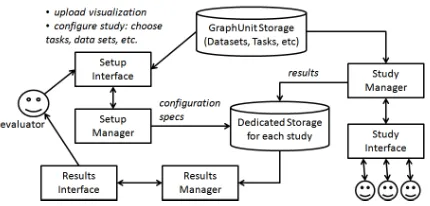
The architecture of GraphUnit is shown in Figure1. Gra-phUnit conceptually consists of three main modules,Study Setup,Study Manager, andResult Analyzer, and a library of graph related datasets and tasks.
Mershack Okoe, & Radu Jianu / GraphUnit: Evaluating Interactive Graph Visualizations Using Crowdsourcing
Figure 1:Architecture of GraphUnit
tasks from GraphUnit’s default libraries, and configuring the study protocol (e.g., within or between, number of users). The setup manager uses this information to create a configu-ration specification file, creates a dedicated directory for the user study, and loads to that directory the configuration spec-ification file and other files uploaded by the evaluator.
TheStudy Manageris activated once an online user ac-cesses the deployed user study. The manager loads the study’s specification file, and creates the necessary infras-tructure for conducting the experiment. The manager then oversees the actual user study by assigning participants to conditions, presenting tasks to participants through thestudy interface, and saving results to text files in the study’s dedi-cated directory.
TheResult Analyzerloads these results, summarizes and graphs them using D3 [BOH11], generates statistical anal-yses that are appropriate for the study design using R, and presents these results to the evaluator.
GraphUnits stores its own library of datasets and tasks in raw text and XML format in a dedicated directory struc-ture. Specifically, GraphUnit stores interconnected data def-initions and task defdef-initions. A data definition includes both the actual data, and task instances defined on that data for each type of task that GraphUnit supports. Task instances are instantiations of a general type of task (e.g., "are two nodes connected?") on a particular dataset (e.g., "are nodes A and B connected?"). As such, for each dataset we define an XML file that contains a list of specific data elements required to create instances of that task (e.g., specific pairs of nodes for a neighbor task). An example of such an XML file is shown in Figure2.
As shown in Figure 3, GraphUnit supports quantitative tasks adapted from the graph task taxonomy of Lee et al. [LPP∗06]. It also contains several graph datasets of varying sizes and complexities which were derived from two larger networks — one of book recommendations, which was also used by Jianu et al. [JRHT14], and one of actor co-starring derived from the internet movie database (IMDB).
Extending GraphUnit with new datasets and tasks: The online version of GraphUnit allows studies to be
con-Figure 2:An example of a task file
Figure 3:Options of quantitative tasks that can be used for the evaluation
figured using only data and tasks that are stored on GraphU-nit’s server. However, evaluators can install their own ver-sion of GraphUnit and gain control over what these datasets and tasks are. To extend GraphUnit with a new dataset, the actual data need to be added first in JSON format or as lists of edges. Then, a new task-instance file (XML) needs to be created for that data for every task that GraphUnit supports, or at least for tasks that the dataset will be used for. Thus, the complete definition of a GraphUnit dataset will consist of both the actual graph data, and a series of XML files, each listing instances of one particular task type defined on that dataset (e.g. a list of node pairs for the graph connec-tivity tasks). Similarly, to extend GraphUnit with a new task type, this task needs to first be defined in an XML file by specifying the generic question that subjects will be asked, and the type of answer they will be able to provide. Then, new XML files need to be created for each existing dataset in GraphUnit, or at least for those datasets that will be used, to specify task-instances for the newly created task type on those datasets.
3.2. Configuration of User Studies
Connecting a visualization: We require evaluators to aug-ment their web visualization by impleaug-menting an interface
c
⃝2015 The Author(s)
[image:4.612.314.527.241.362.2]of JavaScript methods that allows our service to control their visualization. Specifically, we ask them to provide methods for loading a dataset into their visualization (setDataset), and highlighting nodes in the visualization (selectNodes). A few optional interface methods allow developers to cus-tomize tasks and messages that are shown to the subjects during the study, and will be described later. Once the vi-sualization implements this interface, developers can upload them, together with supporting files, to GraphUnit. At that point, they become accessible by GraphUnit, and can be linked to tasks and datasets that our service provides.
To evaluate visualizations that cannot be uploaded to our server, for instance because they require significant addi-tional resources such as a database, the evaluator needs to install their own copy of GraphUnit. This is relatively simple as GraphUnit is a small Java servlet application that requires no special libraries or database dependencies.
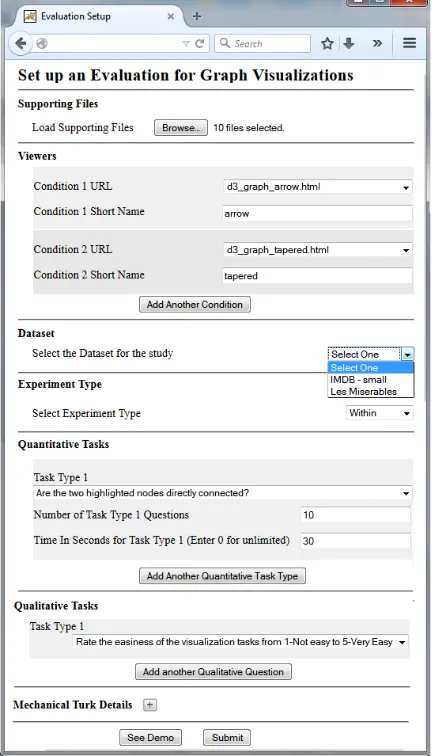
Configuring: To configure user studies, evaluators use the simple web form shown in Figure4. This form allows them to upload one or several visualizations and their support-ing files, specifysupport-ing which uploaded visualizations should be used as conditions in the study, selecting one of GraphU-nit’s datasets to be used in the evaluation, and selecting tasks that will be evaluated.
In accordance to Lee et al.’s taxonomy [LPP∗06], quanti-tative tasks include: topology tasks (e.g. Are two highlighted nodes directly connected?), attribute tasks (e.g. Is there an adjacent node starting with a given letter?), and browsing tasks (e.g. Find the number of nodes on a given path that starts with a given letter). Figure3shows available options for quantitative tasks. Additionally, for each type of task evaluators select, they need to specify the number of in-stances and maximum allowed time for that task. For exam-ple, a study can be configured to contain 20 instances of the task "Are two highlighted nodes directly connected?" and al-low subjects 10 seconds to complete each task instance. Op-tionally, studies may also include qualitative questions such as "Rate the easiness of the visualization tasks from 1-Not easy to 5-Very Easy" or "What problem did you have with the visualization?".
Once the configuration is complete, GraphUnit generates a study specification XML file (Figure 5), and uploads it to the dedicated study repository. The study manager will use that specification to create instances of the study. One such instance is shown to the evaluator as a preview demo, at which point the evaluator can deploy the study or edit it. Deployment can be done either through Mechanical Turk or by sending the study URL to a dedicated group of online users.
[image:5.612.304.520.94.472.2]Putting studies on Mechanical Turk: GraphUnit has a default binding to the Amazon Mechanical Turk platform, and it can configure and place tasks (HITs) on this plat-form automatically for evaluators who own MTurk devel-oper accounts, without requiring them to interact with the
Figure 4:An interface for configuring a user study
platform separately. GraphUnit will request evaluators to provide their MTurk login credentials, a HIT title, the num-ber of assignments, and the reward for the HIT, and using this information, will dynamically configure an appropriate MTurk HIT. Specifically, GraphUnit instructs MTurk to cre-ate a HIT with a short description of the study and an exter-nal link to the study hosted by GraphUnit. Evaluators with-out developer accounts will still be able to use our system but will have to configure MTurk hits manually using the study link provided by GraphUnit.
3.3. Running the user study
Mershack Okoe, & Radu Jianu / GraphUnit: Evaluating Interactive Graph Visualizations Using Crowdsourcing
Figure 5:An example of a study specification file
Ordering of conditions: For a within user study, we use a latin square to organize the study conditions in such a way that all possible orderings of the visualization conditions are performed by a uniform number of participants, and that learning effects are minimized.
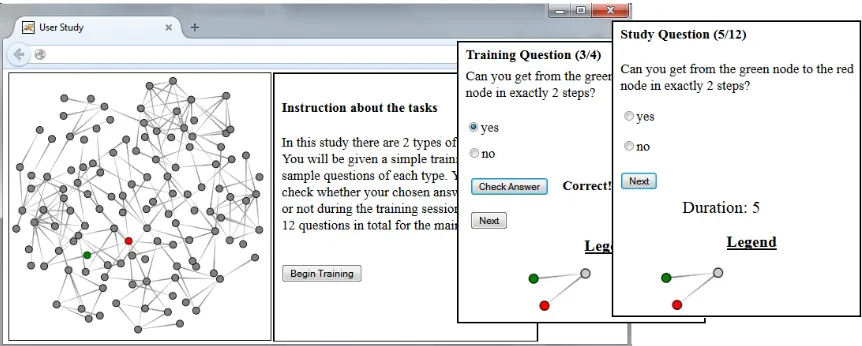
Protocol: Our studies follow three stages: introduction, training, and study. The default introduction page provides a short graph primer. During the training stage samples of each evaluated task are shown and study participants are allowed to check the correctness of their answers. Subject are then walked through the actual study.
As exemplified in Figure6, the user study interface is par-titioned into two sides. A large panel on the left hosts the visualization being evaluated. A smaller panel on the right shows the text for each question, a timer which informs the subject of the time allotted for a task, and allows subjects to provide answers and to navigate through the study. For each question, a blank white screen hides the visualization when the time allotted to complete that task expires. For studies run on MTurk, we provide study participants with a mechan-ical turk code once they complete the study.
3.4. Optional methods
A few optional interface methods can be implemented by evaluators to customize how the study is presented to online users, and ensure that subjects can properly understand each visualization and tasks associated with it.
Custom introduction: Instead of our default graph primer, evaluators can use an introduction page that is tai-lored to the evaluated visualization. To do that, they need to override the getIntroduction function to return a customized introductory HTML file. At the beginning of a user study, GraphUnit will check the existence of this method and, if it
exists, will use the HTML it returns to replace the default introduction.
Task translations: Evaluators can customize how a tasks is phrased to users, by configuring their visualization to "translate" GraphUnit’s graph taxonomy tasks. This allows each visualizations to use a nomenclature that matches its appearance and that subjects can relate to. For instance, a node link visualization can "translate" the neighbor ques-tion into: "Are two highlighted nodes directly connected?", while a matrix representation may ask the same question as: "Is there a black colored box at the intersection of the high-lighted row and column?". Evaluators can provide task trans-lations by implementing thechangeQuestionfunction.
3.5. Analyzing Study Results
Statistical Analysis: GraphUnit uses R to provide statisti-cal analyses of the data it collects from online users. Gra-phUnit results are summarized for accuracy and time. Each analysis starts with Shapiro-Wilk normality tests for accu-racy and time distributions for each evaluated task across all conditions. The time or accuracy distribution for a given task is classified as normal only if results are deemed nor-mal for that task across all conditions. Depending on the number of conditions and the study type (between-group or within-group), we perform the appropriate statistical analy-ses as follows.
For a between-group study with exactly two conditions, we perform either anindependent t-test, if our results are sampled from a normal distribution, or aWilcoxon rank-sum testin the case of a non-normal distribution. For a between-group study with more than two conditions, we perform an
independent Anovaif the result conforms to a normal dis-tribution, and aKruskal-Wallisfor non-normal distributions. For within-group studies with two conditions, we perform either apaired t-testfor normal distributions, or aWilcoxon signed-rank testfor non-normal distributions. Finally, for within-group studies with more than two conditions, we per-form arepeated measure Anovafor normal distributions, or aFriedman testfor non-normal distributions.
If a result is found to be significant across more than two conditions, GraphUnit follows up with a post hoc anal-ysis. For between-group studies, we perform aTukeyHSD
for normal distributions, while for non-normal distributions, we use aWilcoxon rank-sum test to compare pairs of the conditions followed by an adjustment of the resulting p-values with aBonferronicorrection. For within-group stud-ies with normally distributed results, we performpaired t-testcomparisons on all condition pairs and adjust the re-sulting p-values with aBonferroni correction. Finally, for within-group studies with a non-normal distribution of re-sults, we use aWilcoxon signed-rank testto compare pairs of the conditions and adjust resulting p-values using Bonfer-ronicorrection.
c
⃝2015 The Author(s)
Figure 6:An example of a user study, showing three stages: instruction about task, training, and study
Raw Data: We also provide two types of raw data for time and accuracy in CSV format: a summarized raw re-sults where averages of a users performance on each task is recorded, and a basic raw data where performance on indi-vidual questions of tasks are recorded. Evaluators can down-load this data to run additional analyses.
4. Evaluation
We demonstrate GraphUnit’s effectiveness by showing how it can be used to replicate published graph evaluation studies with minimal effort. Moreover, we show how two visualiza-tion researchers could configure users studies of their own graphs quickly.
4.1. Study I - Evaluating node link diagrams vs. matrix diagrams
We configured a user study similar to the study published by Ghoniem et al. [GFC04], comparing node-link diagrams to matrix visualizations. For this study, we used a freely avail-able matrix visualization of a network, and a freely availavail-able undirected graph visualization. We configured these visual-izations for the user study as follows.
First, we introduced the following functions. (1) set-Dataset- we ensured that both visualizations were able to load GraphUnit’s data and display the visualization when this function was called. (2) selectNode - the visualiza-tions received an array of node names through this method and were responsible of highlighting them in the visualiza-tion. The node-link visualization implemented the selectN-odemethod by coloring the nodes red, while the matrix visu-alization highlighted entire rows. (3)changeQuestion, which translated a question based on the visualization type. Since we intended to evaluate the "How many nodes are connected
to the highlighted node?" taxonomy task, the changeQues-tionmethod left the question unchanged in the node-link vi-sualization but translated it into "How many black boxes are on the row highlighted red?" in the matrix representation.
After implementing these functions in both visualizations, we configured the user study on theStudy Setuppage by loading the visualizations, selecting a dataset from the avail-able options, choosing a between-group design, and select-ing to evaluate 20 instances of one task ("How many nodes are connected to the highlighted node?") and allowing 20 seconds for each instance. It took us approximately 30 min-utes to complete the configuration including time used in augmenting the visualizations with the necessary functions. TheStudySetupmodule deployed this study and automati-cally placed it on MTurk. We ran this study with 112 MTurk users and we reimbursed each user $0.5 for their time.
TheStudy Managermodule instantiated the tasks for each user that accessed the study, showed users either the node-link or matrix graph, presented a custom introduction page with information on how to perform the task with the node-link or matrix visualization, provided a training session us-ing 2 questions for the task, presented the actual tasks, and saved user responses to file. TheResult Analyzerwas used to interpret the study’s results.
Mershack Okoe, & Radu Jianu / GraphUnit: Evaluating Interactive Graph Visualizations Using Crowdsourcing
and the mean time for the matrix was 6.3 seconds (SD= 1.7). The graph generated for the study is shown in Figure7.
[image:8.612.63.274.179.215.2]This result is consistent with the result obtained by Ghoniem et al. [GFC04] and shows that for tasks that in-volve estimating node degree, matrix visualizations perform significantly better in accuracy and time compared to node-link visualizations.
Figure 7:Accuracy and time result for Study I (node-link vs. matrix). Error bars are standard errors.
4.2. Study II - Evaluating multiple ways to represent edge directionality in node link diagrams
We replicated Holten and Wijk’s study on representing edge directionality in node link diagrams [HvW09]. We created graph visualizations that used three types of edge represen-tations evaluated by the original study: tapered edges, arrow-head edges, and circular edges. On theStudy Setuppage, we configured the study as within-group, used a small dataset with approximately 100 nodes and 175 edges, and selected two types of quantitative tasks: "Are the two highlighted nodes directly connected" and "Can you get from one of the highlighted nodes to the other in exactly two steps".
However, to replicate the study as it was initially fielded, our visualizations translated these questions into: "Can you get from the green node to the red node using only one step?", and "Can you get from the green node to the red node in exactly two steps?". We chose to evaluate four in-stances of each of the two tasks, and allowed a five seconds response time for the first, and ten seconds for the second. The total number of questions was 24 (8 questions per condi-tion). The study was configured in just 15 minutes, excluding the time required to implement the visualization. TheStudy Setupmodule deployed this study and automatically placed it on MTurk. We ran this study with 62 MTurk participants and rewarded each participant with $0.55.
Similarly to the previous study, the StudyManager module instantiated the tasks, presented a custom introduction page, presented a training session involving 2 questions per task, and allowed users to perform the two tasks with one visual-ization at a time using a latin square ordering of conditions.
GraphUnit result analysis: First, a Shapiro-Wilk test showed that the accuracy and time data for the "one-step connection" task ( task1) and the accuracy data of the "two-step connection" task (task2), were not normally distributed (all p-values were < 0.01), but the time data for task2 was normally distributed (all three p-values were > 0.1). Second, a Friedman’s test showed that the accuracy data of task1
(p-value<0.001), and the accuracy data of task2 (p-value= 0.01) were statistically significant across all three condi-tions. Third, a post-hoc analysis for the accuracy data of task1 revealed significant difference for arrow vs. circular (p-value<0.001), and tapered vs. circular (p-value < 0.001), while a post hoc analysis for accuracy of task2 revealed sig-nificant difference for arrow vs. circular (p-value=0.001). Fourth, an Anova test showed that the time differences in task2 were significant across the three conditions (p-value=0.002) and a post hoc analysis revealed significant difference for arrow vs. tapered (p-value=0.001). The graphs generated for the study are shown in Figure8.
These results are consistent with those of Holten et al. [HvW09] in showing that the circular edge performed signif-icantly worst in accuracy for the two graph tasks, and there was no significant difference between the arrow edge and the tapered edge. However, the arrow edge performed bet-ter than the tapered edge in overall accuracy, and the tapered edge performed better in overall time. This contrasts with Holten et al.’s results which showed that tapered edges out-perform arrows in both accuracy and time. Several reasons might have contributed to this: first, we limited users to a maximum of 10 seconds for each question, while there was no clear limit to the time used by Holten et al.; second, we used an instance of a real IMDB dataset, whereas Holten et al. used randomly generated datasets; third, Holten et al. did not specify the length of the edges, the stroke-size used, the size of the arrow head or the steepness of the tapered edges, and as such the dimensions used in our study may have dif-fered from theirs.
4.3. Study III - Configuring Available Visualization for a user study
Finally, we tested how long it would take a visualization re-searcher to configure a simple user study using GraphUnit. We asked two graduate students unaffiliated with our project and familiar with data visualization concepts to configure user studies of freely available D3 node link diagrams.
First, we provided them with instructions on how to aug-ment the visualization with required functions, and how to configure a user study. They then downloaded the visualiza-tions from D3’s website. We asked one student to configure a study that evaluates two options of node size (5 and 10).
For this, they had to create two versions of the graph vi-sualization, each with a different node size. Similarly, we asked the second student to configure a study that evaluates two options of edge size (2 and 4). The first student required approximately 40 minutes to configure the required study, while the second user was able to read instructions, modify the code, configure the study, and view a demo in 35 min-utes.
c
⃝2015 The Author(s)
Figure 8:Accuracy and time result for Study II (arrow vs. circular vs. tapered). Error bars are standard errors.
5. Discussion
A framework for semi-automated evaluation of data vi-sualizations: We envision GraphUnit becoming the foun-dation and one of many evaluation modules in VisUnit, a broader framework to support the evaluation of data visual-izations in general. Work is under way to design an infras-tructure that would allow different evaluation modules to be proposed, defined and integrated together. We plan to de-velop such evaluation modules ourselves in a similar way to GraphUnit, starting from task taxonomies such as those for multidimensional data [VPF06] or set data [SSK14], and datasets commonly used in the visualization community for testing and prototyping (e.g., InfoVis contest data [PFG08]). More importantly however, VisUnit’s implementation and dissemination will be designed to involve the visualization community in extending the framework’s existing modules with new datasets and tasks, as well as new evaluation mod-ules in a plugin fashion.
Moving evaluation from "after" design to "in" de-sign: Evaluations are used predominantly after visualiza-tion development, to test or validate new designs. We hy-pothesize that a cheap, semi-automated, and low overhead method of performing user studies can pave the way to a more widespread use of quantitative user evaluations, in par-ticular as a way to choose between alternative designs during the design process. In other words, quantitative evaluations could become part of the design and implementation process rather than a way of validating a finished system.
Munzner et al. [Mun09,SMM12] advocate that designers should not rely on techniques they feel comfortable with, but rather choose techniques that serve the application domain well, and design multiple testable prototypes in short iter-ations. However, choosing the technique and design that is best for a particular domain and application is a difficult de-cision since often multiple designs are possible for the same combination of data and tasks. For example, networks may be represented both as node link diagrams and as matrices, and both representations support a wide range of tasks. Sim-ilarly, viewing group information can be done either using BubbleSets [CPC09] or LineSets [ARRC11]. In such cases only a quantitative evaluation can reveal which design is op-timal for a particular data and combination of tasks. Sim-ilarly, evaluating a visualization system qualitatively with domain experts, or even using an insight based methodol-ogy, can reveal only whether a design allows its users to
per-form the tasks they require, but cannot determine whether the tasks can also be performed efficiently.
While many visualization techniques have been evaluated both individually and comparatively [GFC04,JRHT14], the majority of existing visualizations have not. Moreover, real applications generally combine multiple visualization tech-niques together and predicting the visual interactions be-tween them is difficult. The semi-automated evaluation ap-proach we present provides a solution to this problem. De-signers can quickly prototype multiple competing solutions and test them online with minimal effort on a mix of tasks that was elicited as part of the design process. In this sense, our approach fits well with current efforts to speed up vi-sualization prototyping, such as Lyra [SH14] or GLO-STIX [SKL∗14], by providing a quick way of evaluating proto-types developed using such systems.
Promoting benchmark testing and study reproducibil-ity: GraphUnit can help promote study reproducibility by standardizing user study protocols. Visualization researchers can evaluate their own or another visualization and publish GraphUnit’s configuration specification along with their re-sults. Other researchers could use that specification file to run the same protocol on a newly developed visualization, and, to some degree, their results would be comparable to the previous results.
Moreover, GraphUnit can help popularize the idea of benchmarks in visualization. While benchmark tasks and datasets have been proposed [LPP∗06,PFG08], the addi-tional effort of creating data loaders, and setting up and field-ing users studies, makes it unlikely that these resources can be widespread. Their integration into GraphUnit could help promote their transition to becoming accepted benchmarks while increasing their user base. We intend to keep the task taxonomy that GraphUnit relies upon up to date with re-search advances.
Mershack Okoe, & Radu Jianu / GraphUnit: Evaluating Interactive Graph Visualizations Using Crowdsourcing
ability to support basic data reading and manipulation tasks efficiently, if not necessarily its ability to produce high-level insights. Moreover, disseminating studies online has the po-tential to allow evaluators to reach a sufficiently large crowd of domain experts to perform quantitative evaluations of do-main specific visual applications. Such hypotheses require formal evaluation.
Flexibility: Our design is both structured and flexible. It is structured in that it provides a single simple form that can be used to configure all user studies, in that all studies follow a similar design protocol (training, identical interface), and in the way results are analyzed. However, our design allows experimenters to create a wide range of designs by choosing how their visualization’s interface methods are configured.
For instance, experimenters can control how questions are phrased for particular visualizations (section 3.4). This raises an interesting question: does phrasing a task differ-ently across conditions introduce an unwanted bias in sub-jects’ results? We believe that unintentional biases can also occur when tasks are phrased identically, especially when evaluating visual encodings that are significantly different. For example, we argue that naive users will more easily translate a question such as "Are two nodes connected?" into a visual task in node-link diagrams than in matrices, since node-link diagrams are closer to naive users’ mental model of a network. Experienced users of matrix visualiza-tions however, may translate connectivity tasks into their matrix equivalent without effort. Thus, an evaluation that phrases tasks identically in these two visualizations may in-advertently capture a task translation component that is more predominant in naive users than experienced users. As such, GraphUnit leaves this study design choice at the evaluators discretion.
Perceptual studies often show blank screens or intermedi-ate screens between or before actual tasks [HvW09]. Evalua-tors can achieve such effects by hiding their visualization for a few milliseconds when a question is passed to it. The inter-face that GraphUnit relies on to communicate with evaluated visualizations can be extended to allow more such flexibil-ity, while maintaining the structure of the main configuration options. Finally, GraphUnit can be extended with additional tasks and datasets as described in section3.1.
Improving quality of collected data: GraphUnit does not currently control the quality of data provided by online users. However, we will evaluate the opportunity of extending Gra-phUnit with one or multiple of the following quality control capabilities. First, we will require each dataset to specify a limited number of control questions for each type of task that GraphUnit can evaluate. Such control questions will be designed to be easy enough that any well-intentioned par-ticipant can solve. Evaluators will have the option to ask GraphUnit to intersperse such control questions with actual tasks, and discard data from users who fail to answer con-trol questions correctly. Second, we will allow evaluators to
specify a percentile, and discard results that are below that percentile. Third, we will allow GraphUnit to take advantage of MTurk’s ability to only recruit users whose general accep-tance rate is 95% or better. Finally, theCognitive Reflection Testhas been shown to make users more engaged if shown at the beginning of a user study [TWS11] and we will consider adding it as an option in GraphUnit.
Datasets as conditions: Currently, users can select any number of visualizations as experimental conditions, but not datasets. GraphUnit needs to be extended with this capabil-ity so that individual visualization can be tested on multiple datasets such as in Ghoniem et al.’s study [GFC04].
Filtering subjects: Additional work is also required to al-low evaluators to determine the profile of subjects that are allowed to participate in the study by specifying a set of questions that subjects need to answer at the beginning of the study before being allowed to proceed.
Additional answer types: Finally, as described in sec-tion3.1, GraphUnit currently supports a range of numeric and ordinal answer types, similarly to EvalBench [AHR13]. We would like to extend the types of answers that tasks can require, particularly with responses that involve interactions with the visualization. Examples of such answers could be a particular node or edge that the user is required to select, or a coordinate or region on the screen.
6. Conclusion
GraphUnit simplifies the process of designing and fielding controlled quantitative user evaluations of web-based graph visualizations. Visualization designers can field a user study by simply connecting their web-visualization to GraphUnit, selecting tasks they want to evaluate and datasets that they want those tasks on, and configuring the study protocol us-ing a simple web form. GraphUnit will then automatically deploy the study online, use Mechanical Turk to attract par-ticipants, collect user responses and store them in a database, and analyze incoming results automatically using appropri-ate statistical tools and graphs. We showed that GraphUnit can be used to create and deploy previously published graph evaluation studies in a matter of minutes, and we discussed the potential of this method to guide graph visualization de-sign by facilitating quick feedback elicitation, to evaluate and choose between competitive designs, and to evaluate graph visualizations for research purposes.
GraphUnit is currently available as open-source software at http://vizlab.cs.fiu.edu/graphunit/
References
[AHR13] AIGNERW., HOFFMANNS., RIND A.: Evalbench: a software library for visualization evaluation. In Computer Graphics Forum(2013), vol. 32, Wiley Online Library, pp. 41– 50.2,9
c
⃝2015 The Author(s)
[AK07] ANDREWSK., KASANICKAJ.: A comparative study of four hierarchy browsers using the hierarchical visualisation testing environment (hvte). InInformation Visualization, 2007. IV’07. 11th International Conference(2007), IEEE, pp. 81–86.2
[ARRC11] ALPERB., RICHEN. H., RAMOSG., CZERWINSKI
M.: Design study of linesets, a novel set visualization technique.
Visualization and Computer Graphics, IEEE Transactions on 17, 12 (2011), 2259–2267.8
[BBIF12] BOUKHELIFA N., BEZERIANOS A., ISENBERG T.,
FEKETEJ.: Evaluating sketchiness as a visual variable for the
depiction of qualitative uncertainty.Visualization and Computer Graphics, IEEE Transactions on 18, 12 (2012), 2769–2778.2
[BOH11] BOSTOCKM., OGIEVETSKYV., HEERJ.: D3
data-driven documents. Visualization and Computer Graphics, IEEE Transactions on 17, 12 (2011), 2301–2309.2,3
[Car08] CARPENDALES.: Evaluating information visualizations. InInformation Visualization. Springer, 2008, pp. 19–45.2
[CPC09] COLLINSC., PENNG., CARPENDALES.: Bubble sets: Revealing set relations with isocontours over existing visualiza-tions.Visualization and Computer Graphics, IEEE Transactions on 15, 6 (2009), 1009–1016.8
[ED06] ELLISG., DIXA.: An explorative analysis of user eval-uation studies in information visualisation. InProceedings of the 2006 AVI workshop on BEyond time and errors: novel evaluation methods for information visualization(2006), ACM, pp. 1–7. 1,
2
[GFC04] GHONIEMM., FEKETEJ., CASTAGLIOLAP.: A com-parison of the readability of graphs using node-link and matrix-based representations. InInformation Visualization, 2004. INFO-VIS 2004. IEEE Symposium on(2004), IEEE, pp. 17–24.2,6,7,
8,9
[HB10] HEERJ., BOSTOCKM.: Crowdsourcing graphical per-ception: using mechanical turk to assess visualization design. In
Proceedings of the SIGCHI Conference on Human Factors in Computing Systems(2010), ACM, pp. 203–212.2
[HCB74] HUCKS. W., CORMIERW. H., BOUNDSW. G.: Read-ing statistics and research. Harper & Row New York, 1974.2
[HvW09] HOLTEND.,VANWIJKJ. J.: A user study on visualiz-ing directed edges in graphs. InProceedings of the SIGCHI Con-ference on Human Factors in Computing Systems(2009), ACM, pp. 2299–2308.2,7,9
[JRHT14] JIANUR., RUSUA., HUY., TAGGARTD.: How to display group information on node-link diagrams: an evaluation.
Visualization and Computer Graphics, IEEE Transactions on 20, 11 (2014), 1530–1541.1,2,3,8
[KHI∗03] KOSARAR., HEALEYC. G., INTERRANTEV., LAID
-LAWD. H., WAREC.: User studies: Why, how, and when?IEEE Computer Graphics and Applications 23, 4 (2003), 20–25.1,2
[KZ10] KOSARAR., ZIEMKIEWICZ C.: Do mechanical turks dream of square pie charts? InProceedings of the 3rd BELIV’10 Workshop: BEyond time and errors: novel evaLuation methods for Information Visualization(2010), ACM, pp. 63–70.2
[LBI∗12] LAMH., BERTINIE., ISENBERGP., PLAISANTC.,
CARPENDALES.: Empirical studies in information
visualiza-tion: Seven scenarios. Visualization and Computer Graphics, IEEE Transactions on 18, 9 (2012), 1520–1536.2
[LCGM10] LITTLE G., CHILTON L. B., GOLDMAN M.,
MILLERR. C.: Turkit: human computation algorithms on
me-chanical turk. InProceedings of the 23nd annual ACM sympo-sium on User interface software and technology(2010), ACM, pp. 57–66.2
[LPP∗06] LEEB., PLAISANTC., PARRC. S., FEKETEJ.-D., HENRYN.: Task taxonomy for graph visualization. In Proceed-ings of the 2006 AVI workshop on BEyond time and errors: novel evaluation methods for information visualization(2006), ACM, pp. 1–5.3,4,8
[MABL∗07] MACKAYW. E., APPERTC., BEAUDOUIN-LAFON
M., CHAPUISO., DUY., FEKETEJ.-D., GUIARDY.: Touch-stone: exploratory design of experiments. InProceedings of the SIGCHI conference on Human factors in computing systems
(2007), ACM, pp. 1425–1434.2
[MDF12] MICALLEFL., DRAGICEVICP., FEKETEJ.: Assessing the effect of visualizations on bayesian reasoning through crowd-sourcing. Visualization and Computer Graphics, IEEE Transac-tions on 18, 12 (2012), 2536–2545.2
[MS12] MASONW., SURIS.: Conducting behavioral research on amazon’s mechanical turk. Behavior research methods 44, 1 (2012), 1–23.2
[Mun09] MUNZNERT.: A nested model for visualization de-sign and validation.Visualization and Computer Graphics, IEEE Transactions on 15, 6 (2009), 921–928.2,8
[PCI10] PAOLACCIG., CHANDLERJ., IPEIROTISP. G.: Run-ning experiments on amazon mechanical turk. Judgment and Decision making 5, 5 (2010), 411–419.2
[PFG08] PLAISANT C., FEKETEJ., GRINSTEING.: Promot-ing insight-based evaluation of visualizations: From contest to benchmark repository. Visualization and Computer Graphics, IEEE Transactions on 14, 1 (2008), 120–134.8
[Pla04] PLAISANT C.: The challenge of information visualiza-tion evaluavisualiza-tion. InProceedings of the working conference on Advanced visual interfaces(2004), ACM, pp. 109–116.1,2
[SH14] SATYANARAYANA., HEERJ.: Lyra: An interactive vi-sualization design environment. InComputer Graphics Forum
(2014), vol. 33, Wiley Online Library, pp. 351–360.8
[SKL∗14] STOLPERC. D., KAHNGM., LINZ., FOERSTERF.,
GOELA., STASKOJ., CHAUD. H.: Glo-stix: Graph-level oper-ations for specifying techniques and interactive exploration.8
[SMM12] SEDLMAIRM., MEYERM., MUNZNERT.: Design study methodology: Reflections from the trenches and the stacks.
Visualization and Computer Graphics, IEEE Transactions on 18, 12 (2012), 2431–2440.8
[SSK14] SAKET B., SIMONETTO P., KOBOUROV S.: Group-level graph visualization taxonomy. arXiv preprint arXiv:1403.7421(2014).8
[TWS11] TOPLAK M. E., WEST R. F., STANOVICH K. E.: The cognitive reflection test as a predictor of performance on heuristics-and-biases tasks. Memory & Cognition 39, 7 (2011), 1275–1289.9
[VLKS∗11] VONLANDESBERGERT., KUIJPERA., SCHRECK
T., KOHLHAMMERJ.,VANWIJKJ. J., FEKETEJ.-D., FELL
-NERD. W.: Visual analysis of large graphs: State-of-the-art and future research challenges. InComputer graphics forum(2011), vol. 30, Wiley Online Library, pp. 1719–1749.1