User Managed Virtual Clusters in Comet
Rick Wagner, Philip Papadopoulos,
Dmitry Mishin, Trevor Cooper,
Mahidhar Tatineti
San Diego Supercomputer Center UCSD 9500 Gilman Drive #0505
La Jolla, CA 92093-0505 USA
[email protected], [email protected],
[email protected], [email protected]
Gregor von Laszewski,
Fugang Wang,
Geoffrey C. Fox
Indiana University 919 E. 10th Street Bloomington, IN 47408
[email protected],
[email protected]
ABSTRACT
Hardware virtualization has been gaining a significant share of computing time in the last years. Using virtual machines (VMs) for parallel computing is an attractive option for many users. A VM gives users a freedom of choosing an op-erating system, software stack and security policies, leaving the physical hardware, OS management, and billing to phys-ical cluster administrators. The well-known solutions for cloud computing, both commercial (Amazon Cloud, Google Cloud, Yahoo Cloud, etc.) and open-source (OpenStack, Eucalyptus) provide platforms for running a single VM or a group of VMs. With all the benefits, there are also some drawbacks, which include reduced performance when run-ning code inside of a VM, increased complexity of cluster management, as well as the need to learn new tools and protocols to manage the clusters.
At SDSC, we have created a novel framework and infras-tructure by providing virtual HPC clusters to projects us-ing the NSF sponsored Comet supercomputer. Managing virtual clusters on Comet is similar to managing a bare-metal cluster in terms of processes and tools that are em-ployed. This is beneficial because such processes and tools are familiar to cluster administrators. Unlike platforms like AWS,Comet’s virtualization capability supports installing VMs from ISOs (i.e., a CD-ROM or DVD image) or via an isolated management VLAN (PXE). At the same time, we’re helping projects take advantage of VMs by providing an enhanced client tool for interaction with our management system called Cloudmesh client. Cloudmesh client can also be used to manage virtual machines on OpenStack, AWS, and Azure.
The article describes our design and approach to running virtual clusters, the tools we developed, and initial user ex-perience.
Permission to make digital or hard copies of all or part of this work for personal or classroom use is granted without fee provided that copies are not made or distributed for profit or commercial advantage and that copies bear this notice and the full cita-tion on the first page. Copyrights for components of this work owned by others than ACM must be honored. Abstracting with credit is permitted. To copy otherwise, or re-publish, to post on servers or to redistribute to lists, requires prior specific permission and/or a fee. Request permissions from [email protected].
XSEDE16, July 17-21, 2016, ,
c
2016 ACM. ISBN 978-1-4503-4755-6/16/07. . . $15.00
DOI:http://dx.doi.org/10.1145/2949550.2949555
CCS Concepts
•Computer systems organization → Parallel archi-tectures; •Software and its engineering → Virtual machines;
Keywords
Virtual machine; Supercomputer;
1.
INTRODUCTION
The national cyberinfrastructure trends supported by the National Science Foundation includes two important classes. The first is the tradition support of large scale parallel com-puting needs by sophisticated scientific applications and tightly coupled high-performance computing clusters and supercom-puters. The other is the emerging long tail of computational science, driven by new scientific domains (e.g., bioinformat-ics, computational sociology, etc.) adopting the computer as a key tool for research and with rapidly changing soft-ware environments and workflows suited to loosely coupled systems, referred to as the “long tail of science” [10]. How to support these two classes of research in an efficient man-ner is a challenge being faced at all scales: departmental; campus; and nationally.
One approach to tackle this is to provide complete sepa-rate machines and environments in support of both. How-ever it is a valid research question to ask whether the re-quirements for both classes could be provided by a joint op-erational and hardware infrastructure. This is whereComet
[10] benefits the overall community by integrating some of the requirements from both and providing a prototype which combines these approaches.Comet’sgoal is to primarily tar-get the long tail of science but its operation and use could be a model for possible future systems.
network using SR-IOV [9] and can perform RDMA oper-ation between define groups of VMs. This makes Comet
ideally targeted towards hosting virtual clusters instead of just loosely coupled VMs.
We have ensured that the management of the virtual clus-ters (VC) allows the use of common cluster tools such as Rocks, xCAT [20], or Warewulf [7] using semantics based off the experience of operating bare metal. This helps ex-isting cluster administrators quickly build and manage their VC by targeting their current skills and tools. Once the VC is provisioned the administrator can deploy a custom soft-ware environment supporting their research group’s unique needs. This is particularly valuable for groups with rapidly evolving software stacks from an emerging computational science field. Obviously such a model with integration into the queuing system has the advantage of better resource uti-lization in a resource starved environment but at the same time provides the necessary performance benefits that ad-vances scientific applications need.
The paper is structured as follows. Next we provide some important terminology that we use throughout the paper (Section 1.1) and a more in depth look at the motivation (Section 1.2). We outline the architecture (Section 2) and report on our client interface (Section 3). We present some preliminary results (Section 4) and conclude our paper (Sec-tion 5).
1.1
Terminology
As the concept of using standard HPC infrastructure to manage virtual clusters is new and introduces abstractions that may not be available by standard virtualization frame-works such as OpenStack, AWS, and Azure, we provide the necessary terminology that we will use throughout this pa-per. The biggest difference we have is in the introduction of computesets. The definitions include:
Node: The term node is used to refer to individual comput-ers in a virtual cluster. The term node is synonymous with Virtual Machine (VM).
Compute: A node with substantial computational resources used to perform work in a virtual cluster. Compute Nodes (CN) are started and stopped on request by the cluster administrator.
Frontend: A node with limited computational resources used to manage a virtual cluster. Frontend Nodes (FN) typically remain running 24 hours a day and can be started and stopped on request by the cluster admin-istrator
Virtual cluster: A virtual cluster (VC) is a loosely or tightly connected network of FN and CNs managed together by a virtual cluster administrator.
Computeset: A group of CNs started together and be-ing in some state (submitted, started, finished, failed). Each CN can only belong to 1 computeset in submit-ted or active state. Compute sets can be merged to build a larger virtual cluster on demand.
Image: A file containing the contents and structure (ISO9660) of a disk volume which can be attached as a cdrom to a node.
Image attach: Attach is an action applied to a node and image pair whereby the contents of the image are made available to a node on the next power on.
Image detach: Detach is an action applied to a node and image pair whereby the contents of the image are made
unavailable to the node on the next power on. Console: An interactive representation of the screen of a
node (text or graphical) provided to assist with node installation and management.
1.2
Motivation
The reasons for creating the novelCometvirtual environ-ment are to define an efficient system architecture for virtual HPC clusters, provide VC performance comparable to the underlying physical system, and to deliver an HPC platfrom to the VC users and administrators in a familiar fashion. VMs that are started on Comet are running on the same servers as regular HPC jobs and VMs consequently have ac-cess to the same high-performance hardware, including the InfiniBand interconnect via SR-IOV, local flash drives, sig-nificant amounts of RAM and multicore CPUs with vector instruction sets. Combined with the semantics and man-agement features we emphasize through our client interfaces we deliver near bare-metal experience to the users and ad-ministrators of the VCs. Hence the abstraction of a virtual cluster mimics that of a physical one.
Two of the features that enable this bare-metal approach for management are the private management VLAN and in-stallation from an ISO image. Each VC has its own VLAN, enabling the PXE-boot from a frontend server and full con-trol of an associated local network. Via this abstraction clusters can be management using existing tools mentioned earlier, in addition to Cobbler [5] which also handles bare-metal provisioning over a local network. Furthermore we can leverage other commercial cluster management software as well, like Bright Cluster Manager [3].
For installation and troubleshooting, a VM can be booted up from a regular ISO image uploaded to Comet’s image server and mounted on the desired server on request. Using an ISO is for many the easiest way to install a frontend of a cluster—a machine running 24/7 and providing access and management for other nodes. Users can also start a compute nodes using a regular ISO, or PXE-boot from the frontend if an appropriate cluster management tool has been set up. Hence compute nodes can be installed with minimum effort while providing access to the desired OS supported by the KVM hypervisor. There is no need to conduct complex ma-nipulations of images or limit use to a handful of sanctioned images. Users can control the installation process by open-ing theCometVM console in a browser with the cloudmesh client tool (see Section 3).
HPC admins have extensive experience working with bare-metal clusters and the existing tools. Switching to new paradigms could require significant resources in time, hard-ware and money spent to adopt such new approaches. This also includes finding or writing new tools to adapt to new system frameworks. Comet’s virtual environment makes running virtual clusters straightforward by leveraging exist-ing expertise of the users. Usexist-ing such well known tools will avoid the significant learning curve associated for example with OpenStack as obvious from [12].
centralized storage server and limits the network bandwidth utilized to transferring the image. This design also provides VMs with disk performance based on the SSDs within the physical compute nodes.
In addition to production use of Comet VCs, the near bare-metal approach makesCometthem an excellent plat-form for training. Groups can learn how to use tools that work on their real systems in a controlled VM environment. With our solutions, we demonstrate that VCs are easy to set up, replicate, reinstall, and destroy. A new cluster can be booted up for a class and quickly torn down after its intended use [4]. Hence, we provide an efficient platform for trainees that need to get experience with software and services supported by access which is very close to the real hardware. Consequently, the huge benefit of ourComet vir-tual clustersis the combination of near bare-metal and VM features while utilizing existing HPC batch systems.
2.
ARCHITECTURE
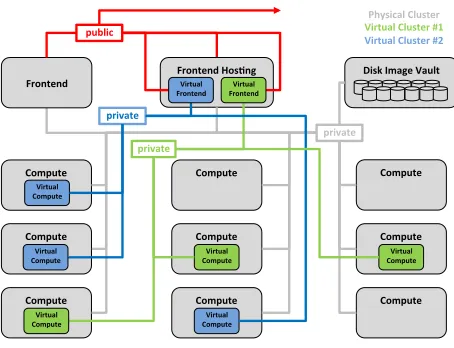
We provide a brief overview of the system architecture and summarize the components which support user managed virtual HPC clusters inComet.
Compute
Virtual Compute
Compute
Compute
Compute
Compute
Virtual Compute
Compute
Virtual Compute
Compute
Compute
Virtual Compute
Compute Frontend Hos3ng
Frontend Disk Image Vault
public
private
private
private
Physical Cluster
Virtual Cluster #1
Virtual Cluster #2
Virtual Frontend Virtual Frontend
Virtual Compute
[image:3.612.315.553.306.477.2]Virtual Compute
Figure 1: Physical system architecture
SummaryThe virtual cluster (VC) environment forComet
is implemented largely on top of production HPC resources.
Comet standard compute nodes are used to host VC
com-pute nodes (VCN) with resource allocation managed by the production scheduler. The allocation of standard compute nodes to the pool of nodes available for running VCNs can be adjusted on demand.
Once a VC is defined on Comet a VC administrator is able to install the VC frontend node (FN) with a system software management stack of their choice. With the virtual FN installed and configured the VC administrator is able to start and complete the installation and configuration of their VCNs. Installation of VCNs can be interactive and manual or fully automated as all nodes can be PXE installed inside the VC private network.
The resource usage of all VCNs is tracked as standard HPC jobs linked to specific XSEDE allocations and usage is reported to XSEDE via the standard mechanisms.
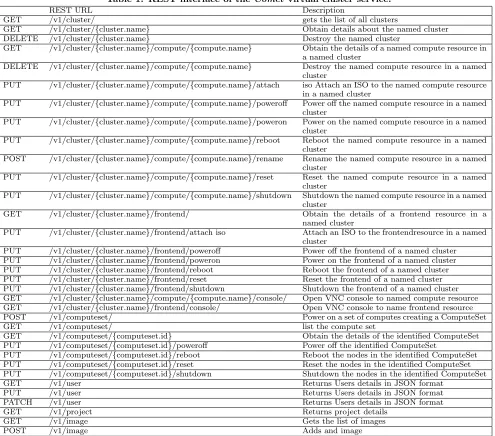
Nucleus. The management platform we developed for this coordination is called Nucleus and consists of a web ser-vice providing a REST API, a database for maintaining state of managed resources, and a message queueing sys-tem (based on RabbitMQ) providing connectivity and load balancing between system components. Nucleus handles au-thentication and authorization of VC administrators, tracks and orchestrates VCN state changes and resource utilization, provides console access to the VC nodes using Guacamole service. The state of VCNs is periodically pushed to the Nucleus management database. The Nucleus database pro-vides all needed information to VC administrators requests for a state. The Nucleus database is “eventually consistent” with the state of the physical cluster. This approach min-imizes the effect of VC administrator state requests on the production scheduler.
Rocks. Rocks KVM roll provides the mechanism for run-ning and managing VMs onComet physical hardware. Nu-cleus uses standard Rocks commands to periodically query the state of all physical and virtual resources and to execute commands on behalf of VC administrators to manage the resources belonging to their VC.
Virtual Compute
Virtual Compute
Virtual Compute
Virtual Compute
Virtual Compute
Virtual Compute
Virtual Compute
Virtual Compute
Virtual Compute Virtual Frontend
public
private
[image:3.612.55.282.315.489.2]Infiniband
Figure 2: Virtual cluster network topology
Networking. Frontend and compute nodes are hosted on physical hosts with two (private and public) or one (pri-vate) 10Gbps Ethernet interfaces, respectively. The private network interfaces of all VMs in a VC are connected to a log-ical VLAN device. Loglog-ical VLAN devices are raw, tagged packet interfaces, using the Macvtap driver. Frontend pub-lic interfaces are bridged either directly to a 10GbE interface or to a virtual VLAN device on the physical host. Physical hosts also provide one FDR InfiniBand interface with one or more Single Root IO Virtualization (SR-IOV) virtual func-tions enabled. All VMs of a single VC are configured to use InfiniBand SR-IOV virtual functions with a single common pkey.
Scheduling. Frontend nodes run constantly at no charge and provide access to the compute nodes of their associ-ated virtual cluster. VC administrators can start compute nodes on any physical compute node assigned by theComet
scheduler.
Table 1: REST interface of theComet virtual cluster service.
REST URL Description
GET /v1/cluster/ gets the list of all clusters
GET /v1/cluster/{cluster.name} Obtain details about the named cluster DELETE /v1/cluster/{cluster.name} Destroy the named cluster
GET /v1/cluster/{cluster.name}/compute/{compute.name} Obtain the details of a named compute resource in a named cluster
DELETE /v1/cluster/{cluster.name}/compute/{compute.name} Destroy the named compute resource in a named cluster
PUT /v1/cluster/{cluster.name}/compute/{compute.name}/attach iso Attach an ISO to the named compute resource in a named cluster
PUT /v1/cluster/{cluster.name}/compute/{compute.name}/poweroff Power off the named compute resource in a named cluster
PUT /v1/cluster/{cluster.name}/compute/{compute.name}/poweron Power on the named compute resource in a named cluster
PUT /v1/cluster/{cluster.name}/compute/{compute.name}/reboot Reboot the named compute resource in a named cluster
POST /v1/cluster/{cluster.name}/compute/{compute.name}/rename Rename the named compute resource in a named cluster
PUT /v1/cluster/{cluster.name}/compute/{compute.name}/reset Reset the named compute resource in a named cluster
PUT /v1/cluster/{cluster.name}/compute/{compute.name}/shutdown Shutdown the named compute resource in a named cluster
GET /v1/cluster/{cluster.name}/frontend/ Obtain the details of a frontend resource in a named cluster
PUT /v1/cluster/{cluster.name}/frontend/attach iso Attach an ISO to the frontendresource in a named cluster
PUT /v1/cluster/{cluster.name}/frontend/poweroff Power off the frontend of a named cluster PUT /v1/cluster/{cluster.name}/frontend/poweron Power on the frontend of a named cluster PUT /v1/cluster/{cluster.name}/frontend/reboot Reboot the frontend of a named cluster PUT /v1/cluster/{cluster.name}/frontend/reset Reset the frontend of a named cluster PUT /v1/cluster/{cluster.name}/frontend/shutdown Shutdown the frontend of a named cluster GET /v1/cluster/{cluster.name}/compute/{compute.name}/console/ Open VNC console to named compute resource GET /v1/cluster/{cluster.name}/frontend/console/ Open VNC console to name frontend resource POST /v1/computeset/ Power on a set of computes creating a ComputeSet
GET /v1/computeset/ list the compute set
GET /v1/computeset/{computeset.id} Obtain the details of the identified ComputeSet PUT /v1/computeset/{computeset.id}/poweroff Power off the identified ComputeSet
PUT /v1/computeset/{computeset.id}/reboot Reboot the nodes in the identified ComputeSet PUT /v1/computeset/{computeset.id}/reset Reset the nodes in the identified ComputeSet PUT /v1/computeset/{computeset.id}/shutdown Shutdown the nodes in the identified ComputeSet GET /v1/user Returns Users details in JSON format
PUT /v1/user Returns Users details in JSON format PATCH /v1/user Returns Users details in JSON format
GET /v1/project Returns project details
GET /v1/image Gets the list of images
POST /v1/image Adds and image
Vault, Figure 1) — a server with a large disk pool for VM images and ISO files. VM images are stored as ZFS datasets on the NAS with each VM owning a single image. The Image Storage system orchestrates the creation and destruction of iSCSI targets providing read-only access to VM images res-ident on the NAS. This allows VMs to start booting almost instantly. Image Storage also migrates a copy of the VM im-age to the physical node hosting the VM and creates a local temp-write volume to receive writes from the VM while the migration is underway. After migration is complete the VM is briefly paused, the migrated VM image and temp-write image are merged, the iSCSI target is disconnected and the VM is resumed with both reads and writes accessing the lo-cal copy of the VM image. At this point the VM is fully autonomous from the NAS providing great capabilities of scaling without putting load on the NAS or network. Pe-riodic snapshots of the local, ZFS backed, VM images are automatically created and copied back to the NAS keeping
VM images backed up in case the physical node crashes. The final synchronization of changes to VM images after VM shutdown allows the VM image state to be persisted until the next VM boot.
pro-vide additional functionality and allow easy scripting which is demanded by VC administrators. We describe the client in Section 3.
3.
CLOUDMESH CLIENT
The Cloudmesh Client toolkit [16] is a lightweight client interface for accessing heterogeneous clouds, clusters, and workstations right from the user’s computer. The client has its origin in [6, 19, 17]. With the client a user can manage their own set of resources enabling management of a per-sonalized cyber infrastructure. It includes an API, a com-mandline client, and a comcom-mandline shell. Extensibility is provided via convenient abstractions. A local database al-lows caching of information from remote resources. This is an essential feature of Cloudmesh as it allows users to pre-serve a view of the infrastructure even in cases where it may not be reachable. Obviously, such a cache is especially use-ful for large scientific workflows and services that require the management of many tasks. Administrators naturally need such a cached view in order to identify faults and to effec-tively preserve the view of resources that need to be accessed or have been created in the past.
Furthermore, users can, via the provided abstractions, switch easily between or utilize together virtual machines from OpenStack, Amazon, Azure Clouds, and Comet vir-tual clusters [10]. Hence a greater ability to deal with faults or system failures can be achieved. Cloudmesh Client can be installed on Linux, OSX, and Windows. Currently we support backends to SLURM, SSH, OpenStack, Azure, and AWS. A Docker interface is planned.1 Next we provide a short overview of the main features of the Cloudmesh Client. Client based. Cloudmesh Client as the name indicates is a client based toolkit that installs and runs on the users or administrators computers. An optional prototype portal is also available as an add on.
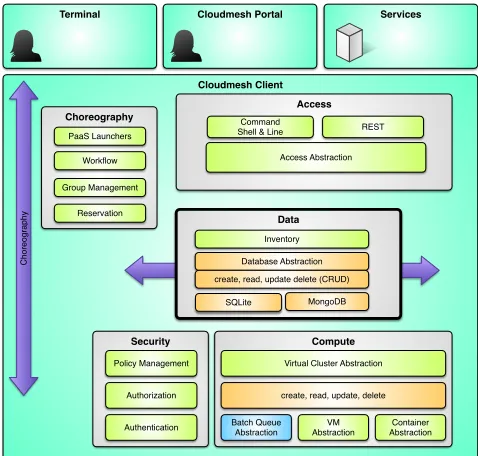
Layered Architecture. Cloudmesh Client has a layered architecture (Figure 3) that allows easy development of new features. This also allows contribution by the community while developing integrated and smaller sub components. A resource abstraction layer allows the integration of a mul-titude of resources spanning HPC, Containers, and Cloud resources. This layered architecture is augmented with a number of components (Figure 4) that together build the overall and expandable Cloudmesh Client architecture pro-viding a rich feature set.
State Caching.Cloudmesh contains necessary state about the resource and environment that a user may want to use. The information is managed in a database abstraction that would allow storing the data in a variety of databases such as SQL and MongoDB. At this time we have chosen SQLite to be the default database as it does not require any ad-ditional setup and is universally available on all operating systems without change. Previously we also provided a Mon-goDB based backend system, but for theComet client it is beneficial to interact with the system without the need of additional services.
Security Management. For Comet users, it is benefi-cial that access to the backend services are enabled with
1
In the past we supported AWS and Azure which we are integrating back into the client and will be available at time of publication. Our main focus so far was the ability to add OpenStack in support of upcoming systems such as Jet-stream and virtual clusters such as used inComet
Cloudmesh Access
HPC Container IaaS
O
p
e
n
St
a
ck
D
o
cke
r
AW
S
Azu
re
EC
2
O
th
e
rs
C
o
me
t
O
th
e
rs
SL
U
R
M
TO
R
Q
U
E
Ma
u
i
O
p
e
n
PBS
O
th
e
rs
Cloudmesh Portal
Cloudmesh Commandline
[image:5.612.318.556.53.214.2]Cloudmesh Shell
Figure 3: Cloudmesh layered architecture.
Cloudmesh Client
Cloudmesh Data Access
Data
Services Terminal
Compute Security
Choreography
Batch Queue Abstraction
VM Abstraction PaaS Launchers
Reservation Group Management
Workflow
Authentication
Virtual Cluster Abstraction
Access
Access Abstraction REST Command
Shell & Line
Policy Management
Authorization
Container Abstraction create, read, update, delete
Cloudmesh Portal
Database Abstraction
SQLite MongoDB create, read, update delete (CRUD)
Inventory
C
h
o
re
o
g
ra
p
h
[image:5.612.316.555.246.474.2]y
Figure 4: Cloudmesh component overview
cm comet cluster ID
– Show the cluster details
cm comet start ID vm-ID-[0-3] -walltime=6h
– Boot 3 nodes for 6 hours
cm comet iso attach image.iso ID vm-ID-3
– Attach an iso image
cm comet power on ID vm-ID-0
– Power on node 0
cm comet console ID vm-ID-0
– open the console for the node
Figure 5: Example Comet client commands
individu-ally add their credentials for services such as Azure, AWS, and other public clouds into the client easily. We have an ex-ploratory project in place that looks at the use of Yubikeys for Cloudmesh Client and Cloudmesh Portal [21]. This will allow an additional 2 factor authentication as part of ac-cessing services used by the users. Hence, the Cloudmesh Client deals with the secured connection and interaction by considering the appropriate interactions with the different backends. For theComet virtualized cluster, it handles the initial apikey retrieval, once a user is authenticated to the nucleus service. It also handles all the subsequent calls in a secured fashion by dealing with the messages signing, en-cryption and deen-cryption via utilizing proper libraries. Command Shell and Command Line. Cloudmesh con-tains a command shell allowing scripts and interactive use. However we designed the command shell in such a way that each command can also be called from the command line re-ducing development and maintenance efforts. Through the Cloudmesh database abstraction the state is synchronized between different components.
Cloudmesh Client Portal. Previously, we distributed Cloudmesh with client, server, and a portal in one package. This however turned out to be too complex to be installed for some of our less technically skilled user communities. Thus we split up the original Cloudmesh into multiple in-dependent packages, such as theCloudmesh Clientand the
Cloudmesh Portal. The portal provides currently a mini-mal feature set to manage virtual machines and HPC jobs. It showcases how to integrate the client and the rest ser-vices in more elaborated portal frameworks. We will expand upon the existing features and make the portal more feature complete. Due to our focus on theComet community, the commandline client has an increased development priority as it allows users to automatize advancedDevOpsworkflows through scripting.
Cloudmesh Comet.We are actively developing the client interface for SDSC’s Comet [14] supercomputer allowing near bare metal provisioning. The interface reuses Cloudmesh components and technologies while interfacing with theComet
Nucleus REST interface. Through this interplay the virtual cluster administrators are enabled to utilize tools and ser-vices that the they typically use to manage an on-premise bare metal cluster. As part of this development we have developed an easy to use high level command line interface specifically targeted toComet’sfeatures. This includes the following functionality:
• Configuring the nucleus service endpoint and the au-thentication tokens or keys.
• Getting information and status of the users cluster(s), nodes, computesets, and other entities.
• Power management of the cluster frontend node.
• Request resource allocation to boot the users node(s); and release the resource upon completion.
• Power management to shutoff, power on, reboot com-pute node(s) during the lifetime of the requested re-source allocation.
• Getting console access to the frontend node or a run-ning compute node
• System ISO image management. This includes list-ing available ISO images, upload new images, and at-tach/detach an ISO to/from one or more compute nodes.
• Convenient management commands to, for example, renaming compute nodes either individually or in batch.
Some example commands are depicted in Figure 5. The manual page is shown in Figure 6.
comet init
comet ll [CLUSTERID] [--format=FORMAT] comet cluster [CLUSTERID][--format=FORMAT] comet computeset [COMPUTESETID]
[--allocation=ALLOCATION] [--cluster=CLUSTERID] [--state=COMPUTESESTATE] comet start CLUSTERID
[--count=NUMNODES] [COMPUTENODEIDS]
[--allocation=ALLOCATION] [--walltime=WALLTIME] comet terminate COMPUTESETID
comet power (on|off|reboot|reset|shutdown) CLUSTERID [NODESPARAM]
comet console CLUSTERID [COMPUTENODEID] comet iso list
comet iso upload [--isoname=ISONAME] PATHISOFILE comet iso attach ISONAME CLUSTERID [COMPUTENODEIDS] comet iso detach CLUSTERID [COMPUTENODEIDS]
comet node rename CLUSTERID OLDNAME NEWNAME
Options:
--format=FORMAT Format is either table, json,
yaml, csv, rest [default: table]
--count=NUMNODES Number of nodes to be powered on.
When this option is used, the Comet system will find a NUMNODES number of arbitrary nodes that are available to boot as a computeset
--allocation=ALLOCATION Alocation to charge
--walltime=WALLTIME Walltime requested for node(s).
An integer followed by a unit (m,h,d,w, for minute, hour, day) E.g., 3h, 2d
--isoname=ISONAME Name of iso image
--state=COMPUTESESTATE List computeset with the given
state. The state could be submitted, running, completed Arguments:
CLUSTERID The assigned name of a cluster, e.g. vc1
COMPUTESETID An integer identifier assigned to a
computeset
COMPUTENODEID A compute node name, e.g., vm-vc1-0
If not provided, the requested action will be taken on the frontend node of the specified cluster
COMPUTENODEIDS A set of compute node names in hostlist
format, e.g., vm-vc1-[0-3] If not provided, the requested action will be taken on the frontend node of the specified cluster
NODESPARAM Specifying the node/nodes/computeset to
act on. In case of integer, will
be intepreted as a computesetid; in case of a hostlist format,
e.g., vm-vc1-[0-3], a group of nodes; or a single host is also acceptable, e.g., vm-vc1-0
ISONAME Name of an iso image at remote server
PATHISOFILE The full path to the iso image file to
be uploaded
Figure 6: Cloudmesh Comet CLI Manual Page
the returned result from the requests and is able to present feedback in various formats. This is essential as it enables the user either for read in the terminal in a human read-able format such as tread-ables or for easy scripting while being able to access the information in YAML, JSON, or CSV. Furthermore, the client creates data mashups from multi-ple information requests via the REST interfaces in order to generate combined information views. A good example is the Cloudmesh Clientcluster view as it combines the data from the cluster call and computeset call to generate a view with node information, comuputeset association and status, account and allocation data, all included in one view for easy consumption.
Cloudmesh Client Comet Python API. Cloudmesh Client is written in Python and provides in addition to the commandline and command shell a Python API. This API provides high level functionality such as data mashups that are not available in the REST interface and provides therefor additional convenient abstractions [18].
Easy Installation. The Cloudmesh Client is easy to in-stall. It is available via pip and the source code is publicly hosted on Github [18]. Python 2.7 and Python 3.5 is sup-ported.
4.
RESULTS AND USECASES
We report on some of our use cases while focussing in partic-ular on the use of virtual machines and virtual clusters, as well as giving an outlook of selected planned improvements based on lessons learned.
4.1
Heterogeneous VM Management
Over the last 2 years we have used Cloudmesh in a num-ber of classes and research projects to access clouds from a variety of sources. This includes the management of classes with more than 70 users, but also the support of individual researchers with the need to conduct infrastructure exper-iments. Cloudmesh has been shown to be able to access Chameleon Cloud, CloudLab, Cybera in Canada, HP cloud, Amazon WS, Azure. Most recently we also showcased po-tential access to Jetstream. One of the interesting benefits of this rich diversity is that educational efforts can be targeted for a particular platform while the interface to them for man-aging virtual machines is the same. In our experience with classes and potential user this is an advantage, as when the switch of a single variable (e.g., the name of the cloud) a VM or VC can be created on a different infrastructure reducing the load on the original system. Hence, reliability can be increased without introducing additional complex and di-vergent interfaces for the diverse set of clouds. Future use cases will include class use ofCometVC for a planned grad-uate course that can serve up to 140 new applicants to the newly created data science program at Indiana University. As we demonstrated with Cloudmesh Client we would also be able to access other XSEDE resources such as Jetstream and Bridges once they become available to us and offer pro-gramable interfaces that we can integrate in Cloudmesh.
4.2
OnDemand Hackathon Support
In February 2016 SDSC hosted a hackathon [4] related to the activities of CAIDA the Center for Applied Internet Data Analysis. “CAIDA provides macroscopic insights into Internet infrastructure, behavior, usage, and evolution, fos-ters a collaborative environment in which data can be
ac-quired, analyzed, and (as appropriate) shared, improves the integrity of the field of Internet science, and informs sci-ence, technology, and communications public policies.” The hackathons theme was live measurements and monitoring of the global Internet routing system (BGP). A total of 90 attendees participated in the event representing a mix of Academia, Industry and Institutions. Cometprovided com-pute resources to participants, including several virtualized nodes, that were essential for the success of the event. Over 15,000 SUs were used during 24 hours of activities. The virtualized nodes were especially important as they allowed CAIDA adminstrators to install a different OS and applica-tion software stack than that which exists onComet.
4.3
Open Science Grid
The Open Science Grid (OSG) [13] provides an integrated fa-cility to access compute resources through distributed high throughput computing for researchers in the US. The re-sources are contributed by the community and organized by OSG. Many projects are executed on OSG, one of which is the Laser Interferometer Gravitational-Wave Observatory (LIGO). LIGO is “designed to open the field of gravitational-wave astrophysics through the direct detection of gravita-tional waves predicted by Einstein’s General Theory of Rel-ativity” [8].
Comet has delivered 700,000 SUs to LIGO via OSG since
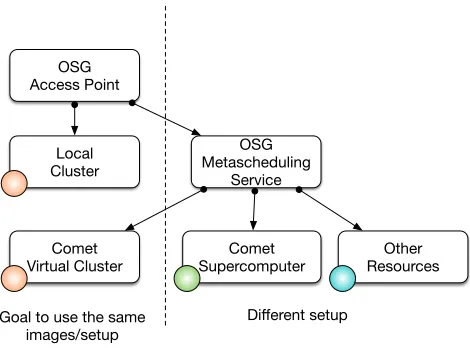
its inception. ThusCometcontributed considerably to both efforts, OSG and LIGO. In November 2015 OSG began op-erating a VC onCometand immediately began running cal-culations related to LIGO. The integration within OSG has been conducted in two modes to demonstrate its wide us-ability (see Figure 7).
Comet Virtual Cluster
Comet Supercomputer
OSG Metascheduling
Service OSG
Access Point
Local Cluster
Other Resources
Goal to use the same images/setup
[image:7.612.321.556.398.572.2]Different setup
Figure 7: Open Science Grid use cases
stack can be used and run on the VC. In contrast to other virtualization infrastructures and efforts we are currently ex-ploring the utilization of MPI jobs within the VC to make use of the underlying high performance networking infras-tructure accessible from within the OSG VMs. These VMs already utilize the virtualized InfiniBand HCAs to access storage.
5.
CONCLUSIONS
We have proven that it is possible to integrate virtual ma-chine management leveraging an existing HPC batch queu-ing systems as part of the operation of a major national scale compute infrastructure. This novel technology solu-tion and operasolu-tional model provides the ability to integrate best practices from both approaches, traditional supercom-puting and utilizing virtual machines to further the long tail of science. Overall management of such a system is reduced as it is well integrated in to HPC administrators familiar toolset. This applies both to the operation ofComet and the virtual clusters it hosts.
Additionally, we developed a powerful client interface to
Comet’s virtualization system. The Cloudmesh client was developed with the goal to interface easily and to enable its users to have access programmatically to Comet via a Python API, a command shell, a commandline tool and a prototype portal. Furthermore as new features become available the client provides an easy mechanism to be up-dated.
We have utilized the tools and capabilities provided in this paper in a variety of different scenarios and shown that they are beneficial for the particular effort. As part of our ef-forts new use cases, namely training and development, have emerged.
We will expand upon our current already operational pro-totypes and integrate them into a production system that will be available soon (during Q2 2016). Users that are in-terested today to explore the virtual modality ofCometor Cloudmesh client for comet should contact the authors of the paper.
6.
ACKNOWLEDGMENTS
Comet is supported by NSF grant: ACI #1341698 Gate-ways to Discovery: Cyberinfrastructure for the Long Tail of Science.
7.
REFERENCES
[1] Rocks cluster. URL: http://www.rocksclusters.org/. [2] J. Basney, M. Humphrey, and V. Welch. The myproxy
online credential repository.Softw., Pract. Exper., 35(9):801–816, 2005. URL: http://dblp.uni-trier.de/ db/journals/spe/spe35.html#BasneyHW05. [3] Bright cluster manager. URL:
http://www.brightcomputing.com/. [4] Caida hackaton. URL: https:
//www.caida.org/workshops/bgp-hackathon/1602/. [5] Cobbler. URL: http://cobbler.github.io/.
[6] G. Laszewski, M. Hategan, and D. Kodeboyina.
Workflows for e-Science: Scientific Workflows for Grids, chapter Java CoG Kit Workflow, pages 340–356. Springer London, London, 2007. URL: http://dx.doi.org/10.1007/978-1-84628-757-2 21,
doi:10.1007/978-1-84628-757-2_21.
[7] LBNL. Warewolf. URL: http://warewulf.lbl.gov/. [8] URL: https://www.ligo.caltech.edu/.
[9] G. K. Lockwood, M. Tatineni, and R. Wagner. Sr-iov: Performance benefits for virtualized interconnects. In
Proceedings of the 2014 Annual Conference on Extreme Science and Engineering Discovery
Environment, XSEDE ’14, pages 47:1–47:7, New York, NY, USA, 2014. ACM. URL:
http://doi.acm.org/10.1145/2616498.2616537,
doi:10.1145/2616498.2616537.
[10] R. L. Moore, C. Baru, D. Baxter, G. C. Fox, A. Majumdar, P. Papadopoulos, W. Pfeiffer, R. S. Sinkovits, S. Strande, M. Tatineni, R. P. Wagner, N. Wilkins-Diehr, and M. L. Norman. Gateways to discovery: Cyberinfrastructure for the long tail of science. InProceedings of the 2014 Annual Conference on Extreme Science and Engineering Discovery Environment, XSEDE ’14, pages 39:1–39:8, New York, NY, USA, 2014. ACM. URL:
http://doi.acm.org/10.1145/2616498.2616540,
doi:10.1145/2616498.2616540.
[11] Openstack. URL: http://www.openstack.org/. [12] openstack.org. Openstack user survey. URL:
http://www.openstack.org/assets/survey/ April-2016-User-Survey-Report.pdf. [13] Open science grid. URL:
http://www.opensciencegrid.org/. [14] SDSC. Comet user guide. URL: http:
//www.sdsc.edu/support/user guides/comet.html. [15] Slurm. URL: http://slurm.schedmd.com/.
[16] G. von Laszewski. Cloudmesh web page. Web Page. URL: http://cloudmesh.github.io/client/.
[17] G. von Laszewski, G. C. Fox, F. Wang, A. J. Younge, A. Kulshrestha, G. G. Pike, W. Smith, J. V¨ockler, R. J. Figueiredo, J. Fortes, and K. Keahey. Design of the futuregrid experiment management framework. In
Gateway Computing Environments Workshop (GCE), 2010, pages 1–10, Nov 2010.
doi:10.1109/GCE.2010.5676126.
[18] G. von Laszewski and F. Wang. Cloudmesh client source code. URL:
https://github.com/cloudmesh/client.git. [19] G. von Laszewski, A. Younge, X. He,
K. Mahinthakumar, and L. Wang. Experiment and workflow management using cyberaide shell. In
Cluster Computing and the Grid, 2009. CCGRID ’09.
9th IEEE/ACM International Symposium on, pages
568–573, May 2009.doi:10.1109/CCGRID.2009.66. [20] Extreme cluster/cloud administration toolkit. URL:
https://xcat.org/.