The Development of a
Java Image Processing
Framework
A thesis presented in partial fulfillment of the requirements for the degree of Master of Technology in Computer Systems Engineering at
Massey University, Palmerston North, New Zealand.
111
Abstract
Table of Contents
Abstract ...... iii
Acknowledgments ...... vii
1. Introduction ...
!
I.I Image Processing ... ! 1.2 Web-Based Instruction ... 31.3 Electronic Textbooks ... 4
1.4 The Java Programming Language ... 6
1.5 A Framework ... 7
2. Framework Requirements ... 11
2.1 Image Processing Software ...... 11
2.1.1 Categories of Image Processing Software ... 12
2.1.2 Software for Interactive Image Processing Instruction ... 13
2.1.3 Java Applets for Interactive Image Processing Instruction ... 15
2.1.4 The Basis of an Image Processing Framework ... 16
2.2 Framework Components ... 17
2.2.1 Extensible Image Processing Operation Library ... 18
2.2.2 Data Types ... 19
2.2.3 A Supervisory System ... 20
2.2.4 Applet Support ... 24
2.3 A Data Oriented Model. ... 25
2.3 .1 Algorithm Representation ... 26
2.3.2 A Dataf!ow Framework ... 27
2.4 Summary ... 29
3. Framework Design ... 33
3.1 Introduction ... 33
3.1.1 Tools ... 33
3.1.2 UML Notation ... 35
3.1.3 Methodology ... 38
3.1.4 Definitions ... 39
3.2 Operations ... 39
3.2.1 Operator ... 39
3.2.2 Primitive ... 42
3.2.3 Meta ... 44
3.2.4 Summary ... 45
3.3 Data Types ... 46
3.3.1 Data ... 46
3.3.2 3.3.3 Common Types ... 48
Summary ... 51
3.4 Data Passing ... 52
3.4.1 Input and Output ... 52
3.4.2 Progress ... 53
3.4.3 3.4.4 3.4.5 3.4.6 lnputManager and OutputManager ... 57
DataManager ... 70
Port ... 77
Table of Contents v
3.4.7 Binding ... 79
3.4.8 Inputs, Outputs, Sources and Sinks ... 84
3.4.9 Surnrnary ... 87
3.5 Scheduling ... 89
3.5. l Blocking and Unblocking ... 90
3.5.2 Primitive's Main Loop ... 92
3.5.3 ControlFlowException ... 94
3.5.4 Shared Threads ... 95
3.5.5 Workspace ... 97
3.5.6 Sequencing ... 98
3.5.7 Summary ... 100
3.6 Applet Support ... 101
3.6.1 Hiperlet. ... 101
3.6.2 Display ... 102
3. 7 Additional Features ... 103
3. 7 .1 IllegalActionException ... 103
3. 7 .2 Looping Constructs ... 104
3.7.3 Macro ... 106
4. Application Example ... I 09
4.1 Concept ... 1094.2 Design ... 110
4.3 Implementation ... 111
4.3.1 Threshold ... 112
4.3.2 Control ... 114
4.3.3 Display Image ... 116
4.3.4 ThreshDemo ... 118
4.4 Conclusions ... 121
5. Summary and Conclusions ... 123
5.1 Future Work ... 126
References ... 132
Appendix 1: Optimally Accessing Image Data in Java ... 135
Al.l Introduction ... 135
Al .2 Storage/ Access Patterns ... 136
Al.2.1 Array Configuration ... 136
Al .2.2 Primitive Type Selection ... 137
Al.2.3 Access Strategy ... 138
Al.3 Experimental Design ... 139
A 1.3 .1 Evaluation Criteria ... 139
A 1.3 .2 Patterns in the Experiment ... 139
A 1.3.3 Experimental Conditions ... 140
Al .4 Results and Discussion ... 141
Al .5 Conclusions ... 143
vii
Acknowledgments
First and foremost, thanks must go to my two very capable supervisors, Donald Bailey and Wyatt Page, each of whom made very different but equally important contributions to the research presented in this thesis. Thanks must go to Donald for his constant ability to provide expert advice and sound common sense in the face of my more fantastic and quick-conceived ideas. He was, after all, the originator of this research and therefore best qualified to provide the direction for the project, both overall and in its every detail. I would also like to thank Donald for inspiring me in the art of devising useful analogies, which itself proved useful when it came time to write this thesis. Wyatt, for his part (and to our fortune) had been less involved at the time the project was initially formulated, and so was able to bring a more objective perspective to the nature of the problem we had set out to solve. His speciality expertise in a variety of niche areas also proved invaluable on more than one occasion.
I am grateful to acknowledge Massey University's assistance, in the form of a Massey Masterate Scholarship. In kind, Donald's financial contribution to the project is also gratefully acknowledged in full, the sum of which afforded me an additional level of support that I might not have otherwise enjoyed.
I would like to give special thanks to my family. To my parents, for being forever interested in everything I do, and to my extended family, for being such a kind, generous and supportive bunch.
My friend and co-conspirator, David Orchiston, is deserving of thanks; his threats mixed with encouragement were of increasing value as the deadline for this thesis approached.
1. Introduction
1.1 Image
Process
in
g
Image processing can be likened to word processing or food processing, only on images. Although the analogy may seem a little tenuous on some points. it can nevertheless prove insightful. The ingredients to make a cake. for example. are combined (processed) according to a recipe and the result (we hope) is something that tastes far better than the original cake constituents. Nothing is gained that is additional to what was originally used to make the cake; the important point is that its form has changed into something much more pleasing to the palate. In a similar fashion, images are processed in order to transform the information contained within them into a form that is much more useful to whomever (or whatever) is going to make use of it. For example, an image may have its contrast enhanced, making it more pleasing to the human eye, or a thresholding operation may be applied to an image so that the number of foreground objects present can be easily counted. Russ (l 994) cites the purposes of image processing as being two-fold. These are:
a) to improve the visual appearance of images to a human viewer; and
2 The Development of a Java Image Processing Framework
Whereas the tools used in cooking are mixing bowls and measuring spoons, and the raw materials are flour, eggs and cocoa, image processing has quite different requirements. The tools of image processing are not physical implements, but mathematically defined operations. Examples of common image processing operations are adding two images, thresholding an image, image filtering operations such as smoothing or sharpening and edge detection operations; and there are many more (see for example Castleman (1979), Gonzalez & Wintz (1987), Jain (1989) and Russ (1994)).
The 'materials' these tools operate on are images. An image can be described as a graphical, two-dimensional representation of the light intensity distribution of a scene as detected by an appropriate sensor (e.g. a camera) 1• In the digital sense, images exist as arrays of picture elements, or pixels, each of which stores a discrete measure '°)f the light intensity at a corresponding position in the original scene. Digital images are characterised by resolution, the number of pixels in each dimension, and depth, the number of bits used to represent each pixel.
The amount of raw data in a typical image tends to be high, for example an image 400 pixels wide and 300 pixels high with 24 bits per pixel would occupy just over 350 kilobytes, or the rough equivalent a 50,000 word text document (for comparison, the body of this thesis contains approximately 30,000 words). Processing these volumes of data has commensurate computational requirements, often involving many repetitious calculations. Simply adding two such images together, for example, would require 360,000 addition operations alone. Unsurprisingly, computers have proved an indispensable tool for image processing research and its applications. Image processing operations are conveniently implemented in computer software and many application environments have been built to facilitate human-computer interaction in image processing (Bailey & Hodgson, 1988; Rasure & Williams, 1991; Rasband, 1992). Further, computers have the storage and retrieval mechanisms necessary for managing large data structures such as images, and they can drive visual display units (VDUs) capable of displaying high-resolution, true-colour images, making truly interactive image processing possible.
1
Chapter 1: Introduction 3
1
.2
Web-Based Instruction
Few would argue that to become a chef, all one needs is a cookbook. Rather what is needed is a kitchen and a lot of time to experiment and gain hands-on experience. It may be argued then that a computer is to an image processing student what a well stocked kitchen is to an aspiring cook. In support of this, Hanna (1994) has observed that image processing is ideally suited to Computer Aided Instruction (CAI). Computers allow interaction with images and image processing algorithms "using feedback based on the visual perception of the output image. Similarly, Sonka, et al. (1998) emphasise the importance of computers in image processing instruction, noting that "to maximise learning, students must become fully active participants in the learning process. "
In contrast, 'traditional' methods of teaching image processing have betrayed various weaknesses and deficiencies. Photocopied lecture notes, for example, reproduce processed images at very low quality, and additional images shown using slide projectors often prove too transient in nature to make an impact on the learning process. These problems are made worse when the concepts being demonstrated involve only subtle changes between the original and processed images (Hanna, 1994). Even more hindering is the lack of interactive facilities for demonstrating image processmg techniques and algorithms to students. Textbooks, for instance, generally provide good theoretical coverage of the subject, however students' understanding could be greatly improved by providing 'hands on' experience with the concepts being taught.
4 The Development of a Java Image Processing Framework
(hypertext, graphics, sound, movies, etc.) into a single document is particularly advantageous, especially for creating stimulating and content-rich learning environments (the high resolution displays required to view these documents are now common-place, which has been a barrier to teaching image processing effectively in the past).
Unfortunately, despite the potential of the Web as a powerful instructional delivery medium, what is done with a significant volume of Web-based instructional material is that conventional materials are simply 'Webified', and many of the features and capabilities of the Web are not utilised. The results of such 'Webification' are often likely to end up in the shovelware category2. Web-Based Instruction, according to Khan ( 1997), "is a hypermedia-based
instructional program which utilizes the attributes and resources of the World
Wide Web to create a meaningful learning environment where learning is fostered
and supported." It follows that in order to successfully 'foster and support' image processing instruction in a Web-based environment, interactive features must be provided that can be successfully integrated into that environment. The development of software to support those features is therefore an important step in developing interactive Web-based instructional systems on image processing.
1
.
3 Electronic Textbooks
Whether the subject is image processing or something quite different, the general term 'Electronic Textbook' (ET) (Barker, 1992; Oliver, et al., 1994; Harger, 1996; Brusilovsky, et al., 1997) is often used to describe this kind of 'enhanced' learning environment. Barker ( 1992) explains the usefulness of such a metaphor:
"Because people are so familiar with conventional books as a means of
documenting and distributing information it is convenient for us to carry this
'model· over lo the computer domain. We therefore use the term electronic book as a generalized metaphor or myth which will project an image (to both
designers and users) of the 'instructional computer' as being just like a book.
However. Lhis type of book has many special properties and characteristics
that make it particularly useful for learning and training tasks. "
2
Chapter I: Introduction 5
To put this in an image processing context, even though conventional image processing textbooks provide raw theory and examples, they suffer due to the inherent linearity and static nature of their content. On the other hand, interactive image processing programs allow experimentation and give feedback, but offer very little in the way of guidance or instruction. An important contribution of computer-based image processing instruction is to provide a medium where theoretical textual and practical interactive content can be combined. The ideal
image processing electronic resource would be an integrated reference textbook, tutorial system and image processing package, providing powerful navigation aids
and flexible accessibility via a single common user-interface. In this context, the
'special properties and characteristics' that Barker refers to naturally include interactive features that enable users to investigate and experiment with the concepts as they are taught.
Invariably, a major decision in the development of any such learning resource is the choice of what image processing software to use to provide these interactive
capabilities. Jordan & Lotufo (1996), for example, describe a Web-based image processing course that relies on the Khoros/Cantata (Rasure & Williams, 1991) image processing package to mix theory with practical exercises. The course is self-guiding, with chapters organised around classes of primitive image processing operations. Lessons within each chapter present fundamentals and illustrative examples relevant to the lesson before guiding the user through a laboratory experiment using Khoros. The laboratory pages contain hyperlinks that activate the K.horos operators named in the text, and at the end of each lab there is a link that opens a Cantata workspace; here the user can see how the operators that
were discussed in the lesson work together.
This approach incorporates much of what could be expected in an ideal system, but there are drawbacks. For example, the image processing software employed is
6 The Development of a Java Image Processing Framework
exists, therefore, to make better use of Kahn's 'attributes and resources' for teaching image processing on the Web.
1.4 The Java Programming Language
Java (Gosling, et al., 1996) owes much of its popularity to its general purpose, internet-centric nature. It is also object-oriented and platform independent, and though it shares much of its lexical structure with C, it has a reputation for
promoting a 'clean' programming style and for being less prone to programmer error (Zukowski, 1998). Because Java is object-oriented, software development using Java is best carried out using object-oriented methods (see for example Booch ( 1994)).
Programs written in Java comprise one or more classes, which are in turn grouped hierarchically into packages. These programs exist in a platform-neutral bytecode format which is executed by a Java Virtual Machine (NM) running on the desired platform. A Web-browser can be made 'Java-enabled' by incorporating a JVM into its code, allowing it to execute Java programs known as applets. These are (typically small) programs written in Java that run within the context of the browser and are displayed as integral parts of a Web-page. A major advantage of Java programs executed in this way is that the browser automatically downloads the necessary bytecodes (which may mean individual classes or entire packages) when the page containing the applet is accessed. Hence there is no installation process associated with running these programs. Further, because the browser/applet architecture has been designed from the outset to ensure that maliciously written applets cannot harm the system they are run on, there should not be any security issues associated with utilising applets for doing image process mg.
The most popular Web-browsers are now Java-enabled, and thus able to support Java applets. All applets gain a graphical display context and are able to respond to keystrokes, mouse-clicks, etc., via the encapsulating browser window. The
Chapter 1: Introduction 7
Mukundan (1999) has demonstrated the use of Java for creating 'mini-tutorial'
applets that demonstrate several different binary vision algorithms. These applets
allow students to conveniently visualise the pixel-level workings of this class of
image processing operation. Further, the design can be generalised to work with
most other common pixel-level operations. This work shows how Java applets
can provide interactive, experimental elements for teaching image processing, and
concludes that such an approach would be suitable in a Web-based learning
environment.
One of the greatest barriers facing developers of such applets derives from the
general-purpose nature of Java. Programming image processing operations,
linking them to a user-interface, acquiring input images and displaying the output;
all of this may be done in an ad hoc manner. Unfortunately, this kind of approach
is highly susceptible to such software engineering pitfalls as poorly conceived
software design, repetition of coding effort, unmaintainable code, code that is
difficult to extend, and bugs.
1. 5 A Framework
An improved approach would be to utilise a software framework to assist the
developer in creating the envisaged applets. Essentially, a framework is a
software system targeted at aiding the development of programs that address a
specific problem domain. A framework can shift much of the development
burden associated with writing software away from the developer, allowing him
or her to work at a higher level of abstraction and avoid unwanted detail. It might
be said that a framework is the culinary equivalent of the difference between the
kitchen at home and Burger King's kitchen if you are trying to make a hamburger. The latter is far more efficient for the chosen task, because it specialises. Gamma,
et al. (1995) illustrate this in an object-oriented context:
"A framework is a set of cooperating classes that make up a reusable design for a specific class of software. For example, a framework can be geared
8 The Development of a Java Image Processing Framework
customize a framework to a particular application by creating application-specific subclasses of abstract classes from the framework. "
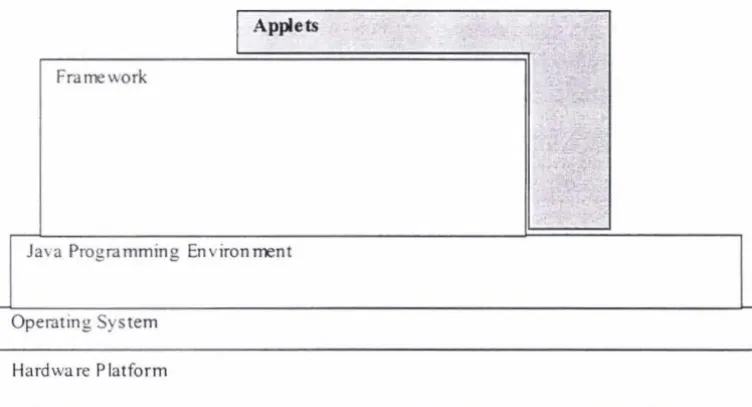
Figure 1.1 illustrates how a framework can be considered as a layer of abstraction. Just as the role of an operating system is to provide an abstraction for its underlying hardware, a framework provides an abstraction atop the developer's programming environment, in this case Java. As shown in the diagram, applets created using such a framework are able to draw on both the framework and the Java programming environment. The framework's contribution is to significantly reduce the development effort involved in creating the desired applets.
I
Applets Frameworkt
Ja,·a Programming Environment
Operating System
[image:16.577.64.440.280.483.2]Hardware Plat form
Fig I. I: A /ram ework as a layer of abstraction
This thesis deals with the design and development of a Java image processing framework. This framework is intended to provide the programmer with a uniform programming interface, reusable components and a well defined architecture within which to create programs that perform image processing tasks. In particular, the framework will provide support for creating 'mini-tutorial' type applets suitable for interactively demonstrating image processing concepts in a Web-based learning environment.
Chapter 1: Introduction 9
Chapter 3 presents the design of the framework. Alternatives are discussed where they arise and the actual design decisions made are justified. The various aspects and mechanisms necessary to the operation of the framework are described.
Chapter 4 demonstrates an example application of the framework. A mini-tutorial demonstrating the concept of a threshold operation on a greyscale image is devised, and an applet is built to accomplish this demonstration.
2.
Framework
Requirements
In the previous chapter. the potential for Java applets to provide the interactive element of a Web-based image processing course was identified. The idea of a oftware framework was then introduced as a way of easing the programming burden associated with creating these applets. This chapter explores the requirements of such a framework in terms of the nature and purpo e of image processing software generally. and it application in a Web-based instructional environment in particular. Of ·igniticant importance is the introduction of a data oriented model for repre. enting image proces ing tasks.
2
.
1 Image Processing Software
12 The Development of a Java Image Processing Framework
2. 1. 1 Categories of Image Processing Software
Image processing software to realise these algorithms can be divided into three broad categories. First, there is application specific software for which an appropriate image processing algorithm or set of algorithms has been devised in order to accomplish a given task. For example, a machine vision system may use such software to locate edges and holes accurately for quality control purposes or robotic guidance. In this case, the software tends to be highly optimised, taking into account process specific factors and hardware platform constraints. There is generally little requirement for any sort of user-interface or user-oriented features. Processing speed is usually the key goal.
The second category comprises software for image processmg algorithm development. This kind of software is used to develop the algorithms that are put to use in applications such as the machine vision example given above. Here the emphasis is on interactivity and flexibility, so that alternative solutions can be quickly and conveniently investigated during the search for an algorithm to solve a given image processing problem. These 'algorithm development environments' provide (often feature-rich) user-interfaces for combining operations and specifying inputs/parameters, and for viewing the results (including intermediate results). Such software is typically described as consisting of a 'supervisory system' for scheduling and invoking image processing operations together with a library containing the operations themselves (Cady, et al., 1981). In addition, a range of data types used in image processing is generally supported, including different image types as well as scalars, histograms, chain codes, convolution kernels, lists, etc. Bailey & Hodgson (1988) make explicit the major requirements of any image processing algorithm development environment. Namely, such a system should provide a wide range of imaging operations; should be easily extensible when new operations are needed; should support a variety of data types found in image processing, not just images; and should be interactive.
Chapter 2: Framework Requirements 13
(i.e. an algorithm). This distinguishes it from being focused only on algorithm representation and manipulation, and from being simply a canned-algorithm geared toward a specific job. Using this kind of software, the user needs only invoke the necessary operations once and the job is done.
2. 1.2 Software for Interactive Image Processing Instruction
Existing Web-based image processing courses tend to rely on software m the
second of these categories to supply the interactive aspects of their content (see for example Jordan & Lotufo (1996) or Fisher, et al. (1996)). Algorithm development environments make available a wide and extensible range of
imaging operations, plus they provide the means to interactively experiment with these operations either in isolation or in arbitrary combinations. This allows any
number of image processing concepts to be demonstrated to the user. Unfortunately, this pairing of Web-based course material with external image processing software in order to create an interactive learning environment has at
least four main disadvantages.
Resulting learning environment is not seamless. In addition to the Web-browser program, the user must also run the image processing software that has been chosen to accompany it. From the user's perspective, this approach effectively
creates a 'dual' user-interface. In the simplest possible scenario, these would each occupy a single window on the user's desktop. The user must then either arrange
these windows so that they share the available desktop area, or must bring each to the foreground as necessary (thereby hiding the other). In the former case, the reduced size of the windows may have adverse effects on the usability of the respective programs. In the latter, the user may well find the arrangement too cumbersome if he or she has to swap views too often, and so may become discouraged with the learning process. Regardless, the courseware designer faces difficulty in trying to coordinate the theoretical and practical components of such
a course because the delivery medium for each is separate. If the two could be combined the result would be a far more seamless learning environment.
14 The Development of a Java Image Proc~ssing Framework
containing the course could also contain the accompanying software. However if
the material is being accessed over the Internet, the software would first have to
be downloaded and installed, which could be off-putting especially for those with
slow connection speeds. The host computer may also have certain access
privileges preventing new software being installed, especially in the case of a
shared system. Platform dependencies are a further drawback since the software
may not have been written for a particular user's hardware and operating system,
even though the Web-based component is still accessible. A final complicating
factor is the need to comply with any licensing requirements associated with the
use of a separate image processing program. Even 'free' software may be subject
to a license that affects how it can be distributed.
Users may not follow instructions properly. An image processing concept may be well covered in theoretical terms, but to demonstrate it experimentally requires
certain steps to be performed by the user, using the software provided. For
instance these steps may consist of a sequence of commands to invoke, followed
by suggestions on which of a number of parameters could be varied and how to
accomplish this. Imparting this sort information to the user is not guaranteed to
be an error-free process, especially if the user is unfamiliar with the software's
user-interface. Any mistakes that are made could lead to either frustration on the
user's part or unintended results that do not relate to the concept being taught. In
the latter case, this may even cause confusion and thus hinder the user's learning
expenence.
User-inte1face is quite general. If it is known that a particular image processing concept is to be demonstrated, then it is almost certain that a user-interface can be
designed that is specifically tailored for getting that concept across to the user.
For example, the demonstration of a look-up table operation would benefit greatly
if the user could specify graphically the function to use to apply the
transformation. Unfortunately, it is likely to be very difficult (or even impossible)
to provide these kinds of customised user-interface facilities within an algorithm
development environment in every case. By its general nature, such an
environment cannot be expected to account for the specific user-interface
requirements of every image processing concept that it might ever be called upon
user-Chapter 2: Framework Requirements 15
interface regardless of whatever concept the courseware designer may wish to
demonstrate.
2. 1. 3 Java Applets for Interactive Image Processing Instruction
What this thesis proposes is the use of Java applets to take on the role of providing
the interactive content for an 'improved' Web-based electronic textbook on image
processing. Whereas before this 'practical' content was delivered using a separate image processing application, the envisaged applets will obviate the need for any
such additional software, and will overcome many of the drawbacks associated
with the old approach.
For instance, because applets can be displayed as integral parts of a Web-page
(using a Java-enabled browser), they offer a far more seamless solution. Interactive image processing demonstrations can be literally interleaved with
text-based content, providing better coordination between the practical and theoretical
aspects of the course material, and hence stronger reinforcement of the concepts
being taught. There is also no need to install any additional software. Instead, the Java-enabled browser automatically downloads the applet code as necessary (regardless of whether the course material is being accessed locally or over the Internet). Finally, the fact that a different applet can be used for each new
demonstration means that: a) its user interface can be customised to best suit that
demonstration's particular needs; and b) there is a much reduced chance of user error since he or she is no longer dependent on a general purpose style of user-interface.
The major drawback of this new approach is that there is a significant
programming burden associated with actually developing the required applets. In
the worst case, each applet for demonstrating a new image processing concept
would have to be created from scratch. Producing the applets to cover even a
moderate range of concepts using such an approach would quickly become a very
tiresome effort. It is of course likely that after a short time at least some reusable
code would emerge due to similarities in the way related concepts are found to be
best demonstrated. However, it is even more likely that the development effort would remain ad hoc in nature and thus an unnecessary burden on the
16 The Development of a Java Image Processing Framework
An additional drawback is that the courseware designer may well lack the
programming skills necessary to develop these applets. Knowledge of Java in
general and applet development in particular is required, as is experience with
actually implementing image processing operations. If existing image processing
software is employed, designers need not acquire or call upon any additional
programming expertise for developing the interactive elements of their course
material.
In order to make the proposed applet-based approach more feasible, it is necessary
to better equip the developer for creating these applets, and a way to do this is to
provide a framework within which software of the required nature can be more
easily and efficiently developed. While such a framework, on its own, can not
entirely remove the need to write any code, it can, if properly designed, a)
significantly reduce the amount of original code needed; and b) greatly simplify
the effort required to generate that code.
In the previous chapter, the general nature of a software framework was
discussed. This research aims to develop an 'image processing framework' which
will assist in the development of programs for performing image processing tasks.
A specific feature of this framework will be support for creating Java applets that
incorporate the framework's image processing capabilities. In this way,
developers can use the framework for creating applet-based image processing
demonstrations for use in a Web-based learning environment.
2. 1.4 The Basis of an Image Processing Framework
As a starting point for the development of the desired framework, it may in fact be
useful to tum to the image processing algorithm development software the
framework is intended to supersede. Designers of this kind of software often
incorporate some manner of underlying framework into their designs, even if it is
only implicit in nature. An underlying software structure such as this is essential
in handling design complexity, and for ensuring that a design is extensible (which
is an important feature of algorithm development software).
However, whereas with the design of such software the use of a framework is a
Chapter 2: Framework Requirements 17
proposed in this research can be considered the end in itself. Rather than merely
providing support for some larger application environment, the purpose of the
framework is to explicitly aid developers in writing their own image processing
programs. In particular, the framework will be used to create interactive
applet-based image processing demonstrations.
The important observation to make is that, in the pursuit of an appropriate design
for the framework, much can (and will) be drawn from the design of algorithm
development software itself. For example, in section 2.2 below, a number of
components typically found in such software are identified as key to the
framework's image processing capabilities. Then, section 2.3 investigates a data
oriented style of algorithm representation and finds it useful as a basis for the
framework's overall design. Image processing algorithm development software is
important precisely because it embodies the kind of functionality courseware
designers need to deliver interactive-style content. Through the use of an explicit
framework that embodies this same functionality, applet-based image processing
demonstrations can be developed to provide the equivalent in interactive content,
but in a form that avoids the drawbacks of using stand-alone algorithm
development software.
2.2 Framework Components
As with algorithm development software, the framework will also need to support
an extensible library of image processing operations, support a range of data
types, and provide a supervisory system to schedule and invoke operations, and to
maintain data in memory as it is processed. This 'core functionality' embodied by
the framework represents the reusable code base upon which programs utilising
the image processing capabilities of the framework can be built. In addition, the
framework will need to add support for incorporating this functionality into the
envisaged applets.
In this section, a number of application programmmg interfaces (APis) are
identified and discussed. These APis essentially provide the means by which
developers can make use of the framework's capabilities. The various
components of the framework are able to work together because they conform to
18 The Development of a Java Image Processing Framework
explicit software system, rather than just a purpose built platform for some image
processing application.
2. 2. 1 Extensible Image Processing Operation Library
A kitchen lacking all manner of mixing bowls, chopping knives, baking dishes,
etc., is fairly useless, but it is still a kitchen. Similarly, the proposed framework may be considered complete even without an associated library of image
processing operations. What the framework must provide is a standard facility for implementing new operations as they are needed. This implies an API that allows
a programmer to define the various attributes of a new imaging operation.
Operations implemented in this way will be of immediate use within the framework, and may be re-used by distributing them among other framework
users. Thus the operations may be considered distinct from the framework itself;
the framework's design only needs to account for the necessary APL
Implementing a new image processing operation means specifying:
• The number of its inputs, the number of its outputs, their associated types, and the mathematical transformation or algorithm to apply. For example, an
operation that adds a pair of images together would take two input images and
produce a single output image by adding pixels in corresponding positions.
• Default values for one or more of its inputs, allowing its outputs to be
evaluated using these defaults whenever actual input data is not available.
• Error conditions, for example it may or may not be an error to add images
with different dimensions.
A well designed API would give the programmer control over all of these aspects
of implementing new image processing operations.
This is a large part of the programmer's 'low-level' view of the framework. The
corresponding 'high-level' view is a separate API (discussed further in section
2.2.3) that hides all of these implementation details, exposing only what is needed
to actually use the framework to build image processing programs. Roman, et al.
(1998) demonstrate this kind of separation, though their work relates to an image
Chapter 2: Framework Requirements 19
class library written in C++ that represents a range of imaging operations m hierarchical fashion. In this way, a clean programming interface is exposed while neatly encapsulating the library's implementation details, thus hiding them from
the user.
2.2.2 Data Types
ln image processing terms, a data type refers to a particular class of storage where the internal structure of the data being stored is well defined. In addition, data types commonly have one or more attributes associated with them, which are used to further define a particular instance of data of that type. For example, the data to represent an image may be defined as being stored as a two-dimensional array of pixels. Any particular image would then have both width and height attributes
associated with it to define its dimensions.
In fact, an image is not so much a single data type as it is a whole family of related types. This is because the pixels in an image may be stored, and therefore
interpreted. in a variety of different ways. For example, a grey scale image may
be stored using one byte for each pixel, giving 256 distinct grey levels.
Alternatively, an RGB colour image may be stored using a 32-bit integer per pixel, using 8 bits for each of its red, green and blue components, with the remaining 8 bits unused. This demonstrates that a data type is defined not only by its internal storage structure and its various attributes, as indicated above, but also
by the meaning that is attached to the data it stores. Only when all of this knowledge about an instance of a particular data type is known is it possible to perform processing on that data in a meaningful w~y.
There are many different types of data that are often used in image processing, not
all of which are image types. For example, a histogram is a commonly used data
type for gathering statistical information on an image. Histograms are used to store the frequencies with which pixels of each possible value (or range of values)
occur within an image. A particular histogram is attributed with the number of 'bins' it contains, which determines how the pixel values are grouped when their
20 The Development of a Java Image Processing Framework
integer data type would still need to specify how the integer was actually stored
(e.g. 32-bits ).
Having well defined data types is a prerequisite for being able to implement image
processmg operations in a consistent manner within the framework. They
effectively provide a 'protocol' that allows data to be passed unambiguously
between one operation and another, with no confusion as to what is expected at
any point. Among the defining attributes of an operation are the types of data
expected at each of its inputs, and similarly the data types produced at its outputs.
For the framework to be useful, a diverse range of data types is needed to support
whatever image processing operations may be required.
As with the image processing operations in the previous section, these data types
may be considered distinct from the framework itself. Again, what is required is
an API that will allow whatever data types are needed to be created; that is, they
are also extensible (this API also forms a part of the framework's low-level view).
An important point concerning data types is that the internal representation used
for the data they type is arbitrary, i.e. it is entirely up to whomever defines any
particular type. Since the framework's data types are distinct from the
framework, it has no way itself of knowing about the nature of a particular data
type's internal structure. It is only the developer who implements a new
operation, which uses a given data type, who must know about how to access that
type of data. Hence each data type must also specify its own 'data access' API for
the benefit of the operations that use it. Because the data types exist on their own,
this Data Access API lies wholly outside the framework.
2.2.3 A Supervisory System
For the framework to be more than just a library of image processing operations
and a collection of data types, it needs to provide the 'glue' that will allow these
components to work together to perform image processing tasks. This glue makes
the framework what it is, a complete image processing system ready to be
customised to whatever application is required. The role of the framework's
supervisory component is to manage whatever processing the developer wants
Chapter 2: Framework Requirements 21
The 'richness' of the functionality provided by this supervisory system will
impact significantly on the framework's ability to reduce the effort involved in
developing new image processing programs. The major responsibilities of the
supervisory system are two-fold. These are scheduling, which involves:
• Scheduling and invoking operations in the required order. For example, if a
particular operation's parameters are modified, or its inputs change, it will
need to be re-invoked, as will all operations that depend (directly or indirectly)
on that operation's outputs.
• Managing the use of multiple threads3, for instance to invoke multiple
independent operations simultaneously, or to increase the responsiveness of
the program's user-interface. These will need to be allocated, assigned and
synchronised correctly.
and data passing, which involves:
• Passing intermediate data between dependent operations. Old data has to be
discarded and newly processed data made available to the operations that are
expecting it. This may involve allocating additional storage in memory and
reclaiming unused memory.
• Handling automatic type conversion of data. This enables an operation's
inputs that normally expect a certain data type to intelligently deal with
alternatively typed data. For example, an input expecting a histogram type could accept an image type if a histogram can automatically be derived from
that image and then presented in its place (automatic conversions can only
apply where a sensible conversion exists, and has been defined by the
respective data types).
Depending on the capabilities of the supervisory system, the responsibility for
correctly handling all of this detail may rest with the developer, with the
framework, or it may be shared in some proportion between the two.
:; A thread of control is a common programming abstraction that enables a program to carry out
multiple tasks as if they were being performed simultaneously. Whether or not this actually
22 The Development of a Java Image Processing Framework
The goal of the framework proposed herein is to assume as much of this
responsibility as possible. That is, to unburden the developer so that he or she
need only concentrate on the high-level design of his or her program, and all but
ignore the lower level details. The justification for this is that the framework is
intended to be easy to use. Courseware developers may not necessarily be
proficient programmers, and therefore the framework aims to hide much of the
necessary details associated with writing image processing programs. This is
intended to make applet development using the framework as simple a process as
possible.
There are a number of implications arising from this approach. For instance, the
design and development of the framework will be necessarily complex. By
abstracting this complexity away from the developer, there remains far less
opportunity for programmer error, be it due to inexperience, lack of the
appropriate skills, or simply ad hoc design. As a corollary of this, the framework
will have to impose a fairly rigid architecture on the programs that use it. Only in
this way will it be able to simultaneously provide a high-level abstraction for the
developer and coordinate the various low-level details necessary to support the
developer's programs. This in tum implies an inherent limitation on the scope
available to developers for imposing their own software designs using the
framework. Figure 2.1 illustrates the proposed framework's intended architectural
complexity.
loosely architected hamework. Little
More than a library. Developer has Most control over program design.
but must deal with yv\any low-level ol.etails.
Strongly architected framework. Overall program design is largely dictated by the framework. Developer is freed from low-leve 1 implementation
details.
Chapter 2: Framework Requirements 23
The API that exposes the capabilities of the framework's supervisory system, and thereby the capabilities of the framework as a whole, is its Developer APL From the perspective of the developer who wants to utilise the framework for creating image processing programs, this is the framework's most visible aspect. It provides the framework's high-level view (alluded to in subsection 2.2.1) which allows the developer to call upon the framework to carry out the required image processing tasks. The applet support discussed in the next subsection is also conceptually at the level of the framework's Developer API, and so may be thought of as supplementing it for the specific purpose of applet development using the framework. Figure 2.2 below gives a structural representation of the framework as has been discussed this far.
Developer API
Framework
Data AP! Operation AP!
<
[image:31.571.117.519.296.588.2]Data Types Operations
Fig 2.2: Idealised representation of the framework
24 The Development of a Java Image Processing Framework
The double arrows between the framework and its external components (data
types and operations) represent the fact that they are defined in terms of their
respective APis. Further, these APis are the means by which these components
interact and communicate with the framework (and in particular the framework's
supervisory system). The double arrow connecting the Data API and the
Operation API represents the supervisory system's means of handling details such
as passing data between operations, detecting when default values should be used,
automatic type conversions, etc. Finally, the diagram shows how an operation
gains access to the data associated with a particular instance of a data type through
the use of its Data Access API (the single arrow). As a whole, this diagram
represents a form of high-level 'roadmap' indicating where the various framework
components fit and their relationships to each other.
2. 2. 4 Applet Support
Java provides support for creating applets as part of its core language features.
What the framework needs to provide are the necessary hooks to enable its image
processing capabilities to be incorporated into applet form. Support for applet
creation can be considered a specialist extension of the framework's Developer
AP!. Among the roles of this extension are:
• Facilitating the integration of the necessary framework classes with Java's
core applet classes.
• Handling input events from the applet's user-interface controls, as well as
providing the means to view output (e.g. images, other processed data, etc.)
via the applet's display context.
• Handling the applet's life-cycle, which is part of the requirements of the
applet-browser protocol (this is explained in more depth in the next chapter).
By considering applet support as an extension, rather than as an integral part of
the framework, the framework's conceptual foundations are strengthened
somewhat. This is because, at its core, the framework's role is to facilitate the
creation of programs that carry out image processing tasks. Applets for
Chapter 2: Framework Requirements 25
application of the desired framework. By making this important distinction, it is
felt that a sounder overall design can be achieved.
Of course, because the desired applets are the motivation for the framework, it is
reasonable to expect that the framework's design will be guided somewhat by
their specific requirements. For example, demonstrating image processing
concepts interactively means providing the user with a responsive system. In this
sense it may not be optimal to make the user wait for an entire image to be
processed before intermediate results can be viewed. This is especially important
where a user is varying a parameter quickly but the recalculation necessary after
each change is relatively slow. For this reason, the framework's design must
place a priority on responsiveness.
Another example, though from the developer's perspective rather than the user's,
is that the applet developer must find the framework straight-forward to use. The
fact that the developer may not be an expert programmer has already been
discussed. This, again, is a strong argument for the framework assuming much of
the responsibility for handling the low-level implementation detail involved in
creating image processing programs.
2
.
3
A Data Oriented Model
A defining aspect of any such software is the scheme it provides for algorithm
representation. This is the 'language' that is used to specify image processing
algorithms using the software. It could be argued that the choice of scheme will
do most to shape that software's user-interface, since this will determine the
nature of the tools that are provided for generating and manipulating algorithms
using the software.
In tum, the desired framework will require an analogous scheme for representing
image processing tasks; and, as with algorithm development software, the choice
that is made will have a defining effect on the framework's design. This section
26 The Development of a Java Image Processing Framework
2.3.1 Algorithm Representation
Figures 2.3a and 2.3b below illustrate two alternative ways that image processing
algorithms can be represented. The process oriented view emphasises a sequential
ordering of operations, thereby giving a specific order in which operations may be
invoked to execute the algorithm. Algorithms represented in this way typically
appear as sequences of commands, which is most suited to algorithm development
environments that offer a command line style of user-interface (for example,
Serendip (Wilson, 1987) and VIPS (Bailey & Hodgson, 1988)).
I. Load Image into A
2. Let B equal A
3. Smooth A 4. Subtract A from B 5. Display B
Fig 2.3a: Process oriented view of an algorithm
oa mage
Fig 2.3b: Data oriented view of the same algorithm
The data oriented view, on the other hand, emphasises the flow of data through an
algorithm. Parallel paths (i.e. those that may be executed concurrently) are made
explicit using this representation. Due to the inherently pictorial, visual nature of
this representation, it is most suited to algorithm development environments that
employ a visual language style of user-interface (for example, HI-VISUAL
(Monden, et al., 1984), Cantata (Rasure & Williams, 1991) and OpShop (Ngan,
1992)).
Unsurprisingly, neither of these schemes, or their associated user-interface styles,
is wholly 'better' than the other. For example, Ngan (1992) finds that the process
oriented view favours a very compact, textual representation of algorithms, and
that a text based. user-interface allows commands to be issued quickly provided
their syntax is well known. On the other hand, the data oriented view leads
Chapter 2: Framework Requirements 27
natural, heuristic approach to algorithm development. In terms of user preference
between the two, one differentiating factor may be the user's level of experience,
where the former style is sometimes favoured by expert users who desire more
programmatic control over their environment. Less experienced users, by
contrast, may find that a visual interface presents fewer barriers to learning and
becoming productive with the image processing software being used.
In carrying out a survey of human computer interface techniques for image
processing algorithm development, Ngan notes that a principle motivation behind
the development of visual languages is in fact to make programming easier.
Representing programs visually offers a very intuitive and user-oriented scheme
for specifying the 'instructions' that make up a program. Because data oriented
schemes lend themselves to visual representation, they have proved valuable in
designing image processing algorithm development environments that are often
much easier and more intuitive to use.
Although this research is not concerned with the development of a visual language
as such, it is felt that the adoption a data oriented model can nevertheless translate
into similar benefits for the user of the framework. The framework's Developer
API, for instance, may rightly be considered its 'user-interface'. After all, it is
through this API that the intended user of the framework (i.e. the developer) is
able to harness the framework's capabilities. By resting the design of the
framework on a data oriented model, this research hopes to provide the developer
with an intuitive and easy-to-use API for writing image processing programs.
2.3.2 A Dataflow Framework
The process oriented form of an algorithm typically employs variable references
to label its various pieces of data; these are usually given names that convey some
meaning about their contents. Using a data oriented scheme, however, the data in
an algorithm flows between operations via interconnecting links. This connection
paradigm is central to the design of the framework. Figure 2.4 illustrates how an
interactive image processing demonstration could potentially be represented using
this paradigm. An important feature of the paradigm is that the 'operations'
constitute not only image processing operations but also user-interface elements,
28 The Development of a Java Image Processing Framework
that can be 'connected', the framework provides a uniform scheme within which
image processing programs can be created. These operations, and the connections
between them, are specified using the framework's Developer APL
1 er D1sp ay mage
oad mage D1sp ay mage
Fig 2.4: Interactively thresholding an image
The diagram in figure 2.4 depicts a threshold operation with two inputs and one
output. Of its inputs, one is supplied via a 'load image' operation, which loads the
image to be thresholded; the other is connected to a slider control, which supplies
the level at which to threshold the image. The two 'display image' operations
display the original and thresholded versions of the image. Thus the user can
control the threshold level and inspect the results interactively. Figure 2.5 sets out
how a simple user-interface could be designed that incorporates the features to
support such a demonstration. The role of the framework is to allow the
developer to easily implement a design such as this in applet form.
Original Image
Fig 2.5: User-interface design for demonstrating a threshold operation
As well as providing developers with an intuitive scheme for specifying image
processing programs, a data oriented model maps conveniently to an
Chapter 2: Framework Requirements 29
a set of object instances, each derived from an 'operation' superclass, with the
connections between them implemented as object references. The potential for a
natural object decomposition is advantageous because Java, the intended
implementation language, is object-oriented. A further advantage of adopting a
data oriented model is that much of the information required to schedule
operations concurrently is inherent in such a model. A framework based on this
model would therefore be well positioned to make use of Java's language level
support for multi-threading.
A data oriented approach does have disadvantages however. Data persistence, for
instance, means that the framework must be carefully designed to avoid
over-allocating system resources, especially memory. This problem arises because,
given a network of connected operations, the data at each node is conceptually in
a unique state. A nai've implementation would therefore maintain each different
version of a piece of data in memory as it was processed, which is not optimal
especially for large images. Rather, memory needs to be released when it is no
longer needed. Unfortunately, determining when this should occur is a non-trivial
problem given a data oriented approach.
Another disadvantage of this approach is that there is an inherent difficulty with
representing loops and conditional operators in data oriented form, both of which
are found in image processing algorithms. For these types of operation, whatever
solution is used will tend to be clumsy relative to its process oriented equivalent.
Both of these drawbacks lead to a more complex framework design.
2
.4
S
u
mmary
The initial motivation behind this research is essentially an improvement in the
use of image processing software for delivering the interactive content of
Web-based image processing courseware. In this chapter, the drawbacks of using a
separate algorithm development environment have been identified, a new
applet-based approach has been discussed, and an image processing framework has been
proposed to assist in developing the applets for implementing this new approach.
What the framework does not represent is a complete implementation. Rather, it
30 The Development of a Java Image Processing Framework
without imposing its final form. It achieves this by sitting between the
programming environment provided by Java and the vanous applet
implementations. The benefit to the programmer is that there is no need to start
from scratch each time an applet for demonstrating a new image processing
concept is required. Instead, the framework is employed and its code is re-used,
effectively by-passing a large portion of the programming effort involved. Code
re-use has the added benefit that there is less opportunity for programmer error
and thus less chance for bugs to appear.
The effect of the abstraction provided by the framework is to hide a lot of the
implementation detail that the developer would otherwise be forced to deal with
directly. The framework achieves this by providing an application programming
interface (API) which enables the developer to take advantage of its image
processing capabilities. This is known as the framework's Developer APL From
the developer's perspective, this API is the framework's most visible aspect.
Also identified in this chapter are a number of additional APis that make up the
framework. By conforming to these APis, the various framework components
gam access to, and are able to work with, the functionality provided by the
framework as a whole. Also, by conforming to key aspects of these APis, the
framework's external components (operations and data types) are able to be used
in a reliable manner by the framework. Having investigated the requirements of
the frameworik in tenns of its constituent components, this chapter recommends
that design and development be broken into five main areas:
• Operations. Operation API for defining new operations; specifying the
processing for an operation to carry out; creating an operation's inputs and
outputs.
• Data Types. Data API for defining new data types; Data Access APis that
provide access to the data being typed; common data types found in image
processing algorithms.
• Data Passing. Establishing connections between operations; Data API for
accessing an operation's inputs and outputs; providing a responsive system;
Chapter 2: Framework Requirements
• Scheduling. Invoking operations; multi-threading; synchronising between
dependent operations.
31
• Applet Support. Developer API; integrating the framework's capabilities with
Java's own support for applets.
Underlying the framework's design is a data oriented model. This implies a
framework that defines image processing tasks in terms of the operations required
to carry out a task, and the connections between them. Data then 'flows' between
operations depending on how they have been connected together. The main
justification for this approach is that it is intended to lead to a more intuitive and
easy-to-use system. The following chapter presents the design of the framework
3. Framework
Design
3
.
1 Introduction
At the outset of thi research. what was desired was an electronic textbook on
image processing that combined a variety of media type , including interactive
content, into an integrated learning environment that utilised 'the Web' as its
delivery medium. The project was called ·HIPER'. standing for Hypermedia
lmage Processing Electronic Resource. The research in this thesis aims to provide
a framework for developing the interactive elements for HIPER. This chapter
presents the design of this framework based on what has been learned in the
previous chapters, including its various cla s hierarchies, programming interfaces,
and mechanisms.
3.1.1 Tools
[n developing the framework, at least
three
tools played important roles and areworthy of mention here. The first is simply the whiteboard. During development,
the whiteboard came to be an indispensable tool for capturing (often abstract)
ideas about the form that the design should take. ln particular, it provided an
extremely useful forum for collaborative de ign work where two or more people
were contributing. ln addition to the use of the whiteboard, two software
packages were used extensively during the development of the framework; these

![Fig 3.1: Borland ]Builder](https://thumb-us.123doks.com/thumbv2/123dok_us/8379891.320338/42.573.61.461.221.606/fig-borland-builder.webp)