
SMART COLOR SORTING ROBOT
SITI NADRAH BINTI SELAMAT
This report is submitted in partial fulfillment of the requirements for the award of the Bachelor of Electronic Engineering(Electronic Telecommunication) With Honours
Faculty of Electronic and Computer Engineering Universiti Teknikal Malaysia Melaka
FAKULTI KEJURUTERAAN ELEKTRONIK DAN KEJURUTERAAN KOMPUTER
BORANG PENGESAHAN STATUS LAPORAN PROJEK SARJANA MUDA II
Tajuk Projek : ………
Sesi
Pengajian :
Saya ……….. (HURUF BESAR)
mengaku membenarkan Laporan Projek Sarjana Muda ini disimpan di Perpustakaan dengan syarat-syarat kegunaan seperti berikut:
1. Laporan adalah hakmilik Universiti Teknikal Malaysia Melaka.
2. Perpustakaan dibenarkan membuat salinan untuk tujuan pengajian sahaja.
3. Perpustakaan dibenarkan membuat salinan laporan ini sebagai bahan pertukaran antara institusi
pengajian tinggi.
4. Sila tandakan ( √ ) :
SULIT*
*(Mengandungi maklumat yang berdarjah keselamatan atau kepentingan Malaysia seperti yang termaktub di dalam AKTA RAHSIA RASMI 1972)
TERHAD** **(Mengandungi maklumat terhad yang telah ditentukan oleh
organisasi/badan di mana penyelidikan dijalankan)
TIDAK TERHAD
Disahkan oleh:
__________________________ ___________________________________ (TANDATANGAN PENULIS) (COP DAN TANDATANGAN PENYELIA)
“I hereby declare that this report is the result of my own except for quotes as cited in the references”
Signature :
Author : Siti Nadrah Binti Selamat
“I hereby declare that I have read this report and in my opinionthis report is sufficient in terms of the scope and quality for the award of Bachelor of Electronic Engineering
(Telecommunication Electronics) With Honours.”
Signature :
Supervisor‟s Name : Madam Nurmala Irdawaty Bt Hassan
ACKNOWLEDGEMENT
All praise be too might ALLAH S.W.T Merciful and Beneficent for the strength and blessing throughout the entire research and completion of this PSM.
First and foremost, all praise is due to Allah, Lord of the worlds for giving us wellness, intellect and strength to do this project and also the following individuals. Without them, it would not be possible for us to complete this project. In particular, I owe a debt of gratitude to our project supervisor Miss Nurmala Irdawaty bt Hassan for guide, and giving advice and idea to us complete our project. Without her, this project cannot be done.
Next, I would like to say a million thanks to my parents for their support and understanding in allowing me to focus my attention to this project. They have always been the driving force in pushing us to excel in everything that I do. To our friends, all of you have been an inspiration to the both of us.
Finally, I would also like to extend our utmost gratitude to all the lecturers of University Technical Malaysia Malacca (UTeM) for their guidance and patience. Their teachings have thought me that education and knowledge are vital in life if we wish to succeed.
ABSTRACT
ABSTRAK
TABLE OF CONTENTS
CHAPTER TITLE PAGE
TITLE OF PROJECT
STATUS CONFIRMATION FORM
DECLARATION
ACKNOWLEDGEMENT
ABSTRACT
ABSTRAK
TABLE OF CONTENTS
LIST OF TABLES
LIST OF FIGURES
LIST OF ABBREVIATION
LIST OF APPENDICES
i ii iii v vi vii viii xi xii xiv xv
I INTRODUCTION
1.1 Project Background 1.2Objectives
1.3Scope Work 1.4Problem Statemant 1.5Significant of Project 1.6Report Structure
1 1 2 3 3 4 5
II LITERATURE REVIEW
2.1 Application Review
2.1.2.1 Similarity Matching vs. Thresholding
2.1.2.2 Positioning of Photoresistor 2.2 Controller Review
2.2.1 Microcontroller (PIC16F876A) 2.3Sensor Review
2.3.1 Infra Red Sensor
2.3.1 Photoresistor (LDR) 2.4 Driver Review
2.4.1 L293D
2.5 Component Review 2.5.1 Servo Motor
2.5.2 Gearbox with DC Motor 2.6 Power Supply
2.7 Electrical Part 2.7.1 DC Motor
7 8 9 9 11 11 12 12 12 13 14 14 15 16 16
III METHODOLOGY
3.1 Project Methodology
3.2 Explanation of Project Planning 3.2.1Searching For Project Title
3.2.2Understanding The Circuit Operation And Circuit analysis
3.2.3 Preparing For Proposal 3.2.4 Searching For Components 3.2.5 Testing The Circuit Function 3.3 Flow Process of Project
3.3.1.2 Sensor Circuit 3.3.1.3 Driver Motor 3.3.2 Hardware Flowchart 3.3.3 Software Flowchart
3.4 Printed Circuit Board (PCB) Manufacturing 3.4.1 PCB
3.4.2 Classification of PCB‟s 3.4.3 Types Of The PCB‟s 3.5 PCB Design
3.5.1 Schematic Design 3.5.2 Schematic
3.5.3 Layout Design
3.5.4 The Printed Circuit Board Layout (PCB) 3.5.4.1 Method To Make The Layout 3.5.5 PCB Fabrication
3.5.6 Component Placement And Orientation 3.5.7 Etching Process
3.6 Prepare The PCB For Use And Drill The PCB 3.7 Drilling
3.8 Drilling process 3.9 Soldering Process 3.9.1 Solder onto a PCB
3.10 Testing and Troubleshooting The Circuit Function
3.11 Designing a Body Structure 3.11.1 Base Body Development 3.11.2 Tower Ball Development 3.11.3 Ejector Development
V
4.1 Result
4.2 Data Analysis and Discussion
4.3 Similarity Matching and Thresholding
CONCLUSIONS AND RECOMMENDATIONS
5.1 Conclusions 5.2 Recommendations
REFERENCE
APPENDICES
45 48 51
52
52 53
54
TABLES OF TABLES
NO TITLE Page
Table 3.3.1.1 Table of I/O List 24
Table 3.3.1.2 The Operation of The Motor 2 Driver 27
Table 4.2.1 Table 4.2.2
Voltage Reading Decimal Reading
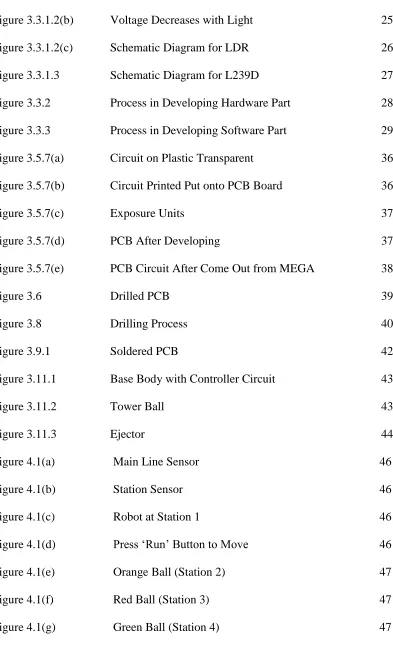
LIST OF FIGURES
NO TITLE PAGE
Figure 1.1 Overview of The project Sequence 2
Figure 2.1.1 (a) Simple Closed Loop System 6
Figure 2.1.1 (b) Block Diagram of Line Follower 6
Figure 2.1.2.2 Positioning of Photoresistor 8
Figure 2.2.1 PIC16F876A Pin Diagram 9
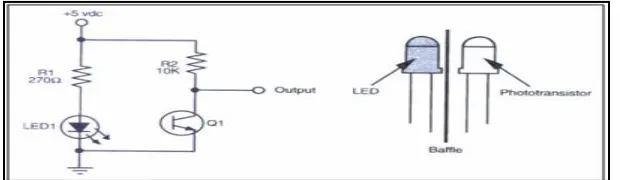
Figure 2.3.1 Infra Red Sensor 11
Figure 2.3.2 LDR 12
Figure 2.4.1 (a) L293D 13
Figure 2.4.1 (b) L293D Pin Diagram 13
Figure 2.5.1 Servo Motor 14
Figure 2.5.2 Double Gearbox with DC Motor 15
Figure 2.7 Motor Control Circuit 17
Figure 3.3.1 Flow of Main Process in This Project 22
Figure 3.3.1.1(a) Sequence to assemble These Circuit 23 Figure 3.3.1.1(b) Controller circuit Schematic Diagram 24
Figure 3.3.1.2(c) Schematic Diagram for LDR 26
Figure 3.3.1.3 Schematic Diagram for L239D 27
Figure 3.3.2 Process in Developing Hardware Part 28
Figure 3.3.3 Figure 3.5.7(a) Figure 3.5.7(b) Figure 3.5.7(c) Figure 3.5.7(d) Figure 3.5.7(e) Figure 3.6 Figure 3.8 Figure 3.9.1
Process in Developing Software Part Circuit on Plastic Transparent Circuit Printed Put onto PCB Board Exposure Units
PCB After Developing
PCB Circuit After Come Out from MEGA Drilled PCB Drilling Process Soldered PCB 29 36 36 37 37 38 39 40 42
Figure 3.11.1 Base Body with Controller Circuit 43
Figure 3.11.2 Figure 3.11.3 Tower Ball Ejector 43 44
Figure 4.1(a) Main Line Sensor 46
Figure 4.1(b) Station Sensor 46
Figure 4.1(c) Robot at Station 1 46
Figure 4.1(d) Press „Run‟ Button to Move 46
Figure 4.1(e) Orange Ball (Station 2) 47
Figure 4.1(f) Red Ball (Station 3) 47
LIST OF APPENDICES
NO TITLE PAGE
CHAPTER I
INTRODUCTION
This chapter will briefly discuss on the project overview. The objective, scope, and thesis outline will be presented in this chapter.
1.1 Project Background
Smart Color Sorting Robot is based on the placing system with some capability to decide the object according to their color. The object will be defined by determining color of the ball while the system will figure which location the object should be located. With the PIC as a controller for the system, a manually feed object which is a coloring ball will be determined by the robot to take and eject them to their exact location or station.
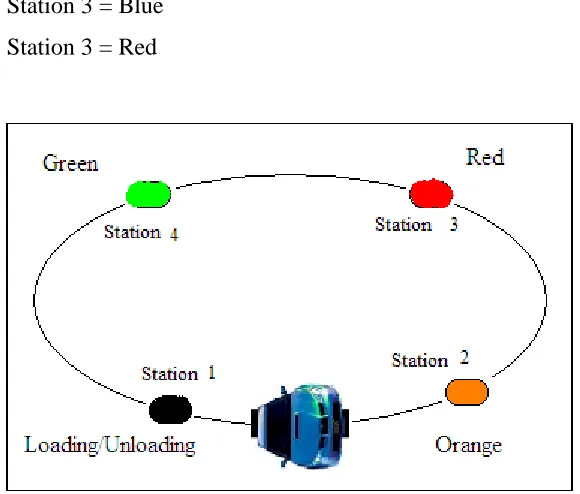
There are four stations in the Color Sorter system that we made. Each station had their own range of color except for the first station which is the load and unloading station.
The ball will be inserting manually by the user. Then the LDR sensor will detect what color is the object, after the detection been done, the decision will be made and the line follower will take the object to the station that been recognized for it.
In this system, there are 4 station;
Station 1 = Load and Unloading station (10 sec delay) Station 2 = White
[image:17.612.182.472.303.550.2]Station 3 = Blue Station 3 = Red
Figure 1.1 Overview of the Project Sequence
1.2 OBJECTIVES
project is to study how to communicate the programming language with the color sensor. After that, the line follower system will make its own decision to the station that been programmed. The objective can be summarized as below:
i. To sort the object according to their color. ii. To sort the object to the station accordingly.
iii. To make the system run continuously with less rest.
iv. To make an interface between the programming of line follower and the sensors.
1.3 SCOPE OF PROJECT
This project is subjected to several scope and limitations that are narrowed down to the study.There are a few scopes and guidelines listed to unsure the project is conducted within its intended boundary. This is to ensure the project is heading in the right direction to achieve its intended objectives. The objectives are:
i. Research study on the Programmable Intelligence Computer, PIC16F876A microcontroller and the control system of the circuit.
ii. To acquire the each sensor that use in this project. iii. To design circuitry for the overall system
iv. To develop the program that can integrate and control the overall system. v. To construct the model and test either the robot is function or not.
1.4 PROBLEM STATEMENT
The problems which often occurred in the industrial that can be solve by this project are:
ii. Each company, have their own cost; this project can be minimizing the cost of the company by minimizing the workers.
iii. Usually, the worker maybe doing some mistakes while doing their job, by developing this project, the company can decrease the human mistakes.
1.5 SIGNIFICATION OF THE PROJECT
i. Manage to gain more idea and information about the sensor and valve. ii. Manage to work on the PIC programming
iii. Manage to apply knowledge about the robotic. iv. Manage to build up the robot.
1.6 REPORT STRUCTURE
Chapter one briefly introduces he overall of the project title Smart Color Sorting Robot. The introduction consists of overview, objective, problem statement, scope of work, methodology and structure report.
Meanwhile chapter two discuss about the background of study related to security system. Literature review will produce overall structure of the Smart Color Sorting Robot which shows the relationship between project research and theoretical concept.
Chapter four consists of result and discussion of the project, finding and analysis throughout the research and project development.
CHAPTER II
LITERATURE REVIEW
This chapter is to discuss some fundamental ideas of line follower and color sensor. The features of this project are also including. All components using for this project will be explain as well.
2.1 Application Review
In this project, there is two application will be combine. This application is: 1. Line Follower.
2. Color Sensor.
Thus, the research on this application was revealed and a few references found in order to complete this project.
2.1.1 Line Follower
line follower will sense a line and maneuvering the line follower to stay right on the line by using infra red sensor as its „nose‟.
[image:22.612.149.566.218.341.2] [image:22.612.153.560.498.625.2]If the line follower tries to move out of track, the infrared sensor will give a signal to the brain of the robot to stay on line. This situation is made based on the simple closed loop feedback.
Figure 2.1.1(a): Simple Closed Loop System [1]
R(s) represented as a power supply from 5V and C(s) represented as a direction of the line follower. A suitable program is needed in order to make this line follower able to track a line and it‟s supposed to think like a „human‟. The overview of this line follower is shown as Figure 2.1.1(b).
2.1.2 Color Sensor
According to Society of Robot‟s Article [2], photoresistor cannot see the color of an object. It only can read the value gain from reflection of the object. The value gain from a various object is difference. Therefore, some research has been made and the result seems to be that photoresistor can be use as color detection element. There are two methods in order to differentiate object‟s color.
1. Similarity Matching Method 2. Thresholding Method
2.1.2.1 Similarity Matching vs. Thresholding
In reality the sensor must be calibrate before the sensors before work. This means the sensor must sense the object, record the readings, and then make a chart using this data. That way when the robot is doing its thing and senses the same object, it can compare the similarity of the new reading vs. the calibrating reading.
For example, suppose the robot needs to follow a white line on a grey floor. The robot would use a microcontroller to sense the analog value from the sensor. During the calibration phase the robot measured an analog value of 95 for the grey floor, 112 for the white line, and then stored these values in memory. Now your robot is on the line, and a sensor reads 108.
Staying with white line example, using similarity matching, by using the equation: abs(new reading - calibrating reading)/calibrated reading * 100 = similarity if,
grey floor = (108 - 95)/95 * 100 = 13.7% different white line = (108 - 112)/112 * 100= 3.6% different compare: white line < grey floor
therefore the sensor sees a white line
This method can be used for any color and any number of colors, given that the calibration beforehand. Consider calibration as a way of teaching the robot to differentiate various colors.
2.1.2.2 Positioning of Photoresistor
[image:24.612.246.408.533.678.2]The photoresistor must be placed in the middle of the LED. It is because a photoresistor needs all the values from the LED‟s of the same distance in order to differentiate the object color.
2.2 Controller Review
A controller used in this project is a microcontroller PIC16F876A. This is a 28 pins PIC and it is enough since the sensor used is only 13 ports.
2.2.1 Microcontroller (PIC16F876A)
[image:25.612.189.468.319.479.2]This microcontroller consist 28 pins, 22 I/O ports. This microcontroller is a high performance RISC-CPU. The operating speed used for this microcontroller is 20 MHz clock input. [3]
Figure 2.2.1: PIC16F876A Pin Diagram [3]
Microchip PIC16F876A Microcontroller Features
High-Performance RISC CPU
Operating speed: 20 MHz, 200 ns instruction cycle Operating voltage: 4.0-5.5V
Industrial temperature range (-40° to +85°C) 14 Interrupt Sources
Special Microcontroller Features
Flash Memory: 14.3 Kbytes (8192 words) Data SRAM: 368 bytes
Data EEPROM: 256 bytes
Self-reprogrammable under software control In-Circuit Serial Programming via two pins (5V) Watchdog Timer with on-chip RC oscillator Programmable code protection
Power-saving Sleep mode Selectable oscillator options In-Circuit Debug via two pins
Peripheral Features
22 I/O pins; 3 I/O ports
Timer0: 8-bit timer/counter with 8-bit prescaler Timer1: 16-bit timer/counter with prescaler
o Can be incremented during Sleep via external crystal/clock
Timer2: 8-bit timer/counter with 8-bit period register, prescaler and postscaler Two Capture, Compare, PWM modules
o 16-bit Capture input; max resolution 12.5 ns
o 16-bit Compare; max resolution 200 ns
o 10-bit PWM
Synchronous Serial Port with two modes:
o SPI Master
o I2C Master and Slave
USART/SCI with 9-bit address detection
Analog Features
10-bit, 5-channel A/D Converter Brown-Out Reset
Analog Comparator module
o 2 analog comparators
o Programmable on-chip voltage reference module
o Programmable input multiplexing from device inputs and internal VREF
2.3 Sensors Review
In this project, three infra red sensors has been use to sense a line and one LDR to detect a ball‟s color.
2.3.1 Infra Red Sensor
[image:27.612.174.484.561.651.2]Infra red sensor is a „transmit – receive‟ sensor where it is used as a line tracking sensor of the project. It works when the receiver gain a signal from transmitter. The transmitter will emit an original signal to the specified surface, thus the original signal will mix up with surface condition and change. Since the original signal has been modified, it will read by receiver.
2.3.2 Photoresistor (LDR)
[image:28.612.263.393.318.464.2]A LDR (Light Dependent Resistors) sensor is used as a color sensor in the project. It is able to receive a value in analog signal with a small range provided. Commonly, this type of sensor used to detect the light. A sensor can be used to measure the voltage drop across the resistor with the analog port of the microcontroller. An LDR is a light sensor, is a sensor that resistance is proportional with exposure of light. The output of this sensor is analog signal. It must be part of the voltage divider circuit in order to give an output voltage. The voltage supply 6Vdc can be applied to the circuit for this sensor. Same as other analog sensor, it must be used with comparator to get a digital signal from this sensor. [4]
Figure 2.3.2: LDR [4]
2.4 Driver Review
L293D is used as a motor driver for the DC motor.
2.4.1 L293D
can drive motor with Imax: 600ma, Vmax: 32V. By using this motor driver, user can eliminate the complicated wiring to drive the two DC motors.
Figure 2.4.1(a) : L293D [5]
Figure 2.4.1(b) : L293D Pin Diagram [5]
This driver is connect to left and right motors and able to enable one or both motor at a time.
2.5 Component Review
There is a few components that is used in this project. 1. Servo Motor
2.5.1 Servo Motor
[image:30.612.239.416.278.391.2]Servo motor is used as an ejector in this project. It will eject the ball from their position when the robot reaches target station. The servo motor used in the project is 4kg/cm type. Its power supply is from 4.8V to 6V (normally use 5V). Servo motor is used in the project because it can give accurate angle control e.g. 90 degree, 40 degree. In addition, it can hold the angle continuously. The servo motor needs an operating frequency of 40Hz. It can rotate from 0 degree to 180 degree when the pulse duty ration changed. [6]
Figure 2.5.1: Servo Motor [6]
2.5.2 Gearbox with DC Motor
Figure 2.5.2 : Double Gearbox with DC Motor [7]
2.6 Power Supply
The system support 9V DC power supply (dc battery). A LED power indicator is used to avoid ensure the polarity and the availability of the adapter power supply. In this project, a separation of two power supply was to avoid interface and to make the robot moves without any problems. The parts of the power supply are shown below:
1. Power supply to DC motor (6V) 2. Power supply to Microcontroller (9V) 3. Power supply for Servo Motor (6V)
9V power:
5mA) is used to indicate the system is power on/off. The LED is connected through 1KR resistor to limit current pass through LED is 5mA.
6V power:
The 6V power only used for L293D motor driver to drive 2 motors forwards, reverse, stop. Same time the 6V power also supply to servo motor.
2.7 Electrical Parts
In this project, DC motor was used to converting electrical power into mechanical work.
2.7.1 DC Motor
A DC motor works by converting electric power into mechanical work. This is accomplished by forcing current through a coil and producing a magnetic field that spins the motor. The simplest DC motor is a single coil apparatus, used here to discuss the DC motor theory.
magnetic field. At 180 degrees, the same phenomenon occurs, but segment A-B is forced up and C-D is forced down. At 90 and 270-degrees, the brushes are not in contact with the voltage source and no force is produced. In these two positions, the rotational kinetic energy of the motor keeps it spinning until the brushes regain contact. [8]
CHAPTER III
METHODOLOGY
This chapter contains the process of designing Smart Color Sorting Robot which discusses about the hardware and software development including the hardware design and software programming. This chapter will explain about the project‟s methodology that is used in developing the software and hardware for smart window shade. The methodology of a project is guidelines that will explain about the project path from the beginning until it is completed. Every selection and action that must be done while implementing the project must be explains in stages. This methodology is needed to make sure the project that consists will be developed systematically, smoothly and successfully in order to obtain better results.
3.1 Project Methodology
should be identify. As soon as the purpose and function of the project is clear, the project will be divided into two parts.
For the hardware design, initially the design has to be built. Then the circuit is designed based on a few references. A few circuits found are studied to make sure all the information is reliable for the title given. After having enough information, circuit is design using PROTEL, PROTEUS and MULTISIM software. A simulation for the circuit was done to make sure the circuit used is corrected. If the simulation shows an incorrect outcome, the circuit will be redesigned until the correct circuit is obtained. Labs experiments are also done to verify the overall designed are operation.
After check component list, the components buy from the electronics‟ shop and get free from the PSM lab. Then, the circuits have been constructing to test the feasibility of the circuit that obtained from internet or books. After do a construct and test the circuit at breadboard, troubleshoot the circuit if the circuit cannot work. After troubleshooting the circuit on breadboard, design the PCB etching is needed. After process on etching, at the point need put in the leads of component and jumpers then solder the lead of component at the protoboard.
After all, check the circuit on protoboard can function or not. If not, try troubleshooting it. Following this, to test the circuit, it will be simulated to detect errors in the circuitry. If errors are discovered the circuit will be troubles hooted and simulated once again. Then hardware circuit will be transferred to PCB board and the etching process will be done. The complete circuit then will be interfaced with the home appliances. After that, troubleshooting will be done to both circuits until the project function successfully. A model was build to place the project and easy to use.
combination of both will be tested, simulated and troubles hooted. In the process of troubleshooting, the project will be analyzed and repaired.
3.2 Explanation of Project Planning
3.21 Searching For Project Title
Firstly, before going any further, a suitable title is needed to make sure it is easy to construct and follow all the criteria fixed by university. So the title Smart Color Sorting Robot is proposed. This is because, based on the function of this robot that have capability to decide the object according to their color and the object will be defined by determining color of the ball while the system will figure which location the object should be located. This project is developed with the purposed to optimizing the productivity, minimizing the cost of the project and make no human mistakes.
3.22 Understanding The Circuit Operation And Circuit Analysis
After a suitable title was chosen, the next step is to do some analysis upon circuit diagram and understand the circuit operation. This is important to understand the circuit operation to help us find what is wrong when the circuit is not functioning while testing it. This project starts by searching for literature reviews from readability source as books and journals. A few circuits found are studied to make sure all the information is reliable for the title given. This also can help us explain the circuit operation during the seminar and presentation in front of the panel.
3.23 Preparing For Proposal
proceeding with the project or not. This proposal is subject to the criteria that been fixed by university. If this title is not accepted, another project that follows according to the criteria has to be found. If the project is accepted, then the project has to be discussed with the supervisor to get advice and information that related to the project.
3.24 Searching For Components
If the proposal is accepted, it means that the title chosen have follow according to the criteria that have been fixed by university. Then, it will need us to find the components for the project. Some types of components are provided at the PSM/PMD laboratory such as resistors, capacitors, light emitting diode, transistors and pushbutton. University will prepare RM200 to each student that need to claim for components that are not provided.
3.25 Testing The Circuit Function
CHAPTER IV
RESULT AND DISCUSSION
This chapter will discuss on the result and discussion of this project. The analysis, calculation and gantt chart will presented in this chapter.
4.1 RESULT
The result of this project is the robot capable to sense the line and move on the track only. At first, the robot should be manually feed object which is colouring ball at load and unloading station. When placing the robot, there is three line sensors which are two of it was located under the body to detect main line as shown in Figure 4.1(a), while the other line sensor was located at the side of body to identify the station as shown in Figure 4.1 (b).
component not damaged by heat. Since the robot capable to place three type of color, relay was used to switch the color.
Figure 4.1(a): Main Line Sensor Figure 4.1(b): StationSensor
When the robot is ON, there is two LED that locate at the both side of the robot will be ON as shown in Figure 4.1(c) and the buzzer will buzz to inform the user that the robot is ready to use. At Station 1 (load and unloading station), the RUN button will be push to start the robot as shown in Figure 4.1(d). Then, the robot will move according to the track that readily made.
Figure 4.1(c): Robot at Station 1 Figure 4.1(d): Press “run” button to
[image:62.612.99.505.113.279.2] [image:62.612.117.537.449.636.2]At Station 2, the robot must eject Orange Ball as shown in Figure 4.1(e). When the station sensor detects station, the robot will stop. Then, the color sensor will make confirmation whether the ball is correct which is orange ball. Next, the robot will move on to the next station. At Station 3, the robot must eject Red Ball as shown in Figure 4.1(f) while at Station 4, the robot should eject Green Ball as shown in Figure 4.1(g). At every station the process for each station are the same with process at Station 2.
Figure 4.1(e): Orange ball Figure 4.1(f): Red Ball Figure 4.1(g): Green Ball
(Station 2) (Station 3) (Station4)
At every station, the robot will eject only the color that has been programmed which is orange color for Station 2, red color for Station 3 and Green color for Station 4. If the color is incorrect, the robot will detect the station and LED for the station will ON and the buzzer will buzz. The robot will move to the station of the color object that the robot carry and it will direct move to home if there is no other ball. If the robots arrive at home, but there is any object in the tower of robot, the run button must be push to deliver the object.
[image:63.612.116.541.229.458.2]4.2 Data Analysis and Discussion
To set the LED with a suitable ball, voltage reading for each ball color was measured. Then, the value of the voltage reading was converting to decimal so that easy to make a comparison between each color. The voltage readings are shown in Table 4.1 below:
Ball Color White LED Red LED Blue LED All LED
Orange 0.54 - 0.69 0.1 - 0.22 2.28 - 2.32 2.67 - 2.7
Red 0.27 – 0.36 0.11 – 0.20 1.82 – 1.84 2.1 – 2.12
[image:64.612.295.406.379.560.2]Green 0.26 – 0.34 0.04 – 0.11 0.6 – 0.64 0.96 – 1.01
Table 4.2.1 : Voltage reading
Conversion to decimal
X = 27.54≈27
The decimal reading is shown in Table 4.2.1 below:
Ball Color White LED Red LED Blue LED All LED
Orange 27 - 35 5 – 11 116 - 118 136 - 137
Red 13 - 18 5 – 10 92 - 93 107 – 108
[image:65.612.109.548.134.231.2]Green 13 - 17 2 - 5 30 - 32 48 – 51
Table 4.2.2 : Decimal reading
From the value of the decimal reading, hence, the LED was select as i. Orange Ball = Red LED
ii. Red Ball = Blue LED iii. Green Ball = White LED
4.3 Similarity Matching and Thresholding
In reality, sensor must be calibrated. This means the sensor should be test to sense the object. Then, the readings are recorded and charts are prepared based on the data. Therefore, when the robot senses the same object, it can compare the similarity of the new reading with the calibrating reading.
For example, suppose the robot needs to follow a white line on a grey floor. The robot would use a microcontroller to sense the analog value from the sensor. During the calibration phase the robot measured an analog value of 95 for the grey floor, 112 for the white line, and then stored these values in memory. Now the robot is on the line, and a sensor reads 108.
= threshold
CHAPTER V
CONCLUSIONS
This chapter will include the conclusion of this project
5.1 Conclusions
Nowadays, industries need a lot of development in order to cut the labor cost and to maximize the productivity. This project is a new generation of combination between the line follower and the color sensor system by using PIC interface as the main controller in order to achieve the industrial needs.
There is some issues being consider in order to making this project successful and become the most illegible prototype. As refer to the reference and feedback from the industries, a new version of Smart Color Sorting Robot is created.
language file to hexadecimal file. There are a few main parts of this project; line follower, color sensor, and the most important here, capability of this system to detect the object and it will be chosen based on their color
In conclusions, after all the project is success the robot should be able to sort the ball according to their color and the station accordingly. The system should be run continuously with restless and be able to operate based on the project that have been programmed.
5.2 Recommendations
This project physically functions as a line follower robot that uses to place an object at the correct station. In future in order to upgrade the capability of this project, here is some suggestion:
1. The robot capable to sort more color of the object to be placed at the station. 2. The robot has to use a long-time life so that the robot could be use efficiently. 3. The robot could switch the ball by itself when the objects in the robot that have
REFERENCES
[1] Priyank Patil, K.J Somaiya College Of Engineering, Line Following Robot.
[2] Society of Robot‟s Article,
http://www.societyofrobots.com/sensors/sensor_color.shtml [3] Datasheet Article,
http://www.datasheetcatalog.com/datasheets_pdf/P/I/C/1/PIC16F876A.shtml
[4] Society of Robot‟s Article,
http://www.societyofrobots.com/schematics_photoresistor.shtml
[5] SGS-Thomson Microelectronics, L293D Datasheet. http://search.datasheetcatalog.net/key/L293D
[6] Servo Motor Article,
http://people.ee.duke.edu/~cec/final/node59.html
[7] Gear Motor Article,
[8] Society of Robot‟s Article,
http://www.societyofrobots.com/schematics_dcmotorbraking.shtml
L293DD
PUSH-PULL FOUR CHANNEL DRIVER WITH DIODES
600mA OUTPUT CURRENT CAPABILITY PER CHANNEL
1.2A PEAK OUTPUT CURRENT (non repeti-tive) PER CHANNEL
ENABLE FACILITY
OVERTEMPERATURE PROTECTION
LOGICAL "0" INPUT VOLTAGE UP TO 1.5 V (HIGH NOISE IMMUNITY)
INTERNAL CLAMP DIODES
DESCRIPTION
The Device is a monolithic integrated high volt-age, high current four channel driver designed to accept standard DTL or TTL logic levels and drive inductive loads (such as relays solenoides, DC and stepping motors) and switching power tran-sistors.
To simplify use as two bridges each pair of chan-nels is equipped with an enable input. A separate supply input is provided for the logic, allowing op-eration at a lower voltage and internal clamp di-odes are included.
This device is suitable for use in switching appli-cations at frequencies up to 5 kHz.
The L293D is assembled in a 16 lead plastic packaage which has 4 center pins connected to-gether and used for heatsinking
The L293DD is assembled in a 20 lead surface mount which has 8 center pins connected to-gether and used for heatsinking.
June 1996
BLOCK DIAGRAM
SO(12+4+4) Powerdip (12+2+2) ORDERING NUMBERS:
L293DD L293D
ABSOLUTE MAXIMUM RATINGS
Symbol Parameter Value Unit
VS Supply Voltage 36 V
VSS Logic Supply Voltage 36 V
Vi Input Voltage 7 V
Ven Enable Voltage 7 V
Io Peak Output Current (100 µs non repetitive) 1.2 A
Ptot Total Power Dissipation at Tpins = 90 °C 4 W
Tstg, Tj Storage and Junction Temperature – 40 to 150 °C
THERMAL DATA
Symbol Decription DIP SO Unit
Rth j-pins Thermal Resistance Junction-pins max. – 14 °C/W
Rth j-amb Thermal Resistance junction-ambient max. 80 50 (*) °C/W
Rth j-case Thermal Resistance Junction-case max. 14 –
(*) With 6sq. cm on board heatsink. PIN CONNECTIONS (Top view)
SO(12+4+4) Powerdip(12+2+2)
ELECTRICAL CHARACTERISTICS (for each channel, VS = 24 V, VSS = 5 V, Tamb = 25 °C, unless
otherwise specified)
Symbol Parameter Test Conditions Min. Typ. Max. Unit
VS Supply Voltage (pin 10) VSS 36 V
VSS Logic Supply Voltage (pin 20) 4.5 36 V
IS Total Quiescent Supply Current
(pin 10)
Vi = L ; IO = 0 ; Ven = H 2 6 mA
Vi = H ; IO = 0 ; Ven = H 16 24 mA
Ven = L 4 mA
ISS Total Quiescent Logic Supply
Current (pin 20)
Vi = L ; IO = 0 ; Ven = H 44 60 mA
Vi = H ; IO = 0 ; Ven = H 16 22 mA
Ven = L 16 24 mA
VIL Input Low Voltage (pin 2, 9, 12,
19)
– 0.3 1.5 V VIH Input High Voltage (pin 2, 9,
12, 19)
VSS≤ 7 V 2.3 VSS V
VSS > 7 V 2.3 7 V
IIL Low Voltage Input Current (pin
2, 9, 12, 19)
VIL = 1.5 V – 10 µA
IIH High Voltage Input Current (pin
2, 9, 12, 19)
2.3 V ≤ VIH≤ VSS – 0.6 V 30 100 µA
Ven L Enable Low Voltage
(pin 1, 11)
– 0.3 1.5 V Ven H Enable High Voltage
(pin 1, 11)
VSS≤ 7 V 2.3 VSS V
VSS > 7 V 2.3 7 V
Ien L Low Voltage Enable Current
(pin 1, 11)
Ven L = 1.5 V – 30 – 100 µA
Ien H High Voltage Enable Current
(pin 1, 11)
2.3 V ≤ Ven H≤ VSS – 0.6 V ± 10 µA
VCE(sat)H Source Output Saturation
Voltage (pins 3, 8, 13, 18)
IO = – 0.6 A 1.4 1.8 V
VCE(sat)L Sink Output Saturation Voltage
(pins 3, 8, 13, 18)
IO = + 0.6 A 1.2 1.8 V
VF Clamp Diode Forward Voltage IO = 600nA 1.3 V
tr Rise Time (*) 0.1 to 0.9 VO 250 ns
tf Fall Time (*) 0.9 to 0.1 VO 250 ns
ton Turn-on Delay (*) 0.5 Vi to 0.5 VO 750 ns
toff Turn-off Delay (*) 0.5 Vi to 0.5 VO 200 ns
(*) See fig. 1.
TRUTH TABLE (one channel)
Input Enable (*) Output
H L H L
H H L L
H L Z Z
Z = High output impedance
[image:75.595.74.530.96.264.2](*) Relative to the considered channel
Figure 1: Switching Times
Figure 2: Junction to ambient thermal resistance vs. area on board heatsink (SO12+4+4 package)
[image:75.595.68.531.299.507.2]POWERDIP16 PACKAGE MECHANICAL DATA
DIM. mm inch
MIN. TYP. MAX. MIN. TYP. MAX.
a1 0.51 0.020
B 0.85 1.40 0.033 0.055
b 0.50 0.020
b1 0.38 0.50 0.015 0.020
D 20.0 0.787
E 8.80 0.346
e 2.54 0.100
e3 17.78 0.700
F 7.10 0.280
I 5.10 0.201
L 3.30 0.130
Z 1.27 0.050
SO20 PACKAGE MECHANICAL DATA
DIM. mm inch
MIN. TYP. MAX. MIN. TYP. MAX.
A 2.65 0.104
a1 0.1 0.2 0.004 0.008
a2 2.45 0.096
b 0.35 0.49 0.014 0.019 b1 0.23 0.32 0.009 0.013
C 0.5 0.020
c1 45 1.772
D 1 12.6 0.039 0.496
E 10 10.65 0.394 0.419
e 1.27 0.050
e3 11.43 0.450
F 1 7.4 0.039 0.291
G 8.8 9.15 0.346 0.360 L 0.5 1.27 0.020 0.050
M 0.75 0.030
S 8° (max.)
Information furnished is believed to be accurate and reliable. However, SGS-THOMSON Microelectronics assumes no responsibility for the consequences of use of such information nor for any infringement of patents or other rights of third parties which may result from its use. No license is granted by implication or otherwise under any patent or patent rights of SGS-THOMSON Microelectronics. Specification mentioned in this publication are subject to change without notice. This publication supersedes and replaces all information previously supplied. SGS-THOMSON Microelectronics products are not authorized for use as critical components in life support devices or systems without express written approval of SGS-THOMSON Microelectronics.
© 1996 SGS-THOMSON Microelectronics – Printed in Italy – All Rights Reserved SGS-THOMSON Microelectronics GROUP OF COMPANIES
Australia Brazil Canada China France Germany Hong Kong Italy Japan Korea Malaysia Malta Morocco The Netherlands -Singapore - Spain - Sweden - Switzerland - Taiwan - Thailand - United Kingdom - U.S.A.
Top View Bottom View
; colour ball robot
include "p16F877.inc"
_code_tmp_0000 equ 0x70 _code_tmp_0001 equ 0x71 param00_delay_ms equ 0x72 param00_delay_s equ 0x74 _DELAY1 equ 0x75 _A equ 0x76 _B equ 0x77 _C equ 0x78 _t equ 0x79 _PORTC equ 0x07 _PORTD equ 0x08 _PORTE equ 0x09 _TRISC equ 0x87 _TRISD equ 0x88 _TRISE equ 0x89 _ADCON1 equ 0x9f ORG 0 clrf PCLATH goto start__code _point goto _point__code _tscn goto _tscn__code _delay_ms goto _delay_ms__code _delay_s goto _delay_s__code start__code movlw D'10' movwf _DELAY1 clrf _t
__CONFIG _CP_OFF & _WDT_OFF & _BODEN_OFF & _PWRTE_ON & _XT_OSC & _WRT_ENABLE_ON & _LVP_OFF & _CPD_OFF
_main__code
clrf PORTB clrf _PORTC clrf _PORTD clrf _PORTE bsf _PORTC, D'0' movlw D'50'
movwf param00_delay_ms call _delay_ms
bcf PCLATH, 3 bcf PCLATH, 4 bcf STATUS, RP0 bcf STATUS, RP1 bcf _PORTC, D'0' movlw D'50'
movwf param00_delay_ms call _delay_ms
bcf PCLATH, 3 bcf PCLATH, 4 bcf STATUS, RP0 bcf STATUS, RP1 bsf _PORTC, D'0' movlw D'50'
movwf param00_delay_ms call _delay_ms
bcf PCLATH, 3 bcf PCLATH, 4 bcf STATUS, RP0 bcf STATUS, RP1 bcf _PORTC, D'0' movlw D'50'
movwf param00_delay_ms call _delay_ms
bcf PCLATH, 3 bcf PCLATH, 4 bcf STATUS, RP0 bcf STATUS, RP1 bsf _PORTC, D'0' movlw D'50'
movwf param00_delay_ms call _delay_ms
bcf PCLATH, 3 bcf PCLATH, 4 bcf STATUS, RP0 bcf STATUS, RP1 bcf _PORTC, D'0' movlw D'50'
movwf param00_delay_ms call _delay_ms
movlw D'200'
movwf param00_delay_ms call _delay_ms
bcf PCLATH, 3 bcf PCLATH, 4 movlw D'32' bcf STATUS, RP0 bcf STATUS, RP1 movwf _PORTC movlw D'200'
movwf param00_delay_ms call _delay_ms
bcf PCLATH, 3 bcf PCLATH, 4 movlw D'64' bcf STATUS, RP0 bcf STATUS, RP1 movwf _PORTC movlw D'200'
movwf param00_delay_ms call _delay_ms
bcf PCLATH, 3 bcf PCLATH, 4 movlw D'128' bcf STATUS, RP0 bcf STATUS, RP1 movwf _PORTC movlw D'200'
movwf param00_delay_ms call _delay_ms
bcf PCLATH, 3 bcf PCLATH, 4 movlw D'240' bcf STATUS, RP0 bcf STATUS, RP1 movwf _PORTC movlw D'200'
movwf param00_delay_ms call _delay_ms
bcf PCLATH, 3 bcf PCLATH, 4 bcf STATUS, RP0 bcf STATUS, RP1 clrf _PORTC movlw D'200'
movwf param00_delay_ms call _delay_ms
movwf param00_delay_ms call _delay_ms
bcf PCLATH, 3 bcf PCLATH, 4 bcf STATUS, RP0 bcf STATUS, RP1 clrf _PORTC movlw D'200'
movwf param00_delay_ms call _delay_ms
bcf PCLATH, 3 bcf PCLATH, 4 movlw D'240' bcf STATUS, RP0 bcf STATUS, RP1 movwf _PORTC movlw D'200'
movwf param00_delay_ms call _delay_ms
bcf PCLATH, 3 bcf PCLATH, 4 bcf STATUS, RP0 bcf STATUS, RP1 clrf _PORTC movlw D'200'
movwf param00_delay_ms call _delay_ms
bcf PCLATH, 3 bcf PCLATH, 4 bcf STATUS, RP0 bcf STATUS, RP1 bsf _PORTC, D'0' movlw D'50'
movwf param00_delay_ms call _delay_ms
bcf PCLATH, 3 bcf PCLATH, 4 bcf STATUS, RP0 bcf STATUS, RP1 bcf _PORTC, D'0' movlw D'50'
movwf param00_delay_ms call _delay_ms
bcf PCLATH, 3 bcf PCLATH, 4 bcf STATUS, RP0 bcf STATUS, RP1 bsf _PORTC, D'0' movlw D'50'
bcf STATUS, RP1 bcf _PORTC, D'0' movlw D'50'
movwf param00_delay_ms call _delay_ms
bcf PCLATH, 3 bcf PCLATH, 4 bcf STATUS, RP0 bcf STATUS, RP1 clrf PORTA clrf PORTB clrf _PORTC clrf _PORTD clrf _PORTE _f1
bcf STATUS, RP0 bcf STATUS, RP1 clrf PORTB clrf _PORTD movlw D'50'
movwf param00_delay_ms call _delay_ms
bcf PCLATH, 3 bcf PCLATH, 4 label_0002
movlw D'240' bcf STATUS, RP0 bcf STATUS, RP1 movwf _PORTC movlw D'70'
movwf param00_delay_ms call _delay_ms
bcf PCLATH, 3 bcf PCLATH, 4 bcf STATUS, RP0 bcf STATUS, RP1 clrf _PORTC movlw D'180'
movwf param00_delay_ms call _delay_ms
bcf PCLATH, 3 bcf PCLATH, 4 bcf STATUS, RP0 bcf STATUS, RP1 movf _PORTE, W sublw D'1' movlw 1
btfss STATUS, Z clrw
sublw 0
movwf param00_delay_ms call _delay_ms
bcf PCLATH, 3 bcf PCLATH, 4 bcf STATUS, RP0 bcf STATUS, RP1 bcf _PORTC, D'0' movlw D'50'
movwf param00_delay_ms call _delay_ms
bcf PCLATH, 3 bcf PCLATH, 4 bcf STATUS, RP0 bcf STATUS, RP1 bsf _PORTC, D'0' movlw D'50'
movwf param00_delay_ms call _delay_ms
bcf PCLATH, 3 bcf PCLATH, 4 bcf STATUS, RP0 bcf STATUS, RP1 bcf _PORTC, D'0' movlw D'50'
movwf param00_delay_ms call _delay_ms
bcf PCLATH, 3 bcf PCLATH, 4 _RUN
bcf STATUS, RP0 bcf STATUS, RP1 clrf _PORTD movlw D'20'
movwf param00_delay_ms call _delay_ms
bcf PCLATH, 3 bcf PCLATH, 4 bcf STATUS, RP0 bcf STATUS, RP1 movf PORTB, W andlw D'32' movwf _A movf PORTB, W andlw D'64' movwf _B movf PORTB, W andlw D'224' movwf _C
btfsc STATUS, Z goto label_0005 movlw D'1' movwf PORTA movf _DELAY1, W
movwf param00_delay_ms call _delay_ms
bcf PCLATH, 3 bcf PCLATH, 4 label_0005
bcf STATUS, RP0 bcf STATUS, RP1 movf _PORTD, W sublw D'6' movlw 1
btfss STATUS, Z clrw
sublw 0
btfsc STATUS, Z goto label_0006 movlw D'2' movwf PORTA movf _DELAY1, W
movwf param00_delay_ms call _delay_ms
bcf PCLATH, 3 bcf PCLATH, 4 label_0006
bcf STATUS, RP0 bcf STATUS, RP1 movf _PORTD, W sublw D'7' movlw 1
btfss STATUS, Z clrw
sublw 0
btfsc STATUS, Z goto label_0007 movlw D'3' movwf PORTA movf _DELAY1, W
movwf param00_delay_ms call _delay_ms
bcf PCLATH, 3 bcf PCLATH, 4 label_0007
btfsc STATUS, Z goto label_0008 clrf _code_tmp_0000 movf _t, W
addlw D'1' btfsc STATUS, C
incf _code_tmp_0000 , F movwf _t
bsf _PORTC, D'0' movlw D'50'
movwf param00_delay_ms call _delay_ms
bcf PCLATH, 3 bcf PCLATH, 4 bcf STATUS, RP0 bcf STATUS, RP1 bcf _PORTC, D'0' movlw D'10'
movwf param00_delay_ms call _delay_ms
bcf PCLATH, 3 bcf PCLATH, 4 call _point bcf PCLATH, 3 bcf PCLATH, 4 _C1
call _tscn bcf PCLATH, 3 bcf PCLATH, 4 goto _C1 label_0008
bcf STATUS, RP0 bcf STATUS, RP1 movf _PORTD, W sublw D'1' movlw 1
btfss STATUS, Z clrw
sublw 0
btfsc STATUS, Z goto label_0009 clrf _code_tmp_0000 movf _t, W
addlw D'1' btfsc STATUS, C
incf _code_tmp_0000 , F movwf _t
bsf _PORTC, D'0' movlw D'50'
bcf STATUS, RP1 bcf _PORTC, D'0' movlw D'10'
movwf param00_delay_ms call _delay_ms
bcf PCLATH, 3 bcf PCLATH, 4 call _point bcf PCLATH, 3 bcf PCLATH, 4 _C2
call _tscn bcf PCLATH, 3 bcf PCLATH, 4 goto _C2 label_0009
bcf STATUS, RP0 bcf STATUS, RP1 movf _PORTD, W sublw D'2' movlw 1
btfss STATUS, Z clrw
sublw 0
btfsc STATUS, Z goto label_0010 clrf _code_tmp_0000 movf _t, W
addlw D'1' btfsc STATUS, C
incf _code_tmp_0000 , F movwf _t
bsf _PORTC, D'0' movlw D'50'
movwf param00_delay_ms call _delay_ms
bcf PCLATH, 3 bcf PCLATH, 4 bcf STATUS, RP0 bcf STATUS, RP1 bcf _PORTC, D'0' movlw D'10'
movwf param00_delay_ms call _delay_ms
bcf PCLATH, 3 bcf PCLATH, 4 call _point bcf PCLATH, 3 bcf PCLATH, 4 _C3
![Figure 2.1.1(a): Simple Closed Loop System [1]](https://thumb-us.123doks.com/thumbv2/123dok_us/110300.10272/22.612.153.560.498.625/figure-a-simple-closed-loop-system.webp)
![Figure 2.1.2.2: Positioning of Photoresistor [2]](https://thumb-us.123doks.com/thumbv2/123dok_us/110300.10272/24.612.246.408.533.678/figure-positioning-of-photoresistor.webp)
![Figure 2.2.1: PIC16F876A Pin Diagram [3]](https://thumb-us.123doks.com/thumbv2/123dok_us/110300.10272/25.612.189.468.319.479/figure-pic-f-a-pin-diagram.webp)
![Figure 2.3.2: LDR [4]](https://thumb-us.123doks.com/thumbv2/123dok_us/110300.10272/28.612.263.393.318.464/figure-ldr.webp)
![Figure 2.4.1(a) : L293D [5]](https://thumb-us.123doks.com/thumbv2/123dok_us/110300.10272/29.612.241.414.274.466/figure-a-l-d.webp)
![Figure 2.5.1: Servo Motor [6]](https://thumb-us.123doks.com/thumbv2/123dok_us/110300.10272/30.612.239.416.278.391/figure-servo-motor.webp)
![Figure 2.5.2 : Double Gearbox with DC Motor [7]](https://thumb-us.123doks.com/thumbv2/123dok_us/110300.10272/31.612.217.442.68.229/figure-double-gearbox-dc-motor.webp)