University of Southern Queensland
Faculty of Engineering & Surveying
Human Interface Device (HID) keyboard application for
Android
A dissertation submitted by
F. Houweling
in fulfilment of the requirements of
ENG4112 Research Project
towards the degree of
Bachelor of Engineering, Computer Systems Enginnering
Copyright
by
F. Houweling
Abstract
Human Interface Device (HID) keyboard application for Android is a software
applica-tion for the Android operating system , it is endeavouring to improve usability of Android
mobile phones and tablets, by providing an additional user data input method, through
the integration of Bluetooth keyboards. This is to be accomplished through a software
solution bridging the missing link between the operating systems native Bluetooth
pro-tocol stack and the operating systems Input Method Editor (IME). The IME is the
primary method that the users application receives textual input from the user. The
application is named
Always Blue Ready
. The application must:
1. Be able to search, discover, pair and connect with Bluetooth kseyboards.
2. Decode keystrokes and make them available for the operating system.
3. Improve the usability of Android devices through the use of the external Bluetooth
keyboard.
4. Must strive to protect user data, or at least inform the user of potential risks.
Benefits for the end user from the implementation of this project will include:
1. Significant improvement in user typing speed.
2. Valuable screen real estate returned to the applications interface.
3. Improve user ergonomics of phones and tablets.
Current project information is published at the website:
http://www.houweling.com.
University of Southern Queensland
Faculty of Engineering and Surveying
ENG4111/2
Research Project
Limitations of Use
The Council of the University of Southern Queensland, its Faculty of Engineering and
Surveying, and the staff of the University of Southern Queensland, do not accept any
responsibility for the truth, accuracy or completeness of material contained within or
associated with this dissertation.
Persons using all or any part of this material do so at their own risk, and not at the risk
of the Council of the University of Southern Queensland, its Faculty of Engineering and
Surveying or the staff of the University of Southern Queensland.
This dissertation reports an educational exercise and has no purpose or validity beyond
this exercise. The sole purpose of the course pair entitled “Research Project” is to
contribute to the overall education within the student’s chosen degree program. This
document, the associated hardware, software, drawings, and other material set out in
the associated appendices should not be used for any other purpose: if they are so used,
it is entirely at the risk of the user.
Prof F Bullen
Dean
Certification of Dissertation
I certify that the ideas, designs and experimental work, results, analyses and conclusions
set out in this dissertation are entirely my own effort, except where otherwise indicated
and acknowledged.
I further certify that the work is original and has not been previously submitted for
assessment in any other course or institution, except where specifically stated.
F. Houweling
0050058934
Signature
3 January 2013
Acknowledgments
Thank you to my Family, without their support I would not have accomplished anything,
Katherine, Emily, Katie, Aimee, Bailey, Noah and Logan. An extra big thank you to
Katherine, Katie and Josh Hurn for proof reading my draft.
I’d also like to acknowledge and thank my supervisor, Dr Alexander Kist, whom gave
me the space to get on with the task and took the time to help when I asked.
Thanks also to Dr John Leis, your L
ATEX dissertation template saved a lot of formatting
time.
Finally I’d like to thank a good friend John Palmer, who’s caring attitude, proof reading
of my draft and regular follow up helped in so many ways.
F. Houweling
University of Southern Queensland
Contents
Copyright Page
iii
Abstract
i
Disclaimer Page
iii
Certification Page
v
Acknowledgments
vii
List of Figures
xvii
List of Tables
xix
Nomenclature
xxiii
1.1
Overview of the Dissertation
. . . .
5
Chapter 2
Literature Review and Bluetooth Keyboard Software Review
7
2.1
Literature Review
. . . .
7
2.1.1
Bluetooth . . . .
8
2.1.2
Universal Serial Bus - Human Interface Device (USB-HID)
. . . .
9
2.1.3
Android Programming . . . .
9
2.1.4
Software Testing . . . .
10
2.2
Bluetooth Keyboard Software Reviews . . . .
12
2.3
Chapter Summary . . . .
15
Chapter 3
Application Design
17
3.1
Application Structure
. . . .
17
3.2
Broad Aims . . . .
18
3.2.1
Small Memory Footprint . . . .
19
3.2.2
Robust and Reliable . . . .
19
3.3
Specific Requirements . . . .
19
3.4
Time Permitting . . . .
20
CONTENTS
xi
3.4.2
Active Battery Management . . . .
20
3.5
Test Application . . . .
21
3.6
Final Application . . . .
24
3.7
State Based Machine . . . .
25
3.8
Database
. . . .
29
3.9
Input Method Editor (IME) . . . .
30
3.10 User Interface . . . .
31
3.11 Threads . . . .
32
3.12 Chapter Summary . . . .
33
Chapter 4
Android Applications
35
4.1
Development . . . .
35
4.1.1
Application Debugging . . . .
37
4.2
Application Structure
. . . .
37
4.3
Security and Permissions . . . .
38
4.4
Application Life-cycle
. . . .
39
4.4.1
onCreate()
. . . .
40
4.4.3
onResume() . . . .
41
4.4.4
onPause() . . . .
41
4.4.5
onStop() . . . .
41
4.4.6
onDestroy() . . . .
42
4.4.7
onRestart() . . . .
42
4.4.8
onRestoreInstanceState() . . . .
42
4.4.9
onSaveInstanceState() . . . .
42
4.5
System Messaging Through Intents . . . .
43
4.6
Android Background . . . .
43
4.7
Chapter Summary . . . .
46
Chapter 5
Bluetooth
47
5.1
Bluetooth Protocol Stack
. . . .
48
5.1.1
Logical Link Control and Adaptation Protocol (L2CAP) . . . .
49
5.1.2
Host Controller Interface (HCI) . . . .
49
5.1.3
Human Interface Device (HID) . . . .
50
5.1.4
Object Exchange (OBEX) . . . .
51
CONTENTS
xiii
5.1.6
Service Discovery Protocol (SDP)
. . . .
51
5.2
Universally Unique Identifiers (UUID) . . . .
51
5.3
Bluetooth Socket Connections . . . .
52
5.4
Chapter Summary . . . .
53
Chapter 6
Application Testing
55
6.1
Software Testing . . . .
55
6.2
Alpha Testing . . . .
57
6.3
Beta Testing
. . . .
57
6.4
Functional Testing . . . .
58
6.5
Integration Testing . . . .
58
6.6
Regression Testing . . . .
59
6.7
Unit Testing . . . .
59
6.8
User Acceptance Testing . . . .
59
6.9
Structural Testing
. . . .
60
6.10 System Testing . . . .
60
6.11 Testing Status
. . . .
60
Chapter 7
Conclusions and Further Work
65
7.1
Work Completed and Achievement of Project Objectives . . . .
67
7.2
Further Work . . . .
68
References
69
Appendix A Project Specification
73
Appendix B Subversion Change Log
75
Appendix C Application Source Code
89
C.1 The
BlueReadyProofActivity.java
Class
. . . .
91
C.2 The
TestingActivity.java
Class . . . .
95
C.3 The
blueToothConnection.java
Class
. . . .
97
C.4 The
BlueReadyDBHelper.java
Class . . . 102
C.5 The
ConnectActivity.java
Class . . . 112
C.6 The
DummyActivity.java
Class
. . . 117
C.7 The
BlueReadyDB.java
Class . . . 118
C.8 The
bluereadyime.java
Class . . . 120
CONTENTS
xv
C.10 The
BlueReadyStateBasedMachine.java
Class . . . 123
C.11 The
AndroidManifest.xml
Application Manifest . . . 137
C.12 The
main.xml
Layout Resource . . . 138
C.13 The
testing_tab.xml
Layout Resource . . . 138
C.14 The
connection_tab.xml
Layout Resource . . . 140
C.15 The
br_keyboard_item.xml
Layout Resource . . . 141
C.16 The
strings.xml
String Resource . . . 142
Appendix D Test Cases
145
List of Figures
1.1
Projects role in the user feedback loop. . . .
1
1.2
Application icon and Typical Bluetooth keyboard. . . .
2
1.3
Different data input methods. . . .
4
3.1
Application block diagram.
. . . .
18
3.2
Examples of issues encountered. . . .
21
3.3
Application dialogues. . . .
22
3.4
Application icons.
. . . .
24
3.5
State diagram.
. . . .
25
3.6
Android IME life-cycle and An example of a typical IME. . . .
30
4.1
Activity life-cycle.
. . . .
40
5.1
Bluetooth Protocols. . . .
48
6.1
Testing type relationship diagram. . . .
56
List of Tables
1
Nomenclature . . . xxiii
2.1
Existing 3rd Party Solution Review . . . .
13
2.2
Existing 3rd Party Solution Developer URL’s . . . .
14
2.3
Existing 3rd Party Solution Comments and Observations
. . . .
14
3.1
State Transition Table, part (a) . . . .
27
3.2
State Transition Table, part (b) . . . .
28
4.1
Examples of Sensitive Information and Services . . . .
39
4.2
Android Versions . . . .
45
6.1
Test Cases . . . .
61
D.1 Unit Test Case TUN1 - State Transition . . . 146
D.2 Regression Test Case TRE2 - Spinner
. . . 147
D.3 Functional Test Case TFU3 - Scanning . . . 148
D.4 Functional Test Case TFU4 - Connecting . . . 149
D.5 Functional Test Case TFU5 - Disconnecting . . . 150
D.6 Functional Test Case TFU5 - Disconnecting . . . 151
D.7 Functional Test Case TFU6 - Enable Radio . . . 152
D.8 Functional Test Case TFU7 - Radio Restore Off . . . 153
D.9 Functional Test Case TFU8 - Radio Restore On . . . 154
D.10 Unit Test Case TUN9 - Key Polling
. . . 155
D.11 Functional Test Case TFU10 - Tab Switching . . . 156
D.12 System Test Case TSY11 - Data Persistence SQL . . . 157
D.13 System Test Case TSY12 - Data Persistence Application State
. . . 158
D.14 Unit Test Case TUN13 - Database Upgrade . . . 159
D.15 Unit Test Case TUN14 - Database Creation . . . 160
D.16 Integration Test Case TIN15 - CRUD
. . . 161
D.17 Regression Test Case TRE16 - Thread Creation . . . 162
LIST OF TABLES
xxi
D.19 Integration Test Case TIN18 - Intent Reception . . . 164
D.20 Functional Test Case TFU19 - App State Switch Exit . . . 165
D.21 Functional Test Case TFU20 - App State Switch Home
. . . 166
D.22 Functional Test Case TFU21 - Interface response to device rotation . . . . 167
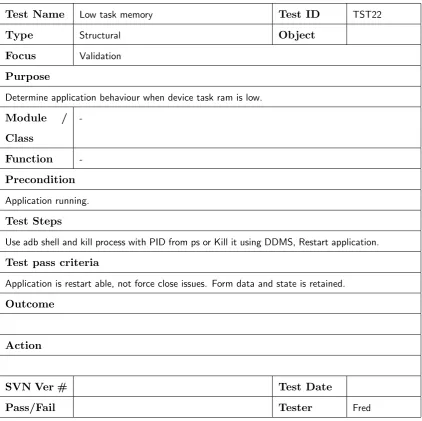
D.23 Structural Test Case TST22 - Low task memory
. . . 168
D.24 Structural Test Case TST23 - Low storage space . . . 169
D.25 Functional Test Case TFU24 - Interface portrait small form factor . . . . 170
D.26 Functional Test Case TFU25 - Interface landscape small form factor . . . 171
D.27 Functional Test Case TFU26 - Interface portrait large form factor
. . . . 172
D.28 Functional Test Case TFU27 - Interface landscape large form factor
. . . 173
D.29 Functional Test Case TFU28 - Input Method Editor . . . 174
D.30 Unit Test Case TUN29 - Correct operation of NullBooleanFieldHelper . . 175
D.31 Functional Test Case TFU30 - Device Compatibility Review . . . 176
D.32 Functional Test Case TFU31 - Android OS Compatibility Survey . . . 177
D.33 Functional Test Case TFU32 - Bluetooth keystroke capture . . . 178
D.34 Functional Test Case TFU33 - Keystroke utilised by user process. . . 179
D.35 Functional Test Case TFU34 - Test application executes on phone device. 180
D.37 Beta Test Case TBE36 - Application Upgrade . . . 182
D.38 System Test Case TSY37 - Heavy CPU Load . . . 183
D.39 Structural Test Case TST38 - Restart ability after forced termination. . . 184
D.40 System Test Case TSY39 - Connected Bluetooth Device turn off . . . 185
D.41 System Test Case TSY40 - Low battery behaviour . . . 186
D.42 System Test Case TSY41 - Standby behaviour
. . . 187
D.43 System Test Case TSY42 - Device configuration change . . . 188
D.44 System Test Case TSY43 - Other app turning Bluetooth off . . . 189
D.45 System Test Case TSY44 - Bluetooth device pairing. . . 190
D.46 Functional Test Case TFU45 - Responsiveness . . . 191
D.47 Functional Test Case TFU46 - Usability verification
. . . 192
Nomenclature
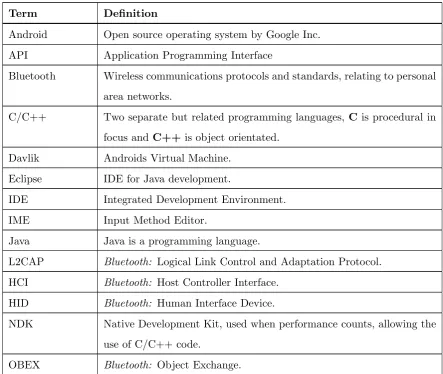
Table 1: Nomenclature
Term
Definition
Android
Open source operating system by Google Inc.
API
Application Programming Interface
Bluetooth
Wireless communications protocols and standards, relating to personal
area networks.
C/C++
Two separate but related programming languages,
C
is procedural in
focus and
C++
is object orientated.
Davlik
Androids Virtual Machine.
Eclipse
IDE for Java development.
IDE
Integrated Development Environment.
IME
Input Method Editor.
Java
Java is a programming language.
L2CAP
Bluetooth:
Logical Link Control and Adaptation Protocol.
HCI
Bluetooth:
Host Controller Interface.
HID
Bluetooth:
Human Interface Device.
NDK
Native Development Kit, used when performance counts, allowing the
use of C/C++ code.
OBEX
Bluetooth:
Object Exchange.
. . . continued
Term
Definition
OS
Operating System.
PAN
Bluetooth:
Personal Area Network.
QoS
Quality of Service.
RFCOMM
Bluetooth:
Radio frequency communications.
SDK
Software Development Kit.
SDP
Bluetooth:
Service Discovery Protocol.
SQL
Structured Query Language.
SQLite
the SQL database that is available on all Android devices.
1SVN
Subversion, a version control system for electronic files.
TCP/IP
Transmission Control Protocol/Internet Protocol.
thread
A separate task belonging to a process that executes independently of
the process and other tasks and is OS Managed.
USB
Universal Serial Bus.
UUID
Bluetooth:
Universally Unique Identifier.
VM
Virtual Machine.
WAP
Bluetooth:
Wireless Access Protocol.
XML
Extensible Mark-up Language.
Chapter 1
Introduction
Android Device
ESC F1 F2 F3 F4 F5 F6 F7 F8 F9 F10 F11 F12 { [ }
] x
!
1 @ 2 # 3 4$ % 5 ^ 6 7& * 8 ( 9 ) 0 _ - DEL Q W E R T Y U I O P +
= | \ tab
caps lock A S D F G H J K L : enter ; shift Z X C V B N M <
, > . ? / shift " ' ctrl alt ~ ` alt ctrl fn
Always Blue Ready User Application
U
Visual Wireless (Bluetooth) API Functions TactileFigure 1.1: Projects role in the user feedback loop.
This dissertation documents
pro-gress of the project Human Interface
Device (HID) keyboard application
for Android, the projects purpose is
to allow the user to input typed data
wirelessly through a physical
key-board for use in Android applications
using Bluetooth as the wireless
pro-tocol. This feedback relationship is
depicted in Figure 1.1.
Modern portable computing devices
such as smart-phones and tablets
rarely feature a hardware keyboard, including many versions of the Android operating
system. The users current solution for data input is to use various on screen keyboards
similar to the one depicted in Figure 1.3a (on Page 4), this places limitations on the
one of a handful of third party add-on software.
The project has been named Always Blue Ready and it’s application icon is depicted in
Figure 1.2a. This project will improve usability of Android mobile phones and tablets.
This improvement will be realised through providing an additional user data input path,
through the integration of Bluetooth keyboards such as the one depicted
1in Figure 1.2b.
(a) Application icon.
(b) Typical portable Bluetooth keyboard.
Figure 1.2: Application icon and Typical Bluetooth keyboard.
This is to be accomplished through a software solution bridging the missing link between
the operating systems native Bluetooth support and the operating systems Input Method
Editor (IME) system, through the implementation of the HID layer. Factors contributing
to the lack of Bluetooth keyboard support include:
1. Early Android devices are missing the HID portion of the Bluetooth protocol stack.
2. Some manufactures tamper with the stock Bluetooth protocol stack (likely to
re-duce complexity), thereby breaking functionality.
3. Immaturity of the Android Bluetooth protocol stack, as is evidenced when viewing
early android operating system source code.
The user encounters great difficulty using a Bluetooth keyboard when their device is
impacted by the issues mentioned above. Use of third party software can provide a
solution. Despite the fact that most Bluetooth enabled Android devices include the
3
ability to discover and pair with Bluetooth keyboards, effected devices are unable to
natively maintain a connection with the paired keyboard and are unable to receive user
input.
Current software attempting to fill this gap, and available on the android market place
is either:
1. Too expensive
2.
2. Does not work reliably.
3. Frequently crashes (force close).
4. Suffers from keying input faults (wrong key mappings).
5. Requires hacking the phone to gain root access.
The author recently discovered that more modern versions
3of the Android operating
system can now connect with Bluetooth keyboards. This project is not made redundant
by this discovery, due to the opportunity to exploit gaps in functionality between existing
solutions and Androids new native support.
The projects goal is to transition the users experience from using the stock input method
as depicted in Figure 1.3a to the scenario depicted in Figure 1.3b.
Benefits for the end user from the implementation of this project will include:
1. Significant improvement in user typing speed.
2. Valuable screen real estate returned to the applications interface.
3. Improve user ergonomics of phones and tablets.
2
BlueInput (
http://www.teksoftco.com/
) is sold for
¿
9.99 EUR =
$
12.51 AUD (as at 11th October
2012).
(a) Example of a standard Input Method
Ed-itor (IME).
(b) Using a Bluetooth keyboard to enter text.
1.1 Overview of the Dissertation
5
1.1
Overview of the Dissertation
This dissertation is organised as follows:
Chapter 2 - Literature Review and Bluetooth Keyboard Software Review
reviews
the literature available relating to key technologies utilised, as well as a review of
existing solutions. (p. 7)
Chapter 3 - Application Design
discusses the application design. (p. 17)
Chapter 4 - Android Applications
introduces the development process for the
an-droid platform, discusses the basic structure of anan-droid applications and includes
a discussion relating to the history of the Android operating system. (p. 35)
Chapter 5 - Bluetooth
details the relevant parts of the Bluetooth protocol stack.
(p. 47)
Chapter 6 - Application Testing
details the projects testing activities and
method-ology. (p. 55)
Chapter 7 - Conclusions and Further Work
provides details relating to work
com-pleted, conclusions for the project and details further work. (p. 65)
Appendix A - Project Specification
is the project specification. (p. 73)
Appendix B - Subversion Change Log
contains the subversion message log for the
source code branch of the project. (p. 75)
Appendix C - Application Source Code
contains the entire project source code
current to 30th December 2012. (p. 89)
Chapter 2
Literature Review and Bluetooth
Keyboard Software Review
This chapter discusses the following key concepts.
1. A review of the available literature.
2. Comparison of existing third party solutions.
2.1
Literature Review
This project will need to utilise the following key resources:
1. Bluetooth resources are required because the project is dependant on the wireless
communications channel that the keyboard data is transported through.
2. USB-HID will be required because the Bluetooth encapsulated keyboard data will
be encoded with this standard.
coding standards that are required to develop Android applications.
A review of available literature from
http://scholar.google.com/
, The USQ
Lib-rary (Including Electronic Resources and Standards), Internet Google Keyword search,
Ipswich Public Library and Amazon Books reveals that there are many resources
avail-able discussing individual aspects, but no single resource that encompass the breadth of
topics that this project will require, especially in sufficient detail.
An overview of the suitable literature identified to date follows:
2.1.1
Bluetooth
Bluetooth is a group of standards and specifications that are maintained by the Bluetooth
SIG (Bluetooth SIG 2012
a
). Members of the Bluetooth SIG have access to these
spe-cifications. These standards and specifications contain detailed technical information
including Bluetooth protocols, data formats and device profiles
1. The Bluetooth HID
encapsulates the USB-HID specification. Most of the readily available textbooks
dis-cussing Bluetooth are antiquated; authors such as Huang (2007), Kumar et al (2004)
and Hopkins (2003) discuss Bluetooth at various conceptual levels, then progress to
spe-cific implementations that do not at all resemble the Android Bluetooth API. These
resources are useful only in providing grounding in the concepts involved with Bluetooth
connectivity. Specific examples of Android Bluetooth applications are published on the
The official site for Android developers.
(Google Inc. 2012) website, however they are
just examples of Peer to Peer applications over RFCOMM connections, typically chat
oriented and documentation is limited to a description of the example as implemented.
This resource is useful for informing best coding practice and style. Most general
An-droid programming books such as Darcey (2011) and Steele (2011) are limited in their
1
Bluetooth profiles include Human Interface Device (HID) and Service Discovery application Profile
2.1 Literature Review
9
discussion of Bluetooth programming.
2.1.2
Universal Serial Bus - Human Interface Device (USB-HID)
Traditionally keyboards are physically connected to their host, most modern keyboards
of this nature connect through the USB interface, and
www.usb.org Web site
(USB
Imple-menters Forum, Inc 2012
b
) maintain and publish the USB-HID specification(Universal
Serial Bus (USB) 2012) which details the protocols and data formats that hosts
2and
keyboards implement to ensure interoperability is maintained.
2.1.3
Android Programming
The most accurate and up to date information on Android programming is published
through the
The official site for Android developers.
(Google Inc. 2012) website,
in-cluding technical articles, API reference and example applications. Many printed texts
discussing Android programming exist, most follow similar patterns:
1. Introducing Android.
2. Explaining the Android architecture.
3. User Interface Design.
4. Discussing the messaging system called Intents.
5. Introduction to common API’s.
6. Data storage and services.
7. Threading.
8. Services.
9. Application Publication.
2
Hosts refers to Software and Hardware that is responsible for communicating with the connected
This is often accomplished through the development of an example application. Often
it is an application derived from some pre-existing example published elsewhere in the
public domain. Some of the better quality texts include
Android Wireless Application
Development
(Darcey & Conder 2011),
Beginning Android 4
(Murphy 2011),
Beginning
Android 4
(Allen 2012),
Beginning Android Application Development
(Lee 2012) and
The
Android Developers Cookbook
(Steele & To 2011).
2.1.4
Software Testing
Many books relating to testing exist, the primary resource utilised for this project is
Software Engineering and Testing an introduction.
(Agarwal, Tayal & Gupta 2008).
This book is presented in two parts, the first part is generally testing focused coverage
includes the topics:
1. Software life-cycle.
2. Quality.
3. System design.
4. Software testing.
The second part focuses on languages such as visual basic which is not relevant to this
project.
Other resources include
The Art of software testing
(Myers, Badgett, Thomas & Sandler
2004), this book provides an introduction to software testing principles, including:
1. The concept of ”human testing”, which is equivalent to white box testing.
2. Test case design.
3. Unit testing.
4. High order testing.
2.1 Literature Review
11
The text
principles of software testing.
(Burnstein 2003) Includes coverage of the following
topics:
1. An introduction to testing as part of software engineering.
2. Introduction to testing fundamentals.
3. And then begins discussing defects, including defects in specifications and
require-ments.
4. Defects in design.
5. Coding defects.
2.2
Bluetooth Keyboard Software Reviews
A competitive review of existing solutions has been completed; the results are tabulated
in Table 2.1 on page 13. It is the intention to develop a solution that exploits gaps
in functionality, cost and ease of use compared to the solutions that currently exist.
Table 2.1, Table 2.2 and Table 2.3 beginning on page 13 summarises some of the reviewed
characteristics for the competitive applications, some of these characteristics deserve
further explanation:
Permissions required
refers to Android Application permissions that are requested
from the user at time of install, without these permissions the application could
not function and cannot be installed, undeclared application permissions will cause
the operating system to refuse successful execution of the privileged functions.
Permissions also effect the users psychological level of trust in the application and
can have a negative impact on user acceptance, especially if out of place permissions
are not justified to the user.
Target OS
refers to the supported API level as described in Table 4.2 - Android
Ver-sions on page 45.
2.2 Bluetooth Keyboard Software Reviews
13
Table 2.1: Existing 3rd Party Solution Review
Product Name
BlueInput
BlueKeyboardJP
Bluetooth Keyboard
Easy Connect
Cost
¿
9.99
Free (+Adds)
Free
$
2.00 (-Adds)
Needs Root Access
No
No
Yes
Target OS
7
7
8
App Size (MB)
0.304
4.5
0.43
Average User Rating
2.9
3.2
3.3
(Stars)
Downloads
10 to 50
50 to 100
50 to 100
(x1000, thousands)
5 Stars
57
200
97
1 Star
73
176
70
5Star
1Star
Ratio
0.781
1.136
1.386
Votes
184
636
240
Works on
231st time Yes
No
available hardware?
2nd time No
Permissions Required
ACCESS COARSE LOCATION
-
yes
-ACCESS FINE LOCATION
-
yes
-BIND DEVICE ADMIN
-
-
yes
BIND INPUT METHOD
yes
-
-BLUETOOTH
yes
yes
yes
BLUETOOTH ADMIN
yes
yes
yes
INTERNET
yes
yes
-RECEIVE BOOT COMPLETED
-
-
yes
SET ACTIVITY WATCHER
-
-
yes
VIBRATE
-
yes
Table 2.2: Existing 3rd Party Solution Developer URL’s
Product Name
Developer URL
BlueInput
http://www.teksoftco.com
BlueKeyboardJP
http://blog.elbra.in
Bluetooth
Keyboard
Easy Connect
http://forum.xda-developers.com/showthread.php?t=
925474
Table 2.3: Existing 3rd Party Solution Comments and Observations
Product Name
Comments and Observations
BlueInput
Too expensive, users complain of poor customer service.
BlueKeyboardJP
Low reliability, key stroke errors, privacy concerns (location
permissions).
Bluetooth
Keyboard
Easy Connect
Immature application and requires device to be hacked for
2.3 Chapter Summary
15
2.3
Chapter Summary
This chapter discussed the following concepts:
1. Detailed the literature review relating to relevant project topics.
(a) Discussion relating to Bluetooth literature, including published standards and
specifications.
(b) Android programming resources.
(c) The Universal Serial Bus - Human Interface Device (USB-HID) specifications
and standards.
(d) Testing literature review.
Chapter 3
Application Design
This chapter discusses the intended design of the final application, including a breakdown
of the major elements, key concepts are:
1. Application structure.
2. State based machine.
3. Utilisation of the Android native database
4. Input Method Editor (IME).
5. User interface
6. Threads and long running operations.
3.1
Application Structure
The general architecture of the application is represented by Figure 3.1 - Application
block diagram. The application is required to utilise the Bluetooth API to interface
with the external input device, in this case a Keyboard. The application is required to
Bluetooth Keyboard
Indicators
Key Strokes
Human Interface
Device
Always Blue Ready [Core logic] Input Method
Editor
Android API’s Blue Tooth
API
Andro
id
Dev
ic
e
Service (Potential for Mouse Keyboard
Support)
Interface Configuration & Tutorial Interface
Persistent Storage Misc. Modules
e.g. Auto Completion
User
System Services
User Dictionary, Contacts Internet, etc.
Figure 3.1: Application block diagram.
1. Searching for Bluetooth devices.
2. Interrogating devices to determine if the device offers HID services.
3. If not yet paired, pairing to the selected device.
4. Connecting to the keyboard.
Once a connection is established the application will decode keystrokes received using
the HID protocol described in
HID Information
and
Human Interface Device Profile
(HID)
(USB Implementers Forum, Inc. 2012
a
, Bluetooth SIG 2012
c
) and inject them
into the operating systems keystroke queue. The application will require an interface
to allow the user to manage and configure the external Bluetooth devices and view the
application tutorial.
3.2
Broad Aims
Broadly the application must satisfy a few other generic constraints. Due to their generic
3.3 Specific Requirements
19
3.2.1
Small Memory Footprint
Resources in mobile devices are at a premium, smaller applications have a number of
significant benefits.
1. Less likely to be killed off by Android resource management.
2. Greater user acceptance.
3. Faster user downloads.
The application memory footprint will be compared to alternative solutions to ensure
that the project is not worse than competing solutions. Additionally the application
behaviour will be tested in simulated low memory conditions.
3.2.2
Robust and Reliable
The application should be designed to be forgiving of varied hardware, unexpected user
use patterns and unexpected situations. This means a greater level of in code error
checking, leading to improved recovery back to the normal application state, as well as
an in application tutorial to assist the user to quickly synchronise their attempted use
with the applications designed usage patterns. The final quality will be further enhanced
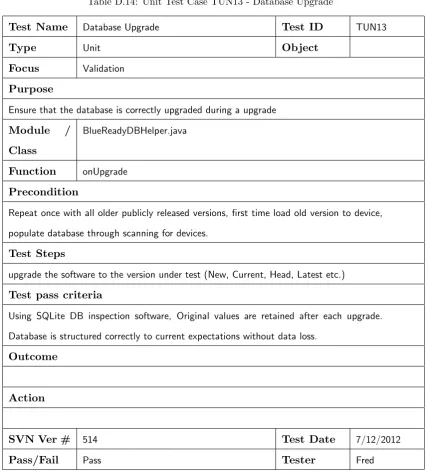
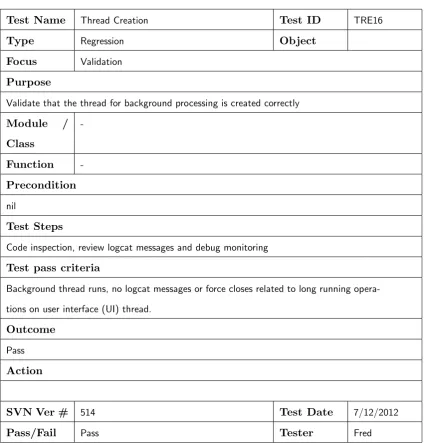
through undertaking various testing methods, with varied hardware combinations.
Suc-cess in this criterion will be measured through user Beta testing.
3.3
Specific Requirements
These requirements are mandatory for the Application before it can be published to the
Android market place. The application must:
2. Be required to decode keystrokes and make them available for the operating system.
3. Improve the usability of Android devices through the use of the external Bluetooth
keyboard.
4. Must strive to protect user data, or at least inform the user of potential risks.
3.4
Time Permitting
These goals are desirable features that add value, but in themselves are not critical to
the end user experience, they may be considered future design goals.
3.4.1
Predictive Text
Accelerate users typing efforts by using predictive text for use in auto completion hints.
This could be facilitated with a combination of the following methods:
1. Dictionary.
2. User Dictionary.
3. Learning.
4. Calender.
5. Contacts.
3.4.2
Active Battery Management
Unfortunately the very act of using Bluetooth will result in a reduction in the duration
the host device is able to remain functioning correctly. By making the application aware
of the systems battery state there is an opportunity to modify the applications behaviour
3.5 Test Application
21
3.5
Test Application
A test application is designed to act as a proof of concept to confirm technical viability.
In addition this test application serves to build key skills, learn specific coding methods,
gain knowledge of system issues and provide a testing framework to interrogate and
interact with external keyboards. The intention is to use reusable coding to allow an
acceleration of the final application to be realised. An example of an issue identified
(a) Typical force close error message.
(b) Open spinner drop down box.
Figure 3.2: Examples of issues encountered.
relates to long running tasks not being permitted to execute in the User Interface process
thread, doing so will result in a
force close
error message as depicted in Figure 3.2a.
does have a side effect, as the thread is not permitted to update the user interface,
this results in a requirement to pass messages between the user interface and the long
running thread. Figure 3.3a and Figure 3.3b depict recent screenshots from the current
test application.
(a) Main application dialogue after selecting a
keyboard in the spinner.
(b) The testing screen for the display of
key-stroke data.
Figure 3.3: Application dialogues.
Another issue that consumed significant time is the design of the Android spinner form
element, the Figure 3.2b - Open spinner drop down box. This figure depicts four
3.6 Final Application
23
XML file and is processed by the Android framework, if the design of the entry contains
a
clickable=true
property as depicted in Listing 3.1 on line 13. The presence of this
property prevents the ability to select any entry.
Listing 3.1: Defective spinner entry due to
clickable
element
1 <?xml version=” 1 . 0 ” e n c o d i n g=” u t f−8”?>2 <R e l a t i v e L a y o u t x m l n s : a n d r o i d=” h t t p : // schemas . a n d r o i d . com/ apk / r e s / a n d r o i d ” 3 x m l n s : t o o l s=” h t t p : // schemas . a n d r o i d . com/ t o o l s ”
4 a n d r o i d : l a y o u t w i d t h=” f i l l p a r e n t ” 5 a n d r o i d : l a y o u t h e i g h t=” f i l l p a r e n t ” 6 t o o l s : c o n t e x t=” . T e s t A c t i v i t y ” >
9 <T o g g l e B u t t o n
10 a n d r o i d : i d=”@+i d / o n A i r I n d i c a t o r ” 11 a n d r o i d : l a y o u t w i d t h=” w r a p c o n t e n t ” 12 a n d r o i d : l a y o u t h e i g h t=” w r a p c o n t e n t ” 13 a n d r o i d : c l i c k a b l e=” t r u e ”
14 a n d r o i d : t e x t O f f=”@+i d / O f f ” 15 a n d r o i d : t e x t O n=”@+i d /On” />
18 <TextView
19 a n d r o i d : i d=”@+i d / deviceName ”
20 a n d r o i d : l a y o u t w i d t h=” w r a p c o n t e n t ” 21 a n d r o i d : l a y o u t h e i g h t=” w r a p c o n t e n t ” 22 a n d r o i d : l a y o u t a l i g n P a r e n t L e f t=” t r u e ” 23 a n d r o i d : l a y o u t a l i g n P a r e n t R i g h t=” t r u e ” 24 a n d r o i d : l a y o u t b e l o w=”@+i d / o n A i r I n d i c a t o r ” 25 a n d r o i d : t e x t=” @ s t r i n g /KeyboardName”
26 a n d r o i d : t e x t A p p e a r a n c e=” ? a n d r o i d : a t t r / textAppearanceMedium ” 27 a n d r o i d : t e x t C o l o r=” @drawable / g r e y ” />
30 <TextView
31 a n d r o i d : i d=”@+i d / d e v i c e A d d r e s s ” 32 a n d r o i d : l a y o u t w i d t h=” w r a p c o n t e n t ” 33 a n d r o i d : l a y o u t h e i g h t=” w r a p c o n t e n t ” 34 a n d r o i d : l a y o u t a l i g n P a r e n t R i g h t=” t r u e ” 35 a n d r o i d : l a y o u t a l i g n P a r e n t T o p=” t r u e ”
36 a n d r o i d : l a y o u t t o R i g h t O f=”@+i d / o n A i r I n d i c a t o r ” 37 a n d r o i d : t e x t=” @ s t r i n g / KeyboardAddress ”
38 a n d r o i d : t e x t A p p e a r a n c e=” ? a n d r o i d : a t t r / t e x t A p p e a r a n c e S m a l l ” 39 a n d r o i d : t e x t C o l o r=” @drawable / r e d ” />
41 </ R e l a t i v e L a y o u t>
The final definition of this entry is defined in Appendix C - Application Source Code in
Listing C.15 on page 141
Development of the test application will finalise once reliable Bluetooth connection to a
keyboard can be maintained, displaying input key codes in a log window. Reaching this
(a) Application icon.
(b) Collection of typical application icons.
Figure 3.4: Application icons.
3.6
Final Application
The final distributable application will be developed after development of the test
ap-plication concludes. This will incorporate lessons learned from the test apap-plication and
reuse source code from the test application. The application will be installable and
ex-ecutable just like any other application the user may have installed, the application icon
as depicted in Figure 3.4a will be available on the users home screen and may appear
similar as depicted in Figure 3.4b.
Table 4.2 on page 45 identifies that at the time of writing 98.8% of devices support the
3.7 State Based Machine
25
a technical limitation is encountered that can be resolved by lifting the minimum target
to 8 then the reduction of the potential market share to 92.2% is tolerable.
3.7
State Based Machine
INACTIVE
RADIO_ON
DESTROY
NO_RADIO
SEARCHING
PAIRING
CONNECTING
CONNECTED
DISCONNECTING
DISCONNECTED
STANDBY
ENABLE_RADIO
RESTORE_RADIO
Figure 3.5: State diagram.
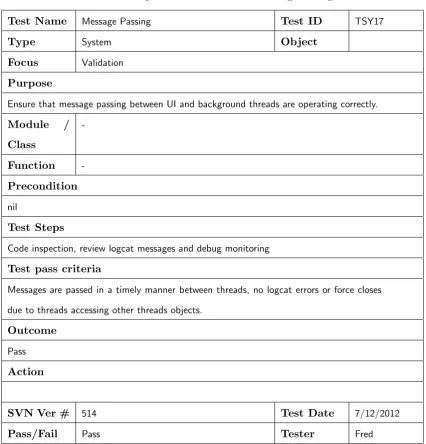
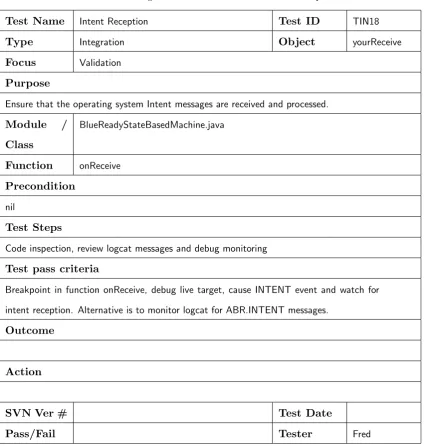
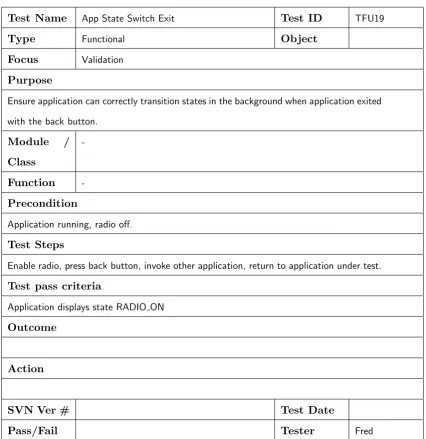
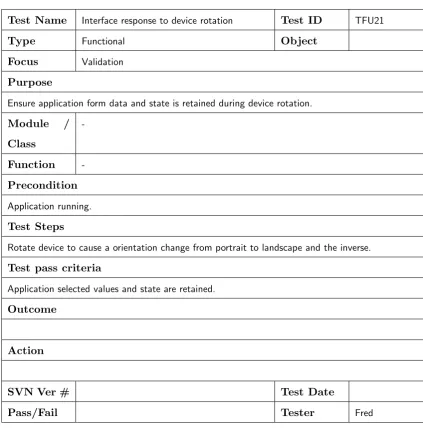
The application is based on a finite state based machine, the current design of this
state based machine is depicted in Figure 3.5 and tabulated in Table 3.1. The State
Based Machine is implemented in the file BlueReadyStateBasedMachine.java, this class
maintains a state lookup table for selecting the next logical state. This next logical
state is referred to as the transition state. The State Based Machine maintains a
current
and
target
state variable defined by an enumeration of the valid system states. The
applications background thread calls the state based machines process() function once
per iteration. This allows the state based machine to perform long running operations,
The purpose of process() function is two fold:
1. To initiate transitions between states through a call to the transition() function.
2. Process state based logic.
The first task is to compare the CurrentState to the TargetState variable, if they do not
match, the state transition() function is executed which returns true upon a successful
transition. The process() function is also designed to process small state based tasks each
iteration. The transition() function searches the state transition table using current and
target states as a composite key, if a matching entry is located and it is enabled the
current state is changed to the transition state. If no entry is located a direct transition
will be assumed.
Some state transitions will be user initiated and others transition automatically based
on system events or logical transitions.
The implementation of the applications State Based Machine is documented in
Ap-pendix C - Application Source Code, Listing C.10 - State Based Machine Implementation
3.7 State Based Machine
27
Table 3.1: State Transition Table, part (a)
TRANSITION STATE
Target State
INACTIVE RADIO ON SEARCHING PAIRING
Curren
t
State
INACTIVE INACTIVE ENABLE RADIO ENABLE RADIO ENABLE RADIO
RADIO ON RESTORE RADIO RADIO ON SEARCHING SEARCHING
SEARCHING RADIO ON RADIO ON SEARCHING PAIRING
PAIRING RADIO ON RADIO ON RADIO ON PAIRING
CONNECTING RADIO ON RADIO ON RADIO ON RADIO ON
CONNECTED DISCONNECTING DISCONNECTING DISCONNECTING DISCONNECTING
DISCONNECTING DISCONNECTED DISCONNECTED DISCONNECTED DISCONNECTED
DISCONNECTED RADIO ON RADIO ON RADIO ON RADIO ON
DESTROY
NO RADIO
STANDBY CONNECTED CONNECTED CONNECTED CONNECTED
ENABLE RADIO RADIO ON RADIO ON RADIO ON RADIO ON
RESTORE RADIO INACTIVE INACTIVE INACTIVE INACTIVE
TRANSITION STATE
Target State
CONNECTING CONNECTED DISCONNECTING DISCONNECTED
Curren
t
State
INACTIVE ENABLE RADIO ENABLE RADIO ENABLE RADIO ENABLE RADIO
RADIO ON CONNECTING CONNECTING CONNECTING CONNECTING
SEARCHING PAIRING PAIRING PAIRING PAIRING
PAIRING CONNECTING CONNECTING RADIO ON RADIO ON
CONNECTING CONNECTING CONNECTED CONNECTED CONNECTED
CONNECTED DISCONNECTING CONNECTED DISCONNECTING DISCONNECTING
DISCONNECTING DISCONNECTED DISCONNECTED DISCONNECTING DISCONNECTED
DISCONNECTED RADIO ON RADIO ON RADIO ON DISCONNECTED
DESTROY
NO RADIO
STANDBY CONNECTED CONNECTED CONNECTED CONNECTED
ENABLE RADIO RADIO ON RADIO ON RADIO ON RADIO ON
Table 3.2: State Transition Table, part (b)
TRANSITION STATE
Target State
DESTROY NO RADIO STANDBY ENABLE RADIO
Curren
t
State
INACTIVE DESTROY NO RADIO ENABLE RADIO ENABLE RADIO
RADIO ON RESTORE RADIO RESTORE RADIO CONNECTING RESTORE RADIO
SEARCHING RADIO ON RADIO ON PAIRING RADIO ON
PAIRING RADIO ON RADIO ON CONNECTING RADIO ON
CONNECTING RADIO ON RADIO ON CONNECTED RADIO ON
CONNECTED DISCONNECTING DISCONNECTING STANDBY DISCONNECTING
DISCONNECTING DISCONNECTED DISCONNECTED DISCONNECTED DISCONNECTED
DISCONNECTED RADIO ON RADIO ON RADIO ON RADIO ON
DESTROY DESTROY
NO RADIO DESTROY NO RADIO
STANDBY CONNECTED CONNECTED STANDBY CONNECTED
ENABLE RADIO RADIO ON RADIO ON RADIO ON ENABLE RADIO
RESTORE RADIO INACTIVE INACTIVE INACTIVE INACTIVE
TRANSITION STATE
Target State
RESTORE RADIO
Curren
t
State
INACTIVE ENABLE RADIO
RADIO ON RESTORE RADIO
SEARCHING RADIO ON
PAIRING RADIO ON
CONNECTING RADIO ON
CONNECTED DISCONNECTING
DISCONNECTING DISCONNECTED
DISCONNECTED RADIO ON
DESTROY
NO RADIO
STANDBY CONNECTED
ENABLE RADIO RADIO ON
3.8 Database
29
3.8
Database
The application utilises Androids native support for the SQLite database for the
long-term storage of Bluetooth device information, including:
1. Device MAC address.
2. Device human readable name.
3. Timestamps.
4. Various flags.
This allows the applications form fields such as the device selection spinner to
popu-late directly from the database adapter. Additionally the application gains access to
Bluetooth device data from previous executions, before the Bluetooth radio is enabled,
3.9
Input Method Editor (IME)
Android devices use a system called the Input Method Editor (IME) to receive user typed
information, typically this is displayed as an on-screen keyboard similar to Figure 3.6b
InputMethodService stops onDestroy() onFinishInput() Detect the current input method
subtype has been changed
onCurrentInputMethodSubtypeChanged()
Start of text input Move to another field InputMethodManager#
getCurrentInputMethodSubtype() Current input method subtype is applied to the text input
onStartInputView() onCreateCandidateViews()
onCreateInputView() onCreate() InputMethodService starts
(a) Input method editor life-cycle(android.com
2012
c
).
(b) A typical Input Method Editor (IME).
Figure 3.6: Android IME life-cycle and An example of a typical IME.
Figure 3.6a details the typical life cycle of the IME. The application will require further
3.10 User Interface
31
technical issues encountered relating to Bluetooth HID communications.
3.10
User Interface
The final application will have the following user interfaces:
1. Application Tutorial.
2. Input Method Editor (IME).
3. Installation assistant to handle initial install tasks, including:
(a) Enable the IME.
(b) Selection of the IME as the default input method.
(c) Initial application configuration.
4. Configuration interface to enable the user to alter application settings such as:
(a) Bluetooth keyboard pairing and Keyboard selection.
(b) IME on-screen configuration and features.
(c) Keyboard key mapping editor.
(d) Dictionary selection.
5. Potentially a keyboard testing screen.
The Input Method Editor will automatically display whenever the Android operating
system requests it’s display.
The application initial configuration interface will display when the application is launched
through it’s application icon, until the initial configuration is completed successfully or
if the applications IME is no longer the default input method.
The application tutorial will automatically display whenever the application icon is
With the exception of the IME interface, all interfaces will be available through a tabbed
interface allowing the user to select other interfaces as desired.
3.11
Threads
Android is very strict about how much time a user interface process can consume during
blocking operations. If Android detects an Activity that is performing long running
operations within it’s user interface process, then it will cause the process to force close.
This is to ensure that the users interface remains responsive. The solution for an
ap-plication that must perform long running operations is offloading the processing to a
separate thread. The thread and the user interface process must communicate through
messaging systems.
The application is designed to invoke one thread to handle this situation, this threads
sole responsibility is to continually call the State Based Machines process() function,
3.12 Chapter Summary
33
3.12
Chapter Summary
This chapter discussed the following concepts:
1. The applications structure.
2. State Based Machine.
3. Utilisation of the Android native database
4. Input Method Editor (IME).
5. User interface
Chapter 4
Android Applications
This chapter discusses the following key concepts.
1. Development.
2. Android application structure.
3. Security model, application permissions.
4. Application life-cycle.
5. Android history.
4.1
Development
The software tools required for development on the Android platform are free. Google
requires developers to register for a developer account
1to publish applications to Googles
Market place.
1
Developer account registrations is currently at a cost of
$
25 USD,
The typical development path is through the installation of the Eclipse development
environment from the website
http://www.eclipse.org/
. This requires the Java
De-velopment Kit (JDK), version 6 is currently recommended from the following website
http://www.oracle.com/technetwork/java/javase/downloads/index.html
.
The next component is the Android SDK Tools, they may be downloaded from the
website
http://developer.android.com/sdk/index.html
.
Once both Eclipse and the Android SDK Tools are installed and up-to-date, the Android
SDK Tools are incorporated into the Eclipse IDE, this is accomplished through using
the
Install New Software
selection in the Help menu within the Eclipse IDE, then typing
the following website into the
work with
field
https://dl-ssl.google.com/android/
eclipse
.
The most accurate and up to date information on Android programming is published
through the
http://developer.android.com/
website, including more detailed
instruc-tions on setting up a development environment as well as technical articles, API reference
and example applications.
Many printed texts discussing Android programming exist, most follow similar patterns:
introducing Android, explaining the Android architecture, User Interface Design,
Dis-cussing Intents , introduce common API’s, Data storage services, threads, services and
application publication. This is often accompanied with the development of example
applications.
Some of the better quality texts include
Android Wireless Application Development
(Darcey & Conder 2011),
Beginning Android 4
(Murphy 2011),
Beginning Android 4
(Allen 2012),
Beginning Android Application Development
(Lee 2012) and
The Android
4.2 Application Structure
37
4.1.1
Application Debugging
There are a wide selection of application debugging options available to the developer.
The Android operating system maintains an application log file known as logcat, this is
where applications are able to silently write log messages to using the
Log
class, this file
may be inspected from the debug target device or from within the Eclipse IDE.
The Android SDK Tools include a virtual device emulator, this provides the developer
with a virtual android device where the application can be installed and tested. This
vir-tual device includes emulation of some of the typical device features including simulated
GPS, Camera (Via host system web-cam) and Audio.
The Eclipse IDE contains a
Debug
perspective where applications may be debugged
using virtual or real hardware over the Android SDK Tools, Android Debug
2facility.
This enables the developer to set breakpoints, single step through application source
code and inspect variables.
4.2
Application Structure
Android applications are compiled into machine byte code for interpretation by the
Davlik Virtual Machine (Ratabouil 2012, p. 59). Android applications can be either
de-veloped as Java, Native C/C++ or a hybrid of the two. Independent of the applications
source code origin, they result in the same compiled file for the user to install.
Applications are traditionally sourced and installed through the Android Market place
3,
although alternative markets and distribution methods exist.
2
The Android SDK Tools debug tool is known as adb.
3
The compiled file frequently referred to as the
Android Application
is in compressed
archive format and is a combination of the machine code
4and resources that the
applic-ation depends on, including the Applicapplic-ation Manifest
5, graphics, icons, native libraries
and data (Such as XML files). The resulting archive file is given an extension of
.APK
.
Androids Davlik Virtual Machine is based on the Java Virtual Machine (Darcey &
Conder 2011, p. 25).
4.3
Security and Permissions
Android is built upon a modified version of the Linux operating system, this allows
the operating system to act as the Hardware Abstraction Layer (Darcey & Conder
2011, p. 23), including services for processes management, memory allocation, network
resources, interprocess message services and security services.
Each android application runs in its own process with its own instance of the Davlik
Virtual Machine. Each application is segregated from others through the association
with a different user profile. This user profile is created by the operating system during
application installation (Darcey & Conder 2011, p. 25). This effectively sandboxes each
application and prevents each application from directly accessing other applications data.
Access to outside resources must occur through the systems defined API’s
6.
The application manifest is an XML format file that describes the application, including:
1. What services and activities the application offers.
2. The versions of the Android Operating system that the application was designed
for.
3. Any permissions the application requires to operate.
4
known as Dex format (Ratabouil 2012, p. 60)
5
The application Manifest is described in the Section 4.3 on page 38
6
4.4 Application Life-cycle
39
Table 4.1: Examples of Sensitive Information and Services
1.
GPS location data.
2.
Contact list data.
3.
File system access.
4.
Internet access.
(Lee 2012, Allen 2012, p. 30,p. 33)
Access to sensitive information and services such as the ones depicted in Table 4.1
-Examples of Sensitive Information and Services is guarded by the operating system
through the use of Androids permissions model. Applications request access to required
services by declaring them in the application manifest. The declared permissions the
application requires to call restricted API functions is requested from the user at the
time of application installation, a denial will prevent application installation. These
permissions are secured at runtime by the effected operating system API functions and
are validated when the sensitive information or service is accessed.
During the publication process the .APK file is signed with a self signed certificate that is
able to identify the applications developer(Darcey & Conder 2011, p. 601). The private
key is held
7by the applications developer (Darcey & Conder 2011, p. 26).
4.4
Application Life-cycle
When the application is invoked as an activity, the application receives notification that
various events are occurring. This occurs as the applications process state is managed
by the process manager. The large range of state methods exist to improve application
responsiveness (Darcey & Conder 2011, p. 75).
7
4.4.1
onCreate()
The applications first such event as depicted in Figure 4.1 as the onCreate() method,
this event is invoked when the application is first started (or has been restarted after
being killed for some reason
8), this is an opportunity for the application to initialise data
structures, configure forms and initiate other activities such as creating threads to handle
long running operations, if the application is restarting after a previous execution the
application is passed in a
Bundle
containing values stored by the previous applications
process instance
9(Allen 2012, p. 194).
Figure 4.1: Activity life-cycle.
108
Applications may be destroyed as the result of a device rotation, they are immediately restarted.
9
The Bundle’s values are saved when the Android operating system calls the onSaveInstanceState()
method.
10
4.4 Application Life-cycle
41
4.4.2
onStart()
The onStart() method is called when the application becomes visible either as the result
of being launched or returning to the foreground.
4.4.3
onResume()
onResume() is the final method to be called prior to the application returning to its
running state. It is an opportunity to restart suspended threads from the onPause()
method.
4.4.4
onPause()
This method is called when another application is coming to the foreground causing
the current application to become a background process. The application should release
access to any resources with exclusive access restrictions, such as the devices camera
(Allen 2012, Lee 2012, p. 195,p. 27). Because Android reserves the right to kill off
the process without further notice, this may be the only chance the application gets
to save data, therefore it is highly advised to save any uncommitted data (Darcey &
Conder 2011, p. 74).
4.4.5
onStop()
This function is called once the application is no longer visible.
Android does not
4.4.6
onDestroy()
Since Android may not call this method in low memory situations, the main focus for
this method is cleanly releasing resources.
4.4.7
onRestart()
This method will be called when the activity is becoming visible again after previously
losing visibility.
4.4.8
onRestoreInstanceState()
This method is called whenever the application is restated, allowing the application the
opportunity to restore application state and other simple values from the Bundle.
4.4.9
onSaveInstanceState()
This method is called whenever the application is destroyed and it is likely that the
activity will restart, giving the application the opportunity to Bundle state variables
and other simple values. The focus is on speed therefore no complicated processing may
occur. Complex data including handles to system resources such as connected sockets,
must be managed in alternative ways (Allen 2012, p. 196). One such method is the
4.5 System Messaging Through Intents
43
4.5
System Messaging Through Intents
Within the Android Operating System asynchronous messages may be passed between
Activities. When an Activity sends such a message it is called an Intent(Darcey &
Conder 2011, p. 69). Such a message is used when an Application wishes to utilise an
external process to perform some action, for example dialling a phone number or
display-ing a map. An Intent message object may contain additional application specific data.
When the intent is a Bluetooth discovery message, the additional application defined
information could contain the discovered Bluetooth devices MAC
11address. An
applic-ation may also register for notificapplic-ation of broadcast events by creating an IntentFilter
object and registering it with the operating system. In this way, applications may receive
notification of system events as they occur, for example battery status notification, file
download completion or the camera button was pushed(Lee 2012, p. 235). There are
many such notifications that can occur including Bluetooth notifications such as:
1. Device disconnection.
2. Device discovery.