i
PERFORMANCE OF RESILIENT BACKPROPAGATION ALGORITHM IN FACE
RECOGNITION
SUHADA BINTI MOHAMMED SAPARDI
This report is submitted in partial fulfillment of the requirements for the award of Bachelor of
Electronic Engineering (Computer Engineering) With Honours
Faculty of Electronic and Computer Engineering
Universiti Teknikal Malaysia Melaka
ii
UNIVERSTI TEKNIKAL MALAYSIA MELAKA
FAKULTI KEJURUTERAAN ELEKTRONIK DAN KEJURUTERAAN KOMPUTER
BORANG PENGESAHAN STATUS LAPORAN
PROJEK SARJANA MUDA II
Tajuk Projek : ………
Sesi Pengajian : ………
Saya ……….. (HURUF BESAR)
mengaku membenarkan Laporan Projek Sarjana Muda ini disimpan di Perpustakaan dengan syarat-syarat kegunaan seperti berikut:
1. Laporan adalah hakmilik Universiti Teknikal Malaysia Melaka.
2. Perpustakaan dibenarkan membuat salinan untuk tujuan pengajian sahaja.
3. Perpustakaan dibenarkan membuat salinan laporan ini sebagai bahan pertukaran antara
institusi pengajian tinggi.
4. Sila tandakan ( √ ) :
SULIT*
(Mengandungi maklumat yang berdarjah keselamatan atau kepentingan Malaysia seperti yang termaktub di dalam AKTA RAHSIA RASMI 1972)
TERHAD* (Mengandungi maklumat terhad yang telah ditentukan oleh organisasi/badan di mana penyelidikan dijalankan)
TIDAK TERHAD
Disahkan oleh:
__________________________ ___________________________________
iii
“I hereby declare that this report is the result of my own work except for quotes as cited
in the references.”
Signature :………..
Author :………..
iv
“I hereby declare that I have read this report and in my opinion this report is sufficient in
terms of the scope and quality for the award of Bachelor of Electronic Engineering
(Computer Engineering) With Honours.”
Signature :…..………..
Supervisor’s name :………
v
ACKNOWLEDGEMENT
Thank to God, because of the abundant mercy, I able to finishing this report for
the qualification of Bachelor of Electronic Engineering (Computer Engineering). I want
take this opportunity to express acknowledgement to all party that have helping me in
the time that I implement this final year project especially to my supervisor Madam
vi
ABSTRACT
Resilient Backpropagation is a learning heuristics for supervised learning in
artificial neural networks. It is simple batch mode training algorithm with fast
convergence and minimal storage requirements.
The problem in the recognition process is can not be done in few second because
its depends on many factors, including the complexity of the problem, the number of
data points in the training set, the number of weights and biases in the network, the error
goal, and whether the network is being used for pattern recognition (discriminant
analysis) or function approximation (regression).
The aim of this project is to analyse the performance of neural network in which
the algorithm of Resilient Backpropagation has been applied for the purpose of face
recognition. The objectives of the project are to use a built in algorithm using MatLab, to
analyze the performances of the algorithm in the face recognition system and to ensure
that the system is useable and user-friendly (GUI).
The Matlab has been chosen as programming software because it has an image
processing toolbox robot vision and neural network toolbox. The step by step was
followed from creating the programming in M-file, teaching and storing databases to the
system and make a performance testing using different of faces from same 10 people.
The outcome of this recognition process must be 90% and above the system can
vii
ABSTRAK
Resilient Backpropagation adalah cara yang paling mudah dalam latihan
algoritma dengan kelajuan tindakan dan minimum simpanan yang diperlukan.
Masalahnya di dalam proses pengecaman, ia tidak boleh siap dalam masa
beberapa saat kerana bergantung kepada banyak faktor seperti, kerumitan masalah
tersebut, bilangan perpuluhan data di dalam set latihan, bilangan berat di dalam
rangkaian, sasaran kesalahan dan apa rangkaian digunakan untuk pengecaman pola
(discriminant analysis) atau fungsi perkiraan (regression).
Tujuan projek ini adalah untuk menganalisis prestasi rangkaian neural dimana
algoritma Resilient Backpropagation telah digunakan untuk tujuan pengecaman muka.
Sasaran hasil projek ini ialah untuk menggunakan algoritma di dalam Matlab, untuk
menganalisis prestasi algoritma di dalam sistem pengecaman muka dan untuk pastikan
sistem tersebut mudah digunakan (GUI).
Matlab telah dipilih sebagai perisian program kerana adanya pemprosesan
gambar kotak visi robot dan rangkaian neural. Langkah demi langkah telah diikuti dari
ciptaan program dalam M-file, mengajar dan menyimpan data ke sistem dan membuat
prestasi cubaan menggunakan perbezaan muka daripada 10 orang yang sama.
Hasil daripada proses pengecaman ini ialah, ianya hendaklah 90% dan lebih
viii
CONTENTS
CHAPTER TITLE PAGE
TITLE OF PROJECT i
VERIFICATION FORM ii
CONFESSION iii
ACKNOWLEDGEMENT v
ABSTRACT vi
ABSTRAK vii
CONTENT viii
LIST OF TABLES xi
LIST OF FIGURES xii
I INTRODUCTION
1.1 Objectives of the project 1
1.2 Problem Learning 2
1.3 Scope of the project 2
1.4 Methodology 3
1.5 Project Planning 3
ix
II LITERATURE REVIEW 5
2.1 Neural Network 5
2.2 Image Processing Toolbox 10
2.2.1 Perform image processing, analysis 10
2.2.2 Working with Image Processing Toolbox 10
2.2.3 Importing and Exporting Images 11
2.2.4 Pre- and Post- Processing Images 11
2.2.5 Enhancing Images 12
2.2.6 Deblurring Images 13
2.2.7 Managing Device-Independent Color 13
2.2.8 Image Transforms 14
2.2.9 Image Conversions 14
2.2.10 Analyzing Images 14
2.2.11 Displaying and Exploring Images 16
2.2.12Spatial Transformations and Image Registration 17
2.3 Resilient Backpropagation 18
2.3.1 Description of Algorithm 20
2.4 Comparison Between Algorithm 21
2.4.1 Speed and Memory Comparison 21
2.4.1.1 SIN Data Set 22
2.4.1.2 PARITY Data Set 24
2.4.1.3 ENGINE Data Set 26
2.4.1.4 CANCER Data Set 28
2.4.1.5 CHOLESTEROL Data Set 30
x
III METHODOLOGY 35
3.1 Data Acquisition 37
3.2 Create Database 37
3.3 Write Program, training phase and testing phase 37
3.4 Analyze Data 37
IV RESULTS AND DISCUSSION 38
4.1 Source code 38
4.2 Graphical user interface (GUI) design 44
4.3 Output of the project 45
4.4 Discussion 53
4.4.1 Comparison between each algorithm 53
4.4.1.1 Performance for each algorithm 56
4.4.1.2 Training state for each algorithm 59
4.4.1.3 Regression for each algorithm 61
V CONCLUSION AND RECOMMENDATION 62
xi
LIST OF TABLES
NO TITLE PAGE
2.3.1 Description of Algorithm 20
2.4.1 Lists of Algorithms 21
2.4.1 Lists The Six Benchmark Problems and some Characteristics 22
2.4.1.1 SIN Data Set 23
2.4.1.2 PARITY Data Set 25
2.4.1.3 ENGINE Data Set 27
2.4.1.4 CANCER Data Set 29
2.4.1.5 CHOLESTEROL Data Set 31
xii
LIST OF FIGURES
NO TITLE PAGE
2.1 Block diagram of a two hidden layer multiplayer perceptron (MLP) 6
2.1 Network Learning to Model the Exclusive-or (Xor) Data 7
2.1 Demonstration of a Neural Network used within Optical Character
Recognition (OCR) Application
8
2.2.5 Enhancing Images 12
2.2.6 Deblurring Images 13
2.2.10 Analyzing Images 15
2.2.11 Displaying and Exploring Images and Video 16
1
CHAPTER 1
INTRODUCTION
This project will analyze the performance of Resilient Backpropagation
algorithm in face recognition where Resilient Backpropagation is a learning heuristics
for supervised learning in artificial neural networks. The task includes literature review,
simple programming including Matlab toolbox, simulation and analyze the performance
Resilient Backpropagation algorithm. In this chapter presents the objectives project,
problem learning, scope of the project and simple methodology.
1.1 Objective Project
These are the objectives of the project:
• To use a built in algorithm using MatLab
• To analyze the performances of the algorithm in the face recognition system.
2
1.2 Problem Learning
Nowadays, face recognition has become a popular area of research in computer
vision and one of the most successful applications of image analysis and understanding.
Because of the nature of the problem, not only computer science researchers are
interested in it, but neuroscientists and psychologists also. The other problem is the
recognition process can not be done in few second because its depends on many factors,
including the complexity of the problem, the number of data points in the training set,
the number of weights and biases in the network, the error goal, and whether the
network is being used for pattern recognition (discriminant analysis) or function
approximation (regression).
1.3 Scope of the project
The scope of this project was focused on using the neural network approach and
image processing. The Matlab has been chosen as programming software because it has
an image processing toolbox robot vision and neural network toolbox. The 10 different
pictures (face images) from 10 people were added to database and that have divided into
two categories which is 50 face images were used for training phase and other 50 face
images were used for testing phase (used as recognition). From the testing session we
3
1.4 Methodology
The procedure for this project was implementing the programming using Matlab
toolbox sets. The step by step was followed from creating the programming in M-file,
teaching and storing databases to the system and make a performance testing using
different of faces from same 10 people.
• Stage 1 : data acquisition
• Stage 2 : create database
• Stage 3 : write program
• Stage 4 : training phase for learning and collect data (performance)
• Stage 5 : testing phase for recognition and collect data (performance)
• Stage 6 : analyze data
1.5 Project Planning
This project is implemented base on the project planning schedule. The project
started from July 2008 to April 2009. The project planning schedule is presented in
Appendix A.
1.6 Thesis Outline
Chapter 1 presents an overview to Resilient Backpropagation algorithm, the
objective of the project, problem learning of the project, scope of the project, project
4
Chapter 2 covers the literature review on the neural network, image processing,
Resilient Backpropagation algorithm and comparison between algorithms.
Chapter 3 describes in details face recognition methodology which is has 6
stages: data acquisition stage, create database stage, write program stage, training phase
for learning and collect data stage, testing phase for recognition and collect data stage
and analyze data stage
Chapter 4 describes more about results and discussion. The result shows the
performance of Resilient Backpropagation in graphical user interface (GUI). The
recognition can detected 90% or above of testing image.
Chapter 5 is about conclusion and recommendation. In this chapter can conclude
that the objectives of this project were achieved were I able to used a built in algorithm
using Matlab, able to analyze the performance of the algorithm in the face recognition
5
CHAPTER II
LITERATURE REVIEW
The main objective of this chapter is to review the literature regarding the
concept of neural network approach, image processing toolbox, Resilient
Backpropagation algorithm and comparison between algorithms.
2.1 NEURAL NETWORK
A neural network is a powerful data modeling tool that is able to capture and
represent complex input/output relationships. The motivation for the development of
neural network technology stemmed from the desire to develop an artificial system that
could perform "intelligent" tasks similar to those performed by the human brain. Neural
networks resemble the human brain in the following two ways:
1. A neural network acquires knowledge through learning.
2. A neural network's knowledge is stored within inter-neuron connection strengths
known as synaptic weights.
The true power and advantage of neural networks lies in their ability to represent
6
directly from the data being modeled. Traditional linear models are simply inadequate
when it comes to modeling data that contains non-linear characteristics [1].
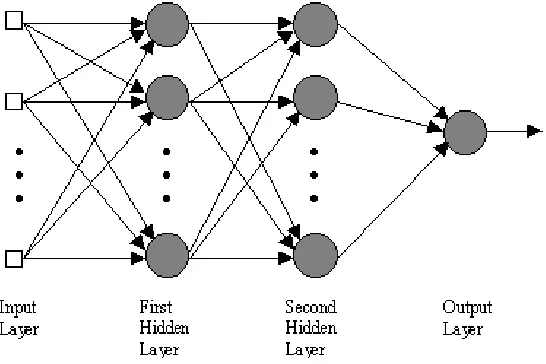
The most common neural network model is the multilayer perceptron (MLP). This
type of neural network is known as a supervised network because it requires a desired
output in order to learn. The goal of this type of network is to create a model that
correctly maps the input to the output using historical data so that the model can then be
used to produce the output when the desired output is unknown. A graphical
[image:18.595.182.455.273.455.2]representation of an MLP is shown below.
Figure 2.1 Block diagram of a two hidden layer multiplayer perceptron (MLP)
Block diagram of a two hidden layer multiplayer perceptron (MLP). The inputs are fed
into the input layer and get multiplied by interconnection weights as they are passed
from the input layer to the first hidden layer. Within the first hidden layer, they get
summed then processed by a nonlinear function (usually the hyperbolic tangent). As the
processed data leaves the first hidden layer, again it gets multiplied by interconnection
weights, then summed and processed by the second hidden layer. Finally the data is
multiplied by interconnection weights then processed one last time within the output
layer to produce the neural network output.
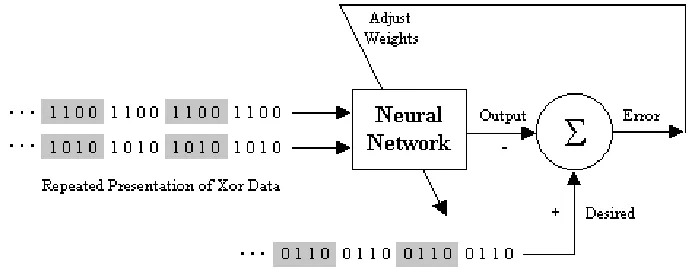
The MLP and many other neural networks learn using an algorithm called
7
neural network. With each presentation the output of the neural network is compared to
the desired output and an error is computed. This error is then fed back (backpropagated)
to the neural network and used to adjust the weights such that the error decreases with
each iteration and the neural model gets closer and closer to producing the desired
[image:19.595.144.491.207.341.2]output. This process is known as "training".
Figure 2.1 Neural Network Learning to Model the Exclusive-or (Xor) Data
Demonstration of a neural network learning to model the exclusive-or (Xor) data. The
Xor data is repeatedly presented to the neural network. With each presentation, the
error between the network output and the desired output is computed and fed back to the
neural network. The neural network uses this error to adjust its weights such that the
error will be decreased. This sequence of events is usually repeated until an acceptable
error has been reached or until the network no longer appears to be learning.
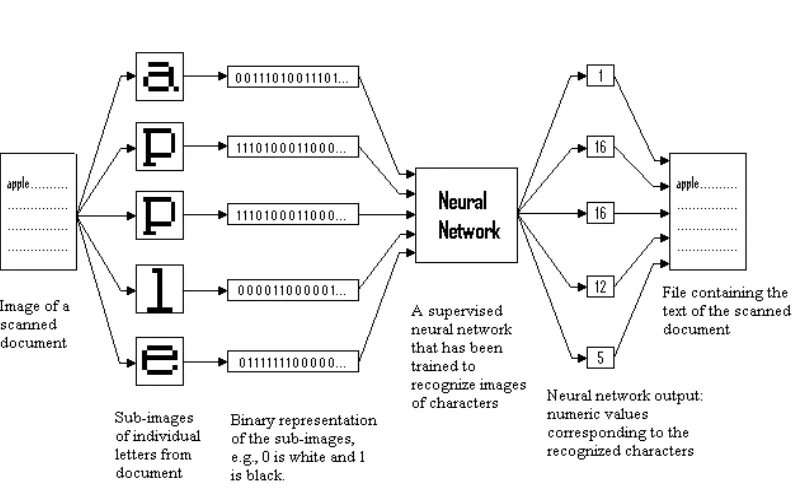
A good way to introduce the topic is to take a look at a typical application of
neural networks. Many of today's document scanners for the PC come with software that
performs a task known as optical character recognition (OCR). OCR software allows
you to scan in a printed document and then convert the scanned image into to an
electronic text format such as a Word document, enabling you to manipulate the text. In
order to perform this conversion the software must analyze each group of pixels (0's and
1's) that form a letter and produce a value that corresponds to that letter. Some of the
8
Figure 2.1 Demonstration of a Neural Network used within Optical Character
Recognition (OCR) Application
Demonstration of a neural network used within an optical character recognition (OCR)
application. The original document is scanned into the computer and saved as an image.
The OCR software breaks the image into sub-images, each containing a single
character. The sub-images are then translated from an image format into a binary
format, where each 0 and 1 represents an individual pixel of the sub-image. The binary
data is then fed into a neural network that has been trained to make the association
between the character image data and a numeric value that corresponds to the
character. The output from the neural network is then translated into ASCII text and
9
Of course character recognition is not the only problem that neural networks can
solve. Neural networks have been successfully applied to broad spectrum of
data-intensive applications, such as:
• Process Modeling and Control - Creating a neural network model for a physical plant then using that model to determine the best control settings for the
plant.
• Machine Diagnostics - Detect when a machine has failed so that the system can automatically shut down the machine when this occurs.
• Portfolio Management - Allocate the assets in a portfolio in a way that maximizes return and minimizes risk.
• Target Recognition - Military application which uses video and/or infrared image data to determine if an enemy target is present.
• Medical Diagnosis - Assisting doctors with their diagnosis by analyzing the reported symptoms and/or image data such as MRIs or X-rays.
• Credit Rating - Automatically assigning a company's or individuals credit rating based on their financial condition.
• Targeted Marketing - Finding the set of demographics which have the highest response rate for a particular marketing campaign.
• Voice Recognition - Transcribing spoken words into ASCII text.
• Financial Forecasting - Using the historical data of a security to predict the future movement of that security.
• Quality Control - Attaching a camera or sensor to the end of a production process to automatically inspect for defects.
• Intelligent Searching - An internet search engine that provides the most relevant content and banner ads based on the users' past behavior.
10
2.2 IMAGE PROCESSING TOOLBOX
Image Processing Toolbox™ 6.1
2.2.1 Perform image processing, analysis, and algorithm development
Image Processing Toolbox™ software provides a
comprehensive set of reference-standard algorithms and graphical
tools for image processing, analysis, visualization, and algorithm
development. You can restore noisy or degraded images, enhance
images for improved intelligibility, extract features, analyze shapes
and textures, and register two images. Most toolbox functions are written in the open
MATLAB® language, giving you the ability to inspect the algorithms, modify the
source code, and create your own custom functions [2].
Image Processing Toolbox supports engineers and scientists in areas such as
biometrics, remote sensing, surveillance, gene expression, microscopy, semiconductor
testing, image sensor design, color science, and materials science. It also facilitates the
learning and teaching of image processing techniques [3].
2.2.2 Working with Image Processing Toolbox
Image Processing Toolbox supports images generated by a wide range of
devices, including digital cameras, frame grabbers, satellite and airborne sensors,
medical imaging devices, microscopes, telescopes, and other scientific instruments. You
can visualize, analyze, and process these images in many data types, including single-
11
2.2.3 Importing and Exporting Images
There are several ways to import or export images into and out of the MATLAB
environment for processing. You can use Image Acquisition Toolbox (available
separately) to acquire live images from Web cameras, frame grabbers,
DCAM-compatible cameras, and other devices. Using Database Toolbox (also available
separately), you can access images stored in ODBC/JDBC-compliant databases.
MATLAB supports standard data and image formats, including JPEG, TIFF,
PNG, HDF, HDF-EOS, FITS, Microsoft Excel, ASCII, and binary files. It also supports
multiband image formats, such as LANDSAT. Low-level I/O functions enable you to
develop custom routines for working with any data format.
Image Processing Toolbox supports a number of specialized image file formats.
For medical images, it supports the DICOM file format, including associated metadata,
as well as the Analyze 7.5 and Interfile formats. The toolbox can also read geospatial
images in the NITF format and high dynamic range images in the HDR format.
2.2.4 Pre- and Post- Processing Images
Image Processing Toolbox provides reference-standard algorithms for pre- and
post-processing tasks that solve frequent system problems, such as interfering noise, low
dynamic range, out-of-focus optics, and the difference in color representation between
12
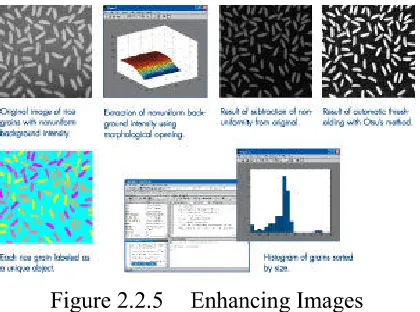
2.2.5 Enhancing Images
Image enhancement techniques in Image Processing Toolbox enable you to
increase the signal-to-noise ratio and accentuate image features by modifying the colors
or intensities of an image. You can:
• Perform histogram equalization
• Perform decorrelation stretching
• Remap the dynamic range
• Adjust the gamma value
• Perform linear, median, or adaptive filtering
The toolbox includes specialized filtering routines and a generalized
multidimensional filtering function that handles integer image types, multiple boundary
padding options, and convolution and correlation. Predefined filters and functions for
[image:24.595.215.425.476.632.2]designing and implementing your own linear filters are also provided.
Figure 2.2.5 Enhancing Images
A typical session using MATLAB and Image Processing Toolbox to perform connected