DEVELOPING BULLETIN BOARD VISUALISATIONS
Rehman Mohamed, John Ferguson, Alasdair Mac Cormick, David Elsweiler
Department of Computer & Information Sciences, University of Strathclyde26 Richmond Street, Glasgow, G1 1XH, Scotland, UK
[email protected], [email protected], [email protected], [email protected]
ABSTRACT
Prevalent text -based representations within online communities and bulletin boards often make it difficult to contextualise the activity and interactions that are taking place. Visualisation techniques have been successfully applied in a range of domains to augment and enhance existing communication technologies such as bulletin boards. This paper presents a new approach to visualising bulletin board activity: BulB. The use of BulB visualisations enables users to gain an overall picture of bulletin board activity and develop an understanding of the overall interaction context.
KEYWORDS
Bulletin Boards, Visualisation, Discussion Forums.
1.
INTRODUCTION
Online communities and interaction environments such as chat rooms and bulletin boards have become vastly popular and widespread. Users are now congregating online, interacting around common, purposeful and mutually beneficial interests. Despite this impetus for people to interact online, there is growing evidence that many online commu nities are failing to fulfil their purpose due to lack of involvement by members (Kim, 2000).
Although many online communities are supported through the use of communication services such as bulletin boards, chat rooms etc, there is also evidence that the provision of these facilities alone is insufficient to engender a sense of community: there are many examples of communities offering these facilities with little or no participation from users (Kim, 2000; Mohamed et al, 2002). Successful online communities need to be organised and adopted by the community; members must have a shared purpose and be willing to openly share information. They grow and thrive when members are able to fulfil that purpose and accomplish those goals that require other members to participate in the community (Ferguson et al, 2002).
A sense of community is normally associated with close interaction and shared co-presence, whereas the typical contact between user and a website is on the whole a solitary experience with limited visual clues indicating the presence of other participants and their activity. The work outlined in this paper is aimed at promoting and facilitating member communication within bulletin boards, whereby a feeling of co-presence akin to ‘face-to-face’ interaction is engendered.
This paper examines the case for the use of visualisation techniques as a driver for enhancing communication within bulletin boards. It then proceeds to review previous work on visualisations within the context of bulletin board support. The authors have been working on the development of a second generation visualisation tool, ‘BulB’, which embodies lessons learned from earlier work. An overview of BulB is given along with initial findings of the efficacy of the various BulB visualisations in a range of user trials.
2.
VISUALISATION TOOLS
(Donath, 2002). Furthermore, text -based representations tend to be unclear and require extensive user participation in order to gain a holistic view of the interaction environment and context. Given the widespread use of text -based online communities and bulletin boards, which make it difficult to contextualise the interactions that are taking place, prolonged membership is often required in order to identify the key or leading members within the community. Within text -based environments, the temporal development of conversations can also be difficult to identify. Therefore, there is a requirement for good facilitation techniques and social scaffolding to support online communication technology. Donath (1996) identifies three important areas in the design of software, aimed at supporting successful online communities: visualisation of social phenomena, the role of information spaces as contexts for communication, and the presentation of the user in the virtual world.
Visual representation of social phenomena is important in the design of successful software to support online communities (Donath, 2002). In the real world, individuals use social cues and information from other people in order to find their way and inform decisions. Social navigation cues are also valuable in the digital domain, with the movement of people around online communities , and the activity within chat rooms or bulletin boards helping to guide or inform decisions (Dieberger et al, 2000). A key challenge of information visualisation is inventing visual metaphors and developing new ways of manipulating existing metaphors to make sense of information (Eick, 2001). Social navigation cues are as valuable in online communities as they are in the real world. People require indicators that allow them to make decisions and interact (Dieberger et al, 2000). Within an online community, these indicators enable users to access and assess activities within different functional areas such as chat rooms, bulletin boards, etc.
Instruments that encourage greater contribution, raising levels of communication and feelings of kinship, will enable interaction and remove barriers that lead to lack of involvement and community stagnation. One such technique is the use of visualisations to augment and enhance existing communication technologies such as bulletin boards.
Visualisation tools have already been applied successfully to track and display, in a graphical format, the distribution of users on a web site (Minar and Donath, 2001). Much of the existing work is general in nature, whereas this paper applies similar concepts to visualising the activities of members within a community bulletin board. It is expected that the use of visualisation tools will enrich the user’s experience when using a bulletin board, and lead to benefits such as reinforcing the immediacy of the shared experience through the use of visual cues and indicators, thus enabling online community participation and sustainability.
3.
EXISTING VISUALISATION TECHNIQUES
There are a number of enhanced interfaces and visualisation techniques that are currently being used successfully to promote user interaction with the web. Examples include WebFan (Xiong and Brittain, 1999) and PeopleGarden (Xiong and Donath, 1999). WebFan visualises web-based bulletin board activity using a fan-like hierarchical structure, allowing web pages with multiple threads to be represented at the same time for overview and comparison purposes. Threads are incorporated into a fan-like structure, and lines on the fan change colour to depict that a given posting has been read.
While WebFan enables the user to gain an overview of postings and replies, it fails to include a range of elements which would be useful to potential users. Through looking at the visualisation, it is not possible to ascertain which users have posted which messages. Such a feature would be helpful to potential users in order to get an overall picture of posting patterns and of the most prolific users within the bulletin board. Furthermore, there is no indication of temporal thread development which would allow a user to see how long a thread has been active, the length of time between postings in a thread and the comparative timeline of each thread.
PeopleGarden uses a flower and garden metaphor to visualise user activity within a bulletin board. Each bulletin board participant is represented by a flower with the long plant-like stems depicting the length of time the user has been an active participant. Petals are used to signify each post that has been made with red signifying initial postings and blue for replies. Collections of flowers, or gardens, are used to depict the contributions and posting patterns of every participant within the bulletin board.
have been ongoing or the distribution of users across threads in the bulletin board. In addition, while visualisations such as PeopleGarden provide information about the activity of various individuals, they fail to convey the context in which this activity takes place; there is no visualisation of the overall social activity context. Although it may be useful to know the activity and level of contribution of various users, there is also a need to contextualise this information by visualising the activity of the group or community as a whole.
Babble (Erickson and Kellogg, 2000; Erickson et al, 2002) makes use of ‘social proxies’ to graphically represent users and their activities as a means of supporting long-term conversations within existing groups. Through making careful choices about which social cues to reveal or suppress, they designed several environments to support a range of various types of interaction. These visually-enabled environments allow users to draw inferences about current activity and consequently, shape the collective activity of the group. In one such environment, the “Timeline” social proxy is used to support asynchronous conversations, leaving traces when users log in and when they contribute to conversations. While not applied directly to a bulletin board, this visualisation helps in understanding the usage patterns of the community, highlighting ‘hot’ times when people tend to log in or have a say.
Chat Circles (Viegas and Donath, 1999) uses Conversation Landscapes as a way of visualising the archive of online chats. As with PeopleGarden, each user is drawn separately. Conversation Landscapes groups people together in conversations based upon the proximity of users within each chat room. This visualisation gives a good graphical display of ‘turn-taking’ within a synchronous communication environment. However the use of separate representations for every individual would not lend itself to application within bulletin boards given the threaded and asynchronous nature of communication within bulletin boards where it is not uncommon for individuals to participate in several threads at once.
4.
BULB
The BulB visualisation approach, drawing influence from prior work on visualising bulletin board activity, aims to shed light on communication patterns and examine the development of conversations within bulletin boards. In constructing a visualisation of bulletin board activity, it was deemed important to draw each thread separately so that users could immediately see the distribution of threads and identify which threads in particular were livelier. Through keeping the colour of each contributor consistent across all threads being visualised, BulB enables users to instantly see which contributors are most active or dominant across all threads. In addition, this allows a user to easily identify the distribution of individuals posting to a particular thread and across the bulletin board as a whole. The colour of each user within BulB visualisations are not intended to convey any implied meaning. For example, the use of red is not intended to suggest any connotations of anger.
The key features of BulB are:
• A stem, or stalk, to represent each thread.
• The height of each stalk represents the total time that each thread has been active, from the first post to the current time. Longer stalks represent threads that have been going longer.
• All stalks are scaled against the longest thread being visualised.
• A unique colour is used to represent each user. This colour is consistent across all threads being visualised.
In addition to browsing through the bulletin board in the normal way, BulB enables users traverse the bulletin board by clicking on the visualisation applet; the webpage for each appropriate thread is loaded on a mouse click. Further, when users roll the mouse over anywhere within the height of each thread, the thread title appears at the bottom of the visualisation panel. Similarly when moving the mouse over the coloured segment for each user, their username appears at the foot of the visualisation panel. Through providing this information, it is easier from a user’s perspective to compare threads and also examine the activity of particular contributors across threads.
Figure 1: Bulletin Board with sample BulB visualisation.
Initial work on the visualisations and preliminary user feedback highlighted the require ment for different graphical displays under various circumstances. Therefore the decision was taken to implement three different visualisations as a means of conveying slightly different information based upon the user’s circumstances and requirements. The three separate visualisations within BulB are:
• Temporal thread development
• User thread participation
• Timeline
4.1 Temporal Thread Development
[image:4.596.185.428.460.518.2]In this visualisation, the stalk-head is used to show the development of each thread since the first message was posted. Segments are drawn to signify every new post with livelier threads having more segments. The stalk-head circumference is scaled to represent the timeline of every thread. Each segment in the head is drawn clockwise around the circumference and the position of each segment represents the time the post was made in relation to the time the thread was created.
Figure 2: Extracts of Sample BulB Visualisations.
Figure 2 shows a sample stalk-head from a ‘temporal thread develo pment’ visualisation. This small example depicts a thread with three posts, each contributed by three different users. Given that there has been a week since this thread was started, it can be seen that the first reply to the initial post was not made until midway through the fifth day, and the final post in the thread was made a day ago - six days after the thread was started.
4.2 User Thread Participation
4.3 Timeline
Unlike the two previous BulB visualisations, where the bulletin board posts are drawn at the top of each stalk, the Timeline distributes posts along the height of each thread stalk. Each post is drawn as an echelon along the stalk, and position of the post on the timeline is based upon when the post was made in relation to the length of time that the thread has been active. Whenever there are two posts in close proximity, such that one echelon is drawn on top of the other, a red oval is drawn around the echelon in order to indicate that there is more than one posting at this point in the timeline.
Figure 2 shows an extract of a ‘timeline’ visualisation with three threads, the middle of which has a small flurry of activity within the short period of time illustrated. There are a total of 4 posts shown with the red oval depicting that there are 2 posts close to each other and which are overlapping on the visualisation.
Although this example indicates a red oval around two contemporaneous posts, it may be that there are more than 2 posts close to each other. In this case, there would be no difference in the appearance of the visualisation to the user – one echelon would be surrounded by a single red oval. Alternative depictions for such circumstances were tested with users. However these were discarded after feedback showed that alternative ways of visualising areas with more than three contemporaneous posts were proving confusing to the users.
4.4 User Settings
Users can customise BulB and get different views of the bulletin board activity through using a settings panel within the applet. As previously outlined, users can choose between one of the three different visualisations depending upon their circumstances and preferences. Other settings include the ability to filter the number of threads that are drawn within the visualisation at any time from one upwards. For example, users may want to visualise only the five most popular threads within the bulletin board at any time. In addition, users can change the way that threads are filtered, opting to display the most popular threads over a give time period, or visualise the threads with the most recent posts. Users can also filter each view by time-scale, range from the past 24 hours through to the entire lifespan of the bulletin board. For example, they may opt to visualise the most active threads over the last week or month. All of these settings can be combined to present fully customisable visualis ations depending upon the user’s requirements or preferences.
In addition, the BulB interface also allows users to filter out various threads based on subject or participants. For example, within the Movicom test-bed community, users were given the functionality to filter threads so that they could display only those threads where particular participants were active and made a contribution.
5.
IMPLEMENTATION OF BULB
BulB has been deployed in a sample test-bed community as a means of assessing the efficacy of the visualisations through a series of user trials. Preliminary feedback has been promising, with users finding it easier to assess the overall interaction context, gaining an overall picture of posting patterns and identifying prolific posters within the bulletin board by looking for the reoccurrence of colours within the visualisations. Users have commented on the usefulness of visualisation features including the ability to identify how long a thread has been active, the length of time between postings in a thread and the comparative timeline of each thread. The use of customisable settings has enabled users to identify the activity and level of contribution of various users within the context of the bulletin board as a whole, and also within filtered sections of the bulletin board where appropriate. Preliminary results have shown that, as expected, specific visualisations are more useful in certain scenarios.
5.1 Scenario A: An Even Spread of Threads and Users
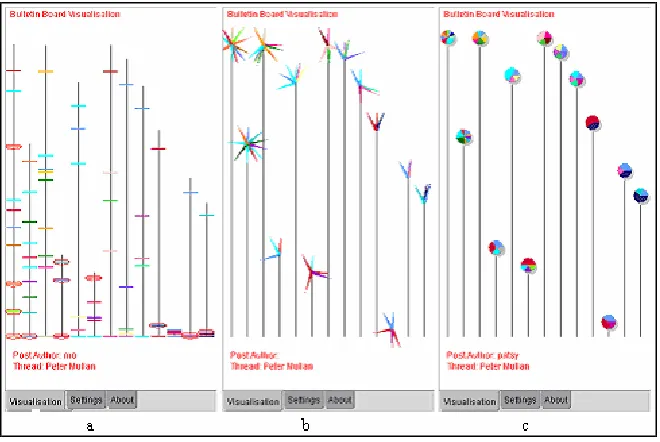
that there are dominant users in individual threads, these users are not dominating across the bulletin board as a whole. Had there been a dominant user across the entire bulletin board, this would have been most evident in the ‘user thread participation’ visualisation (figure 3c), with one colour taking up a large chunk of each pie.
[image:6.596.141.471.178.399.2]Fro m looking at the lengths of the stalks, users can easily identify that there is a variation in the length and ‘lifespan’ of threads, ranging from new threads with only a few posts, to threads that have been active longer and have amassed a greater number o f posts.
Figure 3: Even Spread of Posts and Users
5.2 Scenario B: A Flurry of Posts in a Short Time Period
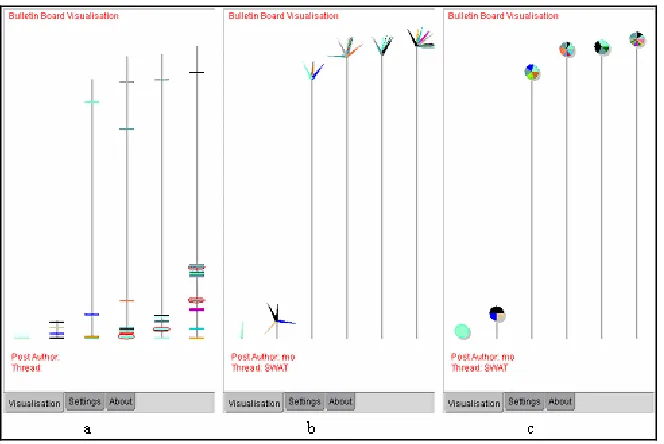
On the whole, the visualisations shown in figure 4 depict an even distribution of contributors across the bulletin board with no single colour or user dominant.
The left-most thread in each visualisation in figure 4 shows a thread that has just started with only one post. In such a case, it is not immediately apparent from the user thread participation visualisation how many posts this individual may have made, and it is not until you look at the other visualisations that it becomes clear that this is a new single -post thread.
Figure 4: A Flurry of Posts in a Short Time Period
5.3 Scenario C: Stagnant Bulletin Board
[image:7.596.141.471.415.636.2]As discussed earlier, many online communities fail due to falling levels of contributions from users. In such circumstances, bulletin boards can become stagnant. In purely text -based environments, users would have to examine the date and time of the last post in order to see if there has been any further activity within a thread.
Figure 5: A Stagnant Bulletin Board
‘temporal thread development’ (figure 5b) and ‘timeline’ (figure 5a) visualisations to be more helpful in highlighting the fact that the bulletin board had become stagnant.
The ‘temporal thread development’ visualisation was not rated as highly as the ‘timeline’ visualisation due to the limited space available to draw posts at the top of each stalk. However, in general, users found both visualisations to be helpful in identifying stagnant threads. In the visualisations shown in figure 5, it will be easier for users to see when a new post is made in a thread through using the ‘timeline’ visualisations since an echelon will appear at the top of the stalk.
6.
CONCLUSION
This paper has presented a second-generation approach to visualising bulletin board activity: BulB. Unlike existing approaches to bulletin board visualisation interfaces, BulB adopts fully customisable views as a means of enabling users to assess current levels of activity across threads, and observe the growth of conversations. Initial user feedback has shown BulB to be very intuitive and an understandable means of visualising information about interaction within bulletin boards. With the aid of BulB visualisations, users are able to easily compare the level of activity across a range of threads at a glance. Preliminary results have also shown specific visualisations to be more useful in certain scenarios.
This paper has proposed the use of a range of customisable bulletin board visualisations. More formal and extended user evaluation of the BulB visualisations is currently in preparation. In addition the possibility of improvements to the interface as a result of initial user feedback is also being investigated. Possible enhancements include the ability to zoom in on specific segments of threads where there may be clusters of individual postings.
REFERENCES
Dieberger, A. et al., 2000, Social Navigation: Techniques for Building More Usable Systems, Interactions, vol. 7 no. 6, pp. 36-45.
Donath, J., 1996, Inhabiting the Virtual City: The Design of Social Environments for Electronic Communities, PhD Thesis
Donath, J., 2002, A Semantic Approach to Visualizing Online Conversations, Communications of the ACM, April 2002, Vol. 45 no. 4, pp. 45-49.
Eick, S. G., 2001, Visualizing Online Activity, Communications of the ACM, vol. 44, 8, pp. 45-50.
Erickson, T. and Kellogg, W., 2000, Social Translucence: An Approach to Designing Systems that Support Social Processes. Transactions on Computer-Human Interaction, Vol. 7, No. 1, pp 59-83. New York: ACM Press.
Erickson, T. et al., 2002, Social Translucence – Designing Social Infrastructures That Make Collective Activity Visible.
Communications of the ACM, vol. 45 no 4, pp40-44.
Ferguson, J.D. et al., 2002, Professional Development On-line, Proceedings of Computers and Advanced Technology in Education (CATE 2002).
Haythornthwaite, C. et al., 2000, Community Development Among Distance Learners: Temporal and Technological Dimensions, Journal of Computer-Mediated Communication, Vol. 6, No. 1.
Johnson, C. M., 2001, A Survey of Current Research on Online Communities of Practice, Internet and Higher Education, Vol.4, pp. 45-60.
Kim, A. J., 2000, Community Building on the Web, Peachpit Press, Berkley.
Minar, N., and Donath, J., 2001, Visualizing the Crowds at a Web Site, Proceedings of CHI 99.
Mohamed, R. et al., 2002, Supporting Arts and Science Communities On-line, Proceedings of ED-MEDIA 2002.
Viegas, F.B. and Donath, J.S. Chat Circles, Proceedings of CHI '99. ACM Press, pp.9-16.
Xiong, R. and Brittain, E., 1999, LiveWeb: visualizing live user activities on the Web, International Conference on Computer Graphics and Interactive Techniques, Los Angeles, p.254.