Rochester Institute of Technology
RIT Scholar Works
Theses Thesis/Dissertation Collections
9-2008
Human Behavior centered Museum Guided Tour
System
Yenmin Chen
Follow this and additional works at:http://scholarworks.rit.edu/theses
Part of theGraphic Design Commons, and theIndustrial and Product Design Commons
This Thesis is brought to you for free and open access by the Thesis/Dissertation Collections at RIT Scholar Works. It has been accepted for inclusion in Theses by an authorized administrator of RIT Scholar Works. For more information, please [email protected].
Recommended Citation
1
School of Design MFA Industrial Design
Rochester Institute of Technology College of Imaging Arts and Sciences Rochester, New York
2
Human Behavior-Centered Museum Guided Tour System Yenmin Chen
MFA Industrial Design
Rochester Institute of Technology College of Imaging Arts and Sciences Rochester, New York
2/9/13 Professor Stan Rickel, Chief Advisor Date School of Design
2/9/13 Alan Reddig, Associate Advisor Date School of Design
3 4 5 9 13 18 40 52 54 Abstract Introduction human-behavior design
Why human-behavior design?
What’s difference between human-behavior design and human-centered design?
research
Visitors in the museum. Space in the museum
design development
4
Abstract
As new technologies appear, many devices or tools become more and more powerful. New technology also gives us more options to choose from in our daily lives, not only in ways used for school, but also with the devices used to surf the Internet. Certainly, we have more variety available in the various aspects of our lives, such as entertainment,
education, work etc.—but new technology brings with it more problems, too. If new technology doesn’t come with new thinking, life may not be better than before.
Some designers focus on human factors too much; they forget to consider how people connect in this world. Hence, a lot of products on the market are convenient to use, but not effective, or they are easy to learn, but not easy to use to complete the work.
5
Background
As digital technology is growing, there are many tools that are becoming more powerful. Not only the computer, but also other new technologies and products have increasingly different functions. New technology gives us more options with entertainment, education and work. In other words, we could formerly reach one goal requiring many steps, but we can now reach many goals at one time with one step.
Problem
6
Introduction
Why do we have so many unsuitable user interfaces?
Some user interface designs focus on human-centered and display design, but rarely focus on human behavior, also called “human action.” One command, or target, can be accomplished using various methods, or actions under different types of situations and environments, but some interface designers restrict themselves in a limited hardware design, like keyboard and mouse. They does not notice that there are still a lot of types of human behavior can be considered as an “interface”.
Where is the creative interface?
7
Sometimes human-centered concept put too much enthusiasm on a reasonable relation between human and computer. It’s a good strategy I can say, but the human behavior is the “relation” between human and computer. If we missed the research of human behavior, the design may not have too much humanity.
Too deep?
What does “deep” mean? The “depth” of the menu means the number of the “clicks” or “layers.” Focusing too much on the menu design, or system design, will sometimes lead to some defects. Too many functions may require a great number of elements (such as icons, buttons, and so on), or commands, and the result of this is a too-deep menu. Too many layers result in a lot of “next step” or “back” actions. If a user executes an incorrect operation, he will be asked to cancel it and redo all of them.
Objective
8
Introduction
Technology
Image recognition system:
An image recognition system includes a database system and hardware device. A database of reference images is first generated and stored, then each identified image took by the hardware device, or test image, is compared to the images stored in the library until a match is found. The database server is screened for possible matches by
comparing the factors for the test image to the descriptors in the reference images in the database. After screening, the possible result will send back to hardware device.
Indoor position system:
9
Why human-behavior design?
Do you ever notice that some non-human-centered design objects are not so successful in the market? I believe the reason is that “the object doesn’t realize the behavior which the user did.” In other words, a human-centered design object may not realize the relationship between the user and the user’s activity, but, no doubt, it can realize the relation between the user and a machine.
In the past, there have been numerous examples of a
successful object coming from a good design strategy with
human-centered design. Users really need a friendly-learning
tool, including the software interface, to operate successfully.
Even though the use of a tool may be easy to learn, its
multi-function capabilities can often create additional problems.
Why do people feel uncomfortable working with new tools? It is because most people feel uncomfortable working with a tool that is too complex or unlike an old tool they are familiar with. For example, a simple tool would be a screwdriver or a
typewriter, even a word processing program. Most people do
not feel uncomfortable learning to use a typewriter because
10
Human behavior design
tool might be Microsoft Word. When the function is not too
complex, the user will not feel any difficulty operating it if
they already learned it well.
In fact, with growing technology today, it is impossible for a
device, or a tool, to have only one target. I use “target”
instead of “function” here, because a typewriter has one
function—to type—and one target—to finish—whereas a
word processing program has numerous functions for typing,
drawing, layout and so on, and one target—to finish—. When
users need more functions with the tool, they will feel “it
doesn’t fit me”, if the functions are more powerful than the
user need. In other words, the device only comes with a
well-designed human-centered design strategy, sometimes it shows
well-designed and powerful interface but not simple and
suitable options. Hence, how to design an object that really fit
the user are more important than just being easy to learn it.
For example, if Microsoft Word was designed using a
human-behavior model, it might be learned more quickly as well as
11
How an object likes that be designed? The first step is to understand the behavior of the user. As the interface is a connection, or language, between a tool and its user, behavior is a connection between the user’s goal and the user. For this reason, I believe human-behavior design is more important than human-centered design.
What’s the difference between human-behavior design and
human-centered design?
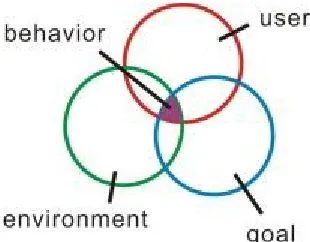
Human-behavior design is very similar to human-centered design. What’s the difference between them? I believe that there is only one difference: the Activity.
12
user. If an interface developed with this method, the user can learn how to use this interface not only naturally, but also through their experience.
[image:13.612.223.378.423.544.2]How is it that the user can operate a human-behavior designed tool by their experience? It is because human behavior results from their knowledge, life style and experience. If we build a tool by observing the users, analyzing the environment, and recording and researching their activities, the users wouldn’t feel uncomfortable using it. We can say the learning process has a type of activity-centered nature.
13
Visitors in the museum.
In order to understand a user’s activities in the museum, the first step is to observe what the visitor’s target in the
museum is.
Why do people visit museums?
“The overwhelming reason given for visiting museums is for some type of learning experience, usually described as ‘education’, ‘getting information’, ‘expanding knowledge’, doing something ‘worthwhile’, and even directly as
‘learning’, which is often linked to higher-order fulfilment of personal needs and enhancing self esteem.” (Lynda Kelly, Head, Australian Museum Audience Research Centre, April 2001, DEVELOPING A MODEL OF MUSEUM VISITING) Describe it simply, visitors to a museum have four kinds of psychological experiences.
14
Research
Visitors who want to learn something.
This kind of visitor visits the museum with a clear target, and knows what they will find in the museum; especially if they studied some related information before starting their tour. They expect or plan a specific goal. For these visitors, their major activity is searching and learning, and a significantly different activity is asking for help. They like to learn information not only from a tour guide book but also from a docent.
Visitors who want to experience it.
This group is very like the visitors who want to learn something, but their most important factor is to participate. If the “learning” visitors want to acquire knowledge, the “experience” visitors’ goal is to become more familiar with content with which they are
15
Visitors who want to feel it.
The modern museum is unlike a traditional museum. The modern museum not only provides knowledge but sometimes provides the surrounding feeling to the visitor. What is the surrounding feeling meant for? In other word, it is atmosphere. The atmosphere can help the visitors enjoy the museum. This group likes to experience the museum as a life style. Hence, the most activity they do is enjoying the space in the museum, relaxing in the space, and places his mind in that atmosphere.
Visitors as others
16
Research
Space in the museum
There are some typical functional spaces in museums.
Entrance
All museums have an entrance; some of them have a bulletin board showing information about the current show in the museum.
Information desk
A visitor can get all kinds of help here.
Lobby
A major space after the entrance, it connects each space and floor.
Atrium & passage
17
Theatre, gallery, interactive showroom
They are different kinds of show room. Theatre showroom holds the show about movies or Theater performances; gallery showroom holds the show of painting, sculpture, and so on. Interactive showroom usually keeps a big empty space for artist needing. They can do anything in that space to create a relation between the visitor and works of art.
Store
18
Design development
[image:19.612.227.406.171.356.2]Visitor’s behavior in the museum.
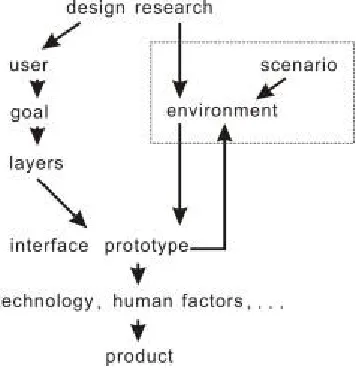
Figure 2 a chart of a human behavior design process
Defining the “activity” is the first task.
After the basic design research, such as the image
19
Figure 3
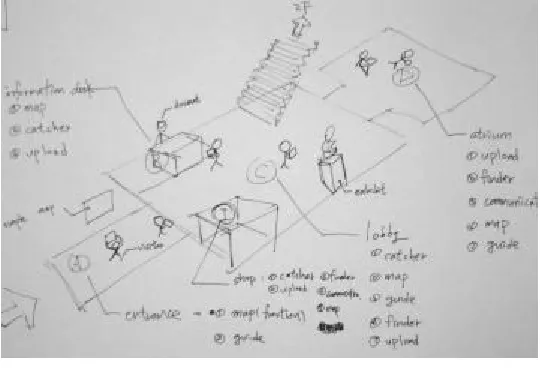
There are some museum spaces illustrated in figure 3, including the entrance, information desk, lobby, gift shop, atrium, and an exhibit.
Figure 4
[image:20.612.225.498.432.614.2]20
Design development
Figure 5
21
According to the four types of psychological experiences of the user in these spaces, I recorded and analyzed all kinds of information-seeking activities here. Then, those activities are systemized and listed below.
a. Map (layout of the museum)
b. Position (where I am within the map) c. Guide (where my objective is)
d. Exhibition (what it is) e. Information (what it is) f. Direction (how to get there)
22
These activities can be organized into two groups. a. Search (information, exhibition)
23
How do behaviors effect the operation?
24
Design development
Figure 6 collecting behaviors
25
Interface design
[Frame]
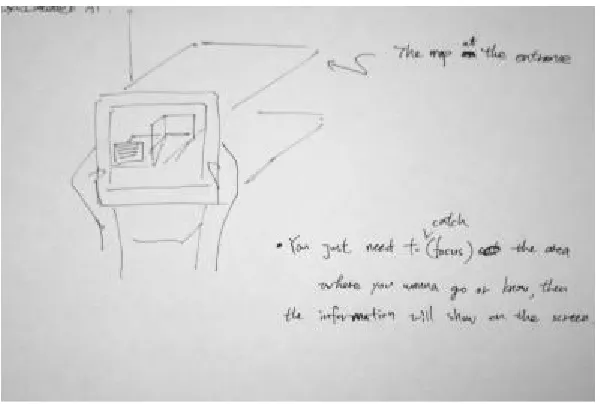
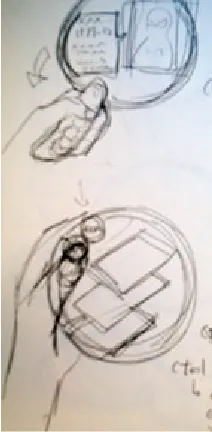
How do people use a magnifying glass to read? It is a kind of “framing”-like action. Using a magnifying glass to “frame” the information is a behavior, or interface, for seeking information, and turning pages, or scrolling, is a behavior to read additional information.
26
Design development
[Scroll]
A user can scroll up and down, or left and right, to get more information or change the function in each space. Because different spaces have different functions or behaviors, it is impossible for the user to scroll all functions in one space.
Figure 9 scroll style concept sketch
How it works
27
Figure 10 how it works
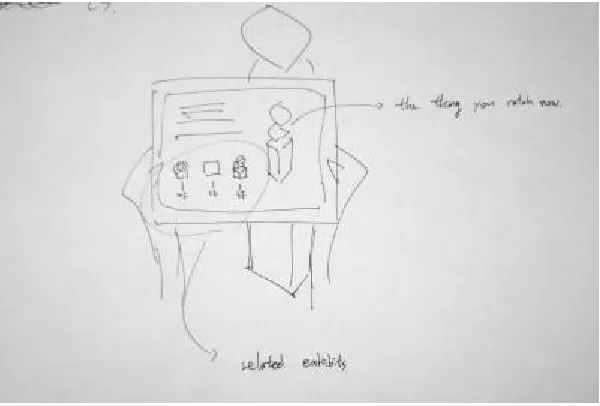
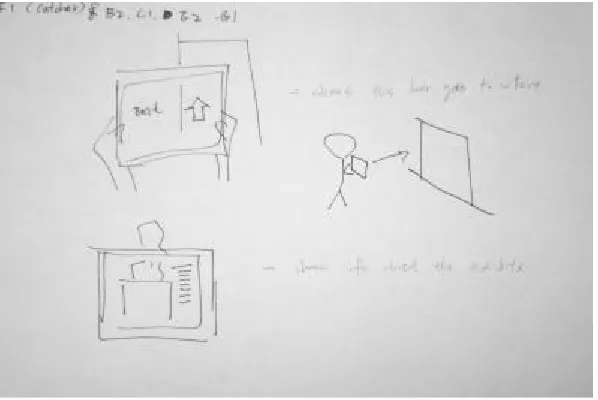
When the device is used to view the map, the information shown on the screen, and the content, depend on which area the user frames on the map. For example, if the user frames “room A” on the map, the device will show that exhibition’s detailed information on the screen; if the user frames “room B” on the map, the device will show extra information about the exhibition in room B.
28
[image:29.612.224.523.162.363.2]Design development
Figure 11 scenario sketch
[image:29.612.224.524.440.642.2]29
Figure 13 scenario sketch
When user goes into a showroom, the information on the screen will change to the exhibition’s guide itself.
30
Design development
User can get additional information about the exhibit by framing it.
Figure 15 scenario sketch:
[image:31.612.225.525.197.400.2]After framing it, the information of the exhibit display on the screen.
31
Figure 17 scenario sketch
Not only the information of the exhibit display on the screen, but also
the information of the space can be showed on the screen. All the visitor
32
Design development
At the outset of the project, I thought about what kind of input type would be suitable for this device. But I eventually changed my thinking, because, if I designed a device through human-behavior thinking, the best input type should be “behavior” itself. I’m now certain the appropriate input type is “frame it.”
Figure 18 scenario sketch
In the beginning, I put too much enthusiasm on typing the text to search
the information. At this time, this behavior is to type a word, but not to
33
Hardware design [Development sketch]
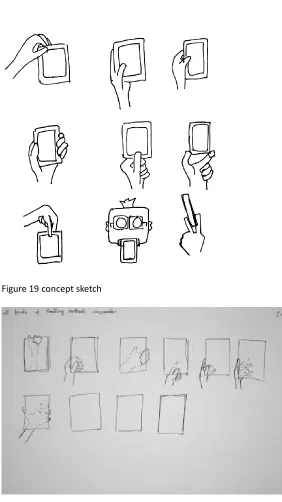
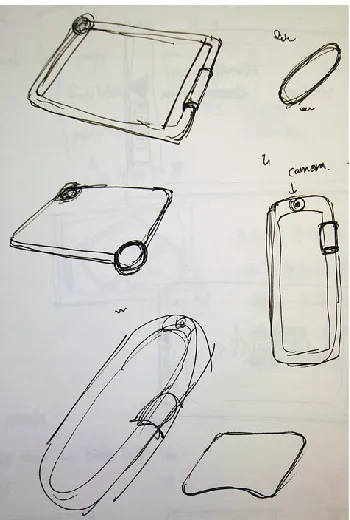
[image:34.612.223.505.195.697.2]Figure 19 concept sketch
34
Design development
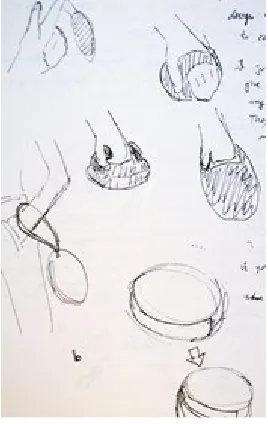
[image:35.612.226.376.199.416.2]Combining the “magnifying glass” and “scroll.”
Figure 21 concept sketch
[image:35.612.225.359.482.694.2]35
[image:36.612.225.331.344.560.2][Different handle style]
Figure 23 concept sketch
36
[image:37.612.226.401.392.652.2]Design development
Figure 25 concept sketch
37
[image:38.612.225.411.450.635.2][Mockup]
Figure 27 mockup
38
Design development
Figure 29 mockup
39
Figure 31 mockup
40
Final design
Hardware
This shape implies both a magnifying glass and a scroll. The user handles its ring-type body, and frames any items to get more information using the ring-type body. If there are more functions in that specific space, or the contents are too much to read, the user can scroll the black wheel button to change the function or see more content.
41
[image:42.612.224.524.252.404.2]On the back side, there is a camera which is an image recognition system. It not only can scan barcodes, but also can recognize the image, environment, and others items in the museum.
Figure 34 3D rendering
[image:42.612.223.523.407.644.2]42
[image:43.612.223.523.162.363.2]Final design
Figure 36
[image:43.612.223.523.415.616.2]43
44
Final design
Interface
[Start]
The Start page tells the user that they can frame a specific tag to get additional information in the museum, and the user will find this tag on anything than can lead to additional information.
Figure 39
The start page shows the hint about how to get the information in the
[image:45.612.222.456.304.438.2]45
[Entrance, lobby, and passage]
[image:46.612.223.452.219.365.2]Visitor can scroll up and down to see an exhibition’s guide or another floor’s map.
Figure 40
The red point indicates where you are by the indoor position system.
Figure 41
[image:46.612.224.452.449.582.2]46
[image:47.612.223.526.107.262.2]Final design
Figure 42
The red point indicates where you are by the indoor position system.
[Show room, any exhibition space]
Figure 43
While the visitor goes into a showroom, the information display on the
[image:47.612.223.454.360.502.2]47
Figure 44
While the visitor goes into a showroom, the information display on the
screen.
Figure 45
While the visitor goes into a showroom, the information display on the
[image:48.612.224.356.339.578.2]48
Final design
Figure46
While the visitor goes into a showroom, the information display on the
[image:49.612.98.524.84.441.2]screen.
Figure 47
After the information display on the screen, the right arrow indicates
that there are more contents in the next page. Then visitor can scroll
49
Figure 48
[image:50.612.206.525.161.647.2]
50
Final design
[Exhibits]
[image:51.612.222.455.247.561.2]While the device is being used to frame an exhibit, detailed information is displayed on the screen.
Figure 51
Figure 52
After the information display on the screen, the right arrow indicates
that there are more contents in the next page. Then visitor can scroll
51
Figure 53
52
Conclusion
Some museums already use a PDA, tablet or other devices, such as a large tape player, as their electronic guide device. If you have experienced them, you may have the same
complaint I do: a complex interface, a large size, non-intuitive operation, etc. Why can’t we consider visiting a museum to be like reading a book or exploring a new world? No matter how much information there is, there is only one action needed: searching. No matter how difficult or
complex the content is, there is only one action to do – finding. Visiting a museum becomes easier and more interesting, would it not? Visiting a museum should be like reading a book; Let everything go back to a simple life style. Human-centered deign does a good job in developing a good product. It can avoid some obvious failures in the beginning; moreover, it can create an easy learning product, too. But, does an easy learning product give the user a simple tool? In this case, I have replaced a boring touch pad with a
53
54
Reference
Lynda Kelly, Head, Australian Museum Audience Research Centre,
April 2001, DEVELOPING A MODEL OF MUSEUM VISITING,
Paper presented at Museums Australia Conference, Canberra,
Colin Ware, April 21, 2004, Information Visualization, Second Edition:
Perception for Design
Morgan Kaufmann
Jef Raskin, April 8, 2000, The Humane Interface: New Directions for
Designing Interactive Systems
Addison-Wesley Professional
Industrial Designers Society of America, September 1, 2003, Design
Secrets: Products 50 Real-Life Projects Uncovered
Rockport Publishers
Theo Mandel, February 21, 1997, The Elements of User Interface Design
Wiley
Donald A. Norman, August 20, 1999, The Invisible Computer: Why Good
55
Karl Ulrich, Steven Eppinger, July 30, 2003, Product Design and
Development
McGraw-Hill/Irwin
Trevor Bounford, September 1, 2000, Digital Diagrams: How to Design
and Present Statistical Information Effectively
Watson-Guptill
Robert L. Harris. January 6, 2000, Information Graphics: A
Comprehensive Illustrated Reference
Oxford University Press, USA
Edward R. Tufte, February 1997, Visual Explanations: Images and
Quantities, Evidence and Narrative
Graphics Press
Edward R. Tufte. May 1990, Envisioning Information
Graphics Pr
56
Applications and Clever Devices
Peachpit Press
Bill Moggridge, October 1, 2007, Designing Interactions
The MIT Press
Donald A. Norman, Stephen W. Draper, January 1, 1986, User Centered
System Design: New Perspectives on Human-computer Interaction
CRC Press
Donald A. Norman, April 21, 1994, Things That Make Us Smart:
Defending Human Attributes In The Age Of The Machine
Basic Books
Jane Fulton Suri, Ideo, March 30, 2005, Thoughtless Acts?: Observations
on Intuitive Design
Chronicle Books
Bell, August 2, 2000, Environmental Psychology
Wadsworth Publishing
John H. Falk, Lynn D. Dierking, May 10, 2000, Learning from Museums:
Visitor Experiences and the Making of Meaning (American Association
57
H. Falk John, D. Dierking Lynn, Willard L. Boyd (Foreword)
, April 1, 1992, The Museum Experience
Howells House / Whalesback Books
Institute for Information Design Japan, April 27, 2001, Information Design
Source Book (German and English Edition)
Birkhäuser Architecture
Donald A. Norman, October 30, 2007, The Design of Future Things:
Author of The Design of Everyday Things