Retrospective Theses and Dissertations Iowa State University Capstones, Theses and Dissertations
2007
Real-time water simulation and rendering using
features of the latest OpenGL-capable graphics
hardware
Kenneth Edward Kopecky II
Iowa State University
Follow this and additional works at:https://lib.dr.iastate.edu/rtd
Part of theComputer Sciences Commons
This Thesis is brought to you for free and open access by the Iowa State University Capstones, Theses and Dissertations at Iowa State University Digital Repository. It has been accepted for inclusion in Retrospective Theses and Dissertations by an authorized administrator of Iowa State University Digital Repository. For more information, please [email protected].
Recommended Citation
Kopecky, Kenneth Edward II, "Real-time water simulation and rendering using features of the latest OpenGL-capable graphics hardware" (2007).Retrospective Theses and Dissertations. 14855.
by
Kenneth Edward Kopecky II
A thesis submitted to the graduate faculty
in partial fulfillment of the requirements for the degree of
MASTER OF SCIENCE
Major: Human-Computer Interaction
Program of Study Committee: Eliot Winer, Major Professor
James Oliver Chris Harding
Iowa State University
Ames, Iowa
2007
UMI Number: 1447545
1447545
2008
UMI Microform
Copyright
All rights reserved. This microform edition is protected against unauthorized copying under Title 17, United States Code.
ProQuest Information and Learning Company 300 North Zeeb Road
P.O. Box 1346
Ann Arbor, MI 48106-1346
Table of Contents
Chapter 1: Introduction
1
Chapter 2: Background
5
Chapter 3: Method Development
16
Chapter 4: Results and Discussion
34
Chapter 5: Summary and Conclusions
44
Bibliography
46
1
Chapter 1
Introduction
Water is arguably the most important substance to life on Earth. It makes up a significant
part of our body. We drink it, keep clean with it, and swim in it. Water can be seen in some
form nearly everywhere we go, from the kitchen sink to the Ocean. With the prevalence of
water in our lives, it is clear that water is involved with a great variety of computer
simulations and game environments. At the same time, however, it has proven to be
extremely difficult to create convincing simulated water on a computer. A variety of
strategies have been developed for simulating water in all the different forms it can be found:
oceans, lakes, rain, and even in a glass. These strategies must be tailored to the particular
situation to take into account the important aspects of the simulation while avoiding the
computational costs associated with the unimportant ones.
Water simulation is especially prevalent in the entertainment industry, most notably movies
and video games. Many famous movies, such as Titanic, Finding Nemo, and The Perfect
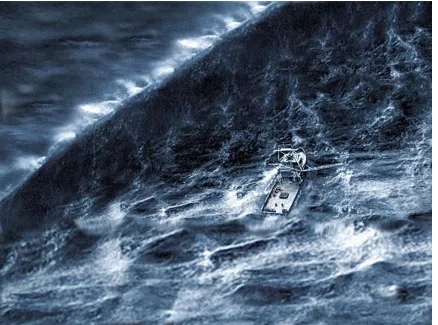
Storm (see figure 1) featured a great deal of computer-generated water. In the latter title,
many scenes were completely computer-rendered, but were indistinguishable from reality by
most moviegoers [1]. Video games, especially in the recent past, have begun allowing users
to explore and interact with mixed land-and-water environments. Whether destroying aliens
in a first-person shooter, riding a jet ski in a race, or catching fish in a more relaxed setting,
Figure 1: Simulated Water from A Perfect Storm
Outside of the entertainment industry, virtual water of a higher quality is used in simulations.
Computational fluid dynamics (CFD) can simulate water and other fluids effectively, and is
used for the design of everything from ventilation systems to boat hulls. For example, the
2008 German Olympic rowing team will be riding in boats that have been carefully
optimized using simulated water. [2]. While these simulations focus on the dynamics of the
water instead of the visual effects, the data they generate can be used to create water that both
3
The broad field of virtual reality (VR) is another important area where computer-generated
water is frequently used. For VR to be believable, the environments that are created must be
immersive and complete. Whether used for treating post-traumatic stress disorder, testing
out a new boat design, or just a brief escape from reality, bodies of water in VR applications
can add the necessary touch of immersion to turn a lackluster application into a truly
spectacular and effective one.
Speed Versus Realism
The different uses of water thus described all require different, and often specialized, types of
simulation. In fact, the primary difference between these simulations is the tradeoff between
computational speed and realism. For these purposes, there are two main categories of water
simulation: Pre-rendered and real-time. Pre-rendered water includes that used in movies and
scientific simulations. For the case of the German boat design, CFD is used to calculate the
most realistic water effects possible. These CFD simulations can take days to run, even on
modern computer clusters, and require very carefully configured inputs. In movies, a
different method is often used: procedural generation of the ocean surface. Movies such as
Titanic and WaterWorld used sections of water simulated by methods such as Fast Fourier
Transforms (FFTs) [29]. This and other methods for generating a water surface is less
computationally expensive than CFD, and their main objective is centered on visual appeal
more than absolute realism. The results of these water simulations are spectacular, and are
Conversely, real-time water is very different to handle. Unlike pre-rendered water, which can
take days or weeks of computation time to calculate only a few seconds of simulation,
real-time water must be updated many real-times per second. In fact, it is a misnomer of sorts to say
“real-time water”, because the term implies that one second of computation time is used to
calculate one second of simulation. In most situations, the computer is doing many things in
a single second to create the water simulation. To do this, real-time water simulators rely on a
greatly simplified model of water’s behavior and appearance. This real-time water is very
useful for adding realism and new interaction modes to games and simulations, which depend
on real-time effects exclusively. For example, real-time water in a game can allow the player
to use a boat that moves through a virtual world in a believable manner. Non-dynamic,
flat-shaded water is entirely doable and has been used in the past, but in today’s games and
simulations, a user demands believability and coherence of all elements of a scene.
The water rendering techniques discussed here, while not revolutionary, provide a foundation
to create realistic, simulated, interactive water in real-time. A complete package such as this
5
Chapter 2
Background
To investigate how best to imitate water, it is good to first look at the way that real water
works. The color and behavior of water depends almost completely on the environment in
which it is found. Oceans and lakes, for example, get their blue color both from reflections
of the sky and the diffusion of light beneath the water’s surface. [3]. Rivers and streams are
transparent or take on the color of the silt picked from the movement of the water. Ponds,
too, are either clear or cloudy from mud and other particles in the water.
The motion of water is also heavily dependent on its environment. Oceans and lakes are full
of waves that are caused by a variety of sources. While some of these waves are the result of
earthquakes, tidal forces, and moving ships, most waves are caused by wind moving across
the water’s surface [3]. The motion of rivers and streams comes from the interaction of the
flowing water with shores and bed of the river. Finally, ponds are fairly still unless the water
is stirred up slightly by wind or boats. All these types of water move differently and
Pre-rendered Water Simulation
For movies and other media that don’t need to be rendered in real-time, the highest-quality
rendering methods are used along with detailed simulation methods to create realistic,
believable water. For the behavior of this water, computational fluid dynamics methods are
often used. Another common method for simulating water accurately is smoothed particle
systems. Here [5], a physically simulated system of “water balls” is used as a virtual 3D
fluid. A closed surface surrounding the particles (hence the term “smoothed”) is calculated
and used for the actual drawing of the fluid. The primary advantage of a smoothed particle
approach is it allows for treating water as a real fluid that conforms to its container, can flow
into other containers, and exhibit realistic effects such as splashes when particles are ejected
away from the main mass of fluid.
Many methods of rendering non-real-time water are used, such as traditional ray tracing and
photon mapping [6]. Ray tracing is a very common and simple method of rendering
graphics. It follows the path of a ray sent from the camera into a scene. The ray intersects
objects and can be reflected or refracted, splitting it into additional rays. These rays are used
to determine the color of each pixel in the image. [7]. Ray tracing provides excellent
shadows and direct illumination; however, it is not as well suited for simulating indirect light,
which can often dominate a scene. This is because basic ray tracing simply has no
mechanism for gathering and calculating the indirect light that bounces off of other objects
near a particular location. Photon mapping is one of several solutions to this problem. In
photon mapping, photons are cast from light sources, and their path is simulated as they
7
position, direction and energy data are recorded in the photon map. When calculating the
illumination for a ray-traced scene, the photon map is referenced and each point in the scene
[image:11.612.169.463.198.425.2]has light added to it from photons that were absorbed nearby [8].
Figure 2: Enright, et al[6] created very believable water, but it required several minutes to render each frame
Real-time Water Simulation
Real-time methods of simulating and rendering 3D water have existed for years. Early 3D
games represented water as a simple blue-textured plane. Techniques for harnessing the
limited power of early 3D graphics hardware were developed, and water rendering
techniques improved. Games like Wave Race for the Nintendo 64 featured water that formed
choppy waves and had believable reflections of the landscape. In the following years, water
for the Nintendo GameCube, focused on using water in their game play. As CPUs and
graphics processing units (GPUs) become more powerful, real-time water has become more
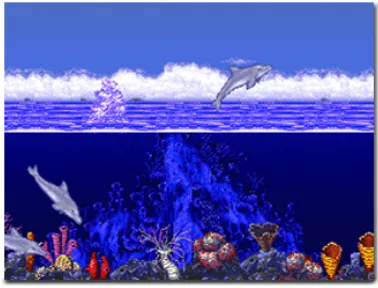
believable and interacting with it more enjoyable. Figure 3 shows the evolution of water
rendering from the 80’s to the late 00’s. The changes that can be seen are very drastic.
[image:12.612.206.399.201.341.2]
Figure 3a: Cobra Triangle (1988 Rare Coin-It)
[image:12.612.207.396.384.528.2]
9
[image:13.612.194.414.88.234.2]
Figure 3c: Wave Race (1996 Nintendo)
[image:13.612.205.399.269.420.2]
Figure 3d: Super Mario Sunshine (2002 Nintendo)
[image:13.612.211.398.458.603.2]
Several methods of physically simulating water in real-time exist. The most commonly used
involve a two-dimensional height field that is simulated as a mesh of interconnected vertices.
Through various methods of simulation, such as diffusion of water columns [9],
Navier-Stokes equations [10], or fast Fourier transforms, the height field is manipulated so that it
appears to behave like real water.
Traditionally, rendering of a water height field is a fairly straightforward process. There are
five primary components used in the rendering: Geometry, the normal map, reflection and
refraction maps, and the shader program. For water to be believable, it must include at least
three or four of these components, but any single one can be eliminated without too much
loss of quality.
The geometry is determined directly from the height field. In cases of very calm water, this
may simply be a flat plane. Quad strips or triangle strips are generally used to render the
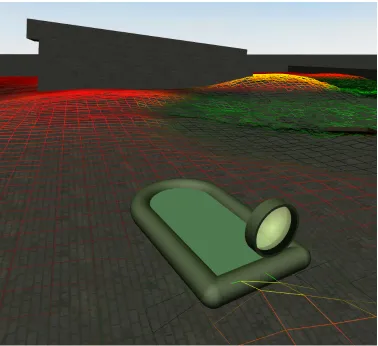
geometry to the screen. Figure 4 below, shows a wireframe version of some water geometry.
Note how simple the geometry appears compared to the complexity of the rendered water
11
Figure 4: Water Geometry. The red value represents the water’s height.
The normal map is an image in which each pixel represents a direction, namely, the direction
of the water’s surface on a given point. The normal map can be combined with other normal
maps or with normals associated with the geometry’s vertices so as to make the water appear
more animated and believable. The method used in our implementation of water rendering
used normal maps generated through Perlin Noise [11]. Perlin Noise, invented in 1985 by
Ken Perlin, uses several layers, or octaves, of randomly generated noise. Each octave
contains noise at half the frequency of the previous octave. When the several octaves are
resulting texture is similar to a fractal in that it has a definite—but still random—form to it.
Our normal maps were created from a height field generated by Perlin Noise techniques.
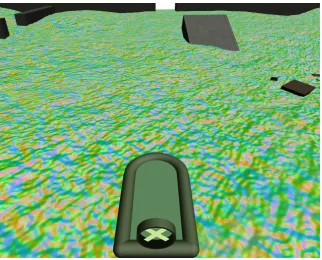
[image:16.612.155.477.170.430.2]The rendered water with a normal map projected onto it can be seen in figure 5.
Figure 5: Normal Mapping
Reflection and refraction maps are where the bulk of the water’s color comes from. These
maps are usually rendered at the beginning of a frame. The reflection map consists only of
objects that lie above the water normally, but are reflected across the geometry to appear to
lie below the water’s surface, similar to how a reflection of one’s face appears to originate
underwater. It is also possible to use a cube map—a textured cube which, when viewed from
the inside, provides a 360° x 180° field of view of the environment from a particle
location--for reflections, which can be rendered once at the start of the program. This technique
produces very believable reflections, but breaks down if objects are close to the water, as
13
principle to the reflection map, but is much easier to generate. This map represents light
from objects that can be seen below the water’s surface. No geometry transformations need
occur, so all geometry below the water’s surface is simply rendered and saved to a texture
map. Without a refraction map, water will look less believable as it will not distort the
appearance of objects lying below it.
High dynamic range (HDR) rendering techniques are also useful to reflection and refraction
rendering. HDR rendering is a method of storing color that is capable of handling values
greater than 1.0 for the red, green blue, and alpha channels. When objects in a scene are
much brighter than other objects (such as the blue sky compared to shadows), HDR
rendering allows the storage of large color values without clamping them to white, as the
standard OpenGL pipeline does. This lets the sun and other bright objects in the scene show
through in reflections and refractions, even when only a small percentage of the incoming
light is reflected or refracted.
The shader program is where the magic of water rendering occurs. A shader program
consists of specific blocks of code to specify the exact way in which each vertex and pixel of
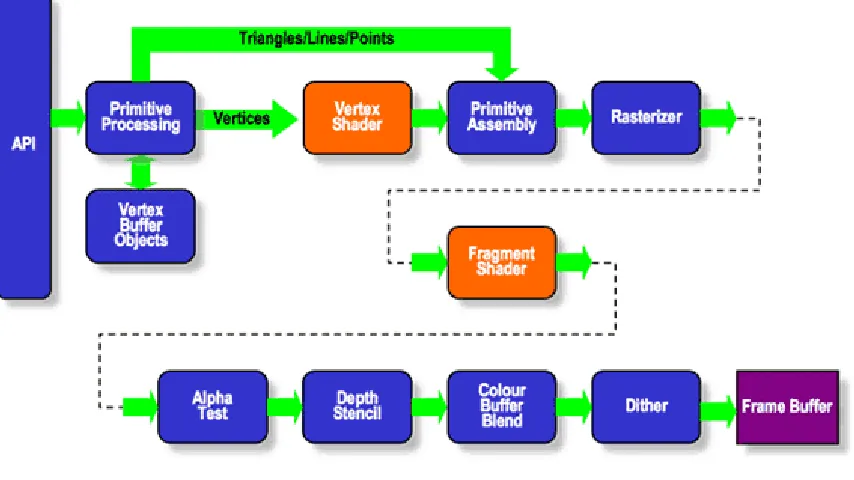
the water’s geometry are rendered to the screen. As seen in Figure 6, the vertex and pixel, or
fragment, shaders replace important parts of the OpenGL rendering pipeline. The fragment,
shader is the primary engine for combining all of the colors and lighting effects that create
the appearance of water. The shader calculates a surface normal [12], usually coming from a
normal map, and uses this normal to making lighting calculations as well as to determine the
Figure 6. Shader placement in the OpenGL pipeline. (khronos.org)
Other effects that are often used to achieve a higher degree of believability in real-time water
rendering include water murk effects and caustics. The former is the fog that is present in all
water that is not perfectly transparent. It reduces the amount of light that reaches objects
underwater as well as reducing the light that reaches back up through the water’s surface.
Murk is easily approximated using the formula in equation 1 (adapted from OpenGL.org).
Kmurk = e-(f * d) (1)
In this equation, f is the magnitude of the fog and d is the distance between the water’s
surface and the underwater object. Fog is added by mixing its color with the color of the
15
Caustics are the effect of light rays being refracted by the water’s surface before they strike
objects below. The light is concentrated in some areas and dispersed in others, creating a
moving pattern projected onto all underwater objects. Although ray-tracing light rays
through the water’s surface will create caustics, this is not yet a useful solution for real-time
rendering due to the additional computation required. Therefore, many implementations of
caustics currently use an animated, tiled texture projected onto all scene objects from the
light source’s perspective. Real-time implementations of caustics do exist, however, using
refraction calculations across the water’s surface. [26] and [28] describe methods of
generating these caustics.
The final feature of simulated water is its physical interaction with other objects in the scene.
There are two directions in which this interaction occurs: 1) water affecting objects and 2)
objects affecting water. The first of these effects is much easier to simulate than the second.
Because objects can be modeled as rigid bodies in a physics engine, it is simply a matter of
determining the forces on them from water. Previous research, including Reinot [13] and
Fagerlund [21], simulated buoyant objects by approximating their volume with sample
points. Each sample point was then compared to the water level. If the point lay below the
water’s surface, an upward force was applied to the object at that specific point. The
magnitude of the force was equal to the buoyant force from the water on the volume of the
object accounted for by that sample point. Equation 2 shows the buoyant force on an object
Fbuoyant = VdisplacedWater ρwater g (2)
Using this equation, and treating the sample point as a volume that is either underwater or
above water with no in-between state, it is easy to show that the force on an object at each
underwater sample point is as given in equation 3.
!
Fpoint=Vobject"waterg N
(3)
Where N is the number of sample points in the object. The effect of these forces is very
similar to that of actual buoyancy on a real object, and virtual objects floating in the water
will bob up and down in a believable manner.
The effect of objects on water is more difficult to simulate. The two most common ways of
showing water reacting to things in it are particle systems and simple physical simulation. A
particle system, in the broad sense, is a group of objects with similar behaviors that are
created and destroyed in response to events in the program. Common examples of particle
systems include sparks, smoke, and footprints. [14] When used in water rendering situations,
particles generally consider of drops of water or small ripples on the water’s surface. These
are created in response to events that trigger splashes and other disturbances, such as an
17
Chapter 3
Method Development
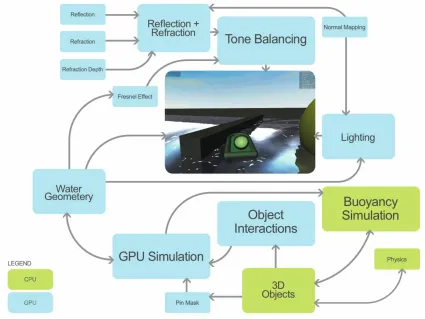
Figure 7 shows the different components needed to create the final rendered water. The
[image:21.612.92.517.213.532.2]unique features developed in this research will be discussed in the following sections.
Figure 7: Flowchart of the simulation and rendering process
Buoyancy
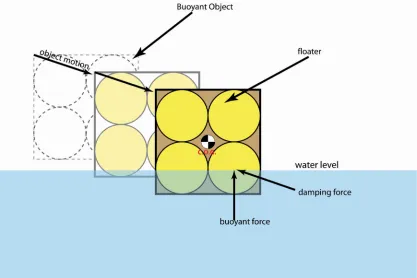
Buoyant force is the force of displaced fluid pushing up on a submerged object. It is equal to
the weight of the displaced fluid. In this thesis the term buoyancy is expanded to describe the
relatively easy to integrate with a physics engine. Based on the work of Reinot, a buoyancy
model of each physically simulated object was created by approximating its volume with a
set of spheres called “floaters.” A floater can be thought of as a particle that represents a
portion of an object’s total volume and is the intermediary between the water dynamics and
the rigid body physics. The object’s volume is divided equally among the floaters distributed
throughout it, and those floaters are attached to the object’s physical body by a fixed offset
vector. At each timestep of the physics engine, the heights of the floaters relative to the
water are calculated, and from that the portion of each floater that is submerged and being
affected by the water is computed.
In addition to the buoyant force of the displaced water, the water’s motion relative to an
object exerts a force on the object. The equations describing this force are too complex to be
handled in real-time, but a reasonable substitute can be found in the following equation [21].
!
Fdrag =
CdragV 2
A
2
(4)
One thing to note is that the direction of the relative water motion is not accounted for in this
equation. It is easily understood why a boat is more apt to move forward than sideways in
water, but it is not so easy to explain this to a computer and have the simulation account
properly for it. To do so would require fluid simulations of the physical object and would be
very difficult to formulate, so a simplified method is used. Each floater optionally contains a
19
calculated, the relative water motion along this axis is partially or fully removed from the
total velocity. Equation 5 shows the method for accomplishing this.
!
v=v+n ˆ slip(nslip •v)
when (nslip • v) < 0 and |v| ≤ 1.0
(5)
After the relative water motion and buoyant forces are calculated, each floater applies its
force to the simulated physical body to which it is attached. Each force is applied to the
floater’s attachment point so the correct moments are also applied. Figure 8 shows a diagram
of the forces exerted by the floater on the object to which it is attached. For simplification, a
slip axis is not shown on the object, but it is easy to see how the floaters affect the object in
[image:23.612.91.508.413.691.2]ways similar to the way a real fluid would.
Displacement Simulation
A more difficult problem in water modeling is the dynamics of the water itself and the effect
that moving bodies have on the water. Various methods of calculating fluid dynamics exist,
but the technology is computationally expensive and cannot currently run in real-time.
Two different methods for water dynamics were examined: 1) water column diffusion, and
2) particle-based disturbances. The first method is a type of simplified physical simulation,
where a rectangular or hexagonal grid of “water columns” [9] is treated as a set of
interconnected masses moving vertically on damped springs. The second method avoids the
processing overhead of physical simulation and instead harnesses the graphics processor
(GPU) to convert a system of particles into a water height map. It should be noted that these
two methods were used separately, although using them simultaneously is mentioned as part
of future work.
Water Column Diffusion
In this method, the water’s surface is divided into a regular grid. Each point on the grid, or
node, can move along its vertical axis and is attracted to each of its eight adjacent (horizontal,
vertical, and diagonal neighbors) nodes, as well as to its “home” position (usually a
displacement of zero). The attraction force is weighted by the proximity of the neighboring
squares, with the diagonal neighbors exerting less force on a particular point than its direct
neighbors. In addition to this spring-like force, a damping force, proportional to the node’s
21
point on the grid hundreds of times per second, where Ks is the spring constant and Kd is the
damping constant.
!
fnode =("orthogonalNeighbors+
2
2 "diagonalNeighbors#ynode)Ks#Kdvnode (6)
Once new positions and velocities for the node are calculated, a smoothing effect, in which
the node’s height is linearly interpolated between the heights of its eight neighboring nodes,
weighted in the same matter as the force propagation, is applied to it. The new position of
node after a simulation step is y3, given by:
!
y1=y0+v0dt+ fnodedt2
y2=(1"0.707Csmoothingdt)y1+0.1768Csmoothingdt(#diagonalNeighbors)
y3=(1"Csmoothingdt)y21+0.25Csmoothingdt(#adjacentNeighbors)
(7.a)
(7.b)
(7.c)
Where the smoothing factor Csmoothing is on the order of 0.001.
This network of springs can provide a convincing simulation of a fluid surface, with waves
spreading, combining, and propagating. For added reality, certain nodes, such as those along
the edge of the water body as well as those directly underneath large, immoveable objects in
the water, are held in place, or pinned, with a position and velocity that always stay at zero.
These pinned nodes act as hard boundaries on the water’s surface, and can reflect and refract
the water’s waves. Finally, methods having objects interact with this mesh-based water
potentially interact with the water were drawn onto an “interaction image”, with the color
channels representing the minimum and maximum heights of the object at that particular
point, as well as the speed of that object. The resulting image was similar to a two-sided
height map, with extra data embedded in it, representing the speed of the moving objects.
This information was used to force water downward when the object moved through it, as
well as raise it upward in areas immediately in front of a the moving object.
When all of these features were added together, the water column diffusion method provided
for highly believable water interaction as will be shown in examples in the next chapter. The
fluid behaves in a believable manner and interactions occur easily with objects in and around
the water. However, simulating such a mesh in real-time requires a great deal of processing
power. On modern processors, such as the Intel Core 2 Duo, the necessary calculations for a
water grid with 256 x 256 vertices can only run at around 4.75 frames per second.
It’s simply not feasible to simulate water of reasonable resolution in real time on the CPU
alone. Fortunately, the calculations for simulating mesh-based water are very parallel in
nature. That is, the forces on any given node in the mesh can be computed without affecting
the other nodes. This makes water mesh calculation a perfect task for a GPU.
The Graphics Processing Unit, or GPU, on a computer is often much more powerful than its
CPU. But while the CPU is designed to be extremely flexible in the way it handles data and
23
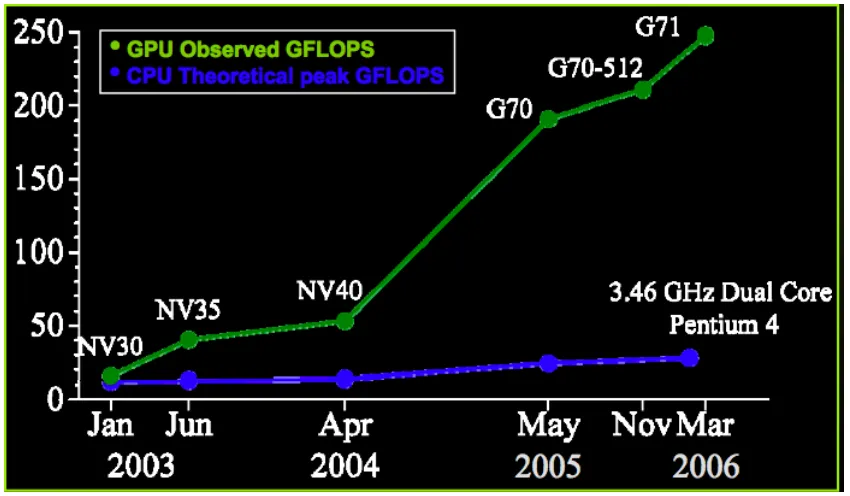
pixels, one by one, at extraordinary speed. Figure 9 shows one comparison of processing
[image:27.612.88.513.171.419.2]power between recent model GPUs and CPUs.
Figure 9: GPU vs CPU Performance (Courtesy of NVidia)
Because of this design, the GPU is limited in the types of calculations it can perform.
Specifically, it can only write data to one location at a time. However, this limitation is no
problem for water mesh simulation, as only one mesh node at a time is being computed. This
method of harnessing the system’s GPU for non-graphics calculations, called General
Processing on Graphics Processing Unit (GPGPU) has been around for several years, but its
use to supplement CPU calculations in real time situations is relatively rare. NVidia [15] has
done extensive work in this area, integrating the Havok physics engine with their graphics
cards. The results have been very complex, beautifully rendered and physically simulated
Figure 10: GPU-based physics allow for highly complex scenes to run in real-time
Particle-Based Disturbances
The other method of water displacement experimented with was particle-based disturbances.
Under this technique, a system of particles representing disturbances in the water, such as
ripples and v-shaped wakes, is used to deform the water’s surface. The only simulation
required with this method is that of the individual particles, which generally number less than
two hundred, as opposed to thousands of mesh nodes that are calculated using the water
25
pixel represents the height of one vertex of the water’s mesh. Each disturbance is drawn onto
this texture, its color and shape representing the magnitude and way in which it deforms the
water. For example, a ripple disturbance is drawn as an expanding ring onto the water’s
height texture. The height information contained in the final texture is used to draw the
water’s surface, with very effective results.
Disturbances were generated by events such as a virtual boat’s motor being engaged or
objects breaking the water’s surface. Each such event adds a disturbance particle to the
water, which would then update and simulate the disturbance for several seconds. When the
disturbance has damped out, usually by way of an exponential decay function, it is removed
from the simulation, to allow space and processing power for new disturbance particles.
Figure 11 shows disturbance particles in action. The rings represent ripples and waves
caused by objects intersecting the water’s surface, while the straight lines represent the wake
Figure 11: Particle-based Disturbances shown as lines and circles
Rendering
The process of turning a set of texture images and other data into realistic-looking water is a
complex one. For this, extensive use of the reprogrammable nature of current graphics cards
was taken advantage of by creating several vertex and pixel shaders, written in the GLSL
shader programming language. A shader is a program that explicitly directs the GPU on how
to handle the vertices that make up the drawn geometry as well as the pixels that result
27
require the programmer to write code in something resembling compiled assembly code [17],
GLSL language is set up to be very similar to C/C++, which makes writing shaders very
simple and clear.
Shaders make use of several inputs: Vertices, matrices, normal coordinates, texture
coordinates, uniforms, and textures. Vertices, normal coordinates, and texture coordinates
are values explicitly sent to the shader for each point, or vertex, of the rendered geometry.
Matrices affect the size, shape, orientation, and position of the geometry on screen.
Uniforms are values variables fed to the shader before it begins rendering, and are the same
for each vertex rendered. Textures are images used to add realism or special effects to the
scene. In the case of water rendering, textures store images of objects that are reflected or
refracted in the water, as well as height maps and other data used by the shader to make the
water appear believable.
A number of shaders, both simple and complex, were used for this water simulation. The
most basic was called “Float Color.” Its purpose was to allow drawing objects with color
values exceeding 1.0, which is OpenGL’s standard limit on color values. It accomplished
this by simply not clamping the values of the output color to 1.0. Storing these values is
another issue, which will be addressed later in this thesis.
The next shader used was “Object Shader” and was used for drawing all objects in the scene
except for the water. The Object shader used two texture inputs—main texture and water
part, the Object shader simply replicated the standard OpenGL shading pipeline for a single
texture and light source, albeit with per-pixel light calculations instead of per-vertex.
However, when it was set to reflection or refraction mode, the Object shader performed
per-pixel clipping of geometry, ensuring that reflections and refractions only appeared below the
water’s surface.
The Water Shader
The final, and most complicated shader was the “Water Shader”. Many inputs went into the
Water Shader, including reflection and refraction textures, a refraction depth texture, a
small-scale ripple pattern, and, most importantly, the water’s height map. Much of what the Water
Shader did was fairly standard for water rendering: Combining reflections and refractions
that have been distorted based on the surface direction of the water, weighting them based on
a simplified model of the Fresnel Effect, and computing specular lighting effects. However,
the Water Shader contained features not generally found in other water shaders. The first of
these was on-the-fly normal calculation, in which the surface direction of the water was
calculated at draw time in the shader’s vertex program. Geometry normals are traditionally
calculated using the Newell Method [18 p 292], in which triangles are formed out of adjacent
29
For each triangle with vertices v0, v1, and v2, the normal N can be found by
Nx = (y0 – y1)(z0 + z1) + (y1 – y2)(z1 + z2) + (y2 – y0)(z2 + z0)
Ny = (z0 – z1)(x0 + x1) + (z1 – z2)(x1 + x2) + (z2 – z0)(x2 + x0)
Nz = (x0 – x1)(y0 + y1) + (x1 – x2)(y1 + y2) + (x2 – x0)(y2 + y0)
(8)
The normal at each vertex of the geometry is then estimated by averaging the normal of each
triangle that borders it.
This method is very effective for calculating a smooth surface from a set of arbitrary points,
but it is computationally expensive. In the case of the regular, rectangular grid layout of a
water mesh, a shortcut was used. A small section of the mesh is shown in Figure 12, with
five key points labeled. Normally, the Newell Method would be used to calculate normals
for the triangles ADP, DBP, BCP, and CAP, which would then be averaged to find the vertex
normal at P. If the Newell Method is applied using only variables for coordinate values, the
final value for the normal at P can be found with a much simpler equation:
N = (By – Ay, 2du, Dy – Cy) (9)
Figure 11 shows an example of this calculation. When compared to the Newell Method, the
results were visually and numerically identical, but the frame rate was significantly higher.
The Water Shader takes advantage of this trick by reading vertex height data into the vertex
work to be done on the GPU rather than the CPU. Thus, the vertex texture contains the
dynamic height data to be read in the vertex shader, so display lists can be used to render the
[image:34.612.102.530.197.552.2]geometry, freeing the CPU to work on other tasks.
Figure 12: Normal Calculation from Neighboring Vertices
Another newly developed feature unique to the Water Shader is excitement mapping.
Excitement mapping simulates, on a per-vertex basis, the amount of small-scale turbulence
present on the water’s surface. This process is analogous to specular mapping of solid
31
change in the amount of highlight and shine on the object. The effect of excitement mapping
is to make water appear more turbulent when it moves rapidly, such as in the case of waves.
This is accomplished by reducing the amount of reflection and highlight for excited areas of
water. Excitement is calculated by estimating the sum of kinetic and potential energy of a
particular water mesh node, as well as by its difference in vertical position and velocity from
that of its neighbors.
The third special feature of the water shader is reflection-refraction tone balancing (RTB), an
operation similar to tone mapping. Tone mapping is a process in which the color values of
an image are balanced to more closely match what the human eye would see in real life.
Welsh [19] used an average luminance model to brighten darker colors while ensuring
brighter colors didn’t become washed out. His formula is shown in equation 9, where
luminance is the average of the red, green, and blue color channels.
Color = color * (1.0 – e^luminance * 8.0) / (luminance) (10)
RTB adds realism and believability to the scene by forcing the image to lean towards either
showing reflections on the water’s surface or refractions beneath it, but not both. This is
similar to how water appears in real life. For example, when standing over a calm lake, you
generally see the reflection of the sky in the water, but if you look downward into your own
reflection, which is much darker than the sky, you will see through the water’s surface and
refracted objects below it become visible. RTB works by using a method similar to tone
found. The refracted light is then brightened or darkened based on the luminance of the
reflected light.
The Render Sequence
The final aspect of rendering water is the render sequence itself. The types of prerenders
done every frame are critical to the final product. For this method the following information
was rendered to textures: Reflections, refractions, refracted object z-depth, water z-depth,
and water height map. Each of these has a key role in the appearance of the water. The
reflection and refraction textures are relatively self-explanatory. Reflections are images of
objects above the water that are reflected in its surface, while refractions are objects under
the water, the light from which is bent as it passes through the water’s surface. For
reflections, the water z-depth texture is used to clip the reflected geometry so that only
objects that lie above the water’s surface are reflected. In the case of refractions, the same
surface clipping can be used, although it isn’t as important because objects above water will
obscure most refractions that appear above the water. When rendering the water, the
refraction z-depth texture is used in conjunction with the refraction texture to determine how
much water is between the user’s eyepoint and the refracted object. This information is used
to add murkiness and cloudiness to the water, obscuring the refracted objects. To determine
33
!
Deye =
"zfarznear
(zfrag"0.5"
zfar+znear 2(zfar"znear)
)(zfar"znear)
(11.a) adapted from [16])
Dunderwater = Deye(object)-Deye(water) (11.b)
Several advanced rendering techniques, available only on very recent graphics cards, were
used to implement the method into a software application. These include floating point
frame buffer objects (FBOs), clipping surfaces, and vertex shader texture reads. Floating
point FBOs are virtual screen buffers that store pixels as 16-bit signed float values with a
practically unlimited range of values, rather than 8-bit unsigned chars that can only store
values from 0-1. This allows the physics of water to be simulated on the GPU with enough
precision to produce stable and consistent results. Floating point FBOs also allow negative
values to be stored as well as values greater than one, enabling data other than color to be in a
texture, as well as HDR color for storing values.
Clipping surfaces are another innovative aspect of the application. Regular clipping methods
only allow clipping against a flat plane. Clipping surfaces use 24-bit depth buffer values
stored to a texture to discard geometry (per pixel) that is either farther from or closer to the
camera than the clipping surface. In this water simulation, clipping surfaces are used to limit
reflections only to objects that lie above the water’s surface. Because the water’s surface
moves and deforms, a regular clipping plane would be of little use for clipping the geometry,
buffer generates the clipping surface used in the simulation. The resulting depth data is
compared to the rendered refractions and reflections, with pixels of the rendered objects
being discarded if they are closer to the camera than the water’s surface.
Finally, the last advanced graphics technique is vertex shader texture reads. Although it has
been in the OpenGL specification for several years, it is only recently that graphics hardware
has begun to support reading from textures in a vertex shader. By using vertex shader texture
reads, height map data for the water can be read for each vertex, as well as the surrounding
vertices, enabling the on-the-fly normal calculations mentioned earlier. When vertex shader
texture reads are used to calculate this information, all of the dynamic information needed to
render the water is stored in its textures, allowing a display list to be used to render the
water’s geometry. Compared to immediate mode rendering, in which the CPU sends
35
Chapter 4
Results and Discussion
Several measures of performance are used to test the two main water simulation methods.
The most basic method is simply looking at the graphical frame rate achieved by the
program. Another method useful only for the physically simulated water is the “Simulation
Time Ratio.” This number represents the number of seconds of physical simulation that can
be calculated in one second of real time. Next, the most valuable benchmark is simply that
of visual appeal. The overall smoothness of the program and believability of the water’s
surface is the real goal for this research, and can therefore be used as means of evaluation.
These factors were all judged for the various modes of water, both with and without vertex
shader texture reads (“GPU Geometry”). Finally, QuickProf [20] profiling software was
used to determine performance benchmarks of the simulation and find what parts of it were
taking up the most time. Bottlenecks were identified and will be discussed. The results are
[image:39.612.90.520.537.664.2]tabulated below, with results in parentheses indicating GPU geometry is turned off.
Table 1: Frame Rate
Water Mesh Size (vertices)
Particle Water (fps) CPU Mesh Water (fps) GPU Mesh Water (fps)
64 x 64 29(29) 34(26) 29(26)
128 x 128 29(28) 2(2) 29(20)
256 x 256 29(16) 0.34(0.36) 20(15)
512 x 512 29(6) 0.09(0.09) 6.6(3.3)
It can be clearly seen from table 1 that CPU mesh water slows down drastically for higher
calculations required being proportional to the square of the mesh size. When GPU
geometry is turned on, mesh size has little effect on both the particle water and the GPU
mesh water except at the highest mesh size tested. In the case of particle water, this is
because no per-vertex calculations are performed on the water. Although per-vertex
calculations are used for the GPU mesh water, the speed at which the GPU can process the
vertices is so great that, for the most part, it is relatively small in comparison to the other
graphics operations required for GPU simulation, and thus mesh size has a much smaller
effect on the frame rate than it does for the CPU simulated water.
The next chart shows the change in Simulation Time Ratio (STR) for different water
simulations. Particle water is left out of this comparison because it is not actually simulated,
so the STR is undefined. Note that a simulation time ratio of 1.0 is the minimum value at
which the simulation can continue to run in real-time, assuming zero overhead for all the
other program functions, such as rigid body physics and rendering.
Table 2: Simulation Time Ratio
Water Mesh Size CPU Mesh Water GPU Mesh Water
64 x 64 2.1 21
128 x 128 0.19 21
256 x 256 0.09 22
37
The results of this test are striking. The CPU-based water degrades in performance very
quickly. At a mesh size of just 128 x 128, its STR is far below the minimum necessary value
of 1.0. It is worth nothing that the 128x128 node water grid performs less than 10% as
quickly as the grid with one-fourth the number of nodes. This indicates that the speed of the
CPU-based simulation is dependant on more than simply the number of nodes. It is likely
that the cache and data bus of the computer limit the flow of data significantly. The
GPU-based water, on the other hand, showed no performance decrease at all with increasing the
number of nodes (pixels) simulated.
The next evaluation is purely subjective. It examines the believability and smoothness of the
water simulation visually. The primary comparison made here is particle-based water versus
simulated mesh water. Figures 13-18 are images of simulated water demonstrating all the
Figure 13: Particle-based Water (note the ripples caused by floating objects)
[image:42.612.91.522.390.665.2]39
Figure 15: Particle-based Water (note the light reflection off the surface as well as the objects under the water)
[image:43.612.91.523.400.614.2]Figure 17: Waves moving across the surface of GPU-based water
41
The particle-based water has nice-looking responses to splashes and other interactions with
the water, thanks to the splash detection system. Ripples and waves move quickly and
believably across its surface, but no medium-to-long term turbulence in the water results for
the particle-based interaction. Additionally, waves are not reflected or refracted by stationary
objects, such as walls, in the water. In terms of speed, however, when GPU geometry is
used, the water runs smoothly at all resolutions tested. Overall, the water looks good, but its
interaction modes are very limited.
Mesh-based water is far more interactive than particle-based water. By using images for
interaction, any object touching the water can affect its motion, based on the object’s velocity
and position. Once interaction occurs with the water, the water will remain in motion, waves
and ripples bouncing around realistically, until damping forces smooth it out again. When
several objects interact with the water, the resulting effects are very believable and provide
for an extremely effective simulation. Simulating the water on the GPU allows for a fast
frame rate, filling a primary requirement for effective water rendering. Mesh-based water is
not without its drawbacks, though. The methods used for pushing the water up and down
tend to cause erratic behavior in slow moving objects. In an effort to cause stationary or very
slow-moving objects to have little effect on the water around them, while faster-moving
objects cause waves and ripples, the behavior of the water tends to change rather abruptly
when an object at rest is put into motion. Overall, however, the mesh-based water provides
for a much more believable experience than the particle-based water. The results of other
effects are also visible in the figures. Figures 13 and 15 show objects both above and below
more visible, similar to the way in which our eyes adjust to light levels depending on where
we look. The refraction of the objects by the water is also visible in these images.
Performance Bottlenecks
By using the Quickprof performance profiling software, it was determined where the
computer was spending the most time for each of the three rendering modes. Figure 19
provides a charts breaking down the performance of each mode, based on specific tasks
[image:46.612.88.472.317.533.2]required for that simulation method.
Figure 19: Processing Time Breakdown
In both the particle and GPU-based water, the main bottleneck was the transfer of the water
data texture from the GPU to the main memory. While this data transfer is necessary for the
program to behave properly, it could be reduced in frequency. Rather than the texture
43
noticeable effect to the simulation fidelity. Starting from a base frame rate of 30 fps, if the
texture was downloaded every 10 frames, two thirds of the “texture download” piece of the
pie would vanish—almost 37% of the total cycle time for the GPU-simulated water. This
time would likely be used to significantly boost the frame rate, as all non-graphics operations
occur at a constant rate and therefore would not speed up or otherwise expand to take up the
extra available CPU and GPU time.
The other major bottleneck across all three simulation modes is the non-water drawing, of
which a significant part is devoted to creating the various prerendered textures. Optimizing
this part can be accomplished through any number of standard graphics speed-up techniques,
Chapter 5
Summary, Conclusions and Future Work
In this thesis, a method for creating believable, useful water for games and real-time
simulations was presented. Unlike many other demos and simulations, the ideas presented
here are designed to be integrated into an application to enhance it, rather than standing alone
and using all of the available computing power for the water and its simulation. It does this
by taking advantage of the massive resources available on modern GPUs for fast calculations
and minimal CPU usage. Perhaps the best advancement in this thesis was the use of
texture-based interaction, which allowed the GPU-texture-based water simulation to account for objects
moving into, out of, and through the water without costly texture uploads and downloads.
The simulations discussed here are also significant in that they rely on the very latest in
graphics hardware. All simulations ran on an NVidia GeForce 8800 card, which is one of the
first cards to fully support reading from textures in the vertex pipeline.
When these features were used, the GPU-simulated-and-rendered water tremendously
outperformed the CPU-based water at all mesh sizes larger than 64 x 64 nodes. Overall, the
particle disturbance-based water has the fastest performance, but it generally fell short in
terms of visual quality and believability.
There is a great deal of options for future work on this topic. One obvious path to pursue is
the drawing of real-time caustics [24, 28]. Another future goal is the simulation, with particle
45
GPU-based water with both particle system-based and image-based object interaction
techniques could encompass a wider range of small- and large-scale detail. Finally, another
possible goal is the combination of procedurally generated water, such as that described in
the Typhoon engine and [28], with the simulated water methods described in this thesis.
References
1. Tyson, J. “How Industrial Light & Magic Works.” Retrieved March 2007, from http://entertainment.howstuffworks.com/perfect-storm.htm.
2. Warzecha, N, Spille-Kohoff, A. (2006). Fluid Motion. Mechanical Engineering. September 2006.
3. National Aeronautics and Space Administration. “The Blue, the Bluer, and the Bluest Ocean.” Retrieved April 2007 from
http://daac.gsfc.nasa.gov/oceancolor/scifocus/oceanColor/oceanblue.shtml 4. Floor, A. (2000) “Oceanography: Waves.” Retrieved April 2007 from
http://www.seafriends.org.nz/oceano/waves.htm.
5. Kipfer, P. and Westermann, R. 2006. Realistic and interactive simulation of rivers. In Proceedings of Graphics interface 2006 (Quebec, Canada, June 07 - 09, 2006). ACM International Conference Proceeding Series, vol. 137. Canadian Information
Processing Society, Toronto, Ont., Canada, 41-48.
6. Enright, D., Marschner, S., and Fedkiw, R. 2002. Animation and rendering of
complex water surfaces. In Proceedings of the 29th Annual Conference on Computer Graphics and interactive Techniques (San Antonio, Texas, July 23 - 26, 2002). SIGGRAPH '02. ACM Press, New York, NY, 736-744. DOI=
http://doi.acm.org/10.1145/566570.566645
7. Rademacher, P. “Ray Tracing: Graphics for the Masses.” Retrieved April 2007 from http://www.cs.unc.edu/~rademach/xroads-RT/RTarticle.html.
8. Waters, Z. “Photon Mapping.” Retrieved May 2007 from
http://web.cs.wpi.edu/~emmanuel/courses/cs563/write_ups/zackw/photon_mapping/P hotonMapping.html.
9. DiFranco, D., Fu, L., Ju, P., & Rikert, T. (1997). “Physics-Based Fluid Model for Haptic Interaction.” (MIT Graphics Class Project)
10.Zelsnack, J. (2003) “GPU Water Simulation.” Presented at Game Developer’s Conference ‘03.
11.Elias, H. “Perlin Noise.” Retrieved November 2006 from http://freespace.virgin.net/hugo.elias/models/m_perlin.htm.
12.Humphrey, B. (2005). "Realistic Water Using Bump Mapping and Refraction." Retrieved June 2006, from http://www.gametutorials.com/gtstore/pc-319-1-heightmap-6-realistic-water-using-bump-mapping.aspx.
13.Reinot, A. “Andres’s Computer Graphics Blog (November 11, 2005 Entry).” Retrieved 6-19-2006, from http://reinot.blogspot.com
14.Hammersly, T. (2004). “Particle Systems.” Retrieved March 2007 from http://www.devmaster.net/articles/particle_systems/.
15.Green, S. Harris, M. “Havok FX Physics on NVidia GPUs”. Presented at Game Developer’s Conference ‘06.
16.“OpenGL Reference Pages.” Retrieved March 2007 from http://www.opengl.org/sdk/docs/man/
47
18.Hill, F. (2003). “Computer Graphics Using OpenGL: Second Edition.” Prentice Hall.
19.Conversations with Terry Welsh regarding water and vegetation rendering. 2006-7. 20.Streeter, T.. “Quickprof Project Website”. Retrieved March 2007 from
http://quickprof.sourceforge.net.
21.Fagerlund, M. "Buoyancy Particles or Bobbies." Retrieved May 2007, from http://www.hypeskeptic.com/Mattias/DelphiODE/BuoyancyParticles.asp. 22.Hart, E. (2007). "GPU Christmas Tree Rendering." Retrieved March 2007 from
http://developer.download.nvidia.com/SDK/10/opengl/src/xmas_tree/doc/GPU_Chris tmasTree_Rendering.pdf
23.Lionel E., Décoret, X. (2006). "Realistic Water Volumes in Real-Time." Proceedings of the Eurographics Workshop on Natural Phenomena ‘06: 1-8.
24.Loviscach, J. (2003). "Complex Water Effects at Interactive Frame Rates." 25.Rost, R. (2005) “Introduction to the OpenGL Shading Language.” Developer
Presentation. Retrieved May 2007 from
http://developer.3dlabs.com/documents/index.htm.
26.Stam, J. (2003). "Real-Time Fluid Dynamics for Games." Presented at Game Developer’s Conference ‘03.
27.Lanza, S. (2005). “Animation and Display of Water”, SHADERX3: Advanced Rendering with DirectX and OpenGL. Charles River Media, Inc.
28.Jensen, L. (2001) “Deep-Water Animation and Rendering,” Gamasutra,
http://www.gamasutra.com/gdce/jensen/jensen_01.htm
Acknowledgements
I’d like to thank the following people for their support in getting me to where I am today.
•My parents, for, well, everything. I don’t know where I’d be without them.
•Dr. Adrian Sannier, for seeing potential in me and giving me guidance in my life when I needed it more than I ever had, but didn’t realize it. Without him, I wouldn’t be in grad school right now.
•Dr. Eliot Winer, for having faith in me and supporting me even when I was starting to veer off the engineering course, and for recognizing that another path might be better for me.
•Andres Reinot, for helping me to become an OpenGL guru of sorts, as well as offering me plenty of artistic and programming advice.
•Kevin Teske, partly for his role in keeping the VRAC computers up and running, but mostly for being a mentor and counselor to me whenever I needed advice, encouragement, or just an honest opinion on my latest graphics work.
•Tyler Streeter, for his help with the physics engine and program debugging.
•Ted Martens, for a great deal of artistic input.
![Figure 2: Enright, et al[6] created very believable water, but it required several minutes to render each frame](https://thumb-us.123doks.com/thumbv2/123dok_us/8132958.242778/11.612.169.463.198.425/figure-enright-created-believable-water-required-minutes-render.webp)
![Figure 3e: Crysis (Projected Release: Late 2007, Electronic Arts) [Picture courtesy of Crysis-Online.com]](https://thumb-us.123doks.com/thumbv2/123dok_us/8132958.242778/13.612.194.414.88.234/figure-crysis-projected-release-electronic-picture-courtesy-crysis.webp)