International Journal of Innovative Technology and Exploring Engineering (IJITEE) ISSN: 2278-3075, Volume-8 Issue-12, October 2019
Abstract: With the growing popularity of streaming content, streaming platforms have emerged that offer content in resolutions of 4k, 2k, HD etc. Some regions of the world face a terrible network reception. Delivering content and a pleasant viewing experience to the users of such locations becomes a challenge. audio/video streaming at available network speeds is just not feasible for people at those locations. The only way is to reduce the data footprint of the concerned audio/video without compromising the quality. For this purpose, there exists algorithms and techniques that attempt to realize the same. Fortunately, the field of compression is an active one when it comes to content delivering. With a lot of algorithms in the play, which one actually delivers content while putting less strain on the users' network bandwidth? This paper carries out an extensive analysis of present popular algorithms to come to the conclusion of the best algorithm for streaming data. Both audio and video compression are put under scrutiny and are compared on various aspects prime to delivery of data.
Keywords: Image compression, Industry statistics, Data compression, Data Analysis.
I. INTRODUCTION
Audio-Video streaming has gained popularity over the years. It has enabled easy communication between people who live in different geographical locations. With enough bandwidth and internet speed, smooth streaming is not a problem at all. But in the regions where the internet speed and bandwidth is low, smooth streaming is not feasible. Hence, there are compression algorithms to deal with this problem and thereby improve the user experience. Most of the multimedia files, especially videos are very large in size. Such large sized files require higher bandwidth for streaming. Compression algorithms try to decrease the size of such files but without compromising with the quality of the file. Streaming such files whose size is reduced to a significant amount even in bandwidth restricted conditions, take place smoothly. Thus, enabling successful streaming of multimedia files. The Compression algorithms can be lossy or lossless. Lossless compression algorithms apply very little compression on the data thus keeping the quality of the file intact to most extent. This type of compression method is not suitable for videos as the file size will not be reduced to a large extent. However
Revised Manuscript Received on October 05, 2019.
* Correspondence Author
Preethal Rao, Department of Information and Communication Technology, Manipal Institute of Technology (Manipal Academy of Higher
Education), Manipal, India. Email: [email protected]
Krishna Prakasha K*, Department of Information and Communication Technology, Manipal Institute of Technology (Manipal Academy of Higher
Education), Manipal, India. Email: [email protected]
Vasundhara Acharya, Department of Computer Science & Engineering Manipal Institute of Technology (Manipal Academy of Higher Education),
Manipal, India. Email: vasundhara.acharya@@manipal.edu
most of the audio codes like MP3, AAC etc., are lossy as audio files are originally small in size and thus need not have more compression. In lossless technique, the file size will be reduced to the maximum possibility and thus quality might be compromised more when compared to lossless technique. The popular codecs like MPEG-2, H.264, H.265 etc., make use of this. FLAC, ALAC are some audio codecs which use lossy technique for compression of large audio files. The goal of this paper is to identify existing techniques in audio-video compression for transmission and carry out a comparative analysis of the techniques based on certain parameters. The side outcome would be a program that would stream the audio/video file of our choice while the main outcome is finding out the compression technique that performs the best with respect to the selected parameters.
A. Abbreviations and Acronyms
AAC : Advanced Audio Codec MP3 : MPEG Audio Layer 3 MP2 : MPEG Audio Layer-2 MP4 : MPEG Audio Layer-4
MPEG-2 : Moving Picture Experts Group FLAC : Free Lossless Audio Codec ALAC : Apple Lossless Audio Codec WMV : Windows Media Video AVI : Audio Video Interleave FLV : Flash Video
MKV : Matroska
3G2/3GPP2 : 3rd Generation Partnership Project 2 GUI : Graphic User Interface
API : Application Program Interface RTSP : Real Time Streaming Protocol UDP : User Datagram Protocol TCP : Transmission Control Protocol IP : Internet Protocol
HEVC : High Efficiency Video Coding AVC: Advanced Video Coding
II. PROBLEMDEFINITION
The network traffic has sharp and severe fluctuations in the bandwidth. Audio-Video streaming at available network speeds is just not feasible for people at those locations. The only way is to reduce the data footprint of the concerned audio/video without compromising the quality. For this purpose, there exists algorithms and techniques that attempt to realize the same. Hence, the goal is to carry out an analysis of all the top techniques that strive to achieve the smoothest possible audio-video streaming even in the most fluctuating of network speeds.
Multimedia Compression Techniques for
Streaming
III. OBJECTIVE
Our main objective is to identify the best compression algorithm for multimedia, selecting efficient algorithm for bandwidth restricted conditions by analyzing the performance of selected algorithms.
IV. METHODOLOGY
Our methodology in brief involves the following:
Figure 1: Flowchart of the steps involved in the project
As shown in the Figure 1, the steps involved in the project is described below:
Step 1: Identifying the popular codecs used for compressing video as well as audio.
Step 2: Developing a platform that would enable video/audio streaming from say a webcam, microphone or even a file sitting in a secondary storage. The platform would mainly consist of end user programs, in which sending, receiving and playing can be done.
Step 3: Once the platform is ready, implementing the selected techniques for audio and video compression respectively and then implement it and integrate it into the platform. At this point all the pieces are collected and analysis can be carried out. But analysis needs to be done based on some predefined parameters.
Step 4: Identification of the parameters based on which comparative analysis can be performed is the next task. Step 5: Once they have been identified, all that is left is to carry out the test with respect to the parameters and record the data.
Step 6: Finally, data gathered would be evaluated to conclude the characteristics of each implemented algorithm/technique.
V. IMPLEMENTATION
Entire process is divided into different segments which are narrowed down to two segments:
A. Streaming B. Analysis A. Streaming
Implementation mainly involves creation of a platform that would enable audio/video streaming from some source. The platform consists of end user programs in which sending, receiving and playing of audio and video files can be done. To develop this platform, Humble Video, Java Swing, RTSP, UDP and TCP (on networking end) were used.
In the program, various libraries and objects supported by humble video were also used like Demuxer, DemuxerStream, MediaPacket, MediaPicture, MediaAudio, Decoder, Encoder
Decoding loops, Muxer, MediaAudioConverter,
MediaPictureConverter. Platform for streaming:
The user needs to open StreamingServer application. StreamingServer then opens a server socket that listens for incoming TCP connection. At this point, StreamingClient is to be opened. The user is presented with an interface to indicate that he/she should connect to the StreamingServer. Connection can be established with StreamingServer by right clicking to bring up the context menu and clicking on connect option. On clicking the connect option, an input dialog box is brought up where the user needs to enter IP address where StreamingServer is running. By default, localhost is assumed to be running in the location of StreamingServer.
After entering the IP address, when user clicks on ‘ok’, StreamingClient establishes TCP connection with StreamingServer. At this point, GUI from 'OFFLINE' changes to 'ONLINE'.
Once StreamingClient and StreamingServer are connected RTSP messages get exchanged to enable next course of action. The RTSP messages are generated as the result of user’s action on client side. Therefore, in order to start streaming audio and video files, user must do the appropriate actions on client end.
First RTSP message that needs to be sent to server is SETUP message. This SETUP message can be sent to server by right clicking and selecting SETUP option. This brings up dialog box where user needs to enter name of the audio or video file that is to be played. After clicking ‘ok’, user is presented with another dialog box, where he needs to choose audio or video streaming. On clicking ‘ok’, Client generates SETUP message and sends to the StreamingServer.
StreamingServer will be listening for RTSP request from the StreamingClient on TCP connection where it receives a SETUP request. The user prepares a thread based on the type of streaming to perform and waits for the PLAY request. Preparation for thread is necessary as StreamingServer streams audio data on TCP and video on UDP connection. User has to specify if the file should be played as audio or video.
International Journal of Innovative Technology and Exploring Engineering (IJITEE) ISSN: 2278-3075, Volume-8 Issue-12, October 2019
StreamingServer on receiving PLAY request will start to prepare its thread. This thread will start streaming operation. If it is a video stream, the thread decodes packets from video container and generates decompressed image which is sent to client. Because the video is to be played at a certain rate on the StreamingServer which maintains the time using which it sends message at the appropriate time, it needs to be displayed. Client on receiving the image re scales the image to fit the user’s screen.
It does this until no packets are available or is interrupted by main thread. For audio streaming, the StreamingServer thread establishes TCP connection with client thread and writes out audio file on TCP stream. The client end decodes packet from TCP stream to play back the audio on Client’s default sound output device.
B. Analysis
To carry out the analysis, initially, popular codecs (currently in use) and then the parameters were identified.
• Popular codecs used for analysis:
1. Video: AVC, HEVC, MPEG-2, WMV, VP9 and Theora 2. Audio: MP3, AAC, Vorbis, WMV, FLAC and MP2 • Parameters based on which the analysis was performed: Bit rate, Quality, Time, Compression ratio (ratio of uncompressed file size and compressed file size)
The software used for the purpose was FFmpeg. It supports many functionalities like converting the formats, re-encoding etc.
To carry out the experiment, 5 raw video and 5 raw audio files were selected. The selection was done on the basis of size. They were named as V1, V2, V3, V4, V5 and A1, A2, A3, A4, A5 respectively.
Sizes of raw video files: V1-7.9GB; V2-15.6GB; V3-29.4GB; V4-47.9GB; V5-30.5GB.
Sizes of raw audio files: A1-39.7MB; A2-38.8MB; A3-36.2MB; A4-40.3MB; A5-34.6MB.
Experiments and Results 1. Container
It can be considered as a collection of audio streams, video streams and metadata pertaining to a multimedia file. Here, various containers like: mp4, flv, mkv, mov, m4v, avi and 3g2 are compared. Each container has a specific way of storing the streams and meta information. Thus, by giving a common stream, each for video (H.264) and audio (AAC), one can compare how the formats store the (same) stream efficiently.
Video Analysis:
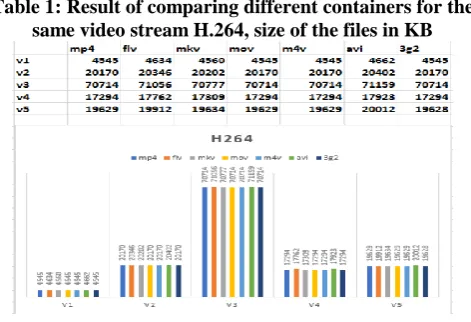
It is noted that mp4, mov, m4v and 3g2 minimized the size of all the 5 files to the higher extent i.e., V1 to 4545KB, V2 to 20170KB, V3 to 70714KB, V4 to 17294KB and V5 to 19629 KB (3g2, however, compressed V5 to 19628KB). Result:
* In terms of storage, 3g2, mov, m4v and mp4 performed well. 3g2 stored the streams in more efficient way.
* In terms of supporting maximum codecs, mov is the best. E.g. theora is supported only in mov and not in mp4 or 3g2. Audio
Analysis:
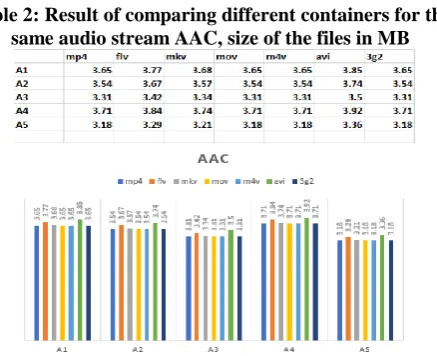
It was noted that mp4, mov, m4v and 3g2 minimized the size of all the 5 files to the greater extent i.e., A1 to 3.65MB, A2 to 3.54MB, A3 to 3.31MB, A4 to 3.71MB and A5 to 3.18MB. Avi
container, however reduced the file size to the least extent.
Result:
* In terms of storage, 3g2, mov, m4v and mp4 performed well, yet again.
Conclusion: Out of all the selected containers, mov, 3g2,
mp4 and m4v are the best both for storing audios and videos in terms of size. While avi container performed worst out of all for storing both audio and video files.
2. Compression ratio
Here, the compression ratios which is the ratio between the original file size and the compressed file size, of different video codecs and audio codecs is each being compared. Video codecs selected are Theora, h264, hevc, vp9, mpeg4(xvid), h263, wmv, mpeg2. Audio codecs selected are aac, opus, vorbis, flac, wmav2, mp3, wavpack, mp2. This is done to get an idea of the extent to which the compression is done by these algorithms. Higher the compression ratio, better the codec.
Video Analysis:
It is observed in Figure 2 and Table 1 that HEVC and AVC have the highest compression ratio. These are followed by VP9 and Theora. MPEG-2, MPEG-4, WMV9 and H.263 have the least. Highest compression is done by HEVC and AVC and is around 5778.29 for V1, 2904.44 for V2, 2330.75 for V3, 3382.73 for V4 and 2105.29 for V5. While the least compression ratio is noted to be 446.939 for V1, 376.775 for V2, 302.343 for V3, 478.553 for V4 and 286.175 for V5. Result:
[image:3.595.310.546.441.602.2]* HEVC, AVC prove to compress the files more when compared to other codecs and H.263, WMV9, MPEG-2 and MPEG-4 (Especially, H.263) compress the files in the least possible manner.
Table 1: Result of comparing different containers for the same video stream H.264, size of the files in KB
Figure 2: Result of comparing different containers for the same video stream H.264, size of the files in KB Audio
Analysis:
Result:
[image:4.595.63.282.108.286.2]* Opus and Vorbis prove to compress the files more when compared to other codecs and Wavpack, FLAC, MP2 (Especially, Wavpack) compress the files in the least possible manner.
Table 2: Result of comparing different containers for the same audio stream AAC, size of the files in MB
Figure 3: Result of comparing different containers for the same audio stream AAC, size of the files in MB
Conclusion: If compression of file is the only goal, then
HEVC and AVC can be selected under video codecs while Opus and Vorbis can be chosen under audio codecs. H.263, WMV9, MPEG-2 and MPEG-4 under video codecs and Wavpack, FLAC, MP2 under audio codecs perform least compression and hence should be avoided.
In the next set of experiments, by altering the quality of the files, size, memory consumed, time, and compression ratio was noted. Each video/audio codec produces different results when their parameters change. FFmpeg provides a quality option wherein the quality output can be adjusted for each algorithm. Q1 means the best quality and Q6 refers to best compression. Going from Q1 to Q6, the quality level decreases, but the compression level increases. Q6 does not refer to the worst quality, instead it is just not good as Q1 quality level. For audio quality, the levels have been names 0,1...5. With 0 corresponding to Q1 and 5 corresponding to Q6.
Comparison of various Video files Time
For V1
Table 3: Result of comparing different video codecs when put in the same container mkv, size of the files in MB
Figure 4: Result of comparing different video codecs when put in the same container mkv, size of the files in
MB Analysis:
It is observed in Figure 4 and Table 3 that when time consumed during the process of compression is considered, VP9 takes maximum time out of all to compress the file. It's followed by Theora. HEVC takes moderate amount of time for the file V1 of various qualities from Q1 to Q6. However, least amount of time is taken for compression by MPEG-2 for Q1, Q2, H.264 for Q3, and then WMV for the remaining qualities.
Conclusion:
If time is the parameter, for the small sized files like V1, WMV (for higher quality files), MPEG-2 and H.264 (for preferably lower quality files) can be chosen for quick compression. VP9, Theora and HEVC must be avoided if compression is to be done faster without bothering the file's size. Similarly for the remaining 4 video files the same trend was noticed.
Comparison of various Audio codecs 1. Quality
For A1 Analysis:
[image:4.595.314.541.372.507.2]For audio file A1 and codec AAC, in Figure 5 and Table 4 one can note that for quality Q0 and Q1 there is decrease in file size from 2.83MB to 2.8MB which is negligible, and for the remaining, with the increase in quality, the file size also increases. For the audio file A1 and codec MP3, It's quiet clear that the size of the file decreases from 7.08MB to 3.45MB for the increasing qualities from Q0 to Q5.
Table 4: Result of codecs AAC, MP3 of different qualities for A1, with size as parameter
Figure 5: Result of codecs AAC, MP3 of different qualities for A1, with size as parameter
[image:4.595.312.544.598.724.2]In Figure 6 and Table 5, it’s observable that for audio file A1 and codec Vorbis, there is increase in file size from Q0 to Q2. But, there is decrease in the size from Q3 to Q4 with values 3.45 to 3.02 and then again there is increase in the size from Q3 to Q5. Also for audio file A1 and codec WMV, there is no change in the file size for any range of qualities.
Table 5: Result of codecs Vorbis and WMV of different qualities for A1, with size as parameter
International Journal of Innovative Technology and Exploring Engineering (IJITEE) ISSN: 2278-3075, Volume-8 Issue-12, October 2019
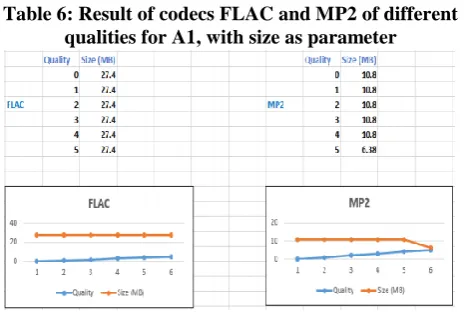
[image:5.595.310.547.51.211.2]It's noted in Figure 7 and Table 6 that for audio file A1 and for both the codecs FLAC and MP2, the file size remains constant which is 27.4MB and 10.8MB respectively irrespective of the quality. The result is observed to be similar with different values for the remaining Audio files.
Table 6: Result of codecs FLAC and MP2 of different qualities for A1, with size as parameter
Figure 7: Result of codecs FLAC and MP2 of different qualities for A1, with size as parameter 2. Bit rate
For A1 Analysis:
In Figure 8 and Table 7, it’s observable that for audio file A1 encoded by codecs AAC and MP3 for differing values of bit rates with size alone being the parameter, size of the file increases from 1.7MB to 8.51MB from 64K to 256k and hence there is sudden reduction in the size for higher bit rates like 320k. There is linear increase in time taken for compression. For MP3 codec, the size is seen to increase linearly and so is the time from 4.635 seconds to 5.32 seconds (except at the bit rate of 192k, which is negligible).
Table7: Result of codecs AAC, MP3 of different bit rates for A1, with size and time as parameters
Figure 8: Result of codecs AAC, MP3 of different bit rates for A1, with size and time as parameters
In Figure 9 and Table 8, it’s observable for the audio file A1 encoded by codec Vorbis for differing increasing values of bit rates with size alone being the parameter, there is increase in size from 1.55MB to 8.32MB, time taken shows some non-linearity by taking lesser time than previous low bit rated file and then increasing the time consumption with the increase in bit rate values from 4.144 seconds to 5.021 seconds. In the case of WMV, size increases initially, but for the bit rates 192k and 256k size remains intact i.e., 7.07MB and then increases as usual. Time taken increases almost linearly with inconsiderable differences and fluctuations.
Table 8: Result of codecs Vorbis, WMV of different bit rates for A1, with size and time as parameters
Figure 9: Result of codecs Vorbis, WMV of different bit rates for A1, with size and time as parameters
In Figure 10 and Table 9, it is observed that for the audio file A1 encoded by codecs FLAC and MP2, the size and time increases linearly along with the increase in the bit rate from 64k to 320k. Size in the case of FLAC increases from 1.77MB to 14.1MB while in the case of MP2, it's seen to be having the increase from 1.64MB to 8.21MB. Time in both the cases is seen to vary in very small amounts.
[image:5.595.53.286.132.288.2]Similarly for the rest of the audio files chosen similar results were found.
Table 9: Result of codecs FLAC and MP2 of different bit rates for A1, with size and time as parameters
Figure 10: Result of codecs FLAC and MP2 of different bit rates for A1, with size and time as parameters
VI. CONCLUSION
Comparison first started with containers and how well they store data. MOV files clearly take the lead with a support for a wide variety of streaming algorithms and a minimal storage size. In terms of storage MP4, 3G2, M4V containers that are equally good as MOV.
A main distinction between the various compression algorithms in the field is how well they can compress the input. HEVC, H.264 and VP9 are the top codecs in this respect. They leave the competition in the dust with their considerably small output sizes. Among HEVC, H.264 and VP9, HEVC is the clear winner.
[image:5.595.311.542.372.510.2]Photo
uthr-3 Photo This makes sense as the newer ones mostly implement the
interframe compression strategy, while the older ones went with the intraframe compression strategy.
When it comes to audio, with respect to the quality level, some of the codec produce the same sizes regardless of quality level indicating that not much changes or compression is being performed. The codecs exhibiting this behavior are WMV, FLAC, and MP2. Vorbis and AAC clearly are better than the rest offering greater compression. AAC and Vorbis offer considerable compression with file sizes that dominate the rest of the algorithms, including MP3. While it's a close match between the two, Vorbis leads by a small margin. When it comes to compression ratios on the audio codecs' side, all of the current popular codec achieve consistent compression ratios, with the compression ratios of AAC and Vorbis being the best. When it comes to bitrate although the sizes are relatively the same for all codecs, the least size is still offered by Vorbis with MP3 and AAC closely behind.
While compressed sizes are important, the time taken to produce such results are also important. The older codecs seemingly have an edge in this respect as MPEG-2, WMV finish compression at a faster pace than the modern ones. But this comes at a cost as data compression achieved is nowhere near to the modern codecs accomplishments. But the only surprising exception in this regard is H.264. The time taken by H.264 is similar to the times of the older codecs but as a relatively modern codec, its compression ratios are way better than WMV and MPEG-2. Thus if quicker compression is the requirement, H.264 is the only answer. The modern codecs like VP9 and HEVC take far longer with VP9 being the worst of the bunch. In audio, while Vorbis, AAC dominated when it came to the size of the output file, it takes a step back in the time required for producing the output. Instead it's FLAC, MP2 and WMV that take the lead and offer outputs in less time, but of course at the cost of worse compressions.
REFERENCES
1. N. Nowak, W. Zabierowski, IEEE methods of sound data compression
comparison of different standards on CTAN.
2. R. G. Deshpande, L. L. Ragha, Performance analysis of various video
compression standards, ICGTSP.
3. V. B. Dunling Li, L. C. Chang, Performance comparison of state-of-art
lossless video compression methods, international conference on computational science and computational intelligence.
4. S. M. Z. Mozammil, M. Inamullah, Analysis of video compression
algorithms on different video les, fourth international conference on computational intelligence and communication networks.
5. S. V. Wunnava, C. Chin, Multilevel data compression techniques for
transmission of audio over net- works, IEEE.
6. D. I. S. Karunakaran, D. Hemamalini, Implementation of software
compression techniques, 2013 international conference on smart structures systems JCSSS-20 13, chennai, india.
7. A. B. Apoorv Gupta, V. Khanduja, Modern lossless compression
techniques: Review, comparison and analysis, IEEE (2017) 1-8.
8. S. Jancy, D. C. Jayakumar, Various lossless compression techniques
surveyed, third international conference on science technology engineering management ICONSTEM.
9. H. S. H Huang, R. Yu, Lossless audio compression in the new IEEE
standard for advanced audio coding.
10. R. B. Patil, D. K.D.Kulat, Audio compression using dynamic human
and rle coding,ICCES 2017.
11. T. R. Rahman, M. Rahman, Compression algorithms for audio-video
streaming, 2010.
12. C. Rawat, S. Rao, Evaluation of burrows wheeler transform based
image compression algorithm for multimedia applications, 2014.
13. M. S. Gaoture, T. H. Nagrare, Design and implementation of algorithm
for video compression, ICICES 2014.
14. E. C. G. Rubem J. V. de Medeiros, J. . ao M. de Carvalho, Lossy audio
compression via compressed sensing, 2010 data compression conference.
15. U. Nandi, J. K. Mandal, A compression technique based on optimality
of lzw code, 2012.
AUTHORSPROFILE
Preethal Rao received the B.Tech. degree in Information Technology from Manipal Institute of Technology, Manipal Academy of Higher Education, Manipal in the year 2019. She is currently working in CenturyLink India as a software engineer. She plans to pursue her masters in software engineering. Her interests include information security, web development and artificial intelligence.
Krishna Prakasha K received the B.E., M.Tech. degree from Viswesvaraya Technological University, Belagavi and Ph.D. degree in Network Security from MAHE, Manipal. He is associated with the Department of Information and Communication Technology, Manipal Institute of Technology, Manipal Academy of Higher Education, Manipal, where he is currently an Assistant Professor (Senior Scale) . He has more than 25 publications in national and international conferences/journals. His research interests include information security, network security, algorithms, real time systems, and wireless sensor networks.
Vasundhara Acharya Vasundhara Acharya