Rochester Institute of Technology
RIT Scholar Works
Theses
Thesis/Dissertation Collections
2001
Using Java powered iButton to replace student ID
card
Yu-Hui Cho
Follow this and additional works at:
http://scholarworks.rit.edu/theses
This Thesis is brought to you for free and open access by the Thesis/Dissertation Collections at RIT Scholar Works. It has been accepted for inclusion
in Theses by an authorized administrator of RIT Scholar Works. For more information, please contact
Recommended Citation
Using Java Powered iButton
to
Replace Student ID Card
By
Yu-Hui Cho
May 25,2001
This project is for the degree of
Master of Science
in Computer Science
Approved by:
Committee Chairman
Hans-Peter Bischof, Computer Science Department, R.I.T.
Committee Reader
Paul T. Tymann, Computer Science Department, R.I.T.
Committee Observer
James R. Vallino, Computer Science Department, R.I.T.
Department of Computer Science
College of Applied Science and Technology
Pennission granted
Title of thesis
lAin;
J
V4
(lwea/
t'&-ttbn<
~
!kiCice
;;z!-ud.ed
ID
cPjy'c{
I,
author's name,
hereby grant permission to the Wallace Library of the Rochester Institute of
Technology to reproduce my thesis
in
whole or in part. Any reproduction will not be for
commercial use or profit.
Contents
1. Introduction
1
2.
Why Choosing
These Topics
3
2.1
Java Powered iButton
3
2.2
Remote Method Invocation
(RMI)
6
2.3
Java Database
Connectivity
(JDBC)
7
2.4
Java 2
Security
7
3.
Architecture
9
3.1
Communication Between Pc End
andJava
iButton
..9
3.1.1
JavaCard Framework
9
3.1.2 OpenCard Framework
10
3.1.3
Application Protocol Data Units
(APDUs)
11
3.2
Remote Method Invocation
(RMI)
12
3.3
Database Management
14
3.3.1
Java Database
Connectivity
(JDBC)
14
3.3.2 Database Management System
(DBMS)
16
3.4
Java
2
Security
16
3.4.1
Java Secure Socket Extension
(JSSE)
16
4. Design
andImplementation
18
4.1
PcEnd
18
4.1.1
Function Specification
18
4.1.1.1
Create
anAccount
19
4.1.1.2
Update
anAccount
21
4.1.1.3
Bank
Simulation
22
4.1.1.4
Vending
Machine
25
4.1.1.5
Information
onJava Powered iButton
26
4.1.2 Secure Connection
27
4. 1
.3Data
Encryption
andDecryption
27
4.2
ServerEnd
28
4.2.1
Database
29
4.2.2 Request
Processing
29
4.2.3
Secure Connection
29
4.2.4 Data Encryption
andDecryption
30
4.3
Java Powered iButton
30
4.3.1
BankApplet
30
4.3.2 Pin Authentication
30
5. Users Manual
34
5.1
Configuring Policy
andSecurity
Files
34
5.2
Server
End
Setting
onSolaris 8
andWindows
2000
..35
5.2.1
Environment
Setting
36
5.2.2
Running
Server
End Program
37
5.3
Pc End
Setting
onSolaris
8
andWindows
2000
....38
5.3.1
Running
Pc End Program
38
5.4
Java Powered
iButton
Setting
onSolaris 8
andWindows
2000
51
5.4.1
Hardware Installation
51
5.4.2 Extra Software Installation
51
5.4.3
Loading
Applet
into
Java
iButton
51
6.
Future
Work
52
7.
Summary
53
8.
Bibliography
54
Appendix A.
Java Powered
iButton Detail
56
A.
1
DS1957B-406 Java-powered
iButton,
model96
release2.2
Appendix B.
JCE
andJSSE Installation
Guide
58
B
.1
JCE Installation Guide
Appendix
C. Extra
softwarefor Java iButton
61
1.
Introduction
The Java Powered iButton is
a secureJava Virtual Machine
encasedin
astainless-steel circular container
only 16mm
wide.It is Java-powered
anddesigned according
to
Sun's
Java
Card 2.0
specification.Inside
the
16mm
steel caseis
a monolithicchip
with ahigh-speed,
8-bit
microprocessor,
32K-bytes
ofROM,
6K-bytes
ofNV
SRAM up
to
134K-bytes,
aTrue
Time
clockand a
high-speed
math acceleratorfor 1024-bit
publickey
cryptography.And
sinceit
relies onbattery-backed
staticRAM
to
storeits
applets,
it
canbe
programmed over and over again as needs change.The Java
iButton
alsosupports
full-length
32-bit Java
integers,
and garbage collection.So
we canprocess and store
data
onthe
iButton.
See Appendix A. for
moredetail
aboutJava Powered iButton.
First
goal ofthis
projectis
to
design
a studentJava
iButton
that
canbe
usedto
replaceconventional studentID
card(magnetic
stripe card).The
studentJava
iButton
will offer moresecurity
andkeep
the
samefunctionalities
that
studentID
cardhas. These
functionalities
areroughly
described
asfollowing:
Java
iButton
offers6K-bytes
ofNVRAM up
to
134K-bytes
memory.So
wecan storethe
owner'slatest information
whenopening
orupdating
an account(ex,
name, address,
and etc.).Access bank
accountthrough
the
network.Use
it
as an e-wallet(I
willuseSecond
goal ofthis
projectis
using Remote Method Invocation
(RMI)
withsecure connection
to
design
andimplement
client/server architecture.I
willalsouse
this
design
to
communicatewithJava iButton.
In
orderto
makethis
projectwork,
extrahardware
and software are needed:Hardware:
A Blue Dot Receptor
and aParallel Port Adapter
are usedto
makeJava
iButton
communicate with aPC.
Software:
The Java
iButton
Developer's Kit (iB-IDEl
.10)from
Dallas
Semiconductor. This kit
containsthe
JavaCard Platform
classesfor
the
Java
iButton,
a converterfor
translating
the
Java
byte
codeinto
the
iButtons
machineinstructions,
andloader
for
loading
the
code onto
the
iButton. It
also contains anOpenCard Terminal Driver for
the
Blue Dot Receptor Reader.
2.
Why
Choosing
These Topics
This
chapterwilldiscuss
the
reasonwhy I
choosethese topics
asthe
mainskeleton of
my
project. [image:10.545.60.476.321.644.2]2.1
Java Powered iButton
Table 1.
gives you a roughidea
aboutthe
differences between
Java Powered
iButton
and conventional stripe card.And
these
differences
willbe discussed
later.
Table
1
.Java
powerediButton
and magnetic stripe card comparisonJava Powered
iButton
Magnetic Stripe Card
Data Storage Space
From 6 K-bytes up
to
134
K-bytes
About 140
bytes
ofdata
Security
Careful
attentiontophysicalsecurity
(rapid
zeroization).Runs Java
better (plus
portions enhanceJavaCard
2.0).
Easy
enoughtoday
topurchasethe toolsneeded
to
hack into
confidentialdata.
Portability
andFlexibility
With
theirprocessing
capabilitiesand
increased
memory capacity,provide a
convenient solution
for
making
data
portableanduniversallyaccessible.
Require
ahost
systemtostore and process all
data.
Data
Storage
Space
Magnetic
stripe card:It
canhold
only
about140 bytes
ofdata.
This
just
enough spacefor
aPIN
numberand criticaldata
neededto
log
into
a server-based system.Java
powerediButton: High memory capacity
(up
to
134K-bytes).
Ample memory
makes useasily
to
meetthe
application's storageneeds
(ex,
name, address,
phonenumber,
security
number,
andetc.).
Security
Magnetic
stripecard:It
is
easy
to
bend
yourcard accidentally.And
then
youlost
everything
you got onthe
card.It
is
alsoeasy
to
purchase
the tools
neededto
hack
into
confidentialdata
because
there
is
no extra protectionfor
the
card.Java
powerediButton: In
physicalsecurity,
iButton
is
armoredwith stainless steel
for
the
hard knocks
ofeveryday
use.If
youtry
to
openthe
iButton,
it
will generateatamper
responsethat
willcause rapid
zeroization1
of
NV SRAM
to
preventdisclosure
ofsecure
data. It
is
Java
Card2
2.0-compliant
to
executeJava
applets.1
zeroization:
A
tamperresponsewhereby
an attempttoaccess protectedmemory
initiates
aninstant
erasure.2
Java Card: JavaCard
wasintroduced
by
Schlumberger
and submitted as a standardby
Standard
cryptographic classesinclude SHA-1 for
secretkey
digital
signatures,
RSA3public
key,
DES4
algorithm.
Physically
secure computer
chip keeps keys
safe and executes1024-bit
publickey
cryptography for
the
safe exchange ofinformation.
Portability
andFlexibility
Magnetic
stripe card:It is
not portablebecause
alldata
mustbe
stored and processedon a
host
system.And it
must always connectto server, then
we can getthe
information
we need.It
is
notprogrammable,
sothis
limits
the
cardfunctionalities.
Java
powerediButton: Compared
with stripecard,
Java iButton
is
much more
flexible.
Because Java
powerediButton
useshigh
speed nonvolatile static
RAM (NV
SRAM),
it
canbe
erased andrewritten as often as
necessary
withoutwearing
out.Java
iButton
can perform multiple
functions in
a wide range ofindustries.
It
is
designed
sothat
its memory
canbe
partitionedinto blocks
ofrandom size
that
operateindependently
from
one another.This
means multiple service providers can place
their
servicesinto
the
Java iButton
that
one service provider can't accessthe
services ofanother.
About
portability,
youdo
notrequire accessto
remotedatabases
atthe time
ofthe transaction.
Java
iButton,
withtheir
processing
capabilities andincreased memory
capacity,
provide aperfect solution
for
making
data
portable anduniversally
accessible.
2.2
Remote Method
Invocation
(RMI)
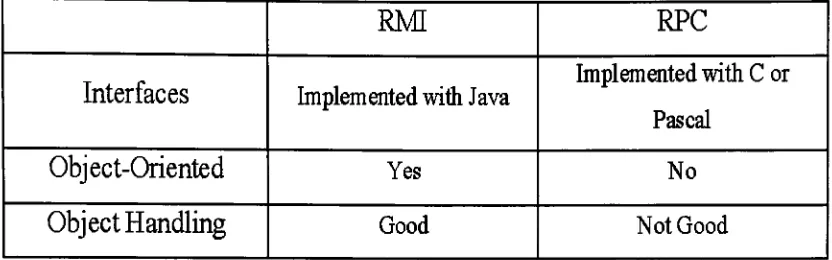
Table 2. Compare
RMI
to
Remote Procedure Call
(RPC)
RM
RPC
Interfaces
Implemented
withJava
Implemented
withC
orPascal
Object-Oriented
Yes
No
Object
Handling
Good
Not
Good
Interfaces
RMI: It
is
implemented
withJava
language.
RPC: It is
typically
implemented
withC
orPascal.
Object-Oriented
RMI:
Based
on an object-orientedlanguage,
Java.
Objects
areinvoked
by
calling
methods.RPC:
It is
not an objectbut
ratherjust
a set offunctions
that
canbe
invoked
remotely.Object
Handling
RMI: It
uses object serializationto
marshal and unmarshalparameters and
does
nottruncate
types,
supporting
true
object-orientedpolymorphism.
We don't
have
to
bother
withbreaking
down
the
objectinto
its
rawelements when we useRMI.
RPC:
A
library
offunction
callsthat
handles
the
actualinto
distributed
objectsystems,
where communicationbetween
program-level objects
residing in different
address spacesis
needed.
We
stillhave
to
handle
most ofthe
data
type
issues.
2.3
Java Database
Connectivity
(JDBC)
Because
my
programis
writtenin
Java
language,
it is
the
first
choiceto
useJava
programming language
commands ratherthan
SQL.
It
is
moreflexible
to
usebecause
it
has
many
newfeatures
[1]. Such
as:Batch
updates:Significant improve
data
update speed.Result
setenhancements:Scrollable
result set:Make
it
possibleto
move
Result
set's cursorto the
specific row.New data
type
support:Binary
Large
Object
(BLOB)
andCharacter
Large Object
(CLOB)
areintroduced
to
manipulatelarge
objects.2.4
Java
2
Security
There
aretwo
majorsecurity issues
when we useRMI:
There
is
no authentication.Objects
areserialized andtransmitted
overthe
network.They
are notencrypted,
soit
is
possiblefor
anyoneto
readthe
data.
The Java Secure Socket
Extension
(JSSE)
can establish a secureInternet
encryption,
serverauthentication,
messageintegrity,
and optional clientauthentication.
This
willtake
care of no authentication problem.The
Java
Cryptography
Extension
(JCE)
is
a packagethat
provides aframework
andimplementations
for data
encryption,
key
generationandkey
agreement,
andMessage Authentication
Code
(MAC)
algorithms.We
canuse
this
extensionto
en/decrypt objectsthat
willbe
transmitted
overthe
network.
This
package will solvethe
second problem.3.
Architecture
I
willdiscuss
the
architectureusedin
my
projectdesign.
And
you will getsome
idea how my
program works.3.1
Communication
Between Pc End
andJava iButton
3.1.1 JavaCard Framework
Java iButton is designed
to
be
fully
compatible withthe
Java
Card 2.0
standard.
So its
architectureis
just
like Java
card architecture(see Figure
1). We have
to
noticethat
Java
card platformis
a scaled-down version ofthe
normalJava
platform.But Java Card
2.0
specification usedin
Java
iButton is
with additional capability.Applet Applet Applet
Industry
Add
onClasses
Javacard
Framework
[image:16.545.152.367.369.527.2]Javacard
VM
Figure 1
.JavaCrad Framework
[8]
Enhancements
[2]
to the
Java Card
2.0
specificationinclude:
True 32-bit Java integers for
straightforwardcomputation.Resizable
commitbuffer
optimizesmemory
usage and allowsfor
large
atomictransactions.
Add
ordelete
appletsin
a secure mannerto
update applications afterissuance.
Large Java
stacksupports complexcomputation.Java-accessible
True
Time Clock
time
stampstransactions.
Java-accessible
unique64-bit
registration number supplementsIP
addresses
to
makethe
intermittent
network ofroaming
iButtons
globally
addressable.Standard
cryptographicclassesinclude
SHA-1 for
secretkey
digital
signatures
(RSA
andDES for Rl.l).
Java-accessible
random number generator seeds generation ofcryptographic
keys.
The Java Card framework
defines
a set ofApplication
Programming
Interface
(API)
classesfor
developing
Java Card
applications andfor
providing
system servicesto those
applications.Java Card
applicationsare called applets.
One Java iButton
canhold
multiple applets.3.1.2 OpenCard
Framework
The OpenCard Framework
provides anApplication
Programming
Interface
(API),
which allows programmersto
develop
applicationsin
Java
and makeJava iButton
use ondifferent
target
platforms possible.Applications
CanilO CardApplication
,
CanlAgent
CardTerminal
Figure
2.
OpenCard
Framework
[7]
OpenCard
consists offour
Java
packages withthe
prefix opencard:Application
andIO: Provide
the
high-level API
usedby
the
application
developer.
Terminal
andAgent:
Provide
the
services neededby
the
high-level API.
3.1.3 Application Protocol Data Units
(APDUs)
The
basic
unit of exchange withJava
iButton
is
the
APDU
packet.The
command message sent
from Pc
end,
andthe
response message returnedby
Java
iButton.
APDU
canbe
two
kinds
offormat: Command APDU
Format (Figure
3)
andResponse
APDU
Format
(Figure
4).
r
Mandatory
Header
Conditional
Body
f
CLA
i
INS
|
PI
.;!
P2
Lc
Data
field
Le
Figure
3.
Command
APDU Format
CLA:
Class byte.
INS: Instruction
byte.
P1-P2: Parameter bytes.
[image:18.545.112.426.43.152.2]Le: The
maximumnumber ofbytes
expectedin
the
data
field
ofthe
following
responseAPDU.
Conditional
Body
Mandatory
Trailer
Data field
SW1
SW2
Figure
4.
Response APDU Format
SW1-SW2:
the
processing
status ofthe
commandAPDU
in
a card.3.2
Remote Method Invocation
(RMI)
RMI
is
a specificationfor how
Java
objects canbe
accessed remotely.The
specification contains
the
definitions
ofnaming (how
objects canbe located
and called
remotely),
marshalling (how
an object shouldbe
convertedinto
abyte
stream andthen
convertedit back
to
anobject)
and proxies(how
method parameters and computation results are passed
between
Java Virtual
Machines). These
objectsmay
resideonthe
same physical machine asthe
hosting
JVM,
orthey
may
be
located
onother machinesthat
are connectedto the
serverthrough
the
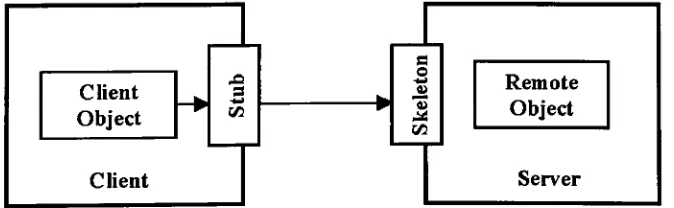
network.The relationship
between
the
client andserver
is
picturedin
Figure
5.
We
have
to
noticethat
Skeleton
files
are nots
s
o 9)
3
Remote
Object
Client
Object
Server
Client
[image:19.545.59.470.112.165.2] [image:19.545.91.428.519.623.2]required
by
RMI in Java 2. In Java
2,
un-packing
willbe
managedby
RMI
libraries.
We
canbreak RMI into
three
major elements[10],
anddetails
aredescribed
asbelow:
Ability
to
locate
remote objects:A
naming
ordirectory
serviceis
used
for
locating
remote object.RMI
simply
usesrmiregistry
to
obtainreferences
to
remote objects.Figure 6
showsthe
organizationof ageneric
naming
service.Client
:...
Neme
Binding
I
Nsme
Binding
Name
^~l^m
Binding
Naming
Service
Figure
6. A
genericnaming
service[11]
Ability
to
Communicate
with remote objects:Details
ofcommunication
between
remoteobjects arehandled
by
RMI.
Figure
7. RMI handled
remote objects communication[12]
Interfaces Cic
f
Remotej
^RemoleObjed)
f
lOExoepionJ
meimteServer)
{RernoteExceptom
(Aclivalable)
fUricastRenrioleObjecl)
[image:20.545.97.425.246.373.2] [image:20.545.118.413.515.674.2]Ability
to
Load
classbytecodes
for
objectsthat
are passed around:In
RMFs
use ofthe
Proxy
pattern,
the
stub class playsthe
role ofthe
proxy,
andthe
remote serviceimplementation
class playsthe
role ofthe
RealSubject.
The proxy
knows
how
to
forward
the
method callsbetween
the
objects.See Figure
8.
lnterface Subject
+request() ii
RealSubject
Proxy
realSubject
+request() +request()
Figure
8.
Proxy
pattern[9]
3.3
Database Management
3.3.1 Java Database
Connectivity
(JDBC)
The
JDBC
API
containstwo
majorinterfaces:
the
first
is
the
JDBC
API
for
applicationwriters,
andthe
secondis
the
lower-level JDBC driver
API
for driver
writers.JDBC drivers
aredivided into four
types:
Type
1
-Connection
through
anODBC Data Source: This
type
of [image:21.545.111.382.201.358.2]accessible
through
ODBC,
but it
requiresthat
ODBC be installed in
each client machine.
See Figure 9.
JOBC API
1DB&OOBC BrtdjspsDriver?'
s
[image:22.545.125.418.102.392.2]PartialJava.
|OBC Driver
Figure 9. Type 1
andType 2
JDBC
Drivers
[3]
Type 2
-Connection
through
Native
Client
Networking
Code:
This
type
ofdriver
includes both Java
and nativecode,
andit
communicates with
the
client-side network software of a particularDBMS.
See
Figure
9.
Type 3
-Connection
through
Middleware:
This
type
ofdriver is
written
in
pureJava.
It
requires a server-side component.See Figure
lava Applet/
Application
[image:23.545.109.450.40.373.2]'JDBC
AF(
|DBt Driver
Manager
or'
DataSource
Object
V
Pure Java
IDBC Driver
T
X)
Figure 10. Type
3
andType 4 JDBC Drivers
[3]
Type 4
-Direct
Connection
to DBMS: I
use
this type
ofdriver
in
my
project.It is easy
to
usebecause
the
only
component neededis
the
driver
itself. See
Figure 10.
3.3.2 Database Management System
(DBMS)
I
useCloudscape
DBMS
that
is included in Java 2
Enterprise Edition.
Cloudscape
is
aJava- andSQL-based
object-relationaldatabase
management system
(ORDBMS).
3.4
Java
2
Security
Four
packages composethe
JSSE
architecture:com.sun.net.ssI:
Provides
classesrelatedto
creating
andconfiguring
secure socketfactories.
javax.net:
Provides
optional classesfor
networking
applications.javax.net.ssl:
Provides
the
classesfor
the
secure socket optionalpackage.
javax.security.cert:
Provides
optional classesfor
publickey
certificates.
I
useSSL in my
project.SSL
handshake
is
usedfor exchanging
information between
client and server.By
accomplishing
the
SSL
handshake
process,
client and server willhave
the
agreement on what cipher suite and encryption mechanismsthey
will usefor establishing
information
security,
andif
authenticateidentity
is
needed.3.4.2
Java
Cryptography
Extension
(JCE)
The
design
principlesbehind JCE
usethe
sameimplementation
asJava
Cryptography
Architecture
(JCA)
and algorithmindependence
by
the
use ofthe
provider architecture.JCE
alsointroduces
some newinterfaces
to
make
it
possibleto
use newer algorithmfor generating key.
I
useSealedObject
classto
encryptanddecrypt
alldata
that
willbe
transferred
across
the
network.By
using
anappropriately initialized Cipher
object,
we can encrypt and sealany
serializableobject.After
having
the
basic idea
of architecture usedin
my
project,
we will goto the
design
andimplementation
phase next.All
designs
arepresented4.
Design
and
Implementation
Three
categories
(Pc
End,
Server End
andJava
iButton)
arepresented.I
willexplain
them
in detail
asthey
ordered.4.1
Pc End
It
providesthe
GUI
allowing
clientto
do
open/updateaccount,
bank
simulation,
shopping
and checkinformation
onJava iButton.
Pc
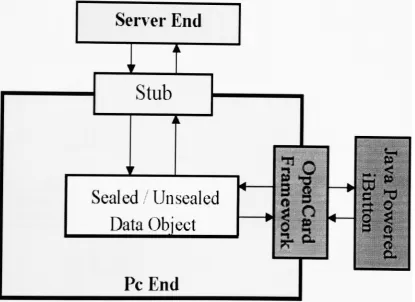
End design
is
shown asbelow.
Server End
I
Stub
Sealed;
Unsealed
Data
Object
Pc End
4.1.1
Function
Specification
[image:25.545.43.459.282.584.2]iButton
inserted
Detect
accountalready
existDetect
accountis
not existI
Pop
up
adialog
toinform
you crate an accountPop
up Password
dialog
Enter
pinnumber
I
Wrong
Compare
Pin
with
iButton
Right
1
Re-enter
pinnumber
Open Account
Detail
in
4.1.1.1
Update Account
Detail
in
4.1.1.2
Vending
Machine
Detail
in
4.1.1.4
Bank
SimulationDetail
in
4.1.1.3
On iButton
Detail
in
4.1.1.5
4.1.1.1
Create
anAccount
During
the
open andupdate accountprocess,
Java iButton
mustbe
always
inserted. If
it
is
removedduring
the process,
an errordialog
Create
an accountis
selectedfor
the
client whodoesn't have
anaccount
in
ourdatabase.
This
willcreate a new accountin database
andstoreclient
information
onboth
server end andJava
iButton.
No Error
Open
Account
Tab
Selected
Pop
up
adialog
toinform
you crate anaccountInput
personalInformation
Send Info.
to
school-end
Error
Check
Info, input
Send Info.
to
iButton
(Store
theA
(
Store
the]
Info.
J
V
Info.
/
Pop
up
aninput
errordialog
Correct
input
4.1.1.2
Update
anAccount
Update
an accountis
selected whenthe
client wantsto
changehis/her
personal
information
or pin number.This
will updateinformation
onboth
server end andJava
iButton.
No Error
Send
Info.
to
school-end
I
Update
Account
Tab
Selected
Send Info.
to
iButton
(Store
the
|
[
I
Display
personal
Info.
Error
Check Info,
input
Pop
up
aninput
errordialog
Store
the
Info.
Correct
input
4.1.1.3
Bank
Simulation
Bank
Simulation
is
designed
to
demonstrate
using
Java
iButton
to
deposit,
withdraw andinquire
accountinformation. Java iButton
mustbe
alwaysinserted.
If
it is
removedduring
the process,
an errordialog
will
pop up
and alltransaction
willbe
aborted.Bank
Simulation
Tab
Selected
^ r ir
Deposit
Withdraw
Account
Inquiry
Deposit
Money
An
amountinput
willbe
checkedduring
the
deposit
andwithdraw process.
If
amountinput
equalsto
0,
an error willbe
thrown.
And if deposit/withdraw
amount exceeds$1,000,000,
an error will
be
thrown.
Deposit money is
transferring
money
from Java iButton
to
server end.Input
errorchecking
willbe
Deposit
Tab
Selected
Input
amount
to
deposit
No Error
i
i
Check
for
errorinputs
Error
Pop
up
aConfirmation
dialog
Enough
i
i
Pop
up
anError
dialog
Check
if iButton has
enough
money
to
be
withdrawn
Not Enough
Deduct money from
Java iButton
Deposit to
accounton serverWithdraw
Money
Withdraw money
here
meansmoney
willbe
withdrawnfrom
server
to
Java iButton. All
errorchecking
will alsobe
Withdraw
Tab
Selected
Enter
the
amountto
withdraw
No Error
Check
for
errorinputs
Pop
up
aConfirmation
dialog
Enough
Check
if
account onserver
has
enoughmoney
to
be
withdrawnDeduct money
from
account
Error
Pop
up
anError
dialog
Not Enough
Deposit
toJava
iButton
Account
Inquiry
When
accountinquiry
tab
is
selected,
clientinformation
willbe
gathered
from
server and available credits willbe
retrievedAccount
Inquiry
Tab
Selected
Click
Account
Information
Tag
Get
clientinformation,
balance
andevents
from
serverGet
available creditsfrom Java iButton
Display
accountinformation for
client4.1.1.4
Vending
Machine
In
this section,
wetest
the
Java iButton calculating
ability.Vending
machine
is
always connectedwith server sothat
all purchase amountcan
be
transferredinto vending
machine's accounton server.All
transaction
amounts are checked anddeducted
withinJava
iButton.
It
has
the
ability
to
processthe
data
we passedin.
*
Vending
Machine
Tab
Selected
Select
the
item
youwant
Enough
Not Enough
Check
if
Java
iButton has
enough
money
tobe
withdrawn
Deduct money
from
Java
iButton
Show
erroronscreenDeposit
tovending
machineaccount on server
4.1.1.5
Information
onJava Powered iButton
This
showsthat
Java iButton has
the
ability
to
store moreinformation
than the
magnetic stripe card.The information
stored onJava
iButton
will
be:
name,
birthday,
socialsecurity
number,
US
address,
US
On
iButton
Tag
Selected
I
Get
clientinformation
andavailable credits
from
Java
iButton
I
Display
clientinformation
4.1.2 Secure Connection
In Java
2,
we can custom our own sockettype.
Therefore,
we caneasily
establish a secure connect with
Java Secure Socket Extension
(JSSE
1.0.2). Method Socket createSocket(String
host,
int
port)
in Interface
RMIClientSocketFactory
mustbe
implemented
withjavax.net.ssl
package.
Because I
putthe
server authenticationin my
design,
wehave
to
import
server's certification and markedit
astrusted
certification.Or
wewill get an exception.
4.1.3 Data
Encryption
andDecryption
When using SSL
connection,
alldata
are encryptedbefore
they
arepassed
through
the
network.I
also use classSealedObject
in Java
Cryptography
Extension (JCE
1.2.1)
to
encrypt anddecrypt data
transaction
amount.Data
encryptedtwice
willbe
muchsaferthan
data
encrypted once.
4.2
Server End
The
basic
serverenddesign is
picturedin Figure 11.
Pc End
Skeleton
i
A
Sealed
Unsealed
Data Object
Data
Storage
1r
i
*
\
i
!
t
' SJopvpt*TTnrl
JDBC
k?vl Vvi llfllvi
j
f
u
/
Backup
>
DBMS
y
Data
[image:35.545.43.486.166.636.2]Storage
One
thing
wehave
to
noticeis
when serveris
down,
both
client andserver
have
to
restart.But
alldata
willbe
recoveredfrom database
assoon as server reboots.
All
accountswillbe
recovered and reconstructedby
calling
recovery
method.4.2.1 Database
In my
design,
client can't connectto the
database directly.
All
requestsfrom
client mustbe handled
by
RMI
server.RMI
server canthen
makeaconnection
to
DBMS
to
do
the
updates.So I
useType
4 JDBC driver
andDBMS
is
using Cloudscape
that
is in
the
J2EE.
4.2.2 Request
Processing
Two interfaces
arecreated.One
is
BankManager. Implementation for
BankManager
interface
takes
careof"create
account",
"get
account",
"set
key" and"update
account".The
otherinterface is Account.
Implementation
for
Account interface only handles
things
associatedwithaccounts such as
"update
clientinformation", "deposit", "withdraw",
"get
balance"
and
"get
clientinformation".
4.2.3 Secure
Connection
Connection
in
server endis
different from
the
client end.In
orderto
similar
to
pc end.We
have
to
implement
methodServerSocket
createServerSocket
(int
port)
in Interface RMIServerSocketFactory.
Second,
serverhas
to
setup
key
managerto
do
server authentication.Third,
wehave
to
export server's certificationto
pc end.4.2.4 Data Encryption
andDecryption
Server
end usesthe
samedata
encrypt/ decrypt
method as pc end.4.3
Java Powered iButton
4.3.1
Bank
Applet
Applet
run onthe
Java
iButton is
similarto
Applet
programming.Applet
is
designed
to
cooperate withpc end program.Bank
applet can process:store client
information
(including
pin),
deposit,
withdraw,
getcredits,
and pin check.
ISOException
willbe
thrown
if any
error occurredduring
data
processing.All
data
are processed withinJava
iButton.
4.3.2 Pin Authentication
Java iButton
is
JavaCard
2.0-compliant.
I
usejavacard.framework
package
to
do
pin authentication.I
set3-minute
timeout
if
userinput
wrong
pin8
times
in
a roll.Max. Pin length
is
setto
9.
These
values canbe
changed at anytime.The only
reasonI
setthese
valuesis for
easy
4.4
Classes
Classes in my
project aredivided into five
packages:Package
projectinterfaces:Contains
remoteinterfaces,
exceptionsthrown
by
remoteinterfaces
,implementation
for
remoteinterfaces
anddata
classes.project.interfaces.Account:
Remote interface.
project.interfaces.BankManger:
Remote
interface.
projectinterfaces
Jnfo: Data
classfor
holding
clientinformation.
project.interfacesAccountlmpl:
Implementation
for Account
interface.
project.interfaces.BankManagerlmpl:
Implementation
for
BankManager
interface.
Package
project.pcend:Contains
the
main classesfor
pc end program.project.pcend.PcEnd:
This is
the
heart
ofthe
pc end program.project.pcend.BankUser:
Contains
the
mainfunction.
project.pcend.ErrorDialog:
Error dialog.
project.pcendAnotherTransaction:
AnotherTransaction
dialog.
project.pcend.Confirmation:
Deposit
/withdraw
confirmation.projectpcendJnfoError:
Information
input
errordialog.
projectpcend.BankHost:
This
classhandles
allJava
iButton
processes on pc end.
project.pcend.BankHostException:
Exceptions
thrown
by
Java
iButton
during
data
processing.Package
projectsecurity:Contains SSL
connection andobjectencryption and
decryption
.projectsecurity.
ObjectDecryption:
Doing
data
decryption.
projectsecurity.
ObjectEncryption:
Doing
data
encryption.projectsecurity.
RMISSLClientSocketFactory:
Create
clientsocket.
projectsecurity.
RMISSLServerSocketFactory:
Create
serversocket.
Package
projectserver:Contains
server class.projectserver.ServerSystemServer:
Main
function
of serverend.
projectserver
AccountDB: This
class will createthe table
AccountData in database.
projectiButton.BankApplet:
This
applet will run onthe
Java
iButton.
Next
willbe
the
users manual which covers environmentsetting,
program5.
Users
Manual
I
assumethat
the
useralready setup jdkl.
2.2
andj2sdkeel.3
appropriately.5.1
Configuring
Policy
andSecurity
Files
Policy
file
You
can use policytoolcommandto
edit or createpolicy file.
Only
serverneeds
this
policy
file.
For
example,
impolicy
Tool.
JSJxJ
File Edit
PolicyFile: C:\Program Files\JavaSoftAJREM.2\lib\security\java.policy(\\
Keystore: i
Add
Policy Entry
j
EditPolicy Entry
j
RemovePolicy Entry
|
CodeBase"file:${java.home}/lib/extf*"
CodeBase<ALL>
CodeBase"file:ff:/test1f'
(2)
(
1
)
Location
of yourpolicy file.
Policy Entry
*l
CodeBase:
SignedBy:
file:/f:/testl/
(1)
AddPermission
I
EditPermissionI
Remove Permissionpermissionlava.net.SocketPermission"*:1024-", "connect1;
Q,)
Done
j
Cancelj
(1)
Your working
root.(2)
Give
socket permissionfor RMI
andJDBC
use.Security
file
Because
we will useJCE
andJSSE,
wehave
to
install
these two
APIs
first.
Both
client and server needto
configurethis
file.
Installation
guides canbe
found
in Appendix B. After
we addtwo
lines
into security
file,
installation
is
complete.
security.provider.2=com. sun.crypto.provider.SunJCE
security.provider.3=com. sun.net. ssl. internal.ssl.Provider
5.2
Server End
Setting
onSolaris
8
andWindows
2000
file,
you can seethe
file
structure asfollowing.
Working
rootproject
server
interfaces
security
5.2.1 Environment
Setting
Solaris 8
Set
the
environment variableJ2EE_HOME
to
whereyouinstalled J2EE. For
example,
setenv J2EE_HOME=/home/stu4/sl6/yxc3650/j2sdkeel.3
Set
the
environmentvariableJAVA_HOME
to
whereyouinstalled J2SE. For
example,
setenv
JAVA_HOME=/
home/stu4/sl6/yxc3650/jdkl.2.2
Windows 2000
Set
the
environmentvariableJ2EE_HOME
to
where youinstalled J2EE. For
example,setJ2EE_HOME=C:\j2sdkeel.3
Set
the
environmentvariableJAVA_HOME to
where youinstalled J2SE. For
example,Both for
Solaris
8
andWindows
2000
To
avoid classpathissues,
copy
andrenamethe
following
jars
from
J2EE_HOME/lib/cloudscape
andJ2EE_HOME/lib/system
to
JAVA_HOME/jre/lib/ext:
cloudscape.jar, client.jar rename
to
cs_client.jarRmiJdbc.jar
renameto
cs_RmiJdbc.jartools.jar
renameto
cs_tools.jarAlso
rememberto
include J2EE_HOME/bin into
yourCLASSPATH.
5.2.2
Running
Server End Program
Both for Solaris 8
andWindows 2000
If
this
is
the
first
time to
run serverprogram,
follow
these
steps
to
create accountdatabase first.
(1)
cloudscape-start -to
start
Cloudscape DBMS.
(2)
Java
-Dcloudscape.system.home=J2EE_HOME/cloudscapeproject, server.
AccountDB HostName PortNumber
-to
create
AccountDB database for
first
time
use.You
will seemessage
"Table AccountData
wascreated"
later.
*
HostName:
serverIP. *PortNumber:
port numberIn working
root,
executethese
commandsin
order:(1)
rmiregistry 1234
-to
start rrniregistry.(2)
Java
-Dcloudscape.system.home=J2EE_HOME/cloudscape-Djava.rmi.server.codebase="file:/fullpath
/"
project.server.BankSystemServer
HostName PortNumber
-to
start server service.After
these steps,
you will see message"Server
started".5.3
Pc End
Setting
onSolaris
8
andWindows 2000
Execute
jar
xvfclient.jarto
extract clientfiles.
After
you extractedthat
jar
file,
you can seethe
file
structure asfollowing.
Working
rootsfc.jar
jssecacerts
Keystore
project
iButton52.jar
pcend
interfaces
security
Put
andiButton52.jar into
JAVA_HOME/jre/lib/ext/
and putjssecacerts
into
JAVA_HOME/jre/lib/security/
.*sfc.jar:
contains classesfor GUI.
*iButton52.jar:containsJavaCard API.
5.3.1
Running
Pc
End Program
In working
root,
execute:Java
projectpcend.BankUserHostName
PortNumber
-
to
start pcWelcome
pageWelcome
Please insertyouriButton.Thankyou!!
Click
(1)
OK
button,
it
willbring
out open accountpageif
the
account
didn't
exist.Or
pop up
pin checkdialog
if
accountexists.
Pin
checkdialog
Pleaseenter youPINnumber.ThanKyou!
PIN:
j
(i)j
Or^gj Cancelsne
n.Thankyou!!
*M&.
Please insertyouriButto
[ok
|
'- jIn
(1)
field,
input
your pin no morethan
9 letters.
Click
(2)
OK
button
to
checkpin.Open
Account
pagemmmm, .
jJOJS
Pleasecreate an accountfirst,thanks!
[
_ J
i
!. iYes
i]
r!
bffiS
ZipCode: [ Phone No.
HomeAddresi
Stre<
Ci(
ZipCod
Jt: I APT#; ]
y: j State
e:
1
Phone No.PIN:
|
Re-Enter PIN: !OK Cancel
j
(3)
shows needto
create accountfirst
message.Click
(2)
OK button
to
clearthe
messagedialog.
After
clearthe
massagedialog,
you can startto
input
information.
Open Account[updateAccountjBank SimulationJE-Wallet!OniButton! tVcttNB
First Name: |Yu-Hui ! Middle Name: ;
LastName: Cho Birthday: ;<2)
SSN: -
-USCitizen: Yes.i:-'i"-i
0) (5) PIN-PIN:
k
Re-EnterPIN: Cancel-. MailingAddfesiStreet: j APT* |
City:
ZipCode:
State: ! *i Phone No.:
]
!HomeAddivss
Street:
j
APT*[
City: State: I ZipCode: Phone No.:
j
Notice
(2)
Birthday
field,
the
format is
month/
day
/
yearIn
(3)
section,
input
yourUS
address and phone number.In
(4)
section,
input
yourhome
address and phone number.In
(5)
section,
input
your pinnumber.Click
(6)
to
storeinformation.
Click
(7)
to
abort andback
to
Welcome
page.Error input
dialog
If
input
containserror(s),
an errordialog
willpop
up..,. jOpenAccountiUpdateAccount.BankSimulationjE-Walietion
iButton!
"Jame
FirstName: MiddleName:
*j
Pleasecorrectthe
following
error(s):Please fill inyourfirstname
Pleasefill inyourlastname
Pleasefill inyourbirthday
Please fill inyour9-digit S.S.N Plpaspfill intfrpptinmailinn aHHrp<:c;
d)
OKg
Yes -City: ZipCode: State: Phone No.: OK Cancel JHI*j rPIN1
PIN:!
Re-EnterPIN:[~~
j
In
(1)
section,
it
showserror(s)
to
be
corrected.Bank Simulation
pageJOJil Open Accountfupdate Account Bank Simulation
!E-Walletj
On iButtonBank
Simulation-Welcome
to
bank
simulation
Please
clickOK
tocontinuem
Click
(1)
OK button
to
proceedbank
simulation.Deposit
pageOpenAccount[UpdateAccountiBankSimulationiE-WalletjOn iButton
Bank
Simulation
Deposit Withdraw AccountInquiry
Please
enterthe
amount:Amount:
%J
(l)O.OOj
Cancey
In
(1) field,
input
the
amountyou wantto
deposit.
If
youdidn't
put
any
amount and you click(2),
you willgetan error.Click
(3)
Cancel button
to
abort.Transaction
Confirmation
Dialog
IMII^^lil1
:-Wailet[oniButW
Jaisijal r
Youentered$ 1.22
to deposit ,is thatright?
iion ""
i
Yesb
LNdthe
amount:
1
|
Amount: ) 1.22|
i
!! 11
ok]
Cancel|
f
|| i
Click
(1)
OK button
to
proceedtransaction.
Click
(2)
No
button
to
re-enterdeposit
amount.Another Transaction
dialog
t-WalletOniButton
Transaction iscomplete.
tioi~l
"ii11" >Doyou need anothertransaction?
Ye^)
No,mAmount:
OK
the
amount:
Click
(1)
Yes
button
to
continueanothertransaction.
Click
(2)
No
button
to
terminate
this
section.Withdraw
pageJHJ*J
Open Account
[update
Account BankSimulation E-Waliet OniButton!t>anK
oimuiation
%
Deposit
Withdraw
Please
enter
the
amount:
Account
Inquiry
Amount: Wo.ool
I
%
I
Canceb)
In
(1) field,
input
the
amount youwantto
withdraw.If
youdidn't
putany
amountand you click(2),
you will get an error.Click
(2)
OK button
to
proceedtransaction.
Account
Inquiry
page.Jfljxl
jOpenAccount
|
UpdateAccountJBankSimulation(E-Wallet
On iButtonj
Bank
Simulation
Deposit
Withdraw
Account
Inquiry
(DAccount No.: 96B1 530000000009
(2)Name: Yu-Hui Cho (3)Balance: $0.0
(4)Credit: $26.17
Events:
5/12/01 MAPM. Deposits 1 22
i/12/019:47PM. Withdraw$I22
(1)
shows account number.(2)
shows client's name.(3)
showsbalance
on server.(4)
shows credits available onJava
iButton.
(5)
recordsdate
andtime
when withdraw/
deposit
transaction
occurred.
Update Account
Page
(Open AccountUpdate Account Bank SimulationJE-WalletjoniButton
ivame
First Name: |Yu-Hui | Middle Name:
!
I
Last Name: jcho Birthday: US Citizen:
[72/22/1971
1
|ys-i
S.S.N:
[
234^12-3444Mailing
Address-Street: pW. Squire Dr.
City: Rochester ZipCode:
[nili]
APT* 6
State:|my-J
PhoneNo.: j(716)123-4567j
tPIN-PIN: j**" Re-EnterPIN: OK, Cancel Ui Home Address-Street: City: ZipCode:
paW. Squire Dr. APT#: fi
|
State: NY'
^Rochester
|l4J2l"|
PhoneNo.: .piejizwssrClick
(1)
OK button
to
update account.Click
(2)
Cancel button
to
abort.E-
Wallet
page[OpenAccount
[
Update AccountjBank SimulationiE-WalletjOniButton;-Vending
Machinem
(1) Enjoyyourhotcoffee.
Becareful!It's very hot And havea nice day1
Coffee Tea $0.55 $0.65 HotChocalate $0.75 Mocha $0.85
Back to Welcome
Pag^
(1)
shows messages(including
error messages).Click
(3)
to
goback
to
Welcome
page.ON
iButton
page[OpenAccount Update AccountjBank Simulation
:E-Wallet;OniButton!
Information
oni
Button-Name: Yu-Hui Cho SSN:234-12-3444
Birthday: 12/22/1971
Address:xxW. Squire Dr. APT# 6 Rochester,NY 14621
Tel:
(716)
123-4567Us Citizen: Yes
CreditsoniButton: 25.62
Back to Welcome Pagei,,
(1)
showsinformation
retrievedfrom Java
iButton.
Click
(2)
to
goback
to
Welcome
page.You may
seethe
following
errordialog
whenyou usethis
program.No
amountinput
errordialog
:Oppnarcrt.iiiHin^toftrmimtRanlr Qimnlatiwi!P-UVi.let:OniButton.
^iffli
i nun ii i wmmamt
Please input theamountto deposit.
Thankyoull
tiu
>n
e amount:
:[ Amount 0.00
This
dialog
willpop
out when no amountinput
but
clickOK
button.
(1)
shows errormessage.Click
(2)
OK button
to
cleardialog.
Input
too
much amount errordialog
[Qpfin Arrmmf I IrxHata AfrotintIRank dimtilatinnit=.Wa||et|OniBUttOn!
Deposit toomuch money.
For securityreason, >
please contact withbank manager,thanks.
Ac
OKq-Amount:
OK
>n
-IDIXI
e amount:
0.00'
Cancel
gftjtartj ^_JO3&\21|jWcwn...jMcom..[g1Dyn,..| ^JK&id|BBCiVl...|K]...|Com.,.|[ S^^'iSLH^'Uljli ro4g&> 9:46
This
dialog
willpop
out wheninput
over$1,000,000.
(1)
shows errormessages.Not
enoughmoney
errordialog
This
dialog
willpop
out whenthere
is
not enoughmoney
onJava iButton
or account.(1)
shows error messages.Click
(2)
OK button
to
cleardialog.
Java iButton
removed errordialog
iButtonisremoved.Actionaborted!
Hi
OK,;>
Please
insert
your iButton.thank
you!!This
dialog
willpop up
whenJava iButton is
removed.(1)
shows errormessages.
Click
(2)
OK
button
to
cleardialog.
Create
accounterrordialog
s
-lOlxl
|0pftg_A_rvy>imtllInriafoAi-<-/MmtlRankcjimttlaf-inn
tp.Wa Net;
On iButton;Youcanonlycreate oneaccount! m
lj
(!)
mulation
\0K&i
Please
clickOK
to
coritinueOK
This
dialog
willpop up
when youtry
to
create another account.(1)
shows error messages.Re-enter
pin errordialog
Pleaseenter youPIN number.Thankyou!
ne
n.
Thank
you!!Jnl*J
PIN: i (i)
OK^
|
Cancey
Please insert
youriButto
'::'
. ''"''',': '
' '
': ;
1
OKJ
Re-enter
the
correct pinin (1).
Click
(2)
OK
button
to
check pin.Click
(3)
Cancel
button
to
abort.5.4
Java
Powered iButton
Setting
onSolaris
8
andWindows 2000
5.4.1 Hardware Installation
It
is
easy
to
install hardware. Connect Blue Dot Receptor
to
serialadapter
first.
Then
connectadapterto
serial port.5.4.2
Extra
Software
Installation
See Appendix
C
for
moredetails.
5.4.3
Loading
appletinto Java iButton
6.
Future
work
There
are still alot
ofthings
we can add on.Below
are somedirections
wecan consider
to
makethis
projectmorecomplete.Use Java iButton
to
authenticateweb pageaccess withSSL:
We
can generatethe
key
withiniButton.
It
is
much saferthan
generating
akey
within pc environment.Allowed
money to transfer between
accountsWe
can putconcurrency
topic
into
the
design
and makebank
simulation more complete.
Let Java iButton
performs multiplefunctions:
Add
morefunctions
to
Java
iButton.
Right
now, there
is
only
oneapplet
running
onJava
iButton. We
can add morefunctions
such asaccess control
for
pc,
Medical/Patient
Care Data
and etc.Use
Dynamic Classloading:
Using
dynamic
classloading,
clients can getthe
classfiles
whenthey
need
to.
When
wehave
new addonfiles
to
distribute,
this
wouldbe
the
easiestway
to
getthe
job done.
Use
RMI Activation:
In my
project,
I have
to
restartclientandserver when server crashes.Using
RMI
activationwill makethis
situationbetter. Activation
canmake
the
stubs more persistentandhelp
usto
manage remote services.Combined RMI
withJini:
With
RMI,
if
any
ofthe
componentsfail,
recovery is
nontrivial.Data
recovery is
animportant
subjectin
distributed
system.Jini
canhelp
us7.
Summary
This
projectlet
us explorerthe
powerofJava.
It
covers:Remote Method Invocation
(RMI)
Database (JDBC
+DBMS)
Java 2
security (JCE
+JSSE)
Java Powered iButton
Because
we aredealing
withmoney,
wehave
to
pay
more attentionto
security.
RMI
is
a goodtool to
build distributed
systems,
but
it
still containssome
security
problems.In
this project,
I
useJCE
andJSSE
to
makeRMI
more secure.
Also SSL
and object encryption can provide a secureenvironment
for
data
transfer.
I
think
using
morethan
one algorithmto
encrypt
data
canlower
the
security
risks.I
chooseJava
iButton
to
replacestudent
ID
cardbecause Java iButton
makesthe
information
andmoney
much safer
due
to
its
gooddesign. Thanks
to
database.
In
distributed
system,
it is
not allowedto
lose
any
data
when server crashes.It
must alwayshave
amethod
to
recoverthe
data.
After going
through
the
wholedesign
andimplement
phase,
I
have
moreclear
ideas
onthese topics
andit
also makesme morefamiliar
withthe
8.
Bibliography
References
[1]
http://www.javasoft.com/products/jdbc/features.html
[2] http://www.ibutton.com/store/jringfacts.html
[3] http://java.sun.com/products/jdbc/datasheet.html
[4]
iButton
Homepage,
http://www.ibutton.com/index.html
[5]
"An
introduction
to the
Java
Ring",
http://www.javaworld.com/javaworld/jw-04-1998/jw-04-javadev.htrnl
[6]
"iButtons:
The first
ready-to-buy 2.0
Java
Card API
devices",
http://www.javaworld.com/javaworld/jw-04-1998/jw-04-ibuttons_p.html
[7]
OpenCard
architecture,
documents,
and source codefor
this
articlehttp://www.opencard.org/
[8]
"Understanding
Java
Card
2.0",
http://www.javaworld.com/javaworld/jw-03-1998/jw-03-javadev_p.html
[9]
jGuru:
Remote Method
Invocation
(RMI),
http://developer.java.sun.eom/developer/onlineTraining/rmi/RMI.html#IntroRMI
[10] RMI,
http://splash.javasoft.conVdocs^ooks/mtorial/rmi/index.html[11]
http://www.javaworld.com/javaworld/jw-01-2000/jw-01-howto.html[12]http://java.sun.conVj2se/1.3/docs/guide/rmi/spec/rmi-objmodel5.html
"Design Patterns
-Elements
ofReusable Object-Oriented
Software",
1999
[14]
Marco
Pistoia,
Duane
Reller,
Deepak
Gupta,
Milind
Nagnur,
Ashok K.
Ramani.
Java 2 Network
Security
Second Edition.
Prentice
Hall,
1999.
[15]
Brett Spell. Professional
Java Programming.
Wrox Press
Ltd,
2000.
[16]
Stephen
Asbury,
Scott
R. Weiner.
Developing
Java Enterprise
Applications. John
Wiley
&
Sons
Inc,
1999.
Appendix A. Java
Powered
iButton Detail
A.l
DS1957B-406
Java-powered
iButton,
model96
release2.2
DS1957B
Java-powered iButton Features:
High
capacity,134
kbyte,
fast NV SRAM
supportsmultipleindependent
applications
Ample memory for
over30
certificates(X.509v3)
andhundreds
of usernames/passwords
True
Time Clock
is
tamper-resistantsotime/datestamps andexpirationdates

![Figure 1Enhancements [2] to. JavaCrad Framework [8] the Java Card 2.0 specification include:](https://thumb-us.123doks.com/thumbv2/123dok_us/121420.11714/16.545.152.367.369.527/figure-enhancements-javacrad-framework-java-card-specification-include.webp)
![Figure 2. OpenCard Framework [7]](https://thumb-us.123doks.com/thumbv2/123dok_us/121420.11714/18.545.112.426.43.152/figure-opencard-framework.webp)
![Figure 7. RMI handled remote objects communication [12]](https://thumb-us.123doks.com/thumbv2/123dok_us/121420.11714/20.545.97.425.246.373/figure-rmi-handled-remote-objects-communication.webp)
![Figure 8. Proxy pattern [9]](https://thumb-us.123doks.com/thumbv2/123dok_us/121420.11714/21.545.111.382.201.358/figure-proxy-pattern.webp)
![Figure 9. Type 1 and Type 2 JDBC Drivers [3]](https://thumb-us.123doks.com/thumbv2/123dok_us/121420.11714/22.545.125.418.102.392/figure-type-and-type-jdbc-drivers.webp)
![Figure 10. Type 3 and Type 4 JDBC Drivers [3]](https://thumb-us.123doks.com/thumbv2/123dok_us/121420.11714/23.545.109.450.40.373/figure-type-and-type-jdbc-drivers.webp)