A persistent infrastructure for augmented field trips
Mark J. Weal, Don G. Cruickshank, Danius T. Michaelides, David E. Millard and David C. De Roure IAM Group
University of Southampton, UK (mjw | dgc | dtm | dem | dder)@ecs.soton.ac.uk
John Halloran, Eva Hornecker and Geraldine Fitzpatrick Interact Lab, Dept. of Informatics
University of Sussex, UK
(johnhall | eh49 | G.A.Fitzpatrick)@sussex.ac.uk
Abstract: This paper describes an approach to the provision of pervasive field trips where a persistent infrastructure is provided, upon which teachers can easily create novel pervasive experiences for children. The physical infrastructure is briefly described along with the underlying information infrastructure, which enables the tools for authoring the content and designing the orchestration of the experience to be placed in the hands of teachers. A literacy experience and initial trials of the system are discussed, conclusions drawn, and future directions outlined.
Introduction
School field trips can form an important addition to the education of children. A typical trip might involve a visit to a local museum or historical site where organised tours are given to impart information to the children. This might be by a curator/guide or perhaps be part of a digital system. Such in-house systems are often limited by very practical constraints such as the time it takes to create slick, commercial content and the costs involved in deployment. This can result in systems that, although very professional, cannot be tailored by the teachers to meet the specific requirements of the currently studied parts of the curriculum.
These trips are often augmented with activities. These might be provided on paper, with the children going through a list of tasks and ticking them off as they are completed. This gives the teachers additional control over the activities of the children but brings new challenges. The children have all the activities available up front and it has been observed by the teachers we are working with that the children often see the task as a race to complete the activities.
Previous work has looked at using technology to provide the field trip experience within the classroom. Virtual Field Trips have been created which seek to either prepare students in order to try to gain maximum value from time spent away from the classroom (Stainfield et al., 2003; Shonfeld et al., 2003) or simply to replace more traditional field trips (Hosticka et al., 2002). Bodersen et al. have also been working on tools to support the gathering of digital information by Children both within schools and at home using their eBag technology (Bodersen et al., 2005). Other work has examined the use of PDAs to collect field data using off-the self applications such as text editors and spreadsheets (De Crom, 2005). While this has been trialled enthusiastically there is also evidence to suggest that teachers have difficulty adopting innovative approaches with such devices (Facer, 2005).
The Chawton House project has looked for ways of providing a pervasive infrastructure in terms of both a physical setup as well as an information infrastructure that allows teachers to design and create augmented field trips, making use of curated information and placing more control into the hands of teachers. Where as previous digital field trip work has tended to focus on aspects of science and geography (Rogers et al., 2005), we have chosen here to look at how augmented field trips might be used to help teach children about literacy, in the first instance, storytelling.
In this paper we will focus on the teachers experience through the Chawton house project. The pervasive infrastructure will be briefly described along with the information model used to construct the literacy experience. The capturing of content and authoring of the activities and orchestration will be discussed with a brief overview of the resultant children‘s experience.
Building on an Established Infrastructure
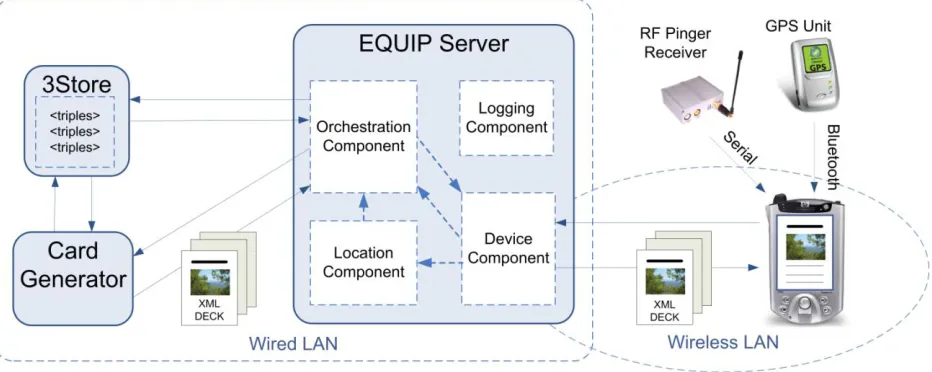
[image:2.612.75.541.271.457.2]The Chawton project architecture has been designed to support a wide range of different users. The architecture is intended to persist at Chawton House Library and become a growing, dynamic, changing system. We shall consider the infrastructure in two parts. First we will discuss the physical infrastructure, what it is composed of, and how it is deployed in the environment. We will then discuss the information infrastructure and how it has been designed specifically for reuse across the different experiences that are constructed upon it.
Figure 1 shows an overview of the Chawton architecture. The basic infrastructure is designed to be installed at the House and exist as a permanently running system that evolves over time as new information is added and new experiences are created. The goal would be for it to be maintained by the curators of the house with IT support where necessary.
Figure 1. The Chawton Infrastructure.
The infrastructure can be thought of as being comprised of a physical infrastructure and an information infrastructure.
Physical infrastructure
A central server deployed in the house was used to run the main orchestration parts of the software. This was connected to the pervasive devices via a wireless network. Four easily deployable battery powered access points were placed in the grounds during the running of the experiences to provide coverage across the area. The children carried PDAs (standard iPaq PocketPCs), which could then communicate with the central server via the wireless LAN using HTTP.
The children interacted with the PDA using a single application which allowed them to listen to and record audio fragments, read textual instructions and make brief notes. The PDA sent update information to the server and received an XML document in response that contained instructions based on the matched context.
Information infrastructure
On top of this physical infrastructure a generic information system was deployed. This consisted of two parts. The first is an orchestration tool constructed using the EQUIP (the EQUator Infrastructure Platform) server (Greenhalgh05). This provides a component based tuple space designed for the development of the types of pervasive experiences we are interested in. Figure 1 shows the EQUIP server and the four key components developed for orchestration, logging, location processing and communicating with the device. The server holds the current state of the system. As that state changes the components are informed of the changes in state they are interested in. Alongside the EQUIP server sits a triple store (the AKT 3store) to store information. The 3Store is a MySQL based triple store that provides the facility to store and query RDF statements. In Chawton it stores a set of RDF statements that represent a card (cards are sent to PDAs, see next section). RDQL queries provide the mechanism for extracting those cards that are relevant to the current context for a device. By using Semantic Web technology we can take advantage of the consistent modelling mechanisms, interoperability and also the more complex inferencing that such systems facilitate.
This information infrastructure was responsible for delivering information to the participants, either visitors using the visit system or children taking part in the literacy experience. The orchestration was based on participant‘s current context: physical location, preferences, the current state of the experience, etc. This context was matched to metadata attached to the content of the experience to decide on appropriate material to deliver to the PDAs.
This orchestration technique is based around previous work on the use of hypermedia techniques in the orchestration of pervasive experiences (Weal et al., 03). The content of the experiences was structured using a card model (Bernstein, 2001). Different cards have different functionality associated with them, for instance a simple information card might have a piece of audio attached to it to be played automatically, or an activity card might ask the children to record a description of the particular part of the grounds they were in. Cards can then be arranged into sequences and decks for particular activities, they are triggered by changes to context, such as a change in location. The teachers were also able to put specific constraints on the cards to ensure that an activity lasted a minimum amount of time or that the next card was played after a maximum allowed time for an activity. Five different types of card were identified for the construction of the first trial experience:
Information cards: give the children additional information about the various locations. These could be a mixture of those created by the curators of the house and those created by the teachers specifically for the experience.
Instruction cards: are designed to prompt the children to think more deeply about their surroundings. They might be ask them to make notes in their paper notebooks, reflect on what might have occurred at a particular location or think about how different characters might react in the current place.
Capture cards: require the children to record information digitally. They can be set up to allow the children to record a piece of audio, or to enter short pieces of text. Once the children have recorded some information they are given the option to review it or rerecord it if they are unhappy with their recording.
Sequence cards: are used to group information, instruction and activity cards together in a location. For example a simple sequence might be that the children listened to an audio clip provided by the curator about the stable block (Information). They are then asked to spend some time thinking about who might have worked there (Instruction). Finally they are asked to record a short piece of dialogue taking place between their imagined characters (Capture).
Multiple choice cards: allow the teachers to add a more random element to the information being delivered. A number of cards are grouped together using the multiple choice card wrapper and the system selects one of them to be presented to the children at that point in the experience. This introduced an additional level of ‗uniqueness‘ to each child‘s experience.
‗pending‘ deck is changed to reflect the new state. Once the children have started a sequence card, that sequence is considered active and will be ‗played‘ to completion. Changes in the user context won‘t affect the currently active card or sequence, only the pending deck.
When a card is experienced, or played, by the child, the context can change as a result of the assertions held on the card. This allows us to build in things such as pre-requisites so that a child has to experience certain cards before they are able to access others. By encoding specific requirements on cards the experience designer gains control over the order in which events can happen as well as various timing requirements which might exist.
Semantic Web technologies were used in the modelling of the information infrastructure. By using a standardised ontology for representing the cards, the results of an activity (i.e. the recording of a description) can be made available to the other users of the system as information. In this way the information cards created by the curators could be included in sequences in the literacy scenario created by the teachers. One of the goals of this system was to provide this form of content re-use enabling the content in the system to grow and evolve over time.
The Curated Information
The teachers were able to build on the information content created by the curators of the house in the construction of the literacy experiences. The curators generated content primarily for use in a simple visitors tour system (Halloran et al., 2005). This involved the defining of key locations and the recording of audio information clips appropriate to these locations.
Locations can be defined in two ways, either by the placement of a pinger or by walking out a region using the hand held device. In the later case a static deck of cards was used which included paired instructions such as ‗Go to the walled garden and press OK‘, followed by the instruction ‗Walk slowly around the perimeter of the walled garden and press OK when completed.‘ The resultant system logs were then automatically processed into GPS regions that defined the particular location.
For the visitors system, content creation involved the in-situ recording of audio content by the curators which was marked up with appropriate context metadata. The curators were recorded as they walked around the grounds and this audio content was edited to generate the information content at the various locations. The post processing phase was required for these first trials in order to segment the audio into individual clips. Additional content can now be added by the curators using the capture cards developed as part of the visitors and literacy scenarios. The intention is to produce a system that allows for ready revision and updating of the information content rather than aimed at providing a highly polished specific tour of the grounds. Work from the first trials is feeding into the development of an in-situ authoring system to support the evolution of the information content.
The Literary Experience
The literacy scenario applied the infrastructure framework to the creation of a field trip for a group of children with the aim of steering them through the gathering of material for them to later use when writing a fictional story. As part of a co-design process, the teachers devised a scenario where at various locations around the grounds the children would be given a range of different activities to carry out, involving writing in their exercise books and recording of text and audio on the PDAs.
The teachers were able to make use of most of the locations previously identified by the curators but were also able to add some new locations that were specific to the literacy exercise but had not featured in the material created by the curators. These new locations were added to the information stored and would be available to future experiences, as the information evolves over time. As well as creating the various activities the teachers were also selecting from the information created by the curators, finding information appropriate for the children that would augment their understanding of the landscape and house. It is this form of re-use that was one of the main design goals of the infrastructure developed for this project.
The Activity Script
provided some indication of timings which the teachers viewed as vital in ensuring the pacing of the overall activity for the children. Below is an example location, the StableBlock, and the set of cards decided upon by the teachers.
Location: StableBlock
max: 10 mins
Instruction: “Please go to the black gate, so you stand in between the church and the other building. Once you are there, press the OK button”
Information: Information on stable block and how it connects to the house. Curated-audio: “the Ferrari in the big garage” clip
Instruction: “Imagine you are two visitors arriving at the house for the first time. Discuss with each other who those characters could be. Click OK once
you have decided on your characters and why they are coming here.”
Capture: “Now imagine being that character and slowly walk up towards the house. Role-play a conversation between you and record it.” (Hot seating).
The intention of the co-design was to allow the teachers the freedom to explore issues of pedagogy that were important to them without being restricted by initial constraints imposed by the system. The card system was kept general so as not to preclude specific types of activity. For example, the Capture card at the end of the sequence scripted above uses a classroom technique known as Hot Seating. Here, one child takes on a particular role with the other child asking them appropriate questions. This technique is familiar to the pupils from their classroom work. The teachers are able to incorporate a wide variety of techniques within the simple framework of Activity, Information and Record cards.
The Activity Cards
Having constructed a script for the activities this was converted into a set of cards. At each location, a sequence of cards was used to describe the activities and metadata on the cards indicated the required timings to ensure that the children did not spend too long on certain activities or indeed rush through them. This part of the activity was not fully automated and for this first prototype required some hand crafting by the researchers. The development of better authoring tools for the domain experts to use directly is one of the ongoing activities of the project.
As is true of most field trips, controlling the timing of the various activities is vitally important. The teachers we were working with reported that when students are presented with a paper based activity sheet it can often devolve into a race to see who gets through the activities quickest. The structured timely delivery of contextual activities provides an opportunity to address this issue directly. By modelling orchestration information as part of the ontology the teachers were able to specify how long the children should spend on particular activities and keep the overall activity progressing.
The card information and metadata was stored in the 3Store in RDF (Resource Description Framework). During the experience the PDA‘s received the card information as a set of XML files. Exporting to XML simplified the processing required on the PDA. The XML representing the example chunk of script given above can be seen in Figure 2. Points to note are the explicit naming of locations using a format that allows for future expansion. Metadata information such as minimum and maximum display time are used to pace the orchestration of the activities. The capture card also contains a template that is used once the children have recorded their piece of audio. The output from the enactment of a capture card is a new information card containing the recorded audio and the template provides a mechanism for describing the new information card created.
The Experience
<SequenceCard id="file:///home/dtm/work/equator/rnr/chawton/final/metadata/chawtonliteracy1stdraft.rdf#12"> <location id="http://www.chawton.org/locations#stableBlock" />
<InstructionCard id="_:genid23.25cc" min-display-time="30" max-display-time="120" acknowledgement="delayed-ok"> <TextContent>Please go to the black gate, so that you are standing between the church and the other building.</TextContent> </InstructionCard>
<InformationCard id="_:genid26.25cc">
<TextContent>Information about the stable block.</TextContent> <AudioContent filename="anecdote-A1.wav"></AudioContent> </InformationCard>
<InstructionCard id="_:genid29.25cc" min-display-time="3" max-display-time="6" acknowledgement="delayed-ok"> <TextContent>Imagine you are two visitors arriving at the house for the first time. Discuss with each other who those characters could be. Click Done once you have decided on your characters and why they are coming here.</TextContent> </InstructionCard>
<CaptureCard id="_:genid32.25cc" capture-type="audio">
<TextContent>Now imagine being those characters and slowly walk up towards the house. Role-play a conversation and record it.</TextContent>
<template>
<InformationCard id="_:genid34.25cc">
<location id="http://www.chawton.org/locations#stableBlock" />
<TextContent>A conversation between two people arriving at the house for the first time.</TextContent> </InformationCard>
</template> </CaptureCard> </SequenceCard>
Figure 2. The XML representing the StableBlock activities of the literacy experience
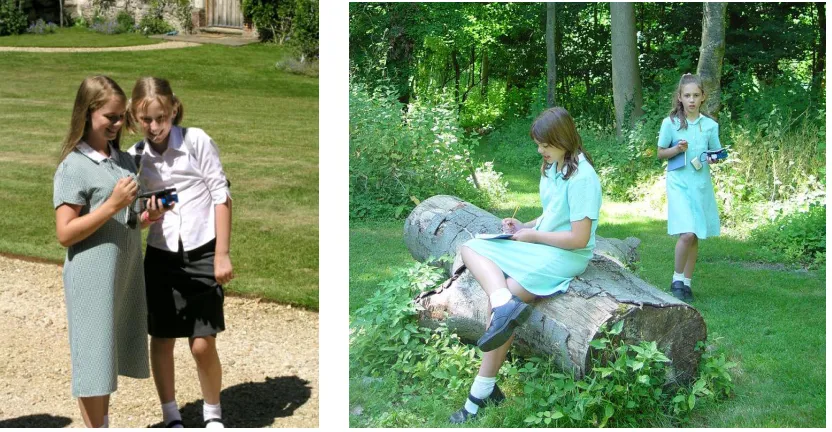
The literacy experience had two parts to it. In the first session the children could explore the grounds freely and at various locations would be required to carry out a sequence of activities. Figure 3 shows the children exploring in pairs. An immediate advantage of the context based activities was that the children were not required to follow a specific route as may well have been the case with a paper based activity sheet. The activities included listening to audio created by the curators, which supplied the children with useful background information about the space. The children were also asked to reflect on different aspects of the house and record small snippets of audio such as descriptions of the kitchen garden, or mock dialogue between fictional visitors as was the case in the Stable Block activities described earlier. The first phase for the children was about gathering information to use in their story.
The second phase of the experience was more focussed and designed to get the children started on their stories. Each pair of children chose two locations from the ones that they had visited during the first phase. At each of these locations they were given simple activities designed to get them started on their stories. This first location was used to get them thinking about setting and atmosphere, the second to look at the characters. At each location they recorded information in their exercise books.
Figure 3. Children using the system during the literacy experience
Conclusions and Future Work
The initial trials of the system have proved largely successful. Mrs. Pat Bradley, Headteacher from Whiteley Primary School felt that, ―The ICT tools have allowed adults to help develop the children‘s literacy skills and the children have been highly motivated by the approach.‖ The teachers also observed that the pacing of the experience was more controlled than would have been the case with a paper based exercise. As Teacher Lesley White put it, ―…they were given the same sort of questions, and things to do, as you would do on a worksheet, but because it was given at regular intervals or fed into them when they were in perhaps certain locations, it paced, it gave the pace to the day, instead of the children setting the pace.‖
It became clear during the trials that the teachers had struggled to conceptualise the mobile activity and until they saw the experience during the trials never truly felt they had a clear idea of what was going to happen. Having seen the first trials it is anticipated that the teachers will both be more comfortable and feel more able to experiment during subsequent trials.
The children also enjoyed the experience and commented on the differences they found with their previous field trips. One child remarked, ―I thought it was one of the easiest things we had to use on one of these trips that we have from school, because normally we have these big clipboards and all this paper to carry around and the paper flies everywhere.‖
We experienced some technical difficulties during the trial, notably the lag between the children arriving at a location and the system identifying the new context and sending appropriate content. The sheer speed at which the children moved around the grounds did sometimes result in them receiving information about a location they had recently passed through but were no longer at. The children were able to adapt to this lag however and subsequent development is seeking to reduce this to a less intrusive level. The logging of activities is all carried out using the same ontology allowing for easy reuse of the data collected during analysis post trials and also facilitating the re-use of information during the trials. Similarly it is hoped that the information space will evolve over time with the curated information increasing and experience builders such as the teachers being able to make use of cards from previous activities.
Acknowledgments
This research is funded by EPSRC IRC project ―EQUATOR‖ GR/N15986/01. The authors wish to acknowledge their partners on the Chawton House project: Chawton House Library, Whiteley Primary School and the University of Bristol.
References
Bernstein, M. (2001) Card shark and thespis: exotic tools for hypertext narrative. In Proceedings of the twelfth ACM conference on Hypertext and Hypermedia, (pp. 41–50). ACM Press.
Brodersen, C., Christensen, B. G., Grønbæk, K., Dindler, C., & Sundararajah, B. (2005) eBag: a ubiquitous Web infrastructure for nomadic learning. WWW '05: Proceedings of the 14th international conference on World Wide Web, Chiba, Japan. (pp. 298—306), ACM Press.
Byrne W. & Beale R. (2004) Determining location in context-aware mobile learning, Proceedings of mlearn 2004, July, (pp. 43-47). Rome, Italy.
De Crom N. (2005) The "ME"-Learning Experience: PDA Technology and E-learning in Ecotourism at the Tshwane University of Technology (TUT), Proceedinsg of mlearn 2005, Oct. Cape Town, South Africa.
Facer K. (2005) Challenges and Opportunities: Making Mobile Learning a Reality in Schools, Proceedinsg of mlearn 2005, Cape Town, South Africa.
Greenhalgh, C. (2005) EQUIP: A platform for distributed interactive systems, available at: http://www.crg.cs.nott.ac.uk/~cmg/Equator/Downloads/docs/equip-tech.pdf
Halloran, J., Hornecker, E., Fitzpatrick, G.A., Millard, D. E. and Weal, M. J. (2005) The Chawton House Experience - Augmenting the Grounds of a Historic Manor House Workshop - Re-Thinking Technology in Museums: Towards a New Understanding of People's Experience in Museums, Limerick (Ireland). 29th-30th June (pp. 54-65).
Hosticka, A., Schriver, M., Bedell, J., & Clark, K. (2002). Computer Based Virtual Field Trips. The 14th World Conference on Educational Multimedia, Hypermedia and Telecommunications (1), (pp. 312-316), Denver, Colorado, USA. AACE.
Randell, C. Muller, H. (2001) Low cost indoor positioning system. In G. D. Abowd, editor, Ubicomp 2001: Ubiquitous Computing, (pp. 42–48). Springer-Verlag.
Rogers, Y., Price, S., Fraser, D. S., Randell, C., Weal, M. J., and Fitzpatrick, G. (2005) Ubi-learning Integrates indoor and outdoor experiences. Communications of the ACM 48, 1, Jan, (pp. 55–59).
Shonfeld M., Erez, A., Litvak, R., (2003) Virtual Field Trips in Biology Courses. World Conference on Educational Multimedia, Hypermedia and Telecommunications (1), (pp. 3122-3125). , Honolulu, Hawaii, USA. AACE.
Stainfield, J., Fisher, P., Ford, B., & Solem, M. (2000) International Virtual Field Trips: a new direction? Journal of Geography in Higher Education, 24 (2) July. (pp. 255-262). Routledge.
Weal, M. J., Michaelides, D. T., Thompson, M. K. and De Roure, D. C. (2003) Hypermedia in the ambient wood. New Review of Hypermedia and Multimedia, Special Issue on Hypermedia beyond the Desktop, 9, (pp. 137–156).