Issue May 2009
Product Silent Fan
Silent Fan
Pages 6
Brief Description
Many versions of Fujitsu Technology Solutions mainboards feature “Silent Fan”, a fan control and monitoring function; this technology enables customers to build quiet and fault-tolerant PC systems. This functionality is based on a unique autonomous microcontroller developed by Fujitsu Technology Solutions.
Benefits
• Less Noise under most operating conditions
• Higher reliability through optimized cooling and extended system monitoring • Three predefined cooling profiles available:
▬ Silent
▬ Auto
▬ Enhanced Cooling
• Operating system and software independent function; fully functional without drivers that are run under the operating system
• Additional fine tuning and monitoring through programming interface
Functional Diagram
Silent Fan
Controller
Control
Monitoring
Control
Monitoring
Control
Monitoring
CPU Slowdown (Throttling)
System Sleep or System Power Off
System Reset PSU Fan 1*
CPU Fan
AUX Fan 2, 3, 4 Temp. Sensor 0
CPU
Temp. Sensor 1 onboard
Temp. Sensor 2 AUX (external; optional)
Message LED
Functional Description
Many Fujitsu Technology Solutions mainboards feature a unique hardware controller with the capability to monitor the fans in the system and control them in accordance with prevailing temperatures. It can also be used to slow down, i.e. throttle, the CPU in order to achieve an additional cooling effect.
As the Silent Fan controller is autonomous and independent of both processor and operating system, the reliable function is guaranteed even in case of deadlock situations of software or CPU.
Silent Fan Controller
These mainboards include a microcontroller developed by Fujitsu Technology Solutions which constantly records temperatures from up to three sensors (CPU and two internal sensors, optional one external). These measurements are used to control and monitor the speed of the CPU fan, power supply fan (special power supplies with controllable fans only) and up to three optional fans. If necessary, the CPU is also throttled; although this has some impact on the performance of the system, it leads to lower heat dissipation as a result of the reduced power consumption. This, in turn, means that the fans can operate at lower speeds, thus making the system quieter.
The CPU temperature is measured directly on the processor die by means of a diode measurement. Alternatively, the digital PECI interface (Platform Environment Control Interface) is used. These measuring methods don’t require any additional sensors on the heat sink or under the processor. The advantage of this type of measurement is the higher precision, thus ensuring that the speed of the fans and the throttling of the CPU can be reduced to a minimum. The user is thus provided with a fully optimized PC system: As fast as necessary, as quiet as possible.
In addition, the Silent Fan Controller provides sophisticated control algorithms to monitor and control the speed of the attached fans; thus, it detects fan failures and also tries to restart locked fans.
The functional block diagram above shows the inputs and outputs of the microcontroller. It operates totally independent of processor, memory and operating system. The system components continue to be protected even if software or CPU get locked for whatever reason.
Silent Fan Controller event signaling
The Silent Fan controller reports all faults and events through the Message LED output. This output can be used to drive a LED that could be connected to the front panel; the LED signal flashes at approx. 2 Hz as soon as the Silent Fan controller reports an event (independent of the operating system). The following events are indicated:
• Fan failure
This signal is triggered by a failure of one of the attached fans. The microcontroller detects a locked fan after two seconds, attempts to restart it by pulsing for approx. 10 seconds and, if this fails, issues an alarm.
• Sensor failure
This signal indicates an inconsistency/failure of one of the attached sensors. Defective sensors are reported immediately.
• Overheating
Silent Fan components on the mainboard
A Fujitsu Technology Solutions mainboard contains the following components for the Silent Fan functionality: • Silent Fan Controller (autonomous microcontroller)
• Onboard temperature sensor
• Connector for controllable power supply • Connector for CPU fan
• Connector for additional fan (optional)
• Connector for external temperature sensor (optional) • Connector for case open switch (intrusion sensor)
Please refer to the datasheet and short description (manual) to find the position of the components on each mainboard. The following sections describe the hardware components that can be attached to the Silent Fan hardware.
Supported Hardware
4-pin fans
All newer mainboards support fans with four connecting wires. In this case, three of the lines are connected identically as with 3-pin fans (upward compatibility), the fourth pin is used for speed control. Since +12 V is always present at pin 2, 3-pin fans that are connected to this header always rotate at full speed unless the fan has a separate control system. The table below shows the pin assignment.
The speed of a 4-pin fan is controlled via a pulse width modulated (PWM) signal at pin 4. This does not ensure that a fan actually switches off if the Silent Fan controller arranges this since the assignment of the speed happens in the fan. In simple terms, the Silent Fan Controller specifies the speed in percent by modulating the duty cycle of the control signal. Ideally the fan should rotate at full speed at 100%, at around half speed at 50% and should be stopped at 0%. Unfortunately, this is not the case with each fan type. Please refer to the specification of the selected fan for more details.
Table Fan Control Pin Header for 4-pin fans
Pin Signal Pin Location
1 GND
2 +12 V
3 Fan Sense
4 Fan Control
3-pin fans
There are also fans with three connecting wires. Two of the lines are used for the supply voltage, while the third pin transmits the current fan speed (sense pin). The speed control of these fans is performed by changing the supply voltage. Some Fujitsu Technology Solutions mainboards are capable of operating also 3-pin fans on select outputs for 4-pin fans. The function can be selected by the BIOS Setup. In this fan operating mode, the fan connector is attached to pin 1 to 3 of the connector (which is also enforced by the keying of the connector). The table below shows the pin assignment and functionality when a fan header is operated in 3-pin mode.
Some manufacturers offer temperature controlled 3-pin fans that are not externally controlled by the interface but by internal control logic in the fan itself. This form of control is then based on a separate temperature measurement (mostly in the heat sink of the CPU) and requires a constant 12 V supply voltage. Since the Fujitsu Technology Solutions fan control function (for 3 pin fans) regulates the fan voltage between 6 V and 12 V, there can be problems with such temperature-controlled fans. This might result in an unwanted interference between the two regulation schemes; therefore, this setup is not recommended by Fujitsu Technology Solutions. One exception is the temperature-controlled fan of the Intel Boxed heat sink. Exhaustive tests have revealed that the control function for this fan continues to work even at low voltages.
Table Fan Control Pin Header in operation mode for 3-pin fans
Pin Signal Pin Location
1 GND
2 Controlled Fan Voltage +6 V to +12 V
3 Fan Sense
4 Not used
2-pin fans
Fans with only two leads are not detected by the Silent Fan controller (due to the missing speed signal on pin 3) and are therefore not suitable for speed control. If attached to pin 1 and 2, a 2-pin fan is operated at full voltage (12 V).
Power supplies
In order to control the power supply fan, a special power supply with an 8-pin control input that is primarily installed in Fujitsu Technology Solutions PCs is required. In power supplies without control input, the power supply fan is indicated as “not present” and consequently is also not monitored or controlled. Nonetheless, this type of power supply does not restrict the remaining thermal management functions.
BIOS Settings for Cooling Characteristics
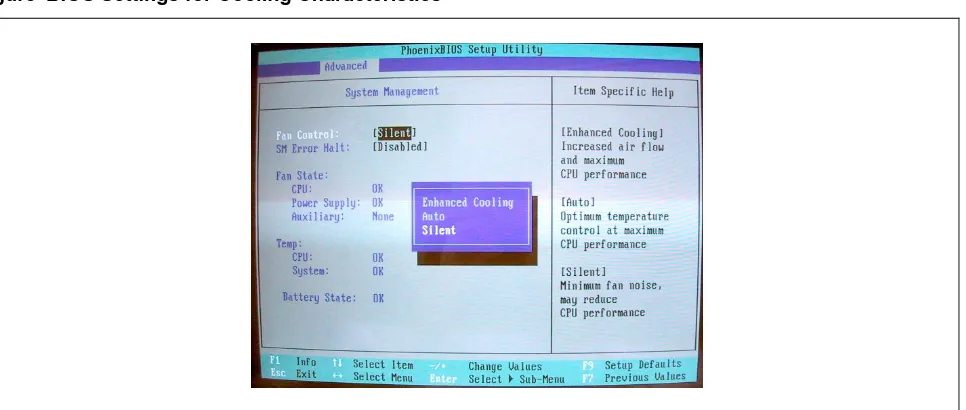
Various settings can be selected in the BIOS in order to optimize cooling performance in line with the user’s requirements. The following alternatives are available under the menu item “Advanced – System Management”. Figure BIOS Settings for Cooling Characteristics
Silent
If noise reduction is most important, “Silent” is the right setting. In spite of the CPU being throttled, typically the performance is entirely adequate for office applications.
• Fans operate at defined minimum speed at low CPU and system temperatures.
• The CPU is throttled as soon as higher fan speeds would be needed. This typically results in decreasing temperatures, thus allowing again for lower fan speeds.
[image:4.595.46.545.72.163.2] [image:4.595.55.538.407.612.2]All rights reserved, including intellectual property rights. Technical data subject to modifications and delivery subject to availability. Any liability that the data and illustrations are complete, actual or correct is excluded. Designations may be trademarks and/or copyrights of the respective manufacturer, the use of which by third parties for their own purposes may infringe the rights of such owner. For further information see: ts.fujitsu.com/terms_of_use.html
Copyright © Fujitsu Technology Solutions GmbH 2009
Published by department:
Fujitsu Technology Solutions GmbH Clients Group, Systemboard OEM Buergermeister-Ulrich-Str. 100 86199 Augsburg, Germany
Company stamp
Auto
This setting is appropriate for most standard situations and is the default setting. Performance and noise generation are weighted equally; the full performance of the system is available while maintaining low noise levels.
• Fans operate at defined minimum speed at low temperatures.
• The CPU is not throttled when the temperatures are rising due to higher load or external conditions but the fans speed are increased gradually.
• The CPU is throttled only when critical CPU and system temperatures occur, e.g. by extreme external conditions beyond specifications.
Enhanced Cooling
This is the right setting for systems with highest performance requirements under extreme external conditions. Noise reduction is not an issue here.
• All fans operate at maximum speed all the times.
• The CPU is throttled only when critical CPU and system temperatures occur, e.g. by extreme external conditions beyond specifications.
The settings selected in the BIOS are automatically restored at each system start. No additional driver etc. is required for this functionality.
SystemGuard Software for Windows
If a user or system builder wants to monitor the characteristics of Silent Fan in more detail, Fujitsu Technology Solutions offers a software tool capable of interpreting Silent Fan controller data. SystemGuard reads measured values directly from the Silent Fan controller and displays them in graphical form. Temperatures and fan speeds are shown and presented graphically together with the corresponding numeric values. The CPU temperature value will not be shown as a numeric value because the CPU is a relative value that is individual to each specific CPU.
Settings selected with SystemGuard are only valid while the system is running; these settings will be lost at reboot, i.e. when the PC is started up, the values from the BIOS are written into the controller. When SystemGuard is launched (e.g. via the startup group within Windows), its settings are transferred into the controller again.
SystemGuard is freeware and is available for download on the Internet; it is also included on the OEM Driver&Utility DVD. For further information see Product Facts SystemGuard.
Additional information and downloads
• General Information:
www.ts.fujitsu.com/mainboards
• Documentation and downloads:
ftp.ts.fujitsu.com/pub/Mainboard-OEM-Sales/
Contact: Fujitsu Technolgy Solutions GmbH:
Peter Hoser / Director OEM Sales, Clients Group, Systemboard OEM Phone: +49 (0) 821 - 804 3177