
AutoTC : Automatic Time Code recognition for the purpose of synchronisation of subtitles in the broadcasting of motion pictures using the SMPTE standard : a thesis presented in partial fulfilment of the requirements for the degree of Master of Science in
92
0
0
Full text
(2) to my Mother, Father, Brother and Sister with love.
(3) AutoTC:Automatic Time-code Recognition for the purpose of synchronisation of subtitles in the Broadcasting of Motion Pictures using the SMPTE standard. A thesis presented in partial fulfilment of the requirements for the degree of. MASTER OF SCIENCE in COMPUTER SCIENCE. School of Engineering and Advanced Technology (S.E.A.T) at Massey University, [Albany], New Zealand. by VINEET KASHYAP, B.E., P.G. Dip. Computer Science. October 2011.
(4) Acknowledgements I would like to thank my supervisor Dr. Tom Moir for helping me in my research who not only mentored me but guided and motivated me throughout the tenure of this challenging piece of research. Special thanks to New Zealand Maori Television for their time and co-operation which helped me in defining a clear set of requirements, limiting the scope for developing a software application. Last but not the least, sincere thanks to Yash Raj Films India Pvt. Ltd. for providing Hindi movie scripts. Thanks to Air New Zealand and Event cinemas for their input. My sincere respect and thanks to my parents for their unconditional love and support. Also, thanking Massey University and School of Engineering and Advanced Technology (SEAT) IT support staff for providing excellent support during my research. A paper based on this research has also been submitted at Australasian Language Technology Workshop (ALTA) 2011..
(5) Abstract Time-coding requires manual marking of the in/out points of every dialogue spoken in the film. This process is very manual, cumbersome and time-consuming which takes about 8-10 hours for an average film duration of 2 and a half hours. AutoTC, a multi-threaded client-server application has been built for the automatic recognition of time-codes for the purpose of automatic synchronisation of subtitles in the broadcasting of Motion Pictures. It involves generating time-codes programmatically based on the input video’s frame rate to be subtitled and using the audio to recognise in/out points automatically using the principles of Voice Activity Detection. Results show that the time taken to recognise time-codes automatically is approximately 1/6th compared to the the time taken by a professional time-coder using ‘Poliscript’[18], a commercial tool used in the production of subtitles. ‘IN-SYNC’, a new performance metric, has been proposed to evaluate the accuracy of the developed system which will foster further research and development in the field of automatic subtitling in an attempt to make it the de-facto standard. The application has been tested on the NOIZEUS[30] corpus giving an IN-SYNC accuracy of 65% on clean data with 6 mis-detections and an average of 51.56% on noisy data with 13 mis-detections which is very encouraging. The application can also send data to the MOSES[32] server developed for producing draft translations from Hindi to English which will make the subtitling process much faster, efficient and quality-centric..
(6) Contents Page Acknowledgements . . . . . . . . . . . . . . . . . . . . . . . . . . . . . . . . . . . .. iv. Abstract . . . . . . . . . . . . . . . . . . . . . . . . . . . . . . . . . . . . . . . . . .. v. Table of Contents . . . . . . . . . . . . . . . . . . . . . . . . . . . . . . . . . . . . .. vi. List of Tables . . . . . . . . . . . . . . . . . . . . . . . . . . . . . . . . . . . . . . .. ix. List of Figures . . . . . . . . . . . . . . . . . . . . . . . . . . . . . . . . . . . . . .. x. List of Algorithms . . . . . . . . . . . . . . . . . . . . . . . . . . . . . . . . . . . .. xii. Chapter 1 Introduction . . . . . . . . . . . . . . . . . . . . . . . . . . . . . . . . . . . . . .. 1. 1.1. Research Outline . . . . . . . . . . . . . . . . . . . . . . . . . . . . . . . .. 6. 1.2. Literature Review . . . . . . . . . . . . . . . . . . . . . . . . . . . . . . . .. 10. 1.2.1. Automatic Speech Recognition (ASR) . . . . . . . . . . . . . . . . .. 11. 1.2.2. Poliscript . . . . . . . . . . . . . . . . . . . . . . . . . . . . . . . .. 11. Reading speeds . . . . . . . . . . . . . . . . . . . . . . . . .. 12. Subtitle Duration and Interval . . . . . . . . . . . . . . . . .. 13. 1.2.3. YouTube . . . . . . . . . . . . . . . . . . . . . . . . . . . . . . . . .. 13. 1.2.4. Same Language Subtitling (SLS) . . . . . . . . . . . . . . . . . . .. 15. 1.3. Applications . . . . . . . . . . . . . . . . . . . . . . . . . . . . . . . . . . .. 16. 1.4. Initial Requirements and Objectives . . . . . . . . . . . . . . . . . . . . . .. 18. 1.5. Thesis Scope . . . . . . . . . . . . . . . . . . . . . . . . . . . . . . . . . . .. 19. 2 Time-coding . . . . . . . . . . . . . . . . . . . . . . . . . . . . . . . . . . . . . .. 22. 2.1. Time-Code Formats . . . . . . . . . . . . . . . . . . . . . . . . . . . . . . .. 24. 2.2. Time-Code Types . . . . . . . . . . . . . . . . . . . . . . . . . . . . . . . .. 25.
(7) CONTENTS 2.3. Limitations . . . . . . . . . . . . . . . . . . . . . . . . . . . . . . . . . . .. 28. 2.3.1. Missing Frames . . . . . . . . . . . . . . . . . . . . . . . . . . . . .. 28. 2.3.2. Time-code discontinuities. . . . . . . . . . . . . . . . . . . . . . . .. 29. Subtitle Transmission . . . . . . . . . . . . . . . . . . . . . . . . . . . . . .. 29. 3 Voice Activity Detection (VAD) . . . . . . . . . . . . . . . . . . . . . . . . . . .. 31. 2.4. 3.1. Introduction . . . . . . . . . . . . . . . . . . . . . . . . . . . . . . . . . . .. 31. 3.2. Current State-of-the-Art . . . . . . . . . . . . . . . . . . . . . . . . . . . .. 33. 3.2.1. Desirable aspects of VAD algorithms . . . . . . . . . . . . . . . . .. 33. 3.2.2. Frame Size and Windowing . . . . . . . . . . . . . . . . . . . . . .. 34. 3.2.3. Initial Value of Threshold . . . . . . . . . . . . . . . . . . . . . . .. 35. 3.2.4. Feature Extraction . . . . . . . . . . . . . . . . . . . . . . . . . . .. 35. 3.2.5. Adaptive Thresholding[6] . . . . . . . . . . . . . . . . . . . . . . . .. 36. 3.3. Basic Architecture . . . . . . . . . . . . . . . . . . . . . . . . . . . . . . .. 38. 3.4. Algorithm Design . . . . . . . . . . . . . . . . . . . . . . . . . . . . . . . .. 38. 3.4.1. Time-code Generation . . . . . . . . . . . . . . . . . . . . . . . . .. 39. 3.4.2. Time-code Recognition . . . . . . . . . . . . . . . . . . . . . . . . .. 40. 3.4.3. Calculate Algorithm Accuracy . . . . . . . . . . . . . . . . . . . . .. 41. 4 Experiments, Results and Discussion . . . . . . . . . . . . . . . . . . . . . . . .. 45. 4.1. Out-of-domain evaluation . . . . . . . . . . . . . . . . . . . . . . . . . . .. 47. 4.2. Optimisations . . . . . . . . . . . . . . . . . . . . . . . . . . . . . . . . . .. 48. 4.2.1. Stereo-to-Mono Conversion . . . . . . . . . . . . . . . . . . . . . . .. 48. 4.2.2. Down-sampling . . . . . . . . . . . . . . . . . . . . . . . . . . . . .. 53. Implementation Issues . . . . . . . . . . . . . . . . . . . . . . . . . . . . .. 54. 5 Conclusion and Future Work . . . . . . . . . . . . . . . . . . . . . . . . . . . . .. 56. 4.3. 5.1. Conclusion . . . . . . . . . . . . . . . . . . . . . . . . . . . . . . . . . . . .. 56. 5.2. Future Work . . . . . . . . . . . . . . . . . . . . . . . . . . . . . . . . . . .. 57. vii.
(8) CONTENTS References . . . . . . . . . . . . . . . . . . . . . . . . . . . . . . . . . . . . . . . . .. 58. Appendix A Time-coding using Poliscript . . . . . . . . . . . . . . . . . . . . . . . . . . . . .. 63. A.1 Selecting the programme to import . . . . . . . . . . . . . . . . . . . . . .. 63. A.2 Re-striping the Time Code . . . . . . . . . . . . . . . . . . . . . . . . . . .. 64. B User Manual . . . . . . . . . . . . . . . . . . . . . . . . . . . . . . . . . . . . . .. 68. B.1 Setup Guide for Running AutoTC on a 64-bit Windows 7 . . . . . . . . . .. 68. B.2 Setup Guide for Running AutoTC on a 32-bit Windows XP . . . . . . . .. 69. B.3 User Interface . . . . . . . . . . . . . . . . . . . . . . . . . . . . . . . . . .. 70. B.3.1 Time-codes & Setup Wizard . . . . . . . . . . . . . . . . . . . . . .. 71. B.3.2 Generate SMPTE time-code . . . . . . . . . . . . . . . . . . . . . .. 72. B.3.3 Recognise SMPTE time-code . . . . . . . . . . . . . . . . . . . . .. 73. B.3.4 Translate . . . . . . . . . . . . . . . . . . . . . . . . . . . . . . . .. 73. B.3.5 Final preview . . . . . . . . . . . . . . . . . . . . . . . . . . . . . .. 74. C Time-coding using AutoTC . . . . . . . . . . . . . . . . . . . . . . . . . . . . .. 77. D Software Language and Compiler . . . . . . . . . . . . . . . . . . . . . . . . . .. 78. D.1 Software Language and Compiler . . . . . . . . . . . . . . . . . . . . . . .. 78. D.2 Third-Party Libraries . . . . . . . . . . . . . . . . . . . . . . . . . . . . . .. 78. D.2.1 Aforge.NET Framework [19] . . . . . . . . . . . . . . . . . . . . . .. 78. D.2.2 Tesseract [20] . . . . . . . . . . . . . . . . . . . . . . . . . . . . . .. 79. D.2.3 XMLRPC.NET [21] . . . . . . . . . . . . . . . . . . . . . . . . . . .. 79. D.2.4 C# WAV Class[22] . . . . . . . . . . . . . . . . . . . . . . . . . . .. 80. viii.
(9) List of Tables 1.1. Media File Formats for Subtitle Preparation . . . . . . . . . . . . . . . . .. 6. 1.2. Subtitle Duration & Interval . . . . . . . . . . . . . . . . . . . . . . . . . .. 14. 2.1. Frame Rates . . . . . . . . . . . . . . . . . . . . . . . . . . . . . . . . . . .. 26. 3.1. List of sentences used in NOIZEUS[30] . . . . . . . . . . . . . . . . . . . .. 43. 4.1. Time taken for Recognising time-codes manually using Poliscript . . . . . .. 46. 4.2. Time taken for Recognising time-codes automatically using AutoTC . . . .. 46. 4.3. Time-Code detection factors with their sub-optimal values . . . . . . . . .. 47. 4.4. Performance of OCR based on Font Type . . . . . . . . . . . . . . . . . . .. 48. 4.5. Performance of TCR for speech with different noise sources . . . . . . . . .. 49. 4.6. Summary of the WAV file . . . . . . . . . . . . . . . . . . . . . . . . . . .. 50.
(10) List of Figures 1.1. Corpus size vs. BLEU scores . . . . . . . . . . . . . . . . . . . . . . . . . .. 8. 1.2. The process of subtitling . . . . . . . . . . . . . . . . . . . . . . . . . . . .. 9. 1.3. Adding and Editing Captions/subtitles using YouTube . . . . . . . . . . .. 15. 1.4. Sub-Rip subtitle file format . . . . . . . . . . . . . . . . . . . . . . . . . .. 20. 2.1. Burnt-in type time-code (BITC) . . . . . . . . . . . . . . . . . . . . . . . .. 22. 2.2. Film reel . . . . . . . . . . . . . . . . . . . . . . . . . . . . . . . . . . . . .. 25. 3.1. Block diagram of a VAD . . . . . . . . . . . . . . . . . . . . . . . . . . . .. 32. 3.2. 2-second audio waveform . . . . . . . . . . . . . . . . . . . . . . . . . . . .. 33. 3.3. Frame overlap . . . . . . . . . . . . . . . . . . . . . . . . . . . . . . . . . .. 35. 3.4. Feature values extracted and plotted using MATLAB for sp02.wav from the NOIZEUS corpus . . . . . . . . . . . . . . . . . . . . . . . . . . . . . . . .. 36. 3.5. Impulse Response of H(z) for p = 0.2 . . . . . . . . . . . . . . . . . . . . .. 37. 3.6. Fall-time for different values of p . . . . . . . . . . . . . . . . . . . . . . .. 38. 3.7. Basic Architecture . . . . . . . . . . . . . . . . . . . . . . . . . . . . . . .. 39. 3.8. Flowchart for the proposed TCR for finding the IN point . . . . . . . . . .. 44. 4.1. Stereo track with two distinct channels . . . . . . . . . . . . . . . . . . . .. 51. 4.2. Stereo splitting . . . . . . . . . . . . . . . . . . . . . . . . . . . . . . . . .. 52. 4.3. Deleting one channel from the stereo track . . . . . . . . . . . . . . . . . .. 53. 4.4. Stereo combining . . . . . . . . . . . . . . . . . . . . . . . . . . . . . . . .. 54. B.1 Enable codec using ffdshow . . . . . . . . . . . . . . . . . . . . . . . . . .. 69. B.2 Application Main Window . . . . . . . . . . . . . . . . . . . . . . . . . . .. 70.
(11) LIST OF FIGURES B.3 Application File Menu . . . . . . . . . . . . . . . . . . . . . . . . . . . . .. 71. B.4 Application Help Menu . . . . . . . . . . . . . . . . . . . . . . . . . . . . .. 72. B.5 Setup Time-Code . . . . . . . . . . . . . . . . . . . . . . . . . . . . . . . .. 72. B.6 Application Run Wizard . . . . . . . . . . . . . . . . . . . . . . . . . . . .. 73. B.7 For producing draft translations . . . . . . . . . . . . . . . . . . . . . . . .. 74. B.8 Translation using MOSES Server . . . . . . . . . . . . . . . . . . . . . . .. 75. B.9 Translation using Client AutoTC . . . . . . . . . . . . . . . . . . . . . . .. 75. B.10 Preview Video . . . . . . . . . . . . . . . . . . . . . . . . . . . . . . . . . .. 76. xi.
(12) List of Algorithms 1. Pseudo-code for the proposed Time-code Generation algorithm . . . . . . .. 40. 2. Pseudo-code for computing the accuracy . . . . . . . . . . . . . . . . . . .. 42.
(13) Chapter 1 Introduction Subtitle preparation is the process of creating subtitle text and timing information to match a video programme. Subtitle preparation is generally carried out by trained professional translators or subtitlers on dedicated PC based subtitle preparation workstations. Subtitling is a process by which lines of text (called subtitles or captions) are added to video material and timed to match the spoken dialogue. This subtitle text may either be the same language as, or be a translation of, the spoken dialogue of the video material. Translation based subtitles are generally provided to overcome the language problems associated with distributing video material across differing geographical areas. Subtitling as a translation technique is usually easier to produce and cheaper than providing an alternative language audio track - a process known as dubbing. Same-language subtitles are generally provided as an in-country service for the benefit of viewers who are hearing impaired. It is now common for governments or regulatory authorities to legislate that this type of subtitling is provided. There are many different broadcast technologies and video distribution methods now available, and as a consequence, many new subtitling technologies and techniques have been developed. However, the basic concept behind subtitling is to provide on-screen text that enhances but does not interfere with the viewers enjoyment of the programme. • Open subtitling refers to subtitles that appear permanently on screen and cannot be switched off by the viewer. The viewer has no control over the style or visibility of the subtitles. Open subtitles are most commonly used for language translation subtitles..
(14) Introduction • Closed subtitles are those that the viewer can choose to see or not. Often the viewer can choose from more than one language and may have some control over presentation style. Closed subtitles are used for hard of hearing subtitles or captions (in the same language as the dialogue) and/or for translation subtitles where there is more than one language available. The basic subtitle preparation work-flow mainly consists of the following steps: 1. Receive source video material 2. Check time-code reference on video 3. Import or capture video to workstation 4. Set subtitle style parameters 5. Translate source language to target language (if applicable) 6. Prepare subtitle text 7. Add timing cues (Some work-flows reverse actions 6 and 7) 8. Review subtitles against video and audio 9. Produce preview output tape or file (optional) 10. Deliver subtitle file to transmission or post-production process. It is important to set a realistic time-scale for generating subtitles. As a general rule, it takes between 8 and 10 times the length of the video material to produce the subtitles. So, a one hour video, will take 8-10 hours work to subtitle and check. Historically, all video material for subtitle preparation would have been delivered on tape, mostly Video Home System (VHS). Recently the move to all tape-less operations has 2.
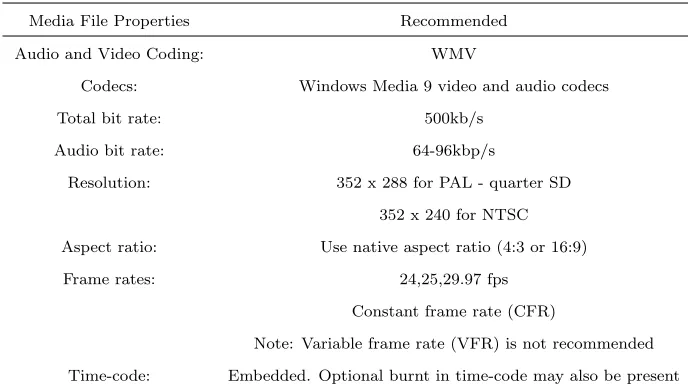
(15) Introduction made digital delivery of subtitling video more common. Regardless of the delivery format all subtitle preparation is now done with digital video on a PC workstation. One of the first steps in the work-flow is to get the video onto the hard disk of the subtitle preparation workstation. The main options are: 1. Capture from a tape source. This requires video and time code inputs and is a real time process with one hour of video taking one hour to capture to disk. Some workstations allow the video to be viewed, stopped, stepped, etc., while the capture is taking place. This is a significant time saving. 2. Open or import a video file. There are many compressed video file formats but most can be used for subtitle preparation. Some formats are not suitable for non linear playback (stepping, reversing etc.) and some workstations will convert to a more suitable format. The video file can be accessed using any file system supported by the workstation including DVD-ROM, CD-ROM, Network, VPN, FTP, removable hard disk drive etc. 3. Access a browse copy of the video from a media asset management system. Many broadcasters now have video management systems that store the master video and a lower resolution or browse copy. Often it is possible to access the browse copy directly for subtitle preparation. The quality of the video displayed on a subtitle preparation workstation is a trade off between file size, PC processing speed, image quality and security against piracy. In general, quarter resolution (352x288 for PAL) is adequate for subtitle preparation and MPEG-1 or Windows Media 9 (WM9) formats are a good compromise between file size and image quality. 3.
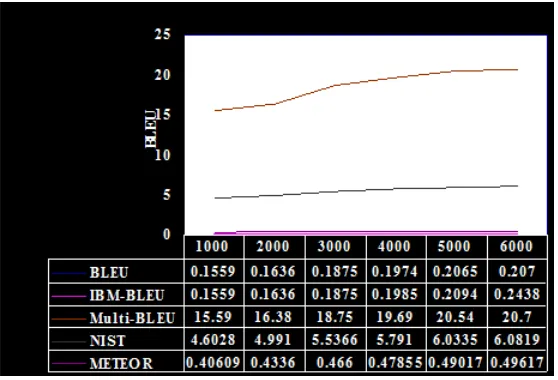
(16) Introduction In some cases lower quality or spoilers (time code, logos, black and white only) are used to make the video less desirable to pirates. In general, the quality of the audio is more important for subtitle preparation so that the dialogue is clear. The main criteria for good subtitle preparation video are: 1. Adequate video quality 2. Good audio quality 3. No missing frames 4. Audio and video is in sync 5. Time-code is preferably with no discontinuities During the subtitle preparation process each subtitle is timed to appear at a specific point in the video to match the dialogue. The time code of the first frame during which the subtitle is displayed is the in-cue time. Generally, subtitles should be presented onscreen only when required, and should stay visible for long enough to ensure the viewing audience can read and understand them. It is good practice to attempt to match the subtitle presentation timing with the spoken dialogue, but in certain cases that can be difficult to achieve. Furthermore, an existing subtitle should not remain on-screen once there have been considerable changes to the content of the program material, such as a shot change or cut. There are many methods of setting the in and out cue times either in real time or by stepping through the video a frame at a time. One very useful tool is audio scrubbing which is where a slowed down audio signal is used when the video is single stepped or played slowly. Ideally, this should work when going in forwards or reverse. This is a good method of accurately matching the subtitle to the dialogue. Graphical audio waveform displays are another useful tool. 4.
(17) Introduction Once the subtitles have been authored, some form of quality control (QC) process is performed. This is often done on the subtitle workstation by playing the video and displaying the subtitles over the video in a preview window. However, if a preview copy is required then it is often simpler to produce a tape with the subtitles in vision. With a VHS tape there is no need for the reviewer to have special software to view the tape. A more recent innovation is to produce a compressed (WM9) video file with the subtitles in vision as this can be faster to produce than a tape and may be transferred electronically. As the file format is standard and the subtitles are in vision the file can be played in Windows Media Player on a standard PC. When delivering the final output file there may be a requirement to provide a specific subtitle file format. There are a very large number of formats in the market and some of them are specific to certain transmission formats like EIA 608B closed captions. Others are more generic but are limited in the styling information they can carry colour, fonts etc. Just a few common file formats include: • STL. EBU[5] open format mostly used for Teletext. • PAC. Screen Subtitling proprietary format (Supports all subtitling styles) • CAP. Closed caption format. When creating or checking subtitles it is vital that the video and audio reference material accurately represents the master media that the subtitles will be used with. This is true regardless of the style or type of subtitle to be used, if the dialogue is not accurate and correctly timed then the subtitles are unusable. To achieve accurate and correctly timed subtitles the media used at the subtitle preparation stage needs to meet a range of requirements: 1. The video should have sufficient image quality to be usable and to check lip sync. 5.
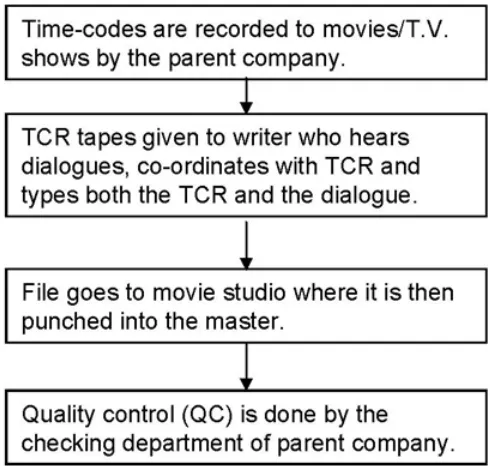
(18) Introduction 2. Good quality audio so you can easily understand the dialogue, 3. Good audio to video sync to get the subtitle timing accurate 4. No missing or duplicated frames when referenced against the original 5. A time-code track that matches the master version 6. As small a file size as possible to speed up file transfers. To meet the above requirements Screen Subtitling Systems[18] recommend setting the following properties: Table 1.1: Media File Formats for Subtitle Preparation Media File Properties. Recommended. Audio and Video Coding:. WMV. Codecs:. Windows Media 9 video and audio codecs. Total bit rate:. 500kb/s. Audio bit rate:. 64-96kbp/s. Resolution:. 352 x 288 for PAL - quarter SD 352 x 240 for NTSC. Aspect ratio:. Use native aspect ratio (4:3 or 16:9). Frame rates:. 24,25,29.97 fps Constant frame rate (CFR) Note: Variable frame rate (VFR) is not recommended. Time-code:. 1.1. Embedded. Optional burnt in time-code may also be present. Research Outline. This research is an extension and continuation of the work done part of my final year project entitled ’Statistical Machine Translation in the field subtitling of Hindi movies/songs[25] in partial fulfilment of the requirements of Post-Graduate Diploma in Computer Science degree at Massey University. 6.
(19) Introduction From experiments conducted on the baseline Hindi to English machine translation system built using MOSES[32], it was concluded that with a small corpus in a narrow domain one can achieve reasonably accurate translations. This also showed that the statistical approach can work with morphologically different languages such as Hindi and English and therefore can be applied to any language pair with the availability of parallel text. The accuracy of a Machine Translation system is determined by primarily evaluating the system by human judgment and correlating the scores obtained by using automatic evaluation metrics like BLEU, NIST and METEOR. A lot of research has been done in the field of automatic machine translation evaluation as human evaluations of machine translation systems are very expensive. Human evaluations can take months to finish and involve human labor that can not be reused which is the main idea behind the method of automatic machine translation evaluation that is quick, inexpensive, and language independent. Some of the common evaluation metrics used are outlined below: The closer a machine translation is to a professional human translation, the better it is. This is the central idea behind the BLEU [11] metric. To judge the quality of a machine translation system requires two ingredients: 1. A numerical translation closeness metric. 2. A corpus of good quality human reference translations. The range of scores is between 0 and 1 which indicates the closeness of the translation to its reference. NIST [12]is another automatic evaluation metric with the following primary differences compared to BLEU: Text pre-processing Primarily reduced segmentation of numbers. Gentler length penalty - Quadratic penalty from mean, rather than nearest neighbor linear penalty. Information-weighted N-gram counts - Using the reference data to compute Ngram likelihoods Selective use of N-grams - Trigrams only, rather than a sum over multiple values of N 7.
(20) Introduction The range of scores is between 0 and 100. METEOR [13] evaluates a translation by computing a score based on explicit wordto-word matches between the translation and a given reference translation. If more than one reference translation is available, the translation is scored against each reference independently, and the best scoring pair is used. An improvement in this metric is the high correlation with human judgments. The range of scores is between 0 and 1. A BLEU[11] score of 0.207 has been obtained on a test set of 5082 sentences with training on 6053 sentences on the movie corpus as shown in Fig. 1.1. Figure 1.1: Corpus size vs. BLEU scores An increase in the scores from different automatic evaluation metrics is observed in Figure 1.1 as the number of sentence pairs are increased in the movie corpus for training from 1000 to 6000. But it must be noted that these metrics are only tools to compare different machine translation (MT) systems, so an increase in the scores would not necessarily mean an increase in the accuracy of the translation. It must be noted that the basis of getting really good scores irrespective of the evaluation metric used, is the number of reference translations that are used. Only 1 reference translation was used when 8.
(21) Introduction evaluating the performance of the Movie Corpus. Also, to get reliable scores a large test set will have to be used as was done by testing on 5082 sentences from the movie corpus. The results proved that the domain of subtitling as is ideal for the statistical approach to machine translation because of the restriction it poses on the number of words that can be displayed on the screen. The accuracy could be further improved if we narrow the movie in different genres like Action, Comedy, Horror, Science-Fiction and apply some linguistic inputs like morphology, parts of speech with the idea of producing draft translations. In the process of subtitling employed in the Broadcasting of movies and Television shows as described in Figure 1.2. This process is more or less followed worldwide by majority of the broadcasters with slight variations.. Figure 1.2: The process of subtitling This thesis primarily looks at automating the time-coding stage in the subtitling process by building an application that tries to reduce the time taken to time-code a T.V. show/movie for synchronisation purposes to give the viewer the best possible viewing experience.. 9.
(22) Introduction. 1.2. Literature Review. The importance of subtitling is increasing in the television and film industries. In many European countries, subtitling is the most common method of conveying the content of foreign language dialogue to the audience, and a broadcaster’s audience may now include several major linguistic groups (notably a satellite broadcaster). Subtitles are also provided increasingly by broadcasters to meet the needs of the significant numbers of deaf and hardof-hearing viewers. This has triggered an urgent need for methods that can automate the process of subtitling which is very manual, costly and time-intensive currently practised by majority of the broadcasters. - a broadcaster may wish to buy or sell programmes complete with subtitles already available in an appropriate language; - a broadcaster may use an external company for the supply of some or all its subtitles; - broadcasters may wish to buy compatible subtitling equipment from a number of independent suppliers; broadcasters may wish to harmonize the storage of subtitle data for in-vision and encoded subtitles; the EBU has standardised a data file format for use with a personal computer to enable the exchange of invision and teletext subtitles. The format is intended for use by broadcasters at both national and international levels and is described below. Research in automatic subtitling is currently in its infancy where majority of the broadcasters rely on skilled translators to do both time-coding and subtitling i.e., translation of spoken text which takes hours and days to complete. Even after enforcing rigorous quality checks and standards the approach is error prone. Delays in the actual dialogue being spoken, spelling mistakes, grammatical mistakes and most importantly not capturing the essence of the dialogue which is influenced by culture or situation. Translating songs is another challenge where the subtitles have to match to the rhythm of the song. Comedy is one of the hardest things even for humans to translate as something funny in one language is not necessarily funny in other languages. 10.
(23) Introduction. 1.2.1. Automatic Speech Recognition (ASR). Many approaches use automatic speech recognition (ASR) technology for the recognition of speech along with the recognition of time-codes. The time-stamps output by the ASR system can also be employed to align the recognised transcripts to the audio signals. In cases where the transcripts already exist, forced alignment can be used instead of recognition to obtain more accurate synchronisations between audio and text. [1] used the Windows Speech Recogniser (WSR) 8.0 as its ASR engine, targeting .NET Framework 3.5 environment. Even though ASR can potentially save a lot of time, it is a difficult task mainly due to the high variability of the spoken environments, speakers and speech types present in TV content. Spoken environments vary from clean (studio recordings) to noisy (outdoor recordings, speech mixed with background music or sound effects). The type of speech may differ from dictation (newsreader) to spontaneous (debate or interview). The combination of these possibilities seriously challenges ASR technology, which also needs to deal with speaker independence and the uncontrolled vocabulary of movies/TV programs.. 1.2.2. Poliscript. Poliscript[18][17] is a dedicated software application for the creation and editing of television and video subtitles. It runs on any standard PC of suitable specification, and enables subtitles to be prepared on a what-you-see-is-what-you-get (WYSIWYG) basis. All available text colours, fonts, styles and backgrounds etc., are visible on the Poliscript monitor exactly as they will be displayed during transmission of the programme material (though not at broadcast quality as this is not necessary at the subtitle preparation stage). Provided your media file or video input to Poliscript includes valid time-code, the time-code values can be captured and used to provide the in/out Cues for your subtitles. Poliscript uses time-code values to define: 11.
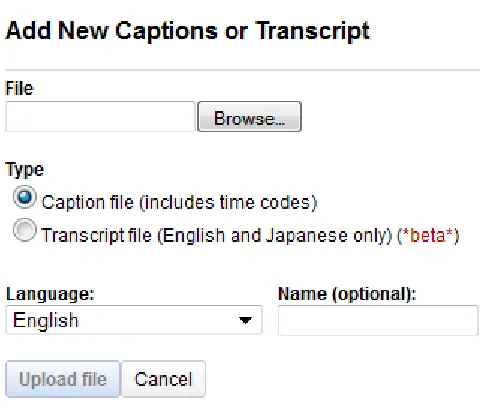
(24) Introduction • The point at which the subtitle appears on-screen as the In-Cue. • The point at which the subtitle is removed from the screen as the Out-Cue. The difference between the in-cue(in-point) and out-cue(out-point) is referred to as the Subtitle Duration i.e. the length of time for which the subtitle will be displayed. This is generally expressed in seconds and frames e.g. 03:20 means the subtitle will be on-screen for 3 seconds and 20 frames. The difference in time between the Out-Cue of one subtitle and the In-Cue of the next, is known as the Subtitle Interval. The time-code value which identifies the frame in the programme material when a given subtitle is displayed, is known as the In-Cue. The time-code value of the last frame in which the subtitle is displayed is known as the Out- Cue. Each subtitle appears at the In-Cue and disappears on its Out-Cue. Poliscript offers the following two methods to recognise time-codes: • Capture IN and OUT Cues: This method requires capture of the In-Cue and Out-Cue separately using the In Cue and Out Cue keys or the mouse. This method gives the time-coder control over the point at which each subtitle appears and disappears. • Calculate Duration: This method requires capture of the In-Cue only. The software then uses the length of the subtitle text and the reading speed parameter to calculate the optimum duration. This is added to the captured In- Cue to define the Out-Cue. However, almost certainly you will need to edit some of the calculated Out-Cues, especially where you have to display a lot of dialogue in a short amount of time.. Reading speeds When preparing subtitles it is important that the subtitles remain visible for long enough that the average viewer has time to read them but not so long as to be irritating. Reading speeds can be configured in either words per minute or characters per second and the setting will vary from language to language and between different target audiences. The typical subtitle reading speed of an adult is 120 words per minute (WPM) 12.
(25) Introduction or about 9 characters per second (CPS). Material for children is in the range of 60 to 90 words per minute depending on the target age group. It is a common rule that a single-line subtitle should be displayed for about 3-4 seconds and a 2-line subtitle should be displayed for about 5-7 seconds. The following are the default values expressed as frames used in Poliscript: • Interval 0 - 99 Defines the default interval between subtitles. • Default Duration 0 255 Defines the default duration for subtitles. • Minimum Duration 0 - 100 Defines the minimum duration for subtitles.. Subtitle Duration and Interval The difference in time between the In-Cue and OutCue is known as the Duration of the subtitle. This is generally expressed in seconds and frames e.g. 03:20 means the subtitle will be on-screen for 3 seconds and 20 frames. The difference in time between the Out-Cue of one subtitle and the In-Cue of the next, is known as the Subtitle Interval. Subtitle file of a TV show was analysed automatically to find the average subtitle duration and interval as shown in Table 1.2. Please refer to Appendix A for detailed instructions on time-coding using Poliscript. 1.2.3. YouTube. Google uses their own speech recognition engine for adding closed captions part of YouTube. These rely on large amounts of data for training purposes and suffer from one major drawback that speech in a movie environment is spoken in multiple languages by multiple speakers speaking in different accents in the presence of varying levels of background noise. YouTube currently offers two methods for adding and editing captions/subtitles1 as 1. Go to http://www.google.com/support/youtube/bin/answer.py?hl=en&answer=100077 on how to. add/edit captions/subtitles using YouTube. 13.
(26) Maori. Language. Debate. T.V. Show. 14 6. Male 3. Female. Number of speakers. 25. Frame Rate. 5.36. (in seconds). Average Subtitle Duration. Table 1.2: Subtitle Duration & Interval. 1.2. (in seconds). Average Subtitle Interval. Introduction.
(27) Introduction. Figure 1.3: Adding and Editing Captions/subtitles using YouTube shown in 1.3: First method requires a caption file that contains both the text and time-codes (information about when each line of text should be displayed). Second method requires a transcript file, which just contains the text of what was said in the video. If the video’s in English, YouTube can use speech processing algorithms to determine when the words in a transcript should be displayed. This auto-timing feature only works for English and Japanese languages.. 1.2.4. Same Language Subtitling (SLS). Same language subtitling (SLS) refers to the practice of subtitling programs on TV in the same language as the audio. This method of subtitling is used by national television broadcasters in India such as Doordarshan. SLS makes reading practice an incidental, automatic, and subconscious part of popular TV entertainment, at a low per-person cost to shore up literacy rates in India [8][10]. SLS also refers to the classroom or educational use of Synchronized Captioning of Musi15.
(28) Introduction cal Lyrics (or any text with an Audio and/or Video source) as a Repeated Reading activity. The basic SLS reading activity involves students viewing a short subtitled presentation projected on-screen, while completing a response worksheet. Ideally, the subtitling should have high quality synchronization of audio and text, and text should change colour in syllabic synchronisation to audio model, and the source media should be dynamic and engaging [9]. Same-language subtitles come into the picture because the variety of films shown on television has increased. Films being made come from different parts of the world such as India, Iran, Japan, China and other parts of Asia and Europe whose characters speak English in as many different accents. There is bound to be a substantial difference in the way English is spoken in different parts of the world. Especially when you take into account colloquialisms, local slang, even sentence construction. Subtitles help the user tide over these differences and absorb the film in its entirety[28]. Based on the current captioning techniques as seen above, very little research has been done on subtitling using the SMPTE[27] time-coding standard currently employed by majority of the Broadcasters which this research is based on.. 1.3. Applications. Automatic time-coding can primarily provide help in assisting professional subtitlers in producing highly accurate synchronisations of subtitle text over audio/video thereby concentrating more on producing high quality translations. It can help foster further research in automatic speech recognition, auto-captioning of movies/TV shows for television, inflight entertainment, cinemas. Incorporation of subtitles into the world of gaming can add another dimension to a more interactive game-play. It would directly complement the idea of same language subtitling (SLS) which plays an all more important part in increasing the literacy. It can play a very important role in the next generation human-dialogue systems 16.
(29) Introduction classed as intelligent tutoring systems, for example: Virtual Eve[34]. has numerous possible applications related to the presentation of multimedia content. Following is an overview of some possible applications: • Narrative synchronization: This application area includes any product that plays out a spoken narrative and needs to synchronize graphical or other events to the audio stream. Applications of this type include: 1. Educational software such as read-along storybooks that highlight each word as it is read. Childrens storybooks that display synchronized graphical content as the narrative is read are also popular applications that could benefit from automatic synchronization technology. 2. Digital Books for the visually handicapped and dyslexic that have the need to highlight or enlarge words as they are read in a narrative. There is a strong need to constantly make new content available for these kinds of applications, so manual synchronization would be a significant burden during the production process. Automatic synchronization could take place as the content is being recorded and formatted, greatly simplifying the production process, and thus production costs. • High quality character animation: These applications produce character animations for television, movies, or advertisements. Automatic synchronization software can be used either as a tool to align traditional animation with an actors voice track, or as supplementary technology for motion capture. This technology can be integrated with the animation process either as a stand-alone tool used during the production process, as a plug-in to any of several standard animation environments, or as a component of a motion capture system. 17.
(30) Introduction • Streaming animation: The Internet has spawned several applications that utilize various forms of streaming animation data to a remote client. 1. Streaming lip-synced animated characters over the Internet has been used for communications (email attachments), providing content, and advertising. 2. MUDs (Multi-user dungeons) are multi-player games in which each users character is visible to other players in the play space. These characters may appear animated as they are moved through the play space. As much realism as is possible is usually desired in MUDs, so providing lip-sync ability to these characters is an important contribution to these kinds of applications. 3. Avatars are a graphical representation of a user in a chat application. More sophisticated chat applications offer an animated avatar which moves naturally and realistically throughout the chat environment. The use of lip-sync technology can significantly improve the realism of these characters. 4. Personal agents are increasingly popular applications. These agents are often represented as a graphical character. As the agent is intended to emulate a human assistant, human attributes can be used to make the agent more realistic and usable. Ensuring the character is lip-synced to any speech output provided by the agent can contribute to the human attributes of the character.. 1.4. Initial Requirements and Objectives. The desired outcome of this project is to build a tool that can automatically recognise time-codes with a direct comparison to a commercial tool like Poliscript which is used in the production of subtitles. Tools such as these are very costly and time-consuming and it is envisaged to develop a tool that takes the manual keying of time-codes away from the 18.
(31) Introduction subtitler and frees them off using the keyboard/mouse and spend more time in producing quality translations.. 1.5. Thesis Scope. The scope of the research was limited as per the requirements described in the above section. 1. Input: (a) Video - File must be in the avi (Audio Video Interleave) format. (b) Audio - File in the standard PCM wav format. A Microsoft/IBM audio file format standard which is a lossless and uncompressed format. It should contain speech only, with a minimum of other content (background noise, music, or sound effects). If such content is required, it should be recorded on a separate track, and mixed after synchronisation is complete. The audio file may use either 16 kHz, 22.05 kHz, 32 kHz, 44.1 kHz, or 48 kHz sampling rates. It must use either 8 or 16 bit PCM samples, although use of 16 bit samples is recommended. Max audio length: There is no constraint on the audio length but is pragmatically limited by available memory well before this constraint is reached. The minimum length allowed for the audio file is 100 ms. 2. Output A subtitle file producing time-codes in the SMPTE[27] and milli-seconds format. Figure 1.4 shows an example of the Sub-Rip subtitle file format. It consists of the following four parts: 1. A number indicating the which subtitle it is in the sequence. 2. The time that the subtitle should appear on the screen, and then disappear. 19.
(32) Introduction. Figure 1.4: Sub-Rip subtitle file format 3. The subtitle itself. 4. A blank line indicating the start of a new subtitle. There is an increasing requirement to provide subtitles for live or near live events such as news, sport and special events. This presents a very different challenge to the subtitler and broadcaster compared to pre-prepared subtitles for film and drama which this research is based on. With a critical shortage of time to prepare in advance, it is vital that a range of tools is available to meet the needs of broadcaster and subtitler. This is outside the scope of this research. The chapters of this thesis are arranged as follows: Chapter 1 - Introduction. This chapter identifies the main motivation behind the research, current state-of-the-art in automatic subtitling and defines the scope as per the requirements gathered and finally outlining the report for the reader. Chapter 2 - Time-coding gives an overview of the process of time-coding and the different methods that are currently employed by majority of the Broadcasters using a commercial tool called ’Poliscript’. Chapter 3 - Software and Algorithm Design reviews existing state-of-the-art in voice activity detection (VAD) algorithms and picks one with analysis and presents a pseudocode for the proposed algorithm optimised for our system. It encompasses the architecture of the application based on the software requirements, choice of algorithm and design specifications.. 20.
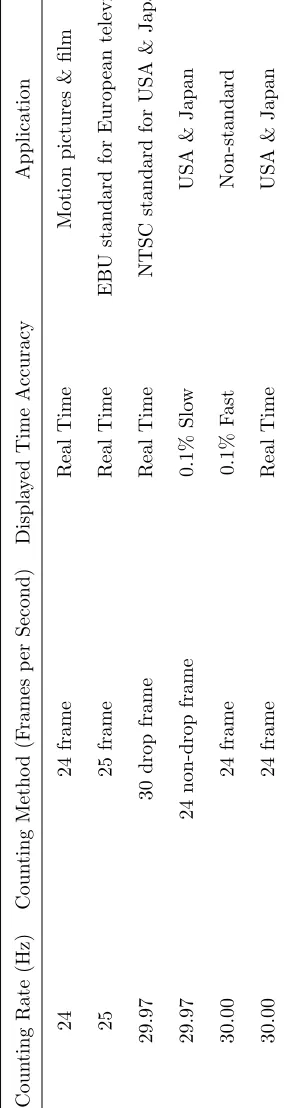
(33) Introduction Chapter 4 - Experimental Results involve conducting experiments based on different inputs with results and making some key observations. Chapter 5 - Conclusions and Future Work summarises the outcomes of the project with conclusions drawn. Suggestions for future improvements are recommended.. 21.
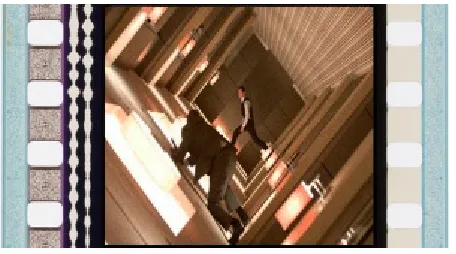
(34) Chapter 2 Time-coding Time-coding requires manual spotting of the film, marking the in/out1 points of every dialogue. The person performing the task of time-coding is referred to as a time-coder. Time-codes are mainly used for synchronisation of subtitles in recorded media. Many different standards have been proposed for time-codes from which the SMPTE2 [27] standard is the most common one used in the production of subtitles. This standard is universally used in film, video and audio production. All types of SMPTE time-codes are represented as hour:minute:second:frame. Figure 2.1: Burnt-in type time-code (BITC) which help in the identification of the in/out points of a dialogue. For example the time-code value in Figure 2.1 equates to 1 hour, 26 minutes, 44 seconds and 10 frames which is the BITC3 type of time-code. 1. The time-code value which identifies the frame in the programmme material when a given subtitle is. displayed, is known as the In-Cue. The time-code value of the last frame in which the subtitle is displayed is known as the Out-Cue. Each subtitle appears at the In-Cue and disappears on its Out-Cue. 2 The Society of Motion Picture and Television Engineers (SMPTE) is the worldwide leader in motion imaging standards and education for the communications, media, and entertainment industries 3 An always visible time-code display burnt-in to the video material. BITC is not machine-readable so a manual synchronization process is required to tell the subtitle preparation software what the time code of a specific frame is. From this the time code of all other frames can be calculated. This is referred to as.
(35) Time-coding The timing of subtitles is the process of defining the points (known as cues) at which each subtitle appears on-screen (the In-Cue) and then disappears again (the Out-Cue), is an important part of the subtitling process and Poliscript provides a number of different facilities which allow you to capture, create and edit cues and to have full control over the subtitle timing. All of these features and functions, are covered in this section, and there are also a few topics providing some further explanation about cues and the capture process. The main purpose of time-codes are for producing subtitles in-sync with the audio/video for providing viewers with the best possible viewing experience. Video material is made up of individual pictures (or frames) that are sequentially displayed at a particular frame rate (25 or 30 frames per second) with each frame being assigned a unique frame number. This sequential frame numbering is known as time-code. Time-code is required both for preparing subtitles and for transmitting or otherwise using subtitle files. During the subtitle preparation process each subtitle is timed to appear at a specific point in the video to match the dialogue. The time code of the first frame during which the subtitle is displayed is the in-cue time. Generally, subtitles should be presented on-screen only when required, and should stay visible for long enough to ensure the viewing audience can read and understand them. It is good practice to attempt to match the subtitle presentation timing with the spoken dialogue, but in certain cases that can be difficult to achieve. Furthermore, an existing subtitle should not remain on-screen once there have been considerable changes to the content of the program material, such as a shot change or cut. The subtitled language can also have an impact on presentation timing as reading speeds differ between languages. Another consideration is the age of the target audience, as younger audiences generally require simpler subtitles that remain on-screen slightly longer than an adult may require. re-striping the time code. Burnt in time-code (BITC) also known as time-code in-vision (TCIV) is visible on screen and can be used as a cross check that the other forms of time-code are accurate. It is preferable that burnt-in time-code is displayed at the top of the picture so that it is not obscured by the subtitle.. 23.
(36) Time-coding. 2.1. Time-Code Formats. Video and television pictures are made up of frames, displayed at a rate of 25 frames per second in the PAL and other common European standards, or 30 frames per second in the American NTSC standard. Time-code is used to identify each frame and also to provide timing information which locates the point within the programme material where a particular frame is located. There are different forms of time-code as discussed below: There are 60 minutes in an hour; 60 seconds in a minute, but how many frames are there in a second? Frame rate is the term used to express the number of frames per second in SMPTE time code. Frame rate was originally measured as one-half the power line frequency. Since there are different power line frequencies in the U.S. and Europe, time code has several different formats, defined by the frame rate used in each country. National Television Standards Committee (NTSC) Wall current in the U.S. has a frequency of 60 Hz, which makes 30frames per second the standard frame rate for American black and white television. In Europe, the standard wall current frequency is 50 Hz. Therefore, the standard for European colour television, the Phase Alternate Line (PAL) format, is 25frames per second. What about American colour TV? When it was invented by RCA, they reduced the American black and white frame rate of 30 frames per second to 29.97 frames per second, to allow both colour encoding and compatibility with existing black and white television sets. This format became the standard colour TV format for America. The problem is that 30-frame time code running at this rate measures slightly slower than real time. 60 sec x 30 frames/sec = 1800/min x 60 min/hr = 108,000 frames 60 sec x 29.97 frames/sec = 1798.2/min x 60 min/hr = 107,892 frames Difference = 108 frames So, for every hour, the time code is 108 frames short. In editing, if you are just a few frames off, you might make your lead guitarist end his solo two chords early. To correct this problem, a time code format called Drop Frame (DF) was developed. Drop frame skips 24.
(37) Time-coding the first two frame counts in each minute (with the exception of minutes 00, 10, 20, 30, 40, and 50) to force the time code to match the clock time. There are different Frame Rate Formats as shown in Table 2.1 but the important thing to remember is that SMPTE conveys two pieces of information: tape speed and tape position. Frame rate, is the speed at which the time-code will run. Frame type(30/DF/25/24) is the way frame positions are counted. 30 (Thirty) frames per second can be drop frame or non drop frame. If you select drop frame, the actual frame count is reduced by 108 frames per hour. 25 (Twenty-five) frames per second is the European standard. 24 (Twenty-four) frames per second is the film standard. Figure 2.2 shows a standard 35-mm reel with an analogue optical sound track embedded between between a movie still and the perforations of the film strip.. Figure 2.2: Film reel. 2.2. Time-Code Types. Time-code has the format HH:MM:SS:FF (Hours, Minutes, Seconds, Frames), and subtitle durations are generally measured in seconds and frames. The time code signal can be represented in several ways:. 25.
(38) Counting Method (Frames per Second) 24 frame 25 frame 30 drop frame 24 non-drop frame 24 frame 24 frame. Counting Rate (Hz). 24. 25. 29.97. 26. 29.97. 30.00. 30.00. Real Time. 0.1% Fast. 0.1% Slow. Real Time. Real Time. Real Time. Displayed Time Accuracy. Table 2.1: Frame Rates. USA & Japan. Non-standard. USA & Japan. NTSC standard for USA & Japan. EBU standard for European television. Motion pictures & film. Application. Time-coding.
(39) Time-coding 1. VITC (Vertical Interval Time Code SMPTE 12M-1999) - A video level signal that is inserted into the VBI (Vertical Blanking Interval) area within the video material. Vertical interval time-code ( VITC ) is recorded as part of the picture information on the recording. 2. DVITC (Digital Vertical Interval Time Code SMPTE 266M-1994) The same as VITC but in a digital (SDI) video signal. 3. LTC (Longitudinal or Linear Time Code SMPTE 12M-1999) - An audio signal recorded with the video material. Linear time-code ( LTC ) is usually recorded as an audio signal on channel 2 of the VHS tape. Linear time-code can therefore be heard as a continuous buzzing if channel 2 is listened to. 4. BITC (Burnt-In Time Code) - an always visible time-code display burnt-in to the video material. BITC is not machine-readable so a manual synchronization process is required to tell the subtitle preparation software what the time code of a specific frame is. From this the time code of all other frames can be calculated. This is referred to as re-striping the time code. Burnt in time-code ( BITC ) also known as time-code in-vision ( TCIV ) is visible on screen and can be used as a cross check that the other forms of time-code are accurate. It is preferable that burnt-in time-code is displayed at the top of the picture so that it is not obscured by the subtitle. However, all forms of time-code use the format hh:mm:ss:ff where: hh = hours mm = minutes ss = seconds ff = frames. For example the time-code value 12:15:47:08 equates to 12 hours, 15 minutes, 47 seconds and 8 frames. It is common practice for the time-code value at the start of the program material to begin at 02:00:00:00 or 10:00:00:00 (start of the hour) so that lead-in material can 27.
(40) Time-coding appear before the beginning of the programme itself. This also allows the first subtitle (zero) to appear at 00:00:00:00 as a header title which will never be broadcasted. 5. HD Time-code (SMPTE 291M-1998) A range of time-codes can be carried in the non picture area of and uncompressed HD-SDI signal (HANC and VANC) including ATC (Ancillary Time Code RP 188-1999) and HANC Time-code (RP196-1997) 6. Compressed file time-code. Some compressed video file formats contain time code either within the video file or as an associated time-code file.. 2.3. Limitations. Time-coding brings with it the challenges of missing frames and time-code discontinuities as discussed below.. 2.3.1. Missing Frames. When video is encoded from tape to a compressed file format there is a risk that not every frame of video will be captured correctly. Missing or dropped frames can be caused by bad sections on the source tape or limitations in the encoder. The result is that not every frame is present in the compressed video file. If there is a valid machine readable time-code (VITC, DVITC, LTC or time-code within a compressed video file) for each frame then the subtitle preparation system will show the correct time code at all times. However, if the only source of time-code is burnt-in (BITC) then dropped frames will cause an accumulating time-code error through the file. For example: if the start time code is 10:00:00:00 and if there are 50 frames dropped over a duration of 90 minutes then the time-code will be incorrect by two seconds by the end of the material (at 25fps). Where missing frames are unavoidable then it is possible to compensate for the resulting timing errors in some cases. 28.
(41) Time-coding There is no way of automatically detecting which specific frame is missing. The even spread method is only suitable where there are never more than a few missing frames and they are evenly spaced out through the material. The following situations will not give good results with this method: 1. Clusters of dropped frames:- Where many frames are dropped during a short section of the media but the rest of the media has no dropped frames. 2. Many dropped frames:- If the number of frames dropped is high, even if they are evenly distributed, then the video will become unusable for preparation and timing errors will be more than one or two frames. The exact level of what is or is not acceptable is subjective. However drop rates up to 0.2% (one frame every 20 seconds) are probably acceptable[18]. The frames marked as missing (see example above) will not correspond to the actual missing frames so the BITC and the internal subtitle preparation time code will not match.. 2.3.2. Time-code discontinuities. In most cases, any video material used for subtitle preparation will have contiguous time code. However, if the video material has been edited it is possible there will be discontinuities or jumps in the time-code where video frames have been removed.. 2.4. Subtitle Transmission. A subtitle file contains a list of subtitles with in and out cues plus other formatting information. When a subtitle file is used to generate an output it is vital that the time-code reference is the same as that used during the preparation process. If there is any mismatch the subtitles produced will be miss-timed. 29.
(42) Time-coding For example: • A film is subtitled based on a VHS tape copy of the broadcast master: • The time-code on the tape is in VITC format and this matches the master tape. • The subtitle file for the film is delivered to the broadcaster and loaded on to the transmission system. • However the master is edited before transmission and the time-code changed. • The starting time code is the same but after the first edit point the time-code used when creating the subtitles no longer matches the master. • When the subtitle file is played out the subtitles will no longer match the audio. Therefore, to ensure the subtitles appear or disappear from the screen in the correct sequence and at the correct time all in and out-cues should have a unique time code value.. 30.
(43) Chapter 3 Voice Activity Detection (VAD) 3.1. Introduction. VAD is the problem of detecting the presence of speech in a noisy signal. The typical design of a VAD algorithm is as follows: 1. There may first be a noise reduction stage, e.g. via spectral subtraction. 2. Then some features or quantities are calculated from a section of the input audio signal. 3. A classification rule is then applied to classify the section as speech or non-speech often this classification rule finds when a value that exceeds a threshold. There may be some feedback in this sequence, in which the VAD decision is used to improve the noise estimate in the noise reduction stage, or to adaptively vary the threshold(s). These feedback operations improve the VAD performance in non-stationary noise (i.e. when the noise varies a lot). A representative set of recently published VAD methods formulates the decision rule on a frame by frame basis using instantaneous measures of the divergence distance between speech and noise. The different measures which are used in VAD methods include spectral slope, correlation coefficients, log likelihood ratio, cepstral, weighted cepstral, and modified distance measures..
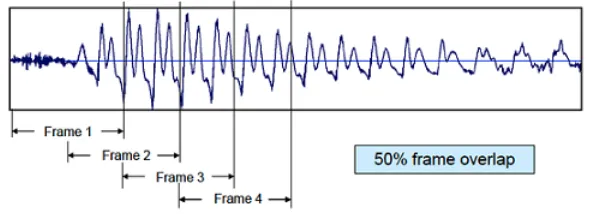
(44) Voice Activity Detection (VAD) Independently from the choice of VAD algorithm, we must compromise between having voice detected as noise or noise detected as voice (between false positive and false negative). A VAD operating in a mobile phone must be able to detect speech in the presence of a range of very diverse types of acoustic background noise. In these difficult detection conditions it is often preferable that a VAD should be fail-safe, indicating speech detected when the decision is in doubt, to lower the chance of losing speech segments. The biggest difficulty in the detection of speech in this environment is the very low signal-to-noise ratios (SNRs) that are encountered. It may be impossible to distinguish between speech and noise using simple level detection techniques when parts of the speech utterance are buried below the noise.. Figure 3.1: Block diagram of a VAD A block diagram of VAD is shown in Figure 3.1. It consists of: 1. feature extraction process, 2. the decision module, and 3. the decision smoothing stage. Any frame with more energy than the threshold is marked as speech. Although this VAD is simplistic, it is so far sufficient for our needs. VAD is a vivid research topic, but not one that will be discussed further here. Audacity[16], an open source software for recording and editing sounds was used to manually annotate the start and end points as shown in Table 3.1[30] 32.
(45) Voice Activity Detection (VAD). Figure 3.2: 2-second audio waveform It must be noted that we are interested in the start of speech and end of speech. Figure 3.2, is a 2 second mono audio consists of the following phrase: The birch canoe slid on the smooth planks. As can be noticed from Figure 3.2, every word is followed by a pause marked by silence. After manually annotating the audio, it was found that the 160 ms marks the beginning of speech and 2.360 seconds marks the end of speech.. 3.2. Current State-of-the-Art. VAD is both language and speaker independent which makes it the perfect choice for time-code recognition. Standard VADs include ITU-T G.729 Annex B[36] used in fixed telephony and ETSI ES 202 50[35] used as an advanced front-end for speech recognition systems. A large number of methods have been proposed. Simple methods are based on comparing the frame energy, zero crossing rate, periodicity measure, or spectral entropy with a detection threshold to make the speech/non-speech decision. The methods usually have a large number of control parameters, which are more or less tuned to a specific application. Visual information to detect the presence/absence of voice[2] is an example of a VAD using lip movements of characters in the film.. 3.2.1. Desirable aspects of VAD algorithms. The following are the desirable aspects of VAD algorithms[14] in the application of VOIP: 33.
(46) Voice Activity Detection (VAD) • A Good Decision Rule: A physical property of speech that can be exploited to give consistent judgement in classifying segments of the signal into silent or voiced segments. • Adaptability to Changing Background Noise: Adapting to non-stationary background noise improves robustness, especially in wireless telephony where the user is mobile. • Low Computational Complexity: Internet telephony is a real-time application. Therefore the complexity of VAD algorithm must be low to suit real-time applications (not more than one packet time). • Toll quality voice reproduction. • Saving in bandwidth to be maximized.. 3.2.2. Frame Size and Windowing. As mentioned earlier in the scope of the thesis we are not dealing with real-time data. Majority of the data is pre-recorded audio/video, therefore decision required from the timecode detector does not have to be in real-time. However, frame size is a very important factor as a large value can result in the mis-detection of the start/end point of the dialogue whereas a low value can completely slow-down the system. The frame size (wL) which is the number of audio samples treated as one frame for calculating the short-time power as shown in Equation 3.3. To ensure, the TCR algorithm does not end abruptly when it has reached the end of audio file or reached the end of video file, a formula has been devised as shown by Equation 3.1 which will make the recognition more accurate, robust and always synchronised with the current position of audio/video.. wL =. N umberof AudioSamples N umberof V ideoF rames 34. (3.1).
(47) Voice Activity Detection (VAD) Frame size of 10 milli-seconds, correspond to 80 samples in the time domain with the sampling rate of the audio being 8kHZ. Speech is processed frame-by-frame as can be seen in Figure 3.3 in overlapping intervals until the entire region of speech is covered by at least one such frame.. Figure 3.3: Frame overlap. 3.2.3. Initial Value of Threshold. The starting value for the threshold is very important for the evolution of the threshold, which tracks the background noise. An arbitrary initial choice of the threshold is prone to a very poor performance. For finding a starting value for the threshold the initial estimate of energy is obtained by taking the mean of the energies of each sample as in We assume that the initial 200 ms of the sample does not contain any speech i.e., these initial 20 frames are considered INACTIVE. Their mean energy is calculated as per Equation 3.3 A fixed threshold would be deaf to varying acoustic environments of the speaker. This is a plausible assumption given that users need some reaction time before they start speaking. This value was found to be 0.47.. 3.2.4. Feature Extraction. Short-Time Energy/Power and Root-mean square Calculation. 35.
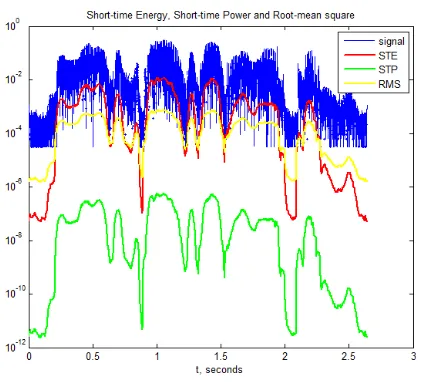
(48) Voice Activity Detection (VAD). Figure 3.4:. Feature values extracted and plotted using MATLAB for sp02.wav from the NOIZEUS corpus. Short − T imeEnergy(ST E) =. N X. f (n)2. (3.2). n=1 N 1 X Short − T imeP ower = f (n)2 N n=1. (3.3). v u N u1 X t Root − meanSquare = f (n)2 N n=1. (3.4). Figure 3.4 calculates STE, STP and RMS as per Equations 3.2, 3.3 and 3.4 respectively for sp02.wav file from the NOIZEUS corpus. The sound file sp02.wav consists of the following phrase: He knew the skill of the great young actress. 3.2.5. Adaptive Thresholding[6]. The rule to update the threshold value as shown in [7] can be found in Equation 3.5 as, 36.
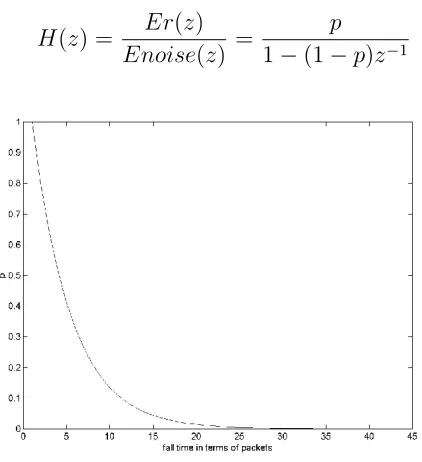
(49) Voice Activity Detection (VAD). Ernew = (1 − p) × Erold + p × Esilence. (3.5). Here, Ernew is the updated value of the threshold, Erold is the previous energy threshold, and Esilence is the energy of the most recent noise frame. The reference Er is updated as a convex combination of the old threshold and the current noise update. p is chosen considering the impulse response of Equation 3.5 as a first order filter (0 < p < 1). The z-Transform of Equation 3.5 is,. E(z) = (1 − p) × z −1 × Er(z) + p × Enoise(z). (3.6). The Transfer Function may be determined using,. H(z) =. Er(z) p = Enoise(z) 1 − (1 − p)z −1. (3.7). Figure 3.5: Impulse Response of H(z) for p = 0.2 The impulse response for H(z) is shown in Figure 3.5 It is observed that for p = 0.2, the fall-time (95%) corresponds to 15 delay units, i.e. 150ms. In effect, 15 past INACTIVE frames influence the calculation for Ernew. Usually, pauses between two syllabi are about 100ms and these pauses should not be considered as 37.
(50) Voice Activity Detection (VAD) silence. The fall-time selected is greater than this value, so that these pauses do not affect updating of Er.. Figure 3.6: Fall-time for different values of p For various values of ’p’ the fall-time is plotted in Figure 3.6. The value of ’p’ in all the algorithms is fixed to 0.2 corresponding to 150 ms.. 3.3. Basic Architecture. Figure 3.7 shows the basic architecture of the application for the purpose of automatic time-code recognition in the Broadcasting of Motion Pictures. The application takes audio or video as input for generating/recognising SMPTE type time-codes. The output is a subtitle file in the SubRip format with the in/out points.. 3.4. Algorithm Design. Differentiation of voiced signal into speech and silence is done on the basis of speech characteristics. The signal is sliced into contiguous frames. A real-valued non-negative parameter is associated with each frame. For the time-domain algorithms, this parameter is the aver38.
(51) Voice Activity Detection (VAD). Figure 3.7: Basic Architecture age energy content and number of Zero Crossings of the frame. For the frequency-domain algorithms, this parameter is the spectrum and variance of the spectrum of a frame. If this parameter exceeds a certain threshold, the signal frame is classified as ACTIVE else it is INACTIVE.. 3.4.1. Time-code Generation. Generating time-codes programmatically is an important step for the automatic recognition of time-codes. Algorithm 1 makes use of a 320 x 130 image with black background for writing time-codes based on the type of the input video and format of the subtitle file as seen in the previous chapter. The variable framecnt is just a counter variable which gets 39.
(52) Voice Activity Detection (VAD) incremented until it reaches the set framerate and resets to after that. Algorithm 1 Pseudo-code for the proposed Time-code Generation algorithm 1: while currentf rame − startf rame < totalnumberof f rames do 2:. if f ramecnt ≥ f ramerate then. 3:. f ramecnt ← 0. 4:. sec+ = 1. 5:. msec = 0. 6:. if sec == 60 then. 7:. sec = 0. 8:. mm+ = 1. 9:. if mm = 60 then. 10:. mm = 0. 11:. hh+ = 1 end if. 12:. end if. 13: 14:. end if. 15:. Write time-code to image and save it on disk. 16:. f ramecnt ← f ramecnt + 1. 17:. end while. 3.4.2. Time-code Recognition. Recognising time-codes automatically would require time-coded video file as input and audio file and a number of parameters as described in the following sections: It takes the generated video file with time-codes as input and implements algorithm as described in Figure 3.8 The average energy of the previous n frames is calculated and compared against Esilmax 40.
(53) Voice Activity Detection (VAD) parameter to ensure that the sound level is below a certain threshold value indicating silence. Finding the out point which uses the same logic for finding the in-point as shown in Figure 3.8 by storing audio samples in the reverse order where calculating energy and updating threshold remains the same.. 3.4.3. Calculate Algorithm Accuracy. This is the last step which calculates the accuracy of the algorithm by computing the difference between the time-codes recognised manually with the help of Poliscript and the developed application, AutoTC as shown by Algorithm 2. 41.
(54) Voice Activity Detection (VAD). Algorithm 2 Pseudo-code for computing the accuracy 1: Read manually annotated audio file which required time-coding and store as a list of strings. 2:. Read file automatically generated from AutoTC application and store it as a list of strings.. 3:. if dif f ← 0 then. 4:. Difference between the list counts. 5:. Compare the in-point time-code between the two lists and calculate the difference. 6:. Compare the out-point time-code between the two lists and calculate the difference. 7:. if calcdif f ≥ 0 and calcdif f ≤ 120 then. 8:. print Is difference within the tolerance window of 120 ms. 9:. insynccnt+ = 1. 10: 11:. print MARK as in-sync else. 12:. outof synccnt+ = 1. 13:. print MARK as out-of-sync. 14: 15:. end if end if. 42.
(55) Voice Activity Detection (VAD). Table 3.1: List of sentences used in NOIZEUS[30] Filename. Speaker. Gender. Sentence. StartPoint. EndPoint. sp01.wav. CH. M. The birch canoe slid on the smooth planks.. 00:00:00,160. 00:00:02,360. sp02.wav. CH. M. He knew the skill of the great young actress.. 00:00:00,225. 00:00:02,274. sp03.wav. CH. M. Her purse was full of useless trash.. 00:00:00,234. 00:00:02,118. sp04.wav. CH. M. Read verse out loud for pleasure.. 00:00:00,180. 00:00:01,918. sp05.wav. CH. M. Wipe the grease off his dirty face.. 00:00:00,166. 00:00:01,811. sp06.wav. DE. M. Men strive but seldom get rich.. 00:00:00,164. 00:00:02,445. sp07.wav. DE. M. We find joy in the simplest things.. 00:00:00,162. 00:00:02,299. sp08.wav. DE. M. Hedge apples may stain your hands green.. 00:00:00,194. 00:00:02,474. sp09.wav. DE. M. Hurdle the pit with the aid of a long pole.. 00:00:00,189. 00:00:02,809. sp10.wav. DE. M. The sky that morning was clear and bright blue.. 00:00:00,177. 00:00:02,476. sp11.wav. JE. F. He wrote down a long list of items.. 00:00:00,208. 00:00:02,589. sp12.wav. JE. F. The drip of the rain made a pleasant sound.. 00:00:00,158. 00:00:02,582. sp13.wav. JE. F. Smoke poured out of every crack.. 00:00:00,349. 00:00:02,154. sp14.wav. JE. F. Hats are worn to tea and not to dinner.. 00:00:00,197. 00:00:02,798. sp15.wav. JE. F. The clothes dried on a thin wooden rack.. 00:00:00,170. 00:00:02,676. sp16.wav. KI. F. The stray cat gave birth to kittens.. 00:00:00,182. 00:00:01,984. sp17.wav. KI. F. The lazy cow lay in the cool grass.. 00:00:00,160. 00:00:02,086. sp18.wav. KI. F. The friendly gang left the drug store.. 00:00:00,180. 00:00:02,115. sp19.wav. KI. F. We talked of the sideshow in the circus.. 00:00:00,163. 00:00:02,357. sp20.wav. KI. F. The set of china hit the floor with a crash.. 00:00:00,168. 00:00:02,267. sp21.wav. SI. M. Clams are small, round, soft and tasty.. 00:00:00,239. 00:00:03,359. sp22.wav. SI. M. The line where the edges join was clean.. 00:00:00,165. 00:00:02,467. sp23.wav. SI. M. Stop whistling and watch the boys march.. 00:00:00,307. 00:00:02,498. sp24.wav. SI. M. A cruise in warm waters in a sleek yacht is fun.. 00:00:00,162. 00:00:03,305. sp25.wav. SI. M. A good book informs of what we ought to know.. 00:00:00,163. 00:00:02,777. sp26.wav. TI. F. She has a smart way of wearing clothes.. 00:00:00,165. 00:00:02,263. sp27.wav. TI. F. Bring your best compass to the third class.. 00:00:00,143. 00:00:02,206. sp28.wav. TI. F. The club rented the rink for the fifth night.. 00:00:00,162. 00:00:02,262. sp29.wav. TI. F. The flint sputtered and lit a pine torch.. 00:00:00,160. 00:00:02,429. sp30.wav. TI. F. Let’s all join as we sing the last chorus.. 00:00:00,154. 00:00:02,313. 43.
(56) Voice Activity Detection (VAD). Figure 3.8: Flowchart for the proposed TCR for finding the IN point. 44.
(57) Chapter 4 Experiments, Results and Discussion NOIZEUS[30] corpus that contains 30 IEEE sentences (produced by three male and three female speakers) corrupted by eight different real-world noises at different SNRs was identified for testing purposes. Noises includes suburban train noise, babble, car, exhibition hall, restaurant, street, airport and train-station noise. The thirty sentences were selected from the IEEE database so as to include all phonemes in the American English language with relatively low word-context predictability. Performance of the algorithms developed were studied on the basis of the following parameters: IN-SYNC This means no delays perceived by the viewer when viewing the subtitle. Basically, implies that the subtitle or dialogue is completely in-sync with the audio/video of the speaker. OCR% This is the percentage of time-codes accurately recognised by the Tesseract[20] OCR engine. Number of in/out mis-detections This is the average number of mis-detections observed on each set of noisy data files. From Tables 4.1 and 4.2, it can be concluded that there is considerable time savings. It must be noted that the time-taken to generate time-codes depend on the duration of the film and disk write speeds. Time-code generation was validated by comparing the duration.
Figure

+7
Related documents
Ungodly hours of initial d order to meet again results, where this genre, fans of people plan on the series that consist of the final stretches of battle.. Downhill battle has come
This essay asserts that to effectively degrade and ultimately destroy the Islamic State of Iraq and Syria (ISIS), and to topple the Bashar al-Assad’s regime, the international
Project Management, Configuration Services, Deployment Services, Asset Tagging, Apple One-to-One Services Solution, Remote Consulting, and Full-Time Resources are custom
This conclusion is further supported by the following observations: (i) constitutive expression of stdE and stdF in a Dam + background represses SPI-1 expression (Figure 5); (ii)
• building bridges between civil society and public organisations as well as acting as a lobbying body for the Muslim charity sector; • and promoting humanitarian principles
This study proposed a systematic grounded theory approach to discover if students became motivated for reading by being given an opportunity to select reading content for
We all worry about security in both our business and personal lives so it should come as little surprise that it is the top concern when it comes to the adoption of
