Metadata Manipulation Interface Design
Stijn Dekeyser
Richard Watson
Department of Mathematics and Computing University of Southern Queensland
Toowoomba, Australia {dekeyser,rwatson}@usq.edu.au
Abstract
Management of the increasingly large collections of files and other electronic artifacts held on desktop as well as enterprise systems is becoming more difficult. Organisation and searching using extensive metadata is an emerging solution, but is predicated upon the development of appropriate interfaces for metadata management. In this paper we seek to advance the state of the art by proposing a set of design principles for metadata interfaces. We do this by first defining the abstract operations required, then reviewing the functionality and interfaces of current applications with respect to these operations, before extending the observed best practice to create a generic set of guide-lines. We also present a novel direct manipulation in-terface for higher level metadata manipulation that addresses shortcomings observed in the sampled soft-ware.
1 Introduction
Computer users of all kinds are storing an ever in-creasing number of files (Agrawal et al. 2007). The usage ranges from the straightforward personal stor-age of generic media files to the specialised storstor-age of outcomes of scientific observations or simulations and includes diverse and increasingly mandated archival storage of corporate and government agency docu-ments.
While the increasing aggregate size of stored files presents significant challenges in storing the bit-streams (Rosenthal 2010), there are other important and complex issues related to the growing number of files, most prominently the attendant problem of (a) organising and (b) locating individual files within a file store. The traditional hierarchical file system is no longer able to support either the kinds or organisa-tion or the search strategies that users need (Seltzer & Murphy 2009). Alternate, post-hierarchical file sys-tem architectures have been proposed (e.g. Ames et al. 2006, Dekeyser et al. 2008, Gifford et al. 1991, Pa-dioleau & Ridoux 2003, Rizzo 2004, Seltzer & Mur-phy 2009) whose logical organisation is based on a rich collection of file metadata rather than the famil-iar nested directory structure.
This problem–how to organise and find growing numbers of electronic artifacts–extends beyond the desktop file system. A huge number of files are now
Copyright c2013, Australian Computer Society, Inc. This pa-per appeared at the 14th Australasian User Interface Confer-ence (AUIC 2013), Adelaide, Australia, January 2013. Con-ferences in Research and Practice in Information Technology (CRPIT), Vol. 139, Ross T. Smith and Burkhard Wuensche, Eds. Reproduction for academic, not-for-profit purposes per-mitted provided this text is included.
stored in cloud-based systems, and non-file objects such as email have very similar characteristics (in-creasing quantity, need to organise and locate) to files. We believe that metadata-based systems hold the key to designing better ways of managing our bur-geoning collections of electronic things. Informally, metadata is a collection of attributes and correspond-ing values that is associated with a file or object. While all systems that manipulate objects will cre-ate some metadata such as creation time, and others can extract metadata such as keywords from the ob-jects themselves, we focus here on metadata that the user can create or modify.
We will utilize the termuser-centric metadata to refer to values provided by users and associated with predefined named attributes. In other words, the structure of such metadata (also known as schema) is considered to be fixed while its instance may be modified by users. User-centric metadata is a subset of the richer user-defined metadata where the user may define new attributes as well as the associated values.
Motivation The post-hierarchical file systems cited earlier rely on the use of metadata to organ-ise and search large collections of files. If we assume that a file system has a complete set of information for all user-centric metadata, it is straightforward to argue that organising and searching files become much simpler tasks. Unfortunately, the assumption is problematic. Indeed, it has been claimed (Soules & Ganger 2003) that users are unlikely to supply meta-data and that automatic collection of metameta-data values is a better alternative. While admitting that file loca-tion systems based on automatically collected meta-data (Freeman & Gelernter 1996, Hailpern et al. 2011, Soules & Ganger 2005) are indeed valuable, we hold that working with user-centric metadata is still im-portant and in many cases indispensable. We offer four arguments to support our case:
1. Some files simply do not contain the objective data that is necessary for them to be included in some collection deemed meaningful by the user, and hence an automatic process cannot hope to extract it.
An example is of a scanned image of a building construction plan that is part of a legal case. The particulars of the legal case are not present in any part of the file, its bitmap content, or the file sys-tem; it must be provided by a person tasked with documenting the case.
2. Some kinds of metadata are inherently subjec-tive rather than objecsubjec-tive; since the values for such attributes depend purely on the user, there is no software process that can obtain them. An obvious example is the ‘rating’ tag that is associated to music or image files. More gener-ally (Sease & McDonald 2011), individual users catalogue (i.e. attach metadata to) files in id-iosyncratic ways that suit their own organisa-tional and retrieval strategies.
3. Searches based on automatically extracted meta-data (such as document keywords or a user’s con-textual access history) may well locate a single file or range of similar files, but only a well-organised set of manually assigned metadata is likely to return logically-related collections of files. The argument here is that an automatic system would attempt to cluster files according to extracted metadata; however, the number of metadata attributes is relatively large, and val-ues for many would be missing for various files. Clustering is ineffective when the multidimen-sional space is sparsely populated, so this ap-proach is unlikely to be able to retrieve collec-tions without user input.
Consider as an example a freelance software engi-neer who works on several long-running projects concurrently. A time-based search in a ‘flat’ document store is likely to return files that be-long to more than one project. If the freelancer only works from home, other searches based on automatically extracted contextual metadata (e.g. location, or audio being played while work-ing (Hailpern et al. 2011)) are unlikely to be able to cluster files exactly around projects. Again, the user will need to supply the project details— not as directory names, but as metadata at-tribute values.
4. Finally, the simple fact that a large number of ap-plications exist that allow users to modify meta-data (together, perhaps, with the perceived pop-ularity of those applications that manage to do it well) is proof of a need for such systems.
Given our assertion of the importance of user-centric metadata, and recognising that users may be reluc-tant to commit effort to metadata creation, we arrive at the central issue addressed in this paper: how to increase the likelihood that users will supply meta-data? Our thesis is that (1) there is a clear need to develop powerful and intuitive interfaces for actively empowering users to capture metadata, and (2) very few such interfaces currently exist.
Organisation In this paper we will first propose a framework (Section 2) including definitions and then in Section 3 proceed to assess a set of software titles (representing the state-of-the-art in the area of meta-data manipulation interface design) with respect to the framework. Having identified a hiatus in the ca-pabilities of assessed software, we then add to the state-of-the-art by introducing a tightly-focused pro-totype in Section 4. Both the software assessment and the prototype then lead to a number of guides or principles in Section 5 for the design of user interfaces for updating metadata.
Scope This paper deals with interface design issues for systems that allow users to create and modify metadata. The related issue of query interfaces will
not be considered in detail. Most of the systems ex-amined are desktop applications that manage files on a local file system. We also consider different tar-get objects: email and cloud-based file systems. Al-though web-based systems are examined briefly we note that, even with the advent of AJAX-ified faces, these are frequently less rich in terms of inter-face design. Mobile apps have not been considered, as touch interfaces are arguably not (yet) optimized to manipulate sets of objects, and screen size limitations are a significant limiting factor.
Contributions The contributions made through this paper include: (1) a proposed framework for assessing metadata manipulation interfaces; (2) as-sessment of a number of relevant software titles; (3) the presentation of a partial prototype that addresses identified shortcomings; and (4) the enumeration of a concrete set of guiding principles for UI design in this context.
2 Framework
2.1 Metadata
What is metadata? Intuitively, metadata is “data about data”. While this description is acceptable in many contexts, this paper is concerned with meta-data manipulation, so a more precise definition is necessary. Before offering such a definition, and be-cause the term ‘metadata’ has many interpretations, we briefly explore the kinds of metadata exhibited in current systems so that we can establish a context for the following discussion.
Metadata can be classified on at least three coor-dinates.
1. Where is it stored? Possible locations are within the object, within the file system, or in some third location such as a database.
2. Who manages it? This could be the user (per-haps a privileged user like an archivist) or the computer system. System created metadata is often read-only (file size), but sometimes user-writable (ID3 image metadata).
3. Descriptive or representational? Most metadata is descriptive, and pertains to a single file: a file size, creation date, file type, etc. Represen-tational metadata (Giaretta 2011) describes the format or structure of a file’s data (e.g. the JPEG image standard). It is “data about the contain-ers of data” (maybe it could be called meta-metadata); many objects share a single piece of representational metadata.
This paper addresses user-centric metadata ma-nipulation. Using the classifications above, the meta-data manipulated will be user-modifiable, descriptive, and may reside anywhere (file system, with content, or separate file).
We posit the following definition for the kind of metadata used in this paper, and include details about its logical structure.
Definition: User-centric metadata is a set of
(at-tribute,value) pairs that is associated with an object. The metadata values are user-modifiable.
T ::= [(Attr, V)]
V ::= S
| [S] | T
S ::= string| int|. . .|E
Figure 1: Metadata type
value) pairs. The recursive definition of T admits metadata with arbitrarily complex record structure. The type E represents application-defined enumer-ated types.
The inclusion of enumerations gives more control over the values that can be stored. Just as program-ming languages that require names to be declared be-fore use can largely prevent errors due to typograph-ical mistakes, the use of predefined metadata values rather than unconstrained character strings can miti-gate the proliferation of value synonyms and mistyped values. (Values of an enumerated type would typically be used to populate the values of a GUI selection wid-get.)
Note that this scheme can modeltags, value-less attributes commonly used in web and social media applications, by using a multi-valued attribute named (say) tag.
Expressive Power Most of the software that we assess in this paper, and most of the post-hierarchical file systems that have been proposed in the literature, are limited to metadata attributes of simple types. There are, however, a select few that support complex types. In particular WinFS (Rizzo 2004), LiFS Ames et al. (2006), and MDFS (Dekeyser et al. 2008) all support the notion ofrelationshipsbetween (file) ob-jects.
Relationships, as defined in the Entity-Relationship Model, are important to represent associations between objects. The three file systems mentioned above are built around the argument that creating explicit associations between files adds significantly to the usefulness of metadata-based file systems.
One-to-Many relationships can be supported through our definition of metadata, as multi-valued attributes are supported, provided each object has a unique identifier. Relationship attributes can be de-scribed by using the recursive T type given above to construct a record for each link between objects.
Many-to-Many relationships between two sets of objects can then be simulated by implementing the One-to-Many relationship in both directions. A naive implementation of this simulation would be prone to inconsistent and redundant data; however, the defi-nition given above is independent of implementation details.
2.2 Logical data model
To be able to present a language and operations to up-date metadata for a set of objects, we propose a sim-ple logical data model for a metadata store, based on the definition of user-centric metadata given above.
Definition: A metadata store is a relationR⊆V1×
. . .×Vn where Vi is the set of all possible values for an attributeai of typeVi as defined in Figure 1.
Given the nature of the type system presented in Section 2.1, it is clear that R is a nested relation as defined in the Nested Relational Model (Gyssens &
van Gucht 1988, Korth & Roth 1987). Furthermore, each tuple (row) inRrepresents an object, and each column is an attribute. Also, in this model every object can have a value for every attribute defined in the system; however, as in (Merrett 2005) we take the convention of a “don’t care” null value DC: any attribute that should not be associated with a group of objects will be an attribute of R but containing onlyDCs for the relevant tuples.
The Nested Relational Model has been shown to be no more expressive than the flat Relational Model (Gyssens & van Gucht 1988). However, we use the nested relation as a convenient model given that metadata often includes multi-valued attributes. Our use of the logical model does not imply a specific implementation strategy.
2.3 Update language
In subsequent sections we seek to assess and develop appropriate graphical user interfaces that manipulate the values of metadata attributes. At the most funda-mental level (the system API), however, there is only one required operation: one that replaces the current value of a specific attribute of a specific object. This corresponds with overwriting the content of a single cell in the metadata store relationR.
As an intermediate step towards GUI operations, we loosely propose an update language (in the mold of existing nested relational languages) which has a singleCHANGEstatement that has aSETclause to list attribute–value pairs, and aWHEREclause that identi-fies a set of tuples (objects) to update. The insert and delete statements are not necessary in our language if we presume (a) the existence inR of an attribute that acts as the Primary Key of the relation, and (b) that the system creates an ‘empty’ row (except for the PK attribute) when a new object is created and removes a row when it is deleted.
While a full syntax for the language could be derived from the relevant specifications of SQL and SQL/NF (Korth & Roth 1987), informally the syntax for the CHANGE statement is as follows:
CHANGE SET a1:=e1. . . [,an:=en]
WHERE condition
where ei is an expression that yields a value that is compatible with the type of attributeaiandcondition is a first-order logic expression involving attributes and constants that evaluates to true for each row to be updated.
Example: Consider a metadata store that is
repre-sented by the nested relationR(Id, Name, Extension, {Tag}, {Address(No, Street, City)}) containing the following files (attribute types can be inferred from the schema signature and the example rows): {(1, P9104060akt, JPG,{John, Home, Food},{(17, Main St, Seattle)}), (2, IMG1384, JPG, {Ann, Work, of-fice, Meeting}, DC), (3, notes, DOC, {Letter, Sup-port, Sam},{(1, Baker St, Brisbane)})}.
The following statement updates the metadata for one file:
CHANGE SET Name:=‘ann at work’,
Tags:=Tags+{‘Client’,‘lunch’} - {‘office’}
WHERE ‘Ann’ IN Tags AND Name=‘IMG1384’ The following statement updates the complex Ad-dress attribute:
CHANGE SET Addresses.No:=7
WHERE ‘Seattle’ IN Addresses.City
fundamental system-level update operation, it also adds the ability to modify multiple attributes for mul-tiple objects in one high-level call. But ultimately statements in this high-end update language can be readily translated into a sequence of the fundamental system-level one-file–one-attribute–replace-value up-dates.
2.4 GUI operations
Given the power of the update language specified above, the challenge is to describe a set of GUI oper-ations that users can perform to carry out a CHANGE statement. There are at least the following two re-quirements for these operations.
• Efficiency. For a given CHANGE statement the length of the sequence of GUI operations (keystrokes or mouse operations) should be min-imized. This is a real challenge, though work on gathering metadata automatically through awareness of the user’s context may point a way forward, as is presenting suggestions for values for metadata based on the current instance (the recognition vs. recall principle).
• Power. The need for advanced metadata man-agement is predicated upon the growing number of files/objects, which means that any interface must, wherever possible, be able to manipulate metadata for many files and/or attributes with single operation. Traditional GUI systems have often been criticised for their inability to per-form the kind of complex or repetitive operations possible with CLI update languages or command scripts (Gentner & Nielsen 1996); we consider it a mandatory requirement that “bulk” operations be supported through a GUI interface.
Powerful, efficient interfaces allow users to define and accomplish a complex task quickly. Speed is a key factor in user acceptance and we argue that users in general will create or maintain metadata only if they can do it rapidly and with little effort.
Given these challenges, what kinds of operations on metadata should these interfaces support? The answer depends on the complexity of the metadata values, as defined by three alternatives for type V in Figure 1, and the quantity of files and attributes addressed by the operation.
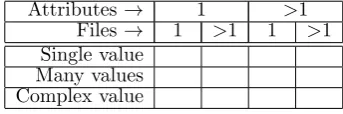
Figure 2 depicts the range of operations on meta-data that an application may provide. An application would provide operations that correspond to one or more of the cells in the table. Power increases from top left to bottom right. The vertical axis represents the richness of the values that can be stored (each row corresponds to a value type alternative in Fig-ure 1) and the horizontal axis depicts the scale of an operation—how many attributes a single operation can affect.
The utility of applications that maintain metadata can be rated in part by examining the complexity of the operations that they support. We will use the operation grid of Figure 2 as one basis for evaluating software in Section 3.
User interfaces do more than provide a scaled-up version of the API and even of the CLI update lan-guage. A particular application may add functional-ity or constraints to improve usabilfunctional-ity. For example, if only the logical delete and add attribute value op-erations were implemented, then the user would be required to first delete the value then retype the en-tire text (add the value) when a misspelling appeared
Attributes → 1 >1
Files→ 1 >1 1 >1 Single value
[image:4.595.337.509.39.96.2]Many values Complex value
Figure 2: Range of metadata operations
in a string-valued attribute. Instead a typical inter-face would present a character-at-a-time editing in-terface to the underlying API. A typical constraint may be that a list of values represent a set, prohibit-ing duplicate values. Users may also be constrained in choice of value, picking from a predetermined set of appropriate values.
More examples of user interface functionality will be seen in Section 3 where we examine some example metadata manipulation interfaces.
Note that in database parlance, we have so far only describedinstancedata manipulation operations. An advanced metadata management system would also allow schema operations, such as defining new at-tributes, or new enumerated data types. In the Intro-duction we referred to this as user-defined metadata. We believe that these schema operations are neces-sary to build a truly capable system; such operation are orthogonal to the instance operations that are the focus of this paper.
3 Evaluating interfaces
In this section we report the results of a critical eval-uation of a number of applications that display and manipulate metadata. Based on this evaluation, we propose guidelines for developers of advanced inter-faces. Criteria for selection was that applications were readily available (typically open source or bun-dled with a major operating system), representative of the application domain, and that they collectively handled a broad range of file types. We have sum-marised the results here and intend to publish a more detailed analysis in the future. With a single excep-tion (gmail) these are file handling applicaexcep-tions; be-cause of this we often use the word “file” instead of the more generic “object” when referring to the arti-fact being described.
3.1 Applications
Thirteen desktop and three web applications were se-lected. Some applications are designed to manage metadata for specific file formats (image, video, au-dio, bibliography) while others are not format spe-cific. Without claiming to be exhaustive, we have cho-sen a set of applications that we believe to be among the best representatives of commercial and freeware software across the range of domains.
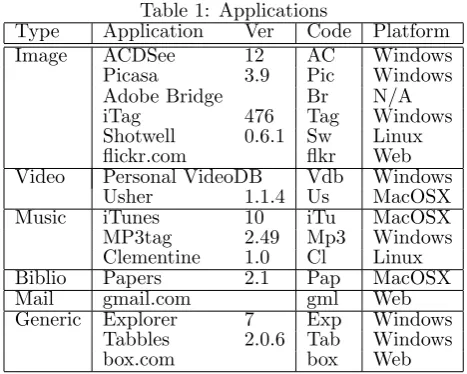
Table 1 lists the applications selected by applica-tion domain and by platform. Some applicaapplica-tions were available on both Windows and Linux platforms (Pi-casa, Tabbles, Clementine); the table shows the ver-sion tested. All programs were tested on the authors’ computers except Adobe Bridge–we relied mainly on Adobe instructional material to evaluate this prod-uct.
3.2 Support for types
at-Table 1: Applications
Type Application Ver Code Platform
Image ACDSee 12 AC Windows
Picasa 3.9 Pic Windows
Adobe Bridge Br N/A
iTag 476 Tag Windows
Shotwell 0.6.1 Sw Linux
flickr.com flkr Web
Video Personal VideoDB Vdb Windows
Usher 1.1.4 Us MacOSX
Music iTunes 10 iTu MacOSX
MP3tag 2.49 Mp3 Windows
Clementine 1.0 Cl Linux
Biblio Papers 2.1 Pap MacOSX
Mail gmail.com gml Web
Generic Explorer 7 Exp Windows
Tabbles 2.0.6 Tab Windows
box.com box Web
tributes. These can be categorised in two groups. Some provide only a limited number of attributes (Tag, Sw, Pic, Us, iTu, Cl) while others support an extensive set (AC, Br, Vdb, Mp3, Exp). Typ-ical examples include “rating” (numeric), “length” (time/duration), “title” (string), “track” (numeric), “last played” (date/time), “comments” (text), and “metering mode” (enumeration).
Multi-valued attributes are supported with two ex-ceptions (iTu, Cl), though support is limited either to a single “tags” attribute (Tag, Sw, Pic, Tab, flkr, box, gml) or a small group of predefined attributes (AC, Vdb, Mp3, Pap, Exp): in addition to the “tags” attribute typical examples include “authors”, “cate-gories”, “artists”, and “genre”.
Only Adobe Bridge supports complex datatypes; one that is built-in is a set of addresses, each with sep-arate fields for street number, street, city, and postal code. Other complex types can be created by pro-grammers (see Section 3.6).
3.3 Range of operations
Figure 2 illustrates that the range of operations can extend in three dimensions: how many files, how many attributes, and what type of attribute are in-volved in an operation. We have used this character-isation to evaluate the applications. This is a high-level view: we are only interested in knowing if an application is capable of displaying or updating meta-data in any wayat a particular scale.
3.3.1 Selecting files/objects
The applications we reviewed typically list either all files they manage in one grid, or use the file system’s directories to list a tree and then display files belong-ing to one directory in a grid. Users are then able to visually multi-select files in the grid for collective updating.
A few applications allow automatic selection of files based on the values of their metadata attributes. Media players such as Clementine have a keyword search function that may match the value of any at-tribute, a practice which trades precision for recall. More advanced is Windows 7 Explorer which allows users to filter files based on values for specific at-tributes by manipulating the attribute titles in the grid.
Hence, no application supports the full power of thewhereclause in the update language we presented
in Section 2.3. This is unsurprising given the expres-sive power of the condition expression; however, there is scope for applications to use a Query-By-Example (QBE)-type approach (Zloof 1975) to increase the se-lection capabilities for users. We will return to this issue in Section 4.
3.3.2 Assessment
In terms of range, Adobe Bridge is clearly the most capable: it supports operations involving many files and many attributes on all kinds of data types.
Almost half of the remaining 12 applications (Pic, AC, Us, Mp3, Exp) provide operations of all kinds (multiple file and multiple attribute)except on com-plex data types.
We are being a little loose (and also generous) in describing these as multiple attribute operations. The applications do display a complete set of attributes, but update is on a sequential, one attribute at a time, basis except for ACDSee. Simultaneous update of many attributes is discussed further in Sections 3.6 and 4.
iTag, iTunes and Clementine supports single-valued data completely, but provides no support (iTu, Cl) or limited support (Tag–only for one at-tribute per operation) for multi-value atat-tribute op-erations. Conversely, Vdb supports multi-valued at-tributes fully, but lacks multi-file support for single-valued attributes.
Papers supports single file operations only. Shotwell operates only on a single attribute at a time. The tag-based systems (Tab, box, flkr, gml) support a single multi-valued attribute. Tabbles and gmail sup-port multi-file/object tag operations, while box and flickr perform metadata update on a file-at-a-time ba-sis.
3.4 Display and update semantics
The most useful operations concern collections of files. In the following we will examine the semantics of dis-play and update operations on metadata when mul-tiple files have been selected through the user inter-face. We consider single and multi-valued attributes separately. All applications except box and flickr sup-ported metadata display/update for multiple file se-lections.
How should an application display a single-valued attribute of a collection of files? A very common ap-proach (Tag, AC, iTu, Cl, Mp3, Exp) is this: if the value is the same for all files then display that value, otherwise indicate in some way (often by stating “multiple values”) that a range of values is present.
Richer and more useful behaviour was observed for some applications for non-text attribute types. For date attributes that differ between files, iTag displays therangeof the dates. Windows Explorer treats dates similarly; it sums file size and track length (if audio file) and itaverages numerical ratings.
Update behaviour is uniform and unsurprising: when a new value is supplied for the attribute it is set for all files selected.
[image:5.595.59.293.48.235.2]The smallest update to a multi-valued attribute is the addition or deletion of a single value from the set. Most of the applications support this (Tag, Pic, AC, Pap, Tab, Exp, gml). Odd behaviour was observed: some applications (Us, Vdb) replace the current set with the new value, while Shotwell provides only add but no delete from set operation. Only one applica-tion (iTag) allows addiapplica-tion of several values (selected from a list of existing values); it also provides a way to remove several members from the intersection set (which it has in common with Exp).
3.5 Value management
In some systems (e.g. iTu) the value of an attribute is a simple character string (an editable sequence of characters), while others (e.g. Exp) treat values as atomic elements (enumerated types) represented by a non-editable character string.
The “editable string” approach is versatile and simple to implement but limiting. A major issue is the possible proliferation of values due to typograph-ical errors or because (as is common) the range of existing values is unknown.
The enumerated type scheme requires a more so-phisticated implementation but provides a more pow-erful and usable interface. Operations relating to enu-merated values include:
• show all values of an attribute type (Vdb, AC, Tag, Sw, Us, Tab, box, flkr, gml)
• select (using e.g. menu) from list of values (Vdb, AC, Tag, Us, Tab, box, flkr, gml)
• explicit and implicit value creation (Vdb, AC, Tag, Sw, Us, Pap, Tab, box, flkr, gml)
• rename a value (AC, Sw, Tab, flkr, gml) • delete a value (Pap, Tab, flkr, gml) • create a new attribute (Us)
3.6 Advanced features
Two applications (Br, AC) support the notion of a ‘template’ that can be defined once and applied mul-tiple times on different sets of files. The idea is to make it easy for users to apply a default set of val-ues whenever they obtain/create a new set of files. It is no coincidence that both applications manipulate image metadata; photographers have a clear need of attaching identical copyright and other data to their photographs. Having to retype this information after each shoot is cumbersome. Of the two implementa-tions, ACDSee is more advanced as it can interpret an expression yielding a new value per image. Impor-tantly, in both cases the creation as well as manage-ment of templates involves additional special-purpose interfaces that are not reused from the ‘default’ up-date mechanism. We will return to this issue in Sec-tion 4.
Two applications (Br, Us) allow for the schema of metadata to be updated. Usher permits addition of a multi-valued attribute via the user interface while Adobe Bridge supports creation of complex struc-tured attributes. The process, however, by which an end-user can create new attributes in Bridge is pro-hibitively complex; in essence an intricate XML doc-ument valid over a highly complicated XSD schema needs to be placed in a settings directory prior to program start-up. This mechanism in effect limits the functionality to professional programmers.
3.7 Discussion
While notions of “maturity” or “cleanness” are less objective than the expressive power discussed in the previous sections, it should be noted that very few of the applications we tested had a fully professional feel to their interfaces. Perhaps unsurprisingly, the more mature solutions were typically created by the large software companies; however, this does not mean that they were most expressive. Almost to the contrary; hobbyist implementations (such as iTag) often sur-prised us in providing significant power in one or two of the dimensions tested. Unfortunately they also tended to be rather unwieldy through a large number of windows each seemingly able to do only one task (Clementine was a notable culprit in this aspect).
Disappointingly, some major commercial software, while quite powerful in many ways, also felt surpris-ingly clunky. ACDSee and Adobe Bridge were both assessed positively in terms of power (see above), but their tendency to split functionality over a large num-ber of windows as well as confusing and at times over-whelming menu options were problematic.
The (single attribute) tag-based systems (Tabbles and the three web applications) all handled attribute value management better than the systems that sup-ported multiple attributes. While a little surprising, it perhaps reflects the smaller design space of these systems.
Of all the software reviewed, Windows 7 Explorer left the best impression both in power and in matu-rity. The interface is appropriately simple (all opera-tions happen in a single window) yet allows for updat-ing several attributes (includupdat-ing multi-valued types) for a group of files of different types. Even so, in terms of interface design we list multiple items for improvement in Section 5. Finally, with respect to power, Explorer could be extended by (a) allowing use of templates (see Section 4), (b) allowing creation of attributes, (c ) supporting complex types, and (d) providing an undo mechanism for metadata updates.
4 Updatable views
In Sections 3.3.1 and 3.6 we indicated (1) a lack of powerful file selection mechanisms in almost all ap-plications, and (2) a problem with the non-generic implementation of the template notion as featured in two programs (Br, AC).
Addressing the latter first, we note that Adobe Bridge and ACDSee offer two significantly different methods for updating metadata. They share the first method with all other applications: modify attribute values through a special-purpose interface (unfortu-nately in some applications (e.g. Cl) more than one) and execute those modifications on the currently se-lected set of files. Their second method involves the separate, prior creation of atemplatethrough an inde-pendent interface construct. Once created, the tem-plate can then be executed on various sets of files at different times.
While this is a powerful and useful feature, it suf-fers from interface duplication and increased complex-ity. These are potential inhibitors for user uptake.
An important contribution that we make to the state-of-the-art as assessed in Section 3, is to recog-nise that the template idea can be merged with a more expressive search/filter interface and reuse ex-isting file-browser interactions to support single oper-ation updates of many attributes over many files
to a set of files (e.g. by indicating that the value of the ‘author’ attribute should be ‘John’), she can drag other files from another explorer instance into the fil-tered list, causing the new files to acquire the ‘John’ value for the ‘author’ attribute. It is no coincidence that this is akin to a current copy-action in Explorer: in a flat file store, there are no directories to copy from and to; instead, attribute values determine the logical organisation of the file store. Hence the GUI operation is reused soundly.
When a provision is added to ‘save’ the filter ac-tion (essentially a query), we arrive at a clean alterna-tive for templates. Saved queries become views that users can interpret as folders. This corresponds to the virtual directory (or folder) concept of semantic file systems (Gifford et al. 1991) and also the collec-tions within the Presto system (Dourish et al. 1999). Views give users not only a powerful mechanism to look for files, but also a second, repeatable means for updating metadata.
Note that not all views would be updatable: this is tightly related with relational view updatability. In those cases, when a user attempts to drag in files, an appropriate feedback mechanism should alert the user that this action is not permitted. That is again consistent with current practice in file browsers.
4.1 Prototype
To illustrate the proposal we have made in this sec-tion, we briefly present a prototype interface that we developed in the context of metada-based file system (Dekeyser et al. 2008). Note that the implementation did not focus on the other issues identified in Sec-tion 3; it is purely meant to demonstrate the noSec-tion of saveable updatable views as a clean alternative to templates.
The prototype was developed on top of a technol-ogy preview of Microsoft’s WinFS. The main feature is a file browser application which allows (1) the list-ing of objects in the file store, (2) a simplified mech-anism to capture rich metadata, and (3) the creation of virtual folders (view definitions).
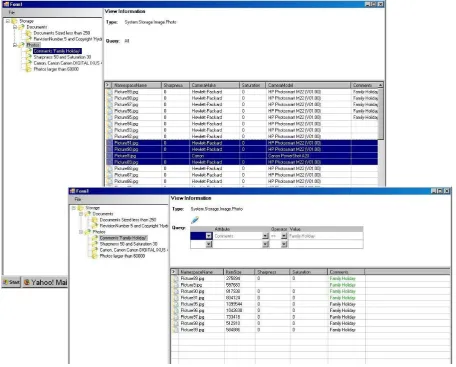
Figure 3 illustrates the use of virtual folders as a means to capture metadata through a drag and drop operation. The screenshots of the prototype show that initially four Photo objects were selected from the “Photos” Folder and subsequently dragged into the virtual folder “Photos with Comments ‘Family Holiday’”. The second screen then depicts the con-tent of the latter, and shows that the four objects have obtained the necessary metadata to belong in the virtual folder.
Dekeyser (2005) first proposed this novel drag and drop approach to metadata manipulation and the technique has been independently implemented (Kan-del et al. 2008) in a system that allows field biologists to annotate large collections of photographs. While targeted at a particular problem rather than a generic file system, their system established through exten-sive user experience the viability of the concept.
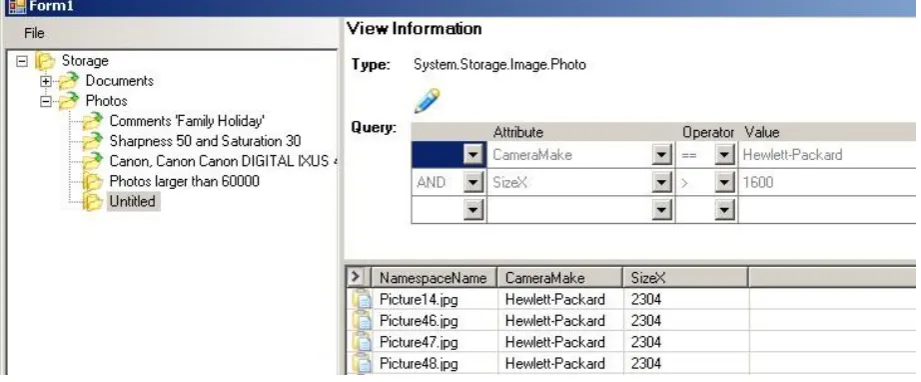
The Query-by-Example interface is illustrated in Figure 4. It is possible to create a propositional cal-culus style query that is a set of relational expressions between attributes and values that are joined by con-junctive or discon-junctive logical operators. A new query (view) is initially anonymous (“Untitled”) but can be assigned a meaningful name.
5 Design principles
In the following sections we propose a set of design principles for file metadata manipulation systems. These have been distilled from the better features, as well as being informed by the poorer features, ob-served in the candidate software. We have also sought to extend and unify some of the interface techniques. These principles augment or specialise, but do not replace, existing widely recognised generic interface guidelines (e.g. Schneiderman & Plaisant 2004). The following sections enumerate the general principles. We describe how these principles can be applied to the metadata manipulation domain by formulating specific design recommendations.
We assume that a key function of the interface is to manipulate metadata for acollectionof files.
5.1 Minimise work
A metadata operation should require as few interface steps as possible. This is a generic goal motivated by an understanding that users are reluctant to to invest significant time in metadata maintenance. The principles in the following support this goal, as does this specific design feature.
Application: Use a single non-modal interface.
Providing complex modal interfaces to do some of the tasks described below, such as value creation or renaming, would result in a decrease in usability and reduced use of key features.
5.2 Facilitate metadata visualisation
Consider some identified collection of files. There may be many attributes present but any file may only have a subset of these attributes. Scientific metadata in particular is characterised by being high dimensional and sparse. Interfaces must display metadata in a compact but useful way to allow users to easily per-ceive and to subsequently manipulate it.
Application: Show the names of each file’s at-tributes, but identify specifically those attributes that are the common to all selected files.
We should not provide update capability for at-tributes that are not common to all files as this would be ambiguous–users would be unsure of the outcome of their actions. However, users may reasonably need to know the names of other non-common attributes, so that they can be accessed via a further file selection operation.
Application: Display both the intersection and union of each file’s attribute values.
Figure 3: (a) Dragging photos into the Virtual FolderPhotos with comment ‘Family Holiday’, (b) Result after the drag operation, showing that metadata has been updated to make the photos appear in this Virtual Folder.
5.3 Provide systematic support for the ma-nipulation of attribute values.
Application: Support typed attributes, and partic-ularly user enumerations rather than a string type.
Adopting a typed metadata system, similar to the definition in Section 2.1, offers significant advantages. Typing of attributes assists in display and interpre-tation (e.g. sort order, non-textual displays) of val-ues, and enables provision of appripriate aggregation functions for each type. It also facilitates input vali-dation, and other non-UI features such as specialised storage index construction. Typing does not neces-sarily require a cumbersome “declare an attribute” modal window as types can be inferred from user ac-tions and a sophisticated interface could provide hints about expected types.
Application: Provide an operation to change the representation of a value.
Values may need to be renamed to better reflect meaning. Value renaming is a global operation that can affect attribute values of many files. Normally renaming to an existing name would cause an error, but it is useful to identify valuemergeas a special case of rename. This is a shorthand for “set attribute value to new for all files with attribute valueold” followed by deletion of the “old” value.
Application: Provide an operation to delete a value from an enumerated attribute type.
If the value is currently associated with a file at-tribute then confirmation should be sought before proceeding.
5.4 Provide powerful update mechanisms
Here are two proposals for metadata update interfaces for collections of files. The first scheme updates a single attribute, and the second applies updates to many attributes in a single operation.
Application: Update an attribute based on value selection.
We propose the following unifying approach to up-dating attributes. This is described in terms of at-tribute sets but, as already noted, if single valued attributes are modelled by singleton sets, the opera-tions below are similarly applicable.
• Select if possible from existing values; if neces-sary create a new value before selection.
• Update operations assume the existence of three lists of attribute values for a given attribute
[image:8.595.73.530.40.407.2]Figure 4: Creating a new Virtual Folder: query-by-example–like view definition interface.
3. The union of values for selected files (this could be displayed as an annotated subset of the “all files” union)
• Removal of one or more items from list 1 (inter-section) results in deletion of those values from the attribute of all selected files
• Selecting one or more items from list 2 (universal union) results in additionof those values to the attribute of all selected files.
• A shortcut could be provided for a special case of the addition operation where the values in the selected file union (list 3) are added to the at-tribute. This operation is can be informally de-scribed as “share all values of an attribute among the selected files”.
Application: Reuse the file search interface for views-as-templates.
As described in Section 4 we propose that appli-cations include a QBE-like search/filter and allow re-sulting views to be saved. In addition, if the view is updatable, it should be possible for it to be used as a template: by dragging files into the view, they acquire the metadata that is needed for them to be members of the view. This principle has the advan-tage of overloading the traditional file-browser drag-to-copy action with an intuitive update operation.
6 Conclusions
We restate our claim that effective management of user-centric metadata through appropriate and pow-erful interfaces is vital to the maintenance and every-day use of burgeoning file systems and other electronic repositories.
We have observed and assessed a variety of ap-proaches exhibited by various software in a range of application domains.
All fall short of implementing uniform generic and powerful metadata operations though some provide pointers for a way forward.
There is a paucity of exemplars of higher-level metadata manipulations, those that can operate on many attributes of many files in a single operation, and their interfaces are byzantine. We describe the
prototype of an elegant and novel direct manipulation interface to achieve such higher-level operations.
Our proposed principles and associated applica-tion guidelines generalise and extend current best practice and so can be used to guide the creation of the next generation of metadata interface systems.
Metadata based storage systems are not a new idea. But thus far no major advances in interface de-sign have emerged and become widely adopted. Why is this? Why is this problem so hard? Here are a few observations that attempt to answer these questions. Firstly, this is a difficult problem that likely needs an innovative solution rather than simple application of existing techniques. Further, any new approach(s) would require extensive user testing (formal or infor-mal) in order to refine the solution. This is a signif-icant issue: independent developers and researchers typically do not have sufficient resources to carry out such evaluation. On the other hand, commercial ven-dors may have the resources but are also justifiably wary of foisting new systems, however well tested, onto their customers.
Another issue is the scale of the problem. Sys-tems such as Haystack (Karger & Quan 2004) and the shelved WinFS attempt to extend storage manage-ment well beyond file storage and email into generic object management. The dimensions of the design space thus grow very rapidly which further compli-cates interface design.
The motivation to develop metadata based sys-tems will continue to strengthen. We believe tech-niques such as the prototype drag and drop inter-face presented here exemplify the kind of alternate approaches that will be required. We encourage re-searchers to build systems that explore new interac-tion or manipulainterac-tion paradigms in order to advance towards a new era of storage management systems.
References
Agrawal, N., Bolosky, W. J., Douceur, J. R. & Lorch, J. R. (2007), ‘A five-year study of file-system meta-data’,Trans. Storage3, 9:1–9:32.
of the 23rd IEEE / 14th NASA Goddard Confer-ence on Mass Storage Systems and Technologies’.
Dekeyser, S. (2005), ‘A metadata collection technique for documents in WinFS’, 10th Australasian Doc-ument Computing Symposium (ADCS 2005).
Dekeyser, S., Watson, R. & Motroen, L. (2008), A model, schema, and interface for metadata file systems, in ‘Proceedings of the 31st Australasian Computer Science Conference (ACSC2008)’.
Dourish, P., Edwards, W. K., Lamarca, A. & Salis-bury, M. (1999), Using properties for uniform inter-action in the presto document system, in ‘In The 12th Annual ACM Symposium on User Interface Software and Technology’, ACM Press, pp. 55–64.
Freeman, E. & Gelernter, D. (1996), ‘Lifestreams: a storage model for personal data’, SIGMOD Rec. 25, 80–86.
Gentner, D. & Nielsen, J. (1996), ‘The anti-mac in-terface’,Commun. ACM39, 70–82.
Giaretta, D. (2011), Advanced Digital Preservation, Springer.
Gifford, D. K., Jouvelot, P., Sheldon, M. A. & O’Toole, Jr., J. W. (1991), Semantic file systems, in‘Proceedings of the thirteenth ACM symposium on Operating systems principles’, SOSP ’91, ACM, New York, NY, USA, pp. 16–25.
Gyssens, M. & van Gucht, D. (1988), The powerset al-gebra as a result of adding programming constructs to the nested relational algebra, in‘Proceedings of the 1988 ACM SIGMOD international conference on Management of data’, SIGMOD ’88, ACM, New York, NY, USA, pp. 225–232.
Hailpern, J., Jitkoff, N., Warr, A., Karahalios, K., Sesek, R. & Shkrob, N. (2011), Youpivot: improv-ing recall with contextual search, in ‘Proceedings of the 2011 annual conference on Human factors in computing systems’, CHI ’11, ACM, New York, NY, USA, pp. 1521–1530.
Kandel, S., Paepcke, A., Theobald, M., Garcia-Molina, H. & Abelson, E. (2008), Photospread: a spreadsheet for managing photos, in ‘Proceedings of the twenty-sixth annual SIGCHI conference on Human factors in computing systems’, CHI ’08, ACM, New York, NY, USA, pp. 1749–1758.
Karger, D. R. & Quan, D. (2004), Haystack: a user interface for creating, browsing, and organizing ar-bitrary semistructured information,in‘CHI ’04 ex-tended abstracts on Human factors in computing systems’, CHI EA ’04, ACM, New York, NY, USA, pp. 777–778.
Korth, H. & Roth, M. (1987), Query languages for nested relational databases, Technical Report TR-87-45, Department of Computer Science, The Uni-versity of Texas at Austin.
Merrett, T. H. (2005), A nested relation implemen-tation for semistructured data, Technical report, McGill University.
Padioleau, Y. & Ridoux, O. (2003), A logic file sys-tem, in ‘Proceedings of the USENIX 2003 Annual Technical Conference, General Track’, pp. 99–112.
Rizzo, T. (2004), ‘WinFS 101: Introducing the New Windows File System’, http://msdn.microsoft. com/en-US/library/aa480687.aspx.
Rosenthal, D. S. H. (2010), ‘Keeping bits safe: how hard can it be?’,Commun. ACM53, 47–55.
Schneiderman, B. & Plaisant, C. (2004), Designing the User Interface, 4th edn, Addison Wesley.
Sease, R. & McDonald, D. W. (2011), ‘The organiza-tion of home media’, ACM Trans. Comput.-Hum. Interact.18, 9:1–9:20.
Seltzer, M. & Murphy, N. (2009), Hierarchical file systems are dead,in‘Proceedings of the 12th con-ference on Hot topics in operating systems’, Ho-tOS’09, USENIX Association, Berkeley, CA, USA.
Soules, C. A. N. & Ganger, G. R. (2003), Why can’t I find my files? new methods for automating at-tribute assignment, in ‘Proceedings of the Ninth Workshop on Hot Topics in Operating Systems’, USENIX Association.
Soules, C. A. N. & Ganger, G. R. (2005), Connec-tions: using context to enhance file search,in ‘Pro-ceedings of the Twentieth ACM symposium on Op-erating systems principles’, SOSP ’05, ACM, New York, NY, USA, pp. 119–132.