RIT Scholar Works
Theses Thesis/Dissertation Collections
10-27-2008
Studying a Virtual Testbed for Unverified Data
William Carl BridgesFollow this and additional works at:http://scholarworks.rit.edu/theses
This Thesis is brought to you for free and open access by the Thesis/Dissertation Collections at RIT Scholar Works. It has been accepted for inclusion in Theses by an authorized administrator of RIT Scholar Works. For more information, please [email protected].
Recommended Citation
Studying a Virtual Testbed for Unverified Data
By
William Carl Bridges
Thesis Committee:
Peter Lutz (Chair)
Hans-Peter Bischof
Sidney Marshall
Thesis submitted in partial fulfillment of the requirements for the
degree of Master of Science in
Computer Security and Information Assurance
Rochester Institute of Technology
B. Thomas Golisano College
of
Computing and Information Sciences
Table of Contents
Abstract...1
Introduction...2
Review of the Literature...4
Malware...7
Malware Defined Types of Malware Worms Logic Bombs Trojan Horses Exploits Kits Spammer Programs Keyloggers Adware and Spyware Current Malware Trends and Statistics Vulnerabilities Current Trends Virtualization...18
Types of Virtualization Platform Virtualization Application Virtualization Benefits of Virtualization Cost Benefits Program Monitoring Performance Isolation Software Efficiency Honeypots and Sandboxes...22
Overview Honeynet Defensive Techniques: Malware Detection………..25
Signature-based Techniques Heuristic-based Techniques General Decryption Integrity Verification IMDS: Intelligent Malware Detection System The SpyProxy Project VMM-based Sensors for Monitoring Honeypots Using a Sandbox to Find Hidden Code in Packed Binaries Defensive Techniques: Aiding Malware Detection………..34
Virtual Introspection
Semantic View Reconstruction
Controlled Program Execution Using Manitou Program Isolation Using Solitude
Comparison of Defensive Techniques for Specific Malware………..40 Suggested Methods of Securing Unverified Data...42
Securing Internet Browsing Securing E-mail
Securing Downloaded Content Securing Open Ports
Conclusion...46 References...47 Appendices...50
Abstract
It is difficult to fully know the effects a piece of software will have on your computer,
Introduction
It can be difficult to determine exactly how software will impact your system prior to
installation. Many popular and useful applications are freely available from open source communities or free downloads, but they do not come with any guarantee that they will not harm your system. It is also possible that they can contain malware, whether it is there intentionally or not. This paradigm is not only applicable to software, but also patches, add-ons, and other third party “enhancement”
applications. Many websites have different kinds of embedded media that require various players; it is difficult to determine if such a player may be malicious before installing it and executing the file.
To gain confidence when installing unknown software, the areas of virtualization, malware detection, and sandbox testing were thoroughly investigated. These areas offered techniques to evaluate unknown and unverified software before installing it. Projects such as SpyProxy[6] help to prevent malicious web sites from installing malware on a user's machine by tunneling the website through a virtual machine then studying the effects it has on the virtual machine before allowing the host system to access the website. While SpyProxy uses a remote machine running a virtual machine similar to your host system to diagnose potentially malicious web sites, projects such as Manitou[1] and Solitude[5] harness local virtualization techniques to help isolate and diagnose potentially malicious software. These projects show how virtualization can be used so that software can be installed in a secure environment, where it cannot harm the host system, so that it can be fully evaluated to determine its true intent before installing it on the host system. Virtualization has progressed so that it can be harnessed by home users in an efficient way to provide a useful testbed.
While virtualization has been used extensively to test unknown software, the malware detection techniques have evolved from initial signature-based techniques. Heuristic techniques are becoming more feasible at both a host and a network level. Many innovative techniques[2][10][12][15] have been created to monitor or determine the execution sequence of code to determine if it is malware. These techniques have proven to have a low false positive rate while maintaining a high degree of detection accuracy without sacrificing efficiency. To support these new techniques, signature-based scanning techniques have also improved[9] to detect viruses faster and more effectively than before.
Honeypots have been used to combine virtualization and malware detection to gather useful statistical information regarding current malware on the local network and capture malicious
binaries.[23] A honeypot is created to look like a tempting target for malware. No legitimate access should be made to the honeypot, so any access to the honeypot can be defined as malicious. This distinction makes it very easy to locate malware – anything interacting with the system can be
considered malicious.[24] The intentional vulnerabilities created in a honeypot help to determine what kinds of malware are circulating through a network. In addition to determining what is attacking a network, honeypots can collect malware binaries for further analysis.[45] This can be used to determine if the anti-virus(AV) software used is adequate for the network by scanning the binaries to see if the AV engine detects them as malware.[46] They can also be analyzed further to see their impact on the system and their potential payloads. Any unidentified binaries can be sent to AV vendors to ensure that signatures are quickly created. The honeypot phenomenon has also spurred the creation of novel malware detection approaches. Combining virtualization for quickly deployable systems allows for the Virtual Machine(VM) to be monitored directly through the Virtual Machine
Monitor(VMM).[52] This allows for kernel level trapping and event handling to yield fine-grain controls over malware.
Review of the Literature
The classical technique of malware detection is to use signature-based algorithms. These attempt to identify a unique character sequence in malware, then scan the computer for that unique sequence. If it is found, it is determined to be malware. Smobile Systems[9] worked on a method to make signature-based scanning fast and accurate enough to work on mobile devices. A signature-cut method was used to find the smallest substring of a signature to use as a filter-hash. This filter-hash was more effective than scanning for the entire signature and eliminates legitimate files from further scrutiny. If the filter-hash finds a match, the full signature-based hash process is used to determine if it is malware or not. By using a filter-hash, they eliminated the overhead of checking each signature against every potential piece of malware. Heuristic detection is another malware detection technique that has received much research. A heuristic technique monitors the variables of a computer system long enough that it can draw a statistical baseline for any given time and day. This information is used to create a model of what normal working conditions are. If the current conditions stray far enough from this model, then the system needs to be checked for compromise. Heuristic techniques take advantage of probabilistic models.[11] The threshold of malware detection can be adjusted by the administrator to be more or less sensitive. The further a monitored system deviates from the statistical average, the more probable it is that malware is present on the system. Due to heuristic systems being probability-based, their rate of false positives are higher than other malware detection techniques. A false positive occurs when the system detects an abnormality as malware, but in actuality that abnormality is caused by a legitimate source.
Instead of scanning or monitoring for problems, the Intelligent Malware Detection System[10] (IMDS) parses binaries to determine if their execution would be malicious. An accurate assumption was made that the executable properties of malware and legitimate software are measurably different. In order for malware to compromise a system, a vulnerability must be exploited, usually involving spawning new processes and hooking in to other modules. Depending on the point of execution, elevation of privileges can also be detected. The IMDS looks at Windows PE executables – they are formatted to be run on any Windows platform and are an attractive format for malware creators due to their interoperability. The IMDS parses the binary and generates a database of the execution sequence. This database is then data mined and compared to legitimate software to determine if the execution sequence is legitimate or not. The API calls of malicious and legitimate software differed enough that IMDS was able to accurately detect 92% of unknown malware and all known malware. The next closest malware detection solutions tested were McAfee and Kaspersky, which only detected 75.3% and 78% of malware respectively.
and the web server. When a web page is accessed, the cache is checked to see if the page has already been accessed. If it has not been loaded, and contains more than standard HTML code, the web page is loaded into a VM. The VM is then monitored for any events that would indicate malicious behavior from the web server. Any request to download additional software is granted so that it can be tested as well. The web pages are examined from their root directory down to ensure safety. If no alerts are triggered, the web page is then sent to the user; if anything malicious occurs, access to the page is denied.
The use of virtualization for malware detection allows for semantic view reconstruction and interesting testbed experiments, but also creates a platform for controlled program execution. Some virtualization techniques accomplish virtualization by implementing a layer between the virtualized system and the host machine. This layer intercepts system calls between the virtual and host layers; they are interpreted going both ways so that either layer can understand the other. This additional layer can be modified to examine system calls before passing them on to the host machine to be
implemented. The Manitou[1] project controls program execution in a virtualization environment by controlling the paged memory and per-page executable and writable bits. Before an instruction is executed, it must pass through Manitou. If Manitou does not want the instruction to be executed, it disables the execution bit of the request. This causes a page fault to occur that is returned to, and dealt with, in the virtualization layer. This generally causes the program to crash or be aborted. This process allows Manitou to monitor different processes and control what is permitted to execute. Even if
malware was to compromise a machine, Manitou could be used to disable execution privileges so that it could not do any harm.
Instead of taking advantage of virtualization by implementing execution controls in a layer below the virtualized environment, Solitude[5] uses an isolation file system (IFS). The IFS can be generated on demand based on the needs of the user. When an application is committed to an IFS, everything is done within that virtualized file system. The application cannot interact with things outside of its own IFS. More than one application can be joined in a single IFS if they need to interact with each other. There are also write methods created so that data from the IFS can be written directly to the host's hard drive. These methods allow for information to pass through the IFS in a
user-controlled manner in the event that it needs to be shared or has been verified in some manner. If something within an IFS is considered problematic, the IFS can be removed and everything within that IFS will be removed as if it had never existed on the computer. If malware were to spread from an application in the IFS all of the writes the malware executed would be contained within the IFS, so when the IFS was removed, all traces of the malware would also be removed.
A honeypot can combine virtualization and malware detection to allow malware to attack a vulnerable emulated environment. The malware detection system can detect the attack and collect data to further benefit the malware detection system or the community the honeypot was deployed in. Honeypots allow for the collection of real-time statistical information regarding the network - where attacks are coming from, what services are being targeted, and what types of payloads are being delivered. For purposes of software verification, honeypots offer valuable insight because they allow an attack to occur, but closely monitor and contain the attack. Sensors[52] can be placed in the Virtual Machine Monitor[52] (VMM) that monitor the events of the virtual environment for malicious
rarely accessed areas that the malware depend on. This does not increase computational overhead significantly because the traps are not accessed very often. However, it is very useful for detecting malware because the semantic view of the virtual environment can be examined before any further execution is permitted. The event handlers can be used to trigger warnings, stop execution, or add dynamic traps in other places for further analysis.
The Nepenthes[45] honeypot is a hybrid approach to honeypot technology. Instead of using a purely high or low interaction design, it uses a customizable modular design. This allows for
vulnerable services to be emulated in a controlled manner. A service could be emulated in a very vague way until something tries to communicate with it. It can then modify itself based on the needs of the network communication. For example, a general FTP service could be emulated, then based on the network interaction, it could respond as a Win32 protocol or a Unix based protocol. The modular design allows for the creation of different emulation environments. Various services can be emulated based on the needs of the user. This can be applied to software verification by emulating the type of environment an application is trying to access. The vulnerabilities can be included in the emulated environment in a way that triggers alarms if they are taken advantage of. If the software tries to
Malware
Malware Defined
Malware is any piece of software that affects your computer in a non-consensual way. This can range from viruses that negatively impact your computer to adware that impacts your computer only with minimal unwanted resource usage. The intent of the software is also taken into consideration when determining if it is malware. For instance, consensual software with the intent of doing one thing that behaves irregularly and accidentally does damage to the computer is not considered malware. A piece of defective software that contains harmful bugs is not considered malware if the software's usage is for legitimate, agreed upon reasons. [13]
Types of Malware
Malware can be classified in many different ways, including, but not limited to, propagation techniques, payloads, in-memory locations, or infection strategies. It is difficult to create well-defined categories for malware because the programs often overlap, and some pieces of malware can fall into more than one category, or define a new subcategory. Regardless of the problems, it is still useful to create a nomenclature for malware so that professionals can communicate about and discuss pieces without having to describe every characteristic of every piece of malware. In Peter Szor's book “The Art of Computer Virus Research and Defense”[16] the following well-known and accepted malware categories are discussed.
Viruses
A virus is the most commonly misused malware category. Many people refer to any piece of malware as a virus. However, a virus is specifically any code that replicates itself. A virus does not execute itself until the program that it has infected is executed.[27] This leads to viruses targeting executable files. Depending on the virus, it can evolve when replicating to create new generations of itself. It can infect host files or other areas of the system. It is also possible for a virus to modify existing references to objects in order to take control of them, and then multiply again. The goal of a virus is to infect a system, which can have destructive or irreparable effects on the system.
An early virus known as the Jerusalem virus (Jerusalem.B) was detected in 1991.[27] It is a good example of the destructive nature of a virus. It infected any file with an exe, sys, and com extension. As the files were infected and ran, they increased in size as a result of the virus. When the system clock turned to Friday 13th, the virus deleted all files on the computer. A virus can harm a
Figure 1: The number of viruses seen each year. [27]
Worms
A worm is a virus on the network level. Instead of replicating itself on an isolated machine, it replicates itself over a network. A worm can automatically execute itself in a manner to move from system to system, or wait for a user-initiated method of replication. An example of a worm is the
mass-mailer type. It propagates through a user's email, sending itself to anyone accessible via the email system. The W32/MSNBot.D.worm worm was detected on September 9, 2008.[30] It spreads to users via e-mail through a file with a butterfly icon. Once a system is infected, it gathers personal information about the user such as user names and passwords. Unlike a virus, a worm is a standalone executable instead of a piece of code embedded within a file. Worms have evolved from being used by malware creators to gain notoriety to being used for financial gain. Of worms detected in 2007,
34.96% of them were used to create botnets.[29] A botnet is a collection of compromised computers that can be accessed for malicious use by an attacker. These computers have been previously
compromised and left in a state that allows an attacker to control them remotely.
There are many subcategories of worms, like the mass-mailer previously discussed. Another subcategory is the octopus. An octopus is a type of worm that exists as different pieces on more than one machine. One function might be on one computer, while other functions are on various other computers in a network. The total functionality of the worm is not realized until they all communicate with each other and harness the capabilities of the separate pieces working together. An octopus could be utilized to perform larger operations that might be more noticeable if done on one isolated machine. This is not a common piece of malware, but it is expected to be used more in the future. A rabbit can be used to refer to a worm that exists as one single copy at a time. It jumps from one computer to another as it executes its payload then leaves. Some researchers use “rabbit” to refer to a piece of malware that quickly replicates itself until the CPU load has increased to a state that can crash programs not made to run in environments with a heavy CPU load.
Logic Bombs
using a logic bomb against his former company UBS[33] in June 2006. He was convicted and sentenced to 8 years and 1 month in prison, and $3.1 million in restitution to UBS. Logic bombs are related to Easter Eggs – pieces of code slipped in with no malicious purpose. These can be pieces of code that give credit to people that helped develop the software, or just something special that the designers wanted to insert. For example, Microsoft's Excel 97 had a built-in flight simulator[31] that is not advertised and can only be accessed through a specific sequence of keystrokes.
In order for a piece of software to be considered a logic bomb, it has to be unwanted and unknown to the user. This means that a known functionality built in to a program that intentionally limits usability or removes itself after a trial period is over is not considered a logic bomb. The payload of a logic bomb is only executed when specific conditions are met at a specific time. They generally delete or corrupt data, print a specific message, or have other unwanted effects.[14] It is possible that a logic bomb will not be discovered or ever used if certain conditions do not occur.
Trojan Horses
A piece of software that convinces a user to run it due to some appealing characteristics, but has malicious consequences, is considered a Trojan. There are two distinct kinds of Trojans with a few subcategories. The first is a complete 100% Trojan. It might be named differently, or packaged and advertised differently, but there is nothing in it other than the malicious code. The second kind of Trojan is a modification of a legitimate piece of software. It still maintains some or all of the
[image:13.612.164.451.444.617.2]functionality as the advertised piece of software, but in addition it executes the piece of malicious code. The goal of a Trojan is to install unwanted software on a computer so that it can be remotely accessed and controlled without the user's consent. Trojans have become more lucrative because now they are often designed specifically to steal banking information. The use of Trojans has increased significantly. Figure 2 shows the increase in Trojans seen at PandaLabs[34]. In 2007, 70% of malware seen at the laboratory were Trojans.
Figure 2: The percentage of Trojans seen at PandaLabs.[34]
A subcategory of a Trojan is a rootkit. A rootkit is a program that mimics the functionality of a legitimate program with some other malicious intention. For example, by modifying the “ps”
command on a Linux system (a command that shows running processes) to hide specific processes while displaying the remaining processes, a rootkit could hide evidence of itself and other pieces of malware.
reside on the infected machine waiting for passwords to be entered. When they are, the password is sent to the attacker so that he/she can have “legitimate” access to what the user is logging into. These are often accompanied by keyloggers so that each keystroke can be recorded. The Lydra.AO
Trojan[51] was detected on October 5, 2008. It contains a keylogger to steal people's account and password information. In addition to having a keylogger, it gets information from the computer such as the computer name, IP information, and operating system version. This information is then sent back to the author.
Another type of Trojan is a backdoor. A backdoor is an application that opens a network port so that a remote connection can be made to the system. The hacker that created the Trojan can then access the infected machine at any time. This can be combined with rootkits to hide the backdoor from the user so that no suspicions are raised. An example of a backdoor Trojan is Redvoz.A.[50] is an example. It was first detected on October 1, 2008. It installs itself on a compromised machine then connects to a server. An attacker can then connect to the server and remotely control the machine. A backdoor can also be built into an application intentionally. Some programs create backdoors for troubleshooting purposes. Many of these are not meant to go live to the public, and some are not meant to be discovered, but they become problematic when they are.
Exploits
Exploit code is created to target a specific vulnerability. It can be executed locally or remotely on the target depending on the targeted vulnerability. Exploit code is not always malicious. A “white hat” hacker can create exploit code to do legitimate penetration testing. In this respect, the severity of the exploit can vary depending on the intentions of the attacker. Exploit code is used to break into specific programs or systems to gain information or elevate privileges. It is also sometimes traded amongst both penetration testers and hackers.
Many exploits have been produced for Microsoft applications[35][36][37][38]. Four different exploits were discovered at PandaLabs on September 10, 2008. The MS08-055 exploit[35] takes advantage of uniquely crafted URLs that reference OneNote files. If the exploit is successful, it gives the attacker access to the computer with the access privileges of the currently logged-on user. The MS08-054 exploit[36] gives control of the user's computer to an attacker through a vulnerability found in Windows Media Player Version 11. A link to a maliciously created audio file executes the exploit. The MS08-053 exploit[37] gives an attacker remote control of the computer with the currently logged-on user's rights by exploiting a vulnerability in Windows Media Encoder 9. The MS08-052 exploit[38] uses a vulnerability in the Microsoft Windows graphics device interface (GDI) to give an attacker remote control of the computer with the privileges of the logged-on user.
Kits (Virus Generators)
A kit is a program used to create viruses automatically based on the decisions the user has made. They are usually menu driven so that very little background knowledge is needed. Instead, the user selects the specific kind of attack and potential targets; then, the virus is automatically created. Most often, these are faulty or unsuccessful viruses. However, occasionally a virus is generated that works and is quite destructive.
A kit that generates malware does not have to be used exclusively to create viruses.
tool is accessed, it looks like a real YouTube website, but an error is displayed. The error can be customized using the tool. If the error message link is followed, then the malware specified by the creator of the site can be downloaded to the host system. If coupled with another tool that creates malware, a malicious user without any knowledge of malware creation or computer security can gain access to a delivery mechanism and cause the malware to be delivered.
Spammer Programs
The main purpose of spammer programs is to generate incoming traffic to a particular website. They are normally used for advertisement purposes; they target mobile devices through e-mail, newsgroups, or even text messages on cell phones with messages regarding the website they are advertising. Another purpose of a spammer program is a phishing attack. The attacker might send a message saying that you need to visit a particular login site, and a link is supplied. The link then goes to a duplicate fraudulent site that is made to look like the original. If any personal information is put in, it is then given to the attacker. This technique can be used for identity theft.
The Spammer.AJR[56] malware was detected on October 12, 2008. The malware sends a message to a user advertising rogue anti-malware software. A link to a website imitating YouTube[57] is given in the message. If the link is followed, adware is downloaded to the user's computer. This adware warns of malware on the computer and advertises different malware solutions. The anti-malware solutions do not provide any useful service, and are not free of charge.
Keyloggers
A keylogger simply logs the keystrokes inputted into a compromised system. Everything typed by the user is stored so that the attacker can see everything that he/she types. This often includes user names and passwords, I.D. Information, social security numbers, or credit card information. This is another piece of malware used for identity theft. A keylogger could also be combined with a rootkit so that the compromised system does not show any signs of being compromised, and the attacker's
method of transferring the keystrokes back can be hidden.
Keyloggers can be categorized differently depending on the attack type. For example, McAfee classifies Keylogger.c as a Trojan with a subtype of keylogger[39]. Keylogger.c captures a user's keystrokes then mails them back to a configured e-mail address using its own SMTP engine.
Hacktool.Keylogger was identified by Symantec on February 13, 2007[40]. It is a keylogger with a defined method of transmission of “...can be installed as part of a threat, such as a Trojan horse.” A keylogger can be bundled with various kinds of malware, or use different kinds of malware, to be installed on a machine. Once installed, they all act the same by logging a user's input in a manner that the attacker can later use it.
Adware and Spyware
Adware and spyware are software installed on a computer system with the intention of
use adware or spyware for directed advertising, and would likely see reduced revenues if they were no longer legal.
The VirusResponseLab2009[41] adware is an example of adware that does not directly harm the computer, but does harm the user. The adware displays screens to the user warning them of threats that do not exist on their computer. To resolve these threats, the user is instructed to purchase and
download the antivirus software from their website. After it has been purchased, it displays a user interface with fake information and pops up windows displaying fake attacks at random times. The adware does not do anything to the computer aside from installing itself, but it does trick the consumer in to paying for software that does nothing useful. This type of malware has been called
“scareware.”[42] A scareware vendor based out of Texas was sued in October 2008 under
Washington's Computer Spyware Act. The act “...punishes individuals who prey on user concerns regarding spyware or other threats. Specifically, the law makes it illegal to misrepresent the extent to which software is required for computer security or privacy, and it provides actual damages or statutory damages of $100,000 per violation, whichever is greater.”[43] Bruce Schneier, “an internationally renowned security technologist”, has promoted the lawsuit as “a good thing.”[44]
Current Malware Trends and Statistics
Vulnerabilities
Malware has traditionally targeted vulnerabilities in a specific host operating system. At one point, a large portion of the population could be found using the same operating system, so it offered a wide attack vector. In order to deliver their malware to the broadest range of people, malware creators targeted the most common base operating systems (generally Microsoft Windows). This has begun to change in the last few years. As operating system usage begins to diversify, it is becoming less effective to write malware for one specific operating system. Instead, malware creators are targeting applications. The year 2007[22] saw a significant increase in vulnerabilities of browsers, office applications, audio and video multimedia players, pdf readers, antivirus products, and compression applications.
Many of the new application-specific vulnerabilities require some sort of interaction from the user. This can be anything from opening an e-mail or attachment to visiting a particular website. The use of social engineering attacks has increased to get the user to take the actions required by the malware developers to infect the host system.
Microsoft Office applications were frequently targeted in 2007[22]. Severe vulnerabilities were found for many of the applications, including Outlook, Word, PowerPoint, Excel, Visio, FrontPage and Access. It is a widely-known fact that Microsoft updates their software every second Tuesday of the month. Exceptions might occur when more critical updates are pushed earlier than expected. Malware developers take advantage of this by releasing their malware on the Wednesday after release so they will have maximum impact. This predictable schedule makes Microsoft applications a more tempting target when considering how many people use the programs.
online stores, and ISPs had trusted sites that had been infected to deliver malware to the people visiting them. As with browsers, multimedia applications are, by default, installed on many different operating systems (Windows, OS X, Linux, Unix, etc.) and offer a large client base for attack. These
vulnerabilities are often executed by enticing the user to open a multimedia file through email or other advertisements. These files will then install the particular piece of malware on the system, leaving it vulnerable to the attacker. Often, they do play some sort of media so that the person being attacked does not realize that something unwanted is going on on their machine.
Current Trends
The most recent documented trends from April to June 2008 [21] show a significant increase in the use of Trojans and the infection of trusted sites to deliver malware. Instead of using attention-grabbing techniques that are very easy to detect, many pieces of malware aim to work silently without the notice of the user. Trojans work perfectly to accomplish this task. A large increase in the use of Trojans has been to steal banking information. There has been a 400% increase in the use of Trojans to steal banking information in the year 2007. The most active families have been Brazilian banker Trojans and Russian banker Trojans (1.0 and 2.0). The Brazilian bank Trojans (Banbra, Bancos) are designed to steal passwords primarily from Brazilian and Portuguese banks (and less frequently Spanish banks) then transmit the information through FTP or email. The Banbra family of Trojans is created with Delphi, while Bancos is created with Visual Basic. Instead of the normal kit-developed Trojans, these were each created individually. The Russian banker Trojans, on the other hand, are largely created using Trojan kits. Because the core remains the same, many functions have not changed, making them easier to detect. The Russian banker Trojans 2.0 family (Sinowal, Torpig, Bankolimb) is more dangerous because they are updated more often. This family has one distinct characteristic in common. The banking information targeted is given to the malware through a configuration file. This particular functionality is easier to locate, but it is also much easier to modify the target since the malware itself does not need to be modified, only the configuration file. They also employ polymorphic and stealth techniques to try and make detection more difficult.
The use of botnets and zombie networks to spread spam has also been increasing. During the first months of 2008, it was estimated that between 60 and 94 percent of all emails sent were spam.[21] The United States is currently the largest producer of spam emails, responsible for 34.21% of all spam. Another avenue of attack has been recently added to the spammers; social networks are now being targeted. At the beginning of the year, spam images were beginning to appear on the Flickr network. The Twitter network has also seen an increase in spam. Various advertisers have created identities and asked to be added to a profile. The advertised product can usually be found in the name, and the information in the profile contains nothing but advertisements.
With the increase of spam, an increase in phishing attacks has also been noted. Increasingly advanced techniques improve both content and detection evasion capabilities and allow spam and phishing emails to get through. Phishing kits are also improving. Web page templates of any major bank or organization can be found in a phishing kit, so that someone wanting to perform an attack does not need knowledge of how to create one. With the abundance of freely hosted web servers and email accounts, it is now possible to perform lucrative phishing attacks with no upfront knowledge or
investment. Easy creation and high profit margin of these attacks means they will likely increase in the future.
orders and attack instructions. Tracking the C&C servers and what machines communicate with them gives an estimate of currently active zombie networks. If a C&C goes down, the associated bots with that server are removed from the count. In addition, entropy values are put in place to keep from inflating the numbers by counting inactive machines. The Shadowserver Foundation has seen an increase from 100,000 to 450,000[20] in machines that were part of a botnet from June 2008 to August 2008.
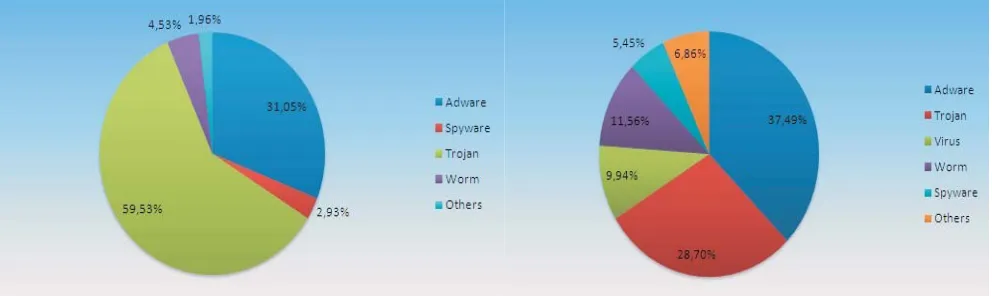
[image:18.612.60.556.235.383.2]Initial reports from the third quarter of 2008 (July – September) show an increase in Adware. As Figure 3 demonstrates, Trojans still represent the largest segment of newly detected malware. However, the increasing amount of fake anti-virus programs has caused the percentage of Adware to increase from 22.03% in the second quarter to 37.49% in the third quarter.
Virtualization
Types of Virtualization
Virtualization is used to abstractly represent computer resources so that a type of virtualized system can take advantage of them. There are over a dozen types of virtualization, ranging from full platform virtualization to something as commonly used as the Redundant Array of Independent Disks (RAID). For the purposes of this research, the types of virtualization examined will be those currently used for malware research, or types that may help to facilitate malware research in the future.
Platform Virtualization
Platform virtualization is performed on a given hardware platform by the host software on the system. A virtual computer environment (virtual machine) is created for the guest software, possibly an application or an entire operating system, to be run in. There are generally no requirements that the software being run in the virtual machine be compatible with the software outside of the virtual machine. The guest application will normally need access to the hardware of the system. This is accomplished by allowing the guest system to interface with the virtual machines hardware as if it was directly accessing the actual machine's hardware. In full virtualization, the virtual machine supports the hardware so that the guest application can operate normally as if it were installed natively; no modifications are needed to get it working properly. Hardware-assisted virtualization allows for the application to be run in the same manner, but the hardware has specific built-in features that facilitate the use of virtualization. It can be used to ensure that the guest applications are run in complete
isolation. Paravirtualization does not allow the guest application to be run unmodified. Instead, a layer is added between the guest application and the host system (such as the Hypervisor). The guest
application then has to be modified to use the API established by the new layer. System calls are made to the virtualization layer instead of the host system, and these can differ depending on the API used.
Application Virtualization
Benefits of Virtualization
At a corporate level, malware is an expensive problem. It can lead to time loss due to computer inefficiencies, data loss, or even hardware corruption that necessitates the need to buy a new system altogether, often losing many irreplaceable components (dated software, for example). Malware detection that takes advantage of virtualization could benefit a home user as well. The user can test whether or not a piece of software is malware by installing it in a manner that isolates it so that it can be tested before allowing it to interact with the actual system. This could help to determine the negative consequences of software that has not been thoroughly tested, whether the consequences are intentional or not.
Cost Benefits
The consumer cost benefits of using virtualization are clear. The cost of time to repair a system after the malware has delivered its payload, the cost of replacing any hardware or software, and any personal costs incurred are avoided if the malware can be detected before it is permitted to harm the system. There is additional cost benefit for using application testing. A system that verifies software through virtualization can be used for more than detecting malware. Program interoperability, system utilizations, memory costs, and many other facets of the software can be tested in addition to the presence of malware. This means that various programs can be thoroughly tested by a third party application instead of needing to be scrutinized by the user. This is particularly beneficial for freeware, where there are many different open source solutions to the same problem, but determining which one is best for the user can be difficult. This is all possible because the home user does not have to meet any special or additional hardware requirements in order to test the software. Virtualization allows any other program to run on the same machine without buying a new system to test with. This can be extended to the corporate level. Many corporations make use of testbeds for large applications. While this would likely still be necessary, the time invested on the testbed and hardware usage could be minimized by testing single computer applications in a virtualized environment. A single application is not the only thing that can be tested or implemented virtually. More than one system could be
virtualized, or even an entire network. Then, the interaction of various computers over a network can also be monitored to see impacts on issues such as bandwidth. Unnecessary hardware costs can also be removed by creating an environment where hardware will not be damaged during application testing.
There is also a measurable benefit to corporations utilizing virtualization due to the reduction in power requirements.[17] Condensing several physical servers down to one physical machine with several virtual machines can save thousands of dollars over the course of a year, depending on how many machines can be reduced. The reduction in systems can be continued further by converting large servers to smaller virtualized machines and using more efficient data storage techniques such as storage arrays. It is difficult to measure additional savings such as the reduction in cooling requirements because they would differ determining on the installation area. However, less cooling would be needed due to fewer machines in use, lowering the power needs of the cooling system ,and possibly allowing for a smaller cooling system.
Program Monitoring
parameters, and then continue with execution, is used to determine exactly where particular effects are occuring. The same capabilities can be used in a virtual environment. Instead of looking at each line of code, an application can be launched in its normal working environment and then monitored to see exactly what it is doing. This includes the ability to pause the application and look at various
processes, registers, and opened files, or gather state information. This information can then be used to determine if the program is performing in a manner that is agreeable to the user or not. The working environment can also be modified to show what kinds of future effects the program might have. For instance, the current date could be modified to be many years in advance to see if anything unusual changes with the application (such as a virus with a set time to deliver its payload, or a date
malfunction). Ie essence, the user would be able to see everything that the program would do to his or her computer without the program actually having access to their system.
Performance Isolation
Depending on the technique, using virtualization to aid in malware detection is only a
reasonable strategy if the use of virtualization allows the user to continue using the system for his or her normal activities. To this end, it is important to determine the impact that virtualization would have if it were hosted on the user's own computer instead of on a remote system[8].
In order to examine the performance isolation capabilities of virtualization, many different types of virtualization (full virtualization, paravirtualization, and operating system level virtualization) were tested to see how applying stress in the virtual environment affected the performance outside of the virtual machine.[8] In total, 6 tests were run on each virtualization environment:
1. Memory Intensive – loops constantly allocating and touching memory without freeing it 2. Fork Bomb – loops creating new child processes
3. CPU Intensive – tight loop containing integer arithmetic operations
4. Disk Intensive – running 10 threads of Iozone, each running an alternating read and write pattern
5. Network Intensive (Transmit) – 4 threads each constantly sending 60K sized packets over UDP 6. Network Intensive (Receive) – 4 threads each constantly reading 60K sized packets over UDP These tests were all performed on the various virtualization environments: Vmware Workstation (full virtualization), Xen (paravirtualization), Solaris Containers and OpenVZ (operating system level virtualization). To test the performance isolation properties, SPECweb (SNMP based) was used to report metrics of interest. Each virtual machine then had an Apache web server configured to report on the requested metrics. When performing the stress tests, a Virtual Machine (VM) was put under one of the above tests (the “misbehaving” machine) while the others remained under normal conditions. The results of the misbehaving machine and all other VMs were then compared to the baseline of all of the VMs working without one of them misbehaving.
The results showed that even when one of the virtual machines was misbehaving, the other VMs did not suffer a significant performance loss. The virtualization technologies add a layer between the VMs and the operating systems that is capable of isolating the virtual machines. This also controls the amount of resources used so that one VM can not consume all of the resources and cause the others to become unresponsive or unstable. This throttling results in the other VMs operating normally, but it causes the VM that is working rigorously to suffer severe performance losses.
Software Efficiency
utilization, processor and memory utilization, and resource usage. To ensure a high degree of isolation, entire operating systems can be duplicated. When examining potentially harmful code for malware, software isolation is necessary. However, for it to be feasibly used at a consumer level it needs to be done without using so many resources that the average computer is not compatible with the software. The Feather-weight Virtual Machine (FVM)[3] uses namespace virtualization to significantly cut down on the resources used in the virtualization. The benefit of this approach over others is that it is also compatible with Windows, and maintains software isolation. Two techniques are used to reduce the resource cost of virtualization. The first is the use of namespaces. Namespaces are already highly developed in the Windows environment. When a virtualized resource tries to perform an action, such as access a file in a particular directory, the namespace is prepended to the directory so the unique virtual file, which is a copy of the original, is accessed. This same method is used for processes, memory accesses, hardware interfacing, etc. Everything in a particular VM has its own namespace. This also allows more than one virtualized resource to operate; each one can have a unique namespace and thusly unique resource abstraction. The Windows environment ensures that differing namespaces will maintain isolation so that one VM will not be able to interact with other VMs.
The second technique is the copy on write technique. If the VM is trying to access a resource with a read-only command, it is not of high concern if that particular resource is shared or copied and unique to that VMs namespace. In the case that it is going to be modified, it is copied in to that VM's namespace. This saves time copying unnecessary items (those that are only going to be read from). The copy on write technique and namespace virtualization are accomplished by intercepting system calls at the kernel level. This is where the namespace rewriting is done, as well as where the copy on write decision is made. The FVM and its virtualization layer operate at the kernel level instead of the user level, making them harder to exploit and easier to maintain separation.
The FVM achieves very efficient virtualization. Tests of the prototype have shown latencies of creating and starting VMs of less than one second. Run-time virtualization was demonstrated to be less than 20% of the total execution time of the tested applications. The FVM was created with the purpose of being resource- and time-efficient, particularly for the use of intrusion and malware detection
Honeypots and Sandboxes
Overview
Honeypots allow for their administrators to monitor current attack trends. In addition to being a useful tool to gain relevant information regarding malware, honeypots provide a system architecture that is meant to be exploited but easily recovered from. One of the values of a honeypot is that it can be exploited to find new types of malware, but it can be taken offline at any time (it is not a production unit) to be examined to determine the extent of the damage. However, a honeypot also offers an environment that is intentionally susceptible to malware, but made specifically to not redistribute malware. This offers a relevant environment to study to aid in creating a system that can efficiently detect malware while remaining resistant to being compromised. In the event the system is
compromised, it is set up to be easily recovered while maintaining enough integrity that malware is not redistributed and no useful information is returned to the attacker.
A honeypot is a system that is never intended to be legitimately accessed[23]. Anything interacting with a honeypot can be considered unauthorized. This helps in forensic examinations of honeypots because there are no false positives. A honeypot can be used in a production setting, or a research setting, or a combination of the two. In a production setting, the honeypot mirrors the actual system that the company is running. Honeypots are highly monitored, so that they can be examined at any time to determine who is trying to access them, what they are doing, and how they are doing it. The security levels of a production honeypot mimic those of the actual network so that information gained regarding attacks on the honeypot can be applied to the actual network. When an exploit is used on the honeypot, it is reported to the administrators so that the vulnerability can be addressed and fixed on the legitimate machines. They do not work very well as decoys because most attacks are automated and will be launched on any machines that are found. However, they are useful for finding
vulnerabilities on a system that can be taken down and examined at any time, which is something that is much harder to do on a working system. The goal is to determine how a honeypot becomes
compromised so that the vulnerability discovered can be fixed on the legitimate system, preventing it from being compromised by that vulnerability. A research honeypot is deployed to gain more
information about the nature of attackers and malware. Instead of looking for specific vulnerabilities that need to be addressed in a legitimate system, a research honeypot aims to discover current trends and attack vectors so that defense mechanisms can remain updated. A research honeypot is generally monitored more heavily than a production honeypot because the administrators are looking for more information than what the live machines are vulnerable to. A research honeypot can also determine where the attacks are coming from, what kinds of tools are being used, or the current trends of
malware. The difference between a production honeypot and a research honeypot is based on how they are used as opposed to how they are setup or where they are deployed. It is possible for a company to utilize a honeypot to fulfill both roles.
contaminated and unusable. A high-interaction honeypot has an actual operating system installed and provides enough services that it can be fully attacked. This allows administrators the ability to collect detailed information about the attacks, but it is more time-consuming to monitor. The services
provided can fully interact with an attacker up to and, including, being compromised. This leads to high-interaction honeypots being taken offline for forensic examination more often, or at the least rebuilt to get rid of the malware that exploited the system.
A sandbox uses some of the same techniques that a honeypot uses. A sandbox is used to allow questionable or unknown software to execute in a safe environment.[54] A honeypot is made to attract malware by appearing to be vulnerable to the attackers. This creates an environment where a certain degree of malware is expected to be executed. A sandbox also allows the execution of malware, but the environment is more restrictive because the administrator of the sandbox determines what will be executed, as opposed to a honeypot where anything could be executed. A sandbox can allow a program to execute in a line by line basis, monitoring exactly what happens at each moment of execution.
Honeynet
A honeynet is an unused network that consists of various honeypots. All traffic to and from a honeynet is suspect. The honeypots can be different system configurations running various operating systems. The honeypots in a honeynet are not emulated and are representative of “off the shelf”
production models. They are not secured, but their security is not diminished. A honeynet sits behind a firewall that archives all network transmissions so that attacks can be analyzed at a network level. Instead of the firewall protecting the honeynet from the Internet, the firewall protects machines on the Internet from potentially compromised machines in the honeynet.
The Honeynet Project[24] released a revised set of suggested standards in October, 2004. Three important definitions and requirements are offered: Data Control, Data Capture, and Data Collection. Data control ensures that malicious interactions can occur with the honeynet, but the results of any compromises will not harm non-honeynet systems. Data control takes priority over data capture, and should not be detectable by the attacker. Data capture captures all inbound and outbound activities to the honeynet, this is also done in a manner that is undetectable by an attacker. Data collection is done in a distributed environment when several honeypots are providing data. Data captured is securely forwarded to a centralized location for analysis and archiving. This is important to insure the integrity of the data collected and to prevent attackers from viewing the collected data and determining that the system is a honeypot and not an operational system.
A honeynet is effectively nothing more than a networked set of honeypots. However, it has to be carefully controlled to collect as much useful information as possible while hiding the fact that it is not a production system from an attacker. The defining aspect of a honeynet is its architecture[25]. To ensure data collection, data capture, and data control, an interface is added between the honeynet and the Internet. This is generally a layer 2 device with no IP information so that it will be hidden from an attacker. The Honeynet Project refers to this interface as a honeywall. Figure 4, below, shows the suggested architecture of a honeynet. The honeywall can have an interface with an IP address for remote administration as long as it is not part of the honeynet. The interface between the router and the honeywall is bridged, as well as the interface between eth0 and eth1 so that no additional IP
Figure 4: The Honeynet Project's proposed architecture for a honeynet.[25]
To monitor the current activities of the blackhat community, the Irish Honeynet Project[26] followed the steps initially outlined by the Honeynet Project. Data control is accomplished with a firewall as the only point of entry and exit to the honeynet, called a honeynet sensor. In order to collect useful information regarding what the malware is doing, up to five outbound connections are allowed through the firewall. This allows the collection of information regarding what tools the malware is downloading to the compromised machine and who it is trying to communicate with. If the five outbound connection threshold is reached, any additional attempts at an outbound connection will fail. This failure will trigger an alarm to the administrators, notifying them that a honeypot has been
Defensive Techniques: Malware Detection
Signature-based Techniques
Signature-based malware detection techniques have been used extensively over the last few decades, since malware has started to become more prevalent. They work on the premise that one can find a unique sequence of characters (signature) in a piece of malware that will only be found in that specific malware. One can then scan through everything on a machine and coming into the machine for that signature. If it is found, it is treated as malware; if not, it is considered to be clean. These techniques were initially effective because there was a limited amount of malware. Also, in comparison to present machines, there was a smaller amount of legitimate software. With the explosive growth in both malware and legitimate software, however, it is harder to find unique signatures that are efficient to search for.
When using a signature-based technique of malware detection, there are several variables that will determine if the technique will be successful enough. The first variable is if the list of signatures is comprehensive enough to detect known malware. After developing all of the signatures, they need to be stored in a manner that is quickly accessible, memory efficient, and computationally easy to locate. A common solution to this is using a hash. The key is something that is efficient to create but yields an accurate representation of the signature. The value is then usually the exact sequence of characters that makes the signature. The length of the signature needs to be considered as well. If it is too short, it will match too many strings and not provide useful information. If it is too long, it will be
computationally inefficient and a full system scan will take too long. This is particularly true of systems that have low memory, processing power, or battery life. In an attempt to make a useful signature-based malware detection system for mobile devices, Smobile Systems[9] studied a method of using filter-hash strings. A signature-cut method is used to determine the smallest effective substring of the signature to use for the filter-hash. This is the set of bytes in the signature that are the least likely to appear in a legitimate piece of software. The aim is to eliminate legitimate software as quickly and easily as possible to keep from wasting computational time. This filter-hash created from the cut signature yields a key that is more general and matches to more signatures. However, it is
computationally efficient and cuts out enough legitimate software that it saves time. If there is no hit from the filter-key, then computation on that particular signature ends and the next sequence can be examined. If there is a match, the process continues to a DJB hash. A byte by byte comparison is done before moving to the DJB hash. This is a more complex process, but it results in a stronger hash value. The chance that the subsequences have the same DJB hash value is very low. The possible duplicates are not in the range of legitimate character sequences, so it is considered to be more accurate. In order to positively identify the signature as malware, the starting index of the cut signature is moved back to the beginning of the initial sequence. The full hash of the signature is then taken with the DJB method and the resulting signature is compared to the computed DJB value. If they match, it is considered malware.
value sizes while still effectively comparing the varying sized signatures and scanned strings to determine if they are malicious.
Signature-based malware detection has been effective in the past, but as more pieces of malware are being released it is becoming harder to keep up with the attackers. Methods are being developed to evade signature-based techniques. For example, polymorphic viruses can modify themselves as they are redistributed so that the signatures can change for the same virus. In addition to modifying
themselves, the sheer number of viruses is becoming problematic. The assumption that signature-based methods can detect malware is based on the assumption that a unique signature can be found for every piece of malware. As more legitimate and illegitimate software is created, the unique strings are more difficult to find, and some begin to overlap with each other. This creates a problem of false positives. For signature-based methods to overcome this, they must first determine if a piece of software is
believed to be malware through signature scanning. They then use another method that ensures it is not in fact a piece of legitimate software that shares the same signature as a piece of malware.
The problem of finding unique signatures is not the only or arguably largest problem of signature-based detection methodologies. The nature of a signature means that the virus has been studied enough that a unique or quasi-unique signature has been extrapolated. In order for this to be true, the assumption has to be made that the malware has first been found. That makes these systems ineffective at detecting new malware that strongly differs from anything currently released. It is possible to detect a zero day attack if it happens to have an overlapping signature with an older attack, or is close enough to it that the malware detection system will still flag it. This weakness means that signature-based systems are usually coupled with other detection techniques for critical systems.
While signature-based methods are becoming more criticized, they are still used in many of the most common antivirus products. Symantec, Trend Micro, and McAfee currently use signature based scanning methods to look for and get rid of malware. However, they have noted that this method (while not as on the decline as people believe) needs to be supported through other methods. Symantec's senior director for product management was quoted in 2007 saying “Everyone agrees signature-based defense is not enough.” Symantec plans to use more whitelisting technologies to try and help the signature-based suite. Trend Micro is also looking forward to new technologies. While still believing that there is utility in signature based methodologies, they intend to invest in more heuristic-based approaches. McAfee continues to use signature-based approaches as well, combining them with host-based intrusion prevention mechanisms. While McAfee is working to add more prevention mechanisms on top of their current suite, they still feel that signatures are needed: “I can understand why some would think signatures are dying, but it does go back to someone not really understanding what a signature is. Some cleaning and repair can't be done without them,” said David Marcus, McAfee's security research manager.[15]
Heuristic Techniques
A heuristic technique makes use of all available information to determine if the suspect data is malware or not. The premise is that there is a fundamental difference between legitimate software and malware. If something is examined long enough, a normal working pattern can be developed. When things change enough from this studied and developed normal behavior model, then a heuristic
will often throw off signature-based methods, but a heuristic method can still detect this malware. A heuristic approach can work on many different levels. The system can be monitored on a file by file level; it looks for variables such as creation and modification times, file location and use, file density, or how the file is interacting with the operating system. It can also be used system-wide; looking at all running processes, currently opened and closed ports, TCP and UDP connections, or CPU and memory loads. Additionally, a heuristic approach can look at the network level to see if anything is out of the ordinary. In this case, it would look at things such as the current amount of bandwidth used, active machines, server loads, and activity to time of day comparisons. A heuristic technique can effectively be used at any level where enough data can be collected so that a state of normalcy can be defined. When enough information is collected that the malware detection system knows how the system should be working at a particular time, it can make an educated decision as to whether it is currently operating within the scope of what is expected. Due to the need to collect a significant amount of data, a heuristic system often needs time to collect enough information before it can be considered reliable. In this “down time”, another malware detection system is used to prevent attackers from abusing the system and to try and weed out any false positives that might be triggered by the heuristic system during its learning process.
When a heuristic technique is comparing the current state of the file(s), system, or network, a probability model is used to identify if it is malware or not.[11] If the data in question has something different from what it believes to be normal, its probability of being malware is increased. As these differences add up, the probability increases until it reaches a certain threshold. The threshold can be whatever is defaulted in the scanning system or something that the administrator has set. It can be increased to try and avoid false positives or decreased in a more sensitive situation. The decision process used to determine whether or not to increase the probability of being malware has to be carefully created in order to create a useful heuristic model. It is often assisted with decision trees or matrices, and a database of abnormal behavior can be created to gain confidence in the probability.
False positives can be a problem in heuristic models. Due to the nature of being probability-based, they can never be completely certain that the content in question is malware; they can only be very confident. This is why heuristic models are often used in combination with other models. When combined with a signature-based method, it can be useful for determining if a suspect file is infected with something that has been seen before. This then makes it possible for the malware detection
software to identify malware with certainty. In addition, the heuristic model can help to detect malware that the signature-based techniques cannot find due to a lack of relevant signatures.
General Decryption
As malware developed, a segment of encrypted viruses became particularly hard to detect.[11] The malware would come in two pieces; a small segment to decrypt/encrypt the entire package, and the payload. In addition to the encryption challenge, the viruses could also be polymorphic or
metamorphic. Polymorphic malware would modify itself enough to evade signature detection before encrypting itself (with a new key) and propagating, while metamorphic malware would create an entire new generation of itself before propagating, often not encrypting itself.
emulation environment while the control module follows it step by step. After the virus has decrypted itself, but before it has done any damage, the signature scanner is used to try and detect the type of virus. With this information, the general decryption engine can disinfect the machine. Even if the malware were able to infect the emulation environment, it would not do any harm to the actual system because it is contained.
In the event the signature scanner cannot determine what the malware is, or if it is metamorphic, a heuristic approach is used to confirm that it is malware and to try and identify what kind. The
heuristic technology observes and scores the behavior of the package. The score is then used to determine if the package is malware. Based on a configured threshold on a numerical rating based on the observation. It is possible that while the package contains the encrypted malware structure of a decryption header followed by an encrypted payload, it is legitimate software. Using the heuristic model can determine if it should be allowed to execute in a real environment or if its execution should be limited to an emulator so that it can be monitored to determine exactly what it does.
This method targets a specific family of viruses, but makes use of both signature and heuristic-based malware detection techniques. This increases the chance that it will be able to determine if a piece of software is malware or not. By isolating the package to an emulated environment, it keeps the malware from propagating and morphing itself. This technique is also useful because it does not require the malware detection software to be able to figure out the encrypted payload. Given the various kinds of encryption and strengths of encryption, it would not be feasible to try and decrypt every package needs to be examined without knowing any information about how it was encrypted or what the key is. Letting the package run so that it decrypts itself saves computer resources and time.
Integrity Verification
Before using or executing a file, it is possible to examine it for something wrong using the previous techniques. However, instead of doing this, another method is to ensure that what you are about to execute is correctly built as you had expected. This can be done by checking the integrity of the file before using it. The most common method of doing this is by using cryptographic hash functions. The two current popular hash functions are the SHA-1 and the MD5. The hash function takes the file as input and outputs a shorter representation of the file that is pseudo-unique to the file. Then, when you want to use the file, you use the same process to reproduce the hash of the file. If they are the same, this indicates that it is safe to use because it has not been modified. Had it been modified, a different hash value would have been produced. Each time a legitimate modification of the file is made a new hash value is created so that only unknown modifications will cause an alert.
The initial problem with these types of utilities are the collisions. This occurs when two varying inputs result in the same output. This is problematic because it means it is possible to change the file, yet produce the same hash value. In the current hashes, this is resolved by trying to ensure that the collisions are not meaningful. If two files produce the same hash output, one of them is a
combination of unusable characters that would never be used as a legitimate file. Another way of dealing with collisions is to use more than one hash. While there might be collisions in both of the hashes, they should not share the same collisions. This means that even if one is modified in a manner that it produces the same hash value, the second hash used will differ and the file will not be accepted as unaltered unless both hash values match.
![Figure 1: The number of viruses seen each year. [27]](https://thumb-us.123doks.com/thumbv2/123dok_us/57805.5356/12.612.163.452.85.256/figure-number-viruses-seen-year.webp)
![Figure 2 shows the increase in Trojans seen at PandaLabs[34]. In 2007, 70% of malware seen at the](https://thumb-us.123doks.com/thumbv2/123dok_us/57805.5356/13.612.164.451.444.617/figure-shows-increase-trojans-seen-pandalabs-malware-seen.webp)
![Figure 4: The Honeynet Project's proposed architecture for a honeynet.[25]](https://thumb-us.123doks.com/thumbv2/123dok_us/57805.5356/25.612.163.449.90.360/figure-honeynet-project-s-proposed-architecture-honeynet.webp)