Instantiations of Shared Event Model in Grid-based Collaboration
Minjun WANG
Electrical Engineering and Computer Science Department, Syracuse University
Syracuse, New York 13244, U.S.A
Community Grid Laboratory, Indiana University,
501 N Morton, Suite 222, Bloomington, Indiana 47404, U.S.A
Geoffrey FOX
Community Grid Laboratory, Computer Science Department, School of Informatics and Physics
Department, Indiana University, Bloomington, Indiana 47404, U.S.A
Marlon PIERCE
Community Grid Laboratory, Indiana University,
501 N Morton, Suite 224, Bloomington, Indiana 47404, U.S.A
ABSTRACT
The Internet is a global infrastructure that brings resources and people together. Diverse fields are prospering on it, such as Grid computing and collaboration.
We demonstrate the Grid-based Collaboration idea by making three interface applications collaborative between computers over networks, using a common message broker as the underlying communication system.
To achieve the global collaboration, we have brought together in the research a Grid-based Collaboration paradigm, a Shared Event model, different implementing structures, methodologies and technologies. We describe the applications’ event structures in messages coordinating the Grid-base collaboration.
We further abstract the collaboration of the applications to be collaboration between paradigms with message as the glue or the key, and point out the implications from this.
Keywords:
Shared Event Model, Grid-based Collaboration1. INTRODUCTION
The Internet is a network of networks; it brings intelligence, knowledge, computing power, database, and people together from virtually every corner of the world. The advantages from it is enormous – e-Science, e-Business, e-Learning, distance education, online conference, web services, just name a few.
Cooperation across the boundaries of companies, organizations and institutions and collaboration within or between groups of people are becoming more regular and important.
Grid-based collaboration manifests itself to have strengths in respects such as performance, tolerance, consistency, security, etc. Grids offer consistent computational and informational environments that enable applications to make use of resources managed by diverse organizations worldwide.
In this paper, we introduce three collaborative applications developed in our lab, which are Grid-based collaboration tools
using Shared Event Model in message communication. They are: Collaborative PowerPoint applications [1], Collaborative Impress applications [2], and Collaborative ReviewPlus IDL applications [3]. They are instantiations of shared event model in grid-based collaboration, and can be used in e-Learning, distance education, online conference, e-Science, and more.
They work on a Grid-base Collaboration paradigm, in which Shared Event Model as messenger, and Peer-to-Peer Grid computing [4, 5, and 1] as basis.
We design the overall structure of each of the three collaborative applications to consist of a type of Master (or Master Client) and a type of Participant (or Participating Client) using small text event messages for the communication between them. During a session, the Master captures events in its process, deal with them, and send the event messages to the participant for rendering the displays in the participant’s process, so that both of them can share the screen displays simultaneously. There can be multiple participants working with the Master concurrently and independently. We use a common message broker – NaradaBrokering Message Service [6, 7] – as the media for message communication implied by the shared event model.
The basic software – Microsoft Office, Open Office/Star Office, or RSI IDL – is required to install on both the hosts of the Master and the Participant, and if files are needed in a session, they are deployed beforehand on the same directories on the hosts. This deployment guarantees the access of the files is correct on the hosts under the control of event messages.
All clients are required to be in a session and keep in that session for the whole collaboration, because an event message coordinates each client to change its current status, and the correct transition to a subsequent status depends on the previous one.
Then, we make comparisons like the event structures of the instantiations and explain the specific fields in which they have strengths and play important roles.
Finally, we abstract the whole demonstration to have a more general view for collaborative applications, which results in collaboration between models, patterns or paradigms, of the same type or different ones. We point out the implications of this, which could relate the popular computing architectures to each other, such as 3-tier client/server computing, web service, online meeting/education, etc.
2. GRID-BASED COLLABORATION MODEL
[image:2.612.60.280.239.381.2]We use a Grid-based Collaboration Model in the design and development of the collaborative applications, as shown in Figure 1.
Figure 1. A grid-based collaboration model
There are two categories of computing in this model – Grid computing and Peer-to-Peer computing.Grid computing [4, 8] is the basis; it largely comprises stable, formal, and efficient high-functionality services like Web Services, Grid Services, Common Message Brokers, etc., which are deployed as Grids on structured, well-organized and powerful supercomputers. They are in the core of the model.
Peer-to-Peer computing is the interface to this world; it offers user-friendly, convenient, intuitive and easy accessible applications and services such as the popular commodity software used daily and everywhere. They are installed on a variety of personal devices, such as desktops, laptops, PDA’s, smart phones, etc. They are at the edge of the model.
The infrastructure of Networks and the Internet ties up and correlates the two computing categories. It enables Peer-to-Peer Grids computing to be a trend, which harnesses the advantages of the two categories so that they complement each other, which also brings new opportunities and challenges to computing in all.
Grid computing offers robust, structured, security services that scale well in pre-existing hierarchically arranged enterprises or organizations; it is largely asynchronous and allows seamless access to supercomputers and their datasets.
Peer-to-Peer computing is more convenient and efficient for the low-end clients to advertise and access the files on the communal computers; it is more intuitive, unstructured, and largely synchronous.
In our design and development of the collaborative applications, we realize the Peer-to-Peer Grids computing idea. We deploy the Narada Message Broker as a Grid and use it for
message communication between the Master and Participants of the applications; we deploy the Master and Participants as Peers at the edge and make them collaborate on events.
3. SHARED EVENT MODEL
We use a Shared Event Model in the communication between Peers. In this model, small text event messages are transmitted via the Grids of common message brokers and used to coordinate the operations between the peers so that they can cooperate concurrently and share the screen output simultaneously.
In our design of the collaborative applications, one type of the Peers is Master Client, another type is Participant. During a session, the Master captures events in its process, deals with them, and sends the event messages to the participant for rendering the displays in the participant’s process, so that both of them can share the screen displays simultaneously [9]. There can be multiple participants working with the Master concurrently and independently. We use Narada Message Broker as the Grid for the message communication.
On the Master, the client captures the event, gets the event structure, and packages the information from it into a delimited string, as in {widget_base|id 0|top 0|handler 0|x 0|y 0}, with possibly other information like session, source, destination, etc., and sends the result message string to Narada message broker for broadcasting to participants. This is a serialization process.
On the participant, the client parses the received message string, gets the different part of the delimited information, and rebuilds the event structure by interpreting the sub-string sections like “id 0” to corresponding field types of the event structure. This is a de-serialization process.
The constructed event structure is then used (as a parameter) in its event handler which is invoked by the participant client programs to generate the same event results as that happened on the Master client.
4. COLLABORATIVE POWERPOINT
APPLICATIONS
PowerPoint is a presentation application of the Microsoft Office suite. We made it collaborative by developing a master client and a participating client, which control and call the functionality of PowerPoint.
The master client of the collaborative PowerPoint applications captures events (such as slide changes, window selection changes, etc.) and broadcasts its event messages to all participating clients during a presentation of a currently opened PowerPoint file. The participating clients receive and deal with the event messages, and render the process of the presentation individually, say, navigate to a specific slide of a specific presentation, or to a specific shape/text range within a slide, based on the messages. This way, they share the presentation or conferencing synchronously.
Implementing Structure
Microsoft Office suite is proprietary and binary component object oriented. The events there are named strings (e.g. “WindowActivate”), or hexadecimal dispatch identifiers (e.g. 0x614).
The office suite exposes its functionality through the standard IDispatch interface, also known as the Automation utility [10]. The IDispatch interface’s primary purpose is to Common Message
Brokers
Web
expose the otherwise solely user-driven applications’ functionality for other applications to use programmatically.
Each exposed method or property has an associated DISPID. The events we are concerned are special ones, which can be fired by source object (connection point) and be caught by event handler (sink).
Next, we describe the way to catch the events fired in the applications of Microsoft Office suite, and the specialties in PowerPoint.
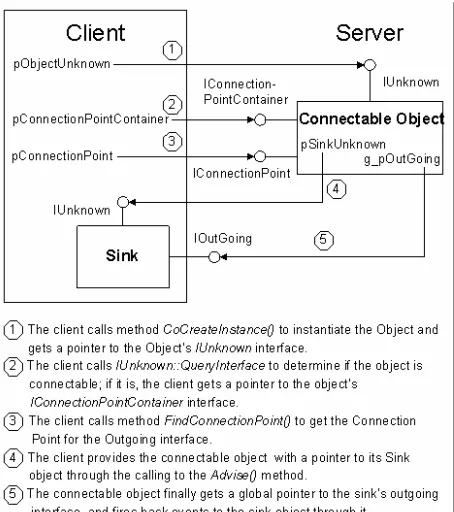
Microsoft designed the Connectable Object technology that enables client and server objects to communicate with each other in both directions. The Connection Point objects are managed by the Connectable Object, where the outgoing interfaces are defined but their implementations are in the client event sinks. Each Connection Point is associated with only one outgoing interface. This is where the events occur and is therefore called the source interface for the client sink interface. The sink is where the handlers of events are implemented.
The Client first gets a reference to the Server’s IConnectionPointContainer interface. It then uses this reference to call method FindConnectionPoint() to get the connection point for the outgoing interface, where the events of interests reside. Finally, the client sets up an advisory connection/relationship with the server by calling the method Advise() with a pointer to its sink’s IUnknown interface. Now the server object has a pointer to the outgoing interface of its client’s sink and fires back events whenever something interesting happens in its process. The event handlers of the sink catch the events and process.
This is elaborated in Figure 2.
The master client gets the events fired at its PowerPoint server just like that, and it sends the event messages through message broker to participants for rendering.
The participant client controls and calls the functions of its PowerPoint server through Automation technology, under the instructions of the received message, rendering the same display as that of the Master.
[image:3.612.327.558.423.667.2]Figure 2. The steps to set up an advisory
connection between the client and the server so
that the server’s connectable object can obtain a
pointer to its client’s sink and fire back events.
Event Structure
The events fired back and caught in the sink are in the form of hexadecimal DISPIDs. By the aid of OLE View, we can map them to their corresponding meaningful named strings in the type library of an application, and thus we know what functions we need to call later in automation programs. In Excel, Word, etc. things go like that, but not in PowerPoint.
If we open the object library of PowerPoint (MSPPT.OLB) using OLE View and expand the “Application” coclass, we can see there is a Dispatch event interface called “EApplication”, which is the connection point for event source and is associated with the outgoing interface of the event sink. Events in this interface include actions of the PowerPoint working environment and transactions of presentation files and slides.
But in this interface, we can not find the DISPID for each named string (which is meaningful and self-descriptive) for an event; however in programs we can only catch any event in the form of a DISPID. With the hexadecimal codes like this, one can not know the meanings of them and can not figure out which is which. We have done logical analysis according to the input/output of presentation processes, and finally mapped each of the codes to its corresponding meaningful string name in the event interface of PowerPoint.
This is shown in Table 1.
Table 1. Hexadecimal codes and their
corresponding text named strings for the events
in the “EApplication” dispatch interface of
PowerPoint.
Hexadecimal Code
Text String
7d1 WindowSelectionChange
7d2 WindowBeforeRightClick
7d3 WindowBeforeDoubleClick
7d4 PresentationClose
7d5 PresentationSave
7d6 PresentationOpen
7d7 NewPresentation
7d8 PresentationNewSlide
7d9 WindowActivate
7da WindowDeactivate
7db SlideShowBegin
7dc SlideShowNextBuild
7dd SlideShowNextSlide
7de SlideShowEnd
7df PresentationPrint
7e0 SlideSelectionChanged
7e1 ColorSchemeChanged
7e2 PresentationBeforeSave
7e3 SlideShowNextClick
[image:3.612.58.285.437.693.2]Impress is a presentation application in Open Office/Star Office [11]; it has similar functionality as Microsoft PowerPoint. We have developed collaborative Impress applications which make use of the functionality of Open Office/Star Office, and collaborate between the Master and Participating clients so that they share the same presentation results during a collaborative Impress session.
Implementing Structure
The master client connects to Open Office/Star Office which serves as a server, listens to events fired there during a session, and sends the event messages to Narada message broker for broadcasting to participating clients for rendering the screen displays as those of the master client, so that they work synchronously in a session.
The client (Master/Participant) communicates information with the office server through TCP/IP socket. The office server listens to client TCP/IP connections using a connection URL as parameter, indicating hostname/IP address, port number, protocol, etc.
In order to do their jobs and work with the data located on the Office servers, both the Master and the Participating clients need to establish a remote communication bridge with their respective Office Server and get the server’s service manager.
After it has set up the remote bridge, the Master client takes control of the programming features via Frame-Controller-Model (FCM) paradigm [12].
In FCM, the Model is the document object; it has document data and also methods that access the data. The methods can change the data directly without having to use a controller object. The controller is the screen interaction with the model; it observes the changes made to the model, and manages the presentation of the document. The frame is the controller-window linkage; it contains the controller for a model, and has knowledge about the window, but not the functionality of the window. That functionality is encapsulated in the underlying windows system – whatever platform it is. This decouples specific windows implementation from the frame, thus makes it possible to use a single frame implementation for different windows in Open Office. The specific windows work with the frame to make the screen presentation.
The master client registers listeners at the remote bridge to listen to events fired at the Office server, as in Figure 3. One of the registered listeners is the “Property Change Listener,” which listens to property change events of an object. The client makes the listener listen to changes of “Current Page” of the current presentation file object.
Narada Message Broker
R e m o t e
B r i d g e Event Handler 1
Event Handler 2
Event Handler N
Controls for the server
User controls the process of presentation
files and slides
Master Client
Office Server
Listener 1
Listener 2
Listener N event messages
event messages
documents events
controls
[image:4.612.328.553.44.292.2]:
Figure 3. The structure of the Master client
applications
Whenever a presentation slide changes in the Impress server, the listener catches the event and notifies the event handler to do further processing. The event handler gets the slide number using method getPropertyValue(“Number”) of XPropertySet interface.
All the event messages like this are sent to the Narada Message Broker.
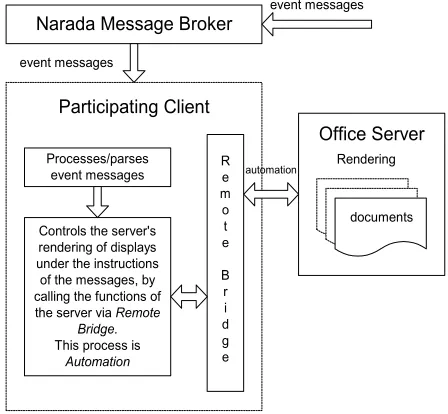
When the Narada message broker receives event messages from the Master client, it notifies the participating clients and broadcasts the messages to them, as in Figure 4.
Narada Message Broker
R e m o t e
B r i d g e Processes/parses
event messages
Controls the server's rendering of displays under the instructions
of the messages, by calling the functions of the server via Remote
Bridge.
This process is
Automation
Participating Client
Office Server
event messages
event messages
documents
automation Rendering
[image:4.612.329.553.459.666.2]Each participating client connects to, controls, and makes use of the Office server. It first creates a remote bridge, gets the server’s component context and service manager; then it gets control of the server’s Frame, Controller and Model, and makes use of the FCM paradigm to use the server’s functionality to control the rendering process.
When the client receives a message from the Narada message broker, it parses it and gets the different parts of information such as event type and its properties, or a URL of a presentation file. It then calls the functions of the server, such as loadComponentFromURL(), to open/switch to a presentation; it calls the method getDrawPages() of the XDrawPagesSupplier interface, the method getByIndex(index) of the XDrawPages interface, and the method select( xDrawPage ) of the XSelectionSupplier interface, to navigate to a specific slide of an opened presentation, etc. The event type is the key to call different processing functions, and its associated properties are used in the functions to generate the correct presentation results. This rendering process is automation; the functions of the Office server are called under the instructions of the event messages.
Event Structure
Each event listener listens to a specific event type fired at the Office Server; the event handler catches the event and translates it into a corresponding string for transmitting. These event types are for actions as well as properties. The event structures are thus the types of the events, or in the form of single strings (short messages) in transmitting to and controlling of the rendering on the participants.
We list some of the event listener interfaces and their corresponding event types we tried in our programs, in table 2.
Table 2. Event listener interfaces and their
corresponding event types
Event listener interface
Event type
XPropertyChangeListener PropertyChangeEvent
XSelectionChangeListener EventObject
XFrameActionListener FrameActionEvent
XKeyListener KeyEvent
XMouseListener MouseEvent
XMenuListener MenuEvent
XWindowListener WindowEvent
XContentEventListener ContentEvent
XFocusListener FocusEvent
XModeChangeListener ModeChangeEvent
XContainerListener ContainerEvent
6. COLLABORATIVE REVIEWPLUS
APPLICATIONS
Interactive Data Language (IDL) [13, 14] is an array-oriented data analysis and visualization environment, which is widely used in research, commerce, and education. Its application areas include engineering, medical physics, astronomical and space science, earth science, etc.
We are working on a real application package developed in IDL – ReviewPlus [15] from General Atomics (USA), which is a general-purpose data visualization tool consisting of a GUI user interface and underlying computing and controlling
modules – and trying to make it collaborative by using a Polling structure. We describe the development and special issues in the implementation next.
Implementing Structure
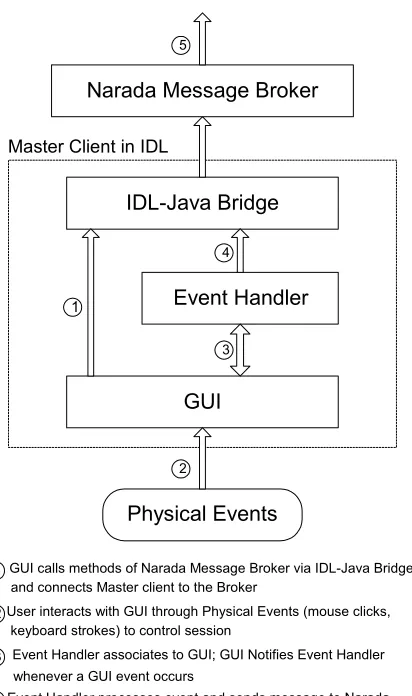
Basically, the Master client of the collaborative ReviewPlus applications consists of a GUI building and managing part, and an event handling part.
• It makes use of the IDL-Java Bridge, calls methods in a Java program to connect to NaradaBrokering.
• It captures events, gets event messages in event handlers whenever a user triggers events in the GUI, such as button clicking, and sends the messages to message broker for broadcasting to participants. This process is elaborated in Figure 5.
GUI calls methods of Narada Message Broker via IDL-Java Bridge
User interacts with GUI through Physical Events (mouse clicks,
Event Handler associates to GUI; GUI Notifies Event Handler
Event Handler processes event and sends message to Narada
Narada Message Broker broadcasts message to all subscribed clients 1
and connects Master client to the Broker
2
keyboard strokes) to control session
3
whenever a GUI event occurs 4
Message Broker via IDL-Java Bridge 5
Master Client in IDL
GUI
Event Handler
IDL-Java Bridge
Physical Events
1
2 3 4
Narada Message Broker
[image:5.612.335.541.215.563.2]5
Figure 5. The mechanism of master client
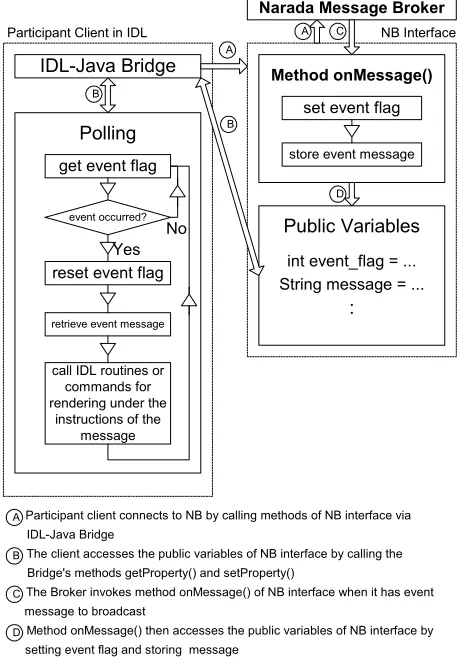
The participant client is implemented on a Polling Structure, which works as follows:It connects to NaradaBrokering by calling methods of the broker’s interface via the IDL-Java Bridge.
onMessage() update them whenever the Broker broadcasts event messages to the clients. The update includes setting event flag and storing event message in the variables.
For instance, the event structure for BASE widget is:
{WIDGET_BASE, ID:0L, TOP:0L, HANDLER:0L, X:0L, Y:0L}
The participating client code now has an instance of the Java class; it is constantly testing, or Polling, the instance variable – event flag. If it finds the flag is set, it resets the flag and retrieves the event message from the event message instance variable. It then follows the instructions of the message to execute different parts of the IDL programs to do the rendering.
[image:6.612.55.285.162.491.2]Where X is the width of the base, and Y is the height.
Table 3. Part of the event structures used in
widget programming of Interactive Data
Language
This process is elaborated in Figure 6.Participant client connects to NB by calling methods of NB interface via
The client accesses the public variables of NB interface by calling the
The Broker invokes method onMessage() of NB interface when it has event
Method onMessage() then accesses the public variables of NB interface by
Narada Message Broker
IDL-Java Bridge
set event flag
store event message
get event flag
event occurred?
reset event flag
retrieve event message
call IDL routines or commands for rendering under the
instructions of the message
Method onMessage()
Public Variables
int event_flag = ... String message = ...
: Polling
Yes No
NB Interface Participant Client in IDL
A
A
B
B
C
D
A
IDL-Java Bridge
B
Bridge's methods getProperty() and setProperty()
C
message to broadcast
D
setting event flag and storing message
{WIDGET_BASE, ID:0L, TOP:0L, HANDLER:0L, X:0L, Y:0L}
{WIDGET_BUTTON, ID:0L, TOP:0L, HANDLER:0L, SELECT:0}
{WIDGET_DRAW, ID:0L, TOP:0L, HANDLER:0L, TYPE:0, X:0L, Y:0L, PRESS:0B, RELEASE:0B, CLICKS:0, MODIFIERS:0L, CH:0, KEY:0L} {WIDGET_LIST, ID:0L, TOP:0L, HANDLER:0L, INDEX:0L, CLICKS:0L}
{WIDGET_SLIDER, ID:0L, TOP:0L, HANDLER:0L, VALUE:0L, DRAG:0}
{WIDGET_TABLE_CH, ID:0L, TOP:0L, HANDLER:0L, TYPE:0, OFFSET:0L, CH:0B, X:0L, Y:0L}
{WIDGET_TABLE_CELL_SEL, ID:0L, TOP:0L, HANDLER:0L, TYPE:4, SEL_LEFT:0L, SEL_TOP:0L, SEL_RIGHT:0L, SEL_BOTTOM:0L}
{WIDGET_TEXT_STR, ID:0L, TOP:0L, HANDLER:0L, TYPE:1, OFFSET:0L, STR:’’}
{WIDGET_TEXT_SEL, ID:0L, TOP:0L, HANDLER:0L, TYPE:3, OFFSET:0L, LENGTH:0L}
The master client captures event, gets the event structure and serializes it in a message string along with other information such as of event handler, and sends it out. The participant client de-serializes the received message from the public variables in the polling structure, locates the event handler and rebuilds the event structure in IDL types. It then calls the event handler with the event structure like this:
ReviewPlus_SignalDialog_event, {WIDGET_BUTTON, ID:15, TOP:1, HANDLER:15, SELECT:1}
7. COMPARISONS
Figure 6. The mechanism of participant client in
polling structure
Technologies Used
In Microsoft suite and in our collaborative PowerPoint applications, COM/DCOM (Distributed Component Object Model) technology [10] is used. It includes Dispatch interface, Connectable Object, Connection Point, Outgoing interface, Event Sink, Type library, Wrapper class and Automation for catching and dealing with events in the Master and rendering the events in Participants.
Event Structure
Part of the event structures used in IDL widget programming (as in ReviewPlus) is listed in table 3. They correspond to a variety of primitive widgets in IDL, such as Button, Slider, Text field, Draw area, etc. The event structure for each widget is different; each one contains state information specific to that widget, e.g., flags and values. However, there are three common items in all the event structures, they are: ID, TOP, and HANDLER. They are long integers and the first three items in the structure.
In Open Office/Star Office and our collaborative Impress applications, Universal Network Object (UNO) technology [16] plays an important role. With it, remote communication bridge is set up between the client and the office server; component objects are instantiated in the client and server processes and communicate with each other to perform tasks across the processes boundaries. Frame-Controller-Model (FCM) paradigm plays another important role in every status of the actions of the programs.
1. ID is the widget ID number of the widget that generates the event.
2. TOP is the widget ID number of the top-level base that contains the widget that generates the event. 3. HANDLER is the widget ID number of the widget
Components (Widgets) take their places. Object-oriented programming/design is in every non-trivial application and manifests itself.
Figure 7. Paradigms linked by message in
collaboration
This abstraction and the Grid-based collaboration model imply:
Event Structures
The event structures in Microsoft Office suite are hexadecimal dispatch identifiers or meaningful named strings; each string is associated with one DISPID. Within the applications of the Office suite those DISPIDs are actually used to perform functions. It looks neat and efficient.
Scenario 1
We have addressed the collaboration of MVC and FCM paradigms based on message. More or new paradigms can be added to this picture. With message, not only can paradigms of the same type collaborate with each other, but also can those of different types, e.g., MVC with FCM. It decouples the type of paradigms and enables more freedom in collaboration; it brings diversity and diversity is important in enabling and facilitating collaboration.
In Open Office/Star Office, the event structures are event types/short strings for methods or properties.
In both the Office systems, the events are mainly for interactive actions or transactions, and they are short strings and simple. This is an advantage in Grid-based collaboration as in distance education, e-Learning and online conference. It poses little network traffic in communication between the involved
clients.
Scenario 2
Traditional three-tier computing includes the tiers of client, server and database.
The event structures in IDL are more complicated; they have the form of a structure containing hierarchy information and are data-intensive in favor of science and engineering data analysis and computation. However, they are still short text strings in transmitting, at most several hundred characters long, as shown in table 3.
What if bring this computing model into Grid-base collaboration, using message in communication and controlling? The server and database can be deployed as Grids, taking advantage of the computing power and security of the Grid infrastructure; common message broker can be served as the solid underlying message communication; shared event model and message play important roles. Thus, client and server can be developed in different languages and run on diverse platforms, and database can be in multiple database environments as well. The message glues them together, coordinates, controls and invokes the functionality in the three tiers.
8. IMPLICATIONS
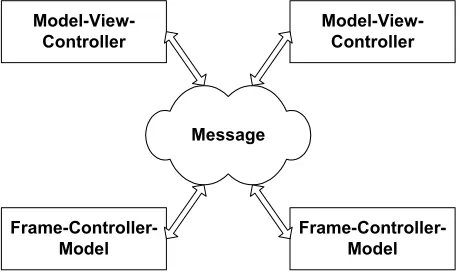
We described the Grid-based Collaboration Model in Figure 1. Let us zoom in and exemplify it with our collaborative applications, and see the role of the Shared Event Model in
collaboration. We think it would result in higher performance,
collaboration and diversity. In the collaborative PowerPoint, Impress and ReviewPlus
applications, the masters and the participants connect to and communicate event messages with each other through a common message broker which serves as a Grid. Each client takes advantage of a well-known paradigm in updating, controlling and displaying. In Open Office/Star Office, it is Frame-Controller-Model (FCM); in the others it is Model-View-Controller (MVC) [17].
Scenario 3
Let us further deduce in Scenario 2.
Suppose the client is in active mode, and the server is in passive mode, in other words, clients in multiple languages and platforms take control of the process of a session by sending out request in message, and the server supplies functionality services on receiving it and sends the result message back. This case naturally evolves into Web Service and complies with the Web Service Architecture.
We can abstract the collaboration to be collaboration between paradigms linked by message; the master gets the message from its paradigm, especially from the Model where the data reside and the Controller, and the participant renders the received message to generate the results through its paradigm, including modifying the data in its Model and coordinating the Controller. Both the master and the participant leverage the power and elegance of the paradigms. This is illustrated in Figure 7.
For performance and quality of service considerations, if Web Service takes advantage of the Grid and common message brokers, wouldn’t it be better?
Now, let us suppose the server is in active mode, and the client is in passive mode, that is, the server generates and broadcasts the message, and the client interprets and executes the received message. This case fits into the situation in distance education, e-Learning, online conference, etc., and it consequently becomes the structure of our collaborative applications described in this paper, in which the master site is the source of the event message and the participant site is the destination. Once again, the master and participants could be in different languages, platforms, and paradigms as well.
Message
Model-View-Controller
Model-View-Controller
Frame-Controller-Model
Frame-Controller-Model
9. CONCLUSION
their event structures in message coordinating the Grid-base collaboration between master/participant clients via the shared event model. We made comparisons of them and pointed out the application fields in which they have strengths. We further abstracted the collaboration of the applications to be actually collaboration between paradigms with message as the glue or the key. We analyzed the implications from this more general model and the Grid-base collaboration paradigm in several scenarios, which could relate fields in client/server computing, web service, and distance education/conference.
REFERENCES
[1] Minjun Wang, Geoffrey Fox, and Shrideep Pallickara, “Demonstrations of Collaborative Web Services and Peer-to-Peer Grids”, Journal of Digital Information Management, Volume 2, Issue 2, June 2004, pp. 93-96.
[2] Minjun Wang and Geoffrey Fox, “Design of a Collaborative System” for Open Office, Proceedings of IASTED KSCE 2004 Conference, US Virgin Islands, November 2004.
[3] Minjun Wang, Geoffrey Fox and Marlon Pierce, “Grid-based Collaboration in Interactive Data Language Applications”, Proceedings of IEEE International Conference on Information Technology, Las Vegas, Nevada, April 4-6, 2005.
[4] Fran Berman, Geoffrey Fox, and Tony Hey, Grid Computing: Making the Global Infrastructure a Reality, Chichester, West Sussex PO19 8SQ, England: John Wiley & Sons Ltd, 2003.
[5] Geoffrey Fox, Hasan Bulut, Kangseok Kim, Sung-Hoon Ko, Sangmi Lee, Sangyoon Oh, Shrideep Pallickara, Xiaohong Qiu, Ahmet Uyar, Minjun Wang, and Wenjun Wu, “Collaborative Web Services and Peer-to-Peer Grids”, presented at 2003 Collaborative Technologies Symposium (CTS'03).
[6] Geoffrey Fox, Shrideep Pallickara, and Xi Rao, “A Scalable Event Infrastructure for Peer to Peer Grids”, Proceedings of 2002 Java Grande/ISCOPE Conference, Seattle, November 2002, ACM Press, ISBN 1-58113-599-8, pp. 66-75.
[7] Shrideep Pallickara and Geoffrey Fox, “Efficient Matching of Events in Distributed Middleware Systems”, Journal of Digital Information Management, Volume 2, Issue 2, June 2004, pp. 79-87.
[8] The Globus Alliance
http://www.globus.org
[9] Geoffrey Fox, “The Rule of the Millisecond”, for CISE Magazine, March/April 2004.
[10] G. Eddon and H. Eddon, Inside Distributed COM, One Microsoft Way, Redmond, Washington: Microsoft Press, 1998. [11] OpenOffice.org
http://www.openoffice.org/
[12] OpenOffice.org, Developer’s Guide, Chapter 6: Office Development
http://api.openoffice.org/docs/DevelopersGuide/OfficeDev/Offi ceDev.htm
[13] Liam E. Gumley, Practical IDL Programming, San Francisco, CA 94104-3205, USA: Morgan Kaufmann Publishers, 2002.
[14] Research Systems Inc. http://www.rsinc.com/
[15] ReviewPlus Data Visualization Software User Manual
http://web.gat.com/comp/analysis/uwpc/reviewplus/manual/
[16] OpenOffice.org, Developer’s Guide, Chapter 3: Professional UNO
http://api.openoffice.org/docs/DevelopersGuide/ProfUNO/Prof UNO.htm