NEW TOOLS IN EDUCATION
Minjun Wang EECS Department, Syracuse
University, U.S.A Community Grid Laboratory,
Indiana University, U.S.A 501 N Morton, Suite 222, Bloomington IN 47404 [email protected]
Geoffrey C. Fox Community Grid Laboratory,
Computer Science Department, School of Informatics and Physics
Department, Indiana University, U.S.A [email protected]
Shrideep Pallickara Community Grid Laboratory,
Indiana University, U.S.A 501 N Morton, Suite 224, Bloomington IN 47404
Abstract
In this paper we introduce our new software tools – collaborative PowerPoint applications using Instant Message and Meta data as a Web Service – which are suitable in the usage of virtual education.
The message-based collaborative PowerPoint applications make it efficient in long distance learning and education.
We use the error-tolerant NaradaBrokering messaging service as the message environment to communicate messages during the process, which makes it more reliable.
By using Instant Message and Metadata as a Web Service, we further improve the message communications and modularity. The Metadata from the presentations can be generated dynamically during the sessions, be saved and reflected in the schedules or lectures’ list on a session server; this makes it possible for rendering presentations asynchronously as well as synchronously, thus can be used in On-demand education, too.
Key Words
Collaborative PowerPoint, Web Service, Distance Education.
1. Introduction
Making PowerPoint applications collaborative using Instant Message and Metadata as a Web Service is useful in situations such as Distance Education [1, 2], On-demand Education and Web Conferencing [3]. Along with some Audio services, this concept contributes to new modern education tools.
We have developed collaborative PowerPoint applications, one of which is a master client that lectures and broadcasts its event messages to all participating clients.
On the hosts of both the master and the participating clients, one should deploy beforehand a copy of Microsoft PowerPoint application and presentation files to be lectured on; these PowerPoint presentation files are deployed in consistent directories on the hosts of the master and the participating clients.
Thus, the architecture makes it possible to collaborate between the clients by communicating only string-based messages. The master client captures events like file opened, slide changed, window selection changed, etc. during a session of a lecture, translates them into messages and sends the messages to the participating clients. The participating clients then render the show of the lecture according to the directions of the received messages. This way, they work synchronously in Distance Education.
By using string-based messages we improve the speed and efficiency of the applications’ performance because it lowers the Internet traffic greatly as compared to Shared Display, which is based on transferring image data like bitmap.
We use NaradaBrokering messaging service [4, 5] as the message environment to communicate messages of events during the process.
We have also developed and deployed Instant-Messaging Web Services to further improve the message communications and modularity. The messages are processed to become Metadata by being attached with XML (eXtensible Markup Language) tags.
protocol to describe registration, session parameters, session membership, negotiation, etc., it defines session information for both general and the Audio/Video subsystems [6, 7]. Therefore, sessions can be set up with the session server, and the collaborative PowerPoint applications can be used in On-demand education, too.
The rest of this paper is organized as follows: in section 2 and section 3, we discuss the mechanism of the master client part and the participating client part of the collaborative PowerPoint applications, respectively; in section 4, we discuss the event models of the applications; in section 5, we talk about the underlying message communications of NaradaBrokering Message Service; in section 6 and 7, we show the roles of Instant Message and Metadata Web Services, which are cooperating with the collaborative PowerPoint applications in Distance and On-demand education; in section 8, we outline the future works to improve the whole applications; and finally, in section 9, we come to the conclusion indicating the advantages, limitations and possible application areas of the new tools.
2. The Master Client
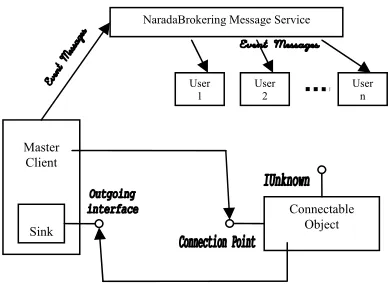
The master client is the one that captures the event and sends the messages to the participating clients during its presentations of a session. It uses Automation, Connection Point object and Event sinks technologies [8, 9] in doing this.
Automation is a technology that enables the otherwise end-user applications to expose their functionality through interfaces, and the other applications can reuse the posted functions in their programs by using the methods resided in the wrapper classes.
In the master client of the collaborative PowerPoint applications, the client code controls the functionality of the PowerPoint application server through automation; it calls the functions of wrapper classes of the server as if the functionality were its own. Under the hood, the wrapper class functions were mapped to the actual functions of the application server through Dispatch map or Dispatch identifiers (DISPIDs). When the function returns from the server, it maps the returned value to its caller in the client code.
Microsoft has designed the Connectable Object technology that enable client and server object to communicate with each other in both directions. During the collaboration, when something interesting happened in the server object, it informs the client immediately. That is what we call an event.
The Connection Point objects are managed by the Connectable Object. This is where the outgoing interfaces are defined but their implementations are in the client event sinks. Each Connection Point is associated with only one outgoing interface. This is where the events occur and is therefore called the source interface for the client sink interface.
The sink interface is where the handlers of events are implemented, in other words, the event massages are handled and dealt with by different reactions.
[image:2.612.326.521.124.269.2]This is illustrated in Figure 1.
Fig. 1 Connectable Object calls outgoing interface implemented by the sink. Master client handles events fired from the connectable object
through the sink, and sends them to the message broker which then distributes to participating users
In our collaborative PowerPoint applications, during a presentation of a session, the event messages are sent through the Connection Point object to the sink object, where they are identified, processed, and sent out to the NaradaBrokering message broker, where the messages are distributed to the participating clients for rendering on the screen. This way, the PowerPoint events are captured and dispatched.
3. The Participating Clients
When the NaradaBrokering messaging broker receives event messages from the Master client, it notifies the participating clients and broadcasts the messages to them.
Each participating client has its own copy of Microsoft PowerPoint application and the presentation files about the topic they have subscribed to, which have been deployed to the same directories as that on the Master client. Each client processes the event messages independently.
When the client receives the message, it parses it and gets the different parts of information such as event type and its properties. It then dispatches the event type to the appropriate handler or method to process. The event type is the key to call different processing functions. The associated properties are used in the functions to generate the correct presentation results.
The client uses automation technology [8, 9] in rendering the session of a presentation. It calls the functions in a PowerPoint wrapper class under the instructions of the event message. The functions are actually mapped to the functions in the Microsoft PowerPoint application. PowerPoint functions get called;
Master Client
Connectable Object Sink
NaradaBrokering Message Service
User
1 User 2 User n
slides, and return the result values eventually to the caller functions in the wrapper class.
This is illustrated in Figure 2.
ig. 2 the event messages invoke methods of wrapper class; the methods
Thus, the participating clients render the presentations bei
. The Event Models
We abstract the event models of the collaborative Po
he event when a cursor is on a spe ev ispatch event int n onl Participating Client NaradaBrokering Message Service
DispatchMap DISPID PowerPoint Call methods F
then are mapped to functions of PowerPoint application through Dispatch Map/DISPID; the functions are executed and result/status code
are returned.
then are mapped to functions of PowerPoint application through Dispatch Map/DISPID; the functions are executed and result/status code
are returned.
ng presented independently and simultaneously.
ng presented independently and simultaneously.
44
werPoint applications to be of three levels of events: physical event, semantic event, and rendering event, from low to high, in that order.
The physical event is t
werPoint applications to be of three levels of events: physical event, semantic event, and rendering event, from low to high, in that order.
The physical event is t
cific area of the screen, a mouse clicking, or a keyboard stroking, etc. When the master client is on a presentation session, the lecturer might use all combinations of the physical events to control the process.
The PowerPoint application converts these physical cific area of the screen, a mouse clicking, or a keyboard stroking, etc. When the master client is on a presentation session, the lecturer might use all combinations of the physical events to control the process.
The PowerPoint application converts these physical ents to meaningful instructions to the applications, such as change slides, change windows, etc. These meaningful instructions we call them semantic events.
In our programs we make use of the D
ents to meaningful instructions to the applications, such as change slides, change windows, etc. These meaningful instructions we call them semantic events.
In our programs we make use of the D
erfaces of the PowerPoint application, connectable object, connection point technology and event sink to catch these semantic events. They are listed in Table 1.
For some reasons, in Microsoft PowerPoint, one ca erfaces of the PowerPoint application, connectable object, connection point technology and event sink to catch these semantic events. They are listed in Table 1.
For some reasons, in Microsoft PowerPoint, one ca y get the hexadecimal codes of these events instead of meaningful string name descriptions as in the other applications of the Microsoft office suites. With codes like this, one can not know the meanings of them and can not figure out which is which. We have done logical analysis according to the input / output of presentation processes, and map each of the code to its corresponding meaningful string name in the event interface (EApplication) of the PowerPoint application. We call this process a translation.
y get the hexadecimal codes of these events instead of meaningful string name descriptions as in the other applications of the Microsoft office suites. With codes like this, one can not know the meanings of them and can not figure out which is which. We have done logical analysis according to the input / output of presentation processes, and map each of the code to its corresponding meaningful string name in the event interface (EApplication) of the PowerPoint application. We call this process a translation.
able 1 the events that are posted in EApplication interface of
After getting them, the master client sends the sem
a effect in our project, ma
cation more enjoyable, mo
f wrapper class; the methods
Thus, the participating clients render the presentations bei
. The Event Models
We abstract the event models of the collaborative Po
he event when a cursor is on a spe ev ispatch event int n onl T T
PowerPoint and that can be captured and processed. PowerPoint and that can be captured and processed.
antic events through NaradaBrokering message service to the participating clients. The participating clients then call the functions of the PowerPoint through automation, according to each command of the semantic event, thus render the process of the presentation. We call this kind of event rendering event.
We’ve realized some multimedi
antic events through NaradaBrokering message service to the participating clients. The participating clients then call the functions of the PowerPoint through automation, according to each command of the semantic event, thus render the process of the presentation. We call this kind of event rendering event.
We’ve realized some multimedi
king sounds, animations and transitions collaborative, that is, they can be played synchronously between the Master and Participating clients.
This makes learning and edu
king sounds, animations and transitions collaborative, that is, they can be played synchronously between the Master and Participating clients.
This makes learning and edu
re impressive; vivifies the lectures and classrooms; brings more lights to the soul. This is done by triggering them when a specific slide is navigated to, or when a specific animation item is invoked, but, it is very limited. For example, if a sound file or an animation or a movie file is embedded in a slide and the Master client invokes it by moving the mouse over the item or clicking on it and wants to inform the participating clients to generate the same effect, there is no way to do that because there’s no such event exposed for us to capture and make use of. The types of such potentially useful and yet absent events are listed in Table 2.
re impressive; vivifies the lectures and classrooms; brings more lights to the soul. This is done by triggering them when a specific slide is navigated to, or when a specific animation item is invoked, but, it is very limited. For example, if a sound file or an animation or a movie file is embedded in a slide and the Master client invokes it by moving the mouse over the item or clicking on it and wants to inform the participating clients to generate the same effect, there is no way to do that because there’s no such event exposed for us to capture and make use of. The types of such potentially useful and yet absent events are listed in Table 2.
WindowSelectionChange WindowSelectionChange
able 1 the events that are posted in EApplication interface of
After getting them, the master client sends the sem
a effect in our project, ma
Physical events Such as MouseOver, MouseClicked, MouseDoubleClicked, KeyDown, KeyUp, KeyStroke, etc.
sounds Such as SoundClipPlayedSoundFilePlayed, etc. Events about
d Played, ayed,
animations an transitions
Such as AnimationClip
MoviesPlayed, AnimationFilePl etc.
[image:4.612.330.535.63.169.2]Events about ,
Table 2 the types of events that are absent in PowerPoint and potentially
We could have developed much more interesting and en
. NaradaBrokering Message Service
We integrate NaradaBrokering Message Service with ou
guage, an
s captures the ev
useful in further application developing.
livening stuffs in our applications if interfaces of those types of events had been posted over there.
5
r collaborative PowerPoint applications to transmit event messages between clients. NaradaBrokering is a system that supports messaging in a Peer-to-Peer Grid [10, 11, 12]; it is a generalized publish-subscribe mechanism; it handles dynamic protocol choice, tunneling through firewalls; it supports TCP, UDP, multicast, SSL and RTP; it can run in client-server mode like JMS (Java Message Service) [5, 13] or in distributed Peer-to-Peer mode like JXTA [14, 15]; it can be used in real-time synchronous collaboration like our collaborative PPT; it has replaced the JMS in the Anabas system of our implementation handling all collaboration modes.
NaradaBrokering system was written in Java lan d our collaborative PowerPoint applications have been developed in C++. In order to communicate information between the two environments, we use JNI (Java Native Interface) as a tool to fulfill this task. The communication is a two-way conduit, both from C++ sending event messages to Java, and from Java to C++.
The Master client in our application
ent in PowerPoint and sends messages to the NaradaBrokering message service system using the functions in JNI interface. In doing so, it first creates and embeds a Java Virtual Machine inside the C++ environment, maps data types between them, calls the JNI functions through the virtual machine.
Fig. 3
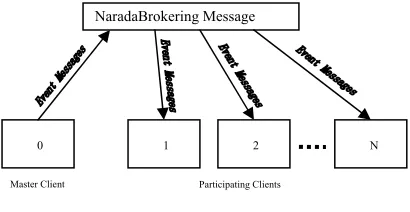
As soon as the NaradaBrokering system receives a message, it broadcasts it to every participating client, using the notification mechanism, as shown in Figure 3. Here, the transformation of the message is from Java to C++ environment. The notifying method, i.e. onMessage(), is overridden to include native function calls to C++, so that the message type commands the appropriate C++ functions in the participating client application to perform the rendering process of the presentation. The functionality of the participating client is divided into C++ methods, and contained in a dynamic link library component (e.g. collabPPT.dll), which is loaded in the Java environment so that the Java native functions can make use of it. The JNI interface plays an important role in this communication direction.
Thus, the master and participating client of the collaborative PowerPoint applications communicate and cooperate with each other through the NaradaBrokering Message Service system.
6. Instant-Messaging as a Web Service
The event messages can be marked up using XML tags, so that an XML document can be generated corresponding to the DOM (Document Object Model) format [16]. This DOM-based XML message can then be used as the unit of message communications between the clients of the Collaborative PowerPoint applications, it is transferred through the Internet using SOAP protocol, and it is the basis of Instant Message communication.
The XML message includes session information such as session identifier, topic title, source, destination, etc., as in
<message sessionID = “aSessionNumber” topic = “aTitile” to = “receiver” from = “sender”> an event message </message>
So that each group of people in a session can send and receive messages correctly in a concurrent sessions support environment such as NaradaBrokering Message Service.
NaradaBrokering Message
0 1 2 N
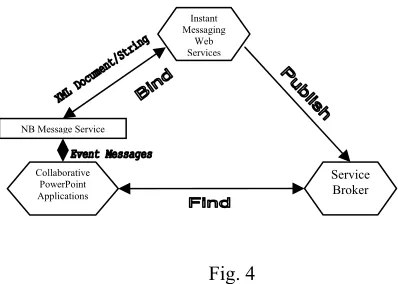
We have developed and deployed Instant-Messaging Web Services [17] for the communication in this project. The main services include functions that markup event messages as DOM-based XML document; functions that get the event messages out of the XML document, etc. The information of this web services such as its URI (Universal Resource Identifier) endpoint, its exposed methods, etc. are described in the WSDL (Web Service Description Language) file and then be deployed using this file. The users can find this web services using UDDI (Universal Discovery, Deployment and Integration), and then bind to the services they need and use them via the internet [18].
In the collaborative PowerPoint applications, the master client send its event messages to the NaradaBrokering message services, which has discovered and bound to the Instant-messaging web services beforehand, which in turn make use of the exposed methods of the web services to make the plain messages received to be a DOM XML document, and then transfers and distributes the document via the internet to the participating clients for dealing and rendering.
The participating clients leverage the functionality of the Instant-messaging web services through the NaradaBrokering message service to get the plain event messages out of the XML document, and operate on the instructions of the messages syntactically, rendering the exact process the master client going through.
[image:5.612.55.254.407.549.2]This is shown in Figure 4.
Fig. 4
7. Metadata and On-demand Education
The Metadata generated by the Instant Message Web Service can be saved as files or in a database, and can be made as a Web Service. The Metadata Web Service can be registered with a session server and reflected in its information page. One of such session servers is the one used in our lab using a protocol XGSP (XML General Session Protocol), which is an XML-based protocol to describe registration, session parameters, session membership, negotiation, etc. It defines session information for both general and the Audio/Video subsystems. Sessions can be set up with the session server,
and the session server manages the sessions intelligently with the Metadata.
Metadata plays an important role in today’s computerized world full of data scattered anywhere and everywhere. It makes intelligence possible in this highly connected networks and internet space. More likely, this world has enough data almost about anything, but most likely, people do not have enough useful information when they need it. How to get the useful information out of the flat data is an interesting and meaningful task. Metadata can and will give a big help in doing this.
Metadata is a gateway to information [19]. Along with other methodologies, we can use Metadata to generate information on demand.
In nowadays on-line education, e-learning, virtual classroom, etc. to get the intended information on demand is attractive. Apart from regular lecture sessions, people can go through the lectured slides of a presentation at their own pace, or skip to specific slides within or even between lecture presentations. They can benefit from this greatly, achieve the best education effects.
We have developed a special application in our collaborative PowerPoint applications that can do things like that. It inherits functions from both the master client (such as message broadcasting) and the participating client (such as rendering) applications. It binds to and makes use of the Metadata Web Services.
It works like this: from a session server, one selects a Metadata Web Service that corresponds to a lecture stored, and then the application binds to it. Next, one clicks buttons like “Next slide”, “Go to slide # x” to control the navigation. Under this control, the application contacts with the Metadata Web Service, gets the information or message out of the Metadata, and renders the display according to the instruction of the message, just like the participating client application does.
Instant Messaging
Web Services
Combined with the participating client application, this on-demand application can potentially be used in forming dynamic virtual study groups (after class). It sends the message out to its group members for rendering. Each member in the group can have both of the applications, and each one can have a chance to control the process. This way, they can discuss the contents on some slides of some presentations in some lectures.
NB Message Service
Service
Collaborative
PowerPoint Broker
Applications
Together, the Metadata Web Services and the collaborative PowerPoint applications can be used in On-demand education – the presentations can be rendered asynchronously later by the subscribers, as well as synchronously as in the real-time lecture session described in this paper.
8. Future Works
We plan to improve our applications to be better education tools in the future by doing the following:
Metadata Web Services dynamically to a session server.
• Integrating the collaborative PowerPoint applications with an Audio/Video system, such as Anabas Collaboration Environment [20]. This is to bring multimedia into virtual classrooms. • Improving the animations and sounds parts of
the applications; working on the unsolved problems mentioned in section 4, the event models; trying to make the effects better.
9. Conclusion
In this paper we have elaborated on the mechanism of the Collaborative PowerPoint applications, the Instant message and Metadata Web Services, and the NaradaBrokering message service. We introduce the whole package as new education tools. Like anything else, it has limitations and advantages.
The limitations are: the Microsoft PowerPoint application has to be installed on the hosts of both the master and the participating client, this may be difficult for hand-held devices, like PDAs (Personal Digital Assistants) [21]; the presentation files of the lectures have to be deployed or downloaded beforehand on the hosts of both of the clients; the animations and sounds can not be totally collaborative.
However, with the advantages of the small text based message transferring, the robustness of NaradaBrokering message service, the efficiency of Instant-message communications, the power of Metadata Web Services, and the specialties of the applications itself (such as efficiency, animations and sounds, generating contents on demand with Metadata), the package of the applications will be suitable in situations like distance conferencing, distance education, on-demand education and more. And we believe it will contribute to those areas.
References
[1] G.C. Fox, Education and the enterprise with the Grid, in F. Berman, G.C. Fox and A.J.G. Hey (Ed.), Grid computing: Making the global infrastructure a reality, 43 (Chichester, West Sussex, England: John Wiley & Sons Ltd, 2003) 963-976.
[2] Collection of resources on distance education, by
Geoffrey C. Fox. http://grids.ucs.indiana.edu/ptliupages/publications/disted/
[3] WebEx Collaboration Environment. http://www.webex.com
[4] G.C. Fox and S. Pallickara, The Narada event brokering system: Overview and extensions, proceedings of 2002 International Conference on Parallel and Distributed Processing Techniques and Applications
(PDPTA’02), Las Vegas, USA, 2002, 353-359.
http://grids.ucs.indiana.edu/ptliupages/projects/NaradaBro kering/papers/naradaBrokeringBrokeringSystem.pdf [5] G.C. Fox and S. Pallickara, JMS compliance in the Narada event brokering system, Proceedings of 2002
International Conference on Internet Computing (IC’02),
Las Vegas, USA, 2002, 391-397. http://grids.ucs.indiana.edu/ptliupages/projects/NaradaBro kering/papers/JMSSupportInNaradaBrokering.pdf
[6] G.C. Fox, W. Wu, A. Uyar, H. Bulut, A web services framework for collaboration and Audio/Video conferencing, Proceedings of 2002 International
Conference on Internet Computing (IC’02), Las Vegas,
USA, 2002. http://grids.ucs.indiana.edu/ptliupages/publicatios/avwebs
erviceapril02.pdf
[7] H. Bulut, G.C. Fox, S. Pallickara, A. Uyar and W. Wu, Integration of NaradaBrokering and Audio/Video conferencing as a web service, Proceedings of IASTED International Conference on Communications, Internet,
and Information Technology, St. Thomas, Virgin Islands,
USA, 2002, 401-406. http://grids.ucs.indiana.edu/ptliupages/publications/AVOv
erNaradaBrokering.pdf
[8] G. Eddon and H. Eddon, Inside distributed COM (One Microsoft Way, Redmond, Washington: Microsoft Press, 1998).
[9] Microsoft Knowledge Base. http://support.microsoft.com/
[10] G.C. Fox, H. Bulut, K. Kim, S. Ko, S. Lee, S. Oh, S. Pallickara, X. Qiu, A. Uyar, M. Wang, W. Wu, Collaborative web services and peer-to-peer Grids,
Proceedings of 2003 Collaborative Technologies
Symposium (CTS’03), Orlando, USA, 2003.
http://grids.ucs.indiana.edu/ptliupages/publications/foxw mc03keynote.pdf
[11] G.C. Fox, D. Gannon, S. Ko, S. Lee, S. Pallickara, M. Pierce, X. Qiu, X. Rao, A.Uyar, M. Wang, and W. Wu, Peer-to-peer Grids, in F. Berman, G.C. Fox and A.J.G. Hey (Ed.), Grid computing: Making the global
infrastructure a reality, 18 (Chichester, West Sussex,
England: John Wiley & Sons Ltd, 2003) 471-490.
[12] M. Wang, G.C. Fox, and S. Pallickara, A demonstration of collaborative web services and peer-to-peer Grids, Proceedings of IEEE ITCC2004 International
Conference on Information Technology, Las Vegas, USA,
April 5-7, 2004. http://grids.ucs.indiana.edu/ptliupages/publications/wang
m_collaborative.pdf
[13] Sun Microsystems Java Message Service. http://java.sun.com/products/jms
[14] Sun Microsystems JXTA Peer to Peer technology. http://www.jxta.org
[15] G.C. Fox, S. Pallickara, and X. Rao, A scalable event infrastructure for peer to peer Grids, Proceedings of 2002
Java Grande/ISCOPE Conference, Seattle, USA, 2002,
66-75.
[17] OASIS Web Services for Remote Portals (WSRP) and Web Services for Interactive Applications (WSIA). http://www.oasis-open.org/committees/
[18] H. M. Deitel, P. J. Deitel, J. P. Gadzik, K. Lomeli, S. E. Santry, S. Zhang, Java web services for experienced
programmers (Upper Saddle River, NJ: Pearson
Education, Inc., 2003).
[19] A. Tannenbaum, Metadata solutions (One Lake Street, Upper Saddle River, NJ: Addison-Wesley, 2002). [20] Anabas Collaboration Environment.
http://www.anabas.com
[21] S. Lee, G.C. Fox, S. Ko, M. Wang, X. Qiu, Ubiquitous access for collaborative information system using SVG, Proceedings of SVG open conference, Zurich,
Switzerland, 2002. http://grids.ucs.indiana.edu/ptliupages/projects/carousel/p