User Experiences and a Usability Inspection of an Electronic Services
Environment for Students
Mark A. Toleman and Jessica M. Toleman
Department of Mathematics & Computing
The University of Southern Queensland
Toowoomba 4350 Australia
[email protected]
Abstract
In 1997 the Information Technology Services section of the University of Southern Queensland introduced USQ-connect, an integrated graphical computing environment that allowed students to access electronic mail, USENET newsgroups and the Internet. The system was based on the Netscape suite of products and replaced similar text-based UNIX utilities and software. As a consequence of the change, many students perceived that several vital ser-vices were lost and there was much debate about the im-posed change. In this paper we examine the debate and conduct a simple usability inspection of the new service. Is-sues raised underpin the need for a user-centred approach, and consideration of usability and Web design principles for the development of new systems.
KEYWORDS: user-centred design, usability inspection
1. Introduction
For several years, the University of Southern Queens-land (USQ) has made Internet access available to its stu-dents. On-campus students have been able to directly use a UNIX system, through dedicated terminals and networked personal computers, for text-based services including elec-tronic mail (mail, elm, pine), USENET newsgroups (nn, pine), and the World Wide Web (lynx). Off-campus stu-dents, and on-campus stustu-dents, could obtain similar access through dial-in facilities. In 1995, following a survey of 357 student-users of its laboratory facilities, Information Tech-nology Services (ITS) reported a high satisfaction rate with AARNet access and the Campus Wide Information System that was then in place [3].
In August 1996, ITS began planning the development of a new project entitled ‘Student Electronic Services and
Sup-port’ which was later named USQconnect [6]. USQcon-nect provides the electronic services previously available through the UNIX software by using the Netscape suite of products. Thus, electronic mail, USENET newsgroups and the Internet (and USQ Intranet) are available via a ‘single’ Web browser.1 Similar software and services are available to both on- and off-campus students, addressing the need for equitable access for these two groups. In addition the graphical nature of the software’s interface is purported to be ‘intuitive and consistent across services’.
A project plan described the project and the roles of ITS staff (up to 17 were involved) but did not mention involve-ment from the main client group (USQ students) nor the secondary client group (USQ academic staff).
USQ staff were ‘officially’ advised of the pending in-troduction of USQconnect in November 1996 [4] when a prototype of the system was first demonstrated and com-ments solicited. Prior to these demonstrations, the con-cept was discussed with representatives from the Library and Distance Education Centre in early October. A proto-type was then presented by the Director of ITS to the Vice-Chancellor’s Committee (VCC) and the Vice-Vice-Chancellor’s Standing Committee on Flexible Delivery (which includes the Deans of the Faculties) in mid-October at which stage the concept was endorsed for further development. Student Administration and the Student Association were also in-formed about USQconnect through meetings with ITS staff, at this time and again in December and January. The VCC received a demonstration of USQconnect in late January. Also in January, six students participated in an informal testing procedure where the basic use of the system, in-cluding off-campus access, was examined (Mahoney, Per-sonal communication). Further advice (mainly for staff but including some students) about USQconnect and more demonstrations were advised in February 1997 [5]. In
ad-1Other browsers, such as Mosaic, may have also been been suitable but
dition, the Academic Computing Advisory Committee was first given information about USQconnect at its meeting in February 1997 [2]. The committee’s prior meeting was in mid-1996 when details of USQconnect were still being de-veloped so this was the first time this committee had details of USQconnect. Both on- and off-campus students were first ‘officially’ informed about USQconnect when they re-ceived their HECS statement at the beginning of semester one in February 1997 (Mahoney, personal communication). The brochure [1] received in these packages included in-formation on the nature of USQconnect, its availability, the costs (none), the method of connecting, computer platforms supported, dial-in services and how to obtain assistance with the system. Other methods of promoting the new ser-vice and advising of its availability included an article in the student newspaper The Honk [7], through training sessions held by ITS, and through the local USQ USENET news-groupsusq.studentandusq.general.
It has been through this last medium, newsgroups, that the debate about the use of USQconnect has been most vis-ible with both students and staff involved in the debate. The following section examines this debate. Section 3 provides a simple usability inspection of USQconnect considering both general usability principles [10] and Web design cri-teria [9]. Finally we discuss the debate and usability study findings.
2. The USQconnect Debate
In the three months after the announcement by ITS in the newsgroupusq.general, of the change to electronic ser-vices for students, there were 187 news items (comments, questions and suggestions) posted by students and staff, and 30 follow-up messages posted by ITS staff. Some news items and responses related to more than one concept too. The debate consumed the majority of the discussion in this newsgroup during this time.
The debate about USQconnect centred around four themes:
loss of service in the transfer to the new environment
difficulty of use
access via on-campus and off-campus methods
the role of ITS as a service provider
2.1. Loss of Service
In the project plan [6], ITS made it clear that USQ had limited resources to dedicate to student electronic services. One way of moderating costs was to examine ‘core’ and
‘fringe’ academic activities with a view to limiting the lat-ter. Although the rationale for deciding on which services would (and consequently would not) be provided had not been given, access to telnet and internet relay chat servers (IRCs) was removed. However, exactly when it was re-moved seems unclear since even some ITS staff were un-aware that it was not available. Some 22 news items dis-cussed the loss of telnet and seven the loss of access to IRCs. Telnet access was blocked by ITS for security reasons and because many students who were using telnet were do-ing so to play games such a multi-user dungeons and drag-ons, MUDDs. Such game playing does not put a heavy load on Internet resources since it is text-based but it does mean that one terminal, personal computer, or dial-in line is in use for other than academic purposes perhaps at a time when resources might be needed. We return to the issue of the timing of resource restrictions in section 2.3.
Clearly ITS considered telnet access a ‘fringe’ academic activity and curtailed its use for students. Unfortunately they neglected the needs of post-graduate students in this regard since some used telnet in their research, though the number of such users was very small. Several students used telnet to legitimately access other computers but suddenly found that access was no longer available. Solutions such as trying different telnet packages were suggested before ITS notified students (several days after the initial discus-sion concerning the inability of getting telnet to work) that telnet access had been blocked. ITS also notified that telnet access, for specific computers and at specific times, could be made available at the request of academic staff. Interest-ingly, new students reading this debate became curious and wondered what was this ‘forbidden fruit’ called telnet.
Most news items (65) concerned the loss of various USENET newsgroups and the suspicion by some users that the number of available messages within the viewable news-groups was incorrect. In order to provide news services through USQconnect to both on- and off-campus students, an upgraded news server needed to be commissioned. Ac-cording to ITS, initially, the range of newsgroups was lim-ited to conserve space on this server. Missing news items were either the fault of the news server in that it was caus-ing news to operate slowly or the fault of the user in not having the correct configuration. The latter mainly related to configuration and use of Netscape. At the time of writ-ing, all newsgroups have been made available and the news server was operating at an acceptable speed but many stu-dents were still having difficulty with the news server con-figuration.
the details of persons knowing some detail such as name or student number), were missed.
New services, such as access to lecture slides were also suggested (five news items). Clearly, as use of USQcon-nect expands, and early indications are that it is a well used service [12], many more such requests will emerge.
2.2. Difficulty of Use
There were 42 news items dealing with general and spe-cific usability problems associated with USQconnect. Some other criticisms related to dial-in access to USQconnect and the amount of allowable access: access times, Internet quo-tas and disk space limitations, but these will be dealt with in the next section.
Clearly, explicitly negative views of the change (11) out-numbered similarly positive ones (3).2 Electronic mail and news services were perceived as the hardest to use through USQconnect and caused the most problems early in the change-over. In addition, for an interim period of a few days, students still had access to the original UNIX-based services such as electronic mail. This caused some specific problems since mailboxes moved in the transfer to the new system and some mailers were unable to locate the user’s new mailbox. The difficulty of using the electronic mail system is exemplified by the ‘help’ with it:
In Netscape Navigator, there is an option that al-lows you to leave your e-mail messages on the server or remove them from the server (Options, Mail and News Preferences, Servers tab). If you access your e-mail from the K block labs, you will find that your mail messages have been removed from the server and saved to yourH:
drive area. You cannot change this option. It means that you will not be able to view these messages if using another computer outside the K block labs. If you access your mail from more than one computer, it is suggested that you pick a specific one to be the master, ie use a particu-lar computer to remove messages from the server; and all other computers should be used to only read mail from the server. It is also in your best interests to delete unwanted messages and keep saved messages to a minimum, as some messages may be deleted if the server runs out of storage space.
In the early stages of using USQconnect, some students could not post news items and some could not read news-groups at all. UNIX system accounts were closed prior to
2One positive view was eliminated from the possibles because of the
person’s association with ITS.
some students downloading their saved electronic mail files and it was unclear whether backup copies were available and, even if they were, whether ITS was willing to upload them. The system change brought incompatibilities too. Students queried how to incorporate their address books and mailing address alias files from the old into the new system. Error messages suggesting Internet access was ‘forbid-den’ were received by some students but there was no rea-son given as to why the access was being denied until it became clear that ITS had restricted access times (and not sites per se). Some of these access problems were solved by configuring a proxy server but this was not advised un-til later. Configuring the correct proxy server (correct for students) proved to be problematic too since the standard software did not always have the correct one by default.
Netscape, the Web browser used by USQconnect, was seen as a memory ‘hog’ and slow to launch and make con-nection. This was in complete contrast to the text-based UNIX software previously available. Students questioned the need for the graphically-based software in light of the hardware configurations available. This was particularly problematic for off-campus students some of whom used very simple computers to access the original text-based fa-cilities efficiently and effectively.
2.3. Access via On-campus and Off-campus
Meth-ods
Off-campus students had concerns that their needs would not be met but, according to Mahoney [6], ITS specifi-cally considered these students when developing USQcon-nect. Nevertheless, many students (13 news items) reported difficulties accessing USQconnect whether by direct dial-in to USQ or an available Brisbane site, an Internet Ser-vice Provider (ISP) or through the Internet from another site. The problems included questions of the software re-quired, the telephone numbers, prematurely closed connec-tions, and option configurations needed. ITS or others of-fered an almost equal number of responses (12) to solve these problems.
hours a day through dial-in access.
The principle of imposing quotas to restrict access to computing resources at USQ is not new and Internet access is no exception, though just what fell inside (and outside) quota considerations was perplexing to students for some time after their introduction. Discussion of quotas gener-ated ten news items. Some wondered whether reading news and using electronic mail affected their allotted quota but this was not the case. Each student’s Internet quota is set at one megabyte per day with a maximum of 10 megabytes per week (which indicates some flexibility in the calculation). Few students criticised the quota at this stage although both the complexity of its calculation and actual calculation were queried.
1Mb a day sounds right, but there are many varia-tions. There is a buffer zone (dunno how big), and something happens once you use this buffer zone which then affects how the planets align, etc, etc.
According to the Internet Quota I am 4Mb over but I can still access the net. I would also like to know how this ridiculous figure came about as my estimates leave me with about 5Mb left.
Internet quotas are explained within USQconnect and in training sessions held by ITS but were not explained in the original documentation sent to students. A quota of 1Mb also existed on student home pages, but this was not an issue as yet, and would not become an issue until students became familiar with developing their own Web pages.
2.4. The Role of ITS as a Service Provider
Two weeks after the introduction of USQconnect, and following an announcement by ITS that UNIX system ac-counts were to be closed, direct criticisms of the role of ITS began to emerge (10 news items). One criticism con-cerned how ITS decided on the network requirements of post-graduate students since neither academic staff nor stu-dents were involved in the decision. Other news items crit-icised the level of service provided by ITS and the lack of response by ITS to user concerns.
At this point part of the debate moved to rumours that ITS would be charging students for services on a cost-recovery basis. Some students discussed the situation at other campuses and with ‘commercial’ service providers and indicated that they would be willing to pay for better service but they, nevertheless, thought ITS could still pro-vide more service. Staff are already charged for dial-in ac-cess so there was some concern that this would be extended to students too. ITS have remained silent on this.
3. A Usability Inspection of USQconnect
ITS conducted a ‘informal’ testing of USQconnect prior to its release. The testing involved six ITS employees who had been or still were USQ students and concentrated on the issues of accessibility (could the system be accessed by di-rect dialling, an ISP or on campus) and completeness (were all links available). The testing was not rigorous and did not involve usability aspects per se. Staff were not involved in the testing process although demonstrations were con-ducted and comments were requested from staff. Informal commenting in this way does not constitute usability test-ing, however.
It may be that ITS assumed that since USQconnect used the Netscape suite of software there was no requirement to undertake usability tests. According to ITS, this software provided an ‘intuitive and consistent’ interface to all ser-vices, unlike the UNIX software used previously, so the as-sumption may have been that the system would therefore be more usable. The debate discussed above makes it clear that usability was a problem both for experienced users and inexperienced users of electronic services at USQ.
Usability inspections [11] provide a relatively inexpen-sive method of user interface evaluation and they can be conducted at a very early stage in the design of software. The various methods available should be applicable to all types of software and services, including USQconnect. In this section we report a modified heuristic evaluation that was undertaken of USQconnect. Usually such evaluations are conducted with three to five expert evaluators using heuristics such as those of Nielsen [8]. In this case only one evaluator (the first named author) undertook the eval-uation by considering Nielsen’s ten usability heuristics and his ‘Top Ten Mistakes in Web Design’ [9].
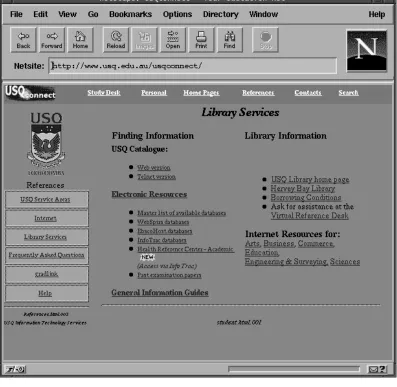
Figure 1 shows the basic layout and structure of the USQconnect user interface. There are two navigational menus: a vertical menu on the left that changes depend-ing on what is selected from a horizontal menu at the top (that does not change). The horizontal menu items and the navigation links they display in the left vertical menu are:
USQconnect homepage – the initial vertical menu with
links to: ‘What’s New’, newsgroups, notices, Code of Practice and help
Study Desk – links to unit homepages, library services
and help
Personal – links to electronic mail, contact details,
change password, quotas, enrolment history, changes to enrolment, tutorial placement and help
Web Builder – allows a student to build their own web
Figure 1. USQconnect screen layout showing frame and menu structure
list files, delete files, HTML reference, Code of Prac-tice and help
References – links to USQ service areas, the Internet,
Library, ‘Frequently Asked Questions’, gradlink and help
Contacts – links to specific usq newsgroups including
general, student and forsale, ‘Frequently Asked Ques-tions’ and support requests
Search – links to search engines for the USQ web site,
AARNets FTP archive, Internet search engines and help.
The rest of this section summarises the evaluation by noting some of the more significant usability problems. Nielsen’s ten usability heuristics are dealt with first.
1. Visibility of system status
On some USQ computers, options in the horizontal menu were partly hidden from view when a subse-quent vertical menu item was selected (for example Personal and then Enrolment Details). This appeared to be related to font size selection at the system level for these particular machines. In addition the screen colour changed from blue to red when help was se-lected and on some machines this was not reversed once the user exited help. In fact the user needed to reload the web page to eliminate the colour corruption.
2. Match between system and the real world
tutorials and practicals and may be confused by new users with a tutorial in the use of this USQconnect sys-tem.
3. User control and freedom
Navigation is via hypertext links. The user must use the system as is, there is no customisation available.
4. Consistency and standards Platform conventions are followed.
5. Error Prevention
Few errors are actually encountered due to the menu structure limiting user response.
6. Recognition rather than recall
The use of menus promotes recognition rather than re-call.
7. Flexibility and efficiency of use
To initiate a USQconnect session, students must pro-vide their user name and password. Unnecessarily, this needs to be repeated when the student wishes to deal with electronic mail or newsgroups and update their own web pages. Surprisingly, such repetition is not re-quired when students wish to view or change important information such as personal and enrolment details.
8. Aesthetic and minimalist design
If a window obscures part of a USQconnect session, then on returning to the USQconnect session, back-ground and foreback-ground colour changes are noted. This is annoying (to say the least) but partly blamed on Netscape and the use of frames (see below).
9. Help users recognise, diagnose, and recover from
errors
Few errors are actually encountered due to the brows-ing nature of the interaction.
10. Help and documentation
Help is available within each of the vertical menus once they are displayed. The assistance available re-lates to the menu options displayed but it is terse and often relatively obvious.
Students have the facility to build their own web pages but there is no or little guidance for them in this pro-cess. Examination of student homepages clearly shows that students are not aware of some very fundamental issues such as the need for a file calledindex.htm
to guide the reader of their web documents. In general, user assistance for building web pages is minimal.
Good design for web use is non-trivial. Nielsen [9] has enumerated his top ten mistakes of web design. Below we note where USQconnect succumbs to these.
1. Using frames
USQconnect uses frames to split the navigational as-pects of the system from the contents. Using frames breaks the fundamental user model of the ‘web page’ since it cannot be bookmarked for return, URLs stop working and printing is problematic.
2. Gratuitous Use of Bleeding-Edge Technology So far USQconnect avoids this mistake.
3. Scrolling Text, Marquees, and Constantly Running
Animations
Most web pages within USQconnect are single pages displayable without scrolling. The exceptions are help pages.
4. Complex URLs
Not applicable in USQconnect.
5. Orphan Pages
Only authorised users are able to use USQconnect so the pages are not accessible to outside users. However, once a student is using USQconnect they can venture to pages outside USQconnect’s pages. On return they are only able to discern their exact location within the USQconnect system by examining the contents of the left vertical menu.
6. Long Scrolling Pages
As mentioned already, the only real problem here is with USQconnect help.
7. Lack of Navigation Support
Exiting menus requires the user to choose a new hor-izontal menu item or use the in-built navigational fea-tures of the web browser. Menu groupings seem to have been intuitively developed with no reference to the end-user students. The simplicity of the menus is such that this appears non-problematic although there are multiple instances of the same or similar menu items that do cause confusion.
8. Non-Standard Link Colours
Horizontal navigational links are white while verti-cal navigational links are blue. Within USQconnect pages use blue for links. More problematic is the way background and foreground colours change when other windows are displayed over USQconnect pages.
9. Outdated Information Not a problem in USQconnect.
4. Discussion
Reaction to imposed change is often negative. Students at USQ have recently had to change from a predominantly text-based system for their Internet access to a graphical version with reduced functionality. The students lost gen-eral access to telnet and their access times to the Internet were reduced, though it might be argued the access qual-ity, with a graphical rather than text-based interface, in-creased. Interestingly, only two students of the 357 sur-veyed in 1995 considered access to a graphical environment important enough to make a comment about it, and moving to a graphical environment was not one of the recommen-dations from the survey. The extent to which this reduction in functionality (and increase in quality) affected students was not clear and certainly had not been evaluated prior to the release of USQconnect for general student use. If the debate within the newsgroupusq.generalwas any ba-sis for deliberation (over 200 postings) their reaction was, in the main, negative. The initial reaction of many contin-uing students was simply that they wanted the old system back since USQconnect was a problem to use and lacked the services of the original system. As one student put it:
Oh well, at least USQconnect lives up to its name. I mean, the service isn’t called WWWconnect or NETconnect, is it? No. The only place we can connect to is USQ.
Academic staff do not have ready access to USQconnect, so it is difficult for them to appreciate the problems that stu-dents have encountered in its use. ITS claims to have ‘ceived many complementary electronic mail messages re-garding the service and very little criticism’ [12] although the veracity of this claim may be questionable given the volume and nature of the debate within usq.general. It is important that service providers consider their clients’ views and part of the problem here was that ITS did not consult adequately with the users about which services to provide, and which not to provide. ITS did consult widely, but the timeliness of the consultation was such that the sys-tem was effectively completed before being demonstrated. Early prototyping and discussions with staff about the ser-vices required would have been useful as would involve-ment by staff in usability testing of the system. A small amount of usability testing (using six students) of the sys-tem was undertaken prior to its released but it has been ac-knowledged by ITS that this provided little by way of feed-back on the system. Informal testing and demonstrations do not constitute usability testing. A number of usability is-sues have been encountered and most could have been elim-inated before release of the system.
References
[1] Anon. USQconnect—Your education net, 1996.
[2] Anon. Minutes of academic computing advisory committee, February 7 1997.
[3] R. Chown. ITS student survey. ITS Newsletter, 7(3):1, 1995. [4] D. Janke. USQconnect—Your education net. ITS
Newslet-ter, 8(10):1, 1996.
[5] D. Janke. USQconnect—Up and running. ITS Newsletter, 9(1):1, 1997.
[6] B. Mahoney. Student electronic services and support. Project Plan Report, 1996.
[7] B. Mahoney. Improving computer services for students. The
Honk, Orientation Edition:46–47, 1997.
[8] J. Nielsen. Heuristic evaluation. In J. Nielsen and R. Mack, editors, Usability Inspection Methods, pages 25–62. John Wiley, New York, 1994.
[9] J. Nielsen. Top ten mistakes in web design, 1996.
http://www.useit.com/alertbox/9605.html.
[10] J. Nielsen. Heuristic evaluation, 1997.
http://www.useit.com/papers/heuristic.
[11] J. Nielsen and R. Mack, editors. Usability Inspection
Meth-ods. John Wiley, New York, 1994.
[12] D. Rochford. USQconnect a smash hit with students. ITS