Steven Kapinos
Petko “pdp” D. Petkov
Haroon Meer
Roger Shields
(collectively “Makers”) of this book (“the Work”) do not guarantee or warrant the results to be obtained from the Work.
There is no guarantee of any kind, expressed or implied, regarding the Work or its contents. The Work is sold AS IS and WITHOUT WARRANTY. You may have other legal rights, which vary from state to state. In no event will Makers be liable to you for damages, including any loss of profi ts, lost savings, or other incidental or consequential damages arising out from the Work or its contents. Because some states do not allow the exclusion or limitation of liability for consequential or incidental damages, the above limitation may not apply to you.
You should always use reasonable care, including backup and other appropriate precautions, when working with computers, networks, data, and fi les.
Syngress Media®
, Syngress®
, “Career Advancement Through Skill Enhancement®
,” “Ask the Author UPDATE®,” and “Hack Proofi ng®,” are registered trademarks of Elsevier, Inc. “Syngress: The Defi nition of a Serious Security Library”™, “Mission Critical™,” and “The Only Way to Stop a Hacker is to Think Like One™” are trademarks of Elsevier, Inc. Brands and product names mentioned in this book are trademarks or service marks of their respective companies.
PUBLISHED BY Syngress Publishing, Inc. Elsevier, Inc.
30 Corporate Drive Burlington, MA 01803
Web Application Vulnerabilities Detect, Exploit, Prevent
Copyright © 2007 by Elsevier, Inc. All rights reserved. Printed in the United States of America. Except as permitted under the Copyright Act of 1976, no part of this publication may be reproduced or distributed in any form or by any means, or stored in a database or retrieval system, without the prior written permission of the publisher, with the exception that the program listings may be entered, stored, and executed in a computer system, but they may not be reproduced for publication.
Printed in the United States of America 1 2 3 4 5 6 7 8 9 0
ISBN 13: 978-1-59749-209-6
Publisher: Andrew Williams Page Layout and Art: SPi
Copy Editor: Audrey Doyle and Judy Eby
Contributing Authors
Michael Cross (MCSE, MCP+I, CNA, Network+) is an Internet Specialist/ Computer Forensic Analyst with the Niagara Regional Police Service (NRPS). He performs computer forensic examinations on computers involved in criminal investigation. He also has consulted and assisted in cases dealing with computer-related/Internet crimes. In addition to designing and maintaining the NRPS Web site at www.nrps.com and the NRPS intranet, he has provided support in the areas of programming, hardware, and network administration. As part of an information technology team that provides support to a user base of more than 800 civilian and uniform users, he has a theory that when the users carry guns, you tend to be more motivated in solving their problems.
Michael also owns KnightWare (www.knightware.ca), which provides computer-related services such as Web page design, and Bookworms (www.bookworms.ca), where you can purchase collectibles and other interesting items online. He has been a freelance writer for several years, and he has been published more than three dozen times in numerous books and anthologies. He currently resides in St. Catharines, Ontario, Canada, with his lovely wife, Jennifer, his darling daughter, Sara, and charming son, Jason.
Igor Muttik PhD is a senior architect with McAfee Avert™. He started researching computer malware in 1980s when anti-virus industry was in its infancy. He is based in the UK and worked as a virus researcher for Dr. Solomon’s Software where he later headed the anti-virus research team. Since 1998 he has run Avert Research in EMEA and switched to his architectural role in 2002. Igor is a key contributor to the core security technology at McAfee. He takes particular interest in new emerging malware techniques, and in the design of security software and hardware appliances. Igor holds a PhD degree in physics and mathematics from Moscow University. He is a regular speaker at major international security conferences and a member of the Computer Antivirus Research Organization.
in 2001 and has not slept since his early childhood. He has played in most aspects of IT Security from development to deployment and currently gets most of his kicks from reverse engineering, application assessments, and similar forms of pain. Haroon has spoken and trained at Black Hat, Defcon, Microsoft Tech-Ed, and other conferences. He loves “Deels,” building new things, breaking new things, reading, deep fi nd-outering, and making up new words. He dislikes sleep, pointless red-tape, dishonest people, and watching cricket.
Steve Palmer has 14 years of experience in the information technology industry. Steve has worked for several very successful security boutiques as an ethical hacking consultant. Steve has found hundreds of previously undiscovered critical vulnerabilities in a wide variety of products and applications for a wide variety of clients. Steve has performed security assessments and penetration tests for clients in many diverse commercial industries and government agencies. He has performed security assessments for companies in many different verticals such as the entertainment, oil, energy, pharmaceutical, engineering, automotive, aerospace, insurance, computer & network security, medical, and fi nancial & banking industries. Steve has also performed security assessments for government agencies such as the Department of Interior, Department of Treasury, Department of Justice, Department of Interior, as well as the Intelligence Community. In 2001, Steve’s fi ndings contributed to the entire Department of Interior being disconnected from the Internet during the Cobel vs Norton lawsuit. Prior to being a security consultant Steve worked as a System Administrator, administering fi rewalls, UNIX systems, and databases for the Department of Defense, Department of Treasury, and the Department of Justice. Prior to that, Steve served 6 years in the United States Navy as an Electronics Technician. Steve has also written several security tools which have yet to be released publicly. Steve is also a member of the Department of Justice’s Infragard organization.
Petko “pdp” D. Petkov is a senior IT security consultant based in London, United Kingdom. His day-to-day work involves identifying vulnerabilities, building attack strategies and creating attack tools and penetration testing
but his name is well known in the IT security industry for his strong technical background and creative thinking. He has been working for some of the world’s top companies, providing consultancy on the latest security vulnerabilities and attack technologies.
His latest project, GNUCITIZEN (gnucitizen.org), is one of the leading web application security resources on-line where part of his work is disclosed for the benefi t of the public. Petko defi nes himself as a cool hunter in the security circles.
He lives with his lovely girlfriend Ivana, without whom his contribution to this book would not have been possible.
Roelof Temmingh Born in South Africa, Roelof studied at the University of Pretoria and completed his Electronic Engineering degree in 1995. His passion for computer security had by then caught up with him and manifested itself in various forms. He worked as developer, and later as a system architect at an information security engineering fi rm from 1995 to 2000. In early 2000 he founded the security assessment and consulting fi rm SensePost along with some of the leading thinkers in the fi eld. During his time at SensePost he was the Technical Director in charge of the assessment team and later headed the Innovation Centre for the company. Roelof has spoken at various international conferences such as Blackhat, Defcon, Cansecwest, RSA, Ruxcon, and FIRST. He has contributed to books such as Stealing the Network: How to Own a Continent, Penetration Tester’s Open Source Toolkit, and was one of the lead trainers in the “Hacking by Numbers” training course. Roelof has authored several well known security testing applications like Wikto, Crowbar, BiDiBLAH and Suru. At the start of 2007 he founded Paterva in order to pursue R&D in his own capacity. At Paterva Roelof developed an application called Evolution (now called Maltego) that has shown tremendous promise in the fi eld of information collection and correlation.
Contents
Chapter 1 Introduction to Web Application Hacking . . . 1
Introduction . . . 2
Web Application Architecture Components . . . 3
The Web Server . . . 3
The Application Content . . . 3
The Data Store . . . 4
Complex Web Application Software Components . . . 4
Login . . . 4
Session Tracking Mechanism . . . 6
User Permissions Enforcement . . . 9
Role Level Enforcement . . . 10
Data Access . . . 10
Application Logic . . . 10
Logout . . . 11
Putting it all Together . . . 11
The Web Application Hacking Methodology . . . 12
Defi ne the Scope of the Engagement . . . 13
Before Beginning the Actual Assessment . . . 14
Open Source Intelligence Scanning . . . 15
Default Material Scanning . . . 16
Base Line the Application . . . 17
Fuzzing . . . 18
Exploiting/Validating Vulnerabilities . . . 19
Reporting . . . 20
The History of Web Application Hacking and the Evolution of Tools . . . 21
Example 1: Manipulating the URL Directly (GET Method Form Submittal) . . . 26
Example 2: The POST Method . . . 31
Example 3: Man in the Middle Sockets . . . 37
The Graphical User Interface Man in the Middle Proxy . . . 45
Common (or Known) Vulnerability Scanners . . . 49
Spiders and other Crawlers . . . 49
Automated Fuzzers . . . 49
All in One and Multi Function Tools . . . 49
OWASP’s WebScarab Demonstration . . . 50
Starting WebScarab . . . 52
Next: Create a new session . . . 53
Next: Ensure the Proxy Service is Listening . . . 56
Next, Confi gure Your Web Browser . . . 57
Next, Confi gure WebScarab to Intercept Requests . . . 59
Next, Bring up the Summary Tab . . . 60
Web Application Hacking Tool List . . . 68
Security E-Mail Lists . . . 69
Summary . . . 73
Chapter 2 Information Gathering Techniques . . . 75
Introduction . . . 76
The Principles of Automating Searches . . . 76
The Original Search Term . . . 80
Expanding Search Terms . . . 80
E-mail Addresses . . . 81
Telephone Numbers. . . 83
People . . . 85
Getting Lots of Results . . . 85
More Combinations . . . 88
Using “Special” Operators . . . 88
Getting the Data From the Source . . . 89
Scraping it Yourself – Requesting and Receiving Responses. . . 89
Scraping it Yourself – The Butcher Shop . . . 95
Dapper . . . 100
Aura/EvilAPI . . . 101
Using Other Search Engines . . . 102
Parsing the Data . . . 102
Parsing E-mail Addresses . . . 102
Domains and Sub-domains . . . 106
Telephone Numbers. . . 107
Post Processing . . . 109
Sorting Results by Relevance . . . 109
Beyond Snippets . . . 111
Presenting Results . . . 111
Applications of Data Mining . . . 112
Mildly Amusing . . . 112
Most Interesting . . . 115
Taking It One Step Further . . . 127
Collecting Search Terms . . . 130
Spying on Your Own . . . 132
Search Terms . . . 132
Gmail . . . 135
Honey Words . . . 137
Referrals . . . 139
Summary . . . 141
Chapter 3 Introduction to Server Side Input Validation Issues . . . 143
Introduction . . . 144
Cross Site Scripting (XSS) . . . 146
Presenting False Information . . . 147
How this Example Works . . . 148
Presenting a False Form . . . 149
Exploiting Browser Based Vulnerabilities . . . 152
Exploit Client/Server Trust Relationships . . . 152
Chapter 4 Client-Side Exploit Frameworks . . . 155
Introduction . . . 156
AttackAPI . . . 156
Enumerating the Client . . . 161
Attacking Networks . . . 172
Hijacking the Browser . . . 180
Controlling Zombies . . . 184
BeEF . . . 188
Installing and Confi guring BeEF . . . 189
Controlling Zombies . . . 190
BeEF Modules . . . 191
Standard Browser Exploits . . . 194
Port Scanning with BeEF . . . 195
Inter-protocol Exploitation and Communication with BeEF . . . 196
CAL9000 . . . 198
XSS Attacks, Cheat Sheets, and Checklists . . . 199
Encoder, Decoders, and Miscellaneous Tools . . . 202
HTTP Requests/Responses and Automatic Testing . . . 204
Overview of XSS-Proxy . . . 207
XSS-Proxy Hijacking Explained . . . 210
Browser Hijacking Details . . . 212
Initialization . . . 212
Command Mode . . . 213
Using XSS-Proxy: Examples . . . 216
Setting Up XSS-Proxy . . . 216
Injection and Initialization Vectors For XSS-Proxy . . . 219
HTML Injection . . . 219
JavaScript Injection . . . 220
Handoff and CSRF With Hijacks . . . 222
CSRF . . . 222
Handoff Hijack to Other Sites . . . 222
Sage and File:// Hijack With Malicious RSS Feed . . . 223
Summary . . . 243
Solutions Fast Track . . . 243
Frequently Asked Questions . . . 245
Chapter 5 Web-Based Malware . . . 247
Introduction . . . 248
Attacks on the Web . . . 248
Hacking into Web Sites . . . 250
Index Hijacking . . . 252
DNS Poisoning (Pharming) . . . 257
Malware and the Web: What, Where, and How to Scan . . . 262
What to Scan . . . 262
Where to Scan . . . 265
How to Scan . . . 266
Parsing and Emulating HTML . . . 268
Browser Vulnerabilities . . . 271
Testing HTTP-scanning Solutions . . . 273
Tangled Legal Web . . . 274
Summary . . . 276
Solutions Fast Track . . . 276
Frequently Asked Questions . . . 281
Chapter 6 Web Server and Web Application Testing with BackTrack . . . 283
Objectives . . . 284
Introduction . . . 284
Web Server Vulnerabilities: A Short History . . . 284
Web Applications: The New Challenge . . . 285
Chapter Scope . . . 285
Approach . . . 286
CGI and Default Pages Testing . . . 288
Web Application Testing . . . 289
Core Technologies . . . 289
Web Server Exploit Basics . . . 289
What Are We Talking About? . . . 289
Stack-Based Overfl ows . . . 290
Heap-based Overfl ows . . . 293
CGI and Default Page Exploitation . . . 293
Web Application Assessment . . . 296
Information Gathering Attacks . . . 296
File System and Directory Traversal Attacks . . . 296
Command Execution Attacks . . . 297
Database Query Injection Attacks . . . 297
Cross-site Scripting Attacks. . . 298
Impersonation Attacks . . . 298
Parameter Passing Attacks . . . 298
Open Source Tools . . . 298
Intelligence Gathering Tools . . . 299
Scanning Tools . . . 307
Assessment Tools . . . 319
Authentication . . . 323
Proxy . . . 335
Exploitation Tools . . . 337
Metasploit . . . 337
SQL Injection Tools . . . 341
DNS Channel . . . 344
Timing Channel . . . 345
Requirements . . . 345
Supported Databases . . . 345
Example Usage . . . 346
Case Studies: The Tools in Action . . . 348
Web Server Assessments . . . 348
CGI and Default Page Exploitation . . . 355
Web Application Assessment . . . 363
Chapter 7 Securing Web Based Services . . . 381
Introduction . . . 382
Web Security . . . 382
Web Server Lockdown . . . 382
Handling Directory and Data Structures . . . 384
Directory Properties . . . 384
Eliminating Scripting Vulnerabilities . . . 386
Logging Activity . . . 387
Performing Backups . . . 387
Maintaining Integrity . . . 388
Finding Rogue Web Servers . . . 388
Stopping Browser Exploits . . . 389
Exploitable Browser Characteristics . . . 390
Cookies . . . 390
Web Spoofi ng . . . 392
Web Server Exploits . . . 395
SSL and HTTP/S . . . 396
SSL and TLS . . . 397
HTTP/S . . . 398
TLS . . . 399
S-HTTP . . . 400
Instant Messaging . . . 400
Packet Sniffers and Instant Messaging . . . 401
Text Messaging and Short Message Service (SMS) . . . 402
Web-based Vulnerabilities . . . 403
Understanding Java-, JavaScript-, and ActiveX-based Problems . . . 404
Java . . . 404
ActiveX . . . 406
Dangers Associated with Using ActiveX . . . 409
Avoiding Common ActiveX Vulnerabilities . . . 411
Lessening the Impact of ActiveX Vulnerabilities . . . 412
Protection at the Network Level . . . 412
Protection at the Client Level. . . 413
JavaScript . . . 414
Preventing Problems with Java, JavaScript, and ActiveX . . . 415
Programming Secure Scripts . . . 418
Code Signing: Solution or More Problems? . . . 419
Understanding Code Signing . . . 420
The Benefi ts of Code Signing . . . 420
Problems with the Code Signing Process . . . 421
Buffer Overfl ows . . . 422
Making Browsers and E-mail Clients More Secure . . . 424
Keep Security Patches Current . . . 425
Securing Web Browser Software . . . 426
Securing Microsoft IE . . . 426
CGI . . . 431
What is a CGI Script and What Does It Do?. . . 431
Typical Uses of CGI Scripts . . . 433
Break-ins Resulting from Weak CGI Scripts . . . 434
CGI Wrappers . . . 436
Nikto . . . 436
FTP Security . . . 437
Active and Passive FTP . . . 437
S/FTP . . . 438
Secure Copy . . . 439
Blind FTP/Anonymous . . . 439
FTP Sharing and Vulnerabilities . . . 440
Packet Sniffi ng FTP Transmissions . . . 441
Directory Services and LDAP Security . . . 441
LDAP . . . 442
LDAP Directories . . . 443
Organizational Units . . . 443
Objects, Attributes and the Schema . . . 444
Securing LDAP . . . 445
Summary . . . 448
Solutions Fast Track . . . 448
Frequently Asked Questions . . . 451
1
Chapter 1
Solutions in this chapter:
■ What is a Web Application?
■ How Does the Application Work?
■ The History of Web Application Hacking and Evolution of Tools
■ Modern Web Application Hacking Methodology and Tools
■ Automated Tools: What they are good at and what they aren’t
■ A Brief Tutorial on how to use WebScarab
Introduction to Web
Application Hacking
Introduction
What is hacking? To me, the act of hacking is the tinkering, studying, analyzing, learning, exploring and experimenting. Not just computers, but anything. One of the great outcomes of this activity is discovering ways to make the object of your attention bend to your will for your benefi t, under your control. An accountant who discovers a new tax loophole can be considered a hacker. Through out time tinkerers, thinkers, scholars and scientists who created things like the wheel, lever and fulcrum, capacitor, inductor, polio vaccine, the light bulb, batteries, phone, radio, air plane, and of course the computer, in a sense, were all hackers. All of the individuals behind most every great invention had a relentless pursuit to bend the will of whatever force they could leverage to a desired outcome. Very few innovations were created by accident, and even if the result of an accident was the inspiration, a great degree of tinkering, studying, analyzing, learning, exploring and experimenting was most certainly necessary to obtain or perfect the desired goal. Most great innovations came from an almost unnatural amount of tinkering, studying, analyzing, learning, exploring and tinkering … or hacking. The act of hacking when applied to computer security typically results in making the object of your desire (in this case, usually a computer) bend to your will. The act of hacking when applied to computers, just like anything else, requires tenacity, intense focus, attention to detail, keen observation, and the ability to cross reference a great deal of information, oh and thinking “outside of the box” defi nitely helps.
In this book, we aim to describe how to make a computer bend to your will by fi nding and exploiting vulnerabilities specifi cally in Web Applications. We will describe common security issues in web applications, tell you how to fi nd them, describe how to exploit them, and then tell you how to fi x them. We will also cover, how and why some hackers (the bad guys) will try to exploit these vulnerabilities to achieve their own end. We will also try to explain how to detect if hackers are actively trying to exploit vulnerabilities in your own web applications.
In this book the examples will being teaching how to fi nd vulnerabilities using “Black Box” methods (where the user does not have the source code, documentation or web server logs for the application). Once the black box methods have been described, source code and audit trail methods of discovering vulnerabilities will also be mentioned.
It should also be noted that it is not possible to document every possible scenario you will run into and fi t all of that information into one moderately sized book, but we will try to be as broad and encompassing as possible. Also this book more aims to teach the reader how to fi sh by defi ning a methodology of web application hacking and then describes how to fi nd common vulnerabilities using those methodologies.
Web Application Architecture Components
Basically a web application is broken up into several components. These components are a web server, the application content that resides on the web server, and typically there a backend data store that the application accesses and interfaces with. This is a description of a very basic application. Most of the examples in this book will be based on this model. No matter how complex a Web application architecture is, i.e. if there is a high availability reverse proxy architecture with replicated databases on the backend, application fi rewalls, etc., the basic components are the same.The following components makeup the web application architecture:
■ The Web Server
■ The Application Content
■ The Datastore
The Web Server
The Web Server is a service that runs on the computer the serves up web content. This service typically listens on port 80 (http) or port 443 (https), although often times web servers will run on non standard ports. Microsoft’s Internet Information Server and Apache are examples of web servers. It should be noted that sometimes there will be a “middleware” server, or web applications that will access other web or network applications, and we will discuss middleware servers in future chapters.
Most web servers communicate using the Hyper Text Transfer Protocol (HTTP) context and requests are prefi xed with “http://”. For more information about HTTP please refer to RFC 2616 (HTTP 1.1 Specifi cation) and RFC 1945 (HTTP 1.0 Specifi cation).
Ideally web applications will run on Secure Socket Layer (SSL) web servers. These will be accessed using the Hyper Text Transfer Protocol Secure (HTTPS) context and requests will be prefi xed with “https://”. For more information about HTTP please refer to RFC 2818 (HTTP Over TLS Specifi cation). (We’ll cover hardening a Web server in Chapter 7.)
The Application Content
when requests are made to that page, the web server executes the command. In some cases, the programs in CGI directories will be PERL scripts. In these cases the web server will launch the PERL interpreter which will process the functions defi ned in the script. There is even a mod_perl module for a web server called Apache which embeds a PERL interpreter within the web server much like PHP.
The Data Store
The Data Store is typically a database, but it could be anything, fl at fi les, command output, basically anything that application accesses to retrieve or store data. The data store can reside on a completely different computer than the web server is running on. The Web Server and the Data Store do not even need to be on the same network, just accessible to each other via a network connection.
Complex Web Application
Software Components
Just as there are components to a web application architecture, there are software components in more complex Web applications. The following components make up a basic application that has multi-user, multi-role functionality. Most complex web applications contain some or all of these components:
■ Login
■ Session Tracking Mechanism
■ User Permissions Enforcement
■ Role Level Enforcement
■ Data Access
■ Application Logic
■ Logout
The example used here to describe the application software components will be that of a Web Mail client such as Yahoo Mail, Gmail, and Hotmail. We will use Gmail as an example.
Login
The following are important security concerns for application login/authentication functionality and will be defi ned in greater detail in future chapters:
■ Input Validation: Conditions such as SQL Injection can result in the bypassing of.
■ Make sure that authentication is not bypassable.
■ Session Cookie set after authentication.
■ Send Authentication Credentials Using a POST Request: Using a GET request can result in conditions where an individual’s login credentials are logged somewhere, such as in the server’s web server logs, or on a proxy server, or even the user’s browser history. There are other places where URLs can logged inadvertently, the perfect case of this is when Google saved MySpace user’s logins and passwords in a URL Blacklist used by Google to attempt to block users from accessing malicious web sites:
http://sb.google.com/safebrowsing/update?version=goog-black-url:1:7753 [goog-black-url 1.7755 update]
+http://www.ebuell.com/gadgets/[email protected]&up_ Password=rebel08&lang=en&country=us&.lang=en&.country=us&synd=ig&mid=58&parent= http://www.google.com&&libs=U4zVTYXvbF0/lib/libcore.js
−http://www.ebuell.com/gadgets/myspace.asp?up_Username=Don41&up_Password=jinjer01& lang=en&country=us&.lang=en&.country=us&synd=ig&mid=83&parent=http://www.google. com&&libs=U4zVTYXvbF0/lib/libcore.js
−http://www.ebuell.com/gadgets/[email protected]&up_ Password=please!&lang=en&country=us&.lang=en&.country=us&synd=ig&mid=28&parent= http://www.google.com&&libs=U4zVTYXvbF0/lib/libcore.js
−http://www.ebuell.com/gadgets/[email protected]&up_ Password=cokeisit1&lang=en&country=us&.lang=en&.country=us&synd=ig&mid=66&parent= http://www.google.com&&libs=U4zVTYXvbF0/lib/libcore.js
−http://www.ebuell.com/gadgets/[email protected]&up_ Password=maughtner1&lang=en&country=uk&.lang=en&.country=uk&synd=ig&mid=93&parent= http://www.google.co.uk&&libs=U4zVTYXvbF0/lib/libcore.js −http://www.ebuell.com/gadgets/[email protected]&up_ Password=stealth1&lang=en&country=us&.lang=en&.country=us&synd=ig&mid=49&parent= http://www.google.com&&libs=U4zVTYXvbF0/lib/libcore.js −http://www.ebuell.com/gadgets/myspace.asp?up_Username=temperanceallanah@yahoo. com&up_Password=teacod27&lang=en&country=us&.lang=en&.country=us&synd=ig&mid=56& parent=http://www.google.com&&libs=dsxAwmPdoAA/lib/libcore.js −http://www.ebuell.com/gadgets/[email protected]&up_ Password=r15641564&lang=en&country=us&.lang=en&.country=us&synd=ig&mid=7&parent= http://www.google.com&&libs=U4zVTYXvbF0/lib/libcore.js −http://www.ebuell.com/gadgets/[email protected]&up_ Password=187hate&lang=en&country=us&.lang=en&.country=us&synd=ig&mid=23&parent= http://www.google.com&&libs=U4zVTYXvbF0/lib/libcore.js −http://www.ebuell.com/gadgets/[email protected]&up_ Password=A5081764&lang=en&country=us&.lang=en&.country=us&synd=ig&mid=56&parent= http://www.google.com&&libs=dsxAwmPdoAA/lib/libcore.js −http://www.ebuell.com/gadgets/[email protected]&up_ Password=gotpms?&lang=en&country=us&.lang=en&.country=us&synd=ig&mid=10&parent= http://www.google.com&&libs=dsxAwmPdoAA/lib/libcore.js
■ Send authentication requests over SSL: This is important. If login information is sent over the network (especially the Internet) unencrypted, at any point between the client machine and the web server, the login credentials can be sniffed.
■ Avoid Do it Yourself Single Sign-On: Developers should do their best not to attempt to create custom single sign-on solutions. This often creates more problems than it fi xes.
■ Pre Expire the Cache on the Login Page: Typically
■ Disable Autocomplete: Autocomplete is a feature of some browsers where the next time a user accesses
■ Do Not incorporate a “Remember Me From this Computer” Feature.
Session Tracking Mechanism
Session Tracking is most often accomplished by using cookies. After a user authenticates into an application, a “Session” cookie is often created. A typical cookie has a name and value. The name identifi es the specifi c cookie (It is possible for an application to set multiple cookies, but usually only one or two cookies are “Session” cookies) and the value is “identifying” information. This “Session” cookie will be sent to the server by the web browser in subsequent requests to the application. This is done so that the user does not have send login credentials with each request, because the cookie now identifi es/authenticates the user. On the server side, the application will bind user identifi able information to the session cookie value, so when the application receives a request with that “Session” cookie value it can associate that value to that specifi c user.
HTTP requests and responses contain header information. In request headers, the web browser will send information such as information about the browser making the request, information about the page that originated the request and of course cookies. HTTP responses from the web servers also contain information in the headers. The response headers contain commands to the web browser such as Set-Cookie commands to tell the browser which cookies to send and when to send those cookies. Cookies are created using the Set- Cookie header in HTTP(S) responses from the server.
The following is an example of a Set-Cookie commands in an HTTP response header from a request to https://gmail.google.com/mail/ (these cookies are set after authentication):
HTTP/1.1 302 Moved Temporarily
Set-Cookie: SID=DQAAAG4AAAB8vGcku7bmpv0URQDSGmH359q9U0g6iW9AEiWN6wcqGybMUOUPAE9TfWP GUB3ZcLcEo5AxiD2Q0p0O63X1bBW5GXlJ_8tJNxQ_BA0cxzZSvuwvHg3syyL-ySooYh76RpiUv4e7TS1PBR jyPp3hCzAD;Domain=.google.com;Path=/ Set-Cookie: LSID=DQAAAHEAAAARo19hN4Hj-iY6KbkdjpSPE1GYgSuyvLlpY1yzCbD29l4yk2tZSr6d5 yItGFZpk-F8bYch7SGJ_LOSAX2MlMpb7QZFHny5E6upeRPIRsSXf6E5d_ZlPjP8UaWfbGTPRuk7u3O3OJ1I 6ShWg80eRG9X7hVIW4G4sDA4KegmoxpQEQ;Path=/accounts;Secure Location: https://www.google.com/accounts/CheckCookie?continue=https%3A%2F%2Fmail. google.com%2Fmail%2F%3F&service=mail&chtml=LoginDoneHtml
Content-Type: text/html; charset=UTF-8 Cache-control: private
Transfer-Encoding: chunked Content-Encoding: gzip
Date: Sat, 30 Dec 2006 18:54:47 GMT Server: GFE/1.3
Cookies can also be set using client side interpreted languages such as JavaScript. The following is an example used by Google Mail:
function lg() {
var now = (new Date() ).getTime();
var cookie = “T” + start_time + “/” + start_time + “/” + now; SetGmailCookie(“GMAIL_LOGIN”, cookie);
}
The following is an example of a subsequent request being sent to the server with the cookies.
GET https://www.google.com/accounts/CheckCookie?continue=https%3A%2F%2Fmail.google. com%2Fmail%2F%3F&service=mail&chtml=LoginDoneHtml HTTP/1.1
Host: www.google.com
User-Agent: Mozilla/5.0 (Windows; U; Windows NT 5.1; en-US; rv:1.8.0.8) Gecko/20061025 Firefox/1.5.0.8
Accept: text/xml,application/xml,application/xhtml+xml,text/html;q=0.9,text/ plain;q=0.8,image/png,*/*;q=0.5
Accept-Language: en-us,en;q=0.5 Accept-Encoding: gzip,defl ate
Accept-Charset: ISO-8859-1,utf-8;q=0.7,*;q=0.7 Keep-Alive: 300 Connection: keep-alive Referer: https://www.google.com/accounts/ServiceLogin?service=mail&passive=true&rm= false&continue=https%3A%2F%2Fmail.google.com%2Fmail%2F%3Fui%3Dhtml%26zy%3Dl<mpl=m_ wsad<mplcache=2 Cookie: LSID=DQAAAHEAAAARo19hN4Hj-iY6KbkdjpSPE1GYgSuyvLlpY1yzCbD29l4yk2tZSr6d5y ItGFZpk-F8bYch7SGJ_LOSAX2MlMpb7QZFHny5E6upeRXf6E5d_ZlPjP8UaWfbGTPRuk7u3O3O
J1I6ShWg80eRG9X7hVIW4G4sDA4KegmoxpQEQ; TZ=300; GMAIL_RTT=703; GMAIL_LOGIN=T11675023 13500/1167502313500/1167504771562; SID=DQAAAG4AAAB8vGcku7bmpv0URQD59q9U0g6iW9AEiWN6 wcqGybMUOUPAE9TfWPGUB3ZcLcEo5AxiD2Q0p0O63X1bBW5GXlJ_8tJNxQ_BA0cxzZSvuwvHg3syyL-ySooYh76RpiUv4e7TS1PBRjyPp3hCzAD
The following are important security concerns for “Session” cookies and will be defi ned in greater detail in future chapters:
■ Input validation: The cookie values and other request headers are sometimes processed by applications. Any data that is processed by the application should fi rst be sanitized.
■ The “Session” cookie should have a large random non guessable value: If a session cookie were predictable (such as an incremental value), all a hacker would have to do would be to send requests to a web server stepping through possible values of the session cookie. If any active sessions were within the range of the requests, they maybe hijacked.
of the web site, the browser will not send the cookie in that request. This is important because all non SSL traffi c can be sniffed.
■ Should timeout in a moderately short period of time: Timeout of an active session should be enforced on the server side.
■ Should not be a persistent cookie: The “Session” cookie should not be saved to the hard drive of the computer.
■ Session Enforcement: The session credentials should be validated on all pages that support application functionality. In other words on pages that contain application functionality, the application should validate that the session credentials being passed to it in requests are active. If a portion of the application functionality doesn’t check for this condition (unless session maintenance is handled by the web server) it may be possible to access that functionality unauthenticated.
■ Recommendations for using cookies:
■ Have the web server create and maintain the state of the cookie.
It should be noted that cookies can also used by the application maintainers to track a user’s browsing experience through a web site.
More information about Cookies can be found by looking up RFC’s 2109 and 2965.
User Permissions Enforcement
In multi-user environments, enforcing user permissions is very important. In the example of an online web mail client like Gmail, it is important for users not to be able to view another user’s private emails or contacts.
N
OTEIt should be noted that at the time of this writing a Cross Site Scripting vulnerability in the Gmail application resulted in the ability for hackers to obtain the contact list of a user. http://scmagazine.com/us/news/article/ 626659/ google-cross-site-scripting-vulnerability-found-patched/
The following are several important security concerns for user permissions enforcement and will be defi ned in greater detail in future chapters:
■ Input Validation
■ Lack of server side validation
Role Level Enforcement
Oftentimes complex multi-user applications are created with administrative features to ease management of the application and user accounts. In these types of multi-user multi-role environment it is incredibly important that users with lesser privileged roles (such as regular end users) can not access functions associated with higher privileged roles (such as administrative functions).
The following are several types of security concerns associated with role level permissions enforcement:
■ Input Validation
■ Lack of server side validation
■ Application Logic Flaws
Data Access
No matter what the type of data being accessed, be it login credentials, bank account info, order information, and no matter what the mechanism used to access the data, be it SQL, LDAP, or some other data communications protocol, applications need to access the data.
The following are several types of security concerns associated with data access:
■ Input Validation
■ Lack of server side validation
■ Application Logic Flaws
■ Permissions Enforcement
Application Logic
This is “the” application itself. Every part of the application, including the core functionality for which the application was designed to do. Sometimes the application logic (or the way in which the application was written) itself can be leveraged to compromise data or the system itself. The following are important issues to check for in the design of the application.
■ Negative Numbers
■ User Controlled Variables
■ Input Validation
■ Application Logic Flaws
■ Race conditions
■ Off by One Errors
Logout
This is the portion of multi-user/multi-role applications where the user can voluntarily terminate their session.
■ Enforce Termination of the Session on the Server Side.
Putting it all Together
Basically when you access a web site your web browser sends a request to the server. This request contains data that the web server will process. If you are accessing a web application, the application will perform functions based on the parameters you send to the server.
In the example of a search engine, you type a value into an input fi eld and hit submit. The web browser takes the data you typed into the input fi eld and converts into a special format that the web server can interpret. The web server calls the search program. The application takes the parameter value and builds a query to the backend datastore (a database in this case). The database responds with the appropriate data, the application parses the data and presents it to you in a nice readable form.
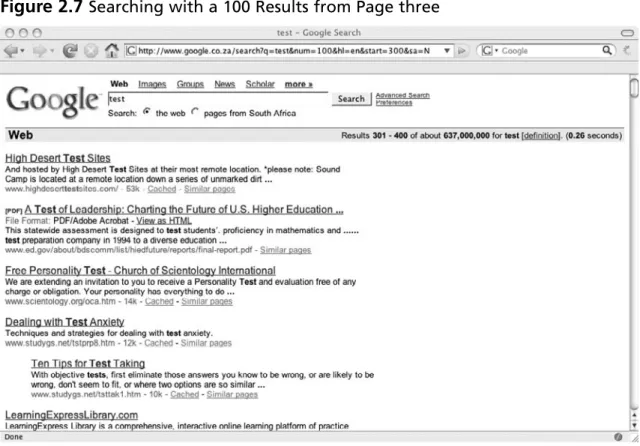
To get your feet wet, we will dissect a couple types of web requests (at this point the response is not important). When a web browser sends a request to a web server it will use one of two HTTP request methods GET or POST. If the GET request method is used, all of the parameters will be in the URL of the HTTP request. For example the following URL uses Google to search for the word “test”:
http://www.google.com/search?q=test
Here we are sending a request to www.google.com. We are calling the program search. We are passing a parameter “q” which has a value of “test”.
The web browser actually sends other data to the server and the full request looks like this:
GET /search?q=test HTTP/1.1 Host: www.google.com
User-Agent: Mozilla/5.0 (Windows; U; Windows NT 5.1; en-US; rv:1.8.0.9) Gecko/20061206 Firefox/1.5.0.9
Accept: text/xml,application/xml,application/xhtml+xml,text/html;q=0.9, text/plain;q=0.8,image/png,*/*;q=0.5
Accept-Language: en-us,en;q=0.5
When a web browser sends a request using the POST method, the parameters will be sent in body of the request (although parameters in the URL will also be interpreted):
POST /search? HTTP/1.1 Host: www.google.com
User-Agent: Mozilla/5.0 (Windows; U; Windows NT 5.1; en-US; rv:1.8.0.9) Gecko/20061206 Firefox/1.5.0.9
Accept: text/xml,application/xml,application/xhtml+xml,text/html;q=0.9, text/plain;q=0.8,image/png,*/*;q=0.5
Accept-Language: en-us,en;q=0.5
Accept-Charset: ISO-8859-1,utf-8;q=0.7,*;q=0.7
Referer: http://www.evilhackersite.com/search.html Content-Type: application/x-www-form-urlencoded Content-Length: 6
q=test
In both GET and POST requests if multiple parameters are sent in the request they are separated by an ampersand “&” (i.e. parameter1=value1¶meter2=value2…). Notice all of the other information that is sent the requests. These are called request headers. The Host header specifi es which “Virtual Host” on the web server should process the request. Modern web servers like Apache and IIS can be confi gured to respond to different domains with custom content and applications. The User-Agent header tells the web server which web browser client sent the request. The Accept header tells the web server what the server can respond with. The Accept-Language header tells the server the preferred language of the web browser. The Accept-Charset parameter tells the web server what type of encoding is accepted by the browser. The Referer header tells the web server what page initiated the request. The Content-Type header (for the POST method) tells the web server how the content being sent in the request is encoded. The Content-Length header (for the POST request) tells the web server how much data will be sent in the request. There are many other request methods and request and response headers that can be sent to and from the server, please refer to RFCs 1945 (HTTP/1.0) and 2616 (HTTP/1.1) to fi nd out more.
The web application then processes the request and sends back the appropriate data, in this case the search engine output to a query for “test”.
Now that you have a basic understanding about how web applications work and you also have some insight into what an actual web request looks like, we can start describing the basic principals about how to hack web applications.
the likelihood that a particular vulnerability that is found will yield a signifi cant exploit. The diligence, thoroughness, and level of focus of the software tester will also play a key factor in the ability of fi nding vulnerabilities. As a software tester, hacker, or security professional, there is no substitute for constantly updating your skills and maintaining intense focus on the task at hand. That being said, there is a distinct method of approaching a software assessment that will result in fi nding most signifi cant types of vulnerabilities.
There is nothing worse than performing a vulnerability assessment and having someone else come after you and fi nd something that you didn’t. You will fi nd that using your imagination and being able to think outside of the box is crucial and that ability will separate a good tester from a great tester. The amount of time, effort and focus that you apply to testing an application will also determine your success. There is no substitute for diligence.
Defi ne the Scope of the Engagement
This is a very important part of the assessment. It is important to defi ne what you are allowed and what “exactly” is to be assessed in the beginning, prior to doing any work. Sometimes if there is a “discovery” phase of the engagement, the scope will be defi ned after the targets have been identifi ed (discovery techniques will be defi ned in a later chapter). Basically during this phase you will negotiate what you can and can’t do, and where you can and can’t go, with the client or organization you will be performing the assessment for. Sometimes clients only want a small portion of a large application tested, such as one piece of functionality or privilege level. This is tricky in some cases. Defi ning these boundaries will keep you from getting in trouble in the future and will determine what tools you can and can not use and also how you confi gure the tools that you do use. You may fi nd that you are limited into testing during certain hours as well. If you feel that any constraints that are put on you will increase the duration of the test, you should voice your concerns before you start. During this phase you will also need to set the expectation of what you will be doing and roughly how long each phase of the assessment will take. (See Chapters 4 and 6 for much more detail on testing Web Applications.)
It is a good idea to be able to “base line” the application before defi ning the scope or even the statement of work (if you are a contractor). But more often than not you will not be able to do that.
During the scoping phase it is important to note thru manually walking the site (or “baselining”) and/or asking the client questions similar to the following:
■ Are there any thick client application components such as Java Applets?
■ How many interactive pages are there?
■ How many parameters are sent with each page?
■ Are there multiple roles?
■ Is there a notion of account privilege separation?
■ Is the application virtually hosted?
■ Are there any account lockout features?
■ Will this be tested in a production environment?
■ Are there any time constraints or testing windows to conform to?
■ Is there an IPS that will block my requests?
■ Should I try to evade IDS/IPS as part of the assessment?
■ Is this a black box test?
■ Are there any virtual, manual, physical, or “real world” processes that are automatically initiated by the application? (for example, Faxes, emails, printing, calling, paging, etc.)
During this phase you will also tell the client what you will need from them. If you will be testing a multi-user/multi-role application, you will need multiple user accounts in each privilege level. You may fi nd that will need the database pre-populated with test data. For example if you are testing a loan applicant management application for a fi nancial institution, you will need the application’s database to be populated with loan applications in various stages of the approval process. You will also need to establish a technical point of contact if you have any issues or questions. If you are conducting a remote assessment, you should also establish a means of encrypting the reports you will be sending to the client.
One thing you will want to note, is the complexity of the application. The more parameters there are to fuzz, the more functions that there are to analyze, the longer the assessment will take. This information is important to properly scope the complexity of the application to give yourself adequate time to perform a thorough assessment of the application. If you do not actually baseline the application fi rst, you may be surprised.
Before Beginning the Actual Assessment
This is because you do not want to have any outside data that might taint your results with external information that may impair your ability to notice subtle nuances of the state of your session or how the application works. Also to prevent tainting of data, during the assessment period it is highly advised not to browse to any web site other than the one being assessed.
Figure 1.2 Clear Private Data
W
ARNINGEnsure that all of you tools are up to date and have the latest signatures. It is not a good idea to run default material scans with outdated signatures or plug-ins. These tools will not pick up the vulnerabilities that may have been discovered since your last signature/plug-in update.
Open Source Intelligence Scanning
This step typically only applies to production or internet facing applications. Applications that are tested in a Quality and Assurance (QA) and/or development environment (as is the case the majority of the time) this phase will not apply to. This phase of testing can be skipped but it is recommended. (See Chapter 2 for more detail on intelligence scanning.)
In this phase of testing you will want to look for any virtual hosts associated with the server you are scanning. Any application running on the same server will have bearing of the overall security of the system. If an application is running on the same server that is in a different virtual host of (i.e. the target application is running the virtual host www.vulnerableapp.com, but there is another application running on the virtual host www.vulnerableserver.com) and there are no signifi cant vulnerabilities in the target application, the tester should assume that the “out of scope” application could possibly contain some signifi cant security issues (even if it was never tested). If the client or organization does not wish to remove or assess the other applications on the server, a note should be added to the report stating that there could be a potentially signifi cant security risks posed by the other application(s).
You will also want to check for applications or other content that may reside on the specifi c virtual host that you are testing. This is because the application you are assessing may not link to this content and you may not have otherwise found it, especially if it is a custom install and does not appear in any “default” directories. One example I will use here is of a web based forum that is on the same www.vulnerableapp.com server as the target application. Since both applications are on the same server and may have cookies set to the same
domain, if this “out of scope” application contains any vulnerabilities such as Cross Site Scripting it may be possible to leverage them in social engineering attacks or direct attacks to take over the server. If any “extra” applications are discovered on the same virtual host, it is highly recommended they be tested or removed. If the client or organization does not want to have that application tested or removed, the tester should mention that the presence of extra applications within the same virtual host may have severe consequences in the report.
You can also do this phase after the conducting baseline of the application. Sometimes during the baseline process you will fi nd keywords that you can use to assist you in searching for information. Also the converse is true, the Open Source Phase may yield login pages to other areas of the application you are testing that you may not have otherwise been able to fi nd.
There are automated tools to perform this phase of testing. It is highly recommended not to solely rely on these tools and to manually walk the site yourself. Some of the more advanced man in the middle proxy tools will make these notes for you while you manually walk the site and will use this data when using the fuzzing feature of the tool later.
If you are testing a production site or a site that has “real world” events that are triggered in some pieces of the application, it is highly recommended to walk the site manually. In some cases, automated crawlers will pre-populate form fi elds with various values, calling many pages repeatedly. If there is a “real world” process that is triggered, it may have an unfavorable outcome.
Default Material Scanning
those two functions should provide information about the directory structure of the web server.
There are many automated tools available for performing this phase of testing. In fact, I personally do not consider this to be “application” hacking, and consider it to be more part of a “network” vulnerability assessment, however sometimes there are relevant application specifi c fi ndings that can be found, so this is an important part of an application
assessment.
Base Line the Application
The “real” fi rst step where you actually make contact with the application is to walk the site you are testing and observe how the application behaves under normal circumstances. This is often called “base lining”, “crawling” or “walking” the application or web site. During this phase it is a good idea to identify all of the interactive pages and all of the parameters that the pages take. Note whether requests are GET or POST methods are used to make requests. Note the cookies that are set and other parameters that appear to be used by the application in the request headers. Also note if the application uses client side code, such as JavaScript, VBScript, Java Applets, binary code, etc. If you are analyzing a multi user/multi role application, the process should be repeated for all privilege levels and at least two users in each privilege level (if possible).
Whether you are a beginner or a seasoned professional, it is best to document all of the information that you gather during the base lining process. This information will form your checklist of things to look for that will help you in being as thorough as possible. Some things to take note during this phase of testing include the following:
■ Observe parameters being passed to the server.
■ Observe the functions of the interactive pages.
■ Note the functions and pages that are available to the user and privilege level.
■ Note functions that are available for one user that aren’t available to users of the same privilege level.
■ Note any data identifi ers. For example an “orderid” parameter that identifi es a specifi c order in an e-commerce site.
■ Observe the parameter values and note their function.
■ Observe all directories and content.
you should notify to the client or organization you are performing the test for of any concerns you may have before proceeding.
Typically this phase can take anywhere from a few hours to a few days depending on the complexity of the application.
Fuzzing
The third phase of testing is fuzzing which is the actual “hacking” phase. Once you have noted how the application works and identifi ed all of the parameters being passed back and forth, it is time to manipulate them to try to make the application bend to your will. During this phase you will perform what is known as “fuzzing”. Basically this is the process of modifying parameters and requests being sent to the application and observing the outcome.
There are many open source and commercial tools that attempt to “automate” this step. In some cases, these tools are good at fi nding specifi c examples of specifi c types of
vulnerabilities, but in some cases they are not. In no way should an automated tool ever be solely trusted as the source for determining the overall state of security for an application. It should be noted however, that running automated tools will help the overall.
Do not perform this phase of testing willy nilly as “fuzzing” can have disastrous consequences, especially if you are performing an assessment of a production application. It is highly advised not to run fully automated fuzzing tools in production environments. It is best to think of yourself as a scientist. When you approach testing a function of the application, fi rst form a hypothesis. Then create a test case to validate your hypothesis. For example in a multi user multi role environment, for a specifi c test you would form a hypothesis that it is possible to perform administrative functions as a regular user. Then create a test case, in this case by logging into the application as a regular user and attempting to access the administrative functions. Based on the results of the test, you will either validate that it is possible for a regular user to access administrative functions or you will fi nd that you need to modify the test in some way to gain administrative access or ultimately concede that the application does not allow regular users to perform administrative functions under any circumstances.
If a vulnerability is found it is important to re-validate it. Once the vulnerability is identifi ed it is important to document it. When documenting the fi nding it is important to include the full request that was sent to the server the resulted in the vulnerability. Also note the user you were logged in as and what steps led you to the point that you were able to exploit the vulnerability. This is important information and will aid developers in reproducing how you were able to exploit the condition which will help them in fi xing the problem.
other vulnerabilities associated with input validation issues such as SQL Injection. But the opposite is not necessarily true. It is always best to err on the side of caution and test for everything.
One thing you will note, is that the more complex the application, the more parameters there are to fuzz, the more functions that there are to analyze, the longer the assessment will take. It is important to properly scope the complexity of the application to give yourself adequate time to perform a thorough assessment of the application.
If any new directories and content were discovered during this phase, it is recommended that the Default Material and Open Source Intelligence Scanning phases be repeated taking into account the new information.
If you are testing a production site or a site that has “real world” events that are triggered in some pieces of the application, it is highly recommended to fuzz the site manually. In some cases, automated fuzzers will call pages hundreds of times, in an attempt to fuzz all of the parameters looking for various vulnerabilities. If there is a “real world” process that is triggered, it will most defi nitely result a very unfavorable outcome.
Exploiting/Validating Vulnerabilities
The fourth phase is validating vulnerabilities. More often than not you will need to prove you can actually exploit the condition, so basically, in web application hacking, validating the fi ndings, in some cases, means creating exploits for them for demonstration purposes. This phase is also necessary to ensure that it is or isn’t possible to further compromise the application to gain access to sensitive data or the underlying network or operating system of the host that the application or application components reside on. Exploiting vulnerabilities also provides insight into the full impact of the security issue that may not ordinarily have been obvious. It can also settle disputes over risk ratings with application owners if you have documented repeatable evidence of the full impact of a vulnerability. Again, during this phase it is important to document every step.
This book will attempt to defi ne each vulnerability category and the specifi c types of vulnerabilities associated with them. This book will also attempt to defi ne how to fi nd the vulnerability and how to exploit them. Since it is not possible to provide examples for every scenario, the book will provide examples for common scenarios and attempt to instruct the reader how to think for themselves.
If High-Risk fi ndings are found, especially if the web site is publicly accessible, it is important to notify the application owners as soon as possible so that they can begin remediation.
challenge the severity of a fi nding, but it does happen. If they demand proof, try to give them proof, but only if they ask for it. But fi rst make sure that they fully aware of the ramifi cations. Do not attempt something you know is going to have disastrous consequences even if they want you to. That will surely get you fi red if not arrested even if you were told to do it. Believe me, their side of the story will change.
In some cases vulnerabilities can be leveraged to gain access to the host operating system of the web server or some backend system like a database server. If this is the case, you should inform the client immediately, and ask them if they want you to perform a “penetration test” to see how far you are able to get into their internal networks.
N
OTEIn an application assessment each phase (the Open Source Intelligence, Default Material, Baseline, Fuzzing, and Validation phases) will yield information that will be useful in the other phases of testing. It is not important which order these phases are performed in, as long as due diligence has been applied to cross reference any new data with the other phases to see if it is possible to pull more information that could lead to fi nding a vulnerability.
Reporting
This is probably the most important phase of testing. During this phase you want to thoroughly document ever vulnerability and security related issue that was found during testing. In the reports you want to clearly illustrate how you found the vulnerability and the exact instructions for duplicating the vulnerability. You also want to emphasize the severity of the vulnerability, and provide scenarios or proof of how this vulnerability can be leveraged.
W
ARNINGTo illustrate how to perform the different phases of testing, it is best to describe the tools that are used to perform them and how they came to be. In other words, in this book we will teach you how to do all of this stuff manually and then give you a handy list of automated tools that can help you to accomplish the tasks you wish to perform.
The History of Web Application Hacking
and the Evolution of Tools
The best way to teach the concepts of web application hacking is to describe how web application hacking was performed before there were tools like man in the middle proxies and fuzzers which we will more formally introduce later in this chapter. To fully understand how these modern tools work it is best to understand the evolutionary process that lead to their creation.
Basically the gist of web application hacking is modifying the “intended” request being sent to the web server and observing the outcome. In the old days this was done the hard way … manually and it was/is very tedious and time consuming. There are a lot of different types of vulnerabilities to look for and most applications are fairly complex, which results in a lot of parameters to modify. Modifying the parameters being sent to the application is known as fuzzing. It can work the other way too, modifying the response from the server to test the security controls of the web browser, but for now we will focus on server side web application hacking. Fuzzing is the heart and soul of web application hacking.
The oldest and easiest way to modify a request has always has been to modify the parameters in the URL directly. If a web form uses the GET method to send a request, then all of the parameters will be sent in the URL.
What follows will be a simple example of how to baseline an application, modify the URL (fuzz the parameters) to hack an application. The example we will be using is a very simple application that is vulnerable to a Cross Site Scripting vulnerability. Cross Site
Scripting will be described in depth in a later chapter, but it is basically injected of code into a URL that is refl ected back to the user at some point (often times immediately as in this example) during the user’s session.
Often times, in order to create the request that will test for a particular condition it is helpful to understand what the application does with the data. These observations are typically performed in during “base lining” phase of testing. What follows is the baselining of this simple sample application.
N
OTEThe following is a real example that is in the VMWare Image that accompanies this book. Check out Appendix 1 to learn more about getting the Virtual Machine (VM) up and running. Once the VM is online, replace
The following URL will bring up the HTML form shown in Figure 1.3.
Figure 1.3 XSS Test Example
The HMTL source for the page shown in Figure 1.3 above follows (viewing the source HTML of a web page can be accomplished by right clicking inside of the web page and clicking the “View Source” option):
<html>
<body bgcolor=′′>
<center><h1>Cross Site Scripting (XSS) Test Example 1</h1></center> <form action=“/input-validation/xss/xss-test.php” method=GET> <input type=text name=form value=“”>
<input type=hidden name=bgcolor value=“#AABBCC”> <input type=submit name=Submit value=“Submit Info”> </form>
</body> </html>
Note that this form uses the “GET” method. This means that when the user clicks the “Submit Info” button (shown in Figure 1.1 above), the web browser will send a request with the input fi eld names and values as the parameters to the request. Note that the parameter “bgcolor” did not have an input fi eld in the web page (shown in Figure 1.3). This is because the input type was defi ned as “hidden”. This means that parameter will not visibly show up as an option to modify, but the parameter will be sent to the server in the request.
to look for vulnerabilities. In this particular example, we can modify the URL directly without having to manually re-submit the form every time. Since the hidden form fi eld name and value pair (parameter) is sent in the URL, we can modify that information easily. All of the parameters from the form above are present in the URL, in this case, the
parameters form, bgcolor and Submit are present in the URL with their respective values. The parameters, or “query” are individually separated by the ampersand “&” character. The name/value pairs are separated by an equal sign “=”. The query is separated from the path by the question mark “?” character. The URL itself follows:
http://www.vulnerableapp.com/input-validation/xss/xss-test.php?form=test& bgcolor=%23AABBCC&Submit=Submit+Info
The HTML source code for the page shown in Figure 1.4 follows:
<html>
<body bgcolor=‘#AABBCC’>
<center><h1>Cross Site Scripting (XSS) Test Example 1</h1></center> <form action=“/input-validation/xss/xss-test.php” method=GET> <input type=text name=form value=“test”>
<input type=hidden name=bgcolor value=“#AABBCC”> <input type=submit name=Submit value=“Submit Info”> </form>
</body> </html>
If we modify the parameters in the URL we can observe exactly what changes in the source code that application responds with. There are three (3) separate URL query parameters that we can modify here.
http://www.vulnerableapp.com/input-validation/xss/xss-test.php?form=test& bgcolor=%23FF0000&Submit=Submit+Info
Tools & Traps…
What’s going on here?
In the HTML source the value of the bgcolor parameter is set to “#AABBCC”, how-ever after clicking the “Submit Info” button shown in Figure 1.1 in the URL that the browser sends to the server the value for the bgcolor parameter is “%23AABBCC”. And when the source code for the returning page is viewed, it is back to “#AABBCC”.
Why does that happen? When the browser sends a request to the server, any information that sent from a web form is “URL encoded”. The browser does this in case the form data contains characters like an equal sign or an ampersand, which may confuse the application the server side. Remember the individual parameters are separated by ampersands and the name/value pairs are separated by equal signs. If the browser sent the form data without URL encoding it fi rst, and the form data contained ampersands and equal signs, the form data ampersands and equal signs would interfere with the application parsing the request query.
The URL encoded values are HEX values associated with a particular character in ASCII. For example “%23” = “#”. Most browsers only URL encode sybmol characters. Many of these characters have special meaning. For example, the “#” character in a URL means “jump to text”. So for this reason, the “#” character and other “special” characters are encoded when submitted within form data. On the server side, the web server “URL decodes” the hex values into their literal characters so that the application can adequately process the data.
The HTML source code for the page shown in Figure 1.5 follows:
<html>
<body bgcolor=‘#FF0000’>
<center><h1>Cross Site Scripting (XSS) Test Example 1</h1></center> <form action=“/input-validation/xss/xss-test.php” method=GET> <input type=text name=form value=“test”>
<input type=hidden name=bgcolor value=“#AABBCC”> <input type=submit name=Submit value=“Submit Info”> </form>
</body> </html>
Here, take note that the body tag “bgcolor” parameter has changed to the value of the “bgcolor” parameter that was sent in the URL. Take note that the hidden form element value did not change, which most likely means that this value is hard coded in the application.
Lastly let’s see if there are any other details of the application we should note. Let’s see in Figure 1.6 if the application sets any cookies.
The application does set a cookie called “SUPER_SECRET_SESSION_COOKIE” that has a value of “super-secret-session-cookie-value”. In a real application session cookies authenticate the request and identify a specifi c user.
After the fi rst phase has been completed by walking the site normally and observing what the application does under normal circumstances, fuzzing can begin. Remember fuzzing is merely sending a specifi cally modifi ed request to the server and observing the outcome. Basically the person testing the application will form a hypothesis and create a test case to validate or invalidate the hypothesis. In order to test for a Cross Site Scripting condition the tester will modify the request, send the request to the server and observe the outcome.
Example 1: Manipulating the URL Directly
(GET Method Form Submittal)
Basically in this example, in order to fuzz the parameters in the example shown above, we will modify the parameters in the URL. In this demo we will be testing for a Cross Site Scripting condition. Briefl y again, Cross Site Scripting is basically a condition where
information that is sent to the server in a request is sent back to the user or users. If the data contains HTML or scripting code it will be interpreted by the victim’s web browser. Cross Site Scripting can often be leveraged to steal credentials or trick users into divulging other sensitive information. Cross Site Scripting is described in detail in chapter 3.
The fi rst example of fuzzing will be the value of the “form” parameter in the following URL: http://www.vulnerableapp.com/input-validation/xss/xss-test.php?form=test&