PA RT
PA
RT
PA
RT
PAR
TP
ART
PA
RT
PA RT
PA
RT
PART
II
Gaining Access and Securing
the Gateway
6 IP Spoofing and Sniffing ... 257
7 How to Build a Firewall ... 317
8 SATAN and the Internet Inferno ... 429
IP Spoofing and Sniffing
CHAPTER CHAPTER CHAPTE R
CH AP
TE
R CH APT ER CH APT ER CHA PT ER CH
AP
TER
S
6
niffing and spoofing are security threats that target the
lower layers of the networking infrastructure supporting
applications that use the Internet. Users do not interact
directly with these lower layers and are typically
completely unaware that they exist. Without a
deliber-ate consideration of these threats, it is impossible to
build effective security into the higher levels.
Sniffing is a passive security attack in which a machine
separate from the intended destination reads data on a
network. The term “sniffing” comes from the notion of
“sniffing the ether” in an Ethernet network and is a
bad pun on the two meanings of the word “ether.”
Passive security attacks are those that do not alter the
normal flow of data on a communication link or inject
Spoofing is an active security attack in which one machine on the network masquerades as a different machine. As an active attack, it disrupts the normal flow of data and may involve injecting data into the communications link between other machines. This masquerade aims to fool other machines on the network into accepting the impostor as an original, either to lure the other machines into sending it data or to allow it to alter data. The meaning of “spoof” here is not “a lighthearted parody,” but rather “a deception intended to trick one into accept-ing as genuine somethaccept-ing that is actually false.” Such deception can have grave consequences because notions of trust are central to many networking systems. Sniffing may seem innocuous (depending on just how sensitive and confidential you consider the information on your network), some network security attacks use sniffing as a prelude to spoofing. Sniffing gathers sufficient information to make the deception believable.
Sniffing
Sniffing is the use of a network interface to receive data not intended for the machine in which the interface resides. A variety of types of machines need to have this capability. A token-ring bridge, for example, typically has two network interfaces that normally receive all packets traveling on the media on one interface and retransmit some, but not all, of these packets on the other interface. Another example of a device that incorporates sniffing is one typically marketed as a “network analyzer.” A network analyzer helps network administrators diagnose a variety of obscure problems that may not be visible on any one particular host. These problems can involve unusual interactions between more than just one or two machines and sometimes involve a variety of protocols interacting in strange ways.
Devices that incorporate sniffing are useful and necessary. However, their very existence implies that a malicious person could use such a device or modify an existing machine to snoop on network traffic. Sniffing programs could be used to gather passwords, read inter-machine e-mail, and examine client-server database records in transit. Besides these high-level data, low-level information might be used to mount an active attack on data in another computer system.
Sniffing: How It Is Done
Note The term “broadcast address” is somewhat misleading. When the sender wants to get the attention of the operating systems of all hosts on the network, he or she uses the “broadcast address.” Most network interfaces are capable of being put into a “promiscuous mode.” In promiscuous mode, network interfaces generate a hard-ware interrupt to the CPU for every frame they encounter, not just the ones with their own address or the “broadcast address.” The term “shared media” indicates to the reader that such networks broadcast all frames—the frames travel on all the physical media that make up the network.
At times, you may hear network administrators talk about their networking trouble spots— when they observe failures in a localized area. They will say a particular area of the Ethernet is busier than other areas of the Ethernet where there are no problems. All of the packets travel through all parts of the Ethernet segment. Interconnection devices that do not pass all the frames from one side of the device to the other form the boundaries of a segment. Bridges, switches, and routers divide segments from each other, but low-level devices that operate on one bit at a time, such as repeaters and hubs, do not divide segments from each other. If only low-level devices separate two parts of the network, both are part of a single segment. All frames traveling in one part of the segment also travel in the other part.
The broadcast nature of shared media networks affects network performance and reliability so greatly that networking professionals use a network analyzer, or sniffer, to troubleshoot problems. A sniffer puts a network interface in promiscuous mode so that the sniffer can monitor each data packet on the network segment. In the hands of an experienced system administrator, a sniffer is an invaluable aid in determining why a network is behaving (or misbehaving) the way it is. With an analyzer, you can determine how much of the traffic is due to which network protocols, which hosts are the source of most of the traffic, and which hosts are the destination of most of the traffic. You can also examine data traveling between a particular pair of hosts and categorize it by protocol and store it for later analysis offline. With a sufficiently powerful CPU, you can also do the analysis in real time.
Most commercial network sniffers are rather expensive, costing thousands of dollars. When you examine these closely, you notice that they are nothing more than a portable computer with an Ethernet card and some special software. The only item that differentiates a sniffer from an ordinary computer is software. It is also easy to download shareware and freeware sniffing software from the Internet or various bulletin board systems.
Note Esniff.c is a simple 300-line C language program that works on SunOS 4.x. When run by the root user on a Sun workstation, Esniff captures the first 300 bytes of each TCP/IP connection on the local network. It is quite effective at capturing all usernames and passwords entered by users for telnet, rlogin, and FTP.
TCPDump 3.0.2 is a common, more sophisticated, and more portable Unix sniffing program written by Van Jacobson, a famous developer of high-quality TCP/IP software. It uses the libpcap library for portably interfacing with promiscuous mode network interfaces. The most recent version is available via anonymous FTP to ftp.ee.lbl.gov.
NetMan contains a more sophisticated, portable Unix sniffer in several programs in its network management suite. The latest version of NetMan is available via
anonymous FTP to ftp.cs.curtin.edu.au in the directory /pub/netman.
EthDump is a sniffer that runs under DOS and can be obtained via anonymous FTP
from ftp.eu.germany.net in the directory /pub/networking/inet/ethernet/.
On some Unix systems, TCPDump comes bundled with the vendor OS. When run by an ordinary, unprivileged user, it does not put the network interface into promiscuous mode. With this command available, a user can only see data being sent to the Unix host, but is not limited to seeing data sent to processes owned by the user. Systems administrators concerned about sniffing should remove user execution privileges from this program.
Sniffing: How It Threatens Security
Sniffing data from the network leads to loss of privacy of several kinds of information that should be private for a computer network to be secure. These kinds of information include the following:
■ Passwords
■ Financial account numbers
■ Private data
■ Low-level protocol information
Sniffing Passwords
Perhaps the most common loss of computer privacy is the loss of passwords. Typical users type a password at least once a day. Data is often thought of as secure because access to it requires a password. Users usually are very careful about guarding their password by not sharing it with anyone and not writing it down anywhere.
Passwords are used not only to authenticate users for access to the files they keep in their private accounts but other passwords are often employed within multilevel secure database systems. When the user types any of these passwords, the system does not echo them to the computer screen to ensure that no one will see them. After jealously guarding these passwords and having the computer system reinforce the notion that they are private, a setup that sends each character in a password across the network is extremely easy for any Ethernet sniffer to see. End users do not realize just how easily these passwords can be found by someone using a simple and common piece of software.
Sniffing Financial Account Numbers
Most users are uneasy about sending financial account numbers, such as credit card numbers and checking account numbers, over the Internet. This apprehension may be partly because of the carelessness most retailers display when tearing up or returning carbons of credit card receipts. The privacy of each user’s credit card numbers is important. Although the Internet is by no means bulletproof, the most likely location for the loss of privacy to occur is at the endpoints of the transmission. Presumably, businesses making electronic transactions are as fastidious about security as those that make paper transactions, so the highest risk probably comes from the same local network in which the users are typing passwords.
However, much larger potential losses exist for businesses that conduct electronic funds transfer or electronic document interchange over a computer network. These transactions involve the transmission of account numbers that a sniffer could pick up; the thief could then transfer funds into his or her own account or order goods paid for by a corporate account. Most credit card fraud of this kind involves only a few thousand dollars per incident.
Sniffing Private Data
Sniffing Low-Level Protocol Information
Information network protocols send between computers includes hardware addresses of local network interfaces, the IP addresses of remote network interfaces, IP routing information, and sequence numbers assigned to bytes on a TCP connection. Knowledge of any of this informa-tion can be misused by someone interested in attacking the security of machines on the network. See the second part of this chapter for more information on how these data can pose risks for the security of a network. A sniffer can obtain any of these data. After an attacker has this kind of information, he or she is in a position to turn a passive attack into an active attack with even greater potential for damage.
Protocol Sniffing: A Case Study
At one point in time, all user access to computing facilities in the organization under study (the university at which the author is employed) was done via terminals. It was not practical to hardwire each terminal to the host, and users needed to use more than one host. To solve these two problems, Central Computing used a switch (an AT&T ISN switch) between the termi-nals and the hosts. The termitermi-nals connected to the switch so that the user had a choice of hosts. When the user chose a host the switch connected the terminal to the chosen host via a very real, physical connection. The switch had several thousand ports and was, in theory, capable of setting up connections between any pair of ports. In practice, however, some ports attached to terminals and other ports attached to hosts. Figure 6.1 illustrates this setup.
Figure 6.1 Case study system before networking.
~2500 Input
~400 Output
[SN Switcher]
IBM Mainframe
DEC Vax
DEC Vax Multiplexor
Offices have a cable running from a wallplate to a wiring closet punchdown block. The punch-down block has cables running to multiplexers which in turn connect to the switch. The multiplexers serve to decrease the number of cables that need to be long. With this arrange-ment sniffing or other forms of security problems are not an issue. No two offices share any media. The switch mediates all interaction between computers, isolating the flow of data away from the physical location of the end users (see fig. 6.2).
Figure 6.2 Case study system after networking of machine room but before networking of user areas. ~2500 Input
~400 Output
[SN Switcher]
IBM Mainframe
DEC Vax
DEC Vax Multiplexor
Terminal Server
Terminal Server
Terminal Server
Ethernet Hub
Rather than using simple terminals, however, most computer users have a computer on their desktop that they use in addition to the Central Computing computers. The switch services these computers as well as simple terminals. The number of computer users, however, has grown rapidly over the past decade and the switch is no longer adequate. Terminal ports are in short supply, host ports are in even shorter supply, and the switch does not supply particularly high-speed connections.
Although the new wiring scheme neatly parallels the old, the data traveling on the new wiring scheme does not neatly parallel its previous path. From a logical standpoint, it can get to the same places, but the data can and does go to many other places as well. Under this scheme, any office can sniff on all the data flowing to Central Computing from all of the other offices in the building. Different departments are located in the same building. These departments compete for resources allocated by upper management and are not above spying on one another. Ordinary staff, the managers that supervise them, and middle management all are located in the same building. A fair amount of potential exists for employees to want to know what other people are sending in e-mail messages, storing in personnel files, and storing in project planning files.
In addition to nosiness and competition, a variety of people sharing the same physical media in the new wiring scheme, could easily misuse the network. Since all occupants of a building
IBM Mainframe
DEC Vax
DEC Vax Ethernet
Hub Ethernet Hub
Ethernet Hub
Ethernet Hub
Router Figure 6.3
Case study system after networking of user areas.
Mac OS
MS Windows
Unix
Punch Block
Hubs
Staff Offices
Hub NetWare Server NFS Server
Departmental Machine Room Figure 6.4
share a single set of Ethernet hubs, they broadcast all of their network traffic to every network interface in the entire building. Any sensitive information that they transmit is no longer limited to a direct path between the user’s machine and the final destination, anyone in the building can intercept the information with a sniffer. However, some careful planning of network installation or a redesign of an existing network should include security considerations (as well as performance issues) to avoid the risks inherent in shared media networking.
The network in the case study fails miserably in the prevention of sniffing. Any computer in a building is capable of sniffing the network traffic to or from any other computer in the building. The following section describes how to design a network that limits the sharing of media to prevent sniffing by untrustworthy machines.
Sniffing: How to Prevent It
To be able to prevent a sniffing attack, you first need to understand the network segments and trust between computer systems.
Network Segmentation
A network segment consists of a set of machines that share low-level devices and wiring and see the same set of data on their network interfaces. The wires on both sides of a repeater are clearly in the same network segment because a repeater simply copies bits from one wire to the other wire. An ordinary hub is essentially a multiport repeater; all the wires attached to it are part of the same segment.
In higher-level devices, such as bridges, something different happens. The wires on opposite sides of a bridge are not part of the same segment because the bridge filters out some of the packets flowing through it. The same data is not flowing on both sides of the bridge. Some packets flow through the bridge, but not all. The two segments are still part of the same physical network. Any device on one side of the bridge can still send packets to any device on the other side of the bridge. However, the exact same sets of data packets do not exist on both sides of the bridge. Just as bridges can be used to set up boundaries between segments, so can switches. Switches are essentially multiport bridges. Because they limit the flow of all data, a careful introduction of bridges and switches can be used to limit the flow of sensitive informa-tion and prevent sniffing on untrustworthy machines.
A segment is a subset of machines on the same subnet. Routers are used to partition networks into subnets. Hence, they also form borders between segments in a network. Unlike bridges and switches, which do not interact with software on other devices, routers interact with network layer software on the devices in the network. Machines on different subnets are always part of different segments. Segments are divisions within subnets, although many subnets consist of a single segment in many networks. Dividing a network into subnets with routers is a more radical solution to the sniffing problem than dividing subnets into segments. However, as you will see in a later section, it may help with some spoofing problems.
Segmentation of a network is the primary tool one has in fighting sniffing. Ideally, each machine would be on its own segment and its interface would not have access to network data for which it is not the destination. This ideal can be accomplished by using switches instead of hubs to connect to individual machines in a 10BASE-T network. As a matter of practicality and economics, however, one must often find a less ideal solution. Such solutions all involve the notion of trust between machines. Machines that can trust each other can be on the same segment without worry of one machine sniffing at the other’s data.
Understanding Trust
Typically, one thinks of trust at the application layer between file servers and clients. Clearly, the file server trusts its clients to authenticate users. However, this notion of trust extends to lower-level network devices as well. For example, at the network layer, routers are trusted to deliver datagrams and correct routing tables to the hosts on their networks. Hosts are trusting of routers and routers are trusted machines. If you extend the concept of trust down to the data link layer one gets to sniffing. A machine sending data considered private on a particular network segment must trust all machines on that network segment. To be worthy of that trust, the machines on the segment and the wiring between them must have sufficient physical security (locks on doors, armed guards, and such) to ensure that an attacker cannot install a sniffer on that segment.
The threat of sniffing comes from someone installing sniffing software on a machine normally on the network, someone taking a sniffer into a room and jacking it into the network connec-tions available there, or even installing an unauthorized network connection to sniff. To counter these options, you must rely on the security of the operating system itself to prevent the execution of unauthorized sniffing, the personal trustworthiness of the people who have access to the rooms in which network components are located, and physical security to prevent untrustworthy people from gaining access to these rooms.
Hardware Barriers
control of a cooperating and mutually trusting systems staff. The personal trust between staff members is mirrored by the mutual trust between the systems for which they are responsible.
The opposite of this is the belief and understanding that some segments simply must be considered insecure. Insecure segments need not be trusted if those segments carry only public or non-critical data. An example of such a segment is a university laboratory used only by students. No guarantee of absolute security is made for the information stored. Possibly the students realize that for this network drive only reasonable precautions will be taken to maintain privacy by enforcement of password protections, file system access lists, and regular backups.
It is less clear where to draw the line in a more professional business setting. The only basis for trust between machines is for trust between the people who control the machines. Even if a person can be trusted personally in an ethical sense, he or she may not be trustworthy techni-cally to administer a machine in such a way that an attacker could not abuse the machine under his or her control.
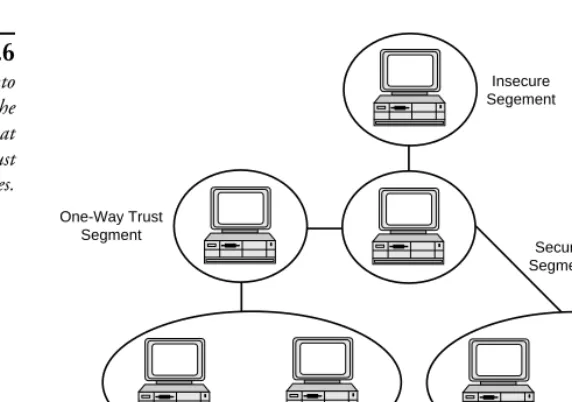
Suppose a set of machines has a set of trust relationships as shown in figure 6.5 (an arrow points from the trusting machine to the trusted machine). One needs to connect them to the network in such a way that two machines that do not trust each other are on the same segment and provide appropriate physical security to avoid tampering with a trusted machine. One such partitioning is shown in figure 6.6 (the lines between segments indicate that the segments are connected by a device that limits data flow, such as a bridge).
Secure User Segments
Security is a relative thing. How secure you make a segment is related to how much control you take away from the technically untrustworthy end user who uses the network in a location with limited physical security.
In some settings, you may consider it appropriate to remove control of a machine from the end user because you cannot trust the end user from a technical standpoint. However, to actually remove control from the end user and prevent the end user machine from being used for sniffing, the machine on the end user’s desk essentially becomes a terminal. This may seem disheartening, but keep in mind that terminals such as X Window System terminals provide the user with all the functionality of a workstation for running most Unix application soft-ware—they also have no moving parts and are virtually maintenance free.
If the end user cannot be trusted or if the software on a desktop machine could be altered by the authorized end user because of the machine’s physical location, then the machine should not be a personal computer. For the purposes of this discussion, a personal computer is one that runs an operating system such as DOS, Windows 3.1, or Windows 95. These operating systems lack the notion of a privileged user in the sense that any user can run any program without interference from the operating system. Hence, any user can run a sniffer on such a system. PCs have always been popular because they can be customized by the end user. No system administrator can restrict what the end user can and cannot do with one of these machines. In highly secure settings, machines that use these operating systems are set up without local disks to prevent installation of unauthorized software such as a sniffer. Essen-tially, they become terminals that offload some of the work from the central, physically secure server.
Insecure Segement
Secure Segment One-Way Trust
Segment
Mutually Trusting Segment
[image:13.612.180.466.80.281.2]Mutually Trusting Segment Figure 6.6
A workstation running an operating system such as Windows NT, Unix, or VMS provides an extra degree of protection because these systems include privileged users, also known as superusers (“administrator” in NT, “root” in Unix, and “system” in VMS) who must know a special password. These operating systems only allow access to certain hardware level opera-tions to superusers. If the end user has ordinary user access to the machine on his or her desk but does not have superuser privileges, then the machine can be trusted to a larger degree than the user. It is still possible to bring alternative boot media to most workstation-class operating systems and obtain superuser privileges without knowing the superuser password. The more secure systems, however, limit the user’s ability to install software. Usually the only software that can be installed by the user is the operating system.
Note I once had to review the security arrangements on a set of (DECstation 3100)
workstations. The system administrator in charge of the local network had desig-nated the workstations secure enough to be trusted by the file server to NFS mount a file system containing mission-critical data directories. I turned one of the worksta-tions off, waited a second and turned it back on. After a self-test, it came up with a boot monitor prompt. I was familiar with similar machines and knew I had two alternatives, but was unsure what the effective difference would be on this particular model of workstation. As it turned out, one command (auto) would boot the
workstation directly into Unix multiuser mode, which is what the system administra-tor had always done. The system administraadministra-tor was unaware of the results of trying the alternative command. When I tried the alternative command (boot), the worksta-tion booted directly into Unix single-user mode and gave the person at the keyboard superuser privileges without being required to issue a password.
These workstations clearly were not sufficiently secure to be trusted to NFS mount the mission-critical disks. The documentation supplied with the workstations did not mention it. However, it turned out that the single-user mode can be password protected with a password stored in non-volatile RAM under the control of the boot monitor. Password protection made these workstations sufficiently secure to be trusted to mount the mission-critical disks. Absolute security is out of the question, since one can still reset the non-volatile RAM by opening the system box. On other systems, the password may be circumvented with other methods.
Although this story has little to do with sniffing, it illustrates how trust can often lead to unexpected risks on machines outside the server room. By obtaining superuser privileges, a user could not only sniff data, but do much more serious damage.
Segments with Mutually Trusting Machines
security training is likely to be broken into by an attacker and used as a base of operations to attack other machines, including sniffing attacks). If you assume the end users are indeed competent to ensure the security of their own desktop system, all machines on the segment can be considered mutually trusting with respect to sniffing. That is, while any of the machines on the segment could be used as a sniffer, the users trust that they will not be based on the following:
■ The physical security of the machines
■ The technical competence of the other users to prevent outsiders from gaining control of one of the machines remotely
■ The personal integrity of the other users
It is possible to build a secure subnet or local area network out of a set of segments that each have mutually trusting machines. You must locate machines that are not mutually trusting on separate segments. Machines that need to communicate across segment boundaries should only do so with data that is not private. You can join mutually trusting segments by secure seg-ments. Such an arrangement presumes that the end users trust the staff operating these central facilities. However, from a practical standpoint all but the most paranoid end users find this acceptable.
Connecting Segments of One-Way Trust
Consider, for example, the simple situation of two segments of mutual trust. Mutual trust exists between the machines on the first segment and mutual trust exists between the machines on the second segment. However, the machines in the first segment are communicating less sensitive information than those in the second segment. The machines in the first segment may trust those in the second segment but not vice versa. In this case, it is allowable for the data from the first segment to flow through the second segment. However, you must use a barrier such as a bridge to prevent the flow of data in the opposite direction.
One-way trust is fairly common between secure segments and other types of segments. The less secure machines must trust the more secure machines, but not vice versa. Similarly, one way trust may exist between a segment of mutual trust and an insecure segment. Connecting segments with one way trust via bridges and routers leads to a hierarchy of segments. Tree diagrams represent hierarchies graphically. In this case, the parent-child relationship in the tree associates the parent with a more secure segment and the child with a less secure segment. Thus, the more secure segments are closer to the root of the tree and less secure segments are closer to the leaves—insecure segments are leaves in the tree representing the one-way trust hierarchy.
Insecure Segments
Insecure segments might be acceptable in areas where security requirements are also low. However, most users expect a higher level of security than any such setup could provide.
If you must use an insecure segment and still expect a higher degree of security, your only solution is software-based techniques rather than hardware-based techniques, such as encryp-tion technology.
Case Study: A Small Department Subnet
A good case study of a network system at risk is in building at the university where I work. Computer Science shares two floors of the building with Mathematics and English. On the lower floor are several rooms with computers that are accessible by clients of Computer Science, offices for professional staff members in each of the three departments, and the Computer Science machine room. On the upper floor are offices for professional staff mem-bers of Computer Science and Mathematics and the office suites for the managers and secre-tarial staff of each.
The rooms in which clients access the network are not secure. Professional staff members in each department are mutually trusting of each other. They are not mutually trusting of all members of other departments. The two management suites cannot trust each other. They cannot trust the professional staff they supervise because they work with sensitive employee records dealing with performance reviews, salary recommendations, and compete for resources provided by higher levels of management.
In fact, the management suites are equipped with a higher level of physical security than the professional staff offices. These suites may be considered secure relative to the offices of the staff they supervise. The machines in each suite can be considered mutually trusting of other machines, because the personnel share sensitive information with each other anyway (see fig. 6.7). Finally, the Computer Science machine room is secure.
Math Staff
Math Management
Computer Science Machine Room
Computer Science Management
Computer Science Staff
English Staff
Computer Science Clients
To satisfy the constraints of these trust relationships, the staff members of Computer Science, Mathematics, and English must each be placed on a separate segment. The Mathematics management suite must be placed on a separate segment. However, data to and from the Mathematics staff may flow through the Mathematics management suite without violating the trust constrains. In an exact parallel, the Computer Science management suite can have a segment with data flowing through it to and from the Computer Science staff segment. The machines used by Computer Science clients may transmit through staff and management
segments. Notice the fact that we have a hierarchy of trust being in effect here. At the top end of the hierarchy is the Computer Science machine room, which must be on its own segment as well.
Now consider the wiring system available to service these two floors. The lower floor has a single communication closet that contains the connection to the central computing facility. The upper floor has a primary communication closet immediately above it connected by a conduit through the flooring. This primary communication closet on the upper floor is close to the Mathematics management suite. The primary closet connects, via a wiring conduit, to a secondary communication closet on the opposite side of the upper floor close to the Computer Science management suite.
If you do not consider security, you will design the network by looking purely at cost and performance. The minimum cost solution is simply to locate a set of hubs in each communica-tions closet and connect all the hubs together to form a single segment. From a performance standpoint the management personnel do not want to have their network activity slowed by the activity of the staff they supervise or by people from a different department, so one can argue to segment the network on the basis of performance in a way that is close to what is needed for security purposes. If cost is not an issue, each of the proposed segments can simply be connected by a switch.
A realistic solution needs to do the following:
■ Balance the issues of cost and performance
■ Take into consideration the physical layout of the building
■ Maintain security by not violating the trust constraints
Figure 6.8 shows such a solution. Mathematics places all of its staff on a single segment by connecting hubs in the upper and lower floor communication closets. The Mathematics management suite has a segment that bears the burden of traffic from the staff segment. While Mathematics has a lower cost solution, Computer Science has a higher performance solution. Computer Science has five separate segments joined by a switch. Computer Science staff are placed on two separate segments, one for the upper floor and one for the lower floor, not to satisfy any security concern, but because separate hubs on each floor simplified the wiring and provide a low-cost opportunity to enhance performance. Computer Science, Mathematics, and English each have a separate subnet. These three subnets are joined into a single network by a router located in the communication closet on the lower floor.
segment, there is trust between the authorized users of the machines sharing a segment. Hence, an authorized user of a machine cannot use it to sniff data going to or from someone who does not trust the user.
You can learn several things from looking at the case study and its solution:
■ A minimum cost solution is not likely to provide for security.
■ A totally secure system is prohibitively expensive, but a reasonably secure system is not.
■ Different approaches to cost and performance trade-offs may be combined in a secure system. Mathematics and Computer Science have different budgets for equipment and needs for network performance.
■ A single solution may provide both security and enhance performance as in the solution shown for Computer Science.
■ A solution that provides for security adds significantly to cost. There is almost no cost difference between having a single segment for Mathematics and the solution shown. An extra wire run from the lower floor staff hub to the upper floor staff hub is one extra cost item as is the bridge separating the two segments.
Computer Science
Management Computer ScienceStaff
Math
Management MathStaff
Computer Science Staff
Computer Science Machine Room
Computer Science Clients
English Staff
Math Staff Hub
Hub
Hub
Switch
Hub
Hub Bridge
Hub
Hub Hub
Router
Tip A simple hardware barrier that is inexpensive and has the potential for increasing network performance is the installation of a bridge between your machine room and the rest of your facility. In many cases, a great deal of traffic occurs between the computers in the machine room. A bridge placed between the machine room and the rest of the facility prevents this traffic from escaping to less secure areas and reduces the collision rate outside the machine room. Bridges are much less expen-sive than a router or a switch. In fact, a low-cost personal computer may be configured for this purpose with free software such as Drawbridge.
Drawbridge is a free software package that turns an ordinary PC with a pair of standard Ethernet interfaces into a bridge. Drawbridge is also capable of filtering operations and can act as a cheap alternative to a firewall in small networks. In some cases, you may be able to recycle a used PC considered obsolete for this purpose as the memory and disk requirements of Drawbridge are quite modest.
So far, this section has covered how to avoid sniffing of data from the local part of the Internet. Such an action seems directed toward protection against internal personnel rather than external threats. However, many security breaches are aided either knowingly or unknowingly by internal personnel. In such cases, the hardware barriers described in this section will limit what an intruder, physically present or remote, can do with a sniffer. Not only is physical security greater for the more trusted segments, but so is the technical competence of those in charge of the computer systems. The least technically competent to protect a system from remote intruders must be given systems that cannot be given commands from a remote location (such as a simple personal computer). Systems that can accept commands from remote locations must be administered by those technically competent enough to prevent remote intruders by not making mistakes that will allow remote intruders to gain access to the systems.
Avoiding Transmission of Passwords
The most glaring security hole beyond simple loss of privacy is the opportunity for a sniffer to gather passwords. The best way to deal with this problem is simply not to transmit cleartext passwords across the network. Simply transmitting an encrypted password that could be captured and replayed by a sniffer is also not acceptable. Several different methods are in use to provide this kind of protection:
■ The rlogin family of protocols
■ Using encrypted passwords
■ Zero knowledge authentication
The rlogin Family of Protocols
The rlogin protocol, originally used with Unix-to-Unix terminal sessions, uses end-to-end mutual trust to avoid the transmission of any form of password. The protocol requires that the server trust the client to authenticate the user. The user places a file on the server indicating what combinations of username and hostname may connect to a particular account on machines using the server. The user may connect from these without presenting any further credentials such as a password.
This file is called the rhosts file. For the original Unix server, the filename had to be preceded with a dot, “.rhosts,” but on non-Unix systems using this protocol, the file may have to have a different name to satisfy the constraints imposed for filenames or different mechanisms used to store the information about what users are accepted on what trusted systems. The user must trust that the server is sufficiently secure, that no one else can alter the rhosts file and that no one else can read the rhosts file. The requirement that the rhosts file not be altered is obvious—if someone modified the rhosts file, he or she could connect to the account via the rlogin protocol without the permission of the legitimate user. The requirement that no one else can read the rhosts file is a bit more obscure, but learned from painful experience. If an attacker gains access to another account on the machine hosting the rlogin server, the attacker can read the rhosts file of a user and target the user for an indirect attack. In an indirect attack, the attacker attempts to gain access to an account listed in the rhosts file on another machine and use it to obtain access to the machine hosting the rlogin server.
Note The rlogin protocol is used by a whole family of programs that use the same authentication protocol. The family is collectively referred to as the r-commands. The family includes rlogin for terminal sessions, rsh for remote shell execution of command-line programs, and rcp for remote file copying. rcp is preferred over FTP for its security and ease of use. It is secure because it does not require the transmis-sion of a password and it is easier to use because it can transfer multiple files specified with the same syntax as the local file copying command.
The rlogin protocol remains vulnerable to ARP spoofing and DNS spoofing (discussed later in this chapter). It also does not completely protect a user who uses machines that he or she does not control. For example, when you start an rlogin terminal session from a client’s or
colleague’s office, the client’s or colleague’s machine is not listed in your rhosts. In these cases, you must remember my password and have it transmitted across the network in plain sight of any sniffers that may be out there.
Note The r-commands are not limited to Unix. DEC VMS has a variety of TCP/IP software
available for it including both clients and servers for many of the programs in this family. Many TCP/IP software packages for the PC offer r-command clients. There is a networking suite for Windows NT that provides an rlogin server, enabling you to have access to the command line from a remote location without being logged into it locally. There are many freeware packages that provide a similar server for any PC with winsock.dll.
Problems with rlogin
As mentioned earlier, on a machine with any server for programs in the rlogin protocol family it is critical that only the user can modify his or her rhosts file. If it is possible for someone else to modify it then the ability to modify it can be leveraged into the ability to obtain full access to the account. Note that if your home directory is on an NFS mounted file system exported to someone else’s machine your rhosts file is vulnerable to simple attacks on NFS. A standard attack for the superuser of another machine is to give you an account on the other machine and then use the su command to gain access to your account on the other machine. The NFS server is fooled into believing you are accessing your files because it trusts the other machine to authenticate its users. So far, the attacker is limited to accessing your files, but when he alters your rhosts file the attacker can begin to run programs that execute with your privileges and do greater harm.
Do not confuse the rexec commands (rexec and rcmd) with the r-commands. The rexec daemon waits for a username and cleartext password to authenticate a client. It will then execute a single shell command. Although this is similar to rsh, rexec requires the transmission of a cleartext password to be sniffed. Also, it provides two distinct error conditions, one for an invalid username and one for an invalid password. Hence, a brute-force attack can be mounted by attempting all possible usernames to both determine what usernames are valid and which users have no password. A standard login program will not provide this distinction and provide a mechanism to prevent rapid-fire attempts to log in. Security conscious system administrators often disable the rexec daemon and rexec commands are so seldom known about by users as not to be missed.
Using Encrypted Passwords
Another solution is to use encrypted passwords over the network. You must use caution, however, when simplifying this technique. Even with encryption, a sniffer can still record the encrypted password and decipher the encrypted password at his or her leisure. One way around this is to use an encryption key that involves the current time. If the sender and receiver are closely synchronized, the sniffer must replay the encrypted password within one tick of the two machines’ shared clock. If the sender and receiver are widely separated, however, this technique becomes less practical and effective because shared clocks will lack sufficient time resolution to prevent an attacker from using a quick replay. One way around this lack of close synchroniza-tion is to set a limited number of attempts at typing the password correctly.
It also does not suffice to simply encrypt the password with an algorithm using a key that allows an attacker to determine the encryption key. The attacker would decrypt it for repeated use at a later time. Some protocols use an encryption technique equivalent to the one used by the Unix password program when it stores passwords in the password file. This encryption technique is no longer considered particularly secure against brute force cryptographic attacks where all likely passwords are encrypted with the same algorithm used by the password file. Any two words that encrypt the same must be the same. Hence, poorly chosen (for example, dictionary words) or short passwords are particularly easy to crack by brute force.
Note SRA from Texas A&M provides telnet and FTP without cleartext password exchange. It uses Secure RPC (Remote Procedure Call) authentication. Secure RPC is part of the Sun RPC package distributed along with Secure NFS by many vendors and is quite common on Unix systems. Secure RPC uses public key cryptography using the patented Diffy-Hellman algorithm. SRA uses a new random secret key/public key pair for each connection eliminating the need for a separate keyserver.
SRA can be obtained by anonymous ftp to coast.cs.purdue.edu in the directory
/pub/tools/unix/TAMU.
The use of Kerberos also prevents cleartext passwords from being sent across the network. Kerberos is a comprehensive authentication system using a sophisticated time varying encryp-tion algorithm and requires that both systems at the ends of a communicaencryp-tion connecencryp-tion trust a separate security server to negotiate the authentication. This avoids having servers trust clients to do the authentication, as the rlogin protocol must do. See Chapter 9 for more information on Kerberos.
Zero-Knowledge Authentication
Another mechanism for secure authentication without passwords is zero-knowledge proofs. Networks that use this system have a client and a server that share what is in essence a very long sequence of digits. When the client connects to the server, the server queries the client about a set of digits in a small set of positions in the sequence. Because the number of digits in the sequence is very long, knowledge of a few digits by a sniffer is not sufficient. The server will query for a different set of positions each time the client connects.
This type of authentication is growing in popularity. You store the digit sequence held by the client on a credit card sized device or even in a ring worn by the user. No computer needs to be carried by a mobile user of this technique; only a few kilobytes of data storage.
RFC 1704 and RFC 1750 provide a good background in the principles of authentication and the current state of encryption technology for the Internet.
DESlogin 1.3 uses a challenge / response technique in conjunction with DES encryption for authentication. The latest version is available via anonymous FTP from ftp.uu.net/pub/ security/des.
S/KEY from Bellcore uses the response / challenge technique as well. S/Key is available via anonymous FTP to thumper.bellcore.com in the /pub/nmh directory. S/Key has support for a variety of platforms, including Unix, Macintosh, and Windows, to generate the onetime password used as a response to a challenge. It also includes a replacement for /bin/login and the FTP daemon on the Unix host.
Employing Encryption for Entire Connection/Session
Public key cryptography can manage the authentication process to prevent password sniffing but is not practical for entire terminal sessions or TCP/IP connections. Public key cryptogra-phy is sometimes called asymmetric because different keys are used for encryption and decryption with no practical way to compute one key from the other key. Classical, symmetric techniques are much more computationally simple and practical for entire sessions. Just as public key cryptography can be used to authenticate a user, it can also be used to solve the key distribution problem of a symmetric encryption technique. Each sender receives the key electronically with the key encrypted by a public key technique. Thus, the key cannot be sniffed and used to decrypt the rest of the session.
One such mechanism employing the RSA public key encryption algorithm is the secure socket layer (SSL) that is being promoted for use with the Web. Because the entire contents of a TCP connection are encrypted, you can send credit card numbers over the Internet without worrying that someone will intercept them at one of the many routers between the user’s Web browser and the merchant’s Web site. You can use SSL as a layer on top of TCP for any server that might otherwise use raw TCP.
To take advantage of session encryption on the Web, you must have compatible encryption techniques being used on both the browser and the Web server. Typically, encryption is only used for transmission of sensitive information such as passwords and credit card information, not routine HTML and image files. Any vendor doing business on the Web should be quite clear about what encryption techniques the server supports and give a list of some of the browsers that support it so that a user will know in advance if the information being sent is protected by encryption. Conversely, a good browser should indicate if a response to a form on the Web is not going to be encrypted so that vendors who do not provide a compatible encryption technique do not endanger their customers.
Spoofing
Spoofing can occur at all layers of the IP system. The hardware layer, the data link layer, the IP layer, the transport layer, and the application layer are susceptible. All application layer protocols are at risk if the lower layers have been compromised. In this chapter, only the application layer protocols intimately linked to the IP protocol are discussed. This includes routing protocols and the DNS naming protocol. Other application layer protocols depend on these two protocols to provide basic services to almost all applications using the Internet.
Hardware Address Spoofing
serious problem occurs if the network interface can alter the source address and send data that appears to come from various source addresses. In the IEEE 802 standards for networking (of which Ethernet is a variant), each network interface has a 48-bit hardware address. It uses this hardware address to match the variety of destination addresses of the frames it sees. The interface copies frames with matching destination addresses into its internal buffer and notifies the operating system that they are available for further processing. Packets coming from the operating system to the interface do not typically specify a source address; the interface always puts its hardware address in the source field.
Most software does not typically control the source field of frames leaving an Ethernet interface. When another host examines a packet containing a hardware source address associ-ated with an interface of a particular machine, it assumes that the packet originassoci-ated on that machine and accepts it as authentic. An IEEE standards committee assigns each network interface manufacturer a unique 24-bit prefix for the 48-bit hardware address; the manufac-turer assigns a unique 24-bit suffix to each interface it makes. Regardless, many interface cards are configurable and allow host software to specify a source address other than the one assigned by the manufacturer. This configurability makes it possible to use them to spoof the source address.
DECNet, for example, uses 16-bit identifiers and requires that the leading 32 bits of the hardware address be set to a fixed value to indicate that the packet is a DECNet packet. Any network interface that is compatible with DECNet can have its hardware source address altered in some way, either by software or switches on the interface board.
To see how common it is for a network interface to be able to spoof the source address, however, recall how a bridge works. A bridge not only puts its interfaces into promiscuous mode, but it also sets the hardware source address of packets sent out on its interfaces to match the hardware source address of the originating interface. A PC with two software configurable interfaces can be configured to be used as a bridge. Clearly, such software configurability has a variety of malicious uses. The drawbridge software mentioned in the previous section on hardware barriers to prevent sniffing is compatible with most Ethernet boards which means most Ethernet boards will permit source address spoofing.
As you can see, it is not entirely safe to base the authenticity of a packet on the hardware source address. Unfortunately, there is very little you can do to protect yourself against such deviousness. One solution is to use digital signatures at the application layer. Unfortunately, currently there are no protections in the IP network layer that will prevent a hardware address spoofer from disguising one machine as another. If the victim machine is trusted (for example, is allowed to NFS mount filesystems from another machine), the spoofer will be able to take advantage of that trust and violate security without being detected. Fortunately, hardware address spoofing is difficult (relative to many other spoofing methods) and requires penetration of physical security.
unauthorized machine and you also need to check to see if the authorized machines are using the hardware address they should. The latter can be checked using sufficiently “intelligent” hubs in secure locations.
All machines not in physically secure locations can be connected to hubs in secure locations. Some “intelligent” hubs can be configured to accept or send packets or both to or from specific hardware addresses on each port they service. Thus, you can configure the hub to accept only packets with hardware addresses matching the manufacturer-assigned hardware address of the interface on the authorized machine. This interface should be connected to the wall plate on the far side of the wires connected to that port. Clearly, you are still relying on physical security to be sure that the hub, wires, and authorized machine remain as they should.
Note Devices that perform hardware address verifications cannot be categorized as
“hubs” in the traditional sense and are probably actually specialized switches or bridges. However, they are marketed as “active hubs” or “filtering hubs.” Such hubs are available from 3Com, HP, and IBM.
ARP Spoofing
A more common form of spoofing that is accidental is ARP spoofing. ARP (Address Resolu-tion Protocol) is part of Ethernet and some other similar protocols (such as token-ring) that associate hardware addresses with IP addresses. ARP is not part of IP but part of these Ethernet-like protocols; ARP supports IP and arbitrary network-layer protocols. When an IP datagram is ready to go out on such a network, the host needs to know the hardware destina-tion address to associate with the given IP destinadestina-tion address. For local IP destinadestina-tions, the hardware address to use will be the hardware address of the destination interface. For non-local destinations, the hardware address to use will be the hardware address of one of the routers on the local network.
How ARP and ARP Spoofing Work
To find the hardware address, the host sends out an ARP request using the hardware broadcast address. A frame with the hardware broadcast address reaches every network interface on the local network, and each host on the local network has its operating system interrupted by the network interface. The ARP request is essentially asking the question, “What is the hardware address corresponding to the IP address I have here?” Typically, only the host with the matching IP address sends an ARP reply and the remaining hosts ignore the ARP request. The ARP request contains the IP address of the sender of the request and reaches all hosts via a broadcast.
The association between the hardware address and the IP address of other machines on a network is stored in an ARP cache on each host. When an IP datagram is about to leave a host, the host consults the ARP cache to find the destination hardware address. If the host finds an entry for the IP destination address, it need not make an ARP request. The entries in an ARP cache expire after a few minutes.
Thus, when the ARP cache entry for a machine expires, an ARP request goes out to refresh the entry. No reply comes back if the target machine goes down. The entries for its interface’s hardware will disappear from the ARP caches in the other machines on the network. The other machines will be unable to send out IP datagrams to the downed system after the ARP cache entries expire. Before that point in time, IP datagrams are sent out but are not received. When the machine comes back up, it will again be able to reply to ARP requests. If someone replaces its interface, the now up and running machine will have a new hardware address and will use that new hardware address in ARP replies. ARP caches throughout the network will reflect the change, and IP datagrams go out using the new hardware address.
Because you expect the IP address to hardware address association will change over time, the potential exists that the change may be legitimate. Sometimes it is purely accidental. Someone may inadvertently assign a machine the same IP address held by another machine. On personal computers or special purpose devices such as network printers or X Window System terminals, the end user typically has access to a dialog box, command, or text file that sets the IP address.
On multiuser systems, the system administrator is typically the only one who can set the IP addresses of the network interface(s). This arrangement is changing, however, as more inexpe-rienced IP-based end users with PCs set addresses. In addition, bureaucracies often separate system administrators and network administrators that use the same network. Under such circumstances it is common for two machines to end up with the same IP address. Duplication can occur either by copying the network configuration from one personal computer to another without the end user knowing the need for IP addresses to be unique. Duplication can also occur if system administrators on a network do not work together when configuring system addressing.
When two machines end up with the same IP address, both of them will naturally reply to an ARP request for that address. Two replies to the request come back to the host that originated the request. These replies will arrive in rapid succession, typically separated by at most a few milliseconds. Some operating systems will not realize anything is wrong and simply file each reply in the ARP cache with the slowest response remaining in the ARP cache until the entry for that IP address expires. Other operating systems will discard ARP replies that correspond to IP addresses already in the cache. These may or may not bother to check if the second reply was a harmless duplicate or an indication an ARP spoof may be underway.
ARP requests. An attacker can simply use a machine assigned, via the normal operating system configuration mechanisms, the same IP address as a machine that is currently not working. An attacker attempting to masquerade his or her machine can simply turn the legitimate machine off. The attacker does not need to have direct access to the power switch on the machine. The machine can be turned off either by unplugging it or flipping the appropriate circuit breaker.
An alternative to disconnecting its power is to disconnect it from the network at some point in the network wiring scheme. Third, the attacker can change the legitimate machine’s IP address and leave it turned on if he or she can reconfigure the machine. Doing so is less likely to draw attention or result in confusion from the machine’s user or administrator.
A Case Study: Inadvertent ARP Spoofing
At a Department of Computer Services in a midwestern university, a room is set aside for making presentations to groups of clients. The room is equipped with a Unix workstation and a $15,000 ceiling-mounted video projector projecting onto a $2,000 eight-foot diameter screen. One day, the workstation needed to be replaced with a newer model. The new worksta-tion came in and was being configured to match to the configuraworksta-tion of the workstaworksta-tion in the presentation room. One of the first questions asked during the operating system installation process was the IP address. The technician in charge of configuring the new workstation looked up the IP address of the workstation in the presentation room and entered it into the dialog box.
After a short time, the new workstation was up and running. The systems staff wanted to be sure it was working correctly because it was difficult to fix after it was installed in the presenta-tion room. The new workstapresenta-tion was turned off that night after testing the shutdown proce-dure to be used by the presenters.
The next morning a presentation started in the presentation room with the old workstation. All was going well until the systems staff decided to resume testing of the new workstation. Shortly after the new workstation booted, the presentation came to a complete halt. The person in charge of the presentation was using the X Window System to demonstrate a program running on a better computer. The workstation in the presentation room had established a TCP/IP connection with the better machine and the presenter was creating the illusion that the program was running on the old workstation.
receiving the IP datagrams sent to the IP address the old and new workstations shared. The new workstation did not know what to do with these datagrams and promptly sent a TCP/IP reset message in reply, resulting in the shutdown of the demonstration program. From initial appearances, the demonstration program just stopped and the old workstation appeared to have been cut off from the network.
Needless to say, the presenter was upset. When the system administrator figured out what had gone wrong, the technician who used the IP address of an existing machine learned a valuable lesson: two machines with the same IP address cannot be connected to the network at the same time.
A Case Study: Malicious ARP Spoofing
As mentioned earlier, I work at a university where Computer Science allows its clients (stu-dents) temporary access to its computers. These include some Unix workstations using NFS to mount a mission-critical filesystem. One of these clients has a laptop running Unix. He already knows the IP address of the workstations that NFS mount the mission-critical filesystems. This particular user has created a copy of the workstation password file on his laptop and has superuser privileges on his own laptop, which runs Unix with NFS.
One day he is left alone in the room with one of our workstations. He shuts down the worksta-tion and jacks his laptop into our network. After a few minutes the file server’s ARP cache entry for the workstation expires. Then, he launches an attack by telling his workstation to NFS mount our mission-critical filesystem. The mount daemon on the file server checks the IP address of the machine making this request against the list of authorized IP addresses and finds a match. It then proceeds to send information needed to access the NFS daemon back to the IP address that just made the mount request.
When the mount daemon sends the reply back, the low-level software connecting IP to Ethernet discovers that it does not have an ARP cache entry for this IP address. It puts the reply on hold and makes an ARP broadcast to determine the hardware address to which to send the reply. The attacker’s laptop is the only machine to respond. The low-level software takes the response, caches it, and uses it to take the reply out of the holding bin and send it out the Ethernet interface. The attacker succeeds in accessing the mission-critical filesystem as if he were a legitimate user of the workstation that he just turned off.
Preventing an ARP Spoof
The deception is useful to the ARP spoofer because the legitimate holder of the IP address is trusted in some way by the machine being deceived. Perhaps the trusted machine is allowed to NFS mount filesystems, use rlogin, or start a remote shell without being prompted for a password (particularly troublesome for privileged user accounts). Ideally, machines extending such trust should simply not use ARP to identify the hardware addresses of the machines they trust.
Stop Using ARP
Machines extending trust to other machines on the local network based on an IP address should not use ARP to obtain the hardware address of the trusted machines. Instead, the hardware address of the trusted machines should be loaded as permanent entries into the ARP cache of the trusting machine. Unlike normal ARP cache entries, permanent entries do not expire after a few minutes. Sending a datagram to an IP address associated with a permanent ARP cache entry will never result in an ARP request. With no ARP request being sent, an attacker does not have the opportunity to send an ARP reply. It seems unlikely that any operating system would overwrite a permanent ARP cache entry with an unsolicited ARP reply.
With permanent ARP cache entries for trusted machines, the trusting host will not use ARP to determine the correct hardware address and will not be fooled into sending IP data to an ARP spoofer. Of course, it will also send IP data to the machine even if the machine has been down for some time. Another downside to permanent ARP entries is that the cache entries will need revising if the hardware address changes for a legitimate reason. Finally, ARP caches may be of limited size, limiting the number of permanent entries or further limiting the time a dynamic entry spends in the cache.
Displaying ARP Cache Entries
On Unix and Windows 95/NT machines, you use the arp command to manipulate and inspect the ARP cache. This command has several options.
arp -a
The -a option displays all ARP cache entries for all interfaces of the host. The following output is an example of what you would see on a Windows 95 machine:
Interface: 147.226.112.167
Deleting an ARP Cache Entry
At some point you may want to delete a permanent ARP cache entry that is no longer valid or delete a dynamic entry that you suspect of being spoofed. The -d option deletes the entry with the given IP address from the ARP cache.
arp -d 147.226.112.101
Inserting a Permanent ARP Cache Entry
The -s option inserts a permanent (static) ARP cache entry for the given IP address. Typically, the Ethernet address would be obtained by displaying the entire ARP cache as shown previ-ously.
arp -s 147.226.112.101 08-00-2b-18-93-68
To ensure that the address is in the ARP cache you can first use the ping command to send an ICMP/IP echo request to the IP address in question. A somewhat more secure, but tedious, method is to use an operating system dependent method for querying the machine in question for its own hardware address from its console. You can place a series of such commands into the startup script for the machine that will be extending trust to others.
Inserting Many Permanent ARP Cache Entries
The -f option loads permanent entries into the ARP cache from a file containing an IP address to hardware address database.
arp -f arptab
In this example, the file is named “arptab,” but the name of the file is up to the system administrator using the command. The -f option to the arp command is not available on all systems. In particular, it is missing from the current versions of Windows 95 and Windows NT. However, it is really just a substitute for a series of arp commands with the -s option.
Use an ARP Server
The arp command outlined in the previous section also allows one machine to be an ARP server. An ARP server responds to ARP requests on behalf of another machine by consulting (permanent) entries in its own ARP cache. You can manually configure this ARP cache and configure machines that extend trust based on this IP address to use ARP replies coming from the ARP server rather than ARP replies from other sources. However, configuring a machine to believe only in the ARP server is a difficult task for most operating systems.
Introduce Hardware Barriers
The use of bridges or switches removes the threat of sniffing between network segments; likewise, the use of routers removes the threat of ARP spoofing between IP subnets. You can separate the trusted hosts (those with IP addresses that might benefit an attacker using ARP spoofing) from subnets on which an attacker might obtain access. Subnetting for security is helpful if physical security prevents attachment to the subnet of the trusted machine. Such subnetting prevents a spoofer from powering down one of the trusted machines and attaching to the subnet on which ARP requests from the trusting machine are broadcast.
A temptation when considering using subnetting to protect from ARP spoofing is to place the machine extending trust on a separate subnet from the machines to which it is extending trust. However, this setup simply places the router in the position of being deceived by an ARP spoof. If trust is extended on the basis of IP addresses, the machine extending the trust is in turn trusting the routers to deliver the IP datagrams to the correct machine. If the trusted machines are on a separate subnet that is susceptible to ARP spoofing, the router for that subnet must bear the burden of ensuring that IP datagrams get to their legitimate destination. With this setup, you might need to place permanent ARP cache entries for the trusted machines in the router itself.
Finally, it is also important that trusted machines be protected from an ARP spoofer that is attempting to masquerade as the router. Fortunately, routers are typically physically secure and crash rarely or for very little time, which makes them difficult to impersonate.
Sniffing Case Study Revisited
To illustrate ARP spoofing in a familiar context, recall the solution to the sniffing problem adopted by Computer Science in the case study earlier in the chapter (see fig. 6.7). The solution to the sniffing problem was to divide the portion of the network servicing Computer Science into five segments. These segments connect to a switch in the Computer Science machine room. The only router being used is the router that joins Computer Science with the two segment subnet for Mathematics and the one segment subnet for English. All five seg-ments in Computer Science are part of a single subnet.
Within a single subnet an ARP request goes out to all machines on the subnet and a reply may come back from any of them. Thus, an ARP spoof attack may be launched from any of the segments. To prevent this, the segments may be divided into a group of subnets rather than a single larger subnet.
The analysis of the situation for the ARP spoofing problem is analogous to that for the sniffing problem. The trust that a machine will not sniff is replaced by the trust that a machine will not ARP spoof. The hardware barrier used to control ARP spoofing is a router to induce