www.nostarch.com
TH E FI N EST I N G E E K E NTE RTAI N M E NT™
SH ELV E I N: OP ER AT IN G S YS TE M
$29.95 ($32.95 CDN)
B U I L D T H E
N E T W O R K Y O U
N E E D W I T H P F
B U I L D T H E
N E T W O R K Y O U
N E E D W I T H P F
“I LAY FLAT.”
OpenBSD’s stateful packet filter, PF, offers an amazing feature set and support across the major BSD platforms. Like most firewall software though, unlocking PF’s full potential takes a good teacher.
Peter N.M. Hansteen’s PF website and conference tutorials have helped thousands of users build the networks they need using PF. The Book of PF is the
product of Hansteen’s knowledge and experience, teaching good practices as well as bare facts and software options. Throughout the book, Hansteen emphasizes the importance of staying in control by having a written network specification, using macros to make rule sets more readable, and performing rigid testing when loading in new rules.
Today’s system administrators face increasing challenges in the quest for network quality, and The Book of PF can
help by demystifying the tools of modern *BSD network defense. But, perhaps more importantly, because we know you like to tinker, The Book of PF tackles a broad
range of topics that will stimulate your mind and pad your resume, including how to:
• Create rule sets for all kinds of network traffic, whether it is crossing a simple home LAN, hiding behind NAT, traversing DMZs, or spanning bridges
• Use PF to create a wireless access point, and lock it down tight with authpf and special access restrictions • Maximize availability by using redirection rules for
load balancing and CARP for failover
• Use tables for proactive defense against would-be attackers and spammers
• Set up queues and traffic shaping with ALTQ, so your network stays responsive
• Master your logs with monitoring and visualization, because you can never be too paranoid
The Book of PF is written for BSD enthusiasts and network
admins at any level of expertise. With more and more services placing high demands on bandwidth and increasing hostility coming from the Internet at large, you can never be too skilled with PF.
A B O U T T H E A U T H O R
Peter N.M. Hansteen is a consultant, writer, and sys-admin based in Bergen, Norway. A longtime Freenix advocate, Hansteen is a frequent lecturer on FreeBSD and OpenBSD topics. The Book of PF, Hansteen’s first
book, is an expanded follow-up to his very popular online PF tutorial.
With a foreword by
B O B B E C K
,
Director of
the OpenBSD Foundation
P E T E R N . M . H A N S T E E N
T H E B O O K
O F P F
T H E B O O K
O F P F
A
N O - N O N S E N S E
G U I D E T O T H E
O P E N B S D F I R E W A L L
THE BOOK OF PF
A No - N o n s e n se G u i d e t o t h e
O p e n B S D F ir e w a l l
by Peter N. M. Hansteen
San Francisco
THE BOOK OF PF. Copyright © 2008 by Peter N.M. Hansteen.
All rights reserved. No part of this work may be reproduced or transmitted in any form or by any means, electronic or mechanical, including photocopying, recording, or by any information storage or retrieval system, without the prior written permission of the copyright owner and the publisher.
11 10 09 08 07 1 2 3 4 5 6 7 8 9
ISBN-10: 1-59327-165-4 ISBN-13: 978-1-59327-165-7
Publisher: William Pollock Production Editor: Megan Dunchak Cover and Interior Design: Octopod Studios Developmental Editor: Adam Wright Technical Reviewer: Henning Brauer Copyeditor: Linda Recktenwald Compositor: Riley Hoffman Proofreader: Alina Kirsanova
Indexers: Karin Arrigoni and Peter N.M. Hansteen
For information on book distributors or translations, please contact No Starch Press, Inc. directly:
No Starch Press, Inc.
555 De Haro Street, Suite 250, San Francisco, CA 94107
phone: 415.863.9900; fax: 415.863.9950; [email protected]; www.nostarch.com
Librar y of Congress Cataloging-in-Publication Data
Hansteen, Peter N. M.
The book of PF : a no-nonsense guide to the OpenBSD firewall / Peter N.M. Hansteen. p. cm.
Includes index.
ISBN-13: 978-1-59327-165-7 ISBN-10: 1-59327-165-4
1. OpenBSD (Electronic resource) 2. TCP/IP (Computer network protocol) 3. Firewalls (Computer security) I. Title.
TK5105.585.H385 2008 005.8--dc22
2007042929
No Starch Press and the No Starch Press logo are registered trademarks of No Starch Press, Inc. Other product and company names mentioned herein may be the trademarks of their respective owners. Rather than use a trademark symbol with every occurrence of a trademarked name, we are using the names only in an editorial fashion and to the benefit of the trademark owner, with no intention of infringement of the trademark.
The information in this book is distributed on an “As Is” basis, without warranty. While every precaution has been taken in the preparation of this work, neither the author nor No Starch Press, Inc. shall have any liability to any person or entity with respect to any loss or damage caused or alleged to be caused directly or indirectly by the information contained in it.
To Gene Scharmann,
B R I E F C O N T E N T S
Foreword by Bob Beck... xi
Preface ... xiii
Chapter 1: What PF Is ...1
Chapter 2: Let’s Get On With It ...7
Chapter 3: Into the Real World ...17
Chapter 4: Wireless Networks Made Easy ...33
Chapter 5: Bigger or Trickier Networks...45
Chapter 6: Turning the Tables for Proactive Defense ...67
Chapter 7: Queues, Shaping, and Redundancy ...87
Chapter 8: Logging, Monitoring, and Statistics ...107
Chapter 9: Getting Your Setup Just Right ...121
Appendix A: Resources...135
Appendix B: A Note on Hardware Support ...141
C O N T E N T S I N D E T A I L
F O REW O R D b y Bo b Be ck xi
P REF A CE xiii
About the Book and Thanks ... xiv
If You Came from Elsewhere ... xvi
PF looks really cool. Can I run PF on my Linux machine? ... xvi
I know some Linux, but I need to learn some BSD. Any pointers? ... xvi
Can you recommend a GUI tool for managing my PF rule set? ...xvii
Is there a tool I can use to convert my OtherProduct® setup to a PF configuration? ...xviii
Where can I find out more? ...xviii
A Little Encouragement: A PF Haiku ... xix
1 W HA T PF IS 1 Packet Filter? Firewall? A Few Important Terms Explained ... 3
Network Address Translation ... 3
Why the Internet Lives on a Few White Lies ... 4
Internet Protocol, Version 6 on the Far Horizon ... 4
The Temporary Masquerade Solution Called NAT ... 5
PF Today ... 6
2 L ET’ S G ET O N WI TH I T 7 Simplest Possible PF Setup on OpenBSD ... 8
Simplest Possible PF Setup on FreeBSD ... 9
Simplest Possible PF Setup on NetBSD ... 10
First Rule Set—A Single, Stand-Alone Machine ... 11
Slightly Stricter, with Lists and Macros ... 13
Statistics from pfctl ... 15
3 I NT O T HE REA L W O R LD 17 A Simple Gateway, NAT If You Need It ... 17
Gateways and the Pitfalls of in, out, and on ... 18
What Is Your Local Network, Anyway? ... 19
Setting Up ... 19
Testing Your Rule Set ... 23
That Sad Old FTP Thing ... 24
FTP Through NAT: ftp-proxy ... 25
FTP, PF, and Routable Addresses: ftpsesame, pftpx, and ftp-proxy ... 26
Making Your Network Troubleshooting Friendly ... 28
Then, Do We Let It All Through? ... 28
The Easy Way Out: The Buck Stops Here ... 29
Letting ping Through ... 29
Helping traceroute ... 29
Path MTU Discovery ... 30
Tables Make Your Life Easier ... 31
4 W IR EL ESS N ETW O RK S M A D E EA S Y 33 A Little IEEE 802.11 Background ... 33
MAC Address Filtering ... 34
WEP ... 35
WPA ... 35
Picking the Right Hardware for the Task ... 35
Setting Up a Simple Wireless Network ... 36
The Access Point’s PF Rule Set ... 38
If Your Access Point Has Three or More Interfaces ... 38
Handling IPsec, VPN Solutions ... 39
The Client Side ... 40
Guarding Your Wireless Network with authpf ... 40
A Basic Authenticating Gateway ... 41
Wide Open but Actually Shut ... 43
5 BI G G E R O R T RI C KI E R N ETW O R KS 45 When Others Need Something in Your Network: Filtering Services ... 45
A Webserver and a Mail Server on the Inside—Routable Addresses ... 46
Getting Load Balancing Right with hoststated ... 51
A Webserver and a Mail Server on the Inside—The NAT Version ... 56
Back to the Single NATed Network ... 57
Filtering on Interface Groups ... 59
The Power of Tags ... 60
The Bridging Firewall ... 61
Basic Bridge Setup on OpenBSD... 61
Basic Bridge Setup on FreeBSD... 62
Basic Bridge Setup on NetBSD... 63
The Bridge Rule Set ... 64
Handling Nonroutable Addresses from Elsewhere ... 65
6 TU RN I N G T HE TA BL ES F O R P ROA C TI V E D EFE NS E 67 Turning Away the Brutes ... 68
You May Not Need to Block All of Your Overloaders ... 70
Tidying Your Tables with pfctl ... 70
Giving Spammers a Hard Time with spamd ... 71
Remember, You Are Not Alone: Blacklisting ... 72
Greylisting: My Admin Told Me Not to Talk to Strangers ... 75
Some Highlights of Day-to-Day spamd Use ... 78
Handling Sites That Do Not Play Well with Greylisting ... 83
Conclusions from Our spamd Experience ... 84
7 Q U EUES , S HA P IN G , A N D RED U ND A NC Y 87 Directing Traffic with ALTQ ... 87
Basic ALTQ Concepts ... 88
Queue Schedulers, aka Queue Disciplines ... 88
Setting Up ALTQ ... 89
Understanding Priority-Based Queues (priq) ... 91
Class-Based Bandwidth Allocation for Small Networks (cbq) ... 93
Queuing for Servers in a DMZ ... 94
Using ALTQ to Handle Unwanted Traffic ... 96
Redundancy and Failover: CARP and pfsync ... 97
The Project Specification: A Redundant Pair of Gateways ... 98
Setting Up CARP: Kernel Options, sysctl, and ifconfig Commands ... 100
Keeping States Synced: Adding pfsync ... 103
Putting Together a Rule Set ... 104
8 L O G G I N G , M O N I TO R IN G , A N D ST A TI ST IC S 107 PF Logs: The Basics ... 108
Logging All Packets: log (all) ... 110
Logging to Several pflog Interfaces ... 111
Logging to syslog, Local or Remote ... 112
Tracking Statistics for Each Rule with Labels ... 113
Some Additional Tools for PF Logs and Statistics ... 115
Keeping an Eye on Things with pftop ... 115
Graphing Your Traffic with pfstat ... 116
Collecting NetFlow Data with pfflowd ... 118
SNMP Tools and PF-Related SNMP MIBs ... 118
Remember, Useful Log Data Is the Basis for Effective Debugging ... 119
9 G ET TI NG Y O U R SET UP JU ST R IG HT 121 The Things You Can Tweak and What You Probably Should Leave Alone ... 121
block-policy ... 122
skip ... 123
state-policy ... 123
timeout ... 123
limit ... 125
debug ... 126
ruleset-optimization ... 126
Cleaning Up Your Traffic: scrub and antispoof ... 127
scrub ... 128
antispoof ... 128
Testing Your Setup ... 129
Debugging Your Rule Set ... 131
Know Your Network, Stay in Control ... 133
A RES O U RC ES 135 General Networking and BSD Resources on the Internet ... 136
Sample Configurations and Related Musings ... 137
PF on Other BSD Systems ... 138
BSD and Networking Books ... 138
Wireless Networking Resources ... 139
spamd and Greylisting-Related Resources ... 139
Book-Related Web Resources ... 139
If You Enjoyed This Book, Buy OpenBSD CDs and Donate! ... 140
B A N O TE O N H A RD WA RE S UP P O RT 141 A Case in Point: The Story of a Small Wireless Network ... 142
Getting the Right Hardware ... 143
Issues Facing Hardware-Support Developers ... 144
How to Help the Hardware-Support Efforts ... 144
F O R E W O R D
OpenBSD’s PF packet filter has enjoyed a lot of success
and attention since it was first released in OpenBSD 3.0
in late 2001. While you’ll find out more about PF’s
history in this book, in a nutshell, PF happened because it was needed by the developers and users of OpenBSD. Since the original release, PF has evolved greatly and has become the most powerful free tool available for firewalling, load balancing, and traffic managing. When PF is combined with CARP and pfsync, PF lets system administrators not only protect their services from attack, but it makes those services more reliable by allowing for redundancy and it makes them faster by scaling them using pools of servers managed through PF and hoststated.
With these features comes the necessary evil of complexity. For someone well versed in TCP/IP and OpenBSD, PF’s system documentation is quite extensive and usable all on its own. But in spite of extensive examples in the system documentation, it is never quite possible to put all the things you can do with PF and its related set of tools front and center without making the system documentation so large that it ceases to be useful for those experi-enced people who need to use it as a reference.
This book bridges the gap. If you are a relative newcomer, it can get you up to speed on OpenBSD and PF. If you are a more experienced user, this book can show you some examples of the more complex applications that help people with problems beyond the scope of the typical. For several years, Peter N.M. Hansteen has been an excellent resource for people learning how to apply PF in more than just the “How do I make a firewall?” sense, and this book extends his tradition of sharing that knowledge with others. Firewalls are now ubiquitous enough that most people have one, or several. But this book is not simply about building a firewall, it is about learning techniques for manipulating your network traffic and understanding those techniques enough to make your life as a system and network administrator a lot easier. A simple firewall is easy to build or buy off the shelf, but a firewall you can live with and manage yourself is somewhat more complex. This book goes a long way toward flattening out the learning curve and getting you thinking not only about how to build a firewall, but how PF works and where its strengths can help you. This book is an investment to save you time. It will get you up and running the right way—faster, with fewer false starts and less time experimenting.
Bob Beck
P R E F A C E
This is a book about building the network
you need. In order to build that network,
we’ll dip into the topics of firewalls and
related functions, starting from a little theory
along with a number of examples of filtering and
other network traffic directing. We’ll assume that you
have a basic to intermediate command of TCP/IP
networking concepts and Unix administration.
All the information in this book comes with a fair warning: As in any number of other endeavors, the things we discuss can be done in more than
one way. You should also be aware that, as with any other book about software,
The book is a direct descendant of a moderately popular PF tutorial. The tutorial is also the source of the following admonition, and you may be exposed to this live if you attend one of my sessions.
WARNING This is not a HOWTO.
This document is not intended as a precooked recipe for cutting and pasting.
Just to hammer this in, please repeat after me:
The Pledge of the Network Admin
This is my network.
It is mine,
or technically, my employer's; it is my responsibility,
and I care for it with all my heart.
There are many other networks a lot like mine,
but none are just like it.
I solemnly swear
that I will not mindlessly paste from HOWTOs.
The point is, while the rules and configurations I show you do work (I have tested them, and they are in some way related to what has been put into production), they may very well be overly simplistic, and they are almost certain to be at least a little off and possibly quite wrong for your network.
Please keep in mind that this book is intended to show you a few useful things and inspire you to achieve good things.
Please strive to understand your network and what you need to do to make it better.
Please do not paste blindly from this document or any other.
About the Book and Thanks
The book is intended to be a stand-alone document to enable you to work on your machines with only short forays into man pages and occasional reference to the online and printed resources listed in Appendix A.
The next two paragraphs are salvaged from the tutorial manuscript and still apply to this book:
This manuscript is a slightly further developed version of a manuscript prepared for a lecture which was announced as (translated from Norwegian):
“This lecture is about firewalls and related functions, with examples from real life with the OpenBSD project’s PF (Packet Filter). PF offers firewalling, NAT, traffic control, and bandwidth management in a single, flexible, and sysadmin-friendly system. Peter hopes that the lecture will give you some ideas about how to control your network traffic the way you want—keeping some things outside your network, directing traffic to specified hosts or services, and of course, giving spammers a hard time.”
Some portions of content from the tutorial (and certainly all the really useful topics) made it into this book in some form. During the process of turning this into a useful book, a number of people have offered insights and suggestions.
People who have offered significant and useful input regarding early versions of this manuscript include Eystein Roll Aarseth, David Snyder, Peter Postma, Henrik Kramshøj, Vegard Engen, Greg Lehey, Ian Darwin, Daniel Hartmeier, Mark Uemura, Hallvor Engen, and probably a few who will remain lost in my email archives until I can grep them out of there.
I would like to thank the following organizations for their kind support: the NUUG Foundation for a travel grant that partly financed my AUUG 2005 appearance; the AUUG, UKUUG, SANE, BSDCan, and AsiaBSDCon organizations for inviting me to their conferences; and finally the FreeBSD Foundation for sponsoring my trips to BSDCan 2006 and EuroBSDCon 2006.
Finally, during the process of turning the manuscript into a book, several people did amazing things that helped this book become a lot better. I am indebted to Bill Pollock and Adam Wright for excellent developmental editing; I would like to thank Henning Brauer for excellent technical review; heartfelt thanks go to Eystein Roll Aarseth, Jakob Breivik Grimstveit, Hallvor Engen, Christer Solskogen, and Jeff Martin for valuable input on various parts of the manuscript; and, finally, warm thanks to Megan Dunchak and Linda Recktenwald for their efforts in getting the book into its final shape. Special thanks are due to Dru Lavigne for making the introductions which lead to this book getting written in the first place, instead of just hanging around as an online tutorial and occasional con-ference material.
Last but not least, I would like to thank my dear wife, Birthe, and my daughter, Nora, for all their love and support before and during the book writing process. This would not have been possible without you.
If You Came from Elsewhere
If you are reading this because you are considering moving your setup to PF from some other system, this section is for you. Some of the more common questions are covered here, in a FAQish, question-and-answer format.
PF looks really cool. Can I run PF on my Linux machine?
In a word, no. Over the years we have seen announcements on the PF mail-ing list from someone claimmail-ing to have started a Linux port of PF, but at the time of writing (late 2007), nobody has claimed to have completed such a project. The main reason for this is probably that PF is developed primarily as a deeply integrated part of the OpenBSD networking stack. Even after a decade of parallel development, the OpenBSD code still shares enough fundamentals with the other BSDs1 to make porting possible, but porting PF
to a non-BSD system would require rewriting large chunks of PF itself as well as whatever integration is needed at the target side.
If you want to use PF, you need to install and run a BSD system such as OpenBSD, FreeBSD, NetBSD, or DragonFly BSD. These are all fine operating systems, but my personal favorite is OpenBSD, mainly because that is the operating system where essentially all PF development happens, and I find the developers’ and the system’s no-nonsense approach refreshing.
Occasionally minor changes and bug fixes trickle back to the main PF code base from the PF implementations on other systems, but the newest, most up-to-date PF code is always to be found on OpenBSD. Some of the features described in this book are available only in the most recent versions of OpenBSD; the other BSDs tend to port the latest released PF version from OpenBSD to their code bases in time for their next release.
If you are planning to run PF on FreeBSD, NetBSD, DragonFly BSD, or other systems, you should check your system’s release notes and other docu-mentation for information about which version level of PF is included.
For some basic orientation tips for Linux users to find their way in BSD network configurations, see “I know some Linux, but I need to learn some BSD. Any pointers?” below.
I know some Linux, but I need to learn some BSD. Any pointers?
The differences and similarities between Linux and BSD are potentially a large topic if you probe deeply, but if you have a reasonable command of the basics, it should not take too long for you to feel right at home in the BSD way of doing things. In the rest of this book, we will assume that you can find
1 If BSD does not sound familiar, here is a short explanation. The acronym expands to Berkeley Software Distribution and originally referred to a collection of useful software developed for the
your way around the basics of BSD network configuration. So, if you are more familiar with configuring Linux or other systems than you are with BSD, it is worth noting a few points about BSD configuration:
Linux and BSD use different conventions for naming network interfaces. Unlike the Linux convention, BSD network interfaces are not labeled eth0 and so on. Instead, the interfaces are assigned names that equal the driver name plus a sequence number. For example, older 3Com cards using the ep driver appear as ep0, ep1, and so on, while Intel Gigabit cards are likely to end up as em0, em1, and the like. Some SMC cards are listed as sn0, and so on. Quite logical, really, and you will find this system easy to get used to.
The configuration is /etc/rc.conf-centric. In general, the BSDs are orga-nized to read the configuration from the file /etc/rc.conf, which is read by the /etc/rc script at startup. OpenBSD recommends using /etc/rc.conf.local for local customizations, since rc.conf contains the default values, while FreeBSD uses /etc/defaults/rc.conf to store the default settings, making
/etc/rc.conf the correct place to make changes. In addition, OpenBSD
uses per-interface configuration files called hostname.<if>, where you substitute the interface name for <if>.
And finally, for the purpose of learning PF, you will need to concentrate on the /etc/pf.conf file, which will be largely your own creation.
If you need a broader and more thorough introduction to your BSD of choice, look up the operating system’s documentation, including FAQs and guides, at the project’s website. You can also find some suggestions for further reading in Appendix A.
Can you recommend a GUI tool for managing my PF rule set?
This book is mainly oriented toward users who edit their rule sets in their favorite text editor.2 The sample rule sets in this book are simple enough
that you probably would not get a noticeable benefit from any of the visualization options the various GUI tools are known to offer.
A rather common line of argument claims that the PF configuration files are generally readable enough that the actual need for a graphic visualization tool is significantly smaller if you are using PF than for other tools. There are, however, several GUI tools available that can edit and/or generate PF config-urations, including a complete, customized build of FreeBSD called pfsense, which includes a sophisticated GUI rule editor.
I recommend that you work through the parts of this book that apply to your situation, and then decide if you need to use a GUI tool in order to feel comfortable running and maintaining the systems you build.
Is there a tool I can use to convert my OtherProduct
®setup to a PF
configuration?
The best strategy when converting network setups, including firewall setups, from one product to another is without question to go back to the specifi-cations or policies for your network or firewall configuration, and then implement the policies using the new tool.
There are several reasons for this. Other products will inevitably have a slightly different feature set, and the existing configuration you created for OtherProduct® is likely to mirror slightly different approaches to specific
problems, which do not map easily (or at all) to features in PF and related tools. Another strong reason to create a set of documents that contain a com-plete prose specification of what your setup is meant to achieve is that it is then possible to verify whether the configuration you are running in fact implements the design goals.
Having a documented policy and taking care to update it as your needs change will make your life easier. (You might start out by putting comments in your configuration file to explain the purpose of your rules.) In some corporate settings there may even be a formal requirement for a written policy.
The impulse to look for a way to automate your conversion is quite understandable and perhaps expected in a system administrator. I urge you to resist the impulse and to perform your conversion after reevaluating your business and technical needs and (preferably) after creating or updating a formal specification or policy in the process.
NOTE Some of the GUI tools that serve as administration front ends claim the ability to out-put configuration files for several firewall products and could conceivably be used as conversion tools. However, this has the effect of inserting another layer of abstraction between you and your rule set, and it also puts you at the mercy of the tool author’s understanding of how PF rule sets work. Once again, I recommend working through at least the relevant parts of this book before spending serious time considering an auto-mated conversion.
Where can I find out more?
There are several good sources of information about PF and the systems it runs on. You have already found one in this book. You can find references to a number of other printed and online resources in Appendix A.
A Little Encouragement: A PF Haiku
If you are not quite convinced yet (or even if you are reading on anyway), a little encouragement may be in order. Over the years, a good many people have said and written their bit about PF—sometimes odd, sometimes wonder-ful, and sometimes just downright strange.
The poem quoted below is a good indication of the level of feeling PF sometimes inspires in its users. The poem appeared on the PF mailing list in a thread that started with a message with the subject “Things pf can’t do?” in May 2004. The message had been written by someone who did not have a lot of firewall experience and who consequently found it hard to get the setup he or she wanted.
This, of course, led to some discussion, with several participants saying that if PF was hard on a newbie, the alternatives were certainly not a bit better. The thread ended in the following haiku of praise from Jason Dixon, which is given intact, along with Jason’s comments:3
Compared to working with iptables, PF is like this haiku:
A breath of fresh air,
floating on white rose petals, eating strawberries.
Now I'm getting carried away:
Hartmeier codes now,
Henning knows not why it fails, fails only for n00b.
Tables load my lists,
tarpit for the asshole spammer, death to his mail store.
CARP due to Cisco,
redundant blessed packets, licensed free for me.
Some of the concepts Jason mentions here may sound a bit unfamiliar, but if you read on, it will all make sense in a little while.
Now I’ll really stop blabbering and let you go to the first chapter, which introduces you to some important networking concepts.
1
W H A T P F I S
You have come here because you have
heard about the networking product called
PF, and you are most likely reading this book
because you want to learn what it’s all about. It’s
probably useful to start by spending a few moments
looking at the project’s history in order to put things
in their proper context.
OpenBSD’s Packet Filter subsystem, which most people refer to simply by using the abbreviated form PF, was originally written during an episode of extremely rapid development during the northern hemisphere summer and autumn months of 2001 by Daniel Hartmeier and a number of OpenBSD developers. The result was launched as a default part of the OpenBSD 3.0 base system in December 2001.
licensed after all. In fact, that wasn’t quite the case: The license itself was almost a word-for-word copy of the BSD license, omitting only the right to make changes to the code and distribute the result.
The OpenBSD version of IPFilter contained quite a number of changes and customizations, which, as it turned out, were not allowed according to the license. As a result, IPFilter was removed from the OpenBSD source tree on May 29, 2001, and for a few weeks OpenBSD-current did not contain any firewalling software.
Fortunately, in Switzerland, Daniel Hartmeier was already doing some limited experiments involving kernel hacking in the networking code. He began by hooking a small function of his own into the networking stack and then making packets pass through it. After a while he began thinking about filtering. Then the license crisis happened.
The first commit of the PF code happened on Sunday, June 24, 2001 at 19:48:58 UTC.1
A few months of rather intense activity followed, and the version of PF released with OpenBSD 3.0 contained a rather complete implementation of packet filtering, including network address translation.
From the looks of it, Daniel Hartmeier and the other PF developers made good use of their experience with the IPFilter code. Daniel presented a paper at USENIX in 2002 with performance tests that showed that the OpenBSD 3.1 PF performed equally well or better under stress than either IPFilter on OpenBSD 3.1 or iptables on Linux.
In addition, tests were run on the original PF from OpenBSD 3.0 that showed mainly that the code had increased in efficiency from version 3.0 to version 3.1. (The article that provides the details is available from Daniel Hartmeier’s website; see http://www.benzedrine.cx/pf-paper.html.)
This all happened several years ago, and, like the rest the world, OpenBSD and PF have both been exposed to rapid changes in hardware and network conditions since. I have not seen comparable tests performed recently, but in my own experience and in that of others, PF’s filtering overhead is pretty much negligible. As one data point (mainly to illustrate that the low end is still useful), the machine that gateways between my office’s network and the world is a Pentium III 450MHz with 384MB of RAM. When I’ve remembered to check, I’ve never seen the machine at less than 96 percent
idle according to top.
The PF code naturally generated interest in the sister BSDs as well. As we mentioned earlier, PF is available as a part of the base system of OpenBSD, where it is the default packet filter. The FreeBSD project gradually adopted
1 It is worth noting that the IPFilter copyright episode spurred the OpenBSD team to perform a
PF into the base system as one of three packet-filtering systems, at first as a package, starting with version 5.3. PF has also been included in NetBSD and DragonFly BSD.2
The main focus in this book will be on the most up-to-date PF version available in OpenBSD 4.2. We will note significant differences between that version and the ones integrated into the other systems where appropriate.
Packet Filter? Firewall? A Few Important Terms Explained
By now I have used some terms and concepts without bothering to explain them, and I’ll correct that oversight shortly. PF is a packet filter, that is, code that inspects network packets at the protocol and port levels and then decides what to do with them. In PF’s case, this code for the most part operates in kernel space, inside the network code.PF operates in a world that consists of packets, protocols, connections, ports, and services. In the PF worldview, interfaces, source addresses, and destination
addresses are relevant too, along with a few other packet and connection
characteristics.
Based on where a packet is coming from or going to, which protocol or connection it is part of, and which port it is coming from or heading for, PF is able to determine where to direct the packet or to decide if it is to be let through at all. It’s equally possible to direct network traffic based on packet
contents (usually referred to as application-level filtering), but that’s not what PF
does. We will return later to some cases where PF will hand off these kinds of tasks to other software, but first let us deal with some basics.
We’ve already mentioned the firewall concept. Perhaps the most important feature of PF and similar software is its ability to identify and block traffic that you do not want to let into your local network or let out to the world outside. At some point the term firewall was coined, possibly in an attempt at geek humor that would also appeal to the suits. I must admit that I’m not terribly fond of the term myself, but since the concept of packet filtering is firmly connected to the firewall concept in people’s minds, I will use the term firewall throughout this book where it makes sense.
Network Address Translation
One other concept we will be talking about quite a lot is inner and outer addresses, or routable and nonroutable addresses. At the heart of things, this concept is not directly related to firewalls or packet filtering, but because of the way the world works today, we need to touch on it.
2 There is even a personal firewall product for Microsoft Windows available that claims to
In fact, let us be very clear about this: NAT does not a firewall make. That is a common misconception, and if you read on you will realize both why some less well-informed people tend to believe that NAT equals firewall and vice versa and why that does not, in fact, make sense. But first, let us go back to the whys and hows.
Why the Internet Lives on a Few White Lies
The addressing terminology that we now take more or less for granted is a relic of the early 1990s. At the time, commercialization of the Internet had just started, and somebody started calculating the number of computers that would connect to the Internet if commercialization continued. The numbers were staggering.
When the Internet protocols were originally formulated, computers were usually big, expensive things that would normally serve a large number of users simultaneously, each at his or her own more or less dumb terminal. Some of these computers ran on Unix or even an early version of BSD, while others generally ran the manufacturer’s proprietary system (although back then it wasn’t too hard for a university or technically oriented business to get access to its operating system’s source code). Some customers even produced patches, which were then integrated into later versions of the manufacturer’s system.
Only universities, research institutions, and a number of companies with Pentagon contracts were allowed to connect to the network of networks that would eventually be referred to as the Internet. The thinking was essentially that 32-bit addresses of 4 octets (what most people think of as bytes, though octet is the more precise term) would go an extremely long way. With a 32-bit address space, it would be possible to accommodate literally millions of machines.
Fast-forward a few years, to the early 1990s, and the Internet was no longer strictly a science project financed by the US Department of Defense. The experiment was over; the early theory about a decentralized, damage-resistant network had proven possible and even practical. The world had changed enough that the commercialization of the Internet began.
Commercial ISPs started offering Internet access to consumers, and suddenly there were millions of small, inexpensive machines wanting to connect at the same time. The new users were mainly on dial-up lines, but they came in large and ever increasing numbers. The development showed every sign of continuing and even accelerating. This meant that the smart people who had made the network had some more work to do.
Internet Protocol, Version 6 on the Far Horizon
These smart people went to the root of the problem and began working on a solution based on a larger address space—since dubbed IP version 6, or
IPv6 for short—which uses 128-bit addresses. IPv6 is the long-term solution,
to the IPv6 challenge, the BSDs come with IPv6 support built in, thanks to code from the KAME3 project, which has been integrated into the baseline network stack for many years. As a result, PF has had native IPv6 support from the very beginning.
Moving the entire world to a different type of network addressing was expected to take a few years, and it was decided that an interim solution was needed.4
The Temporary Masquerade Solution Called NAT
The temporary solution, which has been longer lived and more popular than its inventors probably intended, consists of two parts. One part is a mechanism designed to offer the rest of the world “white lies” by letting network gateways rewrite packet addresses. The other part designates some address ranges, which had been left unassigned, for use only in networks that do not commu-nicate directly with the Internet. Thus, several different machines at separate locations could have the same local IP address but, because the address would be translated before the traffic was let out to the Internet at large, there would be no collision.
If traffic with such nonroutable addresses were to hit the Internet at large, routers seeing the traffic would have a valid reason to refuse to let the packets pass any further. After all, with source addresses in the private ranges, the packets should not be out in the public part of the Internet at all.
We call this system network address translation (NAT), sometimes referred to as IP masquerade or something similar. The two RFCs that define the whats and hows of this are dated 1994 (RFC 1631) and 1996 (RFC 1918), respectively.5
There may be a number of reasons to use the so-called RFC 1918 addresses, but traditionally and historically, the main reason has been that official addresses are either not available or not practical. RFC 1918 provided the final part of the puzzle for the interim solution to the IP address shortage, with specific ranges of IP addresses allocated to internal networks for network administrators to keep track of. With the NAT mechanism in place at the gateway, the crisis appeared to be over. The key was translation, which lets packets flow freely with minimal restriction.
3 To quote the project home page at http://www.kame.net, “The KAME project was a joint effort of
six companies in Japan to provide a free stack of IPv6, IPsec, and Mobile IPv6 for BSD variants.” The main research and development activities were considered complete in March 2006, with only maintenance activity continuing, now that the important parts have been incorporated into the relevant systems.
4 In fact, the migration is far from complete, partly due to some IPv6 design decisions that
remain controversial because of possible security implications. Matters turned slightly worse when some rather serious security issues were discovered early in 2007 that are direct conse-quences of the IPv6 design. Just how damaging these issues will be to IPv6 adoption is still not clear at the time of writing.
5 The two documents are RFC 1631, “The IP Network Address Translator (NAT),” dated May
NOTE I keep running into people who believe that you cannot have packet filtering without NAT or that NAT provides all the network security anyone needs. Neither of these assertions is true, as you will see if you keep reading this book or other useful network-ing literature. See Appendix A for more information and other references.
PF Today
At this point, we have covered a bit of background. Some years have passed since 2001, and the PF code has been through a number of revisions. Some of these revisions have introduced major new features, while others have been introduced maybe to stabilize or optimize PF. PF in its present OpenBSD 4.2 form is a mature and stable packet filter that is capable of doing quite a few things, if you want it to.
PF classifies packets based on address family, protocol, source or destina-tion port or port ranges, packet type, and source or destinadestina-tion address. It will even classify packets relative to specific interfaces or interface groups and, with a reasonable degree of certainty, based on the source operating system and a number of other parameters.
PF can also direct traffic to destinations other than those designated by the sender—for example, to a different machine, to a program for further processing, or to a daemon listening on a port, either locally or on a different machine. (In Chapter 3 and Chapter 6 we will walk through a few sample setups where such external programs perform specific services and interact with PF in various interesting ways.)
Before PF was written, OpenBSD contained the ALTQ code to handle load balancing and traffic shaping. After a while, ALTQ was integrated with PF, mainly for practical reasons.
Even if NAT is not a required part of a packet filter, for practical reasons it’s nice if the address-rewriting logic is handled somewhere nearby. Consequently, PF contains NAT logic as well.
As a result of some years of development based on the real-world needs of network administrators, this powerful toolset is yours to configure via a single, essentially human-readable configuration file, /etc/pf.conf.
2
L E T ’ S G E T O N W I T H I T
In this chapter we create a very simple
setup with PF. At first, we’ll deal with the
simplest configuration possible: a single
machine that is configured to communicate
with a single network. That network could very well
be the Internet.
Your two main tools for configuring PF are your favorite text editor and the pfctl command-line administration tool. In ordinary, day-to-day admini-stration, you will edit your rule set in the /etc/pf.conf file and then load your changes using pfctl. The pfctl application can also do a number of other things and has a large number of options. Some of these options we will explore over the next few chapters.
In case you are wondering, there are web interfaces available for PF administration tasks, but they are not parts of the base system. The PF developers are not hostile toward these options, but they have not yet seen a graphical interface for configuring PF that is clearly preferable to editing
Simplest Possible PF Setup on OpenBSD
If you want to enable PF at startup, you need to tell the rc system to start the service. In OpenBSD, you do this by editing or creating the file /etc/rc.conf.local and adding this magical (yet simple) line:
pf=YES # enable PF
In addition, it is possible to specify the file where PF will find its rules:1
pf_rules=/etc/pf.conf # specify which file contains your rules
At the next startup, PF will be enabled. You can verify this by looking for the PF enabled message on the console.
The /etc/pf.conf file that comes out of a normal installation of OpenBSD, FreeBSD, NetBSD, or other PF-capable system contains a number of useful suggestions, but they’re all commented out.
You do not actually need to restart your machine in order to enable PF, though. You can do it just as easily by using pfctl. And since nobody wants to reboot for no good reason, type this command to enable PF on a running system:
$ sudo pfctl -e
At this point, however, we do not have a rule set, which means PF does not actually do anything.
It is probably worth noting that if you reboot your machine at this point, the rc script on OpenBSD will enable a default rule set, which is in fact loaded before any of the network interfaces are enabled. This default rule set is designed as a safety measure in case your gateway boots with an invalid configuration. It lets you log in and clean up whichever syntax error caused your rule set not to load. The default rule set allows a small number of basic services: ssh from anywhere, basic name resolution, and NFS mounts.
USE SUDO!
I tend to use sudo when I need to do something that requires privileges. sudo is in the base system on OpenBSD and within easy reach as a port or package elsewhere. If you have not started using sudo yet, you should. Avoid shooting yourself in the foot simply because you forgot you were root in that terminal window.
1 However, putting your configuration in a file other than the default /etc/pf.conf is probably not
Some early versions of PF ports elsewhere neglected to bring the default rules with them. This led to some discussion on those projects’ mailing lists, but by the time this book is out, they should all be in line with a sensible default rule set.
Simplest Possible PF Setup on FreeBSD
Good code travels well, and FreeBSD users will tell you that good code from elsewhere tends to find its way into FreeBSD sooner or later. PF is no exception, and from FreeBSD 5.2.1 and the late 4.x series onward, PF and related tools made their way into FreeBSD.
On FreeBSD, it seems that you need a little more magic in your /etc/rc.conf file, but it’s still a simple set of commands. There are some differences between the FreeBSD 4.x and 5.x and newer releases with respect to PF. Refer to the
FreeBSD Handbook, specifically the PF chapter at http://www.freebsd.org/doc/ en_US.ISO8859-1/books/handbook/firewalls-pf.html, to see which information
applies in your case. The PF code in FreeBSD 7.0 is equivalent to the code in OpenBSD 4.1. By looking at your /etc/defaults/rc.conf file, you will see that the defaults values for PF-related settings in FreeBSD are as follows:
pf_enable="NO" # Set to YES to enable packet filter (pf) pf_rules="/etc/pf.conf" # rules definition file for pf
pf_program="/sbin/pfctl" # where the pfctl program lives pf_flags="" # additional flags for pfctl
pflog_enable="NO" # Set to YES to enable packet filter logging pflog_logfile="/var/log/pflog" # where pflogd should store the logfile pflog_program="/sbin/pflogd" # where the pflogd program lives pflog_flags="" # additional flags for pflogd
pfsync_enable="NO" # Expose pf state to other hosts for syncing pfsync_syncdev="" # Interface for pfsync to work through
pfsync_ifconfig="" # Additional options to ifconfig(8) for pfsync
The only ones that you actually need to add to your configuration are these:
pf_enable="YES" # Enable PF (load module if required) pflog_enable="YES" # start pflogd(8)
PFC TL COMMAND LINES
For convenience, pfctl is able to handle several operations on a single command line. To enable PF and load the rule set, run this command:
sudo pfctl -ef /etc/pf.conf
On FreeBSD, PF is compiled as a kernel-loadable module by default. This means that you can start PF with
$ sudo kldload pf
followed by
$ sudo pfctl -e
The pfctl -e command should produce the following output:
No ALTQ support in kernel ALTQ related functions disabled pf enabled
Assuming you have put the relevant lines in your /etc/rc.conf, you could also use the PF rc script to operate PF. Use
$ sudo /etc/rc.d/pf start
to enable PF, or use
$ sudo /etc/rc.d/pf stop
to disable the packet filter. The PF rc script supports a few other operations as well. However, it is worth noting that at this point we still do not have a rule set. Again, since we haven’t gotten around to writing an actual rule set, PF is not actually doing anything—it’s just passing packets.
Simplest Possible PF Setup on NetBSD
On NetBSD 2.0 and newer, PF is available as a loadable kernel module that can be installed via packages (security/pflkm) or compiled into a static kernel configuration. In NetBSD 3.0 onward, PF is part of the base system.
If you want to enable PF in your kernel configuration (rather than loading the kernel module), add these lines to your kernel configuration:
pseudo-device pf # PF packet filter pseudo-device pflog # PF log interface
In /etc/rc.conf you need the lines
lkm="YES" # do load kernel modules pf=YES
pflogd=YES
If you installed the module, load it with
$ sudo modload /usr/lkm/pf.o
followed by
$ sudo pfctl -e
to enable PF.
Alternatively, you can run the rc scripts
$ sudo /etc/rc.d/pf start
to enable PF and
$ sudo /etc/rc.d/pflogd start
to enable the logging.
To load the module automatically at startup, add the following line to
/etc/lkm.conf:
/usr/lkm/pf.o - - - - AFTERMOUNT
If everything is still correct at this point, you are ready to create your first PF rule set.
First Rule Set—A Single, Stand-Alone Machine
This is the simplest possible setup: a single machine that will not run any services, talking to only one network (which may be the Internet).
For now, we will use a /etc/pf.conf file that looks like this:
block in all
pass out all keep state
This rule set denies any incoming traffic, allows traffic we make ourselves, and retains state information on our connections. That’s the way rules are evaluated in PF configurations: The rules are read from top to bottom, and the last rule in your rule set that matches for the packet or connection is the one that will be applied. That’s all you need to know about the matter at this point. We will be looking at evaluation order later when the rule sets grow a bit longer than the one we have here.
a simple case like this, the main purpose is to let return traffic for the connec-tions we initiate pass back to us.
It is worth noting that from OpenBSD 4.1 onward, the default for pass rules is to keep state information,2 so the equivalent rule set in the new style is even simpler:
# minimal rule set, OpenBSD 4.1 onward keeps state by default block in all
pass out all
In fact, you could even leave out the all keyword here if you like. The other BSDs are likely to pick up the new defaults soon, and for the rest of this book we will be sticking to the newer-style rules, with an occasional reminder in case you are using an older-style system.
It goes pretty much without saying that passing all traffic generated by a specific host implies a great deal of trust that the host in question is, in fact, trustworthy. This is something you do only if this is a machine you know you can trust.
If you are ready to use the rule set, load it with
$ sudo pfctl -ef /etc/pf.conf
The rule set should load with no error messages or warnings. On all but the slowest systems, you will be returned to the $ prompt immediately.
2 In fact, the new default corresponds to keep state flags S/SA, ensuring that only initial SYN
packets during connection setup create state, eliminating some puzzling error scenarios. If you want to filter statelessly, you can specify no state for the rules where you do not want to record or keep state information. On FreeBSD, OpenBSD 4.1–equivalent PF code was merged
TESTING THE RULE SET
Even with a simple two-line rule set like this, you can usefully test whether or not the rule set works as expected.
Testing to see if your configuration conforms to your expectations is always a good idea, and proper testing will become even more essential once you move on to more complicated configurations. Writing a test case for each change you make to the rule set, complete with the results you expect to see, is a best practice, and the sooner you get into the habit, the better.
For the rule set we have here, you could test something basic like name resolution by checking the output of $ host nostarch.com, which should return information such as the IP address of the host nostarch.com and the hostnames of the domain’s email exchangers. If you have ssh access to another system, see if you can complete a login and run commands on the remote system. You could also surf the Web (on OpenBSD, lynx is in the base system).
Basically any service you try to access from your own system should work, and any service you try to access on your system from anywhere else should produce a
Slightly Stricter, with Lists and Macros
The first rule set was an extremely simple example, and even though we could use it to demonstrate some basics about how networks and packet filtering work, it is probably too simplistic for practical use. For a slightly more structured and complete setup, we can construct a slightly more realistic example. However, this rule set is still based on the single, stand-alone system that connects to one network.
In this configuration, we’ll start by denying everything and then allowing only those things we know that we need.3 This gives us the opportunity to introduce two of the features that make PF such a wonderful tool: lists and macros.
We’ll make some changes to /etc/pf.conf, starting with
block all
This is a little more restrictive than the first rule set we used. The new rule blocks all traffic in both directions, incoming and outgoing. This is the sensible default and one you will get used to seeing. In all complete rule sets we develop over the next few chapters, this is the baseline filtering rule. Sub-sequent rules will cut your traffic some slack, but before we get to the actual rules, we need to make a few more changes at the very top of the configuration file. We need to define some macros so we can use them later in the rule set:
tcp_services = "{ ssh, smtp, domain, www, pop3, auth, https, pop3s }" udp_services = "{ domain }"
Here we’ve demonstrated several things. You now know what macros look like, and we’ve shown that macros may be lists. You probably also expected to see port numbers by now, but as we have shown here, PF understands rules using service names as well as port numbers. The names are the ones listed in your /etc/services file.
This gives us something to put in our rules, which we edit slightly to look like this:
block all
pass out proto tcp to any port $tcp_services pass proto udp to any port $udp_services
NOTE Please remember to add keep state to these rules if your system has a PF version older than OpenBSD 4.1.
3 You may ask why I write the rule set to default deny. The short answer is that it gives you better
The strings $tcp_services and $udp_services are macro references. Macros are expanded in place when the rule set loads, and the running rule set will have the full lists inserted where the macros are referenced. Macros are extremely good for readability. Even in a small rule set like this, the rules are easier to grasp and maintain than if we had dealt with the full list or port numbers.
This is the point where you pick up the habit of always looking for parts of your rule set that could reasonably be written as macros to help readability. As your rule sets expand, you will be happy that you did.
You may be thinking about how UDP is stateless and connectionless, but PF creates and maintains data equivalent to state information for UDP traffic in order to ensure that UDP return traffic is allowed back in. One common example where state information for UDP is useful is for handling name reso-lution. When you ask a nameserver to resolve a domain name to an IP address or to resolve an IP address back to a hostname, it is quite reasonable to assume that you want to receive the answer. Retaining state information or the func-tional equivalent about your UDP traffic makes this possible.
Since we’ve made changes to our pf.conf file, we must load the new rules:
$ sudo pfctl -f /etc/pf.conf
If there are no syntax errors, pfctl will not output any messages during the rule load.
It is worth noting that you can use the -v flag to produce more verbose pfctl output:
$ sudo pfctl -vf /etc/pf.conf
In this specific case it probably will not make a difference, however. If there are no errors in your rule set, pfctl will not produce any output before returning you to the command-line prompt.
If you have made extensive changes to your rule set, you may want to check the rules before attempting to load them. The command to do this is pfctl -nf /etc/pf.conf. The -n option causes the rules to be interpreted only without loading the rules. This gives you an opportunity to correct any errors. If pfctl finds any syntax errors in your rule set, it will exit with an error message that points out the line number where the error occurred.
Statistics from pfctl
The tests you just performed showed that PF was running and hopefully that your rules behaved as expected. However, in other circumstances you may want to check that PF is actually running and review statistics about its activity. In addition to enabling and disabling PF and loading rule sets, the pfctl program offers many different types of information displays. To access these features, you use pfctl -s, adding the type of information you want to display.
The following example was taken from my home gateway while I was working on this book:
$ sudo pfctl -s info
Status: Enabled for 17 days 00:24:58 Debug: Urgent
Interface Stats for ep0 IPv4 IPv6 Bytes In 9257508558 0 Bytes Out 551145119 352 Packets In
Passed 7004355 0 Blocked 18975 0 Packets Out
Passed 5222502 3 Blocked 65 2
State Table Total Rate current entries 15 searches 19620603 13.3/s inserts 173104 0.1/s removals 173089 0.1/s Counters
match 196723 0.1/s bad-offset 0 0.0/s
TESTING THE RULE SET
Once you have a rule set that pfctl loads with no errors, it’s time to return to your testing to see if the rules you have written behave as expected.
Testing name resolution with a command such as $ host nostarch.com should still work and produce the same output as in the previous example. At this point, however, it is likely that your system still has the result of the last DNS query cached, so for the real DNS test, please choose a domain you have not accessed recently (such as a domain for a political party you would not consider voting for). You should also be able to surf the Web and use several email-related services. However, any attempt to access TCP services other than ssh, smtp, domain, www, pop3, auth,
fragment 22 0.0/s short 0 0.0/s normalize 0 0.0/s memory 0 0.0/s bad-timestamp 0 0.0/s congestion 0 0.0/s ip-option 28 0.0/s proto-cksum 325 0.0/s state-mismatch 983 0.0/s state-insert 0 0.0/s state-limit 0 0.0/s src-limit 26 0.0/s synproxy 0 0.0/s
The first line here indicates that PF is enabled and has been running for a little more than two weeks, which is equal to the time since I last upgraded to the latest snapshot (yes, at that time my home gateway ran OpenBSD-current). The information here is roughly in line with the statistics you should expect to see on the gateway for a small network configured for IPv4 only.4
At this point, you probably want to spend some time exploring pfctl and your configuration. As we hinted earlier, pfctl is a powerful program that supports a large number of options. For example, pfctl -s all provides highly detailed information about PF on your system. Try it and have a look. While you’re there, look into some of the other pfctl options. The command man 8 pfctl gives you full information.
With the last rule set, you have a single machine that should be able to communicate rather well with other Internet-connected machines. This very basic rule set serves as a useful starting point for taking control of your network traffic. One of the most important underlying themes in this book is about being in control. In many ways, the rest of this book is about extending your rule set to fit your network needs while remaining firmly in control of what goes on in your networks.
A few things are still missing, though. You will probably want to add rules that let at least some ICMP and UDP traffic through—for your own trouble-shooting needs, if nothing else.
Looking forward, you should start to think about network services that have consequences for your security, such as ftp. Even though more modern and more secure options are available, more likely than not, you will be required to handle these types of services. You may not have to do that now, on the stand-alone personal system, but once you get around to setting up a gateway for a network with more people and more computers, these consequences will become important.
Using packet filtering intelligently to handle services that are demanding security-wise is a recurring theme in this book.
4 Do not be alarmed by the three packets passed and two blocked in the IPv6 column. OpenBSD
3
I N T O T H E R E A L W O R L D
In the previous chapter we demonstrated
the configuration for basic packet filtering
on a single machine. In this chapter we’ll
build on that basic setup but move into more
conventional territory: the packet-filtering gateway.
While most of the items in this chapter are potentially
useful in a single-machine setup, our main focus now
is to set up a gateway that handles common network
services.
A Simple Gateway, NAT If You Need It
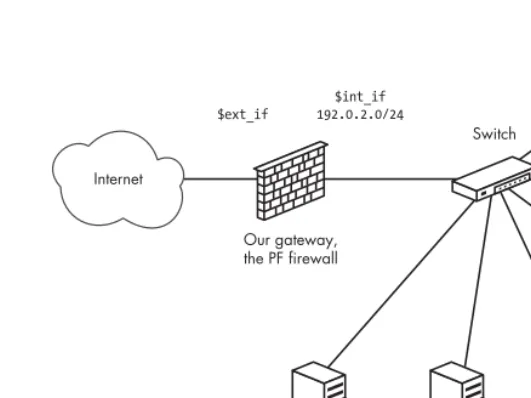
At this point we will start building what you probably associate with the term
firewall: a machine that acts as a gateway for at least one other machine. In
However, before diving into the practical configuration details, we need to dip into some theory. Bear with me; this will end up saving you some of the headaches I’ve seen discussed on mailing lists and newsgroups all too often.
Gateways and the Pitfalls of in, out, and on
In the single-machine setup, life is relatively simple. Traffic you create should either pass out to the rest of the world or get blocked by your filtering rules, and you decide what you want to let in from elsewhere.
When you set up a gateway, your perspective changes. You go from the
It’s me versus the network out there mindset to I am the one who decides what to pass to or from all the networks I am connected to. The machine has several, or at least
two, network interfaces, each connected to a separate network.
Now, it’s very reasonable to think that if you want traffic to pass from the network connected to re1 to hosts on the network connected to re0, you will need a rule like
pass in proto tcp on re1 from re1:network to re0:network port $ports keep state
which keeps track of states as well.1
However, one of the most common and most complained-about mistakes in firewall configuration is not realizing that the to keyword does not in itself guarantee passage all the way there.
The rule we just wrote only lets the traffic pass in to the gateway itself, on the specific interface named in the rule.
To let the packets get a bit farther and move on to the next network over, you would need a matching rule that says something like
pass out proto tcp on re0 from re1:network to re0:network port $ports keep state
This rule will work, but it will not necessarily achieve what you want. In fact, this rule only lets packets with a destination in the network directly connected to re0 pass, nothing else.
If there are good reasons why you need to have rules that are this specific in your rule set, you’ll know you need them and why. By the time you have worked through to the end of the book (or probably a bit earlier), you should be able to articulate with some precision just when such rules are needed. However, for the basic gateway configurations we will be dealing with in this chapter, it is likely that you will want to write rules that are not interface specific. In fact, in some cases it is not really useful to specify direction, either. What you probably want to use is a rule that says
pass proto tcp from re1:network to any port $ports keep state
1 In fact, even if the keep state part denotes the default behavior and is redundant if you are
to let your local net access the Internet and leave the detective work to the antispoof and scrub code. (They are both pretty good, and we will get back to them later.) For now, we just accept the fact that for simple setups, interface-bound in and out rules are likely to add more clutter than they are worth to your rule sets.
For a busy network admin, a readable rule set is a safer rule set.
For the remainder of this book, with some exceptions, we will keep the rules as simple as possible for readability. There are cases where we need to specify direction and interface, and we will be returning to some such cases later in the book.
What Is Your Local Network, Anyway?
Earlier in this chapter we introduced the interface:network notation. It’s a nice piece of shorthand, but you can make your rule set even more readable and maintainable by taking the macro a tiny bit further.
For example, you could define a $localnet macro as the network directly attached to your internal interface (re1:network in the examples above).
Alternatively, you could change the definition of $localnet to an IP address/netmask notation to denote a network, such as 192.168.100.0/24 for a subnet of private IPv4 addresses or fec0:dead:beef::/64 for an IPv6 range.
If your network requires it, you could even define your $localnet as a list of networks. Whatever your specific needs, a sensible $localnet definition and a typical pass rule of the type
pass proto { tcp, udp } from $localnet to any port $ports
could end up saving you a few headaches. We will stick to that convention from here on.
Setting Up
We assume that the machine has acquired another network card, or at any rate, you have set up a network connection from your local network to one or more additional networks, via Ethernet, PPP, or other means.
In our context it is not very interesting to look at the details of how the interfaces get configured. We do need to know that the interfaces are up and running, though.
For the discussion and examples that follow, only the interface names will differ between a PPP setup and an Ethernet one, and we will do our best to get rid of the actual interface names as quickly as possible.
First, we need to turn on gatewaying in order to let the machine forward the network traffic it receives on one interface to other networks via a separate interface. Initially we will do this on the command line with a sysctl command; for traditional IPv4 it is as follows: