For a listing of recent titles in the Artech House Computer Security Series, turn to the back of this book.
mathematicians. With the proliferation of open systems in general, and of the Internet and the World Wide Web (WWW) in particular, this situation has changed fundamen-tally. Today, computer and network practitioners are equally interested in computer security, since they require technologies and solutions that can be used to secure applica-tions related to electronic commerce. Against this background, the field of computer security has become very broad and includes many topics of interest. The aim of this series is to publish state-of-the-art, high standard technical books on topics related to computer security. Further information about the series can be found on the WWW at the following URL:
http://www.esecurity.ch/serieseditor.html
Also, if you’d like to contribute to the series by writing a book about a topic related to computer security, feel free to contact either the Commissioning Editor or the Series Editor at Artech House.
Thomas Hardjono
Lakshminath R. Dondeti
p. cm. — (Artech House computer security series) Includes bibliographical references and index. ISBN 1-58053-755-3 (alk. paper)
1. Wireless communication systems—Security measures. 2. Wireless LANs—Security measures. 3. Metropolitan area networks (Computer networks)—Security measures. I. Dondeti, Lakshminath R. II. Title. III. Series.
TK5103.2.H3684 2005
005.8—dc22 2005048032
British Library Cataloguing in Publication Data Hardjono, Thomas
Security in wireless LANs and MANs.—(Artech House computer security series) 1. Wireless LANs—Security measures
I. Title II. Dondeti, Lakshminath R. 005.8
ISBN-10:1-58053-755-3
Cover design by Yekaterina Ratner
© 2005 ARTECH HOUSE, INC. 685 Canton Street
Norwood, MA 02062
All rights reserved. Printed and bound in the United States of America. No part of this book may be reproduced or utilized in any form or by any means, electronic or mechanical, including pho-tocopying, recording, or by any information storage and retrieval system, without permission in writing from the publisher. All terms mentioned in this book that are known to be trademarks or service marks have been appropriately capitalized. Artech House cannot attest to the accuracy of this information. Use of a term in this book should not be regarded as affecting the validity of any trademark or service mark.
International Standard Book Number: 1-58053-755-3
Preface xv
Acknowledgments xvii
Chapter 1 Introduction 1
I
Authentication and Authorization in WLANs
7
Chapter 2 Authentication in WLANs: An Overview 9
2.1 Introduction 9
2.2 Basic Entities and Requirements in WLANs 10
2.2.1 Entities and Functions in a LAN and WLAN 10
2.2.2 General Requirements in WLAN Security 13
2.3 Authentication Models for WLANs 14
2.4 The Universal Access Method 16
2.5 The 802.1X Authentication Framework 18
2.5.1 The 802.1X Entities 20
2.5.2 The Notion of a Port 20
2.5.3 EAP, EAP over LAN, and EAP over Wireless 21
2.5.4 Supplicant to AS Authentication Protocols 22
2.6 The RADIUS Protocol 23
2.6.1 RADIUS Packets Overview 25
2.6.2 RADIUS Authentication Approaches 25
2.6.3 RADIUS Vulnerabilities 26
2.7 Device Authentication for Network Elements 27
2.7.1 The Rogue Cable Modem Case: A Precedent 28
2.7.2 802.1X and Device Certificates 30
2.7.3 Toward a Solution to the Rogue AP Problem 31
2.7.4 Toward a Solution for Rogue Network Devices 32
2.7.5 Policy-Based Device Authentication in 802.1X 33
2.7.6 Further Afield: 802.1X and Trusted Computing 34
2.8 Summary 35
References 35
Chapter 3 EAP, TLS, and Certificates 37
3.1 Introduction 37
3.2 The Extensible Authentication Protocol 38
3.2.1 Overview of EAP Packet Format 39
3.2.2 Basic EAP Exchange 39
3.2.3 EAP Peers, Layers, Multiplexing, and Pass-Through 40
3.2.4 Summary of EAP 43
3.3 Overview of TLS 43
3.3.1 The SSL Stack 44
3.3.2 The Basic SSL Handshake 45
3.3.3 Certificates in SSL 46
3.3.4 The SSL Record Layer 48
3.3.5 Summary of SSL and TLS 49
3.4 An Overview of Certificates and PKI 49
3.4.1 Concept of Public-Key Cryptosystems 50
3.4.2 Digital Certificates and PKI 50
3.4.3 Role of Certification Authority (CA) 51
3.4.4 Private and Public CAs 52
3.4.5 The X.509 Format 53
3.4.6 Summary of Certificates and PKI 54
3.5 Summary 54
References 55
Chapter 4 EAP Methods 57
4.1 Introduction 57
4.2 The EAP-TLS Method 57
4.2.1 SSL Records over EAP 58
4.2.2 The EAP-TLS Exchange 59
4.2.3 Summary of EAP-TLS 61
4.3 PEAP: EAP-over-TLS-over-EAP 62
4.3.1 Overview of PEAPv2 62
4.3.2 EAP Methods over TLS: EAP-TLV 63
4.3.3 The Two Phases of PEAP 65
4.3.4 Summary of PEAP 70
4.4.1 Overview of TTLS 71
4.4.2 Example of a TTLS Session 72
4.4.3 Comparison of TTLS and PEAP 76
4.5 EAP-SIM 76
4.5.1 Background: The SIM Triplet 77
4.5.2 EAP-SIM Overview 77
4.5.3 Example of an EAP-SIM Session 79
4.5.4 Security Issues with SIM over 802.11 WLANs 80
4.6 EAP-AKA 82
4.7 EAP-FAST 84
4.8 RADIUS Support for EAP 86
4.9 Summary 87
References 88
II
Data Protection in Wireless LANs
91
Chapter 5 WEP 93
5.1 Introduction 93
5.2 Threat Model 94
5.2.1 Threat Model Addressed by the WEP Design 95
5.3 Entity Authentication 95
5.3.1 Open-System Authentication 96
5.3.2 Shared-Key Authentication 96
5.4 WEP Encapsulation and Decapsulation 98
5.4.1 WEP Design Requirements 98
5.4.2 WEP Shared Secret Keys 99
5.4.3 WEP Cipher: RC4 99
5.4.4 WEP Integrity Algorithm: CRC-32 100
5.4.5 WEP Encapsulation 100
5.4.6 WEP Decapsulation 103
5.5 Design Flaws in WEP 103
5.5.1 Lack of Proper Integrity Protection 104
5.5.2 Improper Use of RC4 104
5.5.3 Lack of Replay Protection 105
5.5.4 Lack of Mutual Authentication and
Key Management 106
5.6 Summary 106
References 106
Chapter 6 802.11i Security: RSNA 109
6.2 802.11i Security Goals 110
6.2.1 Enforcing Authorized Access to a Wired Network 110
6.2.2 Protection Against Downgrade Attacks 111
6.2.3 Data Protection 112
6.3 Components of an RSNA 113
6.3.1 Security Associations Within an RSNA 113
6.3.2 RSN IE 114
6.4 Steps in Establishing an RSN Association 115
6.5 Mutual Authentication in RSNAs 117
6.5.1 802.1X and EAP-Based Authentication 117
6.5.2 PMK Caching 118
6.5.3 PSK-Based Authentication 118
6.5.4 Preauthentication in RSNs 119
6.6 SA and Key Management in RSNs 119
6.6.1 4-Way Handshake 121
6.6.2 Summary of the Security Properties of the 4-Way
Exchange 124
6.6.3 Security Assumptions Inherent to the 4-Way
Exchange 126
6.6.4 PTK Derivation 127
6.7 Key Download Protocols in 802.11i 128
6.7.1 Group Key Exchange 128
6.7.2 STAkey Exchange 129
6.8 Summary 129
References 130
Chapter 7 CCMP 131
7.1 Introduction 131
7.2 AES CCM Mode 132
7.2.1 CCM Parameters 132
7.2.2 MIC Computation Using AES-CBC-MAC 133
7.2.3 AES-CTR Mode Encryption in CCM 134
7.2.4 CCM Decapsulation 135
7.3 Security Analysis of the CCM Mode 135
7.3.1 Vulnerability to Precomputation Attacks 136
7.4 802.11i CCMP 137
7.4.1 Key Derivation for CCMP 137
7.4.2 Additional Authentication Data in CCMP 138
7.4.3 Nonce Construction in CCMP 139
7.4.4 Replay Protection 140
7.5 Summary 141
References 141
Chapter 8 TKIP 143
8.1 Introduction 143
8.2 TKIP Design 144
8.2.1 TKIP Design Goals and Constraints 144
8.2.2 TKIP Design Components 146
8.3 Message Integrity Protection Using Michael 147
8.3.1 Michael Protocol Limitations 147
8.4 Confidentiality 148
8.4.1 TKIP Key Mixing 148
8.4.2 Security Limitations of TKIP Key Mixing 149
8.5 Replay Protection 150
8.6 TKIP Encapsulation and Decapsulation 151
8.6.1 TKIP Countermeasures 153
8.7 Summary 154
References 154
III
Wireless Roaming Security
155
Chapter 9 Security in WiFi Roaming 157
9.1 Introduction 157
9.2 Roaming in Dial-Up IP Services: Background 158
9.2.1 The Dial-Up Access Model 159
9.2.2 Authentication in Dial-Up IP Services 160
9.2.3 The Network Access Identifier (NAI) 160
9.2.4 The NAI for Dial-Up Remote Access 161
9.3 WiFi Roaming: Entities and Models 162
9.3.1 WiFi Roaming Entities 163
9.3.2 Roaming Models 164
9.3.3 WiFi Roaming Security Requirements:
A Classification 165
9.4 WISPr: The Wireless ISP Roaming Architecture 167
9.4.1 Hotspot Operational Aspects 168
9.4.2 AAA Sessions in WISPr 169
9.4.3 Alternative Authentication Methods in WISPr 171
9.5 Summary 171
Chapter 10 3G-WLAN Roaming 173
10.1 Introduction 173
10.2 A Brief History of GSM and 3G 173
10.3 3G-WLAN Interworking: The 3GPP Perspective 174
10.4 The 3GPP-WLAN Interworking Architecture 177
10.4.1 3GPP-WLAN Interworking: Entities 178
10.4.2 3G-WLAN Roaming: The NAI 182
10.4.3 3G-WLAN Roaming: Security Issues
and Requirements 183
10.5 Summary 185
References 185
IV
WMAN Security
187
Chapter 11 An Overview of 802.16 WMANs 189
11.1 Introduction 189
11.2 Background on 802.16 WMANs 190
11.2.1 The Basic 802.16 Network Arrangement 190
11.2.2 Frequency Bands in 802.16 192
11.2.3 The 802.16 Protocol Layers 192
11.2.4 The MAC Security Sublayer 193
11.3 Network Entry and Initialization 194
11.4 The Privacy Key Management (PKM) Protocol 197
11.4.1 Background to the PKM Protocol 197
11.4.2 Authorization Key Establishment 199
11.4.3 The TEK Exchanges Phase 201
11.4.4 Key Transitions and Synchronizations 202
11.5 Certificates in 802.16 204
11.5.1 The Need for Certificates in Subscriber Devices 204
11.5.2 The CableHome Certificate Hierarchy 205
11.5.3 A Certificate Hierarchy for the WMAN Industry 207
11.6 Summary 209
References 209
Chapter 12 Wireless MAN Security 211
12.1 Introduction 211
12.2 WMAN Threat Model and Security Requirements 212
12.2.1 Original Design of the 802.16 Security Sublayer 212
12.3 PKMv2 214
12.3.1 Mutual Authentication Between a BS and an MS 215
12.4.1 Public-Key–Based Mutual Authentication
in PKMv2 216
12.4.2 EAP-Based Mutual Authorization in PKMv2 218
12.4.3 PKMv2 Key Hierarchy 220
12.4.4 TEK and GTEK Update 223
12.5 CCM Encapsulation of 802.16 MPDUs 224
12.5.1 Nonce Construction 226
12.6 Secure Encapsulation of Multicast and Broadcast MPDUs 227
12.6.1 802.16 Security Associations 228
12.7 Security Issues in the 802.16 Specification 228
12.8 Summary 229
References 229
Chapter 13 Conclusion and Outlook 231
About the Authors 235
Wireless communications are becoming ubiquitous in homes, offices, and enter-prises with the popular IEEE 802.11 wireless LAN technology and the up-and-coming IEEE 802.16 wireless MAN technology. The wireless nature of commu-nications defined in these standards makes it possible for an attacker to snoop on confidential communications or modify them to gain access to home or enterprise networks much more easily than with wired networks.
The 802.11 and 802.16 standards considered wired equivalency and secure access as important in the original design itself. Unfortunately, efficiency consid-erations seem to have sidelined security as a “nice-to-have” component, whereas a “must implement cautiously” specification would have been more appropriate con-sidering the potential threats. To be sure, strong security seems sometimes overly burdensome in terms of both computational as well communication overhead.
Wireless devices generally try to reduce computation overhead to conserve power and communication overhead to conserve spectrum and battery power. Due to these considerations, the original security designs in wireless LANs and MANs used smaller keys, weak message integrity protocols, weak or one-way authentication protocols, and so forth. As wireless networks became popular, the security threats were also highlighted to caution users. A security protocol redesign followed first in wireless LANs and then in wireless MANs.
This book discusses the security threats and requirements in wireless LANs and wireless MANs, with a discussion on what the original designs missed and how they were corrected in the new protocols. It highlights the features of the current wireless LAN and MAN security protocols and explains the caveats and discusses open issues.
This book is divided into four parts. The first part discusses authentication technologies common to security in wireless LANs and MANs. A detailed discus-sion on EAP and the various methods is included to help readers understand the technologies implemented in the providers’ networks to support secure access. The
second part discusses the security encapsulation and key management protocols in wireless LANs. Wireless roaming and security issues therein are the topics of the third part. Security issues in wireless MANs and the evolution of the security design in the IEEE 802.16 specifications is the topic of the fourth part. The final chapter provides an outlook in the security area in wireless networks.
This book is the result of our working in the area of WLAN and WMAN security, which necessarily included interaction with numerous persons in various forums and standards bodies such as the IETF, Wi-Fi Alliance, and the IEEE. As such, there are various people whose opinions and views have helped educate us and shape the contents and areas of emphasis of this book.
We therefore wish to thank the following people for their input and positive influence on this book (in alphabetical order): Bernard Aboba, Tim Takao Aihara, Tim Allwine, Phil Hallam-Baker, Blair Bullock, Gene Chang, Leigh Chinitz, David Cohen, Alex Deacon, John Ferguson, Mo-Han Fong, Warwick Ford, Paul Funk, Bill Gage, Jim Geier, Paul Goransson, Amer Hassan, Haixiang He, Russ Housley, Brian Johnson, Marcus Leech, Jeff Mandin, Bob Moskowitz, Al Potter, Kartik Seshan, Joel Short, JunHyuk Song, Dorothy Stanley, Wen Tong, John Vollbrecht, Jesse Walker, Doug Whiting, and Peiying Zhu. We apologize to those whose names we may have inadvertently missed.
We also appreciate Donald Knuth, Leslie Lamport, and countless others who developed the wonderful typesetting system, LATEX, without which we could not have produced the manuscript in time. Thanks also to Alistair Smith for his assistance with LATEX in preparing the camera ready copy of this book.
We thank Nicholas Popp and Mahi De Silva (VeriSign) and Don Fedyk and Bilel Jamoussi (Nortel Networks) for their support. Any opinions in the book are ours alone and may or may not represent the opinions of those above or our current or past employers.
We especially thank Rolf Oppliger, Tim Pitts, Julie Lancashire, Tiina Ruon-amma, Judi Stone, and Rebecca Allendorf for not giving up on us, and for their assistance in various stages of the publishing process. We are grateful to the anony-mous reviewer(s) for their constructive criticism and suggestions, which helped im-prove the quality of this book.
Lakshminath thanks Thomas for his patience during the manuscript prepa-ration and production process. He also acknowledges the help of Shannon Shean and Valerie Smith of QUALCOMM for their assistance during the manuscript and galley review stages.
Introduction
The topic of this book is the security of 802.11 wireless local area networks (WLANs) and of 802.16 wireless metropolitan area networks (WMANs). These networks are based on the IEEE standards belonging to the 802 family — which include the much-beloved Ethernet (802.3) that is common today in homes and offices. Although the development of the 802.11 technology and standards have been ongoing since the late 1990s, grassroots adoption of “wireless Ethernet” only began in the 2000–2001 timeframe when access point (AP) devices became cheap enough for the home user to obtain.
The convenience of having wireless access to the IP Internet is self-evident. The value proposition in terms of employee productivity has been so compelling that many enterprises began also to introduce the technology into their corporate networks. This enterprise adoption, however, was prematurely halted when security flaws in the WEP algorithm were discovered and published. Various temporary patches were then suggested in order to support existing enterprise investments in WLAN equipment, with the IPsec-VPN (e.g., over the wireless segment) as the most common approach. The IEEE standards community completed the revision of the security-related components of 802.11 in 2004, with conforming products scheduled to be shipped in 2005.
This book aims, in the first instance, to provide a roadmap for readers seeking a deeper understanding of the security aspects of 802.11 WLANs today and the upcoming 802.16 WMANs. In order for this book to be a useful technological roadmap to the reader, the discussion sometimes goes into a considerable level of detail. This is needed because these discussion points explain the solutions adopted by the 802.11 standards community in answer to the poor security design of the first generation of 802.11 specifications and products. As it is widely known today, the security problems of the early 802.11 specifications resulted in insecure implementations, and thus low adoption of the technology by enterprises.
Second, the aim of the book is to bring together and explain the other broader areas of networking technology that are being impacted by the advent of 802.11 WLANs and 802.16 WMANs. Clearly the 802.11 WiFi phenomenon has gained a tremendous interest in the IP networking industry, and therefore this phenomenon will clearly have an effect on the other technologies and services in the IP networking industry and even the telecommunications industry. Thus, for example, WiFi roaming at airports was unknown only three years ago. In contrast, today, not only is it becoming commonplace, but WiFi’s success has caused a re-thinking among 3G providers about the possible impact of 802.11 WLANs and 802.16 WMANs on the future business model underlying 3G offerings. Along the same lines, WiFi roaming (e.g., at hotels) has displaced a considerable size of the enterprise Internet dial-up market, resulting in many dial-up providers to either embrace WiFi services or to refocus only on the home user dial-up market. Similarly, 802.16 promises an upheaval in the broadband industry, offering ISP newcomers and content providers an opportunity to provide new broadband and content services to the market. The WiMax forum is promoting 802.16-based broadband wireless access (BWA) networks.
This book is not a user guide to specific WLAN or WMAN products, and intentionally avoids specific references to such products. It is also not a thesis on the various engineering solutions that could have been applied to solve the WiFi security problem. Instead, the book attempts to explain what current approaches and solutions have been adopted, and why these were chosen.
The contents of the book are arranged in four parts, where each part groups together topics and issues that are closely related. These parts roughly cover the topics of WLAN authentication and authorization, WLAN security algorithms and protocols, security in WLAN roaming, and security in WMANs. These are described in more detail next.
The first part focuses on the important area of authentication and authoriza-tion, with specific attention given to technologies that are relevant to WLANs and WMANs. The chapters covered in this part are as follows:
• Chapter 3: EAP, TLS, and Certificates. Chapter 3 brings together three tech-nological ingredients that are are crucial for authentication and for the secu-rity of WLANs and WMANs in general. The EAP protocol has now become the basic building block for transporting payloads between entities within the 802.1X context. As such, it is important that the reader obtain a good understanding of this protocol. Various EAP methods for authentication and authorization deploy an underlying TLS session to protect end-to-end com-munications between the 802.1X supplicant and authentication server. Hence, the chapter provides an introduction to the basics of the TLS (SSL) protocol and its operation. Finally, since the TLS protocol is typically deployed with digital certificates, some basic coverage of PKI and certificates is provided as a continuation of the TLS discussion.
• Chapter 4: EAP Methods. Chapter 4 is devoted exclusively to the EAP meth-ods (protocols) that are most commonly cited and used today in the 802.1X context. Those covered are the EAP-TLS, PEAP, EAP-TTLS, EAP-SIM, and EAP-AKA protocols. Since many mobile network operators (MNOs) today are venturing into providing WLAN services — with some repurposing of their authentication infrastructures to support WLANs — some discussion of the EAP-SIM and EAP-AKA protocols is provided, as SIM authentication is the predominant approach used by MNOs.
The second part of this book pertains to data protection in WLANs. The chapters in this part of the book focus on the basic security algorithms used to protect data as it traverses the wireless segment. The chapters covered in this part are as follows:
• Chapter 5: WEP. Chapter 5 is entirely devoted to WEP in order to correctly explain its weaknesses and to understand what improvements need to be made. This chapter sets the backdrop to the ensuing three chapters, all of which are devoted to the new algorithms and protocols developed to replace the original WEP algorithm and improve the security of WLANs.
• Chapter 7: CCMP. Chapter 7 covers another important building block of the RSN. Counter mode for encryption in conjunction with CBC-MAC for mes-sage integrity — referred to as CCM — is now the preferred approach used to provide cryptographic protection for MPDUs being transmitted via shared WLANs. In this chapter counter with CBC-MAC (CCM) is discussed in de-tail. CCM is a crucial building block because in addition to confidentiality and integrity protection, it provides replay protection, and thus facilitates the controlled and secure access to the network.
• Chapter 8: TKIP. TKIP is a stopgap protocol for secure encapsulation of 802.11 frames in legacy 802.11 devices. The aim of TKIP is to patch the many vulnerabilities of WEP using various techniques. However, in designing TKIP one important consideration is the large install base of existing 802.11 hardware. Hence, TKIP was designed so that it could be implemented with only a firmware upgrade. Chapter 8 provides a discussion of TKIP.
The third part of this book focuses on the area of wireless roaming security, covering two chapters on the following topics:
• Chapter 9: Security in WiFi Roaming. One of the main attractions of WLANs is the fact that the mobile user can roam from one service provider to another. Chapter 9 introduces the notion of roaming as found in today’s dial-up Internet. It then covers the entities involved in roaming, and proceeds to discuss WLAN roaming as defined by the WISPr architecture.
• Chapter 10: 3G-WLAN Roaming. Chapter 10 is devoted to the new area of 3G-WLAN roaming, where WLAN services are provided by 3G network operators. The chapter reports the efforts under way in the 3GPP standards community in defining roaming models and interfaces between WLAN and 3G services.
The fourth part of this book is devoted to the security of the emerging area of technology called WMAN or “wireless broadband,” based on the IEEE 802.16 standard. The two chapters covering WMAN security are as follows:
• Chapter 12: Wireless MAN Security. Since security weaknesses were found in 802.11 WLANs, a similar security reevaluation of 802.16 has been under way. Chapter 12 provides a discussion and insight into these recent developments on the security of 802.16.
Authentication in WLANs: An Overview
2.1 INTRODUCTION
Traditionally, the term authentication in the context of computer and network security concerns the ability of a verifier (or prover) entity to ascertain the correct
identity of another entity claiming to be that identity. Thus, the aim of authentication
is for one entity to prove its identity to another based on some credentials possessed by that first entity. Examples of credentials include passwords, digital certificates, or even physical keys. The outcome of an authentication process is typically binary, namely success or fail. The process is typically defined and implemented as one or more protocols.
The term authorization pertains to the rights, privileges, or permissions given to an authenticated entity in relation to some set of resources. In practice, authorization for an entity to take actions (e.g., access network, read files) is preconditioned on a successful authentication. The functions of authentication and authorization are often accompanied by accounting (or auditing), with the three loosely referred to as AAA.
The level of authorization assigned to an entity when it seeks access to resources is often tied to the type and strength of the authentication protocol used and the type of credential possessed by the authenticated entity. Hence, differing levels of assurance or certainty regarding the outcome of an authentication process can be gained by using different credentials and authentication protocols.
For example, when a password (as a credential) is used with a weak protocol (e.g., plaintext challenge-response), then a low or weak level assurance is obtained as both the credential and the authentication protocol are weak. In contrast, a strong credential such as a digital certificate when combined with a strong authentication protocol, such as SSL or TLS, achieves a higher level of assurance regarding the identity of the authenticated entity.
In today’s complex computer and network systems, multiple credentials might be needed for an entity to access multiple resources, each access instance of which
may be governed by separate sets of privileges. Thus, often the term layers (of authentication and authorization processes) is used to describe complex situations.
In this chapter we look at the broad issue of authentication in wireless LANs, starting with some general security requirements. We look at several models and frameworks for authentication in WLANs. First, the UAM method based on the use of HTTP/SSL is discussed, as it is the most common approach used by many wireless ISPs, due its ease of deployment. Second, the 802.1X authentication framework is discussed, covering the important notion of ports and port-based access control. We provide an overview of the RADIUS protocol as RADIUS is often used as an authentication server in 802.1X implementations as well as in UAM implementations, because of its strong presence in the dial-up world. Finally, we look briefly into device authentication and the issue of rogue 802.11 access points.
2.2 BASIC ENTITIES AND REQUIREMENTS IN WLANS
In the context of IP networks, the first objective of authentication and authorization would be to control connectivity to the networks, since networks are considered as resources also. After this primary objective, the second aim would be to control access to resources beyond the network itself, such as other computers and systems interconnected by the network.
The credentials and authentication process used in these two broad classes of access need not be the same. In addition, in the context of authentication and authorization in LANs and WLANs it is useful for us distinguish between the
device the human user is employing and the person, since different credentials and
privileges might be assigned to the two entities. In practice, both user and device are authenticated by a AAA server through the use of an appropriate authentication protocol. Often, the AAA server also holds the authorization information and other privileges information.
2.2.1 Entities and Functions in a LAN and WLAN
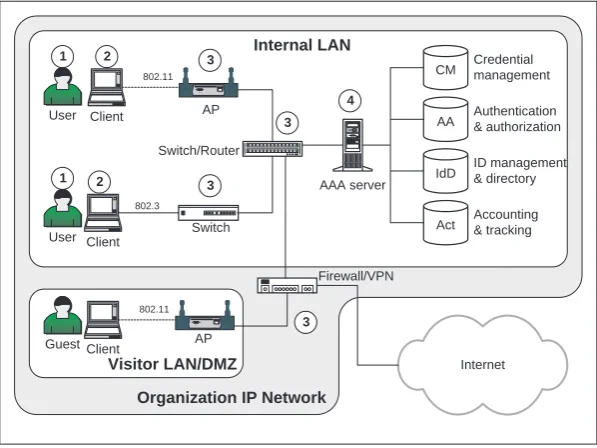
In order to understand further the authentication requirements in WLANs, Fig-ure 2.1 shows a number of entities and their functions in a typical organizational IP network, consisting of LAN and WLANs. For simplicity, no remote offices or campuses are shown, as remote sites today are most commonly connected via secure VPNs to other sites in the same organization.
Client AAA server CM AA IdD Act Authentication & authorization ID management & directory Credential management Accounting & tracking 802.3 Client SERIAL ETHERNET 802.11 Switch/Router 1 2 3 1 2 User User AP Switch 3 3 4 Internal LAN Internet Client 802.11 Guest AP Visitor LAN/DMZ SERIAL ETHERNET Firewall/VPN 3
[image:30.432.73.372.81.305.2]Organization IP Network
Figure 2.1 Basic entities and functions in a LAN/WLAN.
• Users and end-user devices: Human users and end-user devices (e.g., lap-top/desktop computers, PDAs, and so on) represent the “consumer” side of the services provided by an organization’s IP network (including LANs and WLANs). End-user devices are typically assigned to a person and do not really function to support the operational aspects of the network.
• Network devices: Network devices can be loosely defined as those hard-ware/software systems used to support the operational aspects of an orga-nization’s IP network. As such, these devices rightly belong under the au-thority of the IT and network administrators. The typical nonadministrative (unauthorized) user should not have access to these network-devices. Exam-ples of network devices include 802.11 access points (APs), IP routers, LAN switches, hubs, VPN gateways, firewalls, AAA servers, session controllers, remote access servers (RASs), and others.
(PDP), while other network devices represent the policy enforcement point (PEP) [1, 2].
• Firewalls/VPN gateways: Firewalls and VPN gateways play a special role as they represent the entry point (exit point) of connections into (out of) an organization’s IP network. Many enterprises today perform packet filtering and port monitoring at firewalls and other filter devices. Many firewalls today are tightly integrated to IPsec VPN gateways, as these represent entry points for legitimate users (e.g., employees) who are connecting remotely from remote offices, home offices, public WiFi hotspots, dial-up numbers, and other locations outside the perimeter of the organization’s network.
The typical organization network consisting of LANs and WLANs performs a number of important functions pertaining to the operational aspects of the network and security. Some of the security-related functions include the following:
• Authentication and authorization: These two functions are interrelated in the sense that authentication establishes the correct identity of an user or device (as known by the network) and authorization determines what resources are available to that identity.
• Identity management: Many organizations maintain identities for the users and devices within the network, ranging from the simple user ID to names that carry semantic meaning. Since a human user (and network device) may have multiple identities, both within and outside the organization, some method for identity management must be deployed.
• Directory services: Often the function of mapping resources available to a human user is dependent on the identity of the user or device, and on other variables (e.g., which LAN he or she is connecting to or type of access). Directory services embody these functions and in many systems and networks it is tightly related to identity management.
• Credential management: Aside from an identity, a user or device needs some form of credential to prove its identity through an authentication process. Cre-dentials today can range from simple passwords, phrases, and digital certifi-cates, to more sophisticated hardware-based credentials, including hardware tokens and smartcards. Since a credential represents the “keys to the castle,” its correct and secure management is paramount to the overall security of the organization’s resources, including its network.
regardless of whether they were successful or failed attempts. Many corpo-rations today are increasingly deploying intrusion detection systems (IDSs), which need this important information for both analysis/forensics and plan-ning defenses against attacks. Some IDS systems today also perform logging of internal connections to resources within the organization, in order to detect unauthorized behavior by employees and intruders.
2.2.2 General Requirements in WLAN Security
The following lists some general requirements with respect to authentication and authorization of devices and human users connected to LANs and WLANs:
• Device authentication
All devices connecting to LANs and WLANs must be strongly authenticated, based on a strong device credential.
Device authentication pertains to the correct identification of devices in a LAN or WLAN — both end-user devices (e.g., laptops) and network elements (e.g., switches, routers) — by an authenticating entity (e.g., authen-tication server). Many corporate networks today demand that as soon as it detects a device being physically connected to the LAN, the device must be immediately authenticated by an authenticating entity, such as an AAA server (e.g., RADIUS [3] or Diameter [4]). Many networks tie this first-step authen-tication to the granting of an IP address (e.g., via DHCP) to the connecting device.
One open issue today is the form of identity of the connecting device and the credential that the device needs to possess to authenticate itself to the AAA server. Many LANs and WLANs use the physical layer medium
access control (MAC) address of the network interface card (NIC) of the
device as the identifying information. However, MAC addresses can easily be reprogrammed by the user and thus cannot be relied upon.
• User authentication
All users connecting to LANs and WLANs must be strongly authenticated, based on a strong user credential.
to individual employees to be connected to the corporate LAN or WLAN. Strong authentication for users must be the basis for user authorization.
• Device authorization
All successfully authenticated devices on LANs and WLANs must have access only to resources for which they have been authorized.
In the context of devices, this may mean that they can only connect to certain LANs or VLANs of a corporate network, and the other resources (e.g., printers and servers) on those allowable portions of the network.
• User authorization
All successfully authenticated users on LANs and WLANs must have access only to resources to which they have been authorized.
This requirement is an obvious one, arising from the general need of computer and network security. As this topic is beyond the current work, it will only be treated here minimally and only when necessary.
• User privacy
Depending upon the organizational policy, a user’s privacy must be preserved when he or she is accessing resources on the network from various parts of the network. Information regarding users and their behaviors must be held con-fidential and be only accessible to authorized personnel in the organization, such as the IT or network administrator. Thus, although user presence may be an important feature of a network, often a user may not wish this information to be known by other unauthorized personnel.
In the next section we look more closely into a number of AAA models proposed for LANs, WLANs, and WiFi hotspots.
2.3 AUTHENTICATION MODELS FOR WLANS
In architecting a secure LAN and WLAN, often a model or framework for authen-tication is needed in order to understand the particular threats being addressed and the remedies being applied to counter the threats. Credentials and authentication protocols are really only effective when they are appropriately selected and de-ployed within a given model. Over the last few years, a number of models have been proposed for authentication in WLANs. Some of these are as follows:
• Web-based authentication model
At the login page, the user could either enroll for a new account or enter his or her existing account details together with a password. The transmission of the user’s identity and password is protected by the underlying SSL (TLS) session, which encrypts the traffic between the browser and the Web server.
Although this method is simple to install and configure, the approach does not result in a negotiated encryption key at the WLAN frame layer (for use by algorithms such as TKIP). Thus, after the Web login phase has been completed, traffic at the MAC layer may remain unencrypted. This approach, which is also the basis of the universal access method (UAM), will be discussed in Section 2.4.
• 802.1X authentication framework
The IEEE 802 community developed a standard framework for authentica-tion referred to as 802.1X [5]. In this framework, a port-based access control approach is adopted, in which port access is given only to clients (suppli-cant) that have been successfully authenticated by an authentication server. This framework has also been adopted for WLAN authentication, and more importantly it has been integrated with various key agreement protocols be-tween the client/supplicant and the 802.11 access point for deriving the layer-2 cryptographic keys.
One important aspect of 802.1X is that it is an authentication frame-work, within which specific authentication protocols and credentials need to be specified for deployment. Since 802.1X is today rapidly becoming the de facto model for authentication in enterprise WLANs, this approach will be discussed in Section 2.5.
• The point-to-point VPN model
A number of vendors have proposed the use of standard IPsec VPNs to provide for confidentiality (encryption) of data “over the air” (in the wireless segment between the client and access point), obtaining authentication as a beneficial side effect. The argument put forward by proponents of this approach is that strong security can be established at the IP layer (by virtue of IPsec), regardless of the underlying layer-2 security features.
In this approach, the client is allocated a temporary IP address at which time the client software automatically establishes an IPsec VPN with a VPN
server. The VPN server can be collocated with the AP or be another entity
In this approach, authentication is conducted as part of the IPsec VPN setup. Failure in authentication means that the IPsec VPN fails to be established, and the client’s IP address is deallocated. A count may be maintained by the VPN server for the number of allowable failures by the client. As this approach is not new and is based on well-known technologies, it will not be treated further in this chapter.
• SIM-based approach
In the SIM-based approach, authentication is based on a shared key that is contained in the subscriber identification module (SIM) used in GSM networks or USIM in UMTS networks. The growing interest among mobile
network operators (MNO) in providing WLAN services at hotspots to their
subscribers — while leveraging their existing infrastructure — has motivated the use of the SIM in the WLAN context.
This model is interesting because it presents a new effort to repurpose credentials and AAA infrastructures in mobile networks for AAA functions in IP-based WLANs. The client is assumed to be in possession of a U/SIM card when requesting access to a WLAN at a public hotspot. The U/SIM card contains security parameters that are issued and are shared with the authentication database (namely the home location registry or HLR) at the operator’s home network. Thus, in simple terms the authentication protocol that executes between the client and the HLR actually extends from the WLAN through to mobile home network, through possibly one or more IP networks and PSTNs in between. This topic will be further treated in Chapter 9.
2.4 THE UNIVERSAL ACCESS METHOD
The Web-based approach for authentication was adopted by a number of early providers of WLAN hotspots due to the simplicity of the approach and the fact that no special software or hardware was needed for the user to make use of the hotspot. However, as many providers soon discovered, some standardization was needed across these providers in order to give the subscriber the same look and feel when roaming to different hotspots, and to give the providers some common auditing and billing information for cross-provider roaming.
Within the WiFi Alliance (WFA),1 which is the WLAN industry governing
association, a small group of vendors and ISPs called the Wireless ISP Roaming (WISPr) group began developing the universal access method (UAM) as the basis for standardizing operational aspect of WLAN roaming. The WISPr group was
chartered by WECA to describe the recommended operational practices, technical architecture, and AAA framework needed to enable subscriber roaming among WiFi-based wireless Internet service providers (WISPs) [6]. The aim of the roaming framework is to allow WiFi-compliant devices to roam into WiFi enabled hotspots for public access and services. Similar to the dial-up case, a roaming user can then be authenticated by either the roamed WISP or by the user’s own home ISP/WISP. The user (or his or her employer) would then obtain a single billing statement, clearly showing the WiFi roaming charges. In order to facilitate compatibility with the widest possible range of legacy WiFi products, the WISPr group recommended that WISPs or hotspot operators deploy a browser-based UAM for public access networks. The UAM allows a subscriber to access WISP services with only an 802.11 NIC card and Internet browser on the user’s device.
Home Entity
Authentication & Accounting Server
Billing
Internet
Roaming Intermediary (optional)
Authentication & Accounting Server
Hotspot Operator
SERIAL ETHERNET Access Point PAC Gateway
Laptop
Authentication & Accounting Server
Roaming User Direct AAA Exchange
WiFi RADIUS User Data
Figure 2.2 The universal access method (UAM).
The basic architecture of the UAM is shown in Figure 2.2. Here, the user is assumed to roam into a hotspot being operated by a WISP. Upon obtaining layer-2 connectivity and an IP address, the user’s HTTP traffic is intercepted by a public
access control (PAC) gateway. The PAC gateway then provides the user with a login
(or registration) page, protected using an SSL session.
type or operating system, can participate in WISP roaming. The UAM utilizes home page redirection (automatic redirection of the user’s initial HTTP request to an operator-specified Web page), Internet browser-based secure authentication portal, user credential entry, and RADIUS AAA. The UAM represents the lowest common denominator for granting access to a WISP network ensuring that all users can share the same experience [6].
Not surprisingly, the WISPr group did not promote the use of 802.1X even though from a security perspective 802.1X provided a better solution and provides a framework for the negotiation of TKIP keys. The cited reason for this is that 802.1X has not been widely deployed in public access environments. In addition, unlike the UAM, the 802.1X access method requires client software beyond just the Web browser [6].
2.5 THE 802.1X AUTHENTICATION FRAMEWORK
A different approach to authentication and authorization for 802.11 WLANs is that based on the 802.1X standard, which was originally published by the IEEE in 1999, and was revised in 2001.2
The original motivation behind 802.1X was the need for “device-level” au-thentication for network devices connected to an 802.3 (Ethernet) LAN. The basic model adopted was that of the client-server model, in which a client who seeks network access to (or through) a port of another device on the same shared medium must be authenticated by the server. Thus, functionally the authenticating entity (the server) was distinguished from the entity providing the service (or, in this case, the port). This thinking is in line with other existing approaches at higher layers where the server as the decision-maker grants the client access to some service.
With recent developments in newer protocols and architectures, the 802.1X framework has been in fact used with authentication protocols (EAP methods) that employ human credentials, such as passwords and certificates, instead of only for device-level authentication.
One crucial point that distinguishes 802.1X from the UAM approach is the integration of entity authentication with key agreement to establish the master keys subsequently used by the access point and client to encrypt frames when they traverse over the air. In more concrete terms, unlike the UAM approach, after a client has been authenticated by the authentication server (AS) using a given EAP method (e.g., EAP-TLS), the two immediately continue with the derivation of the master keys, which will subsequently be used by the frame encryption algorithm (e.g., TKIP).
Wireless Wired
Authenticator (Access Point)
Authentication Server (RADIUS) Supplicant
(Client)
Authentication using specific EAP method 802.1X identity establishment
Frames (plaintext) 1
2
3
4
SERIAL ETHERNET
RADIUS identity establishment Port closed
Derive master keys
Provide authenticator with keys
Frames encrypted
(a)
(b)
Port open Derive
master keys
EAP/Layer-2 EAP/RADIUS
802.11 IP/802.3
[image:38.432.75.371.150.485.2]Encrypted session begins
2.5.1 The 802.1X Entities
The 802.1X framework recognizes three primary types of entities or port access
entities (PAEs). These are the following [5]:
• Supplicant: This is the port that wishes to or requests access to the services offered by the authenticator’s system. Typically, the supplicant would be the client system, such as a laptop or a PDA.
• Authenticator: This is the port that enforces authentication before allowing access to services that are accessible via that port. In the basic WLAN configuration, the AP would typically be the authenticator.
• Authentication Server (AS): This is the entity that performs the authentication function necessary to check the credentials of the supplicant, on behalf of the authenticator. The resulting decision consists of whether or not the supplicant is authorized to access the authenticator’s services. The most oft-quoted server is RADIUS [3, 7, 8], though other types of servers could also be used (e.g., Diameter [4]).
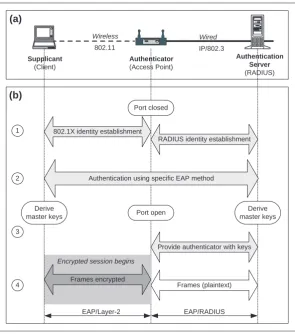
These entities are shown in Figure 2.3(a).
From the basic description of the 802.1X entities above, we can get a basic understanding of the behavior of each entity. Thus, for example, a laptop (the supplicant) seeking to gain access to a LAN behind an 802.11 AP (the authenticator) must first execute an authentication protocol against the AS sitting behind the AP. If the authentication process succeeds, the AS signals the AP to open the relevant port on the AP to allow the client access.
2.5.2 The Notion of a Port
An important concept in 802.1X is that of a “port,” which is the basis for the
port-based access control (PBAC) paradigm as specified in the 802.1X standard as a way
to provide authentication and authorization to devices attached to a LAN. More specifically, port-based network access control makes use of the physical access characteristics of IEEE 802 LAN infrastructures in order to provide a means of authenticating and authorizing devices attached to a LAN port that has point-to-point connection characteristics (and preventing access to that port in cases in which the authentication and authorization process fails) [9]. Thus, the 802.1X standard applies to both 802.3 (wired Ethernet) and 802.11 (wireless Ethernet) point-to-point connections.
provide the means in which it can offer services to, or access the services provided by, other entities reachable via the LAN. The PBAC approach allows the operation of a entity’s ports to be controlled in order to ensure that access to its services (and/or access to the services of other entities) is only permitted by entities that are authorized to do so [9].
Devices that attach to a LAN have one or more points of attachment to the LAN, referred to in the 802.1X standard as network access ports, or simply as ports. The notion of a port applies to devices that have a single point of attachment (e.g., network interface card, or NIC, in a laptop) as well as devices that have multiple points of attachment, such as those that provide MAC bridging (e.g., bridges and switches).
The 802.1X standard views ports as being of two types, namely the protected and unprotected. Authentication applies to requests pertaining to the protected ports, naturally. The unprotected ports could be used by a supplicant (or authenticator) to exchange protocol-related information with other supplicants (or authenticators), though obviously such exchanges must not reveal any sensitive information or parameters that could affect the security of the systems. For cases where the AS is not collocated with the authenticator (e.g., the AP), then these two entities could communicate protocol exchanges using either of the two types of ports. The understanding here is that some higher-level protocol such as EAP/RADIUS would be used between the AP and the AS.
2.5.3 EAP, EAP over LAN, and EAP over Wireless
The 802.1X standard makes use of the Extensible Authentication Protocol (EAP) [10] as a way of communicating authentication information between the supplicant (e.g., client, laptop) and the AS, passing through the authenticator (e.g., AP). It is interesting that in this mode of usage, EAP essentially becomes a lowest denomination of “transport” between the supplicant and the AS.
To understand the significance of EAP in this context, it is important to realize that the EAP packets (frames) exchanged between the supplicant and the AS traverse over two different types of communications media:
• Between the supplicant (client) and the authenticator (AP), EAP is layered immediately above the MAC layer (i.e., no IP layer).
• Between the authenticator (AP) and the AS (RADIUS), EAP is over the RADIUS protocol (over IP).
to as EAP over Wireless or EAPOW, though the intent is clear that the EAP packets are layered over the MAC layer without the IP layer.
Since an authentication exchange occurs between the supplicant and the AS (as the decision-maker), during such an exchange the authenticator provides a “pass-through” or “relay” function. This means that the authenticator needs to repackage the EAP packets for suitable delivery to the AS. This repackaging must be done by higher level function in the authenticator. Though not mandated by the 802.1X standard, the most common way to communicate the EAP frames (coming from the supplicant) to the AS is through EAP over RADIUS [3, 7, 8]. Note that RADIUS itself is defined to run over an IP layer, which typically exists between an AP and the AS in the on-campus scenario (where both the AP and the AS are within the same subnet), and in the WLAN-roaming scenario (where the AP may be on a different subnet, network, or even different autonomous system, to the AS).
2.5.4 Supplicant to AS Authentication Protocols
If we view EAP as the encapsulating format (or even as a general “transport” mechanism) for authentication information exchanged between a supplicant and AS, the next question would be which authentication protocol is to be executed between the supplicant and AS (to prove, among others, to the AS that the supplicant is indeed the entity is claims to be).
The answer is that EAP is extensible enough that the security engineer needs to “instantiate” EAP with the authentication protocol that she or he wishes to use. To that extent, the EAP specifications talk about “methods” or “types” that need to be defined for a particular usage scenario. Note that the EAP methods need not only be related to security,3but can be any other method defined for other functions in a WLAN. EAP will be further discussed in Chapter 3.
Figure 2.3(b) shows an overview of an authentication process and key gener-ation. This can be better understood by looking at the 802.1X process as consisting of four phases:
1. Identity establishment: In the first phase, the supplicant and the AS begin exchanging identity information. This occurs after the 802.11 association. This leads to the need of each end point to prove their identities (namely, through authentication). Part of this phase is for the AS to indicate to the client which authentication method the AS is expecting to use.
2. End point (mutual) authentication: In the second phase, the supplicant and the AS execute the authentication protocol, expressed as an EAP method. Note that not all EAP methods for authentication provide mutually strong
authentication. For example, a password-based method such as EAP-CHAP does not provide a strong authentication as one side (the supplicant) supplies only a password, which is a weak credential.
3. Encryption key derivation: The successful outcome of the authentication pro-cess results in both the supplicant and AS deriving some common crypto-graphic parameter (i.e., keys) that will be used for the basis for deriving (tem-poral) encryption keys used to encrypt the data in frames for the over-the-air segment of the communications.
Since the over-the-air segment is the segment between the supplicant and the AP, and since the AP has so far not been involved in key negotiations, the AS must forward a copy of the derived common cryptographic parameter to the AP so that the AP can begin to derive the (temporal) frame encryption keys and itself begin encrypting/decrypting data frames to/from the Suppli-cant. See Chapter 8 for further information on the key derivation algorithms.
4. Frame encryption/decryption: Once both the supplicant and the AP have begun to derive (temporal) keys for the encryption of data in frames, they can begin using the keys to encrypt frames. Note that when frames from the supplicant have been decrypted by the AP, the wired segment of the communications from the AP to the AS is by default in plaintext. Thus, additional security mechanisms must be applied for that wired segment (e.g., encryption in RADIUS or establish IPsec VPNs).
The reader is directed to Chapter 3 for further discussion on how 802.1X func-tions with the EAP protocol (as transport) and EAP methods (as the authentication protocols).
2.6 THE RADIUS PROTOCOL
The remote authentication dial-in user service (RADIUS) [11] is an authentication protocol that has wide deployment in the dial-up Internet services world. Due mostly to its simple password-based authentication method and simple transaction structure, RADIUS has become the de facto “authentication protocol” in the dial-up world for IP connectivity using the point-to-point protocol (PPP) [12]. More recently, interest in RADIUS has also been extended to the new area of WLAN authentication. In this section we briefly review RADIUS in order to provide a context for ensuing discussions in the following chapters.
is essentially the end point of the dial-up connection over the telephone line (PSTN). From the client’s perspective a RADIUS-server is responsible for receiving user connection requests, authenticating the user, and then returning all configuration information necessary for the client to deliver service to the user. As such, RADIUS offers functionality beyond just authenticating a user, and provides support for authorization and accounting/auditing (AAA).
RADIUS runs over UDP (instead of TCP) for a number of reasons, though primarily because RADIUS is essentially a stateless transactions-based protocol. More specifically, in its expected usage environment, multiple RADIUS servers may be deployed to provide service reliability. Here, when one server becomes unavailable, a backup server must take on the transactions of the first server. Hence, a copy of the request must be kept above the transport layer to allow for alternate transmission. This points to UDP in the case of RADIUS being a better underlying transport than TCP. However, the use of UDP implies that the end point RADIUS entities must deploy their own reliability mechanisms to handle lost packets. Many RADIUS implementations and deployment cases today just use simple retransmission as a reliability mechanism. Finally, RADIUS was designed with a nonaggressive response in mind. The user is expected not to mind waiting several seconds for an authentication to complete. As such, TCP was deemed to be too aggressive for the needs of RADIUS.
Within the context of the 802.1X authentication framework, RADIUS is the most oft-cited protocol for supporting WLAN authentication. Here, the 802.1X supplicant (e.g., 802.11 AP) is in fact the RADIUS client communicating with the 802.1X AS, which is the RADIUS server. In the context of WiFi roaming, RADIUS is also the most oft-cited authentication protocol since many ISPs and aggregators who are providing new WiFi roaming services typically already have a dial-up infrastructure built using RADIUS, which represents a technology investment these organizations would naturally like to preserve.
From the perspective of protocol extensibility, RADIUS provides an attractive solution as all transactions between the client and server are based on the 3-tuple attribute-value-length (AVL) format. As such, a given implementation of RADIUS can introduce its own domain-relevant extensions without affecting other implementations.
2.6.1 RADIUS Packets Overview
RADIUS packets have the format shown in Figure 2.4, where a single RADIUS packet is encapsulated in the UDP data field [3]:
• Code field: This field identifies the type of message and is 1 octet in length. Some of most commonly used types of messages are access-request (code 1), access-accept (code 2), access-reject (code 3), accounting-request (code 4), and accounting-response (code 5). Other codes are accounting specific, while others are reserved for future use.
• Identifier field: The identifier field is 1 octet in length and is used to match requests and responses.
• Length field: This field is 2 octets in length, and indicates the length of the entire packet, including the code, identifier, length, authenticator, and attribute fields.
• Authenticator field: The authenticator field is 16 octets in length, with the most significant octet transmitted first. The actual contents of this field are determined by the type of packet within which it is contained.
When the packet is an access-request packet, this field functions as a
request authenticator consisting of 16 octets of a random number. In the
RADIUS protocol, the NAS and the RADIUS server shares a common secret. That shared secret, followed by the request authenticator is put through a one-way MD5 hash to create a 16-octet digest value. This digest is then XOR-ed against the user’s password, the result of which is then placed in the
user-password attribute in the access-request packet.
The Authenticator field in accept, reject, and access-challenge packets is called the response authenticator. In this case, the field contains a one-way MD5 hash calculated over the concatenation of the following: the identifier, the length, the request authenticator (from the original access-request packet), the response attributes, and the shared secret (shared between the NAS or RADIUS client and the RADIUS server).
• Attributes field: This field contains attribute values that are specific to the packet types.
2.6.2 RADIUS Authentication Approaches
0 1 2 3 0 1 2 3 4 5 6 7 8 9 0 1 2 3 4 5 6 7 8 9 0 1 2 3 4 5 6 7 8 9 0 1 +-+-+-+-+-+-+-+-+-+-+-+-+-+-+-+-+-+-+-+-+-+-+-+-+-+-+-+-+-+-+-+-+ | Code | Identifier | Length | +-+-+-+-+-+-+-+-+-+-+-+-+-+-+-+-+-+-+-+-+-+-+-+-+-+-+-+-+-+-+-+-+ | | | Authenticator | | | | | +-+-+-+-+-+-+-+-+-+-+-+-+-+-+-+-+-+-+-+-+-+-+-+-+-+-+-+-+-+-+-+-+ | Attributes ...
+-+-+-+-+-+-+-+-+-+-+-+-+-Figure 2.4 RADIUS packet format.
The two approaches are embodied in the two most popular authentication protocols used with RADIUS, namely, PAP [14] and CHAP [15]. In the PAP usage case the NAS (or RADIUS client) sends the client ID (or PAP ID) together with the (plaintext) password within the access-request packet to the server. Since sending plain text passwords from a client to a server is insecure, this practice is discouraged and is no longer used by most dial-up ISPs.
In the CHAP usage case, the NAS first generates a random value and sends it as a challenge value to the user, who answers it with a response, accompanied by the user name and the CHAP-ID value. The NAS then communicates with the RADIUS server by sending an access-request packet to the Server containing the CHAP user-name and using the CHAP-ID and CHAP response as the CHAP password. The RADIUS server then verifies the password of the user by repeating the hash operation done by the user and compares the result against the stored value. A correct match results in the server returning an access-accept message to the NAS, while an incorrect match results in an access-reject message.
2.6.3 RADIUS Vulnerabilities
The work of [16] provides an excellent summary of the weaknesses and vulnerabil-ities of RADIUS as defined in RFC2058 [11]. Some of these are as follows:
• Lack of per-packet authentication for request packets. The access-request message contains a 128-bit pseudorandom number referred to as the
request authenticator (RA). However, in reality the RA functions more as
• Off-line dictionary attacks on the shared secret. Many implementations of RADIUS only allow shared secrets that are ASCII characters and have lengths less than 16 characters. This limitation results in shared secrets that typically have low entropy. Knowing this an attacker can begin capturing access-request and access-response packets (and also accounting-request or accounting-response packets) in order to then perform off-line dictionary attacks.
• Off-line dictionary attacks in EAP. Similar to the previous case, an attacker can also attempt an off-line attack on any packet with an EAP message attribute. Note however that since the EAP message attribute uses HMAC-MD5, this type of attack is harder than the previous attack.
The reader is directed to [16] for details on other types of attacks.
2.7 DEVICE AUTHENTICATION FOR NETWORK ELEMENTS
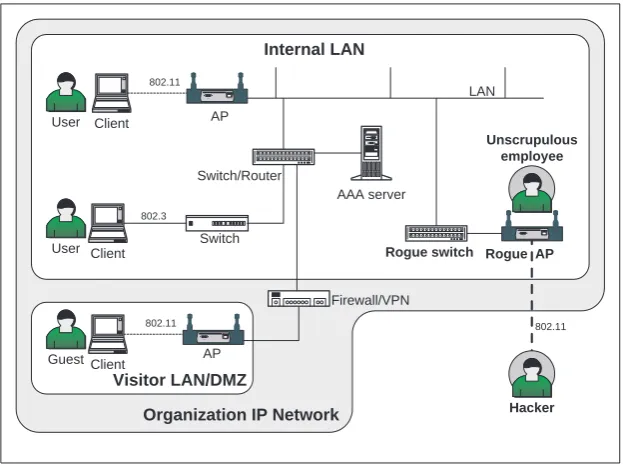
One of the pressing problems in today’s deployment of 802.11 wireless LANs in many enterprises is that of the rogue access point problem. This refers to the situation in which an employee connects an unauthorized 802.11 AP device to the corporate LAN, effectively creating a security hole in the corporate network. The broadcast nature of 802.11 technology allows a nearby external person to gain access to the corporate LAN and other resources on the LAN. The rogue AP problem is illustrated in Figure 2.5.
The core of the problem is the lack of device-to-device authentication and the need for a network infrastructure in which all network elements are authenticated before they participate within the network.
Before the advent of 802.11 technology in enterprises, all network devices, such as routers and switches, were considered to be “in-the-closet” devices and therefore under the direct control of the network administrator. Although a misbe-having employee could connect a foreign router or switch to the Ethernet port on the wall, the physical limitation of the wired world made it difficult for him or her to provide illegal network access to external persons. The introduction of cheap and small 802.11 APs has introduced potential security holes (literally) in the classic enterprise LAN. Other variations of this attack include an employee converting his or her PC or PDA — which has both a wired NIC and a wireless NIC — into a wireless router or bridge, so that external persons can access the WLAN side of the PC or PDA as a gateway into the corporate LAN.
longer viable today from a security perspective, primarily because in many end-user devices the Ethernet MAC address is configurable by the user. Thus, an employee is able to bring an unauthorized device (e.g., AP) into the enterprise premises, reconfigure the device’s MAC address to match an existing authorized device, and connect it to the corporate LAN without detection.
Client
AAA server
802.3 Client
802.11
User
User
AP
Switch
Internal LAN
Client 802.11
Guest AP
Visitor LAN/DMZ
SERIAL ETHERNET
Firewall/VPN
Organization IP Network Switch/Router
SERIAL ETHERNET LAN
Hacker Unscrupulous
employee
Rogue switch Rogue AP SERIAL ETHERNET
[image:47.432.67.379.153.385.2]802.11
Figure 2.5 The rogue AP problem.
2.7.1 The Rogue Cable Modem Case: A Precedent
In the late 1990s, the cable multiservice operators (MSOs) and cable modem manufacturers faced a similar security problem to that of the rogue AP problem. Their problem — which could be dubbed as the rogue cable modem problem — consisted of the need to authenticate off-the-shelf cable modem devices when connected by the user to the physical cable.
malfunction or wear and tear, the operator would send a technician to install a replacement cable modem device.
This operational model changed somewhat when both operators and manu-facturers opted for the off-the-shelf approach. Here, rather than the consumer being leased a cable modem device and having the costly technician to install the device, the consumer would be able to purchase his or her own cable modem from the local electronics store and install the device himself or herself. Furthermore, when the consumer moved to a different town, city, or state, he or she could retain the same cable modem and install it in the new location. Not only would this reduce the operator’s costs and encourage manufacturers to reduce the price of the device — effectively making it a commodity — it would also encourage innovation through better features and through combining the device with other devices, such as the
set-top boxes (STBs).
Head end (CMTS)
Operator's premises
Neighborhood Cable Connection
Cable modem certificate+key Operator's
certificate+key
Device manufacturer certificate CableLabs DOCSIS
Root CA certificate
Mutual authentication upon cable modem boot-up
Chain of trust
Cable modem SetTopBox
[image:48.432.76.373.246.488.2]Consumer's home
Figure 2.6 Device authentication in cable modems.
In addition to the change in the operational model, the cable operators also required the ability to distinguish legitimate cable modem devices from “cloned” devices, thereby allowing the operator to ascertain legitimate subscribers.
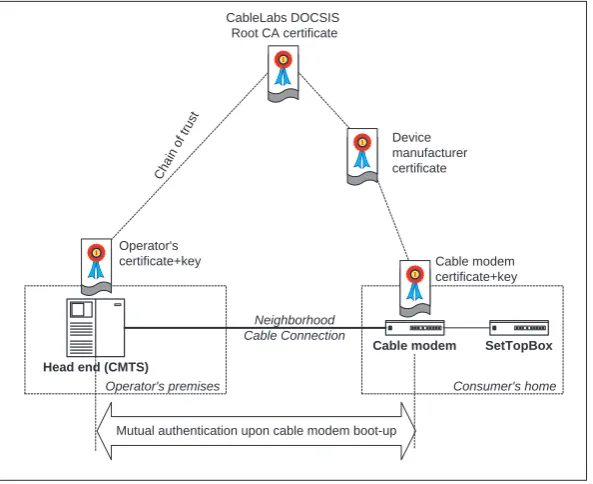
(CMTS) device — also called the head end — located at the local cable operator premises. The authentication protocol adopted by the DOCSIS1.2 specifications required the cable modem device to engage in an authentication handshake with the CMTS, applying their respective public key pair and their digital certificates. Since the certificate (and public key pair) was embedded within the cable modem device, it was technically difficult or infeasible for a hacker to copy the parameters into a cloned device.
In order to promote interoperability across various cable modem manufactur-ers and operators, a certificate hierarchy was established under Cable Laboratories (CableLabs) as the leading industry consortium.4This is illustrated in Figure 2.6. Here each manufacturer is assigned a manufacturer-level key pair and certificate, issued under the CableLabs Root CA. These in turn are used by a manufacturer to issue a device key pair and certificate for each cable modem unit. Currently, there are over 40 manufacturers who are members of CableLabs and who are participating in the CableLabs certificate hierarchy.
2.7.2 802.1X and Device Certificates
The 802.1X authentication framework provides a promising avenue towards solving the problem of rogue devices being attached to an enterprise LAN. A number of authentication protocols in 802.1X (i.e., EAP methods) are certificate-based and can be used for devices as well as users.
In order for a strong authentication protocol to correctly authenticate a device or entity, first a strong identity must be bound to that device or entity. A digital certificate issued to a device and physically embedded into that device provides a strong method for identification. A device certificate binds some physical properties or parameters of a device to a private key, expressed in a public-key certificate. The device can be a user device (e.g., laptop, desktop, PDA) or it can be a network device (e.g., access point, router).
The parameters of the device can be a combination of MAC address, product serial number, hash of the driver code, components’ serial numbers, and others. One or more of these values can be combined (e.g., through a hash function) to arrive at a unique identity of the device, which is then used as the subject identity in the device certificate.
Thus, a device certificate is aimed in the first place to provide irrefutable proof of the identity of the device when the device engages in a mutual authentication protocol with a “verifying party,” which in many cases can be other devices possessing the ability to be an authentication server. Note that it is not sufficient that the device sends a copy of device certificate to the verifier. The device must