Theses Thesis/Dissertation Collections
12-2013
Customizable Workstation
Kimberly Luly
Follow this and additional works at:http://scholarworks.rit.edu/theses
This Thesis is brought to you for free and open access by the Thesis/Dissertation Collections at RIT Scholar Works. It has been accepted for inclusion in Theses by an authorized administrator of RIT Scholar Works. For more information, please [email protected].
Recommended Citation
Kimberly Luly
Customizable
Workstation
A Thesis Submitted in Partial Fulfillment of the Requirements for
the Degree of:
Master of Fine Arts in Industrial Design
School of Design – College of Imaging Arts and Sciences
Rochester Institute of Technology
Rochester, NY
Signature Page
Customizable Workstation
Kimberly Luly
____________________________________________________________
Stan Rickel
Date
Chief Advisor / Graduate Director of Industrial Design / Associate Professor
____________________________________________________________
Kim Sherman
Date
Associate Advisor / Senior Lecturer / Industrial Design
Contents
Abstract _________________________________________________________________ 1 Introduction _______________________________________________________________ 2 Review of Literature / Initial Research __________________________________________ 5
• Health ______________________________________________________________ 5
• Products on Market / Trends ___________________________________________ 11
• Productivity ________________________________________________________ 16 Process _________________________________________________________________ 19
• Design Considerations _______________________________________________ 19
• Market Research ____________________________________________________ 29
Abstract
Introduction
Office and computing technology is constantly changing, and behind these
changes follows office furniture designers trying to keep up with the technology, trying to forecast future trends within the office work environment. Adaptability for both the user and technology is vital in creating a successful workstation within the workspace.
On one hand, many pieces of office technology continually shrink in size due to advancements. Computers are shrinking in size, laptops and tablets have become more common, and monitors are becoming slimmer - though their screen sizes sometimes become larger (depending on the profession for which the monitor is used). All this and an increase in reduced office space due to rising real estate costs, can lead to more compact office environments.
momentum and popularity due to many recent studies citing sedentary behavior as a cause of many common ailments and health problems such as heart disease, obesity, and diabetes. These studies are found in the Health section of my Review of Literature.
People do not have to settle for what they have been given at work: a desk and a chair. They must be able to adjust and personalize their approach to work as well as their environment in order to suit their needs and preferences. Being able to adjust their work environment helps increase the worker’s productivity, comfort, and, as a result, happiness with where they work. These changes are important for everyone involved because they allow the user, the company, and the designers the opportunity to move forward in a new direction and adapt with the evolution of the office environment and technology. This includes how people interact with one another, how their workspace is set up, and how the office as a whole is laid out.
Review of Literature / Initial Research
For my furniture-based thesis emphasizing a customizable workspace, I focus on various texts relating to health, productivity, and trends in workspaces as well as
workspace furniture to better understand and get a different perspective on my
workspace furniture project. After reviewing various recent articles and reports, I chose to organize my sources by topic.
Health
about the health benefits of breaking up sedentary time will further support my product. One way, which my product allows the user to reduce sedentary time, is by offering height adjustability so the user can easily alternate between standing and sitting while at my workstation.
Many journal articles stated similar findings regarding the negative health effects of a sedentary lifestyle. One especially relevant journal article, “Too Much Sitting: The Population-Health Science of Sedentary Behavior,” describes the research being done on the health hazards related to a sedentary lifestyle. The authors of this article, Owen et al., mention how over the past century changes in lifestyle, technology, and
transportation have affected our physical activity levels causing most to become less physically active, thus increasing sedentary behavior. The authors also propose, “that
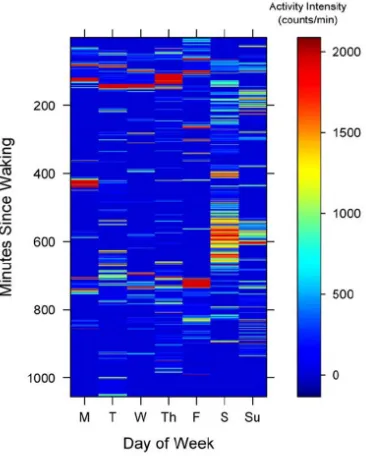
Figure 1: “Being physically active, but also highly sedentary: one week of
accelerometer-count data showing, on average, 31 mins/day moderate-to-vigorous activity time (> 1951 counts/min) and 71% of waking hours sedentary (< 100
counts/min)” (Owen et al.).
Owen et al. found, “In a follow-up of AusDiab (the Australian Diabetes, Obesity and Lifestyle) study participants over 6.5 years, high levels of TV time were significantly associated with increased all-cause and cardiovascular disease mortality. Each one hour increment in TV time was found to be associated with an 11% and an 18% increased risk of all-cause and cardiovascular disease mortality, respectively.”
They also found through their research that breaking up sedentary time can reduce these health concerns (getting up to stand for a few minutes or taking a short walk around the office for example). Another interesting discovery through their
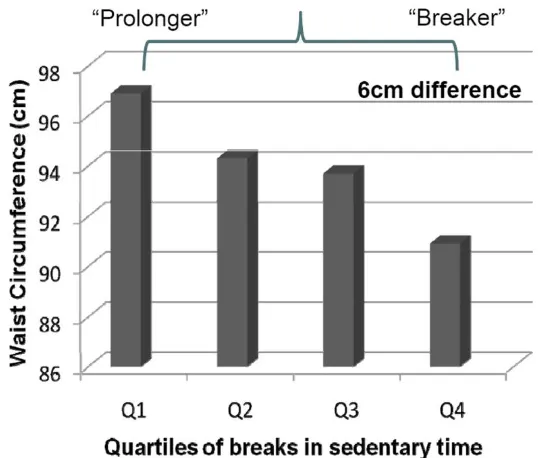
research was that “having a higher number of breaks in sedentary time was beneficially associated with waist circumference, body mass index, triglycerides, and h-2 plasma glucose” (Owen et al.) (e.g. see figure 2).
Owen and his colleagues’ research helps support my decision to make one of the main features of my customizable desk the ability to adjust it from a sitting position to a standing position. Their work also helps argue the need to diminish one’s amount of sedentary time through out the day by finding new approaches to work and leisure time, such as providing “more opportunities to reduce sitting time (for example, height
adjustable desks) or new regulations in workplaces to reduce or break-up extended periods of job-related sitting” (Owen et al.).
The journal article titled, “Amount of time spent in sedentary behaviors and cause-specific mortality in US adults,” mentions the health problems arising from
with sedentary occupations compared with those with active occupations.” The authors also noted that recommended weekly amounts of exercise do not counteract the
[image:13.612.160.429.344.573.2]negative health effects of sedentary activities. This is found evident when Matthews et al. said, “Our most striking finding was that individuals who reported participating in >7 hours MVPA/week, [moderate-vigorous physical activity] but who also watched ≥7 hours television/day had a 50% greater risk of death from all causes and twice the risk of death from cardiovascular disease.” This further supports the need for work approach options within the work environment where one remains sedentary for long periods of time.
Figure 2: “Associations of breaks in sedentary time with waist circumference” (Owen et al.).
et al.). All of these statistics prove the need for reduced sedentary time in almost any way possible through out the day. A large portion of most people’s sedentary time (sitting at their desk at work) can be broken up or diminished through breaks from long periods of sitting through various means such as getting up to stretch, taking a walk around the office, or by standing while working for portions of their day, which I am incorporating into my product’s design.
Another medical journal article, “Long-Term Sedentary Work and the Risk of Subsite-specific Colorectal Cancer”, focuses its research on sedentary work and its possible link to colorectal cancer (distal colon cancer, rectal cancer, and proximal colon cancer). Sedentary lifestyles and sedentary work increases the risk of distal colon cancer and rectal cancer, but the study found that it did not seem to increase the risk of proximal colon cancer (Boyle et al.). Their research also “suggested that new
occupational regulations could be introduced to break up prolonged sedentary time by taking regular non-sitting “breaks”, which have been shown to have a beneficial effect on metabolic biomarkers” (Boyle et al.).
One last article worth mentioning is “Breaking Up Prolonged Sitting Reduces Postprandial Glucose and Insulin Responses.” This article found that by interrupting periods of sitting time with actions as simple as getting up and walking around for a few minutes, that they helped improve glucose and insulin levels, thus improving
metabolism (Dunstan et al.). It also helps reduce the risk of cardiovascular disease.
straight puts 100mm of pressure on the intervertebral discs of your spine.” McNeil also discusses how, “sitting, in contrast to standing, actually increases the intradiscal load compared to standing; spinal pressure ‘sits’ around 140mm pressure. If you slouch, . . . spinal pressure increases to 190mm.” This shows that standing can benefit your spine and posture, and relieve pain and discomfort from sitting.
There is an obvious need to reduce the amount of sedentary time in almost everyone’s lives. This is shown through the health risks noted above, which range from type 2 diabetes to colorectal cancer. As noted by Owen et al., something as simple as breaking up sedentary time can reduce these health concerns. One of the benefits of my product is to help reduce the amount of sedentary time for office workers, by giving them the option to choose between standing and sitting while at work. This option provides breaks in sedentary time, thus helping encourage movement throughout the worker’s day. Once standing, most people are more likely to move around and be more active, compared to when they are sitting when they will be less inclined to get up and move about.
Products On the Market / Trends
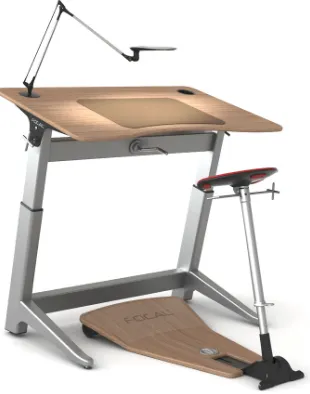
The Office Chair, Aiming To Cure Sitting Disease,” Campbell-Dollaghan explains that Keen designed this desk to help offset the “sitting disease” (people sitting too much for too long). This table is similar in design to a drafting table, and the seat that goes with it allows the user to prop themselves up instead of fully sitting or standing at the desk. By allowing the user the option to stand or sit, this workstation provides the user with a non-sedentary work option. The seat design that Keen developed prevents the user from remaining in a fully seated position, and encourages movement while resting upon the seat. Desks like this are becoming more common in the office furniture retail world, thus showing the demand for the option to stand while working at a desk.
Figure 3: Image of Locus Desk by Focal.
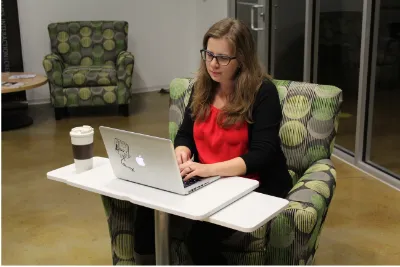
was called OneLessDesk (e.g. see figure 4). This desk works similarly to a set of nesting tables, wherein you only pull out the table(s) that you want or need at that time.
Figure 4: OneLessDesk created by Heckler Design.
Part of any process for finding inspiration is also weeding out ideas that you know are not right for your project. That was the case when I read “Revolution Desk Saves Space With a Fold-Away Workstation” by Sean Fallon. This product features an interesting take on office organization and storage. The work surface looks like it flips open to expose the monitor, which is attached to the underside of the work surface, and this entire action comes from simply sliding the keyboard tray in or out. It is nice in that the user does not always have to keep their monitor out, so it can be hidden if they are doing non-computer based work. Glenn Fleishman reviewed Uncaged Ergonomics’ WorkEZ workstation in his article “Executive Standing Desk turns any desk into a
the angle. It allows the user to experience a standing desk without the need to purchase a brand new desk. After reading both Fleishman and Fallon’s pieces, I opted to not incorporate any of the design features from either product reviewed in these articles. However, I found it useful to see how another designer approached a solution to a similar problem. For instance, rather than making a desk bigger, the Fold-Away workstation reviewed by Fallon simply ‘hides’ items not currently in use.
Mark Lukach, author of the article “The Best Standing Desks”, looked at a large number of adjustable standing desks first hand – mainly electric. The author purchased 6 of them and tested them out in the span of about a year. One advantage to an
adjustable height desk mentioned by Lukach is how it allows for easier transitions between sitting and standing. Lukach stated “when I was at a fixed-height desk, I did longer chunks of sitting, and longer chunks of standing, than I do at my adjustable desk, because it takes more time to switch things up”. An easy to adjust desk helps increase the likelihood that the user will adjust from sitting to standing more frequently to break up long periods of sitting. He also noted, “At my adjustable height desks, when I feel tired, I bring my desk down and sit down. Simple enough. After a quick break, I get back on my feet again.” Users of traditional sitting desks will find the transition easier to a standing desk if the height is easily adjustable.
because even if the desk is stable and of decent quality, if it “looks cheap” people will not want it. To create an effective design, your product needs to look of good quality, and be of good quality through thoughtful design.
A unique office trend that has gained traction in recent years is called “hoteling.” The article by Andy Medici discusses how some organizations and businesses, such as the General Services Administration (a federal agency), have taken to downsizing the square footage of their offices, thus reducing costs for their budgets. They create smaller office spaces by removing private offices and cubicles. Some offices like the General Services Administration (GSA) have adopted the “hoteling” approach to work where no one is given a permanent desk space, and everyone just checks in each day and reserves a desk (Medici). It also mentions how this style of office helps promote communication and collaboration among the employees. Since the workers do not have a permanent desk limiting where they sit each day, they are able to sit near the people with whom they are currently working, even as projects change. This idea of smaller office spaces was also mentioned in McGarvey’s article “The Latest in Office Design”. He talks about how one of the factors pushing changes in office furniture is a smaller office space along with larger common spaces for collaboration. These articles show me the design direction in which many offices are going. By designing my desk to be
easily adjusted for height, anyone at the office could use it, from the employees who want a traditional sitting desk to those who would like to use a standing desk.
Productivity
Aside from health issues, another major reason for switching to a standing desk is to help increase productivity. An article written by Rebecca Bright (“Kids Who Can’t Sit Still – Letting them fidget may keep students focused on learning”) brings up research
showing children’s learning can improve when they are allowed the option to sit or stand during class. Since the children do not have to focus on staying still they can divert that attention elsewhere, in this case, the lessons being taught in class. This concept could easily be applied to adults in the workforce; adults can improve their concentration and focus, and in effect, their productivity by standing while performing work. Gifford
mentioned in her article “We Tested Standing Desks – Here’s Proof That Standing Desks Make You More Productive” that during an interoffice experiment, workers found “standing led to up to 10% more productivity” when compared to the same person sitting down. This experiment consisted of 7 employees; it calculated the employees’
productivity with a piece of proprietary software that measured each worker’s time spent sitting and standing while using the standing desk for one week, then compared it to their productivity while using their usual sitting desk for one week.
Valley. This includes companies such as Google and Facebook. Employees’ requests for standing desks have grown due to the number of articles and research focused on the hazards of remaining sedentary for too long. Many employees, after receiving and using a standing desk, claim, “they feel more comfortable and energized” (Carlton). This ultimately benefits the argument that standing desks improve productivity. Trevor
Christiansen wrote an article titled “Increased Energy With a Standing Desk” that might provide more explanation to why people experience increased productivity while
working from a standing desk. He notes different hormones in your body will change depending on your level of physical activity. For instance, sitting for an extended period of time creates a build up of cortisol, which can decrease your energy (Christiansen). However, if you are standing or moving around, endorphins get released, helping your body to become more alert and energized; movement also increases blood circulation (Christiansen). Anything to become a little more active while working at your desk can potentially help increase your productivity at work.
environment which allowed for better team collaboration, a reduction in the costs of employee churn, and “reduced medical claims and improved worker productivity” within their new offices (Steelcase).
Summary of Literature Review
Looking back at my review of literature, and specifically the medical journal articles, it is clear to see that reducing sedentary time in your life benefits your health, especially in the long term. I also found that many of the recently designed standing desks resulted from the various health studies focusing on sedentary behavior and the need for people to reduce sitting time through out the day. One way many people who work in an office environment can reduce sedentary time is by incorporating standing into their work routine, which an adjustable standing desk can easily do. The need/want for standing desks has risen, and along with that so have the options available on the market for these desks. Office environments are also changing and evolving. More compact and efficient office spaces are developing where mobility and flexibility in the workspace is important and economical. With the luxury of mobility and flexibility in the workspace, the ability to cultivate an atmosphere of collaboration and communication is much easier. With this new type of office featuring an increase in standing desks and increased collaboration, productivity will continue to thrive. Knowing all this, the creation of a mobile, compact, height-adjustable desk will be crucial to users for this next
Process
Design Considerations
Early on I came up with various questions to ask myself and consider while designing my workstation, as well as considerations needing to be taken into account for my final product. My primary questions were: who will be my typical user, how do I see this product being used by the end user, where do I see this product being used, and what will my product offer to the user? My first attempt at gaining a better
understanding of my product’s role in an office environment started with creating a few user scenarios.
My first scenario begins with an office worker named Parker. She works at a web applications company located in a renovated factory loft space, which has a very open floor plan with no cubicle walls. The projects that she works on, as well as her
office’s supplementary adjustable workstations to roll over to Steve’s desk. Once there she arranges her laptop, adjusts the height of the desk, and collaborates next to Steve at the workstation while standing. The footrest comes in handy while collaborating, giving her the ability to shift and adjust her body weight while standing. She likes to stand while collaborating with others because she sits at her personal desk for the majority of her day, and collaboration time allows her to break up her day with a little more activity and movement. Without the desk, Parker would not be able to work with Steve so closely. Anytime they would need to talk with one another, they would have to walk over to the other’s desk, making their collaboration much more difficult.
The second scenario focuses on Alex. He is working at an up and coming online newspaper, and today he needs to give a presentation in his office. He goes into the conference room and rolls the office’s adjustable workstation out of the corner, bringing it to the front of the room, and sets up his laptop on it. He then adjusts it to a
Samantha is a nurse practitioner at a private medical practice. At the medical office she visits various rooms throughout the day while interacting with her patients. Currently, there are 10 other nurses and doctors which share this space. Each time Samantha enters a room, she adjusts the height-adjustable desk to a comfortable sitting height so she can take notes on what is happening with her patients, and enter
information into the patient’s file on her tablet. At certain points, she needs to roll the desk over to the patient to show them an x-ray, or other piece of medical information. Having these adjustable workstations in each room allows whichever doctor or nurse is using the room to adjust and customize the desk to their personal needs. It also allows them to work wherever they choose within the room, allowing the patient to stay relaxed and remain seated while their nurse or doctor works with them or shows them
something.
These scenarios show just a few ways in which my product could potentially be used. Some examples of my workstation in use can be seen in figures 5 – 12. Allowing users to supplement their current office furniture with my workstation for use in
scenarios ranging from collaboration to use during presentations shows off its versatility. Also, giving employers the opportunity to allow their workers to use my product as their full-time workstation, allows users the ability to move around when needed, and to take advantage of a variable-height desk whenever the user feels it is necessary.
[image:26.612.106.506.373.640.2]Supplementing current office furniture, and having my workstation exist in more modern office environments (where there is more open space with collaboration areas and break out rooms) is where I see my product thriving.
Figure 6: Workstation being tested.
[image:27.612.115.495.393.671.2]My preference to stand while working prompted me to incorporate, as a key feature, the ability to use my workstation for standing or sitting. All the reports and studies related to the benefits of reduced sedentary time also factored into my want to create a desk that could work for sitting or standing. However, I realized even if you want to stand while working, there inevitably will be times when you want to sit while working (e.g. you might get tired, not feel well, feel more comfortable sitting at certain times, etc.), so being able to sit at my workstation was also important. The user needs this choice, and flexibility within the product. I can easily see a user coming into the office, and sitting down at their desk while they enjoy their coffee. Then, once finished, switching to the standing position until lunchtime. After lunch, they would sit for an hour or so, then switch back to standing for the remainder of the day. Breaking up the day like this prevents the user from getting overly tired from standing for too long, and also helps prevent large spans of sedentary time. Alternating between standing and sitting helps encourage movement, and helps to energize the user by getting their blood flowing (especially when they move to the standing position).
because you are less inclined to adjust their height. With an easy to use adjustable height desk the user is more inclined to vary their activity.
Figures 8 (left) and 9 (right): Workstation being tested.
Figure10: Workstation being tested.
Once I began working on different workstation concepts through sketches and small models, it became clear that if I wanted my product to be an important, flexible part of the office, then mobility (preferably on wheels) would be another important feature. Creating a smaller, more compact design would also aid in my product’s mobility and flexibility. These design features (compact and mobile) apply themselves well to the ever-evolving office environment where team-based collaboration is gaining traction, and people work together on and off through out the workday. For example, if someone needs to work short-term next to someone across the office, they can roll over my workstation to collaborate. This also lends itself well to office spaces that reconfigure to the needs of the office at any particular time. A mobile workstation such as mine adjusts and moves alongside the reconfiguration of the office, thus reducing churn rate (i.e. the percentage of staff who experience inter-office moves within a year).
Figure 11: Workstation being tested.
[image:32.612.108.504.396.665.2]A 5-point wheeled base keeps the workstation stable. Selecting a 5-point base makes it especially important, once again, to keep my desktop’s size in mind. Keeping the workstation and its desktop surface relatively small with minimal overhang ensured its stability on the 5-point base. However, the addition of wheels introduces a new issue: keeping the desk from rolling away while in use. This is remedied by the addition of locking levers to the wheels, which can easily be flipped up or down to unlock or lock them.
Market Research
Figure 13: Comparison chart of select desks on the market as well as my design. ame Price Top dimensions Max height Portable? Simple to
adjust height? Accessories Footrest
Extra surface area
Airtouch by Steelcase
Starts @
$1499 22.25" x 52" 27" - 43" No Yes Yes No No
Geekdesk by Geekdesk
Starts @
$950 31.5" x 47.5" 23" - 48.75" No Yes No No No
Kangaroo by Ergo Desktop
Starts @ $399
18" x 24" (main work surface)
Can go up to 15" above your
desktop
No Yes Yes No No
Locus by Focal
Starts @
$1290 30" x 48" 31" - 41" No Yes Yes Yes No
Multi-Table by Multi-Table
Starts @ $549
Small Table Top:
24” x 40” x ” 27.5" - 47" No Yes No No No
Terra by Nextdesk
Starts @
$1600 31.5" x 63.5" 24" - 50.5" No Yes Yes No No
POP by Balt $156 15.75" x 25.75" 21.25" - 31.25" Yes Yes No No No
MUV by
Safco ~$180 22" x 29.5" 35" - 49" No No No No No
Euroflex by
Buddy ~$227 15.75" x 27 5/8" 44.25" No No No No No
Homemade
"Ikea Hack" ~$29 24" x 79" 41" No No No No No
The Airtouch by Steelcase has a very thoughtful design. It could work in many locations (in a cubicle or open space), has a good height range, and its height can be adjusted without electric power due to its “exclusive Airtouch ® technology.” Some issues I have with the Airtouch are its size and lack of mobility, making it more difficult to move within an office. As result, this desk would not work in my user scenario featuring Parker. It also has a high price starting around $1399. The Airtouch is made of powder-coated steel, wood, and laminate. Steelcase also notes “50% of our metal components contain recycled content. Our particleboard substrate is 100% recycled wood. The laminate adhesive is water soluble – no solvents are used and no VOC’s are released into the environment during the bonding process.” Their focus on incorporating
environmentally friendly materials into their products is noteworthy as is how easily their workstation can be adjusted.
Next, is the Geekdesk. This desk is functional, but lacks any visual interest or refinement. I like that it can easily adjust heights with its electric motor, but its lack of design and, as Lukach from The Wirecutter points out, its lack of accessories (such as a cable management system) make the Geekdesk a less desirable option on the market. Its price starts out at $985, which is still fairly expensive for most users. Similarly to the Airtouch desk, the Geekdesk is not easily moveable, thus not necessarily suitable for dynamically changing offices. Looking at its specifications, the Geekdesk is made of a steel frame, with an electric motor for adjustability, and a laminate top.
by a designer unlike many of the other desks on the market. Its desktop can also be tilted much like the top of a drafting desk, which is a nice feature. Another benefit of the Locus is its list of accessories (for example, a specially designed seat to work with the system, a task lamp, a no tilt shelf, and a cable management system). In regards to its adjustability, this desk uses a hand crank located at its center just below the desktop, although functional, this is not as easy as the previous two with the electric motor. The one issue I found with this desk is its lack of mobility. Because it is a large desk, once you place it somewhere, the odds of you moving it around the office are fairly slim, thus limiting its mobility and flexibility within the office. The materials used consist of
“aluminum, steel, furniture-grade plywood and polymers,” and its price tag starts at $1290.
Alternatively, there is the Kangaroo by Ergo Desktop. This is more of a
My desk however, would have a retail price of around $300-$400, which is still one of the cheaper adjustable height desks on the market. Raw components, I estimate costing around $90 (this will most likely go down when buying in bulk). The wheels and bottom cost roughly $45, the gas spring and its enclosure around $15, tabletop and drawers about $20, and the other miscellaneous parts around $10. Then, I estimate the manufacturing to be around the same cost ($90). This brings my product’s cost up to $180 before any profit markup, and does not include transporting the pieces. Because of this, the retail price point of around $300-$400 is a legitimate estimate.
The design of my desktop is small while still usable (16” x 24”) with the option of using the extendable trays adding an additional 11 inches on each side. That, in
combination with the wheels on the base of the desk allow for easy mobility within the office. The use of gas springs allows the desk to be easily adjusted from a standing position to a sitting position, and since the desk needs no power, it is not tethered to an outlet. At this time there are no accessories for my desk, however they will be necessary in order to expand the line. These accessories could include, a cup / utensil holder, clips or hooks for a coat / purse / bag, folders or pockets for temporary storage and more. My desk would be constructed from recycled laminate for the work surfaces, aluminum frame, aluminum base and wheels, and a gas spring for adjusting height. My desk aims to solve all of the shortcomings of the previous 4 desks, all while maintaining an
aesthetically pleasing and functional design (e.g. see figure 14).
have a limit on the size of person that can use it. These reasons lead me to believe that there has to be a better option for users, and I think my desk can fill that void in the market.
Figure 14: 3-D model of workstation with trays extended.
Design Process
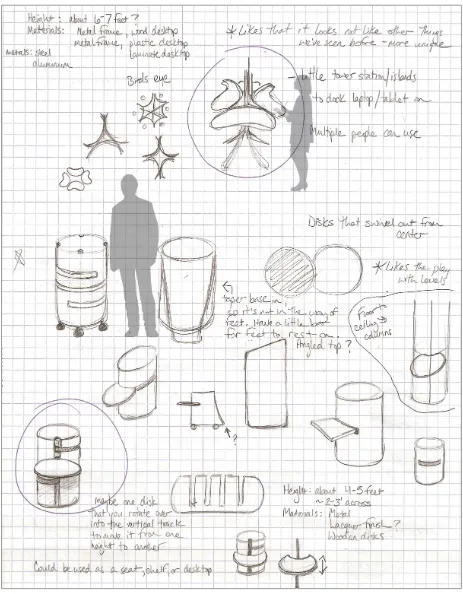
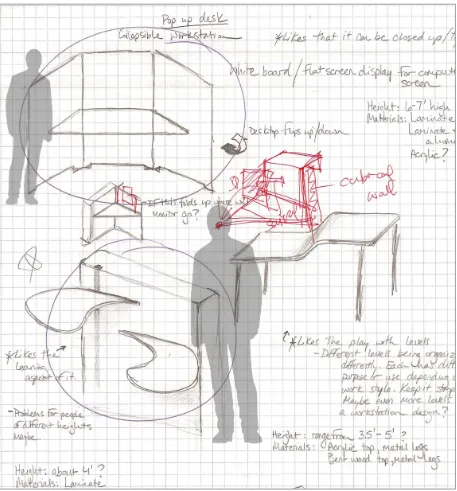
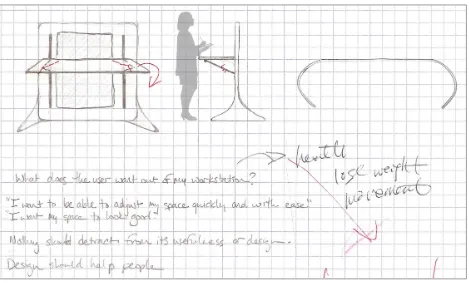
(e.g. see figures 15, 16, and 17). In figure 15 the upper sketch portrays a cluster of desktops that could provide workspace to several workers at once, who could also individually adjust their desktop height while working. I also have in figure 15 a
cylindrical workstation on wheels that I felt had potential during my ideation process. I imagine this cylindrical cart having a few circular levels on it that could swivel out of the body for use as additional work surface levels. The most prominent sketch in figure 16 is located at the top, and shows a portable workstation that could collapse or fold down when not in use. I imagine figure 17, which shows off a desktop that can be flipped down when not in use, being attached to a freestanding panel or on a wall with the desktop on a set of tracks that allows its height to be adjusted.
After developing numerous concept sketches, some of which I mention above, I began narrowing them down. I focused the next stage of my process on 2 sketches I felt had the most potential: one being the unit that moved on a vertical set of tracks (e.g. see figure 17) that could lock the desktop at a desired height, and the large cylindrical form on wheels with a round top on which to work (e.g. see figure 15).
The first of the two, the desktop that moves vertically on a track seen in figure 17, seemed to be a very practical design. It seemed to take up little space, and I had
Figure 16: Initial sketches for workstation.
for how it would ultimately move vertically and lock into place. It also quickly became apparent that it would be less mobile and compact than my other design. After creating the cylindrical model (e.g. see figure 18), I felt it had the most potential though I could identify some problems with it in its initial design. For example, if its shape continued to the floor, there would be no space for someone to put their feet; they would bump into its base. In general, I liked the amount of space it took up, the amount of work surface on top while using it, and how it would eventually evolve into a mobile unit with wheels.
Figures 18 (left) and 19 (right): Full-size cardboard mock-ups based on sketches.
While making the full-size cardboard mock-ups, my sketch designs continued to narrow. I continued playing with the cylindrical design, with it eventually evolving into a mobile cart with a round top (e.g. see figure 20). Once it reached this phase (a mobile cart with a round top), it became clear that a round top was no longer practical or
height and rests on a single column attached to a 5-point-wheeled base. It also includes a footrest to use while standing.
Figure 21: Initial sketch of mobile, adjustable height workstation.
Beginning with one set of desktop surface dimensions, I created a rough full-size cardboard model (30” across, 24” deep, 5” tall) of the workstation’s top (including pull out trays and a rough drawer). After testing it myself and consulting with others, I
and depth smaller and more compact. Once these two rough models were completed, I tested them myself, taking note of any possible improvements or changes for the final iteration (e.g. see figure 23).
Figure 22: Comparison of dimensions for my work surface during testing.
At this point, I showed my project to potential users in order to gain feedback. My testers had a variety of jobs and desk/office arrangements, all requiring them to work at a desk for at least a portion of each day. For each person with whom I talked, I also visited their workspace and documented it, and presented my models and sketches in order to gain feedback. I also asked them various questions related to their office space, desk, and work habits.
Dimensions: 30”x24”x5”
Figure 23: Testing with cardboard models.
I received a lot of good feedback, and a lot of similar feedback for certain things. Though between the two sizes it seemed split; some people liked the larger size while others saw the potential in the smaller. Here is some of the feedback I received while presenting and testing my product:
• Its primary use seems aimed at laptops.
• The side trays should be kept as close to the front as possible.
• It is nice that it is easily adjustable and easy to move and transport.
• It is good as a temporary workspace and for collaboration.
• It could be used for presentations as a lectern.
• Its trays provide extra optional space.
• It needs to be stable and its base should lock into place.
• Give it safe, soft edges, so users do not bump into sharp corners.
• The smaller top makes it less cumbersome.
• Give it a footrest.
Thoughts about potential options and considerations for the workstation also arose during my meetings with potential users. For example, adding or providing power and cable management, having an optional back lip so things will not fall off, having a cover to place on top of the front drawer to provide additional space, make it available in different sizes for various needs, offer a model with a top that can be angled, be able to hang things on the edges, provide a lighting option, and provide mounts to attach monitors to the back. Other comments and considerations were that if this workstation were for generic office use (not dedicated to one person) then it might not need the storage drawer, possibly have the trays on a hinge, and have drawers on the sides. Another piece of information I gained from the people in my group was that they were willing to spend between $200-800 on a new desk (a price range lower than most standing desks on the market).
smaller size for the final design (24”x16”). I made sure to keep the footrest, and to provide a wide range of heights to adjust the desk to for a variety of users. I kept the trays on either side of the desktop, but removed the drawer. I also made sure to round the corners to finish the look and to protect users from being jabbed by sharp corners. Also during this period of development, I replaced the box-like shape of the
workstation’s top with a simpler, less fussy version of itself. With additional feedback, I made the workstation’s top a single layer with the trays suspended beneath it in plain view instead of being hidden within the box I originally designed.
Figure 27: Underside of 3-D model.
[image:53.612.92.526.426.684.2]During the design and construction of my workstation concept, I encountered a few technical issues. First, how to easily adjust the height of the table. For the purpose of my model, I decided that the use of PVC pipes cut to various heights placed inside the larger outer pipe would suffice for adjusting the height of the workstation (e.g. see figures 30 – 33). After researching different options for how I could get my desk’s height to adjust once in production (electric, hand crank, and rack and pinion are a few
examples), I chose gas springs because I want my workstation to adjust similarly to an office chair – something that requires a little force, but is easy to do. Ideally, you will pull the lever up to adjust the height of the station. Another issue I had was how to lock the wheels. One easy way to remedy this is by placing a lever on each wheel to flip up or down to unlock or lock the wheels, though ideally, the wheels would all lock in one motion or flip of a lever.
Finally when designing the trays, I came across a variety of ways to incorporate them into my design. I looked at placing them on hinges and having them hang from the sides, or even using a gate-leg hinge. I looked into drawer slides of different kinds, including mini drawer slides. For actual production though, the trays will function on very small, low profile drawer slides (e.g. see figures 27 and 28). These will be best because they allow the trays to be hidden away when not in use. They will also provide the
strength and support needed for the trays, and ease of movement when sliding the trays in or out from beneath the main work surface.
Another technical issue related to my product’s design was resolving the
materials used for production. I selected slightly more environmentally friendly materials for my workstation. The main work surface and trays will be made of recycled laminate, available in a few different finish options (e.g. birch veneer, cherry veneer, white, or black). My workstation’s base (the telescoping column and wheeled base) will be made of aluminum. And as indicated before, it uses a gas spring for adjusting height.
The creation and development of additional features as well as refinement of my product to enhance the user experience is a necessity, if it succeeds and market
Summary
its compactness. My workstation’s wheeled base also allows it to move around easily, once again increasing its versatility and flexibility within the office environment.
Survey Questions for Users
! 1 QUESTIONS Name: Age: Gender: Occupation:Type of business or company worked at: Type/style of office:
-How do you like to work/what are your work preferences? (sit, stand, a combination?) -Work related activities at your desk?
__Type on keyboard __Type on laptop __Draw/sketch
__Mouse/mouse pad __Meetings
__Present information
__Talk on phone __Read
__Write Other:
________________________________________________________________ ________________________________________________________________ -Non-work related activities at your desk?
__Eat/drink __Play with toys __Nap
__Feet up
__Lean/slouch on it __Reddit
__Youtube __Facebook
__Read articles, etc. __Personal work/projects __Email
__Talk to people Other:
! 2 -What do you keep on your desk?
__Monitor(s) __Computer tower __Keyboard __Mouse/mouse pad __Phone __Speakers __Laptop __Tablet __Pictures __Papers/documents __Toys/knick knacks Other: ________________________________________________________________ ________________________________________________________________
-What do you like about your desk/workspace?
-What do you not like about your desk/workspace?
-Do you have other areas (in your space or elsewhere in office) in which to do work/specific kinds of work? If so, where and how would you describe it?
-Does an adjustable desk appeal to you? Why?
-What type of adjustment do you imagine it having?
-How often do you think you would adjust the desk considering the type of adjustment system involved (with a gas cylinder similar to an adjustable office chair)?
-How would you envision an adjustable workstation?
! 3 -How much actual surface area do you need to comfortably work?
-How much time do you think you spend exclusively at your desk each day?
-How often do you think you get up to leave your desk space?
-How/where do you work at home?
-Do you have a home office or desk at home?
-How often do you use it?
-Are you satisfied with it?
-How do you adjust while working?
-What do you move to adjust?
-Do you make any adjustments/modifications to your current workspace to fit your needs (comfort, efficiency, etc.)?
! 4 -What distracts you at work?
__People coming to you
__People talking to you
__Noises __Food __Computer/TV screens __Internet __Phone Other: ________________________________________________________________ ________________________________________________________________
-Do you do anything to limit distractions at work?
-What affects your comfort at your desk? (Chair, arm space, leg space, desk height, etc.) Explain.
-If you want an adjustable desk, what do you want out of it, or hope to gain from it?
-How much would you be willing to spend on an adjustable desk?
-What is important to you in a desk/workspace (on a scale of 1-10, 10 being very important, and 1 being not important)?
__Cost
__Comfort
__Easy to adjust
__Space it takes up
__Adjustable height
__Easy to move
__Aesthetics
__Durability
__Long life of product
__(Other)______________
Bibliography
Boyle, Terry, Lin Fritschi, Jane Heyworth, and Fiona Bull. “Long-Term Sedentary work and the Risk of Subsite-specific Colorectal Cancer.” American Journal of
Epidemiology 173:10 (2011): 1183-1191. Web. 21 Sept. 2012.
Bright, Rebecca. “Kids Who Can’t Sit Still – Letting them fidget may keep students focused on learning.” National Education Association. National Education Association, n.d. Web. 28 Sept. 2012.
Campbell-Dollaghan, Kelsey. “Founder of Keen Reinvents The Office Chair, Aiming To Cure Sitting Disease.” Fast Company Design. Mansuteo Ventures Publishing, 1 Jun. 2012. Web. 21 Sept. 2012.
Carlton, Jim. “Standing Desks Are on the Rise.” Wall Street Journal. Dow Jones & Company, Inc., 1 Sept. 2011. Web. 17 Oct. 2013.
“Chevron Case Study.” Office Details, Inc. Office Details, Inc. (a Steelcase company), n.d. Web. 24 Oct. 2013.
Dunstan, David W., Bronwyn A. Kingwell, Robyn Larsen, Genevieve N. Healy, Ester Cerin, Marc T. Hamilton, Jonathan E. Shaw, David A. Bertovic, Paul Z. Zimmet, Jo Salmon, and Neville Owen. “Breaking Up Prolonged Sitting Reduces
Postprandial Glucose and Insulin Responses.” Diabetes Care 35:5 (2012): 976-983. Web. 21 Sept. 2012.
“Ergonomic Guidelines for arranging a Computer Workstation - 10 steps for users.”
Cornell University Ergonomics Web. Cornell University, 17 Oct. 2012. Web. 21 Sept. 2012.
Fallon, Sean. “Revolution Desk Saves Space With a Fold-Away Workstation.” Gizmodo. Gawker Media, 22 May 2008. Web. 18 Sept. 2012.
Fleischman, Glenn. “Executive Standing Desk turns any desk into a standing desk.”
Macworld. Macworld Magazine, 2 Jun. 2012. Web. 13 Oct. 2012.
Gifford, Julia. “We Tested Standing Desks – Here’s Proof That Standing Desks Make You More Productive.” Readwrite. Say Media Inc., n.d. Web. 20 Dec. 2013. Healy, Geneviève N., David W. Dunstan, Jo Salmon, Ester Cerin, Jonathan E. Shaw,
Paul Z. Zimmet, and Neville Owen. “Breaks in Sedentary Time: Beneficial associations with metabolic risk.” Diabetes Care 31.4 (2008): 661-666. Web. 13 Oct. 2013.
Herman Miller, Herman Miller, Inc., Web. 30 Oct. 2012.
Lukach, Mark, “The Best Standing Desks.” The Wirecutter. The Wirecutter, 29 Aug. 2013. Web. 15 Oct. 2013.
Matthews, Charles E., Stephanie M. George, Steven C. Moore, Heather R. Bowles, Aaron Blair, Yikyung Park, Richard P. Troiano, Albert Hollenbeck, and Arthur Schatzkin. “Amount of time spent in sedentary behaviors and cause-specific mortality in US adults.” The American Journal of Clinical Nutrition 95-2 (2012): 437-445. Web.
McGarvey, Robert. “The Latest in Office Design.” Executive Travel Magazine. American Express Publishing Corporation, Oct. 2008. Web. 10 Oct. 2012.
McNeil, Kim. “Under Pressure: Poor posture puts more pressure on your spine.” My Yoga Online. My Yoga Online, May 2011. Web. 1 Dec. 2013.
Medici, Andy. “No desk, no nameplate, half the workspace: Feds adjust to ‘hoteling’.”
Federal Times. Gannett Government Media Corporation, 21 Jan. 2012. Web. 10 Oct. 2012.
Owen, Neville, Geneviève N. Healy, Charles E. Matthews, and David W. Dunstan. “Too Much Sitting: The Population-Health Science of Sedentary Behavior.” Exercise and Sport Sciences Reviews 38.3 (2010): 105-113. Web. 13 Oct. 2013.
Rams, Dieter. “Ten Principles of Good Design.” Vitsoe. Vitsoe, n.d. Web. 19 Sept. 2012. Saulny, Susan. “Students Stand Up When Called Upon, and When Not.” New York
Times 25 February 2009: page A1. Web. 21 Sept. 2012.
Steelcase. Steelcase Inc., Web. 30 Oct. 2012.
Teicu, Ada. “42 Gorgeous Desk Designs for any Office.” Freshome. Interior Design & Architecture Magazine, n.d. Web. 19 Sept. 2012.