RIT Scholar Works
Theses Thesis/Dissertation Collections
2011
E-mail behavior profiling: Based on attachment and
language text
Onur Polatcan
Follow this and additional works at:http://scholarworks.rit.edu/theses
This Thesis is brought to you for free and open access by the Thesis/Dissertation Collections at RIT Scholar Works. It has been accepted for inclusion in Theses by an authorized administrator of RIT Scholar Works. For more information, please [email protected].
Recommended Citation
E-mail Behavior Profiling:
Based on attachment and language text
by
Onur Polatcan
Committee Members
Dr. Yin Pan
Dr. Sumita Mishra
Dr. Charlie Border
Thesis submitted in partial fulfillment of the requirements for the degree of
Master of Science in
Networking and Systems Administration
Rochester Institute of Technology
B. Thomas Golisano College
of
Computing and Information Sciences
Abstract
Acknowledgments
I would like to thank the following people whose support helped to make this thesis possible:
Dr. Yin Pan, for her leadership, support, attention to each and every detail and her invaluable suggestions made this work successful. She has been everything that a student could ever want from an advisor.
Dr. Sumita Mishra, for her support and for teaching some of the most interesting classes offered at RIT.
Dr. Charlie Border, for keeping me motivated and giving me key ideas to raise the overall quality for this project.
Professor Ed Wolf, for his inspiration and reading my work over and over again. My parents, to whom I am deeply and forever indebted to for their support, love, and motivation.
Contents
Abstract ... ii
Acknowledgments ... iii
List of Figures ... vi
1.
Introduction ... 1
Background ... 1
2.
Related Work ... 3
2.1 Overview ... 3
2.2 New Methods ... 4
2.3 Work Presented ... 5
3.
Methodology ... 6
3.1 UML Domain Model ... 7
Concepts: ... 8
3.2 Use Case Diagram ... 9
3.3 Class Diagram ... 11
Methods ... 12
4. Experimental Evaluation ... 14
4.1 Datasets ... 15
4.2 Test Environment ... 15
4.3 Settings ... 15
4.5.1 Results 2 ... 22
5. Conclusion ... 27
6. Future Work ... 27
6.1 Limitation ... 27
6.2 Functionality ... 29
Appendix ... 30
A. Source Code – ConnectionManager.java ... 30
B. Source Code – InvisibleWitness.Java ... 39
C. Source Code – MailDictionary.java ... 40
D. Source Code – MailFilter.java ... 41
E. Source Code – dbconfig.properties ... 51
F. Source Code – config.properties ... 51
Works Cited ... 53
List of Figures
F
ALSEP
OSITIVE1 ... 19
F
ALSEP
OSITIVE2 ... 20
F
ALSEP
OSITIVE3 ... 21
F
ALSEP
OSITIVE4 ... 25
F
IGURE1,
UML
D
OMAINM
ODEL... 7
F
IGURE2,
U
SEC
ASED
IAGRAM... 9
F
IGURE3,
C
LASSD
IAGRAM... 11
F
IGURE4,
O
VER SIZE ATTACHMENT... 26
N
OTIFICATIONE-M
AIL1... 19
N
OTIFICATIONE-M
AIL2... 21
N
OTIFICATIONE-M
AIL3... 22
N
OTIFICATIONE-M
AIL4... 26
T
ABLE1,
I
NVISIBLEW
ITNESSR
ESULTS... 16
T
ABLE2,
A
CCESSD
ATABASES
CREENSHOT... 17
T
ABLE3,
M
YSQL
D
ATABASES
CREENSHOT... 18
T
ABLE4,
I
NVISIBLEW
ITNESSR
ESULTS... 22
T
ABLE5,
M
YSQL
D
ATABASES
CREENSHOT... 23
1. Introduction
Background
We are using the e-mail method of communication more than using regular mail or phone calls. E-mail is a part of our daily activity. As I come to work each day, the first thing that I do is to check my e-mail and make sure there are not any urgent messages that need to be prioritized and processed before doing anything else. Since we are composing and reading e-mails every day, the mundane task facilitates a quick response without much thought about the wording, the context, the content, the punctuation, the spelling, and the grammar. With the various features that e-mail communication applications have to offer, such as Microsoft Outlook’s auto-complete "TO" field, one little mistake with the use of that auto-complete function could cause public embarrassment, loss of reputation, loss of job, or even civil or criminal liability both for the sender and for the company. Solving Internet and email security greatly assists surveillance intelligence activities. For instance, the discovery of an employee account and detection of the behavior can be directed to uncover of certain classes of covert, clandestine or espionage behavior performed with Internet resources. Dr. Moore worked as a federal prosecutor in Manhattan, where she focused on investigating and prosecuting "White-Collar" criminal cases. She has also written many articles about e-mail communication. Dr. Moore pointed out that e-mail has become the "smoking gun" of choice in today’s white collar prosecutions [16].
2. Related Work
2.1 Overview
Many of us wear a mask to disguise the "dark side" of our personalities. In the natural one person can be disguised by having a beard one day, and with another day and another mood, clean shaven is the prescription. On one day a person may use a British accent for a specific purpose, and just as quickly, change the accent to a normal accent. Consider the role of a salesperson, and how he or she may dress to impress a potential client. The salesperson may use verbal and non-verbal communication techniques to reduce any resistance a potential client may have in the persuasive role of salesmanship.
be extremely helpful to protect any organization from internal and external threats where internet access is concerned.
2.2 New Methods
How do you read someone? Reading a newspaper and obtaining knowledge is relatively simple, but to really know someone takes time, communication cues – both verbal and non-verbal, intuition, and relationship. E-mail profiling has similar characteristics of relationships, and the techniques required will involve give and take, experience, and intently involved practice.
Many know that research on e-mail filtering is very limited; however, studies on spam filtering are very mature. One must know that spam filtering and e-mail filtering is not the same thing. Professionals may need e-mail filtering for their specific needs [24].
Making the transition from relationships to employee behavior includes several correlations. What happens when employees are laid off, become dissatisfied with their jobs, look for new opportunities, or are terminated from their position. "Nearly 60 percent of employees who quit a job or are asked to leave are stealing company data, according to a report by the Ponemon Institute, a Tucson based research group." [13]. In Krebs’ paper he gives a broad view of how and why employees inadvertently send out e-mails containing important company data. Apparently, many companies are still naive or careless about securing their work environment to remain competitive in the business world.
a WEKA compatible format to get a valuable data set. My research differs in the language set. Where their research focused on English by using a stream of characters and word sequences, my research will identify when English is not being used. The limitations in previous research include only one single language. However, IEFAF stipulates word sequences that treat a group of words as one word. For example, the words, United States of America, could be just one word, such as, USA.
2.3 Work Presented
user oversized average attachment size, and user up-to-date attachment size. This information would give enough sources to determine if there is a security risk involved or not. This application will eliminate the fear of losing intellectual property that is critical for an organization. After researching a considerable number of technical research papers [4,6,7,14,17,18,21,24], I have found very few applications that support an e-mail standard to restrict improper use of this medium.
3. Methodology
The thesis can monitor abnormal activities based on user profile, in order to statistically measure the effectiveness of this concept, I developed an application that captures attachment size that user sends within the given period, it also identifies the language of the text. To simulate a real-time scenario, I decided to use G-mail servers because it would give anyone an opportunity to replicate the same environment without
environment setup overhead. For instance, if the application is running and a user sends an email with an attachment size greater than the average user profile allowed limit, application would do both notifying the network administrator and profiling the message information such as sender, receivers, attachments size, attachment name, and sent date.
3.1 UM
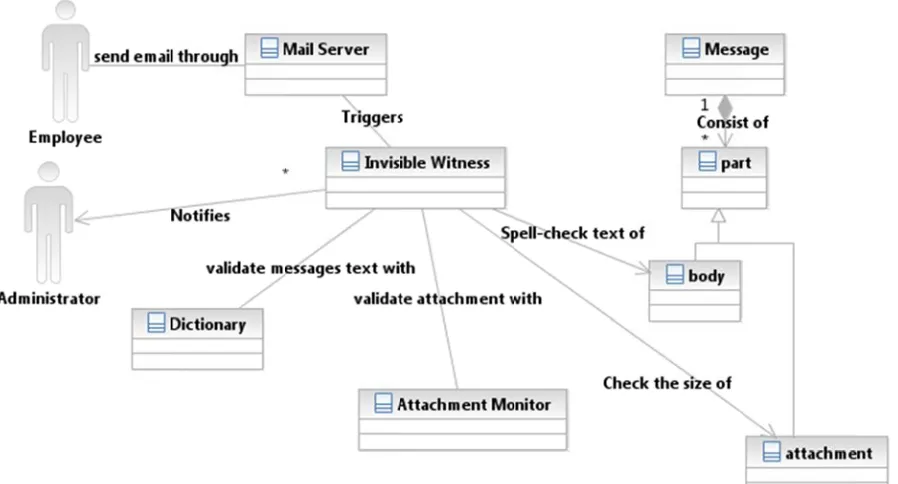
Figure 1 T sends a forth. Th for any a server th the bod stores thL Domain
1, UML Dom
This diagram n email usi he tool (Invi activity. As hat e-mail
y for Engli hem into a d
Model
main Mode
m depicts ng an e-ma isible Witne
soon as th has been s
sh languag database.
el
the proble ail server su ess) runs in
e Invisible sent, it che ge. After ta
m domain. uch as G-m n the backg
Witness too cks the siz aking the n
. In the mo mail, Exchan round and ol gets the ze of its atta
necessary odel above nge, Lotus monitors th notification achment an information
e, an empl Domino an he e-mail se n from an e
nd spell ch n, the tool
Concepts:
Messages: consists of at least one part. Each part might have a different
mime-type. These parts might be Attachment, Plain body, inline attachment, HTML body, or any other type that is specified in the header.
Attachment Monitor: Whenever any message containing attachment is sent to
the Invisible Witness, it would pass that message to the attachment monitor. The attachment monitor checks each attachment whether inline or plain attachment and validate each attachment size by calculating the previous user profile. Depending on the average attachment size, the Attachment Monitor would decide if administrator
notification has to be sent and logs this activity into the database. If the attachment size is less than the average attachment, Attachment Monitor would log the activity but not notify the Network Administrator.
Dictionary: The dictionary is used by the Invisible Witness to spell check the
message body content. This is important for the Invisible Witness to decide whether the message should be flagged or not. The dictionary is an external file containing only words without definition to minimize the file size and improve the system efficiency. Invisible Witness would accept any dictionary containing only a single word per-line.
Administrator: An administrator is also monitored by the Invisible Witness. For
example, if upper management tried to send a huge attachment, the Invisible Witness would log that activity because the upper management is also considered employees.
Employee: An employee is any person working for the company, including
M
emails u mail serv
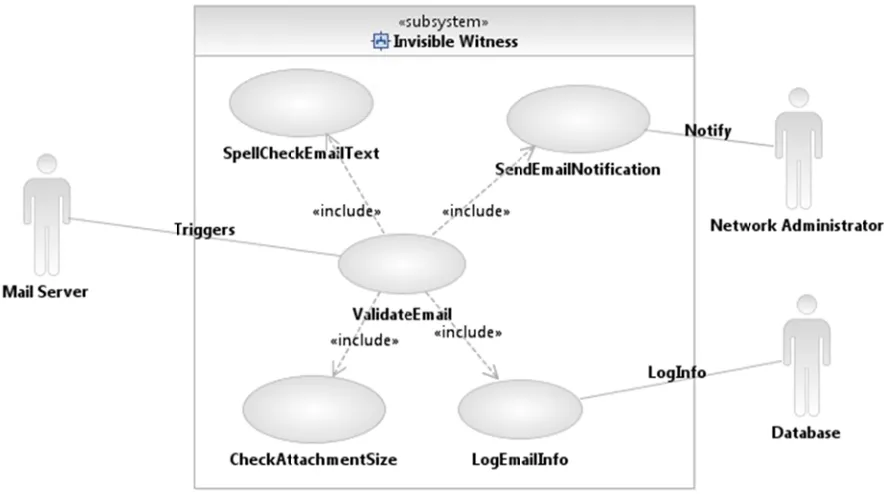
[image:16.612.83.525.184.431.2]3.2 Use
Figure 2
Mail Server
using differe vers.
Case Diag
2, Use Cas
r: The mail ent protoco
gram
se Diagram
server is a ls. G-mail,
m
a server tha Exchange,
at is used to Lotus Dom
o send, rece mino are all
eive, and st considered
tore d
Use Case ID: IWS01 Use Case
Name:
Invisible Witness
Created By: Onur Polatcan Last Updated By:
Onur Polatcan
Date Created: 11/01/2010 Date Last Updated:
01/08/2011
Actors: Mail Server, System, Administrator, Database
Description: System is triggered when a new email has been sent in order to check that email.
Trigger: Mail Server received a message
Normal Flow: 1. Mail Server triggers the system when a new email has been sent
2. System receives an email from the email server to analyze it
3. System gets a word and pass it to a dictionary 4. Dictionary return true for correct words
5. Flow repeated from 3 for each ne message sent 6. Percentage of misspelled word is under 25% 7. Message does not have any attachment 8. Exit the system
Alternative Flows: 6.1 percentage of misspelled words are greater than 25%
6.1.1 system connect to mail server
6.1.2 mail server acknowledge connection
6.1.3 system prepare and send a message to the administrator
6.2 message does not have a body
6.2.1 Flow continue from Normal Flow step 7
7.1 message has attachment
7.1.1 system request user profile from database 7.1.2 database calculates and returns the average 7.1.3 system compares the attachment size with the
average returned from the database 7.1.4 attachment size is less than the average 7.1.5 Flow continue from Normal Flow step 7
7.1.4.1 attachment size is greater than the average
7.1.4.1.1 system prepares and send notification to the admin Exceptions: 1 Mail Server is down: Display error message
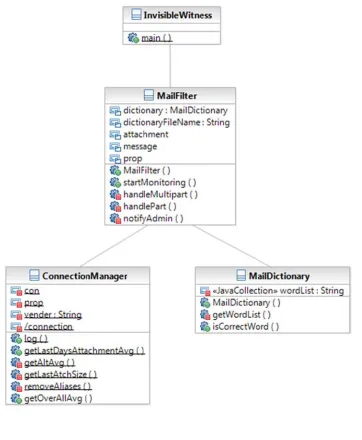
3.3 Clas
Figure 3
ss Diagram
3, Class Di
m
iagram
Methods
MailFilter
This is the main class from which an application is managed. It creates an object from both MailDictionary and ConnectionManager to perform the required tasks.
Following is a brief description of its methods:
startMonitoring(): it will connect to the mail server to retrieve the messages that the system has never yet read. Then, it decompose the message to its original parts to call one of the methods handleMultipart() or handlePart().
handleMultipart(): it will be called in case the message has more than one part to be analyzed. It would iterate through all the parts and call handlePart() for each part.
handlePart(): the method will search for the parts with plain/text (message body) and gets the content of that part to be validated. It will use isCorrectWord() from the Dictionary class to validate and count misspelled words. The method will also check whether the part is an attachment. If it is, it will get the average attachment size to
compare the current attachment size and log the message if the current attachment size is larger than the average.
notifyAdmin(): The method will notify the administrator if the message exceeds the percentage of misspelled words or if its attachment size exceeds the average.
ConnectionManager:
It contains all the functionalities to communicate with the database. It consists of the following methods:
For instance, the message is needed to get general information such as sender, receiver, and sent date. The attachment is needed to get more detailed information about the attachment itself, such as the attachment size, name, and type.
getLastDaysAttachmentAvg(): Invisible Witness would get the average of the last logged activity by the user who sent a message containing at least one attachment to validate the attachment. This method will accept two parameters: sender name and time period. Sender name is to retrieve information about the user. The method will use time period in order to calculate the average of the attachment size that are logged during this period. In case the method did not find any activity during the specified period, it would call getAltAvg().
getAltAvg(): This will calculate the average attachment size using the other period specified in the configuration file, which is usually more than the first period. If no activities were found during this period, it would call getLastAtchSize().
getLstAtchSize(): This string would retrieve the size of the last attachment that the specified user sent. In case no profile was found, the method would return 0.
getOverAllAvg(): This method will get the average of all the attachments that the specified user has sent regardless of the attachment size restriction.
removeAliases(): This string removes the aliases from the email addresses. Unlike email addresses, aliases might be changed by the user at any time. So, it is important to remove theses aliases to improve the accuracy of the program.
MailDictionary
MailDictionary(): accepts the dictionary file name to make it easier to change the diction the application uses to validate the message content.
getWordList(): loads all the dictionary words to make them ready. Loading the words in the data structure is much more efficient than iterating a file each time a word is validated.
isCorrectWord: validates whether the passed word already exists as a
parameter in the dictionary. If it found the word in the dictionary, it would return true. It would return false otherwise. The Invisible Witness will basically use the
isCorrectWord() to validate each word in the body and calculate the average of the misspelled words.
4. Experimental Evaluation
In this section, I present the results of my experimental evaluation of the
automatic filtering application, also known as Invisible Witness. Originally, I checked the accuracy of the application each week, for a total of five weeks; however, to make it as easy as possible for the reader, I decided to use only the last two weeks of data. In this case I could easily show and share the data with anyone. The main idea of the
4.1 Datasets
Originally, I was going to use Enron e-mail corpus, made available by MIT; however, after looking at the given datasets, I learned that none of them have any attachments, and some of the e-mails have no e-mail sender values; therefore, I decided to create my own datasets.
4.2 Test Environment
Windows 7 Professional 64 bit
Microsoft Access 2010
MySQL 5.5
G-Mail server
Java Mail Library
4.3 Settings
It must be noted that when setting up a database, you must ensure that enough characters be given for each column, and the administrator should always read the logs if any error message is printed.
4.4 Results
database display a “one,” but if the attachment is within the parameter, the database will display a “zero.” Each time the network administrator receives an e-mail, there is an informational message line that displays "User up-to-date attachment size," which means that the average attachment size is displayed for the specified user. 4.4.1 Result Section 1 does not include the changes; however, 4.5.1 does.
[image:23.612.78.579.300.409.2]4.4.1 Results Section 1
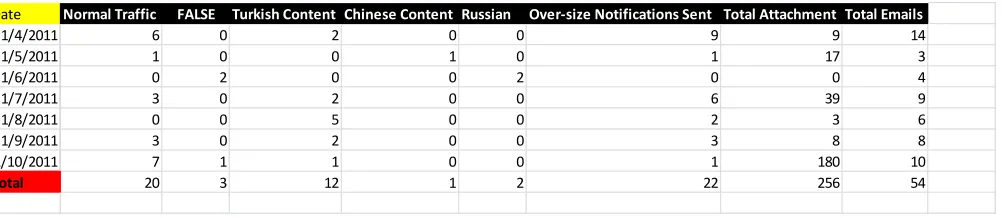
Table 1, Invisible Witness Results
Starting from January 4, 2011, to January 10, 2011, a total of seven days of data has been recorded. The user sent a total of 54 mails. It appears that 20 of these e-mails have not been flagged: 3 of them are false positives; 12 of them have Turkish words; 1 email contains Chinese words; 2 e-mails contain pure Russian; and 22 notifications are sent because of a profile attachment size and is logged on the database. Out of 54 emails, a total of 22 e-mails had attachments on them totaling 256 attachments, but only 22 of them were over the profile size.
Date Normal Traffic FALSE Turkish Content Chinese Content Russian Over‐size Notifications Sent Total Attachment Total Emails
1/4/2011 6 0 2 0 0 9 9 14
1/5/2011 1 0 0 1 0 1 17 3
1/6/2011 0 2 0 0 2 0 0 4
1/7/2011 3 0 2 0 0 6 39 9
1/8/2011 0 0 5 0 0 2 3 6
1/9/2011 3 0 2 0 0 3 8 8
1/10/2011 7 1 1 0 0 1 180 10
Table 2,
T
, Access D
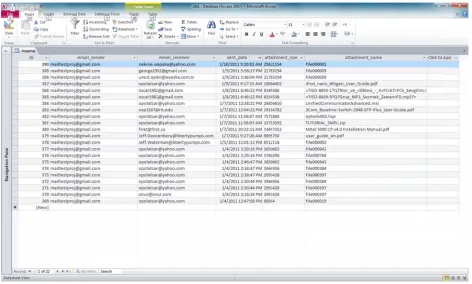
This is the a
Database S
access data
Screenshot
abase scree
t
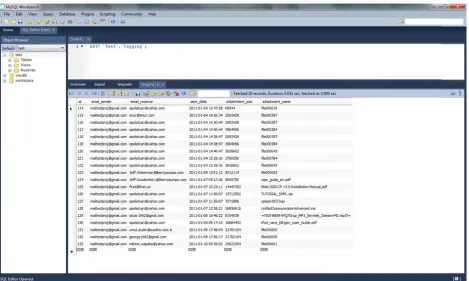
Table 3, T screens recorded the attac the attac see the
, MySQL D
This is the hot, there a d. This hap chment nam chment in
error mess
Database S
screensho are only 20 ppened bec me has mo that colum age in the
creenshot
ot from My 0 logs; whe cause the c ore than 45 n, it just du logs.
t
ySQL serv ere as, Mic
column acc 5 character
umps it, bu
ver 5.5. If crosoft Acce cepts only 4 rs. Since it ut the admi
you look ess databa 45 characte cannot sto nistrator w closely at ase has 22
ers, and on ore the nam would be ab
4.4.2 Fa
O 6%.
False P
T network these wo administ
alse Positiv
Out of 54
e-ositive 1
This e-mail c administra ords daily. trator.
ve
mails, only
could not b ator should Below is wh
3 of the em
e validated add these t hat Invisible
mails have f
because it technical w e Witness s
false positiv
t contains m words if this
sent to ackn
ves, which
many techn particular u nowledge t
is less than
nical words. user is usin he network n
The ng k
O more tha
False P
T dictionar administ
Out of 171 w an 52%, so
ositive 2
This e-mail i ry. It talks a trator was n
words, 90 o o the networ
is pure Eng about a Rus
notified by I
of them were rk administ
glish but has ssian news Invisible W
e not includ rator was in
s many nam paper and itness and
ded in the d nformed.
mes that ar a Soviet lea a screensh
dictionary, w
re not includ ader. The hot of this e
which gives
ded in the network -mail is bel
s
Notifica
This pro
False P
T dictionar to avoid
ation E-Mai
oves that mo
ositive 3
This e-mail c ry. The netw
false posit
il 2
ore than 33
contains so work admin ive is given
3% of the w
ome abbrev nistrator wa n in the “lim
words are no
viations and as alerted a
itation” sec
ot included
d words tha nyway. Mo ction of this
in the dicti
at are not in ore informa
paper.
onary.
cluded in th ation about
Notifica O network
4.5.1
R
H accuracy Table 4, S has bee mails ha mails c Portugu attachm column. ation E-MaiOut of 99 wo administra
Results
2
Here is anot y of the app
, Invisible W
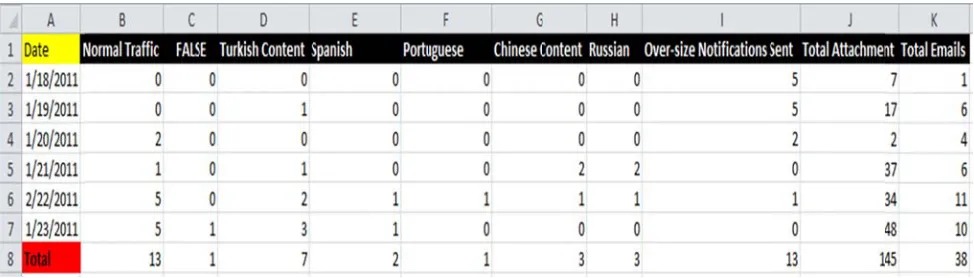
Starting from en recorded
ave not bee ontain Chi ese; 2 e-m ent size an
Out of 38
il 3
ords, 25 wo ator receive
ther set of d plication.
Witness R
m January d. The user en flagged:
inese word mails are Sp nd are logg emails, a
ords were n d this e-ma
data after th
Results
18, 2011, t r sent a tot 1 is a fals ds; 3 e-m panish; and ged on the total of 21
not included ail above.
he code mo
to January tal of 38 e-se positive; ails contai d 13 notific e database e-mails ha
d in the dict
odification,
23, 2011, -mails. It ap
; 7 of them in pure R cations are e, and it fla ad attachm
tionary; ther
which will p
a total of s ppears that m have Turk Russian; 1
sent beca agged 1 on
ents on the
refore, the
prove the
six days of t 13 of thes kish words;
attachm above, k
[image:30.612.71.563.159.453.2]MySQL
Table 5,
There ar behavio screens
ents, but o keep in min
Database
, MySQL D
re total of 1 r reported t hot above 1
only 13 of th nd that each
Database S
3 profile al to Network 145 total at
hem were o h e-mail can
creenshot
lowed over Administra ttachments
over the pr n have mult
t
rsized attac ator via e-m recorded.
rofile size. W tiple parts.
chments se ail instantly
When exam
nt by the us y. Accordin
mining the
ser. This ng to
table
Table 6,
T applicati
, Access D
The above s ion is capab
Database S
screenshot ble of storin
Screenshot
represents ng the data
t
s the same d in either M
data results Microsoft Ac
s as MySQ ccess or My
4.5.2 F
False P
O is less th which m observe
False Posi
ositive 4
Out of 38 em han 2 perce made this da the diction
itive
mails, this w ent. There ata set a fal nary for und
was the only were three lse positive defined word
y false posi e words that e. The netwo
ds to avoid
itive captur t weren’t in ork adminis future prob
red in this d cluded in th strator shou blems.
data set, wh he dictionar uld closely
Notifica T included network Figure 4 T over-siz exceeds was noti sent atta attachm ation E-Mai
The above e d in the dict
administra
4, Over siz
This is the la e attachme s the oversi ified. When achment siz
ent size.
il 4
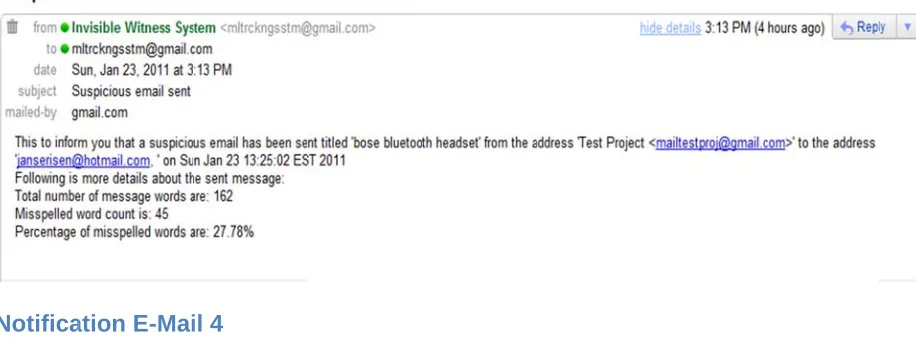
e-mail had o ionary; ther ator.
ze attachme
ast alert rec ent. Accordi zed-averag n one close ze, the user
only 162 wo refore, Invis
ent
ceived from ing to the a ge attachme ely looks at
r oversized
ords, but 27 sible Witnes
m Invisible W above scree
ent size; th the attachm -average s
7 percent o ss reported
Witness in t enshot, the
erefore, the ment carefu size, and the
of the words d this incide
his time pe current atta e network a ully, it displa
e user up-to
s were not ent to the
5. Conclusion
I present a robust and scalable application for filtering confidential data. This application can capture the differing distrubitions of e-mails in users’ sent boxes. This application can be used for one or more user, if needed.
Over the years, most companies have conducted and will continue to conduct a significant portion of their business through e-mail. Some of these information transmitted by e-mail include confidential data that, if not properly secured, could damage the company’s security severely. The significant risks that all companies face are when employees within the organization send confidential information through unprotected e-mails. I hope that organizations will be able to use the "Invisible Witness" tool to minimize its business risk to help protect valuable company information.
6. Future Work
This thesis is prove that a concept is needed to form the basis for possible testing in the near future. I believe this application can be improved by including functionality, performance, effectiveness, as well. The sections below will describe some of the improvements that can be done in near future.
6.1 Limitation
Even though five weeks of data has been used with over 95 percent accuracy, further testing should be done to improve effectiveness. The dictionary that is used in this test bed has over 237,000 words in it. When an employee uses a word that is not in the dictionary, the system flags it, and for this reason, when the word is not included, the administrator should add the new words to get better results.
6.2 Functionality
I believe this application can be advanced and used as commercial software sometime in the near future. There are four modifications that should be applied to advance it:
1. The mail server should push messages rather than the system pulls messages.
I would make the application to be triggered by the mail server whenever a
message has been sent. Currently, the application pulls messages from the mail server. The computer resources usage will be limited to when the application is triggered.
2. Data representation
The system could be expanded to display graphically the users' profiles as a pie or bar chart to depict what is already logged. Currently, the system uses only the logged data to calculate the average profile of users, but these data could be used for many more different presentations.
3. Language add-on
The system could be expanded to add more language dictionaries so that it would identify the text based on the available language that is loaded on the system. For instance, Spanish, French, Chinese and so forth.
4. Attachment Analyzer
Appendix
A. Source Code – ConnectionManager.java
import java.io.File;
import java.io.FileInputStream;
import java.net.URL;
import java.sql.Connection;
import java.sql.DriverManager;
import java.sql.PreparedStatement;
import java.sql.ResultSet;
import java.sql.SQLException;
import java.sql.Timestamp;
import java.util.Properties;
import javax.mail.Message;
import javax.mail.MessagingException;
import javax.mail.Part;
public class ConnectionManager {
private static Connection con = null;// holds the connection object
private static Properties prop = null; // properties for the databases
private static String vender = null; // venders for the databases
/**
* store the message information in the database
*
* @param message
* to get information from
* @param attachment
* to get the attachment information
* @throws MessagingException
*/
public static void log(Message message, Part attachment,
boolean isOverSize)
throws MessagingException { // get the message sender
String sender = message.getFrom()[0].toString(); // remove the alias associated with the sender
sender = removeAliases(sender);
// get the receiver
String receiver =
message.getRecipients(Message.RecipientType.TO)[0] .toString();
receiver = removeAliases(receiver);
// get the date when the message was sent
Timestamp timeStamp = new
Timestamp(message.getSentDate().getTime()); // get the attachment size and name
double attachmentSize = attachment.getSize(); String attachmentName = attachment.getFileName();
try {
// get a connection object
con = getConnection();
// prepare a statement to insert the information in the database
PreparedStatement insertStmt = null;
String insertQuery = "INSERT INTO logging (" + "email_sender, "
+ "email_receiver, " + "sent_date, " + "attachment_size, "
+ "attachment_name, oversize)" + "VALUES(? , ?,?,?,?,?)";
// set the missing values to fill the prepared statement
insertStmt = con.prepareStatement(insertQuery);
insertStmt.setString(1, sender);
insertStmt.setString(2, receiver);
insertStmt.setTimestamp(3, timeStamp);
insertStmt.setDouble(4, attachmentSize);
insertStmt.setString(5, attachmentName);
if (isOverSize) {
insertStmt.setInt(6, 1);
} else {
insertStmt.setInt(6, 0);
}
// execute the query
insertStmt.executeUpdate();
// close the statement and the connection insertStmt.close();
con.close();
} catch (SQLException e) { e.printStackTrace();
}
* specified in the property file
*
* @param sender
* the email address of the sender
* @param numberOfDays
* specify the number of days to get the average from
* @param alternativeNumberOfDays
* alternative number of days in case no records were found
* @return the average of the attachment size within the
specified period
*/
public static double getLastDaysAttachmentAvg(String sender,
int numberOfDays, int alternativeNumberOfDays) {
double avg = 0;
try {
// get the sender's email address
sender = removeAliases(sender);
// get a connection object
con = getConnection();
String dateAdd = "";
if (vender.equals("access")) {
dateAdd = "DATEADD('d', ?, NOW())";
} else if (vender.equals("mysql")) {
dateAdd = "DATE_ADD(NOW(), INTERVAL ? DAY)";
}
// prepare a select statement
PreparedStatement selectStmt = null;
ResultSet rs;
/*
* multiply the number of specified date by '-1' in order to
* calculate the starting date of the period. For instance, if the
* number of days specified in the property file were 7, it would be
* converted to '-7' which is 7 days ago */
numberOfDays = numberOfDays * -1;
String selectQuery = "SELECT AVG(attachment_size)
as average "
+ "FROM logging " + "WHERE sent_date > " + dateAdd
selectStmt = con.prepareStatement(selectQuery);
selectStmt.setInt(1, numberOfDays);
selectStmt.setString(2, sender);
selectStmt.setInt(3, 1); // 1 indicates oversize
attachment only
// execute the query
rs = selectStmt.executeQuery();
avg = 0;
if (rs.next()) {
avg = rs.getDouble("average");
}
if (avg == 0) {// there was no record found
// try the alternative 7 day period
avg = getAltAvg(sender,
alternativeNumberOfDays);
System.out.println("ALT AVG is: " + avg);
}
selectStmt.close();
con.close();
} catch (SQLException e) { e.printStackTrace();
}
return avg; }
/**
* called by 'getLastDaysAttachmentAvg()' to get the average of the
* alternative period specified in the configuration file
*
* @param sender
* the email from which the message was sent
* @param altNumOfDays
* the alternative period
* @return the average of the alternative period
*/
private static double getAltAvg(String sender, int
altNumOfDays) {
PreparedStatement selectStmt = null;
ResultSet rs;
altNumOfDays = altNumOfDays * -1;
String dateAdd = "";
if (vender.equals("access")) {
dateAdd = "DATEADD('d', ?, NOW())";
} else if (vender.equals("mysql")) {
dateAdd = "DATE_ADD(NOW(), INTERVAL ? DAY)";
}
String selectQuery = "SELECT AVG(attachment_size)
as average "
+ "FROM logging " + "WHERE sent_date > " + dateAdd
+ "AND email_sender = ? AND oversize=?";
selectStmt = con.prepareStatement(selectQuery);
selectStmt.setInt(1, altNumOfDays);
selectStmt.setString(2, sender);
selectStmt.setInt(3, 1); // 1 indicates oversize
attachment only
rs = selectStmt.executeQuery();
avg = 0;
if (rs.next()) {
// get the alternative 7 day average from the database
avg = rs.getDouble("average");
}
if (avg == 0) {// there was no record found within the alternative
// 7 day period
// get the size of the last attachment
avg = getLastAtchSize(sender);
}
// close the statement and connection selectStmt.close();
con.close();
} catch (SQLException e) { e.printStackTrace();
}
/**
* retrieve the last attachment that the specified sender sent
*
* @param sender
* the user email
* @return the size of the last attachment
*/
private static double getLastAtchSize(String sender) {
double lastAttachmentSize = 0;
try {
// get a connection
con = getConnection();
PreparedStatement selectStmt = null;
ResultSet rs;
String selectQuery = "";
if (vender.equals("access")) {
selectQuery = "SELECT top 1 id,
attachment_size , MAX(sent_date), MAX(id) " + "FROM logging "
+ "Where email_sender =? AND oversize=? "
+ "GROUP BY attachment_size, logging.id "
+ "ORDER BY logging.id desc;"; } else if (vender.equals("mysql")) {
selectQuery = "SELECT id, attachment_size ,
MAX(sent_date), MAX(id) "
+ "FROM logging "
+ "Where email_sender =? AND oversize=? "
+ "GROUP BY attachment_size, logging.id "
+ "ORDER BY logging.id desc limit 1;";
}
// prepare a statement
selectStmt = con.prepareStatement(selectQuery);
selectStmt.setString(1, sender);
selectStmt.setInt(2, 1); // 1 indicates oversize
attachments only
// get the size of the last attachment from the database
lastAttachmentSize =
rs.getDouble("attachment_size"); }
// close the connection and the statement selectStmt.close();
con.close();
} catch (SQLException e) { e.printStackTrace();
}
return lastAttachmentSize;
}
/**
* lazy initialize a connection if it is not already Initialized or closed.
*
* @return a connection object
* @throws SQLException
*/
private static Connection getConnection() throws
SQLException {
try {
if (con == null || con.isClosed()) {
// load the property file to know which database to connect to
prop = new Properties();
prop.load(new
FileInputStream("dbconfig.properties"));
vender = prop.getProperty("vender");
if (vender.equals("access")) {
// get the application path for databases
ConnectionManager tst = new
ConnectionManager();
URL u =
tst.getClass().getProtectionDomain()
.getCodeSource().getLocation();
String dbFileName =
prop.getProperty("fileName");
Class.forName("sun.jdbc.odbc.JdbcOdbcDriver");
String url =
"jdbc:odbc:Driver={Microsoft Access Driver "
+ "(*.mdb, *.accdb)};DBQ=" + f.getParent() + "\\"
+ dbFileName;
con = DriverManager.getConnection(url);
}// end access connection
else if (vender.equals("mysql")) {
String userName =
prop.getProperty("userName");
String password =
prop.getProperty("password");
String host = prop.getProperty("host");
String schema =
prop.getProperty("schema");
String url = "jdbc:mysql://" + host +
"/" + schema;
Class.forName("com.mysql.jdbc.Driver").newInstance();
con = DriverManager.getConnection(url, userName, password);
}
}
} catch (Exception exp) {
exp.printStackTrace(); }
return con; }
/**
* remove the aliases from email addresses. Aliases comes before the actual
* email addresses. The actual email address is inclosed by '<>' signs
*
* @param address
* with alias to be removed
* @return the actual email address
*/
private static String removeAliases(String address) {
if (index != -1) {// the address includes aliases // remove the aliases
address = address.substring(address.indexOf('<')
+ 1,
address.lastIndexOf('>'));
}
return address; }
/**
* calculate the overall average of the attachment size that user has ever
* sent
*
* @param sender
* the email address of the sender
* @return the overall average of the attachment size
*/
public static double getOverAllAvg(String sender) {
double avg = 0;
try {
// get the sender's email address
sender = removeAliases(sender);
// get a connection object
con = getConnection();
// prepare a select statement
PreparedStatement selectStmt = null;
ResultSet rs;
String selectQuery = "SELECT AVG(attachment_size)
as average "
+ "FROM logging " + "WHERE email_sender =?";
selectStmt = con.prepareStatement(selectQuery);
selectStmt.setString(1, sender);
// execute the query
rs = selectStmt.executeQuery();
avg = 0;
if (rs.next()) {
avg = rs.getDouble("average");
}
System.out.println("up-to-date AVG is: " + avg);
selectStmt.close();
} catch (SQLException e) { e.printStackTrace();
}
return avg; }
}
B. Source Code – InvisibleWitness.Java
/**
* This project is to monitor email activities happening periodically
*
* @author polatcan
* */
public class InvisibleWitness {
/**
* Just starts the program
*
* @param args
*/
public static void main(String[] args) {
try {
MailFilter filter = new
MailFilter("dictionary.txt");
filter.startMonitorint();
} catch (Exception ex) {
ex.printStackTrace(); }
}
C. Source Code – MailDictionary.java
import java.io.BufferedReader;
import java.io.File;
import java.io.FileInputStream;
import java.io.IOException;
import java.io.InputStreamReader;
import java.util.ArrayList;
/**
* This class is used to retrieve the dictionary information from a dictionary.
* It is also used to look-up words.
*
* @author polatcan
* */
public class MailDictionary {
private ArrayList<String> wordList;// holds all the dictionary words
public MailDictionary(String fileName) throws IOException {
wordList = new ArrayList<String>();
getWordList(fileName);// load the array
}
/**
* gets a list containing all the words from the given dictionary
*
* @return a list of all the dictionary words
* @throws IOException
*/
private void getWordList(String fileName) throws
IOException {
String word;
File file = new File(fileName);
BufferedReader bfreader = new BufferedReader(new
InputStreamReader(
new FileInputStream(file))); /*
* iterate through all words in the file and add each word to the array
*/
while ((word = bfreader.readLine()) != null) {
wordList.add(word.toLowerCase());
}
/**
* check whether the word already exists in the dictionary
*
* @param word
* to search for
* @return true:if the word was found in the dictionary.
false:otherwise
*/
public boolean isCorrectWord(String word) {
word = word.toLowerCase();
word = word.trim();
if (word.equalsIgnoreCase("")) {
return true; } else {
return wordList.contains(word); }
} }
D.
Source
Code
–
MailFilter.java
import java.io.FileInputStream;
import java.io.IOException;
import java.text.DecimalFormat;
import java.util.Properties;
import java.util.StringTokenizer;
import javax.mail.Address;
import javax.mail.BodyPart;
import javax.mail.Flags;
import javax.mail.Flags.Flag;
import javax.mail.Folder;
import javax.mail.Message;
import javax.mail.MessagingException;
import javax.mail.Multipart;
import javax.mail.Part;
import javax.mail.Session;
import javax.mail.Store;
import javax.mail.Transport;
import javax.mail.internet.InternetAddress;
import javax.mail.internet.MimeBodyPart;
/**
* Handles all the interaction with the mail server and has methods to handle
* multiple and single part messages. *
* @author polatcan
* */
public class MailFilter {
MailDictionary dictionary; String dictionaryFileName;
Part attachment;
Message message;
Properties prop;
/**
* construct the object and initializes the dictionary file name from which
* the words will be compared
*
* @param dictionaryFileName
* @param maxAttachmentSize
* maximum allowed attachment size in MB
*/
public MailFilter(String dictionaryFileName) {
this.dictionaryFileName = dictionaryFileName;
this.attachment = null;
prop = null;
}
/**
* handle all the interaction with the mail server
*
* @throws Exception
*/
public void startMonitorint() throws Exception { // create an object of the dictionary class to // spell check the message body
dictionary = new MailDictionary(dictionaryFileName);
// load the property file with whatever in the configuration
// file 'config.properties' prop = new Properties();
// get some property values in order to be used for authentication
String host = prop.getProperty("host");
String username = prop.getProperty("userName"); String password = prop.getProperty("password"); String protocol = prop.getProperty("protocol"); String folderName = prop.getProperty("folder");
int port = -1;
// Get session
Session session = Session.getInstance(prop, null);
// Get the store
Store store = session.getStore(protocol);
store.connect(host, port, username, password);
// Get folder
Folder folder = store.getFolder(folderName);
folder.open(Folder.READ_WRITE);
/*
* search in the folder for any 'seen' message because all messages in
* the 'sent items' folder are 'seen' by default
*/
Message messages[] = folder.search(new FlagTerm(new
Flags(
Flags.Flag.SEEN), true));
System.out.println("new message count is " + messages.length);
/*
* iterate through and all the seen messages (messages that are not
* checked by the system yet)
*/
for (int i = 0, n = messages.length; i < n; i++) { // get the current message to check and store it in 'message'
// temporary object
message = messages[i];
System.out.println("======================================= = "+message.getSubject() + " SENT "+message.getSentDate() +" ======" );
if (content instanceof Multipart) {// if the message contains
// multiple parts
handleMultipart((Multipart) content);
} else {// if the message contains only a single
part
handlePart(messages[i]); }
/*
* mark the read message as unseen This is a work around to check
* only the new messages that the system has not read yet
*/
messages[i].setFlag(Flag.SEEN, false);
}
// Close colder and store
folder.close(false);
store.close(); }
/**
* iterates through all the parts and calls handlePart method to handle each
* part
*
* @param multipart
* message to be analyzed
* @throws MessagingException
* @throws IOException
*/
private void handleMultipart(Multipart multipart)
throws MessagingException, IOException { /*
* for each single part call a method to handle that part
*/
for (int i = 0, n = multipart.getCount(); i < n; i++) {
handlePart(multipart.getBodyPart(i)); }
}
/**
*
* @param part
* a single part to be analyzed
* @throws MessagingException
* @throws IOException
*/
private void handlePart(Part part) throws
MessagingException, IOException {
// used to identify the type of the part (i.e. body, attachment,.. )
String disposition = part.getDisposition(); String contentType = part.getContentType();
if (disposition == null) { // When just body
System.out.println("Null: " + contentType); // Check if plain
boolean isPlain =
contentType.toLowerCase().substring(0, 10)
.equals("text/plain");
if ((contentType.length() >= 10) && isPlain) { // get the message body
String messageBody =
part.getContent().toString();
// scan the message body to get each word in the message
// Scanner scan = new Scanner(messageBody);
StringTokenizer tok = new
StringTokenizer(messageBody,
"\t .!&%?@:;[]<>,{}0987654321");
int wordCount = 0;// holds the total word count
int missplledWordCount = 0;// holds the misspelled word count
String word = "";// holds a single word from the message body
/*
* iterate through each word in the message body each word is
* spell-checked
*/
while (tok.hasMoreTokens()) { // get a single word
word = tok.nextToken();
// was found
System.out.println(word + " -->
wrong");
missplledWordCount++; }
}
// calculate the misspelled word average
double misspelledWordPercentact = (missplledWordCount * 1.0 / wordCount) * 100;
// get the limit of the misspelled word percentage from the
// config file
int limit = Integer.parseInt(prop
.getProperty("misspelledLimitPer")); /*
* if the percentage of misspelled words is greater than 25% and
* the message body is not empty, notify the admin
*/
if (wordCount > 0 && misspelledWordPercentact > limit) {
DecimalFormat twoDForm = new
DecimalFormat("#.##");
misspelledWordPercentact =
Double.valueOf(twoDForm
.format(misspelledWordPercentact));
// build the message
String message2Send = "Total number of
message words are: "
+ wordCount;
message2Send += "\nMisspelled word
count is: "
+ missplledWordCount;
message2Send += "\nPercentage of
misspelled words are: "
+ misspelledWordPercentact +
"%";
// notify the admin
notifyAdmin(message2Send, "Suspicious
email sent");
} else { // if other than plain text ignores
System.out.println("OTHER BODY: " +
contentType);
} }
else if (disposition.equalsIgnoreCase(Part.ATTACHMENT) ||
disposition.equalsIgnoreCase(Part.INLINE)) {// if this part
// is an
// attachment or
// inline
// attachment
System.out.println("Attachment: " + part.getFileName() + " SIZE: "
+ part.getSize());
attachment = part;
String sender = message.getFrom()[0].toString();
/*
* get the period where the average to compare with the current
* attachment size will be calculated */
int numberOfDays = Integer.parseInt(prop
.getProperty("numberOfDays"));
int altNumberOfDays = Integer.parseInt(prop
.getProperty("alternativeDays"));
// get the average from the database
double avg =
ConnectionManager.getLastDaysAttachmentAvg(sender,
numberOfDays, altNumberOfDays);
System.out.println("overavg AVG attachment size
is " + avg);
if (part.getSize() > avg) {// if the size exceeds the average size
ConnectionManager.log(message, attachment,
true);
DecimalFormat twoDForm = new
DecimalFormat("#.##");
double currentAttachmentSize = (part.getSize() / (1024.0 * 1024.0));
currentAttachmentSize =
Double.valueOf(twoDForm
.format(currentAttachmentSize));
double avgAttachmentSize = (avg / (1024.0 * 1024.0));
avgAttachmentSize = Double.valueOf(twoDForm
.format(avgAttachmentSize));
double overAllAVG =
(ConnectionManager.getOverAllAvg(sender) / (1024.0 * 1024.0));
overAllAVG =
Double.valueOf(twoDForm.format(overAllAVG));
// build a message
String temp = "Attachment name: " +
part.getFileName();
temp += "\nCurrent sent attachment size: "
+ currentAttachmentSize + " MB";
temp += "\nUser Oversized-Average attachment
size: " + avgAttachmentSize
+ " MB";
temp += "\nUser up-to-date attachment size:
" + overAllAVG
+ " MB";
// notify the admin
notifyAdmin(temp, "Over-size Attachment
Sent");
} else {
ConnectionManager.log(message, attachment,
false);
} }
}
/**
* sends a message to the administrator whenever a suspicious behavior
* happened
*
* the content of the message
* @param subject
* of the message
*/
private void notifyAdmin(String MessageBody, String subject) {
// get the values from the property file
String from_email = prop.getProperty("systemEmail"); String password = prop.getProperty("sysPW");
String from_name = prop.getProperty("sysAlias"); String to_email = prop.getProperty("adminEmail");
try {
String sender = message.getFrom()[0].toString();
// store all the recipients in the array
Address[] addresses = message
.getRecipients(Message.RecipientType.TO); String receivers = "";
// prepare the recipient list to be written in the email body
for (int i = 0; i < addresses.length; i++) {
receivers += addresses[i] + ", ";
}
String messageSubject = message.getSubject();
/*
* start building the message by creating the general information
* first then append the detail of the suspicious email
*/
String body = "This to inform you that a
suspicious email "
+ "has been sent titled '" + messageSubject
+ "' from the address '" + sender + "'" + " to the address '" + receivers + "' on "
+ message.getSentDate().toString()
+ "\nFollowing is more details about the sent message: \n";
prop.put("mail.smtp.socketFactory.fallback", "false");
prop.put("mail.smtp.quitwait", "false");
prop.put("mail.smtp.host", "smtp.gmail.com"); prop.put("mail.smtp.auth", "true");
prop.put("mail.smtp.starttls.enable", "true");
// get a session to send the email
Session session =
Session.getDefaultInstance(prop);
// create a message object
Message msg = new MimeMessage(session);
// set the subject of the method msg.setSubject(subject);
// create email addresses to set the 'from' and 'to' data
InternetAddress from = new
InternetAddress(from_email, from_name);
InternetAddress to = new
InternetAddress(to_email);
msg.addRecipient(Message.RecipientType.TO, to);
msg.setFrom(from);
/*
* create and build the message parts */
Multipart multipart = new
MimeMultipart("related");
BodyPart bodyPart = new MimeBodyPart();
// set the content to plain text
bodyPart.setContent(body, "text/plain"); // add the created part to the message body multipart.addBodyPart(bodyPart);
msg.setContent(multipart);
// start the connection to the server to send the email
Transport transport =
session.getTransport("smtp");
transport.connect(from_email, password);
// send the message
transport.sendMessage(msg, msg.getAllRecipients());
System.out.println("[MailTool] mail sent successfully ...");
} catch (Exception e) {
System.err.println("[MailTool] send() : " + e.getMessage());
e.printStackTrace(); }
} }
E. Source Code – dbconfig.properties
#database vender (access or mysql) vender=access
# MS Access database
---#file name that is placed in the same directory of the .jar file fileName=db1.accdb
#--- MySQL ---#user name
userName=root #password
password=admin #database host host=localhost
#database schema name schema=test
F. Source Code – config.properties
#Sun Dec 26 02:53:39 EST 2010[email protected] password=XXXX
host=imap.gmail.com protocol=imaps
folder=[Gmail]/Sent Mail
#used to specify the period to get the average of the attachment numberOfDays=3
#alternatively used to specify the period alternativeDays=7
sysPW=XXXX
#system email alias that will appear as a name to the admin sysAlias=Invisible Witness System
#the admin email where the notifications will be sent [email protected]
Works
Cited
[1] Java 2 Platform Packages. (2010, 12 26). Retrieved 11 10, 2010, from JavaTM 2 Platform Standard Edition 5.0 API Specification: http://download.oracle.com/javase/1.5.0/docs/api/
[2] Mapping Data Types Between Relational Data Models and UML Class Diagrams. (2010, 03 12). Retrieved 06 06, 2010, from IBM: http://www‐
01.ibm.com/support/docview.wss?uid=swg21325957
[3] Gmail: Email from Google. (2011, 01 08). Retrieved 01 08, 2011, from http://mail.google.com/ [4] Ayers, D. (2009). A second generation computer forensic analysis system. Digital Investigation 6, S34‐
S87.
[5] Forsloff, C. (2010, 10 15). Behavioral Profiling: Learn to Tell the Truth From Lies. Retrieved 08 12, 2010, from ArticlesBase: http://www.articlesbase.com/psychology‐articles/behavioral‐profiling‐ learn‐to‐tell‐the‐truth‐from‐lies‐569677.html
[6] Garfinkel, S., Farrell, P., Roussev, V., & Dinolt, G. (2009). Bringing science to digital forensics with standardized forensic corpora. Digital Investigation, S2‐S11.
[7] Hadjidj, R., Debbabi, M., Lounis, H., Iqbal, F., Szporer, A., & Benredjem, D. (2009). Towards an integrated e‐mail forensic analysis framework. Digital Investigation, 124‐137.
[8] Harrington, J. L. (2009). Relational Database Design. Oxford: Elsevier.
[9] Hildreth, S. (2006, 07 10). E‐MAIL MANAGEMENT:Controlling Content Chaos. ComputerWorld.
[10] Kaufmann, M. (1999). Database design for smarties: Using UML for Data Modeling. Chicago.
[11] Khurum Nazir Junejo, A. K. (2007). Automatic Personalized Spam Filtering through Significant Word Modeling. Pakistan: IEEE.
[12] Knoernschild, K. (2002). Java Design: Object, UML, and Process. Indinapolis: Pearson Education. [13] Krebs, B. (2009, February 26). Data Theft Common By Departing Employees. Retrieved April 09,
2010, from The Washington Post: http://www.washingtonpost.com/wp‐
dyn/content/article/2009/02/26/AR2009022601821.html
[14] Marie‐Francine Moens, J. D. (2010). Identifying and Resolving Hidden Text Salting. Belgium: IEEE. [15] Melissa, W. (2007). A Draft of an Information Systems. Journal of Information Systems, 123‐148.
[17] Naksomboon, S., Charnsripinyo, C., & Wattanapongsakorn, N. (2008). Considering Behavior of Sender in Spam Mail.
[18] Olsson, J., & Boldt, M. (2009). Computer Forensic timeline visualization tool. Digital Investigation, 78‐87.
[19] Peizhou He, X. W. (2009). A simple Method for Filtering Image Spam. Beijing, China: IEEE.
[20] Rogers, M. (2003). The role of criminal profiling in the computer forensics process. CERIAS, 292‐298. [21] Salvatore J. Stolfo, S. H.‐W. (2005). Behavior Profiling of Email. Email Mining Toolkit.
[22] Vorobyov, G. D. (2005). Computer and Internet Use in the Work. THE PSYCHOLOGIST‐MANAGER JOURNAL, 177‐187.
[23] Wilfried N. Gansterer, A. G. (2007). A reliable Component‐Based Architecture for E‐Mail Filtering. Vienna: IEEE.
[24] Xiao Li, J. L. (2010). E‐Mail Filtering Based on Analysis of Structural Features and Text Classification. Zhengzhou, China: IEEE.