UNIVERSITI TEKNIKAL MALAYSIA MELAKA
ALARM PILLOW SYSTEM USING BLUETOOTH SYSTEM AND
ANDROID APPLICATION
This report submitted in accordance with requirement of the Universiti Teknikal Malaysia Melaka (UTeM) for the Bachelor of Electronic Engineering Technology
(Telecommunication) with Honours.
by:
NIK MUHAMAD ZIKRILLAH BIN NIK YUSOFF B071310620
940315-03-5559
ii
DECLARATION
I hereby, declare that this thesis entitled “Alarm Pillow System Using Bluetooth System and Android Application” is the result of my own research except as cited in
references.
Signature : ………..……
Name : ………..……
iii
APPROVAL
This report is submitted to the Faculty of Engineering Technology of UTeM as one of the requirements for the award of Bachelor‟s Degree of Electronic Engineering Technology (Telecommunications) with Honours. The following are the members of supervisory committee:
……… Mr Abdul Halim Bin Dahalan
iv
ABSTRAK
v
ABSTRACT
vi
DEDICATION
To my beloved parents,
Nik Yusoff Bin Nik Ismail and Nik Rahimah Binti Nik Omar For raising me become who I am today.
vii
ACKNOWLEDGEMENT
Alhamdulillah and gratitude to the Allah S.W.T. for giving me the strength and patience to complete this project.
It is genuine pleasure to express my deep sense of thanks and gratitude to my supervisor, Mr Abdul Halim Bin Dahalan and co-supervisor, Mr Noor Mohd Ariff Bin Brahin. Their dedication and keen interest above all overwhelming attitude to help their students had been solely and mainly responsible for completing my project. Their timely advices, meticulous scrutinises, scholarly advices and scientific approaches has helped me to a very great extent to accomplish this project.
My sincere appreciation also goes to my family who has been so tolerant and supports me all these years. Thanks for their encouragement, love and emotional supports that they had given to me.
viii
TABLE OF CONTENT
Declaration ii
Approval iii
Abstrak iv
Abstract v
Dedication vi
Acknowledgement vii
Table of Content viii
List of Tables xi
List of Figures xii
List Abbreviations, Symbols and Nomenclatures xiii
CHAPTER 1: INTRODUCTION 1
1.0 Introduction 1
1.1 Project Background 1
1.2 Problem Statement 2
1.3 Objective 3
1.4 Scope 3
1.5 Importance of the Project 3
1.6 Report Organization 4
CHAPTER 2: LITERATURE REVIEW 5
ix
2.1 What is Alarm Clock? 6
2.1.1 Basic Circuit Operation 6
2.2 What is Bluetooth? 8
2.2.1 How Bluetooth Works? 9
2.2.2 Bluetooth Protocol 11
2.2.3 Piconet and Scatternet 13
2.2.4 Bluetooth versus Wi-Fi 14
2.3 Android Operating System 15
2.3.1 Android Architecture 16
2.3.2 Android versus iOS 17
2.4 Related Projects and Articles 18
CHAPTER 3: METHODOLOGY 21
3.0 Chapter Overview 21
3.1 Project Planning 21
3.1.1 Data Collection 22
3.1.2 Flowchart 22
3.2 Project Implementation 26
3.2.1 Hardware Device Description 26
3.2.1.1 Bluetooth Module 27
3.2.1.2 Arduino Module 28
3.2.2 Software Description 29
x
CHAPTER 4: RESULT AND DISCUSSION 32
4.0 Chapter Overview 32
4.1 Circuit Operation 32
4.2 Application Operation 35
4.3 Project Simulation 38
4.4 Project Analysis 40
CHAPTER 5: CONCLUSION AND FUTURE WORK 44
5.0 Chapter Overview 44
5.1 Conclusion 44
5.2 Future Work 46
REFERENCES 47
APPENDIX A 49
APPENDIX B 51
xi
LIST OF TABLES
2.2.1.1 Frequency range and channels of different countries. 9 2.2.1.2 Classes of Bluetooth according to maximum range. 10
2.2.2.1 Description of Bluetooth Protocol Stack. 12
2.2.4.1 Advantages of Bluetooth compare to Wi-Fi. 14 2.2.4.2 Disadvantages of Bluetooth compare to Wi-Fi. 15 2.3.2.1 Comparison between Android vs Apple iOS. 18
3.2.1.1 Description of BC417 Bluetooth chip. 28
4.4.1 The connectivity of the Bluetooth device when ranges were 41 increased
4.4.2 Bluetooth device transmitter classes 42
xii
LIST OF FIGURES
2.1.1.1 Circuit Operation of Alarm Clock 6
2.1.1.2 Small circuit board from a modern quartz clock. 7 2.1.1.3 Contacts of the relay used to switch on the vibrator. 8
2.2.1 Bluetooth Official Icon. 8
2.2.1.1 Bluetooth module circuit. 9
2.2.1.2 Bluetooth devices frequency hopping. 10
2.2.2.1 Bluetooth Protocol Stack. 11
2.2.3.1 Piconet description. 13
2.2.3.2 Scatternet description. 13
2.3.1 Android Official Icon. 15
2.3.1.1 Android system architecture. 16
3.1 Flowchart of project methodology. 24
3.2.1 Early design of hardware circuit diagram. 27
3.2.1.1 BC417 Bluetooth module chip. 27
3.2.1.2 Description of Arduino Uno R3 28
3.2.2 Early design of graphical interface of Android App. 29 3.2.2.1 Flow on how to build an Android application 31
4.1.1 The circuit operation 33
xiii
4.2.1 Main interface of Alarm Pillow apps 35
4.2.2 The complete function blocks used 36
4.2.3 The function blocks for Bluetooth button 37
4.2.4 The function blocks for ON and OFF buttons 37 4.2.5 The function blocks for TEST and TIMER buttons 37 4.2.6 The screenshot of Alarm Pillow application in 38
Samsung Galaxy S3
4.3.1 The project circuit 39
4.3.2 The flow chart of the project simulation 39
4.3.3 LED light on relay module is turned on 40
xiv
LIST OF ABBREVIATIONS, SYMBOLS AND
NOMENCLATURE
LED -- Light Emitting Diode PDA -- Personal Digital Assistant
OS -- Operating System
ISM -- Industrial Science Medical
FHSS -- Frequency Hopping Spread Spectrum TCS -- Telephony Control System
SDP -- Service Discovery Protocol RFCOMM -- Radio Frequency Communication
L2CAP -- Logical Link Control and Adaption Protocol HCI -- Host Controller Interface
Wi-Fi -- Wireless Fidelity DVM -- Dalvik Virtual Machine
GSM -- Global System for Mobile Communications GPS -- Global Positioning System
SDK -- Software Development Kit QEMU -- Quick Emulator
HAL -- Hardware Abstraction Layer
UI -- User Interface
1
CHAPTER 1
INTRODUCTION
1.0 Introduction
This chapter describes the introduction of research study such as background of the project, problem statement, project objective and scope of the research.
1.1Project Background
Commonplace in almost every household is some form of an alarm clock device. Traditionally, alarm clocks were simple mechanical devices, but with the rapid pace of technological advances, we now have cellular telephones and smartphones with built-in alarm capabilities. These developments are beneficial to the general public in their everyday life. These developments can be divided into many aspects and one of the most important aspects is communication.
The main idea of this project is to help people who have problem to wake up at the set time. This problem occurs in all kinds of people in Malaysia who are students and workers. The alarm pillow is an invention that we think can solve the problem.
2 pillow will gives an uncomfortable feeling to the user to continue to sleep and makes them to wake up.
Bluetooth is a global wireless communication standard that connects devices together over a certain distance. A Bluetooth device uses radio waves instead of wires or cables to connect to a phone or computer. A Bluetooth product, like a headset or watch, contains a tiny computer chip with a Bluetooth radio and software that makes it easy to connect. When two Bluetooth devices want to talk to each other, they need to pair.
Google‟s Android Operating System in Mobile phones are still relatively new, however, Android Operating System has been progressing quite rapidly. There is a lot of advantages of using Android application to connect the Bluetooth connection between the alarm including the multitasking system which you can browse, Facebook while turning on the Bluetooth and the diverse phone options. Talking Android phone, it will feel „different‟ than the iOS; if the iOS is limited to the iPhone from Apple, then Android is available on mobile phones from various manufacturers, from Sony Ericsson, Motorola, HTC to Samsung.
1.2 Problem Statement
This section explains on the problem statement relating with this project. Due to the configurability and freedom offered by today's cellular telephones and smartphones, many choose to relegate their morning wake routine to these all-in-one devices. Typically, these devices provide the user several different waking experiences including music, vibration and tones configurable over a range of volumes and intensities. Thus, based on a user's varying waking requirements, the cellular telephone or smartphone has become the alarm clock of choice.
3 Thus the problem leads to the idea of this project is that the vibrating alarm is installed into the pillow without the phone clock. This may reduce the risk of damage of the phone itself. The vibrating alarm circuit is also including the Bluetooth module device to ensure the connection between the alarm and the phone clock. The alarm circuit inside the pillow is relatively small therefore it would not alter the comfort of the pillow.
1.3 Objective
The objectives of this project are:
1. To develop an effective alarm system to overcome oversleeping problem. 2. To study the Bluetooth system and Android application and how it affects
human daily life.
3. To analyse the performance of the alarm system.
1.4 Scope
4 1.5 Importance of the Project
This section explains on the importance of the project. There are no right or wrong in using the old alarm clock system. However, improving the technology might produce excellent and more productive waking system for the students and workers. This project can change the whole situation in clocking aspects. It makes it easier for the user to set the alarm which is through the phone and less annoying to wake up compare to the old ringing clock.
1.6 Report Organization
a) Chapter 1: Introduction
This chapter contains project background, problem statement, and objectives of project, project‟s scope and the importance of this project.
b) Chapter 2: Literature Review
This chapter covered the literature review and citation about any information that related to this project from any references. In this chapter, the citation about analysis of equipment also is included.
c) Chapter 3: Methodology
This chapter covered more detailed explanation of this project. In addition, this chapter gives information of process flow in this project. Flow chart and table of data is included in this chapter.
d) Chapter 4: Result Expectation
This chapter discuss about the result about the project. e) Chapter 5: Conclusion
5
CHAPTER 2
LITERATURE REVIEW
2.0 Chapter Overview
This chapter discusses projects and paper works related to this project. These related works have been reviewed carefully in order to improve the quality and reliability of this project. By analysing the projects did by other researchers, there is a possibility to know what features are lacking in their projects. They also will recommend some future works that could be done to improve the same project. Moreover, there are some useful ideas that can be implemented in this project from other similar projects. Therefore, literature review process extended right from the start until the end of the project.
In this literature review there were source of information for this alarm clock system with Bluetooth technology and Android application. Furthermore they contain information on the in depth understanding of the Bluetooth technology and also explained how each of various peripherals communicates through Bluetooth communication with various levels of protocols. Whereas Google‟s Android Operating System in Mobile phones are still relatively new, however, Android Operating System has been progressing quite rapidly. There is a lot of advantages of using Android application to connect the Bluetooth between the vibrating alarm and the phone clock.
2.1 What Is Alarm Clock?
6 from their night's sleep or short naps; they are sometimes used for other reminders as well. Most utilize sound; some utilization light or vibration. Some have sensors to recognize when a man is in a light phase of rest, keeping in mind the end goal to abstain from waking somebody who is profoundly snoozing, which causes tiredness, regardless of the possibility that the individual has had sufficient rest. To stop the sound or light, a catch or handle on the clock is pressed; most tickers consequently stop the caution if left unattended sufficiently long. An exemplary simple wake up timer has an additional hand or inset dial that is utilized to indicate the time at which to initiate the alert (Norway, 2001). Wake up timers are likewise found on cell telephones and watches. There is a lot of alarm clock available nowadays such as:
1. Traditional mechanical alarm clock.
It have one or two bells that ring by means of a mainspring that powers a gear to propel a hammer back and forth between the two bells or between the interior sides of a single bell.
2. Digital alarm clocks.
This type of alarm can make other noises. Simple battery-powered alarm clocks make a loud buzzing or beeping sound to wake a sleeper, while novelty alarm clocks can speak, laugh, sing, or play sounds from nature.
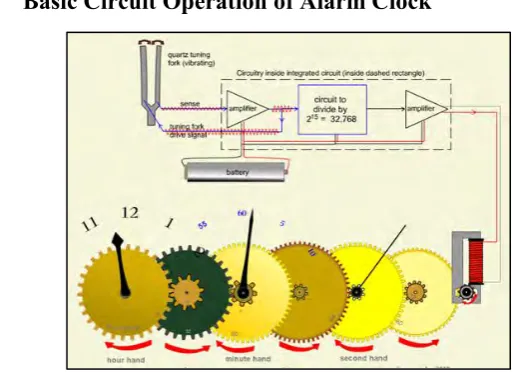
2.1.1 Basic Circuit Operation of Alarm Clock
[image:20.595.174.434.479.665.2]
Figure 2.1.1.1: Circuit Operation of Alarm Clock (Norway, 2001).
7 its mechanical motion and electric charge on electrodes printed on the tuning fork's surface. This property means that oscillations of the tuning fork will create small electrical signals in the "sense" electrode on the tuning fork. It also means that more powerful drive oscillating signals apply to the "drive" electrode can sustain the oscillations. (Friedt, 2007)
This circuit serves a similar function as a gear train, precisely reducing the frequency of the resonator to a usable frequency. In a digital watch, additional circuits of this type would reduce the frequency further and also drive the digital displays. In the clock as shown, the gear train reduces the frequency further and drives the analog clock hands. (Friedt, 2007)
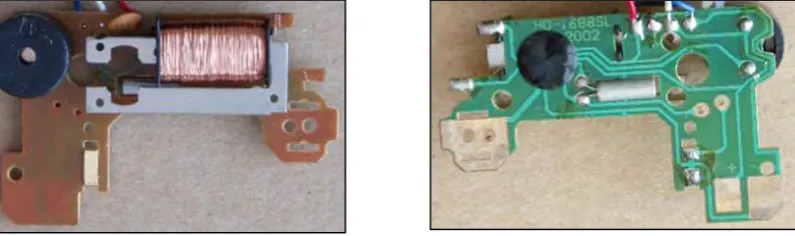
[image:21.595.124.522.343.461.2]The motor-drive amplifier that amplifies these pulses so that they are sufficiently strong to drive a small electric motor.
Figure 2.1.1.2: Small circuit board from a modern quartz clock (Friedt, 2007).
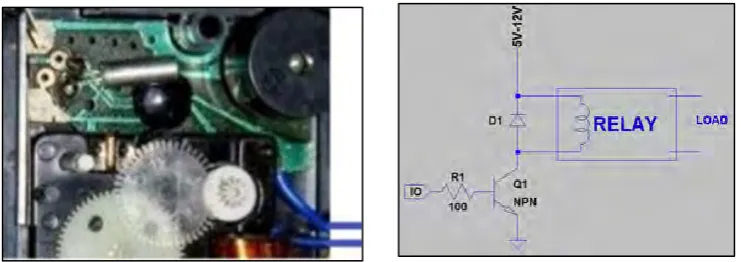
8 Figure 2.1.1.3: Contacts of the relay used to switch on the vibrator (Gmbh, 2005).
A relay is a switch that is turned on and off by an electromagnet. When a small current flows through the coil it produces a magnetic field, which magnetises an iron core. This attracts the armature, which forces the switch contacts to touch. When the current is turned off, the switch contacts open again. A relay is a very useful type of switch because it can be turned on and off in all sorts of ways. (Fong, 2010)
A relay is an electromagnetic switch. It can be connected in two ways: Normally Open (N/O) or Normally Closed (N/C).
2.2 What Is Bluetooth?
Bluetooth is a low cost, low power, short-range radio technologies intended to replace the cable connections between hand phones, PDAs and other portable devices. It can clean up your desk considerably, making wires between your workstation, mouse, laptop computer and many other devices. This technology allows to the users instantaneous connections of voice and information between several devices in real time. (Yasri, 1999)
Figure 2.2.1: Bluetooth Official Icon.
9 Bluetooth technology has a limited scope, this characteristic of limited scope presents a great disadvantage if we try to implement a net in one extensive geographical area (Djonin, 2001).
[image:23.595.188.452.196.354.2]2.2.1 How It Works?
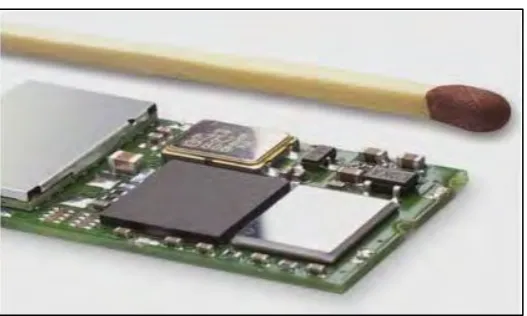
Figure 2.2.1.1: Bluetooth module circuit
Based on Figure 2.2.1.1, every Bluetooth device will have to be equipped with a microchip (transceiver) that transmits and receives in the frequency of 2.4 GHz Industrial, Science, Medical (ISM) band that is available in the whole world with some variations of bandwidth in different countries as shown in Table 2.2.1.1 (Puy, 2008).
Table 2.2.1.1: The frequency range and channels of different countries. (Puy, 2008)
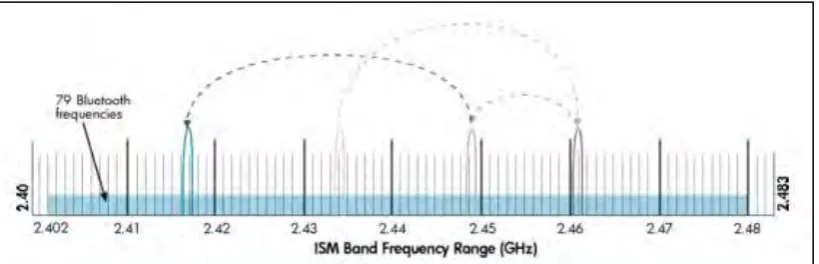
[image:23.595.113.527.531.640.2]10 divided into small pieces called packets. The transmitter and receiver exchange a data packet at one frequency, and then they hopped to another frequency to exchange another packet. They repeat this process until all the data is transmitted (Ramachandran, 2004).
Figure 2.2.1.2: Bluetooth devices hop between frequencies up to 1600 times per second (Ramachandran, 2004).
The Bluetooth radio utilizes a signalling technique called Frequency Hopping Spread Spectrum (FHSS). The radio band is divided into 79 sub-channels. The Bluetooth radio uses one of these frequency channels at a given time. The radio jumps from channel to channel spending 625 microseconds on each channel. There are 1600 frequency hops per second. Frequency hopping is used to reduce interference caused by nearby Bluetooth devices and other devices that using the same frequency band (Yasri, 1999).
The equipment of transmission are qualified in three classes according to the level of power of emission, as we can see in the Table 2.2.1.2 below. The recipient equipment must possess a sensibility of at least 70 dBm, and the rate of admissible mistake must be a minor or equal to 0.1 %.
Table 2.2.1.2: The classes of Bluetooth according to maximum range (Puy, 2008).
Device Power
Class Maximum Permitted Power
Range (approximate)
Class 1 100 mW (20 dBm) ~100 meter
Class 2 2.5 mW (4 dBm) ~10 meter
[image:24.595.132.504.636.744.2]