Theses Thesis/Dissertation Collections
2006
Event driven dynamic web pages
Kan YiFollow this and additional works at:http://scholarworks.rit.edu/theses
This Master's Project is brought to you for free and open access by the Thesis/Dissertation Collections at RIT Scholar Works. It has been accepted for inclusion in Theses by an authorized administrator of RIT Scholar Works. For more information, please [email protected].
Recommended Citation
Graduate Project Report for MS Degree of Computer Science
By
Kan Yi
Project Committee
Chairman: Professor Axel Schreiner
Reader: Professor Stanislaw Radziszowski
Observer: Professor Hans-Peter Bischof
Rochester Institute of Technology
Department of Computer Science
Table of Contents
1. SUMMARY...4
1.1. Motivation...4
1.2. Purpose...5
1.3. Composition...6
2. OVERVIEW...7
2.1. JavaScript...7
2.2. CGI...8
2.3. ASP...9
2.4. JSP and Servlet...10
3. SYSTEM ANALYSIS...12
3.1. Event Driven Model...12
3.2. Dynamic Web Page...13
4. SYSTEM DESIGN...15
4.1. Network Deployment Diagram...15
4.2. Use Case Diagram...17
4.3. Two Kinds of Web Pages...18
4.3.1. Pure Java Class Page...18
4.3.2. XME Page...19
4.4. Event Driven Model...22
4.5. HTML Elements Library...24
4.6. Upload File...25
5. FUNCTIONAL SPECIFICATION...26
5.1. Forward Servlet...26
5.2. HtmlElement Package...31
5.2.1. Node Interface...31
5.2.2. Chars...31
5.2.3. Component...31
5.2.4. Container...32
5.2.5. Input...32
5.2.6. Html...33
5.2.7. Page...33
6. CONFIGURATION...34
6.1. Development Environment...34
6.1.1. Java IDE...34
6.1.2. Web Server...35
6.1.3. Development Configuration...35
6.2. Deployment Configuration...38
6.2.1. Directory Layout...38
6.2.2. Tomcat Web Application Deployment Configuration...38
7. EXAMPLES...39
7.1. XmlMain...39
7.2. Contact...40
7.3. Hello...41
7.5. Upload File...44
7.6. XmlContact...45
1.
SUMMARY
1.1.
Motivation
The Internet is one of the fastest developing areas in recent years. Among all the Internet
protocol layers, the technologies of the application layer are paced with incredible speed
because of their close relation with the daily life of the huge number of the Internet users.
The most significant milestone in web technologies, of course, is the applying of HTML
in World Wide Web (WWW). Although HTML was not initiated from scratch, by
borrowing many ideas from SGML, HTML still achieved tremendous success. At the
early stage, HTML was only used to show static texts, links and images. Compared with
the prior tedious text environment, it is improved a lot. But people were not satisfied with
it, they continued to evolve the HTML into the DHTML, which introduced dynamic web
page technology and event handling capability through the embedded JavaScript in
HTML file.
Different browser vendors supporting different DHTML standards brought a big chaos.
In order to solve this problem, World Wide Web Consortium (W3C), the most
authoritative organization came out with a standard, Document Object Model (DOM),
which is the interface specification that the browsers are recommended to implement for
the support of DHTML. In the DOM implementation, a HTML page becomes a tree
structure, with HTML elements as nodes in a tree. Using JavaScript or JScript language,
the web developer can very easily manipulate HTML elements and change their
Unfortunately, no browsers fully support DOM standards. A very well organized web
page in Internet Explorer may be turned out to be a mess in Netscape. To release the extra
burden on the client side browser, people began to consider the server side technologies.
That’s why Common Gateway Interface (CGI), Active Server Page (ASP), Java Servlet
and Java Server Page (JSP) came out. Besides less requirement putting on the browser,
these server side technologies can do something that can’t be achieved with client side
technologies. For instance, query information from backend database and send
dynamically created results back to the browser.
Yet, CGI, ASP, Servlet and JSP had been invented even before DOM was fully accepted
by people. Without utilizing DOM model, it turns out that the applications developed in
CGI, ASP, Servlet and JSP are very hard to maintain. Applying the DOM model into the
server side is the motivation of my project.
1.2.
Purpose
The purpose of this project is to demonstrate a server side dynamic web pages technique
that supports Event Driven Model. With HTML elements represented as node objects in
HTML trees, the operation of adding elements, removing elements and changing the
attributes of elements become easy, which give us the capability to create dynamic web
pages just as DHTML does. Moreover, we can attach event handler functions to those
HTML elements, which can be triggered when the end user submit the form data from the
Under the Event Driven Model, web page development is similar as the traditional GUI
programming. Create a GUI interface to the end user and get response to trigger
predefined event handlers. The only differences are, the Object Model is created at server
side, and the GUI interface is showed up in the user’s browser, the response from the user
should go through the Internet and post back to the web server to trigger the predefined
event handlers. With the Event Driven Model infrastructure designed in my project, the
web developer is totally transparent to the get and post back request details, which used
to be the nightmare of the web developer.
1.3.
Composition
My project is consists of two parts.
One is the HTML elements library, with which the web developer can construct web
pages. To make web pages very easy to add, delete and change nodes, I implemented the
Node interface defined in W3C DOM API. It is this interface that makes the dynamic
web pages possible.
The other part is a Forward Servlet, which helps to interpret the requests from the
browser. The functionality of the Forward Servlet includes parsing the XML web pages,
creating page instances, caching them for future use, forwarding the get and post methods
to the page instances, reading the content of other type files, uploading files to the web
2.
OVERVIEW
An overview of the existed web technologies would clarify their relationship and
differences with my project. By comparison, I will show out the unique initiative in my
project, not just rebuilding the wheel again.
2.1.
JavaScript
It is a Client side technology that allows user to create dynamic web pages, add event
handler functions to form controls and manipulate the document objects as long as the
browser supports the Document Object Model (DOM), which is an important part of
DHTML.
Here is a JavaScript example snippet:
The above example is a HTML file embedded with JavaScript. JavaScript code is put in a
<script> element, which normally is put inside the <head> element. In the <body> of
html file, the example defines a form, containing a button attached with the event handler
function name, whose definition is in <script> element. Following the form, an empty
span element is defined with an id, which is used to refer the Html element in the
<html>
<head>
<script type="text/javascript"> function button_click() {
var txtMessage = document.getElementById("txtMessage"); txtMessage.innerHTML = "Button was clicked";
} </script> </head>
<body> <form>
<input type= "button" value="click me" onClick="button_click()" > </form>
<span id="txtMessage"> </span> </body>
JavaScript code. When the button is clicked, the predefined function button_clicked() is
triggered to show a message in the span element.
The event driven logic in this example is quite clear. But because JavaScript is a client
side technology, it puts extra requirement on the browser. To run this example
appropriately, the browser should implement the DOM specification and is compatible to
the DHTML standard. IE, Netscape and Mozilla, these popular browsers support different
level of DOM specification at different version. Microsoft IE even supports its own
version of JavaScript, called JScript. It is most possible that a perfect web page with
JScript gets run time script error when it is visited from Netscape. Imagine what a
headache for the web developer to develop web pages that can be seen properly from all
kinds of platforms and browsers. It’s far more than easy to even develop a simple
directory tree view dynamic web page to run in all those major browsers.
Even suppose all the browsers fully support the same DOM standard, there is still
something that JavaScript can’t do, such as retrieving data from backend database. That’s
the reason why some server side technologies came out.
2.2.
CGI
CGI stands for Common Gateway Interface. It is an interface that defines how data is
passed and serves to connect the web server to other software.
A CGI program can be coded in any programming languages, such as Perl, Shell Script,
C++ or Java. No matter which languages, they share the same mechanism. If a web
server supports CGI, the form data are posted to the CGI program through environment
back to the browser by the web server. When you try to look at the CGI interface, you
would be surprised at how simple it is. However, this simple technology gives us the
unbelievable power that the client side JavaScript can’t.
For Example, if you try to search keyword: CGI, through Google search engine. After
you click search button, the following link appears in the URL of your browser:
You can think the search program a kind of CGI program, while what you want to query
is attached as query string behind the CGI program link. Apparently, the search program
needs to search the backend database to get result before it responses to the user.
CGI allows us to create dynamic web pages from server side. It sounds great. However
every execution of a CGI program cost a process. New technologies, ASP, Servlet and
JSP, were invented to substitute CGI.
2.3.
ASP
ASP Stands for Active Server Page. It is a program running inside Microsoft IIS Server.
When a browser requests an ASP file, IIS passes the request to the ASP engine. The ASP
engine reads the ASP file, line by line, and executes the scripts in the file. Finally, the
ASP file is returned to the browser as plain HTML. ASP. It is parsed and executed by
ASP engine in threads. That’s why it has no process overhead and is faster and more
efficient than CGI.
Here is an example in ASP:
http://www.google.com/search?hl=en&q=CGI
<html> <body>
<form action="demo_reqquery.asp" method="get"> Your name:
<input type="text" name="fname" size="20"> <input type="submit" value="Submit"> </form>
<%
dim fname
fname=Request.QueryString("fname")
If fname<>"" Then
From this example, we can see an ASP file is a HTML file added with VbScript or
JScript, which supports Request object to get query string and Response object to redirect
output to the browser.
From efficiency point of view, ASP is faster than CGI. But it still has its shortage. The
first shortage is, ASP is Microsoft’s specific technology, which means it is tightly bound
on the Windows platform. The web developer can’t use ASP on the Unix or Linux
machine. ASP has no portability, while Java technology claims coding once and running
everywhere. The second shortage of ASP is, it is based on linear model, which means the
ASP script is executed line by line and the original get request and post back request with
form data are distinguished by the if statements judging on the existence of the query
string, which obscures the program logic and always turns out difficult to maintain.
2.4.
JSP and Servlet
Both JSP and Servlet are Java server side web technologies that are supports in Java 2
Enterprise Edition.
JSP stands for Java Server Page. It’s very similar as ASP technique. Its advantage over
ASP is that it can be ported to any machine as long as Java Virtual Machine (JVM) is
available. However, JSP makes no improvement on the linear model. The web developers
still need to know how to distinguish the original get request from the post back request
with form data. A more elegant solution would be an Event Driven Model that would
allow the web developer take no care of the get and post methods.
JSP file is a HTML file embedded with some Java snippets. In the Java snippet, we can
written in Java code. In fact, a JSP file is interpreted as a Servlet by JSP engine before it
is executed by Servlet engine.
Here is an example of Servlet:
Servlet separates the get method from post method, which makes it looks a little better
than JSP. But there is still no DOM and Event Driven Model on the server side.
However, basing on the Servlet technology to implement the Document Object Model
and Event Driven Model on the server side would be a good point to start my project.
public class HelloWorld extends HttpServlet {
public void doGet(HttpServletRequest request,
HttpServletResponse response) throws ServletException, IOException {
PrintWriter out = response.getWriter(); out.println("Hello World");
}
public void doPost(HttpServletRequest request,
HttpServletResponse response) throws ServletException, IOException {
doGet(request, response); }
3.
SYSTEM ANALYSIS
There are two goals in my project. One is to provide an elegant Event Driven Model for
the web development. The other is to provide the capability of creating dynamic web
pages.
3.1.
Event Driven Model
DHTML does have some sort of Event Driven Model on the client side. The end user
interacts with web pages and triggers event handler functions. However, those event
handler functions are executed on the client side, which means you can change the
rendering of web pages or validate the input form data format, but since those events are
not sent to the server, you can not do anything that requires the server to participate in,
such as querying data from database, authorizing the user login.
Let’s look at into the linear model in the server side technologies ASP, JSP and Servlet.
The end user sends get request to the web server, the web server sends back the web
rendering to the browser, the end user interacts the web page interface and submits data
to the web server, then the web server processes the user input and responses the result
back to the user.
What I need to improve in the Event Driven Model is hiding those go forth and back
procedures from the web developer. The web developer only needs to construct web
pages, attaches event handler functions to HTML elements that he interested in. The web
and the client sends the event back to the server. What the web developer sees is nothing
different from the traditional GUI programming, events from the GUI triggering the
predefined event handler functions.
In the event handler functions, the web developer can do anything related with the server
side resources. The resources could be the server side database, server side page objects
or the server physical storage.
3.2.
Dynamic Web Page
What is a dynamic web page? Compared with static web page, whose content is already
presented, the content of dynamic web page is not decided yet. The content of dynamic
web page can be pulled out from the database and reorganized before it is sent back to the
browser. Moreover, based on the Event Driven Model, after events triggers event handler
functions, the content of the web page can be very easily to add, remove or change style.
From my previous analysis on the related web technologies, Document Object Model
(DOM) would be the best way to provide the web page with dynamic capability.
Applying the DOM technology to the server side, we can create a HTML tree for every
page class, which describes its content. By implementing the W3C DOM API interface,
we can very easily add, remove HTML elements and change their attributes dynamically.
With the support of getting the references of elements by id, name and or value, we can
In the project, there are two different ways to construct Document Object Model (DOM),
pure Java class describing web pages or XML file describing web pages. One approach to
support these two special page formats is developing my special web server that can
handle the extra request for the special web pages. But considering that I only need an
extended functionality to the general web server, developing a new web server from
scratch would be over killed. Meanwhile the exist technology Servlet is exactly the one
that allows the developer to extend the functionality of the web server. So in my project, I
created a Forward Servlet, which added additional support to the special web pages. It
can create page instances dynamically and cashing them for future use. In the page class,
there is a HTML tree reference describing the HTML rendering. To help the web
developer to develop web pages, I created a HTML elements package that can be used to
construct web pages.
In the first phase of my project, I used pure Java code to describe the HTML rendering
and the event handler functions. In the second phase of my project, I applied XML
technology to describe the HTML rendering in a separate XML file, which makes the
4.
SYSTEM DESIGN
4.1.
Network Deployment Diagram
Obviously, this is a traditional Client-Server-Servlet three tiers web application. The
browser sends requests through the Internet to the web server. EventDriventWeb is the
web application context of the project. The web server is configured so that all the
requested URLs in the EventDrivenWeb Context are passed to the Forward Servlet. A
URL could be a pure Java class web page or a XML grammar described page file or other
file types, such as image files, text files and html files. The major functionality of the
Forward Servlet includes creating a corresponding page instance according to the
requested URL and forwarding the requests to the page instance. Once the page instance
is created, a HTML tree representing the page is constructed, which is ready to serve the
get or post requests passed from the Forward Servlet. Since HTTP protocol is a stateless
protocol, I designed a page caching mechanism so that the post back request can be
Internet Browser
Browser
Tomcat Web Server
Forward Servlet
Page classes
Page Cache EventDrivenWeb Context
XME Pages
Image Files
Other Files
passed to the previous created page instance. The page cache itself is saved in the session
4.2.
Use Case Diagram
Use case diagram is an important tool of the Unified Modeling Language (UML). It is
usually used to describe the functionality of a system from outer users’ perspective.
There are two kinds of user in the system. One is the end user requesting the web pages
through the browser. He can request pure Java class web pages or XML described web
pages, read the content of other file types and upload files to the designated directory of
the web server. The other user is the web developer who develops the web application for
the end user based on HtmlElement package and Event Driven Model infrastructure. The
web developer can develop web pages totally in Java code or only develop event driven
functions in Java code, while describing the HTML rendering in a separate XML file.
Event Driven Dynamic Web Pages System
User
Request java page classes
Request XME pages
Upload files
Web developer Construct Java
page classes
Create XME file Derived Page class with
only event handler functions <<uses>> <<uses>> <<uses>> <<uses>> <<uses>> <<extends>>
Request other file content
Read image file content
Read text file content
Read HTML file content <<uses>>
<<uses>> <<uses>>
Parse XME file
Construct HTML tree
Set event handler functions <<uses>>
<<uses>> <<uses>>
4.3.
Two Kinds of Web Pages
4.3.1. Pure Java Class Page
Pure Java class page is a page with its HTML content and event driven handler functions
all described in Java code.
Here is a HelloWorld Page class looks like:
From this example, we can see both the event handler functions and HTML tree
rendering are totally described in Java code. Of course, to allow the web developer
construct such kind of pages we need to provide a HTML elements library first. The
advantage of this approach is the Document Object Mode (DOM) is very clearly. A page
instance contains a reference to a HTML tree, which is composed by individual HTML
elements. On the other hand, the disadvantage of pure Java approach is the maintenance
of web content of complicated web pages would turn out to be tough. Moreover, once we HelloWorld.java
public class HelloWorld extends Page {
public HelloWorld() throws Exception { html = new Html(
new Head(new Node[]{
new Title("Hello World") }),
new Body(new Node[]{ new Form( new Node[] {
new InputSubmit("hello", "Hello") }),
new Div("output", null) })
);
InputSubmit submit = (InputSubmit) html.getNodeByName("hello"); submit.set(this, "onHelloClick");
}
public void onHelloClick(Input sender, String data) throws Exception { Node output = html.getNodeById("output");
output.addChild(new P());
output.addChild(new Chars("Hello, World")); }
public String toString() { return "HelloWorld"; }
changed the rendering of a page, the page class needs to be recompiled before the end
user can see the update. That sounds not perfect.
4.3.2. XME Page
We want to build a Document Object Model on the server side, while still easy to express
the content of web pages. The most feasible way would be utilizing the XML technology.
We can use the XML grammar to describe the page content and specify which event
handler functions attached to the HTML elements. It would be pretty easy for us to build
a HTML tree by parsing the XML file with the DOM API. I call my specific XML file
XME file, because it is a XML file containing HTML elements and their corresponding
event handler function names. Let’s see a XME version of HelloWorld.
XmlHelloWorld.xme
<?xml version="1.0" encoding="UTF-8"?>
<page classname="XmlHelloWorld"> <html>
<head> <title>
Event Driven Dynamic Web Pages </title>
</head> <body> <form>
<input type = "submit" name = "hello" value = "Hello" onClick = "onHelloClick" />
</form>
<div id = "output" /> </body>
</html> </page>
XmlHelloWorld.java
public class XmlHelloWorld extends Page { Node output = null;
public void init() {
output = html.getNodeById("output"); }
public void onHelloClick(Input sender, String data) throws Exception { output.addChild(new P());
output.addChild(new Chars("Hello, World")); }
public String toString() { return "HelloWorld"; }
In XME version HelloWorld, we have two files for a page. A XME file describes the
HTML rendering in XML grammar, just as easy as HTML. A Page sub class contains
only the event driven functions. It becomes really neat when you look at into the Page
sub class. The classname attribute of <page> element and the onClick attribute of
<input> element show out the relationship between the XME file and the page class.
Let’s see the key design idea behind the scenario in a collaborative diagram:
To support the XME web page, I extended the Forward Servlet to parse the XME file.
During the parsing, a HTML tree is created and the HTML elements are attached with the
corresponding event handler functions. After the Html tree is created, the Forward Servlet
creates an instance of Page sub class, which contains the event handler functions. The
next thing to do is to save the previous created HTML tree reference into the Page
:Forward Servlet
:Sub Class of Page Event Handler
Functions
:XME File Describes Html rendering and the
event handler function name on
Html element
:Html Tree 1.1. create page instance
1. parse
1.2 create Html tree 1.3 set event handler functions
3. setHtml() 4. init()
instance. Then the init() method is called. It is called only once in the whole life of a Page
instance. Normally the web developer can override this method to do some initialization
work, such as getting the references of some elements by id or name. These references
can be used in the event handler functions directly without getting them first. Compared
with init(), another method setRequestResponse() is a method that being called for every
request to save the HttpServletRequest and HttpServletResponse objects into the Page
instance. Sometimes we may want to get some information of the Servlet, Session or
Context, that’s why I save the request and response object into the Page instance. In the
4.4.
Event Driven Model
The design of Event Driven Model hides the procedures of the browser getting page, the
web server sending HTML rendering to the browser, the browser posting back form data,
the web server processing the post back request. All the communications between the
browser and the web server is transparent to the web developer. Here is a sequence
diagram showing the design of Event Driven Model.
According to the HTTP request containing query string or not, we can decide to call the
get() or the post() method of the requested Page instance. The Page instance will delegate
them to its corresponding HTML tree. HTML tree in turn, will pass them down to its all
layers of sub elements.
:Browser :Forward Servlet PageCache :Sub Class of Page :XME Page :Html :Form :InputText :InputSubmit
1: Get page
1.1: Get reference of Page instance {if requested page in PageCache}
{if requested page not in PageCache}
1.3: Parse XME file 1.2: Create new page instance
1.6: Set Html tree reference
1.5: Set event handler function
1.7: get() 1.7.1: get() 1.7.1.1: get() 1.7.1.1.1: get() 1.7.1.1.2: get() 2: post
2.1: get requested page instance 2.2: post() 2.2.1: post() 2.2.2: action() 2.2.1.1: post() 2.2.1.1.1: post() 2.2.2.1: action() 2.2.2.1.1: action() 2.2.2.1.2: action() 1.4: Create Html tree
The get() method gets HTML rendering by requesting every HTML element describing
its tag name, attributes.
The post() method first posts all the input parameters down to their receiving HTML
elements and sets flags to indicate what kind events has been triggered.
When the action() method passes down the HTML tree, the event handler functions
4.5.
HTML Elements Library
Here is a class diagram showing the relationship between the major classes in the
HtmltElement package.
All the HTML elements commit to the Node interface, which defines the basic operations
on HTML nodes, such as id, name, value, attribute setter and getter methods, parent,
children and sibling traverse methods, add, remove and set child methods.
There are three classes implements Node interface. One is Chars class that only contains
text. One is Component class, a leaf node without sub nodes. One is Container class, that
can has Container, Component or Chars as its children nodes.
The class Html has three special methods that allow user to get the reference of a
specified Html element by id, name and value.
+getId() +setId() +getName() +setName() +getValue() +setValue() +getStyle() +setStyle() +getAttribute() +setAttribute() +getAttribute() +removeAttribute() +getParent() +setParent() +addChild() +removeChild() +setChild() +get() +post() +action() <<interface>> Node Component Container Chars 1 -sub *
Hr P Img
+set() +action()
Input TextArea
InputText InputSubmit InputImage InputFile
+isChecked() +setCheck() InputCheck InputCheckbox InputRadio +getNodeById() +getNodeByName() +getNodeByNameValue()
Html Body Frameset Form
Table
4.6.
Upload File
Besides the pure Java class web page, XME page support and reading content of other
file types, the Forword Servlet is also added the capability of uploading files from the
client to the web server in my second phase development.
To support the ability of uploading file, the Network Working Group designed the RFC
1867 protocol, which specifies how the information of the multipart form data are
organized. To handling the multipart form data of HTTP request, we need to do very
trivial job processing the HTTP request through the input stream. Moreover handling the
Unicode is also not so easy to deal with. Reusing other people’s code would be a smart
way to make my project full feature.
So I decided to use the Oreilly’s file upload utility class package. The class MultiRequest
satisfies my requirement. It has similar usage just as HttpServletRequest. By passing
some parameters to the constructor of MultiRequest class, I can very easy to specify what
directory to save upload file and what size of files permit to saved on server disk. The
utility class package can be downloaded freely from web link:
http://www.servlets.com/cos/index.html. One thing needs to note is when we deploy our
system, don’t forget to put the cos.jar file to the WEB-INF/lib directory, which is the
5.
FUNCTIONAL SPECIFICATION
5.1.
Forward Servlet
The Forward Servlet is a Servlet that all the URL requests in EventDrivenWeb web
application context are first sent to. With this Forward Servlet, we can create the instance
of requested page class. There is no need to create a Servlet for every page class while
they have the same functionality. There is only one forward Servlet in the system to
extend the web server to support our special web page format, page class or XME page.
Basically, the Forward Servlet is a coordinator between the web server and the special
web pages. All the page requests are directed to the same Servlet can be achieved by
setup the web application deployment XML description file, the semantic of which is
described in J2EE specification.
Suppose I set the web application context of my project as EventDrivenWeb, I can map
all the URLs to the Forward Servlet in file web.xml as following:
Web.xml
<?xml version="1.0" encoding="ISO-8859-1"?> <!DOCTYPE web-app PUBLIC
"-//Sun Microsystems, Inc.//DTD Web Application 2.3//EN" "http://java.sun.com/dtd/web-app_2_3.dtd">
<web-app> <servlet>
<servlet-name>Forward</servlet-name> <servlet-class>Forward</servlet-class> </servlet>
<servlet-mapping>
<servlet-name>Forward</servlet-name> <url-pattern>/*</url-pattern>
The URL pattern /* will map all the URLs in the current application context to the
Servlet named as Forward, which represents the Forward Servlet class. In the Forward
Servlet, we can take different actions based on what kind of URL is requested.
• If the requested URL has no extra path, the path behind the context path but
before the query string, or the extra path is /, then the Forward Servlet would
redirect the request to the default web page XMLMain.xme.
XmlMain.xme
<?xml version="1.0" encoding="UTF-8"?>
<page classname="HtmlElement.Page"> <html>
<head> <title>
Event Driven Dynamic Web Pages </title>
</head> <body>
<center>
<h level="2" >
<img src="ow.gif"/>
Event Driven Dynamic Web Pages </h>
</center> <p/>
Note: XmlMain.xme is the default page <table border="2">
<tr>
<td colspan="2">
<font color="blue"> Sample Applications </font> </td> </tr>
<tr>
<td> <a href="Contact"> Contact </a> </td> <td>
This application let you input contact information, then create a dynamic output table that contains a list of contact information
</td> </tr> <tr>
<td> <a href="Hello"> Hello </a> </td> <td>
This page let you input your name, then redirect to a greeting page.
</td> </tr> <tr>
<td> <a href="Degrees"> Degrees </a> </td> <td>
Temperature Conversion, Celsius degree <==> Fahrenheit degree
</td> </tr> <tr>
<td> <a href="UploadFile"> UploadFile </a> </td> <td>
Upload file to server and show the dynamic file list in upload directory
</td> </tr> <tr>
<td> <a href="XmlContact.xme"> XmlContact.xme </a> </td>
<td>
This a XML version of Example Contact which separates the html rendering into a XML file </td>
XmlMain.xme is the default page that contains the links to the example pages.
In my first development phase, it is used to be the Main class as the default
page. But whenever I added more example links to the Main default page, I
need to recompile it to see the update. Finally, I bothered to do so, which
motivated me to the XME page approach.
• If the extra path of requested URL is a directory other than root /, an error
message with error code 500 is returned to the browser.
• If the extra path of the requested URL is a file other than a page class, such as
a text file, HTML file or an image file, read the file and send the content back
to the browser.
• If the extra path is a derived class of Page, check if it is already in page cache,
if yes then get the page instance reference from the page cache, else create a
new instance of that Page class. The reason to introduce a page cache is
because of the stateless feature of HTTP protocol. By saving page instances in
the page cache, the post back request can still find the prior created page
instance. The Page cache itself is contained in the session of the Forward
Servlet. As we know, the lifetime of a Servlet instance is controlled by the
Servlet engine in the web server. So if you define the page cache as a member
variable in the Forward Servlet, it is not guaranteed to be still available later,
because the different requests may be forwarded by different Forward Servlet
instance. It is totally web server dependant. So I save the page cache into a
session, normally a session would be alive during the session period of a client
session. It is reasonable that we can reuse the page instance only in the lifetime
of a session.
• If the requested URL represents a XME file, a specific XML file describes the
HTML rendering and event handler function names, we will use DOM API to
parse this XME file and construct the HTML tree, then save the created HTML
tree reference to it’s corresponding Page class instance, which is specified by
the classname attribute of <html> element in the XME file. In the process of
parsing, we may need to attach the event handler methods defined in the
corresponding page class to the HTML element objects. After the HTML tree
constructed, we will call the init() method of the Page class. Normally the web
developer can override this method in the sub class of Page and put in its
initialization code. It is invocated once when the page is created. Every time
the Forward Servlet activated, it will also save the request and response objects
into the requested page instance. The request and response objects may contain
many useful information that we may want to know in the event handler
5.2.
HtmlElement Package
5.2.1. Node Interface
Node is an interface that all the HTML elements must implement. It represents a node of
a HTML tree. The node has three types, text node containing only text, component node
without any children node and container node containing any other type of nodes. The
following method signatures are defined in Node interface:
• get()
• post()
• update()
• action()
• getNodeType()
• getId(), setId()
• getName(), setName()
• getValue(), setValue()
• getStyle(), setStyle()
• getAttributes(), setAttributes(), getAttribute(),
setAttribute(), removeAttribute()
• getParent(), setParent()
• hasChildNodes(), getChildNodes(), setChildNodes()
• getFirstChild(), getLastChild(), getPreviousSibling(),
getNextSibling()
• addChild(), removeChild(), removeAllChild()
• getChild(), setChild()
5.2.2. Chars
A text node that implementing Node interface.
5.2.3. Component
An abstract base class implementing Node interface for the leaf node that may have
attributes but no sub nodes. Sub classes of Component are listed below:
5.2.4. Container
An abstract base class implementing Node interface for the node that can have attributes
and sub nodes. Sub classes of Container are listed below:
• A • Body • Center • Div • Font • Form • Frameset • H • Head • Html • Li • Ol • Option • Select • Span • Table • Td • Title • Tr • Ul 5.2.5. Input
Abstract base class for the form elements that having input as their tag name. An Input
element can be set the event handler function by calling the method set(). The bound
event handler function will be invoked when the action() method is called. Sub classes of
input normally need to override the post() method to decides when the event handler
function will be triggered. Sub classes of input are listed below:
5.2.6. Html
Html is a sub class of Container class. It is special because it is the root of a HTML tree.
A Page instance will always save a reference of Html class instance in its member
variable. To let the event handler functions in Page class can refer to Html elements by
id, name and value, Html class provides three methods:
• getNodeById()
• getNodeByName()
• getNodeByNameValue()
5.2.7. Page
Page is the base class that the web developer can inherit from to define their own pages.
It defines methods that can be used by the Forward Servlet to initialize a page, get and
post requests. These methods are:
• get()
• post()
• html()
• setHtml()
• init()
• next()
6.
CONFIGURATION
6.1.
Development Environment
6.1.1. Java IDE
The development of this project is totally based on the Java language. A good Integrated
Development Environment (IDE) would improve the progress of the project dramatically.
After compared major Java IDEs, JBuilder, Forte and IntelliJ Idea, I decided to use the
IntelliJ Idea V3.0. Just as the name claimed, IntelliJ is a very intelligent IDE, having the
following powerful features:
• Smart-type
• Easily method to method, file to file navigation
• Import assistant
• Seaching for usage
• Refactoring, such as changing variable name, changing method signature or
moving classes from one package to anther.
• Powerful debugging
• Version control
6.1.2. Web Server
Because my project would start with the Servlet technology, so I need choose a J2EE
compatible Web Server that supports the Servlet. J2EE Web Server, Weblogic, Tomcat
Web Server would be candidates. In the end, I chose Tomcat v4.06 as the web server
because:
• It is free software
• It supports remote debug
• It is the recommended web server that IntelliJ suggested for the web development,
so that the breakpoint can be set at the Servlet.
6.1.3. Development Configuration
• Project remote debug configuration
• Tomcat JPDA configuration
In order to let the Tomcat support the remote debug, we need to include the following
JVM options in the web server startup script:
-Xdebug –Xnoagent –Djava.compiler = NONE
6.2.
Deployment Configuration
6.2.1. Directory Layout
6.2.2. Tomcat Web Application Deployment Configuration
To setup the context of my project, the following script needs to be added into file
/jakarta-tomcat-4.0.6/conf/server.xml: /EventDrivenWeb
/doc Directory contains documents /src Page class source files
/HtmlElement Package of HTML elements /upload Directory to save uploaded files
/WEB-INF
Web.xml Config file of the web application
/class Directory to save compiled Java class
/lib Directory to save dependant libraries
server.xml
…
<Context path = "/EventDrivenWeb"
docBase = "c:\javauser\EventDrivenWeb" debug= "0"
reloadable = "true" crossContext = "true" </Context>
7.
EXAMPLES
7.1.
XmlMain
This is the default web page of the web application. It contains the links to the other
examples. The XmlMain page demonstrates a page without event handler functions. It is
good example showing the usage of HTML Elements and showing how to construct a
7.2.
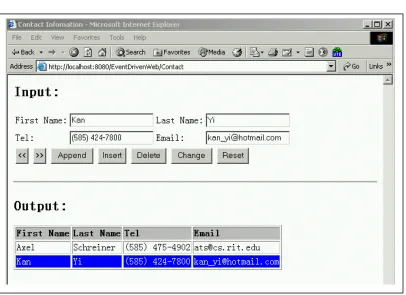
Contact
This application let the end user input contact information, then create a dynamic output
table that contains a list of contact information. The purpose of this example is to
demonstrate the dynamic web page and Event Driven Model. With the powerful
Document Object Model (DOM) on the server side, we can very easy to add nodes,
[image:41.612.92.498.99.394.2]This example shows the usage of InputText, InputRadio, InputCheckbox, InputSubmit,
Select, Option, Textarea. It also shows how to navigate from one web page to another and
7.4.
Temperature Conversion
This example shows the temperature conversion between Celsius degree and Fahrenheit
degree. Through this example, you can see the usage of another form control,
InputImage. Moreover, it also demonstrates the elegance when Model-View-Controller
7.5.
Upload File
This example shows the functionality of uploading file to the specified server directory.
7.6.
XmlContact
This is a XME version of Contact example. It has the same functionality as Contact. But
the web developer can separate the Html rendering in XmlContact.xme file, while the
event handler functions in another XmlContact.java file. The URL for this example is:
http://localhost:8080/EventDrivenWeb/XmlContact.xme
XmlContact.xme
<?xml version="1.0" encoding="UTF-8"?>
<page classname="XmlContact"> <html>
<head> <title>
XML Contact Information </title>
</head> <body>
<h level="2"> Input </h> <p/>
<form method="post" > <table border ="0"> <tr>
<td> First Name: </td>
<td> <input type="text" name="firstName" size="20"/></td> <td> Last Name: </td>
<td> <input type="text" name="lastName" size="20" /></td> </tr>
<tr>
<td> Tel: </td>
<td> <input type="text" name="tel" size="20"/></td> <td> Email: </td>
<td> <input type="text" name="email" size="20" /></td> </tr>
<tr>
<td colspan="4">
<input type="submit" name="previous" value="<<" onClick="onPreviousClick" />
<input type="submit" name="next" value=">>" onClick="onNextClick" />
<input type="submit" name="append" value="Append" onClick="onAppendClick" />
<input type="submit" name="insert" value="Insert" onClick="onInsertClick" />
<input type="submit" name="delete" value="Delete" onClick="onDeleteClick" />
<input type="submit" name="change" value="Change" onClick="onChangeClick" />
<input type="reset" name="reset" value="Reset" /> </td> </tr> </table> </form> <p/> <hr/> <p/>
<h level="2"> Output </h>
<table id="outputTable" border="1" > <tr>
<td> First Name </td> <td> Last Name </td> <td> Tel </td> <td> Email </td> </tr>
</table> <p/> <hr/>
<a href="XmlMain.xme"> Back to home </a>
XmlContact.java
public class XmlContact extends Page {
private List contactInfoList = new LinkedList(); int currentPos = 0;
private static String headRowStyle = "color: black; background-color:silver; font-weight: bold";
private static String selectedRowStyle = "color:white; background-color:blue";
private static String unselectedRowStyle = "color:black; background-color: white";
private Node outputTable;
public void init() throws Exception { // get output Table
outputTable = html.getNodeById("outputTable");
// set head row style
setRowStyle(0, headRowStyle); }
public void onPreviousClick(Input sender, String data) throws Exception { if (currentPos <= 1)
return; // change style
setRowStyle(currentPos, unselectedRowStyle); setRowStyle(--currentPos, selectedRowStyle);
// set input
ContactInfo contactInfo = (ContactInfo)contactInfoList.get(currentPos -1);
setInputContactInfo(contactInfo); }
public void onNextClick(Input sender, String data) throws Exception { if (contactInfoList.size() == 0 || currentPos >= contactInfoList.size()) return;
setRowStyle(currentPos, unselectedRowStyle); setRowStyle(++currentPos, selectedRowStyle);
//set input
ContactInfo contactInfo = (ContactInfo)contactInfoList.get(currentPos -1);
setInputContactInfo(contactInfo);
}
public void onAppendClick(Input sender, String data) throws Exception { ContactInfo contactInfo = getInputContactInfo();
contactInfoList.add(contactInfo); Tr newRow = createNewRow(contactInfo); outputTable.addChild(newRow);
if( currentPos >0)
setRowStyle(currentPos, unselectedRowStyle); currentPos = contactInfoList.size() ;
setRowStyle(currentPos, selectedRowStyle); }
public void onInsertClick(Input sender, String data) throws Exception { if(currentPos == 0)
return;
ContactInfo contactInfo = getInputContactInfo();
contactInfoList.add(currentPos -1, contactInfo); Tr newRow = createNewRow(contactInfo);
XmlContact.java
public void onDeleteClick(Input sender, String data) throws Exception { if(currentPos == 0)
return;
contactInfoList.remove(currentPos-1); outputTable.removeChild(currentPos);
if( contactInfoList.size() == 0) { currentPos--;
setInputContactInfo(new ContactInfo("", "", "", "")); return;
}
if(contactInfoList.size() < currentPos) currentPos--;
setRowStyle(currentPos, selectedRowStyle);
setInputContactInfo((ContactInfo)contactInfoList.get(currentPos - 1));
}
public void onChangeClick(Input sender, String data) throws Exception { if(currentPos ==0 )
return;
ContactInfo contactInfo = getInputContactInfo();
contactInfoList.set(currentPos -1, contactInfo); Tr newRow = createNewRow(contactInfo);
outputTable.setChild(currentPos, newRow); setRowStyle(currentPos, selectedRowStyle); }
private ContactInfo getInputContactInfo() {
String firstName = html.getNodeByName("firstName").getValue(); String lastName = html.getNodeByName("lastName").getValue(); String tel = html.getNodeByName("tel").getValue();
String email = html.getNodeByName("email").getValue();
return new ContactInfo(firstName, lastName, tel, email); }
private void setInputContactInfo(ContactInfo contactInfo) throws Exception { html.getNodeByName("firstName").setValue(contactInfo.firstName); html.getNodeByName("lastName").setValue(contactInfo.lastName); html.getNodeByName("tel").setValue(contactInfo.tel); html.getNodeByName("email").setValue(contactInfo.email); }
private Tr createNewRow(ContactInfo contactInfo) throws Exception {
Tr newRow = new Tr(new Node[]{ new Td(new Node[]{
new Chars(contactInfo.firstName) }),
new Td(new Node[]{
new Chars(contactInfo.lastName) }),
new Td(new Node[]{
new Chars(contactInfo.tel) }),
new Td(new Node[]{
new Chars(contactInfo.email) })
});
XmlContact.java
public String toString() { return "Contact"; }
private class ContactInfo { String firstName; String lastName; String tel; String email;
public ContactInfo(String firstName, String lastName, String tel, String email) {
this.firstName = firstName; this.lastName = lastName; this.tel = tel;
this.email = email; }
8.
REFERENCES
• Erich Gamma, Richard Helm, Ralph Johnson, John Vlissides. 1995 Design
Patterns: Elements of Reusable Object-Oriented Software.
• Grady Booch, James Rumbaugh, Ivar Jacobson. 1998. The Unified Modeling
Language User Guide.
• Thuan Thai, Hoang Q. Lam. 2001 .NET Framework Essentials
• Anneesha Bakharia, C# fast & easy web development
• RFC 2616, HTTP 1.1 Specification.
• http://java.sun.com
• http://www.intellij.com/idea
• http://jakarta.apache.org/site/binindex.html
• http://www.w3.org/TR/html401/
• http://www.w3.org/TR/2003/REC-DOM-Level-2-HTML-20030109/
• http://www.ietf.org/rfc/rfc1867.txt
• http://www.w3cschools.com