The Impact of Technology:
Value-added classroom practice
Final report
Charles Crook, Colin Harrison, Lee Farrington-Flint,
Carmen Tomás, Jean Underwood
Contents
Acknowledgements ... 3
Executive summary ... 4
1 Introduction ... 6
3 Emerging themes: contextual factors and impact on learning ... 25
4 Discussion and conclusion ... 58
Bibliography ... 61
Appendix 1: Technical note method ... 63
Appendix II: Learning practices ... 71
Acknowledgements
This research project was carried out by the following:
The University of Nottingham: Charles Crook, Colin Harrison, Carmen Tomás and Brett Bligh
Nottingham Trent University: Jean Underwood, Phil Banyard, Lee Farrington-Flint, James Stiller and Lucy Betts
We owe a deep debt of thanks to all the schools, managers, teachers and students with whom we have been working. We applaud their cooperation, cheerful
Executive summary
This report extends Becta’s enquiries into the ways in which digital technologies are supporting learning. It looks in detail at the learning practices mediated by ICT in nine secondary schools in which ICT for learning is well embedded.
The project proposes a broader perspective on the notion of ‘impact’ that is rather different from a number of previous studies investigating impact. Previous studies have been limited in that they have either focused on a single innovation or have reported on institutional level factors. However, in both cases this pays insufficient attention to the contexts of learning. In this project, the focus has been on the learning practices of the classroom and the contexts of ICT-supported learning.
The study reports an analysis of 85 lesson logs, in which teachers recorded their use of space, digital technology and student outcomes in relation to student engagement and learning. The teachers who filled in the logs, as well as their schools’ senior managers, were interviewed as part of a ‘deep audit’ of ICT provision conducted over two days. One-hour follow-up interviews with the teachers were carried out after the teachers’ log activity. The aim of this was to obtain a broader contextualisation of their teaching.
The learning practices that we identified as mediating ICT for learning are presented as a taxonomy. This taxonomy is used to classify the lesson activity reported in the logs. We argue that ICT has reconfigured classroom practice in the project schools in important ways. Among these, we would highlight the following consequences:
• ICT makes possible new forms of classroom practice. This is apparent in three particular respects: (1) the reconfiguration of space such that new patterns of mobility, flexible working and activity management can occur, (2) new ways in which class activities can be triggered, orchestrated and
monitored, (3) new experiences associated with the virtualisation of established and routine practices – such as using multiple documents in parallel or manipulating spatial representations.
• ICT creates the possibility of a wide variety of learning practices. Overarching this variety are three central activities which are significantly enriched by the increasingly ubiquitous availability of technologies: (1)
exposition which is animated by the opportunity to invoke rich shared images, video and plans, (2) independent research which is extended by the
In Chapter 3 we identify emerging themes that surfaced from the interview data and relate these to the findings of the teacher log exercise. We identified as emerging themes:
• evolving vision and leadership
• developing an infrastructure to enhance out-of-school learning
• multifaceted staff development and the role of students
• redefining learning spaces
• impacts of ICT on four particular aspects of learning: differentiation, inspiration, coherence and engagement
• exploiting the affordances of new media in teaching and learning.
The emerging themes focus particularly on a system-level analysis of the conditions under which ICT has an impact on learning. However, they echo many of the issues that surfaced as important in the lesson log analysis: the use of space—particularly new ways of using space (including virtual spaces) to improve learning—and the use of ICT to inform a wide variety of learning practices, a number of which involved the students in new forms of activity.
1 Introduction
The purpose of this project is to support Becta’s continuing work to identify the ways in which technology can be used to raise standards of attainment in schools. The project provides insights into the ways in which the use of digital technologies mediates and supports practices of learning.
In defining the remit for this research, Becta posed these five questions:
1. What are the ways in which innovative and effective schools are using digital technologies to support learning?
2. Which technologies are being used and how?
3. Is there evidence (qualitative and/or quantitative) that these are supporting learning? If so, what?
4. What is the rationale for use in each context? How does this fit in with current understanding about ICT and teaching and learning?
5. Are there any identifiable similarities across contexts from which it is possible to generate interpretive hypotheses about how and why digital technologies are beneficial?
Question 3, arguably, is at the heart of an unease related to the difficulty of finding causal relationships between resources in schools, in this case ICT, and learning. The demands of finding sustainable answers to this particular challenge should not be underestimated.
The general emphasis in prior studies has not focused on the processes by which
ICT might have an impact on the practices of learning. There is a significant ‘problem space’ between the introduction of ICT in an educational setting and the
measurement of student attainment. Moreover, that space is probably not well described as a series of causal steps, the general shape of which may somehow describe a successful or less successful trajectory of impact. The space is less a chain and more a set of patterns that reflects complex interactions. It may be more helpful to think of it as an ecology: one in which a complex network of interacting influences is shaping that trajectory in a much more subtle fashion.
Central to our investigation of the complex relations between ICT and achievement is our adoption of a contextualised view of school settings. In the best of
best understood as the deep relationships between an institutional context and the way in which innovative practices emerge and are sustained within them. An ecological approach allows a more fine-grained perspective that links the school setting, the ICT tools available in it, teachers, and their practices. It also aims to generate insights into the complex interplay of the setting; the tools and the
individuals by adopting a strategy that is both top-down and bottom-up in its analysis.
Our rationale and approach are detailed in the next section on impact and outcomes.
1.1 Impact and outcomes
In this section, the tradition of research associated with ICT impact will be sketched in order to locate a context for the present project. Accordingly, what is said here is summary in nature and will not invoke details of particular studies or arguments.
The term ‘impact’ has become associated in the area of educational technology with a form of research inquiry that relates the use of ICT to learning outcomes. An imperative for conducting such research is found in the expectation that recruiting digital technologies into educational practice will bring about useful benefits to
students. At the same time, there is awareness that doing so represents a significant investment – not only in terms of resource procurement, but also in terms of winning the hearts, minds, and confidence of staff. Yet the rewards of ICT appropriation are potentially considerable – at least if doing so fulfils the popular expectation that gains will be particularly felt in the area of ‘knowledge economy’ skills.
Impact research is found in two broad forms. First there are relatively short-term focused studies that consider the fate of particular ICT-supported practices in a relatively piecemeal manner; these can be referred to as ‘contained’ interventions. They investigate how experience of these contained practices is associated with positive gains in learning outcomes. The second form of research addresses outcomes associated with large-scale adoption of educational technology. This allows consideration of claims regarding the benefits to institutions of investing in ICT as a general part of their strategy to support learning; these can be referred to as ‘system-wide’ interventions.
Both types of research are controversial, resulting from the methodological and interpretative challenges that have arisen. The general nature of these concerns centres on these issues:
• It can be hard to interpret the significance of results that arise from the standard format adopted in both forms of study
• While contained studies still tend to encourage scaling up of ICT to a system-wide level, the size of learning outcome effects associated with such
investment is again modest.
Our own view is that these problems are inter-related, and they risk cultivating an unjustified scepticism about the value of investing in ICT as a support for students. It is therefore important to confront patterns of results in current impact studies and to evolve methods that probe the phenomena more deeply. At the core of uncertainties arising from existing research is the systemic nature of the practices that are being scrutinised in these studies. In short, sites of teaching and learning are complex ecologies that will have attained distinctive states of equilibrium. Such states may seem more or less healthy to an outside observer but they are, nevertheless, in careful balance. A new technology introduced into such systems can be absorbed in complex ways. Balances can be disturbed to an uncertain extent and with uncertain modes of adoption. Moreover, the fate of learning experiences that take place could vary a great deal.
The current state of the field seems to require a more generous conception of ‘impact’ as the central concern of research. What needs to be better understood is
the impact of ICT on learning practice – as well as learning outcome. However, the
2 Findings from teacher logs: an analysis of ICT impacts
The sections below report on the information gathered in the 85 teacher logs, based on lessons using ICT. Section 2.1 presents a quantitative summary of teachers’ ratings on overall lesson success. Section 2.2 shows the findings on space and the impact of ICT in the classroom. Section 2.3 presents an analysis of the learning practices in lessons where ICT is used. Section 2.4 presents information on the engagement of students during the lessons with an analysis of teachers’ ratings and comments. Section 2.5 provides a summary of the impacts on learning as derived from the teacher log data. Section 2.6 provides a conclusion to the section.
2.1 Contribution of ICT to overall lesson success
In their logs, teachers provided ratings on the achievement of lesson aims and the rate of progress in lessons where ICT had been used. The ratings are shown on a sliding scale (ranging from negative to positive) and are based on teachers’
perceived success of general aspects of the lesson.
[image:9.595.141.459.515.696.2]The ratings of individual lessons indicate that teachers perceived these 85 lessons to be highly successful. Figure 1 presents teachers’ ratings on the success with which the lesson aims were achieved. Figure 2 shows the teachers’ ratings on the rate of progress in the lessons. Both figures show ratings from 1(negative) to 8 (positive) and the number of lessons out of the total of 85.
Figure 1 Teachers’ rating of success in achieving lesson aims
These ratings express the teachers’ perceptions of the participants’ experience of these lessons. The present data do not represent an outside observer’s independent evaluation of lessons. It is not possible to report and contrast self-evaluations from lessons that did not involve ICT. However, our conversations with participants reassured us that the lessons in this corpus are representative and that; in general, they reflect a positive experience of the contribution of ICT to overall lesson
achievements (as shown in the two graphs above).
2.2 Space: ICT and its generalised impact on the classroom
The analysis that follows focuses on classroom space. In our sample, this might be a personal space that is regularly used or it might be a shared space, particularly one that is well-resourced with technology. Our interest is in how far, and in what ways, the adoption of ICT serves to reconfigure activities in the classroom more radically.
We discuss this in relation to themes of physical layouts, affordances for movement, monitoring, classroom management, orchestrating activity and the experience of interacting with screens (as opposed to physical materials).
Figure 3 Six patterns for organising interactions with ICT
Green circles depict students. Grey blocks are working surfaces. The teacher (depicted by a star) and screen (labelled) are also shown in most instances.
Front facing is a common and familiar arrangement and one that is sometimes
discussion (the waterhole). In most project schools each student potentially had access to their own computer and, often, this was a laptop. This allowed the configuration of spaces to be variable and flexible. The free-ranging organisation was an extreme version of the flexibility that small computing devices now allow. It also is a reminder that ‘technology’ does not simply mean PCs or netbooks. Some class activities depend on access to a variety of technology tools perhaps only briefly:
..to me, ICT's not just working at the computer and typing a document, it's more having them walking around a room filming each other, taking pictures, and so on. (School 7 Teacher 4)
This flexibility is a strong requirement for some forms of activity. For example, one teacher described a music lesson that involved composition, review, and
performance filming. This range of activity required a number of function-specific sites, including some that offered silence or privacy:
Certainly when they are composing they need to be able to hear what they are doing and just have that separation and in this case filming as well… the advantages of the netbooks of course was that they could take them with them. (School 5 Teacher 2)
The flexibility of the layouts and mode of work enabled by a particular technology might sometimes carry a useful acknowledgement of more mature social
relationships (or protection from more patronising ones):
I say 'do log on and then we'll sit in the middle and discuss what we're going to do and you can write notes and then go back'. That's quite a nice flexibility in that room… because [in] the old computer room, we used to have [to say] 'now turn your chairs around and face…' and it just doesn't really work with Year 11. They think you're talking down to them. (School 7 Teacher 5)
A theme in the discussions of these configurations was the possibility of more fluid patterns of movement in a space. This was an opportunity that might be alien to some students:
..and two of the pupils couldn't cope with the fact that they had to move around the room but they need to learn that. They got told 'if you can't cope, you do the textbook alternative' and they soon realised that it's really worth just being able to walk around the room. (School 3 Teacher 3)
When I came into teaching it was having the computers in front of you and I would demo this task and then you would get on with it. Whereas [now] I think it’s become [about having] a lot more movement around the room… being a more confident teacher and being stronger in the classroom, it gives me the opportunity to go off and do these things…definitely involving the students in being up and active in the
classroom and them taking part in leading the class as well. It’s not just me being up there all the time. (School 2 Teacher 3)
This flexibility of teacher movement was often associated with the opportunity for more effective monitoring of student activity and more effective openings for feedback:
I wanted to get away from the traditional two desks and the look of the classroom with lots of two parallel double desks facing the front [to create a] slightly more relaxed atmosphere. I need to be able to get round to all the students because there's a lot of situations where I will need to literally look over their shoulders. (School 7 Teacher 5)
However, some classrooms incorporated other forms of technical design that made ‘looking over shoulders’ redundant. This applies to having central monitor screens that display what is going on across the class:
On the net monitor you have access to all their screens from the front. If I am feeling really mean, then all their screens will be up there. So even if I am working with someone else, then they are actually keeping an eye on each other, as they can see when someone has flicked onto something… When you want to take over their screens, you can literally lock them down and you can add your input... If there is something that you spot they are all doing, then it’s great. (School 2 Teacher 6)
These examples illustrate generic influences on classroom dynamics that arise from adopting ICT as a tool – independent of the particular curricular contexts for its use. These shifting patterns illustrate a greater flow of classroom activity and, in more sedentary lessons, a more flexible potential for monitoring and feedback. On the whole, these impacts would be welcome. However, the appropriation of ICT comes with generic consequences that can be less welcome, as in the next example that concerns the demands of management.
Some teachers noted the properties of traditional media (say a textbook) versus the hidden overheads of ICT:
some haven’t charged it up properly…sometimes it says you have to log in again…or it goes to hibernate... Because of that you are dealing with 4 or 5 problems at once, which rarely happen if you are using [more traditional methods]. (School 5 Teacher 1)
This is a clear stress that is common when ICT fails to deliver. Teachers can readily improvise a recovery from failure when they use traditional media, whereas an ICT-mediated session demands greater depth of planning:
In some lessons, if you are heavily reliant on the technology and it isn’t there, then you really need plan C because plan B is [about] doing something else with [the technology]. (School 5 Teacher 1)
Finally, familiar classroom interactions can be disturbed when an established
learning practice seems to not transfer seamlessly from real world materials to (what we might term) virtual materials. One teacher makes this point about the
virtualisation of practice. This is in relation to the contrast between corporate
attention to events on a single front-of-room screen versus corporate attention to the same to-be-shared events as delivered to individual screens. The latter perhaps recruits attention with a different intensity:
I'm not really sure why. I've tried thinking if it's because there's no one else in their line of sight, they're just looking straight to screen whereas if they're looking at the board, there might be four or five people in front of them and they might want to poke them and mess around. It's incredibly focused when you do it like that, even if it's just me speaking, they won't look up at me, they'll just - eyes on the screen and focus on what's being done. (School 3 Teacher 1)
Other features of the media that make familiar actions feel different were also identified. This maths teacher queried the impact of making geometric forms in real versus virtual media, suggesting that traditional methods can be more effective in some instances:
When you do construction on any geometric software, it doesn't look like a compass. It doesn't look like a protractor. It nicely snaps to the lines, it hasn't the same feel as someone else doing it… I've found now, just doing equations and stuff, they're a lot more focused seeing [me] write it out. Even it slows me down a bit. (School 3 Teacher 1)
Students can get confused by this multitasking: [having] many different documents all open at the same time on the screen. I think they cope much more naturally with multiple sources when they are laid out in front of them as physical things. Another point like this is the transient nature of what’s on the screen. As a teacher, you can’t always see where they have got to. It’s lost from view and there is this feeling I have of not wanting to touch their laptop. (School 6 Teacher 4)
This section has considered the overarching impacts of ICT at the level of classroom structure and organisation. The impacts of ICT become apparent when the
technology is appropriated widely and used regularly. In particular, these impacts apply to the practice, increasingly common in all these schools, of students each having access to a personal (networked) device. ICT used in this way invites new patterns of movement and study flexibility. It also creates opportunities and demands for student monitoring and for classroom management. Finally, there is some
awareness of how familiar practices may be disturbed when they undergo translation into more virtual formats. On the whole, participants were positive about the nature of these impacts but acknowledged that a comfortable classroom experience depended on good technical support and robust infrastructure.
2.3 ICT and learning practices
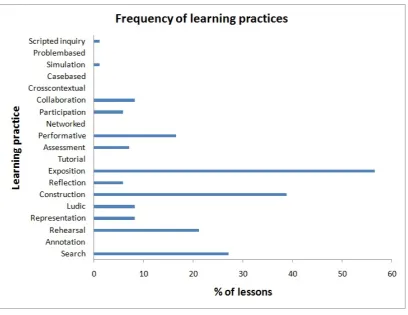
Figure 4 Distribution of learning practices involving ICT
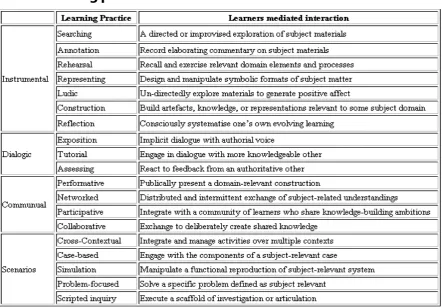
The low percentages of some learning practices mediated by technology (that is, annotation, tutorial, networked, problem-based, cross contextual and case-based) may indicate that some practices such as annotation might be more suitable for a period of private study. Other learning practices do not fit the communal nature of classroom life – learning in tutorial exchanges, for instance.
The second point to acknowledge is that the classification of occurrences for these practices only draws upon instances where the teacher identified a significance of the technology for that activity. In particular, the use of ICT for expository purposes (such as PowerPoint) was probably more frequent than was identified in notes and interviews. Therefore, the profile of learning practices incorporating technology given in Figure 4 is based upon those where the ICT mediation was explicitly invoked by the teachers and, by implication, was regarded as playing a significant role.
means the only way of presenting ideas to a class. For instance, many lessons arranged student activity to be triggered by sharing short extracts of video. These lessons were often acknowledged for their success in stimulating class discussion. Construction similarly was not dominated by the making of PowerPoint’s but included other forms of portfolio work and video recording. Much of what was recorded as ‘search’ and ‘performance’ was integrated with this activity of construction. Searching was not confined to topic research of the kind associated with the ubiquitous Wikipedia. It was more likely to involve finding images, film, examples, and illustrations to support the development of some student-rich media product. Many lessons included space during which these products were ‘performed’ and made the focus of class discussion and/or assessment.
In summary, the graph shows that the impact of ICT learning interactions was
concentrated on expository, construction and search activities. As the descriptions of teachers also revealed, the expository activity supported teachers but the knowledge construction activities were managed by students – often collaboratively. In this sense the mediation of learning by ICT had an impact on the interactions of teachers and students. This analysis is best understood as providing a cross-disciplinary perspective with insights into pervasive practices across the curriculum. The lessons analysed covered a wide area of the curriculum (geography, English, MFL, maths, science, design and technology and music, among others). Some learning practices that may be congenial to specific disciplines may seem underrepresented
(simulations in science, or representational tools in maths, for instance) due to the broad nature of the sample. Taking this into consideration, it is fair to conclude that ICT has an impact on learning practices in a rich variety of ways. In highlighting exposition, construction and search, the cross-curricular snapshot conveyed in the present data identifies key pervasive learning practices.
2.4 Engagement of students in lessons
Figure 6 Teachers’ rating of student engagement
The ensuing interviews with teachers on their own ratings provides further insights into the subtle connections by which ICT was perceived to have contributed to positive behaviour and engagement ratings. The teacher commentaries provide some insights into this feature of ICT use. In teachers’ own words, the factor of engagement with technology was often linked to two other words, ‘fun’ and ‘enthusiasm’:
Enthusiasm, I would have put for the first one because I'm a great believer that if they're enthusiastic, then they're going to learn. If they're happy and enthusiastic and open minded, they will learn. (School 7 Teacher 5)
It is useful to look more closely at the vocabulary of explanation used by the teachers to talk about the outcomes of these lessons. Table 1 below is based on an analysis of the log question, “What made the lesson work?” and teachers’ written reflections on their ‘success of the ICT’ rating. A total of 69 lessons offered commentary that permitted this analysis. These comments were content analysed and the categories in this table derived. The numbers in the right column indicate the number of
Table 1 Concepts invoked in teacher descriptions of lesson success
Teacher‐Student relationship Differentiation 12
Discussion 7
Intervention 6
Monitoring 3
Teacher performance Exposition 5
Improvisation 1
Student‐Student relationship Group discussion 7 Peer teaching 2
Competition 1
Student Experience Participation 4
Performance 3
Choice 3
Exploration 2
Autonomy 2
Task Features Personalised 12
Variety 11
Structure 11
Good stimulus 9
Access 3
Novelty 2
Challenge 1
As will be shown in Chapter 3, the factors of differentiation and personalisation were strongly associated in teachers’ perceptions of successful outcomes. The
management of ‘variety’ within lessons was another factor that was frequently invoked in close connection with student engagement. The category of ‘structure’ is also linked with this, as it refers to the way in which ICT might allow teachers to orchestrate that variety and keep the lesson animated.
Of course, ICT is very effective in delivering variety of experience but it needs to be considered that this could lead to the neglect of other sources of engagement. Some teachers recognised the way in which the technology could take over engagement management in this sense:
I have taken this on board because it’s been all new singing all dancing using all the computers and everything. We got to the stage where every week I was using the music technology. But this year, I have drawn back, so we were doing an African drumming session and yesterday we were doing electric guitars and kit. I think that if you overuse the technology, the kids get bored with it and they have said to me ‘Oh no not computers again’… As a teacher, you think you have got all this stuff and then they say ‘it’s boring’, but I do understand that they don’t want to be doing the same thing all the time. (School 2 Teacher 4)
While the dominant vision of ICT was as a source of engagement, and while the factor of potential variety in experience was stressed, there was also an awareness expressed by many participants that this was neither magical nor reliable in the way that it worked. In the rush to acknowledge the natural appeal for young people of using technology, there has been little consideration of its habituation or the need to plan for appetites that might be increasingly demanding of novelty:
I think that's wearing a little thin now…so we've got into doing computer games, as in …the Question of Sport board and things like that. Again, you can only do that once or twice because, otherwise, that becomes commonplace. So the thing that I was getting into last year, that they responded to so well, was the use of themselves, so videoing themselves… (School 7 Teacher 5)
The Year 11 class who undertook those series of lessons with me is doing extremely well but it's like any other method. If you don’t watch it, it’s 'Not another bloody
diagram' sometimes. You've got to plan your lessons fairly intelligently so they're not doing the same activity or task or 'Here comes another YouTube clip'. (School 7 Teacher 1)
These concerns came through in talking about the dangers of encouraging certain forms of creative projects with ICT too often. It could be thought of as a kind of ‘constructionism fatigue’ whereby students become weary of using technology to produce the same kind of product (PowerPoint, leaflet, video and so on) to illustrate a curriculum idea:
You do get the child who will say ‘Oh no, not another leaflet’ and it is that sort of need [which encourages us] to look at the wider school and think, ‘OK, how many times are we asking a child to produce a leaflet across all the subjects?’ Because if [teachers in] every subject are doing that, then it’s not effective use of ICT. So it’s actually about who is doing the core teaching – this is what makes a good leaflet and the right programme and, yes, consolidating it. But you don’t want to repeat it more and more, as it gets just as boring as the old stuff. And that’s the same with DVDs. They say ‘Oh no, we watched a video last lesson’ and you have no idea of that. So it’s really [that schools need to have] a more coordinated approach to their
curriculum… We will almost switch them off through technology without realising it. (School 2 Teacher 6)
This last observation draws attention to the need for a higher level of lesson co-ordination within a school when ICT is used extensively. It has been stressed here that the technology encourages a shift towards constructivist and performative kinds of project work. However, these exist in a limited range of genres and students may become impatient with exercising these in the interests of what they see as teaching ‘devices’. Teachers may need to be more fully informed of how their colleagues are deploying ICT, so that they can make their own choice of project genre in a way that enables more variety to be achieved.
Having acknowledged that particular challenge, the creative work made possible by certain stock activities can lift an activity from the level of novelty to the level of a more potent experience:
How do I get them to analyse or synthesise using e-learning and then use that as the basis of what I do in my English lessons? It’s gone from, ‘Wow they have cameras, let’s have some fun’ to being a really useful and powerful tool. (School 6 Teacher 1)
In summary, the reports of these lessons are characterised by a strong sense that ICT contributes to the engagement of students. The opportunity to inject variety of experience into lessons is strongly emphasised in teachers’ own appraisals of their lesson success. Again, this discussion warns against treating the technology in a piecemeal way. While technology does mediate distinct forms of learning interaction, that mediation needs to be viewed across all learners’ experiences. One
2.5 ICT success ratings
[image:23.595.117.484.269.485.2]In this section, the records and interviews provided by participating teachers have allowed an analysis of a large number of lessons in which ICT played a significant role. In the logs, teachers were asked to rate the success of their ICT use from negative to positive on a scale. The ratings of perceived ICT success are given in Figure 6. The commentaries of teachers on their own ratings reveal further aspects that influence on the potential of ICT in lessons.
Figure 6 Teachers’ rating of ICT success
The successful ratings show a general satisfaction with the ICT aspect of the
lessons. The twelve lessons attracting the unsuccessful score of seven or less were reported by seven different teachers. Their logs suggest a mixture of reasons for relative disappointment. Technical failures were not that common - only three lessons were judged this way.
2.6 Concluding note on teacher log analysis
In analysing these logs, two themes have been stressed. First, a systemic
perspective is required whereby the intrusion of a technology into an educational practice can disturb the balance of that practice in complex ways. The metaphor of an ecosystem was encouraged as a device for thinking about this balance. Second, a mediational perspective on technology was adopted here. This invites thinking about ICT as a resource that exists as one of a number of tools available to support a learning practice. However, while the impact of ICT may be measured and
celebrated in terms of these piecemeal roles, it is also important to identify emergent properties associated with ICT use when that use becomes pervasive. Such
circumstances were increasingly apparent in these schools as they experienced the integration offered by learning platforms and the ubiquity of lesson access arising from netbooks, laptops, and computer suites.
These examples of impact are not impacts in the traditional research sense of
3 Emerging themes: contextual factors and impact on learning
The sections in this chapter draw on interview and focus group data from all phases of the project. These include preliminary interviews with teachers and managers that set the scene for the study and teacher log data that chart the impact on learning at classroom level. The teacher interviews provide a broader contextualisation of the lesson logs. They reframe the logs within a richer analysis, including the teachers’ own accounts of where the lessons fitted within their developing use of ICT over time.
These perspectives, augmented by the observations of student focus groups from each of the schools, illustrate the perceived impacts of ICT on individuals, teachers and schools. We have tried to highlight where ICT has supported collaboration and communication effectively. We have also tried to map some of the unexpected
pathways of opportunities that a particular application might reveal as a product of its use in different contexts.
In Chapter 2, we looked closely at the impact of ICT on learning at the classroom level. We did this by focusing on the learning practices within 85 individual lessons. In this chapter, we broaden the lens, drawing on the 98 interviews with the teachers whose lessons we analysed and with the senior managers in their schools. We also draw on 13 focus group sessions that were recorded with Year 8 and Year 10 students in six of our nine schools. Half of the teacher interviews were conducted before, and half were conducted after the lesson log exercise. Between them, these interviews provide a rich basis for understanding something of the learning
environment of the schools. In particular, they help us understand the evolution of ICT use within those ecological systems.
The research team was asked by Becta to provide ‘explanatory case study’ evidence on the relationship between ICT and achievement. As a key part of this, we provide case notes in Appendix III of this report. These case studies are based on the
interviews and lesson logs of six teachers. They give teachers’ professional histories and offer examples of ways in which individual teachers have become skilled and effective users of ICT for developing learning. In this chapter, however, we want to highlight some important overarching themes that have emerged from these
schooling, highlighting aspects of teaching and learning that have emerged from looking across the project, across classrooms and across schools.
In our view, the technology-enhanced learning practices that we have observed are best understood by considering the ecologies at macro, meso and micro levels.
• Macro level: we take account not only of changes in the infrastructure, but look at why some institutions’ large-scale change has been embedded more successfully than others.
• Meso level: we look not only at curriculum change, but at the ways in which successful schools are integrating curriculum change using ICT. This includes using the technology as part of assessment, out-of-school learning and
personalisation.
• Micro level: we look not only at how ICT can affect motivation and engagement, but at how it changes the nature of learning.
These ‘emerging themes’, therefore, are central to our story. They start from the teachers’ own words and practices and link together to provide a detailed account of the conditions under which ICT practices enhance learning, become embedded and become transformative.
Establishing a causal relationship between ICT and school achievement is
problematic. However, within the ecology of schools, one causal relationship is firmly established: the link between a sustained, evolving management vision and the process of embedding the use of technology across the institution. As Davis and Somekh argued in their landmark studies of ICT in higher education (Davis et al, 1992; Davis, 1997; Somekh, 1998), it is impossible to bring about deep and
embedded change unless the senior management is actively leading this change. Of course, we met many wonderfully creative teachers in the course of visiting the nine schools involved in this project (some of whom tended to work in ways that were independent of their school’s ICT policy). However, it is also the case that we found no school in which ICT was embedded institutionally that did not have a headteacher who was actively leading this change. The reasons for this are transparent. In order to get ICT deeply embedded within an institution, there need to be significant
changes, not only in the ICT infrastructure, but also in the finance, staffing,
professional development, curriculum, assessment and models of pedagogy that are constituents of the ecosystem of the school.
3.1 Theme 1: Evolving visions, aspirations and goals
All the schools involved had leaders with vision although they did not necessarily share the same vision. In School 3, for example, the head had inherited a situation that needed urgent remedial attention:
… So the plus side was, you know, there were lots and lots of things to put right, but I knew exactly what to do…The lessons were pedestrian, they were, because the children here are very biddable, teachers got away with delivering mediocre lessons. (School 3, Headteacher)
In this case, the headteacher’s vision from the outset was to use ICT as an agent for improving standards:
I knew… we needed to energise the lessons. We needed to make them more interesting, livelier, with more pace and variety… I knew you could do that through the intelligent use of ICT and interactive white boards and so on…Bearing in mind I was the twelfth headteacher in twelve years, and when I stood up and said…‘We’re going to become a centre of excellence of ICT,’ (there was no ICT in the school) …they thought I’d lost the plot. But I knew… that’s what we were going to do. I didn’t come here to like sit around for five or ten years, just to maintain the mediocrity. You know, I’m not interested in that. The kids, 30 per cent of kids were leaving with five A-Cs. This year, 80 per cent will leave with five A-Cs. And, over six years, the
school’s GCSE rate has improved from 30 per cent to 80 percent. And now the goal is even higher... (School 3, Headteacher)
The headteacher’s vision for using ICT to transform achievement included strategic planning as well as setting global goals. His strategy touched every aspect of the school: finance, staffing, staff development, curriculum and assessment. However, ultimately everything was focused on achievement:
…call me old fashioned, but I think that’s really what we’re here to do, because 80 per cent of children this year have got life chances that five years ago they wouldn’t have had. We are going for 100 per cent [of pupils getting 5 C grades or higher] because they’ve got to leave here extremely well qualified. Because if they’re not, they’ve had it, haven’t they, really? And everything that we do and all of the kit and everything else that we buy must have an impact on that. (School 3, Headteacher)
and keen to raise achievement. However, from the start, ICT emphasis in School 6 was on increasing engagement, motivation and enthusiasm for learning. School 6 embarked on a route that embraced new modes of learning, and the headteacher’s vision and provision of resources led to the school becoming an early adopter of an infrastructure that included a learning platform. This emphasis, in turn, evolved into a policy of adopting laptops, and more recently notebook computers. Here, the vision trajectories of Schools 3 and 6 begin to merge, in that more recently the headteacher in School 3 aligned the school’s attainment goals with the ‘widening access’
principles of a learning platform:
…Children are in school for 15 per cent of their time and we can control that by and large. But for me, the real learning gains and the…almost untapped potential to use ICT to affect the other 85 per cent of children’s lives and parents…It’s just a
fascinating way to engage children and parents. I mean, parents want to help their children. They don’t really know what to do or how to do it. So, you know the potential for after half past three is massive and that’s what we’re working on at the moment. (School 3, Headteacher)
It is worth considering for a moment how headteachers acquire their vision and help evolve that vision over time to drive and energise change. In the case of School 3, that impetus came, as it has done for many headteachers, from the National College for Leadership of Schools and Children’s Services (formerly NCSL) SLICT course:
I think one of the highlights for me personally was to go on the…SLICT course...I thought it was the most amazing thing I’d ever been on...By the end of it I had a strategic vision for ICT…I really understood and started to get excited about the possibilities. (School 3, Head teacher)
We shall return to the issue of staff development below. However, it is important at this point to emphasise that headteachers differ not only in the nature of their vision, but in their capability of turning that vision into a reality. We asked School 3’s
headteacher how many students were using their learning platform for out-of-school learning, and his answer was confident:
All of them. 900. We know that. We also [know] that if you set the traditional
homework, for example, in science, you get a 50 per cent return. If you set an online homework, you get a 99 per cent return. (School 3, Head teacher)
I have to be perfectly honest with you here, it is all very well and good, but the giveaway is that if I show you the participants list (which is a very useful thing for teachers because it tells us who has used it and when)…apart from me, the last person that used it was 66 days ago…Daily logins on Moodle (Moodle is compulsory for all subjects across the school), daily logins are about 30 and [there are] 1200 of us... (School 5 Teacher 2)
3.2 Theme 2: Developing an infrastructure to enhance out-of-school learning
With all schools now encouraged to provide increased access to learning outside school, and to use ICT to engage parents (Becta, 2009), it is increasingly important to establish a learning platform and be clear about how it is to be used, by whom and for what purposes.
Both staff and students perceive that the multiple points of communication within the home can support the effectiveness of homework and learning outside school. The school’s extranet facilities can provide learning platforms that have student
management tools, such as independent learning databases and online timetables, with direct links to lesson resources. These tools facilitate learning in that they permit effective sharing, saving and retrieving of work.
Another facility that strengthens links with the home is email communication between teachers, students and parents. Students having their own personal laptops can establish further links with home learning. Although these are all different types of applications and functionalities they serve a common purpose. They enhance communication, enable more effective access and help students to organise homework. Teacher 1 in School 3 perceived that new opportunities for continuing learning from home are enhanced via the school’s learning platform:
It's got to be with our independent learning, it's got to be the steps that go past what we do, what the kids do at home. When I first came in, the kids would not work at home, you'd get next to nothing off them. For homework stuff, they would do it but anything that was 'OK, you've got a test tomorrow, it's your responsibility'…they wouldn't do it. But now, they know they've got this constant access to the school. (School 3 Teacher 1)
Likewise, students perceive accessing school files from home as a crucial aspect of their learning. Students in Schools 3 and 5 commented on their school’s facilities:
you can see the lesson – you can see that from anytime or anywhere. (Year 10 students in School 3)
... In IT last year you could find all the information, everyone can access that
information. You can access it from home. You can save documents…on the school drive remotely. (Student in Year 10 at School 5)
In Schools 5 and 6, a ‘one laptop per student scheme’ establishes continuity
between school and home. Having all the information on their laptop makes it easier for students to access schoolwork. Students said that it was easier to continue working as the laptop had all the things they needed for homework:
It is in your laptop and you can carry on working on it from home and also through the online database for independent learning. (Year 8 student, School 6)
At home we do most of our homework on the school laptops. (Year 7 Student in personal laptop pilot scheme School 5)
The vision of informed teachers is important in this area. This is because individual teachers often have ideas about the tools that they want to use that will be part of the infrastructure of the learning platform. They know how they want the learning
platform to be used, as this teacher’s comment demonstrates:
I would like to store more things other than…more PowerPoint’s, notebook, Word documents or links. I would like it to have more things like film clips. I would like to get the students to be producing more things like podcasts. Actually it’s becoming more of a social network site. I’ve encouraged the use of a forum for recording ideas about improvements in teaching and learning in English, which did get some
response last year (in 2008). But you really have to push it and really drive that forward. Also, getting them (the students) discussing things like the papers for the exam outside of the classroom, and record[ing] some of those conversations to show understanding...(Teacher 1 School 1)
The teachers in School 1 emphasised developing work that was related to the end-of-year exams by using technology to increase reflection, production and critique. They wanted the learning platform to be a vital and developing repository within which students could record ideas and evaluations throughout the progress of their projects. The teachers visualised podcasts and blogging as part of this function.
during lessons and from home. This scheme has been rolled out to incoming Year 7s for the past three years. It has also become a driver for change in how lessons are delivered. The scheme has so far reached the Year 9s. In the near future, the upper years in the school will be transformed through the laptop scheme. The experience of School 6 echoes the point made earlier in relation to School 3. This is namely that changes in the infrastructure become embedded only when they affect curriculum and assessment structures, as well as teachers’ and children’s hardware.
In School 1, the teachers are on this pathway. Two of the teachers from whom we collected logs recognised the need to develop the learning platform to make it more complete:
I think my mind is more preoccupied with the new sort of provision in Year 10. We need to be ready to have this sort of access. My priority is to make sure that there will be adequate provision for Year 10 and 11. (School 6 Teacher 2)
Ideally, all learning resources would be stored on there for students to access at any time, which would help when students are off sick or wish to look back at earlier sessions. (School 1 Teacher 2)
Both English and Art are prime examples…We would like to have some sort of gallery of work (online), where we can show either the students’ final products or their processes, whether that’s a piece of creative writing, whether it’s a Movie Maker advert, or various things like that... Perhaps further examples could go onto the… [learning platform] because they would have to get access via the school in order to go onto that. But certainly some of the examples could go onto the website, which parents, or anyone could access to get a feel for the kind of things we are doing within school. (School 1 Teacher 1)
3.3 Theme 3: Staff development, the role of CPD and the role of students
As the interview comments above suggest, significant structural changes involving ICT have a massive impact on the training needs of staff. The interviews revealed a number of parallel institutional approaches to staff development as well as
unexpected opportunities that played an important part within the ecologies of
provision took account of the fact that individuals were at different stages in terms of their personal development:
I think we differentiated it at the outset in terms of training for people. There were very few mass briefings, you know, it was very much individualised. We ran sessions for less confident people. We ran sessions for more confident people. We got [the] more confident people to train less confident people…[There was a] sense of feeling that we’re all in this together. I think the sense that I managed to convey to staff [was] that ‘OK, I’m no expert. We’re going to take this at a pretty slow pace. It is going to be very interesting, it’s going to be fascinating for the teacher, fascinating for the kids, but we’re not expecting you to be a genius by Christmas, you know’.
(School 3, Headteacher)
The interviews with teaching staff reveal additional sources of development that are less visible and sometimes even unintended. Some opportunities emerged from the alliance between teacher-student-technology that was perceived by some teachers as opening additional channels of teacher development as well as learning
opportunities. These were often described as organic and spontaneous. The
example below reveals an interesting interaction whereby the teacher learned from the students. This, in turn, gave space to more student participation in the
classroom:
How’s it changed my teaching? Drastically. We teach one another now. I mean, you put a child on Photoshop. That software normally has five or six different ways to bring about a solution. They’ll find them all. They’ll teach me new ways. I’ll teach them the way that I know, and they’ll come up with different solutions all the time. So it’s absolutely fascinating. They’ll learn from me, I’ll learn from them. (School 3 Teacher 2)
In School 4, another teacher talked about using a film and moving image-editing package to teach poetry to a Special Education Needs group (SEN):
As teachers become more comfortable with the awareness that students are going to teach them, their contributions can be smoothly integrated into the fabric of the
lesson:
...So a student may well find a new way of doing something or make a discovery that they’ve never come across before…What I would do then would be to use our
[screen monitoring] system so that the child can then take control of my interactive white board and speak through the process and show everyone else in the room what they’d done. That can then be passed over to the rest and they can attempt something similar...I’ve been teaching now for 30 years and of course I was the person at the front of the room who more or less told children what to do. That is no longer the case. I quite often like sitting back and watching people working with the software intuitively. I love the way that a problem may arise and I do encourage them now not just to ask me what the solution is, but to find someone else in the room who has worked through that problem, so they can tutor one another... (School 3 Teacher 2)
In addition to enhancing student participation during lessons, the introduction of technology and staff development transcends the mere learning of how a tool works. Teachers revealed self-development in understanding the intricacies of how the tool linked to further learning possibilities. In the example quoted below, using students’ own mobile phone cameras has resulted in new opportunities for students to take their own pictures in preparation for a digital art project. This resulted in the
opportunity to explore notions of angle and perspective in photography. This was an opportunity that was simply not possible a few years ago:
…Yes, and they wouldn’t have had the choice. This time around, they pick up their image of the school from Moodle and then take another photo themselves.
They…[can] change the viewpoint...Four years ago we would [have given] them the picture because digital cameras were really expensive still and parents would not allow them to bring cameras in...We would have given them the photos to draw from...and that would have been it ...But now they are deciding on the viewpoint, and now they all have cameras on their phones, so it was such an easy thing for them to do... It is just a whole revelation. It is easy for me to do. They personally have their own gear. They all have access and they…[can] just take a picture. [Now] it is a whole different world...What they have nowadays...They are born into this world with these things...We have had to learn this. (School 6 Teacher 2, Art)
3.4 Theme 4: Redefining learning spaces – the boundaries of impact
was at the forefront of many teachers’ minds as they discussed their pedagogy with us. Most of the schools with which we worked have started to incorporate flexible learning spaces and these are perceived to accelerate the pace of learning. Often such areas are used for ICT and non-ICT work. They are also used to promote differentiation and student-led learning. Most teachers have a default classroom layout in which the students face the front of the classroom (or the teacher). This is mainly determined by the need to attend to the interactive white board, but also for monitoring student behaviour. Sometimes students might be in clusters of tables, but still face the front. The interview excerpt below illustrates how the ‘face the front’ default layout acts as a constraint:
The one that's in a classroom, just an old classroom...is a traditional set out for teaching, where you have the board at the front, even though it's an interactive whiteboard. You can have children in rows sat facing the board…We do an awful lot of work in maths from the board. It's always constantly looking at the board. Here's an example: someone's asked a question, I need the board to show... so it isn't really practical to have them facing any other way. With the size of the room, you've just got to have them in rows, so it's both constraints of the room and the other way we have to look at it is the amount of questions and the amount of stuff I have to do at the front. (School 3 Teacher 1)
Flexibility and versatility of the space are the features most desired by the teachers we met. Most teachers commented on the need for larger spaces and the possibility of reconfiguring layouts easily in order to have different types of work areas. Teacher 1 in School 7 commented on the suitability of spaces that meet these criteria:
I find it fine in here because there's plenty of space. It would be preferable, perhaps, if there was another line of network computers down this side...And then you've got a wonderful big space that you can use there. I also find these tables very good for group work as well as small group discussion. You push them together…In many ways, it's ideal, I think. In this block, because you've got fast internet, you've got networked computers accessible. You've got comfy chairs. You've got big desks; you've got plenty of space. (School 7 Teacher 1)
In School 2, Teacher 3 described a diverse layout within the classroom that provides both dedicated space for computer work and a non-computer area. This fitted in with the need for both practical application and non-ICT work for planning elements of topics. This allowed movement within the room and increased the range of activities (such as using small video camcorders).
strong and consistent perception that versatile spaces would be instrumental in providing a more diverse learning experience. Teacher 3 in School 7 expressed the same view: that having a computer area and a non-computer area would help her to direct different students to activities according to their needs during maths lessons.
Other spatial dimensions were perceived to impose limitations on the possibilities of teaching, such as the absence of wall displays. Having multiple screens around a classroom, would create further possibilities for teachers. Two different teachers in School 3 commented on this:
Oh my ideal classroom. I've actually seen it. They have the whiteboard just like we have, but then they have LCD screens around the classrooms as well…They put different things on to different screens. So, I think I'd like a computer system where you could have…multiple feeds like my friend's got on his home computer. He's got four screens banked on top of each other and your computer [could] have four video outputs and you decide which goes where. (School 3 Teacher 1)
I'd have fold down tables on the walls so that if you wanted to have just an object or a piece of information, they could be over there. Or, if they were doing an activity where they had to look at something, go back to the group and draw a piece then take turns to build the picture up as a group. Then you could have it spread around the room. If I had laptops, then you could pop them on there so they could walk over, type up, rather than them being dependent on me to find the answers, for them. [It would be great for them] to realise that I'm a facilitator to provide them [with
guidance] and then they go and find the answers. I've done my work when I walk in [and] keep reminding them 'Your lesson's done. It's time for you to work'. And to have the flexibility of where things are would be brilliant. (School 3 Teacher 3)
3.5 Theme 5: Impacts of ICT on learning
In our view, there were four principal ways in which technology appears to have an impact on learning through what may be termed ‘emergent’ properties. These four impacts are differentiation, inspiration, coherence and engagement.
3.5.1 Differentiation
The variation between the groups was huge...It wasn’t my intention to develop their use of those particular two programmes. I was mainly interested in their research. [I wanted to know] how they used it and how they put the information across and how usable it was and the content. But their variation in the end made a massive
difference…[Although] I had done mixed groups…some groups were just so much more ICT literate. They were just much more able to access it and know what they were doing more quickly. While for others it was a very slow process...and therefore it slowed them down. (School 2 Teacher 6)
This teacher is reflecting on groups of children who composed a product where they were all clear about their ideas and needs but differed in their confidence with the ICT tools. This locates ICT as a source of individual difference rather than a solution. While it was not commonly spoken of this way, the example is a reminder that over and above formal ICT instruction, students may enjoy different personal histories of using the tools – both in and out of class. As far as the sources of in-school variation of experience are concerned, there will be value in monitoring classroom practices in order to minimise differences of confidence.
However, ICT was more commonly identified by teachers as a support for managing learning in a way that helped them effectively respond to different student needs. This support is sometimes related to the ease with which individual progress can be monitored in certain instances using networked technology:
Some will want to get on quickly and some will wait for guidance and when you do stop them you are able, with the monitoring software, to blank the screen and you can do it straight away. You are not waiting for them to stop tapping or whatever. (School 2 Teacher 3)
In this case, ICT can serve as a medium, making students’ working surfaces available to the teacher. This must create richer openings for intervention.
Otherwise, differentiation can be achieved through means that might be termed ‘orchestration’. That is, teachers can exploit design features of the ICT tool to structure the nature, order, or pace of students’ tasks. In the following example, the mechanics of writing on a computer are identified as a useful leveller:
This is clearly empowering. Of course, the less confident child will still need to become more fluent with traditional writing tools (not least because they are likely to be assessed in that medium). However, this is a challenge of managing transitions and clearly ICT is an asset in this sense.
Teachers may also exploit design features of ICT in order to orchestrate differential access to various learning tasks:
I can pre-set five different versions of the same piece of music and they can choose which level they are going to work on. So, in terms of differentiation, it’s really
helped. That has helped with the engagement and the behaviour, while before I was giving out the whole range and telling some of them they only had to work on this easy bit. Some saw that as rubbish and others would say “Oh no, I can’t do that can I?” So I say to them all now, start at level 1. And then they can close that down and go on to the next level. (School 2 Teacher 4)
Alternatively, the same orchestration might be managed at the pace at which an activity is to be carried out:
There was this self-regulating PowerPoint for each screen that would be set up with a load of activities. [The software] would relate: 'Now write this in your book' or 'Work out this exercise and then copy it in your book'. But they could all work at their own pace, which is just a godsend with such mixed ability. Because when I'm stuck in my [no network] room now, we've all got to work at the pace of the slowest person. (School 7 Teacher 5)
In summary, a prominent impact of ICT was identified in terms of the opportunities it creates for providing differential attention to students or for placing customised demands on them. This is because the technology could offer a less daunting interface into basic activities. In the case of networked computers, these enabled individual monitoring and effective orchestration of individual work patterns.
3.5.2 Inspiration
The idea of ‘inspiration’ is an emergent feature of ICT impact. However, this term is not intended to simply refer to the frequent occasions when students are inspired by their ICT-led discoveries, although these are real enough in this data:
Various lively sessions of map work arose from this student discovery. On the other (expressive) side of this relationship, there is also a kind of inspiration that arises from what students do with the media (rather than the inspiration that arises from what it shows):
Some of the work that pupils do when you step back…has been absolutely breathtaking. (School 6 Teacher 1)
In this case, the teacher also enjoyed some of the inspiration.
However, there is another form of teacher inspiration that is of even greater interest in characterising the generic outcomes of adopting ICT. The examples that emerged from our discussions were centred on the ready-to-hand nature of the technology. Typically, these examples took the form of reflecting on the state of an activity and seeing the potential for enrichment that ICT affords.
For instance, this might arise through two previously independent classroom activities suddenly becoming creatively linked. In this example, previous work with sound recording (through the application ‘Audacity’) was linked with stimulating students’ reflections on learning:
So one of the good things that we have started using is Audacity, and they are recording what their thoughts are. So again the students can access the APP
[Assessing Pupil Progress] grids because they are just talking about what they see in front of them…At the end, they were able to say they are…on this level…and this, and through just having the headphones and the mikes - they just loved it. (School 2 Teacher 3)
Another sort of teacher inspiration can arise as a by-product of what students are doing. That is, it might be something that was not part of the planned activity, but once surfaced, becomes a useful discovery. For instance, an exercise in filming music performance inadvertently revealed the ways in which different sounds might blend or compete – as students struggled to record a credible overall balance:
Having discussions along the line [of] ‘Look, in order for this not to sound distorted, you have to consider where you have to be. Is your voice sounding bad at this point?’…We were dealing with musical elements in that sense - in terms of performance - in a different way than you would in a standard form. (School 5 Teacher 2)
… Just standing at the front and communicating with the class in real
time…PowerPoint…is still good for prepared stuff, but for what you're not expecting to come up and answering questions…, it's really good for that. (School 3 Teacher 1)
In summary, investment in ICT as part of routine class activity offers unexpected sources of inspiration. This inspiration has an impact on learning interactions in ways that are often serendipitous for the teacher. It is more widely acknowledged that technology can inspire students, for instance by enabling them to make their own discoveries. (It can also sometimes equip students to be sources of inspiration for others.)
3.5.3 Coherence
Celebratory discussion of ICT in learning often focuses on some particular form of learning activity that is being supported. This might be the representational versatility of multimedia, the simulation of abstract processes, and so forth. However, in
analysing these 85 lessons it was apparent that learning interactions were not so neatly parcelled up. Indeed, it seemed that one important emergent impact of ICT was the capacity to create forms of coherence in learning. Coherence can take three particular forms:
• Co-ordination, whereby distinct activities of learning are integrated
• Continuity, whereby distinct episodes or sites of learning are integrated
• Community, whereby ICT is used to mediate the links between different people, their interests or activities.
Co-ordination
The possibility of activity co-ordination arises quite simply because functionally distinct tasks (in terms of learning goals) are executed in the same working space – that is, the networked computer desktop. While this convergence of activity to a single site is at the heart of this form of coherence, it also can be a source of difficulty for teachers. This is because students can easily stray off-task into activities. In the example below, the teacher is recounting how the network laptop offered a variety of distractions to the core task of music composition: