Development of Customised Software Modules within the
Moodle LMS for Team-Based PBL Courses
Hong Zhou
University of Southern Queensland, Toowoomba, Australia [email protected]
Steven Goh
University of Southern Queensland, Toowoomba, Australia [email protected]
John Worden
University of Southern Queensland, Toowoomba, Australia [email protected]
Barry Tschirpig
University of Southern Queensland, Toowoomba, Australia [email protected]
Andrew Yong
University of Southern Queensland, Toowoomba, Australia [email protected]
Lyn Brodie
University of Southern Queensland, Toowoomba, Australia [email protected]
Introduction
Moodle has been deployed as the new Learning Management System (LMS) to service
USQStudyDesk at The University of Southern Queensland (USQ) since 2008. All courses across the University, regardless of their delivery mode (on-campus, external, or USQOnline), use Moodle as the major learning and teaching platform. It is the declared intention of the USQStudyDesk User
Reference Group (URG) to further enhance and expand Moodle (an open source system) as a continuing process; enhancements and expansions was expected to be achieved through the
collaboration of the development team and key stakeholders including faculties within the University.
Within the Faculty of Engineering and Surveying (FOES), there is an ongoing need for Moodle to support staff members to manage their courses efficiently and improve students‟ learning experience, particularly in our Problem-Based Learning (PBL) Strand where courses have large student numbers and are group-based. There is a need to efficiently and effectively construct student groups based on a combination of program, discipline major and gender, and to assess their learning process via peer assessments.
As student numbers in Engineering and Surveying have climbed in response to the resources boom in Australia, class numbers in the Faculty‟s problem-solving strand have increased markedly from around two hundred to larger than five hundred students studying in all modes. The task of sorting and assigning this student cohort into teams with representation from all degree programs and majors combined with the need to minimize female harassment stretched out to more than three days. USQ‟s Peoplesoft student system could not deliver a report listing students by both program and major. So data for each student had to be manually retrieved, checked for major even when the student on enrolment had not specified their major and then assigned manually to a team of eight students. This slow and tedious task always occurs at the commencement of a semester with students agitating for their positions within a team.
A program that could both sort and assign students to teams using all specified parameters was on a “wish list” for future development by the Moodle support team but they had other higher priority tasks. Faculty final year student projects (software engineering major) offered the potential to address this long standing need and led to the proposal for the development of a Moodle module facility to perform this tedious task. This paper describes a solution to the real need for the capability to construct student groups based on a combination of program, discipline major and gender, and to assess their learning process via peer assessments.
In 2009, we initiated a project to develop a new Moodle module to permit student assignment to groups within group-based courses, thereby satisfying requirements for our PBL and other engineering courses. We understand that other Faculties at USQ have related needs for a group-based facility that the EASE system does not provide, and would welcome our software development. EASE is an independently developed software package designed and developed at the Faculty of Business at USQ which does not include a well developed grouping function. This initial project will be an exemplar for continued development in other Moodle enhancements.
The project team proposes an over-arching structure to host a number of sub-projects whose purpose is to research and develop software and computer engineering applications. Individual projects will be suggested by the project team and the human resources to undertake the project may be drawn from final year students who are interested in software development in the FOES majors for electrical, software and computer system engineering. These students have completed most of our courses and have sufficient software development knowledge and skills to devise new Moodle modules. They also have a rich experience of study with USQStudyDesk and Moodle. These student projects will operate under traditional ENG4111/4112 guidelines within FOES, and be subject to their examiner‟s approval.
The functionalities of new modules will be conceived and based on the requirements of our course examiners; and must be supported and approved by relevant delegates. The project team consisting of three major parties has been working together to bring significant benefits to USQ. The sub-projects provide unique opportunities for FOES students to gain real-world software development experience, and improve their competitiveness in the job market. The new modules developed will reduce staff workloads, improve the work efficiency, and improve students' satisfaction of our courses.
Requirements and Specifications
The new modules have their genesis in supporting students and lecturers in engineering problem based courses. The first module to be developed is the grouping function. In problem-based courses, students need to be allocated into teams intelligently according to a series of criteria. The current Moodle system does not allow such complex team creation criteria, so lecturers would need to organise all the students of a course into teams manually. This is a painful and slow process that could be handled by the Moodle system. The engineering problem based courses are continually growing in enrolments, placing a larger load of the lecturers who are associated with them. The new software module requires to work within Moodle system to handle the grouping process automatically.
User Roles and Responsibilities
Administrator
The administrator‟s role is to setup, maintain and handle any problems that arise with the application inside the engineering problem- based courses. For each course this application will need to be implemented so that the staff and students can access it.
Faculty/Staff
The examiner‟s role is to directly interact with the application. He or she can check that the teams are created correctly; make modifications if needed, and respond to student drop/add requests during the semester. While all of the team organising will be done by the program, late changes must still be made manually by the examiner. For the assessment manager, each staff will have access to each of the assessments as well as the sections that they have been delegated to mark. When the staff members are finished marking, their contributions will be collated with the assessment results for other sections of the assessment. This team based result will then be filtered through a peer assessment formula, and automatically produce an individual result.
Student
The students‟ role is to be organised by the application. Each student will be placed in a team by the team organiser, but the student will not see how they were placed. The management of team based assessment is integrated into the existing Moodle framework. Student will be able to access to their team‟s assessment with their final individual results in one location.
Interactions with Other System
The application will access and function with a couple of external sources to collect all the data it requires. The application resides within Moodle system that the program will be implemented in. Most of the features will be run out the Moodle system, and is accessed through a conventional Moodle block. It will need to be compatible with Moodle requirements and capabilities. An external source that needs to be incorporated into the block will be the PeopleSoft system. The Moodle system does not maintain central student data which currently resides within the USQ Peoplesoft system.
Therefore, criteria for the creation of teams requires extraction from USQ Peoplesoft importation into the Moodle system, and then into the program application block.
from PeopleSoft such as gender and a student. The assessments will most likely be in Adobe PDF or Microsoft word format and the staff will need to mark them. Alternatively, the marks and student responses might be in a using an Excel file.
Software Design Process
This section outlines the team organiser in Moodle is implemented. Moodle provides two main options for to importing code either as a block or an activity module. A Block is an object, which is located on a side pane of the course page, and includes information or links to another resource. An example of a block is a clock, calendar, progress bar or simple html (refer to the block tutorial and Unit 7 of the Introduction to Moodle Programming course). These are all found in the block folder. In contrast, an interactive activity is a task, with which course members can interact. Examples of an activity are an assignment, forum, quiz or wiki. Activities are found in the /mod folder.
Architecture Design
The team organiser program could be implemented as either a module or a block. As a block the process would be as shown in Figure 1. As observed in Figure 1, this block process is very linear and simple to implement.
[image:4.595.73.526.424.475.2]The examiner would have access to this block in the problem-based course and would click on the link for the form. On the form the examiner would enter the required criteria and would click submit. When the submit button is pressed the students are sorted into teams and the teams are inserted into Moodle‟s groups. This process will only need to be run once for a semester. However this design is very limited as if there are significant changes in data. The changes could be new criteria, multiple students joining/leaving a course to influence group size, then this process will need to be run, re-organising students possibly to a different team they were in or solved manually by the lecturers as the physically change the groups.
Figure 1. Block Implementation Process
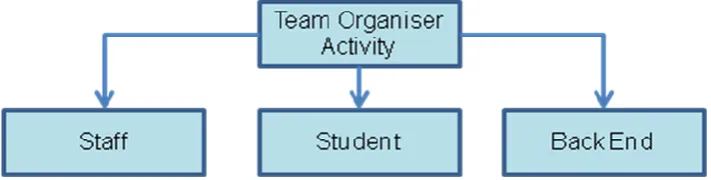
The activity version of the team organiser is illustrated in Figure 2. The back end of the program handles all the computation for the module. The examiner will be able to access and modify all teams. Student will see what team they are in and the team members.
Figure 2. Illustration of Team Organiser in term of Activity
[image:4.595.121.477.569.659.2]whom they are with, so that they can start building initial contacts through the forums, etc. All this extra functionality it possible but might not be needed by the project.
Both of these solutions are valid approaches. The block module technique is simple and effective and meets the project requirements. The activity module technique involves greater programming effort due to additional tasks that are not technically covered (yet) by present project requirements. It is desirable to expand these specifications to cater for different selection criteria in other USQ Faculties who may decide to vary the gender variable in response to a larger female student population.
Component Design
Components for the block implementation include: 1. Block code
2. Form Code 3. Organiser code
a. Code to take information from form b. Code to build teams from criteria c. Code to set up teams into teams Components for the block implementations include:
1. Activity code a. Staff side b. Student Side 2. Form Code
3. Organiser code
a. Code to take information from form b. Code to build teams from criteria c. Code to set up teams into teams
Grouping Algorithm
The process to create the groups will involve several stages to cover the different criteria. Criterion for grouping specified team size and the class list of the students are forwarded to the algorithm. The class list is randomised, so that when the groups are recreated on another occasion, the teams will be formed with different people. Students are initially divided into different sections depending on their study mode. For each study mode section the teams are next sorted with the other criteria. According to the gender criteria, females are partnered with one another, two to a team. This is implemented by finding out how many female pairs exist, and placing the pairs into discrete groups.
The next highest level criterion is that of degree program. Students from different degree programs are grouped. To implement this, the program with the lowest non-zero amount of students is identified. The students in this program are then evenly distributed into the groups. The groups require checking to confirm that they have a consistent distribution of students of a program type. This technique is done for the entire degree program except the most populated degree type.
The final criterion in the form of the student‟s major is used to complete the groups of eight students; resulting a group that has different disciplines. The discipline with the lowest non-zero amount of students is identified. The students in this major are evenly distributed into the groups. A final check of all the groups needs to be undertaken to ensure that there is a consistent number of students from the different majors. The criteria insertion procedure is outlined below:
1. Sort students into STUDY MODE
2. Find FEMALE students and put them in group them in 2‟s
3. Place FEMALE students into groups
4. Order students by DEGREE PROGRAM
6. Insert students into group
7. Repeat (5/6) for all by highest count DEGREE PROGRAM
8. Order students by MAJOR
9. Find lowest student count MAJOR
10. Insert students into group
11. Repeat (5/6) for all by highest count MAJOR
12. Fill groups in with remaining students
Outcomes and User Interfaces
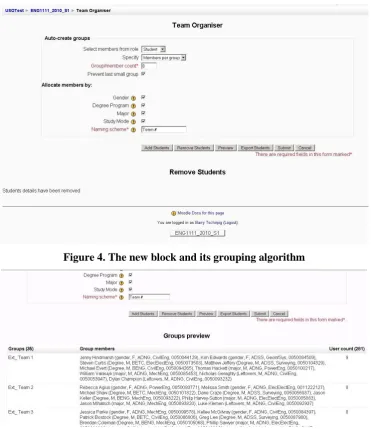
[image:6.595.111.489.316.566.2]The software has been developed and under trail. The new module will be trialled in ENG2102 Problem Solving nd Analysis at FoES in Semester 2 this year. It is envisaged that the new block „TEAM ORGANISER‟ will be saving at least 25-35hrs of manual team allocation, and less likelihood of any error in allocation process. The assessment manager is currently at the detailed design stage and will be soon under development. Below are some of the interfaces of the team allocation block for Moodle.
Figure 4. The new block and its grouping algorithm
Figure 5. A preview of the groups to be allocated with students prior to allocation
Figure 5. An export option for the student allocation into groups is available
Conclusion
The software provides enhanced functionality of Moodle and thus improves the teaching and learning experience at FOES and potentially across USQ. Robust communication networks and working relationships have been established between FOES, DAIS and ICT. A final year student has gained important working experience and software development skills through active engagement in the Moodle development process. In the future, we will aim to establish a practical and ease-of-use model or method for faculty staff to continuously trial and embed new modules within the Moodle LMS to meet on-going teaching and learning requirements.
Acknowledgements
The authors acknowledge the financial support from EERG (Engineering Education Research Group) at Faculty of Engineering and the feedback and contributions of the DIAS and URG (User Reference Group) at USQ.
References
Moodle (2010) Moodle.org: open-source community-based tools for learning. http://moodle.org/ (last accessed May 2010)
Pearson, J. Kwan, T. Wong, S. International journal of learning. Common Ground Publishing, 2003.
The PHP Group (2010) PHP: Hypertext Processor. http://php.net/index.php (Last accessed May 2010.)
Uden, L. and Beaumont, C. Technology and Problem-Based Learning. IGI Global.
http://common.books24x7.com.ezproxy.usq.edu.au/book/id_12623/book.as (last accessed May, 2010)