Your Complete Guide to Configuring a Secure Windows 2000 Network
• Complete Coverage of Internet Information Services (IIS) 5.0
• Hundreds of Configuring & Implementing, Designing & Planning Sidebars,
Security Alerts, and FAQs
• Complete Coverage of Kerberos, Distributed Security Services, and Public
Key Infrastructure
Chad Todd
Norris L. Johnson, Jr. Technical Editor
From the authors
™
1 YEAR UPGRADE
BUYER PROTECTION PLAN
From the authors
s o l u t i o n s @ s y n g r e s s . c o m
With more than 1,500,000 copies of our MCSE, MCSD, CompTIA, and Cisco study guides in print, we continue to look for ways we can better serve the information needs of our readers. One way we do that is by listening.
Readers like yourself have been telling us they want an Internet-based ser-vice that would extend and enhance the value of our books. Based on reader feedback and our own strategic plan, we have created a Web site that we hope will exceed your expectations.
[email protected] is an interactive treasure trove of useful
infor-mation focusing on our book topics and related technologies. The site offers the following features:
■ One-year warranty against content obsolescence due to vendor
product upgrades. You can access online updates for any affected chapters.
■ “Ask the Author”™ customer query forms that enable you to post
questions to our authors and editors.
■ Exclusive monthly mailings in which our experts provide answers to
reader queries and clear explanations of complex material.
■ Regularly updated links to sites specially selected by our editors for
readers desiring additional reliable information on key topics.
Best of all, the book you’re now holding is your key to this amazing site. Just go to www.syngress.com/solutions, and keep this book handy when you register to verify your purchase.
Thank you for giving us the opportunity to serve your needs. And be sure to let us know if there’s anything else we can do to help you get the maximum value from your investment. We’re listening.
From the authors
of the bestselling
™
1 YEAR UPGRADE
BUYER PROTECTION PLAN
From the authors
of the bestselling
Chad ToddSyngress Publishing, Inc., the author(s), and any person or firm involved in the writing, editing, or production (collectively “Makers”) of this book (“the Work”) do not guarantee or warrant the results to be obtained from the Work.
There is no guarantee of any kind, expressed or implied, regarding the Work or its contents.The Work is sold AS IS and WITHOUT WARRANTY. You may have other legal rights, which vary from state to state. In no event will Makers be liable to you for damages, including any loss of profits, lost savings, or other incidental or consequential damages arising out from the Work or its contents. Because some states do not allow the exclusion or limitation of liability for consequential or incidental damages, the above limitation may not apply to you.
You should always use reasonable care, including backup and other appropriate precautions, when working with computers, networks, data, and files.
Syngress Media®, Syngress®, and “Career Advancement Through Skill Enhancement®,” are registered trademarks of Syngress Media, Inc. “Ask the Author™,” “Ask the Author UPDATE™,” “Mission Critical™,” “Hack Proofing™,” and “The Only Way to Stop a Hacker is to Think Like One™” are trademarks of Syngress Publishing, Inc. Brands and product names mentioned in this book are trademarks or service marks of their respective companies.
KEY SERIAL NUMBER
001 AJNR2U394F 002 BKAER9325R 003 ZLKRT9BSW4 004 VKF95TMKMD 005 BWE9SD4565 006 CAL44GMLSA 007 XD2KLFW3RM 008 QM4VLR39P6 009 5MVREM56PK 010 9VNLA2MER3 PUBLISHED BY Syngress Publishing, Inc. 800 Hingham Street Rockland, MA 02370
Hack Proofing Windows 2000
Copyright © 2001 by Syngress Publishing, Inc. All rights reserved. Printed in the United States of America. Except as permitted under the Copyright Act of 1976, no part of this publication may be reproduced or distributed in any form or by any means, or stored in a database or retrieval system, without the prior written permission of the publisher, with the exception that the program listings may be entered, stored, and executed in a computer system, but they may not be reproduced for publication.
Printed in the United States of America 1 2 3 4 5 6 7 8 9 0
ISBN: 1-931836-49-3
Technical Editor: Norris L. Johnson, Jr. Cover Designer: Michael Kavish Co-Publisher: Richard Kristof Page Layout and Art by: Shannon Tozier Acquisitions Editor: Catherine B. Nolan Copy Editor: Darlene Bordwell
Developmental Editor: Jonathan Babcok Indexer: Robert Saigh Freelance Editorial Manager: Maribeth Corona-Evans
v
Acknowledgments
v
We would like to acknowledge the following people for their kindness and support in making this book possible.
Richard Kristof and Duncan Anderson of Global Knowledge, for their generous access to the IT industry’s best courses, instructors, and training facilities.
Ralph Troupe, Rhonda St. John, and the team at Callisma for their invaluable insight into the challenges of designing, deploying and supporting world-class enterprise networks.
Karen Cross, Lance Tilford, Meaghan Cunningham, Kim Wylie, Harry Kirchner, Kevin Votel, Kent Anderson, Eric Green, Dave Dahl, Elise Cannon, Chris Barnard, John Hofstetter, and Frida Yara of Publishers Group West for sharing their incredible marketing experience and expertise. In addition, a special thanks to Janis Carpenter, Kimberly Vanderheiden, and all of the PGW Reno staff for help on recent projects. Mary Ging, Caroline Hird, Simon Beale, Caroline Wheeler,Victoria Fuller, Jonathan Bunkell, and Klaus Beran of Harcourt International for making certain that our vision remains worldwide in scope.
Anneke Baeten and Annabel Dent of Harcourt Australia for all their help.
David Buckland,Wendi Wong, Daniel Loh, Marie Chieng, Lucy Chong, Leslie Lim, Audrey Gan, and Joseph Chan of Transquest Publishers for the enthusiasm with which they receive our books.
Kwon Sung June at Acorn Publishing for his support.
Ethan Atkin at Cranbury International for his help in expanding the Syngress program.
From the Author
I would like to thank Paul Salas, coauthor of Administering Cisco QOS for IP Networks by Syngress Publishing, for introducing me to the folks at Syngress and Chris Jackson for his support and encouragement. I would also like to thank the authors of
Configuring Windows 2000 Server Security, Thomas Shinder, Debra Shinder, and Lynn
White, for providing the foundation for this book. Finally, a thank you to the editors that made this book possible—Jon Babcock, Catherine Nolan, Norris Johnson, Thomas Llewellyn, and Melissa Craft.
vii
Author
Chad Todd(MCSE, MCT, CNE, CNA, A+, Network+, i-Net+) is a Systems Trainer for Ikon Education Services, a global provider of tech-nical training. He currently teaches Windows 2000 Security classes. In addition to training for Ikon, Chad also provides private consulting for small- to medium-sized companies. Chad writes practice tests for Boson Software and is the coauthor of Test 70-227: Installing, Configuring, and Administering Microsoft Internet Security and Acceleration (ISA) Server 2000, Enterprise Edition. Chad first earned his MCSE on Windows NT 4.0 and has been working with Windows 2000 since its first beta release. He was awarded Microsoft Charter Member 2000 for being one of the first 2000 engineers to attain Windows 2000 MCSE certification. Chad lives in Columbia, SC with his wife Sarah.
Norris L. Johnson, Jr.(MCSE, MCT, CTT, A+, Network +) is a Technology Trainer and Owner of a consulting company in the Seattle-Tacoma area. His consultancies have included deployments and security planning for local firms and public agencies. He specializes in Windows NT 4.0 and Windows 2000 issues, providing planning and implementation and integration services. In addition to consulting work, Norris is a Trainer for the AATP program at Highline Community College’s Federal Way,WA campus and has taught in the vocational education arena at Bates Technical College in Tacoma,WA. Norris holds a bachelor’s degree from Washington State University. He is deeply appreciative of the guidance and support pro-vided by his parents and wife Cindy while transitioning to a career in Information Technology.
viii
Contributors
Dr. Thomas W. Shinder, M.D.(MCSE, MCP+I, MCT) is a Technology Trainer and Consultant in the Dallas-Ft.Worth metroplex. He has consulted with major firms, including Xerox, Lucent Technologies, and FINA Oil, assisting in the development and implementation of IP-based communica-tions strategies.Tom is a Windows 2000 editor for Brainbuzz.com, a Windows 2000 columnist for Swynk.com, and is the author of Syngress’s bestselling Configuring ISA Server 2000 (1-928994-29-6).
Tom attended medical school at the University of Illinois in Chicago and trained in neurology at the Oregon Health Sciences Center in Portland, OR. His fascination with interneuronal communication ulti-mately melded with his interest in internetworking and led him to focus on systems engineering.Tom and his wife, Debra Littlejohn Shinder, design elegant and cost-efficient solutions for small- and medium-sized businesses based on Windows NT/2000 platforms.Tom has contributed to several Syngress titles, including Configuring Windows 2000 Server
Security (ISBN: 1-928994-02-4), and Managing Windows 2000 Network Services (ISBN: 1-928994-06-7), and is the coauthor of Troubleshooting Windows 2000 TCP/IP (1-928994-11-3).
Debra Littlejohn Shinder(MCSE, MCT, MCP+I), is an Independent Technology Trainer, Author, and Consultant who works in conjunction with her husband, Dr.Thomas Shinder, in the Dallas-Ft.Worth area. She has been an instructor in the Dallas County Community College District since 1992, and is the Webmaster for the cities of Seagoville and
Sunnyvale,TX.
Deb is a featured Windows 2000 columnist for Brainbuzz.com and a regular contributor to TechRepublic’s TechProGuild. She and Tom have authored numerous online courses for DigitalThink
ix
Windows 20000 MCSE study guides. She is a member of the Author’s Guild, the IEEE IPv6 Task Force, and local professional organizations.
Deb and Tom met online and married in 1994.They opened a net-working consulting business and developed the curriculum for the MCSE training program at Eastfield College before becoming full-time tech-nology writers. Deb is the coauthor of Syngress’s bestselling Configuring
ISA Server 2000 (1-928994-29-6). She has also coauthored Syngress’s Troubleshooting Windows 2000 TCP/IP (ISBN: 1-928994-11-3) and has
contributed to several Syngress titles, including Managing Windows 2000
Network Services (ISBN: 1-928994-06-7) and Configuring Windows 2000 Server Security (ISBN: 1-928994-02-4).
Stace Cunningham(CMISS, CCNA, MCSE, CLSE, COS/2E, CLSI, COS/2I, CLSA, MCPS, A+) is a Security Consultant. He has assisted sev-eral clients, including a casino, in the development and implementation of network security plans for their organizations. He has held the positions of Network Security Officer and Computer Systems Security Officer while serving in the United States Air Force.
While in the Air Force, Stace was also heavily involved for over 14 years in installing, troubleshooting, and protecting long-haul circuits with the appropriate level of cryptography necessary to protect the level of information traversing the circuit as well as protecting the circuits from TEMPEST hazards.This not only included American equipment but also equipment from Britain and Germany while he was assigned to Allied Forces Southern Europe (NATO).
Stace was an active contributor to The SANS Institute booklet
“Windows NT Security Step by Step.” In addition, he has coauthored over 18 books published by Osborne/McGraw-Hill, Syngress Media, and
Microsoft Press. He has also performed as Technical Editor for various other books and is a published author in Internet Security Advisor magazine.
x
D. Lynn White(MCPS, MCSE, MCT, MCP+Internet, CTT) is
President of Independent Network Consultants, Inc. Lynn has more than 15 years in programming and networking experience. She has been a system manager in the mainframe environment, as well as a software developer for a process control company. She is a technical author, editor, trainer, and consultant in the field of networking and computer-related technologies. Lynn has been presenting mainframe, Microsoft official cur-riculum and other operating systems and networking courses in and out-side the United States for more than 13 years. Lynn is the Series Editor for Syngress for both the Network+ and A+ Series. Her latest certifica-tion has been to receive her CTT (Certified Technical Trainer) by the Chauncey Group International. Lynn would like to extend thanks to her family and friends for always being there over the years.
Brian M. Collins(MCNE, MCSE, MCT, CTT) is a Technical Trainer for Network Appliance, Inc. in Sunnyvale, CA. A Technology Industry veteran of 20 years, his employment background includes US Navy Electronics, Semiconductor Industry Robotics, Software Development in several languages, and System Administration. Brian’s hobbies include hiking, operating systems, and coding.When not traveling the world training for NetApp, Brian can be found in the Santa Cruz Mountains of California, 30 miles from the center of Silicon Valley.
Contents
xi Chapter 1 The Windows 2000
Server Security Migration Path 1
Introduction 2
Windows 2000 Server Security 3
Why the Change? 3
Differences in Windows 2000 Server Security 4
Authentication Limitations 7
What Is the Same in Windows 2000 Server? 9 Upgrading and Migrating Considerations 9
Network Security Plan 9
How to Begin the Process 11
Getting Started 12
Exercise 1.1 Switching to Native Mode 13 Issues to Present to Your Manager 15
Proper Analysis 16
Timing 16 Cost 16 Resources 17 Summary 18
Solutions Fast Track 18
Frequently Asked Questions 19
Chapter 2 Default Access Control Settings 21
Introduction 22
The Administrators Group 23
The Users Group 24
The Power Users Group 24
Answers to Your Frequently Asked Questions
Q:How can I enable my Windows 98 clients to use Kerberos v5 authentication? A:Down-level clients
(Windows 9x and NT 4.0) do not support Kerberos v5 authentication. The only way to use Kerberos would be to upgrade your
Configuring Security during
Windows 2000 Setup 25
Default File System and Registry Permissions 30
Default User Rights 46
Exercise 2.1 Checking User Rights through the Microsoft Management
Console 50
Default Group Membership 55
Pre-Windows 2000 Security 57
Summary 58
Solutions Fast Track 58
Frequently Asked Questions 60
Chapter 3 Kerberos Server Authentication 63
Introduction 64 Authentication in Windows 2000 64 Benefits of Kerberos Authentication 66 Standards for Kerberos Authentication 66 Extensions to the Kerberos Protocol 67 Overview of the Kerberos Protocol 67
Basic Concepts 67
Authenticators 68 Key Distribution Center 69
Session Tickets 69
Ticket-Granting Tickets 71 Services Provided by the Key
Distribution Center 72
Subprotocols 73
AS Exchange 73
TGS Exchange 75
CS Exchange 76
Option Flags for KRB_AS_REQ
and KRB_TGS_REQ Messages 77 Tickets 78 Proxy Tickets and Forwarded Tickets 81
Kerberos and Windows 2000 82
Key Distribution Center 84
Provides Details on the Subprotocols
Kerberos contains three subprotocols, also known as exchanges:
■ Authentication Service
(AS) Exchange
■ Ticket-Granting Service
(TGS) Exchange
■ Client/Server (CS)
Kerberos Policy 86 Contents of a Microsoft Kerberos Ticket 88 Delegation of Authentication 88 Preauthentication 89 Security Support Providers 89
Credentials Cache 90
DNS Name Resolution 90
UDP and TCP Ports 91
Authorization Data 92
KDC and Authorization Data 92 Services and Authorization Data 92
Kerberos Tools 92
Kerberos List 93
Kerberos Tray 96
Summary 100
Solutions Fast Track 101
Frequently Asked Questions 103
Chapter 4 Secure Networking Using Windows 2000 Distributed
Security Services 105
Introduction 106 The Way We Were: Security in NT 106 A Whole New World: Distributed
Security in Windows 2000 106
Distributed Services 107
Open Standards 107
Windows 2000 Distributed Security Services 109 Active Directory and Security 110
Advantages of Active Directory Account
Management 111 Managing Security via Object Properties 113 Managing Security via Group
Memberships 115
Active Directory Object Permissions 115 Exercise 4.1 Assigning Active Directory
Permissions to a Directory Object 116
Learn About Setting Up Secure
Communication with Multiple Vendors via SSO
UNIX Novell MacIntosh Other Windows 3.x Windows 95 Windows 98 Windows NT Windows 2000 Kerberos
Web Clients Mainframe(AS/400)
SSL SNA
Lan Manager
Relationship between
Directory and Security Services 119 Active Directory Components 120 Exercise 4.2 Creating Trusts with
Active Directory Domains and Trusts 126 Delegation of Administration 128 Fine-Grain Access Rights 131 Inheritance of Access Rights 131
Security Protocols 134
NTLM Credentials 134
Kerberos Credentials 135
Getting a Ticket to Ride 136 Private and Public Key Pairs and Certificates 137 Other Supported Protocols 137
Internet Single Sign-On 138
Internet Security for Windows 2000 139 Client Authentication with SSL 3.0 140 Authentication of External Users 140 Microsoft Certificate Server 140 CryptoAPI 141 Interbusiness Access: Distributed Partnership 141 Summary 143
Solutions Fast Track 144
Frequently Asked Questions 147
Chapter 5 Security Configuration Tool Set 149
Introduction 150 Security Configuration Tool Set 150 Security Configuration Tool Set Components 151
Security Configuration and Analysis
Snap-In 151 Security Setting Extensions to Group
Policy 151
Security Templates 152
The Secedit.exe Command-Line Tool 154
Security Configurations 154
Security Configuration and Analysis Areas 156
Account Policies 157
Local Policies 158
Event Log 158
Restricted Groups 158
System Services 158
Registry 158
File System 158
Security Configuration Tool Set User
Interfaces 159 Security Configuration and Analysis
Snap-In 159 The Secedit.exe Command-Line
Interface 161
Configuring Security 165
Account Policies 165
Local Policies 168
Event Log 174
Restricted Groups 176
Exercise 5.1 Configuring Restricted
Groups 177
Registry Security 179
Exercise 5.2 Configuring Registry
Security 179
File System Security 181
Exercise 5.3 Configuring File System
Security 181
System Services Security 184
Exercise 5.4 Configuring System Services Security 185
Analyzing Security 186
Exercise 5.5 Analyzing the Local
Machine 186 Account and Local Policies 188 Restricted Group Management 188
Registry Security 188
Understand the Secedit.exe Command
The secedit.exe command-line interface allows the administrator to:
■ Analyze system security ■ Configure system
security
■ Refresh security
settings
■ Export security settings ■ Validate the syntax of a
File System Security 189
System Services Security 190
Group Policy Integration 191
Security Configuration in Group Policy
Objects 191 The Security Settings Extension
to the Group Policy Editor 191 Additional Security Policies 193 Summary 194
Solutions Fast Track 195
Frequently Asked Questions 197
Chapter 6 Encrypting the File System
for Windows 2000 199
Introduction 200 Using the Encrypting File System 201
Encryption Fundamentals 201
How EFS Works 203
User Operations 204
File Encryption 205
Assessing an Encrypted File 207 Copying an Encrypted File 208
The Copy Command 209
Moving or Renaming an Encrypted File 209
Decrypting a File 210
Cipher Utility 211
Directory Encryption 212
Recovery Operations 213
Exercise 6.1 Configuring a Recovery
Agent without an EFS Certificate 213 Exercise 6.2 Adding a Recovery Agent
That Has an EFS Recovery Certificate 218
EFS Architecture 221
EFS Components 222
The Encryption Process 224
The EFS File Information 227
The Decryption Process 229
Learn the Syntax for the EfsRecvr
Command Line
Item Function
/S Recovers the files in the given directory and all subdi-rectories. The default direc-tory is the current directory. /I The recovery
process will continue, even if an error occurs. The default behavior is to immedi-ately stop the recovery process should an error occur.
/Q Limits the reporting of only essential information needed to load the appropriate keys.
Summary 232
Solutions Fast Track 233
Frequently Asked Questions 235
Chapter 7 IP Security for Microsoft
Windows 2000 Server 239
Introduction 240 Network Encroachment Methodologies 240 Snooping 241 Spoofing 241 The TCP/IP Sequence Number Attack 241
Password Compromise 242
Denial-of-Service Attacks 242
TCP SYN Attacks 243
SMURF Attacks 243
Teardrop Attacks 244
Ping of Death 244
Man-in-the-Middle Attacks 244 Application-Directed Attacks 245
Compromised Key Attacks 245
IPSec Architecture 246
Overview of IPSec Cryptographic Services 247
Message Integrity 247
Message Authentication 249 Confidentiality 251
IPSec Security Services 252
The Authentication Header 252 Encapsulating Security Payload 253 Security Associations and IPSec
Key Management Procedures 254
IPSec Key Management 255
Deploying Windows IP Security 256
Evaluating Information 256
Evaluating the “Enemy” 257
Determining Required Security Levels 258 Building Security Policies with
Customized IPSec Consoles 259
Implement IPSec Security Services
IPSec engages two protocols to implement security on an IP network:
■ Authentication header
(AH)
■ Encapsulating security
Exercise 7.1 Building an IPSec MMC
Console 259 Flexible Security Policies 261 Rules 263 Flexible Negotiation Policies 267 Filters 268 Creating a Security Policy 269
Making the Rule 271
Compatibility Notes 283
Summary 284
Solutions Fast Track 285
Frequently Asked Questions 287
Chapter 8 Smart Cards 289
Introduction 290 Interoperability 291
ISO 7816, EMV, and GSM 291
The PC/SC Workgroup 292
The Microsoft Approach 292
A Standard Model for Interfacing Smart Card Readers and Cards with PCs 293 Device-Independent APIs for Enabling
Smart Card-Aware Applications 294 Integration with Various Microsoft
Platforms 295
Smart Card Base Components 296
Service Providers 296
Cryptographic Service Providers 296 Smart Card Service Providers 296 Cards 297
Resource Manager 300
Enhanced Solutions 302
Client Authentication 302
Public Key Interactive Logon 302 Smart Card Reader Installation 303 Smart Card Certificate Enrollment 305
Smart Card Logon 309
Learn About the Interaction between a Smart Card
Application and a Smart Card Reader
Smart Card-Aware Application Smart Card Service Providers Smart Card Resource Manager
Smart Card Reader
Driver/Handler Smart Card ReaderDriver/Handler
RS-232 PS/2 PCMCIA
Smart Card Reader
Smart Card (ICC)
Smart Card Reader Driver/Handler
Smart Card Reader Smart Card
Reader
Secure E-Mail 309 Summary 311
Solutions Fast Track 311
Frequently Asked Questions 313
Chapter 9 Microsoft Windows 2000
Public Key Infrastructure 315
Introduction 316 Concepts 316
Public Key Cryptography 317
Public Key Functionality 319
Digital Signatures 319
Authentication 321 Secret Key Agreement via Public Key 322 Bulk Data Encryption without Prior
Shared Secrets 322
Protecting and Trusting Cryptographic Keys 323 Certificates 323 Certificate Authorities 324
Certificate Types 325
Trust and Validation 326
Windows 2000 PKI Components 328
Certificate Authorities 329
Certificate Hierarchies 330
Deploying an Enterprise CA 331 Trust in Multiple CA Hierarchies 332 Installing a Windows 2000 PKI 333
Exercise 9.1 Installing Certificate
Services 334
Enabling Domain Clients 338
Generating Keys 338
Key Recovery 338
Exercise 9.2 Exporting a Certificate and
a Private Key 339
Certificate Enrollment 343
Learn About Why Certificates Can Be Revoked
Any of these
circumstances would certainly warrant the revoking of a certificate:
■ An entity’s private key
has been compromised.
■ A project with another
organization is completed.
■ The employee has
changed status within the company.
■ A department is to
cease having access to certain information.
■ The certificate was
Exercise 9.3 Requesting a User Certificate with the Certificate
Request Wizard 343
Exercise 9.4 Requesting an EFS Recovery Agent Certificate from the
CA Web Page 348
Renewal 352 Using Keys and Certificates 352 Roaming 353 Revocation 354
Exercise 9.5 Revoking a Certificate and
Publishing a CRL 355
Trust 356 Exercise 9.6 Importing a Certificate
from a Trusted Root CA 357 Public Key Security Policy in Windows 2000 361
Trusted CA Roots 361
Exercise 9.7 Configuring Automatic Certificate Enrollment through
Group Policy 363
Certificate Enrollment and Renewal 366 Exercise 9.8 Changing the Templates
Available on the Enterprise
Certification Authority 368
Smart Card Logon 369
Applications Overview 369
Web Security 370
Secure E-Mail 370
Digitally Signed Content 371
Encrypting File System 373
Smart-Card Logon 373
IP Security 374
Preparing for Windows 2000 PKI 375 Backing Up and Restoring Certificate Services 377
Exercise 9.9 Backing Up Certificate
Exercise 9.10 Restoring Certificate
Services 379 Summary 383
Solutions Fast Track 385
Frequently Asked Questions 389
Chapter 10 Supporting
Non-Windows 2000 Clients and Servers 393
Introduction 394 Authenticating Down-Level Clients 394
Defining Lan Manager and NT
Lan Manager Authentication 395 Using the Directory Services Client 396
Deploying NTLM Version 2 397
Configuring the Servers to Require
NTLMv2 397 Making the Clients Use NTLMv2 400 Exercise 10.1 Configuring Windows
NT 4.0 Clients to Use NTLMv2 400 Exercise 10.2 Configuring Windows
9x Clients to Use NTLMv2 401
Working with UNIX Clients 402
Installing Services for UNIX 403 Exercise 10.3 Adding a User
to the Schema Admin Group 404 Exercise 10.4 Enabling the Schema
Master for Write Operation 406 Exercise 10.5 Installing Services for
UNIX 411
NFS Software 418
Using the Client Software for NFS 418 Using the Server Software for NFS 420 Using the Gateway Software for NFS 422 Using the PCNFS Server Software
for NFS 422
Account Administration Tools 424 Network Administration Tools 432
Authenticating Down-Level Clients
Microsoft considers all clients running any Microsoft operating system (OS) other than Windows 2000 to be
down-level clients. In
Chapter 10, we focus on the following operating systems:
Using the UNIX Utilities 435 Authenticating UNIX Clients 438 Working with Novell Clients 439 Client Services for NetWare 441 Gateway Services for NetWare 441
Exercise 10.6 Installing Gateway Services
for NetWare 442
Exercise 10.7 Configuring
Gateway Services for NetWare 445 Understanding Services for NetWare 447
Exercise 10.8 Installing Services for
NetWare 447 Using Microsoft Directory
Synchronization Services 452 Using the Microsoft File Migration
Utility 453 Using File and Print Services for
NetWare 460 Understanding the Security Risk
Associated With Accessing NetWare
Computers 460 Working with Macintosh Clients 462 Understanding Files Services for Macintosh 462 Understanding Print Services for Macintosh 463 Installing File and Print Services for
Macintosh 463 Authenticating Macintosh Clients 464 Summary 465
Solutions Fast Track 467
Frequently Asked Questions 468
Chapter 11 Securing Internet
Information Services 5.0 471
Exercise 11.1 Uninstalling IIS 5.0 476 Exercise 11.2 Creating an
Answer File for Installing IIS 480 Securing Internet Information Services 5.0 481
Setting Web Site, FTP Site, and Folder
Permissions 481 Configuring Web Site Permissions 482 Configure FTP Site Permissions 484 Exercise 11.3 Setting FTP Site
Permissions 485 Configuring NTFS Permissions 485 Using the Permissions Wizard 487 Using the Permission Wizard Template
Maker 490 Restricting Access through IP Address
and Domain Name Blocking 495 Configuring Authentication 497 Configuring Web Site Authentication 505 Exercise 11.4 Selecting the Level of
Authentication Supported 505 Configuring FTP Site Authentication 509 Exercise 11.5 Setting FTP Authentication 510 Examining the IIS Security Tools 511 Using the Hotfix Checking Tool for IIS 5.0 511 Using the IIS Security Planning Tool 513 Using the Windows 2000 Internet Server
Security Configuration Tool for IIS 5.0 514 The Interviewing Process 515 Configuring the Template Files 515 Deploying the Template Files 524
Auditing IIS 526
Exercise 11.6 Configuring Auditing
for an Organizational Unit 527 Summary 529
Solutions Fast Track 530
Frequently Asked Questions 533
Learn the NTFS Permissions
■ Full Control ■ Modify
■ Read and Execute ■ List Folder Contents ■ Read
Chapter 12 Using Security-Related Tools 535
Introduction 536 Installing the Support Tools 536
Exercise 12.1 Installing the Support
Tools 537 Installing the Windows 2000 Server
Resource Kit 540
Exercise 12.2 Installing the
Windows 2000 Server Resource Kit 540
Using Application Tools 544
Using the Application Security Tool 545 Installing the Application Security Tool 546 Running the Applications as Services Utility 546
Installing Srvany 547
Exercise 12.3 Using Srvany 547 Exercise 12.4 Using the Service
Installation Wizard 547
Configuring an Application to Run
as a Service 552
Exercise 12.5 Configuring the Registry
to Run Applications as Services 553
Using Service Tools 556
Running the Service Controller Tool 556
Using ScList 558
Using the Service Monitoring Tool 561 Exercise 12.6 Running the Service
Monitor Configuration Wizard 561
Using Registry Tools 564
Using Registry Backup 564
Using Registry Restoration 565 Running the Registry Console Tool 566
Using Process Tools 569
Running the Process Viewer 570 Running the Task List Viewer 571 Using the Task Killing Utility 573
Using Process Tree 573
Exercise 12.7 Installing Process Tree 575
Use the Service Monitoring Tool
Using PuList 579
Using Logging Tools 581
Using the Event Log Query Tool 582
Using Trace Logging 582
Using Trace Dump 585
Using Reduce Trace Data 587
Using Permission Tools 588
Using the Service ACL Editor 589
Using Permcopy 590
Running Access Control List Diagnostics 590
Running DsAcls 591
Using Group Management Tools 593
Show Groups 594
Using Show Members 594
Using Find Group 595
Using Miscellaneous Tools 595
Using Show Privilege 595
Running Uptime 597
Heartbeat 598
Using Floppy Lock 601
Running System Scanner 602
Exercise 12.8 Installing System
Scanner 1.1 602
Exercise 12.9 Running a Scan with
System Scanner 608
Summary 612
Solutions Fast Track 612
Frequently Asked Questions 615
Appendix A Port Numbers 617
The Windows 2000
Server Security
Migration Path
Solutions in this chapter:
■ Windows 2000 Server Security
; Summary
; Solutions Fast Track
; Frequently Asked Questions
Chapter 1
Introduction
Why should you worry about security in your network environment? There are several reasons to be concerned about security. First, you need to be sure that only authorized users have access to your network.Without this level of security, anyone can use your network resources and possibly steal sensitive business data. Second, even if your network utilizes login security, a mechanism must be in place to protect data from users who do not need access to it. For example, per-sonnel in the marketing department do not need access to data used by the pay-roll department.These two mechanisms help protect network resources from damage and unauthorized access. As networks become more evolved and organi-zations grow more dependent on them, additional protections must be put in place to maintain network integrity.
Before you can start securing your network, you must first understand what security options are available.You need to pay special attention to the security dif-ferences between where you are (Windows 9x and NT 4.0) and where you want to go (Windows 2000).You need to develop a plan that will help you achieve your migration goal.Your plan should include a starting point and a detailed analysis of each step along the way. It should also include a time frame for switching your domain to native mode. Until you go to a pure Windows 2000 native mode environment, you can’t use all the new features of Windows 2000.
Security for Microsoft’s network operating system has been greatly enhanced with the arrival of Windows 2000 Server. It is obvious from the improvements to this version that the software giant does take security seriously. Some of the new features include:
■ Multiple methods of authenticating internal and external users ■ Protection of data stored on disk drives using encryption
■ Protection of data transmitted across the network using encryption ■ Per-property access control for objects
■ Smart card support for securing user credentials ■ Transitive trust relationships between domains ■ Public Key Infrastructure
■ Increased authentication security for down-level Windows clients, such as Windows 9x and Windows NT 4.0
■ Secure access, which is centrally managed, for non-Windows clients such as UNIX and NetWare
■ Secure access to Web and FTP servers
■ The ability to scan your computer for known vulnerabilities and to print reports of how to fix the problems
■ Locking down computers so that users can only run a predetermined list of applications
Windows 2000 Server Security
Windows 2000 Server security goes well beyond the security available in earlier versions of the network operating system. In today’s ever-changing global envi-ronment, the more security that a network operating system can provide, the better off the organizations that use it will be, since organizations depend heavily on their information systems.
Why the Change?
The change in security in Windows 2000 Server is necessary as more organiza-tions use the operating system for mission-critical applicaorganiza-tions.The more widely an operating system is used in industry, the more likely it is to become a target. The weaknesses in Windows NT came under constant attack as it became more prevalent in industry.
Differences in Windows 2000 Server Security
One of the enhancements to Windows 2000 Server security is that Windows 2000 Server supports two authentication protocols, Kerberos v5 and NT Lan Manager, or NTLM. Kerberos v5 is the default authentication method forWindows 2000 domains, and NTLM is provided for backward compatibility with Windows NT 4.0 and earlier operating systems. (See Chapter 3, “Kerberos Server Authentication,” and Chapter 10, “Supporting Non-Windows 2000 Clients and Servers,” for more detail on these topics.)
Another security enhancement is the addition of the Encrypting File System (EFS). EFS allows users to encrypt and decrypt files on their system on the fly. This functionality provides an even higher degree of protection for files than was previously available using NT File System (NTFS) only. (See Chapter 6,
“Encrypting File Systems for Windows 2000.”)
The inclusion of IP Security, or IPSec, in Windows 2000 Server enhances security by protecting the integrity and confidentiality of data as it travels over the network. It’s easy to see why IPSec is important; today’s networks consist not only of intranets, but also of branch offices, remote access for travelers, and, of course, the Internet. (See Chapter 7, “ IP Security for Microsoft Windows 2000 Server.”)
Each object in Active Directory can have the permissions controlled at a very high granularity level.This per-property level of permissions is available at all levels of Active Directory. (See Chapter 4, “Secure Networking Using Windows 2000 Distributed Security Services.”)
Smart cards are supported in Windows 2000 Server to provide an additional layer of protection for client authentication as well as providing secure e-mail. The additional layer of protection comes from an adversary’s needing not only the smart card but also the personal identification number (PIN) of the user to activate the card. (See Chapter 8, “Smart Cards.”)
Transitive trust relationships are a feature of Kerberos v5 that is established and maintained automatically.Transitive trusts rely on Kerberos v5, so they are applicable only to Windows 2000 Server-only domains. (See Chapter 4.)
Where Is the User Manager for Domains?
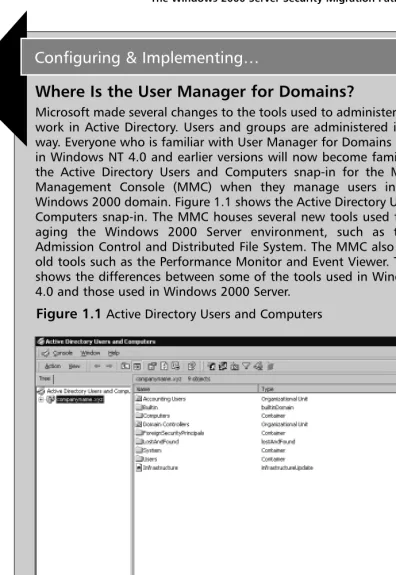
Microsoft made several changes to the tools used to administer the net-work in Active Directory. Users and groups are administered in a new way. Everyone who is familiar with User Manager for Domains available in Windows NT 4.0 and earlier versions will now become familiar with the Active Directory Users and Computers snap-in for the Microsoft Management Console (MMC) when they manage users in a pure Windows 2000 domain. Figure 1.1 shows the Active Directory Users and Computers snap-in. The MMC houses several new tools used for man-aging the Windows 2000 Server environment, such as the QoS Admission Control and Distributed File System. The MMC also includes old tools such as the Performance Monitor and Event Viewer. Table 1.1 shows the differences between some of the tools used in Windows NT 4.0 and those used in Windows 2000 Server.
[image:32.612.77.473.42.617.2]Configuring & Implementing…
Figure 1.1Active Directory Users and Computers
N
OTETable 1.1 shows that Active Directory Users and Computers replaces most of the administrative tools from Windows NT 4.0. Microsoft also provides preconfigured MMCs for administering security policy. The preconfigured MMCs are Domain Security Policy, Domain Controllers Security Policy, and Local Security Policy. Domain Security Policy sets security policy at the domain level. Domain Controller Security Policy sets the security policy for all your domain controllers. Local Security Policy sets security policy on each individual machine. You can also use Active Directory Users and Computers to configure the Domain Security policy and the Domain Controllers Security policy.
Table 1.1Windows NT 4.0 and Windows 2000 Server Tools
Windows NT 4.0 Windows 2000 Server
User Manager for Active Directory Users and Computers is used for Domains modification of user accounts and configuration
of security policy. You can also use the Domain Security Policy MMC to manage security policy. User Manager Computer Management Console, Local Users and
Computers is used to manage local accounts. The Local Security Policy MMC is used to manage local security policy.
System Policy Editor The Administrative Templates extension to group policy is used for registry-based policy configuration.
Add User Accounts Active Directory Users and Computers is used to (Administrative Wizard) add users.
Group Management Active Directory Users and Computers is used to (Administrative Wizard) add groups. Group policy enforces policies. Server Manager Replaced by Active Directory Users and
Authentication Limitations
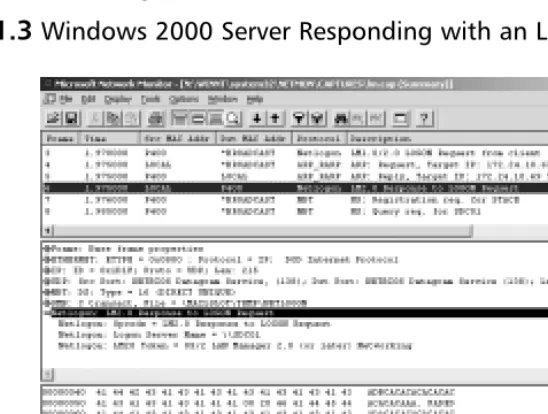
Windows Server 2000 maintains compatibility with down-level clients (Windows NT 4.0,Windows 95, and Windows 98), so it uses the NTLM and LM authenti-cation protocol for logins.This means that the stronger Kerberos v5 authentica-tion is not used for those systems. NTLM and LM are still used, so the passwords for those users can be compromised. NTLMv2, released in Service Pack 4 for Windows NT 4, is supported in Windows 2000 if you properly configure the clients and servers (see Chapter 10, “Supporting Non-Windows 2000 Clients and Servers,” for details). Figure 1.2 shows a packet capture of a Windows 98 client logging on to a Windows 2000 Server domain.The Windows 98 machine is sending out a broadcast LM1.0/2.0 LOGON request.
Figure 1.3 shows a Windows 2000 Server responding to the Windows 98 client’s request.The Windows 2000 Server responds with an LM2.0 response to the logon request.
NTLM is used to authenticate Windows NT 4.0, but LM is used to authenti-cate Windows 95 and Windows 98 systems. NTLM is used to authentiauthenti-cate logons in these cases:
■ A Windows NT 4.0 Workstation system authenticating to a Windows 2000 domain controller
■ A Windows NT 4.0 Workstation system authenticating to a Windows NT 4.0 PDC or BDC
■ A Windows 2000 computer authenticating to a Windows 2000 stand-alone server
■ A Windows 2000 computer authenticating to a Windows NT computer ■ A properly configured Windows 9X computer with the dsclient installed
authenticating to a Windows 2000 domain controller
■ Kerberos authentication is not available for a Windows 2000 machine authenticating to a Windows 2000 domain controller
The difficulty with using NTLM or LM as authentication protocols cannot be overcome easily.The only way to get around using NTLM or LM at the moment is to replace the systems using earlier versions of Windows with Windows 2000 systems.This solution is probably not economically feasible for most organizations.You can add support for NTLM v2, but down-level clients currently don’t support the Kerberos authentication method.
[image:35.612.121.395.236.443.2]Windows NT 3.51 presents another problem. Even though it is possible to upgrade Windows NT 3.51 to Windows 2000 Server, Microsoft does not recom-mend running Windows NT Server 3.51 in a Windows 2000 Server domain, because Windows NT 3.51 has problems with authentication of groups and users in domains other than the logon domain.
What Is the Same in Windows 2000 Server?
Windows 2000 Server has grown by several million lines of code over the earlier versions of Windows NT, so it may be hard to believe that anything is the same as in the earlier versions. NTLM is the same as it was in earlier versions because it has to support down-level clients.Global groups and local groups are still present in Windows 2000 Server, with another group (universal) added. Otherwise, for security purposes, this is a new operating system with many new security features and functions for system administrators to learn.
Upgrading and Migrating Considerations
Upgrading or migrating from Windows NT 4.0 to Windows 2000 Server is a totally different issue than upgrading from Windows NT 3.51 to Windows NT 4.0.Windows 2000 Server includes several new security features that were not present in any earlier version of Windows NT, so it is important to carefully con-sider, before implementation, exactly how you will take advantage of the new security features in the operating system.
Network Security Plan
One security item to consider before upgrading or migrating to Windows 2000 Server is the development of your network security plan.Without such a plan, you might not have as secure a network as possible, given the new tools available in Windows 2000 Server. Depending on your network’s size, you might need more than a single network security plan. Organizations that span the globe could need a different plan to fit the various needs of each of their major loca-tions. Smaller organizations might find that they need only a single plan. No matter the size of your organization, a network security plan is extremely impor-tant. Microsoft recommends that, as a minimum, you include the following steps in your plan:
1. Security group strategies 2. Security group policies
Security group strategies are used to plan the use of the three group types: universal, global, and local. Universal is a new group that was not present in Windows NT 4.0, so make sure that you include it in your plan (see Chapter 4). You need to decide how you will use the existing built-in groups and what new groups you will need to create when you formulate your network security plan.
After you have defined the group strategies necessary for your organization, move on to the security group policies, including Active Directory Objects, File System, Registry, System Services, Network Account, Local Computer, Event Log, and Restricted Groups. Group policy filters within your organization can control each of these items. It is best to minimize the number of group policies because they must be downloaded to each computer during startup and to each user profile during logon. (See Chapter 5, “ Security Configuration Tool Set.”)
The third step to plan for is the network logon and authentication strategies necessary for your organization.Will your organization utilize Kerberos logon, NTLM logon, smart card logon, or even certificate mapping? Depending on your organization’s makeup,Windows 2000 Server can operate in either mixed mode or native mode.
The fourth step is to develop strategies for information security.This includes your organization’s Public Key Infrastructure, use of the Encrypting File System, authentication for remote access users, IPSec utilization, secure e-mail, security for your Web site (see Chapter 11, “Securing Internet Information Services”), and, if applicable, the signing of software code.
The following is a checklist that can help you create the network security plan for your organization:
■ What universal groups are necessary in your organization? ■ What global groups are necessary in your organization? ■ How will we utilize the built-in local groups?
■ What local groups are necessary in your organization?
■ What filters are necessary for group policies in your organization? ■ What policies are required for Active Directory objects in your
organization?
■ What policies are required for network accounts in your organization? ■ What policies are required for local computers in your organization? ■ What policies are required for Event Logs in your organization? ■ What policies are required for restricted groups in your organization? ■ How will you perform network logon and authentication in your
organization?
■ What approach do you take with smart cards in your organization? ■ What approach do you take with certificate mapping in your
organization?
■ How do you implement Public Key Infrastructure within your organization?
■ How do you implement the Encrypting File System in your organization?
■ How will you provide authentication for remote access users? ■ What approach do you take with IPSec in your organization?
■ What approach do you take with secure e-mail in your organization? ■ How do you protect the organization’s Web site?
■ How do implement code signing in your organization?
How to Begin the Process
After determining the plan for network security, you need to test it in a con-trolled lab environment to ensure that it meets your organization’s needs before you implement the changes in a production environment. Failure to do this could result in catastrophe, both to the organization and to your job security.
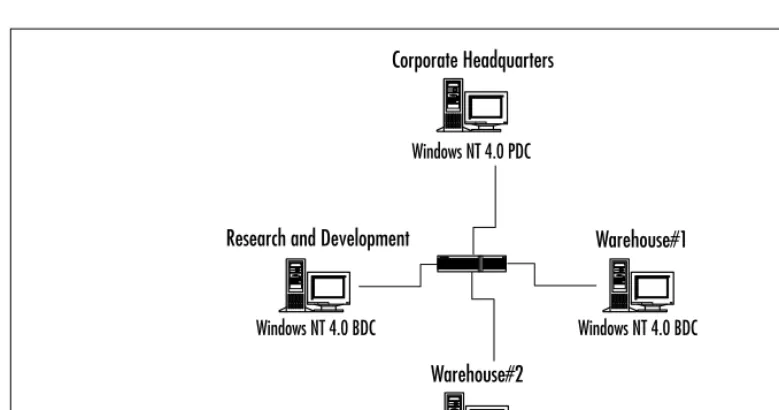
The best way to test your network security plan is to set up a lab that realisti-cally mimics your existing network structure. For example, if your network con-sists of a Windows NT 4.0 PDC and three Windows NT 4.0 BDCs, as shown in Figure 1.4, you should strive to have that setup in your test environment.
Getting Started
This procedure is applicable to both the test environment and the actual organiza-tion. Before you perform the upgrade, you must ensure that you have a good backup of each of your existing domain controllers, in case something goes awry during the upgrade process.The first system that must be upgraded in your existing environment is the primary domain controller, or PDC.This is necessary so that the upgrade of the existing domain into a Windows 2000 domain can be successful. During the upgrade of the existing PDC, you must install Active Directory so that the data store, including the Kerberos authentication protocol, is installed.The existing Security Accounts Manager (SAM) is copied from the Registry to the new data store (the ntds.dit file) of Active Directory.The installa-tion process starts the Kerberos service, allowing it to process logon authentica-tions.The domain is operating in the mixed mode of security, which means that it will honor both Windows NT 4.0 BDCs and Windows 2000 domain controllers. BDCs recognize the new Windows 2000 Server as the domain master.The Windows 2000 server can synchronize security changes to the BDCs successfully.
[image:39.612.65.455.83.288.2]After the PDC has been successfully upgraded, your staff can continue upgrading the rest of your BDCs until they all are Windows 2000 Servers, or they can leave the BDCs as Windows NT 4.0 systems if you want to continue operating using both operating systems.When you begin your rollout, you should
Figure 1.4Sample Network Layout
Windows NT 4.0 PDC
Windows NT 4.0 BDC Windows NT 4.0 BDC
Windows NT 4.0 BDC Corporate Headquarters
Research and Development
Warehouse#2
continue migration for all your BDCs to Windows 2000 Server, so that you can take full advantage of all the security features present in the operating system by switching your domain to native mode.
Exercise 1.1 Switching to Native Mode
To switch your domain to native mode, follow these steps: 1. Click Start.
2. Go to Programs | Administrative Tools.
3. Open Active Directory Domains and Trusts (see Figure 1.5).
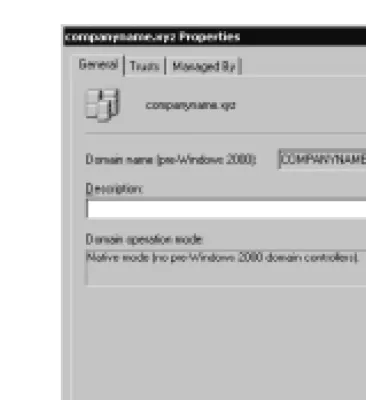
4. Right-click your domain (companyname.xyz in our case) and choose
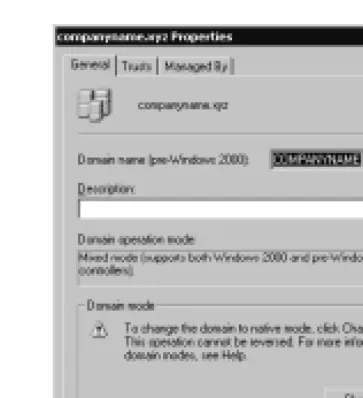
Propertiesfrom the pop-up menu.You will see the window shown in Figure 1.6.
5. Click the Change Mode button.You will receive the warning shown in Figure 1.7.This window warns us that switching from mixed mode to native mode is a one-way process; we cannot undo the change.
6. Click Yes to switch your domain to native mode. After you click Yes, the Domain Properties window (as shown in Figure 1.8) will change to note the new domain mode.The change button will disappear.
7. Click OK to finalize the change to native mode.
[image:41.612.191.373.86.285.2]After you upgrade the domain controllers to Windows 2000 Server, you can start implementing the items in your network security plan, such as group poli-cies and the implementation of PKI. Group policy requires Windows 2000 clients. Down-level clients must process system policy (for NT clients, this is the ntconfig.pol file created with policy editor) because they do not understand group policy.
Figure 1.6The Domain Properties Window in Mixed Mode
Issues to Present to Your Manager
[image:42.612.208.391.86.286.2]It is important that your manager be involved in the network security plan because the plan determines how the network will be organized in the Windows 2000 environment.Without your manager’s the support, you might have a diffi-cult time implementing the necessary security measures for your organization.
Figure 1.8The Domain Properties Window in Native Mode
What Happened to My Backup Domain Controllers?
In a pure Windows 2000 domain, there are no longer BDCs or a PDC; there are only member servers and domain controllers. Member servers do not perform user authentication or store security policy information. Each domain controller runs Active Directory, which stores all domain account and policy information. All domain controllers functions in a multimaster replication model. This means that each domain controller in the domain has read/write capability to Active Directory, so updates can be performed at any domain controller and then replicated to the remaining domain controllers.
Another issue to present to your manager is the question of operating in mixed mode or native mode. If you decide to switch to native mode, your manager needs to take the following points into account:
■ The domain controller that acts as the PDC cannot synchronize data with any remaining Windows NT BDCs.
■ New Windows NT domain controllers cannot be added to the Windows 2000 domain.
Proper Analysis
Before you implement Windows 2000 Server in your environment, you must perform a proper analysis that must take into consideration the timing, cost, and the resources necessary for the installation, especially the security features required for the organization.
Timing
Timing is very important for any new application; this is especially true for a net-work operating system.You must determine what effects the operating system will have on the network’s users and how much time it will take to implement the new security features that are required for your organization.This is one reason it is good to begin with a controlled lab environment. A controlled envi-ronment will give you a good idea of how long it will take to implement your plan in your production environment. Another issue to consider is other activity in your organization. If it is a particularly busy time of year for your company, you might want to hold off the implementation until things calm down.
Cost
Resources
Summary
Windows 2000 Server adds a great number of security enhancements to those that were available in previous versions of the operating system.These enhance-ments include Public Key Infrastructure capabilities, the Kerberos v5 authentica-tion protocol, smart card support, the Encrypting File System, and IPSec.These new additions to security are necessary to protect data as organizations start depending on their information technology infrastructure even more than in the past. Any vulnerability could wreak havoc on those mission-critical systems.
A network security plan is vital to upgrading your network from Windows NT 4.0 to Windows 2000 Server.Your plan must be carefully thought out so that your organization can take advantage of the new security features in Windows 2000 Server. If the plan is not thought out carefully, the necessary security you desire might not be put into place. At a minimum, your network security plan must include security group strategies, security group policies, network logon and authentication strategies, and strategies for information security.
Before you upgrade to Windows 2000 Server in a production environment, you need to test it.The test environment should mimic the production environ-ment so that you can obtain an accurate picture of how the impleenviron-mentation will affect the production environment.When you are satisfied with the results of your testing, you should carefully consider the timing of the upgrade to the pro-duction environment to ensure that no interruption occurs during a particularly busy time for your organization.
Solutions Fast Track
Windows 2000 Server Security
; You need to protect your network resources from damage and unauthorized access.
; Windows 2000 supports a number of new security features, such as IPSec, smart cards, two-way transitive trust relationships, and more granular permissions.
; Active Directory Users and Computers replaces most of the account management and security management tools from Window NT 4.0.
; NTLM authentication is still supported for down-level clients.
; To successfully migrate from Window NT 4.0 to Windows 2000, you must have a network plan that includes a starting point and a complete analysis of the finished migration.
; As part of your network plan, you must determine when you can dis-continue support for the Windows NT 4.0 domain controller.This allows you to change your domain to native mode and take advantage of some of the new exclusive Windows 2000 features, such as the nesting of groups. Nesting is the process of putting one group inside another.
Q:Why do I have to upgrade my primary domain controller first?
A:The PDC must be upgraded first to ensure a successful upgrade of a Windows NT domain to a Windows 2000 domain. Information from the Security Accounts Manager on the PDC is copied to the data store of the Active Directory. In addition, the first Windows 2000 domain controller installed into a domain is given a special role called PDC emulator. If you were to install the first Windows 2000 domain controller on a computer other than the PDC (a BDC), you would have two PDCs—the NT 4.0 PDC and the Windows 2000 PDC emulator—at the same time.The PDC emulator pretends to be the PDC for all down-level clients.
Q:How can I enable my Windows 98 clients to use Kerberos v5 authentication? A:Down-level clients (Windows 9x and NT 4.0) do not support Kerberos v5
authentication.The only way to use Kerberos would be to upgrade your Windows 98 clients to Windows 2000 Professional.
Q:Can I still use Windows NT 4.0 backup domain controllers in a Windows 2000 domain?
Frequently Asked Questions
A:Yes,Windows NT 4.0 BDCs can still be used in a Windows 2000 domain. One of the Windows 2000 Server domain controllers acts as a PDC emulator, so communication can occur to and from the Windows NT 4.0 BDCs.This is a “mixed-mode” state, which must be maintained until all NT 4.0 BDCs have been upgraded to Windows 2000 Servers.
Q:I am trying to use Active Directory Users and Computers from my Windows 2000 Professional computer to manage my domain accounts. However, when I go to my Administrative Tools, I do not have Active Directory Users and Computers.
A:Active Directory Users and Computers is not installed on Professional machines or member/standalone servers by default.When you promote a server to a domain controller (by running Dcpromo), Active Directory Users and Computers is installed. If you want to run Active Directory Users and Computers from a nondomain controller, you must install the Admin Pack. The Admin Pack can be installed in two ways.You can run the adminpak.msi file from %windir%\system32 on one of your servers, or you can run it from the I386 directory on the Windows 2000 Server CD.
Q:I am trying to put a global group inside of another global group, but the Active Directory Users and Computers interface will not allow me to do it. How can I fix this?
A:You are trying to nest groups. If the interface doesn’t give you the option to nest global groups, you are more than likely running in mixed mode. Nesting is available only in native mode domains. See Exercise 1.1 for the details on how to switch your domain to native mode.
Q:I am logged in to my domain controller. I want to create a group, but when I go to Computer Management, the Local Users and Groups icon has a red X symbol over it.Why can’t I create a group on my domain controller?
Default Access
Control Settings
Solutions in this chapter:
■ Configuring Security during
Windows 2000 Setup
■ Default File System and
Registry Permissions
■ Default User Rights
■ Default Group Membership
■ Pre-Windows 2000 Security
; Summary
; Solutions Fast Track
; Frequently Asked Questions
Chapter 2
Introduction
One of the weaknesses in Windows NT 4.0 is inherent in the default access per-missions assigned to the built-in groups for the file system and the Registry. Windows 2000 alleviates that weakness by refining the permissions granted to these groups.
Windows 2000 Server is a member server or standalone server when it is first installed on a clean system. If the server participates in a domain, it is a member server, but if it is in a workgroup, it is a standalone server. Active Directory is not automatically installed during a fresh installation of a system, because the setup program does not know whether you want the device to be a member server or a domain controller. However,Windows 2000 Server does automatically create the following groups when it is first installed:
■ Administrators ■ Backup Operators ■ Guests
■ Power Users ■ Replicator ■ Users
These groups are found in the Groups folder under Local Computer Users and Groups in the Computer Management console. Figure 2.1 demonstrates Local Users and Groups.These same groups, with the exception of Power Users, are also present if the system is promoted to domain controller; however, addi-tional groups are added as built-in local groups.The addiaddi-tional groups are:
■ Account Operators ■ Print Operators ■ Server Operators
These groups, as well as the others, are found in the Builtin folder of your directory tree in the Active Directory Users and Computers console. Figure 2.2 demonstrates Active Directory Users and Groups.
The Administrators Group
The Administrators group is the most powerful group available on the system. Members of the Administrators group can perform any function available in the operating system, and they are not restricted from access to any file system or
Figure 2.1Built-In Groups for Windows 2000 Server Installed on a Clean System
Registry object.The number of members of the Administrators group should be kept to a bare minimum precisely because they do have so much power. Ideally, people who are in the Administrators group should also have another account that they use normally.They should use the account in the Administrators group only when they need to perform administrative functions such as:
■ Configure system parameters such as password policy and audit functions. ■ Install Service Packs and hotfixes.
■ Upgrade the operating system. ■ Install hardware drivers. ■ Install system services.
N
OTEWindows 2000 includes the secondary logon service (RUNAS) to allow running programs with different credentials than those of the currently logged on users. This makes it feasible for administrators to use two user accounts: one account with administrative privileges and the other without administrative privileges.
The Users Group
The Users group is the most restrictive group available in Windows 2000.The default security settings prevent members of the Users group from modifying machinewide registry settings, program files, and operating system files. Members of the Users group are also prevented from installing applications that can be run by other members of the Users group.
The Power Users Group
The Power Users group in Windows 2000 has more system access than the Users group but less system access than the Administrators group. Power Users can install applications to a Windows 2000 system as long as the application does not need to install any system services. Only the Administrators group can add system services. Power Users can also modify systemwide settings such as Power
access other users’ data that is stored on NTFS partitions. Power Users can add user accounts, but they cannot modify or delete any account they did not create, nor can they add themselves to the Administrators group. Power Users can create local groups and remove users from local groups they have created.The Power Users group has a great deal of power on a system, and in Windows 2000 the group is backward-compatible to the default security settings for the Users group in Windows NT 4.0.
Configuring Security during
Windows 2000 Setup
The default security settings for Windows 2000 are put in place during the beginning of the graphical user interface (GUI) mode portion of setup if the installation is a clean install or if it is an upgrade from a Windows 95 or Windows 98 system. However, if the upgrade is being performed on an existing Windows NT system, the existing security settings are not modified. Of course, for file system settings to be applied, you must be using NTFS, not the FAT file system. To see the security settings that are applied during Windows 2000 setup, go to %windir%\Inf and locate these files:
■ defltdc.inf Domain controller security settings. ■ defltsv.inf Server security settings.
■ defltwk.inf Professional security settings.
Each of these files contains all the default security settings that are applied to the system, depending on the type of system that is being installed. Here is a small portion (the top portion) of the security settings from the defltsv.inf file:
; (c) Microsoft Corporation 1997-2000 ;
; Security Configuration Template for Security Configuration Editor
;
; Template Name: DefltSV.INF ; Template Version: 05.00.DS.0000 ;
; Default Template For Windows NT 5.0 Server.
;
; Revision History ; 0000 - Original
[Profile Description]
%SCEDefltSVProfileDescription%
[version]
signature="$CHICAGO$" revision=1
DriverVer=11/20/1999,5.00.2186.1
[System Access]
;---;Account Policies - Password Policy ;---MinimumPasswordAge = 0
MaximumPasswordAge = 42 MinimumPasswordLength = 0 PasswordComplexity = 0 PasswordHistorySize = 0
RequireLogonToChangePassword = 0 ClearTextPassword = 0
;---;Account Policies - Lockout Policy ;---;No Account Lockout
LockoutBadCount = 0
;The following are not configured when No Account Lockout ;ResetLockoutCount = 30
;---;Local Policies - Security Options ;---;DC Only
;ForceLogoffWhenHourExpire = 0
;NewAdministatorName = ;NewGuestName =
;SecureSystemPartition
;---;Event Log - Log Settings
;---;Audit Log Retention Period: ;0 = Overwrite Events As Needed
;1 = Overwrite Events As Specified by Retention Days Entry ;2 = Never Overwrite Events (Clear Log Manually)
[System Log]
MaximumLogSize = 512
AuditLogRetentionPeriod = 1 RetentionDays = 7
RestrictGuestAccess = 0
[Security Log] MaximumLogSize = 512
AuditLogRetentionPeriod = 1 RetentionDays = 7
RestrictGuestAccess = 0
[Application Log] MaximumLogSize = 512
AuditLogRetentionPeriod = 1 RetentionDays = 7