Mobile Ad-Hoc Wireless Access in
Academia (MAWAA) Project
Towards Seamless Wireless Mobility for UK Academic Networks
Project Summary Report 3:
Deployment Experience
Editor: Dr T J Chown
School of Electronics and Computer Science, University of Southampton,
Southampton, SO17 1BJ, United Kingdom [email protected]
Version 1.0
30 June 2004
Contents
1 INTRODUCTION ...3
1.1 MAWAA PROJECT REPORTS... 3
1.2 DEPLOYMENT EXPERIENCE... 3
2 CHOICE OF DEPLOYMENT TECHNOLOGY...4
2.1 ORIGINAL SYSTEM... 4
2.2 WLAN TECHNOLOGY DISCUSSION... 4
2.2.1 Simplicity...4
2.2.2 Cost...5
2.2.3 Roaming support ...6
2.2.4 IPv6 support...6
2.2.5 Other considerations...6
2.3 FLEXIBILITY IN DEPLOYMENT... 7
2.4 SUMMARY... 7
3 DEPLOYING 802.1X...8
3.1 TWO CLASSES OF USERS... 8
3.1.1 Sponsored Guest Access...10
3.1.2 Using multiple SSIDs ...10
3.1.3 Using multiple VLANs...10
3.1.4 Password considerations...10
3.2 802.1X SUPPORT... 11
3.2.1 Operating system support...11
3.2.2 Access Point support...12
3.2.3 RADIUS server support...13
3.3 INFRASTRUCTURE INSTALLATION... 13
3.4 CLIENT INSTALLATION... 13
3.4.1 Windows 2000 SP4, XP SP1...14
3.4.2 Linux ...16
3.4.3 Mac OS/X ...16
3.5 USAGE MONITORING... 17
4 RADIUS HIERARCHY DEPLOYMENT ...18
4.1 LOCAL RADIUS AND CREDENTIALS... 19
4.2 HIERARCHY... 19
5 IPV6 IMPLICATIONS...20
6 UNIVERSITY OUTREACH: COMMUNITY WIRELESS...21
6.1 OVERVIEW... 22
6.2 TECHNICAL SETUP... 22
6.3 DEPLOYMENT EXPERIENCES... 22
6.4 LINK WITH ELECTRONICS AND COMPUTER SCIENCE... 23
6.5 AUTHENTICATION SERVICE... 23
7 CONCLUSIONS AND FURTHER WORK...24
7.1 FUTURE AUTHENTICATION WORK... 25
7.2 OTHER RELATED FUTURE WORK... 25
8 REFERENCES...27
9 APPENDIX A: RADIUS CONFIGURATION FOR 802.1X...33
10 APPENDIX B: RADIUS CONFIGURATION FOR MAC AUTH ...37
11 APPENDIX C: OFFSITE PROXY RADIUS SERVERS ...39
12 APPENDIX D: LIST OF SITE ACCESS POINTS ...40
13 APPENDIX E: CISCO 1200 SERIES AP CONFIGURATION...41
14 APPENDIX F: RADIUS ACCOUNTING FOR MAC-BASED USER ...44
15 APPENDIX G: RADIUS ACCOUNTING FOR 802.1X-BASED USER...45
Figures
Figure 1: Server certificate screen on Windows XP configuration...15Figure 2: Selecting EAP type in the Mac OS/X 802.1x configuration ...17
Figure 3: MRTG plots of simultaneous WLAN user statistics...18
1 Introduction
The subject matter of wireless networking is one of huge interest for academic (and other) institutions at the time of writing. The 2003 UKERNA Networkshop session on wireless LAN (WLAN) was the most popular session of the event, and that interst was repeated in 2004. A subsequent technical workshop [WAGCONF] filled with over 150 registered attendees in quick time. A recent UCISA “Top Concerns” exercise shows mobile (wireless) access and authentication issues in the top three positions [UCISA-TOP].
In this light, the support from JISC for this investigation into Mobile Ad-Hoc Wireless Access in Academia (MAWAA) has been very timely.
1.1 MAWAA project reports
In this series of three reports we describe the results of a year spent investigating current perceived issues with the deployment of wireless LAN networks in campus environments, with the technology available for such deployments, and with
mechanisms that would allow users to roam as seamlessly as possible between such deployments.
The first report “Survey of Wireless LAN Usage and Issues” focuses on the results of formal and informal surveys and interviews with UK academic sites, presenting a summary of the issues that have been raised over the year since the first formal survey was conducted in Q1 2003. It also presents a summary of technical
components for wireless LAN deployments and describes specific wireless access authentication methods.
The second report “Support for Roaming Access” explores how the main access control methods are suited to enable user roaming between wireless deployments. This work while undertaken within the scope of MAWAA has also been taken by Southampton into both the UKERNA Wireless Advisory Group [WAG] and also the TERENA Task Force for Mobility [TF-MOBILITY].
The third and final report “Deployment Experience” describes a deployment of wireless LAN made within the School of Electronics and Computer Science at the University of Southampton, using an 802.1x-based solution over a network of some 30-35 wireless access points.
A glossary of wireless LAN related terms can be found in Deliverable B of the TF-Mobility working group [TF-MOBILITY], and there is a useful resource of WLAN information at the UKERNA Wireless Advisory Group web site [WAG].
1.2 Deployment experience
2 Choice of Deployment Technology
In this section we describe the ethos behind our decision to pilot 802.1x as an access control mechanism in our local wireless network. The network spans three large buildings and required some 30-35 WLAN access points.
2.1 Original system
Like many sites, our original WLAN deployment was very simple, and it also only covered basic public areas, with a small number of access points. Any wireless user wishing to use the WLAN would need to visit an administrator, at which point an entry for their system’s MAC (Ethernet) address would be entered into a DHCP server table, such that when they subsequently connected, they would receive a valid, usable IP address.
Such a system has clear weaknesses. For one, an attacker could observe MAC addresses in use, and later pick one to use to gain network access. If there is no control via MAC filtering, IP blocking or, perhaps more usefully, ARP traffic, then an attacker could also potentially just pick and use any IP address in the block being used. Any MAC-based system only offers weak authentication.
The system also places a demand on administrator time, to add each entry on request.
Because the system is weak, the trust level between the WLAN and the internal network is limited, and only certain types of traffic was allowed to the internal, or indeed the external, network from the WLAN network.
There were two goals in mind when we chose to deploy a more secure and flexible technology. One was to pick the right technology with some future proofing, the other was to do so in a way that allowed a transition path for existing users, and perhaps users that as yet had no device or software support for the new technology, to follow. There may also be guest users visiting for a few hours for who an easy, simple method is appropriate over a more complex but technically superior one. This implied running two WLAN access control schemes in parallel.
2.2 WLAN technology discussion
The choices for the more secure system were fourfold:
1. Restrict access from the WLAN network to a trusted VPN server 2. Use 802.1x authentication for all WLAN devices
3. Deploy a web-redirection based authentication scheme 4. Deploy a Roamnode solution
In the following sections we discuss thoughts from discussions we held on the candidate technologies.
2.2.1 Simplicity
also the systems used by many commercial WISPs, including BT Openzone for example.
Web-redirection solutions typically allow use of RADIUS to assign local policy
decisions by the “role” group that the authenticated user is placed into, and can thus limit (for example) students authenticated via the system to only have external web access, while other types of users get richer access. In principle, 802.1x systems can use similar techniques, but they would typically use Layer 2 segregation by placing different user classes into different VLANs.
It is interesting to note that BT Openzone allows users to connect for £6 per hour using a “scratch” card for the username and password for access. The card can be bought with cash, so there is no way the user can be traced back in the event of a hacking incident from an Openzone hotspot.
2.2.2 Cost
The cost of the APs is also an issue if one wishes to use 802.1x, because the more features an AP has, the more expensive it becomes. The web-redirection and VPN systems can use very basic APs, because the authentication is not dependent on the AP.
Where a site wishes to deploy parallel access control systems, an AP capable of supporting multiple SSIDs and multiple VLANs is required, in which case such a system may support the required 802.1x capabilities as well. A parallel deployment may be desirable if a weaker scheme is offered for short-term guests and a stronger solution used for long-term local WLAN users. It may also be used to bridge the transition from an existing scheme to a new scheme.
The difference in cost between a Cisco 1200 series AP (with 802.1x, multi-SSID and multi-VLAN support) and a plain AP may be at least £200 per AP, possibly £300 or more, so it is an issue for a very large deployment. A more expensive system may also have better remote management features, which would be important in a large deployment, and simply perform better as an access point (the Cisco Aironet range is well rated by most reviews, for example). The pricing for the more advanced APs is generally falling, as the technologies become more mass market and widely
implemented.
However, one should remember that the Bluesocket solution requires a gateway device costing £5,000 or more to control a subnet, and a university may need a number of these. Also, the VPN solution will need an appropriate local VPN
provision, and if local users can connect to the VPN at 100Mbit/s, that provision may be tested significantly in terms of capacity.
The contrast is thus expense at the edge (802.1x) against expense in the inner access control systems (web-redirection gateways, VPN servers). It’s not necessarily a clear-cut issue, but when coverage is important, the use of cheaper APs is advantageous; the real saving (against feature-rich APs) depends on the scalability of the web-redirection and/or VPN capability.
There are open source implementations of web-redirection gateways, e.g.
HostAP (a free Linux-based AP) supports 802.1x; this is described in the Community Wireless section below.
2.2.3 Roaming support
Based on the assessment of the suitability for roaming support for these methods conducted in Section 7.3 of Report 2, there was little to choose between the solutions, but that as and when 802.1x support hardened in client devices and operating systems, it would probably offer the most flexible method. If the question is where a site may see itself in two years, then the 802.1x to WPA to 802.11i path looks to be one that is hardening quickly now.
The “restricted VPN” solution seemed least scalable of all the solutions, and while the use of VPNs is attractive, we do not consider it a scheme that can hope to be
deployed nationally (at hundreds of HE sites) or internationally (at thousands of sites), due principally to the management of the VPN server access control list.
2.2.4 IPv6 support
At our own site, we offer IPv6 connectivity across our whole network. Thus any access control mechanism that does not support IPv6 is going to cause some concern. In practice, most (if not all) IPv6-capable systems are dual-stack, and thus if the system can be authorised for IPv4, and then have IPv6 traffic allowed, the concern may be reduced. There are two issues; one is whether the system can authenticate a user or device over IPv6 transport, the other is whether it then permits IPv6 data to flow.
The web-redirection systems such as Bluesocket and Vernier both currently do not support IPv6, and indeed will not allow WLAN users to gain external IPv6
connectivity. Thus a dual-stack node could authenticate over IPv4, but no IPv6 traffic could subsequently be routed off site.
This was a significant issue for our own deployment, though not one that would weigh highly necessarily for a typical WLAN site.
2.2.5 Other considerations
Some other issues arose in discussions.
In the case of web-redirection systems, there may be an issue for sites which use web proxies, and the configuration script must be fetched from a server which is beyond the access control device. Allowing HTTP access to this server would mean allowing unauthenticated access to internal web pages, because the gateway’s access control lists (ACLs) are typically IP-based. This implies the script needs to be held somewhere inside each protected network, or on the gateway itself. It is a point to note for any site using a proxy.
In addition to authenticating to the network (via the RADIUS server, which in turn authenticated the AP via a shared secret or IPsec), a user may wish to establish that the network they are attaching to is the one they really think it is. In this case, some form of mutual authentication is very desirable. For 802.1x, all the common types bar EAP-MD5 support it. Both EAP-TTLS (e.g. with MS-CHAP-v2 as an
certificates at all, being based on MS-CHAP-v2, but requires strong passwords. EAP-TLS has client-side certificates, which are secure, but the usual PKI issues will likely limit its widespread adoption. Where mutual authentication is used, concerns over rogue APs can be alleviated.
2.3 Flexibility in deployment
By flexibility we mean both the ability for multiple authentication schemes to coexist, and the ability for a new authentication scheme to be introduced in parallel with an existing scheme.
For example, deploying 802.1x may be desirable, but not all client devices have support. Thus while gaining experience of 802.1x, e.g. offering users a pilot scheme for 6 months on the site, an alternative system needs to be maintained.
As stated above, flexibility means expense, because you will then need support for multiple VLANs and SSIDs, and probably good management support.
2.4 Summary
We chose to deploy 802.1x as our primary, strong authentication scheme because: 1. We see it firmly in the future technology path (WPA, 802.11i);
2. Being a Layer 2 authentication mechanisms, it is IP version agnostic (we use IPv6 across our entire network);
3. Layer 2 authentication removes many (or some, depending how paranoid you are) of the concerns over Layer 3 spoofing attacks;
4. The roaming support potential is very good;
5. We felt that the support for Windows XP (SP1) and 2000 (SP4), along with MacOS/X (built-in from 10.3) and Linux (through the Linux WPA project) was good enough to warrant a pilot deployment;
6. Other trials (e.g. by SURFnet) had shown positive experiences;
7. We needed APs with multi-SSID and multi-VLAN capability so that we could offer our existing (weak) scheme alongside our new (stronger) scheme, with good management capability. The Cisco 1200 series met this requirement and also supported 802.1x;
8. Our deployment of 30-35 APs meant the cost differential of APs with rich functionality was not great. This may be different on sites with several hundred APs;
9. We already had a Radiator RADIUS deployment, with licences to support the additional requirements for 802.1x. Radiator supports all the required EAP types and is both attractively priced and well supported.
We had some concerns over VPN scaling on site as well. Having a large number of concurrent wireless users running at potentially 100Mbit/s each would place a strain on a VPN server provision, if all users were forced to use it to get access from the WLAN. 802.1x has the advantage of spreading the burden across the APs, rather than on central servers.
Thus we felt it was most appropriate to focus our pilot deployment on 802.1x within the scope of MAWAA.
3 Deploying 802.1x
802.1x has emerged over the past two years as a technology, in no small part helped by support appearing in major operating systems, i.e. Windows 2000 SP4 and XP SP1, as well as Mac OS/X 10.3. Linux support has been available through the Open 1X project, though the functionality of that code has not been great; the newer Linux WPA project promises a more rosy future. There are commercial clients for Linux, and for many PDAs, but these have a cost. We don’t see 802.1x becoming
mainstream until good free clients are available for all platforms.
Information about 802.1x has been made more widely available, helped by workshops such as [8021XWS].
The philosophy at our site has been that we offer 802.1x access as an option. If our users use it, they get access to more services due to the greater strength of the authentication scheme.
3.1 Two classes of users
We observed that we have two classes of wireless users and that those two classes of users have competing needs. First, we have the heavy and regular wireless users, who need full access to our network and who would be inconvenienced by a cumbersome authentication procedure which required them to repeatedly
authenticate. Second, we have light and occasional wireless users, who don't need full access to our network and who perhaps aren't in a position to install special software.
The heavy users would typically be staff and postgraduate students. The light users would include most staff and postgraduate students and also undergraduate students and visitors.
Given this distinction, we decided to aim to offer a two distinct wireless services, one service based on (strong) EAP-TTLS and the other based on (weak) MAC address authentication.
2000 and XP users authenticate (prior to availability of the more robust SecureW2 client from Alfa and Ariss [ALFA]).
The MAC address service would requires users to register using a web page and would provide access to a limited set of outbound services, e.g. web, ftp, ssh and (perhaps) local VPN services only.
Staff and students would be able to register themselves for these services on the web, in the same way they currently do for their dial-up and VPN services. They would provide a username and password and their MAC address.
Visitors to the School would need to have their MAC address registered by a sponsoring member of staff. Again this would be done on the web. This kind of registration would lapse automatically after a short period of time. By having members of staff register visitors, we create a chain of responsibility which would allow us to track misuse. The MAC address can be linked to a member of staff and a specific guest (although of course the address can be spoofed).
The Web form for guests simply asks for the MAC address, the guest name and affiliation, and the expiry date; the sponsor is also required to be logged in such that the sponsor identity is reasonably strongly asserted. Local users can also manage their own MAC addresses, in cases where they have multiple devices.
The configuration was such that we could enforce self or sponsored registration in addition to the 802.1x authentication, as a means to know which member of staff approved the visitor access to the network. This is a site policy issue, depending on the level of trust the site wishes to place in exactly who is roaming on to the network. The two-tier scheme requires access points to support multiple SSIDs (given that we don't want to have to deploy twice as many APs as necessary).
The software requirements for such an approach would be a RADIUS server (with EAP-TTLS support) and a database to manage the expiry of registrations.
We considered a dedicated guest VPN server, with temporary accounts, but felt that this was an unnecessary complication.
It was felt that the user registration scheme should be web driven, by the user, and not administrator driven. With many guests coming and going at any one time, the drip load on administrative staff over a period of time would add up. Having a member of staff perform the registration both gives us the identity of the visitor and someone who can be fingered as responsible for that user while they were on site. As cited in a later section, we had over 610 different devices/users on our WLAN in the most recent 11 month monitoring period. At 10 minutes setup per person, that would be 100 hours, or 3 weeks, of support time in a year. With new laptops, PDAs and visitors always appearing, the burden would be ongoing.
3.1.1 Sponsored Guest Access
When we first deployed WLAN in the School, we used static MAC-based access control, relying on DHCP allocations to control access. In essence, very little control at all. Any scheme based on MAC authentication is weak, but it can offer a useful “quick and dirty” access mechanism until a stronger scheme is deployed.
An alternative could be to only allow access to the local VPN server, but such a scheme would discount visitors from other academic sites from having external network access, as well as guests attending project meetings or similar events or meetings. This is a challenge that any national roaming scheme faces as well, of course.
It would not be unreasonable for the alternative scheme to be a pure VPN one, if the site accepted the limitations that imposed on which guests could use the network, or was prepared to configure ACLs to allow guests to have access back to their home VPN servers. Such configurations do not scale well beyond a small number of participating sites, as discussed in Report 2.
3.1.2 Using multiple SSIDs
In running two SSIDs on site we wanted to offer the more open, weaker SSID as the broadcast network, but to hide the stronger 802.1x SSID. We ran into a Windows XP “feature”, whereby a broadcast SSID always takes priority over a non-broadcast SSID regardless of the order in the list of preferred networks.
We discovered that Windows XP can handle silent SSIDs, but it has to be configured in a certain way, which we found meant that:
1. Windows must be told to connect only to infrastructure networks; 2. All overlapping non-silent SSIDs must be removed from the list of
preferred networks.
Windows appears to go into a degenerate mode if it can't hear the broadcast SSID of a preferred network. The degenerate mode searches the list of preferred networks for silent SSIDs.
3.1.3 Using multiple VLANs
The Cisco 1200's that we selected can assign a VLAN per node based on the RADIUS response. Thus hosts authenticating against a remote RADIUS server can be placed into a different VLAN to those authenticating locally. The only barrier to such usage may be limitations on the number of available VLAN IDs in local wired switching hardware (to which the APs are connected).
3.1.4 Password considerations
all the passwords in one place in a recoverable form is not ideal, thus we chose to have separate Wireless passwords for our users.
This is not ideal, but we will review the situation as (free and robust) 802.1x client support for EAP-TTLS grows. We plan to migrate to an EAP-TTLS only environment during the summer of 2004, in parallel with the planned UKERNA Location
Independent Networking (LIN) tests.
3.2 802.1x Support
In this section we review 802.1x and related support in clients, access points and RADIUS products.
3.2.1 Operating system support
The summary of client support is given in Table 1 below.
Apple OS/X 10.3.x M/soft Win2K WinXP Alfa & Ariss Funk Odssey 3.0 Mhouse AEGIS 2.2 Open 1x Project Linux WPA Project Wire1x Project Platform Win 95
Win 98 Y Y Y
Win 2000 Y Y Y Y Y
Win NT 4.0 SP6a Y
Win ME Y Y Y
Win XP Y Y Y Y Y
Win CE .NET 4.1 Y
Pocket PC 2002 Y Y
Win Mobile 2003 Y
Pocket PC 2003 Y (*) Y
Palm Tungsten C Y
Solaris 8 Y
Linux Y Y Y
Sharp Zaurus Y
Mac OS/X Y Y
BSD Features
EAP-TLS Y Y Y Y Y Y Y
EAP-TTLS Y Y Y Y Y Y Y
EAP-PEAP Y Y Y Y Y Y Y
Cisco LEAP Y Y Y
EAP-MD5 Y Y Y Y Y Y
Cost
Free? Y Y Y (*N) N N Y Y Y
Table 1: Operating system client 802.1x support
and were difficult to uninstall, but this has improved since. The SecureW2 client is free for personal use for Windows 2000 and XP, but the Pocket PC 2003 client is 20 Euros.
On the commercial side, Funk is available for Windows, but in principle it would seem more sensible if paying for a client to try the MeetingHouse one (AEGIS), because it also supports Linux, the Palm Tungsten C, Sharp Zaurus (a nice Linux PDA), Pocket PC 2002 and 2003, Solaris 8 and Mac OS/X. The latter is not important now given the excellent 802.1x support in Mac OS/X since v10.3. Running one brand simplifies support issues.
For Linux there is the Open1x xsupplicant [OPEN1X], the Taiwanese WIRE1x project [WIRE1X] or, more recently and perhaps most promisingly, the Linux WPA
[LINUXWPA] project. The implementation of WIRE1x is based on Open1x. Our experience of Open1x was not positive; it clearly experienced growing pains. While it is improving, we believe the Linux WPA project may offer the better long term
solution, given its broader scope.
One should also consider the support in wireless cards. [UTAH] has a list of wireless cards that do 182-bit WEP and that support AEGIS 802.1x, for example.
Experiments at ARNES successfully tested Meetinghouse Aegis 2.1.0 and Funk Odyssey 802.1x clients on Windows 98SE, ME, 2000 and XP. However some WLAN cards work fine with both clients, some cards just with one of them. This situation is improving quickly though. According to Microsoft "all major NIC vendors support 802.1X and most have released Windows drivers that support it."
The Table lists known functions only. Other “minority” features, such as EAP-SIM, were not surveyed.
The pricing for Funk and Meetingouse clients is around $40-$50 US per client, but academic discounts can be obtained, along with bulk deals. For a large deployment, this may still be costly. Widespread 802.1x adoption will come only when the core operating systems have good built-in support for all common EAP types.
There is an (open source) Windows EAP project at the University of Utah that builds EAP modules that implement the Windows EAP API [WEAP].
The Open1x project dropped Mac OS/X support plans due to Apple’s work. In principle, there are free 802.1x EAP-TTLS clients available now for all the main laptop platforms (Windows 2000 SP4, XP SP1, Mac OS/X 10.3 and Linux), though FreeBSD we believe is still lacking. Clients for PDA devices are still in the
commercial domain only, which is a problem that remains to be solved. 3.2.2 Access Point support
802.1x is fully supported in many products, including the Orinoco AP2000, and the Cisco 350 and 1200 series. Support is emerging quickly, and prices falling. The more expensive APs may have multiple SSID and VLAN support as well.
3.2.3 RADIUS server support
The main issue for the RADIUS server is which EAP mechanisms they support. In recent months the major packages – including Radiator, FreeRADIUS and Steel-Belted RADIUS – have all produced support for EAP-TLS, TTLS, PEAP and MD -5 as well as LEAP. Thus there is little to choose in terms of functionality.
Radiator is especially good at pattern matching which is important for proxying, and thus for the (inter)national RADIUS referral hierarchy that is arising out of the MAWAA and similar work.
For our own purposes we chose Radiator because it supports TLS, TTLS (including PAP, CHAP, MSCHAPV1 and MSCHAPV2), PEAP and LEAP, with dynamic WEP keys for PEAP, TLS and TTLS. In addition it is attractively priced, has excellent support (from a very small team), and is written in Perl so can easily be modified if required.
As of v3.9, Radiator supports IPv6 transport.
3.3 Infrastructure installation
The infrastructure deployment consists of RADIUS server (in our case Radiator) and access point (Cisco 1200 series) configuration.
We do not detail here specifics of site surveys; we used an informal method to place our APs, which proved adequate without the expense of a formal site survey.
Our Radiator server (initially v3.7.1) was running on a Sparc Solaris system, but we plan to migrate to either Intel Linux or Intel Solaris in the near future. This system sat in our servers subnet.
The APs were all set up in a wired DMZ off our core firewall device. Thus any user attaching to our WLAN would be outside our School’s network from the firewall perspective. If they used MAC-based authentication they would be admitted by a limited set of protocols. If they used 802.1x, they would be placed in a different VLAN that offered much greater internal network access.
We ran two Radiator servers, such that one was primary for 802.1x authentication and the other primary for MAC-based authentication.
Appendix A shows our Radiator configuration file for 802.1x authentication (TTLS, PEAP and MD5), while Appendix B shows the authentication for our sponsored MAC-based access control scheme.
Appendix C is the Radiator file listing the UK proxy details. Appendix D lists (some of) our access points.
Appendix E shows the configuration of one of our Cisco 1200 Aironet APs.
3.4 Client installation
In our network, the SSID ECS-WLAN is our “less trusted” network, while ECS-EAP is the SSID that users wishing to use 802.1x should associate with.
3.4.1 Windows 2000 SP4, XP SP1
As part of the deployment, a server side certificate needs to be generated. This will take the form:
---BEGIN CERTIFICATE---
MIIDfTCCAuagAwIBAgIBADANBgkqhkiG9w0BAQQFADCBjDELMAkGA1UEBhMCR0Ix EDAOBgNVBAgTB0VuZ2xhbmQxDjAMBgNVBAcTBVNvdG9uMQwwCgYDVQQKEwNVb1Mx DDAKBgNVBAsTA0VDUzEYMBYGA1UEAxMPZWNzLnNvdG9uLmFjLnVrMSUwIwYJKoZI hvcNAQkBFhZzeXNqamhAZWNzLnNvdG9uLmFjLnVrMB4XDTAzMDYxMDEwMjAyN1oX DTA1MDYwOTEwMjAyN1owgYwxCzAJBgNVBAYTAkdCMRAwDgYDVQQIEwdFbmdsYW5k MQ4wDAYDVQQHEwVTb3RvbjEMMAoGA1UEChMDVW9TMQwwCgYDVQQLEwNFQ1MxGDAW BgNVBAMTD2Vjcy5zb3Rvbi5hYy51azElMCMGCSqGSIb3DQEJARYWc3lzampoQGVj cy5zb3Rvbi5hYy51azCBnzANBgkqhkiG9w0BAQEFAAOBjQAwgYkCgYEAyd+reQFU isdiWmpdfW4y61PTa9vxT5HE+oOEiFixT1P5+dqeSPilfbGW9ByVqhkIXcWuWdoM KIDodcmsYm5dSYJJSUSUZ5uPSuZhcX6kKBRGYES+BuNCuqexCWw dDa13FMtQeIpK HEZv43I9BK+koW7inw9ojFlUCVSew9wV1TMCAwEAAaOB7DCB6TAdBgNVHQ4EFgQU tFJL8qcyG4rVOuExlVjwLvem6t4wgbkGA1UdIwSBsTCBroAUtFJL8qcyG4rVOuEx lVjwLvem6t6hgZKkgY8wgYwxCzAJBgNVBAYTAkdCMRAwDgYDVQQIEwdFbmdsYW5k MQ4wDAYDVQQHEwVTb3RvbjEMMAoGA1UEChMDVW9TMQwwCgYDVQQLEwNFQ1MxGDAW BgNVBAMTD2Vjcy5zb3Rvbi5hYy51azElMCMGCSqGSIb3DQEJARYWc3lzampoQGVj cy5zb3Rvbi5hYy51a4IBADAMBgNVHRMEBTADAQH/MA0GCSqGSIb3DQEBBAUAA4GB AAwTB/h/eH0iepd/OgXYkSuCFXGh1CDnzC+WLS5Ga11bNlxAq79WKfjOjmNigiJ1 oPJYSDvGSowGVjInWsZNgfg0ErQVTtAhXqWiFHjMYGGUYws8lwHmlu/BWKLBjtV2 RzwWRD5/FpepQldrUg7Wq2daub7lYpdN3UzpcstZ+MFX
---END
CERTIFICATE---The specific instructions for Windows, for use with PEAP, are then as follows. This example is lengthier than the Linux and Mac OS/X example below, because in the first example we are detailing the whole certificate installation procedure – if you don’t do this installation, the server will present the certificate the first time you connect.
• Ensure your wireless cards MAC address (a hardware address in hexadecimal usually printed on the outside of the wireless card) is registered (in the sponsor-approved web scheme).
• Go to Client Manager, add a new profile and set SSID to ECS -EAP. • Ensure network type is access point.
• Ensure WEP is on and set to 11111 (HEX 3131313131). • Place the certificate (see above) on your desktop. • Add certification by doing following.
o (Win 2000) Open users and passwords in control panel.
o (Win 2000) On advanced tab click certificates.
o (Win 2000) In certificate manager click import and follow instructions onscreen.
o (Win XP) Add certificates snap-in to MMC console adding Current User (see Help for details).
o (Win XP) Click on certificates-Current User and then Trusted Root Certification Authorities.
o (Win XP) Click on Action then All Tasks then Import to start Wizard.
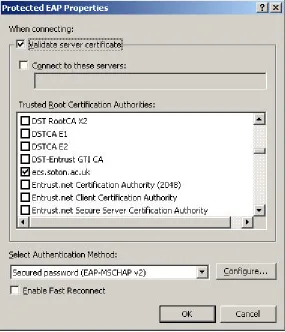
Figure 1: Server certificate screen on Windows XP configuration
• Click on network connection relating to your wireless connection and click on properties.
o (Windows 2000) Click on authentication and ensure the 802.1x box is ticked.
o (Windows 2000) Click on properties then validate server certificates, ensure ecs.soton.ac.uk in the list of certificates is ticked (see picture).
o (Windows 2000) Click on configure and uncheck box
o (Windows XP) Click on wireless connection then advanced.
o (Windows XP) Ensure "Access point (infrastructure) networks only" is clicked.
o (Windows XP) Ensure "Automatically connect to non-preferred networks" is unchecked.
o (Windows XP) Click on ECS-EAP and then properties then the Authentication tab.
o (Windows XP) Click on authentication and ensure the 802.1x box is ticked.
o (Windows XP) Click on properties then validate server certificates, ensure ecs.soton.ac.uk in the list of certificates is ticked (see picture).
o (Windows XP) Click on configure and uncheck box. • Connect to WLAN.
• Type in your user name (Email address) and password in the box when it appears.
The policy for setting and maintaining usernames and passwords for the 802.1x access is one for the deploying site to determine. In our own deployment, we began with separate passwords to the regular system ones, and 802.1x users would
authenticate using their regular username, and the password they created on the (old) MAC-based self-registration scheme.
3.4.2 Linux
For Linux, we mainly used the Open1X project’s xsupplicant, and EAP-TTLS, as follows:
1. mkdir -p /usr/src/802/xsup
2. cd /usr/src/802/xsup wget http://www.open1x.org/xsupplicant-cvs-current.tar.gz
3. tar zxvf xsupplicant-cvs-current.tar.gz
4. cd xsupplicant-cvs-current
5. ./configure make
6. make install
7. Once you have done that you need to configure the 1x.conf file (see below) inserting your password and name in relevant place and put it in /etc/1x/ .
8. Next you have to copy the certificate (see above) to /etc/1x/certs/. 9. Open a terminal as root.
10. Type /sbin/iwconfig eth1 essid ECS -EAP key 3131313131
11. Type /sbin/ifconfig eth1 up
12. Type xsupplicant -i eth1
13. You will have to precede this with the directory name where you have stored xsupplicant unless it is on your root path.
14. 'eth1' is assumed to be the name of device on which your wireless network card is. Adjust as appropriate.
The 1x.conf file appears as follows:
ECS-EAP : id = your email address including @ecs.soton.ac.uk ECS-EAP : root = /etc/1x/certs/CAroot.pem
ECS-EAP : auth = none ECS-EAP : type = wireless ECS-EAP : pref = ttls
ECS-EAP : password = your password when registering mac address ECS-EAP : phase2auth = PAP
ECS-EAP : random_file = /dev/random ECS-EAP : first_auth = "/sbin/ifup eth1"
ECS-EAP : after_auth = "/bin/echo I authenticated"
We are more recently piloting the Linux WPA client, which we believe has a broader functionality and a better long-term future.
3.4.3 Mac OS/X
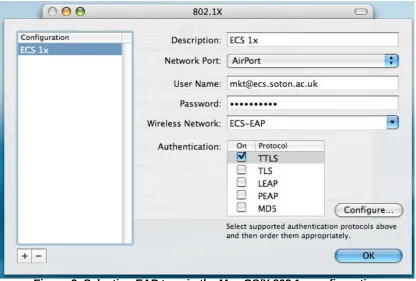
Figure 2: Selecting EAP type in the Mac OS/X 802.1x configuration
Mac OS/X 10.3 or later has this support built-in.
3.5 Usage monitoring
We have used a variety of methods to monitor our 802.1x and MAC-based authentication scheme usage.
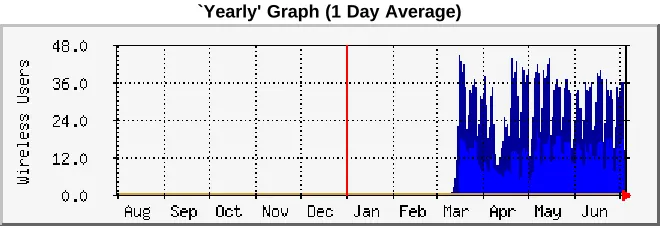
The overall usage level is gathered by polling APs for connected device data. The results are processed by a Perl script and then displayed on our internal systems resources pages using MRTG.
We have recorded the usage data since March 2004, and have seen a maximum simultaneous user count of 45, with the average being 16 users. It is interesting that a few systems are left on overnight. We believe these are “desktop” laptops, but some desktop PCs with wireless NICs.
In addition to the MRTG plots from AP queries, we also log all accesses via 802.1x or MAC-based controls. Examples of the logged data can be seen in Appendix F (802.1x) and Appendix G (MAC). The logging allows a variety of useful statistics to be gathered, including traffic volume in the session, the EAP type used, the AP that the device associated with, and the session length. It is possible to determine where a device last was used (the accuracy depending on the coverage of the AP), for example.
`Weekly' Graph (30 Minute Average)
Max users:36.0 Users Average users:15.0 Users Current users:31.0 Users
‘Monthly' Graph (2 Hour Average)
Max users:40.0 Users Average users:14.0 Users Current users:17.0 Users
`Yearly' Graph (1 Day Average)
[image:19.596.133.463.375.490.2]Max users:45.0 Users Average users:13.0 Users Current users:12.0 Users
Figure 3: MRTG plots of simultaneous WLAN user statistics
The logs show over 36,000 authenticated session IDs over the last 11 month period, which is around 150 sessions per working day, on average. The majority of those authentications used the MAC-based scheme, but use of 802.1x grew over the period.
There were over 640 different devices/users authenticating in that period.
4 RADIUS Hierarchy Deployment
One of the key attractions of deploying 802.1x as an alternative for our users was to support roaming access.
The experiments we conducted here have led to the UKERNA Location Independent Networking (LIN) pilot, and a parallel new project (LICHEN, featuring Southampton, Bristol and Manchester) studying what additional services may be RADIUS
authenticated on top of such a scheme if deployed.
The UK proxy is being deployed by Bristol for the LIN pilot, but in our early work SURFnet deployed a test proxy for the UK and European levels. This was also in support of an undergraduate project being built by a student in the Netherlands.
4.1 Local RADIUS and credentials
Locally, our credentials are held in an SQL Server database. Credentials are held in Radiator's "rcrypt" reversible encryption. rcrypt is a simple scheme which uses MD5 to build a stream cypher. The key is stored in plain-text in Radiator's configuration file.
The Radiator RADIUS server uses Tabular Data Stream (TDS) to query the remote SQL server. We use the FreeTDS library and DBD::Sybase Perl module for database access. We ran Radiator v3.7.1 for most of the reporting period. The latest version is 3.9 at the time of writing.
We offer support for EAP-TTLS (for Linux and OS/X users), PEAP (most Windows users, until we deploy the SecureW2 client widely) and EAP-MD5. The inner authentication used by TTLS and PEAP is MSCHAP-v2.
4.2 Hierarchy
There is an interesting RFC [RFC2607] on Proxy Chaining and Policy
Implementation in Roaming. This details some of the issues and technology. The roaming work done with the UKERNA WAG and TERENA TF-Mobility WG is discussed in Report 2.
In this section we describe our initial proof of concept tests for the RADIUS referral hierarchy, conducted with SURFnet.
The main configuration task is to set up the shared secret for the RADIUS server pair, so each administrator needs to know the secret and the remote server name/IP address. A local configuration for Radiator would appear like this:
<Client proxy-radius-server.surfnet.nl> Secret xxxxxxxxxxxxxxxxxx
Identifier SURFnet-Proxy-ID </Client>
<Handler Client-Identifier=/^(?!SURFnet-Proxy-ID$)/, Realm=/.*/> <AuthBy RADIUS>
Host proxy-radius -server.surfnet.nl
Host proxy-fallback-radius -server.surfnet.nl Secret xxxxxxxxxxxxx
AuthPort 1812 AcctPort 1813 Retries 1
StripFromReply Tunnel -Type,Tunnel-Medium-Type StripFromReply Tunnel -Private-Group-ID
AddToReply Tunnel-Type=VLAN,Tunnel-Medium -Type=Ether_802 AddToReply Tunnel-Private-Group-ID=117
As an experiment, we set up local users at each site, and for example verified access by [email protected] (as an “honourary” Dutch user) from the local Southampton site.
There may be some extra complexity when subrealms are used. One disadvantage of allowing subrealms is that you have to filter for authentication loops. If you're not filtering, then any user that uses a non-existing realm can create a loop, since both RADIUS servers don't know how to answer the request they forward the request with their catchall realm. You have to use Handlers in this case, instead of Realms. You can filter with something like:
#uk-tlr.showcase.surfnet.nl <Client 192.87.116.46>
Secret (the secret you gave me) Identifier UK -TLR-PROXY
</Client>
#include your own clients #put your own handlers here <Handler Realm=soton.ac.uk> </Handler>
<Handler Realm=ecs.soton.ac.uk> </Handler>
#and finally forward all other requests to the uk-tlr
<Handler Client-Identifier=/^(?!UK-TLR-PROXY$)/, Realm=/.*/> <AuthBy RADIUS>
#uk-tlr.showcase.surfnet.nl Host 192.87.116.46 Secret xxxxxxxxxxxxx AuthPort 1812
AcctPort 1813 RetryTimeout 8 Retries 0 </AuthBy>
</Handler>
This configuration was tested and shown working in late Summer 2003. A proof of concept of a three-tier referral system was validated. There were two proxy servers, one in Amsterdam and one in Nijmegen, etlr1.radius.terena.nl (192.87.36.6) and etlr2.radius.terena.nl (195.169.131.2).
Appendices A and C show the Radiator referral configurations in context.
The real UK proxy server is now being deployed in the LIN project by Bristol. We expect SURFnet to continue to provide a European level proxy on behalf of
TERENA. The experiments will be continued, with more formal testing, in the LIN project.
5 IPv6 Implications
IPv6 is an emerging new technology that will grow in importance in coming years. All the major European research networks now have an IPv6 service, many – including JANET in the UK – carrying IPv6 natively on their backbones in dual-stack IPv4/IPv6 mode.
wire on almost all our existing IPv6 subnets, using protocol-based VLANs to overlay congruent IPv6 links on IPv4 subnets. This coverage includes our WLAN network. We are in the process of deploying production support for Mobile IPv6, now that this standard has been finalised and implementations are becoming available (e.g. the Cisco IOS Home Agent and the MIPL Linux client package).
As a result, it is important that our WLAN authentication scheme is IP agnostic, or at least that IPv6 accessed can be enabled from a dual-stack terminal. Most devices will remain dual-stack for some time to come in European academic networks at least (the situation may be different in Asia for example), and thus if external IPv6 access can be opened by authentication over IPv4, at least some functionality is enabled. The web-redirection method is notably problematic. If an IPv6 enabled machine and browser tries to access a web server registered with an AAAA record in the DNS, the browser will try to connect over IPv6 first, and fail. However, it is likely that the web server is dual stack and also has an A record, so the browser should fall back to that, probably after some delay. The main problem though is that systems such as Bluesocket have no means to open IPv6 access externally, thus at present any IPv6 communications would be blocked from such a WLAN.
Work is required in this area, e.g. to study adding IPv6 capability to NoCatAuth, the open source web-redirection control system.
The VPN solution requires an IPv6 VPN service. Some IPv6 support for VPN clients is emerging, though this is still in its relative infancy. Thus at present it is unlikely that a restricted VPN solution would be used for IPv6.
Roamnode is currently an IPv4-only system.
However, 802.1x has the advantage of being a Layer 2 access control mechanism, and thus able to support access control for any IP version; the protocol authenticates the user or device at the Ethernet layer. The RADIUS referral from the AP can still be run over IPv4, be looked up, and allow the IPv6-capable device to be admitted at Layer 2 based on the returned result.
If the RADIUS authentication is required over IPv6, then v3.9 of Radiator offers IPv6 support. IPv6 support is not yet present in commercial APs, but the HostAP Linux package [HOSTAP] can enable IPv6 from the AP if an IPv6-only environment is desired.
Thus at present the only practical mechanism for IPv6 WLAN network access is 802.1x.
6 University Outreach: Community Wireless
The Southampton Open Wireless Network (SOWN) is a community wireless network situated in and around the University campus, aimed at offering outreach to staff and students around the area, and possibly to other non-commercial users.
The School supports SOWN as a beneficial access mechanism for our staff and students.
We report on it here as we are now in the process of setting up 802.1x based
referrals between the SOWN and School networks (as well as other trials, e.g. using Mobile IPv6 between the networks).
6.1 Overview
The SOWN network provides outdoor wireless access and the capability to get internet access via wireless from their homes.
The access points themselves are run without authentication or encryption allowing anybody to connect. Restricted Internet access is available through some members donating connectivity from their home ADSL lines. Since such access is anonymous it is typically subject to heavy port filtering, transparent filtering web proxies,
bandwidth limiting etc. Such restrictions are in place to protect those people sharing connectivity.
6.2 Technical Setup
The original design was for a mesh network; this is a network on which all the access points run on the same channel and forward data between each other. To do this we used PCs running Linux and the HostAP driver [HOSTAP], which supports running certain wireless cards as an Access Point.
The HostAP driver also supports simultaneous wireless bridging, that is it supports linking with neighbouring access points which have been likewise configured. Because of this advanced functionality we refer to these access points as “nodes” to avoid confusion with standard hardware.
Commercial access points such as the Orinoco AP-2000 also have this capability, however all of these links are bridged together limiting topologies and scalability. Each node in the network is allocated a unique IP range within the RFC1918 private IP address range, in particular the 10.0.0.0/8 range, typically as a /24 or /25. We run OSPF on each of the nodes to exchange routes.
Sites are encouraged to peer with the SOWN network, and advertise their global IP space to the network. Currently this means making private addresses routable, however we are hoping to get a public allocation in the near future, and have obtained RIPE membership towards this goal.
6.3 Deployment Experiences
We initially deployed a network consisting of four nodes, two were located on campus and the other two in students houses - on opposite sides of campus and thus not within range of each other. The distance between nodes ranged from 200 to 500m. Latency was typically 5ms per hop.
Consequently throughput is reduced to 1/3rd of normal capacity. Whilst some reduction in capacity was expected this level of severity came as a surprise. We may have experienced better results with a full(er) meshed network. However, deployment has since been refocused on a more planned network, neighbouring nodes have been placed on different channels and links between them use dedicated wireless hardware. This avoids interference and thus any fall in throughput.
6.4 Link with Electronics and Computer Science
We have two machines which are connected to both the University network and SOWN.
The first of these is a NAT router capable of translating PPTP VPN traffic, it publishes host routes onto the SOWN network for the existing departmental VPN servers. This ensures that users of SOWN can use their existing VPN setup.
The second is a dedicated VPN server running Poptop (a Linux PPTP VPN server [POPTOP]). This provides internet access for Undergraduate students which they are otherwise unable to get via the departmental servers.
The server authenticates against the same RADIUS servers used for the School’s 802.1x wireless service.
6.5 Authentication Service
In addition to the mesh network described previously, SOWN has also been working on an authentication service designed to allow people to share their ADSL line securely.
The system (called SOWN-1x) is based around the 802.1x protocol which can be found in an increasing number of cheap, home/office products [DLINK]. We used server-side enhancements to the Radiator RADIUS server to allow users to define “communities” of people who may use their access points.
Users need to register and log in to an SSL secured website (http://auth.sown.org.uk).
Once registered a user can add their access points; this consists of a name, RADIUS secret, the public IP addresses RADIUS requests will come from and optionally location information. Access points can be located behind a typical home broadband router/firewall since RADIUS packets traverse NAT without issue.
Once the access point has been registered the user can create or request to join a community. Communities are simply groups of people, one or more of which may be administrators. Administrators are responsible for approving the addition of new members into the community, which entails checking their identity. Currently the only online method to check identity is verification of the user’s email address. The
Users and access points can belong to more than one community, for example you could define one community for your friends and another for your family and allow both to use the same access point.
Currently communities cannot trust each other, however this is planned in the near future. We would also like to add proxy support for communities, allowing them to define their own realms and RADIUS servers for so as not to be dependant on our infrastructure.
RADIUS Accounting is supported, this logs whenever users connects to an access point, how long for and the total traffic transferred (if supported). These details are made available to the owner of the access point in question.
The system aims to promote sharing between large numbers of people. SOWN believes it offers a practical yet secure solution to sharing home access points with others, without the risks generally associated with running openly.
Another possible project that may emerge from SOWN is using SOWN nodes to do rogue AP detection. We could run Kismet daily at an off-peak time and hand the results to the University Computing Services.
We have also developed some WLAN-based positioning software that we are looking to deploy on both the SOWN and ECS networks. The accuracy indoors can be as good as 2-3m, but depends on the precise environment (offices, open labs, etc).
7 Conclusions and further work
The MAWAA project has included a broader scope than initially planned. The work has contributed to the UKERNA Wireless Advisory Group (WAG) and the TERENA TF-Mobility WG, both of which we sit on. Both group have produced reports, the TERENA group in some detail.
The work has also been widely disseminated in the UK academic community via the annual Networkshop and a dedicated UKERNA Wireless LAN event [WAGCONF]. We have also presented results at the Internet 2 Spring Meeting in 2004, with a view to collaboration on potential (and at this stage it is potential) Shibboleth integration. The results will feed both into the emerging UKERNA Location Independent
Networking (LIN) pilot, and a new JISC-funded project called LICHEN in which we plan, along with Manchester and Bristol plus collaboration from SURFnet, to see what other value-add RADIUS authenticated services can be piggy-backed on the LIN. LICHEN also addresses the Shibboleth integration question.
In our local deployment we have deployed 802.1x in parallel to a weaker, but convenient, self-registered MAC-based scheme. We plan to migrate towards the 802.1x scheme in the coming months, phasing out MAC-based access. Running two schemes in parallel offers a transition path, but does require higher-end APs to work.
TTLS support grows further, particularly in free clients for PDAs, we expect 802.1x deployment to become more mainstream.
7.1 Future authentication work
There are a number of areas and activities we plan to pursue in the WLAN authentication scope:
1. Participation in UKERNA’s LIN pilot, validating larger-scale national and international roaming;
2. Through the LICHEN project, looking at packages like mod_auth_radius that allows any Apache web server to become a RADIUS client for authentication and accounting, or using RADIUS enabled GINA modules or PAM for “public terminal” authentication. The Shibboleth aspect will be particularly
interesting;
3. The mutual authentication issue, investigating methods to reliably mutually authenticate, to counter the rogue AP problem. This may involve ensuring mutual methods such as TTLS are widely used;
4. Participation in the successor to TF-Mobility (under the auspices of TERENA), and in the new GEANT project (Joint Research Activity 5, JRA5);
5. There is plenty of work to do in investigating RADIUS policy options, and user semantics, if a common national scheme is to be proposed. This again includes Shibboleth consideration, e.g. UKeduPerson;
6. Making our own deployment TTLS only, to avoid the password issues mentioned above;
7. Looking further down the 802.11i path, now that the standard is ratified; 8. Using 802.1x between the SOWN and School networks;
9. Monitoring of service availability, which will become more important as the future LIN deployment reaches production status;
10. Encouraging UKERNA or JANET-CERT to produce guidance on key issues, e.g. subtle yet often-avoided questions like “what is a reasonable access control mechanism to ensure you meet the JANET AUP but also your civil responsibilities?”
7.2 Other related future work
We also have other planned work in the wireless domain, including:
1. IPv6 deployment issues, including IPv6 authentication (e.g. IPv6 capability for NoCatAuth);
3. Investigating methods to test and quarantine “infected” WLAN devices, or to security scan them before network admission;
4. Management of large WLAN networks, through the IETF capwap WG; 5. QoS on WLANs;
6. The relationship between 3GPP Release 6 and WLANs;
7. Deployment of some form of “abuse” tracking; SURFnet has begun work in this area: http://www.sourceforge.net/projects/usertracking.
It is clear that the WLAN area will remain a strong area of interest for most universities for some time to come.
7.3 Acknowledgements
8 References
[6NET] The 6NET Project,
http://www.6net.org/
[802.11] IEEE 802.11 protocols
http://grouper.ieee.org/groups/802/11/
[802.1q] 802.1q VLANs
http://www.ieee802.org/1/pages/802.1Q.html
[8021X] IEEE 802.1x
http://standards.ieee.org/getieee802/
[8021XWS] TERENA 802.1x Workshop, March 2004
http://www.terena.nl/tech/task-forces/tf-mobility/1x/
[ABOBA] Unofficial 802.11 Security Page
http://www.drizzle.com/~aboba/IEEE/
[AEGIS] Meetinghouse AEGIS client and server
http://www.mtghouse.com/
[AIRMAGNET] AirMagnet
http://www.airmagnet.com/
[AIRSNORT] AirSnort
http://airsnort.shmoo.com/
[ALFA] Alfa & Ariss freeware 802.1x client for Windows
http://www.alfa-ariss.com/
[APSNIFF] ApSniff
http://www.bretmounet.com/ApSniff/
[BLUESOCKET] Bluesocket Wireless Gateway
http://www.bluesocket.com/
[CAPWAP] IETF CAPWAP WG
http://www.ietf.org/html.charters/capwap-charter.html
[CISCO] Cisco WLAN Security in Depth
http://www.cisco.com/warp/public/cc/so/cuso/epso/sqfr/safwl_wp.pdf
[CONSUME] Consume.net
[DELLWP] Dell White Paper on Wireless Security
http://www.dell.com/downloads/global/vectors/wireless_security.pdf
[DHC] IETF dhc Working Group,
http://www.ietf.org/html.charters/dhc-charter.html
[DLINK] DWL-900AP+ budget 802.1x enabled access point
[EDIN] Bluesocket case study at Edinburgh
http://www.bluesocket.com/customers/UoE-1.pdf
[EAP-TTLS] EAP Tunnelled TLS Authentication Protocol (IETF Draft)
http://www.ietf.org/internet-drafts/draft-ietf-pppext-eap-ttls-03.txt
[FACTSHEET] JANET Wireless Security factsheet
http://www.ja.net/documents/factsheets/wireless-security.pdf
[FCCN] VPN Roaming using Client Certificates
http://www.fccn.pt/projectos/campusvirtuais/Testes/index_ongoing
[FLURER] Weaknesses in the Ket Scheduling Algorithm of RC4
http://www.drizzle.com/~aboba/IEEE/rc4_ksaproc.pdf
[FREERADIUS] FreeRADIUS
http://www.freeradius.org/
[FREESWAN] FreeS/WAN
http://www.freeswan.org/
[FUNET] Public Access Roaming in Finland
http://www.atm.tut.fi/public-access-roaming/
[GSMA] GSM Association WLAN Roaming Guidelines
http://www.gsmworld.com/documents/wlan/ir61.pdf
[HIPERLAN2] Hiperlan 2
http://www.hiperlan2.com/
[HOSTAP] Linux driver for Intersil Prism2/2.5/3
http://hostap.epitest.fi/
[HPI] High Plains Internet wireless AAA
http://www.hpi.net/whitepapers/warta/
[HUPNET] NUPNet (non-English)
http://www.helsinki.fi/~vviitane/hupnet/
[IAS2003] MS Internet Authentication Service for Windows 2003 server
http://www.microsoft.com/windowsserver2003/technologies/ias/default.mspx
[IETF] The Internet Engineering Task Force,
http://www.ietf.org/
[INTERNET2] Internet 2
http://www.internet2.edu
[IPv6FORUM] IPv6 Forum
http://www.ipv6forum.com
[JANETAUP] JANET Acceptable Use Policy
[JANETSEC] JANET Security Policy
http://www.ja.net/documents/JANET_security_policy.html
[JANET-CERT] JANET CERT
http://www.ja.net/CERT/cert.html
[JISC] The Joint Information Systems Committee
http://www.jisc.ac.uk
[JISC-BRIEF] JISC Briefing Papers
http://www.jisc.ac.uk/index.cfm?name=publications
[JISC-WLAN] Potential Role of WLANs in Education
http://www.jisc.ac.uk/index.cfm?name=pub_ibsmwireless (senior management)
http://www.jisc.ac.uk/index.cfm?name=pub_ibwireless (for others) [JNUG] JNUG Report on Wireless Security
http://www.jnug.ac.uk/reports/wlsec.html
[KISMET] Wireless detector
http://www.kismetwireless.net/
[LIN] UKERNA Location Independent Networking
http://lin.bristol.ac.uk/
[LINUXWPA] Linux WPA Supplicant
http://hostap.epitest.fi/wpa_supplicant/
[MISHRA] An initial security analysis of the IEEE 802.1x standard
http://www.cs.umd.edu/~waa/1x.pdf
[MOBBRIS] Mobile Bristol
http://www.mobilebristol.com
[MOBILEIP] IETF mobileip Working Group,
http://www.ietf.org/html.charters/mobileip-charter.html
[MSDEPLOY] Deploying secure 802.11 networks using Microsoft Windows
http://www.microsoft.com/WindowsXP/pro/techinfo/deployment/wireless/
[MUDD] Wireless Network Structure
http://www.wl0.org/~sjmudd/wireless/network-structure/english/article.pdf
[NAT] Traditional IP Network Address Translator, RFC3022.
http://www.ietf.org/rfc/rfc3022.txt
[NGTRANS] IETF ngtrans Working Group,
http://www.ietf.org/html.charters/ngtrans-charter.html
[NOCATNET] NoCatNet
http://nocat.net/
[NOMADIX] Nomadix Wireless Gateway
[OASIS] OASIS from StockholmOpen.net
http://software.stockholmopen.net/index.shtml
[ODYSSEY] Funk 802.1x Solution
http://www.funk.com/radius/wlan/wlan_suite.asp
[OPEN1X] Open Source 802.1x Implementation
http://www.open1x.org/
[OREILLY] O’Reilly RADIUS book
http://www.oreilly.com/catalog/radius/
[PANA] IETF pana WG
http://www.potaroo.net/ietf/ids-wg-pana.html
[PATERNO] Using PPPoE in WLANs, IETF Internet Draft
http://www.ietf.org/internet-drafts/draft-gpaterno-wireless-pppoe-13.txt
[POPTOP] PPTP Server for Linux
http://www.poptop.org/
[PPP-RADIUS] RADIUS plugin for pppd
http://www.chelcom.ru/~anton/projects/pppd-tacacs+radius/
[RADIATOR] Radiator RADIUS server
http://www.open.com.au/radiator/
[REGISTER1] WLAN hot spots get hotter
http://www.theregister.co.uk/content/69/29683.html
[RFC2607] Proxy Chaining and Policy Implementation in Roaming
http://www.ietf.org/rfc/rfc2607.txt
[ROAMNODE] The Nomadic Network Service
http://www.nomadic.bristol.ac.uk/
[SHIBBOLETH] Shibboleth
http://shibboleth.internet2.edu/
[SJ4] The SuperJANET4 Network
http://www.superjanet4.net/
[SOWN] Southampton Open Wireless Network
http://www.sown.org.uk/
[STUMBLER] NetStumbler
http://www.stumbler.net/
[SURFNET] SURFnet 802.1x Authentication and Authorisation
http://www.surfnet.nl/innovatie/wlan/
[SURVEY-RES] Survey Results
http://www.ja.net/development/network_access/wireless/uk_activities/
http://www.switch.ch/mobile/
[SYNTEGRA] Wired vs Wireless deployment costs, case study http://www.us.syntegra.com/acrobat/208986.pdf
[TF-AACE] TERENA TF-AACE WG
http://www.terena.nl/tech/task-forces/tf-aace/
[TF-MOBILITY] TERENA TF-Mobility WG
http://www.terena.nl/tech/task-forces/tf-mobility/
[THRU] 802.11a/b/g Throughput
http://www.oreillynet.com/pub/a/wireless/2003/08/08/wireless_throughput.html
[TINO] Tino Is Not Oasis
http://www.cc.puv.fi/~teu/tino/
[TMOB] T-Mobile to Bring 802.1x to the Masses
http://www.wi-fiplanet.com/news/article.php/3091051
[TNC-ROAM] RADIUS-based Public Access Roaming in FUNET
http://www.atm.tut.fi/public-access-roaming/theory/applied-radius-roaming.pdf
[UCISA-CASE] UCISA Wireless case studies
http://www.ucisa.ac.uk/groups/ng/docs/report_wireless_casestudies.html
[UCISA-EXP] Exploiting and Protecting the Network
http://www.ucisa.ac.uk/groups/ng/expl/expl-00.htm
[UCISA-TOP] UCISA Top Concerns 2004
http://www.ucisa.ac.uk/activities/surveys/tc/2004
[UKBBTF] UK Broadband Task Force
http://www.broadband.gov.uk/html/ukbroadband_task_force/publications.html
[UKERNA] The United Kingdom Education & Research Networking Association
http://www.ukerna.ac.uk/
[UNINETT] UNINETT WLAN Information
http://www.uninett.no/wlan/
[USERAUTH] JANET User Authentication factsheet
http://www.ja.net/documents/factsheets/041-User-Authentication.pdf
[USPATENT] US patentclaim on web redirection
http://wifinetnews.com/archives/002848.html
[USPOL] US university AP policies
http://listserv.educause.edu/cgi-bin/wa.exe?A2=ind0308&L=cio&P=R10719&I=-3&m=4211
[UTAH] AEGIS 802.1x 128-bit wireless card support
http://www.laptop.lib.utah.edu/cgi-bin/dot1x/dot1xCompatibility.pl
http://www.verniernetworks.com/
[WAG] UKERNA Wireless Advisory Group (WAG)
http://www.ja.net/development/network_access/wireless/
[WAGCONF] UKERNA Wireless Conference, February 2004
http://www.ja.net/conferences/wireless/feb-04/prog.html
[WBONE] The WBONE
http://www.wbone.org/
[WEAP] Windows EAP Project at the University of Utah
http://weap.sourceforge.net
[WEPBUGS] Security of the WEP algorithm
http://www.isaac.cs.berkeley.edu/isaac/wep-faq.html
[WEPBUGS2] WEP concepts and vulnerability
http://www.wi-fiplanet.com/tutorials/article.php/1368661
[WEPCRACK] WEPCrack
http://wepcrack.sourceforge.net/
[WHISPA] Wireless access by SMS
http://www.roke.co.uk/itu/technology.asp
[WI-FIA] Wi-fi Alliance
http://www.wi-fi.org/
[WIRE1X] 802.1x supplicant
http://wire.cs.nthu.edu.tw/wire1x
[WIRLAB] Inter-WISP Roaming: A service concept
http://www.wirlab.net/wirlab_wlan_roaming.ppt
[WISPR] Best Current Practice for WISP Roaming
http://www.wi-fi.org/opensection/wispr.asp
[WLANA] The Wireless LAN Association
9 Appendix A: RADIUS configuration for 802.1x
#
# RADIUS configuration for ECS. #
# #
# for debugging configuration, uncomment this lot: #
#Foreground #LogStdout #Trace 4 AuthPort 1645 AcctPort 1646 #
# the log directory, where the accounting details file and the logs go. #
LogDir /var/adm/radius #
# the database directory, where the dictionaries and the user s files live. #
DbDir /usr/local/radiator/etc
include /usr/local/radiator/conf/aps.cfg include /usr/local/radiator/conf/proxies.cfg
# This is where we authenticate a PEAP request, which will be an EAP # request. The username of the request will be unknown, although # the identity of the EAP request will be the real username we are # trying to authenticate.
<Handler Realm = ecs.soton.ac.uk, TunnelledByPEAP=1>
# Windows XP when configured for a workgroup might send tunnelled user names
# in the format COMPUTERNAME\username (eg BAKER\mikem). This # will strip the computer name leaving just the user name RewriteUsername s/(.*)\\(.*)/$2/
<AuthBy SQL>
DBSource DBI:Sybase:server=db.ecs.soton.ac.uk DBUsername wirelessap
DBAuth xxxxxxxx
AuthSelect SELECT password \ FROM Wireless_User \
WHERE username = REPLACE(%0, '@ecs.soton.ac.uk', '') \
AND EXISTS \
(SELECT email \ FROM STAFF \
WHERE email = username)
# This tells the PEAP client what types of EAP requests # we will honour
EAPType MSCHAP-V2,MD5 RcryptKey xxxxxxxxx NoDefault
</AuthBy> </Handler>
# This is where we authenticate a TTLS inner request,
# The username of the inner request will be anonymous, although # the identity of the EAP request will be the real username we are # trying to authenticate.
<AuthBy SQL>
DBSource DBI:Sybase:server=db.ecs.soton.ac.uk DBUsername wirelessap
DBAuth xxxxxxxx
AuthSelect SELECT password \ FROM Wireless_User \
WHERE username = REPLACE(%0, '@ecs.soton.ac.uk', '') \
AND EXISTS \
(SELEC T email \ FROM STAFF \
WHERE email = username)
RcryptKey xxxxxxxxx NoDefault
</AuthBy> </Handler> #
# authenticate real users for ecs.soton.ac.uk, allowing TTLS and PEAP. # note that PEAP needs plaintext or rcrypt passwords.
#
<Handler Realm = ecs.soton.ac.uk>
# we can't strip the realm here because we wouldn't be # able to proxy the inner-authentication.
<AuthBy SQL>
DBSource D BI:Sybase:server=db.ecs.soton.ac.uk DBUsername wirelessap
DBAuth xxxxxxxx
AuthSelect SELECT password \ FROM Wireless_User \
WHERE username = REPLACE(%0, '@ecs.soton.ac.uk', '') \
AND EXISTS \
(SELECT email \ FROM STAFF \
WHERE email = username) RcryptKey zzzzzzzzz
NoDefault
# EAPType sets the EAP type(s) that Radiator will honour. # Options are: MD5-Challenge, One-Time-Password
# Generic-Token, TLS, TTLS, PEAP, MSCHAP-V2
# Multiple types can be comma separated. With the default (most # preferred) type given fi rst
EAPType TTLS,PEAP,MD5
# EAPTLS_CAFile is the name of a file of CA certificates # in PEM format. The file can contain several CA certificates # Radiator will first look in EAPTLS_CAFile then in
# EAPTLS_CAPath, so there usually is no need to set both EAPTLS_CAFile %D/certificates/demoCA/cacert.pem
# EAPTLS_CAPath is the name of a directory containing CA # certificates in PEM format. The files each contain one
# CA certificate. The files are looked up by the CA # subject name hash value
# EAPTLS_CAPath
# EAPTLS_CertificateFile is the name of a file containing # the servers certificate. EAPTLS_CertificateType
# specifies the type of the file. Can be PEM or ASN1 # defaults to ASN1