COMPLEX ENERGY SIMULATION USING
SIMPLIFIED USER INTERACTION MECHANISMS
Jeremy Cockroft, Sabeeta Ghauri, Aizaz Samuel, Paul Tuohy
Energy Systems Research Unit
University of Strathclyde, Glasgow, Scotland
ABSTRACT
Simulation of energy systems and associated thermodynamic domains is very powerful in delivering precise information at high resolution. Modelling software requires detailed information about the energy system. The specialised user usually has questions about specific aspects of the energy system and may not be interested in the complete set of outputs available from simulation results. Similarly the specialised user may only be concerned about a subset of the inputs provided to the software. This suggests an opportunity to develop an input / output scheme tailored for the specialised user. The power of simulation can be accessed through the use of simplified interfaces. Although these restrict flexibility in terms of model input / output data the specialised user is only interested in a subset of the capability of the underlying simulation tool. Robust results rely on a consistent underlying simulation context, this restricted interface ensures that only the parameters of interest to the users are modifiable and that other simulation parameters remain fixed ensuring a consistent and repeatable output. One such example of limited user interaction for both output and input is the ADEPT interface to whole building and plant dynamic modelling and simulation suite ESPr (ESRU 2002). The interface was developed in the context of the UK domestic heating market. This paper describes the development of the ADEPT tool and associated spreadsheet templates in order to provide a readily usable platform for the study of domestic heating systems and controls for plant and control components manufacturers, regulatory authorities and research organisations.
INTRODUCTION
The objective of the project was to produce a controls evaluation methodology based on computer modelling of domestic housing and heating systems. The results from this project were intended to assist in generating evidence to allow the UK Government's Standard Assessment Procedure (SAP) (BRE 2009) for home energy rating to be further
developed so that energy saving benefits of advanced and novel techniques may be recognised within the procedure, particularly in relation to maximising the benefits of advanced controls. This required that the simulations be accessible to controls specialists and others not traditionally associated with building performance simulation. Some of the major user groups attached to the project were specialists in general building performance assessment (non simulation based), controls experts, thermostat manufacturers, boiler manufacturers, building services professionals and people responsible for maintenance of building regulations. Simulation based energy and comfort results were the primary output. A simulation based approach was adopted in order to, as closely as possible, replicate real control, plant systems and building performance and avoid the need for costly and time consuming full scale testing of all the various combinations of buildings and systems that were of interest. It was critical that the results provide a sound basis for conclusions. It is unlikely that such an audience could be convinced to undertake extensive training in order to become competent users of standard simulation software given that they held positions within their organisations such that their use of simulation software would be relatively infrequent. On the other hand this platform was seen as an opportunity to convince a wider audience about the importance and benefits of a computer simulation based approach for solving engineering problems while providing them with a customised interface presenting only the ‘needtoknow’ information for the task at hand. The approach selected for the ADEPT tool was to create an array of simulation models representing a range of typical UK housing construction characteristics, heating system types and control types. The models were set in a typical UK climate and operated with standard use patterns aligned with the SAP. Five house types, five heating system types and five control system types were adopted for the initial analysis (125 model combinations).
include noncondensing boilers, condensing boilers, regular and combiboilers, gas and oil boilers and both radiator and underfloor heat emitters. Controls range from a basic system with either a single room thermostat or thermostatic radiator valves to a two zone system with two independent thermostats. Both room temperature and outdoor temperature based electronic controllers were represented as well as traditional mechanical thermostatic controls. Appendix A gives a detailed list of all house, system and control types.
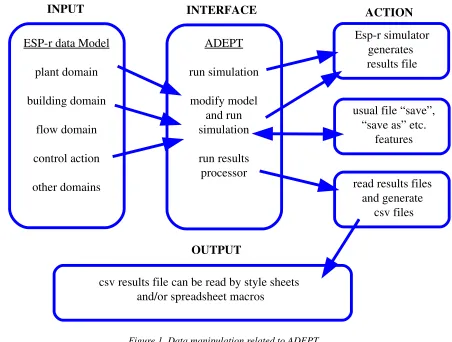
Figure 1 shows a schematic of the ADEPT interface and how it relates to input and output functions with regard to other associated software and files.
The array of ‘standard’ simulation models (125 combinations) was constructed to include detailed modelling of thermal, space heating systems, hot water systems and controls. Detailed simulations were then carried out and the results embedded for future user selection. The results allow very detailed insights into system operation, internal temperatures and energy use for the different combinations. The critical input parameters for the user group were defined and these are made easily available in summary form for each of the ‘standard’ models through the interface when that combination is
selected. These parameters available in dynamic simulation much more closely represent the details of the real systems than those available in the simplified SAP methodology.
If the user wants to further investigate the effect of varying any of the available input parameters defining the system or control components or the control algorithms then the interface allows the user to create a new model, make the required parameter changes, initiate new simulation runs and create new output files for comparison. The nonaccessible simulation parameters remain hidden, maintaining the integrity of the simulation context.
[image:2.595.74.526.418.760.2]The interface also allows the more expert simulation user access to full simulation software where the standard models and any user created models are available for use in any of the simulation domains. In this paper we describe the formulation of the ADEPT tool and explain its broader applicability. Further detail of the technical findings from using the ADEPT tool are explored in Cockroft et al (2007 and 2009). The complete set of 125 building and system model permutations was simulated and results of these are already available for analysis using the provided display tools. The set of 125 models can be referred to as standard models.
Figure 1 Data manipulation related to ADEPT
ESPr data Model
plant domain
building domain
flow domain
control action
other domains
csv results file can be read by style sheets
and/or spreadsheet macros
OUTPUT
ACTION
read results files
and generate
csv files
usual file “save”,
“save as” etc.
features
ADEPT
run simulation
modify model
and run
simulation
run results
processor
INTERFACE
INPUT
However most users want to go further than this, as discussed in the following section.
REQUIREMENTS AND FUNCTIONAL
DETAILS
Requirements of the project included that all parties should be able to view and compare results from various combinations of house, system and control types. It was also required that users could modify model parameters in order to simulate, study and compare additional model variations.
Changes to the standard models are a small subset of all the parameters that define the complete simulation model. Furthermore most parameters within the data model are not user accessible in order to maintain consistency for all the models compared within the scope of the overall project (as an example building construction detail should be the same when comparing different control schemes between two models). The simplified ADEPT interface was developed to:
1) Allow access to a limited number of parameters in the underlying data model
2) Allow general program functions to be performed (e.g. file manipulation, saving and retrieving models)
3) Allow simulations to be performed and results evaluated.
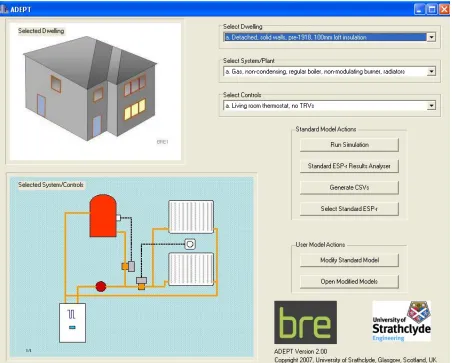
[image:3.595.78.530.380.743.2]Serving as an intermediary between the user and ESPr, ADEPT allows the user to modify a subset of parameters and simulate the model. Results generation and extraction is done by ESPr executables but again through ADEPT. Results are saved as binary files which are automatically extracted into ASCII files that can finally be viewed using XML style sheets or spreadsheet macros. From the interface (figure 2) the three drop down boxes at the top right allow the user to choose one of the standard models. This is done by choosing one of five house, system and control types in each of the boxes. According to the choice of the user a house representation and system schematic is shown towards the left side. As stated the original intentional use of ADEPT was to allow the users to view the standard models and associated results and as a next step to make modifications to the same in order to investigate the effect of these changes. These
are termed standard model actions and user model actions respectively.
Standard Model Actions
In this mode the user can select any of the existing 125 standard models within an Microsoft TM Excel based analysis tool, and immediately view 24hr plots of room or system temperatures, boiler firing rate, and energy input and output. The results are pre simulated for eight selected days of the year and are scaled up to estimate annual energy consumption. Expert users can interrogate simulation results more deeply by resorting to standard ESPr interface for results analysis and model inspection.
User Model Actions
In this mode a nonESPr expert user can copy a standard model of choice and make modifications to it. The new model can then be simulated and results from it compared with standard models or other user models in a way analogous to standard models. The user does not have complete flexibility to change all model parameters e.g. building side details about thermal properties of the fabric, climatic variables etc. Instead the user has access to predefined parameters within the systems and control domains.
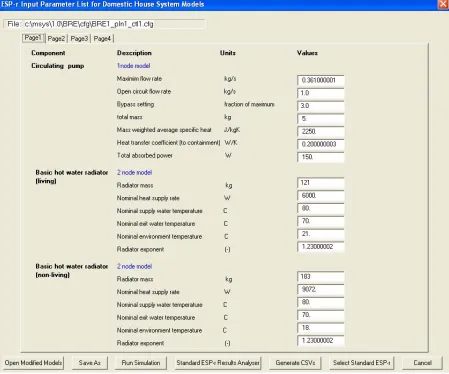
These Parameters of interest were short listed and confirmed by the various clients. These parameters are held as a miniature data model with invariant parameters being filled in from standard models. Figure 3 shows a screen shot of the user model modification window. The image is the first of four pages of model parameters that the user can edit. The HVAC systems that were studied were all wet systems and comprised of a centralised boiler supplying two radiators in two zones and also servicing DHW. The modification pages allow changes to be made to parameters directly related to these.
Expert users of the tool may want to make modifications beyond those available through the interface, therefore at any time the user has the option to fall back to the full ESPr software.
POST PROCESSING OF RESULTS
Simulation tools generate a large amount of complex and time varying data. The translation of these data to information useful for decision making is problematic (Prazeres 2007).
[image:4.595.74.523.402.776.2]Understanding how a building works is often hampered by limitations in the presentation of performance data and contemporary results display
is often constrained to what was considered good practice in the past rather than in ways that preserve the richness of the underlying data. Although most simulation tools have a results display facility either integrated within the tool or external to the simulation engine itself, it was considered beneficial for the project that results be output to a format that would give the most relevant and detailed view of the performance of the building model. This is realised through a three stage process which in future could be further automated, first by batch running simulations from ADEPT. Secondly batch running the results analyser as a separate executable and generating ASCII files from these runs that contained data of interest to the users. Finally spreadsheet macros are used to open these files and provide users with visual displays of results. The intent was to provide a wide range of users the best representation of how the building model would behave in its original configuration to when one or more changes had been made. Results display only outputs the main features of the models. More interested users can always invoke standard ESPr results facility for deeper interrogation of results as discussed in the previous section. Such an approach is in agreement with research conducted by Prazeres (2006) which suggests as one of its main outcomes that targeted displays that are tailored to user preferences are most effective in interpretation of the performance trends inherent in large data sets as produced from building simulation. Figure 4 shows output from the ADEPT Display Centre which is one of the spreadsheets used for displaying results.
COMPARISON WITH OTHER
SIMPLIFIED INTERFACES
In the past many attempts have been made to simplify data input to simulation tools. Notable examples include ECOTECT for Energy Plus and ESPr (Square One, 2004), Design Builder for Energy Plus (Design Builder, 2006), TRNSYSLite for TRNSYS (Transsolar, 2006), EDEM for ESPr (Tuohy et al 2006), HOT3000 for ESPr (NRCAN 2008) and several others mostly for Energy Plus. Many of these are commercial in nature whereas ADEPT is freely available. Some of the interfaces are principally designed to perform other tasks and facility to support dynamic simulation may be an add on type feature while others are developed to primarily form a simplified interface.
Development of underlying simulation tools are mostly conducted with the original interface (if applicable) and do not rely on simplified interfaces at all. Hence simplified interfaces almost invariably have lesser functionality and accuracy as compared to the raw software with its original interface. There
is also a time delay between release of new versions of the simulation software and release of appropriate front ends.
Most interfaces allow manipulation of certain parameters which are assumed to be of interest to the users. Furthermore these parameters are chosen on the premise that these would be the ones users are most likely to manipulate. ADEPT is quite similar to other interfaces in these respects but also differs in that flexibility to manipulate the data model is restricted to parameters associated with some aspects of the plant and control modules only. Users cannot modify building details, plant configuration and simulation times etc. Where this greatly restricts the user in simulation options this also ensures that the user does not alter parameters out with the remit of the analysis scope. In this regards ADEPT is different from most simulation tool front ends in that it is specialised to be used by a group of individuals interested in only certain types of (similar) HVAC system and controls. ADEPT is probably too restrictive for project use in the building design process. The main purpose of the tool is to allow fairly novice simulation users to compare different systems, controls and house types. Simulation can only be carried out for fixed days, use profiles, fixed set points and other details. Most other front ends would probably be more generalised than this.
CONCLUSIONS AND
RECOMMENDATIONS
The project addressed the contingency to allow experts in engineering and management, but not connected to building performance simulation, to perform detailed analyses relating to advanced controls and operation of HVAC plant in the context of the UK domestic housing stock. In order to bring the full potential of simulation to non specialist users ADEPT a simplified interface was developed. This allows users limited access to the underlying data model, simulate it and analyse and compare the results of their changes with the original models. The access to modify was limited but sufficient so that users could manipulate model details that were deemed to be important in terms of the project scope. The uptake of the tool by interested parties and their reaction to simulation based results was positive and encouraging given that most were new to building simulation.
developed for other groups seeking simplified interfaces that address their particular interests. An example is the assessment of renewable energy options such as heat pumps, solar energy collectors and other building integrated systems.
APPENDIX A
List of house types:
1. Detached house. Solid wall construction, pre 1918 with 100mm loft insulation.
2. Semidetached house. 193959, cavity wall construction with 100mm loft insulation. 3. Semidetached house representing average UK
house.
4. Semidetached house. 1990's with timber frame. 5. Midterraced house built to 2006 UK Building
Regulations. The five system types:
1. Gas, noncondensing, regular boiler with non modulating burners. Heat emission by radiators. 2. Gas, condensing, regular boiler with modulating
burners. Heat emission by radiators.
3. Gas, condensing, combi boiler with modulating burners. Heat emission by radiators.
4. Oil, condensing, regular boiler with non modulating burners. Heat emission by radiators. 5. Gas, condensing, regular boiler with non
modulating burners. Heat emission by underfloor system.
The ADEPT model follows the UK SAP zoning scheme and divides the house into a living space (comprising lounge etc.) and a nonliving space (comprising bedrooms etc.). The following five types of control were modelled:
1. Control of all heating based on thermostat in living space only. Without thermostatic radiator valves (TRV) in nonliving space.
2. Control of heating based on thermostat in living space. TRV control for nonliving space.
3. Control of living and nonliving space based on independent thermostats in each space. Different temperature set points used for both spaces. 4. Control of heating based on thermostat in living
space. TRV control for nonliving space. Control of boiler firing by outside temperature compensation.
5. Control of heating based on thermostat in living space. TRV control for nonliving space. Control of boiler by using a PI controller to control firing rate.
ACKNOWLEDGMENTS
The controls modelling capabilities were developed as part of the DEFRA Market Transformation Programme project, carried out under contract to BRE Environment.
REFERENCES
BRE 2009. The Governments Standard Assessment Procedure (SAP).
http://projects.bre.co.uk/sap2005
Cockroft, J., Samuel, A., Tuohy, P. 2007. Development of a Methodology for the Evaluation of Domestic Heating Controls. Phase 2 of a DEFRA Market Transformation Programme project, carried out under contract to BRE Environment. Available at https://www.sesg.strath.ac.uk/Downloads/Report _BRE_E302_040707.pdf
Cockroft, J., Kennedy, D., O'Hara, M., Samuel, A., Strachan, P. 2009. Development and validation of detailed building, plant and controller modelling to demonstrate interactive behaviour of system components. Proceeding BS09. International Building Performance Simulation Association Conference, Glasgow, UK.
Design Builder. 2006. Design Builder 1.2 User Manual. Design Builder Software, Ltd. UK ESRU. 2002. The ESPr System for Building Energy
Simulation. User Guide Version 10 Series. ESRU Manual, University of Strathclyde, Glasgow, UK.
NRCAN. 2008. HOT3000. http://canmerenergy canmetenergie.nrcan
rncan.gc.ca/eng/software_tools/hot3000.html Prazeres, L. 2006. An Exploratory Study about the
Benefits of Targeted Data Perceptualisation Techniques and Rules in Building Simulation. PhD Thesis. Energy Systems Research Unit, University of Strathclyde, Glasgow, UK
Prazeres, L. Clarke, J A. Hand, J. Kim, J. 2007. Delivering Buidling Simulation Information via New Communication Media. Proceedings of BS '07, 10th Conference of the International Building Performance Simulation Association, Beijing, China.
SquareOne. 2004. ECOTECT v5.0 – An Overview. SquareOne Research, UK. (now Autodesk) Transsolar. 2006. TRNSYSLite. User Interface for an
easy, quick and reliable simulation of a single building zone.