Collaboration and Interference: Awareness with Mice or
Touch Input
Eva Hornecker
1,2, Paul Marshall
1, Sheep Dalton
1, Yvonne Rogers
11: Pervasive Interaction Lab, Computing Dept., Open University, Milton Keynes MK7 6AA, UK
2: Dept. of Computer and Information Sciences, University of Strathclyde, Glasgow G1 1XH, UK
[email protected], [email protected], [email protected], [email protected]
ABSTRACT
Multi-touch surfaces are becoming increasingly popular. An assumed benefit is that they can facilitate collaborative interactions in co-located groups. In particular, being able to see another’s physical actions can enhance awareness, which in turn can support fluid interaction and coordination. However, there is a paucity of empirical evidence or measures to support these claims. We present an analysis of different aspects of awareness in an empirical study that compared two kinds of input: multi-touch and multiple mice. For our analysis, a set of awareness indices was derived from the CSCW and HCI literatures, which measures both the presence and absence of awareness in co-located settings. Our findings indicate higher levels of awareness for the multi-touch condition accompanied by significantly more actions that interfere with each other. A subsequent qualitative analysis shows that the interactions in this condition were more fluid and that interference was quickly resolved. We suggest that it is more important that resources are available to negotiate interference rather than necessarily to attempt to prevent it.
ACM Classification Keywords
H5.2. User Interfaces, H.5.3. collaborative computing
Author Keywords
Awareness, collaboration, mice, touch, interactive surfaces
INTRODUCTION
Recently, there has been considerable interest in the use of shared interactive surfaces that enable co-located people to interact with digital content using their fingers. The directness of touch and its visibility to others seems like a natural way of jointly working on the same digital application. Many people have commented on how easy
and enjoyable it is to move images around, swivel, push or stretch them. Everyone can see what everyone else is doing through the dance of arm and body movements. It is assumed that fluid coordination will result in collaboration and awareness be enhanced [7, 17, 20, 34]. In contrast, the use of mice as input devices provides far fewer visible bodily clues about what each person is doing. Instead, group members have to focus on the movement of small cursors on the display. More cognitive effort is required to decode who controls which cursor and what each is planning to do. Furthermore, the reduced level of awareness of what others are doing is more likely to result in conflicts and collisions on the shared surface. This suggests that the overt bodily movements associated with touch interaction enable co-located groups to be more aware of each other’s activity compared with using mice as input.
The goal of our research was to investigate the effects on awareness of using multi-touch versus multiple mice at a horizontal interactive surface for an open-ended collaborative design task. Our study involved a co-located group task for these two conditions. Our hypothesis was that the touch condition would result in higher awareness within the group, leading to more fluent collaboration.
Although awareness support is a common research focus in the CSCW, Ubicomp and HCI literatures, there has been little attempt to operationalize the concept in such a way as to allow the empirical comparison of different systems in terms of their ability to support awareness. In particular, we lack behavioral indicators. In pursuing our research, we therefore had to develop a set of indicators that comprises positive and negative indicators of awareness and awareness work. This was used to analyze the data from our study. Our findings indicate a greater level of awareness together with more conflicting actions in the multi-touch condition. We discuss why interference might be beneficial for awareness and suggest that system design should consider making resources available for people to readily resolve interferences.
BACKGROUND
Interactive Tabletop Surfaces
Interactive tabletops have been used to support co-located groups for a range of activities, including playing games
Permission to make digital or hard copies of all or part of this work for personal or classroom use is granted without fee provided that copies are not made or distributed for profit or commercial advantage and that copies bear this notice and the full citation on the first page. To copy otherwise, or republish, to post on servers or to redistribute to lists, requires prior specific permission and/or a fee.
[12, 20, 25], selecting and viewing images [24] and planning [23]. An assumption is that small groups of people can collaborate more naturally, comfortably and effectively around a tabletop compared with sitting in front of PCs or other vertical displays [17, 30]. Users can point at and select information displayed while simultaneously viewing their own and others’ interactions [28]. A key design challenge is to develop suitable interaction styles that enable all individuals to read, access, manipulate and pass each other the information [28]. It has been suggested that mice are awkward to use on a horizontal surface by multiple users [3]. Instead, styluses, physical tokens and touch have often been employed as input mechanisms. A ‘natural’ collaboration is said to be afforded, where the tabletop invites people to reach out and touch it with their fingers [30, 31]. This form of direct touch can increase visibility of actions, enabling implicit coordination and awareness among co-located groups [7, 17, 20, 28, 34]. Implicit in this context means not verbally stated but understood in what is expressed. This can be through gestures, actions and interactions with an interface.
A number of studies have investigated the effects of different parameters on group work, including orientation of display [23], table size [25, 34] and territoriality [29]. It has also been found that touch surfaces are limited in the kinds of interactions they can effectively support. ‘Fat’ fingers are clumsier than pointing devices and hence more error-prone for fine-grained and precise operations [23]. Other disadvantages include occlusion from hands and arms, reach, and accuracy of selection [7, 28, 34, 19]. Absolute input devices are slower than relative devices meaning that finger interaction is often less accurate and efficient [7]. Forlines et al [7] suggest that while accuracy and efficiency of touch can be inferior to mouse interaction, spatial memory and support of awareness in multi-user settings may be superior.
Awareness
Awareness refers to “an understanding of the activities of others, which provides a context for your own activity” [4, pg 107] and has come to be a widely used term in CSCW and HCI. Numerous papers define specific types of awareness, and discuss how to support these [e.g., 10, 16, 18]. Many tools and systems have been developed to support awareness in distributed collaboration [6, 8, 26].
Early ethnographic research revealed the intricate mechanisms involved in coordinating actions between close-knit teams [14, 15, 33] that subsequently informed the development of computer-based systems to support awareness. A main finding was that workers align and integrate their activities with their colleagues in a seemingly seamless manner [27]. The crucial role of subtle peripheral and non-verbal cues was revealed. The role of proximity, shared environments and artifacts for supporting informal interactions has also been studied [8]. The term awareness has also been used to refer to the knowledge people have
about each other and the context. Another approach to awareness is to view it as information provision. However, this suggests a more passive role of users, where awareness becomes a technology feature that automatically reveals prescribed information [15, 27]. An alternative view is to emphasize that awareness is a practical accomplishment, produced and preserved in ongoing collaboration with others. Awareness relies on fundamental (and intentionally used) capabilities and skills.
Of the different types of awareness that have been studied [1, 5, 13, 16, 18], workspace awareness [9, 10] is the most closely related to our study setting. It refers to the collection of up-to-the-moment knowledge about collaborators’ interactions within a shared workspace [9] rather than just about the workspace itself. Workspace awareness focuses on tasks where small groups manipulate objects and is limited to events in the workspace and ongoing interaction. There has been little research on how to evaluate or measure this kind of awareness. Typically, heuristics are used [1], such as the ‘mechanics of collaboration’ model as part of heuristic evaluations or walkthroughs [11, 21]. Few studies have attempted to establish measures that can empirically study the effects of different technologies on awareness. The focus is typically on distributed rather than co-located settings. Behavioral measures are rarely employed [10, 12, 20], and where they are, indices are relatively coarse, e.g., task completion time [10] or conflicts derived from log files [12, 20]. The most common method is to measure perceived awareness (social presence [13]), and perceived effort using participant self-ratings [10, 20]. Questionnaires and performance data have occasionally been used. With clearly defined tasks, it is possible to verify participants’ answers to questions about what the others did in the task [18]. Situation awareness can also be assessed by using simulations of defined tasks with standard procedures to determine whether participants take notice of problems and react as required [16]. Perceived effort often differs from actual performance and observed behavior [cf. 10]. One of the aims of our research is thus to operationalize behavioral measures of awareness.
INVESTIGATING AWARENESS IN CO-LOCATED SETTINGS
The literature on interactive tabletops suggests that direct touch interaction can support collaboration better than multiple mice [7, 17, 28, 35]. A main reason is that interaction can be anticipated due to visible preparatory movement [11]. With mice, hand movements are much smaller, and the cursor is relatively small and disconnected from its owner, so when multiple mice are used it is hard to discern who controls which cursor.
they employed a competitive task. They report that in a task where participants raced to touch the same sequence of pictures, speed of response was faster with touch input than with mice. Nacenta et al. [20] report a study of several pen interaction techniques on coordination for a collaborative task and used logged simultaneous selection of the same object as one of their awareness measures. Ha et al. [12] also suggested using these collisions as a measure of awareness but found no effects as their task encouraged a territorial divide-and-conquer strategy.
Following the approach of Nacenta and colleagues [20], we carried out a study of awareness for a collaborative task around an interactive surface. For our study, we developed a more comprehensive and fine-grained range of measures based on a thorough review of the awareness literature, focusing on behavioral indicators. Furthermore, we used video recordings rather than logging interactions or user ratings, as this form of data can be analyzed to reveal the subtlety of awareness, such as interference with other’s activities in ways not possible with system logging or survey methods measures.
Deriving Indicators of Awareness
There have been several assumptions made about how a particular setup will facilitate or hamper awareness [e.g., 11, 22]. Yet it has been difficult to verify these. Here we operationalize a number of distinctive indicators of awareness that can be used to code video data. Our approach is to interpret awareness as both a product and process [11] and as something that cannot be directly measured. In particular, we look for indirect indicators of what awareness is said to achieve, and of how it is maintained.
We identified potential indicators of awareness in terms of the processes or phenomena it is said to help achieve. This is similar to how workspace awareness has been characterized by Gutwin and Greenberg [9]. They list management of coupling, coordination of activity, simplified communication, anticipation of what others will do, and assistance as processes [10, 11]. If these do not occur, it suggests a lack of awareness. For example, conflicting actions indicate problems in coordination and anticipation. Furthermore, repair work can be identified that alleviates the effects of such interference.
Ethnographic studies have shown that work is involved in maintaining awareness; people intentionally structure their behavior to present cues for others, providing a set of observable practices [14, 27]. Schmidt [27] argues that awareness is produced from skillful, reciprocal practices of monitoring others and publicly displaying and designing actions to render visible certain aspects of activity [15]. Monitoring others does not require a response since it is intended not to interfere with ongoing work. Correspondingly, people modulate their actions [14, 15] to provide cues and other resources conducive to being monitored. These mechanisms are complementary and
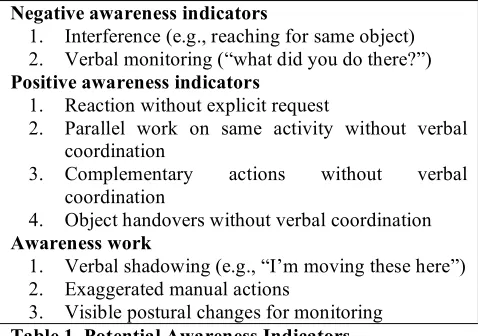
subtly attuned to each other, and people regulate the level of (un)obtrusiveness according to the situation. Monitoring and display become more obtrusive or obvious when awareness is perceived to be at risk [27]. Based on our literature review, we describe below the set of positive and negative indicators of awareness and of awareness work, summarized in Table 1.
Negative Awareness Indicators
Awareness is said to support implicit coordination and anticipation of others’ future activity [11], supporting a smooth interplay of actions. Clashes, collisions, and breakdowns, such as attempting to grab the same object, are commonly interpreted as a sign of lack of awareness [e.g. 12, 20]. The literature also suggests that tabletop interaction can result in people obstructing each other’s activity if somebody’s arm or shadow blocks access or visibility [28]. We have chosen to use the broader concept of interference
(instead of clashes), that refers to unintended negative influence on another user’s actions. It covers all instances where coordination fails, requiring participants to interrupt their activity and to re-negotiate who does what and when. For example, people might start to grab the same object, or both reach out to zoom in on the display, but one might not complete the action. Similarly, zooming in or moving the digital background, while another person tries to select an icon, can interfere with keeping track of the icon.
The means employed to resolve interference can indicate the level of awareness. With higher levels of awareness, interference may be resolved in a lightweight manner, such as unobtrusive monitoring of others, which has been identified as a central practice of awareness work [14, 27]. With lower levels of awareness, people may resort to more explicit mechanisms of coordination such as asking what the other is doing that can interrupt the flow of action. It can also include requesting a summary or rationale of past actions (e.g. “why did you do that?”). We describe these as
verbal monitoring.
Positive Awareness Indicators
A second indicator of positive awareness is coordination of activity or division of labor without previous negotiation or allocation of activity. An example of this is parallel work
on the same task, such as moving a group of icons into one area. Complementary actions are when two people work together, for example, when one person moves an icon while another drags the digital background underneath it in concert, allowing for a continuous move beyond the edge of the display. Object handovers [20, 19], on a smooth trajectory without interruption or verbal references, are another example of implicit coordination.
Awareness Work Indicators
Three types of awareness work indicators were derived: verbal shadowing, exaggerated manual actions and visible postural changes. Monitoring and display of action are complementary practices that have been described as awareness work [14, 27]. One of the practices frequently described is the running commentary that keeps co-located colleagues up-to-date [cf. 11, 15, 27]. This verbal shadowing enhances the perceptibility and legibility of actions by using a second channel of information. A running commentary can occur while doing something, marking the end of an activity, giving a summary, or providing a rationale, e.g., “this lot should sit together”. The unobtrusiveness of awareness practices can sometimes make it difficult to distinguish ‘awareness work’ from work actions. If awareness and coordination are problematic, people are likely to engage in more explicit awareness work, which is easier to detect. Aspects of awareness work such as “public display” might employ exaggerated manual actions to draw attention [15] or use performative actions, e.g., someone putting their bag on the counter to signify that they want to pay [11]. Visible postural changes for monitoring are where a person moves in a more obtrusive way to signify an intention or state.
METHOD
To test the hypothesis that touch interaction supports awareness more effectively than mouse interaction we used our set of indicators to identify different aspects of awareness and compare these across the two conditions.
Participants
39 volunteers from a university department participated in the study, making up 13 groups of three. They included academic, administrative, technical and managerial staff and postgraduate students and ranged in age between 22 and 65 years old (17 female, 22 male). Participants received no payment for participation but were entered into a draw for a small prize.
Experimental Task
To maximize ecological validity, we chose a task that participants could relate to and have an opinion about. This was helping to plan seating arrangements for the upcoming move of the department into a new building. The groups were asked to design a seating plan by assigning people to empty desk slots on a floor plan. An earlier departmental meeting where the issue of seating in the new building had been discussed revealed it to be a topic that people held strong and divergent opinions about. The task was open ended in that there was no right or wrong answers.
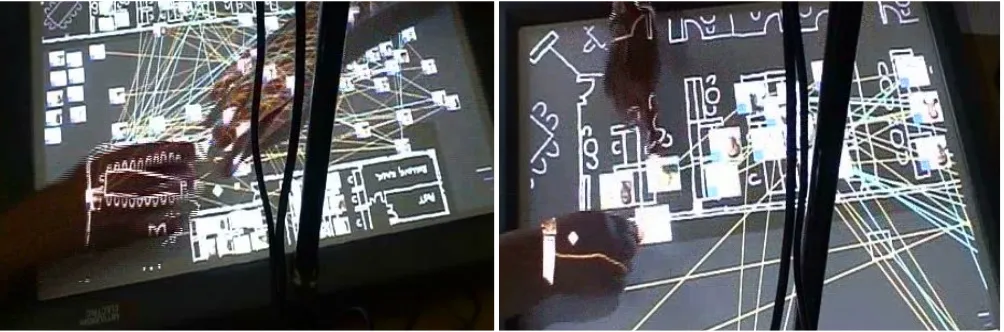
A digital floor plan, showing desks and icons representing the people in the department was designed. The plan showed 2 floors that were positioned next to each other as the background. These could be grabbed, moved, and resized. Icons of people could be dragged over the floor plans and placed beside or on the desks. To aid the process of deciding who should sit with whom, information about working networks was provided. Colored lines could be switched on to show who had published or taught courses together. The people icons were also color-coded depending on whether they were faculty, tutors, students or staff.
Apparatus
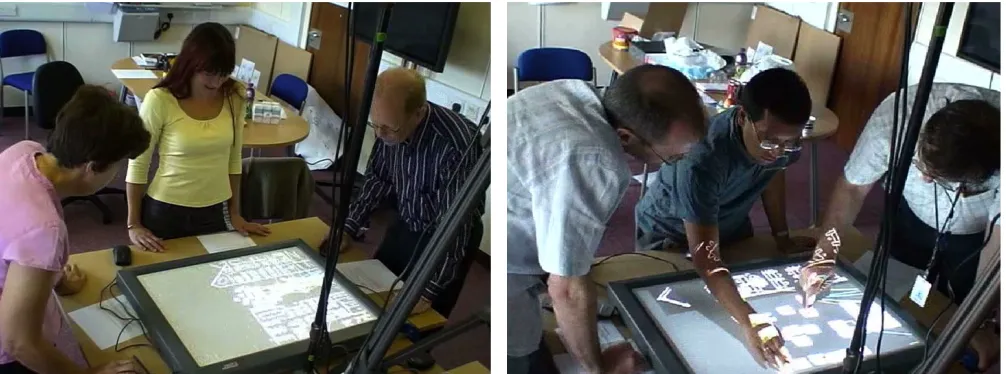
The standard size MERL DiamondTouch display (65 x 50 cm) was used for the experiment. It can distinguish several users who each sit or stand on a conductive pad, enabling them to work at the surface in parallel [3]. This was used for the touch condition. For the mice condition, the touch display was disabled and three mice were provided, one for each participant. A larger board was placed under the display screen to provide space for the mice. The surface was accessible from three sides; the participants were required to stand around it and free to switch positions (see Figure 1).
To zoom or resize the current view of the floor plan involves moving two fingers apart in the touch condition or using the scroll wheel on the mouse. People icons can be selected and dragged across the surface either by using a fingertip or the mouse. The entire floor plan, with everything placed on it, can be moved in the same way.
Procedure
A within-subjects design was used where all groups took part in both mice and touch conditions. To control for learning effects the order was counterbalanced. Participants were first shown how to use the DiamondTouch and then
Negative awareness indicators
1. Interference (e.g., reaching for same object) 2. Verbal monitoring (“what did you do there?”)
Positive awareness indicators
1. Reaction without explicit request
2. Parallel work on same activity without verbal coordination
3. Complementary actions without verbal coordination
4. Object handovers without verbal coordination
Awareness work
1. Verbal shadowing (e.g., “I’m moving these here”) 2. Exaggerated manual actions
[image:4.612.56.295.54.222.2]3. Visible postural changes for monitoring
told what they had to do in the task. The experiment concluded with a debriefing session.
The groups were videotaped using two cameras, one focusing on the interactive surface and the surrounding area, and the other on the whole group from a distance.
Analysis
Coding and Development of Criteria for Indicators
Two of us refined the categories and identified criteria for the coding scheme. We analyzed one group’s behavior, iteratively refining the coding scheme. When going through the coding process we found it almost impossible in practice to reliably code for when a movement or posture was exaggerated. We therefore discarded two of the potential awareness work indicators previously identified as not viable in practice. Examples of the final set of awareness indicators used are shown in Table 2.
Context is central when deciding how to label the actions in terms of different types of awareness. For example, a statement such as “this is Alan” is coded differently according to what the participants are doing at the time, as it can be an answer to a question, assistance, or shadowing. An incident was labeled interference where none of the participants intended to hinder the activity of the other and the action itself was not accidental (e.g. zooming in instead of zooming out). Usually this was obvious from the conversation, for example participants would say “oops” if they make a mistake. Shadowing could simply consist of naming a person when selecting their icon. If an action followed in less than two seconds it was counted as shadowing and not as a question or suggestion awaiting response. Each display manipulation carried out by a participant when another was also working at the tabletop was coded as a parallel action, but only if there had been no group discussion about working in parallel. A reaction was coded when there was no explicit request for an action, either verbal or non-verbal.
RESULTS
The awareness measures were analyzed quantitatively to enable statistical comparisons to be made between the conditions and then qualitatively to understand specific types of interaction in the context they had arisen.
Quantitative Findings
Frequencies were calculated for each of the awareness measures shown in Table 2 for each individual. In four of the 26 conditions (13 groups x 2 conditions), the groups finished early by between 1 and 4 minutes, therefore frequencies per minute were used in all analyses rather than raw scores. Significant effects are reported in this paper at the p < .05 level and effect sizes are reported as Pearson’s r.
Negative Awareness Indicators
The negative awareness indicators were measured in terms of (i) frequencies per minute of verbal monitoring and (ii) number of interferences, which were compared between the two conditions. There were few instances of verbal monitoring in either the mice (M = 0.02/min, SE = 0.01) or touch conditions (M = 0.01/min, SE = 0.005) and no significant difference between the conditions, t(38) = 0.561, p > .05, r = 0.09. This suggests that the participants were sufficiently aware of what each other was doing – at least at a strategic level – that it was not necessary to ask. This is perhaps unsurprising given the number of awareness resources available in both conditions.
[image:5.612.57.560.53.240.2]Contrary to our hypothesis about interference being more frequent in the mice condition, we found that participants interfered with one another’s actions more often in the touch condition (M = 0.10/min, SE = 0.02), than with the mice (M = 0.05/min, SE = 0.02), t(38) = -2.21, p < .05 (2-tailed), r = 0.34). This appears to suggest a difference in awareness at a fine-grained mechanical level in terms of participants anticipating the actions that others might perform and their resulting ability to coordinate.
Positive Awareness Indicators
The positive awareness indicators were measured in terms of (i) frequencies per minute of participants assisting each other without request, (ii) number of times working in parallel, (iii) the number of times handing over objects and (iv) carrying out complementary actions for the mice and touch conditions. We predicted that these indicators would occur more in the touch condition.
As expected, we found significantly more cases of assistance without request in the touch (M = 0.14/min, SE = 0.03) than in the mice condition (M = 0.10/min, SE = 0.02, t(38) = -1.692, p < .05, r = 0.26). Participants also made more object handovers in the touch condition (M = 0.04/min, SE = 0.02) than in the mice condition (M = 0.002, SE = 0.002, t(38) = -2.20, p<.05, r = 0.34)
On average, participants were more likely to work in parallel in the touch (M = 0.45/min, SE = 0.15) than the mice condition (M = 0.21/min, SE = 0.05). However, this difference was not found to be significant, t(38) = -1.47, p > .05, r = 0.23. Similarly, no significant difference was found between the larger average number of complementary actions in the touch condition (M = 0.02/min, SE = 0.007) than in the mice condition (M = 0.005/min, SE = 0.003, t(38) = -1.648, p > .05, r = 0.26).
Overall, the positive awareness measures support our hypothesis about greater awareness offered by touch interaction compared with mice. Participants were more likely to assist each other without being asked and to pass objects between one another in the touch condition, suggesting they were more aware of collaborators’ activity. While differences in the amount of parallel working on the same task and complementary actions were not found to be significant, they were in the predicted direction.
Awareness Work
Verbal shadowing was used as our quantifiable measure of participants’ awareness work to assess the practices by which awareness is maintained in both self and others. We predicted that the more overt movements in the touch condition would provide participants with greater awareness cues than the more subtle hand movements in the mice condition and therefore less obtrusive, verbal awareness work would be necessary.
Contrary to our predictions, we found a significantly higher incidence of verbal shadowing in the touch condition (M = 0.63/min, SE = 0.10) than in the mice condition (M = 0.43, SE = 0.08, t(38) = -2.85, p< 0.01 (2-tailed), r = 0.42. This suggests that people were putting more discernable effort into awareness work in the touch condition.
Overall, our finding of more interference with actions and verbal shadowing in the touch condition is contrary to our hypotheses. At the same time, we found a higher incidence of positive awareness indicators with touch input, confirming our hypotheses. To examine in more detail how interference occurs and how it is dealt with, a qualitative analysis was subsequently performed.
Qualitative Findings
The video clips of negative and positive indicators of awareness were reviewed again. It was observed that interference usually had no serious consequences and was quickly resolved. After a few instances groups typically adjusted their behavior to speed up repair or to evade further incidents. Groups in the mice but not the touch condition often resorted to sequential interaction where one participant carried out all actions with the others directing. To illustrate these findings we provide example vignettes.
Indicator Examples
Interference Edna plays with the scroll wheel, zooming in and out, while Tess tries to focus on the floor layout and to select an icon.
Negative awareness
Verbal monitoring
Don moves icons onto the display. Nora asks, “Are you picking people at random?” After Don has moved several icons, Nadine asks, “Is there any grouping here?” Reaction without
request
A group searches for people from one research area. Al says, “Debra is here” pointing outside of the floor plan. Chris moves the floor plan so the icon is visible.
Parallel Work A group searches for technical staff. Nadine says, “there’s Marge”, selects her icon and starts to move it. Beth says, “Henrik”, and selects and moves his icon. Both move icons towards the same seating area. There was no previous discussion about parallel work. Object handover Ned moves an icon from his side of the surface diagonally towards the other corner
(towards Ken). As he reaches the middle, Ken reaches out. Their hands almost touch each other as Ken extends a finger. Ned lifts his hand away and Ken takes over. Nothing is said.
Positive awareness
Complementary Action
Mick drags an icon to the edge of the display, then moves the floor plan to the centre. Bill selects and moves the icon into the newly visible area. Mick drags the floor plan more and Bill positions the icon on a desk. Mick comments, “that’s one way to do it, you hold it; I move it”.
Awareness work
Shadowing Nathan says, “Sorry – I’ve got José” when pointing at an icon “…and I’m gonna put him here”. Ken says, “He works with…” when moving one icon next to another one
(i) Slight Glitches and Quick Resolution
With touch, interference usually resulted in brief glitches in the interaction. They were negotiated and resolved in a lightweight manner through the fine adjustment of actions, as illustrated in the following vignettes:
Vignette 1 (group 7, touch): Esther moves the floor plan and then pauses. Kim reaches out for an icon, but Esther starts to move again. Kim keeps pointing to the icon, which has turned into a moving target. Esther stops dragging the floor plan and retreats her arm. Kim selects the icon.
Vignette 2 (group 7, touch): Esther and Kim attempt to place two people onto the same desk. Both select an icon and drag it towards a previously identified area. The icons come to be right next to each other, half on the desk. Esther moves her icon towards the next free desk while Kim slightly retreats. As Esther settles on another desk, Kim moves in again and places the icon onto the desk.
The majority of interferences with both mouse and touch input were resolved without having to explicitly communicate how the resolution should proceed. In cases where the interference was not worked out in a lightweight manner, mechanisms for resolution used were verbal or non-verbal, for example:
Vignette 3, (group 12, touch): Hannah, who is standing in the middle, tries to point to an icon that is under Abi’s shadow (on the right). Hannah says, “can’t see it”, then moves her hand back from the surface. Abi changes her posture, moving around the table and angles her arm so that the shadow does not fall onto the surface.
Vignette 4, (group 2, touch): Ross is circling with his finger in search of a particular person at one end of the surface. Carol who is standing on Ross’s right side is aiming for an icon close to where he is standing. His arm is obstructing access. After two seconds, Carol reaches for Ross’s hand and moves it out of the way.
Sometimes a potential interference was resolved even before participants started an action. For example:
Vignette 5, (group 13, touch): Both Beth and Tom stretch their hands out for a ‘zoom’ gesture at the same time. Tom lets his hands drop, and Beth hesitates a fraction of a second. She then touches the surface.
More instances of resolution before an action was carried out occurred in the touch condition (26%) than in the mice condition (5%). Furthermore, lightweight implicit resolution was more common with touch, occurring in 83% of cases compared with 62% in the mice condition.
(ii) Adjustment to Evade Interference
Often groups adjusted their behavior in quite subtle ways to keep interference manageable and to minimize it. Particularly noticeable was increased verbal shadowing to announce actions that might interfere with others planned actions.
Vignette 6 (group 6, mouse): After a few instances of interference, Carl resorts to explicit verbal shadowing. He asks, “shall we zoom a little bit?” while making a zoom gesture in the air. In the mouse condition, he announces his intention to move the floor plan, “lets drag it down – I have control”, and later, “just gonna scroll the page” and “can we zoom out a bit… zoom out” .
Timing of action and careful monitoring of others were also found to be critical for keeping interaction fluent. In vignette 7 Tom has to adjust his pointing gesture to the moving floor plan. Beth, by performing a very slow drag, enables him to do so. She further makes sure that the icon remains on the visible area and waits for Ida to finish what she is saying:
[image:7.612.57.559.525.691.2]Vignette 7 (group 13, touch): Tom gestures towards the left end of the set of icons, starts to point and says, “so”. Beth extends two fingers at her side of the table aiming to drag the floor plan. Ida points at an icon and says, “she’s not ISG [a research group]”. Beth closes her hand. Ida finishes what she is saying and moves her hand back. Beth now opens her hand again and touches the surface with one finger. Tom says, “All right, well” and points at an icon, while Beth
slowly drags the floor plan back. Tom says, “right”. Beth stops moving the floor plan as the item that Tom points at is still just about visible.
(iii) Sequential versus simultaneous interaction
Groups who started in the touch condition generally interacted with the tabletop in parallel and then changed to sequential interaction when switching over to the mice condition. Conversely, the groups who started off with the mouse condition primarily interacted sequentially and then switched to interacting simultaneously when in the touch condition. This finding suggests that the affordances of the input affected how the groups worked together.
Sequential interaction when using the mice was evidenced by more explicit turn taking, waiting for the previous move to be finished, and where only one of the three mice was used for long periods. Several of the groups had longer phases of sequential work with one person doing all the interacting for 5-10 minutes. Typically, one person acted as the interactor while the others requested actions, such as, “can you move James here?”. Other times, meta-comments were made, such as, “shall we start with you doing mouse?” and “see that’s interesting, I’m telling you what to do, I’m not using the mouse”.
Only when it became clear that many icons had to be moved at the same time did most groups work simultaneously. After moving them they returned to giving instructions to the interactor. Only five groups made full use of the potential to use the mice simultaneously, while three groups interacted entirely sequentially or through instructing one member of their group. The groups avoided simultaneous activity unless it speeded up the ongoing activity significantly. In contrast, nearly all the groups interacted with the tabletop simultaneously when in the touch condition. There was also more frequent switching of roles and much less instructing others what to do.
Together, these findings indicate that the more frequent interferences in the touch condition are a result of groups taking risks when working in parallel. Fluent interactions and interferences co-occur, but most interference does not interrupt the interaction and is resolved non-verbally and on-the-fly.
DISCUSSION
The findings from our study of awareness around a tabletop interface have shown significant differences between touch and mice input. Touch input resulted in more positive indicators of workspace awareness in terms of helping behaviors and object handovers. However, in contrast to widely held assumptions about touch interaction [3, 7, 12, 17, 20, 35], it also results in more interference than the mice condition. This concords with Müller-Tomfelde and Schremmer’s [19] recent finding for pairs working together solving a puzzle at a table surface. We also found more verbal shadowing, indicating that participants put in more discernable effort in carrying out awareness work when
using touch input.
Having touch input appears to encourage denser, more coordinated interaction in the groups in terms of more frequent shifts of control. It also encouraged taking more risks, resulting in more interference with others’ actions. Yet, most interference was resolved very quickly through lightweight non-verbal means, resulting only in slight glitches in the flow of interaction. Risking interference, moreover, seems to suggest that a level of trust emerged in the groups, accompanied by confidence that it would be readily resolved. It also suggests sufficient awareness within each group to succeed. In the mice condition, increased division of labor and verbal negotiation indicate that groups used more explicit means of coordination to prevent interference. This would seem to indicate less confidence in the ability of the group to easily deal with interference due to the separation of mouse and pointer. The fluid interaction afforded by using a multi-touch surface involves a risk of interference that is relatively harmless to the ongoing collaborative activity. Face-to-face tabletop interaction on a shared task seems to provide groups with the resources to deal with it and to renegotiate their activity quickly. It may even be the case, as our qualitative analysis implies, that these slight glitches keep people on track and ‘on their toes’, re-establishing awareness and reminding them that it requires constant effort to maintain it. In this sense, the increase in awareness work can be interpreted positively to indicate that participants are aware of potential problems.
The affordances of touch encourage co-located people to ‘jump in’ at the tabletop interface at the same time. These actions can conflict with another person’s intended action. One reason for this might be that it is easier to go from pointing to manipulating interface objects when using fingers compared with switching from gesturing to interacting when using mice, as the point and movement at the tabletop are indistinguishable actions up until the point of contact with the table.
Moreover, when taken together, our measures provide evidence to support the assumed benefit that tabletop touch interfaces lend themselves to fluid forms of close-knit interaction.
Only a small subset of interference was related to physical collisions, shadows, or simultaneous grabbing of an icon. Our broad definition of interferences as glitches in the coordination and anticipation of each other’s actions thus uncovered a range of conflicts at the interface that is invisible with previous approaches to measuring awareness: these use a simpler definition of conflicts or collisions. Interference and verbal shadowing were useful indicators of problems with awareness in the touch condition, while the positive awareness indicators demonstrated that there was nevertheless a high level of awareness. This apparent contradiction motivated a second stage of qualitative analysis, focusing on how interference is dealt with. Without our broad and detailed set of indicators, these phenomena would not have surfaced. This has highlighted new research questions, suggesting that it may be more important which resources people have to resolve conflicts, than whether these occur per se or how to prevent them. For other kinds of co-located tasks or interface set-ups, different patterns of the awareness indicators could emerge. For example, a study of how a large group of co-located people using a combination of displays and devices in a command-and-control setting might reveal an increased incidence of verbal monitoring and shadowing whereas a study investigating the use of shared and personal displays with young children might reveal less awareness work and more negative interference.
The nature of collaboration at interactive surfaces can vary for different task types [32]. If different combinations of awareness work are at play for different settings and tasks then it suggests that the technologies used to support them should be selected and designed accordingly. Competitive tasks [12] or those which encourage a territorial division of labor [29] will have quite different demands than open-ended tightly-coupled tasks, such as the one we used. Furthermore, display and group size can affect the form of collaborative work; bigger display sizes and larger groups potentially encourage more division of labor [25].
CONCLUSION
Most early CSCW work focused on understanding and supporting distributed collaboration [4, 6, 8, 10]. In this context the term awareness was coined and developed. Now, with the development of technologies such as interactive tabletops, providing support for co-located collaboration has become a major topic again [17, 25, 29, 31, 35]. In this new area, claims about facilitation of awareness are frequent but there have been few evaluations.
The contribution of our paper has been in showing that a main benefit of touch surfaces is not just providing a higher level of awareness, but also in how they enable fluidity of
interaction and switching of roles between co-located users. Using a set of awareness indicators derived from the literature, we found increased interference and increased effort in awareness work, which indicate problems with the coordination of activity, as well as positive indicators such as un-requested assistance and non-verbalized handovers in the touch condition. This detailed account was enabled by our coding scheme for awareness, which measures a range of behavioral indices. A subsequent qualitative analysis showed how groups adapt their behaviors to different affordances, risking more interference when they are easier to manage and resolve.
Enforced sequential interaction or predetermined territories might interfere with the kinds of fluent and dense interaction, re-negotiation, and handovers we have documented. We have shown that system designers could take a more lightweight approach and instead of trying to eliminate conflicts, simply aim to increase the resources for dealing with and negotiating interference. An alternative approach could be to support visibility of action, fluid switching of roles or responsibilities, and interleaving of action.
ACKNOWLEDGMENTS
We thank all of our participants for taking part in the study. We would also like to thank the CSCW reviewers as well as our five CHI reviewers for their insightful comments. This research was funded by the German DFG fellowship grant Ho3901/1-1, an Open University research fellowship, and the EPSRC ShareIT project grant EP/F017324/1.
REFERENCES
1. Carroll, J.M., Rosson, M.B., Convertino, G., Ganoe, C. Awareness and teamwork in computer-supported Collaborations. Interacting with Computers 18 (2006). 21-46
2. Convertino, G., Neale, D., Hobby, L., Carroll, J.M., Rosson, M.B. A Laboratory Method for Studying Activity Awareness. Proc. NordiCHI’04. ACM (2004), 313-322
3. Dietz, P.H., Leigh, D.L., DiamondTouch: A Multi-User Touch Technology, Proc. UIST’01. ACM (2001), 219-226
4. Dourish, P., Bellotti, V. Awareness and Coordination in Shared Workspaces. Proc. CSCW’92. ACM (1992), 107-114
5. Endsley, M.R. Theoretical Underpinnings of Situation Awareness: A critical review. In Endsley, Garland, (eds)
Situational Awareness Analysis and Measurement.
Mahwah, Lawrence Erlbaum (2000)
6. Fitzpatrick, G., Parsowith, S., Segall, B., Kaplan, S. Tickertape: Awareness in a Single Line. Proc. CHI’98.
ACM (1998), 281-282
Proc. Proc. CHI’07. ACM (2007), 647-656
8. Gaver, W., Smets, G., Overbeeke, K. A Virtual Window on Media Space. Proc. CHI’95. ACM (1995), 257-264 9. Gutwin,C.,Greenberg,S.WorkspaceAwarenessfor
Groupware.AdjunctProc.CHI'96,ACM (1996),208-209 10.Gutwin, C., Greenberg, S. Effects of Awareness Support
on Groupware Usability. Proc. CHI’98. ACM (1998), 511-518
11.Gutwin, C., Greenberg, S. A Descriptive Framework of Workspace Awareness for Real-Time Groupware.
JCSCW 11 (2002). 411-446.
12.Ha, V., Inkpen, K. M., Whalen, T., Mandryk, R. L. Direct Intentions: The Effects of Input Devices on Collaboration around a Tabletop Display. Proc. Tabletop’06. IEEE (2006), 177-184
13.Harms, C., Biocca, A.F. Internal consistency and reliability of the networked minds social presence measure. In Alcanizm, Rey (Eds.), Seventh Annual International Workshop: Presence 2004
14.Heath, C., Luff, P. Collaboration and control: Crisis management and multimedia technology in London Underground control rooms. JCSCW 1 (1992), 69-94 15.Heath, C., Sanchez Svensson, M., Hindmarsh, J., Luff,
P., vom Lehn, D. Configuring Awareness. JCSCW 11
(2002), 317-347
16.Hourizi, R., Johnson, P. Designing to Support Awareness: A Predictive, Composite Model. Proc. CHI’04. ACM (2004), 159-166
17.Kruger, R., Carpendale, S., Scott, S.D., Greenberg, S. How People Use Orientation on Tables:
Comprehension, Coordination and Communication.
Proc. Group’03. ACM (2003), 369-378
18.MacMillan, J., Paley, M., Entin, E. Questionnaires for Distributed Assessment of Team Mutual Awareness. In Salas (Ed.) Handbook of Human Factors and
Ergonomic Methods, Taylor & Francis (2004). 3-32 19.Müller-Tomfelde, C., Schremmer, C. ‘Touchers’ and
‘Mousers’: Commonalities and Differences in Co-located Collaboration with Multiple Input Devices.
Proc. CHI’08. ACM (2008), 1149-1152
20.Nacenta, M., Pinelle, D., Stuckel, D., Gutwin, C. The Effects of Interaction Technique on Coordination in Tabletop Groupware. Proc. Graphics Interface’07.
ACM (2007), 191-198
21.Pinelle, D., Gutwin, C., Greenberg, S. Task Analysis for Groupware Usability Evaluation: Modeling Shared-Workspace Tasks with the Mechanics of Collaboration.
ACM Transactions on Computer-Human-Interaction, 10(4) (2003), 281-311
22.Robertson, T. The Public Availability of Actions and Artefacts. JCSCW 11 (3-4), (2002), 299-316
23.Rogers, Y. Lindley, S. Collaborating around vertical and horizontal displays: which way is best? Interacting With Computers, 16, (2004), 1133-1152
24.Rogers, Y., Hazlewood, W.R., Blevis, E., Lim, Y. Finger talk: collaborative decision-making using talk and fingertip interaction around a tabletop display. Proc. CHI'04, ACM (2004), 1271-1274
25.Ryall, K., Forlines, C., Shen, C., Morris, M. R. Exploring the effects of group size and table size on interactions with tabletop shared-display groupware.
Proc. CSCW'04. ACM (2004), 284-293 26.Sandor, O., Bogdan, C., Bowers, J. Aether: An
Awareness Engine for CSCW. Proc. E-CSCW’97.
Kluwer (1997), 221-236
27.Schmidt, K. The Problem with “Awareness”. JCSCW 11 (3-4), (2002). 285-198
28.Scott, S.D., Grant, K.D., Mandryk, R.L. System guidelines for co-located, collaborative Work on a Tabletop Display. Proc. E-CSCW’03, Kluwer (2003), 159-178
29.Scott, S.D., Carpendale, S., Inkpen, K. Territoriality in collaborative tabletop workspaces. Proc. CSCW’04.
ACM (2004), 294-303
30.Shen, C., Everitt, K.M., Ryall, K. UbiTable: Impromptu Face-to-Face Collaboration on Horizontal Interactive Surfaces. Proc. UbiComp’03. (2003), 281-288. 31.Shen, C., Vernier, F., Forlines, C., Ringel, M.
DiamondSpin: an extensible toolkit for around-the-table interaction. Proc. CHI’04, ACM (2004), 167-174 32.Tan, D., Gergle, D., Mandryk, R., Inkpen, K., Kellar,
M., Hawkey, K., Czerwinski, M. Using Job-Shop Scheduling Tasks for Evaluating Collocated Collaboration. Journal of Personal and Ubiquitous Computing 12 (3), 255-267
33.Tang, J. C. Findings from observational studies of collaborative work. International Journal of Man-Machine Studies 34 (2), (1991), 143-160
34.Toney, A., Thomas, B. Applying Reach in Direct Mani-pulation Interfaces. Proc. OzCHI’06. ACM (2006), 393-396