Think Python
How to Think Like a Computer Scientist
Think Python
How to Think Like a Computer Scientist
Version 2.0.17
Allen Downey
Copyright © 2012 Allen Downey.
Green Tea Press 9 Washburn Ave Needham MA 02492
Permission is granted to copy, distribute, and/or modify this document under the terms of the Creative Commons Attribution-NonCommercial 3.0 Unported License, which is available athttp: //creativecommons.org/licenses/by-nc/3.0/.
The original form of this book is LATEX source code. Compiling this LATEX source has the effect of
gen-erating a device-independent representation of a textbook, which can be converted to other formats and printed.
Preface
The strange history of this book
In January 1999 I was preparing to teach an introductory programming class in Java. I had taught it three times and I was getting frustrated. The failure rate in the class was too high and, even for students who succeeded, the overall level of achievement was too low. One of the problems I saw was the books. They were too big, with too much unnecessary detail about Java, and not enough high-level guidance about how to program. And they all suffered from the trap door effect: they would start out easy, proceed gradually, and then somewhere around Chapter 5 the bottom would fall out. The students would get too much new material, too fast, and I would spend the rest of the semester picking up the pieces. Two weeks before the first day of classes, I decided to write my own book. My goals were:
• Keep it short. It is better for students to read 10 pages than not read 50 pages. • Be careful with vocabulary. I tried to minimize the jargon and define each term at
first use.
• Build gradually. To avoid trap doors, I took the most difficult topics and split them into a series of small steps.
• Focus on programming, not the programming language. I included the minimum useful subset of Java and left out the rest.
I needed a title, so on a whim I choseHow to Think Like a Computer Scientist.
My first version was rough, but it worked. Students did the reading, and they understood enough that I could spend class time on the hard topics, the interesting topics and (most important) letting the students practice.
I released the book under the GNU Free Documentation License, which allows users to copy, modify, and distribute the book.
What happened next is the cool part. Jeff Elkner, a high school teacher in Virginia, adopted my book and translated it into Python. He sent me a copy of his translation, and I had the unusual experience of learning Python by reading my own book. As Green Tea Press, I published the first Python version in 2001.
vi Chapter 0. Preface
Over the last nine years I continued to develop the book, correcting errors, improving some of the examples and adding material, especially exercises.
The result is this book, now with the less grandiose titleThink Python. Some of the changes are:
• I added a section about debugging at the end of each chapter. These sections present general techniques for finding and avoiding bugs, and warnings about Python pit-falls.
• I added more exercises, ranging from short tests of understanding to a few substantial projects. And I wrote solutions for most of them.
• I added a series of case studies—longer examples with exercises, solutions, and discussion. Some are based on Swampy, a suite of Python programs I wrote for use in my classes. Swampy, code examples, and some solutions are available from
http://thinkpython.com.
• I expanded the discussion of program development plans and basic design patterns. • I added appendices about debugging, analysis of algorithms, and UML diagrams
with Lumpy.
I hope you enjoy working with this book, and that it helps you learn to program and think, at least a little bit, like a computer scientist.
Allen B. Downey Needham MA
Allen Downey is a Professor of Computer Science at the Franklin W. Olin College of Engi-neering.
Acknowledgments
Many thanks to Jeff Elkner, who translated my Java book into Python, which got this project started and introduced me to what has turned out to be my favorite language. Thanks also to Chris Meyers, who contributed several sections toHow to Think Like a Com-puter Scientist.
Thanks to the Free Software Foundation for developing the GNU Free Documentation Li-cense, which helped make my collaboration with Jeff and Chris possible, and Creative Commons for the license I am using now.
vii
Contributor List
More than 100 sharp-eyed and thoughtful readers have sent in suggestions and corrections over the past few years. Their contributions, and enthusiasm for this project, have been a huge help.
If you have a suggestion or correction, please send email [email protected]. If I make a change based on your feedback, I will add you to the contributor list (unless you ask to be omitted).
If you include at least part of the sentence the error appears in, that makes it easy for me to search. Page and section numbers are fine, too, but not quite as easy to work with. Thanks!
• Lloyd Hugh Allen sent in a correction to Section 8.4.
• Yvon Boulianne sent in a correction of a semantic error in Chapter 5. • Fred Bremmer submitted a correction in Section 2.1.
• Jonah Cohen wrote the Perl scripts to convert the LaTeX source for this book into beautiful HTML.
• Michael Conlon sent in a grammar correction in Chapter 2 and an improvement in style in Chapter 1, and he initiated discussion on the technical aspects of interpreters.
• Benoit Girard sent in a correction to a humorous mistake in Section 5.6.
• Courtney Gleason and Katherine Smith wrotehorsebet.py, which was used as a case study in an earlier version of the book. Their program can now be found on the website.
• Lee Harr submitted more corrections than we have room to list here, and indeed he should be listed as one of the principal editors of the text.
• James Kaylin is a student using the text. He has submitted numerous corrections. • David Kershaw fixed the brokencatTwicefunction in Section 3.10.
• Eddie Lam has sent in numerous corrections to Chapters 1, 2, and 3. He also fixed the Makefile so that it creates an index the first time it is run and helped us set up a versioning scheme. • Man-Yong Lee sent in a correction to the example code in Section 2.4.
• David Mayo pointed out that the word “unconsciously" in Chapter 1 needed to be changed to “subconsciously".
• Chris McAloon sent in several corrections to Sections 3.9 and 3.10.
• Matthew J. Moelter has been a long-time contributor who sent in numerous corrections and suggestions to the book.
• Simon Dicon Montford reported a missing function definition and several typos in Chapter 3. He also found errors in theincrementfunction in Chapter 13.
• John Ouzts corrected the definition of “return value" in Chapter 3.
• Kevin Parks sent in valuable comments and suggestions as to how to improve the distribution of the book.
viii Chapter 0. Preface
• Robin Shaw pointed out an error in Section 13.1, where the printTime function was used in an example without being defined.
• Paul Sleigh found an error in Chapter 7 and a bug in Jonah Cohen’s Perl script that generates HTML from LaTeX.
• Craig T. Snydal is testing the text in a course at Drew University. He has contributed several valuable suggestions and corrections.
• Ian Thomas and his students are using the text in a programming course. They are the first ones to test the chapters in the latter half of the book, and they have made numerous corrections and suggestions.
• Keith Verheyden sent in a correction in Chapter 3.
• Peter Winstanley let us know about a longstanding error in our Latin in Chapter 3. • Chris Wrobel made corrections to the code in the chapter on file I/O and exceptions.
• Moshe Zadka has made invaluable contributions to this project. In addition to writing the first draft of the chapter on Dictionaries, he provided continual guidance in the early stages of the book.
• Christoph Zwerschke sent several corrections and pedagogic suggestions, and explained the difference betweengleichandselbe.
• James Mayer sent us a whole slew of spelling and typographical errors, including two in the contributor list.
• Hayden McAfee caught a potentially confusing inconsistency between two examples. • Angel Arnal is part of an international team of translators working on the Spanish version of
the text. He has also found several errors in the English version.
• Tauhidul Hoque and Lex Berezhny created the illustrations in Chapter 1 and improved many of the other illustrations.
• Dr. Michele Alzetta caught an error in Chapter 8 and sent some interesting pedagogic com-ments and suggestions about Fibonacci and Old Maid.
• Andy Mitchell caught a typo in Chapter 1 and a broken example in Chapter 2. • Kalin Harvey suggested a clarification in Chapter 7 and caught some typos.
• Christopher P. Smith caught several typos and helped us update the book for Python 2.2. • David Hutchins caught a typo in the Foreword.
• Gregor Lingl is teaching Python at a high school in Vienna, Austria. He is working on a Ger-man translation of the book, and he caught a couple of bad errors in Chapter 5.
• Julie Peters caught a typo in the Preface.
• Florin Oprina sent in an improvement inmakeTime, a correction inprintTime, and a nice typo. • D. J. Webre suggested a clarification in Chapter 3.
• Ken found a fistful of errors in Chapters 8, 9 and 11.
ix
• Ben Logan sent in a number of typos and problems with translating the book into HTML. • Jason Armstrong saw the missing word in Chapter 2.
• Louis Cordier noticed a spot in Chapter 16 where the code didn’t match the text. • Brian Cain suggested several clarifications in Chapters 2 and 3.
• Rob Black sent in a passel of corrections, including some changes for Python 2.2.
• Jean-Philippe Rey at Ecole Centrale Paris sent a number of patches, including some updates for Python 2.2 and other thoughtful improvements.
• Jason Mader at George Washington University made a number of useful suggestions and cor-rections.
• Jan Gundtofte-Bruun reminded us that “a error” is an error.
• Abel David and Alexis Dinno reminded us that the plural of “matrix” is “matrices”, not “ma-trixes”. This error was in the book for years, but two readers with the same initials reported it on the same day. Weird.
• Charles Thayer encouraged us to get rid of the semi-colons we had put at the ends of some statements and to clean up our use of “argument” and “parameter”.
• Roger Sperberg pointed out a twisted piece of logic in Chapter 3. • Sam Bull pointed out a confusing paragraph in Chapter 2. • Andrew Cheung pointed out two instances of “use before def.”
• C. Corey Capel spotted the missing word in the Third Theorem of Debugging and a typo in Chapter 4.
• Alessandra helped clear up some Turtle confusion. • Wim Champagne found a brain-o in a dictionary example. • Douglas Wright pointed out a problem with floor division inarc. • Jared Spindor found some jetsam at the end of a sentence. • Lin Peiheng sent a number of very helpful suggestions. • Ray Hagtvedt sent in two errors and a not-quite-error. • Torsten Hübsch pointed out an inconsistency in Swampy. • Inga Petuhhov corrected an example in Chapter 14. • Arne Babenhauserheide sent several helpful corrections. • Mark E. Casida is is good at spotting repeated words.
• Scott Tyler filled in a that was missing. And then sent in a heap of corrections. • Gordon Shephard sent in several corrections, all in separate emails.
• Andrew Turnerspotted an error in Chapter 8.
x Chapter 0. Preface
• Daryl Hammond and Sarah Zimmerman pointed out that I served upmath.pitoo early. And Zim spotted a typo.
• George Sass found a bug in a Debugging section. • Brian Bingham suggested Exercise 11.10.
• Leah Engelbert-Fenton pointed out that I usedtupleas a variable name, contrary to my own advice. And then found a bunch of typos and a “use before def.”
• Joe Funke spotted a typo.
• Chao-chao Chen found an inconsistency in the Fibonacci example. • Jeff Paine knows the difference between space and spam.
• Lubos Pintes sent in a typo.
• Gregg Lind and Abigail Heithoff suggested Exercise 14.4.
• Max Hailperin has sent in a number of corrections and suggestions. Max is one of the authors of the extraordinaryConcrete Abstractions, which you might want to read when you are done with this book.
• Chotipat Pornavalai found an error in an error message. • Stanislaw Antol sent a list of very helpful suggestions. • Eric Pashman sent a number of corrections for Chapters 4–11. • Miguel Azevedo found some typos.
• Jianhua Liu sent in a long list of corrections. • Nick King found a missing word.
• Martin Zuther sent a long list of suggestions.
• Adam Zimmerman found an inconsistency in my instance of an “instance” and several other errors.
• Ratnakar Tiwari suggested a footnote explaining degenerate triangles.
• Anurag Goel suggested another solution foris_abecedarianand sent some additional correc-tions. And he knows how to spell Jane Austen.
• Kelli Kratzer spotted one of the typos.
• Mark Griffiths pointed out a confusing example in Chapter 3. • Roydan Ongie found an error in my Newton’s method.
• Patryk Wolowiec helped me with a problem in the HTML version. • Mark Chonofsky told me about a new keyword in Python 3. • Russell Coleman helped me with my geometry.
xi
• Nam Nguyen found a typo and pointed out that I used the Decorator pattern but didn’t men-tion it by name.
• Stéphane Morin sent in several corrections and suggestions. • Paul Stoop corrected a typo inuses_only.
• Eric Bronner pointed out a confusion in the discussion of the order of operations.
• Alexandros Gezerlis set a new standard for the number and quality of suggestions he submit-ted. We are deeply grateful!
• Gray Thomas knows his right from his left.
• Giovanni Escobar Sosa sent a long list of corrections and suggestions. • Alix Etienne fixed one of the URLs.
• Kuang He found a typo.
• Daniel Neilson corrected an error about the order of operations.
• Will McGinnis pointed out thatpolylinewas defined differently in two places. • Swarup Sahoo spotted a missing semi-colon.
• Frank Hecker pointed out an exercise that was under-specified, and some broken links. • Animesh B helped me clean up a confusing example.
• Martin Caspersen found two round-off errors. • Gregor Ulm sent several corrections and suggestions. • Dimitrios Tsirigkas suggested I clarify an exercise. • Carlos Tafur sent a page of corrections and suggestions. • Martin Nordsletten found a bug in an exercise solution. • Lars O.D. Christensen found a broken reference. • Victor Simeone found a typo.
• Sven Hoexter pointed out that a variable namedinputshadows a built-in function. • Viet Le found a typo.
• Stephen Gregory pointed out the problem withcmpin Python 3. • Matthew Shultz let me know about a broken link.
• Lokesh Kumar Makani let me know about some broken links and some changes in error mes-sages.
• Ishwar Bhat corrected my statement of Fermat’s last theorem. • Brian McGhie suggested a clarification.
Contents
Preface v
1 The way of the program 1
1.1 The Python programming language . . . 1
1.2 What is a program? . . . 3
1.3 What is debugging? . . . 3
1.4 Formal and natural languages . . . 5
1.5 The first program . . . 6
1.6 Debugging . . . 7
1.7 Glossary . . . 7
1.8 Exercises . . . 9
2 Variables, expressions and statements 11 2.1 Values and types . . . 11
2.2 Variables . . . 12
2.3 Variable names and keywords . . . 12
2.4 Operators and operands . . . 13
2.5 Expressions and statements . . . 14
2.6 Interactive mode and script mode . . . 14
2.7 Order of operations . . . 15
2.8 String operations . . . 15
2.9 Comments . . . 16
2.10 Debugging . . . 16
2.11 Glossary . . . 17
xiv Contents
3 Functions 19
3.1 Function calls . . . 19
3.2 Type conversion functions . . . 19
3.3 Math functions . . . 20
3.4 Composition . . . 21
3.5 Adding new functions . . . 21
3.6 Definitions and uses . . . 22
3.7 Flow of execution . . . 23
3.8 Parameters and arguments . . . 23
3.9 Variables and parameters are local . . . 24
3.10 Stack diagrams . . . 25
3.11 Fruitful functions and void functions . . . 26
3.12 Why functions? . . . 26
3.13 Importing withfrom . . . 27
3.14 Debugging . . . 27
3.15 Glossary . . . 28
3.16 Exercises . . . 29
4 Case study: interface design 31 4.1 TurtleWorld . . . 31
4.2 Simple repetition . . . 32
4.3 Exercises . . . 33
4.4 Encapsulation . . . 34
4.5 Generalization . . . 34
4.6 Interface design . . . 35
4.7 Refactoring . . . 36
4.8 A development plan . . . 37
4.9 docstring . . . 37
4.10 Debugging . . . 38
4.11 Glossary . . . 38
Contents xv
5 Conditionals and recursion 41
5.1 Modulus operator . . . 41
5.2 Boolean expressions . . . 41
5.3 Logical operators . . . 42
5.4 Conditional execution . . . 42
5.5 Alternative execution . . . 43
5.6 Chained conditionals . . . 43
5.7 Nested conditionals . . . 43
5.8 Recursion . . . 44
5.9 Stack diagrams for recursive functions . . . 45
5.10 Infinite recursion . . . 46
5.11 Keyboard input . . . 46
5.12 Debugging . . . 47
5.13 Glossary . . . 48
5.14 Exercises . . . 49
6 Fruitful functions 51 6.1 Return values . . . 51
6.2 Incremental development . . . 52
6.3 Composition . . . 54
6.4 Boolean functions . . . 54
6.5 More recursion . . . 55
6.6 Leap of faith . . . 57
6.7 One more example . . . 57
6.8 Checking types . . . 58
6.9 Debugging . . . 59
6.10 Glossary . . . 60
xvi Contents
7 Iteration 63
7.1 Multiple assignment . . . 63
7.2 Updating variables . . . 64
7.3 Thewhilestatement . . . 64
7.4 break . . . 65
7.5 Square roots . . . 66
7.6 Algorithms . . . 67
7.7 Debugging . . . 68
7.8 Glossary . . . 68
7.9 Exercises . . . 69
8 Strings 71 8.1 A string is a sequence . . . 71
8.2 len . . . 71
8.3 Traversal with aforloop . . . 72
8.4 String slices . . . 73
8.5 Strings are immutable . . . 74
8.6 Searching . . . 74
8.7 Looping and counting . . . 75
8.8 String methods . . . 75
8.9 Theinoperator . . . 76
8.10 String comparison . . . 76
8.11 Debugging . . . 77
8.12 Glossary . . . 78
8.13 Exercises . . . 79
9 Case study: word play 81 9.1 Reading word lists . . . 81
9.2 Exercises . . . 82
9.3 Search . . . 82
9.4 Looping with indices . . . 83
9.5 Debugging . . . 85
9.6 Glossary . . . 85
Contents xvii
10 Lists 87
10.1 A list is a sequence . . . 87
10.2 Lists are mutable . . . 87
10.3 Traversing a list . . . 89
10.4 List operations . . . 89
10.5 List slices . . . 89
10.6 List methods . . . 90
10.7 Map, filter and reduce . . . 91
10.8 Deleting elements . . . 92
10.9 Lists and strings . . . 93
10.10 Objects and values . . . 93
10.11 Aliasing . . . 94
10.12 List arguments . . . 95
10.13 Debugging . . . 96
10.14 Glossary . . . 97
10.15 Exercises . . . 98
11 Dictionaries 101 11.1 Dictionary as a set of counters . . . 102
11.2 Looping and dictionaries . . . 103
11.3 Reverse lookup . . . 104
11.4 Dictionaries and lists . . . 105
11.5 Memos . . . 106
11.6 Global variables . . . 108
11.7 Long integers . . . 109
11.8 Debugging . . . 109
11.9 Glossary . . . 110
xviii Contents
12 Tuples 113
12.1 Tuples are immutable . . . 113
12.2 Tuple assignment . . . 114
12.3 Tuples as return values . . . 115
12.4 Variable-length argument tuples . . . 115
12.5 Lists and tuples . . . 116
12.6 Dictionaries and tuples . . . 117
12.7 Comparing tuples . . . 118
12.8 Sequences of sequences . . . 119
12.9 Debugging . . . 120
12.10 Glossary . . . 121
12.11 Exercises . . . 121
13 Case study: data structure selection 123 13.1 Word frequency analysis . . . 123
13.2 Random numbers . . . 124
13.3 Word histogram . . . 125
13.4 Most common words . . . 126
13.5 Optional parameters . . . 126
13.6 Dictionary subtraction . . . 127
13.7 Random words . . . 127
13.8 Markov analysis . . . 128
13.9 Data structures . . . 129
13.10 Debugging . . . 131
13.11 Glossary . . . 132
13.12 Exercises . . . 132
14 Files 133 14.1 Persistence . . . 133
14.2 Reading and writing . . . 133
14.3 Format operator . . . 134
Contents xix
14.5 Catching exceptions . . . 136
14.6 Databases . . . 137
14.7 Pickling . . . 137
14.8 Pipes . . . 138
14.9 Writing modules . . . 139
14.10 Debugging . . . 140
14.11 Glossary . . . 141
14.12 Exercises . . . 141
15 Classes and objects 143 15.1 User-defined types . . . 143
15.2 Attributes . . . 144
15.3 Rectangles . . . 145
15.4 Instances as return values . . . 146
15.5 Objects are mutable . . . 146
15.6 Copying . . . 147
15.7 Debugging . . . 148
15.8 Glossary . . . 149
15.9 Exercises . . . 149
16 Classes and functions 151 16.1 Time . . . 151
16.2 Pure functions . . . 151
16.3 Modifiers . . . 153
16.4 Prototyping versus planning . . . 154
16.5 Debugging . . . 155
16.6 Glossary . . . 155
xx Contents
17 Classes and methods 157
17.1 Object-oriented features . . . 157
17.2 Printing objects . . . 158
17.3 Another example . . . 159
17.4 A more complicated example . . . 160
17.5 The init method . . . 160
17.6 The__str__method . . . 161
17.7 Operator overloading . . . 161
17.8 Type-based dispatch . . . 162
17.9 Polymorphism . . . 163
17.10 Debugging . . . 164
17.11 Interface and implementation . . . 164
17.12 Glossary . . . 165
17.13 Exercises . . . 165
18 Inheritance 167 18.1 Card objects . . . 167
18.2 Class attributes . . . 168
18.3 Comparing cards . . . 169
18.4 Decks . . . 170
18.5 Printing the deck . . . 171
18.6 Add, remove, shuffle and sort . . . 171
18.7 Inheritance . . . 172
18.8 Class diagrams . . . 173
18.9 Debugging . . . 174
18.10 Data encapsulation . . . 175
18.11 Glossary . . . 176
Contents xxi
19 Case study: Tkinter 179
19.1 GUI . . . 179
19.2 Buttons and callbacks . . . 180
19.3 Canvas widgets . . . 181
19.4 Coordinate sequences . . . 182
19.5 More widgets . . . 182
19.6 Packing widgets . . . 183
19.7 Menus and Callables . . . 185
19.8 Binding . . . 186
19.9 Debugging . . . 188
19.10 Glossary . . . 189
19.11 Exercises . . . 190
A Debugging 193 A.1 Syntax errors . . . 193
A.2 Runtime errors . . . 195
A.3 Semantic errors . . . 198
B Analysis of Algorithms 201 B.1 Order of growth . . . 202
B.2 Analysis of basic Python operations . . . 204
B.3 Analysis of search algorithms . . . 205
B.4 Hashtables . . . 206
C Lumpy 211 C.1 State diagram . . . 211
C.2 Stack diagram . . . 212
C.3 Object diagrams . . . 213
C.4 Function and class objects . . . 215
Chapter 1
The way of the program
The goal of this book is to teach you to think like a computer scientist. This way of think-ing combines some of the best features of mathematics, engineerthink-ing, and natural science. Like mathematicians, computer scientists use formal languages to denote ideas (specifi-cally computations). Like engineers, they design things, assembling components into sys-tems and evaluating tradeoffs among alternatives. Like scientists, they observe the behav-ior of complex systems, form hypotheses, and test predictions.
The single most important skill for a computer scientist isproblem solving. Problem solv-ing means the ability to formulate problems, think creatively about solutions, and express a solution clearly and accurately. As it turns out, the process of learning to program is an excellent opportunity to practice problem-solving skills. That’s why this chapter is called, “The way of the program.”
On one level, you will be learning to program, a useful skill by itself. On another level, you will use programming as a means to an end. As we go along, that end will become clearer.
1.1
The Python programming language
The programming language you will learn is Python. Python is an example of ahigh-level language; other high-level languages you might have heard of are C, C++, Perl, and Java. There are alsolow-level languages, sometimes referred to as “machine languages” or “as-sembly languages.” Loosely speaking, computers can only run programs written in low-level languages. So programs written in a high-low-level language have to be processed before they can run. This extra processing takes some time, which is a small disadvantage of high-level languages.
2 Chapter 1. The way of the program
SOURCE CODE
[image:24.612.98.432.62.141.2]INTERPRETER OUTPUT
Figure 1.1: An interpreter processes the program a little at a time, alternately reading lines and performing computations.
CODE OBJECT
EXECUTOR CODE
SOURCE
COMPILER OUTPUT
Figure 1.2: A compiler translates source code into object code, which is run by a hardware executor.
Due to these advantages, almost all programs are written in high-level languages. Low-level languages are used only for a few specialized applications.
Two kinds of programs process high-level languages into low-level languages:interpreters andcompilers. An interpreter reads a high-level program and executes it, meaning that it does what the program says. It processes the program a little at a time, alternately reading lines and performing computations. Figure 1.1 shows the structure of an interpreter. A compiler reads the program and translates it completely before the program starts run-ning. In this context, the high-level program is called thesource code, and the translated program is called the object codeor the executable. Once a program is compiled, you can execute it repeatedly without further translation. Figure 1.2 shows the structure of a compiler.
Python is considered an interpreted language because Python programs are executed by an interpreter. There are two ways to use the interpreter:interactive modeandscript mode. In interactive mode, you type Python programs and the interpreter displays the result:
>>> 1 + 1 2
The chevron,>>>, is thepromptthe interpreter uses to indicate that it is ready. If you type
1 + 1, the interpreter replies2.
Alternatively, you can store code in a file and use the interpreter to execute the contents of the file, which is called ascript. By convention, Python scripts have names that end with
.py.
To execute the script, you have to tell the interpreter the name of the file. If you have a script nameddinsdale.pyand you are working in a UNIX command window, you type
python dinsdale.py. In other development environments, the details of executing scripts are different. You can find instructions for your environment at the Python websitehttp:
//python.org.
[image:24.612.111.463.191.244.2]1.2. What is a program? 3
1.2
What is a program?
Aprogramis a sequence of instructions that specifies how to perform a computation. The computation might be something mathematical, such as solving a system of equations or finding the roots of a polynomial, but it can also be a symbolic computation, such as search-ing and replacsearch-ing text in a document or (strangely enough) compilsearch-ing a program.
The details look different in different languages, but a few basic instructions appear in just about every language:
input: Get data from the keyboard, a file, or some other device.
output: Display data on the screen or send data to a file or other device. math: Perform basic mathematical operations like addition and multiplication. conditional execution: Check for certain conditions and execute the appropriate code. repetition: Perform some action repeatedly, usually with some variation.
Believe it or not, that’s pretty much all there is to it. Every program you’ve ever used, no matter how complicated, is made up of instructions that look pretty much like these. So you can think of programming as the process of breaking a large, complex task into smaller and smaller subtasks until the subtasks are simple enough to be performed with one of these basic instructions.
That may be a little vague, but we will come back to this topic when we talk about algo-rithms.
1.3
What is debugging?
Programming is error-prone. For whimsical reasons, programming errors are calledbugs and the process of tracking them down is calleddebugging.
Three kinds of errors can occur in a program: syntax errors, runtime errors, and semantic errors. It is useful to distinguish between them in order to track them down more quickly.
1.3.1
Syntax errors
Python can only execute a program if the syntax is correct; otherwise, the interpreter dis-plays an error message.Syntaxrefers to the structure of a program and the rules about that structure. For example, parentheses have to come in matching pairs, so(1 + 2)is legal, but8)is asyntax error.
4 Chapter 1. The way of the program
1.3.2
Runtime errors
The second type of error is a runtime error, so called because the error does not appear until after the program has started running. These errors are also calledexceptionsbecause they usually indicate that something exceptional (and bad) has happened.
Runtime errors are rare in the simple programs you will see in the first few chapters, so it might be a while before you encounter one.
1.3.3
Semantic errors
The third type of error is thesemantic error. If there is a semantic error in your program, it will run successfully in the sense that the computer will not generate any error messages, but it will not do the right thing. It will do something else. Specifically, it will do what you told it to do.
The problem is that the program you wrote is not the program you wanted to write. The meaning of the program (its semantics) is wrong. Identifying semantic errors can be tricky because it requires you to work backward by looking at the output of the program and trying to figure out what it is doing.
1.3.4
Experimental debugging
One of the most important skills you will acquire is debugging. Although it can be frus-trating, debugging is one of the most intellectually rich, challenging, and interesting parts of programming.
In some ways, debugging is like detective work. You are confronted with clues, and you have to infer the processes and events that led to the results you see.
Debugging is also like an experimental science. Once you have an idea about what is going wrong, you modify your program and try again. If your hypothesis was correct, then you can predict the result of the modification, and you take a step closer to a working program. If your hypothesis was wrong, you have to come up with a new one. As Sherlock Holmes pointed out, “When you have eliminated the impossible, whatever remains, however im-probable, must be the truth.” (A. Conan Doyle,The Sign of Four)
For some people, programming and debugging are the same thing. That is, programming is the process of gradually debugging a program until it does what you want. The idea is that you should start with a program that doessomethingand make small modifications, debugging them as you go, so that you always have a working program.
For example, Linux is an operating system that contains thousands of lines of code, but it started out as a simple program Linus Torvalds used to explore the Intel 80386 chip. According to Larry Greenfield, “One of Linus’s earlier projects was a program that would switch between printing AAAA and BBBB. This later evolved to Linux.” (The Linux Users’ GuideBeta Version 1).
1.4. Formal and natural languages 5
1.4
Formal and natural languages
Natural languagesare the languages people speak, such as English, Spanish, and French. They were not designed by people (although people try to impose some order on them); they evolved naturally.
Formal languagesare languages that are designed by people for specific applications. For example, the notation that mathematicians use is a formal language that is particularly good at denoting relationships among numbers and symbols. Chemists use a formal lan-guage to represent the chemical structure of molecules. And most importantly:
Programming languages are formal languages that have been designed to express computations.
Formal languages tend to have strict rules about syntax. For example, 3+3 = 6 is a syntactically correct mathematical statement, but 3+ = 3$6 is not. H2Ois a syntactically correct chemical formula, but2Zzis not.
Syntax rules come in two flavors, pertaining totokensand structure. Tokens are the basic elements of the language, such as words, numbers, and chemical elements. One of the problems with 3+ = 3$6 is that $ is not a legal token in mathematics (at least as far as I know). Similarly,2Zzis not legal because there is no element with the abbreviationZz. The second type of syntax rule pertains to the structure of a statement; that is, the way the tokens are arranged. The statement 3+ = 3 is illegal because even though+ and=are legal tokens, you can’t have one right after the other. Similarly, in a chemical formula the subscript comes after the element name, not before.
Exercise 1.1. Write a well-structured English sentence with invalid tokens in it. Then write an-other sentence with all valid tokens but with invalid structure.
When you read a sentence in English or a statement in a formal language, you have to figure out what the structure of the sentence is (although in a natural language you do this subconsciously). This process is calledparsing.
For example, when you hear the sentence, “The penny dropped,” you understand that “the penny” is the subject and “dropped” is the predicate. Once you have parsed a sen-tence, you can figure out what it means, or the semantics of the sentence. Assuming that you know what a penny is and what it means to drop, you will understand the general implication of this sentence.
Although formal and natural languages have many features in common—tokens, struc-ture, syntax, and semantics—there are some differences:
ambiguity: Natural languages are full of ambiguity, which people deal with by using con-textual clues and other information. Formal languages are designed to be nearly or completely unambiguous, which means that any statement has exactly one meaning, regardless of context.
6 Chapter 1. The way of the program
literalness: Natural languages are full of idiom and metaphor. If I say, “The penny dropped,” there is probably no penny and nothing dropping (this idiom means that someone realized something after a period of confusion). Formal languages mean exactly what they say.
People who grow up speaking a natural language—everyone—often have a hard time ad-justing to formal languages. In some ways, the difference between formal and natural language is like the difference between poetry and prose, but more so:
Poetry: Words are used for their sounds as well as for their meaning, and the whole poem together creates an effect or emotional response. Ambiguity is not only common but often deliberate.
Prose: The literal meaning of words is more important, and the structure contributes more meaning. Prose is more amenable to analysis than poetry but still often ambiguous. Programs: The meaning of a computer program is unambiguous and literal, and can be
understood entirely by analysis of the tokens and structure.
Here are some suggestions for reading programs (and other formal languages). First, re-member that formal languages are much more dense than natural languages, so it takes longer to read them. Also, the structure is very important, so it is usually not a good idea to read from top to bottom, left to right. Instead, learn to parse the program in your head, identifying the tokens and interpreting the structure. Finally, the details matter. Small er-rors in spelling and punctuation, which you can get away with in natural languages, can make a big difference in a formal language.
1.5
The first program
Traditionally, the first program you write in a new language is called “Hello, World!” be-cause all it does is display the words “Hello, World!”. In Python, it looks like this:
print 'Hello, World!'
This is an example of aprint statement, which doesn’t actually print anything on paper. It displays a value on the screen. In this case, the result is the words
Hello, World!
The quotation marks in the program mark the beginning and end of the text to be dis-played; they don’t appear in the result.
In Python 3, the syntax for printing is slightly different:
print('Hello, World!')
1.6. Debugging 7
1.6
Debugging
It is a good idea to read this book in front of a computer so you can try out the examples as you go. You can run most of the examples in interactive mode, but if you put the code in a script, it is easier to try out variations.
Whenever you are experimenting with a new feature, you should try to make mistakes. For example, in the “Hello, world!” program, what happens if you leave out one of the quotation marks? What if you leave out both? What if you spellprintwrong?
This kind of experiment helps you remember what you read; it also helps with debugging, because you get to know what the error messages mean. It is better to make mistakes now and on purpose than later and accidentally.
Programming, and especially debugging, sometimes brings out strong emotions. If you are struggling with a difficult bug, you might feel angry, despondent or embarrassed. There is evidence that people naturally respond to computers as if they were people. When they work well, we think of them as teammates, and when they are obstinate or rude, we respond to them the same way we respond to rude, obstinate people (Reeves and Nass, The Media Equation: How People Treat Computers, Television, and New Media Like Real People and Places).
Preparing for these reactions might help you deal with them. One approach is to think of the computer as an employee with certain strengths, like speed and precision, and partic-ular weaknesses, like lack of empathy and inability to grasp the big picture.
Your job is to be a good manager: find ways to take advantage of the strengths and mitigate the weaknesses. And find ways to use your emotions to engage with the problem, without letting your reactions interfere with your ability to work effectively.
Learning to debug can be frustrating, but it is a valuable skill that is useful for many ac-tivities beyond programming. At the end of each chapter there is a debugging section, like this one, with my thoughts about debugging. I hope they help!
1.7
Glossary
problem solving: The process of formulating a problem, finding a solution, and express-ing the solution.
high-level language: A programming language like Python that is designed to be easy for humans to read and write.
low-level language: A programming language that is designed to be easy for a computer to execute; also called “machine language” or “assembly language.”
portability: A property of a program that can run on more than one kind of computer. interpret: To execute a program in a high-level language by translating it one line at a time.
8 Chapter 1. The way of the program
source code: A program in a high-level language before being compiled. object code: The output of the compiler after it translates the program. executable: Another name for object code that is ready to be executed.
prompt: Characters displayed by the interpreter to indicate that it is ready to take input from the user.
script: A program stored in a file (usually one that will be interpreted).
interactive mode: A way of using the Python interpreter by typing commands and expres-sions at the prompt.
script mode: A way of using the Python interpreter to read and execute statements in a script.
program: A set of instructions that specifies a computation. algorithm: A general process for solving a category of problems. bug: An error in a program.
debugging: The process of finding and removing any of the three kinds of programming errors.
syntax: The structure of a program.
syntax error: An error in a program that makes it impossible to parse (and therefore im-possible to interpret).
exception: An error that is detected while the program is running. semantics: The meaning of a program.
semantic error: An error in a program that makes it do something other than what the programmer intended.
natural language: Any one of the languages that people speak that evolved naturally. formal language: Any one of the languages that people have designed for specific
pur-poses, such as representing mathematical ideas or computer programs; all program-ming languages are formal languages.
token: One of the basic elements of the syntactic structure of a program, analogous to a word in a natural language.
parse: To examine a program and analyze the syntactic structure.
1.8. Exercises 9
1.8
Exercises
Exercise 1.2. Use a web browser to go to the Python websitehttp: // python. org. This page contains information about Python and links to Python-related pages, and it gives you the ability to search the Python documentation.
For example, if you enterprintin the search window, the first link that appears is the documenta-tion of theprintstatement. At this point, not all of it will make sense to you, but it is good to know where it is.
Exercise 1.3. Start the Python interpreter and typehelp()to start the online help utility. Or you can typehelp('print')to get information about theprintstatement.
If this example doesn’t work, you may need to install additional Python documentation or set an environment variable; the details depend on your operating system and version of Python.
Exercise 1.4. Start the Python interpreter and use it as a calculator. Python’s syntax for math operations is almost the same as standard mathematical notation. For example, the symbols+,-and
/denote addition, subtraction and division, as you would expect. The symbol for multiplication is
*.
Chapter 2
Variables, expressions and
statements
2.1
Values and types
Avalueis one of the basic things a program works with, like a letter or a number. The values we have seen so far are1,2, and'Hello, World!'.
These values belong to differenttypes: 2is an integer, and'Hello, World!'is astring, so-called because it contains a “string” of letters. You (and the interpreter) can identify strings because they are enclosed in quotation marks.
If you are not sure what type a value has, the interpreter can tell you.
>>> type('Hello, World!') <type 'str'>
>>> type(17) <type 'int'>
Not surprisingly, strings belong to the typestrand integers belong to the typeint. Less obviously, numbers with a decimal point belong to a type calledfloat, because these num-bers are represented in a format calledfloating-point.
>>> type(3.2) <type 'float'>
What about values like'17'and'3.2'? They look like numbers, but they are in quotation marks like strings.
>>> type('17') <type 'str'> >>> type('3.2') <type 'str'>
They’re strings.
12 Chapter 2. Variables, expressions and statements
message n pi
17
’And now for something completely different’
3.1415926535897932
Figure 2.1: State diagram.
>>> 1,000,000 (1, 0, 0)
Well, that’s not what we expected at all! Python interprets 1,000,000 as a comma-separated sequence of integers. This is the first example we have seen of a semantic error: the code runs without producing an error message, but it doesn’t do the “right” thing.
2.2
Variables
One of the most powerful features of a programming language is the ability to manipulate variables. A variable is a name that refers to a value.
Anassignment statementcreates new variables and gives them values:
>>> message = 'And now for something completely different' >>> n = 17
>>> pi = 3.1415926535897932
This example makes three assignments. The first assigns a string to a new variable named
message; the second gives the integer17ton; the third assigns the (approximate) value of πtopi.
A common way to represent variables on paper is to write the name with an arrow pointing to the variable’s value. This kind of figure is called astate diagrambecause it shows what state each of the variables is in (think of it as the variable’s state of mind). Figure 2.1 shows the result of the previous example.
The type of a variable is the type of the value it refers to.
>>> type(message) <type 'str'> >>> type(n) <type 'int'> >>> type(pi) <type 'float'>
2.3
Variable names and keywords
Programmers generally choose names for their variables that are meaningful—they docu-ment what the variable is used for.
2.4. Operators and operands 13
The underscore character,_, can appear in a name. It is often used in names with multiple words, such asmy_nameorairspeed_of_unladen_swallow.
If you give a variable an illegal name, you get a syntax error:
>>> 76trombones = 'big parade' SyntaxError: invalid syntax >>> more@ = 1000000
SyntaxError: invalid syntax
>>> class = 'Advanced Theoretical Zymurgy' SyntaxError: invalid syntax
76trombones is illegal because it does not begin with a letter. more@is illegal because it contains an illegal character,@. But what’s wrong withclass?
It turns out that class is one of Python’skeywords. The interpreter uses keywords to recognize the structure of the program, and they cannot be used as variable names. Python 2 has 31 keywords:
and del from not while as elif global or with assert else if pass yield break except import print
class exec in raise continue finally is return def for lambda try
In Python 3,execis no longer a keyword, butnonlocalis.
You might want to keep this list handy. If the interpreter complains about one of your variable names and you don’t know why, see if it is on this list.
2.4
Operators and operands
Operatorsare special symbols that represent computations like addition and multiplica-tion. The values the operator is applied to are calledoperands.
The operators+,-,*,/and**perform addition, subtraction, multiplication, division and exponentiation, as in the following examples:
20+32 hour-1 hour*60+minute minute/60 5**2 (5+9)*(15-7)
In some other languages,^is used for exponentiation, but in Python it is a bitwise operator called XOR. I won’t cover bitwise operators in this book, but you can read about them at
http://wiki.python.org/moin/BitwiseOperators.
In Python 2, the division operator might not do what you expect:
>>> minute = 59 >>> minute/60 0
14 Chapter 2. Variables, expressions and statements
In Python 3, the result of this division is afloat. The new operator//performs floor division.
If either of the operands is a floating-point number, Python performs floating-point divi-sion, and the result is afloat:
>>> minute/60.0 0.98333333333333328
2.5
Expressions and statements
Anexpressionis a combination of values, variables, and operators. A value all by itself is considered an expression, and so is a variable, so the following are all legal expressions (assuming that the variablexhas been assigned a value):
17 x x + 17
Astatementis a unit of code that the Python interpreter can execute. We have seen two kinds of statement: print and assignment.
Technically an expression is also a statement, but it is probably simpler to think of them as different things. The important difference is that an expression has a value; a statement does not.
2.6
Interactive mode and script mode
One of the benefits of working with an interpreted language is that you can test bits of code in interactive mode before you put them in a script. But there are differences between interactive mode and script mode that can be confusing.
For example, if you are using Python as a calculator, you might type
>>> miles = 26.2 >>> miles * 1.61 42.182
The first line assigns a value tomiles, but it has no visible effect. The second line is an ex-pression, so the interpreter evaluates it and displays the result. So we learn that a marathon is about 42 kilometers.
But if you type the same code into a script and run it, you get no output at all. In script mode an expression, all by itself, has no visible effect. Python actually evaluates the ex-pression, but it doesn’t display the value unless you tell it to:
miles = 26.2 print miles * 1.61
This behavior can be confusing at first.
A script usually contains a sequence of statements. If there is more than one statement, the results appear one at a time as the statements execute.
2.7. Order of operations 15
print 1 x = 2 print x
produces the output
1 2
The assignment statement produces no output.
Exercise 2.1. Type the following statements in the Python interpreter to see what they do:
5 x = 5 x + 1
Now put the same statements into a script and run it. What is the output? Modify the script by transforming each expression into a print statement and then run it again.
2.7
Order of operations
When more than one operator appears in an expression, the order of evaluation depends on the rules of precedence. For mathematical operators, Python follows mathematical convention. The acronymPEMDASis a useful way to remember the rules:
• Parentheses have the highest precedence and can be used to force an expression to evaluate in the order you want. Since expressions in parentheses are evaluated first,
2 * (3-1)is 4, and(1+1)**(5-2) is 8. You can also use parentheses to make an expression easier to read, as in(minute * 100) / 60, even if it doesn’t change the result.
• Exponentiation has the next highest precedence, so2**1+1is 3, not 4, and3*1**3is 3, not 27.
• Multiplication and Division have the same precedence, which is higher than Addition andSubtraction, which also have the same precedence. So2*3-1is 5, not 4, and6+4/2is 8, not 5.
• Operators with the same precedence are evaluated from left to right (except exponen-tiation). So in the expressiondegrees / 2 * pi, the division happens first and the result is multiplied bypi. To divide by 2π, you can use parentheses or writedegrees
/ 2 / pi.
I don’t work very hard to remember rules of precedence for other operators. If I can’t tell by looking at the expression, I use parentheses to make it obvious.
2.8
String operations
In general, you can’t perform mathematical operations on strings, even if the strings look like numbers, so the following are illegal:
16 Chapter 2. Variables, expressions and statements
The+operator works with strings, but it might not do what you expect: it performs con-catenation, which means joining the strings by linking them end-to-end. For example:
first = 'throat' second = 'warbler' print first + second
The output of this program isthroatwarbler.
The* operator also works on strings; it performs repetition. For example, 'Spam'*3is
'SpamSpamSpam'. If one of the operands is a string, the other has to be an integer.
This use of+and*makes sense by analogy with addition and multiplication. Just as4*3 is equivalent to4+4+4, we expect'Spam'*3to be the same as'Spam'+'Spam'+'Spam', and it is. On the other hand, there is a significant way in which string concatenation and repe-tition are different from integer addition and multiplication. Can you think of a property that addition has that string concatenation does not?
2.9
Comments
As programs get bigger and more complicated, they get more difficult to read. Formal languages are dense, and it is often difficult to look at a piece of code and figure out what it is doing, or why.
For this reason, it is a good idea to add notes to your programs to explain in natural lan-guage what the program is doing. These notes are calledcomments, and they start with the#symbol:
# compute the percentage of the hour that has elapsed percentage = (minute * 100) / 60
In this case, the comment appears on a line by itself. You can also put comments at the end of a line:
percentage = (minute * 100) / 60 # percentage of an hour
Everything from the#to the end of the line is ignored—it has no effect on the program. Comments are most useful when they document non-obvious features of the code. It is reasonable to assume that the reader can figure outwhatthe code does; it is much more useful to explainwhy.
This comment is redundant with the code and useless:
v = 5 # assign 5 to v
This comment contains useful information that is not in the code:
v = 5 # velocity in meters/second.
Good variable names can reduce the need for comments, but long names can make com-plex expressions hard to read, so there is a tradeoff.
2.10
Debugging
At this point the syntax error you are most likely to make is an illegal variable name, like
2.11. Glossary 17
If you put a space in a variable name, Python thinks it is two operands without an operator:
>>> bad name = 5
SyntaxError: invalid syntax
For syntax errors, the error messages don’t help much. The most common messages are
SyntaxError: invalid syntaxandSyntaxError: invalid token, neither of which is very informative.
The runtime error you are most likely to make is a “use before def;” that is, trying to use a variable before you have assigned a value. This can happen if you spell a variable name wrong:
>>> principal = 327.68
>>> interest = principle * rate
NameError: name 'principle' is not defined
Variables names are case sensitive, soLaTeXis not the same aslatex.
At this point the most likely cause of a semantic error is the order of operations. For exam-ple, to evaluate 2π1, you might be tempted to write
>>> 1.0 / 2.0 * pi
But the division happens first, so you would getπ/2, which is not the same thing! There is no way for Python to know what you meant to write, so in this case you don’t get an error message; you just get the wrong answer.
2.11
Glossary
value: One of the basic units of data, like a number or string, that a program manipulates.
type: A category of values. The types we have seen so far are integers (typeint), floating-point numbers (typefloat), and strings (typestr).
integer: A type that represents whole numbers.
floating-point: A type that represents numbers with fractional parts. string: A type that represents sequences of characters.
variable: A name that refers to a value.
statement: A section of code that represents a command or action. So far, the statements we have seen are assignments and print statements.
assignment: A statement that assigns a value to a variable.
state diagram: A graphical representation of a set of variables and the values they refer to.
keyword: A reserved word that is used by the compiler to parse a program; you cannot use keywords likeif,def, andwhileas variable names.
18 Chapter 2. Variables, expressions and statements
operand: One of the values on which an operator operates.
floor division: The operation that divides two numbers and chops off the fraction part. expression: A combination of variables, operators, and values that represents a single
re-sult value.
evaluate: To simplify an expression by performing the operations in order to yield a single value.
rules of precedence: The set of rules governing the order in which expressions involving multiple operators and operands are evaluated.
concatenate: To join two operands end-to-end.
comment: Information in a program that is meant for other programmers (or anyone read-ing the source code) and has no effect on the execution of the program.
2.12
Exercises
Exercise 2.2. Assume that we execute the following assignment statements:
width = 17 height = 12.0 delimiter = '.'
For each of the following expressions, write the value of the expression and the type (of the value of the expression).
1. width/2 2. width/2.0 3. height/3 4. 1 + 2 * 5 5. delimiter * 5
Use the Python interpreter to check your answers.
Exercise 2.3. Practice using the Python interpreter as a calculator:
1. The volume of a sphere with radius r is 43πr3. What is the volume of a sphere with radius 5? Hint: 392.7 is wrong!
2. Suppose the cover price of a book is $24.95, but bookstores get a 40% discount. Shipping costs $3 for the first copy and 75 cents for each additional copy. What is the total wholesale cost for 60 copies?
Chapter 3
Functions
3.1
Function calls
In the context of programming, afunctionis a named sequence of statements that performs a computation. When you define a function, you specify the name and the sequence of statements. Later, you can “call” the function by name. We have already seen one example of afunction call:
>>> type(32) <type 'int'>
The name of the function istype. The expression in parentheses is called theargumentof the function. The result, for this function, is the type of the argument.
It is common to say that a function “takes” an argument and “returns” a result. The result is called thereturn value.
3.2
Type conversion functions
Python provides built-in functions that convert values from one type to another. Theint function takes any value and converts it to an integer, if it can, or complains otherwise:
>>> int('32') 32
>>> int('Hello')
ValueError: invalid literal for int(): Hello
intcan convert floating-point values to integers, but it doesn’t round off; it chops off the fraction part:
>>> int(3.99999) 3
>>> int(-2.3) -2
20 Chapter 3. Functions
>>> float(32) 32.0
>>> float('3.14159') 3.14159
Finally,strconverts its argument to a string:
>>> str(32) '32'
>>> str(3.14159) '3.14159'
3.3
Math functions
Python has a math module that provides most of the familiar mathematical functions. A moduleis a file that contains a collection of related functions.
Before we can use the module, we have to import it:
>>> import math
This statement creates amodule objectnamed math. If you print the module object, you get some information about it:
>>> print math
<module 'math' (built-in)>
The module object contains the functions and variables defined in the module. To access one of the functions, you have to specify the name of the module and the name of the function, separated by a dot (also known as a period). This format is calleddot notation.
>>> ratio = signal_power / noise_power >>> decibels = 10 * math.log10(ratio) >>> radians = 0.7
>>> height = math.sin(radians)
The first example useslog10to compute a signal-to-noise ratio in decibels (assuming that
signal_powerandnoise_powerare defined). The math module also provideslog, which computes logarithms basee.
The second example finds the sine ofradians. The name of the variable is a hint thatsin and the other trigonometric functions (cos,tan, etc.) take arguments in radians. To convert from degrees to radians, divide by 360 and multiply by 2π:
>>> degrees = 45
>>> radians = degrees / 360.0 * 2 * math.pi >>> math.sin(radians)
0.707106781187
The expression math.pi gets the variable pifrom the math module. The value of this variable is an approximation ofπ, accurate to about 15 digits.
If you know your trigonometry, you can check the previous result by comparing it to the square root of two divided by two:
3.4. Composition 21
3.4
Composition
So far, we have looked at the elements of a program—variables, expressions, and statements—in isolation, without talking about how to combine them.
One of the most useful features of programming languages is their ability to take small building blocks andcomposethem. For example, the argument of a function can be any kind of expression, including arithmetic operators:
x = math.sin(degrees / 360.0 * 2 * math.pi)
And even function calls:
x = math.exp(math.log(x+1))
Almost anywhere you can put a value, you can put an arbitrary expression, with one ex-ception: the left side of an assignment statement has to be a variable name. Any other expression on the left side is a syntax error (we will see exceptions to this rule later).
>>> minutes = hours * 60 # right >>> hours * 60 = minutes # wrong! SyntaxError: can't assign to operator
3.5
Adding new functions
So far, we have only been using the functions that come with Python, but it is also possible to add new functions. Afunction definitionspecifies the name of a new function and the sequence of statements that execute when the function is called.
Here is an example:
def print_lyrics():
print "I'm a lumberjack, and I'm okay." print "I sleep all night and I work all day."
defis a keyword that indicates that this is a function definition. The name of the function isprint_lyrics. The rules for function names are the same as for variable names: letters, numbers and some punctuation marks are legal, but the first character can’t be a number. You can’t use a keyword as the name of a function, and you should avoid having a variable and a function with the same name.
The empty parentheses after the name indicate that this function doesn’t take any argu-ments.
The first line of the function definition is called the header; the rest is called the body. The header has to end with a colon and the body has to be indented. By convention, the indentation is always four spaces (see Section 3.14). The body can contain any number of statements.
The strings in the print statements are enclosed in double quotes. Single quotes and double quotes do the same thing; most people use single quotes except in cases like this where a single quote (which is also an apostrophe) appears in the string.
22 Chapter 3. Functions
>>> def print_lyrics():
... print "I'm a lumberjack, and I'm okay." ... print "I sleep all night and I work all day." ...
To end the function, you have to enter an empty line (this is not necessary in a script). Defining a function creates a variable with the same name.
>>> print print_lyrics
<function print_lyrics at 0xb7e99e9c> >>> type(print_lyrics)
<type 'function'>
The value ofprint_lyricsis afunction object, which has type'function'. The syntax for calling the new function is the same as for built-in functions:
>>> print_lyrics()
I'm a lumberjack, and I'm okay. I sleep all night and I work all day.
Once you have defined a function, you can use it inside another function. For example, to repeat the previous refrain, we could write a function calledrepeat_lyrics:
def repeat_lyrics(): print_lyrics() print_lyrics()
And then callrepeat_lyrics:
>>> repeat_lyrics()
I'm a lumberjack, and I'm okay. I sleep all night and I work all day. I'm a lumberjack, and I'm okay. I sleep all night and I work all day.
But that’s not really how the song goes.
3.6
Definitions and uses
Pulling together the code fragments from the previous section, the whole program looks like this:
def print_lyrics():
print "I'm a lumberjack, and I'm okay." print "I sleep all night and I work all day."
def repeat_lyrics(): print_lyrics() print_lyrics()
repeat_lyrics()
3.7. Flow of execution 23
As you might expect, you have to create a function before you can execute it. In other words, the function definition has to be executed before the first time it is called.
Exercise 3.1. Move the last line of this program to the top, so the function call appears before the definitions. Run the program and see what error message you get.
Exercise 3.2. Move the function call back to the bottom and move the definition ofprint_lyrics after the definition ofrepeat_lyrics. What happens when you run this program?
3.7
Flow of execution
In order to ensure that a function is defined before its first use, you have to know the order in which statements are executed, which is called theflow of execution.
Execution always begins at the first statement of the program. Statements are executed one at a time, in order from top to bottom.
Function definitions do not alter the flow of execution of the program, but remember that statements inside the function are not executed until the function is called.
A function call is like a detour in the flow of execution. Instead of going to the next state-ment, the flow jumps to the body of the function, executes all the statements there, and then comes back to pick up where it left off.
That sounds simple enough, until you remember that one function can call another. While in the middle of one function, the program might have to execute the statements in another function. But while executing that new function, the program might have to execute yet another function!
Fortunately, Python is good at keeping track of where it is, so each time a function com-pletes, the program picks up where it left off in the function that called it. When it gets to the end of the program, it terminates.
What’s the moral of this sordid tale? When you read a program, you don’t always want to read from top to bottom. Sometimes it makes more sense if you follow the flow of execution.
3.8
Parameters and arguments
Some of the built-in functions we have seen require arguments. For example, when you call math.sinyou pass a number as an argument. Some functions take more than one argument:math.powtakes two, the base and the exponent.
Inside the function, the arguments are assigned to variables calledparameters. Here is an example of a user-defined function that takes an argument:
def print_twice(bruce): print bruce
print bruce
This function assigns the argument to a parameter named bruce. When the function is called, it prints the value of the parameter (whatever it is) twice.
24 Chapter 3. Functions
>>> print_twice('Spam') Spam
Spam
>>> print_twice(17) 17
17
>>> print_twice(math.pi) 3.14159265359
3.14159265359
The same rules of composition that apply to built-in functions also apply to user-defined functions, so we can use any kind of expression as an argument forprint_twice:
>>> print_twice('Spam '*4) Spam Spam Spam Spam
Spam Spam Spam Spam
>>> print_twice(math.cos(math.pi)) -1.0
-1.0
The argument is evaluated before the function is called, so in the examples the expressions
'Spam '*4andmath.cos(math.pi)are only evaluated once. You can also use a variable as an argument:
>>> michael = 'Eric, the half a bee.' >>> print_twice(michael)
Eric, the half a bee. Eric, the half a bee.
The name of the variable we pass as an argument (michael) has nothing to do with the name of the parameter (bruce). It doesn’t matter what the value was called back home (in the caller); here inprint_twice, we call everybodybruce.
3.9
Variables and parameters are local
When you create a variable inside a function, it islocal, which means that it only exists inside the function. For example:
def cat_twice(part1, part2): cat = part1 + part2 print_twice(cat)
This function takes two arguments, concatenates them, and prints the result twice. Here is an example that uses it:
>>> line1 = 'Bing tiddle ' >>> line2 = 'tiddle bang.' >>> cat_twice(line1, line2) Bing tiddle tiddle bang. Bing tiddle tiddle bang.
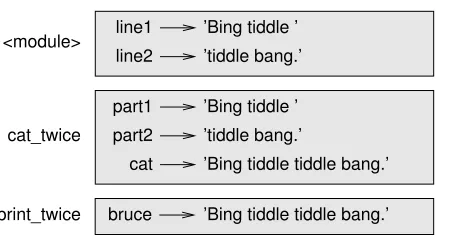
Whencat_twiceterminates, the variablecatis destroyed. If we try to print it, we get an exception:
>>> print cat
3.10. Stack diagrams 25
line1
line2 ’tiddle bang.’ part1
part2 cat bruce
’Bing tiddle ’
’Bing tiddle ’ ’tiddle bang.’
’Bing tiddle tiddle bang.’ ’Bing tiddle tiddle bang.’ <module>
cat_twice
[image:47.612.221.450.81.201.2]print_twice
Figure 3.1: Stack diagram.
Parameters are also local. For example, outside print_twice, there is no such thing as
bruce.
3.10
Stack diagrams
To keep track of whi