JBoss in Action
C
ONFIGURINGTHEJB
OSSA
PPLICATIONS
ERVERJAVID JAMAE
PETER JOHNSON
For online information and ordering of this and other Manning books, please visit www.manning.com. The publisher offers discounts on this book when ordered in quantity. For more information, please contact
Special Sales Department Manning Publications Co.
Sound View Court 3B fax: (609) 877-8256
Greenwich, CT 06830 email: [email protected]
©2009 by Manning Publications Co. All rights reserved.
No part of this publication may be reproduced, stored in a retrieval system, or transmitted, in any form or by means electronic, mechanical, photocopying, or otherwise, without prior written permission of the publisher.
Many of the designations used by manufacturers and sellers to distinguish their products are claimed as trademarks. Where those designations appear in the book, and Manning
Publications was aware of a trademark claim, the designations have been printed in initial caps or all caps.
Recognizing the importance of preserving what has been written, it is Manning’s policy to have the books we publish printed on acid-free paper, and we exert our best efforts to that end. Recognizing also our responsibility to conserve the resources of our planet, Manning books are printed on paper that is at least 15% recycled and processed without the use of elemental chlorine.
Development Editor Nermina Miller Manning Publications Co. Copyeditor: Andrea Kaucher Sound View Court 3B Typesetter: Gordan Salinovic Greenwich, CT 06830 Cover designer: Leslie Haimes
ISBN 978-1-933988-02-3
Printed in the United States of America
v
brief contents
P
ART1 T
HEJB
OSSA
PPLICATIONS
ERVER...1
1
■Vote for JBoss 3
2
■Managing the JBoss Application Server 28
3
■Deploying applications 47
4
■Securing applications 73
P
ART2 A
PPLICATION SERVICES... 107
5
■Configuring JBoss Web Server 109
6
■Securing web applications 135
7
■Configuring enterprise applications 161
8
■JBoss Messaging 201
9
■Configuring Web Services 235
P
ART3 JB
OSSP
ORTAL... 261
B R IEF C O N TEN TS vi
P
ART4 G
OINGTO PRODUCTION... 319
12
■Understanding clustering 321
13
■Clustering JBoss AS services 353
14
■Tuning the JBoss Application Server 374
vii
contents
preface xvii acknowledgments xx about this book xxii
about the cover illustration xxix
P
ART
1 T
HE
JB
OSS
A
PPLICATION
S
ERVER
... 1
1
Vote for JBoss
3
1.1
Introducing JBoss 4
What is JBoss? 4 ■ Exploring the JEMS lineup 6 ■ Why is JBoss AS so popular? 7
1.2
Installing JBoss Application Server 9
Preparing for the installation 10 ■ Installing from the binary distribution 11 ■ Using the JEMS Installer 11
1.3
Exploring the installation 13
The bin directory 13 ■ The client directory 14 ■ The docs directory 15 The lib directory 15 ■ The server directory 15 ■ Understanding server configurations 16 ■ Exploring the configuration structure 17
C O N TEN TS viii
1.4
Starting and stopping the server 20
Starting the server 20 ■ Starting an alternative configuration 21 Verifying that the server is running 22 ■ Stopping the server 23
1.5
Deploying to the server 23
Creating the application 24 ■ Deploying the application 25 Undeploying the application 26
1.6
Summary 27
1.7
References 27
2
Managing the JBoss Application Server
28
2.1
Examining the JBoss Application Server architecture 29
Understanding the microcontainer 29 ■ Understanding JMX 31
2.2
Configuring the application server 33
Configuring logging 34 ■ Configuring directory locations 37 Defining system properties 39
2.3
Exploring the management tools 40
Using the JMX Console 40 ■ Using the twiddle utility 42
2.4
Examining interesting MBeans 43
Viewing system properties 44 ■ Viewing the JNDI namespaces 44 Changing the logging levels 45 ■ Increasing the thread pool size 46 Obtaining application server information 46
2.5
Summary 46
2.6
References 46
3
Deploying applications
47
3.1
Understanding deployment 48
Deploying an application 48 ■ Understanding application packaging 49 Understanding application types 50 ■ Understanding deployment order-ing 52 ■ Deployment configuration options 52
3.2
Understanding class loading 55
Understanding multiple class loaders 55 ■ Scoping classes 56 Understanding loader repositories 57
3.3
Fixing common deployment errors 58
Class not found exception 58 ■ Duplicate JAR files 59 ■ Zip file errors 60 ■ Class cast exception 60
3.4
Deploying miscellaneous applications 61
3.5
Summary 72
3.6
References 72
4
Securing applications
73
4.1
Understanding security 74
Understanding application security 75 ■ Understanding authentica-tion 76 ■ Understanding authorization 77 ■ Configuring security 78 Dynamic login configuration 80 ■ Logging security on the server 81
4.2
Using secure communication 82
Understanding symmetric and asymmetric encryption 82 Understanding certificates and source authentication 84
Creating and signing certificates 85 ■ Modifying the cacerts file 87 Understanding certificate-based client authentication 87
Configuring an SSL-aware security domain 90
4.3
Configuring login modules 91
Using the file-based login module 92 ■ Using the database login module 94 ■ Using the LDAP login module 95 ■ Using the identity login module 102 ■ Stacking login modules 102 ■ Using the client certificate login module 104
4.4
Summary 105
4.5
References 105
P
ART
2 A
PPLICATION
SERVICES
... 107
5
Configuring JBoss Web Server
109
5.1
Understanding web applications 110
Understanding the web application structure 110 ■ Understanding web application configuration 111
5.2
Configuring JBoss Web Server 115
Locating key directories 115 ■ Exploring JBoss Web Server Configura- tion 116 ■ Exploring the WAR deployer configuration file 119
5.3
Configuring URL paths 120
Enabling virtual hosts 121 ■ Configuring context paths 123 Changing the root context path 125
5.4
Configuring connectors 126
C O N TEN TS x
5.5
Configuring web class loading 129
5.6
Using valves 130
5.7
Configuring JavaServer Faces 132
5.8
Summary 133
5.9
References 134
6
Securing web applications
135
6.1
Configuring web security 136
Configuring security in web.xml 137 ■ Configuring security in jboss-web.xml 139 ■ Configuring security in server.xml 139
6.2
Authenticating users 140
Understanding the web authentication strategies 141 ■ Basic authentication 142 ■ Form-based authentication 144 ■ Digest authentication 145
6.3
Authorizing users 146
Configuring authorization 146 ■ Allowing access to any authenticated user 147
6.4
Encrypting web communication 148
Enabling HTTPS 148 ■ Enabling transport guarantees 150 Enabling mutual authentication 152 ■ Creating browser certificates 153
6.5
Enabling client-certificate authentication 154
Enabling protocol-level mutual authentication 155 ■ Setting the authentication method 155 ■ Specifying the JaasSecurityDomain MBean 155 ■ Specifying the security domain 156 ■ Pointing to the security domain from the application 156 ■ Selecting a strategy for forming the principal from the certificate 157 ■ Adding principals and roles to the authorization datastore 157 ■ Adding the client’s certificate to the server’s truststore 158 ■ Creating a browser certificate 158
6.6
Changing the default security domain 159
6.7
Summary 159
6.8
References 160
7
Configuring enterprise applications
161
7.1
Understanding EJBs 162
7.2
Creating an EJB application 167
Coding the example application 168 ■ Packaging and running the example application 171
7.3
Understanding EJB configuration 172
Where does everything go? 172 ■ Configuring EJB applications 173 Configuring the EJB server 176
7.4
Configuring session beans 177
Changing the JNDI binding 177 ■ Looking up a session bean 179 Configuring EJB containers 179
7.5
Configuring entity persistence 182
Injecting Hibernate objects 182 ■ Deploying Hibernate mappings 183
7.6
Creating JMX service objects 184
Creating a service object 184 ■ Running the sample application 186 Accessing MBeans without injection 187
7.7
Configuring the transport protocol 188
Understanding transport configuration 188 ■ Changing the transport 190
7.8
Securing EJBs 191
Securing EJBs via annotations 192 ■ Securing EJBs via configuration 194 Nonintegrated security 195 ■ Securing EJB communication 197
7.9
Summary 199
7.10
References 200
8
JBoss Messaging
201
8.1
Understanding messaging systems 202
Understanding messaging system architectures 202 ■ Understanding the messaging models 203 ■ Understanding the JMS API 204
Understanding the JBoss Messaging architecture 206
8.2
Developing a JMS application 207
Coding the example application 207 ■ Packaging and running the example application 213
8.3
Using message-driven beans 214
Creating an MDB 215 ■ Packaging an MDB 217 ■ Using a descriptor file with an MDB 218
8.4
Using message-driven POJOs 219
Implementing a message-driven POJO consumer 219
C O N TEN TS xii
8.5
Configuring JBoss Messaging 222
Configuring a data source 223 ■ Configuring access control 224 Configuring destinations 227 ■ Updating the application 228 Running the modified example 229 ■ Updating the MDB 230 Configuring secure message transport 230
8.6
Summary 233
8.7
References 234
9
Configuring Web Services
235
9.1
Understanding Web Services 236
Understanding web service terminology 237 ■ Understanding SOAP binding styles 237
9.2
Developing a web service 238
Coding the web service 238 ■ Packaging the web service 239 Manually generating the WSDL 240 ■ Developing a web service using the top-down strategy 241 ■ Developing the client 242
Developing a C# client 244 ■ Revisiting the SOAP binding styles 245
9.3
Exploring JBossWS annotations 246
Understanding the WebContext annotation 246 ■ Understanding the EndpointConfig annotation 248
9.4
Securing a web service 249
Authorizing web service access 249 ■ Defining the security realm 250
9.5
Encrypting SOAP messages 252
Generating the certificate 253 ■ Securing the server using WS-Security 254 ■ Securing the client using WS-Security 256 Signing the messages using WS-Security 258
9.6
Summary 260
9.7
References 260
P
ART
3 JB
OSS
P
ORTAL
... 261
10
The JBoss Portal and portlets
263
10.1
Introducing the JBoss Portal 264
Understanding JSR-168 265 ■ Understanding portal terminology 265 Installing the JBoss Portal 266 ■ Administering the JBoss Portal 268
10.2
Creating a portlet 270
10.3
Creating a portlet instance 283
Creating an instance using the portlet-instance.xml file 283 Creating an instance using the Admin portlet 284
10.4
Declaring a portlet window 284
Declaring a portlet window using the *-object.xml file 284 Declaring a portlet window using the Admin portlet 285
10.5
Summary 288
10.6
References 288
11
Configuring the JBoss Portal
289
11.1
Configuring window appearance 290
Configuring window appearance using *-object.xml 291
11.2
Working with multiple windows and instances 292
Configuring multiple instances and windows using the descriptor files 293
11.3
Working with the CMS portlet 295
Gathering example CMS data 296 ■ Displaying the new content 297 Accessing CMS content 298
11.4
Securing the Portal 299
Creating a new account 299 ■ Managing roles 300 Understanding access control 301
11.5
Developing a custom portal 308
Defining the requirements 308 ■ Making the proposal 308 Defining the portal 309 ■ Customizing the theme 312 Customizing CMS content 315 ■ Packaging the portal 316
11.6
Summary 318
P
ART
4 G
OING
TO
PRODUCTION
... 319
12
Understanding clustering
321
12.1
Understanding clustering 322
Load balancing 322 ■ Cluster topology and makeup 325
Automatic discovery and multicasting 327 ■ High availability 328 Replication and fault tolerance 329 ■ State passivation 332 Distribution versus clustering 333
12.2
Setting up a simple cluster 334
C O N TEN TS xiv
12.3
Understanding JBoss clustering 338
Understanding the JGroups architecture 339 ■ Configuring JBoss clustering services 340 ■ Configuring the protocol stack 343
12.4
Configuring JBoss Cache 346
Examining the JBoss Cache configuration files 347 ■ Deciding what to cache 350
12.5
Summary 351
12.6
References 352
13
Clustering JBoss AS services
353
13.1
HTTP load balancing 354
Load balancing with native web servers 355 ■ Load balancing with hardware 356
13.2
HTTP session replication 356
Configuring replication 356 ■ Understanding session usage 357 Using field-level replication 359 ■ Configuring passivation 360
13.3
Clustering session beans 361
Load balancing session beans 362 ■ Replicating stateful session beans 363
13.4
Clustering entities 364
Replicating the entity cache 364
13.5
Clustering JNDI 367
Understanding the HA-JNDI service 367 ■ Enabling HA-JNDI 369 Accessing HA-JNDI 370 ■ Deciding whether to use HA-JNDI 371
13.6
Summary 372
13.7
References 373
14
Tuning the JBoss Application Server
374
14.1
Defining performance 375
14.2
Performance tuning methodology 376
Holistic performance tuning 376 ■ Performance analysis test cycle 377
14.3
Tuning the hardware and network 379
Setting network card speed 380 ■ Choosing the number of CPUs 381 Choosing 32-bit or 64-bit 381
14.4
Tuning the OS 382
14.5
Tuning the JVM 384
Understanding the Java heap 385 ■ Understanding garbage collection 387 ■ Gathering garbage collection data 389 Choosing heap settings 396 ■ Resolving out of memory exceptions 397 ■ Exploring more tuning options 397
14.6
Tuning JBoss AS 398
Configuring data sources 398 ■ Configuring the HTTP request thread pool 400 ■ Tuning the JSP servlet 401
14.7
Tuning your application 402
Avoiding System.gc 403 ■ Taking a thread dump 403
14.8
Summary 406
14.9
References 407
15
Going to production
408
15.1
Selecting a platform 409
Selecting a JVM 409 ■ Selecting a JBoss AS version 410 ■ Selecting a platform 413
15.2
Collocating multiple application server instances 414
Preventing file clashes 414 ■ Preventing port clashes 415 Shutting down multiple nodes 422
15.3
Removing unwanted services 422
15.4
Securing the server applications 423
Removing the server applications 424 ■ Adding security to the server applications 424 ■ Limiting access to the local machine 424
15.5
Changing the default database 425
Configuring the EJB3 timer service 426
15.6
Starting the application server as a service 427
Registering a service in Windows 428 ■ Registering multiple services 429 ■ Registering a service in Linux 432
15.7
Configuring JSP compilation 434
15.8
Summary 435
15.9
Resources 436
appendix A
JNDI namespaces
437
appendix B
Change is inevitable 442
xvii
preface
As a consultant, I worked at many different software shops, and grew tired of seeing people reimplement the same code over and over again. I knew there had to be a faster and better way to write business applications than reimplementing security frameworks and remoting frameworks for every project. Code reuse was the whole
appeal of OO programming, right?
I started working with WebSphere in 2001—which led me to learn more about the J2EE specification. I was fascinated by the idea that my knowledge of the standard was
portable; I could go to different companies that used J2EE application servers, and
focus on learning and programming business code rather than tinkering with medio-cre, homemade frameworks that would occupy my time and give me little portable knowledge, which is of paramount importance as a consultant.
I wanted to experiment with WebSphere at home but found the lack of project and
code transparency frustrating. I came across JBoss and spent many hours
experiment-ing and learnexperiment-ing about EJBs, JNDI, security, and class loading. Although I’d used open
source frameworks, I had never taken advantage of pouring through the forums and code to learn and discuss the framework. I had taken advantage of the free price of open source, but not the freedom to distribute, examine, improve, and modify the code. I finally started understanding the benefits of this model.
I started working with JBoss on a few projects in 2002 and wrote a couple JB
oss-related articles in 2004. Then, toward the end of 2005, two interesting things hap-pened at around the same time. First, the consulting and training company that I was
take ownership of the partnership and to start teaching JBoss courses. Second, I got a call from an Acquisitions Editor (the person who finds writers for the publisher) at Manning asking if I had any leads on somebody who would be interested in writing a
book. She had run across my JBoss articles and thought I might be a good person to
ask. I thought that writing a book would be as easy as writing a series of technical articles, so I offered to write the book myself. And after a little bit of convincing, I got the job.
At that point, I had to decide what the book would cover and who it would target.
Although I appreciated that the JBoss AS code and documentation was open, having
read through much of the JBoss AS documentation and books, I just wasn’t satisfied
with the style, quality, and expected audience of the material. Most of the documenta-tion seemed overly esoteric and (in my opinion) geared more toward developers of the application server itself, not necessarily toward the users. But I also didn’t want to
write another book on how to develop Java EE applications. Plenty of books and
arti-cles had already done that in an application server–agnostic fashion. I saw little
bene-fit in writing another book on the specification with some bits and pieces of JBoss AS
mixed in. I decided that the book should be geared toward developers and adminis-trators who want to learn how to configure the application server.
After knowing whom the book was geared toward, I had to decide what version of the software to cover. When I started, JBoss AS 4 was widely deployed; but, because
JBoss AS 5 was originally supposed to be released in 2006, I opted to cover JBoss AS 5 so
that the book wouldn’t be outdated as soon as it was published.
Deciding whom the book would be geared toward and what version I wanted to cover was relatively easy. Writing the book was a whole different game! I didn’t appre-ciate the myriad facets of an application server I’d have to understand in order to write a comprehensive book. An application server is like a universe, and few people are masters of more than a few parts of that universe. Although I had a good
under-standing of many parts of JBoss, I quickly realized that I had to learn a lot more.
Another challenge was that I was covering JBoss AS 5, which was actively being
devel-oped. Every time I thought I had something figured out, it changed. I ended up spending an enormous amount of time trying to work around bugs in beta releases and trying to keep up with design discussions on the developers’ forums.
In July of 2006, I realized I was in way over my head. I still thought that the JBoss
AS 5 release was around the corner, so I told Manning that I wanted to bring
some-body in to help me get the book out on time. I called everysome-body I knew and I scoured
through the JBoss forums looking for people. I had a few leads, but I was most
impressed with Peter Johnson. I found him on the forums, answering question after question. He provided detailed explanations, gave plenty of references and back-ground, and used eloquent language.
After talking to Peter, I realized that he had significant experience with JBoss AS. He
works for Unisys, which has been a JBoss Partner since JBoss AS 3.2.3 came out, and was
P R E FA C E xix
of a decent administrative interface to JBoss AS was one of his concerns, which caused
him to lead a team that developed an administration console which was open-sourced
by Unisys and made available for JBoss AS versions 2.2.7 through 4.2.3. He and a few of
his coworkers also worked with the JBoss admin console team on a proposed admin
console that was to come out with JBoss AS 5, but was later dropped in favor of
Embed-ded Jopr.
Unisys, as a good corporate citizen in the open source community—not just taking but also giving back—allowed Peter and his coworkers to participate in various ways,
such as providing patches to improve performance of JBoss AS and PostgreSQL.
Hav-ing been a teacher in a former life, Peter knew that the best way to learn a new topic is to try to explain it to others. He hung out in the forums, seeing what kinds of ques-tions people asked, trying out what he thought were the soluques-tions, and posting answers when he felt he could offer help or insight. By participating in the forums, he could kill two birds with one stone: give back to the open source community and gain
a deeper understanding of JBoss AS.
Peter was excited to join the project, and we seemed to agree on almost every-thing. We shared the same vision for the audience and direction of the book, and he dove right into writing, pushing out chapter after chapter, and providing me with great feedback on what I had already written.
With my background teaching JBoss courses and Peter’s fervent dedication to the
online forums, we had experience fielding many common questions. We decided to
focus the book on the most common things that new and intermediate users of JBoss
AS try to configure. For the most part, each chapter provides you first with
back-ground information and then with specifics on configuring common things for the part of the application server covered by the chapter.
As for JBoss AS 5, the release date kept getting pushed back. This was expected
because the application server underwent several major architectural and
infrastruc-tural changes. As I write this preface in December of 2008, the GA release of JBoss AS 5
has just been released. We’re expecting a final release in January 2009, which should
coincide with the U.S. print version of this book. Peter and I have been working long
and hard on this project, and we hope that you find that it answers most of your basic questions and gives you enough background to figure out the ones that it doesn’t.
xx
acknowledgments
We’ve learned firsthand that it takes a village to publish a book. Although we get the privilege of seeing our names on the front cover, dozens of other people have contrib-uted to putting it all together. We’d like to thank everyone at Manning, especially our publisher, Marjan Bace, and our development editors, Howard Jones, Joyce King, Jackie Carter, and Nermina Miller (we were really hard on our editors, so we went through a lot of them), for their continuous support and help on so many aspects of the manuscript. Thanks also to the others at Manning who worked with us in different stages of the project: Andrea Kaucher, Katie Tennant, Gordan Salinovic, Gabriel Dobrescu, Steven Hong, Leslie Haimes, and Mary Piergies.
Many reviewers read the chapters during various stages of completion and pro-vided valuable feedback and input that helped to make the book what it is today. We would like to thank Anil Saldhana, Tray Scates, David Strong, Scott Dawson, Patrick Dennis, Norman Richards, Andrew C. Oliver, Scott Stirling, John Tyler, Nathan
Slip-pen, Michael Abney, Deepak Vohra, TVS Murthy, Sumit Pal, Bas Vodde, Goldy Lukka,
and Riccardo Audano. We especially want to thank David Strong and Rod Coffin who provided detailed notes on things that needed to be corrected. Rod also did a final pass through the manuscript just before publication, ensuring that the technical con-tent and code were up to date and correct.
Thanks to Vo Blinn, Bongos, Robert Jackson, Alan C, Jan Nielsen, James Hood, Vulinh Nguyen, and many others for picking up the book as part of the Manning Early
Access Program (MEAP), and providing input such as spelling corrections, references
A C K N O W LE D G M E N TS xxi
Javid Jamae
To my wife Elizabeth—I love you, and I couldn’t have done this without you. Words cannot express my gratitude. To my kids Austin, Sina, and Kian—I’m glad I’ll have much more time to spend with you now. Thanks to my parents for all their support. And a big thanks to my in-laws Jack and Pam for helping us out so much over the course of the last several years.
Thanks to all the folks at Manning (especially Andrea and Nermina) for helping form the book into what it is. Thanks to Rod Coffin for his excellent technical review of the book. And last but not least, thanks to Peter for joining me to write this book. It’s been a pleasure working with you.
Peter Johnson
I would like to thank my wife Sandy for her support and understanding over the course of this project. You are my number one cheerleader, and I love you for it. I also want to thank my daughters, Cheryl and Alexa, who provided welcome diversion when I needed to step away from the book.
I also want to thank Tony Sarris, my manager at Unisys, and the rest of the Unisys management team, for supporting me in this effort.
I had several technical reviewers of my chapters that I want to thank. Julien Viet took time off from coding the JBoss Portal to review the portal chapters. Tray Scates and Scott Dawson reviewed and provided technical input for all of the chapters that I wrote. I even want to thank Jim Fontana for reviewing the chapter that did not make it into the book. Those are the breaks, Jim.
xxii
about this book
One of the things you quickly realize when you work with any of the technologies
cov-ered by the Java EE umbrella is that many things are part of the specification, and
some things are left as “implementation details” or left up to the implementer’s
dis-cretion. In practice, this means that any time you learn a Java EE technology, besides
learning the fundamentals about that technology, you also need to learn how to apply or configure the technology in the environment in which you wish to deploy it. If your
deployment environment of choice is the JBoss Application Server, then this book is
for you because it covers those areas that are outside the scope of the specifications. In this book, we cover a wide variety of technologies and show you how to
config-ure those technologies specifically for use in the JBoss Application Server. Naturally,
this can’t be done in a vacuum, so we provide simple examples that illustrate the tech-nology and then walk you through the steps necessary to configure things such as deployment descriptors, access control, and encryption. Our intent isn’t to describe every nuance of any particular technology. For that, we recommend that you read books particular to those technologies (and we provide references at the end of most
chapters). Instead, use this book to learn how to use the technology within the JBoss
Application Server.
A B O U T TH IS B O O K xxiii
resulting packages (JAR, WAR, EAR, and so on). We assume that you can use whatever
tools you’re familiar with to compile and package the applications.
Audience
As programmers at heart, we wrote the book from a programmer’s point of view. Any
programmer that uses the JBoss Application Server in his or her daily routine will
ben-efit from reading this book. But we went beyond mere coding to look at what it takes to get an application configured and into production.
With its focus on configuration topics, this book is also ideal for use by system
administrators who need to configure and deploy applications to the JBoss
Applica-tion Server. Many of the chapter introducApplica-tions guide administrators, pointing out the sections on which they should focus.
Roadmap
This book is divided into four parts. Part 1 covers JBoss Application Server (JBoss AS)
basics. Here’s where you’re introduced to the application server, how it’s configured, and how applications are deployed; you’re also given an overview of security. Part 2
gets into individual Java EE technologies, such as web applications, enterprise
applica-tions, and messaging, and describes their configuration in detail. Part 3 covers the JBoss Portal, describing portal administration and configuration. Finally, Part 4 covers topics that you’ll want to consider when going into production—things such as per-formance tuning, clustering, and a whole checklist of other items.
Chapter 1 gives you a 10,000-foot view of JBoss AS by showing you how to
down-load, install, run, and deploy into it. You’ll learn about the installation structure and where important server configuration files go. We also provide you with some history and an architectural discussion to give you a broader background on the product.
Chapter 2 provides a first look at configuring the application server. The tech-niques you learn here will be useful in the chapters that follow. You’ll learn how the application server is architected and, from there, how you go about configuring it. The chapter continues by describing various configuration topics not covered else-where and concludes with a look at some of the tools you can use to administer the application server.
Chapter 3 discusses deploying applications and contains a discussion of class
load-ers. From the JBoss forums, we’ve gleaned some of the common deployment errors
that crop up and have provided solutions to those issues. We end the chapter describ-ing how to deploy data sources and Hibernate archives.
Chapter 4 introduces you to security in JBoss AS. We start with a general overview
of basic security concepts such as authentication and authorization. We then discuss
how these concepts are implemented in JBoss AS. Finally, we show you how to
config-ure security in JBoss, demonstrating how you can access security data from a database,
LDAP, or other security datastores. After reading this chapter, you should have a
Chapter 5 discusses the JBoss AS web application server, known as JBoss Web Server. First, you’ll learn how to build and deploy web applications. Then, you’ll learn the
basics on how to configure web applications and JBoss Web Server. Finally, we build on
the basic configuration knowledge to show you a number of practical things that you can configure in your web applications.
Chapter 6 merges the discussions in chapter 4 and chapter 5 to show you how to configure security for web applications. We’ll teach you how to use all the standard web authentication models and how to tie them into your own security datastore. We’ll also teach you how to use secure public-key communication to encrypt access to your site.
Chapter 7 talks about EJB applications and the EJB server, the heart of JBoss AS. We
show you how to structure, deploy, and configure EJB applications. Then, we show you
how to configure the application server, enabling you to do things such as change the
communication transport and secure EJB applications.
In chapter 8, you’ll learn about configuring JBoss Messaging, which is the JMS
-com-pliant messaging server bundled with the JBoss Application Server. The chapter starts
off describing JMS and how JBoss Messaging is architected. We present a simple
mes-saging client application and then expand it to include a message-driven EJB and a
message-driven POJO. We use this client to describe messaging configuration topics
such as changing the messaging store to use another database, defining your own des-tinations, providing access control, and encrypting messaging data.
Chapter 9 covers JAX-WS–based web services. After a brief introduction into web
services, we present a simple POJO-based web service and its client. We expand the
example by converting the web service into an EJB, and developing a C# client for the
web service. We use the example to describe various configuration topics such as describing the web service using both annotations and descriptor files, configuring access control, and using WS-Security to both encrypt and sign web service messages.
Chapters 10 and 11 provide an introduction into the JBoss Portal. Chapter 10 starts
with a description of portals in general and the JBoss Portal in particular. We explain
how to install the Portal and set it up to use a database. Then, we provide an example portlet that’s a little more complex that the other examples in this book because we want to highlight various portlet coding techniques. We then use the example to describe how to configure the Portal to include the portlet, using both configuration files and the Management Portlet. In chapter 11, you’ll learn how to use the Content
Management System (CMS) that comes with the JBoss Portal, and how to define access
control for your portal and portlets. The chapter ends with a section that puts every-thing you learn together to create a custom portal.
Chapter 12 introduces clustering in JBoss AS. This chapter talks about the basics of
clustering and shows the location of all the configuration files and how to configure the underlying clustering services. You’ll set up a simple cluster in this chapter and
learn how to configure JGroups and JBoss Cache.
Chapter 13 builds on this background from chapter 12 to show you how to
A B O U T TH IS B O O K xxv
and HTTP session replication, how to cluster session EJBs, how to cluster entities, and
how to configure high-availability JNDI.
In chapter 14, we present ways to assess the performance of your deployed applica-tions and practical steps for improving the performance. We examine performance using a holistic approach, looking at tuning the hardware, operating system, database,
JVM, application server, and your application. We give detailed information on
prop-erly sizing the Java heap, and tips on how to interpret thread dumps to pinpoint per-formance issues within your code.
We end the book in chapter 15 with a checklist of items you’ll want to consider when moving your applications into production. Besides referring you back to prior chapters for topics we’ve already covered (such as clustering and performance tuning), we cover
such topics as selecting the proper platform (operating system, JVM, and application
server), running multiple instances of the application server on a single host, slimming the application server by removing services you don’t need, securing or removing the default applications, replacing the Hypersonic database with a production-worthy data-base, configuring the application server to run as a service so that it will start up
auto-matically when the server is booted, and configuring JSP compilation.
Appendix A discusses JNDI. First, you’ll learn about how to configure the
Environ-ment Naming Context, allowing you to define local names for your resources and
beans. Then, we show you how to explore what’s in JNDI by using the JMX console.
Appendix B covers last-minute changes to JBoss AS that were made too late to be
included in the earlier chapters because they had already gone to the printer. We held off on sending this appendix to the printer for as long as possible to get you all of the
latest JBoss AS developments.
Source code conventions and downloads
The source code for the various examples in this book is available for download from
www.manning.com/JBossinAction. After downloading the zip file, unzip it, and open the index.html file in the base directory using your favorite browser. (We recommend Firefox.) That file provides all the information you need to build, deploy, and experi-ment with the examples. And we provide build scripts!
All source code in listings or in text is in a fixed-widthfontlikethis to separate
it from ordinary text. Occasionally, text or commands that should be all on one line are wrapped to two or more lines. In such cases, the continuation lines begin with a
continuation character (➥,) as in this example:
$JAVA_HOME/bin/java –classpath .:/home/jbia/jars/log4j.jar
➥ org.jbia.example.Client arg1
Pay close attention to the continuation characters when used in an XML file listing.
Often, the service reading the XML won’t trim whitespace characters from the text,
caus-ing the text to be misinterpreted. For example, consider the followcaus-ing example XML:
<some-stuff>
➥ really great stuff
You should type it, as follows:
<some-stuff>really great stuff</some-stuff>
Most example commands are provided in an operating system–neutral fashion rather than showing the command twice, once for Windows and again for Linux. Consider the following generic command:
wsrunclient –classpath target/dist/client.jar org.jbia.ws.Client
Notice two things: First, we provide the script name without any suffixes or prefixes, and we use forward slashes as directory separators in file names. This command would be entered in Windows as
wsrunclient –classpath target\dist\client.jar org.jbia.ws.Client
And in Linux as
./wsrunclient.sh –classpath target/dist/client.jar org.jbia.ws.Client
Unless otherwise specified, all relative paths are within the JBoss Application Server
installation directory. In addition, we use the text xxx to mean any of the configurations
within the server directory. As an example, if you install JBoss AS at c:\jboss-5.0.0.GA,
then the text server/xxx/conf/jboss-service.xml refers to the files c:\jboss-5.0.0.GA\ server\default\conf\jboss-service.xml, c:\jboss-5.0.0.GA\server\all\conf\jboss-service.xml, and to any similarly located jboss-service.xml files in other configurations you might have in the c:\jboss-5.0.0.GA\server directory.
Code annotations accompany many of the listings, highlighting important con-cepts. In some cases, numbered bullets link to explanations that follow the listing.
If you have the PDF version of this book, beware of copying example code from the
PDF file to a command line or text editor. For example, the dash character (-) within
the PDF file is typically not the dash character (ASCII character 0x2D) expected by
soft-ware. You’ve been warned.
On versions of JBoss middleware
Writing a book about a version of the JBoss Application Server that hasn’t reached
general availability (GA) is a calculated risk. When we started this project in the
sum-mer of 2006, 4.0.4 was the latest version with talk of the 5.0 version being released early in 2007. We figured that by the time we got the book done, 5.0 would be out. Well, in the spring of 2007, 4.2.0 came out, and 5.0 was only at beta 2. We put the book on hold until 5.0 beta 3 came out; when beta 4 came out soon after, it had so many
changes that once again we put the book on hold until CR1, and then verified again
on CR2 before starting to send the chapters to the printer.
Although we’ve endeavored to ensure that the configuration settings we provided will be correct for the final release, there are no guarantees. We recommend that you
check the website for the book (www.manning.com/JBossInAction) for any
A B O U T TH IS B O O K xxvii
AS 5.0.0.GA within two or three weeks after it’s released. Check the index.html file in the
source code download for the exact version that it works with.
JBoss Portal is a different story. The chapters on the portal are based on
the 2.6.4.GA release running on JBoss AS 4.2.2, and were later verified with JBoss
AS 4.2.3 and Portal 2.7.0. As of this writing, there’s no clear roadmap of which
ver-sion of the Portal will work with JBoss AS 5.0.0.GA. We will put a notice in the Author
Online forum when this situation changes.
Author Online
Purchase of JBoss in Action includes free access to a private web forum run by Manning
Publications where you can make comments about the book, ask technical questions, and receive help from the authors and from other users. To access the forum and
sub-scribe to it, point your web browser to www.manning.com/JBossinAction. This page
provides information on how to get on the forum once you’re registered, what kind of help is available, and the rules of conduct on the forum.
Manning’s commitment to our readers is to provide a venue where a meaningful dialogue between individual readers and between readers and the authors can take place. It isn’t a commitment to any specific amount of participation on the part of the authors, whose contributions to the book’s forum remain voluntary (and unpaid). We suggest you try asking the authors some challenging questions, lest their interests stray!
The Author Online forum and the archives of previous discussions will be accessi-ble from the publisher’s website as long as the book is in print.
About the authors
Javid (pronounced JAW-veed) Jamae has been a programmer his whole life, starting on
Applesoft BASIC at a young age and dabbling with a myriad different programming
languages before getting paid to write code in Java in the late 90s. Working as a consul-tant, trainer, and software coach for several years, Javid had the opportunity to work on many different projects in many different industries. Javid has also published many Java-related online and print articles over the last several years. Javid lives in Houston with his wife and three kids and is currently plotting ways to start the next multi-billion- dollar software company.
Peter Johnson started his computer career in 1980 supporting a COBOL
account-ing package runnaccount-ing on a Burroughs mini-computer. He started workaccount-ing in Java
in 1998, and was lead designer on projects such as a JDBC driver for the DMSII
data-base that runs on Unisys mainframes. For the past several years, he has been chief architect on a team that analyzes performance of Java applications on large-scale
Intel-based machines (8 to 96 CPUs) and evaluates various open source software for
enterprise readiness. Peter speaks often about Java performance and JBoss
technolo-gies at industry conferences such as the Computer Measurement Group conference,
About the title
By combining introductions, overviews, and how-to examples, the In Action books are
designed to help learning and remembering. According to research in cognitive sci-ence, the things people remember are things they discover during self-motivated exploration.
Although no one at Manning is a cognitive scientist, we are convinced that for learning to become permanent it must pass through stages of exploration, play, and, interestingly, retelling of what is being learned. People understand and remember new things, which is to say they master them, only after actively exploring them.
Humans learn in action. An essential part of an In Action book is that it’s
example-driven. It encourages the reader to try things out, to play with new code, and explore new ideas.
There is another, more mundane, reason for the title of this book: our readers are busy. They use books to do a job or solve a problem. They need books that allow them to jump in and jump out easily and learn just what they want just when they want it.
They need books that aid them in action. The books in this series are designed for
xxix
about the cover illustration
The figure on the cover of JBoss in Action is a “Sword-bearer to the Grand Signior.” The
illustration is taken from a collection of costumes of the Ottoman Empire published on January 1, 1802, by William Miller of Old Bond Street, London. The title page is missing from the collection and we have been unable to track it down to date. The book’s table of contents identifies the figures in both English and French, and each illustration bears the names of two artists who worked on it, both of whom would no doubt be surprised to find their art gracing the front cover of a computer program-ming book...two hundred years later.
The pictures from the Ottoman collection, like the other illustrations that appear on our covers, bring to life the richness and variety of dress customs of two centuries ago. They recall the sense of isolation and distance of that period—and of every other historic period except our own hyperkinetic present.
Dress codes have changed since then and the diversity by region, so rich at the time, has faded away. It is now often hard to tell the inhabitant of one continent from another. Perhaps, trying to view it optimistically, we have traded a cultural and visual diversity for a more varied personal life. Or a more varied and interesting intellectual and technical life.
Part 1
The JBoss Application Server
T
he book is about configuring the JBoss AS and the applications deployed toit. We start the book with a quick introduction into the JBoss Application Server
(JBoss AS). Chapter 1 gets you up and running with a simple web application. It
also describes the directories and files that are part of the JBoss AS distribution.
Those descriptions will come in handy in the following chapters when we look at many of the files and directories in more detail.
Chapters 2 through 4 provide overview information—general things that you’ll need to know as you read the rest of the book. Chapter 2 provides an
over-view of what configuration means within JBoss AS. Chapter 3 covers how to
deploy applications; almost all the other chapters rely on this knowledge as you deploy web application, enterprise application, web services, and even portlets.
Finally, chapter 4 discusses how security works within JBoss AS. Security is also a
topic that we return to time and again in later chapters as we tell you how to
3
Vote for JBoss
In 2005, I (Javid) attended the Houston JBoss User Group meeting to watch a
pre-sentation on the Enterprise Java Beans 3.0 (EJB3) specification. The speaker was
wearing a T-shirt with Vote for JBoss printed across the front. This was a reference to
the movie Napoleon Dynamite, a cult-hit comedy in which the main character,
Napo-leon, a nerdy high-school student, sports a shirt with the words Vote for Pedro printed
on the front to support his friend’s campaign for student-council president. Although the T-shirt was intended as a parody of popular culture, it stimulated me
to think about the words Vote for JBoss more literally.
Voting is part of the democratic process, but the word also has capitalistic
signif-icance. In capitalism, people vote with their wallets; so it’s easy to vote for JBoss
because it has a free, open source license, costing nothing to download, install, and
use. Thousands of programmers vote for JBoss every year. As a reader of this book,
you’re one of those who voted for JBoss and are probably interested in finding out
more about the JBoss products and how to work with them.
This chapter covers
■ Installing JBoss AS
■ Exploring the JBoss Directory Structure
■ Starting and stopping the Server
To open this chapter, we talk about what JBoss is and why it’s so popular. The rest
of the chapter guides you on how to dive in and get started with the JBoss Application
Server (JBoss AS). We discuss how to install, how to start and stop, and how to deploy a
basic application into the server. We also explore the structure of the application server and show you how to configure the server to suit your needs.
1.1
Introducing JBoss
When Java first came out in 1996, many people created their own application infra-structures from scratch, reinventing the wheel for many aspects of their applications.
The Java 2 Enterprise Edition (J2EE) specification—the predecessor to the current
Java EE specification—aimed at creating a standardized application framework for
enterprise applications development.
In 1999, Marc Fleury started a small open source project called JBoss, which
pro-vided an implementation of the Enterprise Java Bean (EJB) portion of the J2EE
specifi-cation. As the project became popular, the developers started selling documentation, consulting services, and training. By 2001, Fleury and company incorporated as the
JBoss Group, LLC, and started offering developer support services in 2002. In this
same timeframe, they made available JBoss AS 3, which emerged to become a
full-fledged J2EE application server that was competitive with proprietary application
serv-ers such as WebSphere and WebLogic.
NOTE The name of the project was originally EJBoss (Enterprise Java Beans
Open Source Software). Sun didn’t like the use of their EJB trademark,
so the E was dropped from the project name, making it JBoss.
The JBoss Group, LLC, became a corporation under the name JBoss, Inc., in 2004.
With the introduction of JBoss AS 4, JBoss, Inc., started offering production support
services for enterprises. JBoss AS 4 has become a popular application server and is still
widely deployed throughout the industry. JBoss, Inc., also expanded its offerings to
more than an application server. Many of the components that ran within JBoss AS
could be run independently outside of JBoss AS, such as JBoss Cache, Hibernate,
jBPM, and JBoss Rules.
Red Hat, Inc., bought JBoss, Inc., in April 2006. The popularity of JBoss AS
contin-ues to rise with the new and innovative features in JBoss AS 5. Although the majority of
this book covers JBoss AS 5, select chapters cover other hot technologies, such as JBoss
Portal, that can run on top of the application server.
So what exactly is JBoss, and why do you need it? Let’s look at what JBoss is and why
it has become so popular in the industry.
1.1.1 What is JBoss?
The word JBoss is used to refer to several things: the division of Red Hat that develops
software products, the trademark used for all the products that the group makes, and
an application server. When people use the term JBoss, they’re usually referring to
5 Introducing JBoss
we use the term JBoss AS to refer to JBoss Application Server version 5 or specify if we
mean otherwise. In order to avoid confusion between the term JBoss, the application
server, and JBoss, the division of Red Hat, we use the term Red Hat to refer to the
com-pany that makes JBoss products.
JBoss AS is a Java Enterprise Edition 5 (Java EE 5)–compliant application server. A
Java application server standardizes the application development architecture. It does
this by defining several component models—standards that developers can use to
develop components. These components can be deployed into an application server
using a standard deployment model. When the components are running in the server,
the server provides a set of services that are made available to the components.
The application component models include standards such as Enterprise
Java-Beans (EJBs), Java Server Pages (JSP), and servlets. Some examples of Java EE services
that are available to these components include remoting, security, transaction man-agement, persistence, messaging, resource pooling, concurrency control, naming and directory services, and deployment.
An application server is a place to run your Java code. What do we mean by this? Without an application server, you’d write your application code and start your appli-cation using a main method. Somewhere in your appliappli-cation you’d need to start all the various services that you might need to access (for example, a database connec-tion pool; a transacconnec-tion manager; clustering services; security services). The left side of figure 1.1 shows an example of the code you’d have to write to start all the services that you reference.
The left side of the figure shows an application with domain code and code that integrates into various frameworks that provide services to the domain code. In this style, you write code to integrate with the various services and, perhaps, the servic- es themselves.
The right side of the figure shows how things work in an application server environ-ment. With an application server, you write your application code using a standard com-ponent model, package it into a standard archive format, and then deploy the archive into the application server, which starts your application and all services that your
application needs to access. Because you’re working within a standardized framework, the services are typically made available to your code transparently. You only have to
pro-vide metadata—in the form of annotations or Extensible Markup Language (XML)—to
hook the services into your components; no code is typically necessary.
Programming with the Java EE standard and using an application server can
drasti-cally reduce the amount of integration code and configuration that you’d otherwise need. In addition, it often prevents you from having to write application services from
scratch. Java EE 5 defines many components and services; a list can be found on the
Sun website, http://java.sun.com/javaee/technologies/.
Besides JBoss AS, Red Hat provides several software products that you can use
either on top of the application server or independently in your own application envi-ronment. Let’s explore this set of products.
1.1.2 Exploring the JEMS lineup
JBoss AS is the core product in Red Hat’s suite of Java middleware products that they
collectively call the JBoss Enterprise Middleware Suite (JEMS). All the other JEMS
products integrate with the JBoss AS, and many of them can also run outside of the
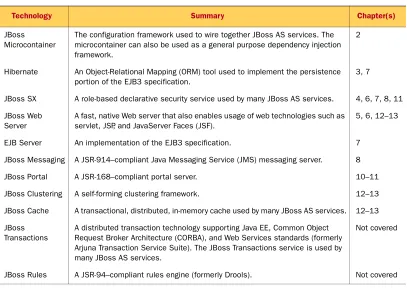
application server in Java SE applications. Table 1.1 summarizes the various JEMS
tech-nologies and tells you where you can learn more about them.
Table 1.1 Technologies in Red Hat’s JEMS
Technology Summary Chapter(s)
JBoss Microcontainer
The configuration framework used to wire together JBoss AS services. The microcontainer can also be used as a general purpose dependency injection framework.
2
Hibernate An Object-Relational Mapping (ORM) tool used to implement the persistence portion of the EJB3 specification.
3, 7
JBoss SX A role-based declarative security service used by many JBoss AS services. 4, 6, 7, 8, 11
JBoss Web Server
A fast, native Web server that also enables usage of web technologies such as servlet, JSP, and JavaServer Faces (JSF).
5, 6, 12–13
EJB Server An implementation of the EJB3 specification. 7
JBoss Messaging A JSR-914–compliant Java Messaging Service (JMS) messaging server. 8
JBoss Portal A JSR-168–compliant portal server. 10–11
JBoss Clustering A self-forming clustering framework. 12–13
JBoss Cache A transactional, distributed, in-memory cache used by many JBoss AS services. 12–13
JBoss Transactions
A distributed transaction technology supporting Java EE, Common Object Request Broker Architecture (CORBA), and Web Services standards (formerly Arjuna Transaction Service Suite). The JBoss Transactions service is used by many JBoss AS services.
Not covered
[image:34.531.59.466.318.606.2]7 Introducing JBoss
Many of these technologies are so involved that they warrant their own books. Unfor-tunately, we can’t cover every technology listed in table 1.1; and those that we do cover can only have one or two chapters dedicated to them. Most of this book focuses on the core application server services and a subset of the most popular products that
build on top of it. While we’re on the topic of popularity, let’s talk about why JBoss AS
is so popular.
1.1.3 Why is JBoss AS so popular?
In addition to license costs, the real cost of adopting a new product is a function of many things, including how long it takes to learn, how easy it is to use, the quality of the product, and the quality of support. Companies pay for training and support, so they can survive those last-minute issues that inevitably arise a week before a critical release. Some people even view a free license as a con when evaluating products because of stereotypes that open source software products are low-quality hacks that ultimately result in high cost and risk for the company. “How could it possibly be good if they’re giving it away for free?” some may ask.
But JBoss AS doesn’t fit this stereotype. More and more companies are choosing
JBoss AS as a production application-server platform, and some research (such as that
from BZ Research) shows that JBoss AS is a market leader in the Java application server
space. Why is JBoss AS so popular?
NOTE Unfortunately, most major market-share research studies have excluded
Red Hat’s JBoss AS because they generate their statistics based on license
sales. Red Hat doesn’t charge per license for JBoss AS, making it difficult
to compare apples to apples. But a few survey-based research studies have
been done that show usage percentages that include JBoss AS. A
Decem-ber 2005 survey by BZ Research concludes that JBoss AS is tied for first
with IBM at about 37% each. BEA and Oracle follow at about 27% each.
(These numbers add up to more than 100% because some companies use more than one brand of application server.)
We argue that it’s not only cost that makes JBoss AS so popular. The success of JBoss
AS is a result of producing a competitive product and being open source. You may
jBPM A full-featured business process management (workflow) engine. Not covered
Red Hat Developer Studio
A set of plug-ins that extends the Eclipse development platform to enable web application development.
Not covered
Seam An application integration framework that can reduce boilerplate code used to write many web applications. This framework is the underpinning of the pro-posed WebBeans Java specification (JSR 299).
Not covered
JBoss AOP An aspect-oriented-programming framework. Not covered Table 1.1 Technologies in Red Hat’s JEMS (continued)
wonder how one Java EE–compliant application server can compete with another. They’re all following the same specification, so how can one be better than another?
The same ways that 802.11-compliant wireless router manufacturers and HDTV
manu-facturers compete: price, features that go above and beyond those defined in the spec-ification, ease of use, time to market, and support.
The Java EE specification standardizes many things, but not everything. JBoss AS
has many easy-to-use features that go above and beyond the Java EE specification. For
example, setting up a JBoss AS cluster requires minimal configuration. JBoss AS is also
good at staying ahead of the curve when new technology specifications come out. For
example, JBoss AS has had support for Java SE 5.0 and EJB3 since 2005, while other
major players dragged their feet for two or more years.
JBoss AS also has the advantage of being an open source software application. What
advantages does Red Hat’s open source model give JBoss AS over other proprietary
application servers? Consider this: A programmer can download JBoss AS, install it,
start it, and deploy an application into it in under 10 minutes, all without worrying
about obtaining a license. Programmers find that it’s easy to experiment with JBoss AS
and learn how to use it. They also love the fact that it’s free. Many have never used
JBoss AS on a production application but have tinkered around with it out of curiosity
or for side projects. They often use JBoss AS to learn how to do Java EE development at
home, even though their work environment may be running on a proprietary applica-tion server.
Programmers are able not only to play around with JBoss AS but also to have a view
into the JBoss AS project’s transparent development process. They can view the
bug-tracking database, read about designs for upcoming features, and look through the developer forums to see what the lead developers of the different product modules are discussing. They can also look through the code to understand it, to debug issues,
or to learn how JBoss AS works. Best of all, they can contribute to the process on
sev-eral different levels. They can report, comment on, and discuss issues with the
devel-opers who are working on them. If there’s a bug in a feature of JBoss AS that they’re
using, they can patch it and submit it for acceptance into a future release. Or, if they’re particularly devoted, they can become regular contributors and take on pro-gramming tasks.
Because of the participatory nature of open source, large communities form around
such popular products. JBoss AS has a large, international community that provides
sup-port through user groups, forums, and wikis. It’s often easier to find this type of free public support for large open source applications than it is for proprietary applications.
Because popular open source products like JBoss AS have a user base that’s significantly
larger and more involved than proprietary competitors, bugs are often found and patched faster in open source applications than in proprietary applications.
JBoss AS isn’t the only open source application server out there. Other open source
application servers include WebSphere Community Edition (CE), Geronimo, and