10
Would You Like
to Choose from
the Menu?
• MenuComponent• MenuContainer • MenuShortcut • MenuItem • Menu
• CheckboxMenuItem • MenuBar
• Putting It All Together • PopupMenu
In Chapter 6, Containers, I mentioned that aFramecan have a menu. Indeed, to offer a menu in the AWT, you have to attach it to aFrame. With versions 1.0.2 and 1.1, Java does not support menu bars within an applet or any other container. We hope that future versions of Java will allow menus to be used with other containers. Java 1.1 goes partway toward solving this problem by introducing aPopupMenuthat lets you attach context menus to anyComponent. Java 1.1 also addsMenuShortcut
events, which represent keyboard accelerator events for menus.
Implementing a menu in aFrameinvolves connections among a number of differ-ent objects:MenuBar,Menu,MenuItem, and the optionalCheckboxMenuItem. Several of these classes implement theMenuContainerinter face. Once you’ve created a few menus, you’ll probably find the process quite natural, but it’s hard to describe until you see what all the objects are. So this chapter describes most of the menu classes first and then shows an example demonstrating their use.
All the components covered in previous chapters were subclasses of Component. Most of the objects in this chapter subclassMenuComponent, which encapsulates the common functionality of menu objects. The MenuComponent class hierarchy is shown in Figure 10-1.
To display aMenu, you must first put it in a MenuBar, which you add to aFrame. (Pop-up menus are different in that they don’t need aFrame.) AMenucan contain
MenuItemas well as other menus that form submenus.CheckboxMenuItemis a
implements extends
INTERFACE
CLASS ABSTRACT CLASS
java.lang
MenuBar
MenuItem Menu
CheckboxMenuItem MenuContainer
MenuComponent
MenuShortcut
PopupMenu
Object
ItemSelectable
java.awt
KEY
java.io
[image:2.612.54.416.73.248.2]Serializable
Figure 10–1: MenuComponent class hierarchy
like a curtain rod. Then you place theMenuBarcurtain rod into theFrame(the win-dow, in our metaphor), curtains and all.
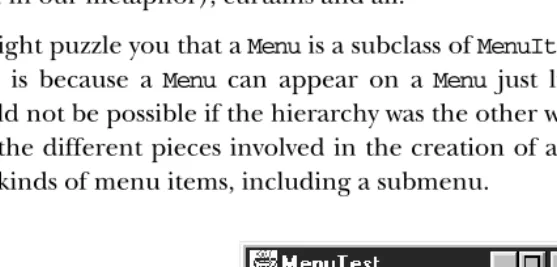
It might puzzle you that aMenuis a subclass ofMenuItem, not the other way around. This is because a Menu can appear on a Menu just like another MenuItem, which would not be possible if the hierarchy was the other way around. Figure 10-2 points out the different pieces involved in the creation of a menu: theMenuBarand vari-ous kinds of menu items, including a submenu.
MenuItem MenuBar
Menu separator
CheckboxMenuItem
[image:2.612.96.374.391.525.2]10.1 MenuComponent
MenuComponent is an abstract class that is the parent of all menu-related objects.
You will never create an instance of the object. Nor are you likely to subclass it yourself — to make the subclass work, you’d have to provide your own peer on ever y platform where you want the application to run.
10.1.1 MenuComponent Methods
Constructor
public MenuComponent ()—cannot be called directly
SinceMenuComponentis an abstract class, you cannot create an instance of the object. This method is called when you create an instance of one of its children.
Fonts
public Font getFont ()
The getFont()method retrieves the font associated with theMenuComponent
from setFont(). If the current object’s font has not been set, the parent
menu’s font is retrieved. If there is no parent and the current object’s font has not been set,getFont()returnsnull.
public void setFont (Font f)
ThesetFont()method allows you to change the font of the particular
menu-related component to f. When a MenuComponent is first created, the initial font isnull, so the parent menu’s font is used.
NOTE Some platforms do not support changing the fonts of menu items. Where supported, it can make some pretty ugly menus.
Names
The name serves as an alternative, nonlocalized reference identifier for menu components. If your event handlers compare menu label strings to an expected value and labels are localized for a new environment, the approach fails.
public String getName ()
The getName() method retrieves the name of the menu component. Every
public void setName (String name)
ThesetName()method changes the current name of the component toname.
Peers
public MenuComponentPeer getPeer ()✩
The getPeer() method returns a reference to theMenuComponentpeer as a
MenuComponentPeer.
public synchronized void removeNotify ()
The removeNotify() method destroys the peer of the MenuComponent and
removes it from the screen.addNotify()will be specific to the subclass.
Events
Event handling is slightly different between versions. If using the 1.0 event model,
usepostEvent(). Other wise, usedispatchEvent()to post an event to this
Menu-Componentor processEvent()to receive and handle an event. Remember not to
mix versions within your programs.
public boolean postEvent (Event e)✩
The postEvent()method posts Event e to the MenuComponent. The event is
delivered to the Frame at the top of the object hierarchy that contains the selected MenuComponent. The only way to capture this event before it gets handed to theFrameis to override this method. There are no helper functions as there are for Components. Find out which MenuComponent triggered the event by checking e.arg, which contains its label, or
((MenuItem)e.tar-get).getName()for the nonlocalized name of the target.
public boolean postEvent (Event e) {
// Use getName() vs. e.arg for localization possibility if ("About".equals (((MenuItem)e.target).getName()))
playLaughingSound(); // Help request return super.postEvent (e);
}
If you override this method, in order for thisEventto propagate to theFrame
that contains the MenuComponent, you must call the original postEvent()
method (super.postEvent(e)).
The actual value returned bypostEvent()is irrelevant.
public final void dispatchEvent(AWTEvent e)★
ThedispatchEvent()method allows you to post new AWT events to this menu
component’s listeners.dispatchEvent()tells theMenuComponentto deal with
to Java 1.0’spostEvent()method. Events delivered in this way bypass the sys-tem’s event queue. It’s not clear why you would want to bypass the event queue, except possibly to deliver some kind of high priority event.
protected void processEvent(AWTEvent e)★
The processEvent() method receives all AWTEvents with a subclass of
Menu-Componentas its target. processEvent() then passes them along for
process-ing. When you subclass a child class, overridingprocessEvent()allows you to process all events without having to provide listeners. However, remember to
call super.processEvent(e) last to ensure regular functionality is still
exe-cuted. This is like overridingpostEvent()using the 1.0 event model.
Miscellaneous methods
public MenuContainer getParent ()
ThegetParent()method returns the parentMenuContainerfor the
MenuCom-ponent.MenuContaineris an interface that is implemented byComponent(in
1.1 only), Frame, Menu, and MenuBar. This means that getParent() could return any one of the four.
protected String paramString ()
TheparamString()method ofMenuComponenthelps build up the string to
dis-play whentoString()is called for a subclass. At theMenuComponentlevel, the current name of the object is appended to the output.
public String toString ()—can be called by user for subclass
ThetoString()method at theMenuComponentlevel cannot be called directly.
ThistoString()method is called when you call a subclass’stoString()and
the specifics of the subclass is added between the brackets ([ and ]). At this level, the results would be:
java.awt.MenuComponent[aname1]
10.2 MenuContainer
MenuContaineris an interface implemented by the three menu containers:Frame,
Menu, andMenuBar; Java 1.1 adds a fourth,Component. You should never need to worr y about the interface since it does all its work behind the scenes for you. You will notice that the interface does not define anadd()method. Each type of
10.2.1 MenuContainer Methods
public abstract Font getFont ()
ThegetFont()method should provide an object’s font.MenuItemimplements
this method, so all of its subclasses inherit it.MenuBarimplements it, too, while
Framegets the method fromComponent.
public abstract boolean postEvent (Event e)✩
The postEvent()method should post Event eto the object. MenuComponent
implements this method, so all of its subclasses inherit it. (Frame gets the method fromComponent.)
public abstract void remove (MenuComponent component)
Theremove()method should remove theMenuComponent componentfrom the
object. If component was not contained within the object, nothing should happen.
10.3 MenuShortcut
MenuShortcut is a class used to represent a keyboard shortcut for a MenuItem.
When these events occur, an action event is generated that triggers the menu com-ponent. When a shortcut is associated with aMenuItem, theMenuItemautomatically displays a visual clue, which indicates that a keyboard accelerator is available.
10.3.1 MenuShortcut Methods
Constructors
public MenuShortcut (int key)★
The firstMenuShortcutconstructor creates aMenuShortcutwithkeyas its des-ignated hot key. Thekeyparameter can be any of the virtual key codes from
theKeyEventclass (e.g.,VK_A,VK_B, etc.). These constants are listed in Table
4-4. To use the shortcut, the user must combine the givenkeywith a platform-specific modifier key. On Windows and Motif platforms, the modifier is the Control key; on the Macintosh, it is the Command key. For example, if the shortcut key is F1 (VK_F1) and you’re using Windows, you would press Ctrl+F1 to execute the shortcut. To find out the platform’s modifier key, call the
Toolkit.getMenuShortcutKeyMask()method.
public MenuShortcut(int key, boolean useShiftModifier)★
ThisMenuShortcut constructor creates a MenuShortcut with keyas its
The keyparameter represents the integer value of aKEY_PRESS event, so in addition to ASCII values, possible values include the variousEventkeyboard constants (listed in Table 4-2) like Event.F1, Event.HOME, and Event.PAUSE. For example, ifkeyis the ASCII value for A anduseShiftModifieristrue, the shortcut key is Shift+Ctrl+A on a Windows/Motif platform.
Miscellaneous methods
public int getKey ()★
ThegetKey()method retrieves the virtual key code for the key that triggered
thisMenuShortcut. The virtual key codes are theVKconstants defined by the
KeyEventclass (see Table 4-4).
public boolean usesShiftModifier()★
TheusesShiftModifier()method returnstrueif thisMenuShortcutrequires
the Shift key be pressed,falseother wise.
public boolean equals(MenuShortcut s)★
Theequals()method overridesObject’sequals()method to define equality
for menu shortcuts. TwoMenuShortcutobjects are equal if theirkeyand
use-ShiftModifiervalues are equal.
protected String paramString ()★
TheparamString()method ofMenuShortcuthelps build up a string
describ-ing the shortcut; it appends the shortcut key and a shift modifier indicator to the string under construction. Oddly, this method is not currently used, nor can you call it;MenuShortcuthas its owntoString()method that does the job itself.
public String toString()★
ThetoString()method ofMenuShortcutbuilds aStringto display the
con-tents of theMenuShortcut.
10.4 MenuItem
A MenuItem is the basic item that goes on a Menu. Menus themselves are menu
items, allowing submenus to be nested inside of menus.MenuItemis a subclass of
10.4.1 MenuItem Methods
Constructors
public MenuItem ()★
The firstMenuItemconstructor creates aMenuItemwith an empty label and no keyboard shortcut. To set the label at later time, usesetLabel().
public MenuItem (String label)
ThisMenuItemconstructor creates aMenuItemwith a label oflabeland no
key-board shortcut. A label of “–” represents a separator.
public MenuItem (String label, MenuShortcut shortcut)★
The finalMenuItemconstructor creates aMenuItemwith a label oflabeland a
MenuShortcut ofshortcut. Pressing the shortcut key is the same as selecting
the menu item.
Menu labels
EachMenuItemhas a label. This is the text that is displayed on the menu.
NOTE Prior to Java 1.1, there was no portable way to associate a hot key with aMenuItem. However, in Java 1.0, if you precede a character with an & on a Windows platform, it will appear underlined, and that key will act as the menu’s mnemonic key (a different type of shortcut fromMenuShortcut). Unfortunately, on a Motif platform, the user will see the &. Because the & is part of the label, even if it is not dis-played, you must include it explicitly whenever you compare the label to a string.
public String getLabel ()
ThegetLabel()method retrieves the label associated with theMenuItem.
public void setLabel (String label)
ThesetLabel()method changes the label of theMenuItemtolabel.
Shortcuts
public MenuShortcut getMenuShortcut ()★
The getMenuShortcut() method retrieves the shortcut associated with this
MenuItem.
public void setShortcut (MenuShortcut shortcut)★
ThesetShortcut()method allows you to change the shortcut associated with
public void deleteMenuShortcut ()★
The deleteMenuShortcut() method removes any associated MenuShortcut
from theMenuItem. If there was no shortcut, nothing happens.
Enabling
public boolean isEnabled ()
TheisEnabled()method checks to see if theMenuItemis currently enabled.
An enabledMenuItemcan be selected by the user. A disabledMenuItem, by con-vention, appears grayed out on theMenu. Initially, eachMenuItemis enabled.
public synchronized void setEnabled(boolean b)★ public void enable (boolean condition)✩
ThesetEnabled() method either enables or disables theMenuItembased on
the value ofcondition. Ifconditionistrue, theMenuItemis enabled. If
con-ditionisfalse, it is disabled. When enabled, the user can select it, generating
ACTION_EVENTor notifying theActionListener. When disabled, the peer does
not generate anACTION_EVENTif the user tries to select theMenuItem. A dis-abledMenuItemis usually grayed out to signify its state. The way that disabling is signified is platform specific.
enable()is the Java 1.0 name for this method.
public synchronized void enable ()✩
The enable() method enables the MenuItem. In Java 1.1, it is better to use
setEnabled().
public synchronized void disable ()✩
Thedisable()method disables the component so that the user cannot select
it. In Java 1.1, it is better to usesetEnabled().
Miscellaneous methods
public synchronized void addNotify ()
TheaddNotify()method creates theMenuItempeer.
public String paramString ()
The paramString() method of MenuItem should be protected like other
paramString()methods. However, it is public so you have access to it. When
you call the toString() method of a MenuItem, the default toString()
method of MenuComponent is called. This in turn callsparamString() which builds up the string to display. At theMenuItemlevel, the current label of the object and the shortcut (if present) is appended to the output. If the construc-tor for the MenuItem was new MenuItem("File"), the results of toString()
java.awt.MenuItem[label=File]
10.4.2 MenuItem Events
Event handling
With 1.0 event handing, aMenuItemgenerates anACTION_EVENTwhen it is selected. The argument toaction()will be the label of theMenuItem. But the target of the
ACTION_EVENT is the Framecontaining the menu. You cannot subclass MenuItem
and catch the Eventwithin it with action(), but you can with postEvent(). No other events are generated forMenuIteminstances.
public boolean action (Event e, Object o)—overridden by user, called by system
Theaction()method for aMenuItemsignifies that the user selected it.eis the
Eventinstance for the specific event, whileois the label of theMenuItem.
Listeners and 1.1 event handling
With the 1.1 event model, you register listeners, and they are told when the event happens.
public String getActionCommand()★
ThegetActionCommand()method retrieves the command associated with this
MenuItem. By default, it is the label. However, the default can be changed by
using thesetActionCommand()method (described next). The command acts like the second parameter to theaction()method in the 1.0 event model.
public void setActionCommand(String command)★
The setActionCommand() method changes the command associated with a
MenuItem. When anActionEventhappens, thecommandis part of the event. By
default, this would be the label of theMenuItem. However, you can change the action command by calling this method. Using action commands is a good idea, particularly if you expect your code to run in a multilingual environ-ment.
public void addActionListener(ItemListener listener)★
TheaddActionListener()method registers listeneras an object interested
in being notified when an ActionEventpasses through theEventQueue with
thisMenuItemas its target. Thelistener.actionPerformed()method is called
whenever these events occur. Multiple listeners can be registered.
public void removeActionListener(ItemListener listener)★
TheremoveActionListener() method removeslisteneras an interested
protected final void enableEvents(long eventsToEnable)★
Using theenableEvents()method is usually not necessary. When you register an action listener, theMenuItemlistens for action events. However, if you wish to listen for events when listeners are not registered, you must enable the events explicitly by calling this method. The settings for theeventsToEnable
parameter are found in theAWTEventclass; you can use any of theEVENT_MASK
constants like COMPONENT_EVENT_MASK, MOUSE_EVENT_MASK, and
WIN-DOW_EVENT_MASKORed together for the events you care about. For instance, to
listen for action events, call:
enableEvents (AWTEvent.ACTION_EVENT_MASK);
protected final void disableEvents(long eventsToDisable)★
Using the disableEvents() method is usually not necessary. When you remove an action listener, the MenuItem stops listening for action events if there are no more listeners. However, if you need to, you can disable events explicitly by callingdisableEvents(). The settings for theeventsToDisable
parameter are found in theAWTEventclass; you can use any of theEVENT_MASK
constants such as FOCUS_EVENT_MASK, MOUSE_MOTION_EVENT_MASK, and
ACTION_EVENT_MASKORed together for the events you no longer care about.
protected void processEvent(AWTEvent e)★
The processEvent() method receives allAWTEvents with this MenuItem as its
target.processEvent()then passes them along to any listeners for processing. When you subclassMenuItem, overridingprocessEvent()allows you to process all events yourself, before sending them to any listeners. In a way, overriding
processEvent()is like overridingpostEvent()using the 1.0 event model.
If you overrideprocessEvent(), remember to callsuper.processEvent(e)last to ensure that regular event processing can occur. If you want to process your own events, it’s a good idea to callenableEvents() to ensure that events are delivered even in the absence of registered listeners.
protected void processActionEvent(ItemEvent e)★
TheprocessActionEvent()method receives allActionEvents with this
Menu-Itemas its target. processActionEvent()then passes them along to any listen-ers for processing. When you subclass MenuItem, overriding
processAction-Event()allows you to process all action events yourself, before sending them
to any listeners. In a way, overridingprocessActionEvent()is like overriding
action() using the 1.0 event model.
If you override processActionEvent(), remember to call the method
super.processActionEvent(e) last to ensure that regular event processing
can occur. If you want to process your own events, it’s a good idea to call
enableEvents()to ensure that events are delivered even in the absence of
10.5 Menu
Menus are the pull-down objects that appear on theMenuBarof aFrameor within other menus. They containMenuItems orCheckboxMenuItems for the user to select. The Menuclass subclassesMenuItem (so it can appear on aMenu, too) and imple-mentsMenuContainer. Tear-off menus are menus that can be dragged, placed else-where on the screen, and remain on the screen when the input focus moves to something else. Java supports tear-off menus if the underlying platform does. Motif (UNIX) supports tear-off menus; Microsoft Windows platforms do not.
10.5.1 Menu Methods
Constructors
public Menu ()★
The first constructor forMenucreates a menu that has no label and cannot be torn off. To set the label at a later time, usesetLabel().
public Menu (String label)
This constructor forMenucreates aMenuwithlabeldisplayed on it. TheMenu
cannot be torn off.
public Menu (String label, boolean tearOff)
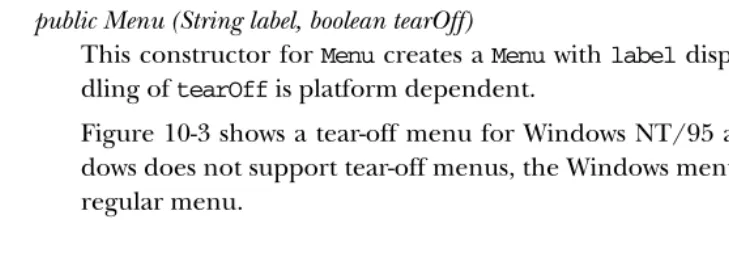
This constructor forMenucreates aMenuwithlabeldisplayed on it. The han-dling oftearOffis platform dependent.
Figure 10-3 shows a tear-off menu for Windows NT/95 and Motif. Since Win-dows does not support tear-off menus, the WinWin-dows menu looks and acts like a regular menu.
[image:12.612.54.419.417.543.2]Windows Motif Tear-off
Items
public int getItemCount()★ public int countItems ()✩
The getItemCount() method returns the number of items within the Menu.
Only top-level items are counted: if an item is a submenu, this method doesn’t include the items on it.
countItems()is the Java 1.0 name for this method.
public MenuItem getItem (int index)
The getItem() method returns the MenuItem at position index. If index is
invalid, getItem() throws the ArrayIndexOutOfBoundsException run-time exception.
public synchronized MenuItem add (MenuItem item)
Theadd()method putsitemon the menu. The label assigned toitemwhen it
was created is displayed on the menu. Ifitemis already in another menu, it is removed from that menu. Ifitemis aMenu, it creates a submenu. (Remember thatMenusubclassesMenuItem.)
public void add (String label)
This version ofadd()creates aMenuItemwithlabelas the text and adds that to the menu. Iflabelis theString“-”, a separator bar is added to theMenu.
public synchronized void insert(MenuItem item, int index)★
The insert() method putsitem on the menu at position index. The label
assigned toitemwhen it was created is displayed on the menu. Positions are zero based, and ifindex< 0,insert()throws theIllegalArgumentException
run-time exception.
public synchronized void insert(String label, int index)★
This version ofinsert()method creates aMenuItemwithlabelas the text and adds that to the menu at positionindex. Iflabelis the String “-”, a separator bar is added to the Menu. Positions are zero based, and if index < 0, this method throws theIllegalArgumentExceptionrun-time exception.
public void addSeparator ()
The addSeparator() method creates a separator MenuItem and adds that to
the menu. Separator menu items are strictly cosmetic and do not generate events when selected.
public void insertSeparator(int index)★
TheinsertSeparator()method creates a separatorMenuItemand adds that to
the menu at positionindex. Separator menu items are strictly cosmetic and do not generate events when selected. Positions are zero based. Ifindex< 0,
insertSeparator() throws the IllegalArgumentException run-time
public synchronized void remove (int index)
Theremove()method removes theMenuItemat positionindexfrom theMenu.
If index is invalid, remove() throws the ArrayIndexOutOfBoundsException
run-time exception. indexis zero based, so it can range from 0 to
getItem-Count()-1.
public synchronized void remove (MenuComponent component)
This version ofremove()removes the menu itemcomponentfrom theMenu. If component is not in theMenu, nothing happens.
public synchronized void removeAll()
TheremoveAll()removes allMenuItemsfrom theMenu.
Peers
public synchronized void addNotify ()
TheaddNotify()method creates theMenupeer with all theMenuItemson it.
public synchronized void removeNotify ()
The removeNotify() method destroys the peer of the MenuComponent and
removes it from the screen. The peers of the items on the menu are also destroyed.
Miscellaneous methods
public boolean isTearOff ()
The isTearOff() method returns true if this Menu is a tear-off menu, and
falseother wise. Once a menu is created, there is no way to change the
tear-off setting. This method can returntrueeven on platforms that do not sup-port tear-off menus.
public String paramString ()★
The paramString()method of Menu should be protected like other
param-String() methods. However, it is public so you have access to it. When you
call the toString() method of a Menu, the default toString() method of
MenuComponentis called. This in turn callsparamString(), which builds up the
string to display. At theMenulevel, the setting forTearOff(from constructor) and whether or not it is the help menu (fromMenuBar.setHelpMenu()) for the menu bar are added. If the constructor for theMenuwasnew Menu ("File"), the results oftoString()would be:
10.5.2 Menu Events
AMenudoes not generate any event when it is selected. An event is generated when
aMenuItemon the menu is selected, as long as it is not anotherMenu. You can
cap-ture all the events that happen on aMenuby overridingpostEvent().
10.6 CheckboxMenuItem
TheCheckboxMenuItemis a subclass ofMenuItemthat can be toggled. It is similar to
aCheckbox but appears on aMenu. The appearance depends upon the platform.
There may or may not be a visual indicator next to the choice. However, when the
MenuItemis selected (true), a checkmark or some similar graphic will be displayed
next to the label.
There is no way to put CheckboxMenuItem components into a CheckboxGroupto form a radio menu group.
An example of a CheckboxMenuItem is the Show Java Console menu item in Netscape Navigator.
10.6.1 CheckboxMenuItem Methods
Constructors
public CheckboxMenuItem (String label)
The firstCheckboxMenuItem constructor creates a CheckboxMenuItemwith no label displayed next to the check toggle. The initial value of the
Checkbox-MenuItemisfalse. To set the label at a later time, usesetLabel().
public CheckboxMenuItem (String label)
The next CheckboxMenuItem constructor creates a CheckboxMenuItem with
labeldisplayed next to the check toggle. The initial value of the
Checkbox-MenuItemisfalse.
public CheckboxMenuItem (String label, boolean state)
The final CheckboxMenuItem constructor creates a CheckboxMenuItem with
labeldisplayed next to the check toggle. The initial value of the
Checkbox-MenuItemisstate.
Selection
public boolean getState ()
public void setState (boolean condition)
ThesetState()method changes the current state of theCheckboxMenuItemto
condition. Whentrue, theCheckboxMenuItemwill have the toggle checked.
public Object[] getSelectedObjects ()★
The getSelectedItems() method returns the currently selected item as an
Objectarray. This method, which is required by theItemSelectableinter face,
allows you to use the same methods to retrieve the selected items of any
Checkbox,Choice, orList. The array has at most one element, which contains
the label of the selected item; if no item is selected, getSelectedItems()
returnsnull.
Miscellaneous methods
public synchronized void addNotify ()
TheaddNotify()method creates theCheckboxMenuItempeer.
public String paramString ()
The paramString() method of CheckboxMenuItem should be protected like
otherparamString()methods. However, it is public, so you have access to it. When you call the toString() method of a CheckboxMenuItem, the default
toString() method of MenuComponent is called. This in turn calls
param-String()which builds up the string to display. At theCheckboxMenuItemlevel,
the current state of the object is appended to the output. If the constructor for
theCheckboxMenuItem wasnew CheckboxMenuItem("File") the results would
be:
java.awt.CheckboxMenuItem[label=File,state=false]
10.6.2 CheckboxMenuItem Events
Event handling
ACheckboxMenuItemgenerates anACTION_EVENTwhen it is selected. The argument
to action() is the label of the CheckboxMenuItem, like the method provided by
MenuItem, not the state of theCheckboxMenuItemas used inCheckbox. The target of
the ACTION_EVENT is the Frame containing the menu. You cannot subclass
CheckboxMenuItem and handle theEventwithin the subclass unless you override
postEvent().
Listeners and 1.1 event handling
public void addItemListener(ItemListener listener)★
TheaddItemListener()method registerslistener as an object that is
inter-ested in being notified when an ItemEvent passes through the EventQueue
with this CheckboxMenuItem as its target. When these item events occur, the
listener.itemStateChanged()method is called. Multiple listeners can be
reg-istered.
public void removeItemListener(ItemListener listener)★
TheremoveItemListener()method removeslisteneras a interested listener.
Iflisteneris not registered, nothing happens.
protected void processEvent(AWTEvent e)★
The processEvent() method receives every AWTEvent with this
Checkbox-MenuItemas its target.processEvent()then passes it along to any listeners for
processing. When you subclassCheckboxMenuItem, overridingprocessEvent()
allows you to process all events yourself, before sending them to any listeners. In a way, overridingprocessEvent()is like overridingpostEvent()using the 1.0 event model.
If you overrideprocessEvent(), remember to callsuper.processEvent(e)last to ensure that regular event processing can occur. If you want to process your own events, it’s a good idea to callenableEvents() to ensure that events are delivered, even in the absence of registered listeners.
protected void processItemEvent(ItemEvent e)★
The processItemEvent() method receives every ItemEvent with this
CheckboxMenuItem as its target. processItemEvent() then passes it along to
any listeners for processing. When you subclassCheckboxMenuItem, overriding
processItemEvent() allows you to process all item events yourself, before
sending them to any listeners. In a way, overridingprocessItemEvent()is like overridingaction() using the 1.0 event model.
If you override processItemEvent(), remember to call the method
super.processItemEvent(e) last to ensure that regular event processing can
occur. If you want to process your own events, it’s a good idea to call
enableEvents()to ensure that events are delivered even in the absence of
reg-istered listeners.
10.7 MenuBar
TheMenuBaris the component you add to the Framethat is displayed on the top
line of the Frame; the MenuBar contains menus. A Frame can display only one
MenuBarat a time. However, you can change theMenuBarbased on the state of the
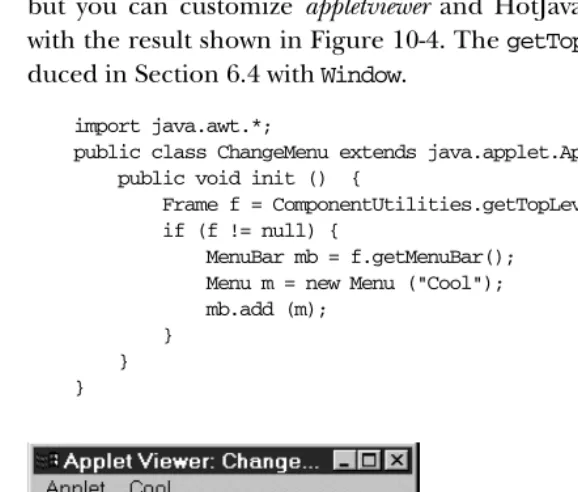
AMenuBarcan be used only as a child component of aFrame. An applet cannot have aMenuBarattached to it, unless you implement the whole thing yourself. Nor-mally, you cannot modify theMenuBarof the applet holder (the browser), unless it is Java based. In other words, you cannot affect the menus of Netscape Navigator, but you can customize appletviewer and HotJava, as shown in the following code with the result shown in Figure 10-4. ThegetTopLevelParent()method was intro-duced in Section 6.4 withWindow.
import java.awt.*;
public class ChangeMenu extends java.applet.Applet { public void init () {
Frame f = ComponentUtilities.getTopLevelParent(this); if (f != null) {
MenuBar mb = f.getMenuBar(); Menu m = new Menu ("Cool"); mb.add (m);
[image:18.612.57.346.161.407.2]} } }
Figure 10–4: Customizing appletviewer’s MenuBar
NOTE When you add aMenuBarto aFrame, it takes up space that is part of the drawing area. You need to get the top insets to find out how much space is occupied by theMenuBarand be careful not to draw under it. If you do, theMenuBarwill cover what you draw.
10.7.1 MenuBar Methods
Constructors
public MenuBar()
The MenuBar constructor creates an empty MenuBar. To add menus to the
Menus
public int getMenuCount ()★ public int countMenus ()✩
The getMenuCount() method returns the number of top-level menus within
theMenuBar.
countMenus()is the Java 1.0 name for this method.
public Menu getMenu (int index)
ThegetMenu()method returns theMenuat positionindex. Ifindexis invalid,
getMenu()throws the run-time exceptionArrayIndexOutOfBoundsException.
public synchronized Menu add (Menu m)
Theadd()method puts choicemon theMenuBar. The label used to createmis
displayed on the MenuBar. If mis already in another MenuBar, it is removed from it. The order of items added determines the order displayed on the
MenuBar, with one exception: if a menu is designated as a help menu by
setHelpMenu(), it is placed at the right end of the menu bar. Only aMenucan
be added to aMenuBar; you can’t add aMenuItem. In other words, aMenuItem
has to lie under at least one menu.
public synchronized void remove (int index)
Theremove()method removes theMenuat positionindexfrom theMenuBar. If
indexis invalid, remove()throws the ArrayIndexOutOfBoundsException
run-time exception. indexis zero based.
public synchronized void remove (MenuComponent component)
This version ofremove() removes the menucomponentfrom the MenuBar. If
componentis not in MenuBar, nothing happens. The system calls this method
when you add a newMenuto make sure it does not exist on anotherMenuBar.
Shortcuts
public MenuItem getShortcutMenuItem (MenuShortcut shortcut)★
The getShortcutMenuItem() method retrieves the MenuItem associated with
theMenuShortcut shortcut. IfMenuShortcutdoes not exist for thisMenu, the
method returnsnull.getShortcutMenuItem()walks through the all submenus recursively to try to findshortcut.
public synchronized Enumeration shortcuts()★
The shortcuts() method retrieves an Enumeration of all the MenuShortcut
public void deleteShortcut (MenuShortcut shortcut)★
The deleteShortcut() method removes MenuShortcut from the associated
MenuItemin theMenuBar. If the shortcut is not associated with any menu item,
nothing happens.
Help menus
It is the convention on many platforms to display help menus as the last menu on
theMenuBar. TheMenuBarclass lets you designate one of the menus as this special
menu. The physical position of a help menu depends on the platform, but those giving special treatment to help menus place them on the right. AMenudesignated as a help menu doesn’t have to bear the label “Help”; the label is up to you.
public Menu getHelpMenu ()
ThegetHelpMenu()method returns theMenuthat has been designated as the
help menu withsetHelpMenu(). If the menu bar doesn’t have a help menu,
getHelpMenu()returnsnull.
public synchronized void setHelpMenu (Menu m)
ThesetHelpMenu()method sets the menu bar’s help menu tom. This makesm
the rightmost menu on theMenuBar, possibly right justified. Ifmis not already on theMenuBar, nothing happens.
Peers
public synchronized void addNotify ()
TheaddNotify()method creates theMenuBarpeer with all the menus on it,
and in turn their menu items.
public synchronized void removeNotify ()
TheremoveNotify()method destroys the peer of theMenuBarand removes it
from the screen. The peers of the items on theMenuBarare also destroyed.
10.7.2 MenuBar Events
AMenuBardoes not generate any events.
10.8 Putting It All Together
Now that you know about all the different menu classes, it is time to show an exam-ple. Example 10-1 contains the code to put up a functionalMenuBarattached to a
Frame, using the 1.0 event model. Figure 10-2 (earlier in the chapter) displays the
resulting screen. The key parts to examine are how the menus are put together in
implement one real action in the example: the one that terminates the application when the user chooses Quit. Any other action just displays the label of the item and (if it was aCheckBoxMenuItem) the item’s state, to give you an idea of how you can use the information returned in the event.
Example 10–1: MenuTest 1.0 Source Code
import java.awt.*;
public class MenuTest extends Frame { MenuTest () {
super ("MenuTest"); MenuItem mi;
Menu file = new Menu ("File", true); file.add ("Open");
file.add (mi = new MenuItem ("Close")); mi.disable();
Menu extras = new Menu ("Extras", false); extras.add (new CheckboxMenuItem ("What")); extras.add ("Yo");
extras.add ("Yo"); file.add (extras); file.addSeparator(); file.add ("Quit");
Menu help = new Menu("Help"); help.add ("About");
MenuBar mb = new MenuBar(); mb.add (file);
mb.add (help); mb.setHelpMenu (help); setMenuBar (mb); resize (200, 200); }
public boolean handleEvent (Event e) { if (e.id == Event.WINDOW_DESTROY) {
System.exit(0); }
return super.handleEvent (e); }
public boolean action (Event e, Object o) { if (e.target instanceof MenuItem) {
if ("Quit".equals (o)) { dispose();
System.exit(1); } else {
System.out.println ("User selected " + o); if (e.target instanceof CheckboxMenuItem) {
CheckboxMenuItem cb = (CheckboxMenuItem)e.target; System.out.println ("The value is: " + cb.getState()); }
}
return true; }
Example 10–1: MenuTest 1.0 Source Code (continued)
}
public static void main (String []args) { MenuTest f = new MenuTest (); f.show();
} }
The MenuTest constructor builds all the menus, creates a menu bar, adds the
menus to the menu bar, and adds the menu bar to theFrame. To show what is pos-sible, I’ve included a submenu, a separator bar, a disabled item, and a help menu.
The handleEvent()method exists to take care of WINDOW_DESTROYevents, which
are generated if the user uses a native command to exit from the window.
The action() method does the work; it received the action events generated
whenever the user selects a menu. We ignore most of them, but a real application would need to do more work figuring out the user’s selection. As it is,action()is fairly simple. If the user selected a menu item, we check to see whether the item’s label was “Quit”; if it was, we exit. If the user selected anything else, we print the selection and returntrueto indicate that we handled the event.
10.8.1 Using Java 1.1 Events
Example 10-2 uses the Java 1.1 event model but is otherwise very similar to Exam-ple 10-1. Take a close look at the differences and similarities. Although the code that builds the GUI is basically the same in both examples, the event handling is completely different. The helper class MyMenuItem is necessary to simplify event handling. In Java 1.1, every menu item can be an event source, so you have to reg-ister a listener for each item. Rather than callingaddActionListener()explicitly for each item, we create a subclass ofMenuItemthat registers a listener automati-cally. The listener is specified in the constructor toMyMenuItem; in this example, the object that creates the menus (MenuTest12) always registers itself as the lis-tener. An alternative would be to overrideprocessActionEvent() inMyMenuItem, but then we’d also need to write a subclass forCheckboxMenuItem.
Having said all that, the code is relatively simple.MenuTest12implements
Action-Listenerso it can receive action events from the menus. As I noted previously, it
registers itself as the listener for every menu item when it builds the interface. The
actionPerformed()method is called whenever the user selects a menu item; the
logic of this method is virtually the same as it was in Example 10-1. Notice, though, that we usegetActionCommand() to read the label of the menu item. (Note also
command associated with the menu item by callingsetActionCommand().) Simi-larly, we call the event’sgetSource()method to get the menu item that actually generated the event; we need this to figure out whether the user selected a
CheckboxMenuItem(which implementsItemSelectable).
We overrideprocessWindowEvent()so that we can receiveWINDOW_CLOSINGevents without registering a listener. Window closings occur when the user uses the native display manager to close the application. If one of these events arrives, we shut down cleanly. To make sure that we receive window events even if there are no lis-teners, theMenuTest12constructor callsenableEvents(WINDOW_EVENT_MASK).
Example 10–2: MenuTest12 Source Code, Using Java 1.1 Event Handling
// Java 1.1 only import java.awt.*; import java.awt.event.*;
public class MenuTest12 extends Frame implements ActionListener { class MyMenuItem extends MenuItem {
public MyMenuItem (String s, ActionListener al) { super (s);
addActionListener (al); }
}
public MenuTest12 () { super ("MenuTest"); MenuItem mi;
Menu file = new Menu ("File", true); file.add (new MyMenuItem ("Open", this)); mi = file.add (new MyMenuItem ("Close", this)); mi.setEnabled (false);
Menu extras = new Menu ("Extras", false); mi = extras.add (new CheckboxMenuItem ("What")); mi.addActionListener(this);
mi = extras.add (new MyMenuItem ("Yo", this)); mi.setActionCommand ("Yo1");
mi = extras.add (new MyMenuItem ("Yo", this)); mi.setActionCommand ("Yo2");
file.add (extras); file.addSeparator();
file.add (new MyMenuItem ("Quit", this)); Menu help = new Menu("Help");
help.add (new MyMenuItem ("About", this)); MenuBar mb = new MenuBar();
mb.add (file); mb.add (help); mb.setHelpMenu (help); setMenuBar (mb); setSize (200, 200);
enableEvents (AWTEvent.WINDOW_EVENT_MASK); }
Example 10–2: MenuTest12 Source Code, Using Java 1.1 Event Handling (continued)
public void actionPerformed(ActionEvent e) { if (e.getActionCommand().equals("Quit")) {
System.exit(0); }
System.out.println ("User selected " + e.getActionCommand()); if (e.getSource() instanceof ItemSelectable) {
ItemSelectable is = (ItemSelectable)e.getSource(); System.out.println ("The value is: " +
(is.getSelectedObjects().length != 0))); }
}
protected void processWindowEvent(WindowEvent e) { if (e.getID() == WindowEvent.WINDOW_CLOSING) {
// Notify others we are closing super.processWindowEvent(e); System.exit(0);
} else {
super.processWindowEvent(e); }
}
public static void main (String []args) { MenuTest12 f = new MenuTest12 (); f.show();
} }
I took the opportunity when writing the 1.1 code to make one additional improve-ment to the program. By using action commands, you can easily differentiate between the two Yo menu items. Just callsetActionCommand()to assign a different command to each item. (I used “Yo1” and “Yo2”.) You could also differentiate between the items by saving a reference to each menu item, callinggetSource()in the event handler, and comparing the result to the saved references. However, if
the ActionListener is another class, it would need access to those references.
Using action commands is simpler and results in a cleaner event handler.
The intent of thesetActionCommand()andgetActionCommand()methods is more for internationalization support. For example, you could usesetActionCommand()
to associate the command Quit with a menu item, then set the item’s label to the appropriate text for the user’s locality.
10.9 PopupMenu
ThePopupMenuclass is new to Java 1.1; it allows you to associate context-sensitive
In principle, any GUI object can have a pop-up menu. In practice, there are a few exceptions. If the component’s peer has its own pop-up menu (i.e., a pop-up menu provided by the run-time platform), that pop-up menu effectively overrides the pop-up menu provided by Java. For example, under Windows NT/95, aTextArea
has a pop-up menu provided by the Windows NT/95 platforms. Java can’t override this menu; although you can add a pop-up menu to aTextArea, you can’t display that menu under Windows NT/95 with the usual mouse sequence.
10.9.1 PopupMenu Methods
Constructors
public PopupMenu()★
The firstPopupMenuconstructor creates an untitledPopupMenu. Once created, the menu can be populated with menu items like any other menu.
public PopupMenu(String label)★
This constructor creates a PopupMenuwith a title oflabel. The title appears only on platforms that support titles for context menus. Once created, the menu can be populated with menu items like any other menu.
Miscellaneous methods
public void show(Component origin, int x, int y)★
Call theshow()method to display thePopupMenu.xandyspecify the location at which the pop-up menu should appear; origin specifies the Component
whose coordinate system is used to locatexandy. In most cases, you’ll want the menu to appear at the point where the user clicked the mouse; to do this,
setoriginto theComponentthat received the mouse event, and setxandyto
the location of the mouse click. It is easy to extract this information from an old-style (1.0)Eventor a Java 1.1MouseEvent. In Java 1.1, the platform-inde-pendent way to say “give me the mouse events that are supposed to trigger pop-up menus” is to call MouseEvent.isPopupTrigger(). If this method returnstrue, you should show the pop-up menu if one is associated with the event source. (Note that the mouse event could also be used for some other purpose.)
If thePopupMenu is not associated with aComponent, show() throws the run-time exceptionNullPointerException. Iforiginis not theMenuContainerfor
thePopupMenuandoriginis not within theContainerthat the pop-up menu
belongs to,show()throws the run-time exceptionIllegalArgumentException. Finally, if theContainer of origin does not exist or is not showing,show()
public synchronized void addNotify ()★
The addNotify()method creates the PopupMenupeer with all theMenuItems
on it.
Example 10-3 is a simple applet that raises a pop-up menu if the user clicks the appropriate mouse button anywhere within the applet. Although the program could use the 1.0 event model, under the 1.0 model, it is impossible to tell which mouse event is appropriate to display the pop-up menu.
Example 10–3: Using a PopupMenu
// Java 1.1 only import java.awt.*; import java.applet.*; import java.awt.event.*;
public class PopupTest extends Applet implements ActionListener { PopupMenu popup;
public void init() { MenuItem mi;
popup = new PopupMenu("Title Goes Here"); popup.add(mi = new MenuItem ("Undo")); mi.addActionListener (this);
popup.addSeparator();
popup.add(mi = new MenuItem("Cut")).setEnabled(false); mi.addActionListener (this);
popup.add(mi = new MenuItem("Copy")).setEnabled(false); mi.addActionListener (this);
popup.add(mi = new MenuItem ("Paste")); mi.addActionListener (this);
popup.add(mi = new MenuItem("Delete")).setEnabled(false); mi.addActionListener (this);
popup.addSeparator();
popup.add(mi = new MenuItem ("Select All")); mi.addActionListener (this);
add (popup); resize(200, 200);
enableEvents (AWTEvent.MOUSE_EVENT_MASK); }
protected void processMouseEvent (MouseEvent e) { if (e.isPopupTrigger())
popup.show(e.getComponent(), e.getX(), e.getY()); super.processMouseEvent (e);
}
public void actionPerformed(ActionEvent e) { System.out.println (e);