International Journal of Innovative Technology and Exploring Engineering (IJITEE) ISSN: 2278-3075,Volume-8 Issue-6, April, 2019
Abstract: In this day and age, the impact that technology has had on our lives is no lowly matter. Technology now is leaps and bounds ahead of what was present 20-30 years ago. We are constantly looking towards the future and what it might offer. The presence of computers and machines in our lives certainly make tasks easier for us in many ways. It depends on how we interact with these computers. Human computer interaction is the study of computer interaction and how it can be made better. We still interact with computers through input devices such as keyboards, mice, controllers etc. Sometimes we come in direct contact to the screen and we use our fingers to operate a device, i.e. - a phone or a touch screen. But we haven’t pushed any boundaries in how we can interact with computers better. There have been some eye-catching strides in this field. Verbal interaction is one such venue that was looked into. Speaking to a device makes things seem natural for us, and that is exactly what we are doing in the case of smart assistants. However, interaction through gestures is a very natural, intuitive and original way to interact with a computer. The objective of this system is to make the interaction between a computer and a human seem as natural as the interaction between humans. Our main goal is to highlight a means or a method to make this interaction possible. We recognize live hand gestures using colour signs as a means of differentiation between the gestures. We use ROI (Region of Interest) to map out the cardinality points and functions of interest. This can be done in decent lighting itself and can be used in various applications.
Index Terms: Hand-Gesture, Colour signs, ROI (Region of interest)
I. INTRODUCTION
Computers have been around for half a century at least and we have come far in computer architecture and development. We use computers every day and they have now become a part of our daily lives. Computers have changed the way we communicate with each other. Along with the onset of the internet, computers have given us the ability to communicate over long distances with relative ease. Communication is vital for us since man is a social animal. We communicate with each other through speech, body language, gestures etc.
Gestures are defined are movements of the body or limbs to convey an idea or though. They can also be defined
Revised Manuscript Received on April 07, 2019.
First Author P. Sai Prasanth, CSE, SRM Institute of Science and Technology, Chennai, India.
Second Author Aswathy Gopalakrishnan, CSE, SRM Institute of Science and Technology, Chennai, India.
Third Author Oviya Sivakumar, CSE, SRM Institute of Science and Technology, Chennai, India.
Fourth Author Ms. A. Aruna, CSE (Asst. Prof.), SRM Institute of Science and Technology, Chennai, India.
as the physical actions made by a human to convey some meaningful information or to interact with the environment. Gestures are very common when you look for them. They are a basis of communication. They are very expressive and they can be made with limb movement like finger and hand movements. Gestures also have huge applications in Human Computer Interaction (HCI). Human computer interaction along with gesture recognition is more natural compared to traditional computer control devices. Taking the human body psyche in consideration, we can categorize gestures as:
Hand and limb movement: These types of gestures involve hand and limb movement. We use these gestures for recognition of hand symbols, poses, sign language and for entertainment.
Head and face gestures: These types of gestures involve the head and facial expressions. For example: Gesturing or shaking of head, Facial expressions to convey feelings and basic human emotions such as fear, love, hate, anger etc, Raising or twitching of facial muscles.
Body gestures: These types of gestures involve full body motions. For example: Tracking or looking at people passing by, analyzing a person or the environment, Recognizing human gaits and movements.All of the above-mentioned gestures do not require speech/verbal communication. They are communicated solely through gestures. Gesture recognition in human computer interaction can be implemented in many ways. In this system, we are implementing gesture recognition as a replacement for traditional input devices like a mouse. We are implementing this by using colour code image processing and the Euclidian distance algorithm that was developed to find the center of the palm as a recognizing surface to identify the hand in use. The Xbox Kinect game platform works on the same principle. They detect hand surfaces by centering on the user’s palm and then focusing on it as the primary input limb. This system that utilizes colour strips was found to be the most practical in the sense that minimal movement of the arm is required and most of the input tracking will be focused on the palm and the small finger movements.
II. RELATEDWORK
The existing systems of the hand gesture (human computer interaction) module uses either real time image processing or they use motion sensors which track and recognize hand movements using low density and high-density algorithms.
Enhancing User Experience Using Hand -
Gesture Control
When we consider using a separate device for tracking the hand gestures made by a user, we can get to know how it can be implemented by taking a look at Karou Yamagashi’s system, A system for controlling personal computers by hand gestures using a wireless sensor device [1]. The author uses a “Magic Ring” (MR) to track the user’s hand movements. The MR mainly tracks the acceleration speed and position of the hand by using the accelerometer built into the magic ring. The transmitted information sent to the computer is analyzed and understood by various algorithms and the respective motions are performed by the computer. The main algorithm used in this system is the dynamic time warping (DTW) algorithm.
Taking a look at the Gesture recognition and fingertip detection for human computer interaction [2], the authors R.Meena Prakesh, T. Deepa, T. Gunasundari and N. Kasthuri talk about developing a hand gesture recognition method using region growing segmentation and convex hull algorithm. The methodology can be applied for controlling mouse movement using the same hand gesture control recognition principle. Initially the video of the hand gesture is captured and analyzed and from that input individual frames are taken out. The frames are then converted into greyscale images which carries only the information about the intensity. The hand region captured by the webcam is isolated and its corresponding center, radius and convex hull are calculated. The fingertips on the hand are recognized utilizing the Convex Hull Algorithm which finds the greatest polygon including all vertices and finally, the desired output is processed.
In the Real time hand gesture recognition for computer interaction [3] by Javeria Farooq, Muhaddisa Barat Ali, the authors for this system have analyzed the various approaches and algorithms possible for implementing hand gesture control on MATLAB platform and had chosen three algorithms in this system namely convex-hull, K-curvature and curvature of perimeter. The methods used in this system by the authors are template matching and fingertip detection. The stages of the process are image acquisition, color segmentation or image segmentation, edge detection, noise removal. The resulting image from the previous process is simultaneously sent to perform all the three algorithms.
In the system of A Method for Hand Gesture Recognition [4] by Jaya Shukla, the author has presented a technique for hand gesture recognition utilizing Microsoft Kinect sensor. Kinect permits capturing dense and three-dimensional scans of any chosen object in real time. Image Processing systems are utilized to discover contour of divided hand images which can calculate convex hull and convexity defects for that contour. The algorithm has been processed and tested out for 15 images in each class which results in producing a correct classification rate of 100%.
In the system of Design of Control System Based on Hand Gesture Recognition [5] by Shining Song, Dongsong Yan and Yongjun Xie, the authors of this system have devised a vision-based dynamic gesture control that establishes human-computer interaction. The system is basically is divided into four parts - gesture image acquisition, gesture
image preprocessing, dynamic gesture recognition and control system. In gesture image acquisition, the control system uses a USB single camera which can identify the movement of the gesture as an input from the user. The image is processed to rectify the errors in them – this is carried out in gesture image preprocessing. The dynamic gesture recognition is the part that obtains the centroid point of the gesture. The Control system is in-charge of the direction of the movement of the gesture. This main objective of this system was to implement the idea which recognizes up, down, left and right and simultaneously control the movement of the mouse pointer to simulate left-click operation.
The authors Gregely Sziladi, Tibor Ujbanyi and Jozsef Katona implemented the Cost-Effective Hand Gesture Computer Control Interface [6]. The main objective of this system is to present a plan that can be built in a cost-effective way to promote learning. This gesture control system is an Arduino UNO controller and ultrasonic distance sensor-based unit. In this system, the gesture controllers are classified into two groups - offline gestures and online gestures. The solution presented is a good demonstration of a simple but usable system for gesture control.
The goal of this system titled Hand Gesture Recognition for Human Computer Interaction [7] by Meenakshi Panwar, Pawan Singh Mehra is to examine a contemporary method of hand gesture recognition dependent on the detection of some shape-based image. The setup comprises of a single camera that scans the hand gesture image as input from the user. Their proposed algorithm that is implemented in MATLAB environment is categorized into four parts as image enhancement and segmentation, orientation detection, features extraction, and classification. Visually Impaired people can easily write on any electronic document like notepad, MS Office etc., by using different hand gestures that can be programmed to identify each alphabet in the English language.
In the system, Vision-Based Human-Computer Interface using hand gestures [8] by Janez Zaletelj, Jernej Perhavc, and Jurij F. Tasic, the recognition of point and click gestures of the user’s hand is explored. Kalman filtering is used to track position and forefinger orientation is recorded using shape analysis. A finger being bent translates to a click action on the screen. The scope of the proposed is not too wide. Only tracking of position of hand and detection of gesture of a single finger can be done. The system however allows simple gesture, so the recognition complexity is low.
III. METHODOLOGY
The perception of our system is to recognize various gestures of the hand that are captured by the system using real time image processing. It can be restricted to following the hand's position to just simply identifying a solitary finger motion. Where this system differs from other existing system is the use of colour strips to
International Journal of Innovative Technology and Exploring Engineering (IJITEE) ISSN: 2278-3075,Volume-8 Issue-6, April, 2019
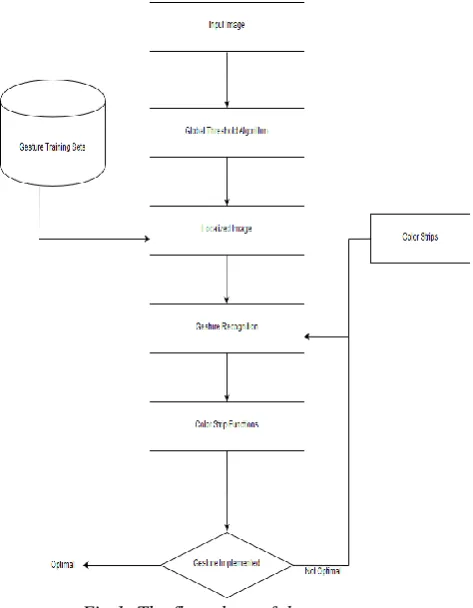
Our system uses real time image processing and pattern recognition to effectively differentiate between gestures and patterns. We are using Open CV to take the raw image input. A grid is designed in which each square or segment is mapped to different cardinality points. These cardinality points define the ROI or region of interest of the hand movement captured by using a camera. The flow of the system is shown in Fig. 1
In order to accurately process each movement of the hand gesture, we capture a single frame and that frame is fed into the ROI. The return value obtained from the ROI is extracted and is bound to the gesture movements in the area which contain a few segments which are expected to outline pixel values in accordance to the movement of the cursor on the desktop screen. Various coloured strips are used to help the system identify gesture movements and map these gestures to various cursor functionalities upon scanning the gestures shown by the user. We need to scan and analyze these gestures in real time. To scan these gestures, we use a camera. This camera is connected to the system and the function points cardinality points are mapped onto the output screen using Open CV.
[image:3.595.325.535.379.575.2]A sequence of algorithms is used to improve the quality of the image obtained from the camera connected to the system. First the image is checked for any rough edges. It checks if any edge pixel has the value 1. If it finds any such pixel, it changes the pixel value to 0. This cleans the edges of the localized image. Then additional algorithms are used to find the centroid, thumb and finger tips of the hand in the image.
Fig 1: The flow chart of the system
First the centroid of the hand is found. This is done by
splitting the hand image into two. One with fingers and one without fingers.
The centroid of the hand is found by using the following formulae:
Mij=∑∑ xi yj I (x, y), where Mij is the image moment, I (x, y) is the intensity at the coordinates (x, y).
{x y} = {M10/M00, M01/M00}, Where x and y are the coordinates of the centroid and M00 is the area of the binary image.
The finger tips are found differently for horizontal and vertical image. For a horizontal image, the finger tips are found by considering only the Y coordinates of the boundary matches. In the case of a vertical image, only the X coordinates of the boundary matches are considered. After finding the finger tips, the fingertip distance is measured using the Euclidean formula. The fingertip distance is measured to identify what all finger tips are significant and what all finger tips are insignificant.
This eliminates any useless computation that the algorithm might have to perform when it maps out the required gestures. The formula for calculating the fingertip distance is E.D (a, b) = √(xa-xb)2 + (ya-yb)2, where ‘a’ represents the boundary points and ‘b’ is the reference point, which is the centroid itself. By calculating the centroid distance, we can eliminate the insignificant finger peaks.
Fig 2: The hand gestures
The thumb is found next. This is called as thumb detection. Identifying whether the thumb is present in the image or not. Since the thumb is vital for any hand gesture, we have to identify it in the localized image also. We can identify the thumb by using the following method:
[image:3.595.57.294.431.735.2]After finding the cardinality points of the fingers and centroid, the peak vs bit sequence is plotted and classified using binary code values. For example, the binary code [01110] will be categorized as 3 fingertips and having no thumb. The binary code also represents the finger pattern of the hand.
Fig 3: The Localized generated image
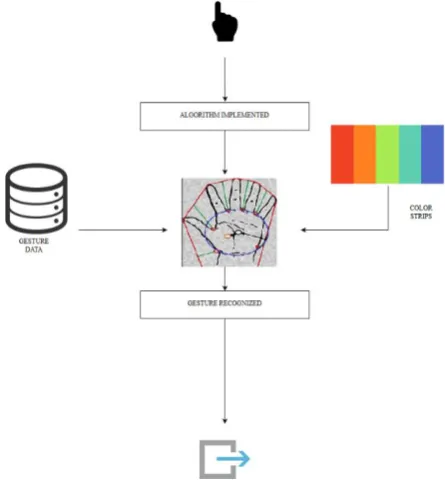
The output that the user sees is the one that has the ROI already mapped onto it. The cardinality points and the functions of each colour are already programmed into the system before the camera input is taken. The system then maps the functions to the camera input and projects it as the output to the user.
We are making use of the Global Thresholding algorithm. This algorithm is run while the camera input is taken. It gets the raw input from the camera and cleans out the coloured strips before mapping the cardinality points onto the ROI (Region of Interest). This is done so as to map the entire hand and not leave out empty spaces. This algorithm mostly acts as a cleaner of sorts before the colour inputs are taken to analyze the frame for gesture mapping.
Fig 4: The Architecture of the system
Once the frame is mapped onto the ROI, the global threshold algorithm finishes executing and the colour strips are used for the gesture mapping. If this algorithm isn’t used, localized image obtained from the raw image would have colour strips which aren’t recognized by the system during the formation of the localized image formation. So, we won’t be able to correctly map out the contour centroid and segments of the hand. These colour strips would be visible on the ROI and they will conflict with the mapping process on the ROI.
The proposed setup involves two coloured strips, blue and red, stuck on the back of the tip of the index finger and ring finger respectively [Fig. 2]. When the hand is held open, neither colour strip is visible and the system understands that the user wants to hover over the screen. To left click, the index finger is bent once and lifted up again. The system detects the blue coloured strip and performs the left click action. Similarly, to right click, the ring finger is bent, the camera detects the red coloured strip and performs the right click action.
It is also possible to combine two or more of these actions to perform other actions. The drag and hover action is done by bending the index finger and holding it in place and then moving hand to hover. Bending and lifting the index finger two times in succession results in a double click. The scrolling action can also be done by bending index finger two times in succession, holding it in place and hovering.
The colours are all programmed into the system individually and each of these colours are mapped to specific functions that are executed when the gesture is performed.
The advantages of this system are:
* Control cursor position continuously with ease. * For effortlessly smooth immersive gaming. * Drag folder and files to another location * Write some text in notepad using On Screen Keyboard using the proposed concept of finger gestures. * Refresh, cut and copy operations are also done using Right Click (a specific colour is used to execute this action).
IV. FUTUREWORK
[image:4.595.58.281.528.768.2]International Journal of Innovative Technology and Exploring Engineering (IJITEE) ISSN: 2278-3075,Volume-8 Issue-6, April, 2019
Also, people suffering from Parkinson's disease, Epilepsy, Cerebral Palsy can use simple hand gestures to control their PC.
V. CONCLUSION
Our system titled Enhancing User Experience Using Hand Gesture showcases the image processing-based human interaction, which displays an easier way of communication between the user and the computer. This helps the user to control the movement on the computer without actually using a physical device. The web camera attached to the system helps identify the gesture, read the message and execute the required action as programmed. The recorded video of the gesture is broken down into frames that is read the system. The usage of coloured strips has made it easier of people to understand its functionalities better. The colour segmentation is done successfully under adequate lighting setup. The colour strips also compensate for the lack of ability for the system to recognize the segmentation of skin in the hand region. In low light is it almost impossible to differentiate the segments. The Global thresholding algorithm used in this project helps in the fast and efficient analysis of the captured image. The quality of the image also plays a major role in the end result of the project. However, upon future work the project can be put to remarkable use in the image processing field.
REFERENCES
1. Kaoru Yamagishi, Lei Jing*, Zixue Cheng, “A System for Controlling
Personal Computers by Hand” 978-1-4799-4476-7/14/$31.00 ©2014 IEEE.
2. “Gesture recognition and finger tip detection for human computer
interaction” R.Meena Prakesh, T. Deepa, T. Gunasundari and N. Kasthuri , 2017 International Conference on Innovations in Information, Embedded and Communication Systems (ICIIECS).
3. Javeria Farooq, Muhaddisa Barat Ali, “Real time hand gesture recognition
for computer interaction,” 2014 International Conference on Robotics and
Emerging Allied Technologies in Engineering (iCREATE)
978-1-4799-5132-1/14/$31.00 ©2014 IEEE.
4. Jaya Shukla, “A method for hand gesture recognition,” 2014 Fourth
International Conference on Communication Systems and Network Technologies, 978-1-4799-3070-8/14 $31.00 © 2014 IEEE, DOI 10.1109/CSNT.2014.189.
5. Shining Song, Dongsong Yan and Yongjun Xie., “Design of control system
based on hand gesture recognition,” 978-1-5386-5053-0/18/$31.00 ©2018 IEEE.
6. Gregely Sziladi, Tibor Ujbanyi and Jozsef Katona, “cost-effective hand gesture computer control interface”, 7th IEEE International Conference on Cognitive Infocommunications (CogInfoCom 2016) • October 16-18, 2016 • Wrocław, Poland The Technical Writer’s Handbook. Mill Valley, CA: University Science, 1989, 978-1-5090-2645-6/16/$31.00 ©2016 IEEE.
7. “Hand Gesture Recognition for Human Computer Interaction”, Meenakshi
Panwar, Pawan Singh Mehra, 2011 International Conference on Image Information Processing (ICIIP 2011), 978-1-61284-861-7/11/$26.00 ©2011 IEEE
8. “Vision-based human-computer interface using hand gestures”, Janez
Zaletelj, Jernej Perhavc, and Jurij F. Tasic, Eight International Workshop on Image Analysis for Multimedia Interactive Services(WIAMIS'07), 0-7695-2818-X/07 $20.00 © 2007, IEEE
9. “Wireless Head Gesture Controlled Wheel Chair for Disable Persons”,
Shayban Nasif, Muhammad Abdul Goffar Khan,
978-1-5386-2175-2/17/$31.00 ©2017 IEEE
10.“Human-Computer Interaction: Process and Principles of
Human-Computer Interface Design”, Gong Chao, 978-0-7695-3569-2/09 $25.00 © 2009 IEEE, DOI 10.1109/ICCAE.2009.23
11.“Gesture Based Mouse Control”, Mrs.M.S.Ghute, Ms.Mohsina Anjum and