Desktop Board
VC820
Specification Update
Release Date: May 2001
Order Number: 738244-009
INFORMATION IN THIS DOCUMENT IS PROVIDED IN CONNECTION WITH INTEL PRODUCTS. EXCEPT AS PROVIDED IN INTEL’S TERMS AND CONDITIONS OF SALE FOR SUCH PRODUCTS, INTEL ASSUMES NO LIABILITY WHATSOEVER, AND INTEL DISCLAIMS ANY EXPRESS OR IMPLIED WARRANTY, RELATING TO SALE AND/OR USE OF INTEL PRODUCTS INCLUDING LIABILITY OR WARRANTIES RELATING TO FITNESS FOR A PARTICULAR PURPOSE, MERCHANTABILITY, OR INFRINGEMENT OF ANY PATENT, COPYRIGHT OR OTHER INTELLECTUAL PROPERTY RIGHT. INTEL PRODUCTS ARE NOT INTENDED FOR USE IN MEDICAL, LIFE SAVING, OR LIFE SUSTAINING APPLICATIONS.
Intel Corporation may have patents or pending patent applications, trademarks, copyrights, or other intellectual property rights that relate to the presented subject matter. The furnishing of documents and other materials and information does not provide any license, express or implied, by estoppel or otherwise, to any such patents, trademarks, copyrights, or other intellectual property rights.
Intel retains the right to make changes to specifications and product descriptions at any time, without notice.
The VC820 desktop board may contain design defects or errors known as errata which may cause the product to deviate from published specifications. Current characterized errata are available on request.
Contact your local Intel sales office or your distributor to obtain the latest specifications before placing your product order.
* Third party brands and names are the property of their respective owners.
Copies of documents which have an ordering number and are referenced in this document, or other Intel literature, may be obtained from:
Intel Corporation P.O. Box 5937 Denver, CO 80217-9808
or call in North America 1-800-548-4725, Europe 44-0-1793-431-155, France 44-0-1793-421-777,
Germany 44-0-1793-421-333, other Countries 708-296-9333
CONTENTS
REVISION HISTORY ...v
PREFACE ... vi
Specification Update for Intel Desktop Boards VC820 GENERAL INFORMATION ...3
SPECIFICATION CHANGES ...5
ERRATA...9
VC820 SPECIFICATION UPDATE
v
REVISION HISTORY
Date of Revision Version Description
November 1999 -001 This document is the first Specification Update for the Intel Desktop Board VC820.
December 1999 -002 Updated revision level tables in the General Information section. April 2000 -003 Added Specification Changes 1.
August 2000 -004 Added Specification Change 2 and Document Change 1. September 2000 -005 Added Erratum 1.
October 2000 -006 Added Documentation Changes 2,3.
February 2001 -007 Removed BIOS/Errata cross reference table, Added Erratum 2. April 2001 -008 Added Documentation Change 4.
VC820 SPECIFICATION UPDATE
vi
PREFACE
This document is an update to the specifications contained in the Intel Desktop Board VC820 Technical Product Specification (Order number 737611). It is intended for hardware system manufacturers and software developers of applications, operating systems, or tools. It will contain Specification Changes, Errata, Specification Clarifications, and Documentation Changes.
Refer to the PentiumIII Processor Specification Update (Order number 244453) for specification updates concerning the PentiumIII processor. Items contained in the PentiumIII Processor Specification Update that either do not apply to the VC820 desktop board or have been worked around are noted in this document. Otherwise, it should be assumed that any processor errata for a given stepping are applicable to the PBA revision(s) associated with that stepping.
Refer to the Intel Celeron™ Processor Specification Update (Order number 243748) for specification updates concerning the Intel Celeron processor. Items contained in the Intel Celeron Processor Specification Update that either do not apply to the Desktop Board VC820 or have been worked around are noted in this document. Otherwise, it should be assumed that any processor errata for a given stepping are applicable to the PBA revision(s) associated with that stepping.
Refer to the Intel 82820 Chipset: 82820 Memory Controller Hub (MCH) Specification Update (Order Number 290630) for specification updates concerning the 82820 MCH Controller. Items contained in the 82820 MCH Specification Update that either do not apply to the VC820 desktop board or have been worked around are noted in this document. Otherwise, it should be assumed that any MCH errata for a given stepping are applicable to the PBA revision(s) associated with that stepping.
Refer to the Intel 82801 I/O Controller Hub (ICH) Specification Update (Order Number 290677) for specification updates concerning the 82801 I/O Controller Hub. Items contained in the Intel 82801 ICH Specification Update that either do not apply to the VC820 desktop board or have been worked around are noted in this document. Otherwise, it should be assumed that any ICH errata for a given stepping are applicable to the Printed Board Assembly (PBA) revision(s) associated with that stepping.
Refer to the Intel 82802 Firmware Hub (FWH) Specification Update (Order Number TBD) for specification updates concerning the 82802 Firmware Hub. Items contained in the Intel 82802 FWH Specification Update that either do not apply to the VC820 desktop board or have been worked around are noted in this document. Otherwise, it should be assumed that any ICH errata for a given stepping are applicable to the Printed Board Assembly (PBA) revision(s) associated with that stepping.
Nomenclature
Specification Changes are modifications to the current published specifications. These changes will be incorporated in the next release of the specifications.
Errata are design defects or errors. Characterized errata may cause the VC820 desktop board’s behavior to deviate from published specifications. Hardware and software designed to be used with any given Printed Board Assembly (PBA) and BIOS revision level must assume that all errata documented for that PBA and BIOS revision level are present on all desktop boards.
Specification Clarifications describe a specification in greater detail or further highlight a specification’s impact to a complex design situation. These clarifications will be incorporated in the next release of the specifications.
VC820 SPECIFICATION UPDATE
3
GENERAL INFORMATION
Basic Intel Desktop Board VC820 Identification Information
AA Revision PBA Revision BIOS Revision Notes
744044-401 744045-401 VC82010A.86A.0014.P03 1-7
744044-402 744045-402 VC82010A.86A.0014.P03 1-7
744044-403 744045-403 VC82010A.86A.0016.P04 1-7
744044-407 744045-407 VC82010A.86A.0031.P11 1-7
744044-408 744045-408 VC82010A.86A.0036.P16 1-7
NOTES:
1. The PBA number or AA number is found on a small label on the component side of the board. 2. The 82820 Chipset kit used on this PBA revision consists of three components as follows:
Device Stepping S-Spec Numbers
82820 MCH B1 SL3FT
82801AA ICH B1 SL3MA
82802AB FWH A0 SB48
3. The following errata are contained in the PentiumIII Processor Specification Update (Order Number 244453) for the Pentium III processor and either do not apply to the Desktop Board VC820 or have been worked-around in this PBA and/or BIOS revision: 3. All other errata associated with the processor apply to this PBA revision.
4. The following errata are contained in the Intel Celeron™ Processor Specification Update (Order Number 243748) for the Celeron processor and either do not apply to the Desktop Board VC820 or have been worked-around in this PBA and/or BIOS revision: None. All other errata associated with the processor apply to this PBA revision.
5. The following items are contained in the Intel82820 Memory Controller Hub (MCH) Specification Update (Order Number 290630) and either do not apply to the Desktop Board VC820 or have been worked around in this PBA and/or BIOS revision: None. All other errata associated with the MCH apply to this PBA revision.
6. The following items are contained in the Intel 82801 I/O Controller Hub Specification Update (Order Number 290677) and either do not apply to the Desktop Board VC820 or have been worked around in this PBA and/or BIOS revision: None. All other errata associated with the ICH apply to this PBA revision.
VC820 SPECIFICATION UPDATE
4
Summary Table of Changes
The following table indicates the Specification Changes, Errata, Specification Clarifications, or Documentation Changes which apply to the VC820 desktop board. Intel intends to fix some of the errata in a future revision of the desktop board, and to account for the other outstanding issues through documentation or specification changes as noted. This table uses the following notations:
CODES USED IN SUMMARY TABLE
Doc: Document change or update that will be implemented.
Fix: This erratum is intended to be fixed in a future revision of the desktop board, driver, or BIOS.
Fixed: This erratum has been previously fixed. NoFix: There are no plans to fix this erratum.
Shaded: This erratum is either new or modified from the previous version of the document. NO. PLANS SPECIFICATION CHANGES
1 Doc Diagnostic LED display changes
2 Doc Addition of new feature, fast booting systems with Intel® Rapid BIOS BOOT
NO. PLANS ERRATA
1 Fix Some SCSI host bus adapters may not boot to the hard disk drive with a bootable CD-ROM drive attached
2 Fixed A heavily loaded PCI bus may cause excessive noise on the NMI signal to the processor 3 Fixed Intel Pentium III processor Erratum E76
NO. PLANS DOCUMENTATION CHANGES
1 Doc Change to description of BIOS main menu memory option
VC820 SPECIFICATION UPDATE
5
SPECIFICATION CHANGES
The Specification Changes listed in this section apply to the VC820 Motherboard Technical Product Specification (Order Number 737611). All Specification Changes will be incorporated into a future version of that specification.
1.
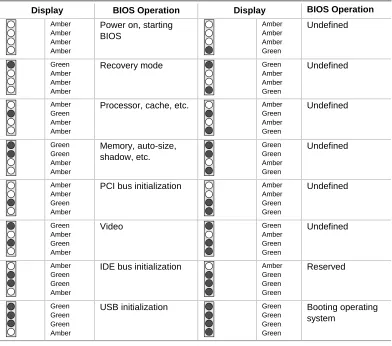
Diagnostic LED Display Changes
In Section 5.6, Enhanced Diagnostics, Table 85 will be updated to reflect the following changes of the diagnostic LED’s.
Table 85. Diagnostic LED Codes
Display BIOS Operation Display BIOS Operation Amber
Amber Amber Amber
Power on, starting BIOS Amber Amber Amber Green Undefined Green Amber Amber Amber
Recovery mode Green
Amber Amber Green Undefined Amber Green Amber Amber
Processor, cache, etc. Amber Green Amber Green Undefined Green Green Amber Amber Memory, auto-size, shadow, etc. Green Green Amber Green Undefined Amber Amber Green Amber
PCI bus initialization Amber Amber Green Green Undefined Green Amber Green Amber
Video Green
Amber Green Green Undefined Amber Green Green Amber
IDE bus initialization Amber Green Green Green Reserved Green Green Green Amber
USB initialization Green Green Green Green
[image:11.612.111.503.205.551.2]VC820 SPECIFICATION UPDATE
6
2.
Addition of New Feature, Fast Booting Systems With Intel
®Rapid
BIOS Boot
Section 3.8, Overview of BIOS Features will be added. All subsequent sections will be renumbered accordingly:
3.8 Fast Booting Systems with Intel Rapid BIOS Boot
There are three factors that affect system boot speed:
•
Selecting and configuring peripherals properly
•
Using an optimized BIOS, such as the Intel
®Rapid BIOS
•
Selecting a compatible operating system
The BIOS is not configured by default to boot at the fastest possible speed. Empirical
measurements have shown that some Intel
®Desktop boards, when optimized as
described above, can complete POST (Power On Self Test) in six seconds or less and
boot to an active Microsoft Windows
*Millennium (Me) operating system in
21 seconds.
In addition to the appliance-like speed that benefits end users, fast booting systems can
also increase an OEM’s manufacturing line throughput.
3.8.1 Peripheral Selection and Configuration
The following techniques will help improve system boot speed:
•
Choose a hard drive with parameters, such as a “power-up to data ready” of less
than eight seconds which will minimize hard drive startup delays. The Western
Digital Caviar AA or BA series are examples of drives that meet this parameter.
•
Select a CD-ROM drive with a fast initialization rate; variations can influence
POST times.
•
Eliminate unnecessary features such as video-company-logo displaying, screen
repaints, or mode changes. These all add time in the boot process. The Plug and
Play communication between the video BIOS and the monitor shows time
variances.
VC820 SPECIFICATION UPDATE
7
3.8.2 Intel
®Rapid BIOS Boot
There are several BIOS settings, which if adjusted, can reduce the execution time of the
POST:
•
Set the hard disk drive as the first boot device. As a result, the POST will not seek
a diskette drive (saving about one second from the POST time) or a CD-ROM drive
(saving about two seconds).
•
Disable Quiet Boot to eliminate the logo splash screen. This could save several
seconds of painting complex graphic images and changing video modes.
•
Make sure the Intel
®Rapid BIOS Boot option (in the Boot menu of the BIOS Setup
Program) is enabled (this is typically the default setting). This feature bypasses
memory count and floppy seek.
•
Disable the LAN feature PXE (Preboot eXecutable Environment) if it will not be
used. Doing so can reduce up to four seconds of option ROM boot time.
✏
NOTE
It is possible to optimize the boot process to the point where the system boots so
quickly that the Intel
®Logo Screen (or a custom logo splash screen) will not be
seen. Monitors and hard disk drives with minimum initialization times can also
contribute to a boot time that might be so fast that necessary logo screens and
POST messages cannot be seen. If this should occur, it is possible to introduce a
programmable delay ranging from 3 to 30 seconds (using the Hard Disk
Pre-Delay feature of the Advanced menu in the IDE Configuration Submenu of the
BIOS Setup Program).
For information about Refer to
IDE Configuration Submenu in the BIOS Setup Program Table 67, page 102
3.8.3 Operating System
3.8.3.1 Selection
The Microsoft Windows* Millennium Edition (Windows Me) operating system
has built-in capabilities for making PCs boot more quickly. For additional
information, see the following URL:
VC820 SPECIFICATION UPDATE
8
3.8.3.2 Optimization
To speed operating system availability at boot time, limit the number of
applications that load into the system tray or the task bar.
✏
NOTE
The Intel
®Rapid BIOS Boot technology is only available with BIOS revision
VC820 SPECIFICATION UPDATE
9
ERRATA
1.
Some SCSI Host Bus Adapters May Not Boot to The Hard Disk
Drive With a Bootable CD-ROM Drive Attached
PROBLEM: If a bootable CD-ROM is attached to the SCSI host bus adapter (HBA) and set as bootable in the setup menu of the SCSI HBA without bootable media installed, the system may not boot to the attached hard drive.
IMPLICATION: Users who wish to utilize a bootable SCSI CD-ROM in conjunction with a bootable hard drive on an add-in SCSI host bus adapter may not be able to boot to the hard drive if the SCSI adapter is set to recognize the CD-ROM as a bootable device.
WORKAROUND: Enable the CD-ROM as a bootable SCSI device only when using bootable media.
STATUS: This erratum will be fixed in a future BIOS revision.
2.
A Heavily Loaded PCI Bus May Cause Excessive Noise on The NMI
Signal to The Processor
PROBLEM: If the PCI bus is heavily loaded, excessive noise on the NMI signal to the processor may cause system hangs or blue screens.
IMPLICATION: Users requiring multiple PCI add in cards that generate heavy traffic on the PCI bus and who are using higher frequency PentiumIII processors, may experience system hangs or blue screens.
WORKAROUND: None.
STATUS: This erratum was fixed in PBA revision 744044-403.
3. Intel
Pentium
III Processor Erratum E76
PROBLEM: For a complete description of the Pentium III processor erratum E76, see the Pentium III Specification Update, order number 244453 found at http://developer.intel.com/design/PentiumIII/specupdt/.
IMPLICATION: For a complete description of the Pentium III processor erratum E76, see the Pentium III Specification Update, order number 244453 found at http://developer.intel.com/design/PentiumIII/specupdt/.
WORKAROUND: Update the VC820 desktop board with BIOS revision VC82010A.86A.0040.P17.
VC820 SPECIFICATION UPDATE
10
DOCUMENTATION CHANGES
1.
Change to Description of BIOS Main Menu Memory Option
In section 4.3, Table 62, BIOS Main Menu will be changed as follows:
Table
1. Main
Menu
Feature Options Description
BIOS Version No options Displays the version of the BIOS. Processor Type No options Displays processor type.
Processor Speed No options Displays processor operating frequency.
System Bus Frequency
No options Displays the of the system front side bus frequency.
Cache RAM No options Displays the size of second-level cache and whether it is ECC-capable. Total Memory No options Displays the total amount of RAM. Memory Bank 0
Memory Bank 1
No options Displays type of RIMM installed in each memory bank.
Language • English (US) (default)
• German
• French
• Italian
• Spanish
Selects the default language used by the BIOS.
Processor Serial Number
• Disabled (default)
• Enabled
Enables and disables the processor serial number.
Memory Configuration
• Non-ECC
• ECC (default)
Allows selection of ECC-mode memory operation if ECC-type memory is installed.
System Time Hour, minute, and second Specifies the current time. System Date Month, day, and year Specifies the current date.
2.
Change to Description of Section 1.6.4, Real-Time Clock, CMOS
SRAM, and Battery
The first note in section 1.6.4 will be changed in its entirety as follows:
✏
NOTE
VC820 SPECIFICATION UPDATE
11
3.
Change to Description of Section 4.4.4.1, IDE Configuration
Sub-Submenus
Table 68 in section 4.4.4.1 will be changed in its entirety as follows:
Table 68.
IDE Configuration Sub-Submenus
Feature Options Description
Type • None
• User
• Auto (default)
• CD-ROM
• ATAPI Removable
• Other ATAPI
• IDE Removable
Specifies the IDE configuration mode for IDE devices.
User allows the LBA Mode Control, Multi-sector Transfers, PIO Mode, and Ultra DMA features to be changed.
Auto automatically selects the values for the LBA Mode Control, Multi-sector Transfers, PIO Mode, and Ultra DMA features.
LBA Mode Control (Note)
• Disabled
• Enabled (default)
Enables or disables LBA Mode Control.
Multi-sector Transfers
(Note)
• Disabled
• 2 Sectors
• 4 Sectors
• 8 Sectors
• 16 Sectors (default)
Specifies number of sectors per block for transfers from the hard disk drive to memory. Check the hard disk drive’s specifications for optimum setting.
PIO Mode
(Note)
• Auto (default)
• 0
• 1
• 2
• 3
• 4
Specifies the transfer mode.
Ultra DMA
(Note)
• Disabled (default)
• Mode 0
• Mode 1
• Mode 2
• Mode 3
• Mode 4
Specifies the Ultra DMA mode for the drive. Note that when Auto is selected in PIO Mode, the BIOS sets Ultra DMA to the fastest speed supported. If the drive doesn’t support Ultra DMA, the BIOS sets Ultra DMA to Disabled and the fastest supported PIO mode is used instead.
Note: The setting of Type determines whether these features display.
4.
Change to Description of Section 1.5.2, Memory Features
VC820 SPECIFICATION UPDATE
12
1.5.2
Memory
Features
The Intel
82820 Memory Controller Hub (MCH) integrates a single Rambus* channel
as an electrically pipelined serial bus (16 data bits in width) with uniform impedance of
28 ohms and single-ended termination. This Rambus channel is capable of providing a
processor-to-memory bandwidth up to 1.6 GB/sec.
The board supports the following memory features:
•
Up to two 2.5 V, 184-pin, RIMM* modules
•
512 MB maximum onboard capacity using 128 or 144 Mbit technology
•
Single or double-sided RIMM modules
•
Serial Presence Detect (SPD) memory only
•
Non-ECC memory with 16-bit components (128 Mbit technology)
•
ECC memory with 18-bit components (144 Mbit technology)
For information about Refer to
The Rambus RIMM Specification Section 1.3, page 16