
WIRELESS BARCODE SCANNER FOR SELF-CHECKOUT
MUHAMAD NAJMI BIN AHMAD SALBI
This Report Is Written As A Partial Fulfillment Of Terms In Achieving The Awards For Bachelor Of Electronic Engineering (Computer)
Faculty of Electronic and Computer Engineering Universiti Teknikal Malaysia Melaka
UNIVERSTI TEKNIKAL MALAYSIA MELAKA
FAKULTI KEJURUTERAAN ELEKTRONlK DAN KEJURUTERAAN KOMPUTER
BORANG PENGESAHAN STATUS LAPORAN
PROJEK SARJANA MUDA II
Tajuk Projek WIRELESS BARCODE SCANNER FOR SELF-CHECKOUT
Sesi Pengajian 1 1 1 4 1 1 1 1 1 5 I
Saya MUHAMAD NAJMI BIN AHMAD SALBI mengaku membenarkan Laporan Projek Sarjana Muda ini disimpan di Perpustakaan dengan syarat-syarat kegunaan seperti berikut:
I. Laporan adalah hakmilik Universiti Teknikal Malaysia Melaka.
2. Perpustakaan dibenarkan membuat salinan untuk tujuan pengajian sahaja.
3. Perpustakaan dibenarkan membuat salinan Japoran ini sebagai bahan pertukaran antara institusi pengajian tinggi.
4. S ila tandakan ( '1 ) :
D
D
0
SULIT* TERHAD** TIDAK TERHAD•(Mengandungi maklumat yang berdarjah keselamatan atau kepentingan Malaysia seperti yang termaktub di dalam AK.TA RAHSlA RASMJ 1972)
.. (Mengandungi maklwnat terhad yang telah ditentukan oleh
organisasi/badan di mana penyelidikan dijalankan)
Nor
J:
flensyar•h_d Ari•
fakulti Kejurutman Elektronlk Dan Kejuruteraan Komputer Untversitl Teknlkal Malaysia Metaka (UTeM)
Hang Tuah Jaya
71101 Ot1ri11R T1mggal, Mataka
(TANDATANGANPENULIB) (COP DAN TANDATANGAN PENYELIA)
iii
"I admit that I have read this report and it has followed the scope and quality in partial
fulfillment of requirement for the degree of Bachelor of Electronic Engineering
(Computer)
Signature
First Supervisor
Date
Nor
~
ohdAri•
Pensyarah .
Fakulti Ktjurutman Elektronik Dan Kejurulerun Komputtr Unlversiti Teknlkal Malaysia Melak1 (UT1M)
Hang Tuah Jaya
: ... Je100.Durian Tu1111a1, Mol.•k~ ... .
: NOR AZLAN BIN MOHD ARIS
!
s/b/
1
"I admit that this report is from my own work and idea except for the summary and a few sections which were extracted from other resources as being mention''.
Signature
:.p·.-... .
Writer Name : MUHAMAD NAJMI BIN AHMAD SALBI Date
: ...
.t.f?./(;/~.°.~5..
... .
v
To my lovely parents, my brother and sister who give me encouragement to success in my studies and not to forget special thanks to all my lecturers and friends that give me
vi
ACKNOWLEDGEMENT
Firstly I would like to forward my utmost gratitude to my supervisor, Mr. Nor Azlan Bin Mohd Aris because give me guideline and inducement to complete my PSM (Projek Sarjana Muda). Special thanks to En Shafiq b Roslan as a master student who also guide me and gave me many information to perform my project.
I would like to send my appreciation to all lab management, especially to the technicians who give corporation for me to complete my project.
vii
ABSTRACT
viii
ABSTRAK
ix
x
TABLE OF CONTENT
PROJECT TITLE i
REPORT STATUS VERIFICATION FORM ii
DECLARATION iii
DEDICATION v
ACKNOLEDGEMENT vi
ABSTRACT vii
ABSTRAK viii
TABLE OF CONTENT x
LIST OF FIGURE xiii
CHAPTER 1 INTRODUCTION 1
1.1 BACKGROUND 1
1.2 OBJECTIVE 3
1.3 WORKSCOPE 3
1.4 PROBLEM STATEMENT 3
xi
CHAPTER 2 LITERATURE REVIEW 5
2.1 ONLINE DATABSE 6 2.2 PHP 6
2.3 MYSQL 7
2.3.1 THIRD-PARTY 8
2.3.2 DEPLOYMENT MYSQL 8
2.4 PHP MYSQL WORKS TOGETHER 9
2.4.1 REASON CHOOSING PHP/MYSQL 10
2.5 MACROMEDIA DREAMWEAVER 10
2.6 INTRODUCTION OF PHPMYADMIN 12 2.6.1 PHP MYADMIN FEARTURE 13
2.6.2 WEB APPLICATION 14
2.7 FILE ZILLA 15
2.8 000 WEB HOST 15
2.9 TAKING A PEEK BEHIND THE SCENE 17
2.10 BARCODE 18
2.11 BARCODE SCANNER 18
2.12 NOTEPAD++ 19
2.13 XAMPP 20
CHAPTER 3 METHODOLOGY 21
3.1 INTRODUCTION 21
3.2 PROJECT FLOWCHART 22
3.3 PROJECT IMPLEMENTATION 23
xii
CHAPTER 4 RESULT AND DISCUSSION 25
4.1 GRAPHIC USER INTERFACE 25
4.1.1 LOCAL HOST 25
4.1.2 ONLINE 28
4.1.3 ONLINE SHOPPING 32
4.2 WIRELES BARCODE SCANNER 36
4.3 DISCUSSION 40
CHAPTER 5 CONCLUSION AND RECOMMENDATIONS 42
5.1 INTRODUCTION 42
5.2 CONCLUSION 42
5.3 FUTURE RECOMMENDATIONS 43
xiii
LIST OF FIGURE
1.0 Project Flowchart 4
2.1 PHP Logo 6
2.2 MYSQL Logo 7
2.3 DREAMWEAVER logo 10
2.4 PHPMYadmin Logo 12
2.5 PHPMYadmin Home 12
2.6 FILE ZILLA Logo 15
2.7 000 WEBHOST Page 15
2.8 Diagram On Internship Process Flow 17
2.9 NOTEPAD++ 19
2.10 XAMPP 20
3.0 Project Methodology 22
4.1 XAMPP Control Panel 26
4.2 XAMPP Folder Attachment 27
4.3 GOOGLE CHROME Browser 27
4.4 GOOGLE CHROME Browser 28
4.5 Login Requirement 28
4.6 Nauskymall.com GUI 29
4.7 Nauskymall.com GUI for Admin 30
xiv
4.9 Daily Sale 31
4.10 Product List 31
4.11 Barcode List 32
4.12 Smartphone Browser User Interface 33
4.13 Login Requirement 33
4.14 Point-Of-Sale Smartphone User Interface 34
4.15 Online Shopping Item 34 4.16 Chosen Item 35
4.17 Payment for Online Shopping 35
4.18 Smartphone as Symbolic for Screen 37
4.19 Product List after Scan 37
4.20 Payment by Cash 38
4.21 Print Receipt 39
1
CHAPTER 1
INTRODUCTION
1.1 Background
2
The implementations are focus in hypermarket such as Mydin Mall which is the recorded huge number of customer. So we purpose one customer for one trolley that installed the barcode scanner and the small computer for data server. These situations are the company need supply the trolley with barcode scanner to provided coveniants way of payment to reduce complaint and customer friendly environment especially during peak hour.
Before the selection product, the customer just need login to the data server to make sure that trolley and barcode scanner are belong to them. After that, the customer can select the product what they want to purchase. Then if they choose one product and confirm to buy it, they just scan the barcode of the product then put the product inside the trolley. At the same time the barcode are represent for that item are save in data server and calculated. After all finished to choose the product and the data server already calculate the total among, the customer just print out the new barcode. The cashier just scan the new barcode that represent as the total amount purchase and pack the purchased item.
3
1.2 Objectives
To design Point-Of-Sale (POS) the system for self-checkout.
To build wireless barcode scanner with screen attached for customer scanning the barcode by them self.
To analyse the performance of the wireless barcode scanner connection within the self-checkout system.
To analyse the performance of the wireless barcode scanner and the POS system and the database.
1.3 Work Scope
The scopes for this project are to build the barcode scanner with embedded screen. The barcode scanner are connecting to the data server wirelessly as an online database system for barcode database using Apache data server, PHP and MySQL. This web-based inventory system that will store all data inventory (hardware and software) of the computers and other devices in the supermarket automatically, using barcode scanner. The system is designed to simplify business transaction. The customer will have to scan their selected item to be bought and the data will be sent to the data server to be calculated for the total price. The system are designed consider as no cancelation for product chosen.
1.4 Problem Statement
Problem statement for this project are:
During the payment, the cashier need to scan barcode for each product that the customer purchase while the other customer are wait for their turn.
Long queue
4
1.5 Methodology
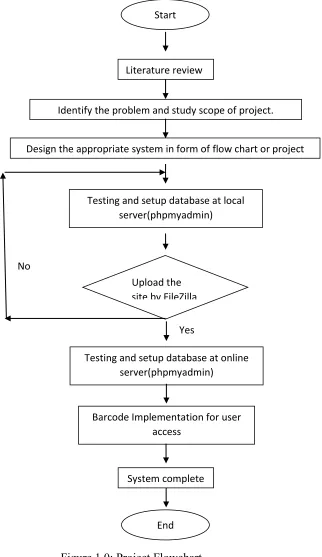
[image:18.612.196.518.133.690.2]
Figure 1.0: Project Flowchart Start
Literature review
Identify the problem and study scope of project.
Design the appropriate system in form of flow chart or project planning
Testing and setup database at online server(phpmyadmin)
Barcode Implementation for user access
System complete
End Upload the site by FileZilla
Testing and setup database at local server(phpmyadmin)
No
5
CHAPTER 2
LITERATURE REVIEW
In this chapter two emphasizes about the project’s background and other relevant input and information which is related to the project. All the input and information were gathered from previous research paper (journals), internet, product manual and etc.
6
2.1 Online Database
Online database is a database that created by the programmer to link with network that is internet. Normally, the software is designed to manage the database and to create the database itself [1].
Online database is a database that created by the programmer to link with network that is internet. Normally, the software is designed to manage the database and to create the database itself [1].
2.2 PHP
Figure 2.1: PHP Logo[2]
PHP is a general-purpose scripting language that is especially suited to server-side web development where PHP generally runs on a web server [2]. Any PHP code in a requested file is executed by the PHP runtime, usually to create dynamic web page content. PHP is the language that being used to
communicate with MySQL database, and PHP, Dreamweaver takes care of much of the complex coding on behalf by offering an extensive suite of server
behaviors [2].
It can also be used for command-line scripting and client-side GUI
7
PHP primarily acts as a filter, taking input from a file or stream containing text and PHP instructions and outputs another stream of data and most commonly the output will be HTML [3].
Originally designed to create dynamic web pages, PHP now focuses mainly on server side scripting, and it is similar to other server side scripting languages that provide dynamic content from a web server to a client [3]. PHP also commonly used as the P in this bundle Apache and MySQL. WAMP packages (Windows/ Apache/ MySQL / PHP) has been used to do this project.
[image:21.612.258.404.304.429.2]2.3 MySQL
Figure 2.2: MySQL Logo
MySQL is a relational database management system .That runs as a server providing multi-user access to a number of databases. MySQL is a popular choice of database for use in web applications, and is a central
component of the widely-used LAMP web application software stack LAMP is an acronym for Linux, Apache, MySQL, PHP. Its popularity is closely tied to the popularity of PHP. MySQL is used in some of the most frequently visited web sites on the Internet. [4]
MySQL is written in C, and C++. Many programming languages with language-specific APIs include libraries for accessing MySQL databases. [4]
8
visually design database structure. MySQL Workbench replaces the previous package of software:-[4]
Database design & modeling
SQL development — replacing MySQL Query Browser
Database administration — replacing MySQL Administrator
2.3.1 Third-party
Several other third-party proprietary and free graphical administration applications are available that integrate with MySQL and enable users to work with database structure and data visually. Some well-known front ends are: [4]
phpMyAdmin — a free Web-based front end widely installed by Web hosts worldwide, since it is developed in PHP and requires the LAMP stack or WAMP.
MySQL ships with a suite of command line tools for tasks such as querying the database, backing up data, inspecting status, performing common tasks such as creating a database, and many more.
2.3.2 Deployment MySQL
MySQL can be built and installed manually from source code, but this can be tedious so it is more commonly installed from a binary package unless special customizations are required.
9
2.4 PHP and MySQL works together
PHP and MySQL work very well together. This dynamic partnership is what makes PHP and MySQL so attractive for web database applications development. Whether have database full of information that want to make the available to users(such as product catalog)or database waiting to be filled up by users(for example, a membership database), PHP and MySQL work together to implement the application.[4]
One of PHP‟s strongest features is its ability to interact with databases. It provides functions that make communicating with MySQL extremely simple .Use PHP functions to send SQL queries to the database. Do not to know the details of communicating with MySQL, PHP handle the details. Just need to know the SQL queries and how to use the PHP functions.
When time in a username and password, although it seems that had logging in to the phpMyAdmin, but actually not. The authentication systems are a function of the MySQL server. Merely using phpMyAdmin (which is running on the web server) as an interface that sends our username and password information to the MySQL server. Strictly speaking, it does not log in to phpMyAdmin, but through phpMyAdmin [4].
10
2.4.1 Reason of choosing PHP/MySQL
All the languages supported by Dreamweaver are good, but it’s a good idea to pick one and get to know it well. Once you have become proficient at one server-side language, can be find the transition to another a lot easier, because they share many elements in common. Strictly speaking, it is possible to mix different server-side technologies in the same website, as long as the server supports them. The hybrid in PHP was run the Web’s most widely available server-side language MySQL is also reputed to be the most popular open source database because PHP is a server-side language, it needs to work in connection with a web server. More often than not, found that it in combination with Apache, the software that runs more than two out of every three web servers .Apache, PHP, and MySQL run on just about every operating system[4].
[image:24.612.211.439.407.541.2]2.5 Macromedia Dreamweaver8
Figure 2.3: Dreamweaver Logo [5]
Dreamweaver is a powerful web page creation and web site management tool. It offers numerous, sophisticated functions that can be used to create professional quality web sites. Because of this, it‟s one of the most popular web authoring tools among web designers [6].
![Figure 2.3: Dreamweaver Logo [5]](https://thumb-us.123doks.com/thumbv2/123dok_us/85013.8028/24.612.211.439.407.541/figure-dreamweaver-logo.webp)
