Rochester Institute of Technology
RIT Scholar Works
Theses Thesis/Dissertation Collections
2006
An application to create problem-specific
document object models for XML
Liangxiao Zhu
Follow this and additional works at:http://scholarworks.rit.edu/theses
This Master's Project is brought to you for free and open access by the Thesis/Dissertation Collections at RIT Scholar Works. It has been accepted for inclusion in Theses by an authorized administrator of RIT Scholar Works. For more information, please [email protected].
Recommended Citation
An Application to create Problem-Specific
Document Object Models for XML
MS Project
Liangxiao Zhu
April 28, 2003
Committee:
Chairman:
Prof. Axel-Tobias Schreiner
Reader:
Prof. James E. Heliotis
Observer:
Prof. Warren R. Carithers
Abstract
XML is widely used. How to parse XML documents and manipulate XML data are very important tasks and popular topics in the software industry. There are several ways of handling XML data today. One of them is to turn an XML document into a tree structure of data. The most popular API of this model is W3C DOM (Document Object Model) [2]. But what DOM provides is a generic data model rather than a problem-specific model, which makes it complicated and inefficient. And in many cases, programmers don’t use the generic data model. More often, they need an object model that is specific to a particular problem. This is where this project comes in. The purpose of this project is to develop an application that turns XML sources of a particular schema into a
Acknowledgements
Table of content
1. INTRODUCTION... 1
2. THE PSDOM PROJECT AND A SIMPLE EXAMPLE ... 3
2.1. PROJECT GOAL... 3
2.2. CLASS DEFINITION FILE... 3
2.3. COMPILING CLASS DEFINITION FILE TO JAVA CLASSES... 4
2.4. COMPILING CLASS DEFINITION FILE TO OBSERVERS... 5
2.5. UN-MARSHALLING XML INTO JAVA OBJECTS... 7
2.6. MARSHALLING JAVA OBJECTS INTO XML DOCUMENT... 7
2.7. USE CASES... 8
3. ARCHITECTURAL OVERVIEW... 9
3.1. OVERALL ARCHITECTURE... 9
3.1.1 Class Definition File and CDF Compiler ... 9
3.1.2 The Binding Framework... 10
3.2. PACKAGE STRUCTURE... 10
4. CLASS DEFINITION LANGUAGE AND CLASS DEFINITION FILE ... 12
4.1. CDF DECLARATION... 13
4.2. PACKAGE DECLARATION... 13
4.3. ELEMENT DECLARATIONS... 14
4.4. SUB DECLARATIONS... 15
4.5. DATA DECLARATIONS... 16
4.6. ATTRIBUTE DECLARATIONS... 16
4.7. TYPE DECLARATIONS... 17
4.8. STRUCTURE DECLARATIONS... 18
4.9. IMPORT DECLARATION... 19
4.10. JAVA DECLARATION... 19
4.11. JAVA_VAR DECLARATIONS... 20
5. CDF COMPILER AND MAPPING RULES... 21
5.1. JAVA PACKAGE DECLARATIONS... 21
5.1.1 Default mapping rules... 21
5.1.2 Mapping rules ... 21
5.2. ELEMENT DECLARATIONS... 21
5.2.1 Default mapping rules... 21
5.2.2 Mapping rules ... 22
5.3. SUB DECLARATIONS... 22
5.3.1 Default mapping rules... 22
5.3.2 Mapping rules ... 23
5.4. ATTRIBUTE DECLARATIONS... 24
5.4.2 Mapping rules ... 25
5.5. ALT AND SEQ DECLARATION... 26
5.5.1 Default mapping rules... 26
5.5.2 Mapping rules ... 26
6. THE BINDING FRAMEWORK ... 28
6.1. ARCHITECTURE... 28
6.1.1 The static part of the binding framework ... 28
6.1.1.1 The Unmarshaller and Marshaller interface... 29
6.1.1.2 UnmarshallerImpl and the “Observer” event-driven model ... 30
6.1.2 The dynamic part of the binding framework ... 31
6.2. IMPLEMENTATION DETAIL... 33
6.2.1 The AltSeq class ... 33
6.2.2 The use of reflection ... 35
6.2.3 Generating observers from CDF... 36
6.2.4 The Implementation of Marshalling... 36
6.2.4.1 Element Class... 37
6.2.4.2 Structure class ... 38
7. SUMMARY AND CONCLUSION... 41
APPENDIX A: THE DTD FOR CDF ... 42
APPENDIX B: ALGORITHM TO GENERATE OBSERVERS ... 43
1. Introduction
XML stands for eXtensible Markup Language, a language developed by the World Wide Web Consortium (W3C). XML has certainly taken the programming world by storm. Because XML is a form of self-describing data, it can be used to encode rich data models. The self-describing and platform independent features of XML make it the best candidate as a data exchange medium among very different systems. It can be easily used for the interchange of data among different applications. Although generating XML is a
relatively straightforward procedure, the reverse operation, using and manipulating XML data from within an application is not such an easy task. Therefore, how to parse XML documents and manipulate XML data become very essential tasks of handling XML resources. This project investigates the current existing methods of accessing XML data; and creates a better solution for developers to use XML data within applications.
Basically, there are three major methods of accessing XML data [1]. The first one is
Callbacks. Simple API for XML (SAX) is the W3C standard that uses this Callback method. It is an event-driven, serial-access mechanism for accessing XML documents. SAX is fast and less memory-intensive because it does not store any part of the document in memory. But on the other hand, SAX API is a bit harder to visualize because of its event-driven model. Instead of navigating the data in XML, you have to set up code to listen for the data. Figuring out this method is not at all intuitive. It generally takes developers some time to understand and master the callback model. This is the single most important drawback of the SAX parser.
Another method is Trees. The most popular example of this tree model is the W3C
Document Object Model (DOM) [2]. DOM is a “platform- and language-neutral interface that will allow programs and scripts to dynamically access and update the content, structure and style of documents” [2]. It parses XML documents and constructs generic object models in memory that represents the contents of XML documents. DOM is easier to program with than SAX. Its tree structure makes it easier to visualize and navigate the contents of XML documents. And the DOM API offers rich functionality for developers. While W3C DOM seems much easier to use than the event-driven SAX, it’s not always appropriate. Very large documents may require lots of memory. The performance can be questionable. And also, what DOM provides are generic object models, which make it complicated and inefficient. It carries a lot of ballast when
handling a simple XML document. A problem-specific object model would have a much smaller footprint and be more efficient.
The third one, also the newest method, is data binding. Sun’s JAXB [3] is using this
The JAXB generated Java classes also mix the code of building user applications and the code of parsing XML together, which makes the code unclear and harder to understand.
Of course, application developers want to work with XML documents in an easy and directly perceived way. They want to put more time to develop the business logic of applications, instead of spending too much time boning up on XML and XML parser specifications. They want to write applications caring more about XML as data than as documents. And they always want their application have better performance. In this project, I provide such a tool that will be as fast as the SAX parser, as directly perceived as the W3C DOM and as easy to create applications processing XML data as the data binding. Compared to the W3C DOM, the Problem-specific Document Object Model (PSDOM) has following advantages. First, it is lightweight. Each problem-specific model relates to XML sources of a particular schema. It doesn’t have to carry any information that is not related to the particular schema. Second, it parses XML
documents more efficiently. The XML sources are parsed in streaming fashion and the data are stored in object tree models. Third, the PSDOM makes it easier to create applications processing XML data. Because it maps XML into objects, which allows a user to manipulate the XML data in the same way a user manipulates objects. Compared to the Sun’s JAXB solution, the PSDOM has these advantages. First, it gives users more flexibility of controlling the mapping between XML documents and Java classes through the Class Definition File. Second, it separates the generated Java classes into the code of building user applications and the code of parsing XML. This makes the generated code clearer, more understandable and reusable.
Some of the ideas in this project are inspired by Dr. Axel Schreiner’s Oops [4] and the
observer pattern in Oops. Oops is an object-oriented parser generator targeted to Java. It takes a grammar as input and automatically generates a parse tree. The parse tree,
combined with the scanner, composes the parser for this grammar. The parser will generate object trees for input files based on this grammar. How to execute this tree is accomplished by the idea of adding observers to the parser. Different users can write different observers for the same grammar, hence, execute different tasks on the grammar. PSDOM borrows the observer pattern in Oops to implement the binding framework.
2. The PSDOM Project and a Simple
Example
In this chapter, I’ll briefly introduce the goal of the PSDOM project; then a simple example is given showing how to use and what you can do with this application.
2.1. Project Goal
The goal of this project is to provide a problem-specific XML document object model that offers a convenient way of mapping between XML documents and Java Objects back and forth. It also provides an application to automatically create models for any specific XML schemas based on a user’s configuration. This model gives users an easy way to access and manipulate data stored in XML format. This application can automatically generate problem specific document object models based on given CDF files. The class definition file allows a user to configure how XML documents should be mapped to object models. The generated models are lightweight, efficient, easy to use and
extendable. This application then can help developers un-marshal XML documents into Java objects. Doing this allows application developers to manipulate the XML data in the same way they manipulate Java objects. And it provides developers the ability to combine the development of applications and using the XML data together seamlessly. Following is a simple example showing how to work with the PSDOM application.
2.2. Class Definition File
A user should first write a class definition file based on an XML schema, such as a DTD file. A class definition file lets a user configure how an XML document should be mapped to Java objects. The class definition file itself is in XML format. The file is similar to an XML schema contains the overall structure information of the XML
document. It also contains the information of how the Java classes should be generated. A user can specify the Java package in which the generated Java classes will reside. A user can specify the types for XML elements or attributes. If an element is mapped to a class, the class name is also configurable. If some of the attributes are not specified by a user, the default mapping rules will take place.
Following is a very simple example of a DTD file and a class definition file, which is written based on that DTD file.
List 2.1 A simple DTD file
<!ELEMENT person (firstName?, lastName)> <!ATTLIST person gender (CDATA) #REQUIRED
age (CDATA) #REQUIRED> <!ELEMENT firstname (#PCDATA)>
<!ELEMENT lastname (#PCDATA)>
List 2.2 A simple CDF file
<cdf>
<element name="person">
<java> public class Person </java> <attribute name="gender" type="CDATA">
<java_var type="String" name="gender"/> </attribute>
<attribute name="age" type="CDATA"> <java_var type="int" name="age"/> </attribute>
<sub name="firstName" repeat="opt">
<java_var type="String" name="firstName"/> <data/>
</sub>
<sub name="lastName">
<java_var type="String" name="surname"/> <data/>
</sub> </element> </cdf>
A CDF file contains the structure information of XML documents. This example shows a person element has two sub-elements, firstName and lastName. It also has two
attributes, gender and age. The file allows a user to configure how an XML document
should be mapped to Java code. In this example CDF file, the person element is mapped
to a class named Person. The user defines the gender as String type and the age as int
type. The user also specifies the variable surname for the element lastName. All
generated Java code will be put in the package of psdom.examples.person. For how to
write CDF files and the details of the CDF syntax and semantics, please see Chapter 4. Once a user has the class definition file, there is not much left that a user needs to do. The CDF compiler will compile the CDF file and generate a set of Java class files and Observers. The observers will be used by the Binding Framework to un-marshal XML documents.
2.3. Compiling Class Definition File to Java Classes
Given a class definition file, the CDF compiler can take it as input and compile it into Java source code. For the class definition file shown in List 2.2, the result Java source file is shown below:
List 2.3 Person Class
package psdom.examples.person;
public class Person { // Variables
private String gender; private Integer age; private String firstName; private String surname; // Constructor
public Person () {} // Methods
public void setGender (String gender) { this.gender = gender;
}
}
public void setAge (Integer age) { this.age = age;
}
public Integer getAge () { return this.age;
}
public void setFirstName (String firstName) { this.firstName = firstName;
}
public String getFirstName () { return this.firstName;
}
public void setSurname (String surname) { this.surname = surname;
}
public String getSurname () { return this.surname;
}
// toString
public String toString () { return new String(
"<person" +
" gender=\"" + gender.toString() + "\"" + " age=\"" + age.toString() + "\"" + ">\n" +
((firstName==null)? "" : ("<firstName>" + firstName.toString() + "</firstName>" + "\n")) +
"<lastName>" + surname.toString() + "</lastName>" + "\n" + "</person>"
); } }
As we can see here, the person element is mapped to the Person class. This class has
four variables representing the attributes and sub-elements of the person element. For
each variable, there are set and get methods for accessing and manipulating the XML
data. The Java source code can be used to build user applications. Notice the toString
method, it can be used directly to marshal Java objects into XML format.
2.4. Compiling Class Definition File to Observers
With a class definition file as the input, the CDF compiler can also generate Observers. The Observers will be used in Binding Framework to un-marshal XML documents into Java object trees. For the class definition file shown in List 2.2, the result Observers source files are shown below:
List 2.4 Person Observer Factory
package psdom.examples.person;
import psdom.bf.Observers; import psdom.bf.Observer;
public class PersonObserverFactory extends Observers { public PersonObserverFactory () { }
} }
List 2.5 Person Observer
package psdom.examples.person;
import psdom.bf.*; import psdom.util.Utils; import java.util.HashMap; import java.util.List;
class PersonObserver extends ElementObserver { static HashMap ruleMap;
static {
// HashMap maps an element name to a rule number ruleMap = new HashMap();
ruleMap.put("person", new int[] {0}); ruleMap.put("firstName", new int[] {1}); ruleMap.put("lastName", new int[] {2});
// HashMap maps an element name to a class name classNameMap = new HashMap();
classNameMap.put("person", Person.class);
// HashMap maps an attribute or sub element name to a method name methodNameMap = new HashMap();
// If the user changed the variable name for an attribute or a sub // add original element.attr/sub name, changed name pair to the hashMap // If the user changed the class name for an element, add orginal element methodNameMap.put("person.gender", Utils.getMethod(Person.class, "setGender")); methodNameMap.put("person.age", Utils.getMethod(Person.class, "setAge")); methodNameMap.put("person.firstName", Utils.getMethod(Person.class, "setFirstName"));
methodNameMap.put("person.lastName", Utils.getMethod(Person.class, "setSurname"));
}
public PersonObserver () { }
public PersonObserver (String name) { super(name); } // Init method
public Observer init (String name) {
final int ruleNum[] = (int[])ruleMap.get(name); if (ruleNum == null) {
System.out.println("Can't find rule num for element: " + name); System.exit(1);
}
switch (ruleNum[0]) { // person
case 0:
return new PersonObserver (name); // firstName
case 1:
return new SimpleElementObserver (name); // lastName
case 2:
return new SimpleElementObserver (name); default:
return null; }
Here, the factory pattern is used in creating observers. All Observer files are used by the Binding Framework only. They are transparent to application developers. Developers do not have to know anything about the observers while using the PSDOM application.
2.5. Un-marshalling XML into Java Objects
When an application developer needs to use the data in an XML document, he can simply
un-marshal the XML into Java objects by using the unmarshaller in the Binding
Framework. The binding framework defines and implements the API to un-marshal or bind the XML sources. The binding framework takes XML documents; calls the
unmarshaller, which in turn invokes observers. The observers will then instantiate Java objects from the element classes generated by the CDF compiler. The root of the Java object tree will be returned to the developer. All these work are done transparent to application developers. A developer just needs to pass the XML source to an
unmarshaller and get the return value, which is the root of a tree. Once a developer has the Java object tree, he can use the data, modify them, or simply pass them to other
programs. List 2.6 is an example showing how to use the unmarshaller.
List 2.6 Read and echo an XML file.
package psdom.examples.person;
import psdom.bf.Unmarshaller; import psdom.bf.UnmarshallerImpl; import psdom.bf.Marshaller; import psdom.bf.MarshallerImpl; import java.io.File;
public class echoPerson {
public static void main(String argv[]) { if (argv.length != 1) {
System.err.println("Usage: cmd [-Dpsdom.observers=...] filename"); System.exit(1);
} try {
Unmarshaller um = new UnmarshallerImpl();
Person p = (Person)um.unmarshal(new File(argv[0]));
p.setAge(new Integer(30));
Marshaller m = new MarshallerImpl(); m.marshall(p, System.out);
System.out.println(); } catch (Exception e) { e.printStackTrace(); }
} }
2.6. Marshalling Java Objects into XML document
Instead of un-marshalling XML documents, after the Java classes have been generated by the CDF compiler, an application developer can instantiate these classes directly and then
marshal them into XML documents. A developer can use set methods to fill the data into
Java objects and then call marshaller to generate XML documents containing those data.
In this way, a developer can easily convert the data of other format into XML format.
2.7. Use cases
PSDOM package provides application developers the ability to manipulate XML contents via generated object interfaces. It can have wide-ranging uses. This section gives several scenarios to show how PSDOM can be used in the application development.
• A lot of configuration files are written in XML nowadays. A user can easily
access the configuration values from a properties file stored in XML by using PSDOM package.
• The PSDOM package can be used to build tools allowing for the modification of a
configuration properties file represented in XML format.
• A developer can use PSDOM package to create XML files based on any given
XML schema.
• A developer can use PSDOM to easily get the data stored in XML format,
massage the data and then pass them to other Java applications.
• Data generated by other application can be stored into XML format by PSDOM
package for later use.
• Applications on different platforms can use PSDOM to exchange data in XML
3. Architectural Overview
In this chapter, I’ll first introduce the overall architecture of the PSDOM project; show the data flow. Then I’ll layout the package structure in directories.
[image:16.612.101.516.248.487.2]3.1. Overall architecture
Figure 3.1 shows the overall architecture of this application
XML
Document ObjectJava
Tree
Java Classes Binding
Framework
XML Schema
(DTD)
Observers CDF
Compiler Class
Definition File
User Application
Calls Pass in
Generates
Generates Pass in
Instantiate
Used by
Uses Creates Validated by
Based on
Figure 3.1 Overall Architecture
The PSDOM contains two major components, the CDF Compiler and the Binding Framework. It also introduces a new Class Definition Language, which is used to write class definition files.
3.1.1 Class Definition File and CDF Compiler
attributes. If an element is mapped to a class, the class name is also configurable. But if a user doesn’t specify any or all of this information, the default mapping rules will take place. So a user has the flexibility to either configure by himself or let the default
mapping rules take charge. Details about how to write CDF files and the CDF syntax and semantics can be found in Chapter 4. How is a CDF file mapped into Java classes will be discussed in detail in Chapter 5.
Once a CDF is written, the CDF compiler can take it as the input, compile and generate Observers and a set of Java classes. The observers will be lately hooked into the Binding Framework. The generated Java classes are in the bean-like style with gets and sets methods. They represent the object-oriented view of XML elements definitions and attribute list definitions. The CDF compiler is implemented mostly in XSL. The XSL is a very powerful language used to transform XML files from one format to another.
3.1.2 The Binding Framework
The binding framework defines and implements the APIs to un-marshal or bind XML sources to Java object trees, and in reverse, the APIs to marshal a Java object tree into an XML document. The binding framework comes with two main parts, the static and
dynamic parts. The static part resides in psdom.bf package, while the dynamic part is
generated at the time the CDF compiler compiles a CDF file. Both dynamic and static parts work together to un-marshal an XML document and bind XML data to Java objects. It returns an instance of the root element. The user application can traverse the Java object tree through the root element, accessing and modifying the XML data.
3.2. Package Structure
[image:17.612.170.382.448.601.2]The PSDOM has the following directory structure.
Figure 3.2 Directory Structure
The bin directory contains a shell script used to call the CDF compiler and compile CDF
files. It is also the place where all compiled Java class files reside.
The docs directory contains all of the Java API documents of the psdom package.
docs bin
src
psdom
bf
compiler
examples
All source codes are in the src/psdom directory. This directory has four sub-directories.
The bf directory has the Binding Framework source code. The compiler directory
contains the source of the CDF compiler. The util directory has some basic auxiliary
classes used by the binding framework. Several examples are also provided in the
examples directory for reference.
4. Class Definition Language and Class
Definition File
The CDF compiler interprets a class definition file, then generates a set of Java classes and interfaces. The class definition file is written in class definition language, the syntax and semantics of which are defined in this section.
A CDF file is in the XML format. It is usually written by a user based on an existing XML schema, such as a document type definition (DTD) file. The class definition language is a specialized declarative programming language with the following kinds of constructs:
• A cdf declaration starts and ends the class definition file.
• A package declaration specifies the target package for the classes and interfaces that will be generated by the compiler.
• An element declaration will be mapped to a Java class. The generated Java class can
be either outer or inner class. This depends on the location of the elementdeclaration
in the CDF. An element declaration in a CDF represents an ELEMENT declaration in
a DTD. But an ELEMENT in a DTD doesn’t have to have a corresponding element
declaration in the CDF.
• A sub declaration represents one sub-element listed in the ELEMENT declaration of a DTD file. It maps a sub-element to a field of the corresponding Java class.
• A data declaration is used in sub declaration to indicate the sub declaration represents a simple element, an element with no attributes and sub-elements.
• An attribute declaration defines a property that represents the attribute’s value. This
declaration is corresponding to an attribute in the ATTLIST in DTD file.
• A type declaration is used to list possible values for attributes.
• Structure declarations, of which there are two kinds: A sequence declaration
specifies a sequential structure, while an alternative declaration defines an alternative structure.
• An import declaration contains the Java class that will be imported.
• A java declaration can be used to declare a Java class header.
• A java_var declaration contains various simple declarations that govern the generation of a class.
An XML 1.0 document-type definition (DTD) for the Class Definition Language is listed
in Appendix. The DTD file can be referred by the system identifier in the DOCTYPE
declaration of a class definition file. For example:
<!DOCTYPE cdf SYSTEM "../../compiler/cdf.dtd">
Because the CDF file is usually written based on a DTD file, it contains the XML document structure information that a DTD file contains. In this chapter, we’ll describe the relation between the DTD and the CDF. We’ll also mention how to write a CDF based on an existing DTD file.
4.1. cdf declaration
• Tag
The cdf declaration has the form
<cdf> ... </cdf>
• Location
The cdf declaration may appear, at most once, only at the top level of the class definition file.
• Sub Elements
The cdf declaration contains, as its content, one or more element declarations. It may
also have at most one package declaration.
• Relation to a DTD
There is no corresponding declaration in the DTD for the cdf declaration in a class
definition file.
• Attributes
The cdf declaration has no attribute.
• Description
The cdf declaration starts and ends the class definition file.
4.2. Package declaration
• Tag
The package declaration has the form
<package>target_package</package>
• Location
The package declaration may appear, at most once, only as the direct child element of a cdf declaration.
• Sub Elements
The package declaration contains no sub element.
• Relation to a DTD
• Attributes
The package declaration has no attribute.
• Description
The package declaration specifies the target package for the classes and interfaces that will be generated by element declarations. Its value must be a valid Java package name. If this option is not specified then the generated classes will be in the unnamed package.
• Example
<package>psdom.examples.person</package>
4.3. Element declarations
• Tag
An element declaration starts with the tag
<element name=”element_name”>
• Location
The element declaration may appear as a direct child of a cdf declaration or as a direct child of a sub declaration.
• Sub Elements
The element declaration may contain any number of import, sub, attribute, data, seq
and alt declarations. Its content may also include at most one java declaration.
• Relation to a DTD
An element declaration represents an ELEMENT in a DTD file. But not all of the
ELEMENT declarations in a DTD will be represented by an element declaration in a
CDF. Some of the simple ELEMENT declarations can be represented by sub
declarations in a CDF.
• Attributes
name defines the element name.
• Description
Each element declaration in a CDF file will be mapped to a Java class. The location
of the element declaration in a CDF file decides if the generated Java class will be an outer class or an inner class. If an element declaration appears as the direct child of the cdf declaration, it will be mapped to an outer class and a Java class file will be generated for it. If an element declaration is a direct child of a sub declaration, it will be mapped to an inner class and no extra Java class file will be generated.
• Example
In DTD file:
age (CDATA) #REQUIRED>
Possible CDF:
<element name="person">
<attribute name="gender" type="CDATA"/> <attribute name="age" type="CDATA"/> <sub name="firstName" repeat="opt">
<data/> </sub>
<sub name="lastName"> <data/>
</sub> </element>
4.4. Sub declarations
• Tag
A sub declaration starts with the tag
<sub name=”sub_name” [repeat=”{many|some|opt}”]>
• Location
The sub declaration may appear as a direct child of an element declaration, a seq
declaration or an alt declaration.
• Sub Elements
The sub element declaration may contain at most one java_var declaration. It can
also have either one element declaration or one data declaration, but not both.
• Relation to a DTD
A sub declaration can represent one sub-element listed in the ELEMENT declaration
of a DTD file. Some of the simple ELEMENT declarations can be represented by a
sub declarations in a CDF.
• Attributes
name defines the name of the sub element.
repeat defines the property of this sub element. It can be set to “many”, “some” or “opt”, and it also can be omitted.
• many – This sub element can occur 0 or more times.
• some – This sub element can occur 1 or more times.
• opt – This sub element can occur 0 to once.
• omitted – This sub element occurs once.
• Description
Each sub declaration in a CDF file will be mapped to a property of a Java class.
• Example
<sub name="firstName" repeat="opt">
<java_var type="String" name="firstName"/> <data/>
4.5. Data declarations
• Tag
The data declaration starts with the tag:
<data>
• Location
The data declaration may appear, at most once, as the direct child of a sub declaration or the direct child of an element declaration.
• Sub Elements
The data declaration contains at most one java_var declaration.
• Relation to a DTD
A data declaration is corresponding to a #PCDATA in a DTD file.
• Attributes
The data declaration has no attribute.
• Description
A data declaration is used in sub declaration to indicate the sub declaration represents a simple element. A simple element is defined an element without attributes and sub-elements.
A data declaration is used in element declaration to indicate the element has its own data besides its attributes and sub-elements.
4.6. Attribute declarations
• Tag
An attribute declaration starts with the tag
<attribute name=”att_name”
[type=”{ID|IDREF|CDATA|NMTOKEN}”] [default=”dfValue”]
[implied=”{yes|no}”] [fixed=”{yes|no}”] >
• Location
The attribute declaration may appear as a direct child of an element, a seq or an alt
declaration.
• Sub Elements
The attribute declaration may contain any number of type declarations. Its content
may also include at most one java_var declaration.
An attribute declaration is corresponding to an attribute in the ATTLIST in a DTD file.
• Attributes
name defines the attribute name.
type defines the attribute type.
default defines the default value of this attribute.
implied indicates this attribute is implied or not.
fixed indicates this attribute has fixed value of not.
• Description
Each attribute declaration will be mapped to a property of a Java class. If the
attribute has type declarations as sub-elements, that means the type of this attribute is
enumeration, and the value of each type declaration is one value of the enumeration.
• Example
<attribute name="gender" type="CDATA"> <java_var type="String" name="gender"/> </attribute>
4.7. Type declarations
• Tag
The type declaration starts with the tag:
<type>
• Location
The type declaration may appear as the direct child of an element declaration.
• Sub Elements
The type declaration contains no sub element.
• Relation to a DTD
A type declaration represents a possible value for an attribute defined in a DTD file.
• Attributes
value contains a possible value for an attribute defined by the attribute declaration.
• Description
A type declaration is used in attribute declaration to indicate the type of this attribute is enumeration, and the value of each type declaration is one value of the
enumeration.
• Example
<attribute name="language" default="English" implied="no"> <java_var type="String"/>
<type value="Spanish"/> </attribute>
4.8. Structure declarations
There are two structure declarations in the class definition language, the seq declaration and the alt declaration, representing the sequential and alternative structures respectively.
• Tag
A seq declaration starts with the tag
<seq name=”seq_name” [repeat=”{many|some|opt}”]>
An alt declaration starts with the tag
<alt name=”alt_name” [repeat=”{many|some|opt}”]>
• Location
The seq or alt declaration may appear as a direct child of an element, a seq or an alt
declaration.
• Sub Elements
Both seq and alt declarations may contain any number of import, sub, seq and alt
declarations. Its content may also include at most one java_var and one java
declarations.
• Relation to a DTD
A seq or an alt declaration represents one sequential or alternative structure listed in the ELEMENT declaration of a DTD file.
• Attributes
name defines the name of the sub element.
repeat defines the property of this sub element. It can be set to “many”, “some” or “opt”, and it also can be omitted.
• many – This structure can occur 0 or more times.
• some – This structure can occur 1 or more times.
• opt – This structure can occur 0 to once.
• omitted – This structure occurs once.
• Description
Each seq or alt declaration represents the sequential or alternative structure
respectively. Each of these declarations in a CDF file will be mapped to a property of a Java class. It will be also mapped to an outer Java class. And a Java class file will be generated for it.
• example
In DTD file:
<!ELEMENT media (hardcopy | online)>
Possible CDF:
<sub name="online"/> </alt>
<element>
4.9. Import declaration
• Tag
The import declaration has the form
<import>import_class</import>
• Location
The import declaration may appear as a direct child element of an element, a seq or an
alt declaration.
• Sub Elements
The import declaration contains no sub element.
• Relation to a DTD
There is no corresponding declaration in the DTD for an import declaration.
• Attributes
The import declaration has no attribute.
• Description
The import declaration specifies the import statements for the classes and interfaces that will be generated by element declarations. Its value must be a valid Java package or class.
• Example
<import>java.util.HashMap</import>
4.10. Java
declaration
• Tag
The java declaration has the form
<java>class header definition</java>
• Location
The java declaration may appear as a direct child of an element, a seq or an alt
declaration.
• Sub Elements
The java declaration contains no sub element.
• Relation to a DTD
There is no corresponding declaration in the DTD for a java declaration.
The java declaration has no attribute.
• Description
The java declaration specifies the class header definition for the classes and interfaces including the access mode, class name, extends and implements. Its value must be a valid Java class definition.
• Example
<java> static class Online </java>
4.11. Java_var
declarations
• Tag
A java_var declaration starts with the tag
<java_var [name=”var_name”] [type=”type”] [elementtype=”elemtype”]>
• Location
The java_var declaration may appear as a direct child of an attribute, a sub, a data, a
seq or an alt declaration.
• Sub Elements
The java_var declaration contains no sub element.
• Relation to a DTD
There is no corresponding declaration in the DTD for a java_var declaration.
• Attributes
name defines the name of a property mapped in a Java class.
type specifies the type of a property mapped in a Java class.
elementtype specifies the base element type of a list property mapped in a Java class.
• Description
The java_var declaration contains various simple declarations including variable names, types and base element types of list variables. A User can use this declaration to choose the name or type of the variable.
• Example
5. CDF compiler and mapping rules
The Class Definition File (CDF) compiler compiles a CDF file and generates Java class files according to the mapping rules defined in this chapter. The CDF file gives a user the flexibility to specify how the Java classes should be generated. A user can specify in a CDF file the package in which the Java class will reside. He can specify the types for XML elements or attributes. If an XML element is mapped to a class, the class name is also configurable. But if a user doesn’t specify any or all of these information, the default mapping rules will take place.
5.1. Java Package Declarations
A package declaration specifies the target package for the classes and interfaces that will be generated by the compiler.
5.1.1 Default mapping rules
If the package declaration is not specified in a CDF file, all generated Java classes will be in an unnamed package.
5.1.2 Mapping rules
The content of the package declaration will be used as the package name. It must be a
valid Java package name. All Java classes will be generated in the specified package.
Example:
<package>psdom.examples.booklist</package>
will generate following Java code:
package psdom.examples.booklist;
5.2. Element Declarations
Each element declaration in a CDF file will be mapped to a Java class. The location of an
element declaration in a CDF file decides if the generated Java class will be an outer class or an inner class. If an element declaration appears as the direct child of a cdf
declaration, it will be mapped to an outer class and a Java class file will be generated for it. If an element declaration is a direct child of a sub declaration, it will be mapped to an inner class and no extra Java class file will be generated.
5.2.1 Default mapping rules
The value of the name attribute will be used as the class name after its first letter is capitalized. If this element declaration maps to an outer class, the name of the class will also be used as the Java class filename. The class will have default package accessibility.
Example:
<element name=”bookList”>
will be mapped into following Java code:
}
5.2.2 Mapping rules
Any Java classes specified in the import declaration will be imported in the generated
Java class file. The java declaration contains the class header statement. A user can specify the accessibility and the name of the class. A user can also specify if this class
will implement or extend any other interfaces or classes. If this element declaration maps
to an outer class, the name of the class will also be used as the Java class filename.
Example:
<element name=”booklist”>
<import> java.util.HashMap </import> <import> java.io.Serializable </import>
<java> public class MyBooklist implements Serializable </java> ...
</element>
will generate following Java code:
import java.util.HashMap; import java.io.Serializable;
public class MyBooklist implements Serializable { // …
}
5.3. Sub Declarations
A sub declaration represents one sub-element listed in the ELEMENT declaration of a
DTD file. It maps a sub-element to a property of the corresponding Java class.
5.3.1 Default mapping rules
A sub declaration will be mapped into a property and associated set and get methods of
the Java class. The sub declaration will be mapped differently depending on its repeat
attribute and whether it has data declaration as its child.
If the repeat attribute is omitted or the value of the repeat attribute is opt, it will be
mapped into a simple property in a Java class. The value of the name attribute will be
used as the variable type after its first letter is capitalized. For example:
<sub name=”subName” repeat=”opt”> …
</sub>
will be mapped into:
private SubName subName;
public void setSubName(SubName subName) { this.subName = subName;
}
public SubName getSubName() { return subName;
}
If the repeat attribute has value of many or some, it will be mapped into a variable of
ArrayList type. The value of the name attribute will be used as the variable type of each element in the array list after its first letter is capitalized. For example:
</sub>
will be mapped into:
private ArrayList subName_list;
public void setSubName_list(ArrayList subName_list){ this.subName_list = subName_list;
}
public ArrayList getSubName_list(){ return subName_list;
}
public void addToSubName_list(SubName element){ subName_list.add(element);
}
If a data declaration is presented as a child of the sub declaration, it means this sub-element is a simple sub-element. A simple sub-element is defined an sub-element without attributes and sub-elements.
If the repeat attribute is omitted or the value of the repeat attribute is opt, it will be
mapped into a simple property in a Java class. The variable type will be default to String. For example:
<sub name=”subName”> …
<data/> </sub>
will be mapped into:
private String subName;
public void setSubName(String subName) { this.subName = subName;
}
public String getSubName() { return subName;
}
If the repeat attribute has value of many or some, it will be mapped into a variable of
ArrayList type. Each element in the array list will have default type of String type. For example:
<sub name=”subName” repeat=”some”> …
<data/> </sub>
will be mapped into:
private ArrayList subName_list;
public void setSubName_list(ArrayList subName_list) { this.subName_list = subName_list;
}
public ArrayList getSubName_list() { return subName_list;
}
public void addToSubName_list(String element) { subName_list.add(element);
}
5.3.2 Mapping rules
A user may use java_var declaration to control the generation of Java code. A user can
will be used as the variable type. The value of the name attribute will be used as the variable name. For example:
<sub name=”subName”>
<java_var type=”Type” name=”name”/> …
</sub>
The generated Java code will be:
private Type name;
public void setName(Type name); public Type getName();
If a user specified type is a primitive type, then the wrapper class for this type will be used as following:
int -> Integer boolean -> Boolean byte -> Byte short -> Short char -> Char long -> Long float -> Float double -> Double
A user may set the repeat attribute of sub declaration to be many or some. It then will be mapped into a variable with the type defined by a user in the type attribute of the
java_var declaration. In this case, the user may also specify the type of each element via the elementtype attribute of the java_var declaration. For example,
<sub name="person" repeat="some">
<java_var type="HashSet" name="person_list" elementtype="Person"/> </sub>
will be mapped into
private HashSet person_list = new HashSet(); public void setPerson_list (HashSet person_list) {
this.person_list = person_list; }
public HashSet getPerson_list () { return this.person_list;
}
public void addToPerson_list (Person element) { person_list.add(element);
}
The data declaration will not affect the mapping if the type attribute of java_var
declaration is specified.
5.4. Attribute Declarations
An attribute declaration is mapped into a property and associated set and get methods of a Java class for its parent element.
5.4.1 Default mapping rules
The simplest attribute declaration is in the form of
<attribute name=”name”> …
private String name;
public void setName(String name); public String getName();
If the attribute declaration has type sub elements, for example:
<attribute name=”language”> <type value=”English”/> <type value=”French”/> </attribute>
It means this attribute can be set to only certain values. A vector will be use to contain all these values. At the time this attribute is set, the value will be validated against the vector. The previous CDF fraction will be mapped into:
import java.util.Vector;
protected static final Vector validName = new Vector(); static {
validName.addElement("English"); validName.addElement("French"); }
public void setName(String name) throws IllegalArgumentException {
if (!validName.contains(name)) {
throw new IllegalArgumentException("..."); }
this.name = name; }
public String getName() { return this.name; }
If default value is provided for this attribute, the default value will be assigned to the instant variable when it is declard. For example:
<attribute name="name" default="dfValue"/>
will be mapped into:
private String name = "dfValue";
If the value of fixed attribute is set to yes, for instance:
<attribute name="name" fixed="yes" default="dfValue"/>
Then the generated Java code will look like:
private static final String name="dfValue";
public void setName (String name) throws IllegalArgumentException {
if (!(this.name.equals(name))) {
throw new IllegalArgumentException("..."); }
}
public String getName () { return name;
}
As we can see here, extra check is provided for the fixed attribute.
5.4.2 Mapping rules
A user may use java_var declaration to control the generation of Java code. A user can
specify the type and name of the property to be generated. The value of type attribute
will be used as the variable type. The value of the name attribute will be used as the variable name. For example, the following CDF fraction:
<java_var type=”Type” name=”myName”/> …
</attribute>
will be mapped into:
private Type myName;
public void setMyName(Type myName); public Type getMyName();
5.5. Alt and Seq Declaration
The alt declaration and the seq declaration are very similar for the purpose of mapping. We’ll give the mapping rules for the alt declaration here. The mapping rules for the seq
should be very similar.
5.5.1 Default mapping rules
Each alt declaration will be mapped to an outer class and a Java class file will be generated. It will also be mapped to a property of a Java class for its parent element.
• Map to a Java class
The value of the name attribute will be used as the class name after its first letter is capitalized. It will also be used as the Java class filename. The class will have default package accessibility. For example, the CDF fraction
<alt name=”name”> …
</alt>
will be mapped to
class Name { // …
}
• Map to a property
The alt declaration will also be mapped to a property and associated methods of a Java
class for its parent element. For example:
<alt name=”name”> ...
</alt>
will be mapped to following Java code in its parent element’s class:
private Name name;
public void setName(Name name) { this.name = name;
}
public name getName() { return name;
}
5.5.2 Mapping rules
A user can use the java declaration and the java_var declaration to control the generation of Java classes and properties respectively.
• Map to a Java class
The java declaration contains the class header statement. A user can specify the
implement or extend any other interfaces or classes. The name of the class will also be used as the Java class filename.
Example:
<alt name=”mediaType”>
<import> java.util.HashMap </import> <import> java.io.Serializable </import>
<java> public class MyMediaType implements Serializable </java> ...
</alt>
will generate following Java code:
import java.util.HashMap; import java.io.Serializable;
public class MyMediaType implements Serializable { // ...
}
• Map to a property
A user may use java_var declaration to control the generation of Java code. A user can
specify the type and name of the property to generate. The value of type attribute will be used as the variable type. The value of the name attribute will be used as the variable name. For the following CDF fraction:
<alt name=”altName”>
<java_var type=”Type” name=”name”/> …
</alt>
the generated Java code will be:
private Type name;
6. The Binding Framework
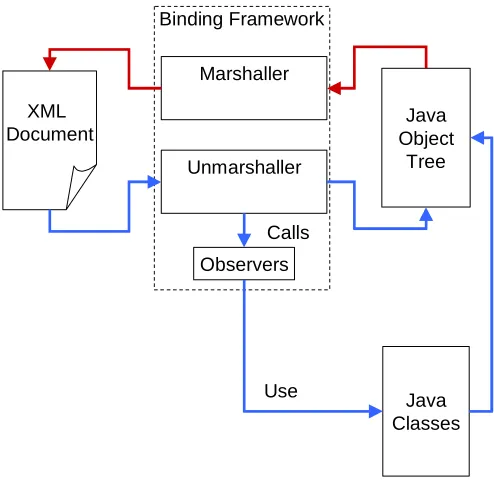
The binding framework defines and implements the APIs to unmarshal or bind an XML source to a Java object tree, and in reverse, the APIs to marshal a Java object tree into XML documents. The overall Architecture of the Binding Framework and how it works is shown in Figure 6.1.
Unmarshaller XML
Document
Java Object
Tree
Java Classes Observers
Use Calls Binding Framework
Marshaller
[image:35.612.175.422.235.476.2]Figure 6.1 Binding Framework Architecture
6.1. Architecture
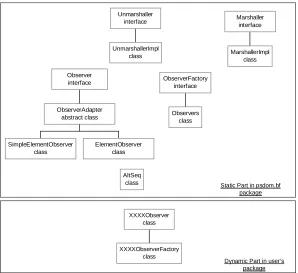
The binding framework comes with two main parts, the static and dynamic parts. The static part resides in the psdom.bf package, while the dynamic part is generated at the time the CDF compiler compiles a CDF file. The class hierarchy of the binding
framework is shown in Figure 6.2. The full specification of these classes is available in a separated document, the Java API doc for the package.
6.1.1 The static part of the binding framework
The static part of the binding framework is resides in the psdom.bf package. With
implementation of Unmarshaller interface uses the “observer” event-driven model from Dr. Schreiner’s “oops” [4] project.
SimpleElementObserver class
ElementObserver class ObserverAdapter
abstract class Observer interface
UnmarshallerImpl class Unmarshaller
interface
Observers class ObserverFactory
interface
AltSeq class
XXXXObserverFactory class XXXXObserver
class
Static Part in psdom.bf package
Dynamic Part in user’s package MarshallerImpl
class Marshaller
[image:36.612.158.456.125.398.2]interface
Figure 6.2 Binding Framework Classes Hierachy
6.1.1.1
The Unmarshaller and Marshaller interface
The Unmarshaller interface has two overloaded methods:
public interface Unmarshaller {
java.lang.Object unmarshal(java.io.File file); java.lang.Object unmarshal(java.io.InputStream is); }
This interface provides a user with a single entry point to unmarshal an XML source. The XML source can be different types such as java.io.File or java.io.InputStream. This gives a user the flexibility of choosing XML source and makes it easy to be embedded in a program.
The return value of the unmarshal method is an instance of the XML root element object.
The return type of the unmarshal method is java.lang.Object. The actual type of the
XML root element object can be defined in a CDF file. Because the return type is
The Marshaller interface also has two overloaded methods in it:
public interface marshaller {
void marshal(Object obj, java.io.OutputStream os); void marshal(Object obj, java.io.File file); }
This interface provides a user a simple way to marshal a Java object tree into the
OutputStream or a File object. The obj parameter is the Java object that represents a top-level XML element.
6.1.1.2
UnmarshallerImpl and the “Observer” event-driven model
There are already a lot of good XML parsers available nowadays. Therefore, instead of creating my own XML parser, I used the Simple API for XML (SAX) [7] parser in my implementation. The SAX is a W3C standard and it has some advantages. First of all, SAX parser just parses an XML document once, which makes it fast. Second, it is less memory-intensive because it does not store any part of the documents in memory.
In this project, an UnmarshallerImpl class is provided as an implementation of the
Unmarshaller interface. The UnmarshallerImpl uses the SAX to parse XML sources; it then passes all element names, attributes and contents down to observers. Different
implementations and XML parsers can be used to replace UnmarshallerImpl if a user
prefers, as long as it implements the Unmarshaller interface and works with observers.
Observers play the most import role in the binding framework. It’s an event-driven model borrowed from Dr. Schreiner’s “oops” [4] project. This model makes the structure of code very clear, hence, it becomes much easy to program. Each element in the XML schema will have one observer. Observers create Java objects when it is needed and set values of properties in these objects with passed-in XML data. When creating
observers, I used Factory Method [9] design pattern. This design pattern defines an
interface for creating an object, but lets subclasses decide which class to instantiate. The
ObserverFactory interface takes charge of creating a top-level observer. But the implementation of this interface is deferred until the dynamic part of the binding framework is created. All other observers will be created by their parents. A user can
choose which ObserverFactory to use by specifying psdom.observers property in the
command line.
The Observer defines the interface that’s used to process XML. Usually, each observer handles one XML element. With different implementations of this interface, it can
process different XML elements. The Observer interface declares seven methods:
public interface Observer { Observer init (String name); void shift (Object value);
void shift (String attrName, String attrValue); void shift (Observer sender);
The first method init is called when an element is started, or in other words, a rule is activated. Its responsibility is to create a new child observer to handle the newly started element. It takes a string as its input. Usually the input is the name of the element, which serves as the name of this observer.
There are three different versions of shift methods. The first one is called when a value,
usually the PCDATA part of an element is accepted. The second one is called when an
attribute of an element is passed in. The last one is called when a child element is
accepted. After the process of the current element is completed, the reduce method is
then invoked.
A user can get the value of an observer by calling the value method. The value of an
observer holds an instance of a Java class that represents the XML element, which the observer processes. The name of an observer can also be retrieved by calling the
getName method.
Another design pattern used in this project is the Adapter pattern [9]. This pattern converts the interface of a class into another interface clients expect. The
ObserverAdapter class uses this pattern. Two subclasses of ObserverAdapter exist. One
class is SimpleElementObserver. This class handles only very simple XML elements,
which have no sub-elements or attributes. The other one is ElementObserver. It can
handle all other XML elements including the elements with very complex XML structure. There is an auxiliary class AltSeq. It is designed to help processing the complex structure including the combination of alternative and sequential structure.
More detail about AltSeq class can be found in the Implementation Detail section of this
chapter.
6.1.2 The dynamic part of the binding framework
The dynamic part of the binding framework is generated automatically at the time the CDF compiler compiles a class definition file. This dynamic part contains two classes.
One is XXXXObserverFactory, which is a subclass of the Observers. The other is
XXXXObserver, which is a subclass of the ElementObserver. They both reside in a
user-defined package. The XXXX is usually the same as the name of the root element of an
XML document with the first character capitalized. A user should specify which
ObserverFactory to use at the time of un-marshalling an XML document by defining the
psdom.observers property in the Java command line. For example:
-Dpsdom.observers=psdom.examples.person.PersonObserverFactory
The XXXXObserver contains the problem-specified implementations of the Observer
interface. Each element of an XML document will be assigned an observer to process it. From observer point of view, all XML elements are classified into 3 types.
• A simple XML element that has no sub element and no attribute. It may only contain
PCDATA. This type of elements will be processed by a SimpleElementObserver.
• An element with either sub elements or attributes or both, but without any Alt or Seq
• An element with Alt or Seq structure, or any complex combination of Alt and Seq.
This type of elements will be assigned an ElementObserver with extra code to handle
Alt or Seq structure by the AltSeq class. The detail of the AltSeq class will be discussed in the Implementation Detail section.
• Besides the observers, the XXXXObserver also contains some hash maps, which are
very essential in the process of binding an XML document to Java object tree. Every
XXXXObserver has at least 3 hash maps. They are ruleMap, classNameMap and
methodNameMap. If the XML document has Alt or Seq structure, then the
XXXXObserver will have extra hash maps of elementPositionMap and
positionPropMap.
The first hash map that every XXXXObserver has is the ruleMap. A ruleMap is used to
map between the element name and the rule number. Each element name is assigned a
rule number. The number is used to identify which observer will be used. The ruleMap
looks like:
ruleMap.put("booklist", new int[] {0}); ruleMap.put("book", new int[] {1}); ruleMap.put("title", new int[] {2}); ruleMap.put("author", new int[] {3}); ruleMap.put("firstname", new int[] {4}); ruleMap.put("middlename", new int[] {5}); ruleMap.put("lastname", new int[] {6}); ruleMap.put("media", new int[] {7}); ruleMap.put("hardcopy", new int[] {8}); ruleMap.put("online", new int[] {9}); ruleMap.put("website", new int[] {10});
Because the hash map in Java takes only Object type as the second parameter, I used int
array type instead of int type.
The second hash map that every XXXXObserver has is the classNameMap. A
classNameMap maps an element name to a class. Not every element name will have a class associate with it. If an element is a simple element, which has no sub elements and no attributes, it will be mapped to a variable in a class. Therefore, there will be no class
associate with it, and hence, no entry in the classNameMap. The classNameMap looks
like:
classNameMap.put("booklist", MyBooklist.class); classNameMap.put("book", Book.class);
classNameMap.put("author", Author.class); classNameMap.put("media", Media.class);
classNameMap.put("hardcopy", MediaType.Hardcopy.class); classNameMap.put("online", MediaType.Online.class);
The class name can be defined by a user in the Class Definition File. For more detail about Class Definition File syntax and semantics, please see chapter 4. If an XML element is mapped to an inner class, the outer class name will also be specified in the
classNameMap. For example:
The last hash map that every XXXXObserver has is the methodNameMap. Every sub
element and attribute has a setXXX method or addToXXX method (if this element repeats)
in a Java class to set its value. The methodNameMap is used to map between an attribute
or sub element name to that method object. The methodNameMap looks like:
methodNameMap.put("booklist.book", "addToBooks"); methodNameMap.put("book.category", "setCategory"); methodNameMap.put("book.language", "setLanguage"); methodNameMap.put("book.title", "setTitle");
methodNameMap.put("book.author", "addToAuthor_list"); methodNameMap.put("book.media", "setMedia");
methodNameMap.put("book.hardcopy", "setHardcopy");
methodNameMap.put("hardcopy.pcdata", "setHardcopyValue"); ...
Because different elements may have attributes with the same name, the element name is added as the prefix to distinguish this ambiguity. An element with sub elements or
attributes may also have PCDATA. For this case, we use XXX.pcdata. For example:
methodNameMap.put("hardcopy.pcdata", "setHardcopyValue");
If the XML document has Alt or Seq structure, then the XXXXObserver will have extra
hash maps of elementPositionMap and positionPropMap. These two maps work together
and are used by AltSeq class. For each XML element that has Alt or Seq structure or
both, there are an elementPositionMap and an positionPropMap. The detail of the AltSeq
class and these two maps can be found in the Implementation Detail section.
6.2. Implementation detail
Some implementation details of the binding framework are discussed here, including the
implementation of the AltSeq class, the use of the reflection and how the observers are
generated from a class definition file.
6.2.1 The AltSeq class
When we have Alt and Seq combined in an element, things can get very complicated.
Let’s see a simple example with both Alt and Seq:
<!ELEMENT elem (((firstName, lastName)* | groupId), priority)>
This is an element description in a DTD file. The CDF version is:
<element name=”elem”>
<alt name=”groupPriorityType”> <!-- In Level 1 -->
<seq name=”nameType” repeat=”many”> <!-- In Level 2 -->
<sub name=”firstName”> <!-- In Level 3 -->
<data/> <!-- A is an element with only PCDATA --> </sub>
<sub name=”lastName”> <!-- In Level 3 -->
<data/> </sub> </seq>
<sub name=”groudId”> <!-- In Level 2 -->
<data/> </sub> </alt>
<sub name=”priority”> <!-- In Level 1 -->
</element>
Because each Alt or Seq will be mapped into a class, in this example, we will have 3 classes, ie Elem, GroupPriorityType, and NameType. If an element firstName comes in,
we’ll create an object of NameType to hold element firstName. But if an element
lastName comes in, we won’t. Simply because an object of NameType is already exist to
hold element lastName. Therefore, the position of an element is very important. The
elementPositionMap is added to the observers for this reason. Also, if an element
firstName comes in, we may need to create an object of GroupPriorityType, but we also
may not need to create one if the preceding elements are firstName and lastName.
Because of (firstName, lastName)*, we can have firstName, lastName, firstName,
lastName come in. When first firstName comes in , we’ve already created an object of
GroupPriorityType. At the time of second firstName comes in, an object of
Grou