Rochester Institute of Technology
RIT Scholar Works
Theses
Thesis/Dissertation Collections
3-2014
Wing Chun: Introducing Basic Wing Chun Kung
Fu Using Instructional Multimedia
Li Han Huang
Follow this and additional works at:
http://scholarworks.rit.edu/theses
This Thesis is brought to you for free and open access by the Thesis/Dissertation Collections at RIT Scholar Works. It has been accepted for inclusion in Theses by an authorized administrator of RIT Scholar Works. For more information, please [email protected].
Recommended Citation
WING CHUN
Li Han Huang
Introducing Basic Wing Chun Kung Fu
Using Instructional Multimedia
Thesis documentation submitted to the Faculty of the College of Imaging Arts and Sciences in candidacy for the Degree of Master of Fine Arts
March 2014
Rochester Institute of Technology
College of Imaging Arts and Sciences
School of Design
Approvals
Chief Adviser
Associate Professor Chris Jackson, Computer Graphics Design
Signature of Chief Adviser
Date
Associate Adviser
Professor Marla Schweppe, Computer Graphics Design
Signature of Associate Adviser
Date
Associate Adviser
Assistant Professor Shaun Foster, Computer Graphics Design
Signature of Associate Adviser
Date
Chairperson, School of Design
Peter Bryne
I, Li Han Huang, additionally grant to Rochester Institute of Technology Digital Media Library the
non-exclusive license to archive and provide electronic access to my thesis in whole or in part in all forms
of media in perpetuity. I understand that my work, in addition to its bibliographic record and abstract,
will be available to the worldwide community of scholars and researchers through the RIT DML. I retain
all other ownership rights to the copyright of the thesis. I also retain the right to use in future works
(such as articles and books) all or part of this thesis. I am aware that Rochester Institute of Technology
does not require registration of copyright for ETDs. I hereby certify that, if appropriate, I have obtained
and attached written permission statements from owners of each third party copyrighted matter to be
included in my thesis. I certify that the version I submit is the same as that approved by my committee.
Inclusion in the RIT Digital Media Library
Electronic Thesis and Dissertation (ETD) Archive
Table of Contents
ABSTRACT
0
1
2
3
4
5
6
7
INTRODUCTION
RESEARCH
PROCESS
SUMMARY
CONCLUSION
APPENDIX
BIBLIOGRAPHY
2.1 Content Research
2.2 Visual Research
2.3 Interaction Research
1
2
3
8
40
43
44
84
3.1 Thesis parameters
3.2 Design Ideation
3.3 3D Design
3.4 Logo Design
3.5 Information Architecture
3.6 Visual& UI Design
3.7 Interactive Design
3.8 Troubleshooting
4.1 Usability Testing
4.2 Thesis Defense feedback
4.3 Emails from Users
WING CHUN Abstract 1
-0
|
Abstract
âWing Chun Kung Fu 3Dâ is a conceptual website that
offers people a new experience to learn and play Wing
Chun Kung Fu via instructional multimedia.
In the website, instead of showing the video or static
images in a conventional way, users can learn basic
Wing Chun with elements such as three dimensional
visuals, animations, and interactivity.
By having a TV-game interactive style to create a
pleasant learning environment, I will demonstrate how
to use instructional multimedia to teach martial arts
through non-traditional methods.
Website link:
1
|
Introduction
Wing Chun is a truly beautiful and practical Kung Fu style in Chinese martial arts,
specializing in close range fighting. Without big movements and wasting energy,
Wing Chun focuses on efficiency, speed and sensitivity. It has been broadly used
for self-defense around the world. Reported by the program â10 greatest weapons
everâ on Discovery channel, Wing Chun is recognized to be the greatest weapon
of the ten.
The inspiration for developing an interactive Wing Chun Website comes from the
movie âIp Man.â It shows me how the traditional martial arts can be so graceful. It
does not focus on the power from your body, but rather on the spirit and instant
reaction of physical contact. I started to think about how I could introduce Wing
Chun to more people. As a designer, I believe that creating an interactive website
could be the best method to accomplish this.
By using techniques in instructional multimedia, the website âWing Chun Kung
Fu 3D - WK3D.comâ offers people a new experience by which to learn Kung Fu.
I hope people will garner more interest and understanding in Wing Chun after
playing with this 3D interactive application.
-2
|
Research
To start this project, there are questions that I have been asking myself: What is Wing
Chun? What would people like to see? How to make an impressive website for people
who want to learn about Wing Chun? How to develop an interactive application for users
to play and learn easily?
In order to answer those question, I organized the research materials into three sections
as follow:
Initially, I thought that Wing Chun was just a type of elegant fighting system. After I
began my research, I realized it is much more complicated than what I had imagined.
The principle and technique are based on sophisticated philosophies of science and the
mind. I needed to have a solid understanding of Wing Chun before I could teach people
about it.
I began my research by reading books, watching videos, visiting martial art websites,
downloading martial arts related iPhone Apps, and training in Wing Chun Kung Fu under
the Wing Chun sifu John Landers. The more I learned, the more I loved Wing Chun. I am
eager to introduce this martial art to every person around me.
After 3 months of content research, analyzing what people would more likely want to
learn in the beginning, and also considering the project time frame, I narrowed down my
website content to four main topics: Intro, Forms, Training, and Terms.
WING CHUN Research / Content Research 3
WING CHUN Research / Content Research 4
-[ Books ]
Wing Chun Kung Fu:
Traditional Chinese King Fu for Self-Defense and Health
Ip Chun, Michael Tse
This book is written by Ip Chun, the son of Grandmaster Ip Man. He outlines the art
and history of Wing Chun, demonstrates the first form of Wing Chun and discusses the
benefits of learning Wing Chun.
Wing Chun Kung Fu
J. Yimm Lee, Bruce Lee
Edited by Bruce Lee, this book delivers a solid introduction of Wing Chun theory and
techniques. Demonstrates the attack and trapping movements by showing numerous
of photos at different angles.
[ Websites ]
Master Samuel Kwok
http://www.kwokwingchun.com/
This website has large amounts of Wing Chun resources in organized categories. I got
the big picture of what my website should include by visiting this site.
Wing Chun Interactive
http://www.wingchuninteractive.com/
WING CHUN Research / Visual Research 5
-[ Training ]
Samurai Martial Arts
1512 SpenceportT Road Rochester, NY 14606
Martial art is the art of body motions. Learning by doing is better than itâs learning by
reading or observation alone. I learn Wing Chun Kung Fu under the Wing Chun sifu John
Landers at Samurai Martial Arts. I started as a beginner at 100 minutes per class, Two to
three days a week. I was promoted to the advanced level and received a blue sash after
training for one year. The training not only helped me to further understand Wing Chun
for my project needs, but also it is of great benefit for me to have self-defense techniques
and an added ten pounds of muscle.
The look and feel of the website plays a big role in the userâs first impression.
People tend to have more interest in visiting high visual appeal websites. Therefore, I
would like to create a visually appealing environment to boost the usersâ interest in Wing
Chun Kung Fu.
I consider Wing Chun a new brand that needs to be introduced to the market. From
branding, identity, logo, color to fonts, I have researched many successful sports-related
brands, such as Nike, Adidas, UFC, EA Sports, Wii and Xbox Kinect games.
I was planing to choose a direction that is a realistic, sporty, and highly polished interface
such as EA NBA Live. After learning Wing Chun in more depth and analyzing the pros and
cons of these sports brands, I had a clear idea about what I wanted in the visuals.
Simple, clean, minimal, and non-commercial are the key elements that match the
principles of Wing Chun.
It is the way to interact with people that makes this project complicated. To create 3D
lessons, I needed to learn 3D modeling, texturing, rigging, lighting, and rendering. To
build an interactive and responsive website, I need to improve my ActionScripts 3.0 and
HTML skills. Also I researched many different user experiences to possibly apply to my
project. Below are the main resources that helped me in my interaction research.
[ Websites ]
Wrangler FW11 Mark Your Territory
http://www.thefwa.com/shortlist/wrangler-fw11-mark-your-territory/
This is an advertising campaign promoting Wranglerâs FW11 collection. Users can drag
the buttons through the guiding paths to control the models and the interactive scenes.
I think it would be interesting to create the lessons with this kind of technique in which
users can learn each movement step-by-step by following the guiding buttons. Then, I
started a long programming journey in ActionScript 3.0.
WING CHUN Research / Interaction Research 6
-2.3 Interaction Research
[ Websites ]
Jordan Alpha Trunner
http://www.nike.com/jumpman23/trunner/index.html
WING CHUN Research / Interaction Research 7
-Adventures in AS3
http://as3adventure.blogspot.com/
This is a blog that provides many useful ActionScript 3.0 examples. I later created
a function that allows the user to drag the button to control the 3D motions, it was
developed based on a formula in the article âDrag + Easeâ.
ZAHIA
http://www.zahia.com/
This is Zahiaâs high fashion and very elegant official website. I was inspired by its
interactive floating banners that allow the user to navigate sections they would like to
read with smooth transitions.
Lynda.com
http://www.lynda.com/
An online video training website where I learned Cinema 4D and ActionScript 3.0.
GREYSCALEGORILLA
http://greyscalegorilla.com/
3
|
Process
This section includes my thesis parameters and six phases of my design and
development processes, includes design ideation, 3D design, logo design, information
architecture, visual and UI design, interaction design, and usability testing.
3.1 Thesis parameters
< Goals >
⢠Introduce Wing Chun Kung Fu to more people.
⢠Develop a new experience for people to learn basic Wing Chun via instructional
multimedia.
⢠Build audienceâs confidence and help people prepare themselves before finding a
Sifu or training teacher.
< Background >
⢠The current Wing Chun instructional websites mainly show photos, graphics, and
videos. The only one that has Flash interactive lessons, is not designed well in
usability.
⢠Wing Chun is not as popular as the other martial arts, such as Brazilian Jiu-Jitsu,
Karate, Judo, boxing, Muay Thai, and Tai Chi.
-3.2 Design Ideation
< Target Audience >
My target audience is all the people who at least know how to use the Internet and
who have an interest in Wing Chun, self-defense, or any type of martial art.
< Softwares >
Maxon Cinema 4D, Adobe Photoshop, Adobe illustrator, Adobe After Effects, Adobe
Dreamweaver, Adobe Flash.
For this project, my central idea is to create a 3D interactive website to introduce basic
Wing Chun Kung Fu. The reason I use 3D is its flexibility. Once I build a model with
rigging controllers, I can easily to show any kind of movements with any angle of view,
and render it to whatever platform I want. Besides, it is fun to watch. For the gamers
and young people who do not do any kind of exercise, it could attract them to move
their bodies and hopefully become more physical fit.
Also, I would like to use the combination of multimedia techniques that I learned from
RIT Computer Graphics Design, such as 3D design, post-production, interaction
design, typography, instructional multimedia, and user interface design, to prove that
I am able to use them well already. Even though it is really challenging, I am really
excited to make it work.
-3.3 3D design
WING CHUN Process / 3D design 10
-For the design process, I started with the most complicated and time-consuming part,
3D design, that includes two character modeling with rigging and texture mapping, and
making animations and rendering them for interactive applications at the end.
< Character Modeling >
There are two characters in my project, one is for the form training and the other is the
assistant role for demonstrating the attack and trapping movements part.
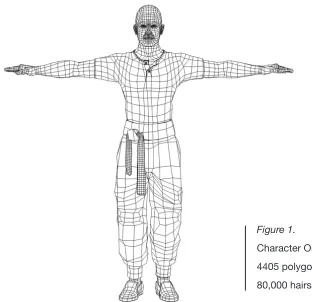
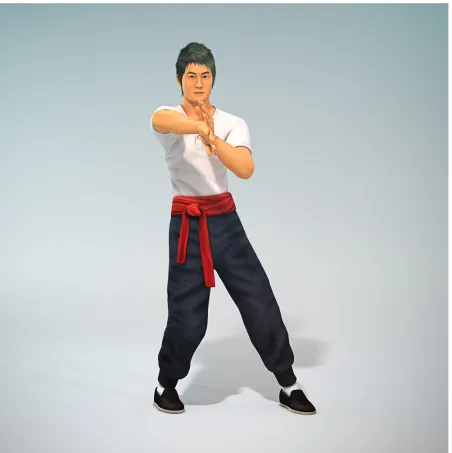
[image:15.612.141.453.395.697.2]The first character (see Fig. 1) has a friendly Asian look, consisting of mid-20th century
Chinese martial arts training outwear, and a sash around the waist. It is made with
low-polygons for rendering easily.
Figure 1.
WING CHUN Process / 3D design 11
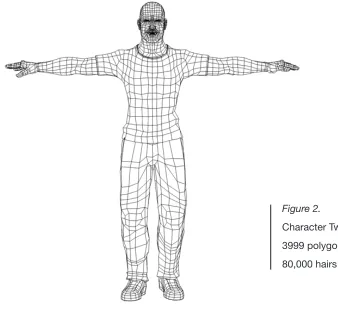
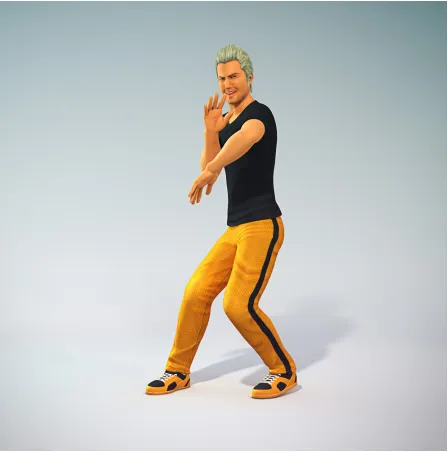
-Figure 2.
Character Two
3999 polygons
80,000 hairs
The second character (see Fig. 2) is modified based on the structure of the first one. It has
shorter hair and is Caucasian looking in a modern training outfit.
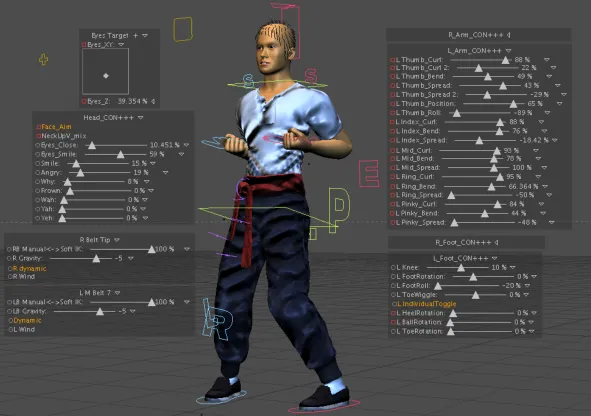
< Rigging >
I was planning to use a motion capture system to record the motion from myself. However,
I found that system cannot capture hand movement and it is impossible to have two
people together in the motion capture studio. I changed my plan to build rigging systems
for my two characters.
[image:16.612.143.481.170.487.2]WING CHUN Process / 3D design 12
-the beltsâ rigging. They can be animated ei-ther by gravity and collision, or by manual
keyframing.
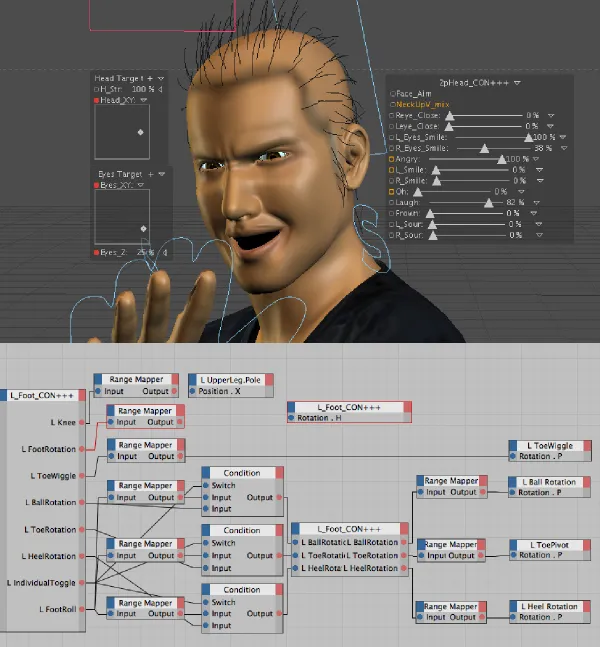
[image:17.612.19.610.270.686.2]The most difficult part is to rig the shoulders and the arms. They showed strange bends
and unnatural twists when I started to animate them. Therefore, I spent more time
adjusting the polygons, joints, and weight-painting until they looked more realistic.
WING CHUN Process / 3D design 13
[image:18.612.12.612.30.677.2]Rigging system and controlers
WING CHUN Process / 3D design 15
-< Texture Mapping >
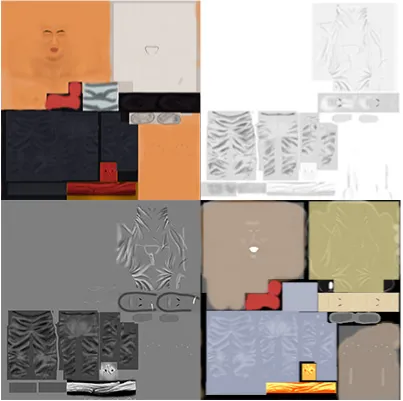
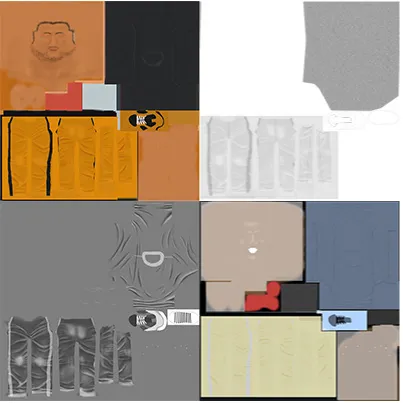
For the textures, my goal is to create a simple and clean look and feel. I got fabric
textures from scanning my clothes and adding some subtle clothing wrinkles by
drawing on the map to make the models look softer. Below are the maps for my
characters (Fig. 7 and Fig.8):
1. Color map 3. Bump map
[image:20.612.110.513.219.620.2]2. Diffusion map 4. Specular map
1. Color map 3. Bump map
[image:21.612.111.514.150.553.2]2. Diffusion map 4. Specular map
Figure 8. The textures of character two
-WING CHUN Process / 3D design
< Animation >
The animation process is the most interesting part for me. Since I did not plan to use
motion capture studio, I had to animate the motion to be as natural as possible. I learned
the importance of secondary movement from my 2D and 3D animation classes, to make
my characterâs movement more realistic. Also, I recorded my movements and imported
the video to After Effects to see how much time I took to finish each movement, and how
the other parts of my body would follow the moves. Below are the screenshots of my
animating screens (Fig. 9).
WING CHUN Process / 3D design 18
-< Lighting and Rendering >
[image:23.612.86.538.237.690.2]I would like to create a natural, clean and bright atmosphere for presenting the movements.
I used a Sky Shader Object and three or four soft boxes lighting in the scene and turned on
Global Illumination and Ambient Occlusion. I spent a long time trying to find the balance by
adjusting the value of their angles, intensities, colors, and shadows. I then Rendered out
the animation with separated shadow passes, Ambient Occlusion passes, and Reflection
passes for the post-production needs in After Effects. ( See Fig. 10 and Fig. 11).
WING CHUN Process / 3D design 19
[image:24.612.84.532.116.568.2]WING CHUN Process / Logo design 20
-3.4 Logo design
Similar to Tai Chi, Wing Chun theories are relevant to Chinese Taoism philosophy
Yin & Yang. Yin could be understood as negative, dark, or soft and Yang could be
understood as positive, light, or hard. Everything in the natural world has both yin and
yang aspects. Each of them cannot exist alone, they are complementary to each other
as a whole object.
In Wing Chun, we can never use strength against strength. Yin is soft or defense
and Yang is hard or attack. We use soft movements to redirect the hard force from
opponents and use it as our hard power to fightback.
For the logo development, I initially designed a sharp fist shape (see Fig. 12). I thought
it did not match the Wing Chunâs philosophy and it looked too sporty. Then I combined
the Yin-Yang concept to my logo design, visualized the fist and defensive palm to
the logo and transformed the lines and organized the shapes many times to the final
geometric logo (see Fig. 13).
[image:25.612.120.378.449.537.2]wk3d.com
Figure 12.
Logo design
process
Figure 13.
WING CHUN Process / Information Architecture 21
-Figure 12.
Logo design
process
3.5 Information Architecture
To build the website, the first step is to create my information architecture. After the
research and the learning process, I have a better idea about what Wing Chun is, and
what people would like to learn in the beginning. I then decided to adjust the website
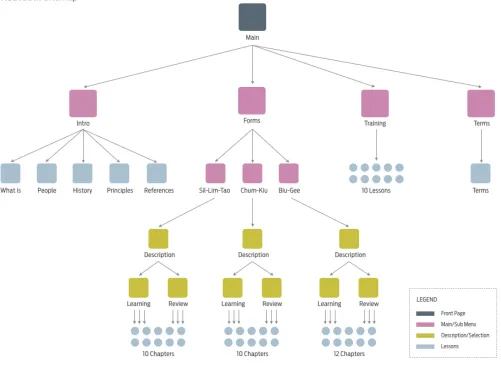
structure of my proposal and narrowed down the contents into four main topics:
Intro
Introducing what Wing Chun is, discuss the history, people
who learn Wing Chun, principles and references I recommend.
Forms
Teaching three Wing Chun forms by showing 3D interactive
animation with floating description step-by-step.
Training
Teaching basic self-defense techniques by showing 3D
interactive animation with floating description step-by-step.
Terminology
Showing interactive flash cards with the terms used in Wing
Chun Kung Fu.
WING CHUN Process / Information Architecture 22
[image:27.612.59.560.187.557.2]WING CHUN Process / Information Architecture 23
[image:28.612.90.560.211.557.2]WING CHUN Process / Information Architecture 24
[image:29.612.53.559.201.557.2]WING CHUN Process / Visual and UI design 25
-3.6 Visual & UI Design
< Font Selection >
I tested many different combinations during the font selection. At the beginning, I tried
san-serif for the headers. They looked too bold and too solid. Then I tried serif fonts, but
they are too soft and too traditional. Finally, I found a new typeface named St Marie from
the category of slab serif. Even if it looks thin, we can still feel its strength, flexibility, and
resilience, just like the characteristic of Wing Chun. Therefore, I purchased it from www.
myfonts.com and used it for the headers.
For the paragraph, I found a font, Syntax, that is easy and comfortable to read. And for the
navigation buttons and menu, Antenna is good for the user to quick recognize.
St Marie Light
AaBbCbDdEe 1234567890
St Marie ExtraLight
AaBbCbDdEe 1234567890
St Marie Thin
AaBbCbDdEe 1234567890
Syntax Series Book
AaBbCbDdEe 1234567890
Antenna Regular
WING CHUN Process / Visual and UI design 26
-#FFFFFF
#D8D9DB
#EAEAE0
#333333
#FDCC00
#D1171E
Primary Colors
Secondary Colors
Background Colors
< Color >
As yin-yang is the key concept for the logo design, I applied its color code, black and
white as the main color of the whole website. Then I used a light blue and yellow tone as
background to differentiate the learning and introduction sections.
The reason I used a blue tone is because the first thing the Wing Chun practitioner needs
to do is to stay calm. Blue can help people to keep focused and calm. The reason for
using a warm yellow tone is that the introduction section is an area to discuss Wing Chun
and its history. Light yellow could be a connection between readers and the ancient story
and theories.
WING CHUN Process / Visual and UI design 27
-< User Interface >
For the interface design, in order to let users immediately have a general idea about what
the contents are in the site, I created four large banners as the entrances to connect to my
four main topics (Fig. 17). Also, each banner has its sub-menu, so users can easily dive in
to the specific topic they would like to reach. The key concepts of the navigation design
are simple, clear, and straightforward.
[image:32.612.31.581.237.542.2]Next, I mimicked the ancient scrolls to design the Intro (Fig. 18). Users can scroll
horizontally to browse the content. Also, users can quickly access specific content or
go back to the homepage by using the pop-up menu on the top left. In each section, I
designed many icons and links for people to tap and read further information.
WING CHUN Process / Visual and UI design 28
[image:33.612.37.577.89.689.2]WING CHUN Process / Visual and UI design 29
-Figure 19. Navigation design in Forms section
For the Forms, Training, and Terms page, I would like to have users focus on my
full-screen interactive lessons, so I placed all the navigation at the bottom of the full-screen.
The style is also clean and minimal as the homepage design (see Fig. 19).
In the Forms and Training section, users can choose learning mode or Review mode
depending on their needs. Learning mode is designed for beginners. By dragging and
releasing the buttons, users can learn the movements step-by-step (Fig. 21, 22, and
23). In Review mode, users can watch the whole movements by dragging their mouse.
Dragging right plays the animation forward and left plays it backward (Fig. 24 and 25).
WING CHUN Process / Visual and UI design 30
[image:35.612.43.568.39.332.2]-Figure 20. Description page in Forms section
[image:35.612.37.579.386.681.2]WING CHUN Process / Visual and UI design 31
[image:36.612.37.577.36.329.2]-Figure 22. Learning mode - 2
[image:36.612.37.578.385.680.2]WING CHUN Process / Visual and UI design 32
[image:37.612.37.579.39.328.2]-Figure 24. Review mode - 1
[image:37.612.39.576.386.675.2]WING CHUN Process / Visual and UI design 33
[image:38.612.38.580.40.326.2]-Figure 26. Instruction - 1
[image:38.612.37.579.382.678.2]3.7 Interactive design
< Animated Menu >
I create a smooth animated menu on the homepage navigation. When the cursor is on
either one of the banners, that banner will expand and show the sub-menu. The other
banners will also shrink at the same time.
< Responsive Webpages >
After creating the animations, information architecture, logo, and basic interface, the last
thing I need to do is to create interactive functions with the programming in HTML and
Flash ActionScript 3.0. There were a lot of mathematical calculations and many
back-and-forth animation adjustments for creating the interactions.
This is the most challenging and important part in the design process. This is the final step
to create a new learning experience for people to learn Wing Chun. Below are the main
interactive functions I designed for the website:
WING CHUN Process / Interactive design 34
-Figure 28.
[image:39.612.113.477.339.496.2]Animated menu
< Smart Menu >
There are many small lessons in the Forms section, and each lesson has two learning
options. I created a menu that allows user to switch between Learning mode and Review
mode easily. Also, the menu can memorize the lessons users have read already, so they
will not be confused when changing the lesson.
In order to provide users with a better interactive experience, I designed the full-screen
style website and have the site dynamically fits into different sizes of browsers.
< Horizontal Parallax Scrolling >
I used a horizontal parallax scrolling effect for designing the Intro page. Users can read the
contents by scrolling their mouse up and down, then the titles, paragraphs, and images
will scroll horizontally with different speeds.
WING CHUN Process / Interactive design 35
[image:40.612.115.511.89.226.2]-Figure 30. Responsive webpage - 2
Figure 31. Horizontal parallax scrolling effect
[image:40.612.33.578.346.405.2]< Instructional Slide Buttons >
Figure 33. Instructional Slide Buttons
I designed many instructional slide buttons for users to learn step-by-step. Users can
watch the characterâs movements while dragging the buttons. Each movement will be
completed when users drag the button to the end of the dotted path. After a movement is
done, the next slide button will show up for the next move.
< Floating Notes >
Besides showing the movements with the animation, I designed floating notes that show
the step numbers and the text instructions. They will follow the body and change the
position with smooth transitions. The notes will become white when users complete a
movement.
< Drag to See >
WING CHUN Process / Interactive design 36
[image:41.612.112.443.83.225.2]-Figure 34. Floating Notes
Figure 35.
[image:41.612.110.516.383.456.2]In Review mode, I made a function for users to drag and see the movement with two
aspects. The longer the distance you drag, the more video frames will be played. Dragging
to the right will play the animation forward and dragging to the left will play it backward.
< Interactive Images >
To have the introduction more interesting to see, I added interactive features to the
images. When the cursor touches the images the images will move or interact with the
cursor.
WING CHUN Process / Interactive design 37
[image:42.612.114.442.424.692.2]WING CHUN Process / Interactive design 38
[image:43.612.114.504.92.330.2]-Figure 38. The character bows when the cursor is on him
[image:43.612.48.566.374.667.2]WING CHUN Process / Troubleshooting 39
-3.8 Troubleshooting
I have been facing many problems throughout my entire project. For the most
technical problems such as software crashes, rigging, rendering, and programing
problems, I looked for online resources or used the Help feature in the software
to find the solutions.
4
|
Summary
4.1 Usability Testing
To design a user-centered application, itâs very important for me to collect usability
feedback at the end of my design process. The feedback will help me to understand the
first-time usersâ behavior, and then further improve the usability of my site.
The procedure is to have people visit my website and play with each section of the
application without any previous instruction, so I can observe if there is any navigation or
interaction difficulty, any visual or text content that they cannot easily understand, or any
bug that needs to be fixed.
I received much valuable feedback such as the inactive navigation should be less
dominant than the active one. Instead of using the help button, the usability instructions
may need to show up automatically for the users to have a basic idea about how
the application works before the lesson starts. When a movement is completed, the
instructional buttons should jump to the next step without waiting for users to release the
button. Additionally, the Enable Deblocking feature needs to be on to help improve image
resolution.
I greatly appreciate my advisors, classmates, friends, and all who participated in my
usability testing process.
-4.2 Thesis Defense Feedback
I received many positive feedback during the thesis defense. There were also three small
issues that committee members pointed out for me to think about.
One is that transition of the door opening and closing between the two lessons may be
too redundant. It would be better to have this transition only during the main section
changes.
The other is the design consistency issue between the Intro section and the Forms
section. My idea was to provide users more visual variation to extend usersâ interest.
However, I think it would help if I added more visual connections between the two different
sections in future updates.
The third one is that even I have had two modes for the form learning, Professor Marla
Schweppe would like to see those movements to be performed in the real speed. I think
that is a great idea I should add to my lessons so users would have better understanding
of how the whole movements would performed in the normal speed.
WING CHUN Summary / Thesis Defense Feedback & Emails from Users 41
-4.3 Emails from Users
11/11/13
super cool
Hello
http://wk3d.com is amazing! Continue building it! :)
- Benoit Falardeau
8/30/13
Wing Chun
Hola, Mailto soy Ignacio de Argentina, tu pagina es muy buena, pero no la has terminado,
¿Necesitas ayuda?
- Ig Her
8/28/13
wk3d.com Completion Estimate
I was just curios, I know you said that this was for a thesis project, but do think thereâs any
chance that this could be completed ever?
Not rushing you or anything, I think it would just be awesome to have a reference like this
to be able to point to.
Thank you so much for your time.
- Greg Bedsaul
10/30/12
wing chun kung fu 3D
Bonjour , jâaurais aimer savoir pourquoi on ne peut pa lire la suite après le sil lim tao ?
merci :)
- Geo AMAT
-5
|
Conclusion
The goal of my thesis project is to demonstrate how to use instructional multimedia to
teach Wing Chun Kung Fu by non-traditional methods. After one year of hard work, I
have finally achieved this goal by organizing a substantial amount of information collected
from the web, books, and sifu, using all the skills and techniques I have learned from
Computer Graphics Design at RIT to build this 3D interactive application.
The significance of this project is that I proved interactive multimedia is able to improve
usersâ leaning experience and helps to earn peopleâs interest in Wing Chun.
I learned so much from the design process. I have learned how to combine 3D design
with web design to create an interactive application. I have learned many design
techniques from 3D, graphic design, to user experience design. Also, I learned an
important lesson about time management. I did not know exactly how much time it
would take to finish this project. The more new techniques I learned, the more elements I
wanted to put into my project. As a result, I spent much more times than I had predicted.
I should have planned better to make sure every design process followed its own
schedule.
I hope this site will inspire more people to learn Wing Chun. I will continue updating and
adding to the website contents. I may also transfer the coding program from ActionScript
3.0 into HTML5, in order to keep up with current trends for the increasing number of
mobile and tablet users.
I greatly appreciate my committee members for their instruction and direction. Thanks to
my friends and website visitors who gave me all the support and encouragement.
-WING CHUN Appendix / Thesis Proposal 44
-6.1 Thesis Proposal
Thesis Proposal for the Master of Fine Arts Degree
Rochester Institute of Technology
College of Imaging Arts and Sciences
School of Design
Computer Graphics Design
Title:
Wing Chun: Introducing Basic Wing Chun Kung Fu Using Instructional Multimedia
Submitted by:
Lihan Huang
Date:
October 21, 2009
Thesis Committee Approval:
Chief Adviser:
Associate Professor Chris Jackson, Computer Graphics Design
Signature
of
Chief
Adviser
Date
Associate Adviser:
Professor Marla Schweppe, Computer Graphics Design
Signature
of
Associate
Adviser
Date
Associate Adviser:
Visiting Professor Shaun Foster, Computer Graphics Design
Signature
of
Associate
Adviser
Date
School of Design Chairperson Approval:
Chairperson, School of Design:
Patti Lachance
Signature
of
Chairperson
Date
-Thesis Proposal for the Master of Fine Arts Degree
Wing Chun: Introducing Basic Wing Chun Kung Fu Using Instructional Multimedia
by Lihan Huang
1. Thesis Problem
How can instructional multimedia help designers use new
technologies to create a martial arts tutorial website that focuses
specifically on Wing Chun?
2. Problem Statement
I am designing an interactive application that introduces basic
Wing Chun, using techniques in instructional multimedia. I will
illustrate how web designers could add interest and effectively
teach users about Wing Chun.
3. Abstract
âWing Chunâ is a conceptual website which offers people a new
experience to learn and play Wing Chun Kung Fu via instructional
multimedia.
In the website, instead of showing the tutorial video or static
images in a conventional way, users can learn basic Wing Chun
using three dimensional visuals, animations, and interactivity.
Also, in order to develop and keep userâs interest in this martial
art, there is a arcade style game for the users to play. By using
a TV game interactive style to create a pleasant environment for
learning, I will demonstrate how to use instructional multimedia to
educate users about Wing Chun using non-traditional teaching
methods.
-4. Project Description
4.1 Overview
Wing Chun is a truly beautiful and practical Kung Fu style. The
system relies on biomechanics. It has been broadly used for
self-defense around the world. Also, a specialty of Wing Chun is
close-range combat. French police use it for training their special
force EIRS members. Reported by the program â10 greatest
weapons everâ on Discovery channel, Wing Chun is recognized to
be the greatest weapon of the ten.
The inspiration for developing an interactive Wing Chun Website
comes from the Chinese movie âIp Manâ. The movie made me
aware of the fact that traditional martial arts can be graceful. It does
not focus on the power from your body, but rather on the spirit and
instant reaction, and your mind. I started to think about how, as a
designer, I can introduce Wing Chun to more people. Creating an
interactive website could be the best way to do it.
The website âWing Chunâ will be designed for young people who
have an interest in Wing Chun. The main structure will be built in
Flash. To make it interesting, I will use some TV game elements,
visual and audio, in the website interface to catch peopleâs
attention.
Also, there will be a three dimensional tutorial to allow the user
to clearly understand the basic form. In this section, I will build a
character in Maya and use motion capture technology to record a
personâs motion and two peopleâs reaction. I will combine this with
an interface for the user to choose play, stop, pause, and change
speed. The target is to let them learn the basic form efficiently.
Thesis Proposal for the Master of Fine Arts Degree
Wing Chun: Introducing Basic Wing Chun Kung Fu Using Instructional Multimedia
by Lihan Huang
-Thesis Proposal for the Master of Fine Arts Degree
Wing Chun: Introducing Basic Wing Chun Kung Fu Using Instructional Multimedia
by Lihan Huang
Further, an arcade style game will be designed for the user to play
after the user gets tired of practicing. There will be 5 levels in the
game. The player has to focus on opponentsâ random gun attack
(with pre-action for player to react), then dodging(Z key) with
at-tack(X key). After knocking out all the opponents, General, who is
the master of Karate will appear at the end of each stage of the
game. The game will use Flash and ActionScript 3.0 for
coding.
-4.2 Target Audience
Age: 6~60 (focusing on 6-30)
For all people
a. who have an interest in Wing Chun
b. want to learn Wing Chun
c. who want to learn self-defense?
d. love Chinese martial Art
e. who are a fan of Fan of Bruce Lee or Yip Man
f. for health
Persona A
⢠Name: Peter
⢠Age: 15
⢠Job: student
⢠Interests: Movies, TV Games, Skateboarding, Asian Culture, Bruce Lee
Peter is a big fan of Bruce Lee and is trying to find some
Kung Fu information and lessons on the Internet. He wants
to be stronger in order to protect himself.
Persona B
⢠Name: Sayaka
⢠Age: 28
⢠Job: Teacher
⢠Interests: Yoga, Swimming, Zen philosophy
Sayaka is a English teacher. She has been learning Yoga for 3 years. She wants
to take the womenâs defense class to protect herself from sexual harassment.
4.3 Software and Hardware Requirements
⢠MAC OSX of Windows Vista or Windows XP
⢠Flash Player 10 for Firefox or Explorer.
⢠Speaker
Thesis Proposal for the Master of Fine Arts Degree
Wing Chun: Introducing Basic Wing Chun Kung Fu Using Instructional Multimedia
by Lihan Huang
-5. Survey of the Literature
For this project, I needed to know the strengths and weaknesses of the existing martial
arts teaching materials; so I researched several websites, books, videos, and Apple
Apps. Also, for designing the interface, I visited several TV and PC game websites to
know what are the new interactive methods online and how I might make the website
more interesting. The following are the references that will help me to develop the Wing
Chun website.
5.1 Instructional Websites
âWing Chun Interactiveâ
http://www.wingchuninteractive.com/
This website teaches Wing Chun using 2D animation. Although it shows front and side
perspective views and descriptions are clear enough, the motions look very stiff. If they
improved the animation, this website would be wonderful. The website doesnât belong to
any club or company. It just leaves some spaces for Google advertising. From this site, I
gained inspiration for my website. It gave me the rough direction to start my work.
â5min | Life Videopediaâ
http://www.5min.com
5min is a platform for people to share the instructional video online. The main difference
between 5min and YouTube is 5min has a interface for users to choose the speed of the
playing rate, brightness, and watch frame by frame. Itâs a great concept for a
tutorial website that allows people to learn from video in detail easily, and that is just what
I want to do in the Wing Chun website.
5.2 Graphical User Interface
âIP-Manâ
http://www.ipman-movie.com/opening_en.html
This is the Wing Chun movie, IP-MAN (12 December 2008 release) official website. The
main buttons are located on different parts of the wooden dummy, which is for Wing Chun
practicing. When users roll over it, a hand or leg will show up and hit the dummy with the
sound of Kung Fu yelling that skillfully brings the movie stage to the webpage. Also, to
create a dramatic atmosphere, it combines a vintage image with Chinese painting to
design the background.
Thesis Proposal for the Master of Fine Arts Degree
Wing Chun: Introducing Basic Wing Chun Kung Fu Using Instructional Multimedia
by Lihan Huang
-âBorderlandsâ by Gearbox Software
http://www.borderlandsthegame.com/
This is a website that introduces the TV game. By using the amazing gaming
environment and ambient sound, the site makes people curious about the game and
makes them want to stay in this site longer and discover what will happen after
clicking each button. It provides me an idea about what the interface and music could do
for creating a game style website.
5.3 Kung Fu Games
âKung Fu Masterâ
http://www.everyflashgame.com/game/71/Kung-Fu-Master.html
It was the first beat âem up arcade game developed by the Japanese company Irem
Cor-poration in 1984. The concept came from of Bruce Leeâs Game of Death. The player can
punch and kick in a standing, crouching or jumping position. There is a boss at the end
stage. The player has to defeat him before entering the next floor. We can still find those
elements in most beat âem up games and I will use them as the structure of my
interactive game, too.
âStick-Fuâ
by Mobirate
iPhone App game
Stick-Fu lite is a free iPhone beat âem up game. Players use the left thumb to control left
and right, the right thumb to punch and kick. The interface is so clear and simple that it
allows the player to play it
without thinking. Beautiful graphics and fluent movements are
the features that make the game interesting. If a player wants to play more, they have to
pay $0.99. This game inspires me to create an interesting game to promote my website
and earn some money back at the same time.
Thesis Proposal for the Master of Fine Arts Degree
Wing Chun: Introducing Basic Wing Chun Kung Fu Using Instructional Multimedia
by Lihan Huang
-5.4 Instructional Games
âWii Fit plus- Yogaâ
by Nintendo
Nintendo Wii (May 21, 2008 released)
Wii Fit is a great interactive game that allows players to watch the 3D tutorial from the
screen and move their bodies. There is a balance board to detect playersâ balance and
then show the diagrams on the screen so players can adjust their posture easily. The 3D
tutor, a gentle voice guide, an elegant simple diagram and relaxing ambient sound makes
this game popular for young ladies. If Wing Chun is taught using those elements, people
can learn it more easily.
âMy Fitness Coachâ
by UBI Soft
Nintendo Wii (December 2, 2008 released)
This game teaches fitness dance with a 3D tutor. The special fact I learned from the
game is that they use a timeline for players to know when they should change the motion.
It is really helpful when teaching Wing Chun with slow motion.
5.5 Books
âComplete Guide to Kung Fu Fighting Stylesâ
by Jane Hallander
UNIQUE PUBLICATIONS., 1985
This old book introduces all kinds of Chinese Kung Fu with realistic black and white
pictures. It talks about Wing Chunâs history and fighting theory. While the other books
make me confused about the Wing Chun branches, this book gives me clear information.
âKung Fu: History, Philosophy, and Techniqueâ
UNIQUE PUBLICATIONS., 1982
This book discusses about the philosophy of Taoism before talking about the external
Kung Fu techniques that inspired me to show more inner philosophy in the website in
order to let people know that the goal of Wing Chun learning is not only for fighting and
defense, but to learn respect, filial piety, and morally correct manners first.
Thesis Proposal for the Master of Fine Arts Degree
Wing Chun: Introducing Basic Wing Chun Kung Fu Using Instructional Multimedia
by Lihan Huang
-6. Design Concept
6.1 Flowchart
Thesis Proposal for the Master of Fine Arts Degree
Wing Chun: Introducing Basic Wing Chun Kung Fu Using Instructional Multimedia
by Lihan Huang
-6.2 Lesson Sketch
- Motion capture for body
- Maya for modeling, hands, and detail (The character will be Human-looking)
- AfterEffect for motion graphics, text and editing
- ActionScript 3.0 for users to adjust fast/slow,
volume and control the timeline
- There will be 3-5 Seconds for each tutorial.
However, by using different angles and slow
motions, it will be 30 Seconds.
Thesis Proposal for the Master of Fine Arts Degree
Wing Chun: Introducing Basic Wing Chun Kung Fu Using Instructional Multimedia
by Lihan Huang
-6.3 Game Design
Type
Platform , Beat âem up
Charactors
1. fighter
2. citizens (who need your help)
3. foreign polices
4. General
Game Rules
The Wing Chun fighter has to focus on opponentsâ random gun attack or Karate attack
(with pre-action for player to react), then dodging with attack. After knocking out all
the opponents, the General who is the master of Karate will appear at the end of each
stage.Players will learn new Wing Chun skills after passing a level. There will be 6 levels
in the game. Players can learn how the different skills work easily by playing this game
and gain more interest in Wing Chun.
Skills and Control
Jump space
Dodge
z
L1. Wing (basic) x
L2. Lap down + x
L3. Splitting c
L4. Jerk down + z
L5. Palm up up + x
L6. Slap down + c
Visual Setting
Characters: 3D
Background: 2.5D
Thesis Proposal for the Master of Fine Arts Degree
Wing Chun: Introducing Basic Wing Chun Kung Fu Using Instructional Multimedia
by Lihan Huang
-Color:
Red 204 28 0
Yellow 255 173 0
Blue 0 152 161
Brown 133 117 82
Gray 95 95 97
Music
âA Man of Determinationâ remix by using Garageband
Sketch
Player
(will be larger)foreign polices
Coins
Add ScoreChicken
Add LiveThesis Proposal for the Master of Fine Arts Degree
Wing Chun: Introducing Basic Wing Chun Kung Fu Using Instructional Multimedia
by Lihan Huang
-9. Budget
$360 Wing Chun Kung Fu class - 3 month
$ 60 Research expense for books
$ 10 .COM domain name registration - 2 Years
$ 90 Web hosting - 3 years
$520 Total
10. Timeline
Time
Item
Note
2009
September
ConceptSurvey of literature
October
Thesis proposal draft 1st Committee MeetingNovember
Thesis proposal defense Submit proposal Research Kung Fu learningDecember
Kung Fu learning 3D modeling2010
January
3D rigging & texturing Kung Fu learning Logo Design2nd Committee Meeting
February
Website visual design Animation renderingMarch
Animation rendering UI / UX designApril
User testUI / UX design 3rd Committee Meeting
May
UI / UX design Thesis defense Thesis show4th Committee Meeting
June
Final work reviseThesis Proposal for the Master of Fine Arts Degree
Wing Chun: Introducing Basic Wing Chun Kung Fu Using Instructional Multimedia
by Lihan Huang
-6.2 Code Samples
HTML
< Responsive Homepage >
<html xmlns=âhttp://www.w3.org/1999/xhtmlâ lang=âenâ xml:lang=âenâ> <head>
<link rel=âshortcut iconâ href=âhttp://wk3d.com/favicon.icoâ type=âimage/x-iconâ >
<meta http-equiv=âContent-Typeâ content=âtext/html; charset=iso-8859-1â />
<script type=âtext/javascriptâ src=âswfIN.jsâ></script> <title>Wing Chun Kung Fu 3D</title>
<style type=âtext/cssâ> body, html {margin:0; padding:0; height:100%} </style>
</head> <body>
<script type=âtext/javascriptâ>
var s = new swfIN(âwk3dcom.swfâ, âtitleâ, â100%â, â100%â); s.scrollbarAt(720, 480);
s.write(); </script>
<noscript>Javascript must be enabled to view this site</noscript> </body>
</html>
-ActionScript 3.0
< Loader, container and Resizehandler >
import com.greensock.TweenLite; stop();
var oHei:Number = 925; var oWid:Number = 1440;
var loader:Loader = new Loader();
function preSetup():void { loader.contentLoaderInfo.addEventListener(Event.COMPLETE, afteloaded); loader.contentLoaderInfo.addEventListener(ProgressEvent.PROGRESS, trackProgress); addChildAt(loader, 0); loader.load(new URLRequest(âwk3d_Dmenu18.swfâ)); // back_mc is the container
back_mc.x = 0; back_mc.y = 0;
back_mc.width = stage.stageWidth; back_mc.height = stage.stageHeight; loading_mc.x = stage.stageWidth-120; loading_mc.y = stage.stageHeight -60;
stage.addEventListener(Event.RESIZE, resizeHandler); stage.align = StageAlign.TOP_LEFT;
stage.scaleMode = StageScaleMode.NO_SCALE; }
preSetup();
//when 100% loaded
function afteloaded(e:Event):void {
removeChild(loading_mc);
TweenLite.to(back_mc, .7, {alpha:0, delay:.3, onComplete:removeBack});
function removeBack():void { removeChild(back_mc); } } //trackProgress function trackProgress(event:ProgressEvent):void {
var perLoaded:Number =
Math.round(event.bytesLoaded / event.bytesTotal * 100); loading_mc.loadP.text = String(perLoaded);
}
//resizeHandler
function resizeHandler(e:Event):void {
var wid:Number = stage.stageWidth; var hei:Number = stage.stageHeight; back_mc.x = 0;
back_mc.y = 0; back_mc.width = wid; back_mc.height = hei;
loading_mc.x = stage.stageWidth-120; loading_mc.y = stage.stageHeight -60; }
-< Home Menus >
import flash.events.MouseEvent; import flash.events.Event; import flash.display.*; import com.greensock.TweenLite; import com.greensock.easing.*; stop();var oHei:Number = 925; var oWid:Number = 1440; var mskSm:Number = 228; var mskLg:Number = 320; var speed:Number = 7; var introCh:int = 1;
stage.align = StageAlign.TOP_LEFT;
stage.scaleMode = StageScaleMode.NO_SCALE;
stage.addEventListener(Event.RESIZE, resizeHandlerr);
//record the banner locations var bTitleX:Number = 372; var b1X = Number;
var b2X = Number; var b3X = Number; var b4X = Number; var EndX = Number;
// four banners
b1.buttonMode = true; b2.buttonMode = true; b3.buttonMode = true; b4.buttonMode = true;
b1.addEventListener(Event.ENTER_FRAME, fallowMenu); b2.addEventListener(Event.ENTER_FRAME, fallow); b3.addEventListener(Event.ENTER_FRAME, fallowBiii); b4.addEventListener(Event.ENTER_FRAME, fallowBiv); bEnd.addEventListener(Event.ENTER_FRAME, fallowBend); b1.addEventListener(MouseEvent.MOUSE_OVER, longer); b2.addEventListener(MouseEvent.MOUSE_OVER, longer); b3.addEventListener(MouseEvent.MOUSE_OVER, longer); b4.addEventListener(MouseEvent.MOUSE_OVER, longer); b1.addEventListener(MouseEvent.MOUSE_OUT, back); b2.addEventListener(MouseEvent.MOUSE_OUT, back); b3.addEventListener(MouseEvent.MOUSE_OUT, back); b4.addEventListener(MouseEvent.MOUSE_OUT, back); // menus in the banners
menuIntro.addEventListener(MouseEvent.MOUSE_OVER, longeri); menuIntro.addEventListener(MouseEvent.MOUSE_OUT, introOut); menuForms.addEventListener(MouseEvent.MOUSE_OVER, longerii); menuForms.addEventListener(MouseEvent.MOUSE_OUT, formsOut); menuTrn.addEventListener(MouseEvent.MOUSE_OVER, longeriii); menuTrn.addEventListener(MouseEvent.MOUSE_OUT, trnOut); menuTerms.addEventListener(MouseEvent.MOUSE_OVER, longeriv); menuTerms.addEventListener(MouseEvent.MOUSE_OUT, termsOut); menuForms.fmI.addEventListener(MouseEvent.CLICK, goSil); menuIntro.introI.addEventListener(MouseEvent.CLICK, goWhat); menuIntro.introII.addEventListener(MouseEvent.CLICK, goPeople); menuIntro.introIII.addEventListener(MouseEvent.CLICK, goHistory); menuIntro.introIV.addEventListener(MouseEvent.CLICK, goPrinciples); menuIntro.introV.addEventListener(MouseEvent.CLICK, goReferences); menuIntro.buttonMode = true;
menuForms.buttonMode = true; menuTrn.buttonMode = true; menuTerms.buttonMode = true;
-menuIntro.introI.alpha = 0; menuIntro.introII.alpha = 0; menuIntro.introIII.alpha = 0; menuIntro.introIV.alpha = 0; menuIntro.introV.alpha = 0; menuForms.fmI.alpha = 0; menuForms.fmII.alpha = 0; menuForms.fmIII.alpha = 0; menuTrn.trnI.alpha = 0; menuTrn.trnII.alpha = 0; menuTrn.trnIII.alpha = 0; menuTrn.trnIV.alpha = 0; menuTrn.trnV.alpha = 0; menuTrn.trnVI.alpha = 0;
b1.msk.addEventListener(Event.ENTER_FRAME, mskOri); b2.msk.addEventListener(Event.ENTER_FRAME, mskOri); b3.msk.addEventListener(Event.ENTER_FRAME, mskOri); b4.msk.addEventListener(Event.ENTER_FRAME, mskOri);
var twitLink:URLRequest = new URLRequest(âhttp://twitter.com/LihanHâ); endBtns.btnTwitter.addEventListener(MouseEvent.CLICK,twit);
endBtns.btnAbout.addEventListener(MouseEvent.CLICK,goAbout);
var emailLink:URLRequest = new URLRequest(âmailto:[email protected]â); endBtns.btnContact.addEventListener(MouseEvent.CLICK, emailClick);
var ratio:Number = 1; beginSize();
function beginSize():void {
var wid:Number = stage.stageWidth; var hei:Number = stage.stageHeight; logo_mc.x = wid - 15;
logo_mc.y = hei - 12; title_mc.y = hei / 2 - 145; b1.y = 450 * hei / oHei; b2.y = 450 * hei / oHei; b3.y = 450 * hei / oHei; b4.y = 450 * hei / oHei;
menuIntro.y = 478 * hei / oHei; menuForms.y = 478 * hei / oHei; menuTrn.y = 478 * hei / oHei; menuTerms.y = 478 * hei / oHei; if (wid < oWid)
{
if (wid <1150) {
bTitle.x = 220;
mskLg = 250;
title_mc.x = bTitle.x / 2 - 72; }
else {
bTitle.x = wid / 2 - 348; title_mc.x = bTitle.x / 2 - 72; }
if (wid>900) {
mskSm = 240 * wid / oWid; mskLg = 320 * wid / oWid; }
else {
mskSm = 240 * 900 / oWid; mskLg = 320 * 900 / oWid; }
}
-WING CHUN Appendix / Code Samples 62
-if (wid >= oWid) {
bTitle.x = wid / 2 - 348 * wid / oWid; title_mc.x = bTitle.x - 260;
mskSm = 240; mskLg = 380; }
if (hei<820 &&hei>650) {
b1.scaleX = hei / 820; b1.scaleY = hei / 820; b2.scaleX = hei / 820; b2.scaleY = hei / 820; b3.scaleX = hei / 820; b3.scaleY = hei / 820; b4.scaleX = hei / 820; b4.scaleY = hei / 820; ratio = hei / 820; }
else if (hei>950) {
b1.scaleX = hei / oHei; b1.scaleY = hei / oHei; b2.scaleX = hei / oHei; b2.scaleY = hei / oHei; b3.scaleX = hei / oHei; b3.scaleY = hei / oHei; b4.scaleX = hei / oHei; b4.scaleY = hei / oHei; ratio = hei / oHei;
bTitle.scaleX = hei / oHei; bTitle.scaleY = hei / oHei; bEnd.y = hei / 2;
bEnd.scaleX = hei / oHei; bEnd.scaleY = hei / oHei; }
else { }
endBtns.x = title_mc.x; endBtns.y = hei - 20; bTitleX = bTitle.x; }
function resizeHandlerr(e:Event):void {
var wid:Number = stage.stageWidth; var hei:Number = stage.stageHeight;
logo_mc.x = wid - 15; logo_mc.y = hei - 12; title_mc.y = hei / 2 - 145; b1.y = 450 * hei / oHei; b2.y = 450 * hei / oHei; b3.y = 450 * hei / oHei; b4.y = 450 * hei / oHei;
WING CHUN Appendix / Code Samples 63
-if (wid < oWid) {
if (wid <1150) {
bTitle.x = 220;
mskLg = 250;
title_mc.x = bTitle.x / 2 - 72; }
else {
bTitle.x = wid / 2 - 348; title_mc.x = bTitle.x / 2 - 72;
}
if (wid>900)
{
mskSm = 240 * wid / oWid; mskLg = 320 * wid / oWid; }
else {
mskSm = 240 * 900 / oWid; mskLg = 320 * 900 / oWid; }
}
if (wid >= oWid) {
bTitle.x = wid / 2 - 348 * wid / oWid; title_mc.x = bTitle.x - 260;
mskSm = 220; mskLg = 280; }
if (hei<820 &&hei>650) {
b1.scaleX = hei / 820; b1.scaleY = hei / 820; b2.scaleX = hei / 820; b2.scaleY = hei / 820; b3.scaleX = hei / 820; b3.scaleY = hei / 820; b4.scaleX = hei / 820; b4.scaleY = hei / 820; ratio = hei / 820; }
else if (hei>950) {
b1.scaleX = hei / (oHei+5); b1.scaleY = hei / (oHei+5); b2.scaleX = hei / (oHei+5); b2.scaleY = hei / (oHei+5); b3.scaleX = hei / (oHei+5); b3.scaleY = hei /(oHei+5); b4.scaleX = hei /(oHei); b4.scaleY = hei / (oHei); ratio = hei / oHei;
bTitle.scaleX = hei / oHei; bTitle.scaleY = hei / oHei;
bEnd.y = hei / 2;
else { }
endBtns.x = title_mc.x; endBtns.y = hei - 20; bTitleX = bTitle.x; } //Btn functions function emailClick(event:MouseEvent):void { navigateToURL(emailLink); } function twit(event:MouseEvent):void { navigateToURL(twitLink); } function goAbout(e:MouseEvent):void { gotoAndPlay(âaboutâ); } function goSil(e:MouseEvent):void { gotoAndStop(âsilâ); } function goWhat(e:MouseEvent):void {
introCh = 1;
gotoAndStop(âwhatIsâ); }
function goPeople(e:MouseEvent):void {
introCh = 2;
gotoAndStop(âwhatIsâ); }
function goHistory(e:MouseEvent):void {
introCh = 3;
gotoAndStop(âwhatIsâ); }
function goPrinciples(e:MouseEvent):void {
introCh = 4;
gotoAndStop(âwhatIsâ); }
function goReferences(e:MouseEvent):void {
introCh = 5;
gotoAndStop(âwhatIsâ); } function longer(e:MouseEvent):void { e.target.msk.removeEventListener(Event.ENTER_FRAME, mskOri); e.target.msk.addEventListener(Event.ENTER_FRAME, mskScale); if (e.target == b1)
{
TweenLite.to(menuIntro.introI, .5, {alpha:1, delay:.01}); TweenLite.to(menuIntro.introII, .5, {alpha:1, delay:.03}); TweenLite.to(menuIntro.introIII, .5, {alpha:1, delay:.05}); TweenLite.to(menuIntro.introIV, .5, {alpha:1, delay:.07}); TweenLite.to(menuIntro.introV, .5, {alpha:1, delay:.09}); }
-if (e.target == b2) {
TweenLite.to(menuForms.fmI, .5, {alpha:1, delay:.01}); TweenLite.to(menuForms.fmII, .5, {alpha:1, delay:.05}); TweenLite.to(menuForms.fmIII, .5, {alpha:1, delay:.09}); }
if (e.target == b3) {
TweenLite.to(menuTrn.trnI, .5, {alpha:1, delay:.01}); TweenLite.to(menuTrn.trnII, .5, {alpha:1, delay:.04}); TweenLite.to(menuTrn.trnIII, .5, {alpha:1, delay:.07}); TweenLite.to(menuTrn.trnIV, .5, {alpha:1, delay:.1}); TweenLite.to(menuTrn.trnV, .5, {alpha:1, delay:.13}); TweenLite.to(menuTrn.trnVI, .5, {alpha:1, delay:.16});
} else{} } //mouse out function introOut(e:MouseEvent):void { b1.msk.removeEventListener(Event.ENTER_FRAME, mskScale); b1.msk.addEventListener(Event.ENTER_FRAME, mskOri); } function formsOut(e:MouseEvent):void { b2.msk.removeEventListener(Event.ENTER_FRAME, mskScale); b2.msk.addEventListener(Event.ENTER_FRAME, mskOri); } function trnOut(e:MouseEvent):void { b3.msk.removeEventListener(Event.ENTER_FRAME, mskScale); b3.msk.addEventListener(Event.ENTER_FRAME, mskOri); } function termsOut(e:MouseEvent):void { b4.msk.removeEventListener(Event.ENTER_FRAME, mskScale); b4.msk.addEventListener(Event.ENTER_FRAME, mskOri); }
//make the banners wider
function longeri(e:MouseEvent):void { b1.msk.removeEventListener(Event.ENTER_FRAME, mskOri); b1.msk.addEventListener(Event.ENTER_FRAME, mskScale); } function longerii(e:MouseEvent):void { b2.msk.removeEventListener(Event.ENTER_FRAME, mskOri); b2.msk.addEventListener(Event.ENTER_FRAME, mskScale); } function longeriii(e:MouseEvent):void { b3.msk.removeEventListener(Event.ENTER_FRAME, mskOri); b3.msk.addEventListener(Event.ENTER_FRAME, mskScale); } function longeriv(e:MouseEvent):void { b4.msk.removeEventListener(Event.ENTER_FRAME, mskOri); b4.msk.addEventListener(Event.ENTER_FRAME, mskScale); }
-function fallowMenu(e:Event):void {
if(stage.stageHeight <= 950) {
b1.x = bTitle.x + b1.msk.width * ratio / 2 * ratio - 10 * stage.stageWidth / 1440;
menuIntro.x = bTitle.x + b1.msk.width * ratio / 2 * ratio - 9* stage. stageWidth / 1440-2 ;
}
else if (stage.stageHeight > 950) {
b1.x = bTitle.x + b1.msk.width * ratio / 2 * ratio - 40* stage.stageWidth / 1440;
menuIntro.x = bTitle.x + b1.msk.width * ratio / 2 * ratio - 9* stage. stageWidth / 1440 - 25*stage.stageHeight/900;
}
b1X = b1.x;
}
function fallow(e:Event):void {
if (stage.stageWidth > 1440) {
b2.x = b1.x + b1.msk.width * ratio / 2 + b2.msk.width * ratio / 2 - 10- 2* stage.stageWidth / 1440;
} else {
b2.x = b1.x + b1.msk.width * ratio / 2 + b2.msk.width * ratio / 2 - 10; }
menuForms.x = b1.x + b1.msk.width * ratio / 2 + b2.msk.width * ratio / 2; b2X = b2.x;
}
function fallowBiii(e:Event):void {
if (stage.stageWidth > 1440) {
b3.x = b2.x + b2.msk.width * ratio / 2 + b3.msk.width * ratio / 2 - 10 - 2* stage.stageWidth / 1440;
} else {
b3.x = b2.x + b2.msk.width * ratio / 2 + b3.msk.width * ratio / 2 - 10; }
menuTrn.x = b2.x + b2.msk.width * ratio / 2 + b3.msk.width * ratio / 2; b3X = b3.x;
}
function fallowBiv(e:Event):void {
if (stage.stageWidth > 1440) {
b4.x = b3.x + b3.msk.width * ratio / 2 + b4.msk.width * ratio / 2 - 10 - 2* stage.stageWidth / 1440;
} else {
b4.x = b3.x + b3.msk.width * ratio / 2 + b4.msk.width * ratio / 2 - 10; }
-menuTerms.x = b3.x + b3.msk.width * ratio / 2 + b4.msk.width * ratio / 2; b4X = b4.x;
}
function fallowBend(e:Event):void {
bEnd.x = b4.x + b4.msk.width * ratio / 2 - 10; EndX = bEnd.x;
} function back(e:MouseEvent):void { e.target.msk.removeEventListener(Event.ENTER_FRAME, mskScale); e.target.msk.addEventListener(Event.ENTER_FRAME, mskOri); } function mskScale(e:Event):void {
if (e.target.parent.msk.width < mskLg - 1) {
e.target.parent.msk.width -= (e.target.parent.msk.width-mskLg)/speed; }
else {
e.target.parent.msk.removeEventListener(Event.ENTER_FRAME, mskScale); }
}
function mskOri(e:Event):void {
e.target.parent.msk.width -= (e.target.parent.msk.width- mskSm)/speed; if (e.target.parent == b1)
{
TweenLite.to(menuIntro.introI, .25, {alpha:0}); TweenLite.to(menuIntro.introII, .25, {alpha:0}); TweenLite.to(menuIntro.introIII, .25, {alpha:0}); TweenLite.to(menuIntro.introIV, .25, {alpha:0}); TweenLite.to(menuIntro.introV, .25, {alpha:0}); }
if (e.target.parent == b2) {
TweenLite.to(menuForms.fmI, .25, {alpha:0}); TweenLite.to(menuForms.fmII, .25, {alpha:0}); TweenLite.to(menuForms.fmIII, .25, {alpha:0}); }
if (e.target.parent == b3) {
TweenLite.to(menuTrn.trnI, .25, {alpha:0}); TweenLite.to(menuTrn.trnII, .25, {alpha:0}); TweenLite.to(menuTrn.trnIII, .25, {alpha:0}); TweenLite.to(menuTrn.trnIV, .25, {alpha:0}); TweenLite.to(menuTrn.trnV, .25, {alpha:0}); TweenLite.to(menuTrn.trnVI, .25, {alpha:0}); }
}
-WING CHUN Appendix / Code Samples 68
-< Lesson Setup >
import flash.display.MovieClip; import flash.events.Event;
stop();
//sil_menu.chapter_mc.alpha = 0;
var zen:MovieClip = new zenLoad(); var chapter01:Boolean = false; var chapter02:Boolean = false;
var LoR:String = âLâ; // Learning/Review mode switch
zen.x = stage.stageWidth-360; zen.y = stage.stageHeight-200;
homeBtn.x = 40;
homeBtn.y = stage.stageHeight +50; sil_menu.x = homeBtn.x + 50; sil_menu.y = homeBtn.y;
sil_menu.silHelp_btn.x = stage.stageWidth-175; if(stage.stageWidth>1250)
{
sil_menu.silHelp_btn.x = stage.stageWidth - 200; }
else{}
homeBtn.alpha=0; sil_menu.alpha=0;
menuIntro.introI.alpha = 0; menuIntro.introII.alpha = 0; menuIntro.introIII.alpha = 0; menuIntro.introIV.alpha = 0; menuIntro.introV.alpha = 0; menuForms.fmI.alpha = 0; menuForms.fmII.alpha = 0; menuForms.fmIII.alpha = 0; menuTrn.trnI.alpha = 0; menuTrn.trnII.alpha = 0; menuTrn.trnIII.alpha = 0; menuTrn.trnIV.alpha = 0; menuTrn.trnV.alpha = 0; menuTrn.trnVI.alpha = 0; //sil_menu
sil_menu.dis_btn.buttonMode = true;
sil_menu.step_btn.buttonMode = true; //step=learning sil_menu.rv_btn.buttonMode = true;
sil_menu.silHelp_btn.buttonMode = true;