Rochester Institute of Technology
RIT Scholar Works
Theses Thesis/Dissertation Collections
2006
A comparison of web development technologies:
WebObjects vs. ASP.NET
Adnan Al-Ghourabi
Follow this and additional works at:http://scholarworks.rit.edu/theses
This Master's Project is brought to you for free and open access by the Thesis/Dissertation Collections at RIT Scholar Works. It has been accepted for inclusion in Theses by an authorized administrator of RIT Scholar Works. For more information, please [email protected].
Recommended Citation
ROCHESTER INSTITUTE OF TECHNOLOGY
Department of Computer Science
Master of Science Project Report
A Comparison of Web Development Technologies:
WebObjects vs. ASP.NET
Adnan Al-Ghourabi
[email protected]
November 2, 2005
Committee Members
2 TABLE OF CONTENTS
ABSTRACT ... 4
1. Project Background... 5
1.1 Web Portals... 5
1.2 Existing Solution... 6
1.3 Project Goal... 6
2. System Analysis... 7
2.1 Content Viewing ... 7
2.2 Portal Administration ... 7
2.2.1 Content Editing... 7
2.2.2 Security Management ... 7
3. Overview of Technologies... 9
3.1 WebObjects... 9
3.1.1 Frameworks... 9
3.1.2 Development Tools... 9
3.1.3 Deployment Tools ... 10
3.1.4 WebObjects Architecture... 10
3.2 ASP.NET ... 16
3.2.1 ASP.NET 2.0 Beta... 17
3.2.2 ADO.NET ... 17
4. Design Overview... 19
4.1 Existing Solution: IBuySpy Portal ... 19
4.1.1 Database Design/Setup ... 20
4.1.2 Connecting to the Database... 20
4.1.3 Logical Layers... 20
4.2 WOIBuySpy... 21
4.2.1 Database Design/Setup ... 21
4.2.2 Connecting to the Database... 21
4.3 Logical Layers Setup... 22
4.3.1 Data Access Layer ... 22
4.3.2 Business Layer: Generating Enterprise Objects... 23
4.3.3 Presentation Layer ... 23
5. WOIBuySpy Implementation Specification... 25
5.1 Content Viewing Components ... 25
5.1.1 Main ... 25
5.1.2 WOTab... 27
5.1.3 WOAnnouncement ... 27
5.1.4 WODiscussion... 28
5.1.5 WOLogin... 29
5.1.6 WOUserRegistration... 30
5.2 Portal Administration Components ... 31
5.2.1 WOEditAnnouncement... 32
5.2.2 WOAdminTabs... 33
5.2.3 WOAdminEditTabs ... 34
6. Technology Comparison ... 36
3
6.1.1 ASP.NET (1.1 and 2.0 beta)... 36
6.1.2 WebObjects ... 36
6.2 Data Persistence ... 37
6.2.1 Session ... 37
6.2.2 Caching ... 40
6.2.3 ViewState ... 41
6.3 Frameworks and Platforms ... 42
6.3.1 ASP.NET (1.1 and 2.0 beta)... 42
6.3.2 WebObjects ... 42
6.4 Security... 43
6.4.1 ASP.NET (1.1 and 2.0 beta)... 43
6.4.2 WebObjects ... 44
6.5 Application Logical Layers... 44
6.5.1 Data Access Layer ... 44
6.5.2 Business Layer... 47
6.5.3 Presentation Layer ... 47
6.6 Reusable Components ... 48
6.6.1 ASP.NET (1.1 and 2.0 beta)... 48
6.6.2 WebObjects ... 49
6.7 Events and Actions... 50
6.7.1 Events/Actions Handling ... 50
6.8 Validation... 54
6.8.1 ASP.NET (1.1 and 2.0 beta)... 54
6.8.2 WebObjects ... 54
6.9 Tools ... 54
6.9.1 ASP.NET (1.1 and 2.0 beta)... 54
6.9.2 WebObjects ... 55
6.10 Productivity and Code Reduction... 55
6.11 Deployment... 56
6.11.1 ASP.NET (1.1 and 2.0 beta)... 56
6.11.2 WebObjects ... 56
6.12 Technology Marketing... 56
6.13 WebObjects Features Not Available in ASP.NET 1.1 ... 57
6.13.1 Templates (Master Pages) ... 57
6.13.2 Backtracking... 57
6.14 ASP.NET 2.0 Features Not Available in WebObjects ... 57
6.14.1 Role-Based Security ... 57
6.14.2 WebParts ... 58
7. Conclusion ... 59
8. References... 60
4
ABSTRACT
5
1. Project Background
One of the major disadvantages of HTML is the fact that it is static; any modification requires editing the HTML file. This is a cumbersome task, as websites grow bigger in content and complexity. Server-side scripting languages were targeted at solving the deficiencies of HTML by providing dynamic web content that is usually database-driven.
There are several languages that have been tailored for web development: JSP, which is based on Sun’s Java language; ASP, Microsoft’s early server-side scripting language; PHP and others. These languages have been used for web application development projects for both the Windows and Unix/Linux platforms.
With the introduction of the .NET framework in late 2000, ASP has been tremendously improved to take advantage of object oriented programming, and has become the dominant development language of choice for web applications on windows platforms.
WebObjects, which may be referred to as WO for short, is another Web development technology. It consists of a number of development and deployment tools, and a set of frameworks to develop server applications. WebObjects applications are Java-based and can therefore be deployed on a variety of platforms1. WebObjects was first created by NeXT in 1996 and was based on Objective-C. It was later acquired by Apple in 1997. The latest version available is 5.3.
Five years ago, a WebObjects development license used to cost $50,000, limiting its use to big projects such as The United States Postal Service call center. With a free download available as of version 5.3, an increasing number of developers will be using WebObjects in the coming years.
There have been various studies for comparing Web development languages. ASP.NET decisively outperforms most existing web development languages. For example, in a .NET version of Sun’s Pet Shop application, which was developed in JSP, the lines of code in ASP.NET were less by a staggering 75% (Microsoft [MS], 2003). Other comparative studies have also shown similar results comparing ASP.NET to ASP and PHP in terms of performance. These impressive results explain the momentum ASP.NET has been gaining since the launch of the .NET technology (MS, 2004).
1.1 Web Portals
As web development matured, web portals have been introduced to further increase the efficiency of website development and maintenance. Web portals are websites that provide a one-point access to a variety of services and information in an organized and customizable interface.
6 Web portals offer online administration and dynamic content management. This concept has made website maintenance a fast, easy, and inexpensive process. In contrast to static pages and traditional dynamic-content pages, the development effort is a one-time process; once the website has been developed, any further modifications to the content can be applied online without any programming effort.
The extendibility of the website content depends on the capabilities that are built in. Traditional dynamic-content pages often require modifying pages and rewriting code in order to handle any changes in the design and the layout in which data is presented. This is true for both logic and design changes.
Use of Web portals has increased thanks to their modular design and role-based security model. The modular design enables developers to enhance the portal’s functionality by simply adding new modules. With a role-based implementation, content management and overall maintenance become less of a cumbersome task, ensuring content freshness and better user experience.
1.2 Existing Solution
The IBuySpy Portal is a web portal that has been developed by the ASP.NET team at Microsoft. It demonstrates the best practices for developing ASP.NET applications, using the .NET framework, in terms of modular design, caching, Windows and forms based authentication, and state management.
IBuySpy has been largely embraced by the .NET community, and has been successfully implemented in production environments. The author was involved in setting up and customizing IBuySpy as an intranet solution for Ortho-Clinical Diagnostics, a subsidiary of Johnson & Johnson.
1.3 Project Goal
Because a comprehensive study comparing WebObjects to other available technologies does not appear to exist, this project aims at providing a comparison between ASP.NET and WebObjects. It is therefore the focus of this project to highlight the differences between the two technologies in terms of system architecture, frameworks, reusability, development environment and tools, security, and implementation.
As the author is a .NET developer, another important objective of this project is to gain a different perspective on how to develop Web applications, understand the limitations of ASP.NET, and apply this knowledge in developing better .NET applications.
7
2. System Analysis
The IBuySpy portal’s functionality can be summarized by two general use cases: content viewing and portal administration. Although the WebObjects implementation provides the same functionality, it improves on some aspects, which will be highlighted in chapter 6.
2.1 Content Viewing
This use case can be defined as follows:
1. By default, all visitors are members of the “All Portal Users” role and can therefore access content that is tailored towards the public.
2. The portal does not require users to be authenticated to view public content. 3. Once logged in, the user can see tabs and modules assigned to that tab to
which access has been granted by the administrator.
4. Permission to view tabs takes precedence over modules. A module cannot be viewed if the user does not have access to the tab under which it is listed. 5. Users can access tabs by providing a tab ID in the query strings. Modules,
however, cannot be accessed directly as they cannot exist without a tab.
2.2 Portal Administration
Portal administration encompasses the tasks of content editing and organization, and security management.
2.2.1 Content Editing
This task can be defined as follows:
1. Every module is editable. If a user has the appropriate permission, an edit link will be displayed by the title.
2. The edit permission entails the ability to add and delete content. There is no support for granular permissions.
3. Each module type has a separate page for editing. Clicking on the edit link would redirect the user to the edit page for that module. The user would then have the option of canceling or saving changes.
4. Canceling or saving changes would redirect the user back to the tab that was active before.
5. Editors cannot change permissions unless they are administrators. 6. Edit pages cannot be accessed directly.
2.2.2 Security Management
8 2. Administrators cannot delete built in modules for administration tasks.
3. Administrators can also show, hide, delete, and add tabs. Administrators cannot delete the administration tab.
4. Administrators can assign roles to tabs and modules.
5. Administrators can add new modules to the portal provided they exist on the file system at the server where the application is deployed.
6. Administrators can delete roles except the administrator role and the “All Portal Users” role.
9
3. Overview of Technologies
3.1 WebObjects
The WebObjects system consists of a set of frameworks, development, and deployment tools.
3.1.1 Frameworks
The frameworks are libraries that consist of WebObjects classes, Enterprise Objects, and the Foundation Kit.
3.1.1.1 WebObjects Classes
These classes are included in the com.webobjects.appserver package, which contains WOApplication, WOComponent, WOSession, among other high-level WebObjects classes (Marker, 2004). They provide the application server, support the core infrastructure for components, and handle state management and the request life cycle.
3.1.1.2 Enterprise Objects (EO)
These classes instantiate business objects directly from the database by representing their entities as Java objects, creating an abstract layer that hides the underlying data storage from the data layer (Apple, 2003). JDBC provides the interface between the Java platform and the data source allowing WebObjects to be database-agnostic. As the data within objects change, EO will maintain the integrity of data and handle all database-related issues such as locking and referential integrity.
3.1.1.3 Foundation Kit
The foundation kit is a set of classes that provide collection classes (arrays, dictionaries) that were inherited from Objective-C, but have been rewritten entirely in Java, and are shared by Cocoa, Apple’s desktop application development system (Marker, 2004). These classes have preserved their prefix “NS”, which stands for NeXTStep, an operating system that was offered by NeXT, the company that previously owned WebObjects.
3.1.2 Development Tools
1. Project Builder: the IDE for WebObjects, which manages the Java business logic, properties files, Web components, and other files. Other tools can be invoked from within Project Builder.
10 Figure 1: Sample WO Component [4]
Builder. For example, code-sense (intellisense). The 2.1 version is only supported on OS 10.4 (Tiger) with further enhancements to the graphical user interface.
3. WebObjects Builder: the tool for developing Web components and creating mappings between components in this interface and Java objects (either by typing, or by graphically dragging properties or data members to corresponding elements).
4. EOModeler: the tool for managing the data access layer in WebObjects. It is used for importing database schemas, or generating ones from an existing data model. It also generates the Java enterprise object classes. This tool has been integrated with the XCode as of version 2.1.
3.1.3 Deployment Tools
1. WebObjects Task Daemon: this is a task manager that communicates between WebObjects applications and the WebObjects adaptor using XML.
2. WebObjects Monitor: a front-end for the task daemon for configuring running WebObjects applications (Marker, 2004).
3.1.4 WebObjects Architecture
WebObjects is based on the Model-View-Controller paradigm.
3.1.4.1 View
Views are represented by WOComponents and WOElements. A Web page in WebObjects is represented by a Web component (.wo), which in turn can include other Web components. A web component consists of an HTML file (.html) where the markup, sub-components, and elements will be added, a Java class that represents the component as an object (.java), and a binding file that maps each element’s attributes to properties or data members that provide or set their values (.wod). These files are depicted in Figure 1. Data is generated dynamically and displayed within WOElements tags. These elements are embedded in HTML using the
<webobject></webobject> tag
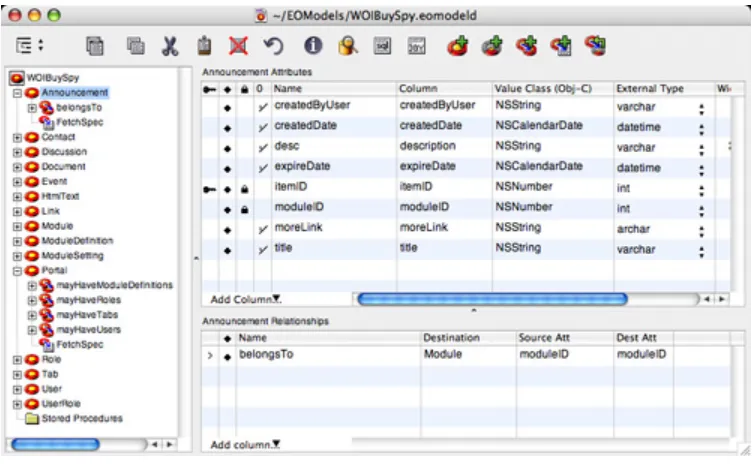
11 Figure 2: Announcement Entity in EOModeler
3.1.4.2 Controller
By default, WebObjects applications have Application, Session, and
DirectAction classes that manage the flow of data between the view and the model.
Those will be covered in further detail in the comparison sections.
3.1.4.3 Model
The model is represented by Enterprise Objects (EO). EO is an integral part of the WebObjects system. It provides the developer with an abstract data access layer that hides the underlying data storage. As the data within objects change, EO will maintain the integrity of data and handle all database-related issues such as locking and referential integrity.
EO’s architecture consists of the following components:
1. Database and JDBC Adapter
EOModeler can interact with any database provided there is a JDBC driver for it as it needs to translate raw data in the database to the EOs and vice versa.
3. EO Model
12 Once the model has been created, one can generate Java classes that correspond to the entities in the model. These classes provide setters and getters for the different columns as well as methods to add or remove objects to or from relationships. They inherit from EOGenericRecord, which provides the inherent behavior supported by the enterprise objects framework (EOF). EOs can then be instantiated explicitly, or retrieved in an array by using a fetch specification (Apple, 2003).
3. Editing Context
The editing context is an object where EOs are maintained. When a fetch takes place, EOs will be loaded in the editing context; these objects are called an object graph. The editing context maintains these objects and their relationships. Changes are not committed to the database unless the saveChanges() method is called. By default, each session object has its default editing context (Marker, 2004).
Editing contexts can be shared among users to provide a read-only data that all users can view. In addition, more than one editing context can be created for different tasks; for example, a site’s administration area can have an admin-specific context where administrators make changes and later commit them. EOF will update all related objects in the object graph (Marker, 2004).
If the user decides to revert changes, all changes across the object graph within an editing context will be reverted up to the point where the last commit took place. As this behavior may not be desired in certain scenarios such as a wizard-base data entry process, one can use nested editing contexts. For example, if the user commits changes, those will be committed to the parent editing context and not the database. Not until saveChanges() is called on the parent editing context do changes get committed to the database (Marker, 2004).
Editing contexts also support the ability to undo changes even though changes may have already been committed. It also supports redo operations.
The application’s performance can get a boost by disabling this feature as it consumes more memory per session (Marker, 2004).
3.1 Fetch Specification
Fetch specifications are used to describe the data to be retrieved. To construct a fetch specification, one has to specify the name of the entity in the model (Apple, 2003). For example, if there is an entity “Announcement”, one can retrieve all announcements using the following:
fetchSpec = new EOFetchSpecification("Announcement", null, null);
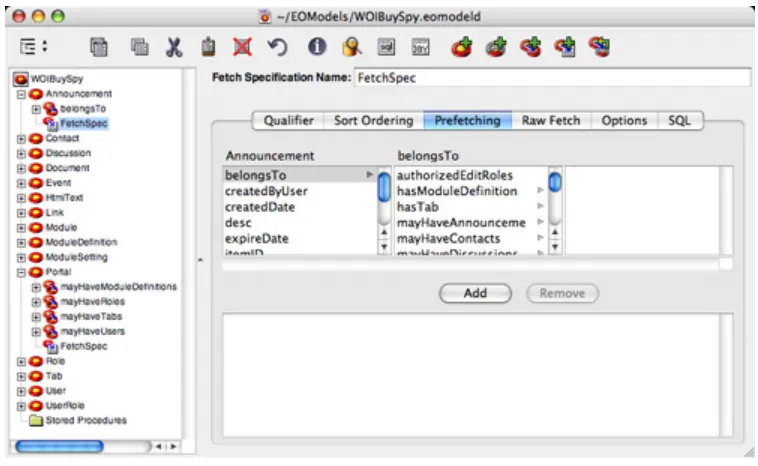
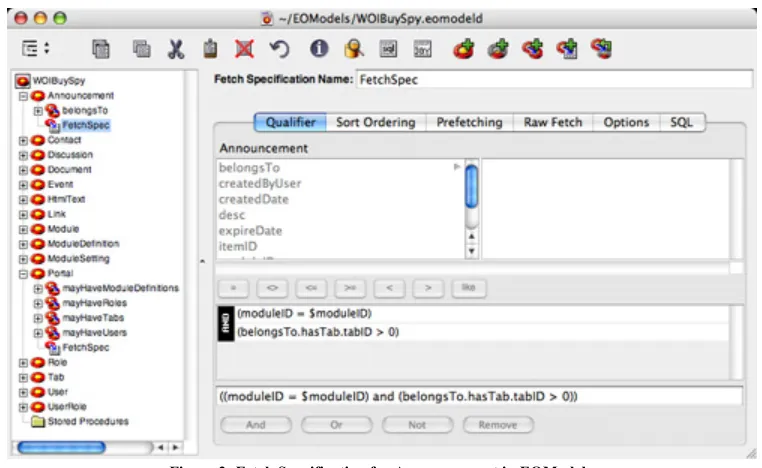
13 Figure 3: Fetch Specification for Announcement in EOModeler
fetchSpec = EOFetchSpecification.fetchSpecificationNamed("FetchSpec", "Announcement");
It is possible to filter data retrieved by a fetch specification by passing qualifiers. Figure 3 depicts the setting of the fetch specification for the Announcement entity in EOModeler. The highlighted qualifier tab shows the relationships defined for Announcement. The lower pane shows the passing of moduleID as a qualifier.
To pass a qualifier, one needs to create an NSDictionary object, populate it with key-value pairs that match the defined qualifiers in the model, and then add the dictionary to the specification as below:
fetchSpec = EOFetchSpecification.fetchSpecificationNamed("FetchSpec", "Announcement");
NSMutableDictionary dictionary = new NSMutableDictionary(); dictionary.takeValueForKey(_ModuleID, "moduleID");
fetchSpec =
fetchSpec.fetchSpecificationWithQualifierBindings(dictionary);
The condition belongsTo.hasTab.tabID > 0, defined in the fetch specification in Figure 3, demonstrates a powerful feature in WebObjects: the developer does not need to specify joins across tables. The belongsTo relationship returns a Module object, which in turn has a hasTab relationship that returns the tab it belongs to. The Tab object defines a tabID attribute, which the fetch specification checks against to satisfy the condition.
3.1.2 Advantages of Fetch Specifications
14 1. One can pass qualifiers to filter the retrieved data.
2. It gives the flexibility of specifying a sort order.
3. Developers can use the default generated SQL statements or write their own. It is also possible to use stored procedures from the underlying data store.
4. Prefetches can be used to improve performance.
5. It is possible to limit the number of rows retrieved in each fetch. Additionally, faults can also be set to avoid round-trips to the database.
3.2 Relationships
Among the great features of EOF is the ability to use one-to-one and one-to-many relationships programmatically without having to worry about the low-level details. These relationships can save the programmer the need to write a fetch specification for each entity since the object graph is available within the editing context, and the user can traverse relationships to get the desired objects. When EO classes are generated, relationships are included as add or remove methods. The parameter passed to these methods matches the type of the object to be added or removed from a relationship.
For example, an announcement module entity may define a relationship mayHaveAnnouncements, which is a one-to-many relationship. Since this relationship has been defined in EOModeler, it is included as a method in the Module EO, and is therefore accessible at runtime. Calling this method would return an array of announcements that belong to that module, if any. An announcement entry, on the other hand, defines a belongsTo relationship, which is many-to-one. Given an announcement entry, it is possible to traverse the belongsTo relationship to retrieve the module object the announcement belongs to.
3.3 Faulting
When EO retrieves objects, it resolves relationships by delaying making a round trip to the database to retrieve the related data, creating what is called a fault, a temporary object holder that represents the destination object(Apple, 2003).
15 Figure 4: Faulting in EOF [3]
3.4 Inheritance
Another powerful feature of EO is the ability for entities in a model to inherit from others. For example, if an entity Person has a first name and a last name, another entity, User, does not need to recreate these attributes; it can simply inherit from the
Person entity. This can be achieved visually in EOModeler.
3.5 Prefetching and Freshness of Data
When an enterprise object has a relationship to another entity in the model, related data can be retrieved in one of the following ways:
1. Fetched upon need, but resulting in a database round-trip for each fault. One can overcome this by specifying the batch fault size so objects can be retrieved in batches and not one at a time.
16 Figure 5: Prefetching for Announcement in EOModeler
3.2 ASP.NET
ASP.NET is the successor of ASP. With the introduction of the .NET framework, the functionality of ASP has been dramatically changed to take full advantage of .NET. ASP, just like other server-side scripting languages such as PHP, is interpreted. This results in pages being interpreted whenever a client requests a page. This is a major drawback in terms of speed and server overhead. Another drawback is the lack of separation between logic and design: the logic is embedded within the HTML code. Not only does maintenance become cumbersome, but also the whole development process since the design and logic are tightly integrated. Although PHP and JSP support object-oriented programming, they still suffer from some of these drawbacks.
ASP.NET was designed with the intension of avoiding these drawbacks and offering a language that is faster, easier to develop, easier to maintain, and reusable.
ASP.NET is a Web development technology with support for more than 25 languages, thanks to the common language runtime (CLR) architecture. The big set of classes in the .NET framework offers an enormous advantage to ASP.NET developers. It also makes it easier for application developers to write code for web applications in an environment with which they are familiar and in a language that they master. Currently, C# and VB are the dominant languages of choice.
17 Web Forms can include user-customized components called User Controls. These components provide an easy way for reusability. As User Controls cannot be requested independently, they need to be a part of a web form. The User Control can be included in a page by declaring a @Register directive that declares a tag prefix attribute by which the control will be referenced, a tag name attribute to associate a name with the control, and a source attribute that specifies the virtual path to the User Control. User Controls can also be added dynamically.
Web Forms and User Controls may include Server Controls, which are built-in controls that are available for ASP.NET development. Among these are TextBox, Label, CheckboxList, Button, and LinkButton controls etc.
When the application receives the first request, files are compiled with the result saved in the cache, which will decrease response time for further requests. Classic ASP pages see a 3 to 5 fold increase in performance when migrated to ASP. ASP.NET also offers developers the choice of whether to cache pages or controls and for how long. This feature has a great advantage especially with pages that consist of controls; if a menu on a page does not change often, the menu control can be cached to speed up loading time for example.
3.2.1 ASP.NET 2.0 Beta
ASP.NET 2.0 is currently in a beta version and is due to be released in November 2005. One of the goals of ASP.NET 2.0 is to overcome some of the limitations of the 1.1 version and reduce the amount of code developers have to write by introducing new controls, improving on others, and expanding the .NET framework. MS has added over 2000 classes to the .NET framework 2.0 (Evjen, 2005).
3.2.2 ADO.NET
ADO.NET, ActiveX Data Objects for .NET, is the data access component of the .NET framework and is XML-based. It is a set of classes for managing connections and data manipulation (Wildermuth, 2004).
3.2.2.1 Data Structures
18 By default, DataSets are untyped; data is accessed using names of fields or indexers. For example:
ds.Tables[0].Rows[RowNumber][“ColumnName”]
DataAdapters, a set of commands, behave as a bridge between the data source and the DataSet. Select, Insert, Update, and Delete commands can be used to carry out the changes to the DataSet back to the data source. These commands can be generated on the fly, or can be set in the data access classes the developer creates. It is also possible to avoid specifying command objects by calling a stored procedure (MS).
3.2.2.2 Managed Providers
ADO.NET 1.1 provides three managed data providers for MS SQL Server, ODBC, and OLE DB. The MS SQL Server provider is available in the System.Data.SqlClient namespace while the other two are part of the System.Data.OleDb namespace. The latter namespace can be used for a variety of data sources from Oracle to delimited text files. Managed providers act as a translation layer that is peculiar to the underlying data storage in terms of connectivity, data type translation, and data manipulation. Developers can write their own data providers should the need arise (Wildermuth, 2004).
3.2.2.3 ADO.NET 2.0 beta
ASP.NET 2.0 has introduced data source controls (Evjen, 2005), some of which greatly increase productivity. An ObjectDataSource control has been added to support binding to an instance of a user-defined class. The class has to provide methods that perform basic operations for data manipulation. ASP.NET controls can then be bound to the ObjectDataSource control.
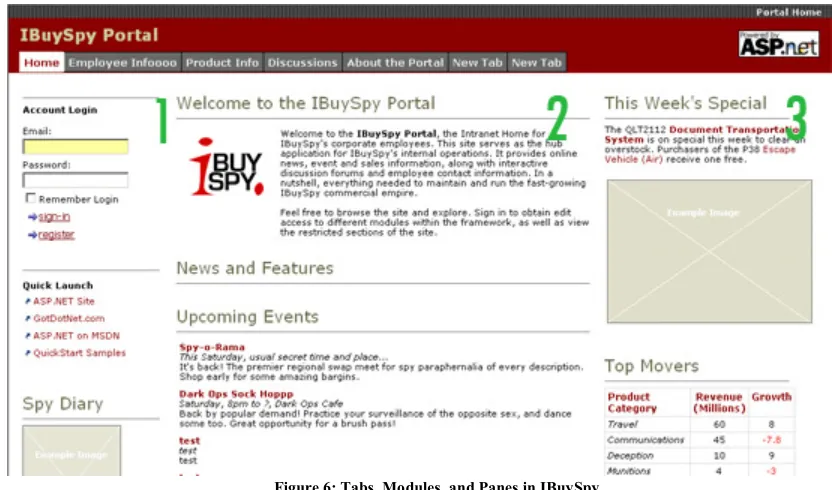
19 Figure 6: Tabs, Modules, and Panes in IBuySpy
4. Design Overview
This section describes the design of both implementations in terms of features, database setup, and logical layers.
4.1 Existing Solution: IBuySpy Portal
IBuySpy is an ASP.NET-based Web portal. It is module and role-based. The available modules can be added, removed, or rearranged using the portal’s administration, provided the user has the credentials to do so. These modules provide for common website functionality such as HTML text, item lists, links, threaded-based discussion etc. Each module is assigned a role, and is, therefore, only visible to users who belong to that role.
Each module has a module definition that defines its type, such as an announcements module. The portal can have multiple instances that have the same module definition. For example, the portal’s main page may have different announcements targeted at a different user base.
The portal’s content is served in modules that are displayed under tabs. Each tab represents an instance of a page, where modules are displayed in three panes, as depicted in Figure 6. If a pane does not contain any modules, the width will be distributed evenly between the remaining panes.
20 All tabs and modules are role-aware. Tabs will only be visible to users with the appropriate permissions as designated by the administrator. The active tab is determined by the TabID in the query string. By default, the first tab will be active, as in Figure 6.
If a user has an edit permission to a module, a right-aligned edit link will be displayed at the title’s level. Content editing is performed at a separate. aspx page. When the user clicks on the edit button, the module’s ID will be passed to the edit page, where the user can decide to edit, add, delete, or update the content.
Content can be presented in different formats, depending on the type of the module containing the data. For example, an announcements component would display content in a form of a hyperlink with a brief text and an optional “more” link to view the complete text of the announcement. A generic HTML component would display the content as a formatted paragraph similar to the first module in the second pane in Figure 6.
4.1.1 Database Design/Setup
IBuySpy uses a relational database model that resides on a SQL Server 2000. The database will be created by the IBuySpy installer. The interested reader can refer to appendix A to view the data model used by IBuySpy.
4.1.2 Connecting to the Database
By default, IBuySpy includes a connection string in the Web.config file. The username and password are in clear text. The application supports SQL Server 2000 only.
4.1.3 Logical Layers
4.1.3.1 Presentation Layer
The presentation layer is represented by Web forms and User Controls that display the portal customizations and allow for data management. The content is generated dynamically using a variety of built-in Server Controls.
4.1.3.2 Business Layer
IBuySpy does not implement a business layer. Code-behind files handle authentication, server-side validation, and communicate data back and forth between the presentation and the data layer.
4.1.3.3 Data Access Layer
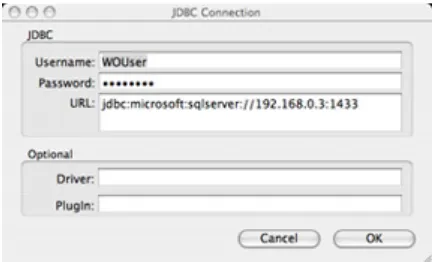
21 Figure 7: Connecting to SQL Server in EOModeler
4.2 WOIBuySpy
WOIBuySpy provides the same functionality as IBuySpy. Both applications have the same design. There are, however, inherent differences in how use cases are implemented due to differences in the underlying framework. Chapters 5 and 6 will identify the areas where the two implementations differ or coincide.
The following sections use the notion of components and modules interchangeably. Modules is the terminology used in the database schema to represent the content of components.
4.2.1 Database Design/Setup
The initial approach that was taken at the beginning of this project was to use OpenBase as the back-end for this application. OpenBase is a commonly used database for WebObjects applications. It is included in the installation of WebObjects.
As MS SQL has its own proprietary flavor of SQL, which does not conform to SQL standards, using OpenBase meant an extensive find-and-replace process would be needed to standardize the generated scripts.
Due to an initial misunderstanding of WebObjects, the author’s initial approach was to reuse the existing stored procedures used by IBuySpy.
The first stumbling block was OpenBase’s support for stored procedures; they can only be used with a PowerCenter license, a $2,500 cost. The decision was therefore to go with SQL Server 2000 as the back-end for this application. Microsoft provides a SQL Server 2000 JDBC adapter for Unix-based systems that support the 1.4 JDK (MS, 2004).
The choice was a challenge in that there was no documentation from Apple. It also helped the author to further understand WebObjects and its EOF.
4.2.2 Connecting to the Database
The MS JDBC driver includes three jar files: mssqlserver.jar, msutil.jar, and msbase.jar. These files need to be placed at the Library/Java/Extensions path.
22 Figure 8: Importing Tables to
EOModeler
[Microsoft][SQLServer 2000 Driver for JDBC]Error establishing
socket.
SQL Server should be configured to allow both Windows and SQL Server authentication. The user needs to be created in SQL Server and given ddladmin rights to be able to read the database schema. By default, EOModeler will attempt to connect to the database the login user is configured to own.
SQL Server listens to port 1433 for connections; firewalls and routers, if present, should be configured accordingly.
4.3 Logical Layers Setup
This section describes how the logical layers were created.
4.3.1 Data Access Layer
The data access layer has been abstracted using EOModeler and the EOF.
The model has been created by retrieving the database schema and was modified as necessary. These modifications will be highlighted in chapter 6.
4.3.1.1 Creating Entities
Upon successfully connecting to the database, EOModeler prompts the user to select tables and stored procedures to import. EOModeler will create entities as well as relationships for all the tables using foreign key constraints. This step is shown in Figure 8.
One important aspect of this abstraction is that changing the database is irrelevant to the WebObjects application provided table schema changes are reflected in the model.
After entities have been created, one has to convert some of the data types that were carried over from SQL Server to standard SQL:
1. Replace int identity with int.
2. Column and Name fields must have the same name. 3. nvarcharvarchar.
4. Names should start with a lower-case.
5. Entity names should be changed to singular: AnnouncementsAnnouncement. 6. Integers are usually represented by double internally. They need to be changed
23
4.3.1.2 Creating Relationships
When the entities are first created, EOModeler adds relationships based on the foreign key constraints. By default, their names are created off the entity name, which adds ambiguity in the generated code. It is therefore recommended to rename relationships to have the form of mayHave[…] if it is a one-to-many relationship, has[…] or canHave[…] if it is a one-to-one relationship.
One can also define relationships to be bidirectional. For example, a User may have a UserRole object associated with it. A UserRole object has to belong to a User object. A bidirectional relationship provides the ability to traverse the object graph in both directions. It is also important to remember to add or remove objects from both sides of the relationship when adding or removing objects in the editing context.
4.3.1.3 Fetch Specifications
A default fetch specification has been created for each entity. If using stored procedures, the order of the fields returned must exactly match the order of the entity attributes in EOModeler, which are sorted alphabetically. This behavior may be driver-specific. It is, however, unnecessary to use stored procedures in WebObjects applications; the EOF takes care of the data access layer and handles the data fetching.
4.3.2 Business Layer: Generating Enterprise Objects
Java classes were generated from EOModeler and included within the project. These classes represent EOs. The business layer, although not used in this application, can be easily created by extending the Java classes that represent the EOs and provide the required business logic. Developers should not directly alter these classes, but rather inherit from them, to avoid losing any custom classes in the event of regenerating EOs to reflect a change in the data model.
4.3.3 Presentation Layer
The presentation layer adheres to the MVC programming paradigm and is represented by the use of WebObjects components each of which consists of a Java class, an HTML file, a WebObjects definition file, and a WebObjects properties file. The presentation layer serves the portal’s content and management.
The portal has been built in a modular approach and consists of content viewing and portal administration components. Different WebObjects elements and components have been used and will be identified in chapter 5.
25
5. WOIBuySpy Implementation Specification
This chapter will cover the implementation of WOIBuySpy in terms of components used, how they are loaded, their UI design, how data is fetched and updated, authentication, authorization, validation, and error handling.
Components in WOIBuySpy inherit from WOBaseComponent, which is an abstract class that defines the common functionality that all components have to support in terms of fetching data based on a module id, showing or hiding content based on the user’s permissions, or reporting errors to the user.
Each component has its own fetch specification with a qualifier that accepts the module ID for which data should be retrieved. A fetch “attempt” occurs with each request; however, an actual fetch does not occur unless the database has a newer copy of that data than the object graph snapshot in the cache.
All components that play the role of a page will load their content in a pre-defined template to give the portal a consistent look.
Due to the peculiar life cycle of a request in WebObjects, fetches should not take place in the constructor, as objects are only instantiated once and later cached. The life cycle of a WebObjects request will be covered in details in chapter 6.
WebObjects components developed for WOIBuySpy will be examined below, and will be addressed with respect to each use case outlined in chapter 2.
5.1 Content Viewing Components
Content viewing components are dynamically loaded at runtime by Main, a component that plays the role of a page. Components in WebObjects can either be a page or a component within a page.
5.1.1 Main
Main is responsible for loading components in the three panes under each tab.
Given a tab ID in the query strings, the session class performs a fetch and retrieves all the components that should be displayed under that tab. These modules will be saved in different arrays based on the pane they belong to.
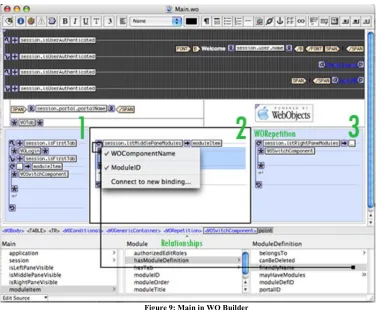
26 Figure 9: Main in WO Builder
Figure 10: Property Settings for WOSwitchComponent in Main
Each WORepetition contains a WOSwitchComponent, a placeholder that can load components dynamically given their name. When an array is bound to the list attribute of
a WORepetition, each item in that array will be of a Module type, an EO that represents
[image:27.612.119.497.591.685.2]27 Figure 11: Property Settings for WORepetition in WOTab
As there may be many instances of a module definition, a module ID is needed to return a unique instance of that definition. The ModuleID, as depicted in Figure 10, is a custom attribute that has been added. During execution, WO adapter will look for an accessible data member with the name ModuleID, _ModuleID, or a set method with the name setModuleID or _setModuleID. In the event where the method or the variable does not exist or is inaccessible due to its protection level, an exception will be thrown. If the method or the property has been found, the ModuleID will be passed to the fetch specification in the respective model.
The second component served by Main is the header which displays the portal’s title, the name of the user, and a log off link if the user has already been authenticated. Session holds the user’s information, if authenticated, through a user object along with the user’s authentication status.
It is important to note that components are being loaded in Main without the knowledge of the Model, Main.java. In fact, the model in WebObjects can neither create nor load components; it is merely responsible for providing properties and methods that act upon instance variables or EOs. The Session class provides the needed objects and it is the responsibility of the view to map these objects to components and elements.
5.1.2 WOTab
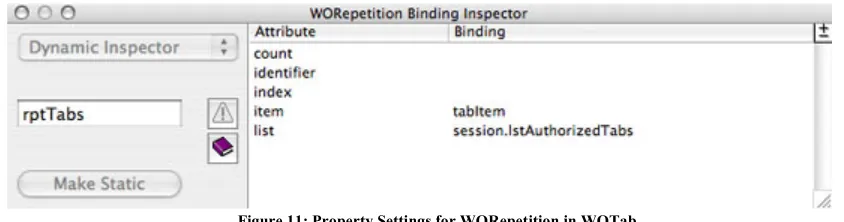
This component uses a WORepetition to load tabs in horizontal table cells. It only displays the tabs the user is authorized to see: the session provides an array of authorized tabs by comparing the user’s permissions against those of the tabs. Figure 11 depicts the setting of the WORepetition’s properties, where its list attribute is bound to the session.lstAuthorizedTabs array.
Active tabs will be displayed in a different style. With each request, Session saves the tabID retrieved from the query strings to a property, which WOTab compares to the tabID property of the tabItem object.
5.1.3 WOAnnouncement
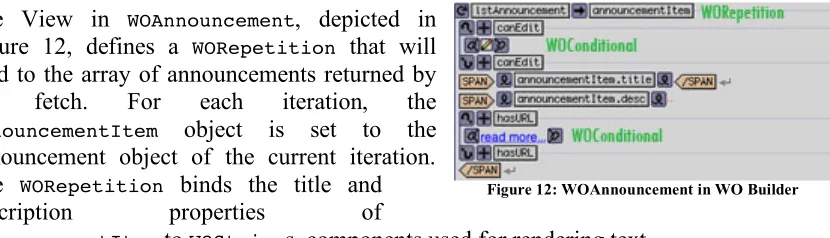
28 Figure 12: WOAnnouncement in WO Builder The WOAnnouncement component lists all the announcements under a given module. When the ModuleID is passed from Main, the fetch takes place, and an array of all the announcements is returned for that module.
The View in WOAnnouncement, depicted in Figure 12, defines a WORepetition that will bind to the array of announcements returned by the fetch. For each iteration, the announcementItem object is set to the announcement object of the current iteration. The WORepetition binds the title and
description properties of
announcementItem to WOStrings, components used for rendering text.
WOAnnouncement makes use of WOConditionals to determine whether to hide or show an edit or a “More” link. WOConditional is a built in component in the WebObjects framework that displays the content it wraps if the condition is true, and hides it otherwise. The condition can be reversed by clicking on the plus sign.
If the user has permission to edit the component, the canEdit property will be set to true in the session object, and will satisfy the condition in the WOConditional, resulting in showing the edit image. If the user clicks on the edit image, a WOEditAnnouncement object will be constructed and returned. Returning a WebObjects component results in that component being loaded as a page. The current Main instance is passed to the WOEditAnnouncement instance. This would enable the user to return back to the same page after canceling or saving changes.
A WOHyperlink is used to display a “More” link provided the announcement has a URL associated with it. WOHyperlink is wrapped in a WOConditional. The condition is determined by the hasURL property as displayed in Figure 13. It is good to note that WO Builder will treat methods whose names start with get, _get, set, or _set as properties, and will not show this prefix.
5.1.4 WODiscussion
This component is different from the other content viewing components in that it needs to display data in a hierarchal format. WebObjects provides a WONestedList component for this purpose. Although this component offers the required functionality, it offers less control over how data is displayed. Moreover, this component, as advised in the WebObjects documentation, has been deprecated and replaced by another. The author was unable, however, to find that component in the documentation.
[image:29.612.107.522.125.244.2]29 Figure 14: Implementation of User Authentication in Session
Figure 13: Implementation of getChildMessages in WODiscussion
parent message would result in two actions. First, the body of the message will be displayed. Second, the child WORepetition will be bound to the array returned by the getChildMessages() method. The implementation of this method is shown in Figure 13.
Child messages are retrieved by simply filtering the array of messages that was initially retrieved for a given ModuleID. This is possible thanks to the design of the Discussion table, where a self-referencing foreign key is used to relate child messages to their parent records.
5.1.5 WOLogin
Since the portal is role-based, there may be areas of the site that are only accessible by registered users. By default, the user can only see tabs and modules that are available to the “All Portal Users” role.
WOLogin only appears if the user has not been authenticated yet. It has two text fields for a username and password, and two buttons for authentication or registration.
5.1.5.1 Authentication
30 Figure 15: View of WOUserRegistration
Figure 16: Validating User Registration in Session
The hashed password along with the username will be used as qualifiers in a fetch specification to only retrieve matching records. No records will be returned if the user does not exist in the database or authentication fails. WOLogin does not differentiate between a non-existent user and a failing login attempt.
A further discussion of this implementation will follow in chapter 6.
5.1.5.2 Authorization
Once the user has been authenticated, an isUserAuthenticated flag will be set to true. This flag will be used to show or hide certain links such as “log off” etc. In addition, a collection of UserRole objects will be retrieved through the isDefinedIn relationship of the User object. UserRole is a cross-join entity that relates users to roles. A UserRole object defines a hasRole relationship, which returns a Role object.
5.1.6 WOUserRegistration
WOUserRegistration, displayed in Figure 15, is a simple form with three required fields: username, password, and name. The current requirement is that each must be at least six characters long.
When the user clicks the register button, the session object checks if the username has already been used or not. Figure 16 depicts the implementation of this operation.
Since the portal object has already been retrieved and saved in the session, there is no need to have another fetch to retrieve users. The mayHaveUsers() relationship can be filtered based on the username provided by the user to determine if an existing user has used the same username.
5.1.6.1 Client-side Validation
31 Figure 17: Custom Attributes for WOForm in WOUserRegistration
Figure 18: Client-side Validation for WOUserRegistration
Figure 19: WO Builder View of Error-Reporting in WOUserRegistration
The validateForm function in Figure 17 is specified in the template used by all components.
Figure 18 displays a sample error returned by the validateForm JavaScript function.
5.1.6.2 Server-side Validation
WOIBuySpy implements its own server-side error handling. WOBaseComponent defines an array for errors, and a flag to indicate whether an error exists by simply checking the length of the array. Whenever a component needs to perform validation before saving changes to an enterprise object, it has to perform all
validations first, and add a custom error to the errors array if an error is encountered. Before processing data, the component checks the errors flag. The view has a WOConditional that hides a WORepetition that binds to errors array. If the array is not empty, the content of WOConditional will be displayed, and the repetition will render all the errors in a list format. The View implementation is shown in Figure 19.
5.2 Portal Administration Components
The admin tab, which becomes visible if the user has the admin role, is used to administer the site and manage its layout. The elements of the portal’s administration are:
32 2. Admin Tab: the admin tab gives access to all the admin components used to manage the site. This tab cannot be deleted.
3. Admin modules: a collection of components that enable adding new module definitions, change the settings of an existing one, add users, assign roles to users, add tabs, add modules to tabs, change tabs order, change the layout of modules within tabs, and change the settings of tabs and what roles are assigned to them.
The user will be warned on the client-side before a delete action can take place. This is possible by encapsulating delete buttons with a JSConfirmPanel, a WebObjects element in the WebObjects extension framework that prompts the user for confirmation.
The portal’s administration takes advantage of the fact that tabs have already been fetched and available in the application’s cache. When editing tabs or modules for example, a filter operation takes place in memory to retrieve the desired objects without the need for a refetch operation.
Since the portal administration’s components manipulate data, it is possible that an error occurs. If an error is encountered, it is possible to discard changes by calling revertChanges() on the editing context, where changes since the last commit to the database will be canceled and reversed. Calling the Undo method on the editing context will discard the changes of the last operation performed.
It is important to understand the effects of reverting or undoing changes. If using the same editing context, the user may have unsaved changes in another component that may be deleted inadvertently. In the design of the portal, this is not an issue for non-admin operations as every component, upon saving, commits changes to the database.
Most of the administration components share the same implementation. Therefore, the below sections will only cover those with unique implementation.
5.2.1 WOEditAnnouncement
This component is displayed as a page when a user clicks on the edit button for an announcements component. The WOAnnouncement, from which the edit event is fired, is set to the announcement property of the constructed WOEditAnnouncement object.
The following sections will describe the behavior of WOEditAnnouncement in edit and add modes.
5.2.1.1 Edit Mode
33 Figure 20: View of WOAdminTabs
Figure 21: Property Settings for WOBrowser in WOAdminTabs The user will have the following options:
1. Cancel: when the user clicks on cancel, the action will simply return the calling page object, Main, and the user will be redirected back to the page where the event was originally fired.
2. Save: when the user changes the title field for the announcement for example, the change will be reflected on the object directly, as the title property of announcement was bound directly to the title text field. The object already exists in the editing context cache, and the only action required to commit the change to the database is by calling the saveChanges() method on the editing context, assuming that validation by EO did not throw an error.
3. Delete: the delete action is more involved as it requires the following:
a. Delete the announcement object from the array of announcements for a given module.
b. If the object is part of a relationship, it needs to be deleted from both sides of the relationship.
c. It should be deleted from the editing context.
d. To commit the change, the saveChanges() method has to be called.
5.2.1.2 Add Mode
In this mode, the save and delete buttons will be hidden. The user can choose to cancel or save. The save operation is the opposite of the delete operation described in the edit mode section.
5.2.2 WOAdminTabs
This component lists all the available tabs for the portal in the order they are displayed, as shown in Figure 20. The user can select a tab and perform the following actions: change the order of, add, or delete a tab. The user can also add a new tab.
WOAdminTabs uses WOBrowser, the equivalent of a list box, to list tabs. The list attribute is bound to session.lstTabs. When the user selects an item, the selected object, a Tab in this instance, will be added to
34 the multiple property to false. The settings for these properties are depicted in Figure 21.
5.2.2.1 Change Tab Order
Tabs are always assigned even numbers starting from zero. This would make it easier to rearrange tabs. When moving a tab up, 3 will be subtracted from its current order. This method ensures that the moved tab will take the spot between the previous two tabs since tabs are evenly-numbered. Moving a tab down performs the opposite, where 3 will be added to its current order to ensure it will take the spot between the subsequent two tabs. The tabs will then be resorted and assigned even numbers starting from zero. This implementation is similar to that of IBuySpy.
5.2.2.2 Add Tab
When the user clicks on “Add New Tab”, a new tab object will be created and added to the list. It will have a default name and a high order number to ensure it will show up last. It will also be added to the mayHaveTabs relationship that is defined on the portal’s object. The tab will then be added to the array of tabs to which the WOBrowser is bound, added to the editing context, and then saved to the database. Tabs will then be resorted and assigned even numbers starting from zero.
By default, new tabs can be deleted as well as existing non-admin tabs.
5.2.2.3 Edit Tab
When a tab is highlighted and the edit image is clicked, a WOAdminEditTabs component is created and returned. Its tab properties will be set to that of the selected tab.
5.2.3 WOAdminEditTabs
35 Figure 22: View of WOAdminEditTabs
5.2.3.1 Tab Settings
WOCheckboxMatrix, a component that lists checkboxes in a predefined number of columns, is used to render the list of available roles in the portal, with the authorized roles checked by default. By binding the list attribute to the lstRoles array and binding the selections attribute to the list of authorized roles, WOCheckboxMatrix will automatically have the roles checked. When the user makes changes, the selections array can be checked to see what roles are listed, and have these roles added or removed from the tabItem.mayHaveRoles relationship.
5.2.3.2 Existing Modules
WOPopUpButton, the equivalent of a drop down list, is used to list the existing modules within the portal. The user can select a module, assign it a name, and click on “Add Module”. This will add the new module to the middle pane by default.
5.2.3.3 Panes
36
6. Technology Comparison
One of the goals of this project is to offer a comparative study between WebObjects and ASP.NET. WOIBuySpy has been an ideal case study to highlight the differences between both technologies, thanks to the variety of features that it implements.
Although the functionality of both portals is similar, some of the architectural decisions for WOIBuySpy were dictated by the programming paradigm of WebObjects. This chapter, therefore, aims at comparing WebObjects and ASP.NET and how the differences, if any, affected the design of WOIBuySpy. Each comparison criterion will include a section that relates it to the portal, if applicable.
6.1 Request Life Cycle
This section describes the life cycle of pages as they are requested from the Web server.
6.1.1 ASP.NET (1.1 and 2.0 beta)
In ASP.NET, when a page is accessed for the first time, the page and the controls objects within will be created. The initialization code for the page executes, the page gets rendered to HTML, and returned to the client’s browser. All objects will be released from the server memory. When a post-back takes place in response to an action by the user, the form’s data is submitted to the server. As a result, ASP.NET recreates all the objects on the page, and ensures that their state match that of the last response to the client. It then checks what triggered the post-back, and raises the appropriate event. The page is then rendered to HTML and returned to the client reflecting any changes in content as a result of the post-back (MacDonald, 2005). Figure 23 summarizes the life cycle of a request in ASP.NET.
6.1.2 WebObjects
[image:37.612.93.521.479.595.2]In WebObjects, the server forwards the request to the WO adaptor. The latter forwards the request to the application and waits for a response. When the application receives a request, a five-step process takes place: first, an object will be created for the requested component if it is being accessed for the first time; otherwise, it will be awakened from sleep and restored from the session. Second, the form values, if any, will be retrieved. Third, actions will be handled. Forth, the components will be rendered in HTML and
37 appended to the response using the method appendToResponse. Lastly, objects will be put to sleep.
These steps take place at four different layers: application, session, page, and subcomponents. Each step starts at the application level and continues down to the subcomponents. Sleep occurs in the opposite direction of the awake phase. Figure 24 depicts the WebObjects life cycle.
WebObjects uses the cache to store pages for a session lifetime. The cache size can be set in the Application class using the method pageCacheSize. When the cache becomes full, pages used least recently will be removed from the cache (Hill, 2004).
Unlike ASP.NET, where pages are recreated for each request, WebObjects restores the page from the cache, and therefore avoids instantiating a new object; only the action method will execute. It is, therefore, important not to perform data fetches in the constructor, as the component’s object will only be instantiated once, provided it is still in the cache.
6.2 Data Persistence
This section will cover three different approaches in data persistence: sessions, caching, and viewstate.
6.2.1 Session
This section outlines session implementation in both technologies.
[image:38.612.94.524.179.374.2]6.2.1.1 ASP.NET (1.1 and 2.0 beta)
38 Sessions are heavily used in WebObjects, and rarely used by – experienced – .NET developers. The session in ASP.NET is accessible through the Page object, and is a key-value collection.
ASP.NET offers three session state providers to store the session in different modes (Robinson, 2004).
1. InProc: this mode instructs ASP.NET to store session information in the current application’s domain. Although this mode has the best performance since information is stored in the aspnet_wp process memory space, it is the least durable as data will be lost if the server is restarted.
This mode has two more disadvantages. First, session information is encoded using the machine’s key; in a web farm scenario, this mode will fail as each server has its own machine key. One solution is to use the same machine key for all servers. This change, however, will affect other applications with a dependency on machine keys; SharePoint Portal Server 2003 will fail to operate in a server farm mode as unique machine keys is a requirement.
Second, if the server has more than one processor, the “web garden" needs to be set to false in the machine.config file; a configuration that allows requests to be directed to any of the ASP.NET worker processes running. If this mode is set to true, a session may be saved in the memory address space of one process, while subsequent requests may be directed to another process.
2. StateServer: this mode allows ASP.NET to rely on a windows service to handle session management; this service does not need to be running on the same server. The drawback with this mode is that all objects need to be serializable. Moreover, there is a performance hit involved in serializing and deserializing and data transfer, especially across different machines. The advantage this mode has over InProc is that data can be persisted even in the event of restarting the server.
3. SqlServer: this mode uses SQL Server to store session and information. It is the slowest, and requires objects to be serializable.
Although these modes offer flexibility in implementing session state management, each mode incurs a restriction of some type that could either hinder performance or break applications if ported to a different physical architecture. In addition, a session ID is generated for each request unless the session object is actually used to store data. Even though this can enhance performance by not having to save and restore unused session IDs, they add a performance hit to applications like SharePoint Portal Server 2003, where it is highly recommend by Microsoft not to enable session management.
39 Global.asax.cs will only execute in InProc mode, which could result in an unexpected behavior when deploying applications on different hardware infrastructures.
6.2.1.1.1 IBuySpy
The ASP.NET implementation of IBuySpy does not use sessions. It uses the Context object to store portal settings, selected tabs, and modules to be loaded within each tab. Sessions are not used for two reasons:
1. Since the portal’s content is dynamic, the user may not be able to see an update unless the session has expired. ASP.NET 1.1 does not implement an update mechanism to ensure data freshness.
2. Using sessions would require knowing the configuration of the hardware where the portal will be running and adjust it as necessary, which would add complexity and a dependency on hardware that should not be an issue in the first place.
The Context object is a short-lived object that is accessible throughout the application but its lifetime is limited to that of the current request. For each request, IBuySpy retrieves the application settings, the current tab, and the modules for the current tab from the database. These objects will then be saved in the Context object. Data in the Context will be removed at the end of the request life cycle. Each subsequent request will result in the data being retrieved from the database.
To improve performance, IBuySpy has an option of enabling caching for each component when the module settings are being edited under the admin tab.
6.2.1.2 WebObjects
WebObjects does not offer the flexibility that ASP.NET offers in terms of what session mode to use. However, one could argue that it does not need to; WebObjects applications are independent of the hardware, and are therefore deployable on any platform provided the operating system and the web server support WebObjects.
While the session object in ASP.NET is a key-value collection by default, the session object in WebObjects is an object with methods and properties that the developer can customize.
In WebObjects, the session is used to save instances of WOComponents for which a response was sent to the client. Components are associated with a specific context using a context ID, which is unique within a session. The ID is incremented by one whenever there is a new request. The component, using the context ID, will be restored when an action is invoked. The context ID is visible in the URL (Hill, 2004).
40 restorePageForContextID to restore the desired page, i.e. the WOComponent instance (Hill, 2004).
The session object is often used to store fetch specifications, provide commonly-used methods, store custom editing contexts, or to provide communication across pages. More importantly, the default editing context is always accessible from the session object.
6.2.1.2.1 WOIBuySpy
In WOIBuySpy, the session class handles user authentication and authorization, retrieves the portal object, all tabs, and all modules within a tab and assigns them to their corresponding panes.
Since each user will have a session object, it would not make sense to load all announcement objects, for example, for every user. Those will be loaded in each component. The fetch will be saved in the default editing context by accessing it through the session: session.defaultEditingContext().
The editing context, where fetches are saved and added to the object graph, is saved in the cache. To ensure data freshness, EOModeler has an option to set “refresh refetched objects” to true, which allows cached objects to be replaced if the data in the cache is stale. Since each module fetches data for each request, in the case of the session, the modules, if unchanged, will be retrieved from the cache. This does not require any intervention from the developer by the virtue of the EOF.
6.2.2 Caching
This section outlines the caching capabilities implemented by both technologies.
6.2.2.1 ASP.NET (1.1 and 2.0 beta)
ASP.NET has advanced caching capabilities. There are two types of caching: an application wide cache, and an output cache.
The Cache object is accessible throughout the application and is shared by all users. Ideally, the cache object is used to save data viewable by all users. One can set a priority and an expiration time on the cached object.
41 In ASP.NET 1.1, developers are unable to write custom cache dependencies because the CacheDependency class is sealed, which limits any customization to either a time or a parameter-specific setting. ASP.NET 2.0 improves on the caching features of its predecessor by unsealing this class, which gives developers the ability to create dependencies that are more elaborate and application-specific (Evjen, 2005).
ASP.NET 2.0 introduces another level of caching called SQL Server Cache Dependency, which is specific to MS SQL Server. This feature allows the cache to be updated automatically in the event of a data change in the database (Evjen, 2005).
6.2.2.2 WebObjects
Caching in WebObjects is used for EOs and components (pages) alike. As explained in the request life cycle, whenever a user views a page, it will be saved in the session. Also, EOs in a WebObjects application are only retrieved the first time a fetch occurs and are later accessed from the cache, unless the “refresh refetched objects” option has been set to true.
6.2.3 ViewState
This section describes how a state of a page is maintained across Web requests.
6.2.3.1 ASP.NET (1.1 and 2.0 beta)
ASP.NET tracks the state of server controls by using the ViewState. When a post takes place, all the values for the controls will be collected and encoded in a string that is saved in an HTML hidden text field. Upon a postback, the string is decoded and the retrieved state is applied back to each control (MS, 2003).
ViewState is also accessible programmatically in the form of a key-value collection. Only serializable objects can be stored in the ViewState, but it is not recommended to do so as that will increase the response size since the encoded string is included in the rendered HTML.
ViewState for a page is maintained through the loop of posts and postbacks, and is therefore helpful for setting flags, which would be lost otherwise since pages get recreated for each request.
ViewState is helpful in error handling, where the values entered by the users can be maintained.
6.2.3.2 WebObjects
![Figure 1: Sample WO Component [4]](https://thumb-us.123doks.com/thumbv2/123dok_us/118785.11500/11.612.311.526.420.694/figure-sample-wo-component.webp)
![Figure 4: Faulting in EOF [3]](https://thumb-us.123doks.com/thumbv2/123dok_us/118785.11500/16.612.137.454.66.326/figure-faulting-in-eof.webp)