University of Southern Queensland
Faculty of Engineering and Surveying
OPC Cycle Time Analyser
A dissertation submitted by
Clement Bollaart
In the fulfilment of requirements of
Courses ENG4111 and 4112 Research Project
towards a degree of
Bachelor of Electronics and Computing Engineering
Abstract
Variations in equipment cycle times can have a significant effect on the output of
modern assembly lines. In an effort to identify and act accordingly when these
variations occur, the development of a software application to analyse equipment
cycle time via OPC is investigated in this project.
Manufacturing organisations continuously seek improvements in equipment
performance and output. A common improvement made is the reduction of
equipment cycle time, this provides an increase in output for a relatively small
capital outlay. These improvements remain relatively unchecked and variations in
cycle time due to numerous factors continue to influence equipment performance.
An equipment cycle time analyser can be used to monitor and report variations in
cycle time. The resulting information can be used to predict equipment failures and
allow maintenance departments to plan corrective actions. This analyser tool can
also be used by engineering departments for analysing equipment cycle time during
cycle time improvement projects and new equipment installation.
Currently the development of the cycle time analyser system is at a stage where the
cycle time of equipment can be monitored using OPC as a means of communication.
Additionally a Microsoft Excel application is available which can import the data
recorded by the cycle time analyser software and display a step time diagram of a
Certification
I certify that the ideas, designs and experimental work, results, analyses and
conclusions set out in this dissertation are entirely my own effort, except where
otherwise indicated and acknowledged.
I further certify that the work is original and has not been previously submitted for
assessment in any other course or institution, except where specifically stated.
Clement Christiaan Bollaart
Student Number: 0050029162
Signature
11
thOctober 2007
Acknowledgements
I would like to thank the following people for their assistance and support which
have contributed greatly to the success of this project.
Dr. Peng (Paul) Wen (supervisor) for his guidance and constructive criticism given
during this project.
My colleagues and managers from Robert Bosch (Australia) for their support,
understanding and assistance during the project term.
T
able of Contents
Abstract
ii
Limitations of Use
iii
Certification
iv
Acknowledgements
v
Table of Contents
vi
List of Figures
viii
List of Tables
viii
Definitions
ix
Chapter 1 Introduction ...11
1.1 Project Aim...11
1.2 Project Objectives ...12
1.3 Chapter Overview ...13
1.4 Chapter Summary ...14
Chapter 2 Background ...15
2.1 History of Lean Manufacturing ...15
2.2 Line Balancing...15
2.3 Trends in Current Manufacturing ...17
2.4 Current Cycle Time Data...19
2.5 Real Time Data via OPC ...20
2.6 TPM and Predictive Maintenance...21
2.7 Benchmarking...22
2.8 Summary...23
Chapter 3 Methodology ...25
3.1 Overview ...25
3.2 Design Process Model...25
3.3 Communication with OPC Server...26
3.4 Development of User Interface...26
3.5 Design and Implementation of Reports...27
3.6 Programming Language Selection...27
3.7 Analysis of Cycle Times ...28
3.7.1 Machine Capability ... 28
3.7.2 Simplified Machine Capability ... 29
3.7.2 Example Tolerance Calculation. ... 30
3.8 Chapter Summary ...31
Chapter 4 System Development and Implementation...32
4.1 Overall Description ...32
4.2 OPC Communication ...32
4.3 OPC OPCDAAUTO.DLL ...33
4.4 User Permission Considerations ...34
4.5 DCOM Setting Required ...35
4.6 Recording Format ...35
4.7 Operation of Cycle Time Analyser Software ...36
4.7.1 Connection to OPC Server... 37
4.7.2 Create OPC group ... 38
4.7.3 Add OPC Items to Group ... 38
4.7.4 Start Recording... 39
4.7.6 User Instructions ... 41
4.8 Testing ...41
4.9 Visualisation of Recorded Data ...42
4.10 Visual Basic Limitations ...43
4.11 Problems Encountered...44
4.11.1 OPC TimeStamp... 44
4.11.2 DCOM Security Settings ... 45
4.11.3 SyncRead does not Return Timestamp Data as Array ... 46
4.11.4 OPC Server Capability ... 47
4.12 Chapter Summary...47
Chapter 5 Conclusions ...48
5.1 Achievement of Objectives ...48
5.2 Future Work...49
5.2.1 Statistical Evaluation of Tolerance Times... 49
5.2.2 Monitor Multiple Machines ... 49
5.3 Final Summary...50
References...51
Appendix A...52
Project Specification ...52
Appendix B ...54
OPC Input Items Example ...54
Appendix C ...55
Cycle Time Analyser Instruction Manual ...55
Appendix D...76
DCOM Setting for windows XP...76
Appendix E ...86
OPC Tunneller Quotation ...86
Appendix F...88
Visual Basic Code...88
List of Figures
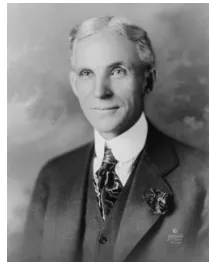
FIGURE 1: HENRY FORD (1919) 15
FIGURE 2: FORD ASSEMBLY LINE 15
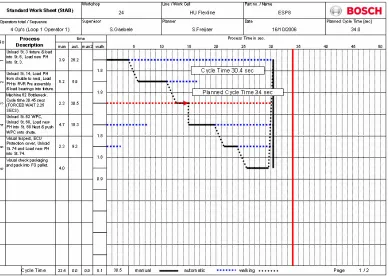
FIGURE 3: LINE BALANCING WORKSHEET 16
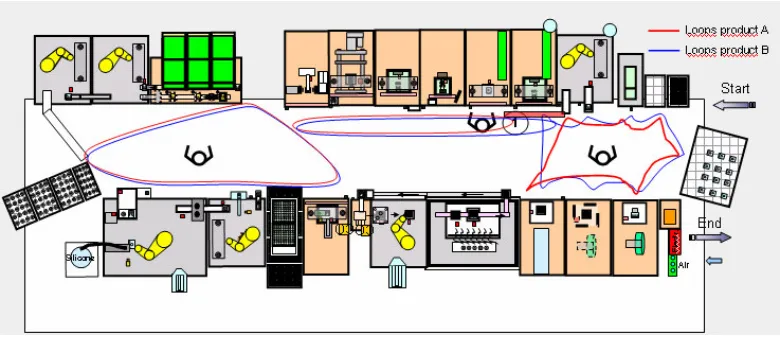
FIGURE 4: HIGH FLEXIBILITY PRODUCTION LINE 18
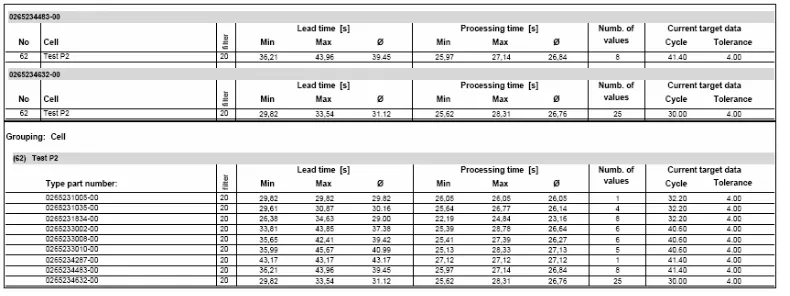
FIGURE 5: CYCLE TIME STATISTICS – TYPICAL MANUFACTURING DATA 19
FIGURE 6: PDCA CYCLE 22
FIGURE 7: TYPICAL “ACL” ENTRY 26
FIGURE 8: NORMAL DISTRIBUTION 29
FIGURE 9: MACHINE CAPABILITY PROCESS FLOW 30
FIGURE 10: ARCHITECTURE OF THE CODESYS OPC SERVER 33
FIGURE 11: INTERFACING TO OPC SERVERS 34
FIGURE 12: VISUAL BASIC DATA ARRAY 35
FIGURE 13: TEXT FILE FORMAT 36
FIGURE 14: OPC VISUALISATION 36
FIGURE 15: SERVER CONNECT 37
FIGURE 16: GROUP CONNECT 38
FIGURE 17: ADD ITEMS 39
FIGURE 18: FUNCTION BUTTONS 40
FIGURE 19: RESULTS DISPLAY 40
FIGURE 20: EXCEL REPORT 43
FIGURE 21: CODE FOR MILLISECOND CONVERSION 45
List of Tables
Definitions
Client – Computers or applications that employ the services of Servers.
Cm, Cmk – Machine capability index
COM – Component Object Model, which supports communication among
objects on different computers.
DCOM – Distributed COM
LSL – Lower Stability Limit
MUDA – Waste (non value added)
OLE – Object Linking and Embedding
OPC – OLE for Process Control
PPM – Parts Per Million
RAD – Rapid Application Development, an incremental software process
model that emphasizes a short development cycle.
Server – Device which centrally provides certain services within a network.
TCP/IP – Transmission Control Protocol / Internet Protocol, the set of rules
which controls virtually the entire communications over the internet and also
applies to most separate networks.
TPM - Total Productive Maintenance
TPS – Toyota Production Systems
UTC – Coordinated Universal Time, UTC-based time is loosely defined as the
current date and time of day in Greenwich, England
USL – Upper Stability Limit
LSL – Lower Stability Limit
S - Standard deviation is a measure of the spread of data in relation to the mean. It is
the most common measure of the variability of a set of data. If the standard
Chapter 1 Introduction
1.1 Project Aim
This project aims to design an equipment cycle time analyser which enables
equipment to be continuously monitored for deviations from a base cycle time value.
The cycle time analyser will be capable of monitoring equipment sub-cycle steps and
report which segments have caused the base cycle time to be exceeded.
In order to achieve this, real time data will be collected from equipment using TCPIP
based communication and this will be compared against predetermined values for
different process steps and functions.
When deviations occur the user is to be notified that the cycle time has been
exceeded and they will then have the ability to drill deeper into the cycle time results
to determine exactly which step or function of the equipment caused the cycle time
exception.
1.2 Project Objectives
To achieve the aim of the project a system design was developed based on
developing a number of objectives, the sum of which satisfy the project aim.
The objectives identified are:
•
Research possible methods to collect real time data from industrial
devices.
•
Analyse complete equipment cycle and divide operations into logical
steps to be monitored by cycle time analyser.
•
Design a software program to record step times from online equipment.
Record and store best case example.
•
Investigate and define tolerance times allowed for various steps
( cylinder movements, barcode reading, screwing operations, vision
inspection etc).
•
Extend software to check real time data collected from a machine cycle
with pre-defined times allowed for steps.
User to be notified when current equipment cycle
deviates + or - from desired best case example.
Step which caused cycle time deviation + or - to be
identified.
•
Evaluate deviations from best case example, and use data collected to
maintain and improve equipment reliability.
•
Investigate the potential use of such a monitoring device as a predictive
maintenance tool. To continually improve the effectiveness and
“Particular requirements for the application of ISO 9001:2000 for
automotive production and relevant service part organizations”.
These objectives provide the basis for this project and make up the project
specification.
In addressing the objectives above, the focus is to develop a software application that
is not specific to a particular control system. The software should have the flexibility
to be used on any system which provides access to real time variables via an OPC
communication interface.
1.3 Chapter Overview
Chapter 2. Background.
This chapter examines the desire of manufacturing organisations to continually make
improvements to increase their efficiency. Current manufacturing trends are outlined
and the availability of plant floor data collection is established. Finally the need and
potential benefits of an OPC cycle time analyser are outlined.
Chapter 3. Methodology.
In this chapter the design methodology is detailed. This includes the selection of a
software design model, use of existing infrastructure for communication, user
interface requirements, report requirements and analysis potential of data collected.
Chapter 4. System Development and Implementation.
Chapter 4 details the system design, operation and implementation of the developed
software. The steps taken to test the software application are detailed and the
meets the objectives and it’s potential to be used as a predictive maintenance tool are
outlined.
Chapter 5. Conclusions.
Chapter 6 provides a concluding discussion on the project work completed so far and
identifies ideas for future development.
1.4 Chapter Summary
This chapter has outlined the project topic to be discussed in this dissertation. The
reasons for undertaking this project have been highlighted and the content of the
Chapter 2 Background
2.1 History of Lean Manufacturing
The concept of lean manufacturing has been a topic of
much discussion since Henry Ford conceived the concept
of an assembly line for the production of the Model T
Ford back in 1913.
The assembly line that was developed by Ford and his team at the Michigan
Automobile Factory was a simple one. A motor-drawn rope pulled the chassis pass a
number of workstations where workmen performed various operations resulting in a
completed automobile at the end of the assembly line.
This simple concept along with
other improvements over an 8 year
period such as, the introduction of
the conveyor belt, reduced the
assembly time of a Model T car
from 14 hours to 1 hour 33
minutes and enabled a reduction in
the selling price from $1000 in
1908 to $360 in 1916.
2.2 Line Balancing
Line balancing is the assignment of operator tasks at workstations to balance
[image:15.612.397.502.124.257.2]operator loops in such a way that the assembly lines output is optimized.
Figure 1: Henry Ford (1919)
[image:15.612.143.517.390.580.2]Ever since the introduction of the assembly line by Henry Ford in 1913, line
balancing has been an optimization problem of significant industrial importance: the
efficiency difference between the optimal and sub-optimal assignment can yield
economies (or waste) reaching millions of dollars ( Falkenauer 2007).
The above worksheet is an example of a typical line balancing exercise. It clearly
shows that the quickest operator loop that can be achieved is determined by the
bottleneck station. In the example, the actual cycle time of the bottleneck station is
30.5 seconds and is shown as the red dashed horizontal line. If the cycle time of the
bottleneck station was to increase for any reason the output of the assembly line
would be immediately effected. Cycle time data is one of the most important items
[image:16.612.138.527.182.458.2]Assembly line blancing has become a major focus in modern manufacturing
processes, the aim of which is to optimize machine and worker patterns to provide
maximum output with minimal waste.
2.3 Trends in Current Manufacturing
Manufacturing companies have 2 ways to make a profit.
1.
To increase the selling price.
2.
To reduce the cost of production.
As the selling price is generally determined by market conditions most companies
turn to reducing the cost of production to maximize profit.
To reduce the cost of production, companies aim to achieve the following goals;
Reduce Cost – By eliminating waste, anything which does not add value to
the product. This can relate to motion ( time looking and walking)
overproduction, inventory (excess stock on hand), waiting time or double
handling.
Create a flexible system that can quickly respond to change –
The Vehicle Manufacturing Industry has an ever changing working
environment due to, production levels changing with customer demands,
absenteeism changes per day and continuous improvements in the
Figure 4 above shows a typical high flexibility production line designed to meet the
cost and flexibility targets set by most manufacturers. This production line consists
of 17 workstations which are shared between 3 operators and produces 2 different
product combinations.
Manufacturing companies dedicate large amounts of resources and funds to optimize
work place layouts and increase worker efficiency.
This optimization process is based on workstations performing their expected
functions within a predetermined cycle time. Any deviation from the expected cycle
time will have a large impact on the assembly line output.
The simple example below shows what effect a variation of 1 second in one worker
loop can have on the lines output.
Assuming the line has a cycle time of 30 seconds and all loops have a balanced
operator loading. Under normal conditions 120 parts would be produced in one hour.
If the bottle neck station in loop 3 has an increase in its cycle time by 1 second the
[image:18.612.137.527.70.239.2]As all 3 loops would be affected by the increase in cycle time, worker efficiency and
utilization are also reduced by 3%.
This reduction in output is a perfect example of MUDA (waste) according to TPS
(Toyota Production Systems).
2.4 Current Cycle Time Data
The cycle time data provided by most manufacturing information system is usually
an average value over a certain period of time per product type as shown in the
Figure 5 below.
The data provided in such reports is historical in nature and not sufficient for a real
time analysis of an equipments performance. Additionally the data provided is
insufficient to enable analysis of sub cycles of the equipment. The processing time in
the above statistics varies from a minimum of 22.19 seconds to a maximum of 26.77
seconds for the part number 0265231xxx product family, a variation of 4.58 seconds.
Analysis of equipment sub-cycles is not possible from the currently available data
[image:19.612.133.528.320.468.2]2.5 Real Time Data via OPC
In recent years automation technology has developed to a level that allows seamless
exchange of information across plant and enterprise networks, (Shimanuki 1999)
allowing access to real time data from Automation devices.
OPC stands for
OLE for
Process
Control (Matrikon 2005). OPC is one of the
technologies that allows the exchange of data between automation devices and it
significantly reduces the time, cost and effort required to write custom interfaces to
different intelligent devices in use today. OPC provides a standard scalable way to
collect and archive critical IT asset data and deliver it to decision makers so that it
can be acted on in a timely manner (Murphy 2006).
OPC Data Access or OPC – DA is the OPC specification that is used to read and
write real time data exclusively (Kondor 2007). It is a published specification that is
being adopted by an increasing number of manufacturers in the automation industry.
It sets out how data should be structured and allows devices from different vendors
to communicate. OPC is based on Microsoft’s COM and DCOM technologies. The
OPC foundation, a non-profit international organization made up of hardware and
software companies, is responsible for establishing and maintaining the
specifications. The specification states that each data point shall include three
attributes: a value, a quality and a time stamp. The time stamp reflects the time at
which the server knew the corresponding value was accurate (OPC Interface
OPC performance is more than adequate for most dedicated and distributed
applications running on commonly available hardware (Liu, J 2005). Studies have
reported OPC servers supplying 20,000 values per second to 4 clients with only 10
percent CPU load. (Chisholm, A, 1998)
2.6 TPM and Predictive Maintenance
Total Productive Maintenance (TPM) is a maintenance philosophy that is associated
with the lean manufacturing model (Carreira 2004). Lean production models are
based on reducing work in progress (WIP) which requires a balance of operations,
continuous material flow and minimal variation; some would call this predictability
(Carreira 2004). Predictability would imply that equipment cycle time is stable and
consistent over a extended period of time.
As maintenance departments move towards a predictive maintenance strategy,
accurate and timely information on the state of assets can be used to detect and
correct impending problems before they become catastrophic failures.
The ISO/TS 16949 defines predictive maintenance as: activities based on process
data aimed at the avoidance of maintenance problems by the prediction of likely
failure modes.
Section 7.5.1.4 “Preventive and predictive maintenance stipulates that the
organization
shall
utilize predictive maintenance methods to continually
improve the effectiveness and efficiency of production equipment”.
The aim of any data collection exercise is to get the right data, to the right people, at
2.7 Benchmarking
Benchmarking is the process of determining who is the very best, who sets the
standard, and what that standard is (Reh 2007).
Benchmarking is another tool which is used by organizations to improve their quality
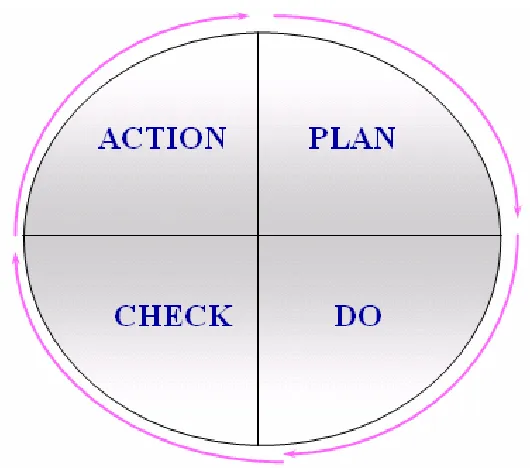
and or output. It follows a similar approach to the PDCA (Plan Do Check Act)
continuous improvement cycle.
The steps involved in a benchmarking project are:
1.
Determine who is the Best. (Plan)
2.
Determine how good they are. (Do)
3.
How do we get that good. (Check)
[image:22.612.189.454.256.490.2]Any cycle time reduction project can also be considered a benchmarking activity
with the following steps.
1.
Determine the optimum cycle time. (Plan)
2.
Design processes and workflow to optimize cycle time. (Do)
3.
Continually monitor cycle time. (Check)
4.
Implement improvements based cycle time results. (Act)
Step 3 of the above project requires some form of continual monitoring so that the
cycle time achieved by the project is maintained. This is an Ideal application for
some form of cycle time analyser.
Equipment processing time (cycle time) or sometimes referred to as
throughput
is a
major factor that can effect the output of an assembly line. Equipment cycle time
remains largely unchecked in a lot of manufacturing organizations and can have
variations of up to a couple of seconds before the effects are noticed as a reduction
in output. Each year companies spend large amounts of money to improve and
increase the productivity of their equipment but spend little to monitor and
“benchmark” their gains.
2.8 Summary
History has shown that manufacturing organizations are continually working to
improve assembly line quality and output. Line balancing, TPM, Predictive
maintenance and benchmarking are some of the methods used to achieve
Once improvements have been made some form of monitoring should be
implemented to ensure that the gains achieved are maintained well into the future.
An equipment cycle time analyser would provide a means to monitor improvements
that have had a positive effect on equipment cycle time.
An equipment cycle time analyser should be capable of recording the overall and sub
- cycle processing times from automated assembly equipment and report any
deviations to the user. This data can then be used to investigate the cause of the error
Chapter 3 Methodology
3.1 Overview
A number of key elements need to be addressed in the design of the cycle time
analyser software. These elements are:
1.
Design process model
2.
Communication with OPC server
3.
Development of user interface
4.
Design and implementation of reports
5.
Programming language selection
6.
Analysis of cycle times
The Methodology adopted for these elements are discussed in this chapter.
3.2 Design Process Model
Due to the tight timelines and need for concurrent development, required by this
project, a RAD (Rapid Application Development) model was chosen for the project.
The RAD model allows for concurrent modelling, development and construction
phases to occur during the life cycle of the project.
The Development activities will be split into the following concurrent tasks:
1.
Communication with OPC server
2.
Development of User interface
3.
Design and implementation of reports
3.3 Communication with OPC Server
This task involves the investigation and set up of client and server devices to enable
the exchange of OPC data using existing Ethernet infrastructure.
The existing network structure has been designed to operate sensible control systems
and test equipment for real time measurements without any interference or
disturbance coming from local area networks and other data traffic. The system is
implemented with a separate VLAN / subnet utilising a dedicated 3 layer switch.
This provides a better split in subnets and a more secure separation from the
core-layer 3 switches of the network. Figure 7 is an example of an access control list
entry.
Figure 7: Typical “ACL” Entry
The production network is also protected with access control lists to limit incoming
and outgoing traffic only to authorised users.
3.4 Development of User Interface
The user interface to be provided should be easy to use. The choice of programming
language to be used for the project was also based on the need for a graphical user
interface. The user interface should provide an intuitive means to connect and
monitoring points to the application. Results should be displayed as a numerical
value in addition to a go, no-go indication.
3.5 Design and Implementation of Reports
To be able to analyse the results collected during the monitoring process some
method is required to visualise and compare the results obtained. As Microsoft Excel
has extensive built in functions to display graphs and manipulate the associated data,
it was decided that the implementation of the cycle time analyser should incorporate
an excel component for reporting. The reporting function must have the ability to
display all 16 recorded signals on one graph so the relationship between the signals
can be identified. Additionally there should be the possibility to overlay a reference
curve over the last recorded curve so that variations in signal times can be compared.
Excel’s standard functionality will provide useful functions such as the ability to
zoom into a section of the chart by changing the axis scale.
3.6 Programming Language Selection
Visual Basic was selected for the software implementation of this project. This
language was chosen due to the large amount of supporting documentation and
programming examples identified during the literature review. Numerous examples
and a wide selection of reference material is available to assist in the development of
a software program with respect to OPC connectivity. Additionally the OPC
foundation provides an Automation wrapper DLL suitable for use with Visual Basic.
Visual Basic also provides an efficient environment for developing software
3.7 Analysis of Cycle Times
3.7.1 Machine Capability
A machine capability study refers to a short term study with the sole aim of
discovering the machine specific effects on the production process. These principles
can be extended to determine the allowable limits that should be applied to the
recorded values of cycle time to ensure stable monitoring results.
The aim of a machine capability study is to reach a conclusion about the behaviour of
machine (in control or not?). The following formula is used for the calculation of
capability.
\
6
totalm
s
T
C
•
=
Where
C
m= Capability index
T = Tolerance = USL-LSL
s
tolal= total standard deviation
The capability formula above can be transformed to derive the allowable tolerance
times based on a required capability index,
total
m
s
C
T
=
•
6
•
The Tolerance value needs to be divided by 2 as the cycle time analyser uses a +/-
tolerance value.
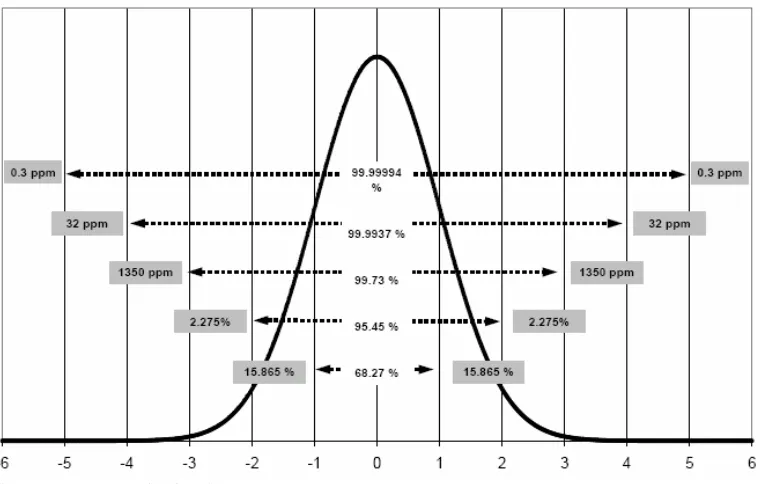
Figure 8 shows the relationship between a calculated Cmk value and a fraction
nonconforming, a Cmk = 1.33 corresponds to 32ppm non-conforming and a Cmk =
Figure 8: Normal Distribution
3.7.2 Simplified Machine Capability
As capability studies can be very time consuming when considering the large number
of values to record, a simplified approach can be adopted to derive tolerance times.
Using this approach a reduced number of samples can be used to calculate tolerance
times provided a capability index of 2 is applied.
If this approach is used the resulting tolerance time should be subject to a reality
check to confirm it’s suitability to detecting variations in cycle time.
The simplified approach should only be used on sub cycles with minimal variation
otherwise the assumed capability of 2 will result in unrealistically large tolerance
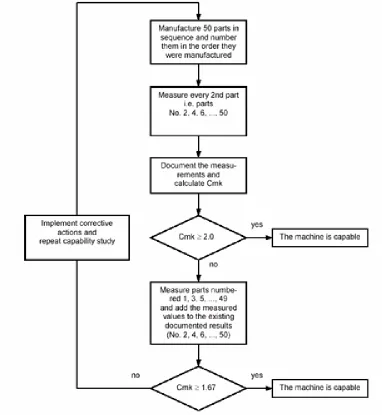
The simplified approach is based on the flow chart shown in Figure 9.
Figure 9: Machine capability process flow
3.7.2 Example Tolerance Calculation.
Table 1 contains 50 Samples taken for a machine press movement.
1 2 3 4 5 6 7 8 9 10
Calculated s
total= 0.058
Now, T =
C
m6
S
total= 1.67 6 0.058 = 0.58
This value describes the total tolerance and needs to be divided by 2 to specify an
upper and lower limit values.
Tolerance = 0.58 / 2 = 0.29 seconds
In this example 0.29 seconds should be entered into the tolerance field and the
average of the 50 measurements, 2.351 seconds should be entered as the base value.
3.8 Chapter Summary
The main issues in the design of the cycle time analyser system will be addressed by
the selection of programming language and appropriate communication to provided a
cost effective and functional application. Issues that arise due to unforseen
circumstances will need to be reviewed as they occur and appropriate actions put in
Chapter 4 System Development and Implementation
4.1 Overall Description
The development and implementation of the cycle time analyser application involved
the following main activities:
Connection of the equipments OPC server to Visual Basic client application.
DCOM settings to allow data exchange between server and client.
Programming of client software application.
These activities and associated tasks are discussed in this chapter.
4.2 OPC Communication
OPC is a standardised interface that allows access to process data. It is based on
Microsoft’s COM/DCOM which has been extended to meet the needs of data access
in the automation process where it is mostly used to read and write data from
computer based control systems. Typical OPC clients are visualisations and
programs for recording operational data.
Due to the features of DCOM it is possible to gain access to an OPC server that is
installed on a remote PC. Another advantage of the adoption of COM technology by
OPC is programming language independence.
OPC was chosen as the communication medium for this project due to it’s ability to
support multiple clients and it’s focus on providing process data to client programs.
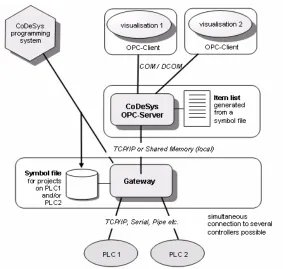
Figure 10 shows the system architecture for typical OPC systems highlighting the
Figure 10: Architecture of the CoDeSys OPC server
4.3 OPC OPCDAAUTO.DLL
A common way is needed for automation applications to access data from field
devices or databases. The OPC Data Access Automation defines a standard way by
which automation applications can access process data.
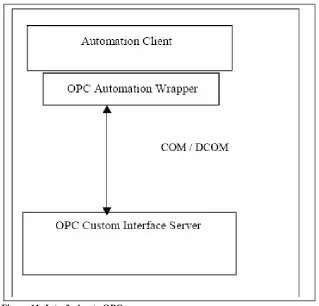
Figure 11 shows an OPC client utilising the “wrapper” DLL to call into an OPC
Server. The wrapper translates between the custom interface provided by the server
Figure 11: Interfacing to OPC servers
The OPC foundation provides a sample of the Data Access Automation interface for
the foundation members use in providing an Automation interface to OPC data
access custom interfaces. The sample provided has been used in the implementation
of this client application.
4.4 User Permission Considerations
To allow communication between two computers each machine needs to be set up so
that they have permission to access each other. This is a two way street. The client
must have permissions to access the machine with the OPC server and visa versa. If
you do not have permissions set to allow communication in both ways, then all
attempts to establish communication will be unsuccessful. For the purposes of this
project user permissions for DCOM have been opened up to allow access to all users.
established and testing completed that user permissions should be reviewed to only
allow the necessary users access.
4.5 DCOM Setting Required
See Appendix C for necessary DCOM settings.
4.6 Recording Format
The cycle time application allows for 16 discrete signals to be monitored.
Each signal is sampled at a 50ms interval with a set number of 670 samples per
signal. This resolution will allow for an overall equipment cycle time of
approximately 33.5 seconds to be recorded. The individual samples are temporarily
stored an array as shown in Figure 12 before being transferred to a text file in a tab
[image:35.612.131.525.413.449.2]delimited format.
Figure 12: Visual Basic data array
The text file is used to upload the recorded data into Microsoft Excel for the
Figure 13 shows the format used for the tab delimited text file.
Figure 13: Text file format
[image:36.612.132.410.461.654.2]4.7 Operation of Cycle Time Analyser Software
Figure 14 shows the main screen developed for the cycle time analyser application.
It consists of a number of sections:
1.
Connection to OPC server
2.
Create OPC Group
3.
Add OPC items to group
4.
Start recording
5.
Cycle time display
These sections are described in more detail below.
4.7.1 Connection to OPC Server
The first step in the operation of the cycle time analyser software is to establish
connection to the selected automation controller and select the required OPC server.
This is achieved by entering the required node name (IP address or computer name)
and then pressing the “List OPC Servers” button. A list of available OPC servers will
then be displayed. Select the required OPC server and click the “Connect button”
Once Connection to the OPC server has been established the “Add group” button
will become active. Figure 15 shows the server connect section of the cycle time
[image:37.612.131.295.509.641.2]analyser application.
4.7.2 Create OPC group
Type the name of the OPC group to be added and click the “Add Group” button.
[image:38.612.131.340.162.269.2]Figure 16 shows the Add Group to OPC Server section.
Figure 16: Group connect
4.7.3 Add OPC Items to Group
OPC items can now be added, these represent the input, output or internal memory
locations that should be monitored. These can be typed directly into the 16 fields
provided or uploaded from a text file using the “Load I/O” button.
Appendix B shows an extract from the target equipments OPC variables list. OPC
items need to be entered in the item fields using the same naming convention as
displayed in this extract.
Trigger points can also be selected:
Trigger - determines the signal which will start the recording process,
positive edge trigger.
End - determines which signal is to be used to calculate the overall
Figure 17 shows the OPC Items section.
Figure 17: Add Items
4.7.4 Start Recording
After connection is established and OPC items have been added, the start recording
button can be pressed to begin the recording process. When the signal marked with
the ‘Trigger’ changes to a high state recording will begin.
Once recording has finished indicated by the progress bar the fields Start, End and
Seconds will contain data from the recording process.
Start – Time of Trigger. (start Trigger)
End – Time of end signal.
Figure 18 shows the function buttons.
Figure 18: Function buttons
4.7.5 Cycle Time Display
Additionally at the end of recording all signals that have undergone a low – high -
low transition will have their sub-cycle times presented in Cycle times section of the
[image:40.612.133.517.381.580.2]display as shown in Figure 19.
Figure 19: Results display
Times that are displayed in green represent times that fall within the base time +/- the
tolerance time.
Times that are shown in red and have a zero (0) value represent, times that had a high
state at the end of the recording cycle.
4.7.6 User Instructions
A comprehensive instruction manual was developed for the cycle time analyser
software which can be found in appendix C.
4.8 Testing
Testing involved a number of stages.
1.
Testing connection between client and server.
2.
Verifying data recording.
3.
Report
The first stage was to test the OPC connection and establish that the required
information could be accessed by the Visual Basic client program. Initially an
attempt was made to establish communication using the corporate network. This
involved a number of challenges due to the existing network configuration. With the
mixture of domains, workgroups, password rules, access control lists and different
subnets, standard DCOM settings could not be adopted to allow communication
between the client and server computers. An alternative solution is discussed in
section 4.11.2 but as this was not the main focus of this project it was decided to use
a computer connected to the same subnet and using the same username / password
combination as the server computer for testing purposes.
The next stage of testing involved running the cycle time analyser application and
performed on a piece of equipment that had no moving components to reduce the
risk of equipment damage that may have occurred from potential software issues.
The test was performed initially by changing the machine operating mode from
automatic to manual and recording the associated OPC items. This test proved that
accessing the OPC server with a second client had no adverse effects on the systems
operation.
The final stage of testing involved taking a number of recordings at different cycle
times and comparing the results. A test was conducted by adjusting the robot speed
[image:42.612.127.525.349.488.2]from 100% to 30% and recording the results of the overall cycle time. The results in
table 1 show the variation in overall cycle time as the robot speed was varied.
Table 2: Overall cycle time variation
4.9 Visualisation of Recorded Data
Microsoft Excel was chosen for the visualisation of the recorded data due to it’s
ability to easily manipulate and format data. Both data and reference files are stored
as tab delimited files and are read into excel using Visual Basic macro’s.
% Speed
Cycle time
Difference
100
36.511
0
75
36.719
0.208
50
38.550
1.831
Once the data is read into the respective excel sheets Data and Reference, it is
formatted to show the data for each of the 16 bits monitored as single step time traces
[image:43.612.132.524.141.430.2]on a displacement diagram as shown in Figure 20.
Figure 20: Excel report
The excel report performs the following functions
•
Import data and reference files
•
Show reference
•
Input text description for signals
•
Diagram 1, format suitable for printing
4.10 Visual Basic Limitations
The interval property associated with Timer controls in Visual Basic have some
•
If an application is making heavy demands on the system such as long
loops, intensive calculations, drive, network, or port access, the cycle
time program may not receive timer events as often as the Interval
property specifies.
•
The system generates 18 clock ticks per second — so even though the
Interval property is measured in milliseconds, the true precision of an
interval is no more than one-eighteenth of a second.
Considering these limitations it is recommended that this application be run in
isolation to reduce the load on the system.
4.11 Problems Encountered
4.11.1 OPC TimeStamp
The majority of OPC servers provide Item timestamp information in UTC format
which provides a time resolution down to milliseconds. However Microsoft Visual
Basic does not provide any formatting instructions for retrieving milliseconds from
the UTC format.
After much investigation and a recommendation from the OPC Foundation Forum
the VariantTimeToSystem function was perceived as a solution to this issue.
The VariantTimeToSystemTime function was tested and was also not able to return
the millisecond component of the timestamp.
After further investigation, a Microsoft knowledge base 297463 was discovered that
supported the conclusion that the VariantTimeToSystemTime was incapable of
Finally the decision was made to write a small subroutine to calculate the millisecond
value from the timestamp. The milliseconds are then concatenated on to the
“hh:mm:ss” format to provide a timestamp with millisecond resolution
[image:45.612.135.518.194.535.2]“hh:mm:ss.000”
Figure 21 shows the code used for the millisecond conversion.
Figure 21: Code for Millisecond conversion
4.11.2 DCOM Security Settings
Initially an attempt was made to connect to the OPC server from an office computer
that was a member of a domain whilst the computer with the OPC server was
situated in a workgroup. The configuration required to enable communication using
DCOM proved increasingly difficult and was abandoned as it was not the primary
' This function converts.UTC based timestamp and extracts milliseconds
‘ Calculate total milliseconds in time stamp
' Convert date time format to double
Dummy1 =
CDbl
(varDateTime)
' Remove fractional part of number
Dummy2 =
Fix
(varDateTime)
Dummy3 = varDateTime - Dummy2
Dummy3 = Dummy3 *
100000000
Dummy3 =
Int
(Dummy3)
TotalmSec = Dummy3
' Extract hours from time stamp
Hours =
Fix
(Int(Dummy3 /
3600000
))
Dummy3 = TotalmSec
' Extract Minutes from time stamp
Minutes =
Fix
(((TotalmSec - (Hours *
3600000
)) /
60000
))
Dummy3 = TotalmSec
' Extract seconds from time stamp
Seconds =
Fix
(((TotalmSec - (Hours *
3600000
) - (Minutes *
60000
)) /
1000
))
' Extract milliseconds from time stamp
Milliseconds =
Fix
((TotalmSec - (Hours *
3600000
) - (Minutes *
60000
) -
(Seconds * 1000)))
' Format time output into “00:00:00.000”
focus of this project. Other alternatives were investigated resulting in the discovery
of an OPC tunneller software from a company called Matrikon which effectively
connects OPC client and servers independent of DCOM settings. The cost of the
OPC tunneller software provided by Matrikon prohibited its use in this project, see
Appendix E. Use was made of the 30 day trial period offered by Matikon for
evaluation purposes. This software made connection to OPC servers on different
subnets remarkably easy and would be considered as a permanent solution to resolve
DCOM issues if the cycle time analyser concept is implemented.
4.11.3 SyncRead does not Return Timestamp Data as Array
The SyncRead function has two optional variables, Qualities and Timestamps.
In the OPC Data Access Automation Interface Standard these are defined as
“Variants containing a Date array of UTC time stamps for the Timestamps variable
and a Variant containing an Integer array of Qualities for the Qualities variable”.
Upon further investigation a similar query had already been posted on the OPC
foundation’s forum page on 14
thMarch 2003, suggesting that the following special
logic be used to convert the variants to arrays before the data can be accessed.
// Convert Variant containing Date array to Array
Dim
TimeStamps()
As Doub
le
ReDim
TimeStamps(ItemCount)
If
VarType(TimeStamp) = vbArray + vbDate
Then
Dim Buffer1()
As Date
Buffer1 = TimeStamp
For
ii = 1
To
ItemCount
TimeStamps(ii) =
CDbl
(Buffer1(ii))
Next
ii
4.11.4 OPC Server Capability
The basic update rate of the OPC-Servers used for communication is specified as
milliseconds = cycle time with which all item data are read from the controller. This
data is then written into the cache with which the client communicates with a
separately defined update rate.
In comparison to direct access to the controller, reading and writing of variables via
this cache list leads to an increase in access time (max. approx. 1ms per item).
The user needs to be aware that using an OPC server with an excessive number of
items can reduce the accuracy of the information received from the server.
4.12 Chapter Summary
The Cycle Time Analyser application that has been developed is based on a
Windows based application that performs synchronous read requests from the
connected OPC server. The collected data represents the 16 OPC items entered in the
GUI and is compared to preset values entered into the base times screen and
tolerance time screens. The data recorded can be imported into an Excel spread sheet
Chapter 5 Conclusions
5.1 Achievement of Objectives
The aim of this project was to develop a software application that was capable of
monitoring equipment cycle time utilising the existing infrastructure. The system was
developed to the stage where equipment sub cycle times could be extracted from the
recorded data and compared with preset values determined by statistical analysis.
The software has proven to meet the requirements of a flexible and scalable system
suitable for implementation.
The objectives defined in Chapter 1 have been addressed and research into the
suitability of OPC and Visual Basic as components of the cycle time analyser have
proven to be effective.
The use of existing infrastructure caused a number of authorisation issues which
were solved by the use of a third party software application which allows PC
connectivity across conflicting network configurations.
The cycle time software was designed and implemented. The system allows real time
data to be recorded from equipment and stored in a local file for further analysis. A
comparison of recorded data is also performed with pre recorded limits to give an
5.2 Future Work
The evolution of the cycle time analyser software to it’s current level has proven the
underlying principles and indicated that the continuation of the development of
application would provide an effective monitoring tool. The following tasks are
currently seen as enhancements that could be added to the existing solution.
5.2.1 Statistical Evaluation of Tolerance Times
The stability of equipment cycle times is a necessary prerequisite to allow for
informed decisions to be made about equipment capability. The calculation of
stability and capability were performed by manual calculations as the timing of this
project did not allow for this function to be fully integrated into the software
application. The implementation of the following functions would greatly increase
the speed at which the software could be adapted to different equipment.
•
Record 100 samples
•
Calculate Capability index
•
Calculate lower and upper tolerance limits
5.2.2 Monitor Multiple Machines
The current application only allows for one machine to be monitored at a time. The
ability to monitor multiple equipment simultaneously would greatly increase the
usability of this application. Processor loading and communication bandwidth will
5.3 Final Summary
As a result of undertaking this project it has become clear that monitoring equipment
cycle time and comparing the values obtained with previously recorded values can be
used to determine equipment stability. The software application presented in this
project can be used as part of a lean system of operation and used to predict
equipment failures. It is anticipated that the cycle time analyser software identified in
this project will, after further development and testing, be adopted as a permanent
References
ISO/TS16949 Technical Specification, Quality Management Systems –
Particular
requirements for the application of ISO 9001:2000 for automotive production and
relevant service part organizations
Hobbs, Dennis P,
Lean Manufacturing Implementation: A Complete Execution
Manual for Any Size Manufacturer,
J. Ross Publishing
Bill Carreira, 2004,
Lean Manufacturing That Works: Powerful Tools for
Dramatically Reducing Waste and maximizing Profits,
Amacom, New York
Toyota Production System Manual, June 1992, Toyota
Murphy E, 2006 ‘Time for a health check’,
Focus: Open connectivity
, 24
thDecember
2006.
Chisholm, A, 1998, ‘DCOM, OPC and performance issues’,
OPC Foundation white
paper
, 1998.
Liu, J, Wee Lim,K, Khuen Ho, W, Chen Tan, K, Tay, A, Srinivasan, R 2005
‘Using
the OPC Standard for Real-Time Process Monitoring and Control’,
IEEE Software
, November/December 2005, page 54.
Yoh Shimanuki, 1999, ‘OLE for Process Control (OPC) for New Industrial
Automation Systems’, IEEE
Robert Bosch gmbh
Machine and Process Capability, 3
rdedition 2004
Kondor, R, 2007, Matrikon, ‘Understanding OPC: Basics for New Users’
http://ethernet.industrial-networking.com/articles/article
How to cycle time
http://www.optimaldesign.com/OLHelp/HowTo/HowToCycleTime.htm
Line Balancing in the Real World, Emanuel Falkenauer, 2007 viewed on 6
thMay
2007.
http://optimaldsign/Download/OptiLineFalkenauerPLM05.pdf
Birth of the Assembly line, 2007 viewed on 6
thMay 2007.
http://autopopuli.blogspot.com/2006/10/birth-of-assembly-line.html
Wikipedia
, 2007, viewed on 6
thMay 2007.
http://en.wikipedia.org/wiki/Henry_Ford
Reh, J, 2007 ‘Benchmarking’, viewed on 16th May 2007,
Appendix A
Appendix B
Appendix C
RBAU
Cycle Time Analyser
OPC Cycle time analyser3.doc
RBAU/MFA1, 09/2007
System for Analysis of Cycle Time
of Production Equipment
with
OPC
RBAU
Cycle Time Analyser
OPC Cycle time analyser3.doc
RBAU/MFA1, 09/2007
1. Table of Contents
1. Table of Contents...57
2. Purpose and Aim of Cycle Time Analysis ...58
2.1.Extension of cycle time monitoring...58
3. System Configuration...59
4. Summary...59
5. Prerequisites ...59
6. Program Installation ...60
7. Network setup ...60
8. DCOM settings...60
9. Cycle Time Analyser Operation ...61
9.1 Loading Items from File...62
9.2 Connect to OPC Server ...63
9.3 Add Group to OPC Server ...64
9.4 Adding and Displaying Items...64
9.5 Start recording ...66
9.6 Cycle time results...67
9.7 Base times ...68
9.8 Tolerance times ...69
9.9 Displaying results in excel...70
9.9.1
Input sheet data ... 72
9.9.2
Zoom... 73
9.9.3
Excel Diagram 1... 74
RBAU
Cycle Time Analyser
OPC Cycle time analyser3.doc
RBAU/MFA1, 09/2007
2. Purpose and Aim of Cycle Time Analysis
Frequently the requirement exists to optimise the cycle time of existing production,
assembly or test equipment.
In the case of complex control systems, the chronological reference to the state of
sensors and other components are not directly obvious from the machine program.
Deviations from the designed cycle time are difficult to locate.
The method applied so far is to record signals using a multi-channel recorder.
This method has a number of disadvantages:
- Only possible to monitor sensors or hard signals.
- Recording of a very limited number of signals.
- Considerable effort is required to connect individual signals.
The aim is to generate an analyser diagram from the control system of the
equipment.
With this system of cycle time analysis it is possible to chronologically record all
signal changes of the selected inputs / outputs of a complete machine cycle.
The system is connected to the automation controller.
2.1. Extension of cycle time monitoring
RBAU
Cycle Time Analyser
OPC Cycle time analyser3.doc
RBAU/MFA1, 09/2007
3. System Configuration
4. Summary
Prior to recording, the machine specific inputs and outputs are allocated to items and
entered in the item allocation table. There is a facility to read the input items from a
file.
After recording, data is stored in a text file “data.text" and can be imported to the
cycle time analyser Excel sheet for visualisation and analysis.
5. Prerequisites
Microsoft Excel
Access to Equipment subnet
PC with required DCOM and network configuration.
Automation controller Industrial PC – Windows XP Existing Visualisation
Integrated in Controller
RBAU
Cycle Time Analyser
OPC Cycle time analyser3.doc
RBAU/MFA1, 09/2007
6. Program Installation
The PC program is available on disk as “OPC Cycle Time Analyser.exe” and may be
copied to any directory.
The recording sample is stored in the temp directory on C drive: “C:\temp\data.text
A reference sample can also be saved on C drive “C:\temp\ref.
7. Network setup
This section describes how to adapt the network configuration to allow your PC to
connect using TCPIP with the equipment to be analyzed.
-
Change DCOM settings on your PC and equipment to those recommended in
section 8
-
Connect your PC to same subnet as the installed equipment.
-
Change your IP address to one that is located in the same subnet as your
equipment
-
Create a user with the same login details “user name and password” as the target
equipment.
-
Map a network drive to the target equipment to be monitored.
8. DCOM settings
RBAU
Cycle Time Analyser
OPC Cycle time analyser3.doc
RBAU/MFA1, 09/2007
9. Cycle Time Analyser Operation
OPC Server Connection: Connection is established to required OPC server by listing all servers available and selecting required server
OPC Group:
Enter name of OPC server group.
Function Buttons: Operator button for starting , loading Items and saving reference diagram.
Screens:
These buttons open the cycle times, Tolerance and base values screens
OPC Items:
16 items can be monitored by the OPC Analyser and are entered into these fields. Alternatively Items can be loaded from a pre written text file with the Load I/O function.
Cycle times:
Measured cycle times are displayed after the measurement time is complete.
Triggers:
RBAU
Cycle Time Analyser
OPC Cycle time analyser3.doc
RBAU/MFA1, 09/2007
9.1. Loading Items from File
The list of OPC Items to be monitored can also be loaded from a text file. This makes
the adaptation for another machine much quicker than entering individual items.
The file must contain the proper OPC item descriptions, similar to those in the
example below.
Enter a maximum of 16 items to be copies to
OPC Items.
This file can be created in a text editor like
Notepad or Ultraedit.
Click on the Load I/O to open the I/O text file
RBAU
Cycle Time Analyser
OPC Cycle time analyser3.doc
RBAU/MFA1, 09/2007
OPC Items are now copied from the I/O file to the OPC Items in the cycle time
analyser screen.
9.2. Connect to OPC Server
This section describes how to list and connect to an OPC server:
-
Input Node Name IP address
-
Click
List OPC Servers
-
Select the required OPC server
-
Click
Connect
Enter the IP address of the equipment that has the OPC server you wish to connect to. If no IP address is entered OPC servers on the local machine will be listed.
Click “List OPC Servers after you have entered the IP address. A list of available OPC servers will be displayed.
RBAU
Cycle Time Analyser
OPC Cycle time analyser3.doc
RBAU/MFA1, 09/2007
9.3. Add Group to OPC Server
This section describes how to add a group to the OPC server
-
Type the Group Name
-
Click
Add Group
9.4. Adding and Displaying Items
This section describes how to add OPC items.
-
Type the OPC Items or load OPC Items as described in Section 9.1.
-
Select the required Trigger and End signals.
RBAU
Cycle Time Analyser
OPC Cycle time analyser3.doc
RBAU/MFA1, 09/2007
Enter the required OPC Items required to be monitored.
Note: Names used here must match those loaded into OPC server.
Select the required trigger points.
Trigger – on the low to high transition of this signal recording of time stamp values will commence.
End – the low to high transition of this signal will be used to determined the overall cycle time
Click Add OPC Items to add entered items to OPC server.
Value:
During recording the actual Value received for this Item from the OPC server is shown here.
Time Stamp:
RBAU
Cycle Time Analyser
OPC Cycle time analyser3.doc
RBAU/MFA1, 09/2007
9.5. Start recording
This section describes how the analyzer is started and some other related functions.
-
Click start recording button.
-
Time stamp values should now be changing as items are read from the server
-
Once the selected trigger item has a 0 to 1 transition the recording progress bar
will be active.
-
The progress bar will show when the recording process is finished.
-
Once recording is finished the fields Start, End and Seconds will display values:
Start - is the time the trigger 0 to 1 transition.
End is the time of the end trigger 0 to 1 transition
Seconds is the calculated difference
Progress bar, shows recording process starts when trigger activated.
Start displays the value of
the start trigger. End displays the value of the end trigger after recording.
Seconds the time difference between trigger start and trigger end signals. Start recording – starts real
RBAU
Cycle Time Analyser
OPC Cycle time analyser3.doc
RBAU/MFA1, 09/2007
9.6. Cycle time results
This section shows the Cycle times results screen.
-
Items highlighted in green identify items within the tolerance time.
-
Items highlighted in red identify items outside the tolerance time.
RBAU
Cycle Time Analyser
OPC Cycle time analyser3.doc
RBAU/MFA1, 09/2007
9.7. Base times
This section shows the Base times screen.
RBAU
Cycle Time Analyser
OPC Cycle time analyser3.doc
RBAU/MFA1, 09/2007
9.8. Tolerance times
This section describes the Tolerances screen.
-
Tolerance times obtained by statistical analysis of process cycles are entered on
this screen.