Rochester Institute of Technology
RIT Scholar Works
Theses
Thesis/Dissertation Collections
5-18-2016
Sense3
Armaan Bhargava
Bruno Rocha
Lakshminarayanan Vijayaraghavan
Meith Jhaveri
Mrinal Jain
See next page for additional authors
Follow this and additional works at:
http://scholarworks.rit.edu/theses
This Master's Project is brought to you for free and open access by the Thesis/Dissertation Collections at RIT Scholar Works. It has been accepted for inclusion in Theses by an authorized administrator of RIT Scholar Works. For more information, please [email protected].
Recommended Citation
Author
Armaan Bhargava, Bruno Rocha, Lakshminarayanan Vijayaraghavan, Meith Jhaveri, Mrinal Jain, and Srinivasan Thiagarajan
i
Rochester Institute of Technology
B. Thomas Golisano College of
Computing and Information Sciences
Master of Science in Game Design and Development
Capstone Final Design & Development Approval Form
Student Name:
Armaan Bhargava
Student Name:
Bruno Samuel Leal Rocha
Student Name:
Lakshminarayanan Vijayaraghavan
Student Name:
Meith Jhaveri
Student Name:
Mrinal Jain
Student Name:
Srinivasan Thiagarajan
Project Title:
Sense3
Keywords:
Pseudo Endless Runner, Vertical Remixing
Jessica Bayliss, Ph.D.
ii
Jesse O’Brien
Advisor
Owen Gottlieb, Ph.D.
Advisor
Charlie Roberts, Ph.D.
Observer
David Schwartz, Ph.D.
iii
Sense3
By
Armaan Bhargava,
Bruno Rocha,
Lakshminarayanan Vijayaraghavan,
Meith Jhaveri,
Mrinal Jain, and
Srinivasan Thiagarajan
Proposal submitted in partial fulfillment of the requirements for the degree
of Master of Science in Game Design and Development
Rochester Institute of Technology
B. Thomas Golisano College of Computing and
Information Sciences
iv
Acknowledgements
This work was supported in part by a grant from the Coordenação de Aperfeiçoamento de
Pessoal de Nível Superior (CAPES) – Brazil.
We would also like to thank our committee chairs, advisors, and observers for being with us
throughout the project and pushing and helping us to get to the point that we have reached.
We would like to thank all our Graphics Design team, who has helped us create a unique visual
identity.
Further, we would like to thank our team of composers who have worked with us creating a
great musical experience.
Finally, we would like to thank all our friends and family who have always been supporting us
Executive Summary
Sense3, at its core, is a game in which the player has to collectively use the three senses of
sight, touch and hearing to primarily dodge obstacles and collect audio samples , which are
vertically remixed to form music. We chose EDM themed music, coupled with a futuristic outer
space theme for the art style of the game, creating an immersive environment. The game is a
pseudo-endless runner, where the player has to collect all the components to assemble their
music. After each play through, the game allows the player to listen to the newly assembled
music before reloading. We wanted to encourage replay value as each play through yields new
and different music. The concept was decided upon after a series of prototyping sessions and
Table of Contents
Contents
1.
Introduction ... 1
2.
Game Genre Background and Market Analysis ... 3
3.
Background Research ... 5
Visualization...5
Feedback Loop ...9
Level Design ... 11
Game Feel... 15
Game Interface ... 17
User Interface ... 19
Procedural Generation ... 21
Audio... 30
3.
Game Development Process and Timeline ... 33
Structuring the team ... 33
Prototyping the game ... 35
Scheduling and milestones... 38
Development process ... 40
5.
Game Design ... 42
Challenge and Reward ... 45
Game Mode ... 48
6.
Technical Design ... 50
7.
Asset Overview ... 52
8.
Playtesting and Results ... 55
GDC Playtest Session: ... 57
Prof. Oyzon’s Playtest ... 61
GameFest at Rensselaer... 63
Imagine RIT ... 64
10.
Future Work... 67
11.
Bibliography... 68
12.
Appendices ... 71
List of Figures
Figure 1. Sense3 game look... 1
Figure 2. 140 ... 4
Figure 3. Race the Sun ... 4
Figure 4. Rez... 4
Figure 5. Child of Eden ... 4
Figure 6. Smash Hit ... 4
Figure 7. 1...2...3...Kick It! (Drop That Beat Like an Ugly Baby) ... 4
Figure 8. Initial concept of visualizing audio through visual elements. ... 6
Figure 9. The twirling caused by the black hole. ... 6
Figure 10. Floor lights to help the player once the sound is localized. ... 7
Figure 11. Visual obstacles glowing with the help of MKGlow shader. ... 8
Figure 12. Negative feedback loop... 10
Figure 13. Initial version of puzzles that make the player use the dodge mechanic. ... 11
Figure 14. Falling and moving obstacles. ... 12
Figure 15. Easy, medium, and hard version of one of the final puzzles. ... 13
Figure 16. Final set of puzzles that encourage dodge, jump, and moving straight. ... 14
Figure 17. Sense3 Main Menu ... 19
Figure 18. Current score indicator ... 20
Figure 19. Blend shapes of player model to indicate current score... 20
Figure 20. Procedurally generated infinite terrain. ... 22
Figure 21. Procedurally generated terrain with obstacle placement rules... 23
Figure 22. Procedurally generated endless plane with translucent texture. ... 23
Figure 23. Initial setup of the game. ... 25
Figure 24. Subsequent rows being added as player moves forward... 26
Figure 25. First playable prototype. ... 35
Figure 26. Concept art for environment... 36
Figure 27. Visual obstacles reacting to the audio provided as input to FFT. ... 43
Figure 28. Mood board. ... 52
Figure 29. Progression of look of visual obstacles over the semester. ... 53
Figure 30. Planet with a techno touch to it. ... 71
Figure 31. Meteors- These are usually revolving around the planets or just lying around in space. ... 71
Figure 32. Moving Pillar- Consists of 3 cubes which contain an animation of breaking into smaller pieces and moving up and down. ... 72
Figure 33. Fan- Model of a fan which is spinning around its pivot. ... 72
Figure 34. Helicopter- This model looks like a helicopter. Its individual pieces instead of spinning have an animation which makes them go away from the center and then towards it. ... 73
List of Tables
1
1. Introduction
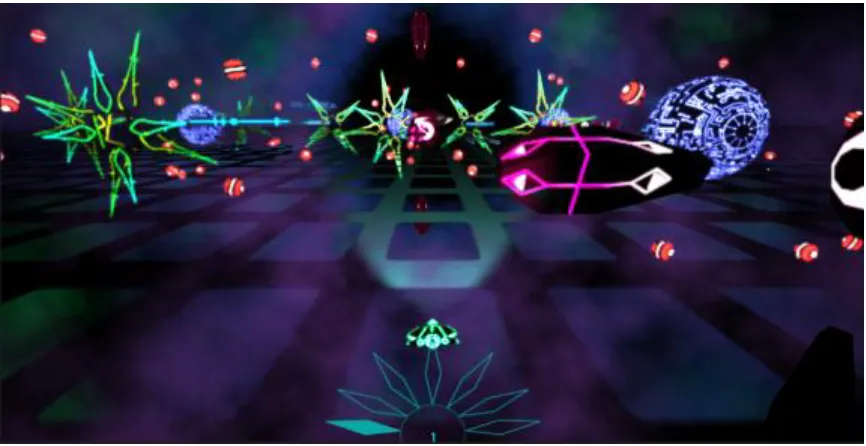
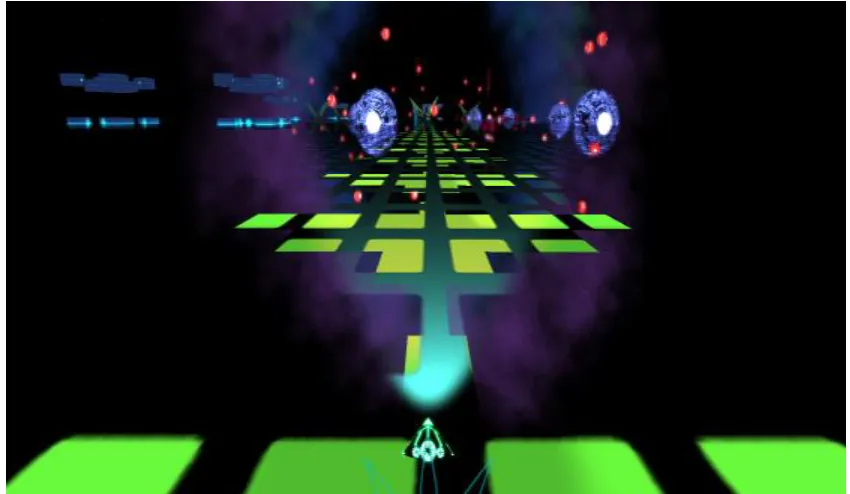
As explained previously, Sense3 is a game based around the concept of using the three senses
of sight, touch and hearing to dodge obstacles and build music (see Figure 1). This game
[image:12.612.108.541.205.428.2]strives to have the player simultaneously process their visual, auditory, and haptic perceptions.
Figure 1. Sense3 game look.
The objective is to collect sound “pickups” placed in the world, which can only be located by the
auditory sense. If the player passes through the correct region in which the sound pickup was
placed, that track gets added to the player’s list and is played continuously on a loop. If the
player is unable to pick it up, a new sound will be placed ahead, creating a unique experience
on each play.
A lot of work was put into the project before the main game concept was decided upon. We
inspected aspects like the current market, music-based games and endless runner genre
2
amount of time was spent on researching the various components of the game. The chapter:
Background Research, covers these topics in further detail.
In Game development process and timeline, we explain the methodologies adopted for the
development process and the reasoning behind it. It also covers the discrepancies between the
plan we had originally laid out and the actual development.
Since we used an agile methodology, several design decisions were made on a weekly basis
depending on the feedback received from that week’s playtest. The game’s initial design and all
the changes it underwent, along with the reasoning behind each design decision are highlighted
in the Chapter: Game Design.
The chapter Technical Design explains how the technical aspect of the game was implemented.
It covers the various software we used and why we chose it, the general architecture of game
and how we implemented certain features. It also explains how the technical aspects of the
game kept pace with a frequently altering game design in further depth.
This document also presents separate chapters dedicated to the feedback we obtained from the
playtests, detailing what went wrong and how it could have been tackled, and features which
could not be implemented in the game due to various restrictions. One of the main purposes of
3
2. Game Genre Background and Market Analysis
We derived inspiration from several endless runners and musical games from various platforms.
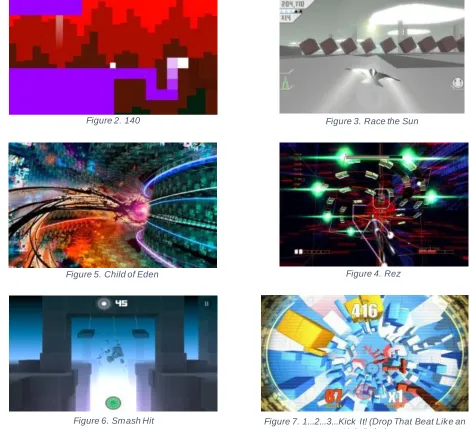
The gameplay mechanics mostly resemble Race the Sun1, which is a fast paced skill-based
game that incorporates twitch mechanics as core gameplay. We took inspiration from Child of
Eden2 and Rez3 for art and visual style. The graphics in both these games have heavy
interaction with the music playing in the background of the game. The environments in both of
these games are dynamic, varying in form, color, and lights based on input from sound. Another
inspiration for our level generator is 1… 2… 3… Kick It! (Drop that beat like an ugly baby) 4. This
game creates a different level for every different musical track that you choose to play in the
game.
Games we take inspiration from
Game Visuals Audio Gameplay
1405 (see Figure 2) Minimalistic Art Audio -
Race the Sun (see Figure 3)
Obstacle Design - Endless Survival
Runner
Child of Eden (see Figure 4)
Abstract 3D Visual Audio -
Rez (see Figure 5) Abstract 3D Visual Audio -
Smash Hit6 (see
Figure 6)
Minimalistic Obstacle Design/Art
- -
1… 2… 3… Kick It! (Drop that beat like an ugly baby) (see Figure 7).
Procedural level generation
- -
4
From all these games we came up with our concept of using senses, visual, auditory and tactile,
to traverse through a procedurally generated level collecting sounds and avoiding obstacles to
[image:15.612.373.560.80.192.2]survive for as long as possible and collect as many musical tracks as possible.
Figure 2. 140 Figure 3. Race the Sun
Figure 5. Child of Eden Figure 4. Rez
Figure 6. Smash Hit Figure 7. 1...2...3...Kick It! (Drop That Beat Like an
[image:15.612.94.564.83.512.2]5
3. Background Research
Visualization
Sense3 utilizes audio as input to create a dynamic environment. Sense3 gives emphasis to
audio, visual and haptic feedback. Every time a sound track is played, it has an impact on the
visuals.
“Multiple simultaneous frequencies compose an audio track, and each one of them appears with
certain intensity. This distribution of frequency/intensities is called the Frequency Spectrum, and
is most usually computed using the Fast Fourier Transform (FFT).”7 Thus, we use an FFT to
obtain the frequency bins from the audio and feed it as an input to the objects that contain the
glow shaders in the game. The process is to take the audio files and use a Fast Fourier
Transform algorithm8 provided by the Unity3D API to obtain the frequencies.
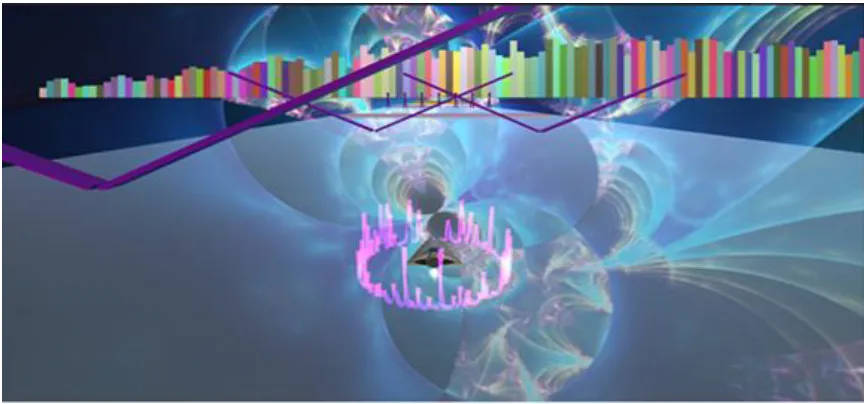
Initial prototyping ideas included mesh deformation, skybox fractals and line renderers (to create
circular shock waves) using audio inputs. Audio inputs were also used to scale the game
objects based on the FFT and to simulate equalizers in the background9 (see Figure 8). After
6
Figure 8. Initial concept of visualizing audio through visual elements.
Visualization is represented in other forms as well. One other example is the black hole
mechanic (see Figure 9). When a player enters the range of a black hole, the screen shakes
and the player is drifted towards the black hole. The intensity of the screen shake increases if
the player is still within the range of the black hole and it stops when the player is out of range.
The game controller of the player also vibrates when the player is in the range. This is the haptic
[image:17.612.153.497.83.253.2]feedback provided to denote the presence of the black hole.
7
The other form of visualization is the floor lights. We added floor lights as a visual cue to the
player. An array of planes was scaled using the input obtained from the Fast Fourier Transform
of the currently playing music. This was used to simulate the lighting of the translucent floor
[image:18.612.111.536.211.458.2]from underneath (see Figure 10).
Figure 10. Floor lights to help the player once the sound is localized.
The frequencies obtained from the audio are also applied to all the game objects that implement
the glow shaders, which provide the bloom/illumination to the objects. Bloom effect is dependent
on the music as the objects do not glow if the player cannot hear any sounds (see Figure 11).
The shader that has been used for glow effects is called MKGlow10. We got access to MKGlow
through Unity3D asset store. The MKGlow is a very easy to use shader. It was easy enough to
8
shader to make it customized for our needs. The audio input was passed into the MKGlow in
order to make the objects glow with regards to the music. Unity’s built-in rendering system is
easy to use, however any HLSL/GLSL code written outside would need some changes and
extra code in order to be ported into Unity3D. Some of the areas of research that went into it
included implementing an in-house bloom shader. Using HLSL and DirectX we were able to
create a bloom post processing effect. However, we have reserved the integration of in-house
[image:19.612.109.539.261.509.2]shaders to replace MKGlow as part of the future work.
9
Feedback Loop
“Positive feedback loops create an exponential growth or decline; negative feedback loops
maintain an equilibrium”.11. A positive feedback system works on encouraging a behavior in the
current state, thus making any kind of growth exponential, whereas negative feedback tends to
make the system work in the opposite direction, thus helping to return to a normative state. In
our game, when the player picks up a track, it is added to the background music. We have
implemented a two-way negative feedback loop such that the game makes it easier to progress
towards equilibrium from either extreme.
Negative Feedback:
1. The player’s speed reduces with each collision, thus it tends to get the player back to a
stable and controllable speed. When the player has a low count of tracks, it makes the
game easier and helps the player progress towards equilibrium.
2. The game’s difficulty increases with the game’s progress. When the player collides with
a visual obstacle, the difficulty gets stabilized and the game tends to become less
difficult. The player loses a track from the sound stack when they hit an obstacle.
The core rationale behind this decision is to achieve a competitive gameplay not very punishing
for new players. The game is intended to be easy to play and difficult to master. Thus, the
10
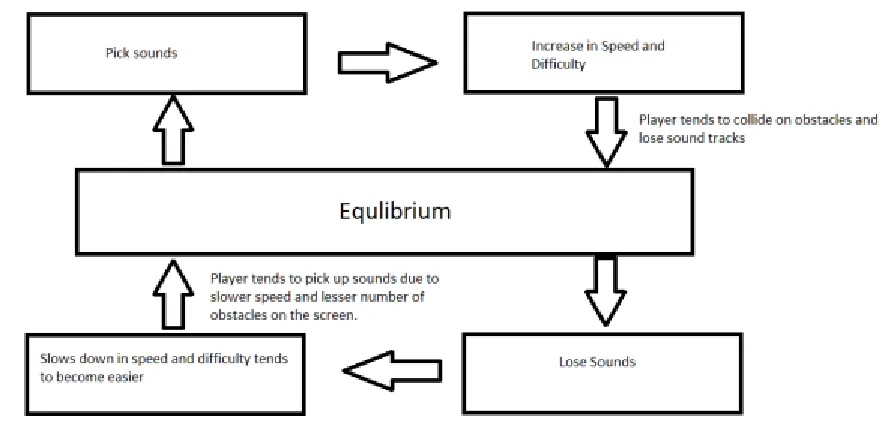
The negative feedback loop can be described from the image below (see Figure 12). As the
figure illustrates, when the player picks up a lot of sounds, the game tends to become difficult
due to a dense clustering of obstacles and the increased speed of spaceship. The probability of
the player losing sound tracks is high unless the player is skilled in the game. At the same time,
when the player is out of tracks, the game tends to become easier due to less number of
obstacles on the screen and the slower speed of the space ship. The player has good chances
[image:21.612.96.537.257.471.2]of picking up sound tracks and tending to reach the equilibrium.
11
Level Design
Level Design has gone through various stages through the course of our game. In the beginning
we needed the levels to help us test the game mechanics like collecting sounds or losing
sounds when hitting obstacles.
In Level Design for Games: Creating compelling game experiences, the author says that
“Puzzles can integrate the gameplay with the environment in a very unique and rewarding way.
Players remember levels by the puzzles contained inside and what they did to solve them.”12
In the first few iterations, levels were designed manually by hand. We wanted to make a fun
experience by giving players the thrill of dodging obstacles. Obstacles were placed in such a
way that skill was required to dodge them and collect sounds (see Figure 13). This was a
[image:22.612.107.539.420.622.2]rewarding experience.
12
The obstacles in the levels had to be designed in a way that they would complement the dodge
mechanics of the game. We designed obstacles that would fall down on the player, or move
[image:23.612.108.540.159.385.2]sideways randomly to confuse the player (see Figure 14).
Figure 14. Falling and moving ob stacles.
In the second semester, we got the procedural generator to work. Now, instead of designing
puzzles manually, we load small individual puzzles into the generator and it generates infinite
levels.
In Game Creation and Careers, Marc Saltzman says that “Good puzzles are first and foremost
fair. They won’t have giant leaps of logic to solve and there may be multiple solutions. A good
puzzle isn’t arbitrary and makes sense in the game world and supports it. Good puzzles allow
the player a little leeway in experimentation and don’t force you to die to discover how to solve
13
We went about creating puzzles with the help of the artists, who also did the 3D modelling and
texturing for us. We created 3 prefabs of each puzzle, Easy, Medium and Hard as can be seen
in the figure below (see Figure 15). The puzzles had to be designed in such a way that there
was a fine balance in the difficulty and the options the player had to dodge them. In the puzzle
shown in the below image, it can be dodged by either jumping through the gap in between the
[image:24.612.106.541.239.454.2]cube or by dodging it from the side.
Figure 15. Easy, medium, and hard version of one of the final puzzles.
The final product was a game that could be played in many ways. Some players like to move
sideways, some like to use jump, some like to be patient and keep going in a straight path (see
Figure 16). Each puzzle in the game has been fine tuned in terms of difficulty. Each time the
14
15
Game Feel
We approached the game experience through the building blocks of Game Feel14, according to
Steve Swink: Real-time control of virtual objects in a simulated space, with interactions
emphasized by polish.
Our main interaction encompassed the control of the player avatar, requiring an increasing level
of skill to navigate and interact with audio pickups and obstacles.
Our simulated space allows the use of multiple senses, with visual, aural and tactile as tools to
extend our senses. New music tracks trigger a need to move to the right place in order to
acquire the background music. Visual and haptic feedback imply danger ahead, giving the
player the urge to move away and evade.
Polish effects are effects that artificially enhance the impression of a unique physical reality in
the game. These effects are supposed to enhance the physics defined in game and we
organized the main haptic feedback effects as visual effects, sound effects, cinematic effects
and haptic effects.
The visual and sound effects main purpose is to enforce the overall game immersion while
16
Cinematic (Camera) and haptic effects translate into ship movement, either as impact, forced
movement or as simple movement feedback. Haptic effects were constrained due to the lack of
accessible haptic output devices that could improve the overall experience, as we could only
17
Game Interface
Since the game is heavily dependent upon sensory feedback, choosing the appropriate output
devices plays an important role in the design of the game.
For audio output, it is necessary for the player to be able to distinguish the side from which the
sound is originating. For this reason, the optimal hardware would be stereo-enabled headsets.
Any other audio hardware with a stereo surround sound feature is a viable alternative. Initially,
we desired to use 5.1 surround sound to simulate the feel of having the sound obstacle placed
in a 3D environment. It would also give the player a sense of obstacles passing by them.
Somewhere along the development process, we decided against it as it was causing a sensory
overload for the player. In our first playtest, amongst the team-members itself, we concluded
that, as a player, it is difficult to decipher the position in one dimension from the world position;
i.e. the player could not figure out the relative position of the sound obstacle from the given
feedback. Thus, we decided the game would do it for them. Any new audio introduced would be
one dimensional; i.e. it could be heard on the left, right or both. This reduced our audio
peripheral requirements to any stereo enabled headsets.
Any normal display device should be sufficient for providing the necessary feedback to the
player. Since our game is heavily dependent on immersion, we have also implemented the
Oculus Rift15 as a video output device. Using the Oculus instead of a monitor causes the
18
associate visual changes in the environment to music, thus furthering the main c oncept of mixed
sensory inputs.
To provide tactile feedback, our initial approach was to use the controller’s vibration to
foreshadow the presence of a mine (hidden obstacle). Since the controller cannot provide more
information to players other than “vibrating” or “not vibrating”, we researched into other haptic
interfaces that would convey more information to the player.
We wanted to incorporate the Haptic Vest. It is a vest that sends vibrations to different parts of
the torso of the person wearing the vest. This would have allowed us to provide more
information through haptic channels, allowing the player to be more cognizant of the locality of
the obstacle. Unfortunately, we were unable to obtain a working prototype of the vest as it
exceeded our budget.
To work around this issue of sending meaningful feedback via the haptic sense, we used pulse
width modulation (PWM) in conjunction with the vibration of the controller. The game is now
designed such that the controller vibrates in short bursts when the player is far from the
obstacle. As the player approaches the obstacle, the pause between bursts of vibrations
decreases gradually. Eventually, as the player gets too close to the obstacle, the controller
19
User Interface
The game’s user interface was built using the new Unity UI. The main menu is a rotating 3D
[image:30.612.108.542.167.441.2]menu. There are 5 slabs in the main menu (see Figure 17).
Figure 17. Sense3 Main Menu
As you can see from the above image, the 5 buttons correspond to Play, Flow, Quit, Credits and
Tutorial. The Flow mode is an Oculus specific mode that has been created to give the users a
realistic experience of travelling in space through planets. The tutorial is an initial scene that is
aimed to teach the users about the game intuitively. The play mode contains an avatar of the
ship, which is by default rotating on its axis. Upon a click, it plays a small animation before
20
Figure 18. Current score indicator
The HUD in the game is just a single element as shown above (see Figure 18). The HUD
displays how many sounds have been picked up by the player. The counter and the leaves in
the HUD increase/decrease as the user picks up or loses sound respectively. The initial plan
was to use blend shapes and convey the number of tracks added to the user by the change in
shape of the spaceship as the user picks up tracks (see Figure 19). Eventually, we needed to
quantify the progress and hence we decided to add an additional UI element, which was the
counter with leaves. Most of the information is conveyed to the user intuitively. The score alone
needed an UI as the score and number of sounds can go up and down respectively based on
the player skill and difficulty.
21
Procedural Generation
Even though we decided from the beginning that Sense3 would be an endless runner, we
worked on the whole game as a single finite level for most of the semester. Towards the end of
the prototyping phase, the team decided that we still wanted to have the procedurally generated
endless runner.
As we wanted a procedural generation engine with basic functionalities, we started looking into
other endless runners and how they handle procedural generation. We were particularly
inspired by the simplistic nature of 1… 2… 3… Kick It! (Drop That Beat Like An Ugly Baby). The
game generates the level based on the music provided as an input by the player. Taking
inspiration from this, we decided that we would generate our obstacles based on the current
status of the player (essentially the number of tracks in the player’s queue currently).
We also started looking into efficient algorithms that could generate an endless horizontal and
vertical world. We found a very efficient algorithm16 that generates a grid of terrains in front of
the player and the whole grid moves with the player whenever the player moves forward,
backward, left or right. This gives the simple illusion of an endless world. Using the example, we
modified the source to better suit our needs and have a procedurally generated endless terrain
grid based on the position of the player in the grid. It essentially ensures that the player stays in
one cell of the grid and the grid rearranges itself when the player moves out of that cell (see
22
Figure 20. Procedurally generated infinite terrain.
After this, we wanted a simple system of placing obstacles based on some rules due to our
constraints, which were imposed by the audio system.
For the obstacle placement algorithm’s first version, we created a completely random placement
and limited the number of obstacles generated each time to 10 for simple tests. This test gave
us some interesting results, but there were a lot of overlapping obstacles, as a completely
random function is not the best way to do it.
We fed the rules for obstacle placement into our infinite world generator and had some good
results. Anytime that the terrain grid updated, we destroyed those obstacles that were no longer
23
Figure 21. Procedurally generated terrain with ob stacle placement rules.
After play testing with the first version of the procedural generation engine, we figured out that
using a terrain was not efficient and also not something that we wanted for the game as we had
imagined the track to be translucent. Getting a translucent texture for the terrain was too much
work for the gain. Instead, we first converted the moving of the grid algorithm to work for a plane
and then just added a translucent texture for the plane (see Figure 22). The results were much
better as it enhanced the performance as well as the visual look of the game.
[image:34.612.162.486.447.603.2]24
Next, we required a better way to place obstacles. We have three types of obstacles (audio,
visual, and tactile) and we wanted to handle each one differently, so that changing the behavior
of one of the types would be simpler. Thus, we started looking into better algorithms for the
smart and efficient placement of obstacles.
Sense3 being endless horizontally too, we had to make sure that obstacles didn’t overlap each
other when the player leaves and re-enters a part of the scene. At the beginning, this was a big
problem to solve, as each of the visual obstacles were of different sizes, shapes, and
orientations.
After researching and reading about how different games handle this issue, we figured that it
would be better to have each visual obstacle be the same size. For this, we made each obstacle
inside a box as a puzzle and then placed those boxes at pre computed positions based on the
player movement. It also made it easier to handle overlapping obstacles as we knew the
positions where visual obstacles had already been placed.
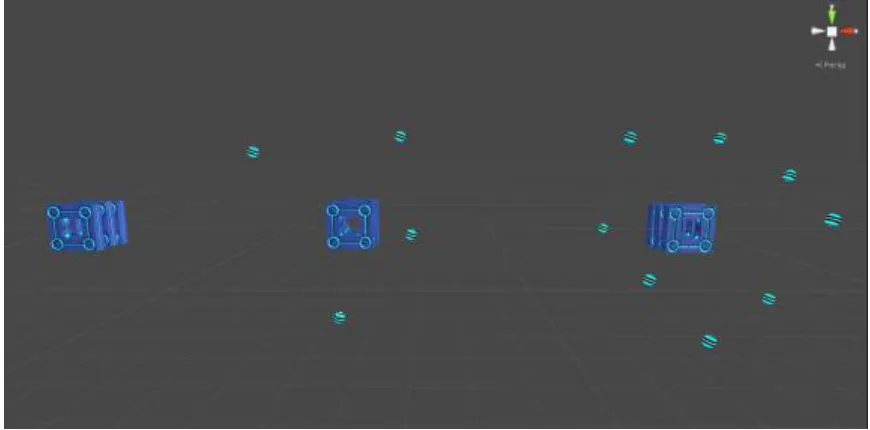
To set up the whole visual obstacle system, we started off with creating five rows (see Figure
23) of obstacles and then adding a row each time the player crosses an existing row (see Figure
24). This gives the player enough time to see what is coming ahead and plan his/her next few
movements. We also decided to create five columns of obstacles as that was sufficient to fill the
screen just enough and also ensure that the player doesn’t notice the sudden initialization of
obstacles on the sides. For horizontal movement, we created virtual boundaries for the world
25
left or the right), we first update the boundaries, and then check if it is necessary to add a
[image:36.612.108.545.136.363.2]column of visual obstacles in the direction the player has moved.
Figure 23. Initial setup of the game.
By this time, we were handling a lot of objects on the screen. Deleting and re initializing the
obstacles was not the best thing to do. Instead, we went with the classic approach of creating a
pool of obstacles at the beginning of the game and then just disabling and enabling them as
required. At this point, the visual obstacles were being handled well but we still required a lot of
26
Figure 24. Sub sequent rows b eing added as player moves forward.
The sound obstacles had to be handled in a slightly different manner as we had to make sure
that there was only one sound obstacle in the scene at any given time and that it is always
generated in such a position that the player enters it and hence has a chance to pick the sound
up.
Solving the first problem about the sound obstacle was pretty easy as we instantiate only one
sound obstacle and enable/disable it as required using the singleton design pattern. For the
second problem, there were two solutions, and we combined them both to make sure that the
player enters the sound obstacle for sure. The first part of the solution was to make the sound
obstacle as wide as the screen width. This was easy and a little bit of trial and error was enough
to fix that part. The second part of the solution was a little bit tricky as the timing of the
placement and instantiation of the sound obstacle were very important to make sure that the
27
maximum forward distance the player covered before running out of the current screen space
while moving horizontally. Then it was easy to place the sound obstacle. Any distance in front of
the player less than the previously calculated forward distance would make the player enter the
sound obstacle for sure.
Also, the distance between two sound obstacles was such that after passing/collecting one
obstacle, the player would be able to hear at least two repetitions of the previously collected
track before he entered a new sound obstacle.
The tactile obstacle works very similar to the sound obstacle, but the frequency of occurrence
changes depending on how far the player has gone in the game. This will be discussed further
on in the document.
Level progression is also an important aspect of an endless runner and hence it had to be
implemented with the procedural generator. After reading how other endless runner games
implement level progression and taking help from a paper we found online, we came up with a
basic level progression algorithm. For the initial version of the progression, we decided to have
three levels of difficulty depending on the number of tracks the player has collected. The higher
the number of tracks collected, the more difficult the game gets.17
To make the change in difficulty visible, we decided to play with the player speed, the density of
the puzzles, and the frequency of the tactile obstacles. Every time the player collects a sound,
28
of obstacles is kept constant, the increased speed gives the player less time to react and they
have to make decisions faster. Whenever the player loses a track, we decrease the speed of
the player.
For the difficulty levels, we decided that the game would be in an easy mode for up to two
tracks, a medium mode for the next three tracks, and in a difficult mode for the remaining two
tracks. In these three levels, the puzzles are different. With each increase in difficulty, the
density of the puzzles increases and the player has even less space to move. The distance
between two tactile obstacles also reduces drastically with each increasing difficulty level and
makes the game harder. These changes keep happening back and forth as the difficulty level
changes depending on the current number of tracks collected by the player.
After playtests at the Game Developers Conference (GDC) and the RPI GameFest, we figured
that the level progression was too drastic and hence a lot of players were unable to finish the
game. Most average players would stay alive in between three and four tracks and never finish
the game. Hence, we decided to tweak the level progression a little bit. This time, we divided the
in use obstacles into three parts and would replace the lower difficulty part with a higher
difficulty part whenever a player collects a sound and do the reverse whenever a player loses a
sound. This helped the player get used to the obstacles a little bit better and more people were
able to complete the game in this iteration.
Being an endless runner, efficient procedural generation and smart obstacle placement were a
29
sources mentioned above helped us a lot to make the prototype faster and then the team could
take this basic tool and extend its functionality to make it do whatever the game required. Even
though everything is still in a prototype phase, it is written well enough just to expand easily and
possibly use it for any endless runner. Having a robust and reusable procedural generator was
one of the goals of creating the engine in the first place and the team is pleased that the engine
30
Audio
Audio plays a central role in Sense3. The approach to music in our game is an implementation
of vertical remixing. “Vertical remixing is an interactive composition technique in which layers of
music are added or taken away to create levels of intensity and emotion”.18.
We wanted the player to enjoy a different musical experience for every play through. In each
play through, new tracks would be assembled to create a unique music track and visual
experience. The music composers designed each audio sample such that it would play well with
the other samples. This was done by subdividing the EDM genre into smaller categories like
Bass, Kick, drums, etc. The composers provided us with several variations of each subcategory.
The final track would be constructed by taking 1 track from each of the sub categories. This
ensured that the end track would always result in a gratifying musical experience.
Since our game required us to seamlessly add or remove tracks which are currently in play, we
decided to restrict the soundtracks to four bar (a time measurement normally used in music)
tracks. Eight bar tracks would be too long to provide enough flexibility to fade in during runtime,
even though eight bar tracks could provide us with a bigger platform for the composers to play
with. Two bar tracks were avoided, because it tended to become too repetitive over a small
period of time itself.
Our first prototype consisted of a basic system which was composed of layers. Each layer
31
layer can be loaded with any number of tracks of that category. The main system then chooses
one of these layers randomly and issues the play command. That particular layer then chooses
one of the tracks from its list and plays it.
To ensure that the final track built from the vertical remixing of the base tracks doesn’t result in a
cacophonous tune, the tracks are selected based on an algorithm that takes into consideration
the tracks that are currently playing. For instance, the first track to be added should have a kick,
and the next one should take in consideration what the current song list currently has and give
an option, for instance of a chords or melody track.
After our first playtest and design session, features like fade in and fade out, stereo pan and
synchronization were deemed necessary. We built upon our first prototype and improved the
system to accommodate other features like fade in and fade out. It was also important to
incorporate audio synchronization into the game as it was vital to give the player a continuous
and pleasurable experience.
Around this time, we also restructured the entire game architecture to that of a star topology.
The new system is designed such that the entire game is subdivided into smaller independent
components. The core system of the game would implement the game logic and send the
appropriate instructions to each component based on the game logic. We also changed the
entire audio system and separated it into smaller components (Audio controller and Layers)
32
Every time the audio controller has to play a new layer, it checks the time sample of an already
playing layer, and instructs the next layer to start playing from that particular time sample. This
ensures that the tracks are always in sync with each other.
Our future plans include integrating the FMod19 plugin into Unity and using FMod to setup the
33
3. Game Development Process and Timeline
Structuring the team
At the end of the first year of our Master’s program, we were familiar with each other and had a
good understanding of everyone’s strengths in the class, and all of us were comfortable working
with each other. Even though no one had a clear vision of the game each person wanted to
make, everyone had their personal goals -- what they wanted to get out of the capstone project.
The main roadblock during the initial designs was that none of us were well versed with music
and sound engineering. For the first iteration, we made up some audio using iMaschine20 for
iOS and used it for most of the initial prototype phase. The final solution came with the
integration of the Sound Design Team:
● John McClung; a professional composer, in charge of the EDM tracks composition;
● Ryan Gaynor; an RIT senior; in charge of the trance music tracks composition;
● Angela Muscariello; an RIT IGM senior, in charge of the sound effects.
Even though we had concept art during the first semester, we weren’t sure how would we get all
the final art and modelling done for our game, as none of us were artists and only concept art
was not enough for us. Finally, we were introduced to a lot of art students and had the
opportunity to pitch our game to them. The graphics design team joined us on the project and
helped us to create a proper visual identity.
● Peter Lockhart; 3D Modeler, Artist lead;
34 ● Dakota Harold; 3D Modeler;
● Edward Amidon; 3D Modeler;
● Claire Meixner; Concept Artist;
● Tamille Garcias; Concept Artist.
Along with the rest of the team, we worked with the following faculty members focused in all the
main interest areas:
● Dr. Jessica Bayliss; Co-Chair focused on general technical aspects of game
development,
● Prof. Elouise Oyzon; Co-Chair focused in the Graphics design,
● Prof. Ian Schreiber; Co-Chair mainly focused in Game design and mechanics,
● Prof. Al Biles; Advisor guided us through the audio aspects of the game,
● Prof. Christopher Cascioli; Advisor guided us through the technicalities of graphical
features,
● Prof. Jesse O'Brien; Advisor, focused in Level Design and overall 3D modelling,
● Dr. Owen Gottlieb; Advisor, focused on formal aspects of documentation and game
design,
35
Prototyping the game
Sense3 went through a large number of iterations over the course of game development.
Our process involved having a weekly design meeting where we would discuss feedback from
the recent playtest session and brainstorm new ideas. We also distributed the tasks amongst
ourselves during the meeting. Each week we would add something new, making sure that the
approved new content is merged with previous iterations. We also got IGM students and faculty
to playtest weekly so that we could hear other points of view and ideas.
The original concept consisted of an endless runner in which the player had to switch between
two different physical dimensions and avoid obstacles from both dimensions while being able to
[image:46.612.175.475.399.583.2]see only one dimension at any given moment (see Figure 25).
36
During the first few iterations, the game was missing a proper hook, and the overall gameplay
felt simple and repetitive. To resolve this, the team held design meetings and brainstorming
sessions to come up with new ideas ranging from: increasing speed, giving a bonus for pickups,
making the whole world react to the music being played, and the idea of a changing
environments dynamically. After making prototypes for all these systems, we could see that the
game had changed immensely for the good.
The iterative process of adding features fit well with the process of guiding and integrating the
work of the concept artist and audio designers.
Apart from the weekly design meeting, we also got ideas for the theme, environment and game
feel from our graphic design team in weekly meetings during capstone class, aimed to discuss
tasking, game progression and future work.
The graphics design team also had a big influence over the final game concept as some of the
obstacles were first introduced by the artists and later built into the game. Some of the initial
[image:47.612.92.543.515.635.2]concept art helped shape the overall environment for the game (see Figure 26).
37
These weekly iteration cycles helped us take the game to higher levels in terms of gameplay by
the end of the first semester, which was our primary objective at the time.
After several iterations on the original prototype, we could see that the game changed a lot from
what we had originally envisioned, but we were happy as those changes were pushing the
38
Scheduling and milestones
During the capstone course for the first semester we were expected to come up with a game
idea, develop a prototype and write the game design document:
September 2015:
· September 07, 2015: Playable prototypes and discussions for each idea.
· September 14, 2015: Iteration on all prototypes.
· September 21, 2015: Final version of all prototypes for team review (finalize a max of 2).
· September 28, 2015: Close-in on ideas (finalize one idea).
October 2015:
· October 05, 2015: Finalize research areas.
· October 19, 2015: Get feedback from faculty for improvements and new ideas. Also, run
a beta test of the prototype and review feedback.
· October 26, 2015: Get version 1.0 of the GDD due at the end of the semester.
November 2015:
· Depending on where we are, we might rethink the whole idea if the feedback is not good
enough, or try to catch up on the schedule if there is a backlog, or start production and work on
the final GDD version if everything goes to plan.
December 2015:
· Week 1: Review GDD and run cleanup on prototype.
39
The second semester comprised the bulk of the development process, playtest and delivery and
presentation of the capstone project
March 2016:
Deliver a build with all functionalities, to be playtested at a playtest session in San
Francisco during the GDC period;
April 2016:
Work in the feedback from the GDC playtest session and polish the game;
April 29: Create a new build to be entered in to RPI Gamefest.
May 2016
Week 1: Exhibit the final build at Imagine RIT;
40
Development process
For version control, we used Github and the SourceTree GUI client. Github allows a repository
to be shared by more than five collaborators. It was a simple choice over its main free
competitors as Bitbucket only allows five users to collaborate in their free version and other
version control systems require a paid server.
The SourceTree client is a very simple and intuitive GUI client for Github as it gives an easy
visual representation of all commits, branches made and the status of each branch. It is also
fast as it can notify you of any incoming pulls almost instantly. This helps us easily check who is
actively working on what and helps resolve merge conflicts easily.
As for our development process, we are using the agile methodology. It is a simple process. We
have weekly sprints where we come up with stories every week. For every story, we carve out
tasks in such a way that everyone has something to work on and there are less dependencies
and blockers for every person. As we know that it is hard to come up with different tasks for six
different people, we mostly pair up team members with similar interests on some of the tasks so
that everyone still has something to work on.
We meet every day for a daily stand up and talk about the tasks we worked on since the last
meeting, tasks we plan to work on next and if there is anything blocking us. This helps us learn
41
To keep track of all stories and tasks for each week, we used two systems: a physical Kanban
board and a virtual board using HacknPlan to manage our tasks online. HacknPlan is a useful
system to keep backlog, easily record and track changes. During most of the project the Kanban
board was our main task tracking system. The Kanban board helps the whole group to
understand what is the whole team currently working on and also facilitate the process to pick
up unassigned tasks, anyone in the team could grab an unassigned test once done with their
current activities.
The Agile process helps us develop features while adding new ones each week and we feel that
this is the best iterative methodology for us given our timeframe and scope of the project. We
have something substantial every week and it helps us keep motivated by seeing how far we
42
5. Game Design
Sense3 is a game based around the concept of using three senses to dodge obstacles and
build music, nevertheless we did many experiments before getting into the current version of the
game.
Initially, we decided to implement certain concepts of Synesthesia21, the stimulation of one
sense that leads to involuntary experiences in a second sense. The major concept that we draw
from there is the associative property of synesthesia. We wanted to simulate the feeling of a
synesthetic person who can associate sounds to visuals.
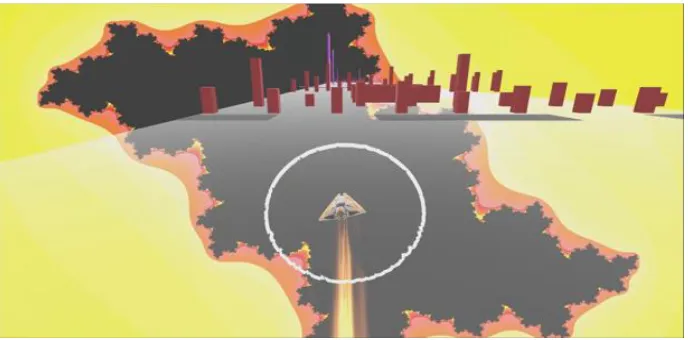
We tried to achieve the above experience by creating different fractal patterns in the
background for every new sound sample the player collected. It is important to note that at this
point in time, our game did not have the diverse pool of soundtracks available, rather there was
a fixed set of samples which would be experienced exactly at the same point in time the game
was played.
Our initial playtests were aimed at checking the functionality of the core game mechanic. Hence,
our pool of playtesters consisted mostly of RIT faculty and graduate students. These playtests
made us realize that most people were concentrating on collecting music samples, unaware of
the synesthetic aspect of the game. The fractal patterns created too much visual noise and
diverted the player’s attention from avoiding the obstacles. Most people could not relate the
43
We also experimented on scaling objects in regards to the frequency of music. When the player
listens to a sound track, the visual obstacles in front of the player would expand and contract on
[image:54.612.121.529.185.356.2]Y-axis (see Figure 27).
Figure 27. Visual ob stacles reacting to the audio provided as input to FFT.
The obstacles reacted to accumulated frequencies instead of specific frequency bands. Again,
the player could not differentiate between different types of soundtracks, thus failing to
understand what a synesthetic person would experience.
However, everyone seemed to enjoy the concept of building music and exclusive feedback for
each sense. Thus, we decided to retain the concept of building music and shift our focus from
simulating a synesthetic experience to associating each sense to meaningful objects in the
game. Hence, we came up with the game mechanic of associating the auditory sense to
44
We took forward the game mechanic of building music using the concept of vertical remixing. In
our game, we dismantled the Electronic Dance Music (EDM) genre into 7 layers; Bass, High
hat, Kick, Lead, Rhythm, Snare and SCpad.
The audio system has a pool of seven layers, each consisting of eight sound samples. Sound
pickups are placed at specific time intervals and our system activates any one of the layers and
randomly picks one of the samples from it. This sample on being collected blends in (vertically
remixed) with what is already playing in the background creating an elevated and euphoric
45
Challenge and Reward
The gameplay at its core uses the “challenge and reward” game design system. The challenges
used in this game comprise of Physical Coordination Challenges. “Physical coordination
challenges test a player’s physical abilities, most commonly hand-eye coordination”.22
We have taken the coordination challenge and expanded it to two other senses, hearing and
touch, increasing the complexity of the coordination required by the challenges in the game.
Players are tested on their speed and reaction time when playing this game. “Speed challenges
the player’s ability to make rapid inputs on the controls, and reaction time challenges test his
ability to react quickly to events”.22 At any given point of time there are several “simultaneous
atomic challenges” presented, comprising of navigating through the level, dodging visual and
haptic obstacles as well as collecting sound pickups.
The players are required to have the “intrinsic skill” to process the inputs from all their senses of
sight, touch and hearing in order to make quick decisions to survive and complete the
challenges in the game.
The game doesn’t permit the player to be slow as the avatar is continuously moving to their
impending death. The sound pickups have a fixed range, which means that the player can miss
46
stress, along with the skill. Stress tests how good the player’s intrinsic skills are when put under
a time constraint.23
When picking up a sound, the player is rewarded with the sound being added to the background
music using the concept of vertical remixing. These samples are more than just temporary
rewards. They have a functional purpose as they also represent the player’s lives; e.g. the
player is allowed to collide into obstacles as long he has music samples to sacrifice. If the player
collides into an obstacle in complete silence, the game ends.
The music sets the tone of the gameplay. More samples collected infer more complex and
difficult challenges in terms of the obstacles. This results in an enhanced gameplay experience
with immersive layered music playing in the background.
All the challenges discussed so far are explicit challenges, outlined to the player through the
tutorial, where the player learns how to tackle them in their most basic form.
However, we also have implicit challenges of incremental difficulty in the game which can be
experienced as the players keep acquire more music samples. The better the player gets at the
game, the more difficult we make it, constantly pushing the player to rise up to the challenge the
game provides. Simply put, more sounds equals to more speed and obstacles, both visual and
tactile. Therefore, it becomes harder for the player to collect the next sound without increasing
47
The game is not unforgiving. If the player loses sounds, the avatar slows down and the density
of obstacles decrease. Technically, if we have succeeded in pushing the player’s skills, it should
48
Game Mode
The game has three different main modes: Tutorial, Arcade and Flow mode. In the tutorial
mode, the game introduces an obstacle or pick-up and a prompt tells the player what to expect
and how to behave around it. Once the player has a grasp of the main game mechanics, it
automatically loads the arcade mode.
The arcade mode is the main level of the game where the player has to avoid obstacles and
pick sounds. The game is designed such that the gameplay becomes progressively more
difficult. Each time the player picks up a sound track, the player’s speed increases linearly.
As the speed increases, the player is forced to focus harder in order to avoid the obstacles. We
want the players to be immersed in the music and the fast paced gameplay.
Once the arcade mode winning condition is met and the player has collected tracks in all
available layers, the game plays the accumulated tracks for a limited time before ending the
session.
We have planned to turn the vertical remixing steps and the final accumulated track into a
collectible/reward after each play through. The user should be able to then use this collectible
49
The flow mode is designed with the main objective of letting the players enjoy the game’s music
in a relaxing virtual reality environment, letting the player feel as if they are simply floating
through space. Unlike the arcade mode, which focuses on speed and the player’s
concentration, flow mode tries to induce a calm and soothing environment.
The incorporation of the Oculus allowed us to create a more immersive environment for the
player. In the arcade mode, having the player’s sight focused forward with relatively little head
movement helped to reduce the chance of simulation sickness. We noticed this in the next
playtest session, as players who had allegedly experienced simulation sickness during a prior
VR experience, reported no motion sickness after the play through. The arcade mode of the
game could not utilize the full potential of the Oculus, as the player has to focus on the
upcoming obstacles and thus has a limited viewing range. In flow mode, the player is free to
50
6. Technical Design
We are using the Unity3D24 game engine to prototype and create our game. This was a natural
choice as all of us have experience using this game engine and know our way around it.
Unity3D offers flexibility and usability in all three areas:
● Graphically, it allows us to implement our own shaders and plug them into the engine’s
rendering system allowing us to create the visuals we want. However, the plethora of
assets available for Unity also allowed us to incorporate certain features into the game
without investing time into developing it.
● For audio, Unity3D has an intuitive audio system which is very important to us as none
of us come from a musical background and needed all the support possible.
● For haptics we are using a simple script to create vibrations on a range of intensities.
Unity has built in support for Xbox controllers, making it easier and faster for us to
incorporate it into the game.
Since Unity3D has a large community, we can make good use of such external resources
without having to worry about going too deep.
Unity3D uses a component-based architecture where everything in a game (ex. player, camera,
obstacle, and skybox) is a game object and each game object only has components that it
needs to function in the game. From a high level perspective, our game requires different game
51
designed our game’s architecture using an event-based system where a message is broadcast
to all game objects that are waiting for input from the game object whose change in state will
affect them. This kind of event listener/observer architecture system helps us to keep things
synchronized and easy to scale.
A simple breakdown of the functional systems that make up our game are:
● Procedural Level Generator: this system will create the level and obstacles in the game.
This system will take small designed visual obstacle components, sound components and
rumble components as input and place them randomly onto a generated terrain as output. Its
responsibility is to make sure that the player experiences a new gameplay on each play
through.
● Audio System: this system is responsible for syncing audio based on player speed, panning
audio and manipulating decibel levels based on player position. It is also responsible for
intelligently managing new incoming music with the appropriate track already in the stack.
● Graphics System: this system is used for creating visualizations based on musical input.
Most of this work is pushed on to the GPU using shaders to achieve maximum quality. The
system is responsible for creating dynamic visual environments through changing colors and
lighting in the scene.
● Haptic System: this system is responsible to giving haptic feedback based on music data. It
is also be responsible for supporting alternate channels of information in the game.
● Player Controller System: this has to do with programming every ability that the player will
52
7. Asset Overview
Assets are an integral part of our game. We have visual assets created by artists and audio
assets created by audio designers in our game. The visual assets are the visual obstacles and
the player ship in our game. The audio assets are the individual audio tracks. All visual assets
were created keeping in mind the desired look of the game based off the mood board we had
[image:63.612.105.544.268.549.2]created when we first started working with the artists (see Figure 28).
Figure 28. Mood b oard.
Our requirements for the visual obstacles were that we wanted them to be abstract, like cubes
and spheres, yet follow a theme and fit in the space look of our game. Each obstacle has a
53
animation. For the ship we wanted 7 layers, each layer coinciding with the number of tracks
[image:64.612.108.542.129.546.2]collected. This would give the feeling that the ship was evolving with each track collected.
54
For the audio assets we wanted four bar, perfectly looped tracks. We used a specific naming
convention so that the process of loading files would be automated rather than being done by
55
8. Playtesting and Results
Given our agile development process, a lot of the project development cycle was guided by
feedback received in the prior week. We conducted several playtests with a small subject group
restricted to IGM faculty and students.
As part of our schedule, we joined the IGM local playtesting group “Crash Test”.
The initial playtest sessions were mostly geared towards refining the game concept and as
source for designing new features.
Some of the main questions that were addressed in the beginning, which eventually made into
the game were:
Requires a reference point.
o Players were unable to infer if their current trajectory would collide with the
oncoming obstacle.
o Certain obstacles would come up from beneath the ship and result in a collision.
The players were unable to gauge when this would occur
UI needs refining – Players were unaware that the avatar changes to reflect the number
of tracks the player had collected;
Inefficient synchronization of music tracks. Some of the remixed tracks were not playing
in sync, creating a dissonant music experience.
Some implemented features driven by the initial feedback:
56
57
GDC Playtest Session:
One of the major milestones that has driven our game was the GDC playtest as this was the
first big playtest session where we presented our project with all the main features developed.
This playtest was mainly composed by game industry veterans, press and students . Given the
relevance of the crowd, we received an enormous amount of useful feedback to be
incorporated. The Game Developers Conference (GDC) playtest night was organized by the
Interactive Games and Media (IGM) department at Rochester Institute of Technology.
The event audience was composed by gamers and game developers with ages ranging from 20
to 50 years.
What follows are the compiled results we got based on the playtest session held at GDC:
1. Frame of Reference: Players can’t see if they are in collision trajectory with some
obstacles.
2. Asteroid Obstacle: Moving Asteroid tends to appear suddenly from outside the player
view, giving the player no time to react, often frustrating players.
3. Highlight audio Interactions: The mechanics related to audio: Player on the Right track,
Player collected a music pickup, player collides with an obstacle, Player missed a track -
need to have a better visual feedback to inform the player any required message.
4. Sound Pickup: Overall sound pickup architecture comments: Players feel that there are
58
completely blocking of one side of the audio output does not translate what the players
expect.
5. Jump: Jump mechanic does not seem relevant to the current interaction on the game,
most obstacles and situations can be avoided by moving sideways.
6. Level Progression: The game may drag too much depending on player skill. Players
often got caught in a loop where they can easily dodge the first obstacles, but can’t
overcome the harder one, not being able t