Rochester Institute of Technology
RIT Scholar Works
Theses Thesis/Dissertation Collections
2010
Developing a taxonomy for office email: A Case
study
Larry Conrow
Follow this and additional works at:http://scholarworks.rit.edu/theses
This Thesis is brought to you for free and open access by the Thesis/Dissertation Collections at RIT Scholar Works. It has been accepted for inclusion in Theses by an authorized administrator of RIT Scholar Works. For more information, please [email protected].
Recommended Citation
Rochester Institute of Technology
B. Thomas Golisano College
of
Computing and Information Sciences
Master of Science in Human Computer Interaction
Thesis Proposal Approval Form
Student Name:
Larry ConrowThesis Title:
Developing a Taxonomy for Office Email: A Case StudyMS Thesis Committee
Name Signature Date
Chair
Committee Member
Committee Member
Evelyn Rozanski, PHD
Jennifer Englert, PHD
Developing a Taxonomy for
Office Email: A Case Study
By
Larry Conrow
Thesis submitted in partial fulfillment of the requirements for the degree of Master
of Science in Information Technology
Rochester Institute of Technology
B. Thomas Golisano College
of
Computing and Information Sciences
© 2010
Larry Conrow
DEDICATION
To my wife Lorrie, my daughter
Ireland and my son Kasey.
Acknowledgements
I would also like to acknowledged the advice and consultation offered by my thesis
committee during the design, execution, and documentation of this research endeavor. A special
Table of Contents
ABSTRACT ………. 6
LIST OF TABLES AND CHARTS ……… 7
INTRODUCTION ……….. 8
LITERATURE REVIEW ……….. 9
PROBLEM STATEMENT ……… 16
RESEARCH QUESTIONS AND HYPOTHSIS ………... 17
METHODOLOGY ………. 20
PART 1. ETHNOGRAPHIC FIELD STUDY ………. 20
PART 2. EMPIRICAL STUDY ………. 24
DATA COLLECTION AND ANALYSIS ……… 27
USER PERFORMANCE ………... 27
USER PREFERENCE ……… 39
DISCUSSION ……….. 41
CONCLUSION ………... 43
BIBLIOGRAPHY ………... 44
APPENDICES ………. 48
ABSTRACT
Larry Conrow
Developing a Taxonomy for Office Email: A Case Study
The amount of email a professional will receive on a day to day basis has increased
substantially over time. The need to process these emails has become a constant source of
information overload. Email overload has been estimated to be costing a loss of productivity in
the U.S. of millions or even billions of dollars due to time spent reading, organizing and saving
emails. As stated in the New York Times in 2007 by Steve Lohr, "$650 billion is an estimate of
the cost of unnecessary interruptions in terms of lost productivity and innovation".
Through field research, surveys, and observation this study will try to identify patterns or
a series of patterns or themes commonly used by people within an office setting to sort/organize
their email. These patterns or themes will be the basis for creating a taxonomy of the predefined
hierarchical folder structures for storing emails. The first part of the study used ethnographic
field study and observation techniques. These data collection techniques included participant
observations, interviews, and questionnaires. The second part used the empirical method to
derive a conclusion. The study collected data through experimentation and the formulation and
testing of the hypotheses.
This research study consisted of two parts: The first part of the examination looked at the
time-on-task of the sorting process. The results showed that having a predefined folder structure
did have a significant positive impact on time-on-task. The second part examined accuracy in
recall of the placement. The results also showed that having a predefined folder structure did
have a significant impact on accuracy in recalling placement of email. The results of this study
LIST OF TABLES AND CHARTS
Figure 1. Profile characteristics of the ten participant……….…….... 24
Figure 2. Group 1 test environment ………... 25
Figure 3. Group 2 test environment ………... 26
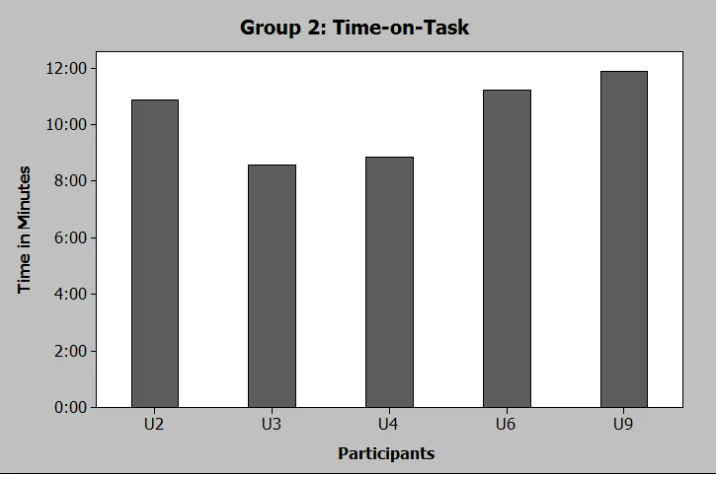
Figure 4. Time-on-Task Data for Group 1 ……….… 28
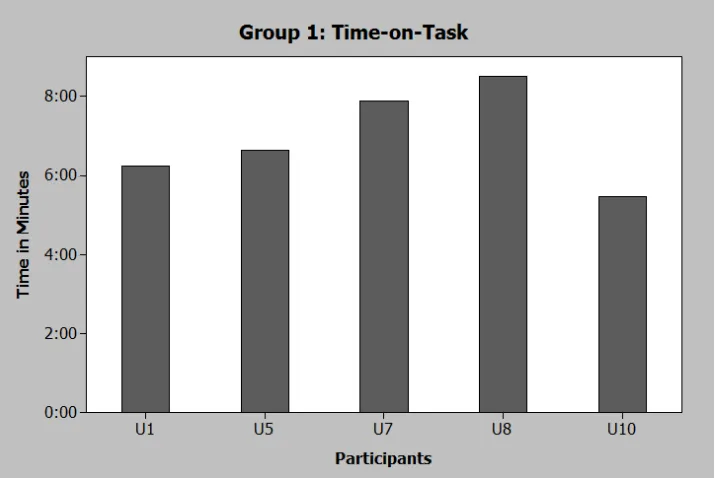
Figure 5. Time-on-Task Chart for Group 1 ………... 28
Figure 6. Time-on-Task Data for Group 2 ……….… 29
Figure 7. Time-on-Task Chart for Group 2 ………... 29
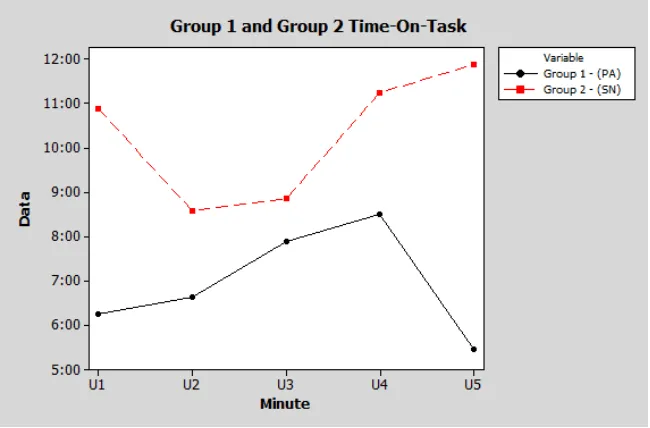
Figure 8. A comparison between Group 1 and Group 2 Time-on-Task ..…... 30
Figure 9. Group 1 (PA) and Group 2 (SN) Time-On-Task ………..………….. 30
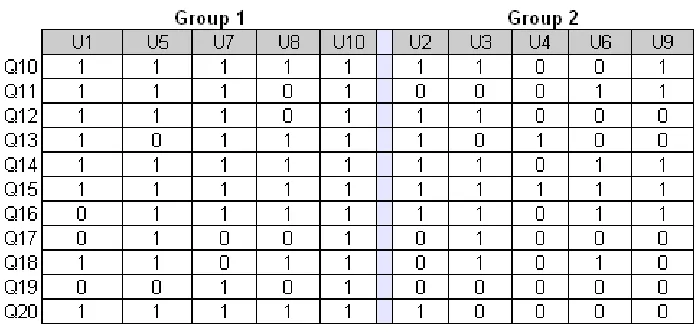
Figure 10: Original Data (Test for recall of email placement) ……….. 31
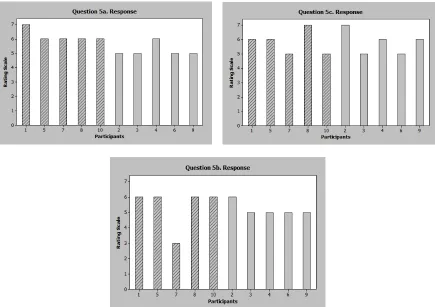
Figure 11: Results from Survey Question 5 ……….. 39
INTRODUCTION
Email is the most successful computer application invented yet. As email communication
continues to thrive professionals are running into similar problems time and time again. Email
overload has been estimated to be costing a loss of productivity in the U.S. of millions or even
billions of dollars due to time spent reading, organizing and saving emails. As stated in New
York Times in 2007 by Steve Lohr, "$650 billion figure is an estimate of the cost of unnecessary
interruptions in terms of lost productivity and innovation". These interruptions which add to the
information overload problems is a total of several activities that technology workers perform in
their business day such as email, instant messaging, blogs, etc. In 2005 Bellotti, Moody, &
Whittaker stated “it is used by millions of people to carry out their business each day” (p. 2).
Email today has been adopted as a communication and information exchange tool in
workplaces and industries. The amount of email a professional will receive on a day to day basis
has increased substantially over time. The need to process these emails has become a constant
source of information overload. The way in which people review, organize, store and retrieve
emails in a corporation is a cognitively demanding task. In 2008 Spira reported that employees at
“Morgan Stanley, the average employee receives 625 e-mail messages per week and Intel
employees spend, on average, 20 hours per week managing e-mail.” As Gantz, Boyd and
Dowling (2009) found that the more a person deals with information “the more it creates the
feeling of overload.” The information that is stored in personal email systems needs to be quickly
and accurately retrieved. The structure in which the information is stored should support the way
LITERATURE REVIEW
Research studies have demonstrated different ways in which people use email. There
have been studies done on the way people use email, manage their email, classify, store and
retrieve email. Prior research has identified two different types of strategies used by people that
use email. Researchers have named these two groups in slightly different ways; filers and pilers,
prioritizers and archivers, no-filers and filers, cleaners and keepers (as cited in Tungare, M., &
Pérez-Quiñones, M. A. 2009). Other studies of email users have identified a trend where people
will take time and organize their emails on a regular basis, or people will not and just leave
emails in their in boxes.
Research has been done in the area of Personal Information Management (PIM) which is
described by Hardof-Jaffe et al., (2009) as a “field that focuses on the activities by which a
person keeps, saves, and organizes information items in order to be retrieved later” (p. 250).
There has also been research done to examine email usage or behavioral patterns among a small
sample population. Other research has looked at a technology based solution such as tools or
applications that would allow a user to control the support, manage or to aid with their email.
Bergman, Beyth-Marom, and Nachmias (2005) presented Personal Information
Management (PIM) as an “activity in which an individual stores his/her personal information
items in order to retrieve them later on” (p. 2). The main purpose of the Bergman et al. 2005, was
to “empirically examine personal information space and organizational strategies in the context
of learning processes on a large population of students so that they could have a better
understanding of the traditional piling/filing classification”. Their study was conducted using
data mining techniques to identify clusters or groups of email messages and group them together.
Data was collected from 2,081 undergraduate students and included a list of files and folders for
The four different strategies from the findings are:
a) Piling – most of the files are in the root directory;
b) One-folder Filing – most of the files are located in one folder, under the root directory; c) Small-folder Filing – items are being divided into many relatively small folders (about 6 files per folder on average);
d) Big-folder Filing – items are being divided into folders (about 23 files per folder on average) with about a half of them located in one big folder (Bergman et al., 2005).
Qwizdka (2004) found two groups of email users: the cleaners and the keepers. The
cleaners and the keepers both had two different ways of managing their email. The way these
two groups handled tasks/events in email as presented by Qwizdka (2004) could be attributed to
flexibility of closure. The people in group one transferred information to other programs
removing information from email applications. The users look as though they had greater control
over the way they managed their email by ignoring new email messages, and setting aside
specific time or times to read their email. The people that were classified as the cleaners as stated
by Qwizdka (2004) tend not to use email to handle messages related to tasks to-do or events. The
people that were classified as the keepers would use email to handle messages related to tasks
to-do or future events (Qwizdka, 2004). This group would also stop every time or almost every time
a new email came in to read it.
As Boardman's (2001) presented the current way in which people organize and maintain
their email is expensive in terms of cognitive effort and time. Boardman's (2001) research study
shows that people can suffer from cognitive overload if they try to maintain, sort and locate
information in multiple hierarchies within a computer system. Boardman's (2001) proposed
solution was, “a simple technique that also organizes resources at the workspace level, by
sharing one hierarchy between all applications” (p. 2). This way lessened the cognitive effort
needed to manage information in multiple locations; any change made in one hierarchy the
change would be automatically reflected in the other locations.
Nathan Zeldes a computing productivity manager from Intel states one of the biggest
problems he thinks leads to over emailing, is “mistrust” (Overholt, 2001). Managers feel the
only way to find out what is really happening is to be included in almost every email so they can
find out what they need to know. Nathan's answer to the overload of emails being sent led him to
techniques are listed below and are called “The 10 Commandments of Email According to Intel”
(Overholt, 2001).
The 10 Commandments of Email According to Intel:
1. Don't use your inbox as a catchall folder for everything you need to work on. Read items once, and answer them immediately if necessary, delete them if possible, or move them to project-specific folders.
2. Set up a "Five Weeks Folder" that deletes its content automatically after five weeks. Use it as a repository for messages you're unsure about, such as that email you want to delete, but you're not sure if the guy's going to call you tomorrow and ask about it. 3. Assist colleagues' inbox-filtering efforts by agreeing on acronyms to use in subject
lines that quickly identify action items and other important messages. Sample acronyms: < AR> , Action Required; < MSR> , Monthly Status Report.
4. Send group mail only when it is useful to all recipients. Use "reply-to-all" and "CC:" buttons sparingly.
5. Ask to be removed from distribution lists that you don't need to be on.
6. To cut down on pileup, use the "out-of-office" feature of your email, in addition to your voice mail, to notify people when you are traveling.
7. When possible, send a message that is only a subject line, so recipients don't have to open the email to read a single line. End the subject line with < EOM> , the acronym for End of Message.
8. Graphics and attachments are fun, but they slow down your ability to download messages when you're on the road. Use them sparingly.
9. If you're sending an attachment larger than 5 MB to a large group of recipients, consider putting it on the company's Web site or intranet instead.
10. Be specific. If you send a 20-page attachment, tell the recipient that the important information is on pages 2 and 17. (Overholt, 2001)
According to the user feedback from the employees at Intel, the tips and techniques are
effective. They have also seen the quality of emails from other co-workers improved.
Other research has focused on specific users groups such as managers in a business
environment. Mackenzie's (2000) study asked “How do managers represent and classify the
information that they receive through e-mail” (p.177). In the same study by Mackenzie (2000)
they also looked at what influenced storage and retrieval of electronic messages and what were
their search strategies they used to retrieve stored emails. The study found that managers use
three cues to qualify the level of importance of the email. The first cue was the subject line,
second was the way it was flagged, and thirdly was who sent the email message. The managers
on two levels, immediate need and future access. The manager would store an email based on
the assumption that in the future they might need to refer back to it.
Most people these days use or have multiple email applications or sites with which to
communicate causing email overload. A study done by Baker et al., (2005) looked at dealing
with a user population that uses several email applications. In particular those that separate their
communication between school and work email applications. The goal was to create a user
interface that would support multiple roles. The concerns, preferences, attitudes, and needs of the
population in question were sent two surveys to gain an insight into their email usage. The first
was sent to 35 individuals in November 2001. The second was in April 2002 and was distributed
to 47 individuals. The study showed how a customized email client interface would benefit the
students because they use email differently than a business user. A majority of the students that
used current email clients with similar functionality would fail to use the functionality. The main
problem was “feature overload” (Baker et al., 2005). The same problem also applied to other
software tools that would help to manage email overload. Based on these two surveys they were
able to draw conclusions about the sample populations. Baker et al., (2005) “set out to design a
user interface that addressed the main problems for college students: email overload and feature
intimidation” (p.1). The study looked at exploring the categorical nature of college students
email correspondence (Baker et al., 2005). The idea was to organize email messages and contacts
by role/sub-role for example such as school role, work role, or family role. Role management
does not solve all the problems but it helped to focus different email task.
A group of 20 individuals tested the interface by completing a series of tasks interacting
with a paper prototype of the interface. A pre and post survey collected qualitative data. The
results showed many things including an interest in using an email application that provides
simple functionality. The prototype provided functionality that was just not used in the test. The
preference was for simple, easy to use functionality, decreasing the level of feature overload. The
testing also showed that “feature overload may be reduced when functionality is customized by
role” (Baker et al., 2005). When the information is broken into particular roles, the roles define
the organization of the content. The content that is defined by a role can become more focused
and to-do-list. Even document repositories or even cooperate information sharing sites could be
organized by roles.
A study done in 2009 by Tangare and Pérez-Quiñones “You Scratch My Back and I’ll
Scratch Yours: Combating Email Overload Collaboratively” hypothesized a system that would
enable email users (or one’s social contacts) to share their organizational strategies with
collaborators of a similar group. Tangare & Pérez-Quiñones (2009) specifically looked at an
experiment to examine whether automated collaborative tagging can assist users in email
management. They found that there is enough of similarities among groups of an organization,
such as employees, that share a similar work role that a system support for semi-automatic social
information management can assist in overcoming the email overload problems they face today
(Tangare & Pérez-Quiñones, 2009). Through a series of studies, questionnaires and interviews
they studied the:
1) Number of messages received, 2) Number of tags suggested,
3) Number of suggestions accepted,
4) Number of messages untagged after automated tagging,
5) Frequency of tagging and if it was influenced by the presence of tag suggestions, 6) Percentage of messages left in the inbox never tagged, and
7) Time required for re-finding tasks with automated tags applied (Tangare & Pérez-Quiñones, 2009).
They hypothesized a system that will share organizational strategies which would
automate, collaborative tagging to help with email management. This system would also help
people working in similar roles and use email tagging in similar ways. This hypothesized system
would supply support for semi-automatic social information management, which can assist users
in overcoming the email overload problems they face today (Tangare & Pérez-Quiñones, 2009).
A very common activity performed in email applications is dealing with the management
of pending tasks. Gwizdka (2002) research focusing on pending tasks which looked at inboxes
and messages that are used as reminders about email tasks and non-email tasks and events. Two
prototypes were developed by Gwizdka: The first interface “explored automatic placement of
pending tasks” (Gwizdka 2002). The second interface, “will explore manual arrangement of
pending task information” (Gwizdka 2002).
When the interfaces are tested they expect show results that will contribute to: 1) Research results concerning use of computer mediated external artifacts to manage pending tasks;
2) Establishing evaluation measures for task awareness in email;
3) Design and evaluation of alternative email interfaces (Gwizdka 2002).
Dredze, Blitzer, and Pereira (2005) relying on the assumption that users perform similar
task in similar ways. These similarities that occur among users are classified as patterns. These
patterns form the basis in which the IRIS platform’s technology was design around. The
application IRIS platformwould use these patterns to track incoming messages and predict if an
email needs a reply by the user. The email that was identified would then be prioritized into the
mailbox. Also, when an email was sent, the application would “maintain a list of outstanding
requests for follow-up” (Dredze et al.., 2005). Two computer science graduate students were sent
emails for evaluation. The IRIS platform was able to detect replies by matching the in-reply-to
and references fields of a message with the Message-ID field of potential parents (Dredze et al.,
2005).
A series of 1,218 email messages were sent to User 1, in which the user directly replied
to 449 of them. User 1 also sent out a series of 637 emails, which received 215 replies back. User
2 received 596 messages and replied to 129 of them. He sent 323 messages and received replies
to 91 of those (Dredze et al., 2005). User 1 performed better than User 2. User 1 received work
emails which may be more structured and contain more request for follow up. Further work with
a larger sample population will be needed to identify if there are any true patterns or features
with true value.
Additional work has been done also by Mock (2001) which uses an add-in to the existing
email application Microsoft Outlook 2000. This tool looks at dealing with two problems; 1)
managing the inbox by automatically classifying email based on user folders and 2) searching
and retrieving by providing a list of emails relevant to the selected item (Mock, 2001). The
add-in will build a classifier based on existadd-ing user created folders. The classifier scans the folders for
are then classified as a group within the email inbox. This allows the user to view messages by
category, by date received, by author, or any other field (Mock, 2001). The next steps in the
project will be to test the application add-in to gain a better understanding of the methods
explained.
A prior study that was done by Ayodele, T., Khusainov, R., & Ndzi, D. (2007) which
uses an algorithm to group and summarize email messages. The system analyzes incoming email
and organizes it based on similar activities by identifying the most frequent words in the email.
This allows the application to classify and summarize information to build a model of the most
frequent and common words in email messages in order to group messages into activities
(Ayodele et al., 2007). To evaluate the algorithm they conducted a series of tests to evaluate the
summaries against the summaries from human participants. Ayodele et al., (2007) comparison is
performed by using information retrieval metrics of precision and recall. The study involves a
participant selecting a sentence that seems to convey the meaning of the information being
presented. Then the system automatically compares the selection against the classified and
summarized information. The comparison worked well for similar emails that were sent in a high
PROBLEM STATEMENT
Email today has been adopted as a communication and information exchange tool in
workplaces and industries. The amount of email a professional will receive on a day to day basis
has increased substantially over time. The need to process these emails has become a constant
source of information overload. The way in which people review, organize, store and retrieve
emails in a corporation is a cognitively demanding task. In 2008 Spira reported that employees at
“Morgan Stanley, the average employee receives 625 e-mail messages per week and Intel
employees spend, on average, 20 hours per week managing e-mail.” As Gantz, Boyd and
Dowling (2009) found that the more a person deals with information the “the more it creates the
feeling of overload.” The information that is stored in personal email systems needs to be quickly
and accurately retrieved. The structure in which the information is stored should support the way
RESEARCH QUESTIONS AND HYPOTHSIS
Through field research, surveys, and observation this study will try to identify patterns or
a series of patterns or themes commonly used by people within an office setting to sort/organize
their email. These patterns or themes will be the basis for creating a taxonomy of the predefined
hierarchical folder structures for storing emails. This study approach is intended to help users
that do sort and organize their emails, define a folder structure in which they can sort their email
into. This predefined structure will be designed for a specific user role, (but in the future could
be adopted by other roles). The structure will be set up so that it can be easily learned and
adapted. Once learned the decision of where to store an email, what level to store it, what name
or naming structure should be used to name the folder should a new folder be created or not.
Also will the name a user uses make sense to the user in the future so to enable a trigger that will
provide a cue as to what email is stored or saved in this folder? These types of decisions will not
be needed with this proposed taxonomy, allowing a simpler less cognitively taxing solution.
1. Does having a predefined folder structure speed up the process of sorting emails?
2. How efficiently can users sort emails into a predefined folder structure and one that is not
defined. Which in turn would decrease the amount of cognitive effort and time required
to perform these types of task?
3. What obstacles prevent a user from completing the task of sorting or organizing a series
of emails?
4. What type of criteria does a user use to process or archive their email?
5. Does having a predefined folder structure help to improve the accuracy in recalling the
placement of emails within the identified between the predefined or not defined folder
taxonomy?
6. Will participants be willing to use the predefined folder structure?
7. What types of problems do users have with the predefined folder structure?
8. What seems to work well?
9. How could the folder structure be improved?
Before the start of this study started a need for a solution on how to sort, organize and
control for an email application inbox was needed. After search of current research was done,
none of the solutions looked at the use of folders as a solution. So a hypothesized structure has
developed as a starting point in which a series of field studies, observations and activities will
either validate or modify the taxonomy. This modified taxonomy will then be tested in an
empirical study by the defined target user roles.
The defined hypothesized folder structure and descriptions:
1. Archive – Sort and store files that maybe important at a later time. Once the folder has
reached a large number of emails the folder can be archived using Microsoft Outlook's
functionality.
2. Miscellaneous – Any emails that require being stored for a short period of time that may
be referenced and then deleted. An example of this would be an email of a hotel
reservation that might be referenced for a confirmation number then deleted after the
stay.
3. My Projects – Current emails that are important to a current project or assignment. Once
the project has been completed these emails can be moved to the archive folder.
4. Personal – Email of a personal nature that relate to only you, these emails could be from
family or friends, or from a manager, or some one from corporate HR department.
5. To Do - These emails can be flagged using Microsoft flagging option and be placed in
this folder until the task is completed. Once completed the email can be deleted or moved
Upon the completion of the ethnographic study a final folder structure will be proposed.
This structure will be tested against the following research questions:
RQ 1: Does having a predefined folder structure speed up the process of sorting emails that need to be saved or deleted?
Ho: The organization of the emails into a predefined structure will have a positive effect on amount of time the sample population’s organization of emails.
This will be tested against the alternative:
HA: The organization of the emails into a predefined structure will have a no change or a negative effect on the amount of time the sample population’s organization of emails.
RQ 2: Does having a predefined folder structure improve the accuracy in recalling the placement of the emails within the identified folder taxonomy?
Ho: The ability to recall the placement of the emails in the predefined structure will have a positive effect on amount of time the sample population’s takes.
This will be tested against the alternative:
HA: The ability to recall the placement of the emails in the predefined structure will have a no change or a negative effect on the amount of time the sample population’s takes.
METHODOLOGY
The first part of the study used ethnographic field study and observations techniques.
These data collection techniques included participant observations, interviews, and
questionnaires. The second part used the empirical method to derive a conclusion. The study
collected data through experimentation and the formulation and testing of the hypotheses.
PART 1. ETHNOGRAPHIC FIELD STUDY
Participants
Participants were recruited by word of mouth to take part in a study. Once volunteers
were identified a screening questionnaire was used to filter out anyone that might not qualify for
this study. Since different jobs have different roles and function people use to email and
communicate differently. It was decided to focus only on using IT professionals as the target job
role to be tested. To assist in identifying the experimental group a survey was created and
completed during the recruitment phase of the study in which to qualify or disqualify the user’s
population (see Appendix 1). A total of 5 IT professionals were selected to take part; three males
and two females. Their job functions were all different but similar in the fact they were all
involved within a similar IT professional development group (see Appendix 2). As part of the
survey it was required for each individual to send a screen capture of their current folder
Treatment
To better understand the problems that people faced in organizing their email a series of
five different field observations and interviews were conducted at various times throughout the
day and all the interviews were videotaped.
Participants were asked to sign a consent form indicating they understood and agreed to
the conditions (see Appendix 3). Each interview lasted approximately one hour and were
conducted in various locations at various times throughout the day. The participants were
interviewed with their own work computers. This allowed for watching and studying the way
they went about interacting with their email. One participant had a desktop computer and the
other four used their laptops for the interviews. This allowed for the participants to show and
explain how they worked with their email and how they organized and sorted emails.
To start, the participants were asked to create a picture of where they send and receive
emails from. This was done to identify common working patterns and information patterns (see
Appendix 4). A series of direct and open-ended questions were asked to each participant (see
Appendix 5). Once an interview was completed a card sorting exercise was done to see how this
sample population would sort and organize their emails. The participants were asked to sort a
series of 75 cards (see Appendix 6). The cards were made up email subject lines gathered from
the previously supplied screen caps. They were organized into different groups as if they were
folders in an email application. A series of predefined categories were supplied as a starting point
and blank categories were provided if a user wanted to add additional categories (see Appendix
7). The card sorting exercise was photographed for card placement and then compiled
afterwards using the User Experience Card Sorting – UXSort1 tool (see Appendix 8). The card
sorting exercised revealed a need to include a delete folder, because not all emails were
considered important enough to be saved for later retrieval.
1
Interviews and Observations
By asking a series of predefined questions similar response were grouped from the
different participants. This question and answer session was video taped for later reference. After
the interviews the tapes were transcribed and coded based on the predefined qualitative data
analysis codes listed below (see Appendix 9). This section also provides some findings gathered
from the interviews. For a complete list of all the data analysis see attached media files -
qualitative data analysis.xls.
I.Email Strategies Characteristics (ESC)
Two of the people would save everything, or more importantly all participants would
save, as one subject put it, “CYA (cover your ass)” emails.
Participant 3: “I will save emails that are associated with project
documentation or project type materials.”
II.Personal Information Management Behavior (PMI)
The more a participant organized their email; in two cases the participants had greater
than one hundred folders the more overwhelming them as they try to manage it.
Participant 5: “I will try and respond to as many emails as I can before
my first meeting. I then try to file as many emails out of my in-box so
I know the new ones coming are something I have to pay attention to or
something I have to do.”
Participant 4: “I am not good at filing. I usually do a bulk filing.”
A.Organization (PMI-O)
Participant 1: “Sometimes I will try and consolidate topics into bigger
buckets over time.”
B.Saving Criteria (PMI-SC)
Participant 5: “I never delete emails from a person, I only delete emails
C.Folder Creation Criteria (PMI-FCC)
Participant 3: “I created a folder for a project and already had one with
a similar name but did not know it.”
D.Interaction with email style (PMI-IS)
Participant 2: “I have no time to manage email in to folders that have
large depth. It takes too much time to decide which folder to place it into.”
E. Processing Times (PMI-PT)
Participant 3: “I will spend a couple of hours on Friday organizing my
email on Friday.”
III.Successful Strategies (SS)
A common theme for a best practice was to place a file on a shared drive and then to
attach the link to the email. This helps to save on exceeding email space quotas on the
company email servers.
Participant 5: “I try to always place attachments on a shared drive and send the
link instead of the file.”
A.Managing Email (SS-M)
Participant 2: “I will use my mobile phone to check for quick project status
and to see when I have meetings.
B.Folder Naming Convention (SS-NC)
Participant 1: “One to three key words for folder name…”
C.Recall Strategies (SS-R)
Participant 4: “I can never find my emails I just use the built in search to
IV.Difficulties (D)
If a participant was on vacation or did not have access to their computer for a long period
of time, they then needed to spend a lot of time scanning email subject lines looking for
key words such as “Urgent”. All participants felt that most of the emails were just FYI
emails and very few were actually things they needed to take action on.
Participant 3:“Some emails, when left in the in-box, get lost as more emails come
into the in-box.”
A. Information Overload Factors (D-IOF)
Participant 2:“I have 1275 unread emails in my in box”
B. Request for enhancements (E) A common theme for enhancement was a way to find emails faster.
Participant 3: “I wish the search was able to check entire emails for keywords or people in the “to” or “cc” list.”
After the completion of the ethnographic study some interesting filed study results
validated and modified the proposed folder structure. The study revealed the importance around
the project folder and how much information moved in and out of this folder. Also the
importance of being able to simply archive old or no longer need emails. Users did not feel
comfortable deleting them in case they ever needed to retrieve information form them at a later
point in time. This helped to reinforce the archive folder as a very important issue to manage
with in emails. If a user did not archive on a regular basis they would constantly run into issues
of having to many files saved which caused an over quota application error. Once they reached
an over quota status they could no longer send emails they need to expend a lot of time sorting,
organizing and deleting emails trying to free up enough memory to make their email application
workable again.
The field study also identified the miscellaneous folder as a not needed folder. Any thing
a user found miscellaneous was either deleted or sorted as a personal email. The study also
revealed the more folders a user created the more effort was needed to find old or previously
remember the subject or subject line to scan through the emails. If at that time if they were
unsuccessful they would use the search or advanced search feature within the application to
search for emails. Having many folders and sometimes hundreds to thousands of emails with in
several different folders it was observed as being faster to use the built in search then to dig
thought the folders and emails.
After the completion of the field study it was decide to use the following folder structure
to test. The folder structure that was tested was created from the following folders: Archive,
Projects, Personal and To Do
PART 2. EMPIRICAL STUDY
Participants
The empirical study was conducted using a total of ten participants. The participants were
recruited by word of mouth over a week period. A recruiting survey was sent out to each
interested participant (see Appendix 10). The participants needed to meet the following
minimum criteria: they had to be daily users of email in their job, receive from 35 or more emails
a day, and work within an IT organization.
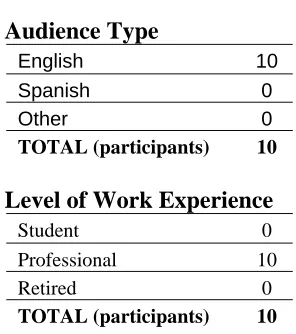
The ten participants who participated in the study had the following profile characteristics:
Audience Type
English 10 Spanish 0 Other 0
TOTAL (participants) 10
Level of Work Experience
Student 0 Professional 10 Retired 0
TOTAL (participants) 10
Daily Emails Received
none 0 1 to 35 1
36 or more 9
[image:26.612.126.274.533.700.2]Once the participants were identified they were randomly assigned to one of two
experimental groups. One of the groups was classified as the Treatment Group 1 Pre – Assigned
Named Folders (PA). This was the group that was given a folder structure to test. The other was
Group 2 they were the Self Named Folders (SN) group. This group was not provided any folder
structure so they needed to create their structure from scratch.
The empirical evaluation of the email folders structure was conducted in Rochester, New
York between the dates of September 20 to 24 of 2010. The participants were asked to spend
approximately one hour taking part in this study. An introductory script (see Appendix 11) was
read to all participants and then each was asked to complete an Informed Consent Form.
Group 1 Pre – Assigned Named Folders (PA)
Five participants were read a description of the hypothesized folder structure (see
Appendix 12). The description gave them a basic understanding of how the folder system would
work. An environment was set up in Microsoft Out-Look with seventy five predefined emails.
The email subject lines were compiled and tweaked to be made more generic from the screen
caps provided from the ethnographic interviews (Appendix 13). The subject lines that were used
we designed the represent similar email that someone might receive in an IT organization. They
then started their task of sorting the emails into the provided structure. The time-on-task was
tracked for each participant. The time on task started when the description of the assigned name
folder structure explanation began.
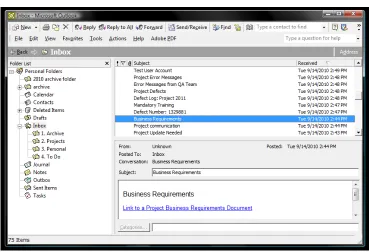
Participants were asked to perform the required task using Microsoft Outlook on a
Windows Vista operating system seen in Figure 2. The screen resolution was set to 1440 x 900
pixels on a Core 2 Duo laptop computer. The user activities and mouse movements were
Figure 2. Group 1 test environment
After the completion of the task the users were asked to complete a 20 question survey
(see Appendix 14). The survey was to acquire qualitative data on their preferences of the task
they had just completed. The last 11 questions were used to test recall of placement of files
within the folder structure.
2
Group 2 Self Named Folders (SN)
The five participants in Group 2 were given the same environment in which to sort the
emails. The emails that were used were the same emails that Group 1 had used. But this time the
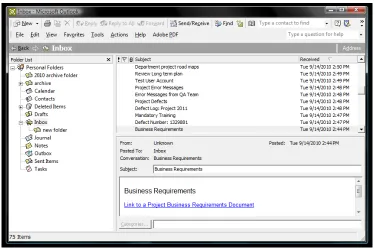
participants needed to sort and organize the emails into their own created folder structure as seen
in Figure 3. It was observed that all the users in this group would read through their emails and
as they read a email they would create a folder for a email. None of the users just created a folder
structure and then sorted emails into them. The time-on-task was tracked for each participant.
[image:29.612.119.494.294.544.2]The time was tracked as soon as the users started to interacted with the email application.
Figure 3. Group 2 test environment
After the completion of the task the users were asked to complete the same 20 question
survey as group 1.
DATA COLLECTION AND ANALYSIS
USER PERFORMANCE
Objective 1. A 2-tail hypothesis test to determine if Group 1 can on average, sort a series of
emails into the studies predefined folder structure within the estimated mean time.
Objective 2. A 2-tail hypothesis test to determine if Group 2 can on average, sort a series of
emails into the participant created folders within the estimated mean time.
Objective 3. A Two-Sample T-test and CI for the difference of two independent means to
determine if on average there is a significant difference between the time intervals by Group 1
and Group 2.
Objective 4. A 2-tail F-test of the ratio of two variances of independent groups to determine if
that the time it takes Group 1 to place the emails is significantly different from the time in which
Group 2 places the emails.
Objective 5. A Odds Ratio Test to determine if the probability of successful recall happening in
Group 1 expressed as a proportion of the odds of successful recall happening in Group 2.
Objective 6. A 2-tail F-test of the ratio of two variances of independent groups to determine if
that Group 1 remembers the place the emails successfully is significantly different from Group 2
remembering the placement of the emails successfully.
Objective 7. A Power Curve for 2-Sample T-test for Group 1 and Group 2 to obtain a set of
measurements to see if the sample size needed to be preformed on future experiments.
USER PREFERANCE
Objective 8. A 2-tail Z-Test to determine the proportion of two independent group’s preference
Presentation of data for Group 1 and Group 2
Descriptive Statistics Group 1: Treatment Group 1 (Pre – Assigned Named Folders (PA))
Total (Time in seconds)
Variable Count Mean StDev Group 1 5 416.8 74.4
Total (Time in minutes)
[image:31.612.106.497.177.641.2]Variable Count Mean StDev Group 1 Min 5 0.2894 0.0516
Figure 4. Time-on-Task Data for Group 1
[image:31.612.129.488.410.649.2]Descriptive Statistics Group 2: Treatment Group 2 (Self - Named folders)
Total (Time in seconds)
Variable Count Mean StDev Group 2 5 617.2 88.8
Total (Time in minutes)
[image:32.612.88.501.115.613.2]Variable Count Mean StDev Group 2 Min 5 0.4286 0.0516
[image:32.612.128.489.375.615.2]Figure 6. Time-on-Task Data for Group 2
Descriptive Statistics for Group 1 and Group 2
Figure 8. A comparison between Group 1 and Group 2 Time-on-Task
[image:33.612.144.469.402.616.2]Below is the question used to identify if the users were able to recall the placement of specific emails with in a folder structure. If they said they could not remember they were response was calculated as a wrong answer.
_____________________________________________________________________________
For the following questions please write the name of the folder you placed the email in. If you deleted the email, write “deleted”.
10. In which folder did you place “Project Requirements”? 11. In which folder did you place “Site Maps and Wire Frames”?
12. In which folder did you place “Project plan – For upcoming Project”? 13. In which folder did you place “Meeting Notes: Project 1”?
14. In which folder did you place “Your Travel Plans – Confirmation Number”? 15. In which folder did you place “Lunch Is Here”?
16. In which folder did you place “Expense Report”?
17. In which folder did you place “Webinar – Development Strategy Client Sign Off”? 18. In which folder did you place “Defect Number: 1329881”?
19. In which folder did you place “FYI – Verified System Updates Sign Off”? 20. In which folder did you place “To Do” – Your response is required”?
_____________________________________________________________________________
This table show the results of the following questions asked.
[image:34.612.125.473.397.563.2]Key: 1 was a correct respon e, 0 was a wrong response
Objective 1. A 2-tail hypothesis test to determine if Group 1 can on average, sort a series of
emails into the studies predefined folder structure within the estimated mean time. (Estimated mean time 6:25 minutes, 75 emails sorted for 5 seconds an email equals 375 seconds.)
1. One-Sample T: Group 1
Time-On-Task for Group 1
Test of mu = 375 vs not = 375
Variable N Mean StDev SE Mean 95% CI T P Group 1 5 416.8 74.4 33.3 (324.5, 509.1) 1.26 0.277
t (4,0.05) = 2.132 - cannot reject Ho
Results: The average time interval for Group 1 was a mean score = 416.8 seconds, (n = 5, s.d. =
74.4, 95% CI = 324.5, 509.1). Then testing the hypothesis of Ho: u = 375.0 seconds, Ha: u ≠
Objective 2. A 2-tail hypothesis test to determine if Group 2 can on average, sort a series of
emails into the participant created folders within the estimated mean time. (Estimated mean time 6:25 minutes, 75 emails sorted for 5 seconds an email equals 375 seconds.)
2. One-Sample T: Group 2
Tim- On-Task for Group 2
Test of mu = 375 vs not = 375
Variable N Mean StDev SE Mean 95% CI T P Group 2 5 617.2 88.8 39.7 (506.9, 727.5) 6.10 0.004
t (4,0.05) = 2.132 - reject Ho
Results: The average time interval for Group 2 was a mean score = 617.2 seconds, (n = 5, s.d. =
88.8, 95% CI = 506.9, 727.5). Then testing the hypothesis of Ho: u = 375.0 seconds, Ha: u ≠
Objective 3. A Two-Sample T-test and CI for the difference of two independent means to determine if on average there is a significant difference between the time intervals by Group 1 and Group 2.
3. Two-Tail T-Test and CI:
Time On Task for Group 1 Time On Task for Group 2
Sample N Mean StDev SE Mean Group 1 5 416.8 74.4 33.3 Group 2 5 617.2 88.8 39.7
Difference = mu (1) - mu (2) Estimate for difference: -200.4
95% CI for difference: (-363.8, -37.0)
T-Test of difference = 0 (vs not =): T-Value = -3.40 P-Value = 0.027 DF = 4
Ho: u1 - u2 = 0 Ha: u1 – u2 ≠ 0
t(4,0.05) = 2.13
t-star is in the critical region, Reject Ho
Results: The average mean time for Group 1 is 416.8 seconds (n = 5, StdDev. = 74.4) and the
Objective 4. A 2-tail F-test of the ratio of two variances of independent groups to determine if
that the time it takes Group 1 to place the emails is significantly different from the time in which Group 2 places the emails.
4. Two tail F-Test for Equal Variances:
Time-On-Task for Group 1
Time-On-Task for Group 2
95% Bonferroni confidence intervals for standard deviations
2
H0: σ2 = 1 HA: σ22 ≠ 1
σ12 σ12
Sample N Lower StDev Upper Group 1 5 41.6354 74.3687 257.282 Group 2 5 49.7299 88.8268 307.301
F-Test (Normal Distribution)
Test statistic = 0.70, p-value = 0.739 F(4,4,0.05) = 6.39
alpha = 0.05, p-value = 0.739, (p-value is not lower then alpha, cannot reject)
Results: The standard deviation for Group 1 was StDev. = 74.3687, (n = 5, Lower = 41.6354,
Objective 5. A Odds Ratio Test to determine if the probability of successful recall happening in
Group 1 expressed as a proportion of the odds of successful recall happening in Group 2.
5. Odds Ratio Test: Group 1 and Group 2
Figure 10: Original Data (Test for recall of email placement)
C1 C2 Total 1 44 11 55 35.00 20.00
2.314 4.050
2 26 29 55 35.00 20.00
2.314 4.050
Total 70 40 110
OR = ad bc
[95% Conf. Interval]
DF Odds ratio Std. Error Z P-Value Low High
1 4.4615 0.431949 3.46 0.000 1.9134 10.4031
Log-Likelihood = -65.563
Test that all slopes are zero: G = 13.079, DF = 1, P-Value = 0.000
Objective 6. A 2-tail F-test of the ratio of two variances of independent groups to determine if that Group 1 remembers the place the emails successfully is significantly different from Group 2 remembering the placement of the emails successfully.
6. Two tail F-Test for Equal Variances:
95% Bonf erro ni conf iden ce inte rval s for standard deviations
H0: σ22 = 1 H :
A σ22 ≠ 1
σ12 σ12
Sample N Lower StDev Upper Group 1 11 0.78779 1.18322 2.27406
Group 2 11 1.07733 1.61808 3.10984
F-Test (Normal Distribution)
Test statistic = 0.53, p-value = 0.338
.05, p-value = 0.338, (p-value is not lower then alpha, cannot ject)
riables xistbetween the two groups ability to remember the placement of emails successfully.
F (10,10, 0.05) = 2.98 alpha = 0
re
Results: The standard deviation for Group 1 was StDev. = 1.18322 (n = 11, Lower = 0.78779,
Objective 7. A Power Curve for 2-Sample t Test was done for Group 1 and Group 2 to obtain a set of measurements to see if the sample size needed to be preformed on future experiments.
7a. Power Curve for 2-Sample t Test
Testing mean 1 = mean 2 (versus not =) Calculating power for mean 1 = mean 2 + difference
Alpha = 0.05 Assumed standard deviation = 5
Sample Target
Difference Size Power Actual Power 5 27 0.95 0.950077
The sample size is for each group.
USER PREFERENCE
Below is the question used to identify if the users of the study had a positive view point of the folder structure.
5. Using the following rating sheet, please circle the number nearest the term that most closely matches your feeling about the folder structure you used.
5a. Simple Complex 7 – 6 - 5 - 4 – 3 - 2 - 1 5b. I like I dislike 7 – 6 - 5 - 4 – 3 - 2 - 1
[image:42.612.110.492.182.342.2]5c. Easy to use Hard to Use 7 – 6 - 5 - 4 – 3 - 2 - 1
Figure 11: Results from Survey Question 5
[image:42.612.96.531.387.694.2]
Objective 8. A 2-tail Z-Test to determine the proportion of two independent group’s preference
of a folder structures.
8. Test and CI for Two Proportions
Sample X N Sample p 1 11 30 0.366667 2 5 30 0.166667
Difference = p (1) - p (2) Estimate for difference: 0.2
95% CI for difference: (-0.0179914, 0.417991)
Test for difference = 0 (vs not = 0): Z = 1.75 P-Value = 0.080
Fisher's exact test: P-Value = 0.143
Ho: P1 - P2 = 0
Ha: P1 – P2 ≠ 0
z(.05) = 1.96
-star is not in the critical region, Cannot reject Ho z
show that Group 1 has a different proportion than Group 2 at the Results: The proportions for Group 1 was 11 (n = 30), and the proportion for group 2 was 5 (n = 30). Then testing the two independent samples for a difference in proportion using a 2-tail Z-test the evidence is sufficient to
DISCUSSION
The following section reviews this study comparing it to previous research by comparing
similarities and differences in the results and conclusions. The research conducts an empirical
study on proposed email taxonomy. While some studies have looked at the way people use
email, manage their email, classify, store and retrieve email fewer studies have looked at the
aspect of Personal Information Management (PIM) in the way a person keeps, saves, and
organizes information items within an email application’s folder structure.
This research study consisted of two parts: The first part of the examination looked at the
time-on-task of the sorting process.
RQ 1: Does having a predefined folder structure speed up the process of sorting emails that need to be saved or deleted?
Ho: The organization of the emails into a predefined structure will have a positive effect on amount of time the sample population’s organization of emails.
This will be tested against the alternative:
HA: The organization of the emails into a predefined structure will have a no change or a negative effect on the amount of time the sample population’s organization of emails.
The results showed that having a predefined folder structure did have a significant,
positive impact on time-on-task. The findings seem to indicate that having the folder
structure in place, for a specific user group had a significant difference in the time it took
to complete the task. All the participating users had no problem, objections or request to
use additional folders to sort the emails into the provided folders. Similar to the results by
Baker et al., (2005) the preference was for simple, easy to use functionality, decreasing the
level of feature overload. The simpler a task is the less time is needed to complete it. Also,
if a defined sample population that shared a similar work role shared their organizational
strategies, information management can assist in overcoming the email overload problems
they face today (Tangare & Pérez-Quiñones, 2009). The findings from the study also
observed that having a common methodology of classifying and summarizing information
activities. The prior study by Ayodele, T., Khusainov, R., & Ndzi, D. (2007) was similar in
which a system was built that automatically compared, classified and summarized
information automatically. The comparison only worked well for similar emails that were
sent in a high volume.
The second part examined accuracy in recall of the placement.
RQ 2: Does having a predefined folder structure improve the accuracy in recalling the placement of the emails within the identified folder taxonomy?
Ho: The ability to recall the placement of the emails in the predefined structure will have a positive effect on amount of time the sample population’s takes.
This will be tested against the alternative:
HA: The ability to recall the placement of the emails in the predefined structure will
have a no change or a negative effect on the amount of time the sample population’s takes.
The results also showed that having a predefined folder structure did have a significant
impact on accuracy in recalling placement of email for Group 1 Pre – Assigned Named Folders
(PA). The study observed that a longer amount of time-on-task was needed and a high error rate
occurred Group 2 Self Named Folders (SN). This is similar to the results studied by Boardman's
(2001) that showed the current way in which people organize and maintain their email is
expensive in terms of cognitive effort and time. The findings identified that one of the most
common errors observed by Group 2 Self Named Folders was the ability to recall the placement
of an email. Boardman's (2001) research study shows that people can suffer from cognitive
overload if they try to maintain, sort and locate information in multiple hierarchies within a
computer system. Users struggle to deal with the increased amount of received email in their
in-box. This study looked at a way to provide a small target population a way to simply sort and
organize their email. As one participant explained that had a high number of folders said, “I
Researchers have identified several different classifications of people and the way they
approach email. The names of these groups are named in slightly different ways; filers and
pilers, prioritizers and archivers, no-filers and filers, cleaners and keepers (as cited in Tungare,
M., & Pérez-Quiñones, M. A. 2009). This study focused on the filers or keeper also since
information in email need to be retrieved on a constant basis it is important that a user be able to
find the required information in a timely manner. This study provided only four different
locations in which to look for emails. As another participant explained the down side of a large
folder structure “I had 257 folders: It started to get too confusing trying to decide which folder to
place it in. Would it go in this one or that one, and then I still could never find it.”
Also observed was one participant that identified them self as someone that save all or
almost all emails and had over one hundred folders. Even though they spent a lot of time
organizing their folders they had still had a project folder with over a thousand emails in it the
one folder. This user still had to rely on the applications ability to sort and search for emails. The
multiple folders made the participant repeat the same search method over and over with in
multiple folders instead of just one.
It was expected that having a predefined folder structure would have a positive effect on
time-on-task and the ability to recall placement of email within a predefined taxonomy. This
study focused on a small sample user population in which the taxonomy was designed. For future
studies it would be important to examine different user group’s population to a tested taxonomy
and tweaked as necessary to fit their working model.
The present study had a limitation in the sample size. A Power Curve for 1-Sample T-test
was done for Group 1 Pre – Assigned Named Folders and Group 2 Self Named Folders to obtain
a set of measurements to see if the sample size needed to be preformed on future experiments. To
have the ability to test with a 95% confident interval a sample population of 27 participants (see
7a. Power Curve for 2-Sample t Test) for each group for a total of 54 participants would be
CONCLUSION
Email is a key communication tool used in today’s society. The way in which we manage
it is an important subject that needs continuous research. The objective of this study was to
identify and test hypothesized email folder taxonomy. The folder structure that was tested was
created from the following folders: Archive, Projects, Personal and To Do.
This study also proposed looking at trying to answer some of the following questions.
Did having a predefined folder structure speed up the process of sorting emails, which decreased
the time need to complete the task? The users in Group 1 (Pre – assigned Named Folder) had a
statically significant better performance then the users in Group 2 (Self Named Folders) when
Time-On-Task was compared. What where some of the obstacles that prevented a user from
completing the task of sorting or organizing a series of emails? Both groups where able to
complete the task so there were no identified obstacles.
During the ethnographic field study the biggest problem that was observed was time. If
someone did take the time to organize and sort their emails in to multiple folders using a self
created hieratical folder structure it toke an incredible amount of time to manage it. Also if
someone did sort and organize emails into multiple folders they usually ended up not being able
to keep up with the constant flow of incoming emails so they would abandoned sorting and
organizing. They would try and do it similar to a spring cleaner, rereading larger amount of
emails at one time and try and organize and delete emails in one overall long session taking
several hour if not days to complete.
What type of criteria does a user use to process or archive their email? Most user saved
emails that contained important information that they felt they would need later. Also another
common theme was people in this study would save emails if it contained a important decisions
that is something went wrong they could refer back to the communication that outlined the
decisions. Did having a predefined folder structure help to improve the accuracy in recalling the
placement of emails within the identified between the predefined or not defined folder
taxonomy? The data showed that the users in Group 1 (PA) had a 4.46 times greater percentage
willing to use the predefined folder structure? When asked on the post test survey if they would
use this structure during a normal work day? The results showed that the users in Group 1 (Pre –
Assigned Named Folders (PA) 3 out of the 5 participants said they either agreed or strongly
agreed with this question.
What types of problems do users have with the predefined folder structure? What seems
to work well? How could the folder structure be improved? Overall the folder structure worked
well, people in Group 1 were able to learn the purpose of each folder and sort the emails from the
task in a very fast time. What types of goals do people have when organizing their email? The
primary goal of all the users was the ability to locate saved emails.
The results of this study suggested a possible solution for future investigation of applying
this taxonomy to different job roles. The findings are clearly targeted toward a small population
and neglect a larger population of working professionals. Any future research should investigate
different populations or work roles. Also, research should complete studies of a longer duration
BIBLIOGRAPHY
Ambra, J. D., Van Toorn, C., & Dang, G. (2007, December). The Negative Aspects of Email and
Productivity: Towards Quantification. 18th Australasian Conference on Information
Systems. Retrieved from http://www.acis2007.usq.edu.au/assets/papers/109.pdf
Ayodele, T., Khusainov, R., & Ndzi, D. (2007, December). Email Classification and
Summarization: A Machine Learning Approach. In IET Conference on Wireless,
Mobile and Sensor Networks. Shanghai, China, (pp. 12-14). doi:10.1049/ cp:20070271
Baker, R. H., Duarte, N. B., Haririnia, A., Klinesmith, D. E., Lee, H., Velikovich, L. A.,
Westhoff, M. J. (2003). A Design Study of the Integration of Email and Role
Management for University Students. Manuscript submitted for publication,
University of Maryland, College Park, MD 20742. Retrieved from
http:// hcil.cs.umd.edu/trs/2003-30/2003-30.pdf
Bälter, O. (2000, April). Keystroke level analysis of email message organization.
Proceedings of the SIGCHI conference on Human factors in computing systems, 105 -
112. doi:10.1145/332040.332413
Bellotti, Moody, & Whittaker. (2005). Introduction to this special issue on revisiting and
reinventing e-mail. In Human-Computer Interaction (Vol. 20, pp. 1-9). doi:10.1207/
s15327051hci2001&2_1
Bergman, O., Beyth-Marom, R., & Nachmias, R. (2008, January). The
User-Subjective Approach to Personal Information Management Systems Design:
Evidence and Implementations. Journal of the American Society for Information Science,
54(9), 872-878. doi:10.1002/asi.v59:2
Boardman, R. (2001). Multiple hierarchies in user workspace. In Proceedings of the 2001
Boardman, R., & Sasse, A. M. (2004). “Stuff goes into the computer and doesn’t come out”: a
cross-tool study of personal information management. Proceedings of the SIGCHI
conference on Human factors in computing systems, 583 - 590. doi:10.1145/
985692.985766
Boardman¹, R., Sasse, A. M., & Spence, B. (2002). Life Beyond the Mailbox: A Cross-Tool
Perspective on Personal Information Management. Paper presented at In CSCW 2002
Workshop: Redesigning Email for the 21st Century. Retrieved from
http://hornbeam.cs.ucl.ac.uk/hcs/people/documents/Angela%20Publications/2002/
cscw2002.pdf
Burns, A. (2005). Project Plan: Designing a User Interface for the Innovative E-mail Client
Framework (Master’s thesis). Retrieved from http:// se.ethz.ch/projects/alexandra_burns/
projectplan.pdf
Dredze, M., Blitezer, J., & Pereira, F. (2005). Reply expectation prediction for email
management. In the Second Conference on Email and Anti-Spam. Symposium
conducted at CEAS, Stanford, CA. Retrieved from
http://www.cs.jhu.edu/~mdredze/publications/dredze_ceas05.pdf
Ducheneaut, N., & Bellotti, V. (2001). E-mail as habitat: an exploration of embedded
personal information management. In ACM New York, NY, USA (Vol. 8, pp. 30 - 38).
doi:10.1145/382899.383305
Gantz, J. ,Boyd A.,Dowling, S. (2009). Cutting the Clutter: Tackling Information Overload At the Source. Retrieved from http://www.xerox.com/information-overload/enus.html
Gwizdka, J. (2002). Reinventing the Inbox – Supporting the Management of Pending Tasks in
Email. In CHI ‘02 extended abstracts on Human factors in computing systems.
Symposium conducted at Conference on Human Factors in Computing Systems,
Minneapolis, Minnesota, USA. Abstract retrieved from http://doi.acm.org/10.1145/
Gwizdka, J. (2004). Email task management styles: the cleaners and the keepers. Conference on
Human Factors in Computing, CHI ’04 extended abstract on Human factors in computing
systems. Vienna, Austria. Retrieved from http://doi.acm.org/10.1145/985921.986032
Hardof-Jaffe, S., Hershkovitz, A., AbuKishk, H., Bergman, O., & Nachmias, R. (2009,
July). How do Students Organize Personal Information Spaces? Paper presented at
EDM 2009, Cordoba, Spain. Retrieved from http://www.educationaldatamining.org/
EDM2009/uploads/.../hardof.pdf
Henderson, S. (2005). Personal digital document management. In Proceedings of the 6th ACM
SIGCHI New Zealand chapter’s international conference on Computer-human interaction: making CHI natural, Auckland, New Zealand (pp. 75-82). doi:10.1145/
1073943.1073957
Henderson, S. (2009). Personal Document Management Strategies. ACM International
Conference Proceeding Series. Proceedings of the 10th International Conference NZ Chapter of the ACM’s Special Interest Group on Human-Comput