Michael C. Daconta
Kevin T. Smith
Donald Avondolio
W. Clay Richardson
More Java
Pitfalls
Assistant Developmental Editor: Emilie Herman Managing Editor: Micheline Frederick
New Media Editor: Angela Denny
Text Design & Composition: Wiley Composition Services This book is printed on acid-free paper. ∞
Copyright 2003 by Michael C. Daconta, Kevin T. Smith, Donald Avondolio, and W. Clay Richardson. All rights reserved.
Published by Wiley Publishing, Inc., Indianapolis, Indiana Published simultaneously in Canada
No part of this publication may be reproduced, stored in a retrieval system, or transmitted in any form or by any means, electronic, mechanical, photocopying, recording, scanning, or otherwise, except as permitted under Section 107 or 108 of the 1976 United States Copyright Act, without either the prior written permission of the Publisher, or authorization through payment of the appropriate per-copy fee to the Copyright Clearance Center, Inc., 222 Rose-wood Drive, Danvers, MA 01923, (978) 750-8400, fax (978) 646-8700. Requests to the Pub-lisher for permission should be addressed to the Legal Department, Wiley Publishing, Inc., 10475 Crosspoint Blvd., Indianapolis, IN 46256, (317) 572-3447, fax (317) 572-4447, E-mail: [email protected].
Limit of Liability/Disclaimer of Warranty: While the publisher and author have used their best efforts in preparing this book, they make no representations or warranties with respect to the accuracy or completeness of the contents of this book and specifically disclaim any implied warranties of merchantability or fitness for a particular purpose. No warranty may be created or extended by sales representatives or written sales materials. The advice and strategies contained herein may not be suitable for your situation. You should consult with a professional where appropriate. Neither the publisher nor author shall be liable for any loss of profit or any other commercial damages, including but not limited to special, inci-dental, consequential, or other damages.
Wiley, the Wiley Publishing logo and related trade dress are trademarks or registered trade-marks of Wiley Publishing, Inc., in the United States and other countries, and may not be used without written permission. Java is a trademark or registered trademark of Sun Microsystems, Inc.. All other trademarks are the property of their respective owners. Wiley Publishing, Inc., is not associated with any product or vendor mentioned in this book. For general information on our other products and services please contact our Customer Care Department within the United States at (800) 762-2974, outside the United States at (317) 572-3993 or fax (317) 572-4002.
Wiley also publishes its books in a variety of electronic formats. Some content that appears in print may not be available in electronic books.
Library of Congress Cataloging-in-Publication Data:
ISBN: 0-471-23751-5
“I mean, if 10 years from now, when you are doing something quick and
dirty, you suddenly visualize that I am looking over your shoulders and
say to yourself, ‘Dijkstra would not have liked this’, well that would be
enough immortality for me.”
We humbly disagree: 10 years of Dijkstra is just not long enough; may
he happily haunt our consciousness for 10
10years. Such an increase is
Introduction xi
Acknowledgments xvii
Part One
The Client Tier
1
Item 1: When Runtime.exec() Won’t 4 Item 2: NIO Performance and Pitfalls 17
Canonical File Copy 20
Little-Endian Byte Operations 21
Non-Blocking Server IO 26
Item 3: I Prefer Not to Use Properties 34 Item 4: When Information Hiding Hides Too Much 39 Item 5: Avoiding Granularity Pitfalls In java.util.logging 44 Item 6: When Implementations of Standard APIs Collide 53 Item 7: My Assertions are Not Gratuitous! 59
How to Use Assertions 59
Item 8: The Wrong Way to Search a DOM 66 Item 9: The Saving-a-DOM Dilemma 73 Item 10: Mouse Button Portability 80 Item 11: Apache Ant and Lifecycle Management 88 Item 12: JUnit: Unit Testing Made Simple 100
Contents
Item 13: The Failure to Execute 108
Deploying Java Applications 109
The Java Extension Mechanism 110
Sealed Packages 111
Security 112
Item 14: What Do You Collect? 112 Item 15: Avoiding Singleton Pitfalls 117
When Multiple Singletons in Your VM Happen 119
When Singletons are Used as Global Variables, or Become Non-Singletons 120
Item 16: When setSize() Won’t Work 122 Item 17: When Posting to a URL Won’t 126
Connecting via HTTP with the java.net Classes 126
An Alternative Open Source HTTP Client 137
Item 18: Effective String Tokenizing 140 Item 19: JLayered Pane Pitfalls 146 Item 20: When File.renameTo() Won’t 151 Item 21: Use Iteration over Enumeration 157 Item 22: J2ME Performance and Pitfalls 162
Part Two
The Web Tier
199
Item 23: Cache, It’s Money 200
Item 24: JSP Design Errors 208
Request/Response Paradigm 208
Maintaining State 209
JSP the Old Way 210
JSP Development with Beans (Model 1 Architecture) 214
JSP Development in the Model 2 Architecture 220
Item 31: Instance Variables in Servlets 269 Item 32: Design Flaws with Creating Database Connections
within Servlets 279
Item 33: Attempting to Use Both Output Mechanisms in Servlets 291 Item 34: The Mysterious File Protocol 297 Item 35: Reading Files from Servlets 302
Web Application Deployment Descriptors 308
Item 36: Too Many Submits 312
Preventing Multiple Submits 314
Handling Multiple Submits 316
Part Three The Enterprise Tier
327
Item 37: J2EE Architecture Considerations 329 Item 38: Design Strategies for Eliminating Network
Bottleneck Pitfalls 335
A Scenario 336
General Design Considerations 336
EJB Design Considerations 340
Item 39: I’ll Take the Local 341
Item 40: Image Obsession 348
Item 41: The Problem with Multiple Concurrent Result Sets 353 Item 42: Generating Primary Keys for EJB 359
A Simple Scenario 359
A “Client Control” Approach 360
The Singleton Approach 362
The Networked Singleton Approach 363
An Application Server-Specific Approach 363
Database Autogeneration Approaches 363
Other Approaches 364
Item 43: The Stateful Stateless Session Bean 365
Message-Driven Beans 366
Entity Bean 366
Stateful Session Bean 368
Stateless Session Bean 368
Item 45: Take a Dip in the Resource Pool 378 Item 46: JDO and Data Persistence 385 Item 47: Where’s the WSDL? Pitfalls of Using JAXR with UDDI 398
Where’s the WSDL? 404
Item 48: Performance Pitfalls in JAX-RPC Application Clients 417
Example Web Service 418
A Simple Client That Uses Precompiled Stub Classes 420
A Client That Uses Dynamic Proxies for Access 421
Two Clients Using the Dynamic Invocation Interface (DII) 423
Performance Results 427
Conclusion 428
Item 49: Get Your Beans Off My Filesystem! 429 Item 50: When Transactions Go Awry, or Consistent State in
Stateful Session EJBs 433
The Memento Pattern 438
Good programming is difficult. It is especially arduous for new programmers given the pace of change and the ever-expanding size of the software engineering body of knowledge (www.swebok.org) that they must master. The authors of this book have found that experience and in-depth understanding are key factors in both programmer productivity and reliable software. The bottom line is that experienced programmers don’t stumble around in the dark. They know the lay of the land, they recognize pat-terns, and they avoid the hazardous areas. This book presents our experience and guidance on 50 discrete topics to assist you in avoiding some of those hazards.
What Is a Pitfall?
The formal definition, given in the first Java Pitfalls(Wiley, 2000) book, is as follows:
“A pitfall is code that compiles fine but when executed produces unintended and some-times disastrous results.”
This rather terse definition covers what we consider the “basic” pitfall. There are many variations on this theme. A broader definition could be any language feature, API, or system that causes a programmer to waste inordinate amounts of time struggling with the development tools instead of making progress on the resulting software.
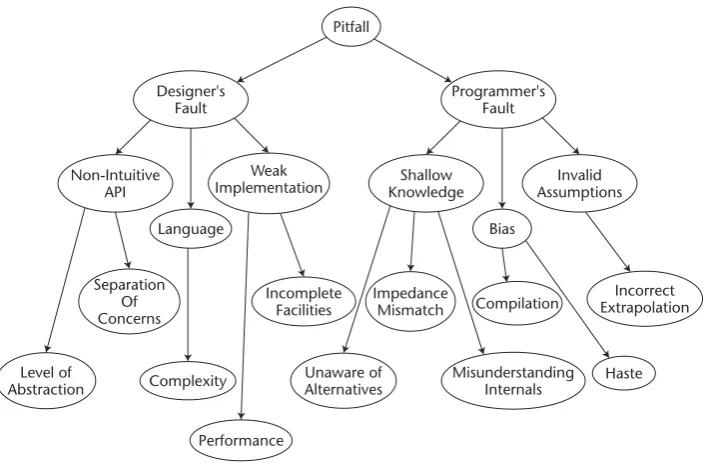
The causes of pitfalls can be loosely divided into two groups: the fault of the platform designer or the fault of the inexperienced programmer. This is not to cast blame, but rather to determine the source of the pitfall in the construction of a pitfall taxonomy. For the same reason we create a formal definition of pitfalls, we present the pitfall taxonomy in Figure i.1 in order to attempt to better understand the things that trip us up.
Introduction
“Sometimes we discover unpleasant truths. Whenever we do so, we are in difficul-ties: suppressing them is scientifically dishonest, so we must tell them, but telling them, however, will fire back on us.”
Edsger W. Dijkstra, “How do we tell truths that might hurt?”
Figure i.1 A pitfall taxonomy.
The categories of pitfalls associated with the system designer are as follows:
Nonintuitive Application Programming Interfaces (APIs).The Java platform has thousands of classes and tens of thousands of methods. The sheer size of the platform has become a complexity pitfall. Some of these classes are well designed, like servlets, IO streams (excluding performance ramifications), and collections. Unfortunately, many APIs are nonintuitive for the following reasons:
■■ Wrong level of abstraction.Many APIs are layered over other software (like the operating system or native code) in order to simplify or aggregate func-tions. In layering, you must make a trade-off between simplicity and granu-larity of control. Thus, when setting the abstraction level, you must balance these appropriately for the particular context and target audience. Too high a level of abstraction (like URLConnection, Item 17) frustrates users with weak control mappings, while a too low level of abstraction reduces the average user’s efficiency by over-cluttering the most common case. ■■ Weak separation of concerns.When an API tries to do too much, it often
mixes metaphors and addresses its multiple concerns in a mediocre fashion. An example of this is the JAXR API that attempts to combine the diverse information models of UDDI and ebXML (Item 47).
■■ Other deficiencies.Too many method invocation sequences and dependen-cies will lead to incorrect ordering. Poor naming and weak parameters (object instead of a specific type) steer programmers toward dead ends.
Pitfall
Designer's Fault
Programmer's Fault
Non-Intuitive API
Weak
Implementation KnowledgeShallow AssumptionsInvalid
Bias Language
Level of Abstraction
Separation Of Concerns
Complexity
Performance Incomplete
Facilities
Unaware of Alternatives
Impedance Mismatch
Misunderstanding Internals
Compilation ExtrapolationIncorrect
Language Complexity.The Java language has many improvements over its predeces-sors yet also struggles with its own set of tradeoffs and idiosyncrasies. The cleanest language features are its strict object orientation, automatic memory management, and interfaces; while some overly complex areas are threading and synchronization, the tension between primitives and objects, and the effective use of exceptions.
Weak Implementation of Platform Areas.The most oft-cited example is poor per-formance. An example of this is the rewrite of the input/output facilities in the NIO package for performance reasons. Besides performance, there are thin APIs that ruin the Write Once, Run Anywhere (WORA) guarantee like the
File.renameTo() (Item 20) method and the Runtime.exec() method (Item 1). There are also incomplete APIs where the programmer assumes complete func-tionality exists. These problems are fixable and often are resolved with each new release of the Java Development Kit (JDK).
The categories of pitfalls associated with the programmer are as follows:
Shallow Knowledge.Experience increases the depth of one’s knowledge. It takes time to learn the underlying concepts, interactions, and nuances of a system. This is often manifest in choosing a weak implementation when a better alterna-tive exists (like applets versus Web Start, Item 26), misunderstanding the inter-nal workings of an API (like the consequence of instance variables in servlets, Item 31), and shock when implementations fail to meet your expectations of behavior (characterized as an impedance mismatch in Figure i-1). Such an impedance mismatch can occur with multiple concurrent result sets (Item 41).
Bias.Without many years of experience, a programmer can weigh previous experi-ence too heavily to the point where it unfavorably biases him or her in a particu-lar direction. Examples of this are to not take advantage of tools to automate the development process like Ant (Item 11) and JUnit (Item 12). Another example is to stick with legacy APIs over new ones for collections (Item 21) and regular expressions (Item 30). Lastly, one more effect of bias is to bring past habits into a new context like J2ME programming (Item 22).
Invalid Assumptions.A programmer can incorrectly base decisions on invalid assumptions—for example, assuming the most direct path to the solution is the best path. This often arises in designing larger systems with JSP (Item 24) and J2EE (Item 37).
Pitfalls can be extremely frustrating to programmers. We’ve experienced first hand this frustration. Our goal is to help you to avoid some situations we struggled through. So now that we understand pitfalls, let’s see our method for exploring them.
Dissecting a Pitfall
There are three distinct parts of a pitfall:
The Root cause of the Problem.By far, this is the most important part of revealing the pitfall. Here, we go under the hood and explain the detailed internal work-ings, invalid assumptions, or API deficiencies that cause programmers to stum-ble into the trap. Usually this explanation is supported with a diagram.
The Solution or Workaround.The final part of the pitfall is to demonstrate a fix for the problem. This is done with a program entitled “GoodXXX.java” that is the reciprocal of the “BadXXX.java” program. The solution program will often be accompanied with a run of the results, or a table or graph, which proves the problem was indeed solved.
This method of dissecting a pitfall has proven an effective way to present these pro-gramming hazards.
How This Book Differs from
Java Pitfalls
This book borrows all the good features from the first book and improves upon it in three ways:
Broader Coverage.The first book focused on the lang, util, io, and GUI packages, whereas this book covers the J2ME, J2SE, and J2EE platforms.
New Features.This book covers the majority of new features like regular expres-sions, NIO, assertions, JAXR, JAXM, JAX-RPC, and many more.
Better Coverage.The authors followed the “pitfall dissection” model more consis-tently and thoroughly, producing pitfalls with more detail and analysis.
In general, the authors strove to outdo the first book in every regard. We sincerely hope that we succeeded and encourage your feedback.
Organization of the Book
Like the first one, this book has 50 items. Unlike the first book, in this one they are divided into three parts corresponding to the three-tiered architecture:
Part One: The Client Tier.This part covers both J2ME and J2SE and explores pit-falls in developing both networked and standalone clients. Topics covered include preferences, application deployment, logging, IO performance, and many more. This part has 22 pitfalls.
Part Two: The Web Tier.This part examines pitfalls in components that run inside the Web container, like servlets and JavaServer Pages (JSPs). These applications generate dynamic Web pages or communicate with applets, JNLP, or standalone clients. This parts covers topics like JSP design, caching, servlet filters, database connections, form validation, and many others. This part includes 14 pitfalls.
Web services play a key role in the enterprise tier, pitfalls related to some of the Web services APIs (JAXR and JAX-RPC) are in this section. Some other topics in this part are J2EE design errors, session beans, Java Data Objects (JDO), security, transactions, and many more. This part includes 14 pitfalls.
How to Use the Book
This book can be used in three primary ways: as a reference manual on specific prob-lems, as a tutorial on the topics exposed by the probprob-lems, or as a catalyst to your orga-nization’s technical mentoring program. Let’s discuss each in detail:
As a Reference Manual.You can use the table of contents to examine a specific solution to a problem you are facing. The majority of readers use this book in this manner. Some readers reported using the first book as a corporate resource in the technical library.
As a Tutorial.You can read the book cover–to-cover to learn about the underlying cause of each pitfall. Another way to approach the book this way is to browse the contents or pages and then read the pitfalls that interest you. Lastly, another use is to treat each pitfall as a bite-sized tutorial to present at a “brown-bag lunch” internal training session or technical exchange meeting.
As Part of a Mentoring Program.You can use the book as a starting point for a technical mentoring program in your organization. This book is founded on the principle of peer mentoring. The dictionary definition of a mentor is a “wise and trusted counselor.” This often miscasts a mentor as having great age or experi-ence. I disagree with this definition because it leads to an extreme scarcity of good mentors. At its essence, mentoring is one aspect in the search for truth. Thus, the key quality for being a mentor is a deep understanding of at least one domain that you are willing to share with others. Anyone can participate in this process, and I encourage you to be involved in peer mentoring. Working together, I believe we can solve the software quality crisis.
What’s on the Companion Web Site?
The companion Web site will contain four key elements:
Source Code. The source code for all listings in the book will be available in a compressed archive.
Errata. Any errors discovered by readers or the authors will be listed with the corresponding corrected text.
Examples. Sample chapters, the table of contents and index will be posted for people who have not yet purchased the book to get a feel for its style and content.
Comments Welcome
This book is written by programmers for programmers. All comments, suggestions, and questions from the entire computing community are greatly appreciated. It is feedback from our readers that both makes the writing worthwhile and improves the quality of our work. I’d like to thank all the readers who have taken time to contact us to report errors, provide constructive criticism, or express appreciation.
I can be reached via email at [email protected] or via regular mail:
Michael C. Daconta c/o Robert Elliott Wiley Publishing, Inc. 111 River Street Hoboken, NJ 07030
Best wishes,
Michael Daconta
Sierra Vista, Arizona
This book has been a difficult journey. It survived through three co-author changes, several delays, and a move to a new state. Along the way, the vision of the book never faded, and in some way it willed itself into existence. All the authors believe that uncovering pitfalls helps programmers produce better programs with less frustration. I would like to thank those people who helped me through this challenge: my family— Lynne, CJ, Greg, and Samantha; my editors at Wiley Publishing, Inc.—Bob Elliott and Emilie Herman; my co-authors—Kevin, Clay, and Donnie; Al Saganich for contribut-ing two pitfalls; my supervisors, customer and coworkers on the Virtual Knowledge Base project—Ted Wiatrak, Danny Proko, Joe Broussard, Joe Rajkumar, Joe Vitale, Maurita Soltis, and Becky Smith; my editor at Javaworld—Jennifer Orr; my friends at Oberon—Jodi Johnson and Dave Young; and finally, I would like to thank our readers who share our goal of producing great programs. Thanks and best wishes!
Michael C. Daconta
First of all, I would like to thank my co-authors—Mike, Clay, and Don. Your hard work on this project, and our many brainstorming sessions together at Cracker Barrel, helped create a good book full of our Java experiences and lessons learned. Second, I would like to thank my other new friends at McDonald Bradley and our entire VKB team. What a team of incredible folks.
I would like to give special thanks to a few people who suggested pitfalls and ideas for this book—John Sublett from Tridium, Inc. in Richmond, Virginia, Kevin Moran from McDonald Bradley, and Jeff Walawender from Titan Systems. Lois G. Schermer-horn and Helen G. Smith once again served as readability editors for some of my mate-rial. Special thanks to Stan and Nicole Schermerhorn for allowing me to use their company’s name, Lavender Fields Farm, in a fictional scenario in this book. Also, thanks to Al Alexander, who granted me permission to use DevDaily’s DDConnec-tionBroker to demonstrate a solution to a common programming pitfall.
Acknowledgments
My experience on Java projects with many software engineers and architects over the years helped me in writing this book: Ralph Cook, Martin Batts, Jim Johns, John Vrankovich, Dave Musser, Ron Madagan, Phil Collins, Jeff Thomason, Ken Pratt, Adam Dean, Stuart Gaudet, Terry Bailey, JoAnn White, Joe Pecore, Dave Bishop, Kevin Walmsley, Ed Kennedy, George Burgin, Vaughn Bullard, Daniel Buckley, Stella Aquilina, Bill Flynn, Charlie Lambert, and Dave Cecil III. I would also like to thank Bill Lumbergh, and the TPS Report support team at Initech—Peter, Samir, and Michael.
I would like to express thanks to my dad, who jump-started my career in computer science by buying me a Commodore Vic-20 in 1981. Making the most of the 5 KB of memory on that box, I learned not to use memory-consuming spaces in my code—per-haps contributing to “readability” pitfalls when I started writing code in college. Thanks to my former teachers who helped me in my writing over the years—Audrey Guengerich-Baylor and Rebecca Wright-Reynolds.
Over the last year, I have been blessed with many new friends at New Hanover Pres-byterian Church and neighbors in Ashcreek in Mechanicsville, Virginia. Special thanks to the guys in last year’s Wednesday night Bible study—Rich Bralley, Billy Craig, Matt Davis, Dan Hulen, Chuck Patterson, Ben Roberson, Keith Scholten, Todd Tarkington, and Matt Van Wie. I would also like to thank folks who helped me take a break to focus on playing the trumpet this year—Ray Herbek, Jeff Sigmon, Rita Smith, and Kenny Stockman.
Finally, I would like to thank my wonderful wife Gwen. Without her love and sup-port, this book would never have been possible!
Kevin T. Smith
All of my material for this book is drawn largely from an object-oriented class I teach and a lot of great developers I’ve worked with over the years. Specifically, I’d like to thank these people who inspired me with their probity and hard work: Peter Len, Joe Vitale, Scot Shrager, Mark “Mojo” Mitchell, Wendong Wang, Chiming Huang, Feng Peng, Henry Chang, Bin Li, Sanath Shetty, Henry, John and Andy Zhang, Swati Gupta, Chi Vuong, Prabakhar Ramakrishnan, and Yuanlin Shi.
Special thanks goes to my beloved wife Van and her support and assistance during the writing of this book and the three coauthors of this book who are really progressive thinkers and great guys to hang with.
Donald Avondolio
First, I would like to thank my wife Alicia for all of her patience and understanding while I wrote this book. You truly are the greatest and I love you more than you under-stand. To Jennifer, my baby doll, you are the greatest gift a father could ever receive. To Stephanie, I love you and I will never forget you. I would like to thank my parents, Bill and Kay, for being, well, my parents. Nothing I could write here could express the impact you have had on my life.
greatest and it was a privilege to serve as your lead. Mojo, it has been enjoyable to watch you progress from apprentice to master. Vic Fraenckel and Mike Shea, you aren’t on my team, but you are certainly on the team, in spite of being part of the Borg. To Becky Smith, my fellow warrior, we have been through a lot of battles (some with each other), but it has been a pleasure working with you and your team.
To all the guys who have served with me on Gainesville District VFD Duty Crew A (and particularly its leader, Captain Bob Nowlen)—Patrick Vaughn, Marshall Sayen, Gary Sprifke, Mike Nelson, Matt Zalewski, Doug Tognetti, Frank Comer; we have seen some crazy things together, and I have been happy to be the one to drive you there. Chief Richard Bird, I would like to thank you for your leadership of our department and ser-vice to our community, which has been ongoing since before I was born. To the guys at the Dumfries-Triangle VFD, now you know where I went (writing this book): Brian Thomason, Tim Trax, Brian Kortuem, Brian Lichty, Nick Nanna, Scott Morrison, Brian Martin, Jack Hoffman, Craig Johnson, and Randy Baum—I wish I could name all of you. Volunteer firefighters truly are the salt of the earth, and I am happy to be among you.
To those who have served as mentors of mine through the years (in no particular order): Tom Bachmann, Seth Goldrich, Don Avondolio, Danny Proko, Burr Datz, Kevin McPhilamy, Shawn Bohner, John Viega, Pat Wolfe, Alex Blakemore (nonpolitical mat-ters), Sam Redwine, and many others that I will kick myself for forgetting later. To Ted Wiatrak and Major Todd Delong, I would like to thank you guys for believing in us and giving us a shot to help some very important people. In closing, I would like to thank two of my Brother Rats, Matt Tyrrell and Jeff Bradford, for being, well, like brothers to me.
1 There have been a number of high-profile failures with using Java for major client-side applications. Corel developed an office suite in Java but scrapped the project after an early beta release. Netscape embarked on a pure Java version of a Web browser (referred to as “Javagator”), but the project was canceled before any code was released. Although these were the early days of client-side Java, in the 1997 to 1998 time frame, it was enough to cast a pall over client-side Java, and the momentum shifted to server-side Java. Yet, even under that shadow of server-server-side Java, the client tier continued to improve. Richer user interfaces, faster virtual machines, a fine-grained security model, and easier network deployment came to the platform piecemeal with each new release. So, borrowing a play from the Microsoft playbook, client-side Java has continued to address its shortcomings and improve with each release. Today we have high-profile and successful commercial applications in Java like ThinkFree Office, Borland’s JBuilder, TIBCO’s Turbo XML editor, and TogetherSoft’s Together Control Center UML modeling tool. So, it is possible to develop rich client applications in Java. This part will assist you in that endeavor.
This part explores pitfalls in three general areas of client-side development: perfor-mance, nonintuitive application programming interfaces (APIs), and better alterna-tives. Here are some highlights of pitfalls in each area.
Performance has long been the bane of client-side Java. The first book, Java Pitfalls: Time-Saving Solutions and Workarounds to Improve Programs, had numerous pitfalls on performance, and many other books and Web sites have come out on Java performance tuning. This part has two pitfalls on performance:
The Client Tier
“Now, if we regard a programming language primarily as a means of feeding prob-lems into a machine, the quality of a programming language becomes dependent on the degree in which it promotes ‘good use of the machine’.”
Edsger W. Dijkstra, “On the Design of Machine Independent Programming Languages”
NIO Performance and Pitfalls (Item 2). This pitfall examines the IO performance improvements of the New IO package (NIO). The pitfall examines file channels, ByteBuffers, and non-blocking server IO.
J2ME Performance and Pitfalls (Item 22). This pitfall ports a Swing application to the J2ME platform and uncovers both API pitfalls and over 20 optimizations for these small footprint devices.
Nonintuitive APIs cause hours of frustration, and the majority of pitfalls in this part are in this area. We carefully dissect the APIs, examine the internal workings of the software, and offer workarounds to the problem. The workarounds sometimes involve a proper sequence of operations, the use of a different class, or the abandonment of the standard API for an open-source alternative.
When Runtime.exec()Won’t (Item 1). This pitfall is a canonical example of a mismatch between user expectations and the capability of an incomplete API.
Avoiding Granularity Pitfalls in java.util.logging(Item 5). The new
java.util.loggingAPI has some hidden complexities and relationships that affect the level of reporting granularity. You must understand the relation-ship between loggers and handlers to effectively use this API.
The Wrong Way to Search a DOM (Item 8). With JDK 1.4, the Java platform pro-vided native support for XML with the javax.xml package. Unfortunately, the most intuitive representation of a Document Object Model (DOM) is not the cor-rect representation, and this pitfall goes under the hood to see why.
The Saving-a-DOM Dilemma (Item 9). While JAXP introduced standard ways to create and manipulate XML DOM trees, it provides weak capabilities for per-sisting them—forcing developers to use implementation-specific methods. This pitfall discusses those challenges.
The Failure to Execute (Item 13). Java Archives or JAR files are the primary binary distribution for Java components. Unfortunately, there is great confusion about how these files work and how to make them executable. This pitfall explores those problems and provides an explanation of the best practices in using JAR files.
When Posting to a URL Won’t (Item 17). The URLand URLConnectionclasses in the java.netAPI were designed at a very high level of abstraction that can be confusing. This pitfall demonstrates several incorrect ways to use the API, the reasons behind the deficiencies, and both a solution and open-source alternative to the problem.
The existence of better alternatives is an ever-growing problem as the platform ages and poor alternatives are kept to maintain backward compatibility. In addition to new APIs in the platform, again, open-source alternatives are proving themselves to be the best solution for many services.
I Prefer Not to Use Properties (Item 3). This pitfall demonstrates some weaknesses of the Propertiesclass and how java.util.prefs package offers a better solution.
from developers. Exceptions are a classic example and this pitfall demonstrates how the new JDK 1.4 chained exception facility solves it.
When Implementations of Standard APIs Collide (Item 6). With XML becoming part of JDK 1.4, an immediate issue arose from the fact that the XML standards do not synchronize with JDK releases. This pitfalls address how JDK 1.4 sup-ports upgrades to these endorsed standards.
My Assertions Are Not Gratuitous! (Item 7). There is often a lag between the introduction of a new feature and adoption of that feature by the majority of programmers. For key reliability enhancements like assertions, this adoption gap is a serious pitfall. This item walks you through this important facility.
Apache Ant and Lifecycle Management (Item 11). Though most pitfalls in this part occur at the language and API level, this pitfall takes a broader look at a better alternative for the software lifecycle. For team development, not using a build tool like Ant is a serious pitfall.
JUnit: Unit Testing Made Simple (Item 12). Much like the Ant build tool, JUnit is a critical tool in assuring the quality of code through unit tests. This pitfall demonstrates how to effectively use JUnit and why failing to use it is bad.
Use Iterationover Enumeration(Item 21). The CollectionAPIs have proven themselves both effective and popular. This pitfall uncovers a weakness in the Enumerationimplementation, examines the internals to uncover the source of the problem, and reveals how Iterationsolves the problem.
There are 22 pitfalls in this part of the book, covering a wide array of client-side traps to avoid. Using these workarounds and techniques will enable you to build robust client-side applications that make “good use of the machine.” The remainder of the pit-falls in this section are:
Mouse Button Portability (Item 10). Java is an outstanding choice for cross development application development. Unfortunately, not all platforms are the same, especially when it comes to the most popular input device—the mouse. This pitfall shows the challenges involved in working with these different input devices.
What Do You Collect? (Item 14). The issue of over abstraction can be particularly acute when dealing with the CollectionAPIs. This pitfall shows examples of not knowing the type contained in a collection and discusses emerging strate-gies for solving this problem.
Avoid Singleton Pitfalls (Item 15). The Singleton pattern is a widely used pat-tern in Java development. Unfortunately, there are numerous mistakes that developers make in how they use a Singleton. This pitfall addresses these mis-takes and suggests some remedies.
When setSize()Won’t Work (Item 16). Frequently, developers, especially new developers, use methods without understanding the overall API associated with them. A perfect example is the use of setSize()which leads to unex-pected results. This pitfall examines not only the mistaken use of setSize()
Effective String Tokenizing (Item 18). The operation of the StringTokenizer
class is frequently misunderstood. Interesting problems occur with multiple character delimiting strings. This pitfall examines those problems, and explains how they can be avoided.
JLayered PanePitfalls (Item 19). This pitfall examines issues with using Swing’s JLayered Pane, particularly related to the use of layout mangers with it.
When File.renameTo()Won’t (Item 20). The interaction with files in Java can pro-duce unexpected results, particularly in working across filesystems or platforms. This pitfall examines those unexpected results and offers solutions for resolving them.
Item 1: When Runtime.exec() Won’t
1The class java.lang.Runtimehas a static method called getRuntime()to retrieve the current Java runtime environment. This is the only way to get a reference to the
Runtimeobject. With that reference you can run external programs by invoking the
exec()method of the Runtimeclass. One popular reason to do this is to launch a browser to display some kind of help page in HTML. There are four overloaded ver-sions of the exec()command. Those method prototypes are:
■■ public Process exec(String command);
■■ public Process exec(String [] cmdArray);
■■ public Process exec(String command, String [] envp);
■■ public Process exec(String [] cmdArray, String [] envp);
The general idea behind all of the methods is that a command (and possible a set of arguments) are passed to an operating system-specific function call to create an oper-ating system-specific process (a running program) with a reference to a Processclass returned to the Java Virtual Machine (VM). The Process class is an abstract class because there will be a specific subclass of Processfor each operating system. There are three possible input parameters to these methods: a single Stringthat represents both the program to execute and any arguments to that program, an array of Strings that separate the program from its arguments, and an array of environment variables. The environment variables are passed in the form name=value. It is important to note that if you use the version of exec()with a single Stringfor both the program and its arguments, the String is parsed using whitespace as the delimiter via the
StringTokenizerclass.
The prevalent first test of an API is to code its most obvious methods. For example, to exec a process that is external to the JVM, we use the exec()method. To see the value that the external process returns, we use the exitValue()method on the
Processclass. In our first example, we will attempt to execute the Java compiler (javac.exe). Listing 1.1 is a program to do that.
1This pitfall was first printed by JavaWorld(www.javaworld.com) in “When Runtime.exec() won’t”,
01: package org.javapitfalls.item1; 02:
03: import java.util.*; 04: import java.io.*; 05:
06: public class BadExecJavac 07: {
08: public static void main(String args[]) 09: {
10: try
11: {
12: Runtime rt = Runtime.getRuntime(); 13: Process proc = rt.exec(“javac”); 14: int exitVal = proc.exitValue();
15: System.out.println(“Process exitValue: “ + exitVal); 16: } catch (Throwable t)
17: {
18: t.printStackTrace(); 19: }
20: } 21: }
Listing 1.1 BadExecJavac.java
A run of BadExecJavac produces the following:
E:\classes\org\javapitfalls\item1 >java Æ org.javapitfalls.item1.BadExecJavac
java.lang.IllegalThreadStateException: process has not exited at java.lang.Win32Process.exitValue(Native Method) at BadExecJavac.main(BadExecJavac.java:13)
The program failed to work because the exitValue() method will throw an
IllegalThreadStateException if the external process has not yet completed. While this is stated in the documentation, it is strange in that it begs the question: why not just make this method wait until it can give me a valid answer? A more thorough look at the methods available in the Processclass reveals a waitFor()method that does precisely that. In fact, the waitFor() method returns the exit value, which means that you would not use both methods in conjunction. You choose one or the other. The only possible reason for you to use the exitValue()method over the
So, the first pitfall relating to Runtime.exec()is beware the IllegalThread-StateExceptionand either catch it or wait for the process to complete. Now, let’s fix the problem in the above program and wait for the process to complete. In Listing 1.2, the program again attempts to exec the program javac.exe and then waits for the exter-nal process to complete.
01: package org.javapitfalls.item1; 02:
03: import java.util.*; 04: import java.io.*; 05:
06: public class BadExecJavac2 07: {
08: public static void main(String args[]) 09: {
10: try
11: {
12: Runtime rt = Runtime.getRuntime(); 13: Process proc = rt.exec(“javac”);
14: int exitVal = proc.waitFor();
15: System.out.println(“Process exitValue: “ + exitVal); 16: } catch (Throwable t)
17: {
18: t.printStackTrace(); 19: }
20: } 21: }
Listing 1.2 BadExecJavac2.java
Unfortunately, a run of BadExecJavac2 produces no output. The program hangs and never completes! Why is the javac process never completing? The javadoc documenta-tion provides the answer. It says, “Because some native platforms only provide limited buffer size for standard input and output streams, failure to promptly write the input stream or read the output stream of the subprocess may cause the subprocess to block, and even deadlock.” So, is this just a case of programmers not following “RTFM” (read the f-ing manual)? The answer is partially yes. In this case, reading the manual would get you halfway there. It tells you that you need to handle the streams to your external process but does not tell you how. Besides RTFM, there is another variable at play here that cannot be ignored when you examine the large number of programmer questions and errors over this API in the newsgroups. The Runtime.exec()and Process
The lesson here for the API designer is to reserve simple APIs for simple operations. Operations prone to complexities and platform-specific dependencies should reflect the domain accurately. It is possible for an abstraction to be carried too far. An example of a more complete API to handle these operations is the JConfig library (available at http://www.tolstoy.com/samizdat/jconfig.html). So, now let’s follow the documen-tation and handle the output of the javac process. When you run javac without any arguments, it produces a set of usage statements that describe how to run the program and the meaning of all the available program options. Knowing that this is going to the stderr stream, it is easy to write a program to exhaust that stream before waiting on the process to exit. Listing 1.3 does just that. While that approach will work, it is not a good general solution. That is why the program in Listing 1.3 is named MediocreExecJavac; it is only a mediocre solution. A better solution would empty both the standard error stream and the standard output stream. And the best solution would empty these streams simultaneously (this is demonstrated later).
01: package org.javapitfalls.item1; 02:
03: import java.util.*; 04: import java.io.*; 05:
06: public class MediocreExecJavac 07: {
08: public static void main(String args[]) 09: {
10: try
11: {
12: Runtime rt = Runtime.getRuntime(); 13: Process proc = rt.exec(“javac”);
14: InputStream stderr = proc.getErrorStream();
15: InputStreamReader isr = new InputStreamReader(stderr); 16: BufferedReader br = new BufferedReader(isr);
17: String line = null;
18: System.out.println(“<ERROR>”);
19: while ( (line = br.readLine()) != null) 20: System.out.println(line);
21: System.out.println(“</ERROR>”); 22: int exitVal = proc.waitFor();
23: System.out.println(“Process exitValue: “ + exitVal); 24: } catch (Throwable t)
25: {
26: t.printStackTrace(); 27: }
28: } 29: }
A run of MediocreExecJavac produces the following:
E:\classes\org\javapitfalls\item1>java Æ org.javapitfalls.item1.MediocreExecJavac
<ERROR>
Usage: javac <options> <source files> where <options> includes
-g Generate all debugging info -g:none Generate no debugging info -g:{lines,vars,source} Generate only some debugging info
-O Optimize; may hinder debugging or enlarge class files
-nowarn Generate no warnings ... some output removed for brevity ... </ERROR>
Process exitValue: 2
So, MediocreExecJavac works and produces an exit value of 2. Normally, an exit value of 0 means success and nonzero means error. Unfortunately, the meaning of these exit values is operating system-specific. The Win32 error code for a value of 2 is the error for “file not found.” This makes sense, since javac expects us to follow the program with the source code file to compile. So, the second pitfall to avoid with Run-time.exec()is ensuring you process the input and output streams if the program you are launching produces output or expects input.
Going back to windows, many new programmers stumble on Runtime.exec()
when trying to use it for nonexecutable commands like dir and copy. So, we replace
“javac”with “dir”as the argument to exec()like this:
Process proc = rt.exec(“dir”);
This line is replaced in the source file called BadExecWinDir, which when run pro-duces the following:
E:\classes\org\javapitfalls\item1>java Æ org.javapitfalls.item1.BadExecWinDir
java.io.IOException: CreateProcess: dir error=2
at java.lang.Win32Process.create(Native Method) at java.lang.Win32Process.<init>(Unknown Source) at java.lang.Runtime.execInternal(Native Method) at BadExecWinDir.main(BadExecWinDir.java:12)
01: package org.javapitfalls.item1; 02:
03: import java.util.*; 04: import java.io.*; 05:
06: class StreamGobbler extends Thread 07: {
08: InputStream is; 09: String type; 10:
11: StreamGobbler(InputStream is, String type) 12: {
13: this.is = is; 14: this.type = type; 15: }
16:
17: public void run() 18: {
19: try 20: {
21: InputStreamReader isr = new InputStreamReader(is); 22: BufferedReader br = new BufferedReader(isr); 23: String line=null;
24: while ( (line = br.readLine()) != null) 25: {
26: System.out.println(type + “>” + line); 27: System.out.flush();
28: }
29: } catch (IOException ioe) 30: {
31: ioe.printStackTrace(); 32: }
33: } 34: } 35:
36: public class GoodWindowsExec 37: {
38: public static void main(String args[]) 39: {
// ... command line check omitted for brevity ... 45:
46: try
47: {
48: String osName = System.getProperty(“os.name” ); 49: System.out.println(“osName: “ + osName);
50: String[] cmd = new String[3];
51:
52: if(osName.equals(“Windows NT”) || 53: osName.equals(“Windows 2000”)) 54: {
55: cmd[0] = “cmd.exe” ; 56: cmd[1] = “/C” ; 57: cmd[2] = args[0]; 58: }
59: else if( osName.equals( “Windows 95” ) ) 60: {
61: cmd[0] = “command.com” ; 62: cmd[1] = “/C” ;
63: cmd[2] = args[0]; 64: }
65:
66: Runtime rt = Runtime.getRuntime();
67: System.out.println(“Execing “ + cmd[0] + “ “ + cmd[1] 68: + “ “ + cmd[2]);
69: Process proc = rt.exec(cmd); 70: // any error message?
71: StreamGobbler errorGobbler = new
72: StreamGobbler(proc.getErrorStream(), “ERROR”); 73:
74: // any output?
75: StreamGobbler outputGobbler = new
76: StreamGobbler(proc.getInputStream(), “OUTPUT”); 77:
78: // kick them off 79: errorGobbler.start(); 80: outputGobbler.start(); 81: 82: // any error???
83: int exitVal = proc.waitFor();
84: System.out.println(“ExitValue: “ + exitVal); 85:
86: } catch (Throwable t) 87: {
88: t.printStackTrace(); 89: }
90: } 91: }
Running GoodWindowsExec with the dircommand produces:
E:\classes\org\javapitfalls\item1>java
org.javapitfalls.item1.GoodWindowsExec “dir *.java” Execing cmd.exe /C dir *.java
OUTPUT> Volume in drive E has no label. OUTPUT> Volume Serial Number is 5C5F-0CC9 OUTPUT>
OUTPUT> Directory of E:\classes\com\javaworld\jpitfalls\article2 OUTPUT>
OUTPUT>10/23/00 09:01p 805 BadExecBrowser.java OUTPUT>10/22/00 09:35a 770 BadExecBrowser1.java ... (some output omitted for brevity)
OUTPUT>10/09/00 05:47p 23,543 TestStringReplace.java OUTPUT>10/12/00 08:55p 228 TopLevel.java
OUTPUT> 22 File(s) 46,661 bytes OUTPUT> 19,678,420,992 bytes free ExitValue: 0
Running GoodWindowsExec with any associated document type will launch the application associated with that document type. For example, to launch Microsoft Word to display a Word document (a .doc extension), you type
>java org.javapitfalls.item1.GoodWindowsExec “yourdoc.doc”
Notice that GoodWindowsExec uses the os.name system property to determine which Windows operating system you are running in order to use the appropriate command interpreter. After execing the command interpreter, we handle the standard error and standard input streams with the StreamGobblerclass. The StreamGob-blerclass empties any stream passed into it in a separate thread. The class uses a sim-ple Stringtype to denote which stream it is emptying when it prints the line just read to the console. So, the third pitfall to avoid is to know whether you are executing a standalone executable or an interpreted command. At the end of this section, I will demonstrate a simple command-line tool that will help you with that analysis.
It is important to note that the Processmethod used to get the output stream of the process is called getInputStream(). The thing to remember is that the perspective is from the Java program and not the external process. So, the output of the external program is the input to the Java program. And that logic carries over to the external programs input stream, which is an output stream to the Java program.
One final pitfall to cover with Runtime.exec()is not to assume that the exec()
accepts any Stringthat your command line (or shell) accepts. It is much more limited and not cross-platform. The primary cause of this pitfall is users attempting to use the
programmer incorrectly associates the parameter command with anything he or she can type on a command line instead of associating it with a single program and its arguments, for example, a user trying to execute a program and redirect its output in one call to exec(). Listing 1.5 attempts to do just that.
01: package org.javapitfalls.item1; 02:
03: import java.util.*; 04: import java.io.*; 05:
// StreamGobbler removed for brevity 32:
33: public class BadWinRedirect 34: {
35: public static void main(String args[]) 36: {
37: try
38: {
39: Runtime rt = Runtime.getRuntime();
40: Process proc = rt.exec( Æ
“java jecho ‘Hello World’ > test.txt”);
// remaining code same as GoodWindowsExec.java 63: }
Listing 1.5 BadWinRedirect.java
Running BadWinRedirect produces:
E:\classes\org\javapitfalls\Item1>java Æ org.javapitfalls.Item1.BadWinRedirect
OUTPUT>’Hello World’ > test.txt ExitValue: 0
01: package org.javapitfalls.item1; 02:
03: import java.util.*; 04: import java.io.*; 05:
06: class StreamGobbler extends Thread 07: {
08: InputStream is; 09: String type; 10: OutputStream os; 11:
12: StreamGobbler(InputStream is, String type) 13: {
14: this(is, type, null); 15: }
16:
17: StreamGobbler(InputStream is, String type, OutputStream Æ
redirect)
18: {
19: this.is = is; 20: this.type = type; 21: this.os = redirect; 22: }
23:
24: public void run() 25: {
26: try 27: {
28: PrintWriter pw = null; 29: if (os != null)
30: pw = new PrintWriter(os); 31:
32: InputStreamReader isr = new InputStreamReader(is); 33: BufferedReader br = new BufferedReader(isr); 34: String line=null;
35: while ( (line = br.readLine()) != null) 36: {
37: if (pw != null) 38: {
39: pw.println(line); 40: pw.flush(); 41: }
42: System.out.println(type + “>” + line); 43: }
44: if (pw != null) 45: pw.flush(); 46: } catch (IOException ioe)
47: {
48: ioe.printStackTrace(); 49: }
50: } 51: } 52:
53: public class GoodWinRedirect 54: {
55: public static void main(String args[]) 56: {
// ... command argument check omitted for brevity ... 62:
63: try
64: {
65: FileOutputStream fos = new FileOutputStream(args[0]); 66: Runtime rt = Runtime.getRuntime();
67: Process proc = rt.exec(“java jecho ‘Hello World’”); 68: // any error message?
69: StreamGobbler errorGobbler = new
70: StreamGobbler(proc.getErrorStream(), “ERROR”); 71:
72: // any output?
73: StreamGobbler outputGobbler = new
74: StreamGobbler(proc.getInputStream(), “OUTPUT”, fos);
75:
76: // kick them off 77: errorGobbler.start(); 78: outputGobbler.start(); 79: 80: // any error???
81: int exitVal = proc.waitFor();
82: System.out.println(“ExitValue: “ + exitVal); 83: fos.flush();
84: fos.close(); 85: } catch (Throwable t) 86: {
87: t.printStackTrace(); 88: }
89: } 90: }
Running GoodWinRedirect produces
E:\classes\org\javapitfalls\item1>java Æ org.javapitfalls.item1.GoodWinRedirect test.txt
OUTPUT>’Hello World’ ExitValue: 0
After running GoodWinRedirect, we find that test.txt does exist. The solution to the pitfall was to simply handle the redirection by handling the standard output stream of the external process separate from the Runtime.exec()method. We create a sepa-rate OutputStream, read in the filename to redirect the output to, open the file, and write the output we receive from the standard output of the spawned process to the file. In Listing 1.7 this is accomplished by adding a new constructor to our Stream-Gobblerclass. The new constructor takes three arguments: the input stream to gob-ble, the type String, which labels the stream we are gobbling, and lastly the output stream to redirect the input to. This new version of StreamGobblerdoes not break any of the previous code it was used in, since we have not changed the existing public API (just extended it). A reader of the JavaWorldarticle, George Neervoort, noted an important improvement to GoodWinRedirect is to ensure that the streams have com-pleted reading input from the process. This is necessary because it is possible for the process to end before the threads have completed. Here is his solution to that problem (thanks George!):
int exitVal = proc.waitFor(); errorGobbler.join();
outputGobbler.join();
Since the argument to Runtime.exec() is operating system-dependent, the proper commands to use will vary from one operating system to another. So, before finalizing arguments to Runtime.exec(), it would be valuable to be able to quickly test the arguments before writing the code. Listing 1.7 is a simple command-line utility to allow you to do just that.
01: package org.javapitfalls.item1; 02:
03: import java.util.*; 04: import java.io.*; 05:
// Class StreamGobbler omitted for brevity 32:
33: public class TestExec 34: {
35: public static void main(String args[]) 36: {
// argument check omitted for brevity 42:
43: try 44: {
45: String cmd = args[0];
46: Runtime rt = Runtime.getRuntime(); 47: Process proc = rt.exec(cmd);
48: // remaining code Identical to GoodWindowsExec.java
68: } 69: } 70:
Listing 1.7 (continued)
Running TestExec to launch the Netscape browser and load the Java help documen-tation produces:
E:\classes\org\javapitfalls\item1>java org.javapitfalls.item1.TestExec Æ “e:\java\docs\index.html”
java.io.IOException: CreateProcess: e:\java\docs\index.html error=193 at java.lang.Win32Process.create(Native Method)
at java.lang.Win32Process.<init>(Unknown Source) at java.lang.Runtime.execInternal(Native Method) at TestExec.main(TestExec.java:45)
So, our first test failed with an error of 193. The Win32 Error for value 193 is “not a valid Win32 application.” This tells us that there is no path to an associated application (like Netscape) and the process cannot run an HTML file without an associated appli-cation. So, we can try the test again, this time giving it a full path to Netscape (or we could have added Netscape to our PATHenvironment variable). A second run of TestExec produces:
E:\classes\com\javaworld\jpitfalls\article2>java TestExec Æ “e:\program files\netscape\program\netscape.exe e:\java\docs\index.html” ExitValue: 0
One useful exercise would be to modify TestExec to redirect the standard input or standard output to a file. When you are executing the javac compiler on Windows 95 or Windows 98, this would solve the problem of error messages scrolling off the top of the limited command-line buffer. Here are the key lines of code to capture the standard output and standard error to a file:
FileOutputStream err = new FileOutputStream(“stderror.txt”); FileOutputStream out = new FileOutputStream(“stdout.txt”); Process proc = Runtime.getRuntime().exec(args);
// any error message? StreamGobbler errorGobbler
= new StreamGobbler(proc.getErrorStream(), “ERR”, err); // any output?
StreamGobbler outputGobbler
= new StreamGobbler(proc.getInputStream(), “OUT”, out);
One other improvement to TestExec would be a command-line switch to accept input from standard-in. This input would then be passed to the spawned external pro-gram using the Process.getOutputStream()method. This pitfall has explored several problems in using the Runtime.exec()method and supplied workarounds to assist you in executing external applications.
Item 2: NIO Performance and Pitfalls
The NIO packages represent a step forward for input/output (IO) performance and new features; however, these enhancements do not come without some cost in complexity and potential pitfalls. In this item, we examine some of the benefits and deficiencies in this new package. Before we examine specific features, let’s get a high-level view of the package and its features. There are four major abstractions in the NIO packages:
Channels. A channel represents a connection to entities capable of performing IO operations like files and sockets. Thus, channels are characterized by the thing they are connected to like FileChannelor SocketChannel. For fast IO, chan-nels work in conjunction with buffers to read from the source or write to the sink. There are also interfaces for different roles a channel can play like Gath-eringByteChannelor ScatteringByteChannel, which can write or read from multiple sequences of buffers. Lastly, you can get a channel from the
FileInputStream, FileOutputStream, ServerSocket, Socket, and
Buffers. Buffers are generic data containers for random access manipulation of a single data type. These are integrated with the Charsetsand Channels
classes. Each buffer contains a mark, position, limit, and capacity value (and cor-responding methods for manipulation). The position can be set to any point in the buffer. Buffers are set in a mode (reading or writing) and must be “flipped” to change the mode.
Charsets. A charset is a named mapping between bytes and 16-bit Unicode char-acters. The names of these character sets are listed in the IANA charset registry (http://www.iana.org/assignments/character-sets).
Selectors. ASelectoris a class that multiplexes a SelectableChannel. A
SelectableChannelhas a single subclass called AbstractSelec-tableChannel. The AbstractSelectableChannelhas four direct sub-classes: DatagramChannel, Pipe.SinkChannel, Pipe.SourceChannel,
ServerSocketChannel, and SocketChannel. In network communications, a multiplexer is a device that can send several signals over a single line. The Selector class manages a set of one or more “selectable” channels and provides a single point of access to input from any of them.
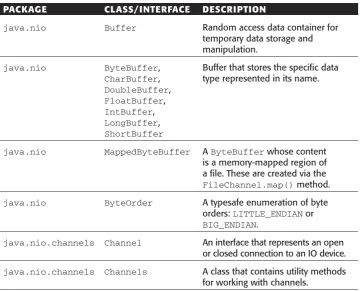
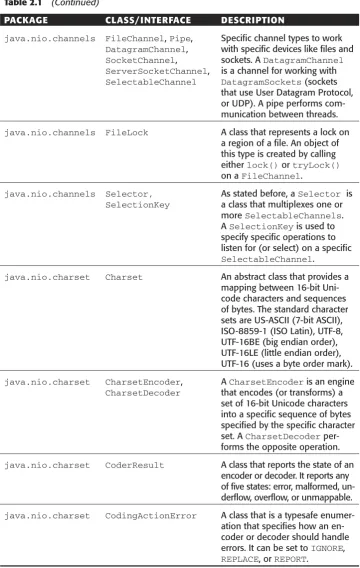
[image:40.531.76.439.330.621.2]Table 2.1 lists all the key classes and interfaces in the NIO packages.
Table 2.1 Key NIO Classes and Interfaces
PACKAGE CLASS/INTERFACE DESCRIPTION
java.nio Buffer Random access data container for
temporary data storage and manipulation.
java.nio ByteBuffer, Buffer that stores the specific data
CharBuffer, type represented in its name.
DoubleBuffer,
FloatBuffer,
IntBuffer,
LongBuffer,
ShortBuffer
java.nio MappedByteBuffer A ByteBufferwhose content
is a memory-mapped region of a file. These are created via the
FileChannel.map()method.
java.nio ByteOrder A typesafe enumeration of byte
orders: LITTLE_ENDIANor
BIG_ENDIAN.
java.nio.channels Channel An interface that represents an open
or closed connection to an IO device.
java.nio.channels Channels A class that contains utility methods
Table 2.1 (Continued)
PACKAGE CLASS/INTERFACE DESCRIPTION
java.nio.channels FileChannel, Pipe, Specific channel types to work
DatagramChannel, with specific devices like files and
SocketChannel, sockets. A DatagramChannel
ServerSocketChannel, is a channel for working with
SelectableChannel DatagramSockets(sockets
that use User Datagram Protocol, or UDP). A pipe performs com-munication between threads.
java.nio.channels FileLock A class that represents a lock on
a region of a file. An object of this type is created by calling either lock()or tryLock()
on a FileChannel.
java.nio.channels Selector, As stated before, a Selector is
SelectionKey a class that multiplexes one or
more SelectableChannels.
A SelectionKeyis used to
specify specific operations to listen for (or select) on a specific
SelectableChannel.
java.nio.charset Charset An abstract class that provides a
mapping between 16-bit Uni-code characters and sequences of bytes. The standard character sets are US-ASCII (7-bit ASCII), ISO-8859-1 (ISO Latin), UTF-8, UTF-16BE (big endian order), UTF-16LE (little endian order), UTF-16 (uses a byte order mark).
java.nio.charset CharsetEncoder, A CharsetEncoderis an engine
CharsetDecoder that encodes (or transforms) a
set of 16-bit Unicode characters into a specific sequence of bytes specified by the specific character set. A CharsetDecoder per-forms the opposite operation.
java.nio.charset CoderResult A class that reports the state of an
encoder or decoder. It reports any of five states: error, malformed, un-derflow, overflow, or unmappable.
java.nio.charset CodingActionError A class that is a typesafe
enumer-ation that specifies how an en-coder or deen-coder should handle errors. It can be set to IGNORE,
Unfortunately, we cannot demonstrate all of the functionality in the NIO package. Instead, we examine three examples: a canonical file copy, little endian byte operations, and non-blocking server IO.
Canonical File Copy
Our first example is a canonical file copy operation. The old way to implement the copy would be to loop while reading and writing from a fixed-size byte buffer until we had exhausted the bytes in the file. Listing 2.1 demonstrates that method.
01: package org.javapitfalls.item2; 02:
03: import java.io.*; 04: import java.nio.*;
05: import java.nio.channels.*; 06:
07: public class SlowFileCopy 08: {
09: public static void main(String args[]) 10: {
// ...command line check omitted for brevity ... 16:
17: try 18: {
19: long start = System.currentTimeMillis(); 20: // open files
21: FileInputStream fis =
22: new FileInputStream(args[0]); 23: FileOutputStream fos =
24: new FileOutputStream(args[1]); 25:
26: int bufSize = 4096;
27: byte [] buf = new byte[bufSize]; 28:
29: int cnt = 0;
30: while ((cnt = fis.read(buf)) >= 0)
31: fos.write(buf, 0, (int) cnt);
32:
33: fis.close(); 34: fos.close();
35: long end = System.currentTimeMillis();
36: System.out.println(“Elapsed Time: “ Æ + (end - start) + “ milliseconds.”);
37: } catch (Throwable t) 38: {
39: t.printStackTrace(); 40: }
41: } 42: }
In line 26 of Listing 2.1 we set the buffer size to be 4 KB. Obviously, given the simple space/time trade-off, we can increase the speed of this for large files by increasing the buffer size. A run of Listing 2.1 on a 27-MB file produces:
E:\classes\org\javapitfalls\item2>java
org.javapitfalls.item2.SlowFileCopy j2sdk-1_4_1-beta-windows-i586.exe Æ j2sdk-copy1.exe
Elapsed Time: 13971 milliseconds.
Lines 30 and 31 of Listing 2.1 are the key workhorse loop of the program where bytes are transferred from the original file to the buffer and then are written from the buffer to a second file (the copy). The FileChannel class includes a method called
transferTo()that takes advantage of low-level operating system calls specifically to speed up transfers between file channels. So, the loop in 26 to 31 can be replaced by the following code:
FileChannel fcin = fis.getChannel();
FileChannel fcout = fos.getChannel(); fcin.transferTo(0, fcin.size(), fcout);
The above snippet is from the program called FastFileCopy.java, which is identical to SlowFileCopy.java except for the lines above that replace the whileloop. A run of FastFileCopy on the same large file produces:
E:\classes\org\javapitfalls\item2>java
org.javapitfalls.item2.FastFileCopy j2sdk-1_4_1-beta-windows-i586.exe Æ j2sdk-copy2.exe
Elapsed Time: 2343 milliseconds.
The performance of FastFileCopy is very fast for all large files, but slightly slower for smaller files.
Little-Endian Byte Operations
008: class LittleEndianOutputStream extends OutputStream 009: {
010: OutputStream os; 011:
012: public LittleEndianOutputStream(OutputStream os) 013: {
014: this.os = os; 015: }
016:
017: public void write(int b) throws IOException 018: {
019: os.write(b); 020: }
021:
022: public void writeShort(short s) throws IOException 023: {
024: int is = (int) s; // promote 025: int maskB1 = 0xff;
026: int maskB2 = 0xff00; 027:
028: byte [] b = new byte[2]; 029: b[0] = (byte) (s & maskB1);
030: b[1] = (byte) ((s & maskB2) >>> 8); 031:
032: os.write(b); 033: }
034:
035: public void writeInt(int i) throws IOException 036: {
037: byte [] b = new byte[4]; 038: int maskB1 = 0xff; 039: int maskB2 = 0xff00; 040: int maskB3 = 0xff0000; 041: int maskB4 = 0xff000000; 042:
043: b[3] = (byte) ((i & maskB4) >>> 24); 044: b[2] = (byte) ((i & maskB3) >>> 16); 045: b[1] = (byte) ((i & maskB2) >>> 8); 046: b[0] = (byte) (i & maskB1);
047:
048: os.write(b); 049: }
050: }
The LittleEndianOutputStream was used in combination with a DataOut-putStreamto write integers and shorts in a BMP encoder. Note how we manually swap the bytes when writing an integer to the underlying OutputStream in the
writeInt()method. We swap the bytes by masking the byte in the original integer (Big Endian format), shifting it down to the lowest byte position and assigning it to its new byte position. LittleEndianOutputStream is now obsolete, as Listing 2.3 shows the encoder rewritten using NIO Buffers.
001: /** BmpWriter3.java */
002: package org.javapitfalls.item2; 003:
004: import java.awt.*; 005: import java.awt.image.*; 006: import java.io.*;
007: import java.nio.*;
008: import java.nio.channels.*; 009:
010: public class BmpWriter3 011: {
012: // File Header - Actual contents (14 bytes): 013: short fileType = 0x4d42;// always “BM”
014: int fileSize; // size of file in bytes 015: short reserved1 = 0; // always 0
016: short reserved2 = 0; // always 0
017: int bitmapOffset = 54; // starting byte position of image data 018:
019: // BMP Image Header - Actual conents (40 bytes):
020: int size = 40; // size of this header in bytes 021: int width; // image width in pixels
022: int height; // image height in pixels (if < 0, “top-down”) 023: short planes = 1; // no. of color planes: always 1
024: short bitsPerPixel = 24;// number of bits per pixel: 1, 4, 8, Æ or 24 (no color map)
// Some data members omitted for brevity -- code available online. 037:
038: public void storeImage(Image img, String sFilename) throws Æ IOException
039: {
// ... getting Image width and height omitted for brevity ... 056:
057: width = imgWidth; 058: height = imgHeight; 059: