INTEGRATED COLLABORATIVE
INFORMATION SYSTEMS
Ahmet E. Topcu
Submitted to the faculty of the University Graduate School in partial fulfillment of the requirements
for the degree Doctor of Philosophy
in the Department of Computer Science, Indiana University
ii
Accepted by the Graduate Faculty, Indiana University, in partial fulfillment of the requirements for the degree of Doctor of Philosophy.
Doctoral Committee _____________________________
Prof. Geoffrey C. Fox (Principal Advisor)
________________________________ Prof. Donald F. (Rick) McMullen
________________________________ Prof. Luis M. Rocha
________________________________ Prof. Jee H. Koh
iv
Abstract
The evaluation of the Web shows that people want to access information easily, store them in a personal way, and share them with the others. There are numerous tools and services built in recent years in different categories having Web 2.0 capability. Examples include Social Bookmarking Tools (YouTube, del.icio.us, Flickr,), Blogs (blogger.com, Google Blog), Social Networking Tools (MySpace, LinkedIn) and other related tools. New tools and services are built and open to the Web community continuously. New blogs and data are published every second. The users of these tools have the opportunity to use different tools and decide the best ones in their perspective. Users don’t need to know about the version of the tools and services. However, having many tools in similar areas is a problem. If a user wants to use some other tools, how can the user move the data from the previous tool to the new tool? What if the user decides to use similar tools in the same environment and compare information at the same time? In other words, users should have a flexible environment to use multiple tools at the same time. In the current Web 2.0 domain, it is not easy to say that which tools and services are the best because of the large number of existing tools and the continuous development of new tools.
v
vi
TABLE OF CONTENTS
CHAPTER 1 INTRODUCTION ... 1
1.1 Motivation ... 3
1.2 Statement of research problems ... 5
1.3 Why Integrated Collaborative Information Systems Architecture ... 7
1.4 Contributions ... 10
1.5 Organization of the Thesis ... 11
CHAPTER 2 BACKGROUND AND SURVEY OF TECHNOLOGIES ... 13
2.1 Academic Web Search Tools ... 13
2.1.1 Google Scholar ... 14
2.1.2 CiteSeer ... 16
2.1.3 Windows Live Academic ... 19
2.2 Annotation Tools ... 21
2.2.1 CiteULike ... 21
2.2.2 Connotea... 22
2.2.3 del.icio.us ... 24
2.3 Grids and Web 2.0 ... 26
2.4 Collaboration Tools ... 28
2.5 Technologies ... 30
2.5.1 Web Services ... 30
2.5.2 Apache Axis 1.x ... 31
2.5.3 Parsers ... 33
2.5.4 HTTP Client ... 35
2.5.5 AJAX and JSON ... 37
2.5.6 XPATH... 38
2.5.7 Simple Message Formats: RSS and Atom Feed... 38
CHAPTER 3 INTEGRATED COLLABORATION INFORMATION SYSTEMS ARCHITECTURE ... 40
3.1 General picture of the Integrated Collaboration Information Systems (ICIS) Architecture ... 42
3.1.1 Integration Manager ... 44
3.1.1.1 Pull Services... 44
3.1.1.2 Push Services ... 46
vii
3.1.3 Permission Handler ... 49
3.1.4 Data Manager ... 50
3.1.5 Storage ... 50
3.1.6 Tools ... 50
3.2 Fundamental Integrated Collaboration Information System Services ... 51
3.2.1 Local Search Service ... 51
3.2.2 Web Page Search Service ... 52
3.2.3 Web Search Tool Service ... 52
3.2.4 Tagging Service... 53
3.2.5 Access Control Service ... 53
3.2.6 Event Service... 53
3.3 Integration of a tool into Integrated Collaborative Information Systems (ICIS) 54 CHAPTER 4 ACCESS CONTROL ... 57
4.1 Users and Profiles ... 57
4.2 Group Administration ... 58
4.3 Access Rights ... 59
CHAPTER 5 PROTOTYPE IMPLEMENTATION ... 63
5.1 Description of IDIOM Project Modules ... 68
5.2 Web Search Tools: Using Google Scholar (GS) and Windows Live Academic (WLA) to Search for Digital Entities ... 70
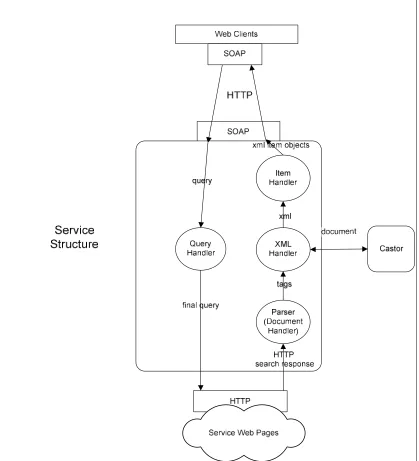
5.2.1 Search Handler Service ... 72
5.2.1.1 Query Handler ... 73
5.2.1.2 Parser... 74
5.2.1.3 XML Handler ... 74
5.2.1.4 Item Handler ... 74
5.2.2 Web Search Tool: Basic and Advanced Search Interface ... 74
5.2.2.1 Basic Search ... 75
5.2.2.2 Advanced Search ... 76
5.3 Local Search Tools: Using Basic and Advanced Search Tools to search Information Service Storage... 79
5.3.1 Basic Local Search ... 80
5.3.2 Advanced Local Search ... 81
5.4 Web Page Metadata Collection Service ... 83
viii
5.5.1 Service for Digital Entities (DEs) ... 87
5.5.2 Service for Folder (Container for DEs) ... 89
5.6 Level of Authorization... 91
5.6.1 Super Administrator Control Model ... 91
5.6.2 Group Administrator Control Model... 92
CHAPTER 6 PROTOTYPE EVALUATION ... 95
6.1 Experimental Setup Environment ... 96
6.2 Responsiveness Experiments ... 97
6.2.1 Responsiveness Experiments Results ... 101
6.3 Scalability Experiment ... 108
6.3.1 Results of the Scalability Experiment ... 111
6.4 Summary ... 116
CHAPTER 7 CONCLUSIONS AND FUTURE RESEARCH ISSUES ... 117
7.1 Thesis summary ... 117
7.2 Answering the research questions ... 120
7.3 Future research directions ... 124
Appendix A 125
ix
LIST OF FIGURES
Figure 1-1 : Existing and New Research Tools having new capabilities for Scientific
Documents ... 9
Figure 2-1 : Google Scholar Web Search Tool ... 16
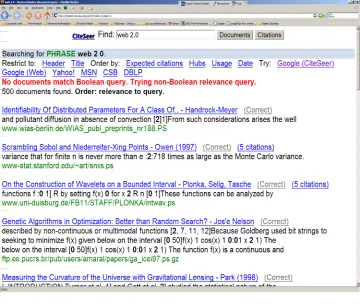
Figure 2-2 : CiteSeer Web Search Tool ... 19
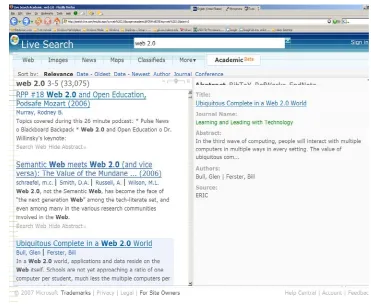
Figure 2-3 : Windows Live Academic Web Search Tool ... 21
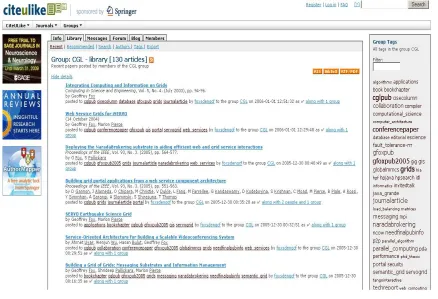
Figure 2-4 : CiteULike Annotation Tool ... 22
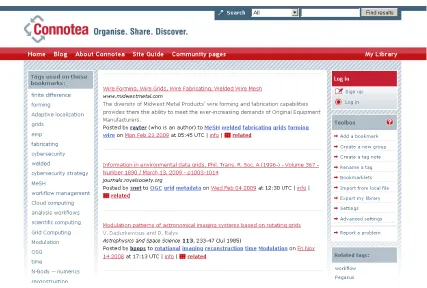
Figure 2-5 : Connotea Annotation Tool ... 23
Figure 2-6 : del.icio.us Annotation Tool ... 24
Figure 3-1 : Simplified view of the ICIS Architecture... 42
Figure 3-2 : Architecture of Integration of Collaborative Systems ... 43
Figure 3-3 : Digital Entity (DE) content ... 44
Figure 3-4 : Integration Model with Pull Service and interaction with clients and tools . 46 Figure 3-5 : Integration Model with Push Service and interaction with clients and tools 48 Figure 3-6: Two-way filter operations ... 49
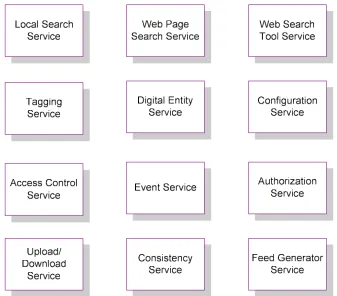
Figure 3-7 : Integration Collaborative Information Systems (ICIS) Services ... 51
Figure 3-8 : Tools and ICIS Framework are not integrated ... 55
Figure 3-9 : Tool integrated into ICIS using wrapper and gateway ... 56
Figure 3-10 : Integrated tool, ICIS, and client interactions ... 56
Figure 4-1 : SA, GA, and user relations ... 59
Figure 4-2 : User and Group relations with DE and folder ... 62
Figure 5-1 : Digital Entity (DE) metadata fields ... 65
Figure 5-2 : IDIOM Project General Picture ... 68
Figure 5-3 : Web Tool Search Layers for GS and WLA ... 71
Figure 5-4 : Search Handler Service Structure... 73
Figure 5-5 : Web Search Tools using Basic Search ... 76
Figure 5-6 : Web Tool Search using Google Scholar Advanced Search ... 77
Figure 5-7 : Web Search Tools and search results ... 78
Figure 5-8 : Web Search Tools after insertion request operation ... 79
Figure 5-9 : Local Basic Search interface ... 81
Figure 5-10 : Advanced Local Search Interface... 81
Figure 5-11 : Result of the Search Query ... 82
Figure 5-12 : Web page Collection of Metadata ... 84
Figure 5-13 : Feeders list ... 85
Figure 5-14 : DEs in RSS format ... 86
Figure 5-15 : DEs using live bookmarks ... 86
Figure 5-16 : Managing Access Rights ... 89
Figure 5-17 : Managing all DEs in folder/database ... 90
Figure 5-18 : Adding new group or others (users) to folder/database ... 90
Figure 5-19 : Super Administrator (SA) ... 92
Figure 5-20 : Group Administrator (GA) ... 94
Figure 6-1 : System Responsiveness Experiment Testing Cases ... 100
Figure 6-2 : Test results for inserting access control privileges using database ... 101
x
Figure 6-4 : Test results for updating access control privileges using memory ... 103
Figure 6-5 : Test results for selecting access control privileges from database ... 104
Figure 6-6 : Test results for selecting access control privileges from memory ... 105
Figure 6-7 : System Responsiveness Experiment Testing Cases using Web Search Tools ... 106
Figure 6-8 : Web Search Tool Performance using Google Scholar ... 107
Figure 6-9 : Testing cases for scalability experiment for search request using DB ... 109
Figure 6-10 : Testing case for scalability experiment for search request with memory utilization ... 110
Figure 6-11 : Testing case for scalability experiment for search request by increasing data size with memory utilization ... 110
Figure 6-12 : Search message rate with Database access ... 112
Figure 6-13 : Search message rate with memory utilization ... 113
xi
LIST OF TABLES
Table 2-1: Grid view of e-Science features ... 27
Table 2-2 : Web 2.0 view of e-Science features ... 28
Table 4-1 : Access Rights... 60
Table 4-2 : Access Control Lists ... 61
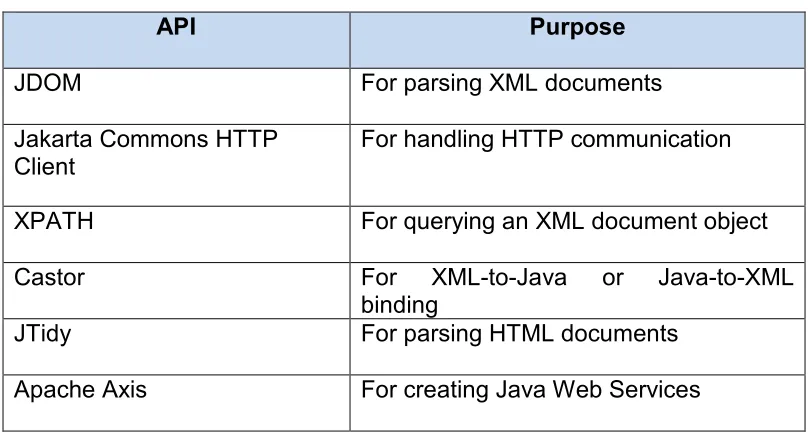
Table 5-1 : The APIs used in implementing the Web Layer ... 69
Table 6-1 : Summary of the cluster node for services... 96
Table 6-2 : Summary of the cluster nodes for clients ... 97
Table 6-3 : Statistics for the Figure 6-2... 101
Table 6-4 : Statistics for the Figure 6-3... 102
Table 6-5 : Statistics for the Figure 6-4... 103
Table 6-6 : Statistics for the Figure 6-5... 104
Table 6-7 : Statistics for the Figure 6-6... 105
Table 6-8: Statistics for the Figure 6-8... 107
Table 6-9: Statistics for the Figure 6-12... 113
Table 6-10 : Statistics for the Figure 6-13 ... 113
CHAPTER 1
INTRODUCTION
2
Bibsonomy [4], Domain specific academic search tools, such as CiteSeer [5], or general ones, such as Google Scholar [6].
These developments overlap with ongoing efforts to exploit Grid architectures based on Web services [7] for supporting international scientific and engineering research teams by enabling the sharing of large data and compute resources (i.e., creating a Cyberinfrastructure for e-Science [8, 9]).
The classic way of collaboration is posting information by individual or organization. The posted information can be accessed by anyone or selected users selected through by authorization tokens defined in the system. The main purpose of the collaboration is sharing information easily by any users or selected users or groups in web domain. For example Grid application provides sharing computer, resources, and network around the communities. The web is become popular because people want to share more information easily and they want to tag, comment, and rate the information by using the community tools.
Another way to access information is through digital libraries and academic search. Significant advances have also taken place in the areas of digital libraries and academic search. Domain specific academic search tools, such as CiteSeer [5], or general ones, such as Google Scholar [6], have enabled open, fast and easy access to vast online repositories of linked scientific documents.
3
return only about 20% of the desired content [10]. Similarly, there is no easy way to find all publications that focus on a very narrow topic, say all or almost all the papers discussing a particular chemical compound. Moreover, the new tools for annotating scholarly papers (CiteULike, Connotea) are currently detached from the capabilities provided by other research tools, such as academic search tools.
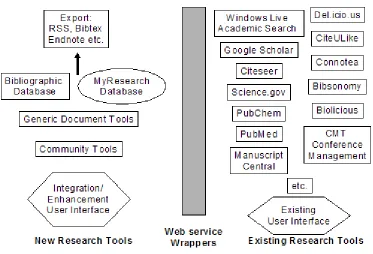
The following figure is depicted below shows a system model for using existing research systems such as academic search tools (Google Scholar, Windows Live Academic, CiteSeer) and social bookmarking tools (CiteULike, del.ici.us, Connotea). These tools can be used by adding new capabilities by building wrapper (constructed as Web services) that allow us to extract information and store information for scientific documents. For example del.icio.us tool can be used to manage tags and comments on the document while allowing custom tools manage the other information needed by user.
1.1
Motivation
4
users should have a flexible environment to use multiple tools at the same time. In the current Web 2.0 domain, it is not easy to identify which tools and services are the best because of the large number of existing tools and the continuous development of new tools. In this thesis, we are particularly interested in integration of different tools, sharing information in this integrated community, and having additional functionalities for scientific research in a Service Oriented Architecture in order to use the different capabilities of the tools.
We identify the following limitations of the current approaches in Web 2.0 domain using tools for sharing and managing the information.
i. In the web domain, there are numerous annotation and search tools. Each of them has different capability and not complete defined metadata. Tools may provide services to the users such as tagging, posting, sharing information. However, in their category they do not provide a complete metadata definition to support the whole document.
ii. Each tool has different advantages over other tools and is currently detached from the capabilities provided by other research tools.
iii. The wealth of information contained in numerous fields remains largely outside the scope of tools. For example a search in Web Search Tool for specific group or lab publications may not return whole publications. iv. If the tool you choose is not adopted or worse just disappears, what will
5
should be an easy way not to depend on one tool. In this dynamic collaboration environment tools can easily disappear.
v. The information in current web domain is spread to web with different tools and there is no easy way to share the information using different tools, and users need to duplicate the same information in the different domains.
vi. Tools may have many features that other tools do not have. Users need to switch between tools and store the same information in them. Also these collaboration systems may not have the best performance or give full access to their systems that cause another limitation for tools.
1.2
Statement of research problems
In this thesis, we provide some assessment about recent developments, the problems defined previously, and investigate a novel approach of building Integrated Collaborative Information Systems Infrastructure to integrate various tools having common metadata that we think will have a model for the scientific research community. We particularly identify the following research questions for building such framework.
6
2. Can we implement a framework by integrating tools that handle data and metadata from various tools and resources in Service Oriented Architecture? 3. How does Integrated Collaborative Information Systems (ICIS) use the tools?
How does ICIS architecture provide a mechanism to link data between the tools?
4. How does ICIS architecture provide data sharing between users and protect data from other user?
5. Does system architecture provide to use the benefit of the integrated tools without developing new tool?
6. Does the integration architecture approach scales well?
7. What is the performance of the Integrated Collaborative Information Systems (ICIS) and what factors influence the performance?
8. Can we support data sharing and uploading and downloading for scholarly publications using our integrated architecture?
9. How does our integration model support the consistent data for scholarly publications?
We have answer to these questions in CHAPTER 7
7
1.3
Why Integrated Collaborative Information Systems
Architecture
The web technologies such as RSS (Really Simple Syndication)[12], ATOM[13] AJAX (Asynchronous JavaScript and XML)[14], microformats[15], and REST (Representational State Transfer)[16] provide flexible Web-accessible data and services for Web 2.0 applications. However, although the current systems are for the most part good, they are independent of each other. Huge amount of data distributed over different tools and services exists in the Web. A large fraction of this data is duplicated. What is needed is an integration model that would bridge the different tools and services. In the 90s the software and system releases were not frequent. Now, people do not careen to know about version of the software and systems. That is not really needed because today’s tools provide services that always improve [11]. There are many tools in Web 2.0 but we are not sure which tools will improve and will be embraced by the web communities. So, in this rapid development cycle one tool might have an advantage to the other tool and vice versa. For example, the annotation tools for scholarly papers are currently detached from the capabilities provided by other research tools.
8
AJAX and REST. This model is created using native tools and wrappers around them without re-building the tools. Also local capabilities for example local search capabilities can be added and embedded in different client models, such as gadgets. So, the model has the capability to upload information to the tools and download information from them. The model should also provide sharing of logging of users. Our proposed Integrated Collaborative Information Systems Infrastructure (ICISI) offer a solution to build a framework by integrating tools by supporting distributed and centralized paradigms and managing metadata.
9
Figure 1-1 : Existing and New Research Tools having new capabilities for Scientific Documents
ICISI provides easily integration of the tools. We can easily add and remove service mechanism to collect information and upload information to the tools. ICISI also provides a protection for user data. Because it is possible that one tool might disappear. ICISI lowers the risk of losing data by protecting user data.
10
that add new capabilities by using wrappers to the major tools. These services allow one to both extract information and to store information in them. The tools and model are depicted in Figure 1-1.
ICISI provides following important features: (i) flexibility- providing add and extend service mechanism; (ii) easy integration; (iii) use benefits of different tools; (iv) build combined tools to share data with other users; (v) protect data from users.
1.4
Contributions
The main contribution of this thesis is to propose an architecture for Integrated Collaborative Information Systems (ICIS) supporting both distributed and centralized paradigms and managing metadata coming from various resources.
The implications of this thesis are seven-fold.
• Proposing novel architecture for integration of different Web 2.0 tools under one Collaboration Systems. This approach introduces the Integrated Collaboration Information Systems that link virtual organizations of tagging systems with other Cyberinfrastructure/Web 2.0 subsystems. Essentially, users have dynamic environment and share information to use the benefit of the different tools.
11
• Identifying and analyzing the key factors that affect both performance and scalability of the Integrated Collaboration Information Systems.
• Implementing the proposed Integrated Collaboration Information Systems Framework software and showing the integrated tools by using capabilities of different tools.
• Demonstrating an approach building wrappers using Web services around the tools to integrate them and add value to existing systems.
• Integrating scientific research tools by defining metadata and using various URL, and map them. This integration model used to support different environments where communities can take advantage of the tools in Web 2.0 integrated environments.
• Building services that aggregate information from a variety of sources (i.e., “mash-up” tools) and provide added value to communities of researchers. These services use metadata linking and using various URL, and map them.
1.5
Organization of the Thesis
12
13
CHAPTER 2
BACKGROUND AND SURVEY OF
TECHNOLOGIES
2.1
Academic Web Search Tools
14
In this section, we explain the major open-access academic search tools and technologies that use various methods of acquiring and analyzing scientific documents. These tools are discussed next.
2.1.1
Google Scholar
15
covers; at the same time it is known it does not cover some major publishers, such as Elsevier, American Chemical Society, and Emerald [18, 19]); although GS has access to digital archives of the largest academic publishers, the crawlers of GS have not indexed millions of publications;[19] (jj) coverage (GS does not provide full coverage of the articles from the publishers that seem to be covered [18, 19]); (jjj) accuracy (its metadata extraction algorithms are not very precise, leading to duplicate records, unreliable citation counts, etc. [19]).
GS crawlers were allowed to access largest and most well-known scholarly publishers and university presses (such as IEEE, ACM, Wiley); digital hosts(such as HighWire Press, MetaPress, Igenta); societies; government agencies (such as the American Physical Society, National Institute of Health); other scholarly organizations and preprint servers(such as arXiv.org, CiteBase)[19]. GS provides digital full text versions of the publications by searching from one web location having option to search multiple databases. This provides great beneficiaries to patron of libraries without repeating search queries for different databases [19].
16
21
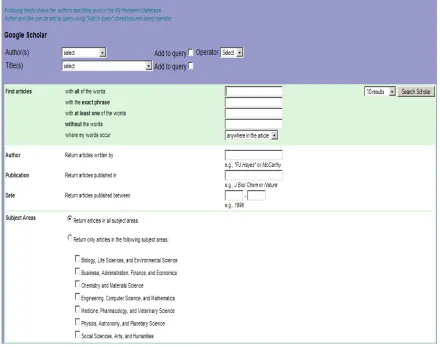
Figure 2-1 : Google Scholar Web Search Tool
Another feature of Google Scholar is to provide “versioning” .These versions may come from publication databases, university resources, and publication web pages. However, there is no clear information indicating “official” version of the document. This confuses the researchers and may be problem for accessing to the final publications[20]. Since GS provides services and update versions are available immediately on web page. So, user does not need to update the GS to have latest version of the service.
2.1.2
CiteSeer
17
Citation Indexing, a method for the automated extraction, parsing and indexing of the citations contained in a paper and of the context of these citations in the paper’s body. CiteSeer has pioneered a number of techniques for the automated extraction of document metadata, including front-end metadata such as title, author names, author affiliations, abstract, and back-end metadata, such as acknowledgements, and citations to other papers. The algorithms used by CiteSeer are generally based on carefully crafted heuristics and/or machine learning techniques. Giles et al. [5] states that automatic citation indexing operation is constructed using following steps:
1. Papers available from World Wide Web are downloaded. 2. CiteSeer converts the papers to text.
3. Papers in text format are parsed to extract the citations and it’s context in the body of the paper
4. All the extracted information is stored in the database.
CiteSeer extracts the following information by using PreScript from the New Zealand Digital Library project[21]:
• URL: The URL of the downloaded Postscript file is stored.
• Header: The title and author block of the paper is extracted.
• Abstract: If it exists, the abstract text is extracted.
• Introduction: If it exists, the introduction section is extracted.
• Citations: The list of references made by the document are extracted and parsed further as described below.
18
• Full text: The full text of the document and citations is indexed [5].
19
[image:30.612.144.504.78.382.2]23
Figure 2-2 : CiteSeer Web Search Tool
2.1.3
Windows Live Academic
20
WLA has very promising features for users to control of their searches. For example, Quint [29] state following features for WLA:
• Sort and limit results by author, date (forward or reverse chronological
order), journal, conference, or back to the default, relevance.
• Use the "Richness Slider" to expand or contract the relevance ranked
display of search results.
• Click on author names for author bibliographies (with no limits on the
numbers of authors "clickable"; no "et al.").
• View an abstract of each search citation in a preview pane section on the
right of the screen or "hide abstract" if you just want to scan brief
citations as quickly as possible using the full screen.
• Export citation in basic text, RIS' EndNote, or BibTeX bibliographic
formats.
• Find in a library using the connection to OCLC's Open WorldCat service
(on its way).
• Save search strategies in macros using "Search Builder," which will also
support RSS feeds ("Feeds" at the top of the screen tied to a "+live.com"
option) to alert searchers as new results appear on their Live.com page.
21
[image:32.612.135.506.73.379.2]22
Figure 2-3 : Windows Live Academic Web Search Tool
2.2
Annotation Tools
2.2.1
CiteULike
CiteULike [2] is a online community bookmarking tool which provides service for managing and finding scholarly publications. This tool provides the following features: (i) sharing references with your community; (ii) storing references; (iii) discovering new publications; (iv) tagging services for papers.
22
Figure 2-4 : CiteULike Annotation Tool
2.2.2
Connotea
Connotea [3] inspired by del.icio.us provides social bookmarking services and reference management. Connotea is developed by Nature Publishing Group [30] is become public in 2004.The key concepts of Connotea can be listed as: (i) Online storage of references and bookmarks; (ii) Simple, non-hierarchical organizing (iii) Opening the list to others; (iv) Auto-discovery of bibliographic information [31].
23
[image:34.612.115.542.320.608.2]can be word or phrases. Besides adding tags, users have option to add a comment to the article. The comments which are displayed chronological and conversational thread can be read by other users or viewers. Connotea also provides service for recognizing URL’s from common archives and importing bibliographic data. When user add a URL to Connotea, the link is analyzed to decide whether it can be processed by Connotea to extract the publication name, volume, issue number, and other its related metadata. Another feature of the Connotea is providing user subscription to the RSS [32] feeds in order them to see the list of the bookmark or alert new items that are added.
24
2.2.3
del.icio.us
del.icio.us [33] is a online bookmarking tool to allow users to post their links, tags and other metadata, share them with other people. This tool also provides the following features: (i) access more popular bookmarks; (ii) search the contents; (iii) tagging services. Biddulph [34] states that the del.icio.us has important three major axes: users, tags, and URLs. For example;
• http://del.icio.us/mike is mike’s URLs.
• http://del.icio.us/tag/xml is URLs with the tag xml.
• http://del.icio.us/url/8b7fec48fcb35763c9f8e1a8061eb124 is a reference to the URL http://www.xml.com/ (8b7fec48fcb35763c9f8e1a8061eb124 is the md5sum digest of the URL).
25
These annotation tools are very useful and superior to custom databases, and use similar approaches to bibtex files for managing information. They provide valuable direction in information systems. However, they cannot replace conventional web pages like CGL publications web page recording publications. User can not generate web pages using CiteUlike and Connotea annotation tools as the RSS/bibtex exports from CiteULike does not display full information while Connotea has only small subset of needed information[10].
Connotea, del.icio.us, and CiteULike all use “bookmarklets” to analyze the current page by invoking JavaScript. There might be problem if users try to add a document specified by a DOI. One should record only DOI itself not the particular baseurl. CiteULike recognizes all DOIs whereas Connotea does not recognize all DOIs.
Edit and tag addition date are important but these dates are not recorded by Connotea and CiteULike only dates are stored from initial submission.
Connotea and CiteULike have similar capabilities such as:
• View, search, discover, and add/edit user interfaces.
• Add tags to your or other entries.
• Add URLs/DOIs and bibliographic metadata.
• Extract information from current page using bookmarklets.
26
2.3
Grids and Web 2.0
Grid computing introduces solution to problems defined in [35] can be summarized as: (i) highly controlled research sharing; (ii) problem solving in Virtual Organization (VO) which is set of individuals and institutions such as The NSF TeraGrid [36] and NSF/DOE Open Science Grid [37]. Grids support Web Services architecturally [38] and XML is important for Web Service-based SOA systems [39]. Open Grid Service Architecture (OGSA) [40] and Semantic Web [41] both depend on XML metadata, and Web Services invokes remote methods by using XML-based protocol and interface definitions. This message protocol, usually SOAP [42] is bound to a lower level transport protocol such as HTTP. The method interface expressed in WSDL [43] describes agreed-up set of methods, parameters and return type of services.
Web 2.0 bring new ideas and directions to the scientific community similar to impact of Grid [35, 44] which provides resource sharing, innovative applications, high performance data orientation, and collaboration. One part of Web 2.0 is mash-up, workflow, and collaboration which widely adopted by web communities using tools such as Social Bookmarking (YouTube [45], del.icio.us [33], Flickr [46]), Blogs (blogger.com, Google Blog), Social Networking (MySpace, LinkedIn), Maps (Google Map) and other related tools.
27
• Services, not packaged software, with cost-effective scalability
• Control over unique, hard-to-recreate data sources that get richer as
more people use them
• Trusting users as co-developers
• Harnessing collective intelligence
• Leveraging the long tail through customer self-service
• Software above the level of a single device
• Lightweight user interfaces, development models, AND business models
Fox et al.[47] make the comparison of Web 2.0 and Grids in the following tables that are copied from Table I and II of Fox et al.[47].
Table 2-1: Grid view of e-Science features
Feature Grid approach
1. Community building Designed to enable virtual organizations based on collaborations between existing organizations such as research groups and supercomputing centers. Top-down approach, closely tied to PKI-based security infrastructure
2. Collaboration Focused on real-time audio/video
collaborations such as access Grid. Virtual organizations provide a framework but typically no interesting functions for asynchronous collaboration
3. Semantic and ontological representation of metadata
Table
Feature
1. Community building
2. Collaboration
3. Semantic and ontolog representation of metadata
2.4
Collaboration Tools
Sakai [48] is an academic open source online Collaboration and Learni Environment (CLE) project that support learning, research and collaboration. It has been used over 100 institutions.
Sakai provides features are common to course management systems such as sha course material, gradebook, chat, uploading/downloading assignments, and online testing. Another feature of Sakai is to provide collaborative environment for researchers.
Drupal [49] is another features such as file uploads forums, peer-to-peer networking,
28
Table 2-2 : Web 2.0 view of e-Science features
Web 2.0 approach
Community building Web 2.0 communities are typically networks of emergent groups of individuals with shared interests. Facebook, MySpaces, and Flickr are prominent examples
Collaboration Dominated by asynchronous collaboration: group-edited content Wikis), shared
commenting/rating/tagging of online content. Collaboration and community building are intertwined
Semantic and ontological representation of metadata
Metadata described by Microformats (semantic XHTML extensions) that represent community consensus and convention. Ontologies are replaced by
folksonomies of conventional tags used to describe a network entity
tion Tools
is an academic open source online Collaboration and Learni Environment (CLE) project that support learning, research and collaboration. It has been used over 100 institutions. First version of the project was released in March 2005. Sakai provides features are common to course management systems such as sha course material, gradebook, chat, uploading/downloading assignments, and online testing. Another feature of Sakai is to provide collaborative environment for researchers.
is another open source Content Management System supports file uploads and downloads, blogs, collaborative authoring environments, peer networking, newsletters, podcasting, and picture galleries.
Web 2.0 communities are typically networks of emergent groups of individuals with shared interests.
MySpaces, and Flickr are Dominated by asynchronous collaboration:
edited content Wikis), shared commenting/rating/tagging of online content. Collaboration and community
Metadata described by Microformats (semantic XHTML extensions) that represent community consensus and
Ontologies are replaced by of conventional tags used to describe a network entity
is an academic open source online Collaboration and Learning Environment (CLE) project that support learning, research and collaboration. It has been First version of the project was released in March 2005. The Sakai provides features are common to course management systems such as sharing course material, gradebook, chat, uploading/downloading assignments, and online testing. Another feature of Sakai is to provide collaborative environment for researchers.
29
users to publish resources and manage them. Drupal aim is defined in [50] as “Drupal is designed to be flexible and powerful enough to meet a broad range of web technology needs, from simple informational postings to large organizational sites and collaborative projects. This said, there is acentral interest in and focus on communities and collaboration. Drupal aims to enable the collaborative production of online information systems and communities.”
Microsoft SharePoint [51] is one of the community tool developed by Microsoft. It is explained in [52] saying that “Microsoft SharePoint enables groups to configure portals and hierarchies of websites without specifically requiring web-development. This allows groups of end users, as participants, to have much greater control in finding, creating, collecting, organizing, and collaborating on relevant information, in a browser-based environment. It also allows views of the different collections of information to be easily filtered, grouped, and/or sorted by each consumer according to their current desire. It has a robust permissions structure, allowing organizations to target users' access and capabilities based on their organizational role, team membership, interest, security group, or any other membership criteria that can be defined.”
The other platforms explained in [53] for building online communities using Web 2.0 features that enable sharing information such as Joomla(one of the most widely used content management systems and community platforms based on PHP) [54] , PHP-NUKE (One of the older CMS/community platforms) [55], Community Server (One of the few .NET blog platforms has evolved into a full-blown community product) [56], and jive (popular in the enterprise space) [57].
30
2.5
Technologies
We described the main technologies that are important to our proposed research thesis design implementation in the following sections.
2.5.1
Web Services
WSDL is an XML (provides a language which can be used between different platforms and programming languages and still express complex messages and functions) used to describe Web Services. It provides information about location of the services, how to locate them, on what the service is about, where it resides and how it can be invoked. One of the important benefits of the Web service is to provide interoperability. Therefore, different distributed Web services run on different platforms and architecture[58]. Following elements used in defining the WSDL document described in [59]: (i) Types– a container for data type definitions using some type system (such as XSD); (ii) Message– an abstract, typed definition of the data being communicated; (iii) Operation– an abstract description of an action supported by the service; (iv) Port Type– an abstract set of operations supported by one or more endpoints; (v) Binding– a concrete protocol and data format specification for a particular port type; (vi) Port– a single endpoint defined as a combination of a binding and a network address; (vii) Service– a collection of related endpoints[59].
SOAP stands for Simple Object Access Protocol and used for communication between client and server applications, and it is platform independent. SOAP is simple and extensible and language independent. SOAP request sample shown below:
<?xml version="1.0" encoding="UTF-8"?>
31
xmlns:xsi="http://www.w3.org/2001/XMLSchema-instance"> <SOAP-ENV:Body>
<ns1:echoString xmlns:ns1="http://soapinterop.org/"> <arg0 xsi:type="xsd:string">Hello!</arg0>
</ns1:echoString> </SOAP-ENV:Body> </SOAP-ENV:Envelope>
Web services have many advantages over others services; (i) protocol independent services; (ii) well-defined interfaces for distributed services; (iii) separation of interface from implementation (transparency); (iv) communicate using open protocols; (v) used by other applications easily; (vi) can be discovered using Universal Description Discovery and Integration(UDDI) [60].
In order to discover the services, UDDI is used as a platform-independent framework for describing services used by Web services on the web domain. The clients search the UDDI repository to find out the desired services.
2.5.2
Apache Axis 1.x
32
• Speed: Axis uses SAX (event-based) parsing to achieve significantly greater speed than earlier versions of Apache SOAP.
• Flexibility: The Axis architecture gives the developer complete freedom to insert extensions into the engine for custom header processing, system management, or anything else you can imagine.
• Stability: Axis defines a set of published interfaces which change relatively slowly compared to the rest of Axis.
• Component-oriented deployment: You can easily define reusable networks of Handlers to implement common patterns of processing for your applications, or to distribute to partners.
• Transport framework: Clean and simple abstraction for designing transports is defined (i.e., senders and listeners for SOAP over various protocols such as SMTP, FTP, message-oriented middleware, etc), and the core of the engine is completely transport-independent.
• WSDL support: Axis supports the Web Service Description Language, version 1.1, which allows you to easily build stubs to access remote services, and also to automatically export machine-readable descriptions of your deployed services from Axis.
There are also four services defined in Axis indicated in [61].
• RPC services use the SOAP RPC conventions, and also the SOAP encoding.
33
• Wrapped services are just like document services, except that rather than binding the entire SOAP body into one big structure, they "unwrap" it into individual parameters.
• Message services receive and return arbitrary XML in the SOAP Envelope without any type mapping / data binding. If users want to work with the raw XML of the incoming and outgoing SOAP Envelopes, they write a message service.
2.5.3
Parsers
The DOM (Document Object Model) [63] developed by the World Wide Web Consortium defines a standard way for accessing and manipulating documents. The nodes in documents may be elements, their text, and their attributes. In DOM all the information from the document needs to be read into memory and stored in a tree a structure. Information stored in the memory as a tree structure has been parsed and client applications access to the structured information. Therefore, client can use the following features:
i. XML documents can be viewed as a tree structure. ii. All elements can be extracted through the DOM tree. iii. Element contents can be modified or deleted.
iv. New element or node can be added to the XML documents.
The node types, and their node types they may have as children, are explained [64]:
34
• DocumentFragment -- Element, ProcessingInstruction, Comment, Text, CDATASection, EntityReference
• DocumentType -- no children
• EntityReference -- Element, ProcessingInstruction, Comment, Text, CDATASection, EntityReference
• Element -- Element, Text, Comment, ProcessingInstruction, CDATASection, EntityReference
• Attr -- Text, EntityReference
• ProcessingInstruction -- no children
• Comment -- no children
• Text -- no children
• CDATASection -- no children
• Entity -- Element, ProcessingInstruction, Comment, Text, CDATASection, EntityReference
This DOM approach has advantage when users have small size of data, and information will be taken directly from memory. However, it has some disadvantage for example bigger size of the document affects the performance having larger memory consumption. Moreover, it may not keep whole document in a memory at one time, and whole document must be successfully parsed before client program access to the information [65].
35
easy adaptation in many communities. SAX has event based API instead of storing the document in a memory and passing it to the client program. Then, client registers to receive notifications for various part of the document. The performance will be stable even for larger documents. The client program does not wait until entire document has been read. It can start to process the document earlier. This provides advantages when network bandwidth is an issue. However, it has some disadvantages for example when client need the same part of the document later. Because, there is comprehensive model of the document is available in memory in SAX. In this case using DOM model would be more appropriate [65].
2.5.4
HTTP Client
The Hypertext Transfer Protocol (HTTP) is defined in [67] as “an application-level protocol for distributed, collaborative, hypermedia information systems. It is a generic, stateless, protocol which can be used for many tasks beyond its use for hypertext, such as name servers and distributed object management systems, through extension of its request methods, error codes and headers.” Three commonly methods are used by HTTP: (i) GET- retrieve information from the server; (ii) POST – Data is sent to server by the client as a part of the request; (iii) HEAD - find out whether information is available on the server.
Jakarta Commons HTTP Client is an open source project and implementation of HTTP using Java Programming Language. It provides following features explained in [68]:
36
• Full implementation of all HTTP methods (GET, POST, PUT, DELETE, HEAD, OPTIONS, and TRACE) in an extensible OO framework.
• Supports encryption with HTTPS (HTTP over SSL) protocol.
• Granular non-standards configuration and tracking.
• Transparent connections through HTTP proxies.
• Tunneled HTTPS connections through HTTP proxies, via the CONNECT method.
• Transparent connections through SOCKS proxies (version 4 & 5) using native Java socket support.
• Authentication using Basic, Digest and the encrypting NTLM (NT Lan Manager) methods.
• Plug-in mechanism for custom authentication methods.
• Multi-Part form POST for uploading large files.
• Pluggable secure sockets implementations, making it easier to use third party solutions
• Connection management support for use in multi-threaded applications. Supports setting the maximum total connections as well as the maximum connections per host. Detects and closes stale connections.
• Automatic Cookie handling for reading Set-Cookie: headers from the server and sending them back out in a Cookie: header when appropriate.
• Plug-in mechanism for custom cookie policies.
37
• Response input streams to efficiently read the response body by streaming directly from the socket to the server.
• Persistent connections using KeepAlive in HTTP/1.0 and persistence in HTTP/1.1
• Direct access to the response code and headers sent by the server.
• The ability to set connection timeouts.
• HttpMethods implement the Command Pattern to allow for parallel requests and efficient re-use of connections.
• Source code is freely available under the Apache Software License.
2.5.5
AJAX and JSON
Asynchronous JavaScript and XML (AJAX) is a combination of the web client technologies for building interactive web applications. It provides new approach for web application providing simplicity and independent of communication with the server using JavaScript's XMLHttpRequest class methods. XMLHttpRequest returns an XML messages that can be parsed using JavaScript[69].
Ajax incorporates the followings explained in [69]:
• Standards-based presentation using XHTML and CSS.
• Dynamic display and interaction using the Document Object Model.
• Data interchange and manipulation using XML and XSLT.
38
• JavaScript binding everything together.
JavaScript Object Notation (JSON) is an alternative to XML for data transmission in the web. It has simple data structure and no parsing is necessary for extracting information in Ajax applications. This has advantage if one wants to use pass simple datatype such as string, number, and array over the internet [70].
2.5.6
XPATH
XML document has tree of nodes, and XPath [71] models these nodes which have different types of nodes such as element nodes, attribute nodes and text nodes. XSLT [72], XPointer [73] and other XML parsing software uses XPath to extract specific information from structured objects. It also provides mechanism to manipulate strings, numbers and booleans. XPath addresses the parts of an XML document which has been modeled as tree of nodes. In the following example, XPath points to the author node in a structured XML document.
XPath authorQuery =node.createXPath (“//item/livesearch:academic/author”)
2.5.7
Simple Message Formats: RSS and Atom Feed
Really Simple Syndication (RSS) provides syndication of Web site content. Since RSS data size small, it can be loaded fast on the wire [32]. There are three required channel elements for defining object in RSS file:
• title - defines the title of the item
39
• description - describes the item
Atom is another way of syndication of information. It is supported by many news reader clients. Possible use of Atom Feeds explained in [74].
• Feed: Use for computer-friendly syndication -- similar to RSS in functionality.
• Editing: Use between atom-enabled clients and servers to create and update entries, comments, and either annotate or edit other resources.
• Archiving: Use for internal storage, import, and export of entries, comments, and other resources.
• Commenting: Use to post comments to an entry.
40
CHAPTER 3
INTEGRATED COLLABORATION INFORMATION
SYSTEMS ARCHITECTURE
There is no precise definition of integration in the literature. It is not a property of a single tool but it should have relationship with other tools in the environment [75]. Integration can be categorized into five kinds: (i) platform, related with framework services; (ii) presentation, concerned with user interaction; (iii) data, using information in the tools; (iv) control, mechanism for tool communication and interoperation ; (v)
41
The model should have the following capabilities: (i) Tagging and linking of people through uploading and downloading of information; (ii) Sharing information; (iii) Supporting scientific research community; (iii) Integrating the new tools as they are generated in a specific area; (iv) Providing a dynamic environment in which the user can benefit from the capabilities of different tools; (v) Allowing rich content.
The integration model itself doesn't build new tools. It uses the existing tools. One of the application areas is in academic search. In the following section we will define the integration model of similar tools. The key feature is to reuse the tools so that there is no need to rewrite a new tool for specific domain. So, the proposed model should be easier to link together all relating information.
42
3.1
General picture of the Integrated Collaboration
Information Systems (ICIS) Architecture
Integrated Collaboration Information Systems (ICIS) architecture has communication with tools and clients through gateways defined in this model. The different gateways is defined and implemented for each tool to have successful interaction between them to extract information from them or store information in them. ICIS architecture also provides services to build community-centric platform for users. The simplified view of this architecture is depicted below in Figure 3-1.
Figure 3-1 : Simplified view of the ICIS Architecture
43
Data Manager, provides a mechanisms to extract data from the repository and insert data into the repository; and (f) Storage, maintains user data and permissions in the database.
Figure 3-2 : Architecture of Integration of Collaborative Systems
We will explain the key component of the Integration Manager. It has two gateways and one core component called Information Service. Tool Gateway provides a channel between external web tools and Information Services such as request a search query or getting response from the tools. This service provides extensibility for the integrated system.
Client Gateway provides a mechanism for communication between Client and
44
interface such a search operation which is defined as Pull Service in the Information Service which gets actions such as search query from Client Gateway. Hence, the operation is sent to the Information Service to trigger required Information Service
subcomponents such as Pull Service. As a result of the operation of the client request, resultant data is sent back to the Client from the Information Service.
Digital Entity (DE) is defined in our architecture as a collection of metadata fields and their data. The Figure 3-3 is depicted below shows the DE and its encapsulated metadata.
Figure 3-3 : Digital Entity (DE) content
3.1.1
Integration Manager
3.1.1.1
Pull Services
Figure 3-4 shows the Integration Manager and two services of the Information Services which are Pull Service and the Presentation Service. This figure shows also interaction of the services with gateways and the clients. Pull Service basically interacts with the tools using the HTTP method or the Web Services using the WSDL through
45
may be in any format such as embedded HTML, RSS feed or any other objects. These data coming from tools send to the Information Handler again through Tool Gateway. Information Handler processes the incoming objects in order to extract data or metadata.
Information Handler use different methods Gateway such as heuristics methods to extract data coming from the Tools. There are different ways to extract information coming from the Tools. There might not be standard methods to handle the incoming information. One possible methodology is to use heuristic method because the tool may not provide any other methods such as Web Services or API. In heuristic method, data is parsed and extracted in order to build a metadata using original incoming data hidden in different format. Information Handler provides extracted data required to build a new metadata. Metadata builder builds metadata elements in an XML format. This should be defined as common data format used in this Integration Systems. Each integration systems should define elements of metadata in order to have successful integration model. We could name this metadata object as Digital Entity (DE). Presentation Service provides an interface to display DEs whether coming from the Web Tools or from local integrated systems. Clients interact with these services to do some certain operations such as filter out the DEs or insertion of the DEs to storage or uploading DEs to other tools.
46
gateways and presentation service in this section. Push, Gadgets, and Local Search Services are also components of the Information Service. These services can be used dynamically and if needed other services can be added to Information Services which provides flexibility in the Integration Manager.
Figure 3-4 : Integration Model with Pull Service and interaction with clients and tools
3.1.1.2
Push Services
47
Gateway or generate XML documents in RSS or some other XML document formats. Request Handler process the incoming request for example search a title keyword from repository. Request Handler communicates with Data Manager Extracter Service to get query the results. Information Handler gets extracted data from Request Handler and sends them to the Metadata Builder to build a new metadata. Metadata Builder builds metadata elements in an XML format as DEs. Presentation Service displays the DEs coming from Metadata Builder. Clients interact with these services to do some certain operations such as filter out the DEs or uploading DEs to the other tools. Tool Gateway
48
Figure 3-5 : Integration Model with Push Service and interaction with clients and tools
3.1.2
Filter
49
Figure 3-6: Two-way filter operations
3.1.3
Permission Handler
Current Web 2.0 tools do not have a defined clear security model. The restricted access to the resources should be defined and used to protect user community data. Otherwise, without having security model scientific communities suffer from lack of security while using the Web 2.0 tools. The model also should still allow using systems without any fine-grained security model. We defined a security model using access control matrix and roles [79]. Users have ability to define permissions such as Read, Write to grant/deny to DEs in the system. This security model can be adopted into the
50
Therefore, users both protect their data and share them with the other user. Permission Handler also provides group access control for users. For example, each user associated with the group has access to all DEs of this group.
3.1.4
Data Manager
This service communicates with the storage through driver connection. Controller
in the Data Manager module takes actions in order to decide whether they are data insertion or extraction of the data operations. Inserter Service does insertion operations of the DEs and their associate permission tokens. Extraction Service is responsible for getting DEs and their permissions from Storage using queries. For extraction or insertion operations for DEs, users should have required security tokens in order to do these operations. Otherwise, users can not access to the DEs stored in the Storage.
3.1.5
Storage
All the community building data metadata should be backend by storage. In the
Storage, DEs and user and group permissions are stored. The storage can be defined as any databases or file systems.
3.1.6
Tools
51
for example, one tool may provide service API for pulling information from the service of the tool.
3.2
Fundamental Integrated Collaboration Information
System Services
[image:62.612.155.492.291.587.2]In this section we explain fundamental ICIS Services that provides collaborative environment for user communities. The main services are depicted below in Figure 3-7 and explained in the subsections of this section.
Figure 3-7 : Integration Collaborative Information Systems (ICIS) Services
3.2.1
Local Search Service
52
This service provides a capability to search the resources to populate Digital Entities (DEs) from the local repository. The search results shown as RSS-like object and detailed description of metadata provided for captured DEs from repository.
3.2.2
Web Page Search Service
This service provides search methodology to search any web pages and collect metadata from these web pages. This tool extracts the information from any web pages to build DEs. Client communicates with web pages using HTTP methods. The collected information may be valuable to start building Digital Entities. Because extracted information from web pages may not have completed metadata related to the DE.
3.2.3
Web Search Tool Service
53
objects are parsed through the RSS files, and displayed to the users such as RSS-style format.
3.2.4
Tagging Service
Tagging provides a way of categorizing metadata by users. It is easy to discovery of new content, and support for the creation of niche communities by using the tags. This service provides a user to add a tag for metadata. User also can easily select the tags and then related document can be viewed, edited or uploaded to other tools in the system.
3.2.5
Access Control Service
This service provides capability of accesses for user to use the resources or denies the use of the resources by user. This service mechanism defined for Access Control in the CHAPTER 4 and implementation details in section 5.5. The aim of this service is to control and protect user data from other users or communities. This model is implemented in order to provide a capability to handle different types of citation metadata and store them in the repository. Moreover, the system has control mechanism for allowing multiple users and protects their metadata resources from other users.
3.2.6
Event Service
54
minor events related to a user. Event Service provides major and minor event operations and allows users to build dataset using different combination of the events done by users. It also provides rollback on the changes done by users. This service is implemented by another PhD student.
3.3
Integration of a tool into Integrated Collaborative
Information Systems (ICIS)
The question raised here that how to integrate a tool into the Integrated Collaborative Information Systems (ICIS)? We will address this question to explain ICIS integration steps. These steps are defined as:
1. Investigate the tools to find out whether one tool can be integrated into ICIS. The tools need to have common data or metadata. In ICIS Framework, there should defined data model before starting to integrate various tools. Next, if they have common metadata, tool can be integrated into ICIS Framework.
2. Map the tool metadata with defined ICIS metadata. Tool itself own metadata definition for Digital Entity. However, the name of the metadata might be different for the same object. We need to analyze tool metadata to map them with ICIS data correctly.
55
information from the tools. Because the tool doesn’t any technologies we mentioned. We have to decide on methodology and, choose the possible technology tool provides. Then, we can build a gateway which is specific to each tool in ICIS Framework.
4. Build a wrapper around tools based on the step 3 using Web services or Web 2.0 technologies.
5. Build necessary integration clients using client gateways in order to access and use the tools.
We have some limitations such as tools may have many features but they may not have the best performance and give full access to their resources that causes lack of performance for the tools. The integration model defined in this chapter provides flexibility that provides easy integration into ICIS or remove of the tools from ICIS. The Figure 3-8, Figure 3-9, and Figure 3-10 shows the integration steps of the tool into ICIS Framework.
56
Figure 3-9 : Tool integrated into ICIS using wrapper and gateway
57
CHAPTER 4
ACCESS CONTROL
In collaboration systems users may access other user’s private data unless a protection mechanism is incorporated in the system [80]. We have designed and implemented an authorization module for Integrated Collaboration Information System in order to protect the databases and DOs. This module provides mechanisms for: (1) Login management; (2) Logout management; (3) Digital entity and folder(s) access rights management; (4) Administrative tools.
4.1
Users and Profiles
58
and del.icio.us), and the group membership information. Users can access and modify their profile settings at any time; while logged in users can: (a) Change their system password; (b) Update their profile including the full name, email address and the username and password for the annotation web sites; (c) Make requests to subscribe to any available group.
.
4.2
Group Administration
59
Figure 4-1 : SA, GA, and user relations .
4.3
Access Rights
60
users or groups. For both public and private operation, read and write permission given to user or group for each inserted DE.
In the system, DEs stored for users and groups need to be protected from other users. The IDIOM system distinguishes between three kinds of users: Owner is initiator of the DE and folder creation, Group which is the any available groups in IDIOM system;
Other users. The owner of DE and folder can specify the DE and folder permissions for all three kinds of users mentioned above.
We have used a model similar to UNIX file system [82]. The Unix RWX bits correspond to Read, Write, and Execute operation for each file and directory. In the system, DE corresponds to the file element and folder corresponds to the directory element. For each DE and folder, there are three types of access rights defined in the systems. Access rights, summarized in Table 1, are used in the implementation of the authorization module. Authenticated users can create databases dynamically. A user needs to have write permission for specified folder in order to put DEs into the folder. IDIOM system allows user to create user’s own folder. All access control lists and permissions for authorization are defined and stored in the central storage.
Table 4-1 : Access Rights Access
Right
DE(Digital
Entity)
Folder( contains collection
of DEs)
Read read DE
access to folder for viewing DEs