i
Human Foot Step Impact Based Interactive Flooring System
PUA CHEE JIAN
This Report Is Submitted In Partial Fulfilment of Requirements For The Bachelor Degree in Electronic Engineering (Computer Engineering)
Fakulti Kejuruteraan Elektronik dan Kejuruteraan Komputer Universiti Teknikal Malaysia Melaka
ii
UNIVERSITI TEKNIKAL MALAYSIA MELAKA
FAKULTI KEJURUTERAAN ELEKTRONIK DAN KEJURUTERAAN KOMPUTER
BORANG PENGESAHAN STATUS LAPORAN
PROJEK SARJANA MUDA II
Tajuk Projek : Human Foot Step Impact Based Interactive Flooring System
Sesi Pangajian : 16 / 17
Saya PUA CHEE JIAN mengaku membenarkan Laporan Projek Sarjana Muda ini disimpan di Perpustakaan dengan syarat-syarat kegunaan seprti beikut:
1. Laporan adalah hakmilik Universiti Teknikal Malaysia Melaka.
2. Perpustakaan dibenarkan membuat salinan untuk tujuan pengajian sahaja. 3. Perpustakaan dibenarkan membuat salinan laporan ini sebagai bahan pertukaran
antara institusi pengajian tinggi. 4. Sila tandakan (√):
SULIT* *(Mengandungi maklumat yang berdarjah
keselamatan atau kepentingan Malaysia seperti yang termaktub di dalam AKTA RAHSIA RASMI 1972)
TERHAD** **(Mengandungi maklumat terhad yang telah
ditentukan oleh organisasi/badan di mana penyelidikan dijalankan)
TIDAK TERHAD
Disahkan oleh:
_________________________ ____________________________________
(TANDATANGAN PENULIS) (COP DAN TANDATANGAN PENYELIA)
th th
iii
“I hereby declare that the work in this project is my own expect for the summaries and quotations which have been duly acknowledge.”
Signature : ……… Author : PUA CHEE JIAN
iv
“I acknowledge that I have read this report and in my opinion this report is sufficient in term of scope and quality for the award of Bachelor of Electronic Engineering
(Computer Engineering) with Honours.”
Signature : ………
v
Specially dedicated to
My beloved family and friends for the help and encouragement. Thanks for my supervisor, PM.DR. Kok Swee Leong and all the lecturers who gave me guidance and
vi
ACKNOWLEDGEMENT
vii
ABSTRACT
viii
ABSTRAK
ix
TABLE OF CONTENT
CHAPTER CONTENT PAGE
PROJECT TITLE i
REPORT STATUS APPROVAL FORM ii
DECLARATION iii
SUPERVISOR APPROVAL iv
DEDICATION v
ACKNOWLEDGEMENT vi
ABSTRACT vii
ABSTRACK viii
TABLE OF CONTENT ix
LIST OF TABLE xi
LIST OF FIGURE xii
LIST OF ABBREVIATIONS xiv
1 INTRODUCTION
1.1 BACKGROUND STUDY 1
1.2 PROBLEM STATEMENTS 3
1.3 OBJECTIVES 4
1.4 SCOPES OF PROJECT 4
1.5 PROJECT OUTLINES 5
2 LITERATURE REVIEW
2.1 WIRELESS DATA TRANSMISSION 6
2.1.1 HISTORY OF WIFI 7
2.1.2 HISTORY OF BLUETOOTH 8
2.1.3 COMPARISON OF WIFI AND BLUETOOTH 9
2.2 TILE’S LOCATION SENSOR 10
2.3 HUMAN FOOT STEP IMPACT SENSOR 10 2.4 INTERACTIVE FLOORING SYSTEM 11
x
3 METHODOLOGY
3.1 OVERVIEW OF THE INTERACTIVE FLOORING 14 SYSTEM
3.2 BLOCK DIAGRAM OF THE INTERACTIVE 15 FLOORING SYSTEM
3.3 FLOW CHART OF THE INTERACTIVE FLOORING 15 SYSTEM
3.4 FLOW CHART OF THE PROJECT 17 IMPLEMENTATION
3.5 FLASH PROGRAMMING INTO ESP8266 19 WIFI-MODULE
3.6 INSTALLATION BLYNK APP 21
3.7 SENSOR DEVELOPMENT 22
3.8 PROTOTYPE TESTING 22
3.9 SUMMARY 23
4 RESULT AND DISCUSSION
4.1 WIRELESS INTERACTIVE FLOORING SYSTEM 24
4.1.1 WI-FI MODULE 25
4.1.2 GRAPHICAL USER INTERFACE 26
4.2 EMBEDDED TILE 28
4.2.1 TILE’S LOCATION SENSOR 28 4.2.2 HUMAN FOOT STEP IMPACT SENSOR 29 4.2.3 WIFI-MODULE FABRICATION 29
4.3 PROTOTYPE TESTING 30
4.4 SUMMARY 34
5 CONCLUSION AND RECOMMENDATION
5.1 CONCLUSION 35
5.2 RECOMMENDATION 36
xi
LIST OF TABLE
NO TITLE PAGE
2.1 Comparison of Wi-Fi and Bluetooth 9 2.2 Comparison of Bluetooth tracking, copper plate marker, RFID 10
and ultrasonic sensor
2.3 Comparison of copper switch sensor, capacitive sensor and pressure 11 Sensor
2.4 Comparison of Literature Review 12
3.1 Pin descriptions 20
xii
LIST OF FIGURE
NO TITLE PAGE
3.1 Overview of the interactive flooring system 15 3.2 Block diagram of the interactive flooring system 15 3.3 Flow chart of the interactive flooring system 16 3.4 Flow chart of the project implementation 18
3.5 ESP8266 pin design 19
3.6 Arduino software (IDE) interface 20
3.7 ESP8266 flash mode pin connection 21 3.8 Installation Blynk app flow diagram 21
3.9 Sensor development flowchart 22
4.1 Graphical user interface for the interactive flooring system 27
4.2 Declaration all the widget 27
4.3 Appearance of the embedded tiles 28
4.4 Tile’s location sensor 28
4.5 Human foot step impact sensor 29
4.6 PCB layout for ESP8266 Wi-Fi module 29
4.7 Fabricated ESP8266 Wi-Fi module 30
xiii
4.11 People stepping on Tile 2 32
xiv
LIST OF ABBREVIATIONS
LED Light Emitting Diode GUI Graphical User Interface CCTV Close-Circuit Television
FCC Federal Communications Commission
IEEE Institute of Electrical and Electronics Engineers WLAN Wireless Local Area Network
RF Radio Frequency
SIG Special Interest Group
1
CHAPTER 1
INTRODUCTION
This chapter provides an overview of the research entitled “Human Foot Step Impact Based Interactive Flooring System”. It will embrace the background study, objective, problem statement and scope of the project. The objective of this project will identify the gap of the problem statement that is revealed in the chapter.
1.1 BACKGOUND STUDY
2
In order to detect the human foot step impact do need a sensor. A sensor device is measures a physical quantity and converts it into a signal which can be read by an observer or by an instrument. Sensor is categories into two which are active sensor and passive sensor. Active sensor is a sensing device that need an external power source for working. In contrast, passive sensor is just sense and respond to some type of input from the physical environment. [1] In this project, passive sensor is the most suitable sensor that used to detect human foot step impact. There is a passive sensor that suitable to use in this project which is switch sensor.
Interactive flooring system is a system that can have some interesting interact among the floor and the people. It is a great combination of interactive floor software and hardware. In this case, the hardware using is embedded tile and the software using is Arduino IDE and Blynk. Embedded tile is one of the detector device that working with interactive flooring system. Once the embedded tile detects the human foot step impact that acting on the surface of tile, the system will activate the indicator nearby. Besides, Arduino IDE is the software that just used as a platform to flash the programming into the Wi-Fi module, ESP8266.
3
1.2 PROBLEM STATEMENTS
Follows the grow of technology, the interaction between people is getting worse and worst. There is a lot of people willing to interaction with their smartphone rather than family members or friends. At the same time, people would like to express their feelings to social media also not willing to share to their friends or family members just next to them. Based on the survey that completed by Pew Research Center in the year 2014, there is up to 46% of the American say that they could not live without smartphone. [3] It is highly dependence on smartphone and cause the relationship between people become inferior.
In addition, there is a lot of devices that can be used as an interactive system to get the attraction from the people. Close-Circuit Television (CCTV) or camera is the usual device that used to monitor the situation inside a building and to attract the attention from the people. However, CCTV or camera is not only a high cost device, it is also a high power consumption device. Therefore, this interactive flooring system is introducing to overcome the problem. Embedded tile is the device that replaced the CCTV or camera in this flooring system. The tile is embedded with a series of sensor which able to detect the human foot step impact. Embedded tile can have the same functionality as CCTV or camera and it is just a low cost device and low power consumption for operation.
On the other hand, there are many interactive flooring systems already published to the world. For example, Interactive e-Directory System for Shopping Mall from Hong Kong’s company, ZTFLOOR from Zhongtian, China and Verity Systems (M) Sdn Bhd from Malaysia. All these company or system are unable to identify the location of tile. Therefore, for my final year project is introducing the function of identify location of tile. This feature can identify which tile is the people stepping and thus can take particular action like activate the indicator nearby or display which tile is the people stepping.
4
1.3 OBJECTIVES
The main objectives of the project are listed below: a) To design a wireless interactive flooring system.
b) To fabricate an embedded tile for interacting flooring system. c) To test the performance of prototype.
1.4 SCOPES OF PROJECT
The modality of this interactive flooring system is based on the human foot step impact that acting towards the surface of tile. Once the system detects there is any impact on the surface of the tile, the microcontroller that build in the Wi-Fi module, ESP8266 will decide either to activate or not to activate the indicator nearby. For this project, it is just using a prototype to prove the concept. For the real application, it could be used in multiple field and thus it would not to discuss in this project.
For the software part, there are two software have been used in this project which are Arduino IDE and Blynk. Arduino IDE is the platform that used to flash the programming into the Wi-Fi module, ESP8266. Besides, Blynk is the open source app that used as graphical user interface for user to identify the location of tile and the status of LED indicator.
For the hardware part, two tiles that made by rubber are used to prove the concept. Tile is divided into two layer which are upper layer and bottom layer. The upper layer is embedded with a tile’s location sensor and a human foot step impact sensor. The bottom layer is act as a marker for identify the location of tile. The size of tile used in this project is 330mm*270mm. A self-design switch that made by copper plate is used to detect the human foot step impact and a copper contact is used to identify the location of tile. Besides, ESP8266 is a Wi-Fi module which is used for wireless data transmission in this project.
5
system. The prototype performance testing is carry out in indoor for optimize the performance of the prototype. Normal walking step is needed in the performance testing to avoid the damage happen on the human foot step impact sensor.
1.5 PROJECT OUTLINES
Chapter 1 is the introduction of the project. It is consisting of background study, problem statements, objectives and scopes of the project.
Chapter 2 is to describe the literature review. It is a summarization of previous research that related to this project. It is also to identify the gap of research where this project attempt to fill and reorganize the important of the research.
Chapter 3 is to identify the methodology of the project. It is describing about the communication between tiles and mobile app, the functionality of the switch and the tools required.
Chapter 4 is to determine the result of the project. It is highlighting the response that obtained from the sensor and a desired circuit is designed for the embedded tiles. It is also determining the action taken when there is a force impact on the tiles.
6
CHAPTER 2
LITERATURE REVIEW
This chapter presents the literature survey from the related journals or articles on the theoretical background. The former research that has been done or similar to the project will be discussed.
2.1 WIRELESS DATA TRANSMISSION
7
2.1.1 HISTORY OF WIFI
In year 1985, Wi-Fi does not exist without a decision taken by Federal Communications Commission (FCC), America's telecoms regulator, to get a few group of wireless spectrum, enabling them to be utilized without the requirement for a government permit. In year 1988, NCR Corporation, which wanted to use the unlicensed spectrum to hook up wireless cash registers, asked Victor Hayes, one of its engineers, to look into getting a standard started.Mr Hayes, along with Bruce Tuch of Bell Labs, approached the Institute of Electrical and Electronics Engineers (IEEE), where a committee called 802.3 had defined the Ethernet standard. [6]
Wi-Fi was designed and first discharged for buyers in 1997, when a board of trustees called 802.11 was made. This prompt the production of IEEE802.11, which alludes to an arrangement of gauges that characterize correspondence for remote neighborhood (WLANs). Taking after this, a fundamental particular for Wi-Fi was set up, permitting two megabytes for every second of information exchange remotely between gadgets. This started an advancement in model hardware (switches) to conform to IEEE802.11, and in 1999, Wi-Fi was presented for home utilize.
In 2003, faster speeds and separation scope of the prior Wi-Fi variants joined to make the 802.11g standard. Switches were improving as well, with higher power and further scope than any time in recent memory. Wi-Fi was starting to discover up – contending with the speed of the speediest wired associations.
2009 saw the last form of the 802.11n, which was significantly quicker and more solid than its forerunner. This expansion in effectiveness is ascribed to 'Numerous information different yield' information (MIMOs), which utilizes various radio wires to improve correspondence of both the transmitter and collector. This took into consideration noteworthy increments in information without the requirement for higher transmission capacity or transmit control. [7]
8
2.1.2 HISTORY OF BLUETOOTH
In year 1994, Ericsson, the Swedish telecommunications company, have the idea of replacing the tangle of RS-232 cables that usually used to communicate between instruments with an RF-based ‘wireless’ alternative.At the same time, Intel and Nokia had also have the same idea of wirelessly linking cellphones and computers. In turn, they realized that to have any chance of universal interoperability (allowing products from different companies to connect because they used a common RF protocol) the technology would need to be standardized and driven by a Special Interest Group (SIG). The companies met at the Ericsson plant in Lund, Sweden, in December 1996 to agree on the formation of a SIG.
The Bluetooth SIG was authoritatively formed with five companies which were Ericsson, Nokia, Intel, Toshiba, and IBM in 1998. Version 1 of the technology, Bluetooth SIG was launched a year later. By 2005, Version 2.0 had been approved, the SIG had welcomed its 4,000th member and shipments had reached 5 million per week.
In June 2007, the Bluetooth SIG procured the Wibree Alliance, a Nokia-led activity that incorporated Nordic Semiconductor and which had set out to develop an ultra low power (ULP) form of wireless connectivity. Nordic and others brought their expertise to develop a form of Bluetooth wireless technology, initially dubbed ultra low power Bluetooth and later Bluetooth low energy.
In year 2010, the latest version of Bluetooth wireless technology, Version 4.0 which included Bluetooth low energy as a hallmark element was ratified and soon after the two types of chip described in the core specification.
9
2.1.3 COMPARISON OF WIFI AND BLUETOOTH
Wi-Fi Bluetooth
Frequency 2.4, 3.6, 5 GHz 2.4 GHz
Cost High Low
Bandwidth High (11 Mbps ) Low ( 800 Kbps )
Specifications
authority IEEE, WECA Bluetooth SIG
Security Security issues are already
being debated. It is less secure Year of
development 1991 1994
Primary devices Notebook computers, desktop computers, servers, TV, Latest
mobiles.
Mobile phones, mouse, keyboards, office and industrial automation devices.
Activity trackers, such as Fitbit and Jawbone. Hardware
requirement Wireless adaptors on all the devices of the network, a wireless router and/or wireless
access points
Bluetooth adaptor on all the devices connecting with each
other
Range With 802.11b/g the typical range is 32 meters indoors and
95 meters (300 ft) outdoors. 802.11n has greater range. 2.5GHz Wi-Fi communication
has greater range than 5GHz. Antennas can also increase
range.
5-30 meters
Power High Low
Ease of use It is more complex and requires configuration of
hardware and software.
Fairly simple to use. Can be used to connect upto seven devices at a time. It is easy to
switch between devices or find and connect to any
device.
Latency 150ms 200ms
[image:23.612.114.541.110.624.2]Bit-rate 600 Mbps 2.1Mbps
10
2.2 TILE’S LOCATION SENSOR
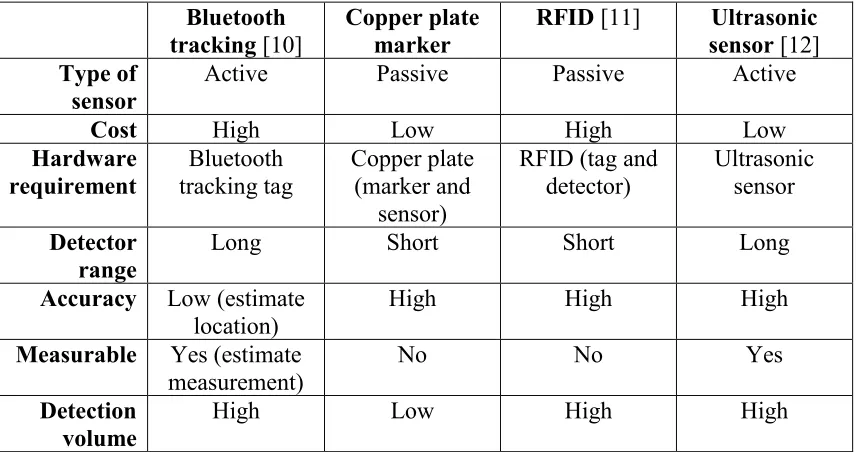
Tile’s location sensor is a sensor that able to identify the location of tile. The following Table 2.2 is the comparison among the Bluetooth tracking, copper plate marker, Radio-frequency identification (RFID) and ultrasonic sensor.
Bluetooth
tracking [10] Copper plate marker RFID [11] sensor Ultrasonic [12] Type of
sensor Active Passive Passive Active
Cost High Low High Low
Hardware
requirement tracking tag Bluetooth Copper plate (marker and sensor)
RFID (tag and
detector) Ultrasonic sensor
Detector
range Long Short Short Long
Accuracy Low (estimate
location) High High High
Measurable Yes (estimate
measurement) No No Yes
Detection
[image:24.612.115.543.166.392.2]volume High Low High High
Table 2.2 Comparison of Bluetooth tracking, copper plate marker, RFID and ultrasonic sensor
2.3 HUMAN FOOT STEP IMPACT SENSOR
![Table 2.1 Comparison of Wi-Fi and Bluetooth [9]](https://thumb-us.123doks.com/thumbv2/123dok_us/72514.6816/23.612.114.541.110.624/table-comparison-wi-fi-bluetooth.webp)