analysis of experiments with application to
chemical processes
D.C. Woods1
, D.M. Grove1
, I. Liccardi2
, S.M. Lewis1
, and J.G. Frey3
1
Southampton Statistical Sciences Research Institute
2
School of Electronics and Computer Science
3
School of Chemistry
University of Southampton, UK
Email:[email protected]
Summary. AneLearning website is described for the design and analysis of exper-iments, with particular application to chemistry research. Interactive learning con-tent is provided via the R statistical software. Authentic chemistry examples, which make use of simulation and data analysis routines in the software, demonstrate the application of the statistical methods. We outline the content of the website, the scope of the interactive examples and the interface linking the web-browser and the R system.
Key words: chemistry education, simulation, statistics education, web-based learn-ing
1 Introduction
The value of statistical design of experiments (DOE) methods has become increasing recognised by researchers in many areas of chemistry (see, for ex-ample, [4]). As a result of collaborations between statisticians and chemists at the University of Southampton, a need was recognised for tailored statistics learning resources for research chemists, specifically academics, postdoctoral researchers, PhD students and advanced undergraduate students. The devel-opment of a web-based approach using chemistry exemplars was viewed as a method of providing resources that include both clear exposition of statistical topics and interactive examples to promote problem-based learning.
of them are commercial ventures that require a subscription fee. Freely avail-able web-based tutorials and textbooks, such as StatSoft’s electronic text-book (http://www.statsoftinc.com/textbook/stathome.html), MM*Stat (http://www.quantlet.com/mdstat/) and the German-language e-stat sys-tem (http://www.e-stat.de), are not tailored to the specific needs of chem-istry researchers and tend to offer a breadth of topics that may be intimidating for statistical novices.
TheeLearning website described in this paper was designed to provide a freely available interactive design of experiments learning tool for the chem-istry community. Authentic chemchem-istry examples are used to motivate and explain the statistical ideas and links to the R statistical software [8] are used to provide interactive content. In Section 2 we describe the design and content of the website. Section 3 outlines the interface between the webpages and the R system, and, in Section 4, we describe the use of interactive R content in the context of computer-generated and optimal design.
The website is platform and browser independent and does not require any specialist software to be installed on the client machine. The site is available athttp://www.doe.soton.ac.uk/elearning.
2 Design of the website
The aim of the website is the introduction of the design and analysis of exper-iments to chemists who, although having little or no formal statistics training, are comfortable with the basics of handling data. Hence the material on the website assumes that the user has a fairly limited background in statistics, with perhaps some experience of the Normal distribution and simple linear regression (although these topics are briefly revised).
A model-based approach to the design of experiments is developed on the website and, in the analysis of the experimental data, the link with regression analysis is established. Thus the focus of the website is the collection of data for subsequent model fitting. This is a different approach to that taken by much design of experiments training for chemists but, in our opinion, it allows the easy introduction of more advanced topics (such as optimal design) and allows the website to be used as a primer for subsequent courses or training. The use of embedded R code, which we shall call R scripts, allows interac-tive and dynamic content to be provided. It is well recognised that students learn best from the use of dynamic activities, rather than static exposition (see, for example, [9]). Use is made of simulations to allow learners to gen-erate experimental data, fit regression models and visualise their results, all in real time. This allows the user to “try out” the methods discussed on real chemistry examples and provides demonstration of the potential application of the statistical methods.
course. Starting with the motivation for factorial experiments, the website introduces the basic ideas of factorial experiments and regression analysis and also covers more advanced topics, including computer-generated design, model building and model selection, as described below.
Section 1: Introduction to designed experiments
This section motivates the use of designed experiments in a chemistry context. Terminology is explained and regression models are introduced (possibly as revision). R scripts allow users to explore a variety of response surfaces that can be described by linear regression models. The efficiency of factorial ex-periments compared with a “one factor at a time” approach is also discussed.
Section 2: Classical designs for multi-factor experiments
An example on the optimisation of the desilylation of a silyl ether, taken from [7], is introduced in this section, and is used to motivate and illustrate the topics of 2-level factorial and fractional factorial designs. Aliasing between factorial effects, including interactions, is described through the regression model by considering the bias introduced into the parameter estimators. Cen-tral composite designs that allow the fitting of second-order models are also introduced.
R scripts are used to demonstrate the fitting of regression models to fac-torial experiments, see Figure 1. The use of a simulation also helps to explain aliasing and confounding through the generation of data from a full 23
fac-torial experiment. Learners are able to compare the fitted models, and judge the impact of aliasing on subsequent conclusions, by fitting various models to the full factorial and the 23−1
half-replicate.
Section 3: Optimal designs for multi-factor experiments
In this section, the use of optimal designs obtained from computer search algo-rithms is motivated and introduced.DandV-optimality (see, for example, [1] Ch.10) are defined in an intuitive manner without mathematical detail. Ap-propriate applications for the different criteria are outlined, e.g.D-optimality for screening experiments andV-optimality for experiments to optimize a re-sponse. This section of the website is more fully described in Section 4 of this paper.
Section 4: Running an experiment in practice
Fig. 1. Output from an interactive R script which demonstrates the fitting of a first-order regression model to data from an experiment using two replicates of a 22
factorial design, with data simulated from a second-order model taken from [7].
Section 5: Fitting a model to experimental data
This section discusses issues of model fitting, again using an example based on that of [7]. The use of replicated experimental runs to estimate the residual error is explained and demonstrated using simulation. Hypothesis testing and the interpretation of p-values in an Analysis of Variance table are then intu-itively explained, with R scripts allowing the learner to explore these ideas interactively. The section ends with an exercise in which the learner interprets the simulated results of an experiment and decides which of the factorial ef-fects are important.
Section 6: Evaluating and choosing a model
Several tools for assessing the adequacy of a fitted model are introduced in this section, including residual plots, R2
3 Web-interface to the R system
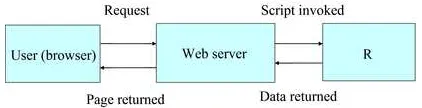
To embed output from the R system into the webpages requires a fast and secure interface between the web-browser and R. This is achieved using Java’s JSP technology, which allows Java code to be embedded within the HTML of a website. JSP allows the development ofcustom tags, which resemble HTML or XML tags. When the webpage is retrieved by a browser, the custom tag is replaced with the output of the Java code associated with the tag. This code is invoked on the server and so no Java software is required on the client machine.
A library of custom JSP tags has been developed to allow the embedding of R scripts within the website. An R script is dynamically invoked when an access is made to a webpage. Through tags, input boxes can be added to pages to allow values to be submitted to scripts, and the output from the scripts presented to the user. To allow pages to be interactive, parameters may be passed to scripts. Inside R, these take the form of global variables. The variables are defined within the JSP tag; for example, the following code would invoke the script named ”interactive.R” with the variable ‘x’ set to the value of 123:
<rembed:script name="interactive.R"> <rembed:variable name="x"
defaultValue="123" /> </rembed:script>
<rembed:controls />
Use of the “controls” tag automatically adds a form to control all inputs to the script. Unlike a system such as Rweb [3], users may not upload scripts to the server for security reasons. As the user only ever accesses R through the JSP tags, the potential for malicious misuse is minimized.
Tags were developed similarly to allow the embedding of plots and tables, outputted from the R scripts. JSP tags were also developed to allow data to be passed between R scripts, thereby allowing data to be passed between different pages on the website and to be manipulated on each page. This was achieved through the JSP session, which provides storage that persists between page accesses. These tags are used extensively in Sections 5 and 6, where linear “stories” are told through a sequence of webpages using simulated data.
that standard R code requires only minimal alteration to be used on the webpages and hence development time is greatly reduced.
[image:6.595.197.408.247.301.2]Any information printed to the standard output by the script is added to the page automatically by the tag. More complicated output, such as tables and graphical plots, is written to files by the R script. Each R script is given a special directory by the embedding code where it can place output files. These temporary files are unique to each user and allow multiple users to access the pages at any one time. Any such output files are collected after the script terminates so that they may be presented on the page. A schematic of the communication between the browser and R is given in Figure 2. The screenshots in this paper give examples of outputs provided by the JSP tags.
Fig. 2.Schematic of the interface between the web browser and R.
4 Examples of interactivity using R
To demonstrate the use of R scripts to add interactive content, we focus on Section 3 of the website, entitled “Optimal designs for multi-factor experi-ments”. The learner is introduced to the method of using computer algorithms to find designs under both D- andV-optimality. R scripts are used to allow learners to find optimal designs under a variety of models and for a range of run sizes. The R scripts in this section use the exchange algorithm in the AlgDesign package [10] to find the computer-generated designs. Two different examples are used:
Example 1. A three factor example from Section 2 is reintroduced and used to demonstrate how computer-generated designs can be applied when there are constraints on the design region. In this example, it is impossible to experiment in one corner of the design region. This prevents the application of standard factorial and response surface designs. The learner can choose the form of the polynomial model (linear, quadratic or cubic) under which the design is evaluated, the number of runs, the optimality criterion (D or V) and the corner of the design region to exclude from the candidate list. The resulting design is displayed graphically. This example allows a learner to observe how the computer-generated design locates its design points in relation to the excluded region.
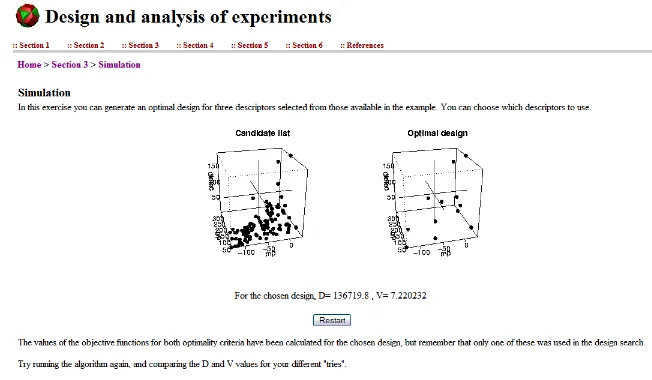
using the nine chemical descriptors for solvents given by [2], see Figure 3. The learner may select three of these descriptors and use R to find a D- or V -optimal design for an experiment on combinations of descriptor values, again for a variety of models and numbers of runs. The candidate list of possible design points and the selected design are displayed graphically. This allows learners to compare the distribution of points in the selected design with the distribution of all possible points.
Fig. 3. Graphical displays of the candidate list and a D-optimal design with 12 runs for a quadratic regression model in three chemical descriptors.
Both examples use a subset of drop-down lists, numeric input boxes and tick boxes to obtain input from the learner. This user-friendly input is then translated by the JSP tags into input files for the R scripts. Checks on the requested number of runs input and, in the second example, the number of descriptors selected prevents the user from entering inputs that are not mean-ingful or that would cause errors in the R code.
5 Discussion
Further features under development include a database of multiple choice exercises, which will be accessible from within each section of the webpage, and further formative feedback from the interactive examples. These developments will enhance the use of the website as a stand-alone learning tool.
Acknowledgements
This work was supported by the EPSRCe-Science grant GR/R67729 and by a mini-project award from the Higher Education Academy Maths, Stats and OR Network.
References
1. A. C. Atkinson and A. N. Donev. Optimum Experimental Designs. Oxford Science Publications, Oxford, 1992.
2. F. P. Ballistreri, C. G. Fortuna, G. Musumarra, D. Pavone, and S. Scire. Prin-cipal properties (pps) as solvent descriptors for multivariate optimization in organic synthesis: specific pps for ethers. Arkivoc, 11:54–64, 2002.
3. J. Banfield. Rweb: statistical analysis on the web. http://genome1.beatson.gla.ac.uk/Rweb, 1998.
4. R. Carlson and J. E. Carlson. Design and Optimization in Organic Synthesis. Elsevier, Amsterdam, NL, 2nd edition, 2005.
5. J. Larreamendy-Joerns, G. Leinhardt, and J. Corredor. Six online statistics courses: examination and review. American Statistician, 59:240–251, 2005. 6. J. Neter, M. H. Kutner, C. J. Nachtsheim, and W. Wasserman. Applied Linear
Statistical Models. Irwin, Chicago, 4th edition, 1996.
7. M. R. Owen, C. Luscombe, L-W. Lai, S. Godbert, D. L. Crookes, and D. Emiabata-Smith. Efficiency by design: optimisation in process research. Or-ganic Process Research and Development, 5:308–323, 2001.
8. R Development Core Team. R: A Language and Environment for Statistical Computing. R Foundation for Statistical Computing, Vienna, Austria, 2006. ISBN 3-900051-07-0.
9. H. A. Simon and X. Zhu. Learning mathematics from examples and by doing.
Cognition and Instruction, 4:137–166, 1988.
10. R. E. Wheeler. AlgDesign. The R project for statistical computing, 2004.
![Fig. 1. Output from an interactive R script which demonstrates the fitting of afirst-order regression model to data from an experiment using two replicates of a 22factorial design, with data simulated from a second-order model taken from [7].](https://thumb-us.123doks.com/thumbv2/123dok_us/8506414.348926/4.595.139.443.77.361/interactive-demonstrates-tting-regression-experiment-replicates-factorial-simulated.webp)