Rochester Institute of Technology
RIT Scholar Works
Theses
Thesis/Dissertation Collections
11-1-1996
On-screen electronic forms design: Graphical
elements vs. straight data entry formats
Karen Preston
Follow this and additional works at:
http://scholarworks.rit.edu/theses
This Thesis is brought to you for free and open access by the Thesis/Dissertation Collections at RIT Scholar Works. It has been accepted for inclusion
in Theses by an authorized administrator of RIT Scholar Works. For more information, please contact
Recommended Citation
On-screen
Electronic
Forms Design:
Graphical Elements
vs.
Straight Data
Entry
Formats
by
Karen L. Preston
A
thesis
project submittedin
partialfulfillment
ofthe
requirements
for
the
degree
ofMaster
ofScience in
the
School
ofPrinting
Management
andSciences
in
the
College
ofImaging
Arts
andSciences
ofthe
Rochester Institute
ofTechnology
November,
1996School of Printing Management and Sciences
Rochester Institute of Technology
Rochester, New York
Certificate of Approval
Master's Thesis
This is to certify that the Master's Thesis of
Karen Leigh Preston
With a major in
Graphic Arts Publishing
has been approved by the Thesis Committee as satisfactory
for the thesis requirement for the Master of Science degree
at the convocation of
November,
1996
Thesis committee:
John Parada
Thesis Advisor
Marie Freckleton
Graduate Program Coordinator
On-screen
Electronic Forms Design:
Graphical Elements
vs.Straight Data
Entry
Formats
I,
Karen Leigh
Preston,
hereby
grant permissionto the
Wallace Memorial
Library
ofR.I.T.
to
reproducemy
thesis
in
whole orin
part.Any
reproduction will notbe for
commercialAcknowledgements
Upon
the
completion ofthis research,
I
wouldlike
to
expressmy
appreciationto
the
people who
have
been
a greatsupportto
this
project.I
wouldlike
to
extendmy
sincerest gratitude
to
John
C.
Paroda,
Executive Vice President
ofIntercon
Associates,
Inc.
for
the
assistance
and guidancethat
he has
given me.I
would alsolike
to thank
Connie Rodriguez
ofthe
Xerox Corporation
for her
support andfor
providing
me withthe
necessary
materialsand equipment.
Table
ofContents
Acknowledgements
iii
Table
ofContents
iv
List
ofTables
vList
ofFigures
viAbstract
viiChapter
1Introduction
1
Endnotes
for
Chapter
15
Chapter
2Review
ofLiterature
6
Endnotes
for
Chapter
3
13
Chapter
3
Hypothesis
15
Chapter
4
Methodology
16
Chapter 5
The Results
35
Chapter
6
Summary
andConclusions
62
Bibliography
69
List
ofTables
Table
1.Timeliness
table
35
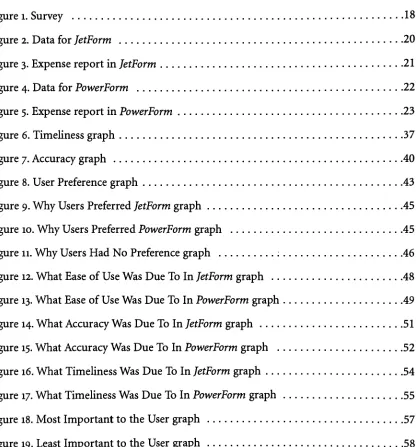
List
ofFigures
Figure
1.Survey
18
Figure
2.Data
for JetForm
20
Figure
3.Expense
reportin JetForm
21
Figure
4.Data
for
PowerForm
22
Figure
5.Expense
reportin PowerForm
23
Figure
6.
Timeliness
graph37
Figure
7.Accuracy
graph40
Figure
8.
User Preference
graph43
Figure
9.Why
Users Preferred JetForm
graph45
Figure
10.Why
Users Preferred PowerForm
graph45
Figure
11.Why
Users Had No Preference
graph :46
Figure
12.What Ease
ofUse Was Due To In JetForm
graph48
Figure
13.What
Ease
ofUse Was Due To In PowerForm
graph49
Figure
14.What
Accuracy
Was Due To In JetForm
graph51
Figure
15.What
Accuracy
Was Due To In PowerForm
graph52
Figure
16.What Timeliness Was Due To In JetForm
graph54
Figure
17.What
Timeliness Was Due To In PowerForm
graph55
Figure
18.Most Important
to the
User
graph57
Figure
19.Least Important
to
the
User
graph58
[image:8.569.83.501.164.611.2]Abstract
Electronic
forms
is
anemerging
marketthat
is
being
incorporated into
daily
usein many
corporations and small
businesses.
In
the transition
from
paperforms
to
electronicforms
many
users aremerely
recreating
the
paperforms
digitally
to
create an exact replica onscreen.
This is
being
done
through the
utilization of pagelayout
programs such asQuarkXpress
andPageMaker
as well asthrough
the
aid of electronicforms
softwareprograms available
today.
These
software programs aidthe
user withforms
design,
often providing
templates
offorms
that
arein
a graphicalformat
containing
rules,
logos,
andothergraphically embellishing
elements.The
electronicforms
industry
is
alsomoving
towards
aworkgroup computing
environment where
intelligent
forms
canautomatically
be
sentelectronically
to
other usersin
the
workplace without ever
printing
onto paper.However,
the
graphic elementsinvolved in
the
electronicforms
oftoday
can slowdown
networks and requiremany
bytes
of memory
for
storageespecially in
major corporations whomay have
thousands
offorms
onfile.
A
comparison ofthe
graphically
embellishedform
versusa straightdata-entry
questionsonly
form format
needsto
be
researched.The
purpose ofthis thesis
projectis
to
providethe
electronicforms
industry
withknowledge
asto the
advantages anddisadvantages
ofboth
a graphicalform
and a straightdata-entry
form.
This
research alsoperformeda seriesof
tests
asto the
timeliness, accuracy
ofdata
entered,
and user'spreferencefor both
graphically
embellishedforms
and straightquestions-only
forms.
Chapter
1Introduction
Enterprise
on-demandpublishing
of electronicforms
is
anemerging
market.Electronic
forms
arebeing
implemented for
in-house
personal computer usein many
corporations.With
several software suppliersfor
electronicforms
andthe
utilization ofpagelayout
programs such as
QuarkXpress
andPageMaker
to
createforms,
corporations areinvesting
their
time, money
and efforts onthe
look
ofthe
on-screenform.
These
forms
are alsostarting
to
be
created asintelligent forms
forms
that
are routedelectronically
to
variouspeoplein
the
workgroup
andlinked
to
corporatedatabases. The
question ofthe
efficiency
ofincorporating
graphicaldesign
elementsinto
on-screen electronicforms
as opposedto
utilizing
a straightdata
entry
format
remains unanswered.The
trend
in
corporateAmerica
and aroundthe
worldis
a shifttowards the
paperlessoffice,
and one area wherethis
is
being
implemented is in
the
changefrom
printedforms
to
electronicforms.
Forms
arebeing
filled
out andtransferred
from
oneparty
to
anotherelectronically,
withouthard
copy.This is occurring in
corporations as well as smallbusi
nesses andparticularly in
the medical,
financial
andinsurance industries. These
business
es whoin
the
past relied on commercial printersto
create and warehouse paperforms
are nowswitching
to
digital
on-screenformats.
In
fact,
the
electronicforms
marketis
esti matedto
be
closeto
$100
million andis
forecasted
to
growin
the
upcoming
years.1This is
causing
problemsfor forms distributors
and commercial printerswho arebeing
forced
to
re-thinktheir
definition
of services.Until
recently,
companieshave
relied onforms distributors
andmanufacturers
to
design,
print and sometimes warehousetheir
forms.
Although
stilltrue
in many
casesstill,
the trend
is
moving
towards
doing
away
with paperforms
altogether andimplementing
electronic
forms.
Desktop
computersandelectronicforms
softwarehave
madeit
feasible
for businesses
to
createforms
in-house
andprintdirectly
to
alaser
printer, thus
eliminating
costs associated withwarehousing,
typesetting,
andprinting
ofthe
form.
This
leads
to
atrend
in
the
printing
industry
as well.With
allofthe
new electronicforms
being
created,
forms
distributors
arelosing
sales.As
aresult,
distributors
arechanging
the
services
that
they
offer.According
to
a1995
survey
by
Business
Forms,
Labels
andSystems
magazine,
distributors
withprinting
expertisehave
expandedtheir
services. 90 percenthave
movedtowards
commercialprinting,
74
percent promotionalproducts,
55
percentcomputer
supplies,
48 percentdirect
mailservices,
32 percent office supplies and6
percentbar-coded
products.2Also,
on-demandprinting is
being
implemented into
plants sothat
customers can provide
digital files
for
the
forms
they
create and receive short-run outputof
forms.
Printing
services are notthe
only
servicesbeing
offered now.Distributors
are now offering
assistanceto
customersin
developing
andmaintaining
electroniclibraries.
In satisfy
ing
these
customers'
needs,
somedistributors
are alsoestablishing
new alliances withexperts
in
graphicdesign
andinformation
systems as well as manufacturers.Vendors
arealso
supplying
electronicforms
users withblank forms
to
be loaded into
the
printers ofthe
desktop
users.This
way, the
suppliers areaiding
the
forms
users and stillmanaging
to
stay
within
the
market.As John
Rosenberg
ofthe
International Business Forms Industries
explains,
"Companies
areautomating commonly
usedforms
andlooking
for firms
to
sup
ply
electronic and paperneeds."3Electronic
forms have
many
advantages over paperforms.
First,
electronicforms
eliminate paper
documents
andthe
needto
storethem.
Some warehousing
and commercialprinting
costsare eliminated as well as environmental costs ofsaving
paper.According
to
Business
Forms, Labels,
& Systems
magazine,
"Filing
and retrieval of paperdocuments
is
aAnother
majoradvantageofelectronicoverpaperforms is
the
availability,transferabil
ity,
andstoring ability
ofinformation.
At
the
mere click of abutton,
information
can morerapidly
be
processed andtransferred
from
onelocation
to
another.With
the
networking
ability
oflinking
to
databases,
forms
caneasily
be
transferred
from
oneparty
to
anotherin
a matter of seconds withoutthe
needto
step
foot
away
from
the
desk.
The
forms
canbe
routed
from
one personto
the
nextfor
immediate
approval withoutthe
delay
ofwalking
around
the
office,
sending
through
interoffice
mailsystems,
orthe
chance oflosing
the
document
in
an over-stuffed"in
box."With
this
faster
information
flow,
problems canbe
discovered
sooner,
customer complaints canbe handled
faster,
resulting in
a more efficientand competitive company.
Electronic
forms
canbe
easierto
file
aswell.With
information
being
processeddirectly
into
the computer, there
is
no needto
waitfor
piles ofinformation
to
be
data
entered andless
chance oflosing
afile folder.
The
information
candisseminate
directly
into
adatabase
where
it
caneasily
be
retrievedby
calling up any
number of variables.There
is
less
of a needto
know
the
filing
system of whoeverfiles
the
form because
the
information
canbe
retrieved with
any
number of commandsbe it last
name,
socialsecurity
number or evencity.
The
transition
towards the
paperless officehas
been
aidedby
electronicforms
softwarepackagesavailable
today.
Many
ofthese
packages allowthe
userto
design forms
on-screen,
store
them
in
adatabase,
andtransfer the
form
enterprise-widethrough
workgroup
computing.
The majority
ofbusinesses
areutilizing
the
forms
softwareto
createforms
that
look
identical
to the
paperforms
they
are usedto.
One
problemthat
existsis
a result ofthe
form
as a graphic.These
graphics require numerousbytes
ofmemory
for
storage andtransferring
overthe network,
andthe
graphics slowdown
the
system as a result.Another
type
ofform has
emergedin
light
ofthis
problem.This
form
is
a strictdata-entry
format
and requires no graphics.Theoretically
the
data-entry
form
should speedup
memory
as well.However,
the
electronicforms
industry
seemsto
be
currently
underthe
notionthat
userspreferforms
that
are embellished with graphics.Very
little
researchhas
been done
up
to
this
pointin comparing
the
graphicalform
to the
data
entry
form because
this
data
entry
form
format
is
a newtechnology
that
is
just coming
forth
withinthe
very
new
technology
ofelectronicforms.
A
comparisonbetween
the
graphically
embellishedform
andthe
data-entry
form
wouldprovide companies with
knowledge
that
willbe
useful whenselecting
an electronicforms
system.Perhaps
moreimportantly,
measuring
the
user'saccuracy,
timeliness,
and preference when
filling
in
eachform
onegraphically
embellished and onequestions-only
will establish abasis for
the
electronicforms
industry
to
develop
newtechnology
that
is
more efficient.Electronic
forms
technology
is
anemerging
market whichhas been
advancing rapidly
and will
eventually
changethe
scope of alloffices,
from large
corporationsto
smallbusi
nesses,
as weknow
them today.
For
yearsthe
paperless officehas been
a conceptthat the
corporate world
is striving
for,
and electronicforms
technology
is
akey
to
obtaining
this
goal.
Not only
areusersfeeling
the
impact,
but
the
printing
industry
as well withlosses
in
printing
salesforcing
printersto
rethinktheir
services.Electronic
forms
technology
is
one ofthe
many
facets
which encompasses andis chang
ing
the
scope ofelectronic publishing.Just
as mostcompanies will expect ahome
page onthe
Internet,
so most companies will expecttheir
business forms
on-screen.As
such,
graphic
designers
arefinding
themselves
faced
withthe task
ofdesigning
forms
on-screen,
regardless of whetherthey
areforms designers
or artdirectors.
Still
in
the
growing
stages,
electronicforms
requirefurther
research anddevelopment.
The
potentialto
moldthe
future
of electronicforms
is
anexciting
notion.When
complete,
the
results ofthis thesis
canhave
animpact
onthe
electronicforms
market.Whatever
the
Endnotes
for
Chapter
11
Noel
Jeffrey,
"Forms
Ingenuity,"Amm'can
Printer,
(August
1993),
pp.56-58.
2
Camillus J.
Cullen,
Arnetta
Queen,
andMary
McKenzie
Dixon,
"Change
Creates
Choice,"Business
Forms,
Labels &
Systems,
(March
1995),
pp.16-23.
3
Noel
Jeffrey,
"Forms
Ingenuity,"American
Printer,
(August
1993),
pp.56-58.
4
Ivars
Chapter
2Review
ofLiterature
As
electronicforms
have
emerged as a newtrend
andstep
towards
the
paperlessoffice,
numerous software companies are
offering
packagesthat
allowthe
form
on-screento
look
similar
to the
paperforms
that
peoplehave been
usedto.
Now
morethan
just
forms
arebeing
implemented
on-screen.Companies
aredeveloping
what areknown
asintelligent
forms
forms
that
canbe
routedelectronically using
software and networks.These
forms
can
be filled
in
on-screen andthen
automatically
e-mailed ordirected
through
cyberspaceto the
proper workstationsfor
authorization.Currently,
the
forms
industry
standardis
to
utilize
forms
programsthat
embellishthe
forms
with graphicsto
makethe
form
"pretty,"enticing
the
userto
utilizethe
form.
However,
a straightdata-entry
form format
is
anoth er alternative.In comparing
the two types
offorms,
both have
their
advantages anddisadvantages.
Most
companieshave begun
their transition
into
electronicforms
by
recreating
almost exact replicas ofthe
pre-existing
paperforms
simply
by
scanning in
the
paperforms
that
already
existed orby
redrawing
these
paperforms
with pagelayout
programs such asPageMaker
orQuarkXpress. Electronic forms
compositionsoftware,
which providesthe
user with
templates
and easy-to-usedrawing
tools,
alsohelps
companies establishtheir
pre-existing
forms
on-screen.These
packages canbe
used as atool to
create cleanforms
designs
that
canbe
printed on alaser
printer or storedin
adatabase
to
be
usedstrictly
onscreen.
Electronic
forms
software notonly
providesforms
design
features,
but
also offersdesigned
and canmergethe
forms
into existing
databases.
Many
packagesoffer users standarddrawing
tools to
createthe
form,
with a palette oflines
in
all shapes andthicknesses,
boxes,
circles, arcs, shades,
patterns.Various
PostScript
fonts
areusually
provided,
and some programs offer othertypographicfeatures
such askerning.
Graphically
embellishedforms
programsMost
people agreethat
whenshopping
for
anelectronicforms
softwarepackage,
companies should consider
forms
design,
data
management,
form
management, printing,
andease of use.
The
forms design
is
assumedto
be
one ofthe
primary
priorities,
and users aretold
that,
"The
package should provide alibrary
offorms
that
you can customizeby
adding
fonts
orgraphics,
plusdesign
tools
for
creating
forms from
scratch."1In
fact,
the
currentnotion
in
the
electronicforms
industry
is
that the
design
ofthe
form
mustbe
graphically
embellished
to
entice a userto
fill
the
form
out.According
to
Dimension
Specialist, Inc.,
anOklahoma-based
electronicforms
specialist,
"People
wantto
seethe
actualform
onthe
screen so
they
cantab to
desired fields
andfill
them
in
. . .Symantec/Delrina
marketstheir
productFormFlow
by
stating it
has,
".
. . advanced object-orienteddesign
tools
suchas radio
buttons,
tables
and graphicsto
easily
recreatethe
look
andfeel
ofthe
paperform
on-screen."3In August
1993,
American
Printer
reportedthat
morethan
eighty
companies marketsome
type
of electronicforms
software.4Some
ofthe
top
contendersin
today's
PC
market
for
electronicforms
areDelrina's
[now
Symantec/Delrina] FormFlow, JetForm,
Novell/WordPerfect's
Informs,
andLotus' Forms.5
Delrina actually
has
50 percent ofthe
electronic
forms
market as a result ofPerForm,
aprogramthat
the
governmentuses,
andJetForm
comesin
at25
percent ofthe
marketshare.6For
the
Macintosh
market,
Informed
Designer
by
Shana
andSmart Form
by
Claris
aretwo
in
alist
oftop
vendors.Most
ofthe
the
screenyou createfor
the
design
ofthe
form is
the
form
that
willbe
used.Templates
areusually
offered wherethe
forms
designer
can choosefrom
ready-to-useforms
that
canthen
be
customized withgraphicsandshading
by
using
the
design
tools
offered.Each
ofthese
vendorsis
among
the
top
contenders notonly
because
ofthe
forms design
and
fill-in
packagesthey
offer,
but
alsobecause
they
providetools
to
connectthe
electronic
forms
to
the
electronic workplaceenvironment asintelligent forms
that
canbe
routedfrom
personto
personthrough
a network.Many
ofthe
software programs availabletoday
are
strictly
for creating
the
design
ofthe
form
such asForm XPress
from
XPoint
Corporation
orForms Machine
from
Ullman
Software
Enterprises.7Other
productsare on
the
market whichhelp
the
user withfurther forms
management.For
instance,
Xerox's
In Concert
providesthe
electronicrouting
capabilitiesto
establish aworkgroup computing
environment,
andAcuForm
from TopForm/
Acumen Systems
is
adata
entry
programthat
scans
in
the
data from
existing forms
andplacesit
directly
into
adatabase.
One
ofthe
marketed advantages of an on-screenform
that
is
embellished with graphicsis
that
it
enticesthe
userto
fill
it
out.Graphics
cantransform
what was once aboring
form
into something visually
appealing.The Shana
Corporation,
makers ofthe
Macintosh-based
electronicforms
softwareInformed,
saysthat
design
is
the
basis
ofthe
forms
process.8
Personal
Publishing
magazinesays,
"A form
that
is appealing
as well as efficientwill
help
you accomplish your goal ofgathering
andorganizing
information."9Particularly
with electronicforms
being
a newtechnology,
peoplemay
feel
more comfortable
filling
out aform
that
looks like
the
paperforms
that
they
have been
accustomedto.
According
to the
GartnerGroup
in
1995,
during
the
nextfive
yearsvendorswill provideelectronic
form
templates
as examplesto
be
usedin
designing
electronicforms,
but forms
designers
will still needto
customizetheir
forms
".
. .for
professional use andto
maintaincorporate standards
for
E-form
'look
and feel.'"10This
meansincluding
the
company'slogo,
as well as other graphicsto
create aform
similarto
the
paperforms
usedpreviously.form
andknow
immediately
whereto
goto
fill
out a certainblock
ofinformation.
Lisa
Burton
ofGraphics
Systems West in
Ventura,
California,
suggeststhat
designers
place certain
piecesofinformation in
the
same spot onthe
form.
As
anexample,
she always placesphonenumbers
in
the
samelocation
sothat
usersdo
notneedto
look
all overthe
placefor
them.
In
this
way
the
design
is
kept
consistent.11Much
effortgoesinto
the
design
ofthe
form
on-screen.The
form
oftentimesis divided
into
sectionsto
aidthe
userin
identifying
pieces ofinformation
more quickly.These
areoften separated
by
thick rules,
whilethin
ruleshelp
separate materialinside
each section.The
title
ofthe
form
is
anattention-grabber,
somany
forms designers
placethe
title
in
alarge
point size andboldface
it. The
logo
is
animportant
additionto the
form
aswell andcan
be
imported
then
placedinto
the
form.
The
placement of captionsis
vitalto
aidthe
user as well.
Usually
captions are either positioned atthe
baseline,
below
the
line,
orin
the
upper
left-hand
corner of a cell.Special
attentionto
detail
is
alsoinvolved in
the
spacing
of
the
form: horizontal
space shouldbe
equal and should allowthe
user roomto
fill in
information.12
Compiling
all ofthese
instructions together,
the
form
shouldbe designed
graphically
to
aidthe
userin
filling
outthe
form.
The early
effortsin creating
electronicforms
technology
concentrated on".
. .creating
electronic
layouts
that
couldbe
merged withvariabledata
onhigh-speed
printers,
such asthe
IBM
3800 andXerox
4700."
13
Designing
forms
to
be
printed on-demandeffectively is
still a major concern of
the
software companies.The
moregraphics aform
has,
especially
with
imported
EPS, TIFF,
orPICT
files,
the
more complicatedthe
process andthe
morelikely
an error can occur whensending
aform
to
print.As
withany
document,
good output requires attention
to
detail:
graphics shouldbe
linked
andfonts
used needto
be
included.14
Although
this
generally is
more of a problem whensending
adocument
to
animagesetter
or a servicebureau
instead
of alaser
printer, the
inclusion
of moregraphicsandvarious
fonts
has
the
possibility
to
create problems.Forms
managementis
requiredto
storeandWhen
designing
aform
on-screen,
designers face
otherdemands
that
were not prevalent
whendesigning
paperforms.
For
instance,
screens or patterns should notbe
usedto
decorate
the
form if
the
form
is going
to
be
output on a printer at 300dpi
because
the
non-refined
dots
willmakeit
difficult
to
readthe
text.15Another
potential problemis
whencolor
is
usedonthe
form.
It is
alwaysimportant
to
rememberthat
on-screen coloris
dif
ferent
from
outputcolor,
andblack
type
is
stillthe
easiesttype to
read.Different
colors areassociated with
different
audiences as well.Michael
McCoy,
whohas been
in
the
forms
management
field for
overtwenty
years,
citesthe
example of notusing
redfor
abank
deposit
slip
because
ofits
association withdebt
andwarning.16Problems
also occur withtype
sizes on-screen.Most
forms
are producedto
be
printedonto an
8
V2
inch
by
11inch
piece of paper.In
orderto
fit
all ofthe
captions andinforma
tion,
the
point sizes ofthe type
mustbe
very
small.According
to
Personal
Publishing
Magazine,
captions areusually
setin
a sans seriftypeface
for
readability,
but
they
areonly
in
6
pointto
8
pointtype.
Instructions,
subheads andtype
areusually in
10 or 12 pointtype.17
Even
12 pointtype,
the
largest
ofthose
just
listed,
is
abit
smallto
readsufficiently
on-screen.
14
pointtype
andhigher
areusually better
point sizesfor
on-screen readability.Another
problemis
the
size ofthe
page onthe
screen.Most
computer monitors are notmade
to
view afull
8
V2
inch
by
11inch
piece of paper.This
leaves
the
viewerto
zoomin
orscroll aroundon
the
screenin
orderto
get aroundthe
form.
With many
graphics,
a newsection of
the
form
needsto
be
redrawn eachtime the
user scrollsto
view ahidden
part ofthe
document.
This
takes time.
Also,
areas ofthe
screen whichindicate instructions
may
be hidden from
view,
causing
the
userto
have
to
scrollback
andforth.
The
data
entry
form format
An
alternativeto
the
graphicalform
is
a strictdata
entry
form format.
Although
this
has
not
become
a standard alternativein
the
electronicforms
industry
yet, the
data entry form
Two
software applications are available whichskip
the
graphics onthe
form
and getstraight
to
the
point with aquestions-only
format:
Intercon
Associates'
PowerForm
andDelrina's
FormFill.
PowerForm
containslists
ofinquiries
that
askthe
user questionssuchas,
"What
is
yourname?"
or
"What
is
yourstate?".The
answers arethen
pluggedimmedi
ately into
adatabase
wherethey
canbe
placed ontop
ofany
form
or canbe
routed electronically
for workgroup
computing.As
aresult,
no graphics are ever neededto
fill
out aform.
The
software concentratesstrictly
onthe
data
that
is
entered.Delrina's
FormFlow
features
Intelligent Forms Language
whichaddsintelligence
to the
user'sforms
and allowsthe
userto
dictate
where and whenthe
form
shouldbe
routed.With FormFlow
the
usercanchoose
to
include
graphics or not whenrouting
electronically.Since
data
is
the
only
thing
routedelectronically, there
are no graphicsto
slowdown
the
computer and
the
system requiresfewer bytes
of memory.While Novell/WordPerfect's
Informs
requires 280,878bytes,
JetForm
requires80,609
bytes for
the
designer file
andJetForm's
filler file
takes
up
102,500bytes,
Delrina's FormFlow only
requires67,918
bytes
ofmemory.18
Most
ofthis
memory in JetForm
andNovell/WordPerfect's Informs
is
consumed
by
the
graphics requiredfor
the
form.
Design
time
is
also saved when allthat
is
neededis
the
questionsthat
aregoing
to
be
askedversus graphical
form
which needs notonly
the questions,
but
the
WYSIWYG
draw
ing
ofthe
form.
Designers
with experience can expectto take
10hours
to
create aform
in
FormFlow,
14
hours
to
design
aform
withJetForm,
and 16hours
whenusing
InForms.*9This
time
amount canbe
greatly
reduced.Another
advantageis
the
elimination ofthe
scrolling
time
asthe
computer completesthe
graphics.When scrolling
through questions, the
computer readsthis
as straighttext
and
the
resulting
scrolltime
is brief.
The
data-entry
form
format
has its
disadvantages
as well.First,
the
lack
ofgraphicsmay
bore
a user who needsthat
extraflourish
to
complete whatmay
sometimes
be
the
munare written
today
indicate
that
designers
should addthese
embellishmentsbecause
usersprefer
them.
Another
disadvantage
withthe
strictdata-entry
format
is in
the
list
of questions.Suppose
aform
is
designed
with alist
of onehundred
questions andthe
userdecides
to
change an answer
to
one ofthem
but
can't remember what number questionit
was orwhen
it
was asked.The
user would needto
scrollthrough
the
entirelist
just
to
find
the
onequestion
desired.
On
agraphicalform,
the
userwouldvisually
be
ableto
godirectly
to that
cell
to
changethe
answer.One
ofthe
main reasonsfor
this thesis
projecthas
to
do
withthe
fact
that
using
the
form
accountsfor
65
percent ofthe
form's
total
cost.In
astudy
by
the
State
ofMissouri's
Office
ofAdministration
Forms Management
Unit,
this
forms
usage wasdefined
asincluding
fill
in
time
(to
completeform)
andcostto train
new employeesto
useelectronic
forms.20If
there
exists a simplerform
such asthe
questions-only
format,
andit is found
to
be faster
and easierto use, then: the
fill
in
time
is
reduced, the
cost oftraining
newemployees
is
reduced,
andtherefore
65
percent ofthe total
cost ofthe
form
canbe
greatly
reduced.
The
resultsofthis
research shouldindicate
whether usersactually
do
prefer graphics ontheir
forms
orif
they
prefer a strictdata-entry
styleform
with no embellishments.It
should also
indicate,
regardless of what usersprefer,
which style ofform
is
quickerto
fill
Endnotes
for
Chapter
21
Scott
Sanbauer, "Perfect
Forms With
Windows,"PC
World,
(July
1991),
p.200.
2
Dimension
Specialist,
Inc.
[on-line]
http://www.dspecialist.com/
(March
1996).3
Symantec/Delrina
[on-line]
http://www.delrina.com/
(March
1996).4
Noel
Jeffrey, "Forms
Ingenuity,"American
Printer,
(August
1993),
p.57.
5
R.
Casonato,
"Electronic
Forms,"GartnerGroup
Conference
Presentation
IDOM1
EForms,
July
1995,
pg.10.
6
META
Group,
Advanced Information Management
[Newsletter],
(November
30,
1995)
7
Jennifer A.
Mariano,
"Software
Programs Advance
the
Art
ofForms
Design,"
Business
Forms,
Labels &
Systems,
(August
1990),
p.20.
8
Shana
Corporation,
"Informed"Shana Corporation: The
Company,
The
Products,
The
Future
[Marketing
Material]
pg.1.
9
Philip
Bishop,
"Are
You In Good
Form?,"Personal
Publishing,
(February
1991)
p.22.
10
R.
Casonato,
"Electronic
Forms,"GartnerGroup
Conference Presentation IDOM1
EForms,
July
1995,
pg.8.
11
Philip
Bishop,
"Are
You In Good
Form?"Personal
Publishing,
(February
1991)
p.22.
12
Ibid.,
25.
13
Ivars
Sarkans,
"Electronic
Forms
Shape
the
Future,"Business
Forms,
Labels &
Systems,
(August
1994)
p.73.
14
Kathleen
Tinkel,
"Preflight
Takes
Off,"Publish,
(February.
1995),
pp.46-48.
15
Philip
Bishop,
"Are
You In Good
Form?,"Personal
Publishing,
(February
1991)
p.25.
16
Ibid.
17
Ibid.
18
Horsey,
David
M.,
evaluation on cost ofdesign
using
expense reportfor
Xerox
Corporation,
(February
1996)
p.1.
19
Ibid,
3.
20
State
of
Missouri
Office
ofAdministration
Forms
Management
Unit,
"Electronic
Forms Savings Calculation
Method,"paper presented at
the
1995
Business
Forms
Chapter
3
Hypotheses
Most
peoplein
the
electronicforms
industry
assumethat
users prefer electronicforms
with graphical elements.
Yet,
there
has been
nosubstantial researchup
to this
pointto
back
this
assumption.No
comparisonhas been
made asto the
differences between
the timeli
ness,
accuracy,
and user's preference ofthe
graphicalform
andthe
straightdata-entry
form.
This
researchis
aimed atanswering
these
questions.The
hypotheses
are:1.
Users
willprefer on-screenforms
embellished with graphicaldesign
elements.2.
Data
willbe
entered moreaccurately
whenusing
astraightdata
entry
form.
3.
Users
will enterdata
morequickly
whenusing
astraightdata
entry
form.
As
these
two
forms have
not yetbeen
compared, these
areonly
assumptions asto
whatwill
occur,
andthese
assumptions arebased
onthe
looks
ofthe
forms
in
the
software proChapter 4
Methodology
The
objective ofthis
researchis
to
comparethe
graphicalform
to the
straightdata
entry
form.
This
willbe
measuredaccording
to
three
determinants:
first,
the timeliness
of entering
data
whichtranslates
into how
quickly
the
subjectsfill
in
eachform;
second, the
accuracy
with whichthe
data
is
entered orhow
"right"their
answersare;
third,
the
preferenceof
the
user whichform
type
they
find
easierto
use.An
expense report willbe
createdfor
two
different
types
offormats.
One
willbe filled
in using
agraphically
embellishedform designed
using
the
softwareJetForm. The
otherexpense report will
be filled
in using
a straightdata-entry
format
createdin PowerForm
which will ask
the
same questionsthat
are onthe
JetForm
form.
Therefore
both forms
willbe
identical
in
content,
but
different in
the
format
ofthe
form.
The
forms
willbe
createdandstored
in
aPC
atXerox
Corporation
onWest Henrietta Road.
Two
scenariosof equallength
willbe
written outfor
the
usersto
read.These
will contain
data
that
shouldbe
enteredinto
eachform.
The
scenarios willbe
writtentelling
the
user who went on a
trip,
how
muchthey
spenton whichdays
and onwhat,
etc.The
scenarios will
be
similarbut have
different
data for
the
usersto
enter.This
willeliminatethe
bias
to
oneform
overanotherstrictly
onthe
basis
ofbetter
recollection ofdata for
the
second
form
filled
out.Subjects
for
the
experimentwillbe
various peoplein
the
community
whohave
not usedJetForm
orPowerForm.
Twenty
subjects willbe
chosen.The
experimentwilltake
placeonThe
subjectswillbe
giventime
to
read overthe
scenarios.When
they
areready
they
willbegin
the
experiment.Each
subject willbe
timed
with a stopwatch as soon asthey
startfilling
out eachform
until
they
finish
the
form.
Each
subject willtherefore
be
timed twice
oncefor
filling
outthe
JetForm
form
and oncefor
filling
outthe
PowerForm
form.
Their
times
willbe
recorded.When
the
subjectsarefinished
filling
out eachform
they
willbe handed
a survey.This
survey
will askquestionsasto the
preference ofthe
forms
and why.The
subjects willfill
out
the
survey
by
hand
and returnit.
(See Figure
1.Survey
on pages 18 and19.)
The
completedforms
willbe
printed out and checkedfor
accuracy
ofentering
data.
The
results will
be
recordedalong
withthe time taken
for
each,
andthese
willbe
kept
withthe
survey
for
each subject.The
results ofthe
experiment willbe
tabulated
and will provide answersto the
hypothe
ses.
The
results will showhow
many
users preferred whichtype
ofform,
whichform
wasquicker
to
fill
out,
whichform
providedthe
most accurateresults,
and acompilation ofthese three
measurements.For
instance,
perhaps a user preferred onetype
ofform
but
produced quicker and more accurate results on another
type
ofform. Or
perhaps a userpreferred one
type
ofform
andthat
form
wasfaster
to
fill
outbut
the
userdid
notfill
in
the
form
accurately.The
equipment needed willbe
asfollows:
aPC
atXerox
Corporation
onWest Henrietta
Rd., Rochester, NY,
JetForm
andPowerForm
softwareprograms,
and a stopwatch.All
experimental
work willbe
performedin
the
Forms Management
Department
ofXerox
Corporation
onWest Henrietta
Rd., Rochester,
New
York. All
softwarehas been donated
by
Xerox Corporation.
The
following
pages containthe
survey
used as well asthe
data
entered andproperly
Figure
1.Survey
Survey
Circle
the
answerwhichbest
represents your opinion.Have
you everfilled
out aform
on-screenusing
anelectronicforms
softwareprogram?
a.
Yes
b. No
2.
Have
you ever used eitherJetForm
orPowerForm
before
today?
a.
Yes
b. No
3.
Which
programdid
youpreferto use,
JetForm
orPowerForm?
a.
JetForm
b. PowerForm
c.
No Preference
4.
What
did
you useasabasis for
your answerto
question3?
(Circle
asmany
asyou
feel
apply)
a.
Ease
ofuseb.
Accuracy
(How correctly
youfilled
in
the
data)
c.
Timeliness (How
quickit
took
youto
fill
outthe
form)
d.
Other:
5.
If in
question4
youchose answer "a"asoneofyourresponses,
what was easeofuse
due
to?
(Circle
asmany
asyoufeel
apply)
a.
The
on-screenform
looking
like
a paperform
b. Questions
in
list form
withoutneeding
to
seethe
look
ofthe
form
on-screenc.
Not
having
to
zoomin
andoutto
seevariouspartsofthe
screend.
Not
having
to
scrollthrough
anentirelist
ofquestionsto
find
the
ones youwant
to
answere.
Other:
6.
If in
question4
you chose answer"b"
as one ofyour
responses,
what wasaccuracy
due
to?
(Circle
asmany
asyoufeel
apply)
a.The
on-screenform
looking
like
apaperform
b. Questions in list form
withoutneeding
to
seethe
look
ofthe
form
on-screenc.
Not
having
to
zoomin
and outto
see various parts ofthe
screen
d. Not
having
to
scroll throughanentirelist
ofquestions
to
find
the
ones youwant
to
answer7.
If in
question4
youchose
answer"c"
as one of your
responses,
whatwastimeliness
due
to?
(Circle
asmany
as yourfeel
apply)
a.
The
on-screenform
looking
like
a paperform
b.
Questions in
list form
without
needing
to
seethe
look
ofthe
form
on-screen c.Not
having
to
zoom
in
and outto
see various parts ofthe
screend. Not
having
to
scrollthrough
an entirelist
ofquestionsto
find
the
onesyou wantto
answere.
Other:
8.
If in
question4
you choseanswer"d"
as one of your
responses,
whatwasthe
reason you chose other?(Circle
asmany
as youfeel
apply)
a.The
on-screenform
looking
like
apaperform
b.
Questions
in
list
form
withoutneeding
to
seethe
look
ofthe
form
on-screen c.Not
having
to
zoomin
and outto
see various parts ofthe
screend. Not
having
to
scrollthrough
an entirelist
of questionsto
find
the
ones you wantto
answere.
Other:
9.
Rank
eachin
order ofimportance
to
you as auser ofelectronicforms.
l=Most
important,
2=Second in
importance,
3=Least important.
Ease
of useAccuracy
Timeliness
10.
Is there
anything
else you wouldlike
to
say
about your preference?The
following
is
anexampleofthe
data
sheetthat
was givento
the
userbefore
filling
in
the
expense reportin JetForm.
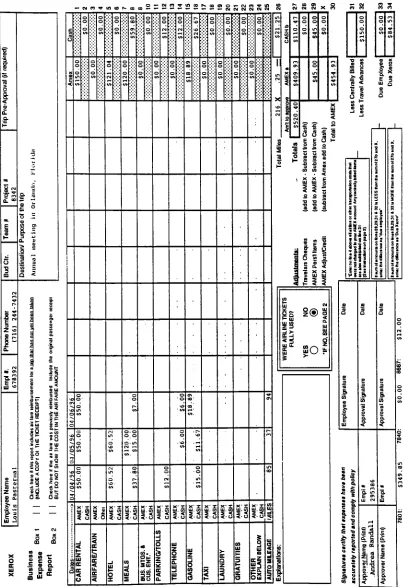
An
example of aproperly
completed expense reportwhere theuser
filled in
the
data
shownhere
in JetForm is
onthe
next page.Figure
2.Data
for
JetForm
Data
for
JetForm
Your
nameis Louis Pasternal
and you wentto
Orlando,
Florida
for
the
annualmeeting
from
April
4,
1996
to
April
6,
1996.
Your
phone numberis
716-244-7432.
Your
employeenumber
is 678392
andthe
Project
number was8342.
There
is
noBudget Center
orTeam
number.The
approverfor
yourtrip
is Andrea
Randall,
employee number295836.
You
did
not use airlinetickets
since you rented a carfor
the trip.
Xerox
reimburses you$.25/mile.
On April
4th,
$50
was chargedto
American Express
for
a rental car.$60.52
was chargedon
American Express for
ahotel
room.$37.80
was spentin
cash on meals and$12
was spentin
cashfor
parking.You
made no phone calls.Gasoline
cost you$15
cashto
fill
the
tank.
You
drove
85
miles.On April
5th,
youallocated$50
to
American
Express for
yourrental car and$60.52
wascharged on
American Express
for
ahotel
room.$15
wasspentin
cash on meals and$120
was charged
to
American Express
for
meals.You
spent$6
cash on phone calls.Gasoline
cost you$11.67 in
cash.You
drove
37
miles.On April
6th,
you once again put$50
to
American
Express
for
your rental car.You
checked out of
the
hotel
andpaid cash$7
for
breakfast. You
spent$6
cash on phone callsto
call your wife.Gasoline
cost you$18.89
whichyou puton yourAmerican Express.
You
drove
94
miles.Before
youleft for
this
trip
youdid
receive atravel
advance of$150
in
cash.And
youFigure
3.Expense Report
in JetForm
ojmvmcor*1
V. 3 M "B H-< CL H -* V
?
a M a. m O 0 (D1
K
3 u u.1!
OJ0 S ffl
* 5 CQ Q (M ** .fi r* 11 5^ { at 01 3 01 01
Z* a
Q**
n a. * O
. rn g ^.
CL00
Fr- c 0) Ul E 0
3<
.& fcrr
||
2< auj Sz18
.E= z s? .y SO *s (C SZS2
Z3is
^ -^ J=
3 HI' ?^ E c UJJ X O CC UJ J= a. 01 qla 3 x cc a ui tt
IS
s-a
x-1 uj. co 2 -into 33UJ. COUl.CO ui.
3-3
I-3
3-3
is
Oul
(V GO CM 01 X
s
p" O 0 0 V O 0 0
z
3
0 O m 0 4SV r
rl / u t/y
m O m
tr\
X tn v
0 m
i
to ^w <o
0 0 X
UJ
<
in
5
*/>3 s
Is 0E E - 2 S o
x x c UJ UJ o
2 X
< < ts
[image:30.569.79.484.89.676.2]The
following
is
anexampleofthe
data
sheetthat
was givento
the
userbefore
filling
in
the
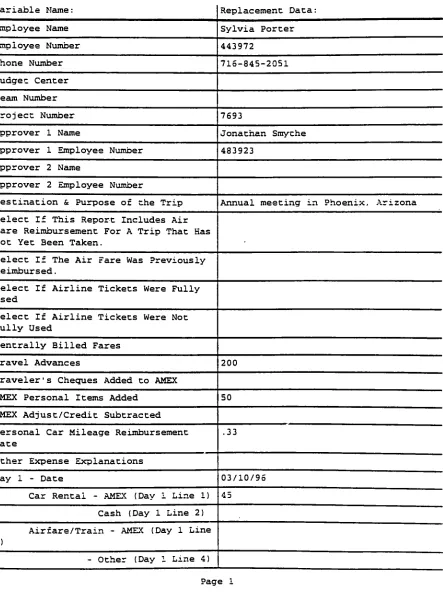
expense reportin PowerForm. An
example of aproperly
completedexpense reportwhere
the
userfilled in
the
data
shownhere
in
PowerForm
is
onthe
following
pages.Figure
4.Data
for
PowerForm
Data
for
PowerForm
Your
nameis Sylvia Porter
and youtravelled to
Phoenix,
Arizona
for
the
annualmeeting
from
March
10,
1996
to
March
12,
1996.
Your
phone numberis
716-845-2051.
Your
employee number
is
443972
andthe
Project
number was7693.
There
is
noBudget
Center
orTeam
number.The
approverfor
yourtrip
is Jonathan
Smythe,
employee number
483923.
You
did
not use airlinetickets
since you rented a carfor
the trip.
Xerox
reimburses
you$.33/mile.
On March
10th,
$45
was chargedto
American Express
for
arental car.$70.87
was charged onAmerican Express
for
ahotel
room.$24.20
was spentin
cash on meals and$7
wasspentin
cashfor
parking.You
made no phone calls.Gasoline
cost you$14
cashto
fill
the tank.
You drove
76
miles.On March
1
1th,
you allocated$45
to
American
Express
for
your rentalcar and$70.87
was charged on
American
Express for
ahotel
room.$9
was spentin
cash on meals and$140
was chargedto
American Express for
meals.You
spent$12
cash on phone calls.Gasoline
cost you$12.92 in
cash.You
drove
28
miles.On March
12th,
youonce again put$45
to
American
Express
for
your rental car.You
checked out of
the
hotel
and paid cash$5.50
for
breakfast. You
spent$6
cash on phone callsto
call yourhusband.
Gasoline
costyou$17.86
which youput on yourAmerican
Express.
You
drove
88
miles.Figure
5.Expense Report in PowerForm
PowerForm
Filler VariableListing
Filled
Form File: c:\powrform\filled\kpfill.pff5/21/95 3:02 ?M
Variable
Name: Replacement Data:Employee
Name Sylvia PorterEmployee Number 443972
Phone Number
716-845-2051
3udget Center
Team Number
Project Number 7693
Approver 1 Name Jonathan Smythe
Approver 1 Employee Number 483923
Approver 2 Name
Approver 2 Employee Number
Destination & Purpose of the
Trip
Annual meeting in Phoenix, ArizonaSelect If This Report Includes Air Fare
Reimbursement
For ATrip
That Has Not Yet Been Taken.Select If The Air Fare Was
Previously
Reimbursed.Select If Airline Tickets Were
Fully
Used
Select If Airline Tickets Were Not
Fully
UsedCentrally
Billed FaresTravel Advances
200
Traveler'
s Cheques Added to AMEX
AMEX Personal Items Added
50
AMEX Adjust/Credit Subtracted
Personal Car Mileage Reimbursement
Rate
.33
Other Expense Explanations
Day
1 - Date 03/10/96Car Rental - AMEX
(Day
1 Line1)
45Cash
(Day
1 Line2)
Airfare/Train - AMEX
(Day
1 Line3)
- Other
(Day
1 Line4)
[image:32.569.66.509.107.700.2]PowerForm
Filler VariableListing
Filled Form File: c:\powrform\filled\kpfill.pft
5/21/96
3:02 PM
Variable
Name: Replacement Data:Hotel - AMEX
(Day
1 Line5)
70.87:ash
(Day
1 Line6)
Meals - AMEX
(Day
1 Line7)
Cash
(Day
I Line8)
24.20Business Meetings & Customer
Entertainment
-AMEX
(Day
1 Line9)
Cash
(Day
1 Line10)
Parking/Tolls
-AMEX
(Day
1 Line11)
-Cash
(Day
1 Line12)
7Telephone
-AMEX
(Day
i Line13)
-Cash
(Day
1 Line14)
Gasoline
-AMEX
(Day
1 Line 15)- Cash
(Day
1 Line16)
14Taxi AMEX
(Day
1 Line17)
-Cash
(Day
1 Line18)
Laundry
AMEX(Day
1 Line19)
- Cash
(Day
1 Line20)
Gratuities - AMEX
(Day
1 Line21)
-Cash
(Day
1 Line22)
Other (Explain
Below)
-AMEX
(Day
1 Line23)
- Cash
(Day
1 Line24)
Personal Auto Mileage - Miles
(Day
1 Line25)
76
Day
2 - Date 03/11/96Car Rental
-AMEX
(Day
2 Line I) 45
-Cash
(Day
2 Line2)
Airfare/Train AMEX
(Day
2 Line3)
- Other
(Day
2 Line4)
Hotel
-AMEX
(Day
2 Line5)
70.87PowerForm
Filler VariableListing
Filled Form File: c:\powrforrn\filied\kpfill.pff
5/21/95
3 :02 PM
Variab1e Name: Replacement Data:
- Cash
(Day
2 Line6)
Meals AMEX
(Day
2 Line7)
140- Cash
(Day
2 Line3)
93usiness Meetings & Customer
Entertainment AMEX
(Day
2 Line9)
-Cash
(Day
2 Line10)
Parking
/Tolls - AMEX(Day
2 Line il)Cash
(Day
2 Line12)
Telephone AMEX
(Day
2 Line13)
Cash
(Day
2 Line14)
12Gasoline - AMEX
(Day
2 Line15)
- Cash
(Day
2 Line16)
12.92Taxi - AMEX
(Day
2 Line17)
-Cash
(Day
2 Line13)
Laundry
-AMEX
(Day
2 Line19)
-Cash
(Day
2 Line20)
Gratuities
-AMEX
(Day
2 Line21)
- Cash
(Day
2 Line22)
Other (Explain
Below)
- AMEX(Day
2 Line23)
- Cash
(Day
2 Line24)
Personal Auto Mileage - Miles
(Day
2 Line25)
28
Day
3-Date 03/12/96
Car Rental
-AMEX
(Day
3 Line1)
45- Cash
(Day
3 Line2)
Airfare/Train AMEX
(Day
3 Line3)
- Other
(Day
3 Line 4)Hotel - AMEX
(Day
3 Line5)
-Cash
(Day
3 Line6)
Page 3
PowerForm
Filler VariableListing
Filled
Form File: c:\powrform\filled\kpfili.pf:5/21/Sb
3:02 PM
Variable
Name: Replacement Data:Meals
-AMEX
(Day
3 Line7)
Cash
(Day
3 Line8)
5.503usiness Meetings & Customer
Entertainment - AMEX
(Day
3 Line9)
-Cash
(Day
3 Line10)
Parking/Toils AMEX
(Day
3 Line11)
Cash
(Day
3 Line12)
Telephone AMEX
(Day
3 Line13)
Cash
(Day
3 Line14)
6Gasoline AMEX
(Day
3 Line15)
17.86
-Cash
(Day
3 Line16)
Taxi
-AMEX
(Day
3 Line17)
- Cash
(Day
3 Line18)
Laundry
- AMEX(Day
3 Line19)
-Cash
(Day
3 Line20)
Gratuities
-AMEX
(Day
3 Line21)
- Cash
(Day
3 Line22)
Other (Explain
Below)
- AMEX(Day
3 Line23)
-Cash
(Day
3 Line24)
Personal Auto Mileage - Miles
(Day
3 Line25)
88
Day
4 - DateCar Rental - AMEX
(Day
4 Line 1)
-Cash
(Day
Line2)
Airfare/Train AMEX
(Day
4 Line3)
-Other
(Day
4 Line 4)Hotel
-AMEX
(Day
4 Line5)
- Cash
(Day
4 Line6)
Meals - AMEX
(Day
4 Line7)
Page 4
PowerForm
FillerVariable
Listing
Filled
Form File: c:\powrform\filled\kpfill.pff5/21/9
3:02 p:
Variable
Name: Replacement Data:Cash
(Day
4 Line3)
3usiness
Meetings
& Customer Entertainment-AMEX
(Day
4 Line9)
Cash
(Day
4 Line10)
Parking/Tolls - AMEX
(Day
4 Line11)
a Cash
(Day
4 Line12)
Telephone AMEX
(Day
4 Line13)
Cash
(Day
4 Line14)
Gasoline
-AMEX
(Day
4 Line15)
= Cash
(Day
4 Line16)
Taxi
-AMEX
(Day
4 Line17)
^. Cash
(Day
4 Line18)
Laundry
- AMEX(Day
4 Line19)
Cash
(Day
4 Line20)
Gratuities - AMEX
(Day
4 Line21)
Cash
(Day
4 Line22)
Other
(Explain Below)
AMEX(Day
4 Line23)
-Cash
(Day
4 Line24)
Personal Auto Mileage - Miles
(Day
4 Line25)
Day
5 - DateCar Rental - AMEX
(Day
5 Line1)
-Cash
(Day
5 Line2)
Air
fare
/Train - AMEX(Day
5 Line3)
-Other
(Day
5 Line4)
Hotel - AMEX
(Day
5 Line5)
- Cash
(Day
5 Line5)
Meals - AMEX
(Day
5 Line7)
- Cash
(Day
5 Line8)
Page 5
PowerForm Filler
VariableListing
Filled
Form File: c:\powrform\filled\kpfill.pff5/21/95
3:02 PM
Variable
Name:3usiness Meetings & Customer
Entertainment
-AMEX
(Day
5 Line9)
- Cash
(Day
5 Line10)
Reolacement Data:
Parking/Tolls
AMEX(Day
5 Line .1)Cash
(Day
5 Line12)
Telephone
AMEX(Day
5 Line13:
Cash
(Day
5 Line14)
Gasoline AMEX
(Day
5 Line15)
Cash
(Day
5 Line16)
Taxi AMEX
(Day
5 Line17)
-Cash
(Day
5 Line18)
Laundry
AMEX(Day
5 Line19)
Cash
(Day
5 Line20)
Gratuities AMEX
(Day
5 Line21)
Cash
(Day
5 Line22)
Other (Explain
Below)
- AMEX(Day
5 Line23)
Cash
(Day
5 Line24)
Personal Auto Mileage - Miles
(Day
5 Line25)
Day
6 - DateCar Rental - AMEX
(Day
6 Line1)
Cash
(Day
6 Line2)
Airfare/Train AMEX
(Day
6 Line3)
- Other
(Day
6 Line4)
Hotel - AMEX
(Day
6 Line5)
Cash
(Day
6 Line6)
Meals AMEX
(Day
6 Line7)
Cash
(Day
6 Line3)
3usiness Meetings & Customer
:ertainment - AMEX
(Day
6 Line9)